RSS
 

Posts Tagged ‘Realtime’

Sony’s ‘Real-time tracking’ is a big leap forward for autofocus

14 Feb

One of the biggest frustrations when taking pictures is discovering that your photos are out of focus. Over the past few years, camera autofocus systems from every manufacturer have become much more sophisticated, but they’ve also become more complex. If you want to utilize them to their full potential, you’re often required to change settings for different scenarios.

The autofocus system introduced in Sony’s a6400 as well as in the a9 via a firmware update aims to change that, making autofocus simple for everyone from casual users to pro photographers. And while all manufacturers are aiming to make autofocus more intelligent and easier to use, our first impressions are that in practice, Sony’s new ‘real-time tracking’ AF system really does take away the complexity and removes much of the headache of autofocus so that you can focus on the action, the moment, and your composition. Spoiler: if you’d just like to jump to our real-world demonstration video below that shows just how versatile this system can be, click here.

When I initiated focus on this skater, he was far away and tiny in the frame, so the a9 used general subject tracking to lock on to him at first. It then tracked him fully through his run, switching automatically to Face Detect as he approached. This seamless tracking, combined with a 20fps burst, allowed me to focus on my composition and get the lighting just right, without having to constrain myself by keeping an AF point over his face. For fast-paced erratic motion, good subject tracking can make or break your shot.

So what is ‘Real-time tracking’? Simply now called ‘Tracking’, it’s Sony’s new subject tracking mode. Subject tracking allows you to indicate to your camera what your subject is, which you then trust it to track. Simply place your AF point over the subject, half-press the shutter to focus, and the camera will keep track of it no matter where it moves to in the frame – by automatically shifting the AF points as necessary. The best implementation we’d seen until recently was Nikon’s 3D Tracking on its DSLRs. Sony’s new system takes some giant leaps forward, replacing the ‘Lock-on AF’ mode that was often unreliable, sometimes jumping to unrelated subjects far away or tracking an entire human body and missing focus on the face and eyes. The new system is rock-solid, meaning you can just trust it to track and focus your subject while you concentrate on composing your photos.

You can trust it to track and focus your subject while you concentrate on composing your photos

What makes the new system better? Real-time tracking now uses additional information to track your subject – so much information, in fact, that it feels as if the autofocus system really understands who or what your subject is, making it arguably the ‘stickiest’ system we’ve seen to date.

$ (document).ready(function() { SampleGalleryStripV2({“galleryId”:”2553378816″,”isMobile”:false}) })

Sample photoSample photoSample photoSample photoSample photo
Subject tracking isn’t just for action. I used it even in this shot. Good subject tracking, like Sony’s ‘Real-time tracking’, keeps track of your subject for you, freeing you up to try many different poses and framings quickly. Most of these 20 shots were captured in under 19 seconds, without ever letting off the AF-ON button. The camera never lost our model, not even when her face went behind highly-reflective glass. The seamless transitioning between Eye AF and general subject tracking helps the AF system act in such a robust manner. Not having to think about focus allows one to work faster, get more poses and compositions, so you can get to the shot you’re happy with faster. Click here or on any thumbnail above to launch a gallery to scroll through all 20 images.

Pattern recognition is now used to identify your subject, while color, brightness, and distance information are now used more intelligently for tracking so that, for example, the camera won’t jump from a near subject to a very far one. What’s most clever though is the use of machine-learning trained face and eye detection to help the camera truly understand a human subject.

What do we mean when we say ‘machine-learning’? More and more camera – and smartphone – manufacturers are using machine learning to improve everything from image quality to autofocus. Here, Sony has essentially trained a model to detect human subjects, faces, and eyes by feeding it hundreds, thousands, perhaps millions of images of humans. These images of faces and eyes of different people, kids, adults, even animals, in different positions have been previously tagged (presumably with human input) to identify the eyes and faces – this allows Sony’s AF system to ‘learn’ and build up a model for detecting human and animal eyes in a very robust manner.

Machine learning… allows Sony’s AF system to detect human and animal eyes in a very robust manner

This model is then used in real-time by the camera’s AF system to detect eyes and understand your subject in the camera’s new ‘real-time tracking’ mode. While companies like Olympus and Panasonic are using similar machine-learning approaches to detect bodies, trains, motorcyclists and more, Sony’s system is the most versatile in our initial testing.

Real-time tracking’s ability to seamlessly transition from Eye AF to general subject tracking means that even when there was an eye to track up until this perfect candid moment, your subject will still remain in focus when the eye disappears – so you don’t miss short-lived moments such as this one. Note: this image is illustrative and was not shot using Sony’s ‘Tracking’ mode.

What does all of this mean for the photographer? Most importantly, it means you have an autofocus system that works reliably in almost any situation. Reframe your composition to place your AF point over your subject, half-press the shutter, and real-time tracking will collect pattern, color, brightness, distance, face and eye information about your subject so comprehensively it can use all that to keep track of your subject in real-time. This means you can focus on the composition and the moment. There is no longer a need to focus (pun intended) on keeping your AF point over your subject, which for years has constrained composition and made it difficult to maintain focus on erratic subjects.

There is no need to focus on keeping your AF point over your subject, which for years has constrained composition and made it difficult to focus on erratic subjects

The best part of this system is that it just works, seamlessly transitioning between Eye AF and Face Detect and ‘general’ subject tracking. If you’re tracking a human, the camera will always prioritize the eye. If it can’t find the eye, it’ll prioritize its face. Even if your subject turns away so that you can’t see their face, or is momentarily occluded, real-time tracking will continue to track your subject, instantly switching back to the face or eye when they’re once again visible. This means your subject is almost always already focused, ready for you to snap the exact moment you wish to capture.

$ (document).ready(function() { SampleGalleryStripV2({“galleryId”:”4012823305″,”isMobile”:false}) })

Sample photoSample photoSample photoSample photoSample photo
The tracking mode lets you specify a subject and it’ll prioritize their eye, switching to face detection if it loses the eye and treating them as a generic subject to track if they, for instance, turn their head away from the camera. Click on the images and follow the entire sequence to see how the camera focuses on my subject no matter where she walks to in the frame.

One of the best things about this behavior is how it handles scenes with multiple people, a common occurrence at weddings, events, or even in your household. Although Eye AF was incredibly sticky and tracked the eyes of the subject you initiated AF upon, sometimes it would wander to another subject, particularly if it looked away from the camera long enough (as toddlers often do). Real-time tracking will simply transition from Eye AF to general subject tracking if the subject looks away, meaning as soon as they look back, the camera’s ready to focus on the eye and take the shot with minimal lag or fuss. The camera won’t jump to another person simply because your subject looked away; instead, it’ll stick to it as long as you tell it to, by keeping the shutter button half-depressed.

Performance-wise it’s the stickiest tracking we’ve ever seen…

And performance-wise it’s the stickiest tracking we’ve ever seen, doggedly tracking your subject even if it looks different to the camera as it moves or you change your position and composition. Have a look at our real world testing with an erratic toddler, with multiple people in the scene, below. This is HDMI output from an a6400 with 24mm F1.4 GM lens, and you can see focus is actually achieved and maintained throughout most of the video by the filled-in green circle at bottom left of frame.

Real-time tracking isn’t only useful for human subjects. Rather, it simply prioritizes whatever subject you place under the autofocus point, be it people or pets, food, a distant mountain, or a nearby flower. It’s that versatile.

In a nutshell, this means that you rarely have to worry about changing autofocus modes on your camera, no matter what sort of photography you’re doing. What’s really exciting is that we’ll surely see this system implemented, and evolved, in future cameras. And while nearly all manufacturers are working toward this sort of simple subject tracking, and incorporating some elements of machine learning, our initial testing suggests Sony’s new system means you don’t have to think about how it works; you can just trust it to stick to your subject better than any system we’ve tested to date.


Addendum: do I need a dedicated Eye AF button anymore?

There’s actually not much need to assign a custom button to Eye AF anymore, since real-time tracking already uses Eye AF on your intended subject. In fact, using real-time tracking is more reliable, since if your subject looks away, it won’t jump to another face in the scene as Eye AF tends to do. If you’ve ever tried to photograph a kids’ birthday party or a wedding, you know how frustrating it can be when Eye AF jumps off to someone other than your intended subject just because he or she looked away for long enough. Real-time tracking ensures the camera stays locked on your subject for as long as your shutter button remains half-depressed, so your subject is already in focus when he or she looks back at the camera or makes that perfect expression. This allows you to nail that decisive, candid moment.

Articles: Digital Photography Review (dpreview.com)

 
Comments Off on Sony’s ‘Real-time tracking’ is a big leap forward for autofocus

Posted in Uncategorized


AirMap announces real-time geofencing alerts on Android, iOS for DJI drones

11 Dec

Airspace management company AirMap announced the release of real-time geofencing alerts in its AirMap for Drones mobile app available for iOS and Android devices.

The new feature alerts pilots visually and/or verbally when their drone is approaching airspace that is unsafe or areas where drone flying is not permitted. AirMap uses data from organizations such as civil aviation authorities, air navigation service providers and local authorities to build its databases and airspace maps.

AirMap says real-time geofencing will soon get the ability to prevent drones from entering unsafe operating area or leaving its flight path, instead of just sending out alerts. Pilots will have to opt in to activate this function.

In addition to implementing real-time geofencing alerts in its own app, AirMap is also making the feature available to other developers and OEMs as a mobile SDK for iOS and Android, allowing them to ‘to build services enhancing flight safety, compliance and overall experience for their users.’

Real-time geofencing alerts are currently only available for users of DJI drones when operating in the AirMap for Drones fly mode. More information can be found on the AirMap website.

Articles: Digital Photography Review (dpreview.com)

 
Comments Off on AirMap announces real-time geofencing alerts on Android, iOS for DJI drones

Posted in Uncategorized


iOS 12.1 arrives with ‘beauty filter’ fix and real-time Portrait depth control

02 Nov

Apple has released iOS 12.1 for iPhone and iPad on Tuesday. As promised, the update brings a fix for the “beauty filter” issue that resulted in soft selfies and debate. The new version also adds the ability to preview Portrait mode depth of field in real-time before capturing the image.

The ability to adjust Portrait mode depth of field post-capture remains, but users now have the option to adjust that depth of field before capturing the image, as well, with a real-time preview of the background blur for more control over the process.

Camera updates aside, iOS 12.1 also brings dual SIM support to the newest iPhone models, more than 70 new emoji, and Group FaceTime for chatting with up to 32 people.

You can download iOS 12.1 by going into Settings > General > Software Update.

Articles: Digital Photography Review (dpreview.com)

 
Comments Off on iOS 12.1 arrives with ‘beauty filter’ fix and real-time Portrait depth control

Posted in Uncategorized


Watch a real-time 4K close-up video of the solar eclipse at totality

06 Sep

You might be getting sick of all the solar eclipse articles, but in the aftermath of last month’s phenomenon we keep running across incredible new vantage points—from this amazing (and viral) climber photo to this footage shot from a weather balloon in the stratosphere. Here is one more jaw-dropping capture.

Photographer JunHo Oh shot this 4K close-up of totality from Warm Springs, Oregon using a Panasonic GX85 attached to a 2160mm f/12 telescope and a RainbowAstro RST-150H Harmonic Drive robotic mount.

In the video above you get to watch the eclipse reach totality up close before tracing the corona in all of its solar flare-fueled glory. In the zoomed out version below you can watch the full eclipse at once. Both are worth 3 minutes of your time… and a healthy shot of awe.

Articles: Digital Photography Review (dpreview.com)

 
Comments Off on Watch a real-time 4K close-up video of the solar eclipse at totality

Posted in Uncategorized


CamFi DSLR controller now offers real-time upload to Dropbox

06 Aug

The makers of the CamFi wireless DSLR controller have launched a new version of their iOS app. It now allows the user to transfer photos to Dropbox in real-time while shooting. The new feature is aimed at photojournalists who want to send images to news desks as quickly as possible but can arguably be useful in other scenarios as well.

To make the system work, photographers need a so-called MiFi, a portable broadband device that allows multiple mobile devices to share a 3G or 4G mobile broadband Internet connection, or a second phone that is acting as a mobile hot-spot. Both the CamFi that is attached to the DSLR via a USB-cable and the phone that is running the CamFi app are then connected to the MiFi. This way, the CamFi can be controlled via the app and access the Internet at the same time.

As images are captured they are sent from the CamFi to the control phone via Wi-Fi and uploaded from the phone to Dropbox via the MiFi’s internet connection. This works for both Raw and JPEG files. The same system can be setup when controlling CamFi from a Windows PC. The developers say Mac and Android versions will be released very soon.

Articles: Digital Photography Review (dpreview.com)

 
Comments Off on CamFi DSLR controller now offers real-time upload to Dropbox

Posted in Uncategorized


Kaleidoscopic Carpet: Interactive Art Projection Unravels in Realtime

28 Jul

[ By WebUrbanist in Art & Installation & Sound. ]

magic carpet

A truly magical carpet ride, this immersive project provides a shifting spectrum of colors and shapes that morph in response to user interactions, changing as visitors walk over the surface.

carpet play

carpet warped

Thousands of patterns, pixels, cells and geometries are tied into an array of sensors, reacting to individuals and groups as they pass over the dynamic surface.

carpet deconstructed

carpet display modular

Commissioned by the 2016 Milton Keynes International Festival, Miguel Chevalier’s generative installation flows between a set of ever-changing landscapes with pieces that multiply, divide and merge.

interactive carpet art

carpet art

The effects are triggered and amplified by users, whose perception of space changes and warps with the projections (vertigo sufferers beware).

responsive carpet projection

The artwork is accompanied by a custom mobile sound installation by Ray Lee. If you missed this particular installation, no need to worry: Miguel plans to keep taking the shop on the road, unrolling the red (and green and blue and black and white) carpet for more audiences in other places.

Share on Facebook


[ By WebUrbanist in Art & Installation & Sound. ]

[ WebUrbanist | Archives | Galleries | Privacy | TOS ]


WebUrbanist

 
Comments Off on Kaleidoscopic Carpet: Interactive Art Projection Unravels in Realtime

Posted in Creativity


Density Sensor: Real-Time Data Shows Which Places are Packed

10 Aug

[ By WebUrbanist in Gadgets & Geekery & Technology. ]

density location sensor

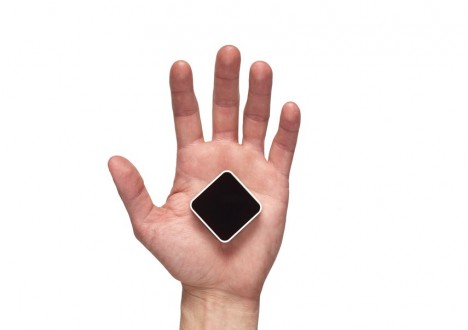
Online reviews indicate how popular your favorite place is in general, but cannot tell you whether now is a good time to drop by or if you may be stuck in a crowd or waiting in line – this is where the Density Sensor comes into play.

density sensor tracking

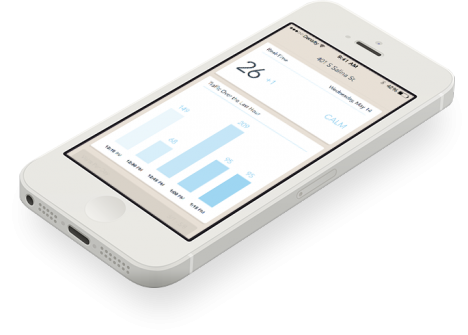
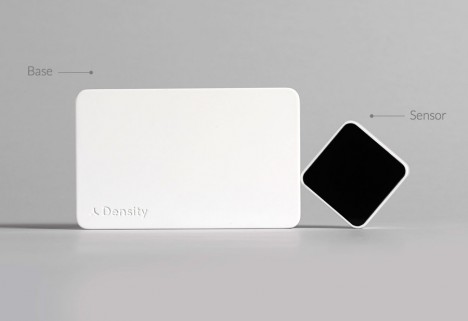
No need to resort to complex spatial mapping or real-time video sensors with this gadget, a people-counting device that simply tracks passages through doors (attached to the frame). Some more obvious applications include specific bars, restaurants, coffee shops and other businesses that have time-of-day and day-of-week cycles to contend with, but the same data can also help you pick the DMV or grocery store with the shortest line.

density incoming outgoing people

In turn, businesses can choose what data to share with customers and what to keep for optimization purposes, offering discounts during less busy times or adjusting when to open and close. Compared to non-networked break-beam technology or real-time surveillance cameras, there is no need to wait for data or face privacy concerns.

density sensor box

Of course, up-to-the-minute incoming and outgoing traffic are just a starting point – architecture firms, for instance, could use extended datasets to anonymously track customer or employee flows through a building and use that data to optimize going forward, shaping extensions or remodels. Ultimately, one could imagine this system being replaced by more detailed heat-mapped trackers keeping tabs on entire spaces, but for now this is a cheap solution to a long-standing problem.

Share on Facebook


[ By WebUrbanist in Gadgets & Geekery & Technology. ]

[ WebUrbanist | Archives | Galleries | Privacy | TOS ]


WebUrbanist

 
Comments Off on Density Sensor: Real-Time Data Shows Which Places are Packed

Posted in Creativity


Ditch Your Car: Get From A to B Using Real-Time Transit Data

03 May

[ By WebUrbanist in Technology & Vehicles & Mods. ]

transit screen sidewalk projection

What if we could make alternative transportation ultimately faster, cheaper and more convenient than personally-owned cars, the dominant transport devices of the 20th Century? The sharing economy has opened new possibilities for commuters and travelers, but integrating this dizzying array of options together with public transport is an essential next step in this ongoing paradigm shift.

transit car bike bus

OMGTransit is a Minneapolis-based startup that provides free, fast and simple sets of options for getting from your location to your destination without a personal car, be it by bus, shared bike (NiceRide in the case of the Twin Cities), shared car systems like Car2Go or ZipCar or private rides from Uber or Lyft. Available as an iPhone or Android application, OMG also offers a web app version – all with no cost to the user.

omgtransit example page design

Boasting a beautifully-designed interface with attention to usability, color and detail, their free-for-all approach is aimed at helping them grow faster than the competition. Their team, headed by entrepreneur and technologist Matt Decuir, has its sights set first on major cities around the US and then the world (perhaps space thereafter).

transit screen directions wayfinding

More focused on next-step options than A-to-B directions, TransitScreen started out displaying realtime  transit data in residential, commercial and institutional building lobbies. Their boards show people up-to-the-minute information on subways, commuter trains, buses, bike share, ride shares in cities around the United States.

transit screen sidewalk projection

Now, with SmartWalk, this same company has taken to the streets (or rather: sidewalks and walls) outside of offices, apartments and universities, projecting this data onto public surfaces for the benefit of anyone passing by. The data includes color-coded transit option types and times but also wayfinding cues regarding directions and distance.

realtime transit designs

Other players in this space include Roadify and RideScout, though not all offer options for all devices or for every type of regional transport. Some, like Google Maps in its current form, have broader reach but focus more on public transportation schedules (their acquisition of Waze is a step toward realtime data, albeit for personal cars). Whatever system(s) triumph, the goal is a worthy one: reducing friction in the use of alternative transit options to the point where taking, for instance, a bus to a bike to a shared car is easy, fast and cheap enough to obviate the need for a fully-owned automobile.

Share on Facebook


[ By WebUrbanist in Technology & Vehicles & Mods. ]

[ WebUrbanist | Archives | Galleries | Privacy | TOS ]


WebUrbanist

 
Comments Off on Ditch Your Car: Get From A to B Using Real-Time Transit Data

Posted in Creativity


Augmented Sandbox: Realtime 3D Topographic Landscaping

18 Apr

[ By WebUrbanist in Gaming & Computing & Technology. ]

gif-water-island

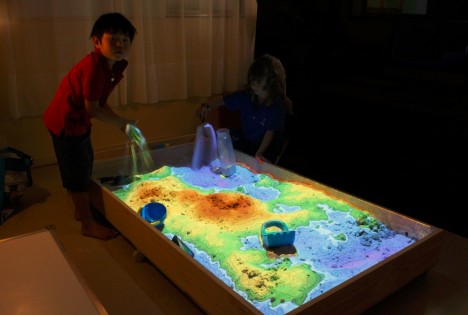
Simulating an amazing array of natural environments and phenomena, this dynamic playspace turns ordinary hand-sculpted sand into vividly colorful landscapes in the blink of an eye.

gif-volcanic-mountain

A real and working augmented reality sandbox, the system is designed to help educate students about earth sciences with a uniquely responsive and intuitive interface.

gif-interactive-volanco'

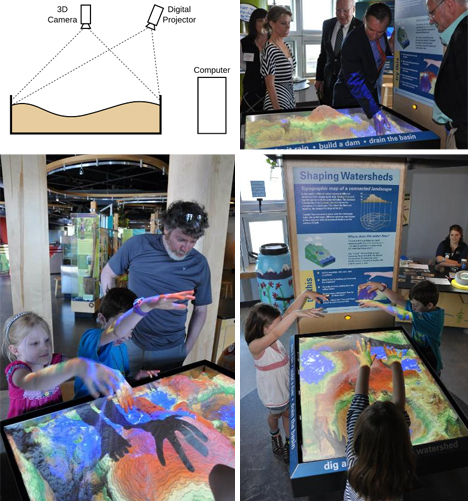
A team of data visualization and earth sciences experts, mainly from the University of California, created the setup using a Microsoft Kinect camera coupled with topographic visualization software and a 3D data projector.

From rough prototypes to its present state, the project has come a long way in terms of the level of rendering detail and response speed.

augmented reality sandbox

Tapping into a familiar form of childhood play, the project “allows users to create topography models by shaping real sand, which is then augmented in real time by an elevation color map, topographic contour lines, and simulated water. The system teaches geographic, geologic, and hydrologic concepts such as how to read a topography map, the meaning of contour lines, watersheds, catchment areas, levees [and more].”

Of course, one can imagine an array of applications of this technology beyond classrooms and science museums, from Minecraft-style, construction-centric games to simulators and modeling tools for landscape architects and urban designers.

interactive 3d projected sandbox

More about this amazing project: “UC Davis’ W.M. Keck Center for Active Visualization in the Earth Sciences (KeckCAVES), together with the UC Davis Tahoe Environmental Research Center, Lawrence Hall of Science, and ECHO Lake Aquarium and Science Center, is involved in an NSF-funded project on informal science education for freshwater lake and watershed science. The sandbox hardware was built by project specialist Peter Gold of the UC Davis Department of Geology. The driving software is based on the Vrui VR development toolkit and the Kinect 3D video processing framework, and is available for download under the GNU General Public License.”

Share on Facebook


[ By WebUrbanist in Gaming & Computing & Technology. ]

[ WebUrbanist | Archives | Galleries | Privacy | TOS ]


WebUrbanist

 
Comments Off on Augmented Sandbox: Realtime 3D Topographic Landscaping

Posted in Creativity


Spinning Zen: Real-Time Patterns Painted on a Potter’s Wheel

04 Apr

[ By WebUrbanist in Art & Sculpture & Craft. ]

spinning circle works of art

Like a hypnotist’s pendulum, this fifteen minute visual experience will charm you with its rich variety of mesmerizing patterns, all drawn by hand before your eyes.

An amazingly meditative trip, this work by Mikhail Sadovnikov is entirely dynamic and temporary. Each addition necessarily involves subtraction as new shapes continuously erase and overwrite what you see.

spinning hypnotic circle fingerpainting

Using the clay residue left on the wheel between throwing pots, the artist moves between a series of sequences set to music of various styles and speeds.

spinning potters wheel art

Sometimes symmetrical, other times abstract but always contained in a simple circle, the pacing and control are amazing – but you really have to watch the video to see for yourself and witness where sand mandala making meets fluid finger painting.

Share on Facebook


[ By WebUrbanist in Art & Sculpture & Craft. ]

[ WebUrbanist | Archives | Galleries | Privacy | TOS ]


WebUrbanist

 
Comments Off on Spinning Zen: Real-Time Patterns Painted on a Potter’s Wheel

Posted in Creativity