The Moto X Style is Motorola’s brand new flagship smartphone and replaces the 2014 edition of the Moto X, using a 1/2.3″ 21MP BSI CMOS sensor and F2.0 lens. We’ve had a chance to try the new model before launch, and we took it out to capture a range of sample shots in varying light conditions. Read more
Tag: Preview
-
Adobe Creative Cloud trials reset to offer preview of 2015 features
Adobe recently updated its Creative Cloud suite of software, and to give users a chance to test the new features it has reset its product trials. This includes trial versions of Illustrator CC, InDesign CC, and Photoshop CC. Users, even those who have previously taken advantage of Adobe’s 30-day free trial, can start a new trial by opening the software application and clicking ‘Update’. Read more
-
Video preview of the Canon Powershot G7 X
If posts to our news articles and forums are any indication, one of the most exciting announcements from Photokina is the Canon G7 X, a genuinely pocketable camera with a large 1”-type sensor. In this video DPReview’s Richard Butler takes us through a preview of the G7 X and gives us an idea of what to expect from it.
-
How to use Monochrome Preview to Compose Better Color Photos
You may have heard it said that when you change the way you see – the things you see begin to change. Legendary American documentary photographer and photojournalist, Dorothea Lange once said that “The camera is an instrument that teaches people how to see without a camera.” In this article we are going to use our camera to learn how to see.
Become color blind
When it comes to photography, color can attract your eye so readily that it can often disguise poor composition. Black and white photography depends totally on composition, so in order to compose images more effectively you may need to become color blind. This article is going to explore how to view your images without color, learning to see the light and shapes in your subjects. Fortunately, these days most digital cameras have a black and white or monochrome shooting mode. In this mode the live preview (and replay) on your camera’s LCD will appear black and white, but your RAW file will still retain all color information. Using this method is meant to be used as an exercise to help you learn to see your compositions more clearly.
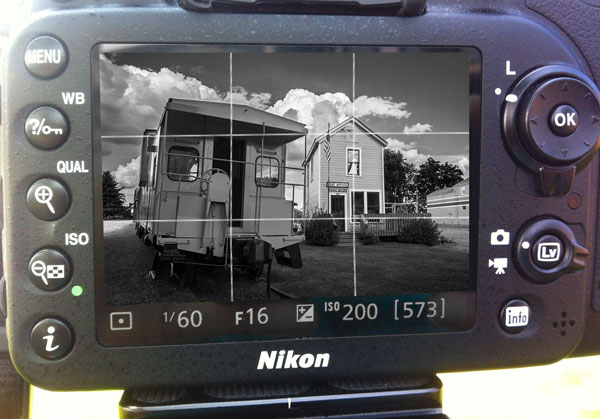
LCD preview of this colorful image is composed using rule of third grid in black and white

Camera settings:
- Set your file type to RAW (This is a must!)
- Set White Balance
- Set your Picture Control (Nikon) or Picture Styles (Canon) to Monochrome
- Set your exposure with whichever method you normally use
- Turn on your Live View
- Turn on rule of third grid lines on your preview
- Use the black and white preview in Live View on your LCD to compose your image, paying special attention to the entire image for tones, shapes, lines and textures. Remember also to use all of the usual rules of composition, such as the rule of thirds, etc.
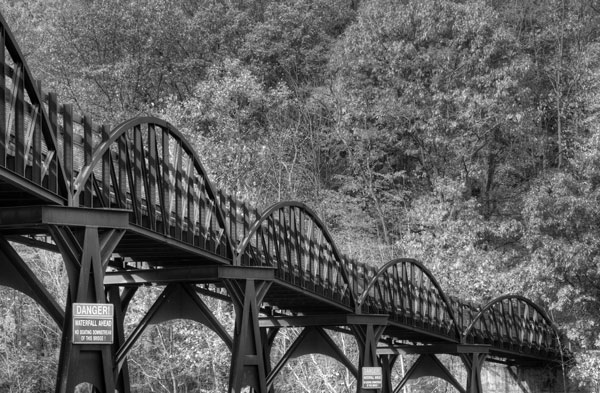
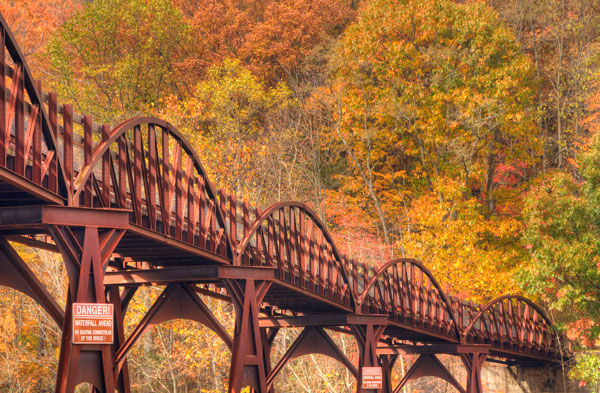
In black and white it becomes easier to see how this bridge draws the views eye into the image.
Tripod use is not a requirement for this system, but is helpful for two reasons: first of all, it frees up your hands to experiment with your camera controls and secondly, (and most importantly) it slows you down to allow you to analyze every aspect of your image.
Removing color from your preview makes it easier to see the shapes, lines, textures and tones and allows you to concentrate on your composition.
Don’t expect to get everything perfect in camera. Post-production is your friend! Even the great Ansel Adams produced most of his magic in the darkroom. But of course you want to get it as close as you can in camera. Be especially sure you get the white balance set as accurately as possible, because when shooting in RAW, white balance and exposure are the only camera settings that are retained by your RAW file. However, the white balance can be corrected in your RAW processing.
It is recommended that since you will be viewing a monochrome image on your LCD that you check your histogram to ensure that your image is properly exposed.
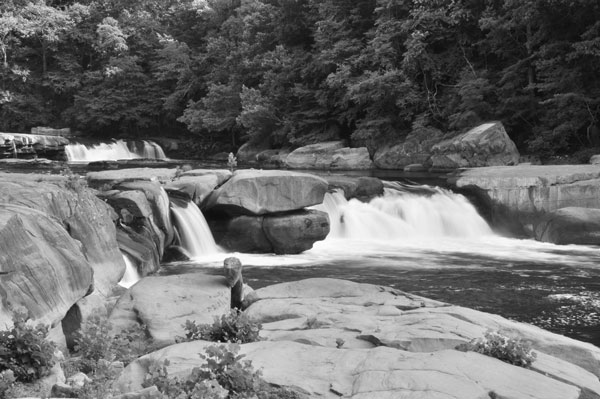
Here we can see how the rocks in the foreground lead the viewer’s eye to the waterfalls.
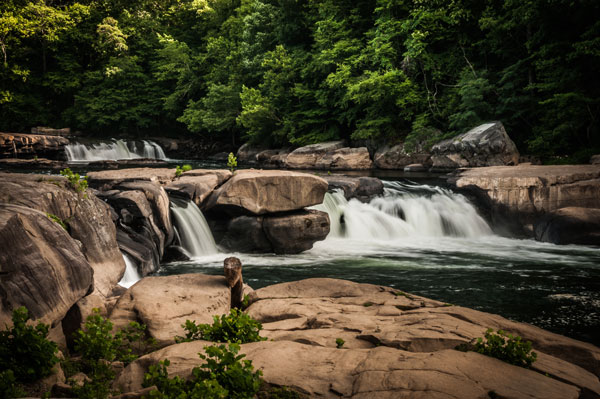
As mentioned at the beginning of the article, your image will be previewed on your LCD in black and white, but your RAW file will record color. If you should choose to shoot in RAW + JPG mode your RAW file will be recorded in color but your JPG will record only black and white.
Don’t panic when you see a monochrome preview upon importing your RAW files into Lightroom (or whatever you use for post-processing). As soon as you click on the image you will get a color preview.
There are many methods of creating black and white images and most photographers will agree that it is best to start with a color file. Therefore, another use for this preview method comes into play if you are shooting an image that you know you will later be converting to black and white. You’ll get a good preview of how your image may appear later upon converting your RAW file to black and white, and will know right away whether your image will be effective in black and white.
One disadvantage with this method that is worth mentioning is that using the Live View mode will drain your batteries faster.
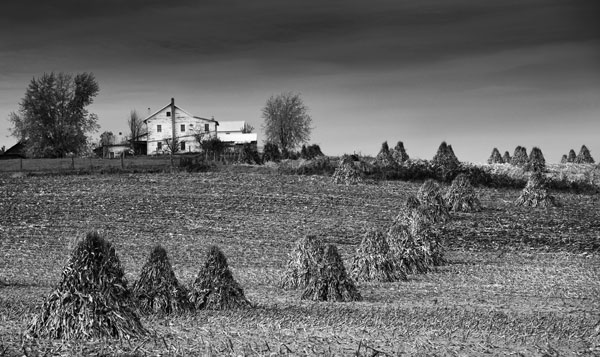
This image could also make a great black and white with lots of textures and a very interesting subject
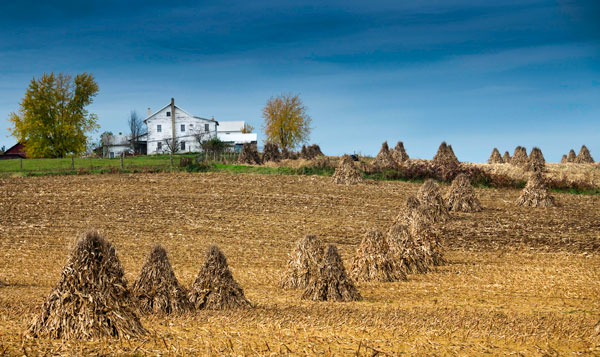
This method is great for landscape, architectural, and abstract photography where it is so important to see tones, shapes and lines for composition. Yes, there are some obvious times when color may play an important part of your images such as in the fall where the colors may become your subject, but every method has its exceptions.
Try this experiment. First, shoot your scene as you would do normally with color preview. Then shoot it again with a black and white preview. You might be surprised with the difference in your results.
Give it a try, please share your results in the comments below.
The post How to use Monochrome Preview to Compose Better Color Photos by Bruce Wunderlich appeared first on Digital Photography School.
-
Preview of the Slide and Clutch Camera Carrying System from Peak Design
With Peak Design launching another set of products via Kickstarter, we’re very fortunate to get our hands on the new, as yet unreleased, Slide and Clutch camera carrying system prior to launch for a little dPS preview!
You can see the Kickstarter here and pre-order if that’s your thing!
As a Peak Design pro, I’ve been using “Capture” since it was released along with Leash and Cuff. The video below of Pete and Adam will give you a great idea of what the team at Peak Design are doing with this new gear and why they’re passionate about what they do – they love this stuff we do called photography.
The Kickstarter is already funded, 450% funded, which says a lot about what they’ve built and the products they’ve created in the past. The new strap, Slide, is building on that, and after using it for a week (no, they don’t pay me to say this) it really is worth picking up now via the Kickstarter campaign. If you don’t, and you see it afterwards for more money, you will think to yourself “you know, Simon was right”. The strap sits really comfortably on my shoulder, it allows quick attachment to my camera through Peak Design’s unique anchor system, it literally slides around to where you want it and is so super easy when you’re wearing it, to make the strap shorter or longer as you can see in the video.
I’ve also been using Clutch, a hand strap system that keeps your camera firmly in your big greasy paw when you’re out and about shooting. I have used it with a gripped Canon 5DMK3 and without the grip – it’s quick to attach, quick to tighten and very quick to loosen off, too. When shooting portrait, I’d slide my hand out of Clutch and shoot my portrait photographs and then slide my hand back in. I didn’t really notice any loss of speed and after a few goes I was a veritable wild west camera slinger. I used Clutch on the weekend for a cycling event and loved the flexibility of being able to not worry about dropping my camera in the rain, and boy did it rain! It stayed firmly in my hand and allowed me to drop the camera into Capture to use the other body with my long lens and Slide attached – once done, I could let the long lens slide around to my hip / back and grab body number one back to continue shooting. Lots of bodies, no time to stop (over a thousand cyclists to grab a portrait of while they cycled past) and it worked perfectly (aside from when I tried to drink soup and shoot at the same time, but that’s another story).
Back in my office now and this is what the Slide strap looks like attached to a Sony A7, (granted, at f/1.4 which doesn’t show you much A7 at all, but you get the picture) to give you a vague idea of scale.
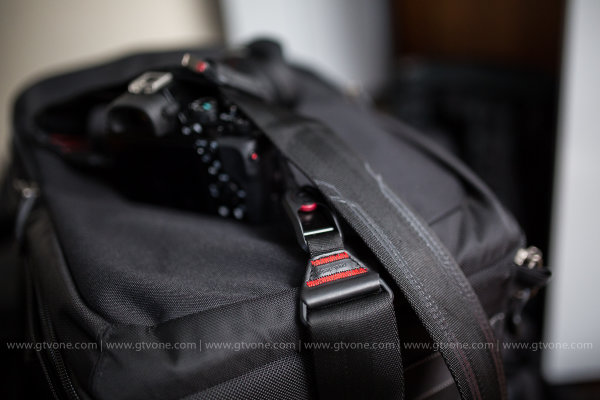
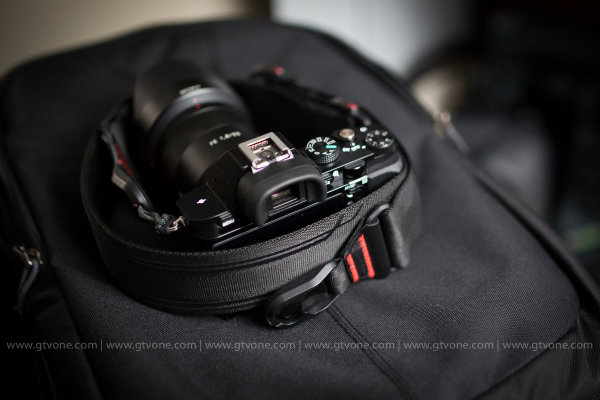
In conclusion, I’m super impressed with this, the next iteration of the Peak Design strap – Slide. (Leash being my first Peak Design strap) and from me, it’s highly recommended! I give it a healthy FIVE stars.
That said, I’m sure you have questions! So, as I have the Slide with me, and I’m taking it on a quick trip to China tomorrow, please feel free to ask any questions in the comments section below, I will answer as best I can. Another great product from Peak Design. Well done guys.
–Sime
The post Preview of the Slide and Clutch Camera Carrying System from Peak Design by Sime appeared first on Digital Photography School.
-
Seene 3D photo app makers preview 360-degree scanning

Seene is a free app for iOS that lets you capture and share interactive and three dimensional images, just like Instagram and Vine do for 2D-images and videos respectively. The makers of the app, Obvious Engineering, are now showing off a preview of a forthcoming feature. Soon Seene will be capable of capturing a full 360-degree model of an object and export it for printing on a 3D-printer. Learn more
-
Flickr Rolls Out New Photo Preview Page to All Users
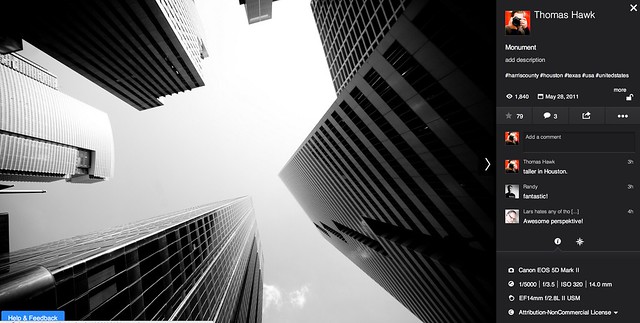
Yesterday Flickr opened up their new photo page preview to the world. I opted in to the new photo page this morning and here are my initial thoughts on it. Overall I like it.
1. Photos are bigger. The bigger the photo the better. Flickr eliminated top menu items on the page. They also eliminated the hint area to encourage people to scroll below the fold. By moving the top and bottom non-photo information to the side of the photo, this allows bigger photos.
2. You no longer have to scroll to see a lot of the important information around a photo. Having a lot of the information that people care about to the side of the photo, makes it easier to get to this information. You know, sort of like how Google+ does it.

3. I’ve got mixed feelings on the new hashtags. I do like the fact that Flickr has added #tags to all Flickr tags… I think. This is the new methodology for tags in social media (i.e. Twitter, Instagram, Facebook, Google+ and everybody else in the world), so it would make sense that people would be more familiar with this concept, especially new users.
On the other hand, hashtags don’t really work very well for multi word tags and descriptions (the space between words gets stripped out). So “Saved by the Deleteme Uncensored Group” on the old Flickr photo page now becomes #savedbythedeletemeuncensoredgroup, which looks like a big mess. A lot of Flickr users would tag phrases and thoughts in the tag section of their photos and these are now pretty much unreadable.
Also Flickr now hides a lot of tags underneath a “more” button. This to me would seem to discourage users from using lots of descriptive tags, which I think are important for organizational and search reasons on Flickr. I don’t think any tags should be hidden under a “more” button. All tags should be shown on the photo page.
Groups and others who relied on multi word tags for photo games, may not like the new tagging structure.
4. A lot of the full functionality of the new photo page is being developed. This new photo page is by no means the final product. I think it’s good that Flickr lets people opt in and opt back out, to try it out. It’s a little bit of perpetual beta in a way and I like that Flickr is willing to put itself out there without having everything at 100%. Move fast and break things (as they say over at Facebook).
5. The new Flickr photo page is an under-developed preview, this means that there are quite a few things that still need to be done (some of which are planned and in the works by Flickr).
We need to be able to generate html code to blog images off site still (it’s coming). We need to be able to see all sizes of our photos and download our photos (it’s coming). We need to be able to click on favorites and see who has favorited an image. We need to be able to click on a date an image was taken and have it take us to the calendar archive view for that day of our photos. You can’t edit a comment on a photo after you make it (you can only delete your comment and start over). HTML formated links seem to be borked in photo descriptions.
Lots of little things still need to be added in to the photo page. It’s missing a lot of functionality still. The design looks good though and I hope they implement all these little things quickly.
6. My favorite thing about the new photo page is that it really highlights your sets. Sets are one of my favorite things on Flickr. I’ve made over 1,800 sets on Flickr. With the new photo page, Flickr now shows other thumbnails of photos from the same set and not just a link to the set. I think this will drive more views to people’s sets on Flickr, which is a great thing. [Note: this seemed to be working earlier today, but now it seems like this feature is not showing on my photos]
7. According to Neil Howard, the new Flickr photo page doesn’t support secure SSL browsing. SSL is the “https://” that makes a connection encrypted which is used by a lot of people.
8. I do like the new feedback forum that Flickr is also pushing with this preview. It has a way to vote answers up or down. This seems like an interesting way for staff to pay attention to the things that need to be fixed the most. The forum is already full of the “who moved my cheese” cheeshead bellyaching that comes with every Flickr change, but there is some useful criticism and feedback there that seems to bubble up to the top at the same time.
One other thing worth noting with these new bigger photos. A lot of photographers have told me over the years that they only load small, low res images on social media sites like Flickr. They think that these smaller photos are “good enough” and fret about having their larger images “stolen.”
I’ve always uploaded my full high res originals to the Flickr. As display sizes keep getting bigger and bigger, some of the people who have uploaded low res, small photos are going to see their photos begin to look bad in the larger size formats. On the other hand, those of us who always upload high res photos, our photos will still look good at these larger sizes. Especially as more and more photos are being consumed on things like the Flickr app on AppleTV, people ARE actually looking at your photos in much larger format than what you may have initially considered. Everything with photos on today’s web is going BIGGER — just something to think about.
It is pretty cool that Flickr gives everyone a full terabyte of high res original sized images for free — which means virtually unlimited free storage for your high res photos on Flickr. Google and Facebook should do that too.
These are my initial thoughts. Now I’m actually going to revert back to the old photo page (so that I can get the html code to blog the image in this post) and then revert back to the new page and keep testing it out.
What do you think of the new Flickr Photo Page? Do you like it? Love it? Hate it? And why?
More from The Verge here.
-
Canon EOS 70D preview updated with studio & real-world samples

One of the hottest cameras of the year so far, the Canon EOS 70D won’t be in stores for a few more weeks but we’ve got hold of an early beta sample, and Canon has let us post pictures from it. Not wanting to waste any time, we’ve been busily shooting with it for the past few days both in the studio and out in the real world, and we’ve added a lot to our previously-published preview. Click through for a link to the expanded preview, now including studio comparison pages and a large gallery of sample images.
-
Sigma 18-35mm F1.8 DC HSM preview updated with lens test data

We’ve just updated our preview of the Sigma 18-35mm F1.8 DC HSM with lens test data, courtesy of DxOMark. This lens has generated a lot of excitement as the fastest zoom ever made for SLRs, but the big question is whether its speed comes at the cost of optical quality. We’ve looked into this by comparing the 18-35mm to some current benchmark designs – and the results may surprise you. Click through to read all about it.
-
Dynamic range and Noise pages added to Sony RX1R Preview

We’re working on Sony’s flagship compact camera, the 24MP RX1R, and as part of our usual testing we’ve updated our preview with noise and noise-reduction analysis, and our standard page looking at dynamic range. This is in addition to our studio comparison scene pages, and a real-world samples gallery showing just what the RX1R – which lacks an AA filter – can do. Click through for a link to our updated preview.