RSS
 

Posts Tagged ‘Power’

Wave-Free Surfing: Electric Boards Power Through Calm Waters

26 Aug

[ By WebUrbanist in Technology & Vehicles & Mods. ]

onean surfboard

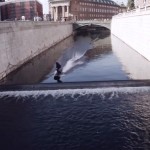
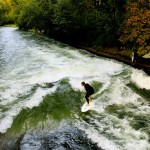
Leaving those stand-up paddleboarders in the proverbial dust, these new battery-powered boards will let you cruise lakes, rivers, cannals and other bodies of water all without that formerly-critical ingredient: waves.

The Spanish surf company Onean has unveiled two models, the Carver and Manta, respectively designed for serious surfers to slalom across calm water and to let more casual surfers to smoothly explore still surfaces in remote places.

surf remote stream lake

Each version has speed controls tied to a handheld remote and optional foot slots for greater traction. A third model, the Blade, is also in production but details about the board have yet to be released.

surf electric battery board

The Carver owes its look to the classic longboard and its speed (around 5 miles per hour) to an interchangeable onboard battery powering an axial water pump. The wider Manta has is slightly slower and wider, made for cruising.

surfboard remote demo

The battery life on the faster variant is only 20 minutes, at which point it can be swapped with a spare, but the latter has more energy storage, allowing for up to 2 hours of travel and enabling more ambitious explorations.

surf without waves

surfboard close up

Aside from obvious coastal uses (like providing a backup board on calm days at the beach), electric boards can bring an entirely new sport to landlocked but water-covered places like Minnesota, the Land of 10,000 Lakes.

Share on Facebook


[ By WebUrbanist in Technology & Vehicles & Mods. ]

[ WebUrbanist | Archives | Galleries | Privacy | TOS ]


WebUrbanist

 
Comments Off on Wave-Free Surfing: Electric Boards Power Through Calm Waters

Posted in Creativity


BIG Plans to Turn 4 London Power Plant Chimneys into Tesla Coils

03 Aug

[ By WebUrbanist in Architecture & Cities & Urbanism. ]

battersea square

Danish firm BIG Architects has a feasible strategy for converting four iconic smokestacks in the center of London into a series of gigantic pedestrian-powered Tesla coils. These would be the tallest of their kind and their visual effect would be nothing short of stunning, generating arcs of energy to bridge between the 300-foot-high towers at predetermined times.

big tesla coil project

Bjarke Ingels Group was commissioned to create a sizable public plaza space adjacent to the disused building as part of a larger redevelopment plan, but announced during a lecture that they had much larger design ambitions in mind. Going public with this plan may have come as something of a shock to their client, who had not yet be apprised of the scheme. In defense of the architects: they wished to make sure what they were proposing was actually possible before any announcement. “We’re working with experts in Tesla coils, looking into how to incorporate it into the chimneys so essentially we might celebrate the transformation from carbon footprint to human footprint.”

giant tesla coils

Currently, the world’s largest Tesla coils are in the 100-foot-high range, so depending on how much of each tower was turned toward this function, these could conceivably become the tallest coils ever constructed (in addition to being the highest-reaching).

battersea power project

Piezoelectric pavement would slowly generate energy from those passing through the square (estimated at 50,000 people per day), which would be collected and deployed in periodic bursts. “We imagine it like Big Ben, when the clock strikes the hour, we can have this celebration of human energy and human life.”

battersea power station

The two pairs of towers are extremely tall relative to their surroundings and arguably an iconic part of the neighboring urban landscape, jutting up out of a power plant complex that is nearly a century old. The Battersea Power Station will be rebuilding the chimneys regardless, so it is just a matter of whether they will adopt this enhancement in the process. Already populated with colorful enhancements and unusual architecture, bolts of electricity arcing across the sky would still certainly stand out in London’s bright nighttime cityscape (tesla coil image by Clarence Risher).

Share on Facebook


[ By WebUrbanist in Architecture & Cities & Urbanism. ]

[ WebUrbanist | Archives | Galleries | Privacy | TOS ]


WebUrbanist

 
Comments Off on BIG Plans to Turn 4 London Power Plant Chimneys into Tesla Coils

Posted in Creativity


Course Correction: Deserted Golf Greens into Solar Power Plants

12 Jul

[ By WebUrbanist in Abandoned Places & Architecture. ]

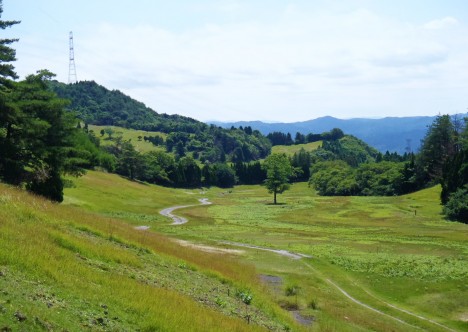
abandoned golf green solar

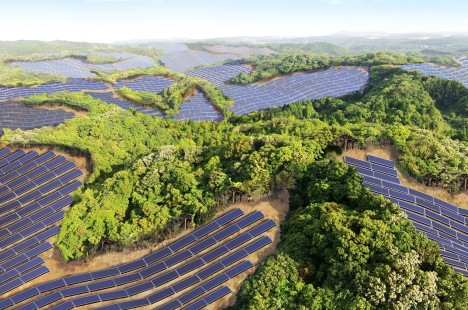
Derelict putting greens will be put to greener uses in Japan, where an abandoned golf course near Kyoto is being converted to the area’s largest solar energy-generating facility.

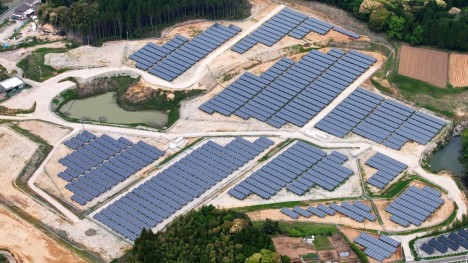
Solar power production represents an ideal type of landscape reuse in this context for many reasons: expansive areas with little shade and high sun exposure are perfect for laying out panels for maximum effect and efficiency. Developed by Kyocera, “the plant will generate an estimated 26,312 megawatt hours (MWh) per year — enough electricity to power approximately 8,100 typical local households.”

golf green conversion

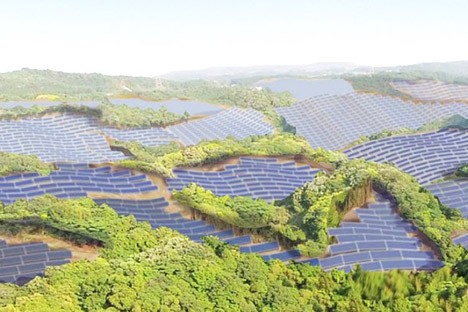
Also under construction, a similar project in the Kagoshima Prefecture is being located on an area originally cleared for a golf course that was never finished and occupied. Critical to a country facing power issues in the wake of the Fukushima nuclear incident, these projects are also a sign of land use awareness and changing times. Just a few decades ago country club memberships sold for millions in Japan, but “overdevelopment of golf properties during the real-estate boom of the 1990’s and 2000’s has led to hundreds of idle courses today that are now under analysis for repurposing or redevelopment.” 

green golfing

Of course, closed golf courses are also an international problem well beyond the Japanese archipelago, giving this solution potentially global applications as well, particularly in the United States. Together, these projects should help inspire other countries to turn some of the most environmentally unsound landscapes toward more productive and sustainable uses.

Share on Facebook


[ By WebUrbanist in Abandoned Places & Architecture. ]

[ WebUrbanist | Archives | Galleries | Privacy | TOS ]


WebUrbanist

 
Comments Off on Course Correction: Deserted Golf Greens into Solar Power Plants

Posted in Creativity


Ricoh addresses ‘power off’ issue on some Pentax K-3 II cameras

10 Jul

Ricoh is addressing an anomaly found on a small group of its Pentax K-3 II digital SLRs in which the camera will not turn off, even when the power lever is in the ‘off’ position. Ricoh will service any K-3 II within a specific range of serial numbers at no charge, regardless of whether the camera is having the issue. Read more

Articles: Digital Photography Review (dpreview.com)

 
Comments Off on Ricoh addresses ‘power off’ issue on some Pentax K-3 II cameras

Posted in Uncategorized


The Hand of Man: Bonsai Hangs Inside Abandoned Power Plant

20 Jun

[ By Steph in Art & Installation & Sound. ]

bonsai power plant 1

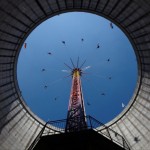
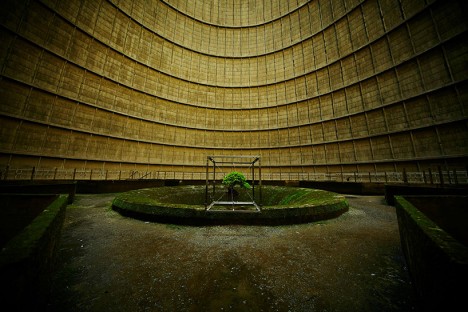
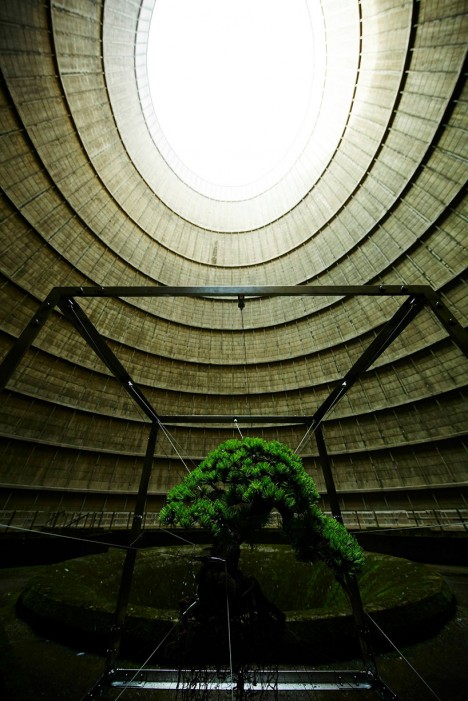
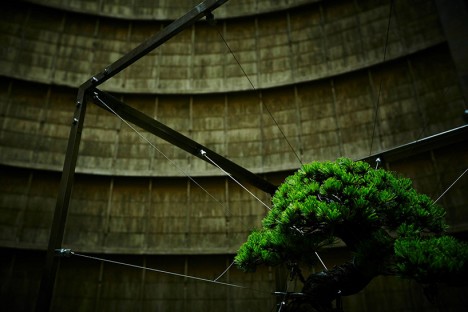
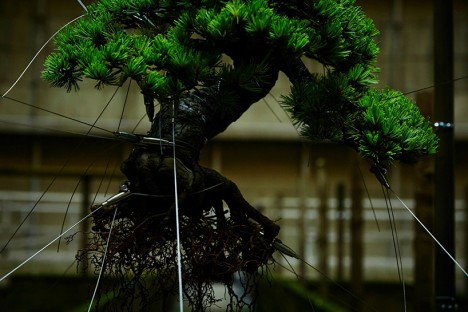
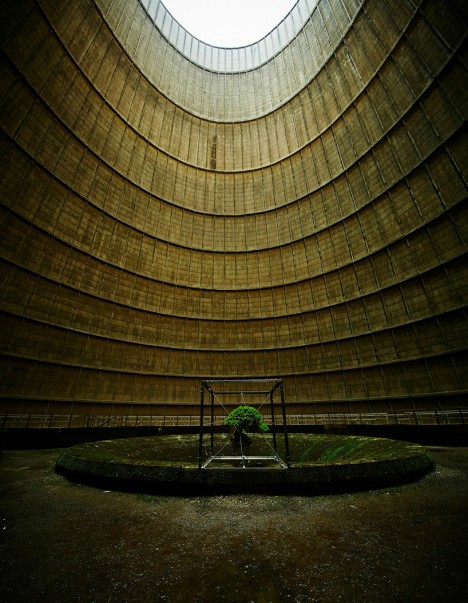
Inside the cooling tower of an abandoned power plant, a tiny bonsai tree hangs from a geometric metal frame, its roots exposed. The only other sign of life inside the cavernous space is an occasional slick of moss. The project meets at the junction between urban exploration, installation art and photography, with no one but the artist witnessing it in person before it was quietly whisked away, the bonsai re-planted to continue its life.

bonsai power plant 2

bonsai power plant 3

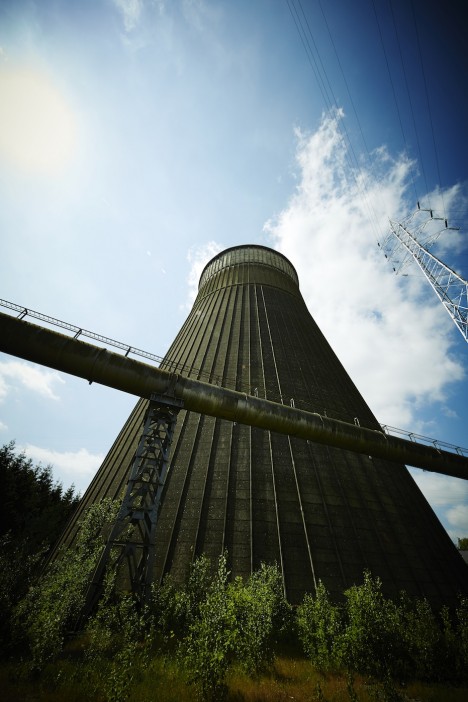
Located in the city of Charleroi, Belgium and originally built in 1921, the coal-burning power plant was decommissioned in 2007 after criticism of its inefficiency. While much of it was demolished, the tower – which once cooled 480,000 gallons of water per minute – still stands as a dystopian monument, drawing in determined explorers despite the security guards posted outside. Before protests shut it down, it was responsible for 10 percent of the total carbon dioxide emissions in the nation.

bonsai power plant 4

bonsai power plant 5

bonsai power plant 6

Japanese botanical artist Azuma Makoto doesn’t typically provide any explanation for the meaning behind his installations, but it’s hard not to see some potent symbolism in this image. Bonsai plants are painstakingly constrained by human intervention, and here one floats without the soil it needs to thrive, within a cavernous representation of waste and short-sighted thinking.

bonsai space

bonsai space 2

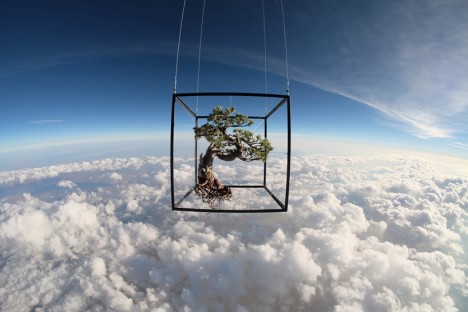
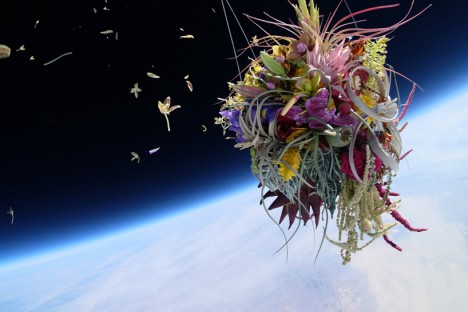
Makoto previously sent a bonsai into space for the Exobiotanica project, suspending a Japanese white pine and a bouquet of lilies and other flowers from carbon-fiber frames and launching them into the sky with a specially-equipped balloon. Six GoPro cameras captured their journey. Said the artist, “Roots, soil and gravity – by giving up the links to life, what kind of ‘beauty’ shall be born? Within the harsh ‘nature,’ at an altitude of 30,000 meters and minus 50 degrees celsius, the plants evolve into exbiota (extraterrestrial life.)”

Share on Facebook


[ By Steph in Art & Installation & Sound. ]

[ WebUrbanist | Archives | Galleries | Privacy | TOS ]


WebUrbanist

 
Comments Off on The Hand of Man: Bonsai Hangs Inside Abandoned Power Plant

Posted in Creativity


Take Your Light With You – the Power of Speedlights

10 Jun

Off-camera flash is a huge part of lighting used in photography today. Of course you can’t compare it to studio lighting, but the question is, how close can you get? In this article I will talk about portable lighting, and how to control it with some simple accessories and light modifiers to achieve the big lights look.

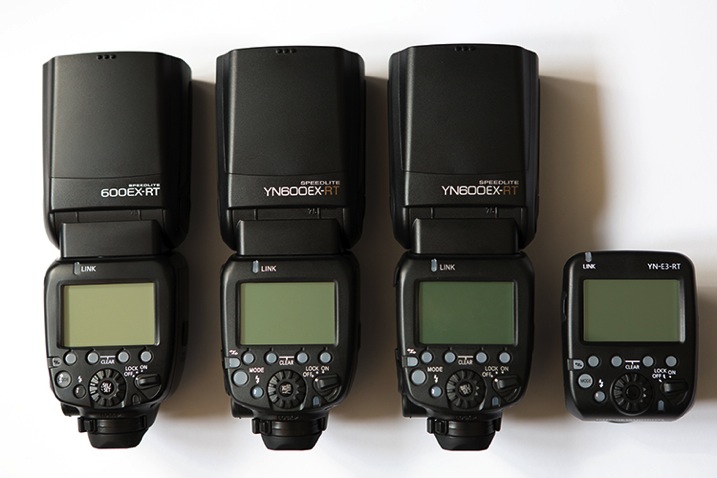
As a serious off-camera flash fan, when the Canon 600EX-RT Speedlite was put out on the market, I immediately went out to buy it. I have to say, I love the way it performs and the upgrades it has, compared to its predecessor, the 580EX II. After testing it for a couple of weeks, I started thinking about buying another one so I could take advantage of the built-in radio triggers that are one of the major selling points of these units. But the thing is, they don’t come cheap. After some searching around, I realized that for the price of another Canon 600EX-RT, I could buy two Yongnuo 600EX-RTs plus one ST-E3-RT controller, which are really similar to the Canon units and use the same radio-triggering system. So this is what I ended up with:
01

You can see from the image how similar they look, and the functions and menus are pretty much the same as well. It’s the perfect solution for good equipment on a low budget.

They are a Chinese-made product and I wouldn’t trust them for serious on-camera work as they’re reported to have some overheating and TTL metering problems. But surprisingly, the build quality is much better than I expected, so for the price, I decided to give them a go for off-camera lighting.

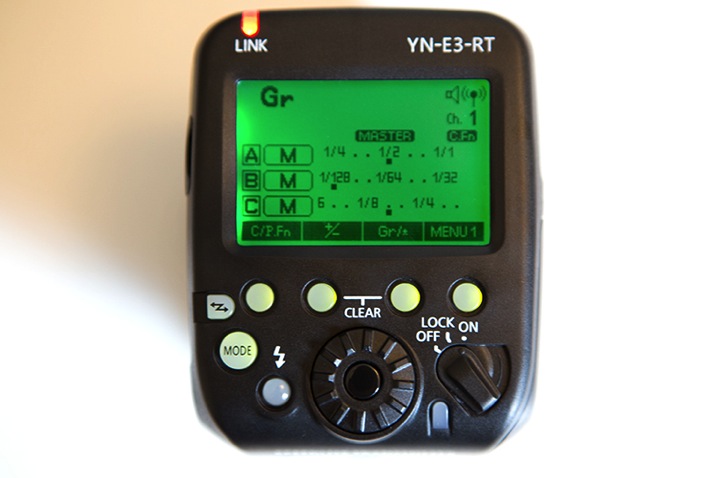
You don’t really need three speedlights as a starting point to do off-camera flash. All you need is a simple flash that allows manual power control, a couple of cheap triggers, and you’re in business. This setup is a step forward in the off-camera flash world, as it allows you to control up to five groups of flashes in slave mode, through a master unit in manual or TTL mode.
02

The shooting session you are about to see was my first time trying out this setup, and it was all about getting familiar with the controls and trigger functions, which I found very intuitive and user-friendly. It took place in a high-end car stand with no prior scouting or production. So the idea was to get to the venue and work with what I had; two beautiful models, a great clothing collection, and a few exotic cars.

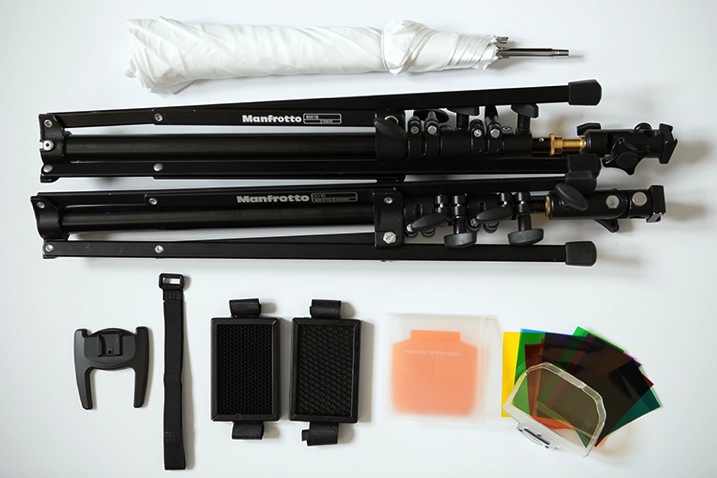
All the images were made with simple light modifiers like shoot-through umbrellas, softboxes and snoot grids that are simple and fast to assemble, making the job a lot easier if you’re doing it alone. The light stands are the 001B by Manfrotto, which are ultra-compact, and support enough weight to use with speedlights and simple modifiers.

I also carry around some gels for simple colour temperature correction, or for when I want to go crazy with colour and party like it’s the 90s all over again.
03

This image is a good example of how you can achieve a high-end fashion look with this equipment and a simple two-light setup.

04

The ambient light plays an important role in this image and it should always be the starting point. A quick reading with the camera light meter told me that the ambient light was – f/2.8, 1/125th at 100 ISO. So my flash power was set to complement that lighting without overpowering it; a main light with a shoot-through umbrella, and a hair light with a grid.

A lighting ratio of 1:2 is usually a good proportion. The ability to control everything from a master transmitter on top of your camera is priceless, as it allows you to adjust things as you go, without having to constantly move and change settings in the units themselves. This is a great way to keep it simple and effective. When you have control of this basic setup, then you can start to play around with it. Change the light modifiers and add more light sources to fill out different areas in your image. Like the setup used in this second image where the light positioning is similar to the first, but I added a third flash to add a little more light to the background.

05

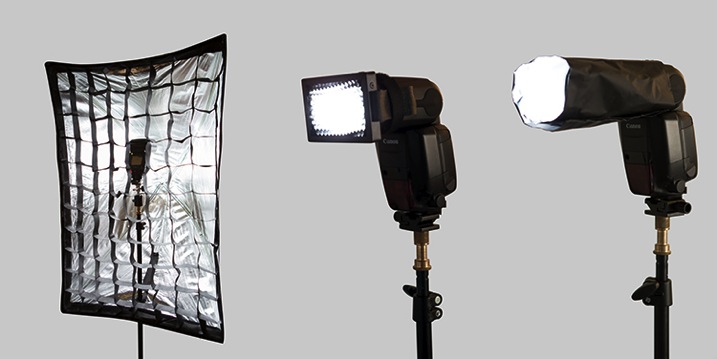
Besides power and ratio control, the next important thing is to control the direction of your light. One simple way to do that without a modifier is to use the internal zoom control in the flash. In these units it ranges from 20 to 200mm which enables you to control the angle the light is going to reach from a wider to a narrower beam.

You can also use grids, or just make your own snoot or flag with some cardboard, or whatever you have with you that will do the trick. Usually I use black cinefoil which is completely malleable, and allows me to get the shape I want for greater light control.
06

This next image is all about grids, and critical light placement to keep the light focused on the model to allow for a dark background.

07

The trick here is the HSS (high-speed sync) function of these flashes which allows the use of shutter speeds higher than 1/200, freezing fast action movements and blocking the ambient light that would otherwise illuminate some of the background.

The major drawback of off-camera lighting is, of course, the power output these units provide. Even with the powerful guide number of 197′ at ISO 100 and 200mm of the Canon 600EX-RT, which is probably the most powerful on the market in its range, it’s still not enough to compare to a studio strobe.

But that doesn’t mean you can’t cheat. One easy way is to group flashes together and try to squeeze more juice out of them. I use a triple bracket inside a soft box to fake it, and get the look of a more powerful light source.
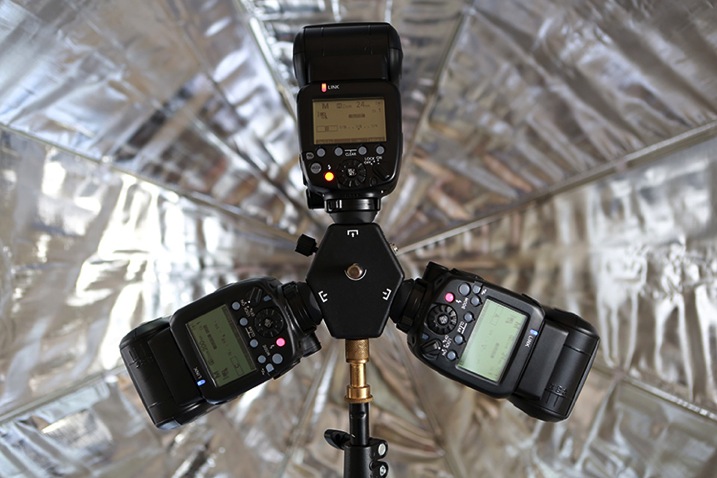
08

This way you can use different settings on your camera and make the light work your way, giving you more depth of field, for instance.

09

So, how close can you get to studio strobes with off-camera speedlights? Well, pretty darn close if you ask me, as long as you’re able to accept its limitations and just get the most out of it. How do you use your speedlights?

googletag.cmd.push(function() {
tablet_slots.push( googletag.defineSlot( “/1005424/_dPSv4_tab-all-article-bottom_(300×250)”, [300, 250], “pb-ad-78623” ).addService( googletag.pubads() ) ); } );

googletag.cmd.push(function() {
mobile_slots.push( googletag.defineSlot( “/1005424/_dPSv4_mob-all-article-bottom_(300×250)”, [300, 250], “pb-ad-78158” ).addService( googletag.pubads() ) ); } );

The post Take Your Light With You – the Power of Speedlights by Ivo Guimaraes appeared first on Digital Photography School.


Digital Photography School

 
Comments Off on Take Your Light With You – the Power of Speedlights

Posted in Photography


Floating Island: Self-Sufficient Home Produces Food & Power

17 May

[ By WebUrbanist in Architecture & Houses & Residential. ]

floating island home vancouver

Powered by solar panels and sustained by a half-acre plot of farmland, these 12 connected buoyant platforms together form an autonomous off-the-grid dwelling for the couple that built the complex over the course of more than 20 years.

freedom cove architecture buildings

Located off the coast of Vancouver Island in Canada, Freedom Cove, as it is called, has everything one could wish from a dream home including pools, beaches, gardens, greenhouses, galleries, towers, workshops and guest rooms

floating island pools plants

Its creators, artists Wayne Adams and Catherine King, spend their time painting, writing, carving and making music as well as entertaining guests – visitors are welcome in the summer, but can only reach this remote location by chartering special boat taxis.

floating island complex platforms

Like the science-fictional floating city of Armada in China Mieville’s novel The Scar, each piece is tied together and seems to have been accrued almost organically over time.

floating island fruits vegetables

Living off the land (and water), the couple fishes for food off the sides of the platforms and grow their own vegetables and fruits in a half-acre farm area above. An array of solar panels provides energy with generators used for backup.

freedom cove cloating home

“A retired ballerina, Catherine maintains these floating gardens while Wayne’s incredible sculptural talents support them. The gardens host frequent visits from whale and bear watching groups in the area. Guests leave with a candle casted from the moulds of various sculptures. They live on a very meagre annual income. “

Share on Facebook


[ By WebUrbanist in Architecture & Houses & Residential. ]

[ WebUrbanist | Archives | Galleries | Privacy | TOS ]


WebUrbanist

 
Comments Off on Floating Island: Self-Sufficient Home Produces Food & Power

Posted in Creativity


The Power of Keywording in Lightroom

12 May

I have to admit, I did not know about keywords in Lightroom, or their powerful uses, until a couple of years ago. During one of Julieanne Kost’s tutorials, I heard the terms and saw it being used in a very practical sense – a way to add specific descriptors to images in a catalog. I was intrigued and the more I researched them, the more I realized what an amazing and awesome tool was available right at my finger tips.

Descriptive and Specific Keywords assigned to an image in Lightroom

Descriptive and Specific Keywords assigned to an image in Lightroom

In the simplest sense, Keywords in Lightroom are a way to describe key elements about a photograph. Just as the basic wikipedia definition of the term, keywords add description to an image and when used in conjunction with filters, are a great way to find specific images quickly in a large catalog. Keywords also provide a way for others to find your images on the web. Keywords get attached to images as part of the image metadata when an image is exported from Lightroom. These keywords in the metadata then act as an identifier and show up in internet searches when people search for certain words and phrases. If your images have your logo, watermark, or some other identifier, that is a another way for people to get exposed to your work.

Keywords can be found in the Library module in Lightroom. There are three panels related to keywords – Keywording, Keyword Suggestions and Keyword List. Each of these can be expanded or collapsed using the triangle looking arrow (see below image).

Keyword Panel in Lightroom's Library Module

Keyword Panel in Lightroom’s Library Module

Keyword List

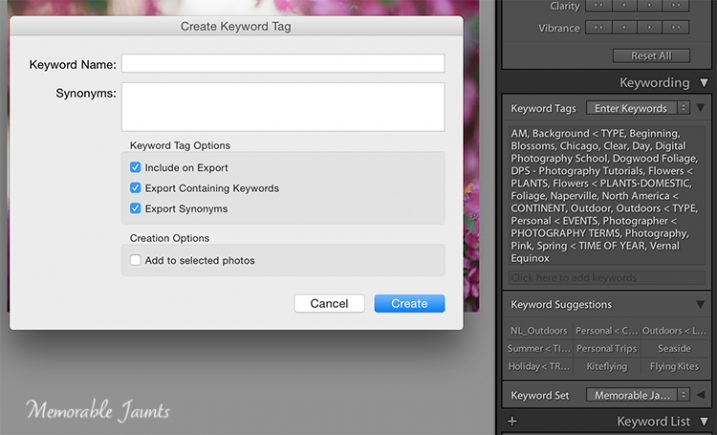
Keyword List basically indexes all the keywords that you have setup in your catalog. To add a word to the Keyword List, click on the “+” symbol on the left hand side of the panel and a dialog box opens up. You can enter in the information (e.g. the name of the keyword, synonyms, etc.) and once you click okay, a keyword will be added to your list. Some of my keywords are Location, Time of Year, Seasons, Time of Day, Clients and Subjects.

Within these parent keywords, I have child keywords like name of the client, the four seasons of the year, type of photography, etc. To add a child keyword to a parent keyword, select the parent keyword and then select the “+” symbol. The same dialog box opens up except this time the keyword will be added to the parent keyword. Depending on the image, I select the relevant keywords and they get added to the keyword metadata for that specific image.

DPS Article on Keywords in LR by Memorable Jaunts - Adding Keywords to the Keyword List

Clicking on the “+” on the left of the Keyword List panel is a way to add new keywords and keyword categories.

Keyword Set

Keyword Set is a great way to setup a pre-qualified set of keywords. This is very helpful if you photograph different genres. I have three distinct set of keywords – Memorable Jaunts Wedding Photos, Memorable Jaunts Family Photos and Memorable Jaunts Outdoor Nature Photos. Each set has related keywords assigned to it. If I am working on a wedding gallery for a client, I can choose Wedding Photos and then have a shortlist of preassigned keywords to attach to specific images in that gallery. My wedding photos keyword set has words like bride, groom, candid, posed, family, wedding party, etc.

Keyword Suggestions

Keyword Suggestions are Lightroom’s way of anticipating what your keyword needs are. These suggestions are based on the latest, most frequently used keywords. If your keyword list is long like mine, you can use this to quickly assign keywords to images especially if you tend to work with similar type of images.

DPS Article on Keywords in LR by Memorable Jaunts - Assigning Keywords to images

Keywords Suggestions are based on the most recently used and frequently used keywords.

Once you assign keywords to a particular image in a galley, you can use Sync Metadata and assign the same keywords to all the images within that gallery, especially if they are all along the same lines – same session, same people, and same genre.

A few tips to keep in mind

#1 – Keyword lists can grow very quickly

It is important to take the time upfront to assign keywords to all images within your catalog. This makes sorting and filtering images based on specific keywords much easier.

#2 – Try not to add keywords on the fly

Ensure that keywords are always added using the appropriate hierarchy. For example, if you have four seasons – Fall, Summer, Winter and Spring under “Seasons” parent keyword group, resist the temptation to add Summer Equinox or Early Fall to a specific image without adding it to the “Seasons” parent keyword group. If you add a keyword that is not on the keyword list, Lightroom will add it as an orphaned keyword to your list. Soon you will have many adhoc keywords that don’t really belong to any specific category or group. Along the same lines, maintain your keywords – delete the keywords that you no longer use and no longer assign to any image.

#3 – Keywords can also be imported and exported from Lightroom

LR saves keywords as a txt document. What this means is that you can create your keyword list in a normal text editor, save the file as a “.txt” file and then import it into your catalog. You can also share your keywords list between computers, say your desktop at home and the laptop you use in the field.

#4 – Create a base keyword of your name or the name of your business and assign that to all your images

Remember that keywords gets stored as metadata information for images. This ensures that your name or business information is always present on each and every one of your images.

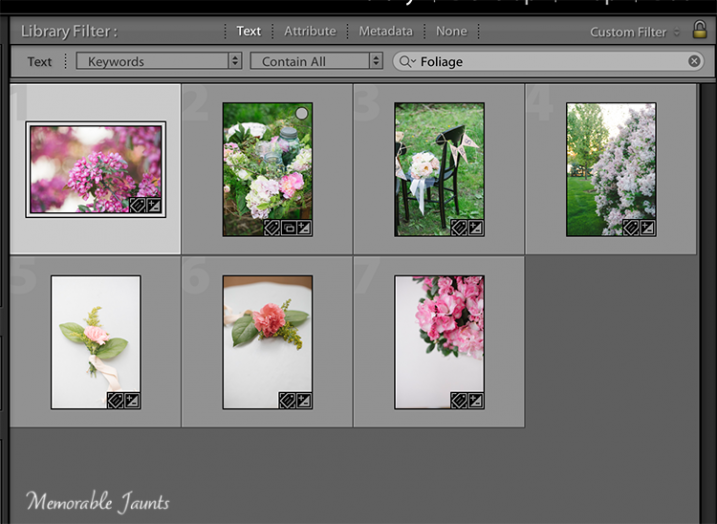
Another powerful advantage of assigning keywords to your images is the ability to search or filter images in your catalog based on specific keywords. When you filter in Lightroom, choose the Text option and the drop-down box to select Keywords, then start entering specific keywords. Lightroom will start sorting images based on the keyword until you find all the image that have that corresponding keyword in their metadata.

DPS Article on Keywords in LR by Memorable Jaunts - Filering using keywords - Searchable by keyword

Selecting Keywords as part of search criteria ensures the ability to get specific results based on exact keywords

DPS Article on Keywords in LR by Memorable Jaunts - Filering using keywords

Using keywords to sort through all images in a catalog

Regardless of whether your catalog is small or large, it is worth the time and the effort to assign appropriate and relevant keywords to all your images. This makes future management and maintenance of your catalog much easier and efficient.

Tell us in the comments below how you use keywords?

googletag.cmd.push(function() {
tablet_slots.push( googletag.defineSlot( “/1005424/_dPSv4_tab-all-article-bottom_(300×250)”, [300, 250], “pb-ad-78623” ).addService( googletag.pubads() ) ); } );

googletag.cmd.push(function() {
mobile_slots.push( googletag.defineSlot( “/1005424/_dPSv4_mob-all-article-bottom_(300×250)”, [300, 250], “pb-ad-78158” ).addService( googletag.pubads() ) ); } );

The post The Power of Keywording in Lightroom by Karthika Gupta appeared first on Digital Photography School.


Digital Photography School

 
Comments Off on The Power of Keywording in Lightroom

Posted in Photography


The Power of the Sea in 24 Breathtaking Images

01 May

Nature provides a sense of its power in many ways – few with the same effect as the sea. It can be calm and peaceful, or powerful and frightening.

Enjoy these breathtaking images of the sea and think about how you can capture shots like this too:

Photograph Storm Rage by Matthew Jones on 500px

Storm Rage by Matthew Jones on 500px

Photograph New Beginning by Bobby Bong on 500px

New Beginning by Bobby Bong on 500px

Photograph Audience of One by Marc  Adamus on 500px

Audience of One by Marc Adamus on 500px

Photograph Abandoned by Ted Gore on 500px

Abandoned by Ted Gore on 500px

Photograph Rough sea n12 by Giovanni Allievi on 500px

Rough sea n12 by Giovanni Allievi on 500px

Photograph Beat of the Ocean by Hugh-Daniel Grobler on 500px

Beat of the Ocean by Hugh-Daniel Grobler on 500px

Photograph Bending waves by Paolo Lazzarotti on 500px

Bending waves by Paolo Lazzarotti on 500px

Photograph Porthleven Storm by Lloyd W.A. Cosway [DEVONshots.com] on 500px

Porthleven Storm by Lloyd W.A. Cosway [DEVONshots.com] on 500px

Photograph Rising by Andre Luu on 500px

Rising by Andre Luu on 500px

Photograph Waves Hunter by Bobby Bong on 500px

Waves Hunter by Bobby Bong on 500px

Photograph A T T A C K by Thomas Roux on 500px

A T T A C K by Thomas Roux on 500px

Photograph Tropical paradise with turtles by Vitaliy Sokol on 500px

Tropical paradise with turtles by Vitaliy Sokol on 500px

Photograph wave by Vitaliy Sokol on 500px

wave by Vitaliy Sokol on 500px

Photograph beyond the waves by Tu Geo on 500px

beyond the waves by Tu Geo on 500px

Photograph The Modern Force by Toby Harriman on 500px

The Modern Force by Toby Harriman on 500px

Photograph m a u i  .  j a w s  I V by s e n s o r p i x e l on 500px

m a u i . j a w s I V by s e n s o r p i x e l on 500px

Photograph Iceland Through The Lens by Skarpi Thrainsson on 500px

Iceland Through The Lens by Skarpi Thrainsson on 500px

Photograph tracing by Dragan Todorovi? on 500px

tracing by Dragan Todorovi? on 500px

Photograph Gold On The Sea by Sergio Valverde Pérez on 500px

Gold On The Sea by Sergio Valverde Pérez on 500px

Photograph Cool!!  by Emrah Erduran on 500px

Cool!! by Emrah Erduran on 500px

Photograph Coming Back by Plamen Valchev on 500px

Coming Back by Plamen Valchev on 500px

Photograph Morjim beach, Goa, India by Pavel Sokolov on 500px

Morjim beach, Goa, India by Pavel Sokolov on 500px

Photograph Mighty Sea, color version by Joao Brites Moita on 500px

Mighty Sea, color version by Joao Brites Moita on 500px

Photograph Rugged Cliffs and Stormy Seas by Rosie Schneider on 500px

Rugged Cliffs and Stormy Seas by Rosie Schneider on 500px

googletag.cmd.push(function() {
tablet_slots.push( googletag.defineSlot( “/1005424/_dPSv4_tab-all-article-bottom_(300×250)”, [300, 250], “pb-ad-78623” ).addService( googletag.pubads() ) ); } );

googletag.cmd.push(function() {
mobile_slots.push( googletag.defineSlot( “/1005424/_dPSv4_mob-all-article-bottom_(300×250)”, [300, 250], “pb-ad-78158” ).addService( googletag.pubads() ) ); } );

The post The Power of the Sea in 24 Breathtaking Images by Darlene Hildebrandt appeared first on Digital Photography School.


Digital Photography School
 
Comments Off on The Power of the Sea in 24 Breathtaking Images

Posted in Photography


Photographers Ignite – 5 Minute Power Sessions to Change Your World

15 Mar

Screen Shot 2015-03-11 at 7.17.19 PMI only just heard about Photographers Ignite, which is a twist on the extremely popular Ignite Sessions. It is produced by Kevin Kubota and I had a chance to sit in on the sessions on the last day of this year’s WPPI (Wedding and Portrait Photographers International) conference.

I asked Kevin if I could share some of the videos and he agreed, so while the sessions from this year aren’t online yet I hand picked a few from the archives that I think you’ll enjoy.

#1 – There’s gotta be something more . . .

This video by Matt and Katie spoke to me on so many levels. I’ve been to the burnout stage and like Katie, survived and got my love for photography back. Giving back using my photography is something I believe in passionately and we even have a few articles about how to do that here on dPS (I’ll put some links below the video for you). Watch and see if it speaks to you as well.

  • Why to Consider Doing Photography Related Volunteering in Your Community
  • Using Photography to Make a Heartfelt Difference
  • Photography As A Means For Societal Betterment
  • Use Your Camera to Give
  • Photography projects that make you feel alive

#2 – The Creativity of a child

On a very similar theme of finding that lost passion or creativity, Melissa Niu tells her story of how her daughter helped her recapture hers. As adults with busy lives we seem to lose a little of ourselves and creativity is suppressed or put on the shelf. Find a way to rekindle yours.

  • Kick Your Creativity Up A Notch
  • 6 Ways to Enhance Your Creativity
  • 12 Ways to Add Randomness and Creativity to Your Photography
  • 5 Cheap and Easy Ways to Re-inspire Your Photographic Creativity

#3 – Need to know

Adobe teacher and guru Julieanne Kost (and self proclaimed geek) goes through the things she feels are the need to know items in terms of the technical side of photography. “Learn the technology” says Kost so you it becomes an asset which allows you to focus on your creativity not the technology.

So? Are you inspired and motivated?

Let here what you plan to do now. If you watch the Matt and Katie video he urges everyone to do what? DO! Take action. Because . . .

“Inspiration and awareness without action is just entertainment.”

googletag.cmd.push(function() {
tablet_slots.push( googletag.defineSlot( “/1005424/_dPSv4_tab-all-article-bottom_(300×250)”, [300, 250], “pb-ad-78623” ).addService( googletag.pubads() ) ); googletag.pubads().enableSingleRequest();
googletag.pubads().disableInitialLoad();
googletag.pubads().collapseEmptyDivs( true );
googletag.enableServices();
} );

googletag.cmd.push( function() { googletag.display( ‘pb-ad-78623’ ); } );

googletag.cmd.push(function() {
mobile_slots.push( googletag.defineSlot( “/1005424/_dPSv4_mob-all-article-bottom_(300×250)”, [300, 250], “pb-ad-78158” ).addService( googletag.pubads() ) ); googletag.pubads().enableSingleRequest();
googletag.pubads().disableInitialLoad();
googletag.pubads().collapseEmptyDivs( true );
googletag.enableServices();
} );

googletag.cmd.push( function() { googletag.display( ‘pb-ad-78158’ ); } );

The post Photographers Ignite – 5 Minute Power Sessions to Change Your World by Darlene Hildebrandt appeared first on Digital Photography School.


Digital Photography School

 
Comments Off on Photographers Ignite – 5 Minute Power Sessions to Change Your World

Posted in Photography