RSS
 

Posts Tagged ‘Portraiture’

4 Ways of Creating Effective Catchlights in Portraiture

31 Jul

The post 4 Ways of Creating Effective Catchlights in Portraiture appeared first on Digital Photography School. It was authored by John McIntire.

Catchlights in portraiture example
Canon 5D Mark III | Canon EF 50mm f/2.5 Macro | 50mm | 1/80 sec | f/5.6 | ISO 100

It is arguable that the most important part of a portrait is your subject’s eyes. While there is a case or two in which this might not be true, for the most part, the eyes are the focal point of portraits. This is because, when we interact with people on a one-to-one basis, it’s the eyes that we use to interact with one another.

As a photographer, it’s vital that you are able to present your subject’s eyes as the focal point in your images. One key way to do this is through the deliberate use and manipulation of catchlights. Catchlights in portraiture are the reflection(s) of your light source(s) that appear in the eyes. 

This article will discuss why catchlights are important, how to make use of them, and how to manipulate them to your benefit. It will also discuss several ways to help you to include catchlights in your portraiture.

What are catchlights?

catchlights in portraiture types of catchlights
Catchlights are the reflection of the light source in your subject’s eyes.

As mentioned above, catchlights are the reflections of your light source as they appear in your subject’s eyes. It doesn’t matter if you are using natural light or flash; if there is light going directly into your subject’s eyes, there will be a catchlight.

In terms of photography, this is important because the presence of a catchlight in portraiture means that the detail in your subject’s eye will be revealed in the final images. If there is no detail in the eyes, it will be that much more difficult for your viewers to engage with the subject. You’ve probably heard of the term dead-eyes before. That’s what this is referring to. 

Ensuring you have a catchlight
catchlights in portraiture
Making sure that your catchlights are a prominent feature in your subject’s eyes can help you to create more evocative portraits. Canon 5D Mark III | Canon EF 50mm f/2.5 Macro | 50mm | 1/125 sec | f/5 | ISO 100

If your goal is to create a catchlight in your portraits, the easiest way to do it is to ensure that your key light is pointed directly into your subject’s eyes. Because your key light will be the brightest light source in your frame, this will help to ensure that the catchlight is as bright as possible, making sure that it stands out. 

If you are using natural light, or studio lighting with a modeling light, you will be able to see the catchlights in your subject’s eyes before you take the picture. All you have to do to ensure a catchlight is direct your subject’s pose until you can see the catchlight. If you are using a light source without a modeling light, you will have to be more careful. Take a test shot and review it on the back of your camera to see what’s going on, then guide your subject from there. 

Placement

catchlights in portraiture
Ensuring that the main catchlight is at the top of your subject’s eye is a great starting point. This is a natural place for the catchlight to sit and leaves most of the eye unobscured. Canon 5D Mark III | Canon EF 50mm f/2.5 Macro | 50mm | 1/60 sec | f/5.0 | ISO 100

To help ensure more natural results, it can help for you to light your subject from above. This has a few effects. The first of these is that it places the catchlight at the top of your subject’s eye, just as it would be if they were outdoors and being lit by the sun. Also, having the catchlight at the top of the eye helps to have more of the eye visible in the frame. 

If you are using more than one catchlight, the position of the other ones doesn’t matter too much, but putting the main catchlight at the top of the eye is still a good idea. 

Big vs small

catchlights in portraiture size of catchlight
The size of your catchlight is going to depend on your chosen light source and how far away that light source is from your subject.

The size of the catchlights in your subject’s eye is entirely dependent on the light sources you are using. If you are shooting in the middle of a clear day, the light source will be the naked sun, and it will appear as a small pinprick of a catchlight in your subject’s eye.

If you are shooting on an overcast day, the entire sky becomes your light source. It is not uncommon for the catchlight to appear massive, as a reflection of everything that appears above the horizon. And if you are in a studio using a large octabox close to your subject, your catchlight will be enormous and take up a large portion of the eye. 

How big you want your catchlights is entirely up to you. Personally, I prefer them to be somewhere in the middle. Too small and they barely show up in anything wider than a close-up portrait. Too big and they take up far too much of the eye, dominating one of the most important parts of your image. 

On occasion, you might hear people saying that catchlights should only ever be small. This is not a rule. Use whatever size catchlight you want.

Bright vs dim

catchlights in portraiture
Large light sources close to your subject will result in dimmer catchlights. Smaller light sources will result in brighter catchlights. It doesn’t matter which you choose, but it can help to be aware of it.

Another aspect of catchlights in portraiture that is dictated by the size of the light source is how bright the catchlights appear. Catchlights made by smaller light sources (such as the sun or small studio modifiers) will appear brighter than those made by large light sources (such as an overcast sky or large studio modifiers). 

Again, how you use this is entirely up to you. In a close-up portrait where the eyes take up a large portion of the frame, the brightness of the catchlights won’t matter as much. However, in a three-quarter length or full-length shot where the eyes are a much smaller part of the image, you may need catchlights to be brighter so that they stand out more. 

Of course, you always have the option of brightening up your catchlights with a bit of dodging and burning afterward, but making the choice at the time of capture can help to save you a lot of time behind the computer. 

Doing more with catchlights in portraiture

Beyond the basics of simply placing a catchlight in your subject’s eye, looking out for new and intriguing ways to use catchlights in portraiture can be a fun and rewarding pursuit. There are a lot of different things you can do to try and make your catchlights more exciting and visually interesting. This section will outline a few of these. 

1) Add more lights

catchlights in portraiture
Adding more lights (that show in your subject’s eyes) is one simple way of changing up the catchlights in your portraits. Canon 5D Mark III | Canon EF 16-35mm f/4L IS USM | 35mm | 1/125 sec | f/5.6 | ISO 100

Simply adding an extra light or two is possibly the easiest way to make your catchlights a little more interesting. Any secondary lighting that you use that is in your subject’s line of sight will usually appear as a second catchlight in their eye. 

catchlights in portraiture
Here the two fill lights show up as two additional catchlights.

The thing to look out for here is that you don’t go overboard. Having your subject’s entire eye consumed by multiple large catchlights will probably look more disconcerting to your viewer than clever. By all means, experiment, but don’t be afraid to dial it back a notch if you go too far.

2) Use a reflector

catchlights in portraiture
The humble white reflector is a great way to add a subtle second catchlight that lifts the brightness of your subject’s eyes. Canon 5D Mark III | Canon EF 16-35mm f/4L IS USM | 35mm | 1/125 sec | f/14 | ISO 100

Adding a simple white reflector as fill can help to lift your subject’s eyes with a catchlight of its own. This will usually result in a subtler effect, but it can lead to much brighter and more vivid eyes in your images. 

catchlights in portraiture
Here you can see just how much the reflector is doing.

3) Try different lighting patterns

catchlights in portraiture
Some lighting patterns like clamshell lighting make for really interesting catchlights. Canon 5D Mark III | Canon EF 50mm f/2.5 Macro | 50mm | 1/100 sec | f/9 | ISO 100

Using lighting patterns that require multiple light sources can provide interesting catchlights as well. Cross lighting and clamshell lighting are two patterns in particular that can create interesting effects. Both of these patterns only require two lights as well.

catchlights in portraiture clamshell lighting catchlight example
Here you can see the effect that clamshell lighting has on the subject’s eyes.

4) Use novelty light sources

catchlights in portraiture
Ring lights and other novelty light sources produce unique catchlights that can be used for visual interest. Canon 5D Mark III | Canon EF 50mm f/2.5 Macro | 50mm | 1/60 sec | f/8 | ISO 1000

There are fair few interesting lighting options on the market that provide unique catchlights. The most prominent of these is the ring light. Ring lights provide on-axis lighting for your subject as you put your camera through the aperture of the ring. The catchlight appears as a ring in your subject’s eyes.

These lights, and other lights like them, are fun to use and can help you achieve interesting lighting in your portraits. 

catchlights in portraiture
Here, you can see the distinct ring shape of the catchlight made by a continuous ring light.

One caveat for these novelty light sources: While a lot of people really love the effect they produce, a lot of people really hate it, and are very vocal about how much they hate it. Depending on the purpose and the audience of your images, novelty light sources may not be the right choice. 

The end

Taking control of your catchlights can be a great way to help you get the most out of your portrait photography. Hopefully, you see how easy and impactful this can be. It’s also a lot of fun.

Chasing catchlights in portraiture can lead you to a lot of interesting scenarios and lighting setups that you may not find, or come up with, by other means. 

The post 4 Ways of Creating Effective Catchlights in Portraiture appeared first on Digital Photography School. It was authored by John McIntire.


Digital Photography School

 
Comments Off on 4 Ways of Creating Effective Catchlights in Portraiture

Posted in Photography


How to Use Photoshop Blending Modes for Fine Art Portraiture

14 Oct

The post How to Use Photoshop Blending Modes for Fine Art Portraiture appeared first on Digital Photography School. It was authored by Charlie Moss.

photoshop-blending-modes-for-fine-art-portraiture

Layering images experimentally in photoshop can be an exciting way to bring a fine art feel to your photography. It is spontaneous and unpredictable, with different outcomes each time.

The layering technique I talk about in this article is a way you can explore and get inspired by the work of Victorian art photographers like Julia Margaret Cameron. They would have used long exposures because of the limitation of their cameras, which added a dream-like quality to their images.

Instead of long exposures, I have used multiple images shot of the same subject, layering them and using Photoshop blending modes. It gives a different kind of ethereal feeling to the images which you can use on any subject, not just portraits.

Start with a portrait

Your portrait doesn’t have to be sophisticated, but it should be able to be repeated over a dozen shots or so. I opted for simple natural window light, but there’s no reason why you couldn’t use flash instead.

photoshop-blending-modes-for-fine-art-portraiture

The image I found worked best was one with strong colors and features with a simple background. I opted to take inspiration from Julia Margaret Cameron’s photography by using simple historical clothes, and an instantly recognizable prop.

You want to try to end up with a dozen or so slightly different images of your subject. Take far more images than you need so that you have lots of choices when it comes to selecting images for your layering effect.

Between each shot, ask your subject to move just a small amount – perhaps their head or their hands, but just a fraction. Try to avoid any dramatic pose changes.

Layering the images in Photoshop

When it comes to selecting images and editing them, there are many different software packages and options. I’m going to talk about how I use Lightroom Classic and Photoshop to achieve this effect. Even within these two software packages, there are other ways you can accomplish the same effect. As long as you end up with a photograph that you love, then you haven’t done anything wrong!

I start by importing my images into Lightroom Classic and then selecting the ten or so images that will make up the layers of my final image. At this point, I try to choose a ‘base’ image that will be at the bottom of the layer stack in Photoshop and will show through the strongest. Generally, this is my favorite image out of the set.

How to Use Photoshop Blending Modes for Fine Art Portraiture

When you’ve got your images selected in Lightroom Classic in the Develop module, open the ‘Photo’ menu and select ‘Open as Layers in Photoshop.’

This will save you having to manually stack all of the images together. You’ll end up with a single file open in Photoshop with all of your selected images placed on layers.

How to Use Photoshop Blending Modes for Fine Art Portraiture

The next stage is to place your ‘hero’ image (the one that you want to show through the most) at the bottom of the layer stack by dragging and dropping it. Then select all the layers above and reduce their opacity.

Playing with Photoshop Blending Modes

This is when it starts to get interesting. Playing with the different photoshop blending modes for the layers will give you all kinds of different results. Dark images will suit different blending modes to lighter images. You can check out a comprehensive guide to photoshop blending modes here!

You’ll want to turn down the opacity of the layers quite far so that the original ‘hero’ image shows though. The other layers should then become more of a fuzzy halo rather than a focal point for the shot.

photoshop-blending-modes-for-fine-art-portraiture

Once you’ve found a blending mode and opacity that looks good, you can start to fine-tune the image.

Begin by identifying parts of the images that don’t really work, and work out which layer they’re on. Then create layer masks and use a black paintbrush to gently fade those unwanted parts away.

I decided to remove almost all of the layers from the face of my subject since it was a portrait, and I wanted to be able to see her clearly. I also took away some distracting echos of hands, which I felt made the final image stronger. Since you’re working using layer masks, you can always undo any of your choices at this stage – just simply paint over the bits you want to see again on the layer mask with a white paintbrush!

How to Use Photoshop Blending Modes for Fine Art Portraiture

As you can see from my layer masks, they don’t have to be neat. Just use a fairly large brush with soft edges and a low opacity and you won’t be able to see the brushstrokes of your mask in the final image.

Finishing your image

Once you’re happy with the basic image you’ve achieved through layering, I’d suggest saving a copy of your work. Then you can experiment further with different techniques.

photoshop-blending-modes-for-fine-art-portraiture

Once I’d saved my image in Photoshop, I closed it and went back to Lightroom Classic to work on the shot further. Here, I simply changed the toning of the image slightly with a preset and applied some sharpening to key areas of the picture.

The result was a warmth that always makes me think of Old Masters paintings in galleries. Together with the effect of the layers, it creates a rather painterly fine art image.

photoshop-blending-modes-for-fine-art-portraiture

But, of course, there’s absolutely no harm in processing the same image in a different way. This is one of the reasons I love Lightroom Classic – you can create virtual copies of a single shot and work on them all differently!

photoshop-blending-modes-for-fine-art-portraiture

This variation I processed in Nik Analog Efex Pro 2, which you can use straight from the Lightroom Classic interface in the same way that you can take photos to Photoshop. The software itself is very similar to Lightroom Classic with its adjustment panels on each side but instead specializes in replicating old film effects.

It is a great way to create an image that pays homage to the great Victorian art photographers.

You could get a similar effect by layering wet plate textures and dust and scratch layers in Photoshop before adding a black and white conversion.

There are many ways to get all these different effects – please try some and post your results in the comments. I’d love to see what you did with this technique and how you achieved it!

The post How to Use Photoshop Blending Modes for Fine Art Portraiture appeared first on Digital Photography School. It was authored by Charlie Moss.


Digital Photography School

 
Comments Off on How to Use Photoshop Blending Modes for Fine Art Portraiture

Posted in Photography


How to Master Natural Light Portraiture

07 Dec

I love working with natural light, I always have. Even more so now that our digital cameras have sensors so incredibly capable of making images in extremely low light. Making portraits using natural light only is a good skill to learn so you can make photographs anywhere. Here are some tips to help you mast nature light portraiture.

How to Master Natural Light Portraiture

Be aware of the quality of light

When you want to make a series of portraits using only natural light, you first need to be aware of what the light is like at your chosen location and the style of portrait you want to make. Is the quality of light hard or soft?

If it’s a bright sunny day and the light is harsh (hard), you will get portraits with a much different look and feel, than if the sky is cloudy and overcast. Morning and evening light will give your portraits a different quality (soft light) as will photographing your subject indoors and using light from a window.

How to Master Natural Light Portraiture

Soft side light from a window.

Hard sunlight can be quite challenging to work with, but can produce some good results if you style you portrait well. If you’re working in open sun it can be helpful to have a reflector on hand and a friend to assist you so dark shadows can be reduced.

What kind of photo do you want?

Having a concept in mind for the type of photo you want will give you a better chance of success. If you’re heading out to make some portraits on a sunny day and have an idea of making some soft dreamy romantic photos, this will be difficult. But if you want to make some photos to illustrate the idea of a journey in a hot country the light will be your friend and support your idea.

How to Master Natural Light Portraiture

Bight, harsh sun in the middle of the day.

Cloudy days provide a soft light that’s generally easier to get a more even exposure. The flat light tends to render a softer feeling to portraits.

So if you’re making portraits with natural light on a cloudy day, you will have more success if your concept is for a gentler look. Photos taken under a cloudy sky and later converted to black and white work well as the tone range will be more limited than on a sunny day.

How to Master Natural Light Portraiture

Portraits on a cloudy day.

Use light to your advantage

If the sky is heavily overcast you will find it challenging as the light will be very dull. On days when there’s not such thick cloud you will notice the light is still soft, but brighter and more vibrant (less flat,) so nicer for making portraits. Be careful of your exposure settings if the clouds are moving and the light value is frequently changing.

Finding a shaded space and making use of naturally reflected light will help you achieve a different look on a bright sunny day. This is not the same as the light you have on a cloudy day. Light reflecting off a wall close by or light-toned pavement, (cement rather than asphalt or dark paving,) will fill in shadows on your subject’s face and produce a more even, lively result.

How to Master Natural Light Portraiture

Light reflecting off a nearby white wall provided fill light for this portrait.

Placing your subject so they are slightly inside a shaded area, but close to the bright sun, can allow the reflection of the sunshine to have a very helpful effect in lighting your subject. So long as your subject is not too far away from the bright light you can make use of the reflection to add a more interesting dynamic to your portraits.

The Golden Hours

Of course, making portraits with the rich morning or evening sunshine (often called Golden Hours), or even subdued light can produce very pleasing portraits. Be careful though not to have your subject look directly ahead into the sun as they will typically make an unpleasant face. Backlighting or side lighting your subject at these times can be more effective and more comfortable for your subject. Diffused morning and evening light is lovely to work with as it is soft yet can still be quite rich and warm toned.

How to Master Natural Light Portraiture

Diffused early evening light.

Try new things

I’ve loved making natural light portraits for many years, but I also enjoy developing my technique by trying new ways of working. If you enjoy a particular aspect of photography, stick with it, develop what you do. But don’t just do the same thing every time.

If you like making portraits in natural light on a cloudy day because you find it easier, sometimes try shooting on a sunny day. Stretch yourself to learn some new technique. You may discover something new, a new way ot working that you really enjoy.

How to Master Natural Light Portraiture

Portable natural light studio

I have a portable natural light studio I love to take into the mountain villages here in northern Thailand. We’ve even started including it in some of the workshops we run and our customers love the professional looking results they can achieve. My outdoor studio only requires that we have space to set it up, (just a few square meters is enough,) and a sunny day for the best light, but I do use it on cloudy days too.

The best thing about it is having control over how the sun lights my subjects. I set it up so the sun is behind the backdrop. Above the backdrop is a fine gray nylon screen to filter the sunlight. The light reflects off the ground which is a light colored earth and works well with Asian skin tones, or a large plastic sheet. I have more recently introduced a large reflector too and am achieving some very pleasing results.

How to Master Natural Light Portraiture

The light coming from behind the backdrop is providing great light on these subjects’ hair as a rim light, and on their faces via reflected light.

The portable studio behind the scenes.

Your turn to try it

Next time you head out to make some portraits try something different with the light. If you prefer sunshine, make some in the shade as well. If you prefer a cloudy day challenge yourself to go out in the middle of the day when the sun is shining and find a location where you have some good light. Remember, the only time you cannot make a photo is when there is no light at all.

The post How to Master Natural Light Portraiture by Kevin Landwer-Johan appeared first on Digital Photography School.


Digital Photography School

 
Comments Off on How to Master Natural Light Portraiture

Posted in Photography


Swimming with giants: Black and white whale portraiture by Jem Cresswell

02 Jun

Creativity showcase site My Modern Met recently interviewed Jem Cresswell, an Australian photographer who has just completed a project he calls Giants. The project is a series of portraits of humpback whales presented in black and white and offers an intimate look into the personalities and emotions of these ‘gentle giants.’

In the interview, Cresswell describes his process (much of which you can see from the behind-the-scenes video above), as well as some interesting details concerning his interactions with the whales. In addition to only swimming with ‘certain whales,’ Cresswell says they never use scuba gear and he always enters the water ‘as calmly as possible, keeping my heart rate low and wait to see the behaviour.’

The interview also addresses the presence of ‘spindle cells’ in humpback whales, which are cells that are thought to be responsible for social organization and empathy. ‘It is obvious though, that humpback whales exhibit complex emotional behaviors, have intricate social networks and complex song structures,’ says Cresswell.

Head on over to My Modern Met or Cresswell’s website to view these stunning portraits for yourself – all of which, Cresswell says, were captured on a Canon 5DS R, 24-70mm F2.8L II and 16-35mm F4L in an Aquatech underwater housing.

Via: My Modern Met

Articles: Digital Photography Review (dpreview.com)

 
Comments Off on Swimming with giants: Black and white whale portraiture by Jem Cresswell

Posted in Uncategorized


7 Steps to Capturing Truth in Your Portraiture

05 Sep

A stunning portrait, one that stops you in your tracks and demands attention, is a beautiful thing. There’s something magical when a portrait intrigues and connects with us. It’s not about celebrity or beauty; it’s about humanity. For my money, the moment you capture truth and humanity in your portraiture, is when photography and art collide.

DPS7

From the moment you raise a camera to take a photograph of someone, there are many variables to keep under control. It is easy to get lost and allow your focus to drift. This is the one time in photography when you need to be incredibly present.

Following this mini guide of seven steps, can help you to improve your portrait photography, and connect better with your subjects.

Step One: Photograph within your technical capabilities

The last thing you need to be worried about when you start a shoot is the technical side of things. Practice ahead of time and nail your technique. Get to know all of your equipment, and iron out any technical kinks before the day of the shoot. Your subject is bound to become nervous if you seem uneasy with your kit, or project any uncertainty. Things can still go wrong on the day, but the more relaxed you are overall, the more you will be able to handle it without panicking.

DPS2

Step Two: See images of your subject beforehand

It can be handy to see images of your subject ahead of shoot day. I like to ask clients to send me a picture of themselves which they really like. This is useful in several ways.

You can get a good idea of their skin tone and the planes of their face, which helps you to consider your lighting set up and any adjustments you will need to make. You also get a good idea of how the client wants to be perceived, and what they want an image to say about themselves.

This will not always balance with what you see in them, but herein lies the magic. As a photographer, you are seeing the subject in a new light. When you add that into the process, alongside trying to capture what they like about themselves, you make a unique portrait.

DPS1

Step Three: Have a plan

You absolutely must have a plan ahead of time. Use the what you’ve learned by having seen an image of your subject ahead of time, to help you plan your lighting and background choices. Obviously consider the weather if you are planning any natural light or outdoor shots.

It’s worth mentioning at this point that natural light doesn’t always mean you actually have to be outside. Being close to large windows or open doors can provide a beautiful light, but it absolutely depends on the weather. You should also plan what framing you might use. The goal is not to end up with a contrived shoot, it’s still important to stay in the moment. But, if session is slowing down, and you at least have some ideas in mind, you can refer back to your mental plan and get things going again by changing it up.

Author photo

Step Four: Take charge

When you lift that camera, you must take charge of your set. This is a collaborative process, but you are definitely in the driver’s seat. It’s up to you to be vocal with your subject, to keep their energy levels up, and to make sure they feel good about themselves. It’s no good just shouting out stage directions, “left a bit, chin down,”. You must encourage them, and keep them having fun, because tension is not your friend! No matter how many times your subject has been in front of a camera, each one is a new performance and needs to be directed as such.

Wherever your shoot is taking place, you are in charge of that space. Define the space in your mind, and remove as many distractions as possible. Obviously if you are shooting in a public place, a park for example, you can’t remove everything. But if you can choose an area away from the main pathways, that will make life easier.

DPS3

If you are indoors music is a must. It’s a great leveller, and helps everyone to relax. You can create a playlist specially for your shoots, include some cheesy music to put a smile on people’s faces. It’s a good idea to choose different genres/decades depending on your client’s age, style, etc.

Step Five: Learn to read people

Learning to read people is a skill you absolutely must acquire in order to progress as a people photographer. Try to connect with your subject and chat to them, tell stories – humanizing the experience is vital. The more they relax, the more you will get out of them, and the more authentic the photograph will be.

DPS5

You must learn to pick up on signs and signals: Are they losing focus? Change up the setting. Are they uncomfortable? Try standing or sitting instead. You don’t want to waste shots on unusable images, where the subject is not present or is clearly not in the zone.

Another way in which you can learn to read people has to do with their personality. Determining early on that they are nervous, might mean you tell some jokes, or explain the setup to put them at ease. A giggly, happy person definitely needs to be represented as such, but there is always room for a more serious look, which will be up to you to direct them towards.

DPS6

Step Six: Set the tone

So once you have gained control and confirmed that you are in charge, you must set the tone for the whole shoot. When you look at a portrait which you love, consider what you like about it and how you too can take this sort of image. Keeping in mind that any picture you take will have your own voice, and that develops over time. The connection or level of engagement in that photograph is entirely dictated by you, the photographer.

Your subject feeds off your energy and pace, so you must keep this in mind at all times. If they seem to be wilting, it’s your job to bring them back up to speed. Make sure to check your own performance so that you are giving out the right vibes.

DPS9

Step Seven: take your time

This last step has to be one of the most important – take your time! Please trust me on this one, slow down and keep your head in the game. A shoot can run away from you in no time, and the last thing you want is to look at back at your shots and discover you haven’t captured what you wanted. You may find that you have spent too long on one look or background, and not captured another enough. Just as you want your subject to take mini breaks to refocus themselves, you must take the opportunity too.

Personally, I know that if at the end of a shoot I don’t feel a bond with my client, I haven’t nailed it – I’ll have some great images of them but it won’t be what I set out to capture.

DPS4

Your turn

Do you do portraits? How do you inject some truth into your portraiture? Please share your tips and tricks in the comments below. If you have any questions I’ll try and answer them as well.

googletag.cmd.push(function() {
tablet_slots.push( googletag.defineSlot( “/1005424/_dPSv4_tab-all-article-bottom_(300×250)”, [300, 250], “pb-ad-78623” ).addService( googletag.pubads() ) ); } );

googletag.cmd.push(function() {
mobile_slots.push( googletag.defineSlot( “/1005424/_dPSv4_mob-all-article-bottom_(300×250)”, [300, 250], “pb-ad-78158” ).addService( googletag.pubads() ) ); } );

The post 7 Steps to Capturing Truth in Your Portraiture by Alex Lagarejos appeared first on Digital Photography School.


Digital Photography School

 
Comments Off on 7 Steps to Capturing Truth in Your Portraiture

Posted in Photography


Surrealism and intimacy: fine art portraiture with Fritz Liedtke

16 Feb

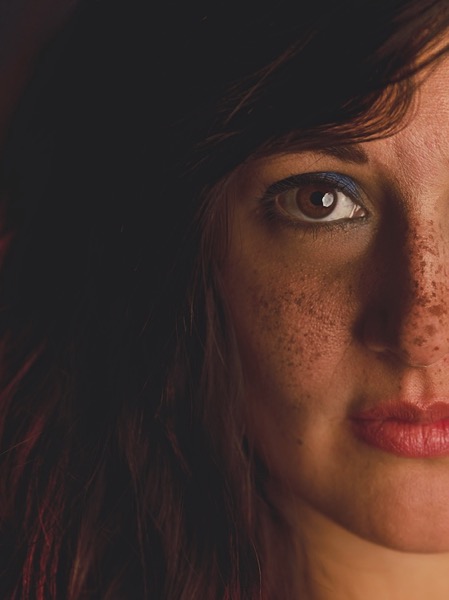
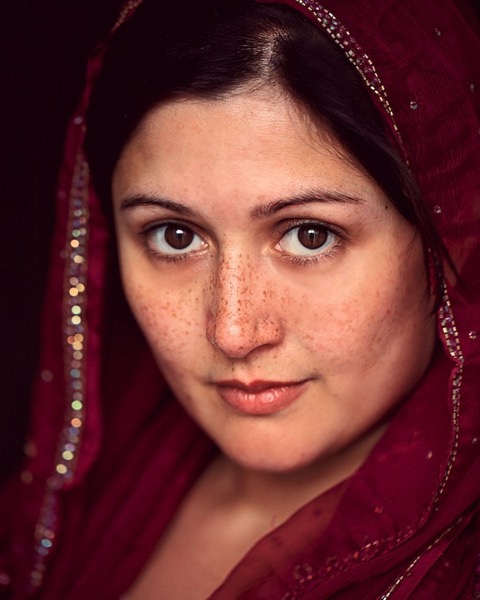
Professional photographer Fritz Liedtke’s work spans the worlds of film and digital, from editorial and commercial work to fine art. A native of Edmonds, WA, Liedtke became fascinated with the creative possibilities and surrealism presented by modifying the focal plane of 4×5 cameras in high school and college. In this presentation, Liedtke guides us through a recent project titled ‘Astra Velum’ (Veil of Stars), wherein he focused on photographing individuals whose faces were peppered with freckles.

‘I wanted to try to create something beautiful out of something that many people see as blemishes,’ Liedke says. Of course, not everyone feels that way about their freckles, but throughout his project, Liedtke noticed that many people he put in front of his camera didn’t necessarily feel like they fit in with the overall concept of American ‘beauty culture,’ with its focus (pun intended) on near-flawlessness.

Liedtke takes us through his post-processing and printing techniques, as well as guiding messages for those looking to start out on a personal project of their own. Keep your eyes open for interesting people to photograph, set goals for yourself, and perhaps most importantly, ‘don’t be afraid,’ Liedtke says. ‘Most people will be flattered that you want to photograph them.’

Articles: Digital Photography Review (dpreview.com)

 
Comments Off on Surrealism and intimacy: fine art portraiture with Fritz Liedtke

Posted in Uncategorized


Lens Technique: Wide-angle portraiture with the Sigma 24-35mm F2 DG HSM Art

15 Feb

Photographers tend to shy away from wide-angle lenses when shooting portraits, but DPReview Technical Editor Rishi Sanyal thinks that’s all wrong. In this video, he uses the Sigma 24-35mm F2 Art to illustrate his case for wide-angle portraits, capturing a couple of models with a setting sun in Seattle’s lovely Discovery Park. Step away from your 85mm comfort zone and learn some of Rishi’s tips for environmental portraits.

Articles: Digital Photography Review (dpreview.com)

 
Comments Off on Lens Technique: Wide-angle portraiture with the Sigma 24-35mm F2 DG HSM Art

Posted in Uncategorized


Behind the Camera: Sue Bryce’s contemporary portraiture

17 Jan

If there’s been a theme to Sue Bryce’s career, it might be one of evolution. She started making portraits when she was 18 with a Hasselblad film camera, and with grit and sheer determination she built and marketed her own business. Classifying her work as contemporary fashion portrait photography, she’s evolved through decades in a shifting industry, and in addition to running her highly successful studio now offers online workshops for newcomers. We sat down with her recently to learn more about her work, vision and history with photography. 

Articles: Digital Photography Review (dpreview.com)

 
Comments Off on Behind the Camera: Sue Bryce’s contemporary portraiture

Posted in Uncategorized


A light touch: Dean Bradshaw’s commercial and personal portraiture

22 Mar

‘Conceptual’ and ‘commercial’ photography are styles that relatively few are able to achieve success in, especially at the same time. But Dean Bradshaw’s intellectual and humorous approach to advertorial work sets his portfolio far above that of the typical commercial photographer. Take a look at a selection of his imagery and find out a few insights behind his success in our Q+A. See gallery

Articles: Digital Photography Review (dpreview.com)

 
Comments Off on A light touch: Dean Bradshaw’s commercial and personal portraiture

Posted in Uncategorized


Color Portraiture with Retouch and Enhancement in Lightroom 4 and 5

25 Aug

The Following is an excerpt from the SLR Lounge Lightroom Preset System v5, a preset system designed to take you from Ordinary to Extraordinary photos in just a few seconds and clicks.

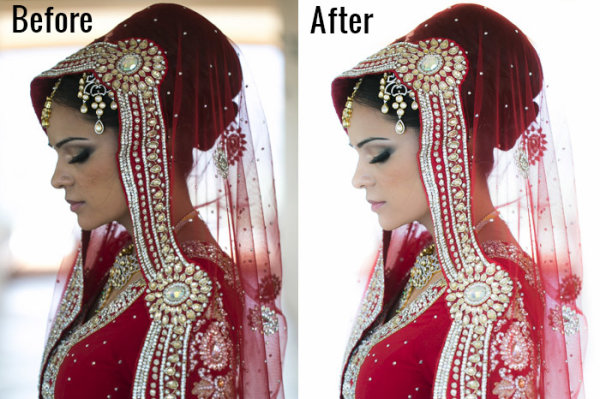
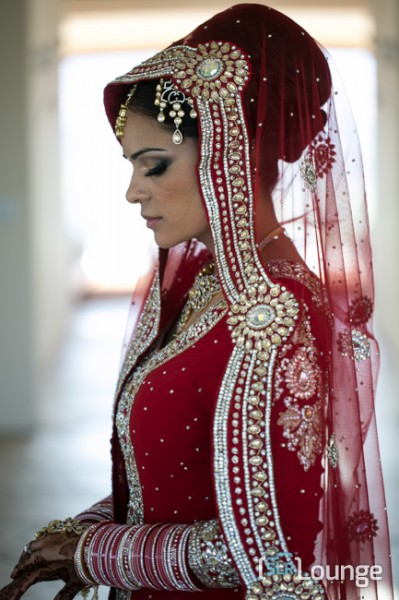
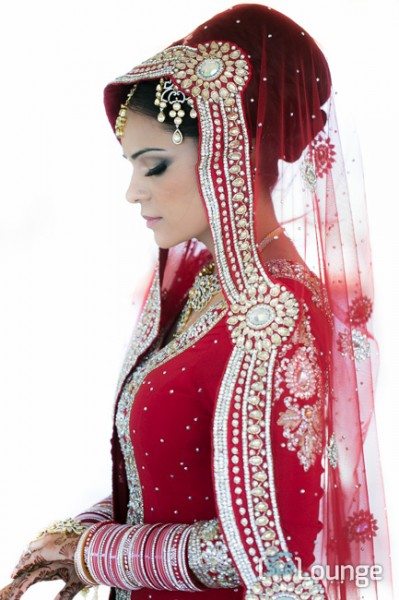
In this article, we have a beautiful bride who designed an amazing red dress with a lot of great details and jewelry. We want to edit this photo so that she has a nice soft portrait look and the details in her dress remain sharp and crisp. To do this, we’re going to be utilizing similar techniques in production as we covered in the previous Soft Flattering Color Portrait tutorial. But, we are going to go through the added step this time of utilizing our brush presets to make the image details pop. The written article is below, and if you like, you can also watch the original video tutorial towards the end of the article.

Here’s a quick sneak peak of our image before and after we’re done with our edit.

beforeafter copy

Read the Written Tutorial

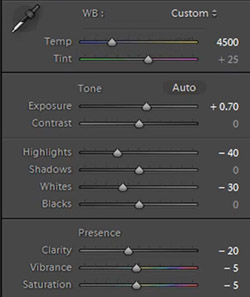
Since this is a portrait, we have a preset that gets us to a nice soft portrait look quickly which we discussed in detail in the previous Soft Flattering Color Portraits tutorial. This preset adjusts the develop settings so that portrait skin tones looks nice and soft, and it also desaturates skin tones via a slight modification to Vibrance and Saturation to help even out skin tone colors. We also increased our exposure to +0.70 because an overall brighter image will look more flattering on our bride. Personally, I want to go with a more neutral/white look for the image, so that the red in the dress truly pops. So we’re going to adjust our Temperature to 4500. Here’s what our develop settings look after our preset and manual adjustments are applied.

developesettings

In the HSL our Red and Orange have been decreased slightly because once again, we want to subtly even out skin tone colors.

HSL

  • Red: -20
  • Orange: -10

In the Details our preset gave us the perfect amount of Sharpening and Noise Reduction. The Sharpening settings are doing a great job of showing the intricate details in the dress, while using a little bit of Noise Reduction to smooth out pores and fine detail in our subjects skin.

Sharpening

  • Amount: 70
  • Radius: 1.5
  • Detail: 10
  • Masking: 30

Noise Reduction

  • Luminance: 15
  • Detail: 70
  • Contrast: 0
  • Color: 25
  • Detail: 50

Our preset also adjusted our Lens Vignetting to +30, because we want a nice even edge to edge toning.

Lens Vignetting

  • Amount: +30
  • Midpoint: 30

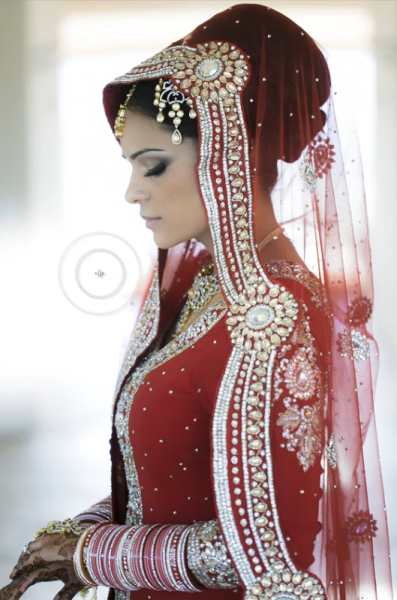
Now we’re going to do some more post processing with our Brush. The first thing we want to focus on is the beautiful red dress. We’re going to set our Brush settings for Clothing and Texture and apply it everywhere but her skin. If you press “O” you can bring up the brush mask overlay and see where the brush is being applied. (See video tutorial below for reference)

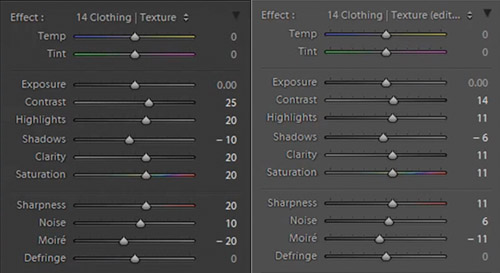
When you apply a brush onto your image, a “pin” will appear on your image (Press “H” on your keyboard to hide/reveal pins). If you click on the pin you can decrease or increase the strength of the brush settings by left-clicking and dragging to the left (weaken) or right (strengthen). We want our adjustments to be a little more subtle so we slightly decreased the strength of the brush.

bothclothingbrushsettings

Original Brush Settings on Left, Lowered Brush Strength Settings on Right

We like the window in the background because it helps compose our frame, but there’s a distracting bar in the middle. For this particular image, we could keep the frame since it does a great job framing our subject. But, just to illustrate how capable Lightroom is, we’re going to remove the window entirely, making this a high key image with a nice bright background. To do this we’re going to use our Brush with strong dodge settings and apply it to the window.

Screen Shot 2013-08-21 at 1.12.48 PM

If you have additional questions, watch the video tutorial below to see exactly how this affect was applied.

Dodge Brush Settings

  • Exposure: 4.00
  • Contrast: 1.00
  • Highlights: 1.00

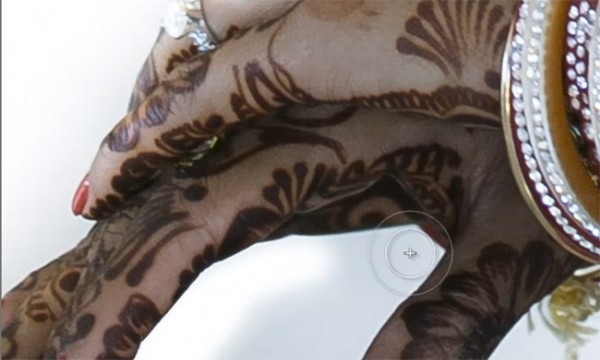
We want to apply the brush to the inside of her hands, but it’s a tough spot to reach because the area is very small. This is a great place to use Lightroom’s Auto Mask function.

automask

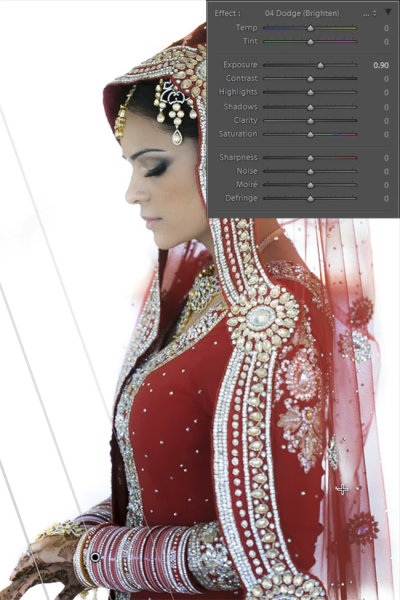
Her hands are slightly underexposed so we’re going to add a graduated filter and set the exposure to +0.90. We are then going to drag the filter from the bottom left of the image to her bracelets.

firstgraduatedfilter

We also want another subtle graduated filter for the back of her veil, so we’re going to set the exposure on this filter to +0.30. We want to drag this up from the bottom right of the image to her bicep area just as we did for the previous graduated filter shown above.

Now that we’re done with the dress, we’re going to go back and touch up some details on our bride. The first thing we’re going to do is select our “Hair and Lashes” preset. This will give some nice contrast and sharpness in her eyes and eyebrows.

Hair and Lashes Brush Settings

  • Contrast: 10
  • Highlights: 20
  • Shadows: -10
  • Clarity: 15
  • Saturation: 10
  • Sharpness: 25

After the eyes, we’re going to move onto the lips. We’re going to select our Brush preset for lips which will give us some nice color and contrast on the lips.

Lip Brush Settings

  • Contrast: 15
  • Clarity: 15
  • Saturation: 20
  • Sharpness: -10
  • Noise: 10

And now we are left with our final image. Here’s a before and after of our portrait.

Before

lightroom-5-tutorial-high-key-retouch-0001

After

lightroom-5-tutorial-high-key-retouch-0002

Watch the Video Tutorial

If you would like to see exactly how all of the settings and adjustments were applied, please watch the video below from the SLR Lounge YouTube Channel.

Conclusion and Learn More

We hope you all enjoyed this tutorial. If you are interested in learning more or purchasing the SLR Lounge Lightroom Preset System v5

Post originally from: Digital Photography Tips.

Check out our more Photography Tips at Photography Tips for Beginners, Portrait Photography Tips and Wedding Photography Tips.

Color Portraiture with Retouch and Enhancement in Lightroom 4 and 5


Digital Photography School

 
Comments Off on Color Portraiture with Retouch and Enhancement in Lightroom 4 and 5

Posted in Photography