RSS
 

Posts Tagged ‘Portrait’

Correcting For Under Exposure and Boosting Dynamic Range with an Environmental Portrait in Lightroom 4

17 Dec

Introduction

This tutorial is a demonstration of the SLR Lounge Lightroom 4 Preset System. With over 200 presets, the LR4 Preset System has been critically acclaimed as the most powerful and intuitive preset system available for Lightroom 4. DPS users can get 10% off by using the DPS10 coupon code upon checkout. Click the link above to learn more/purchase.

Overview

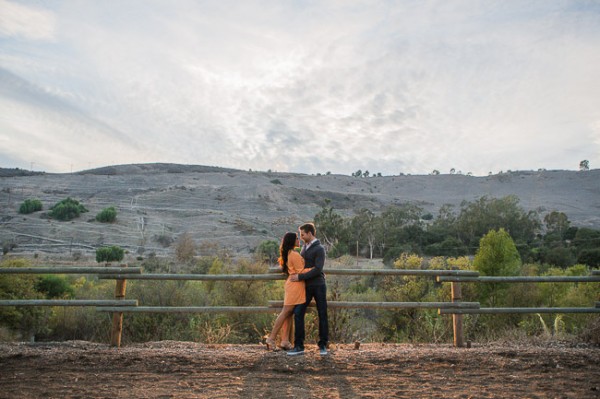
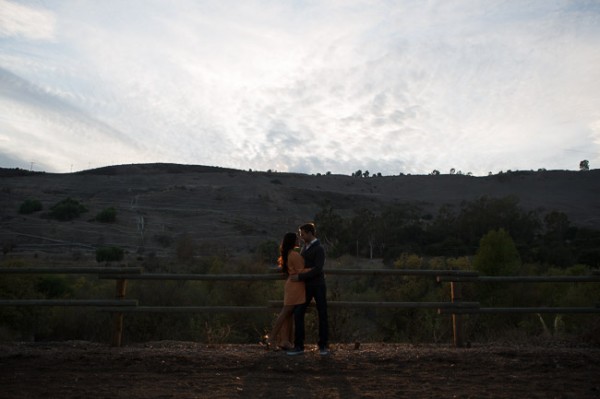
Often times when shooting environmental portraits we “expose to the right”, meaning we are pushing our highlights to the right of the histogram without blowing out too much of our highlights, or clipping too much of our shadows. Depending on the type of scene, this can lead to what looks like an underexposed image directly out of the camera since we are trying to preserve the majority of our highlight detail. However, since most of the range in the highlights and shadows are still retained, we can bring it out through post production. In this step-by-step tutorial, we will demonstrate how to not only correct the exposure in this type of portrait, but also how to increase its dynamic range.

Lightroom 4 Preset System Mixology

This effect can be achieved quickly in under a minute with the SLR Lounge Lightroom 4 Preset System, If you don’t own the preset system, please skip to Step 1 to learn how to do it manually.

1. MY MIXOLOGY > 25 HDR Strong
2. BASE ADJUSTMENTS > 23 Light Soften Skin (Detail)
3. BASE ADJUSTMENTS > 34 Medium Boost (Contrast)
4. BASE ADJUSTMENTS > 62 Light Noise Reduction (Noise Reduction)
5. Add +.30 Exposure
6. 13 Nature | Color Adjustment Brush
7. 12 Sky | Cloud | Ocean Adjustment Brush

The Original Image
Step 1. Applying our Basic Adjustments

What we usually recommend when working in Lightroom is to work your way down the Develop Module Panels starting from the Basic Adjustment Panel.

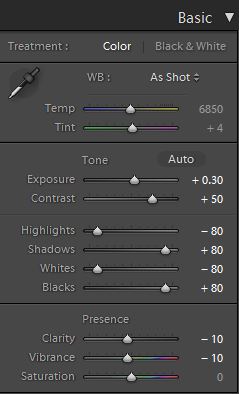
Because the image is underexposed, one of the first steps that we need to do is to correct the exposure by adding +0.30 stop to Exposure. In order to increase the dynamic range, we are also going to bring down the Highlights and Whites by -80 and lift up the Shadows and Blacks by +80. When applying this technique to your own photos, you may be better off dialing in your Highlights, Whites, Shadows and Blacks and then adjusting the Exposure as necessary.

At the same time, when we increase the dynamic range, the contrast flattens out, so we do need to add Contrast to compensate.

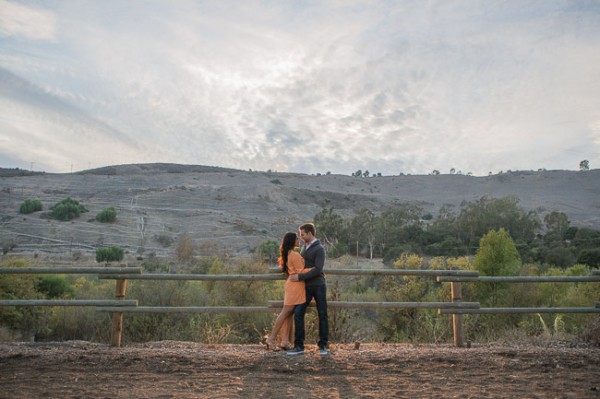
Because we are working with a portrait, we want to have nice, smooth skin tone that is not overly saturated, so let’s decrease Clarity and Vibrance by -10. Your Basic Panel adjustment and image should look like the following:
02 Basic Adjustments

Step 2. Adding Additional Contrast via Curves

The image can still use some more contrast, so let’s add a subtle contrast-boosting “S” curve.
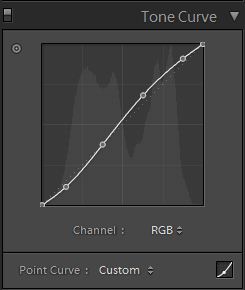
03 Tone Curve

Step 3. Sharpening and Noise Reduction

With the SLR Lounge Preset System, we typically apply the following Sharpening setting to our image:
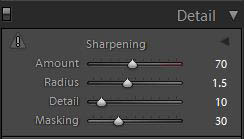
Detail

We are also going to add Noise Reduction because we to smooth out any noise that is introduced from the dynamic range boost. We use this setting for Noise Reduction:
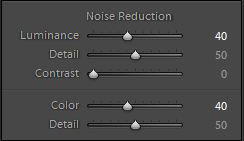
Noise-Reduction

Here is how your image should look like after applying all of these adjustments.
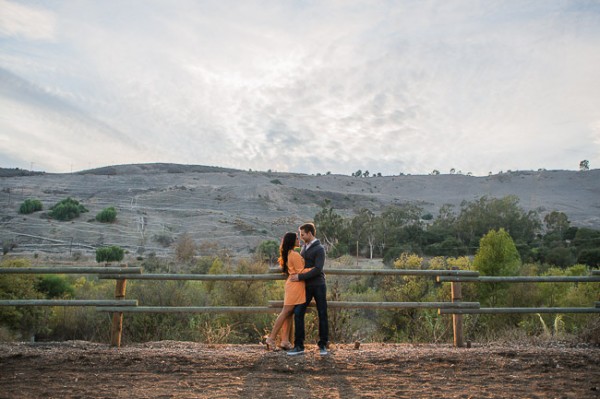
04 Detail

Step 4. Using Adjustment Brushes for Sky and Landscape

Even though we boosted the dynamic range of this image, the sky is still overblown. The LR4 Preset brush we use for the sky is called “Sky | Cloud | Ocean.” This brush lowers the exposure, highlights, and shadows, and increases contrast, clarity, and saturation in the sky. Here is our settings for this brush.
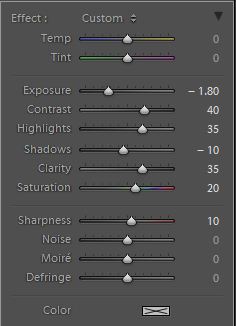
Sky Cloud Ocean Brush

Finally, we want to add more midtone contrast and saturation to the foliage in order to make them pop. Here is how the settings look like for the “Nature | Color” LR4 Preset Brush that we applied to the landscape. This also increases contrast, clarity, and saturation.
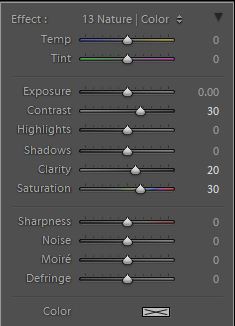
Nature Color Brush

Now that all our adjustments have been applied, let’s take a look at the before and after images to compare the original underexposed image against the final image.

ORIGINAL

HIGH DYNAMIC RANGE PORTRAIT
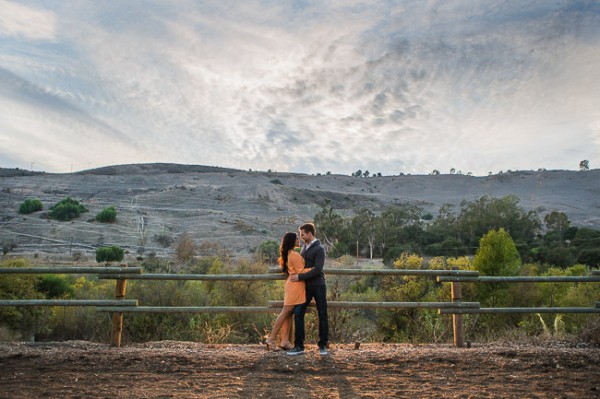
05 Finished

The Lightroom 4 Preset System

The SLR Lounge Lightroom 4 Preset System is designed to enable users to achieve virtually any look and effect within 3-5 simple clicks. From basic color correction, vintage fades, black & white effects, tilt-shift effects, faux HDR, retouching, detail enhancing, and so much more. The sky is the limit with what has been dubbed the most powerful and intuitive preset system available. Click the link above to learn more/purchase.

Post originally from: Digital Photography Tips.

Check out our more Photography Tips at Photography Tips for Beginners, Portrait Photography Tips and Wedding Photography Tips.

Correcting For Under Exposure and Boosting Dynamic Range with an Environmental Portrait in Lightroom 4


Digital Photography School

 
Comments Off on Correcting For Under Exposure and Boosting Dynamic Range with an Environmental Portrait in Lightroom 4

Posted in Photography


Edit this RAW File – Portrait Photography

17 Dec

froknowsphoto.com This weeks RAW edit brings us this well composed and exposed portrait that just has one issue which is unfortunate. How would you correct the problem in this photo, try your hand at editing the RAW file. froknowsphoto.com click to edit the RAW file
Video Rating: 4 / 5


Deal 2: 30% off Phil Steele’s Flash Portrait Course

14 Dec

On the 2nd day of Christmas dPS gave to me – 30% off Phil Steele’s Flash Portrait Course!

Regular readers of this site will know of Phil Steele because we’ve regularly featured videos from him over the last few months (among our most popular posts this year).

So when we were putting together our current 12 Days of Christmas campaign this year Phil was a no-brainer of to ask to participate as the reviews from readers on his courses are excellent.

In todays deal Phil is kindly offering a 30% discount on his popular Flash Portrait Course – a video course designed to help you take professional headshots and and portraits using a DSLR and basic flash.

Not only will this course save you from spending a fortune on gear you might not need, for the next 24 hours you can own this practical flash portraits guide for just $ 33.

phil steele.png

Here’s what you’ll learn in the course:

  • Learn how you can save money and take amazing photos with off-camera flash—the new, easy, inexpensive, portable way to take professional photos without expensive studio gear!
  • Discover the four crucial, inexpensive pieces of equipment you need to get the flash off your camera (and don’t worry, if you don’t have a flash yet, Phil will tell you which kind to buy to avoid over-spending)
  • Watch Phil go through 4 photo shoots with live models, revealing all his off-camera flash secrets.
  • Learn advanced techniques using multiple flashes, colored filters, reflectors, and other optional equipment, for creating photos that make viewers say “Wow!”
  • Watch over Phil’s shoulder as he edits the photos in post-production, adjusting them to look their best.
  • Learn from Phil’s mistakes! He shows you the reality of each shoot, including what goes right and what goes wrong and how to fix it.
  • Discover the foolproof 4-Step-Formula for choosing the perfect ISO, Shutter, and Aperture for your flash photos. Never wonder what to do in “M” mode again!

There’s a lot more – check out the full details of this course on Phil’s site where you can grab it today (and today only) for just $ 30 (a bigger discount than Phil has ever offered on this one before).

PS: Phil is throwing in some free bonus videos in this deal including one on using Reflectors for outdoor portraits and another with one of his portrait retouching techniques for post processing.

Plus it all comes with a money back guarantee – so you can try it and see if it’s right for you with confidence.

Grab this great course here while the deal lasts (it is live for just 24 hours).

Post originally from: Digital Photography Tips.

Check out our more Photography Tips at Photography Tips for Beginners, Portrait Photography Tips and Wedding Photography Tips.

Deal 2: 30% off Phil Steele’s Flash Portrait Course


Digital Photography School

 
Comments Off on Deal 2: 30% off Phil Steele’s Flash Portrait Course

Posted in Photography


Capturing the Quintessential Travel Portrait

14 Dec

You’d be hard-pressed to find many people who don’t love to travel – especially amongst camera wielders. We love exploring new places around the globe and bringing back photos to share with all our friends. It’s exciting, and a look at the world outside our own perspective.

There are three questions I always find myself being asked when returning from a travel assignment – where did you go, what did you eat and who did you meet? A key component in any good travel photo story is capturing portraits and the daily interactions of the people wherever you go. The astounding diversity across the world is what makes us so fascinating to each other. For this article, we’ll focus specifically on interaction based portraiture instead of candid captures.

Here are a few tips and tricks I use for capturing the quintessential travel portrait.

Ego is Irrelevant

Perhaps my favorite phrase and one I pass along to anyone looking to create better people-based photography is this, “Check your shame at the door.” What that simply means is never be afraid to ask, dance or make a complete fool of yourself in pursuit of a great photo.

There’s no room for ego in this business and you need to get over any worries you may have about asking people for photographs. The photographer who asks for a portrait will capture 100% more than the one who doesn’t. After all, all they can say is no. If you have plans on making a career in the photo industry you’ll need to get over your discomfort of the word “no.” Because you hear it – a lot.  Take the negativity out of it and think of “no” as merely a stepping stone to another “yes.”

When you get that critical yes – or sometimes the hand gesture or smile that says to conveys an ok – it’s time to jump into action.

Context is King

Travel portraiture relies heavily on context. You don’t want someone to look at an image and think you captured it right outside your house – you want to show portraiture that tells the story of this person’s culture. What makes this person unique and interesting to you and your audience? Part of answering that question is knowing the main audience for your images. To a Tibetan a portrait of one of their fellow villagers may be nothing special – but to a Western audience it could be incredibly unique. It’s all about context.

Travel portraiture is more than just up and tight shots. Often it’s half bodies, full bodies, people as small figures in a broad scene and more. The general rule is that an individual is connecting with the photographer/camera or is clearly the immediate subject of the photo.

Showing environment is a great way to add context. Look for backgrounds that interest you and wait for just the right person to come around. Alternatively, grab someone who really interests you and if you can convince them to go to a nearby location even better.  Add variety to your images not only through different environments, but also different poses, expressions and actions. Get that mountain man to smoke his pipe, the chef with a plate of food, the business person with their notepad or the kite surfer holding her board. Use different lighting – front, side, backlit, shade, etc. All these build toward a body of work.

Connecting the Vision

Travel portraiture is all about telling a story. The question is, which story are you telling? Coming back from travels with a lot of portraits that convey a cohesive vision is much stronger than a random collection. It’s all about your perspective and vision.

Do you want to show all smiling, warm and inviting faces… or the grief a recent strife has caused in a region? No answer is right or wrong; it’s simply up to you what kind of photographer you are and the type of images you enjoy capturing. Depart on your travels with a plan for vision-based portraiture and you’ll return with a set of images you’ll be much happier to share with friends and family.

Post originally from: Digital Photography Tips.

Check out our more Photography Tips at Photography Tips for Beginners, Portrait Photography Tips and Wedding Photography Tips.

Capturing the Quintessential Travel Portrait


Digital Photography School

 
Comments Off on Capturing the Quintessential Travel Portrait

Posted in Photography


Celebrity portrait shoot – Full resolution Pentax 645D image

30 Nov

Check out the full resolution, 10mb Jpeg, from the Pentax 645D medium format digital camera. See the 645D here: goo.gl You can see the image on our flickr page – use this direct link: goo.gl Join our new Flickr forum: www.flickr.com www.facebook.com www.mattgranger.com https
Video Rating: 3 / 5

Behind the Scenes of a Fashion Photo shoot.
Video Rating: 0 / 5

 
Comments Off on Celebrity portrait shoot – Full resolution Pentax 645D image

Posted in Nikon Videos


No Posing, No Costumes – children’s portrait photography by David Moore

26 Nov

A simple and powerful photojournalism approach to children’s portrait photography from Santa Fe, New Mexico photographer David Moore of Clearing the Vision. More details: www.clearingthevision.com

 
Comments Off on No Posing, No Costumes – children’s portrait photography by David Moore

Posted in Photography Videos


Headshots & Portrait Photography : Headshots & Portrait Photography: Telephoto Lenses

17 Nov

Telephoto lenses are better for portrait photography than wide-angle lenses. Use telephoto lenses inportrait photography with tips from a production designer in this free video on headshots and portrait photography. Expert: Dan’L Terry Bio: Dan’L Terry is a nationally award-winning artist/designer. His art has been exhibited in national juried shows and museums, on the covers of books and magazines, and in feature films. Filmmaker: MAKE | MEDIA
Video Rating: 4 / 5

A look at 3 photographers from different backgrounds embracing the film medium, as it gradually wins the heart of the younger generation that grew up with digital cameras. Article : www.nst.com.my Music used by: Admiral Bob – ccmixter.org Klausgena – ccmixter.org
Video Rating: 4 / 5

 
Comments Off on Headshots & Portrait Photography : Headshots & Portrait Photography: Telephoto Lenses

Posted in Photography Videos


5 Min Portrait – Bowling – Photography How To

14 Nov

froknowsphoto.com Welcome to the very first 5 Min Portrait VIDEO. What I discovered in the first 5 min is that it may be a little tough to stick to the 5 Min time frame when trying to set up, direct the subject and try to get useful images. There is a pretty good chance that I will go beyond the 5 min on these types of shoots. For more information and to see the images please click the link above. I used the Nikon D3s and Sigma 70-200 2.8 OS as well as the Simga 85 1.4 during this photo shoot.
Video Rating: 4 / 5

 
Comments Off on 5 Min Portrait – Bowling – Photography How To

Posted in Photography Videos


San Antonio Senior Portrait Gallery

13 Nov

Senior Portraits: www.richardsphotography.com Professional senior portraits in San Antonio Tx by Richard’s Photography. With 20 years experience in the professional portrait arena we feel we can come up with some creative portraits for high school seniors even if they feel they are too shy or maybe they think they aren’t photogenic. That’s all baloney. A good photographer in San Antonio can bring out the best in someone if they are open to someone with artistic and creative photography talent and energy. Our portrait studio has a special indoor background system plus we can head out the backdoor for some outdoor senior portraits if the outside is what you like best. Call us at our photography studio for more information about a portrait appointment. With 2013 coming up a new school year now is the time to take your 2013 senior pictures. Get them down so you’ll have one less thing on your mind. Richard and Patty in San Antonio Texas can create some wonderful portraits and memories from your high school days.

tinyurl.com How To to do trick photography – Photography Tricks – Photography Tips
Video Rating: 5 / 5

 
Comments Off on San Antonio Senior Portrait Gallery

Posted in Photography Videos


Family Portrait

12 Nov

The Braverman family gathers for a family portrait before Haddie departs for college, while Kristina, Adam and Max have a hard time digesting the new change. Meanwhile, Julia and Joel struggle to adjust to their newly adopted son’s behavior and worry about their family’s future. Newlyweds Jasmine and Crosby disagree on the spiritual beliefs they should teach Jabbar. Mark proves his commitment to Sarah by altering a Braverman tradition, while she attempts to prove her worth as an assistant to photographer Hank Rizzoli. Also, Amber navigates a new job at The Luncheonette.
Video Rating: 0 / 5

Ameesha tells her mother that her photographs have been rejected and accuses her of being happy. Sulochana reprimands Ameesha for not being a dutiful daughter. Urmila tells Manas that he is managing Sonu and accepting the changes at home very well. Manas finds a bill for 3 shirts. He calls the store, and the storekeeper tells him that 3 shirts of the same brand were purchased. Kiran tells Ameesha that she finally convinced the client to accept Ameesha as their model.
Video Rating: 5 / 5

 
Comments Off on Family Portrait

Posted in Photography Videos