RSS
 

Posts Tagged ‘Picture’

How to Customize Your Images With In-Camera Picture Styles

31 Mar

I’ve written before about how your images are being processed. This is true regardless of whether you shoot RAW and process in software such as Lightroom or Photoshop, or JPEG and allow the camera to make color and contrast decisions for you. Personally, I’ve never been a fan of the canned in-camera picture styles the camera manufacturers prepackage in their cameras. Some are too contrasty, while others don’t offer enough color saturation for my taste.

Customizing Your Images With In-Camera Picture Styles

A landscape image using a picture style I created in Canon Picture Style Editor.


While all of today’s digital cameras have some ability to adjust the processing decisions being made by selecting and adjusting Picture Styles (in Canon-speak) or Picture Controls (in Nikonian terms), many people aren’t aware that you can be even more creative and create your own styles using desktop software provided by Canon and Nikon.

There are two reasons why you would do this. First, if you do not like processing RAW files, or just prefer “getting it right in camera”, but would still like to be able to create your own look to your images, creating a custom picture style is an easy way to do so. Second, if you’re undertaking a project which would require processing large numbers of files, having the camera use a custom look for these images takes away a lot of processing grunt work.

Canon’s Picture Style Editor is available on the Canon EOS Solutions disc which is packaged with the camera and is also available for download via the various Canon websites, under Drivers and Downloads for your specific camera. Nikon’s Picture Control Utility 2 is available via Nikon’s Download Center.

Canon’s Picture Style Editor

Customizing Your Images With In-Camera Picture Styles

Canon Picture Style Editor

Canon Picture Style Editor offers a tremendous amount of control over the final look of an image. Once inside the application, you’ll be prompted to open a Canon CR2 file you’ve taken. A popup will appear advising of the best way to adjust the picture style. First, make the basic adjustments. Next, you should make adjustments to the six color axis. Finally, make adjustments to specific colors.

Make the adjustments you want

In the Basic Adjustments, you select the Base Picture Style to start with, and then you can adjust Sharpness, Contrast, Color Saturation, and Color Tone using the labeled sliders. You can also create a custom tone curve here.

The three adjustment panels found in Canon Picture Style Editor - Customizing Your Images With In-Camera Picture Styles

The three adjustment panels found in Canon Picture Style Editor

Once the Basic adjustments are done, you can move to the six color axis. Here you can adjust Red, Green, Blue, Cyan, Magenta, and Yellow values including Hue, Saturation, and Luminosity. For further color adjustments, you then click on the Specific Colors tab and again make adjustments there including Hue, Saturation, and Luminosity, as well as Tone Curve.

The number of adjustments available within the Canon software allows for a wide variety of styles for your images. Canon has several downloadable picture styles available so you can see what’s possible, but the ability to create your own really make this utility a great addition to your workflow, especially if you dislike post-processing. Effects such as selective color, muted color, highly saturated color, and more, can be created in-camera.

Selective Color Picture Style

On the left is an image using Canon’s Portrait picture style. On the right, is a selective color picture style I created in Canon’s Picture Style Editor. You have to know which color you want to show through before the shot is taken, but conceivably, you could create several selective color styles and upload them to the camera.

Adding the styles to your camera

Custom Picture Styles - Canon

To upload your new custom picture style to your Canon EOS camera, you need to connect the camera to your computer with a USB cable. You also need Canon’s EOS Utility Software, which is provided on your EOS Solutions CD, or is available on Canon’s website.

Once inside EOS Utility, select Control Camera, then Camera Settings/Remote Shooting. You’ll see a window open up that displays the camera settings. Beneath that will be a shooting menu, where you’ll see the heading for Picture Styles. Click on Register User Defined style. A window will open up where you can select from three slots to register a user-defined style. Select one and then click on the Open Folder button to select the picture style file you created and upload it to your camera. Once it’s in the camera, you can select it the same way you would with the pre-loaded picture styles.

Nikon Picture Control Utility

Nikon Picture Control Utility - Customizing Your Images With In-Camera Picture Styles

Nikon Picture Control Utility

Nikon Picture Control Utility Adjustments - Customizing Your Images With In-Camera Picture Styles

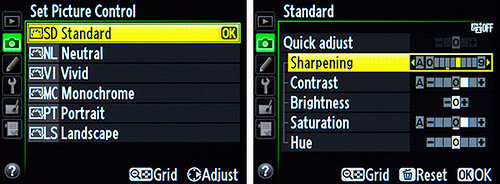
The adjustment panel for Nikon Picture Control Utility

Nikon’s Picture Control Utility is a bit more limited in its adjustments than is the Canon application, but you still have a fair amount of control to create new image styles. When you open the application, you’ll see a listing of the Nikon Picture Controls on the left. These are the same as you see in-camera when you select the Picture Control menu on your Nikon. On the right hand side, you’ll see the adjustments you can make, which include Sharpening, Clarity, Contrast, Brightness, Saturation, and Hue. You also have the ability to create a custom tone curve if you prefer, rather than using the Brightness and Contrast sliders.

While I prefer the greater control over color that Canon provides, Nikon’s Picture Control Editor allows you good options to create your own look for your images.

Uploading to the camera

Uploading them into your camera is even easier than Canon’s method. Simply connect a Nikon formatted memory card to your computer, and at the bottom of the application window, click Use In Camera. You’ll want to use a descriptive name for your picture control so that you’ll know what you’re choosing when selecting it in camera. This will automatically save the picture style to your memory card.  Insert the memory card into your Nikon camera and in the Camera menu, select Manage Picture Control. Select Load/Save and you’ll see any Picture Control files you’ve saved to the card and be prompted to add them to the camera.

That’s all there is to it. In addition to saving the picture control to a memory card, you can save it to a file on your computer, and also use it in Nikon’s Capture NX or View NX software.

Gritty Portrait Picture Control - Customizing Your Images With In-Camera Picture Styles

The image on the left is shown using Nikon’s Portrait Picture Control. On the right, is a custom Portrait Picture Control created in Nikon Picture Control Editor.

Summary

In the digital age, it’s sometimes difficult to differentiate your images from the millions of others out there. One way to do so is in post-processing. But that’s not something every photographer, be they professional or enthusiast, wants to deal with.

Creating custom picture styles takes a few minutes on the computer, but allows you to create a look that is distinctly yours. By uploading it to your camera you can then apply it to images you make from that point on. Have you created any custom picture styles for your work? Share samples in the comments below!

Custom Landscape Picture Control - Customizing Your Images With In-Camera Picture Styles

On the top is the image using Nikon’s Landscape picture control. On the bottom is the same image with a custom picture control I created. I adjusted to tone curve to reduce contrast and increased color saturation to provide better color in my landscape images.

Customizing Your Images With In-Camera Picture Styles

On the left is Nikon’s Standard picture control, while on the right is a custom picture control I created.

Canon Muted Color Picture Style - Customizing Your Images With In-Camera Picture Styles

The left image was shot using Canon’s Portrait Picture Style. On the right is the same image where I created a more muted look.

Canon Picture Style - Customizing Your Images With In-Camera Picture Styles

On the left is Canon’s Landscape picture style, on the right is a custom picture style I created for landscape images.

The post How to Customize Your Images With In-Camera Picture Styles by Rick Berk appeared first on Digital Photography School.


Digital Photography School

 
Comments Off on How to Customize Your Images With In-Camera Picture Styles

Posted in Photography


Picture of Russian ambassador’s assassin wins World Press Photo award

15 Feb

2017 World Press Photo Contest winners

An Assassination in Turkey. © Burhan Ozbilici, The Associated Press. World Press Photo of the Year

The 60th World Press Photo award has been won by a Turkish photographer for an image of the direct aftermath of the assassination of the country’s Russian ambassador. Burhan Ozbilici, who works for Associated Press in Istanbul, beat 5,034 other photographers from 125 countries to the top prize in one of the world’s most prestigious professional photography contests.

Ozbilici’s image was taken during the opening of a photography exhibition in Ankara at which the Russian ambassador Andrey Karlov was making a speech. Ozbilici wasn’t scheduled to cover the event but dropped in on his way home from work. During the presentation an off-duty Turkish policeman pulled out a gun and shot Karlov nine times, shouting that it was revenge for Russia’s part in the conflict in Syria. Immediately after the killing the gunman, Mevlüt Mert Alt?nta? told the gallery visitors to get out, which Ozbilici took to signify that Alt?nta? wasn’t going to harm anyone else. He is quoted as saying that he ‘remembered’ his ‘professional duty’ and decided to try to photograph the situation.

Ozbilici’s image also won the competition’s Spot News Stories category, but the chair of Judges, former Magnum President Stuart Franklin, wrote in the British newspaper The Guardian that he was ‘strongly opposed to it becoming photo of the year’. He went on to say ‘Unlike the assassination of Archduke Ferdinand in Sarajevo in 1914, the crime had limited political consequences. Placing the photograph on this high pedestal is an invitation to those contemplating such staged spectaculars: it reaffirms the compact between martyrdom and publicity…. Photography is capable of real service to humanity, promoting empathy and initiating change. This image achieves neither…’

The contest attracted 80,408 images across its eight categories, and in total there were 45 winners. Ozbilici’s winning image will net him €10,000 and a ‘selection’ of Canon camera equipment. The winning images will be displayed in a traveling exhibition that will open in Amsterdam on 14th April and which will go on to visit 99 other cities during the year. A book will also be available. For more information visit the World Press Photo website.

Press release

World Press Photo announces winners of 2017 contests

The 2017 World Press Photo Contest
The World Press Photo of the Year honors the photographer whose visual creativity and skills made a picture that captures or represents an event or issue of great journalistic importance in the last year.

Burhan Ozbilici’s picture–which also won first prize in the Spot News Stories category–shows how Mevlüt Mert Alt?nta?, a 22-year-old off-duty police officer, assassinated the Russian ambassador to Turkey, Andrey Karlov, at an art exhibition in Ankara, Turkey, on 19 December 2016. Alt?nta? wounded three other people before being killed by officers in a shootout. Ozbilici is a staff photographer for The Associated Press, based in Istanbul.

Mary F. Calvert, member of the jury, spoke about the winning photograph:

‘It was a very very difficult decision, but in the end we felt that the picture of the Year was an explosive image that really spoke to the hatred of our times. Every time it came on the screen you almost had to move back because it’s such an explosive image and we really felt that it epitomizes the definition of what the World Press Photo of the Year is and means.”

Jury member João Silva added:

“Right now I see the world marching towards the edge of an abyss. This is a man who has clearly reached a breaking point and his statement is to assassinate someone who he really blames, a country that he blames, for what is going on elsewhere in the region. I feel that what is happening in Europe, what is happening in America, what is happening in the Far East, Middle East, Syria, and this image to me talks of it. It is the face of hatred.”

The 2017 Photo Contest in numbers
The 2017 contest drew entries from around the world: 5,034 photographers from 125 countries submitted 80,408 images. The jury gave prizes in eight categories to 45 photographers from 25 countries: Australia, Brazil, Canada, Chile, China, Czech Republic, Finland, France, Germany, Hungary, India, Iran, Italy, Pakistan, Philippines, Romania, Russia, South Africa, Spain, Sweden, Syria, New Zealand, Turkey, UK, and USA.

Discover all of the winners and the awarded photos in an image gallery: http://www.worldpressphoto.org/collection/photo/2017

Jury member Tanya Habjouqa said about this year’s winners:

‘It was a very intense, sometimes brutal, discussion—sometimes even emotional—but I feel proud. I think we were brave in our decision. We were bold. I think the selection is definitely going to push forward a debate and I think it is a debate that is essential to have.”

You can also watch and download exclusive video interviews with the jury members here: https://vimeo.com/album/4395034

2017 Photo Contest jury and procedures
A group of internationally recognized professionals in the fields of photojournalism and documentary photography—chaired by Stuart Franklin—convened in Amsterdam to judge all entries. The jury is independent, and all entries were presented anonymously. A secretary without voting rights safeguards the fairness of the process, which is explained in full here: http://www.worldpressphoto.org/activities/photo-contest/judging

For the full list of jury members and secretaries, please see: https://www.worldpressphoto.org/activities/photo-contest/jury

The World Press Photo Foundation will release a technical report reviewing the contest, including the code of ethics, entry rules, and verification process on Monday, 27 February.

Prizes
The premier award, the World Press Photo of the Year, carries a cash prize of 10,000 euros. In addition, Canon will present the winning photographer with a selection of camera equipment. For more information about Canon, please visit: http://www.canon-europe.com/pro/

Award winners have their travel and lodging paid for by the World Press Photo Foundation to Amsterdam so they can attend the World Press Photo Festival, an event taking place 20-22 April featuring photographer presentations, screenings, and talks. For more information, see festival.worldpressphoto.org. They also receive a diploma and a Golden Eye Award at the Awards Ceremony.

2017 Exhibition
The prize-winning photographs are assembled into an exhibition that travels to 45 countries and is seen by more than 4 million people each year. The winning pictures are also published in the annual yearbook, which is available in multiple languages. The first World Press Photo exhibition opens in De Nieuwe Kerk, Amsterdam, on 14 April 2017. For more information about the exhibition in Amsterdam, please go to: http://www.worldpressphoto.org/exhibitions/2017-exhibition/amsterdam

This year’s exhibition displays will be printed on Canon large-format and Arizona flatbed printers. Please see the Canon website for further information: http://www.canon-europe.com/

The 2017 World Press Photo Digital Storytelling Contest
The Digital Storytelling Contest (previously known as the Multimedia Contest) rewards those producing the best forms of visual journalism enabled by digital technologies and the spread of the Internet. The contest is open to digital storytellers, visual journalists and producers, with submissions that include the work of a professional visual journalist.

Katerina Cizek, Chair of the Immersive Storytelling category said:

‘This year, the entries in the Immersive Digital Storytelling Category were very strong, diverse and ambitious. The projects also ranged widely in scale and scope. Because of this, the jury deliberated on how to weigh and balance the diverse qualities of the projects, and agreed on the criteria of: excellence in visual storytelling, importance and originality of reporting, innovation in immersivity and depth of social relevance. We ultimately agreed upon three winners, who each excel in their own ways, exemplifying distinct developments in our emerging field.”

DJ Clark, Chair of the Short Form category added:

‘This is a rapidly evolving media format in its early stages. We need people to push the boundaries and experiment. It won’t always work, but when it does it stands out.”

See a gallery of all the winners: http://www.worldpressphoto.org/collection/mm/2017

The 2017 Digital Storytelling Contest in numbers
This year 282 productions were submitted to the contest: 135 Short Form, 54 Long Form, 62 Immersive Storytelling and 31 Innovative Storytelling.

Prizes
Winners in each category are invited to the World Press Photo Festival in Amsterdam. A representative from each of the winning productions will have their travel and lodging paid for by the World Press Photo Foundation. The winners in each category will receive a diploma and a Golden Eye Award, presented during the annual Awards Ceremony. The prize-winning projects are assembled into an exhibition that travels to select locations. In 2016, the exhibition locations included China, Denmark, Germany, Italy, the Netherlands, Spain, and UAE.

2017 World Press Photo Contest winners

Taking A Stand In Baton Rouge. © Jonathan Bachman, Thomson Reuters. Contemporary Issues – First Prize, Singles

Lone activist Ieshia Evans stands her ground while offering her hands for arrest as she is charged by riot police during a protest against police brutality outside the Baton Rouge Police Department in Louisiana, USA, on 9 July 2016. Evans, a 28-year-old Pennsylvania nurse and mother of one, traveled to Baton Rouge to protest against the shooting of Alton Sterling. Sterling was a 37-year-old black man and father of five, who was shot at close range by two white police officers. The shooting, captured on a multitude of cell phone videos, aggravated the unrest coursing through the United States in previous years over the use of excessive force by police, particularly against black men.

2017 World Press Photo Contest winners

Migrant Crossing. © Vadim Ghirda, The Associated Press. Contemporary Issues – Second Prize, Singles

A woman is supported by two men while crossing a river, as refugees attempt to reach Macedonia on a route that would bypass the border fence, on 14 March 2016. Hundreds of refugees walked out of an overcrowded camp on the Greek-Macedonian border on this day, shortly after the closure of Macedonia’s borders, determined to head north despite the dangers of the crossing.

2017 World Press Photo Contest winners

The Libyan Migrant Trap. © Daniel Etter. Contemporary Issues – Third Prize, Singles

Two Nigerian refugees cry and embrace in a detention center for refugees in Surman, Libya, on 17 August 2016. The detention center houses hundreds of women escaping precarious conditions. Many claim they are regularly beaten or sexually assaulted, and receive insufficient amounts of food and water at the center. Most of these women were attempting to reach Europe by being smuggled across the Mediterranean in boats setting sail from neighboring Sabratah.

2017 World Press Photo Contest winners

Standing Rock. © Amber Bracken. Contemporary Issues – First Prize, Stories 

Riot police clear marchers from a secondary road outside a Dakota Access Pipeline (DAPL) worker camp using rubber bullets, pepper spray, tasers and arrests. In other incidents they’ve employed militarized vehicles, water canons, tear gas and have been accused of using percussion grenades.

Story: For nearly 10 months, members of the Standing Rock Sioux tribe and their allies camped out in opposition to the Dakota Access Pipeline crossing their territory and threatening their water supply. The estimated $ 3.78 billion project, backed by Energy Transfer Partners, is nearly complete, covering almost 1,172 miles. In military vehicles and body armor, police used tear gas, pepper spray, rubber bullets, and water cannons against the protesters, and have been accused of inhumane treatment of arrestees.

2017 World Press Photo Contest winners

Standing Rock. © Amber Bracken. Contemporary Issues – First Prize, Stories

Jesse Jaso, 12, enters the Unity Teepee, at the Sacred Stone Camp. The teepee is signed by camp supporters from all over North America and around the world. Oceti Sakowin, or the Seven Council Fires, is the true name of the great Sioux nation and refers to the coming together of the different factions of the tribe. Oglala, Cheyenne, Ut, Cree, Hopi and non-indigenous all are among the 200+ tribes represented in the camps and on the front lines. The last time there was a similar gathering was before the Battle of the Little Bighorn, 1876.

2017 World Press Photo Contest winners

Victims Of The Zika Virus. © Lalo de Almeida, for Folha de São Paulo. Contemporary Issues – Second Prize, Stories

Marcela (2) observes her sisters in her mother’s lap at the family’s home in the rural area of Areia. Twin sisters Heloisa (left) and Heloá (right) were born seven months prior with microcephaly caused by the Zika virus.

Story: In September 2015, babies in Brazil began to be born with microcephaly and other malformations, and in April 2016 the link between the Zika virus and these malformations was confirmed. Northeastern Brazil, where most of the Zika cases of microcephaly were reported, is one of the poorest regions in the country, and lacks an adequate health system. Many children with microcephaly often live hundreds of kilometers away from the nearest health center and spend hours traveling in order to receive medical and physical therapy. Most come from poor households and receive little governmental support.

2017 World Press Photo Contest winners

Victims Of The Zika Virus. © Lalo de Almeida, for Folha de São Paulo. Contemporary Issues – Second Prize, Stories

Heloá, seven months old, takes a bottle of milk on her grandmother’s lap at the family’s home in Areia. She and her sister Heloísa were born with microcephaly caused by the Zika virus.

2017 World Press Photo Contest winners

Copacabana Palace. © Peter Bauza. Contemporary Issues – Third Prize, Stories

A pastor, who also lives in the occupied buildings, explains all the construction problems. A couple of weeks ago, the hall floors from a building crashed down at night. Fortunately everybody was sleeping and nothing serious happened. Most of the buildings are exposed to corrosion.

Story: “Copacabana Palace”, an ironically named series of condominiums in Brazil, houses more than 300 homeless families. Built more than 30 years ago, construction on this complex was never finished and has since become squatted. A lack of fresh water, electricity, or a working sewage system means residents here often face serious health problems. Most of the people here come from favela communities, some of whom may have been offered social housing as part of governmental rehousing schemes that they don’t feel safe enough to occupy due to the presence of drug-gang families. According to official statistics from the Brazilian Institute of Geography and Statistics, it is estimated that there are 1.8 million homeless people in Brazil.

2017 World Press Photo Contest winners

Copacabana Palace. © Peter Bauza. Contemporary Issues – Third Prize, Stories

Domingo, from Angola, came several years ago to Brazil in search for a better life.

Articles: Digital Photography Review (dpreview.com)

 
Comments Off on Picture of Russian ambassador’s assassin wins World Press Photo award

Posted in Uncategorized


Picture of school boy in uniform wins Swiss photographer £15,000 Taylor Wessing prize

17 Nov

$ (document).ready(function() { SampleGalleryV2({“containerId”:”embeddedSampleGallery_4662939106″,”galleryId”:”4662939106″,”isEmbeddedWidget”:true,”standalone”:false,”selectedImageIndex”:0,”startInCommentsView”:false,”isMobile”:false}) });

London’s National Portrait Gallery has announced the winner of its annual Taylor Wessing Photographic Portrait Prize, with Swiss photographer Claudio Rasano scooping the top award of £15,000. The winning image, of a school boy from South Africa, was part of a series studying how people can remain individuals while wearing the same uniforms. Rasano has featured in the short list for the prize in two previous years, but this is the first time he has won.

Second prize went to Joni Sternback for a tintype portrait of a pair of surfers which won him £3000, while the £2000 third prize went to Kovi Konowiecki for a picture of a pair of Jewish girls. Both photographers are from America.

The competition also provides an additional £5000 prize for a photographer under the age of 35, which was won by the UK’s Josh Redman. His John Kobal New Work Award grants him a commission to photograph someone from the UK film industry for the gallery’s collection.

The winning images, along with over fifty other entries, can be seen at the National Portrait Gallery in London until the 26th February. Entrance is £6. For more information visit the National Portrait Gallery website.

Press release

CLAUDIO RASANO WINS TAYLOR WESSING PHOTOGRAPHIC PORTRAIT PRIZE 2016 FOR HIS PHOTOGRAPH OF A JOHANNESBURG SCHOOLBOY

Claudio Rasano won the Taylor Wessing Photographic Portrait Prize 2016 for his portrait of a Johannesburg schoolboy, the National Portrait Gallery has announced. The prestigious £15,000 award was presented to the Swiss-Italian photographer at an awards ceremony last night (Tuesday, 15 November 2016).

The winning portrait, part of Rasano’s series Similar Uniforms: We Refuse to Compare, was taken in February 2016, in Johannesburg, South Africa and focuses on issues of preserving individuality in the context of school uniforms. The photograph was shot in daylight, outdoors and in front of a plain white paper background. The sitter for this particular inkjet print is eighteen-year-old Katlehong Matsenen.

Rasano explains: “Children themselves have been known to rebel against uniforms, especially as they approach the awkward age characterised by the need to fit in and the desire to stand out, all at the same time. Some experts too have spoken against school uniforms on the grounds that they suppress individuality and diversity.”

Claudio Rasano was born in 1970 in Basel, Switzerland. His work has been included in numerous international exhibitions and previously featured in the Taylor Wessing Photographic Portrait Prize in 2011 and 2013. Rasano’s awards include the Shortlist for the Athens Photo Festival, 2016; Bieler Fototage 2015; Leica Oskar Branack Prize 2015 and a finalist in the Photography Masters Cup 2015.

Second prize has been awarded to Joni Sternbach’s large-format tintype portrait of surfers Thea Adler and Maxwell Schultz and third prize has gone to Kovi Konowiecki for his photographs Shimi Beitar Illit and Tilly and Itty Beitar Illit part of a series of inkjet prints that portray Orthodox Jews from around the world. The John Kobal New Work Award, worth £5,000, was won by Josh Redman for his portrait, Frances.

The winning portraits will be on display as part of the Taylor Wessing Photographic Portrait Prize 2016 exhibition from 17 November 2016 to 26 February 2017. The annual exhibition is one of the most prestigious photography awards in the world and showcases new work that has been submitted by some of the most exciting contemporary photographers. Since the international competition began in 1993, it has remained a hugely important platform for portrait photographers and offers an unparalleled opportunity for celebrated professionals, emerging artists and amateurs alike.

The competition judges had no knowledge of the identity of the entrants, and the diversity of styles in the exhibition reflects the international mix of entries as well as photographers’ individual and varied approaches to the genre of portraiture. For the second time, photographers were encouraged to submit works as a series in addition to stand-alone portraits, and there was no minimum size requirement for prints. This year, for the first time, the rules also allowed photographers to submit photographs on different supports to the competition – to encourage the demonstration of a range of different photographic processes.

The prize-winning photographs and those selected for inclusion in the exhibition were chosen from 4303 submissions entered by 1842 photographers from 61 countries.

Dr Nicholas Cullinan, Director, National Portrait Gallery, says ‘My congratulations to Claudio Rasano for his winning portrait of schoolboy Katlehong Matsenen taken in Johannesburg earlier this year. The quality and diversity of both this year’s shortlist and exhibition are a testament to the engaging work being produced by international photographers. Each and every photographer who entered has contributed their part to the debate and evolution of contemporary portrait photography.’

Tim Eyles, Managing Partner, Taylor Wessing LLP, says: ‘One of the great joys and honours of sponsoring the Taylor Wessing Photographic Portrait Prize for the past nine years- and being part of the judging panel- is having the rare opportunity to catch an intimate glimpse into the lives of people from around the world. Each winning portrait tells a different, unique story and builds a genuine connection between the viewer, the subject and the photographer. I hope that you will share our enjoyment of the photographs in this year’s exhibition, and join me in congratulating the photographers whose portraits are featured.’

American artist Joni Sternbach was born in the Bronx, New York and is a Visiting Artist at Cooper Union School of Art, faculty member at the International Centre of Photography and The Penumbra Foundation in New York, where she teaches wet plate collodion. Sternbach uses early photographic processes to create contemporary landscapes and environmental portraits, centring on man’s relationship to water. Her series Surfland, features large-format tintype portraits of surfers. Her prize-winning portrait was taken in February 2016 at Davenport Landing, Santa Cruz, California, USA. Sternbach says: ‘For me, this photograph represents many of the challenging aspects of creating a portrait. I was in an entirely new location and faced with people I’d never met before. In this spectacular environment, I aimed to create a dynamic complexity within the picture that was both unique to that person and also understandable to others.’

American artist Kovi Konowiecki was born and raised in Long Beach, California. After pursuing a professional career in football, Konowiecki is in the final stages of an MA in photography at the University of the Arts, London. His work lies between documentary and fine art, often focusing on portraiture and telling stories that also reveal his identity, and his experiences of growing up in Long Beach. Shimi Beitar Illit and Tilly and Itty Beitar Illit are part of a series of inkjet prints that portray Orthodox Jews from around the world. The colours and floral background create a painting-like quality, highlighting the mysticism of the subjects and their association with a history that many may find unfamiliar.

Konowiecki explains: ‘When I set out to photograph the faces of Orthodox Jews around the world, it was an attempt to both strengthen my ties to my family’s history and shed light on the traditions of a people that seem strange to modern society. The project started by contacting members of the Jewish community from where I grew up, and evolved into travels across the world to capture Orthodox Jews who, although they live thousands of miles apart, are bound together by history, tradition and a set of values that serve as the cornerstone of the lives of many who live in today’s society.’

£5,000 John Kobal New Work Award: Josh Redman for Frances

The £5,000 John Kobal New Work Award has been awarded to Josh Redman for his photograph Frances, from an on-going series of pared down studio portraits. Redman says, ‘This was Frances’s first serious photo shoot, and it’s an honour to have been part of her initiation into modelling at age 83. During the 3-hour sitting we chatted over pastries about her late husband, the War, her lifelong job as a typist and her daughter Tineka.’ Born in the UK in 1984, Redman was a sculptor and potter until 2012 when he decided to sell his kiln, buy a camera and move to London. Since then he has worked as a freelance photographer, winning the AOP Assistant Award in 2014 and has been commissioned by Adidas, SKY TV and The British Museum amongst others.

The John Kobal New Work Award is given to a photographer under thirty-five whose work has been selected for the Taylor Wessing Photographic Portrait Prize exhibition. The winner receives a cash prize of £5,000 to include undertaking a commission to photograph a sitter connected with the UK film industry for the Gallery’s Collection.

The competition was judged from original prints by Dr Nicholas Cullinan, Director, National Portrait Gallery; Dr Phillip Prodger, Head of Photographs, National Portrait Gallery; Carole Sandrin, Curator, Musée de l’Elysée, Lausanne; Christiane Monarchi, Editor Photomonitor; Nadav Kander, Photographer and Tim Eyles, Managing Partner, Taylor Wessing LLP.

The exhibition also features an In Focus display of previously unseen prints from a new body of work by the award-winning Spanish photographer, Cristina de Middel. The photographs, making their international debut in the exhibition, are part of the series ‘Gentleman’s Club’, taken of prostitutes’ clients in brothels in Rio de Janeiro, Brazil. By recruiting her sitters through a newspaper advert, she inverted the normal roles of the business by placing herself in a position of power. Sitters were asked about their experience, personal history and motivations. In Focus is an annual showcase for new work by an internationally-renowned photographer, which is exhibited alongside the images selected for the Taylor Wessing Photographic Portrait Prize 2016. De Middel is the second In Focus artist, selected by the Gallery’s curators, following last year’s inaugural display which featured the work of Pieter Hugo.

TAYLOR WESSING PHOTOGRAPHIC PORTRAIT PRIZE 2016
17 November 2016 – 26 February 2017
Tickets with donation: Full price £6, concessions £5 / Tickets without donation: Full price £5, concessions £4 (Free for Members and Patrons) Supported by Taylor Wessing npg.org.uk/photoprize #photoprize

PUBLICATION
A fully illustrated paperback catalogue including all photographs from this year’s exhibition features an interview with the In Focus photographer Cristina de Middel and interviews with the prize-winners by Richard McClure. RRP £15 with a special price of £9.99 when purchased directly from the National Portrait Gallery shops.

Prizes: First prize is £15,000, second prize is £3,000, and third prize is £2,000. The winner of the John Kobal New Work Award receives £5,000.

Tour: The exhibition will tour to Sunderland Museum and Winter Gardens from 18 March – 4 June 2017 and The Beaney House of Art and Knowledge, Canterbury from 8 July – 29 October 2017.

Articles: Digital Photography Review (dpreview.com)

 
Comments Off on Picture of school boy in uniform wins Swiss photographer £15,000 Taylor Wessing prize

Posted in Uncategorized


Aura is a next generation digital picture frame

04 Oct

Digital picture frames were all the rage around 2006, but since then have pretty much been relegated to the bargain basement. Instead of focusing on innovation, new features and better performance, frame makers decided to compete on price. As a result digital frames have always been regarded a low-quality product and the gadget community quickly lost interest.

The team behind the new Aura frame is planning to change that and make the digital picture frame once again a product that technophiles across the globe are lusting for, with a design that combines a high-quality display with all sorts of digital bells and whistles. The Aura’s screen is pretty much identical to the 2048 x 1536 pixel Retina display in the iPad and the acrylic frame, which is edged in anodized aluminum, will be available in either ivory with rose gold trim or black with charcoal trim. 

Premium finish aside, the Aura frame stands out thanks to its features. There is an accompanying mobile app for syncing manually created albums to the device. Alternatively, the app offers facial recognition and can be set to upload all images that have specific persons in them. There is also a filter that gets rid of blurry images, duplicates and those where subjects have their eyes closed. It even makes sure to only use images that crop well for the frame’s 4:3 format.

Of course you can invite others to contribute to an album as well. In addition the Aura also comes with a set of sensors that can detect if you are in the room in order to make sure you always see a new image when you enter.

The sensors are also used for the gesture control feature which lets you scroll through images from a distance. The Aura frame is not available yet but its makers just secured $ 6M Series A round funding from Spark Capital, so chances are you’ll be able to buy one in the nearer future. The projected retail price is $ 400 and you can register your email to be notified at launch. Watch the video below for a better idea how Aura works.

Articles: Digital Photography Review (dpreview.com)

 
Comments Off on Aura is a next generation digital picture frame

Posted in Uncategorized


Using a Flat Picture Style for Better Finished Images

13 Aug

During my career in photography, I’ve continued to evolve, both my shooting and editing styles, to achieve the results I wanted. Several years ago, while working with film editors on a cinema project, I came across a concept that I decided to apply to my own photography, and I have to say, it has improved my final images a great deal. Let me explain about using flat picture styles.

Finished-Image

When Hollywood studios film a movie using a digital cinema camera, many times the camera will be set to record what is known as Log Gamma. This is similar to the picture styles that we DSLR and camera users have come to know and love. But while picture styles or picture controls are for the most part intended to provide a finished look, Log Gamma does just the opposite. A video file shot using Log Gamma will be very flat, with little contrast and color saturation. The purpose of shooting video this way, is so that it retains as much information as possible about the range of tones in the image, so the colorists who work on the video later can bring out that detail, and create a visual look to the film. This process is called color grading.

As I began to understand what the colorists were doing, I adjusted my workflow to allow me to take advantage of the same concepts. I find that by using a flat, low contrast, low saturation picture style, when I process the RAW file I can bring out better detail and contrast, and avoid clipping in the highlights and shadows.

Choosing a Flat Picture Style

Before Image With Histogram

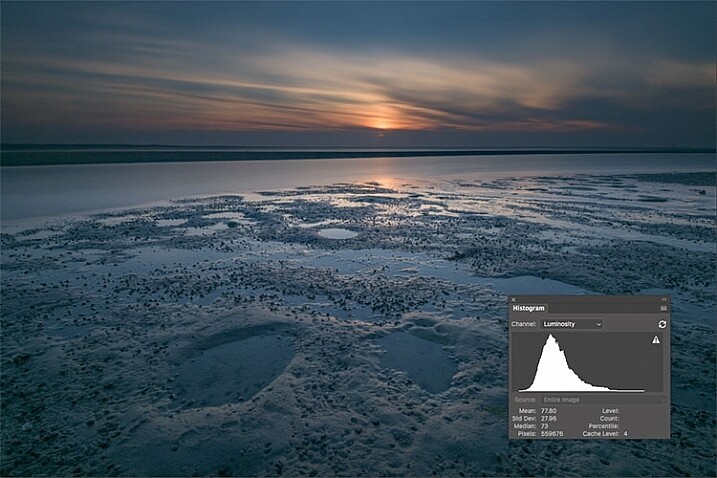
A flat or neutral picture style will give you an image with the least contrast, maintaining better highlight and shadow detail. This allows you to bring out those details in processing. The histogram on your camera, and later in Photoshop or Lightroom, allows you to see where your highlight and shadow tones fall, to avoid clipping.

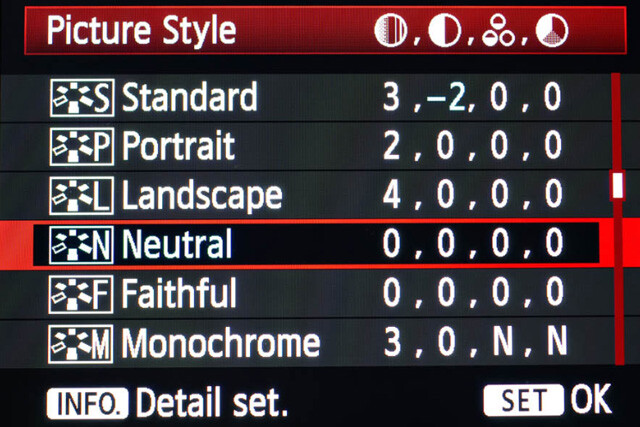
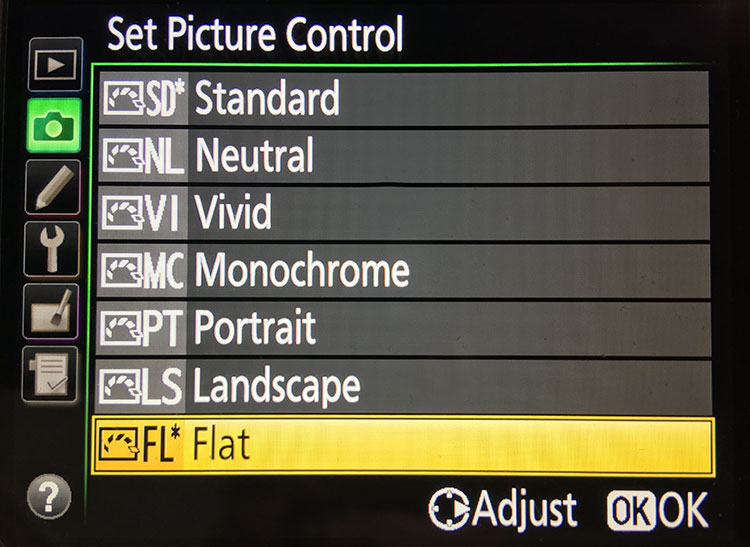
I had been shooting RAW for some time, but have left the Picture Style set to Standard or Landscape, for the most part. Once I saw this technique, I decided to change my picture style on my camera to Neutral (for Canon cameras) or Flat (on newer Nikons).

Canon Picture Style

Canon Picture Style

The reason is that the histogram shown on the back of the camera, as well as the image preview, reflect the selected picture style. The result is that if the picture style selected is a more contrasty one, such as Landscape, the histogram will reflect that, and may indicate clipping of highlights or shadows, especially in a contrasty scene.

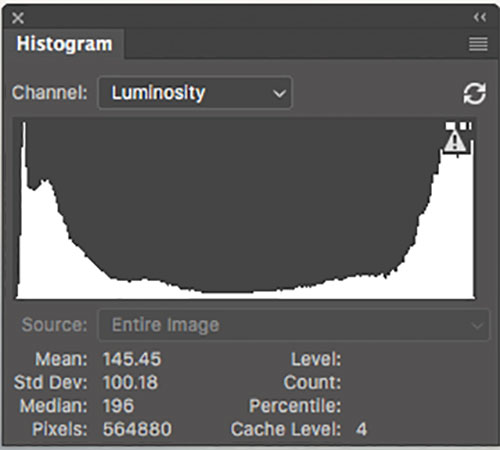
Clipped Histogram

This histogram shows clipped highlights, meaning detail is lost in the brightest areas of the image.

On my Nikon D810, I use the Flat picture control, because it is the best choice for capturing the full range of tones in the scene, and those tones are reflected on the histogram on the back of the camera when I review the shots. This is important because I need an accurate indication of where the highlights and shadows in a scene fall in my histogram.

Nikon 810 Flat Picture Control

Nikon 810 Flat Picture Control

Nikon picture control

Nikon picture control – if you do not have Flat, choose Neutral or Faithful

The histogram on your camera is a graphed indication of where the pixels in your image fall in relation to highlights and shadows. The left edge represents blacks, the mid-left represents shadows, the middle is midtones, the mid-right is highlights, and the far right is whites. While not all cameras have a Flat picture control or style, most have a Neutral or Faithful picture style or control, that works similarly. Also, most cameras give you the ability to edit the picture styles, so you can turn down the contrast if you like, ensuring that you capture more highlight and shadow detail, and reducing the chances of clipping highlights or shadows.

When you clip highlights, objects in the scene that are clipped will show as pure white with no detail. When shadows are clipped, objects in those areas will show as pure black in the scene, also with no detail. When viewing the histogram, if the squiggly lines that make up the graph are pushed up against either the left or the right side, that is called clipping. When that happens, you are losing detail in the shadows if it’s pushed against the left, and in the highlights if the graph is pushed against the right. By reducing the contrast in the picture style, you’ll reduce the chances of losing detail in the scene.

Shooting RAW, and knowing I’ll be making adjustments in post, it doesn’t really matter what picture style I use, because I can change that when processing the RAW file. But it’s essential to be able to see an accurate histogram on my camera, to ensure I’ve captured as much tonal range as possible.

Processing the RAW File

Image photographed using flat picture control

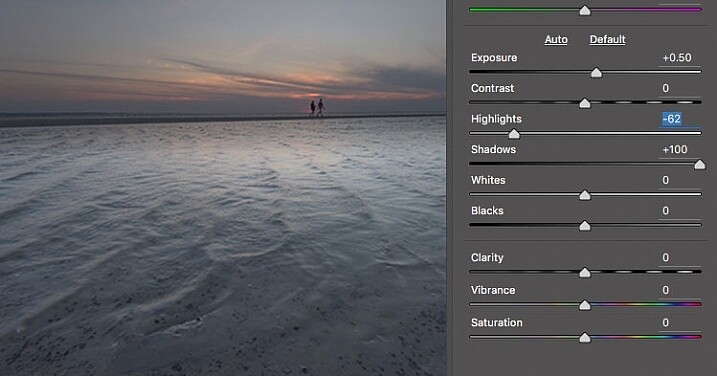
This image was shot using the Flat picture control, and then the highlight and shadow sliders in Adobe Camera RAW were adjusted to further reduce contrast.

Once I begin processing the RAW file, I’ll do even more, if necessary, to flatten the image and compress the range of tones within the histogram. This includes using the Highlights and Shadows sliders in Adobe Camera RAW to bring out details on both ends of the histogram.  You can watch the histogram change in Adobe Camera Raw or Lightroom as you do so, to be sure you don’t go too far. If the highlights begin to look muddy, you’ve gone too far. By the same token, if the shadows start to look washed out, that’s probably too far as well. You want to maintain detail in each, but not lose the depth of tone completely. It’s important to note that this adjustment will vary for different images, depending on where the highlights and shadows fall in the images.

In addition to adjusting the highlights, shadows, and contrast here, I will use the Dehaze slider, Lens Correction, and Spot Removal brush in Adobe Camera RAW. If you prefer, you can use the Vibrance, Saturation, and Adjustment Brush to complete the image in Adobe Camera RAW or Lightroom, but my preference is to work in Photoshop. There I can use a Layers workflow along with masking and Adjustment Layers and with various plugins, to achieve my final image.

Building Up Color and Contrast

Using Adjustment Layers

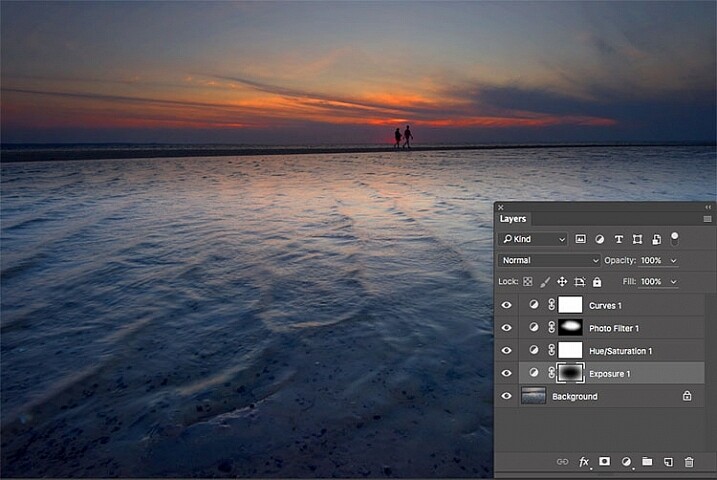
Using Adjustment Layers in Photoshop, I built up the color saturation and contrast to achieve the final image.

Once I have the image at the desired level of flatness, I then go about building up color saturation and contrast, or in Hollywood terms, color grading my image. After bringing the image into Photoshop, there are a number of ways you can go about this. The first is to use adjustment layers so that you can continually adjust each layer as desired, until you flatten the image for your final output. In addition, if you’re making an adjustment that you only want to apply in certain areas, you can use layer masks to hide or reveal it as desired.

Many of these adjustments will be to personal taste. I personally prefer my images to have punchy color and contrast. So a set of adjustment layers I might use would be Vibrance, Exposure, Hue/Saturation, Curves, and Exposure.  The flexibility of using adjustment layers allows me to direct adjustments where I need them, rather than being forced to make them globally.

Image processed with Nik Color Efex Pro

This is the same image, but I used Nik Color Efex Pro to achieve the final image instead of adjustment layers.

If adjustment layers aren’t your thing, perhaps using a plugin such as Google’s Nik Efex Pro. It’s now available at no cost, and is a software package I highly recommend. I’ve created several presets in Color Efex Pro, and will also use Viveza and its control points to further adjust my image. For landscapes, in Color Efex I have created a preset using Brilliance/Warmth, Pro Contrast, Skylight Filter, Detail Extractor, and Vignette:Lens, that I find to be pleasing for a majority of my landscape images. Depending on the image, I will tweak these settings to meet my vision.

Summing Up

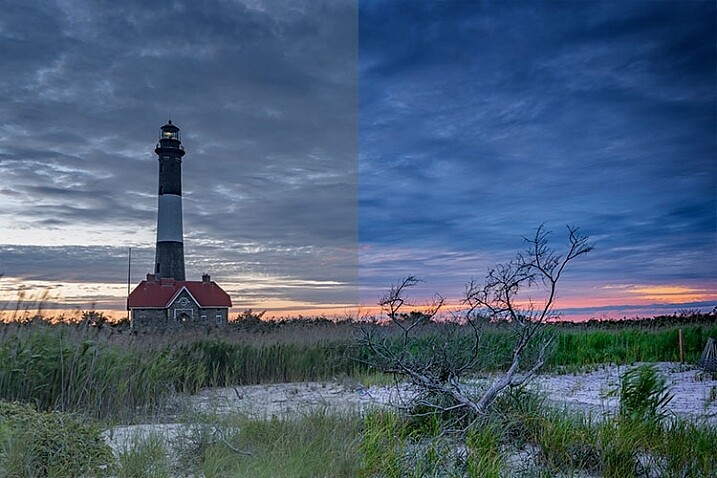
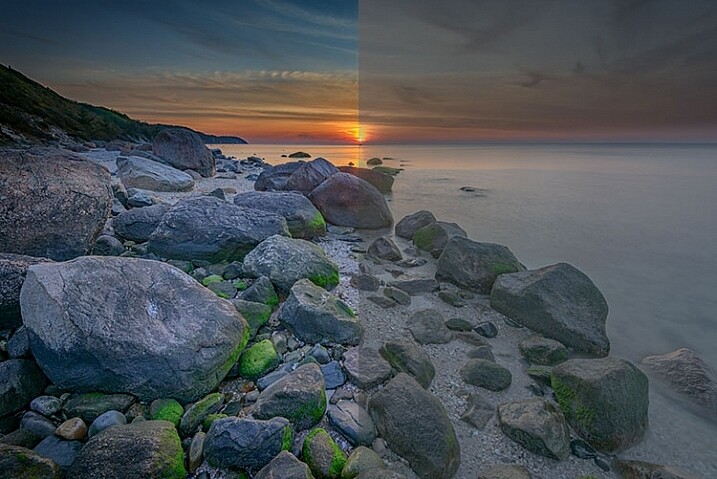
Before and After

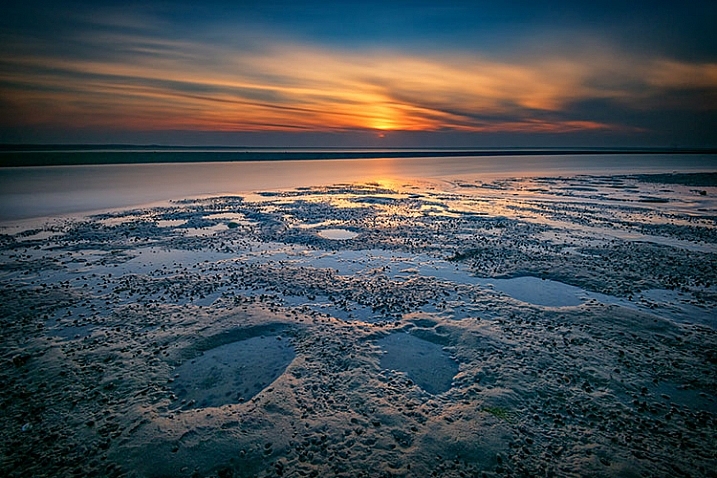
On the left is the image with its tones flattened and desaturated, using a Flat picture control and adjusting highlights and shadows as needed. On the right is the image fully processed building contrast and color saturation.

By starting with a flattened file, you give yourself room in the range of tones to build contrast and saturation, without clipping highlights, shadows, or any of the color channels. While shooting with a more finished picture style may look more pleasing on the camera’s LCD screen, or upon import into Lightroom or Photoshop, the contrast has already been adjusted to give it a pleasing look. Any adjustments to Saturation or color may result in a file that at the very least looks overcooked, and at worst, shows evidence of clipping highlights, shadows, or color channels.

An image showing before and after color grading.

On the right is the image with the flat picture style, while the left has been “color graded” in Photoshop.

Building-contrast-2

googletag.cmd.push(function() {
tablet_slots.push( googletag.defineSlot( “/1005424/_dPSv4_tab-all-article-bottom_(300×250)”, [300, 250], “pb-ad-78623” ).addService( googletag.pubads() ) ); } );

googletag.cmd.push(function() {
mobile_slots.push( googletag.defineSlot( “/1005424/_dPSv4_mob-all-article-bottom_(300×250)”, [300, 250], “pb-ad-78158” ).addService( googletag.pubads() ) ); } );

The post Using a Flat Picture Style for Better Finished Images by Rick Berk appeared first on Digital Photography School.


Digital Photography School

 
Comments Off on Using a Flat Picture Style for Better Finished Images

Posted in Photography


Wildfire picture wins £3000 international Environmental Photographer of the Year Award

30 Jun

$ (document).ready(function() { SampleGalleryV2({“containerId”:”embeddedSampleGallery_1827965088″,”galleryId”:”1827965088″,”isEmbeddedWidget”:true,”standalone”:false,”selectedImageIndex”:0,”startInCommentsView”:false,”isMobile”:false}) });

The Chartered Institution of Water and Environmental Management (CIWEM) has announced the winners of its Environmental Photographer of the Year awards and given out £6000 (approx. $ 8000) in prizes as well as a job. The winner of the £3000 overall award is Swedish photographer Sara Lindstrom for a picture of a forest fire taken in Alberta, Canada.

Luke Massey took the £1000 Young Environmental Photographer of the Year award for pictures of a peregrine on a balcony in Chicago, and the Environmental Film of the Year, and £500, went to Sergiu Jiduc for a film called ‘The Karkoram Anomaly Project, Pakistan’ about dramatic climatic conditions that effect the Balti people in Pakistan.

SL Kumar Shanth from India won the Atkins Built Environment award that includes a year-long position of Photographer in Residence with design and engineering firm Atkins, while the Changing Climate award and £500 went to Sandra Hoyn and the People, Nature and Economy Award and £1000 went to Pedram Yazdani.

The winning images will be included in a 60-picture exhibition that will be held at the Royal Geographic Society in London from 29th June to 19 August 2016. The exhibition will then tour to Grizedale Forest, supported by Forestry Commission England, from 3 September 2016 until 1 January 2017. For more information on the exhibition and the awards visit the Environmental Photographer of the Year website.

Articles: Digital Photography Review (dpreview.com)

 
Comments Off on Wildfire picture wins £3000 international Environmental Photographer of the Year Award

Posted in Uncategorized


Picture this: Our revamped galleries system is now live

11 Aug

Love our galleries of real-world sample images but hate our galleries interface? You’re not alone. We’ve been working on an improved system for uploading and displaying camera and lens samples for some time, and it’s finally ready for you to try out. Our new gallery viewer fixes several of the most frustrating problems with the old one, and introduces many new features including a loupe and one-click 100% view. Click through for a quick walkthrough

Articles: Digital Photography Review (dpreview.com)

 
Comments Off on Picture this: Our revamped galleries system is now live

Posted in Uncategorized


Take this Picture of the Day Project to Practice and Help You Grow as a Photographer

26 Jun
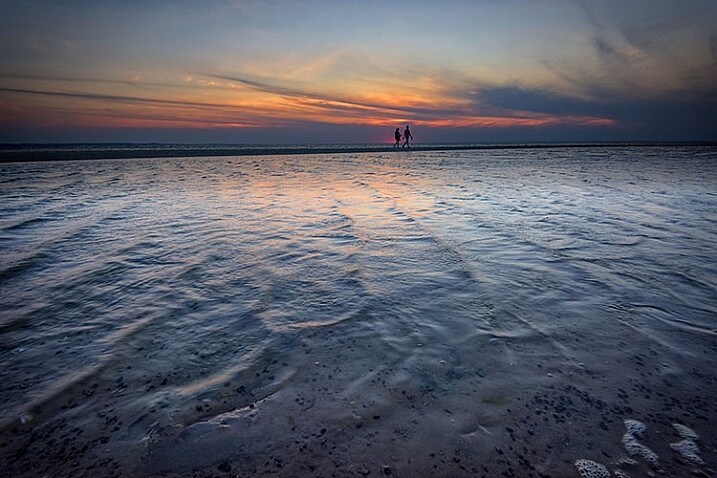
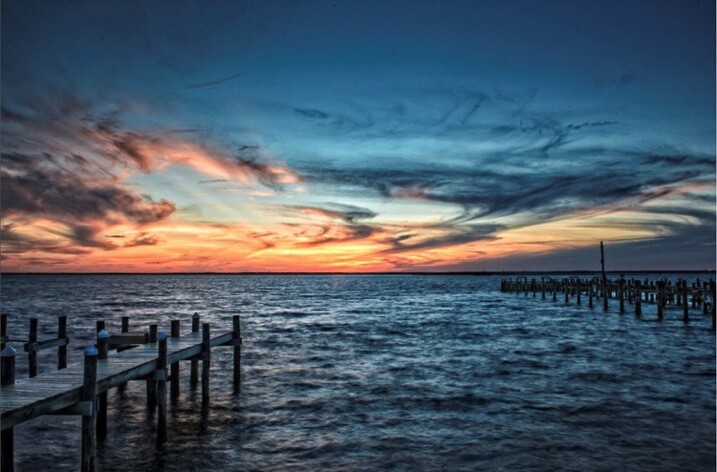
Sunset

Sunset on Long Beach Island (NJ)

I watched the future football Hall of Fame quarterbacks practicing on the sidelines just before the Super Bowl. Although they had thrown the football perhaps millions of times before, they were practicing their throwing before the big game. They believe in the old (but true) saying, “Practice makes perfect.”

It’s important for us as photographers to continually practice our skills as well. Although we may have pressed the shutter button a million times, we need to be sure that we are always “ready for the big game”. Like the Super Bowl quarterbacks, it is important that we keep practicing our skills; whether we are professionals, aspiring professionals, or enthusiasts.

Why Practice?

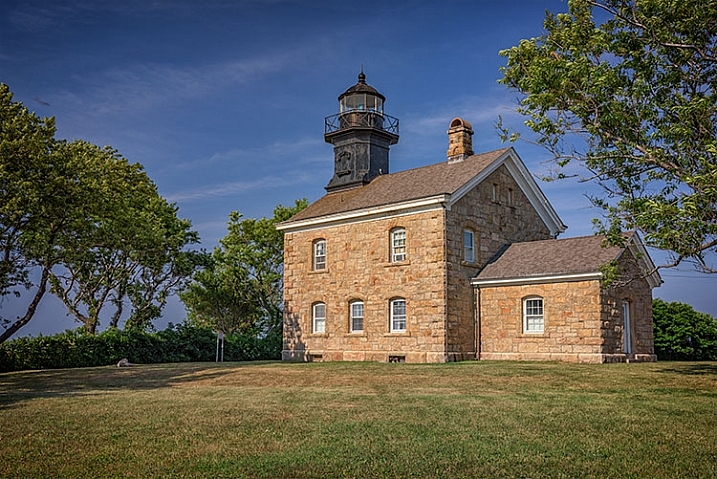
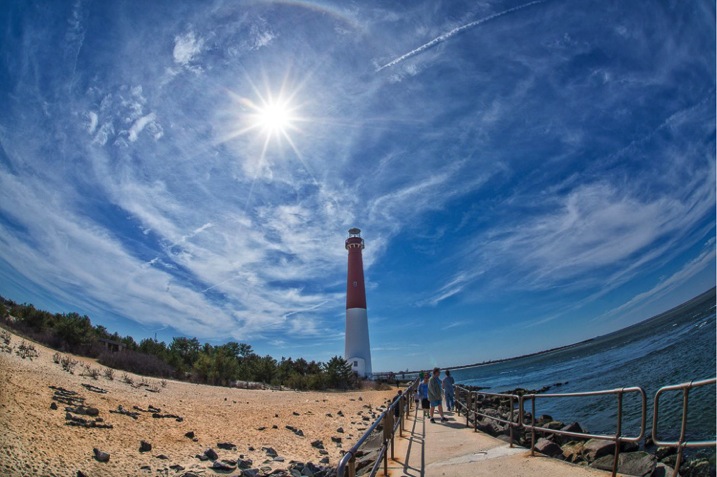
Old Barney

Old Barney lighthouse in Barnegat Light, NJ

Although practice does not make perfect (we can practice doing things the wrong way), it does make our techniques more natural, and more permanent. For example, using back-button focus on my camera the first time seemed strange to me, but after practicing it over and over, it become an automatic technique that I use without even thinking about it. It’s a challenge to try turning off your brightly lit LED display on your camera once the theatre is darkened, but with practice it’s an automatic, and easy process.

Practice not only gives us a chance to make our shooting techniques more automatic, it gives us a chance to try new techniques. Practice gives us an opportunity to learn new poses, try a new lenses, or try a new post-processing technique to enhance our photographs before we use them in a client shoot. As a photographer, learning never stops; practice is a good way to try out things with no pressure or fear of failure.

Maybe I’ll Practice Tomorrow

Unless we are full time photographers or we have the luxury of having the time to shoot whenever we want, finding time to practice can be a challenge. Life is busy; there are so many things that need to be done that we are sometimes tempted to say, “Maybe I’ll practice tomorrow.” Sometime we need motivation to force us to make the effort, despite other things that may get in the way, to practice our photography techniques.

Picture of the Day

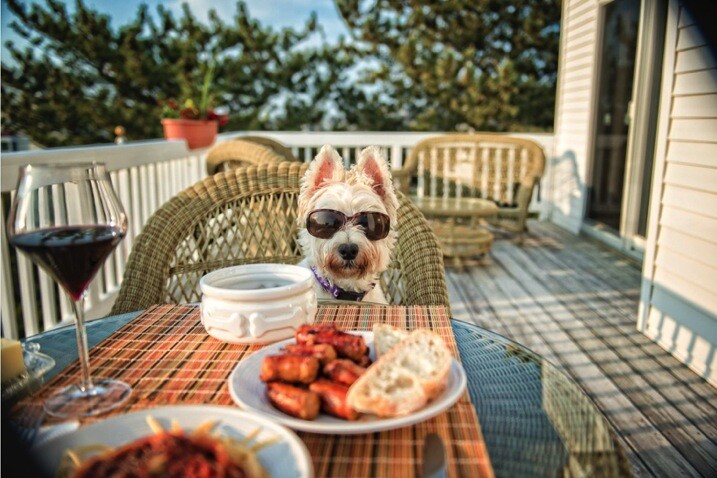
Clyde

If someone asked me what the biggest thing was that has helped me to improve my photography skills, I would have to say that it was my commitment to what I call the Picture of the Day. A little more than a year ago I started trading photographs that I took with my sister who is a photography enthusiast. Very quickly that practice spread to other family members and friends. Today, I send a new photograph to more than a hundred people every morning. The list continues to grow. But it’s not the number of people that receive the Picture of the Day that is the motivator, it’s the commitment to taking, and sending the picture, that benefits me as a photographer.

Even though my photography business focuses mainly on people (weddings, portraits and events); my Picture of the Day photos may include people, animals, architecture and landscapes. People that receive my Picture of the Day have commented that opening my morning email is like opening a box of chocolates because “you never know what you’re going to get”. Sometimes my pictures are not meant to be works of art, but rather just funny, like the shot of my dog Clyde (above), sitting by the dinner table with his sunglasses on, waiting for dinner. The zoo is always a great place to take pictures, so I make that part of my list of places to shoot.

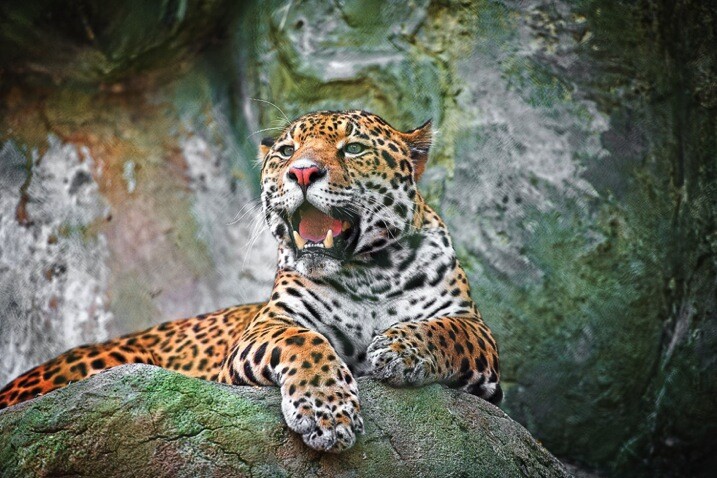
Jaguar

Jaguar at the Elmwood Park Zoo (Norristown, PA)

Admittedly, I shoot most days, but not every day. I make time during the week to practice shooting; I am committed to take that time despite everything else. I have my camera with me most of the time, and many of my shots are unplanned. I stockpile the shots so that I always have a reserve of pictures to use for my morning emails.

How has the Picture of the Day Helped Me?

My commitment to the Picture of the Day has helped me to grow as a photographer more than anything, including the following:

Kids and Mom

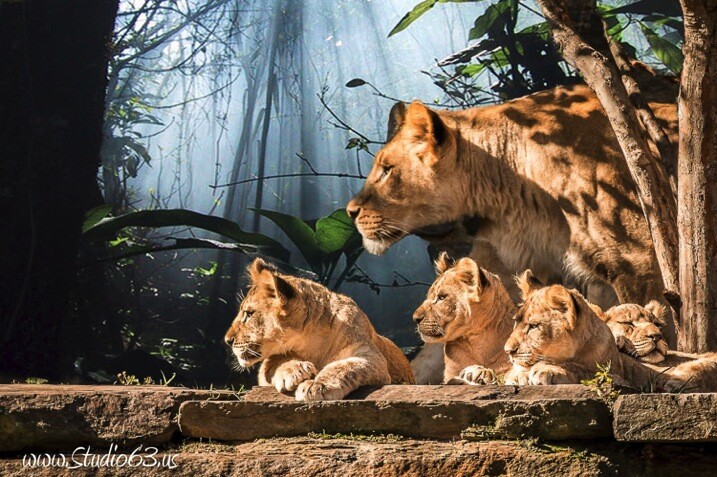
Four month old lion cubs with mom (Philadelphia Zoo)

  • Knowing that I need a new picture every day motivates me to get out and shoot, even if I am not shooting the things that my business is focused on.
  • Knowing that my Picture of the Day needs to be different than all of those that I previously sent out, motivates me to try new techniques and to look at things more creatively. That has helped me to start thinking out-of-the-box and has greatly expanded my composure skills for when I am shooting weddings or portraits for clients.
  • Shooting for the Picture of the Day has given me the opportunity to try and to practice with new lenses and filters, so that when the time comes to use them in a business shoot, I am ready.
  • My Picture of the Day has enabled my business to grow, as people that receive my email every morning are reminded that I am in the photography business. I can’t think of a more effective, less costly marketing tool.
  • Lastly, shooting for my Picture of the Day has been just plain fun!!!

Make the Commitment Today

Nina and Pinta

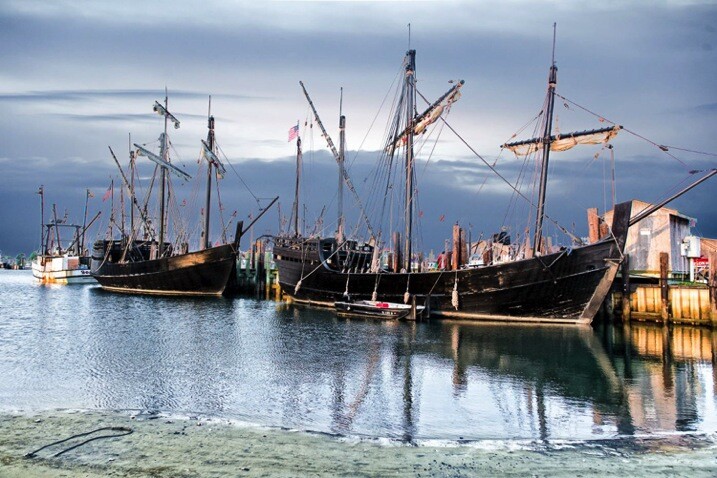
Nina and Pinta replicas at visit to Viking Village (Barnegat Light, NJ)

If you are not just a picture snapper, but rather, serious about photography – make the commitment to start your own Picture of the Day project today. Like mine, it can start small and grow over time (I had only one person on my list initially.) I sometimes post my Picture of the Day on my personal Facebook page which adds more visibility to my work. This visibility also adds to my list of people that subscribe to my Picture of the Day.

How do you practice your photography?

googletag.cmd.push(function() {
tablet_slots.push( googletag.defineSlot( “/1005424/_dPSv4_tab-all-article-bottom_(300×250)”, [300, 250], “pb-ad-78623” ).addService( googletag.pubads() ) ); } );

googletag.cmd.push(function() {
mobile_slots.push( googletag.defineSlot( “/1005424/_dPSv4_mob-all-article-bottom_(300×250)”, [300, 250], “pb-ad-78158” ).addService( googletag.pubads() ) ); } );

The post Take this Picture of the Day Project to Practice and Help You Grow as a Photographer by Frank Slezak appeared first on Digital Photography School.


Digital Photography School

 
Comments Off on Take this Picture of the Day Project to Practice and Help You Grow as a Photographer

Posted in Photography


Photographer creates picture of 100-man orchestra… with the same person playing each instrument

06 Jun

An Oslo musician and photographer has created a photo stitched together using 400 images, showing an entire orchestra with every instrument played by the same person. Violinist Alexander Light created the 200MP picture by shooting percussionist Heming ValebjØrg in every seat on a stage while he played the appropriate instrument for that position. Read more

Articles: Digital Photography Review (dpreview.com)

 
Comments Off on Photographer creates picture of 100-man orchestra… with the same person playing each instrument

Posted in Uncategorized


Landscape Photography Tips & Tricks: Getting the Big Picture

04 Feb

Of all the different types of photography, capturing images of landscapes is one of the most popular.   The compulsion to capture breathtaking images of sweeping vistas, crystal shorelines and towering mountains comes on especially strong whenever people travel to new places. You’ve probably noticed this whenever some of your friends go on vacations. Their Facebook walls become flooded with Continue Reading

The post Landscape Photography Tips & Tricks: Getting the Big Picture appeared first on Photodoto.


Photodoto

 
Comments Off on Landscape Photography Tips & Tricks: Getting the Big Picture

Posted in Photography