RSS
 

Posts Tagged ‘Photos’

Making the Shot: Your Guide to Creating Stunning High-Speed Splash Photos Without Flash

02 Apr

The post Making the Shot: Your Guide to Creating Stunning High-Speed Splash Photos Without Flash appeared first on Digital Photography School. It was authored by Rick Ohnsman.

1 - High-Speed Splash Photos Without Flash - Rick Ohnsman

The making of one of my most successful shots started with a little photo play on a hot summer day, and a try at some high-speed splash photography.

The image above, “Red Bell Splashdown,” went on to win first place in the Corel International Food Photography Contest.

Let’s take a look at the “making of” methods used to create the shot so that you too can have fun with this quite simple technique.

Freezing motion

There are essentially two ways to freeze motion with a camera:

  1. Use a Fast Shutter Speed such that the “sliver of time” you are capturing is very short and the object being captured moves very little, if at all, during the extremely short duration the shutter is open, or
  2. Use the very Short Duration of a Flash so that the object you are photographing gets illuminated for a very small sliver of time. The duration time of an electronic flash can be extremely short. For example, a Speedlight like the Canon 580EXII at 1/128 power is less than 1/19,000th of a second!

I’ve used the flash method, and indeed it can produce some dramatic results. I will perhaps show that process and the results in a future article. For my splash photos, however, I wanted to keep it simple and do it outdoors where water splashes wouldn’t require any clean-up or endanger my photo gear. When I did these shots, I was using my Canon 50D which has a maximum shutter speed of 1/8000th of a second. I figured this should be enough to get the job done.

2- High-Speed Splash Photos Without Flash - Rick Ohnsman

Let the sun shine in

Obviously, getting a proper exposure with a very high shutter speed would involve several possibilities:

  1. Use a fast lens with a wide aperture – I was shooting with a Canon 50mm f/1.8 prime lens, so a wide aperture was possible. However, I still needed a decent depth of field, so opening it up all the way wasn’t a good option.
  2. Use a high ISO – Cranking up the ISO can aid in getting a fast shutter speed but at the penalty of more image noise. I didn’t want that if I could avoid it.
  3. Shoot in very bright light. Normally, shooting under mid-day summer sun would not be something a photographer would do, but in this case, blazing sunlight (and lots of it) was the perfect solution.

3- High-Speed Splash Photos Without Flash - Rick Ohnsman

The set-up

I wanted to use colorful subjects for the shoot. Bell peppers – easily found at the supermarket in red, yellow and green – seemed a good choice. I also picked up some other colorful fruits – strawberries and limes. To accommodate the size of the objects and also give me a flat glass “window” to shoot through, a 10-gallon aquarium was just right.

Wanting to get light not just from above but from below as well, I put a large 5-in-1 reflector on the table where I wanted to shoot, silver side up. I placed the aquarium on top of that out in the bright noon sun. I filled the tank with water about halfway and allowed the bubbles to settle out while I set up the rest of the equipment.

4- High-Speed Splash Photos Without Flash - Rick Ohnsman

I put a pepper in the water and let it float while I took a look through the camera to frame the shot. I could see I would need a plain and preferably dark background, so I put a piece of black paper behind the tank. The paper was still too bright with the direct sun on it, so I used another reflector, black side down, at the back to the tank to shade the paper backdrop. I had my camera on a tripod and moved it to get as much of the front of the tank in the frame as I could, being sure I could focus that close.

5- High-Speed Splash Photos Without Flash - Rick Ohnsman

To be able to drop my subjects into the tank and also trigger the shutter, I rigged up a Youngnuo RF-602C radio trigger so that I’d be able to fire the camera remotely. A wired remote with a long enough cord could have also worked.

Camera settings

I put the camera in Manual Mode. To get a good combination of the fast shutter speed needed, decent depth of field, and not too high an ISO, I found that shooting at ISO 400, F/6.3 and the key – fast shutter speeds between 1/2000 and 1/3200th of a second was about right. Letting a pepper float in the tank where I anticipated it to be when dropped, I set the focus and then locked it in manual. I also put the shutter in high-speed continuous mode so for each drop I’d get a burst of about 5 shots.

6- High-Speed Splash Photos Without Flash - Rick Ohnsman

Splash-down!

So, good to go, I dropped the peppers, strawberries, and limes, trying to fire the bursts in synchronization with my drops. My wife Kathy came out to join in the fun and did some of the drops. We quickly found it was necessary to squeegee and wipe the front of the glass between shots to clean the drops off the front of the glass from the previous shot. So it went: drop, shoot, squeegee and repeat. For each drop, one frame of the 5-shot burst might be good, but often not. Timing is crucial. With practice, while we gained some skill, luck was still a huge element. There was lots of shooting to get the keepers. We tried it with the peppers and fruits in different combinations too. I easily made over 200 shots that afternoon.

7- High-Speed Splash Photos Without Flash - Rick Ohnsman

Cleaning up your act!

Straight out of the camera, the raw shots were less than impressive. Of course, Raw files look flat, and so I knew they’d improve greatly with a basic Raw edit. There were also more drops, splashes, bubbles and other particles in the water than I wanted. However, the important thing – the action – was properly frozen and sharp!

My Red Bell Splashdown image used settings of ISO 400, f/4.0, 1/3200th sec. The rest was using editing tools to adjust the exposure, get good rich color and deep blacks, and eliminate distractions. My editing tool of choice is usually Adobe Lightroom. With the Adjustment Brush and the Spot Removal Tool, I was able to clean up the image to create the impact I was after.

8- High-Speed Splash Photos Without Flash - Rick Ohnsman

Other considerations and possibilities

With any photo shoot, it’s always a good idea to critique your work and consider, “What might I have done better? Differently? What variations might I want to try?”

Seeing I had used a shutter speed of 1/3200th for my splash shots, I was curious how much difference there might be at the maximum shutter speed of my Canon 50D which is 1/8000th. I didn’t want to set up the fish tank and all of that for this second experiment, so I tried something simpler.

This time, I poured liquid into glasses in the bright summer sun. This process was simple enough. I clamped the glasses in a stand, put up a black backdrop behind them, set up the camera in a similar fashion to the previous splash shots, and did the pours. This time my settings were ISO 400, f/3.5, 1/8000th of a second.

When checking the shots afterward, it was apparent that the freezing effect was even more pronounced. However, at such a wide aperture, my depth of field was much more shallow.

9- High-Speed Splash Photos Without Flash - Rick Ohnsman

What might I try next time?

I’d like to give different color backgrounds a try. Using black made editing much easier, and when cleaning up the shots, it was simple to “black out” any distracting elements. I’m not so sure that would be as easily achieved with a color background. Trying it with a white background for a high-key look might also look interesting.

10- High-Speed Splash Photos Without Flash - Rick Ohnsman

Of course, using different objects for the splash photos is also fun. In fact, we did do that when during the splash photo session my Mini-Schnauzer, Schatzi, wanted to play and decided to bring us her favorite ball. Looking at the “face” on the ball, I thought it might be fun to try it in a splash drop as we’d done with the peppers. When seeing the result – which looked like the “creature” was exhaling bubbles during a dive – it made me laugh.

11- High-Speed Splash Photos Without Flash - Rick Ohnsman

So, give this high-speed shutter technique a try. Take it outside in the bright sun, crank up the shutter speed as high as you can and have some fun. It’s a great way to improve your camera skills, learn the relationships between ISO, Aperture, and Shutter Speed, and then test your editing skills when tuning up your shots. I’m confident you’ll get some images of which you’ll be proud.

The post Making the Shot: Your Guide to Creating Stunning High-Speed Splash Photos Without Flash appeared first on Digital Photography School. It was authored by Rick Ohnsman.


Digital Photography School

 
Comments Off on Making the Shot: Your Guide to Creating Stunning High-Speed Splash Photos Without Flash

Posted in Photography


5 Different Approaches to Taking Photos of Strangers

01 Apr

The post 5 Different Approaches to Taking Photos of Strangers appeared first on Digital Photography School. It was authored by Nils Heininger.

As travel photographers, documentary photographers or photojournalists, we all share the same unique challenge: Building up a relationship with our subjects from scratch. Commercial and wedding photographers also need to create closeness to their subjects, but they usually have a foundation that connects them. Models are usually paid to cooperate. Customers of wedding photographers want good images themselves. This is a foundation on which photographers can build their relationships. Our challenge is different – we enter a new environment and have nothing but our camera and ourselves.

1 - Approaches to Taking Photos of Strangers - Nils Heininger

When we find ourselves in a special environment in a different culture and amongst strangers, we have to find strategies to approach them. A great portrait exists not only through light and composition but also the emotional connection between the photographer and photographed.

If as a photographer you don’t feel comfortable shooting a situation, it influences the quality of your images negatively. Also considering moral aspects, it is always better to connect with people and be sure they appreciate (or at least tolerate) you taking their pictures.

We (almost) all struggle with approaching strangers. Even Steve McCurry admitted he is often shy and feels awkward when he takes pictures. However, the good news is, there are strategies to make the best out of the situation and subsequently create more possibilities for good images. Here, I share my best strategies to get closer to people and come home with more good portraits.

2 - Approaches to Taking Photos of Strangers - Nils Heininger

1. Ask and shoot

The first strategy is quite simple, yet often a challenge – just go and ask. How many times did you not have the courage to approach a stranger and ask for taking an image? And how many times did you regret it? If you are like me, then far too many. The more you approach people, the more you will realize most of them are happy to have their picure taken and might even see it as a compliment.

But, what if they say no? What does it matter if they reject you? So what? There are billions of other people out there. Fear is generally one of the biggest barriers to getting good pictures.

You have to overcome it.

One of the best ways to do so is to go out and practice. You will be surprised how many people pose for you if you approach them the right way.

Stay confident, do your thing and do it well.

3 - Approaches to Taking Photos of Strangers - Nils Heininger

The challenge with this strategy is to stay calm. When I started out, I found my images composed weakly or a little soft because I tried to get it done as quickly as possible. My hand was perhaps too shaky, and I rushed through the process without considering the right camera settings.

Later, I realized it is not necessary to be in such a hurry. Yes, you should not take too much time from people. However, if you become too nervous and ruin the moment, all the time is spent for nothing.

Be aware of what you do and how you do it. Stay calm and confident then you will succeed more easily. People appreciate it most if they see that you act professional and portray them in a good light.

4 - Approaches to Taking Photos of Strangers - Nils Heininger

2. Be patient and drink tea

As I find myself mostly in South Asia, drinking tea is an activity to socialize and get into contact with people. In other areas, you might replace it with coffee, maté or beer. Be mindful to the fact that taking pictures of people is not just hitting the shutter button. If it were that easy, we would not have all those amazing professionals who still stand out with their images of people. Each of these pictures involved much work behind or beside the camera.

Most of the photographers who accurately capture the culture and atmosphere of a place through a local person have spent a lot of time choosing the person and building a relationship. While you can run through the streets and click away thousands of images of everyone, you may want to spend your time more efficiently. Stay calm and invest some time into building a network. Go to places where the people you want to take portraits of hang out. Socialize and take your camera out when it is time to do so.

5 - Approaches to Taking Photos of Strangers - Nils Heininger

3. Find a fixer

If you have found the right people and still could not get into contact, sometimes it is useful to find a fixer. Fixers are people who arrange access to a story for a photographer, videographer or journalist. Mostly, they belong to the area and act as a mediator between the professional and the people.

Fixers can also help with translating, and they know a lot about the covered issue themselves and have an idea of what you are looking for. While fixers usually get paid in the case of professional journalism, you can also find guides, community members or other locals who can help you out. Sometimes this happens while you are drinking tea, sometimes it is enough to walk aimlessly through a street in a strange neighborhood.

Find the people, who look like they could help you. Often, locals are happy to share their stories. Introduce yourself and show that you don’t mean any harm.

6 - Approaches to Taking Photos of Strangers - Nils Heininger

For example, I wanted to cover the life of a fisherman in Puri, India but I did not know anyone at the place I was visiting. When I arrived, I quickly found a boy who could introduce me to the community while I was wandering around an area where you usually do not find too many tourists. The young man asked me what I was doing, and we talked. I did not even have to find someone who connected me. The person found me within a few minutes!

Even though he was not a fisherman himself, he was very helpful in giving me information about the community and connecting me to others. After a while, people got used to me. Even though the boy himself could not arrange a boat ride for me, I was able to connect to others. One morning, I finally found myself out on the sea with some fishermen.

7 - Approaches to Taking Photos of Strangers - Nils Heininger

4. Visit a festival or event

Special events or festivals are a great opportunity to capture the culture of a place and to get to know people. Festivals offer the opportunity to take pictures of important moments. Often, you will also be asked by people if you could send the images to them. Be helpful and share what you have. My experience is that everything you share will be paid back in multiple amounts. When I photographed the wild dances of the Dervishes at a Sufi Shrine in Pakistan, one of the performers asked me to send the images to him. As I became acquainted with him, I could stand in the first row during the next week’s event. Once connected to the people, they made sure that I could capture some great images.

Often, it might be tempting to push your limits for getting the image. Always be aware of what is allowed and appreciated during certain events. Some people might not want their images captured, or you might disturb a significant moment (DSLR users will know the curse of the loud shutter noise). I have a rule of thumb for these situations – when I have an awkward feeling in my tummy or get more attention than the actual event, I’d prefer to ask someone if I should step back.

8 - Approaches to Taking Photos of Strangers - Nils Heininger

Imagine a photographer placing his camera right in front of your face before the kiss at your wedding. You cannot even see the bride properly. That would totally kill the moment. At unknown events and rituals, you have to be aware of what is going on around you.

As a bad-mannered photographer, you can also ruin the name of a whole community of professionals and hobbyists. Always be kind and considerate. Others might also want to shoot wherever you have participated. If you behaved in a bad way, they may not get permission anymore. In the most extreme cases, you can even put yourself in danger if you unintendedly cross a line. Get your image but try to not focus the attention on yourself. For you, a certain event might be an opportunity for photographs. For others, it might be a very important day in their life.

9 - Approaches to Taking Photos of Strangers - Nils Heininger

5. Make a project and be open about it

Approach a community and openly tell them that you want to photograph their everyday life. On the first day leave your camera at home and introduce yourself to the people.

While this may be frustrating (because you will undoubtedly see opportunities you could capture), remain patient. Drink tea, talk and explain what you want to do and why. In this way, people get to know you and your intentions. You also get a better idea of what to capture and how.

When I took photos in a slum, people were suspicious because NGOs go in and out taking images of poverty. I explained that I want to take images of normal life and portray them as normal human beings, which I knew they were. The results were less staged images of their everyday life, which they appreciated.

10 - Approaches to Taking Photos of Strangers - Nils Heininger

In such a project, you can even give something back to people.

Print some images and hand them over to the community. You may be surprised at just how happy that makes people. Moreover, you may also find that people who did not want their photograph taken before will approach you to take their images too. It’s small gestures like these that keep you welcome in an area.

Long term projects may not cover a large variety of places and people, but they can cover a deeper insight into a community and connect the audience to the subject.

You don’t have to make your project too big. It all depends on your capabilities. There are many small ones which you can pursue within a week or even a day.

Developing a project does not only open gates for you but also gets you out and enhances your creativity. Shooting with a concept in mind can make you feel less awkward when out on the streets. It may also help you explain to people why you would love to take their image.

11 - Approaches to Taking Photos of Strangers - Nils Heininger

In a nutshell

Invest time in your photography as it is more than just hitting the shutter button.

Commercial and wedding photographers need to invest time to set up a team and develop ideas for clients, and landscape photographers have to hike, look for the weather and the sun. Photographing strangers also takes some preparation, even if it is just mental preparation to get over the fear of approach.

However, be patient and wait for the right moment. Do not get frustrated if you don’t get a five-star image every time. Make connections and enjoy the experience too.

What are your best ways to approach strangers? Do you have similar anxieties of just talking to them? How do you get over this? Sharing troubles and advice can help us support each other. Feel free to share your story in the comments.

12 - Approaches to Taking Photos of Strangers - Nils Heininger


The post 5 Different Approaches to Taking Photos of Strangers appeared first on Digital Photography School. It was authored by Nils Heininger.


Digital Photography School

 
Comments Off on 5 Different Approaches to Taking Photos of Strangers

Posted in Photography


9 Creative Architecture Photography Techniques for Amazing Photos!

19 Mar

The post 9 Creative Architecture Photography Techniques for Amazing Photos! appeared first on Digital Photography School. It was authored by Simon Bond.

It’s great to get a technically sound photo, and architecture photos demand this. Getting the technical side of your photo correct should be your first priority, but beyond that, it’s worth experimenting. In this article, you’ll learn about some creative photography techniques, and how you can apply these to your architecture photography. Whether you adopt any of these for your work will be at your discretion, but having extra options for your photography is never a bad idea. So read on to find out which creative architecture photography techniques you could apply.

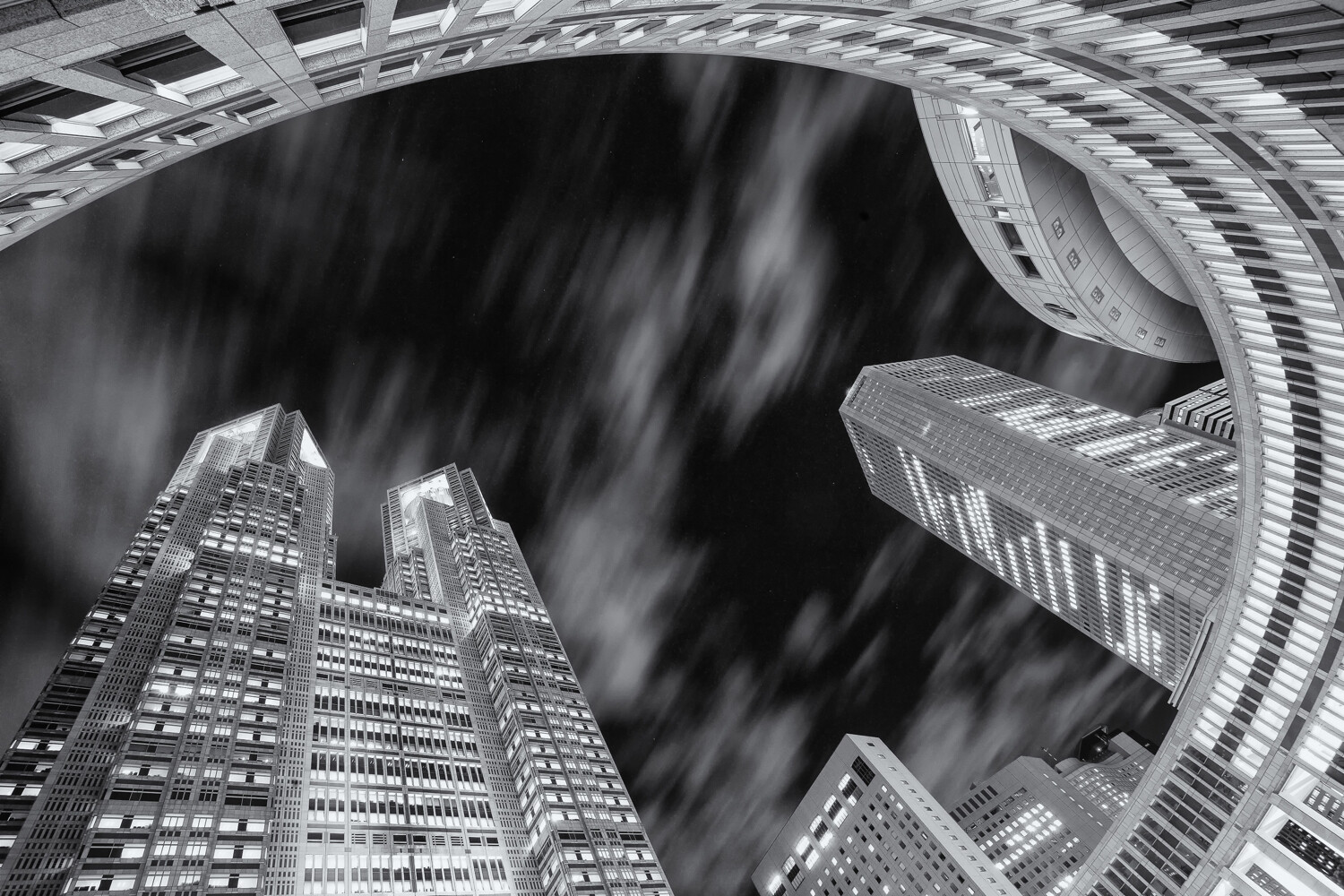
This photo of the Tokyo metropolitan government building has used a worm’s eye view, and a wide-angle lens.

1. A different perspective

Many architecture photos are taken at eye level. In other words, a standing composition from street level or an elevation that brings you level with the building if that’s available. This is far from the only way to photograph architecture though. Using extreme perspectives like worms eye or birds eye views can give dramatic results.

  • Worms eye view – This is likely to be the easiest perspective to achieve and works best when photographing taller structures. You can use this to emphasize interesting ceiling features or to take photos of skyscrapers from the base of the building. If you happen to be surrounded by tall buildings that are close to each other, you can use this perspective to fill the sky.
  • Birds eye view – To get this type of angle, you’ll first need to find a way of getting above the structure you’re photographing. With the advent of drone photography, this has now become a lot easier to achieve. No drone? No problem. You can always find a tall building to photograph from or, if you’re lucky, a hot air balloon ride!

2. Infrared photography

You can change the nature of your creative architecture photography, without needing to use extreme perspectives. One of the best ways to do this is by using infrared photography. This will change your image into more of a dreamscape. This style of photography works much better outdoors, and in places where there is some vegetation. Through some post-processing, you’ll create an image where photosynthesizing plants are white, and the sky is dark. Architecture then forms a powerful focal point within your infrared photo. There are some excellent guides on this style of photography. You have three main choices when it comes to carrying out this style. You can convert your camera for infrared, use an infrared filter, or you can produce this effect through post-processing.

Infrared photography is a great technique to experiment with.

3. Light painting

One of the most creative photography techniques out there is light painting. Through the use of light painting techniques and styles, you can customize the way you photograph architecture. The trick is knowing where and how to apply this to your photograph because not all architecture lends itself to every technique. Perhaps it’s impossible to gain access to the area of the structure in which you’d like to light paint? Perhaps light painting will be too big a distraction and detract from the architecture itself. When you can use light painting to form a leading line to the architecture, or perhaps to frame the architecture, you’ll be on the right lines. There are various tools you can use. Below is a selection.

  • A torch – The simplest of light painting tools. This can be used to create patterns in front of the camera, or perhaps to light up a section of the architecture you wish to photograph.
  • A light source on a string – Repeating patterns work well in photography, and spinning a light source on a string will provide this repetition. You could also use this to create a light orb, and strategically place the orb in front of your architecture.
  • LED light sticks – In recent years products like the pixelstick and the magilight have really revolutionized light painting. These excellent tools can be used to create bespoke light paintings in front of the architecture you’re photographing.

In this photo a pixelstick has been used to light paint around the pagoda.

4. Kinetic light painting

Light paintings’ cousin is kinetic light painting. The technique also requires a tripod, but this time you move the camera rather than the light source. Once again, this can be quite experimental, and not all locations are well served by this photography style. The two main types of kinetic light painting are the zoom burst and camera rotation.

  • Zoom burst – This technique works well with tall buildings, from a distance, and where they’re lit up with lots of interior building lights. You’ll need to set the camera on a tripod, with a lens that can zoom. A kit lens works very well for this, or perhaps a 24-70mm lens. You begin the photograph at the longer focal length, and then zoom out. You can read more about this technique here.
  • Camera rotation – This time you rotate your camera around a tripod head. It works well with tall buildings, where you have a worms eye view. Once again, you can read more about how to do this by reading this guide.

This is a single photo of the Tokyo Skytree. It’s straight out of the camera, and has used kinetic light painting.

5. Refraction photography

You can also use refraction photography with a crystal ball for creative architecture photography. That’s because the fisheye-like properties of the glass ball will capture the entire piece of architecture you intend to photograph. There are tricky aspects you need to handle including the upside-down image within the ball, and centering the architecture within the ball. Providing you can find a good place to position the ball, you’ll be able to use this technique to produce a unique photo of a building or sculpture.

This location is a popular place to photograph St Paul’s cathedral in London. The addition of a crystal ball gives this image another perspective.

6. Detail photos

The main focus of architectural photography is to capture the whole scene. That’s not always needed though, and you can find great detail photos by using lenses of longer focal length. These photos might not work on their own but would certainly add to a selection of photos of one particular piece of architecture. You’ll need to look out for details in the roofing, lines of repeating architecture like arches in a church, or ornate decorations on a wall. Then look to focus in on this particular area. Look to light the detail photo well by either choosing the correct time of day for the sun or using an external flash.

Detail photos of architecture are always worth taking.

7. Digital blending

A process known as digital blending allows you to get perfect pictures. The technique is great for getting technically perfect photos, but you can push beyond that and get more creative. One of the main advantages of this is the ability to photograph towards a sunset sky, and then to balance light across the scene so your architecture doesn’t become too silhouetted. The technique requires you to use a tripod for best results and to take a set of bracketed images. You’ll then need to use luminosity masks to blend the bracketed images in post-processing.

In this photo digital blending is used to ensure the roof windows aren’t blown out.

8. Contrast

Contrast is a broad term, and can be interpreted in several ways. You can use any of these interpretations for more creative architecture photography. Let’s look at some of the ways contrast can be applied.

  • Light and shadows – The most obvious when it comes to photography is to use the light in your photo. You can use this to accentuate areas of interest on the architecture, by using shadows to show detail points.
  • Colors – In some cases, you can play colors off against each other. Obviously, you can’t move architecture, so you’ll need to be creative about how you add opposite colors that contrast with it.
  • Old and new – Old architecture surrounded by new can make an effective photo. Think of a church or temple surrounded by modern skyscrapers.

Framing is a potent photographic technique, which draws the eye to the main subject.

9. Framing

Look to frame the architecture you’re photographing. An arched doorway is a great way to frame your main subject. You could introduce the framing yourself, by holding something in front of the camera. You can use gaps in a fence as a way of framing your photo.

Which creative architecture photography technique will you use?

There are many ways to add creativity to your photography. You’ve now learned about some of the best creative architecture photography techniques. Are any of these techniques you’ve tried before? Which of these ideas will you try? We’d love to see the results of your photography from the past, and anything you might take in the future. As always please share your thoughts and photos in the comments section of this article.

The post 9 Creative Architecture Photography Techniques for Amazing Photos! appeared first on Digital Photography School. It was authored by Simon Bond.


Digital Photography School

 
Comments Off on 9 Creative Architecture Photography Techniques for Amazing Photos!

Posted in Photography


Twitter wants you to tweet more photos, makes its in-camera app easier to access

16 Mar

Twitter has announced a change to its iOS app in an apparent move to encourage the tweeting of photos. The in-app camera has received a redesign and can now be opened by simply swiping left from your Twitter timeline screen.

Once the camera has opened you can tap on the virtual shutter button to capture a still image or hold down to record video. There is also quick access to Twitter’s livestreaming feature. Location information and captions are overlaid onto photos and videos captured within the app and you can choose from a range of overlay colors.

Overall the new feature isn’t a groundbreaking change but it shows that Twitter is aiming to compete more closely with Instagram and other image-focused social media apps, most of which offer equally direct access to the camera app.

Articles: Digital Photography Review (dpreview.com)

 
Comments Off on Twitter wants you to tweet more photos, makes its in-camera app easier to access

Posted in Uncategorized


No, Flickr didn’t hand your photos over to corporations for machine learning

16 Mar
A screenshot of illustrated portraits shared on IBM’s Diversity in Faces dataset website.

Earlier this week, Flickr started taking heat across the web after it was specifically mentioned in a report from NBC News that took a deep dive into the ‘dirty little secret’ of using Creative Commons images to help train facial recognition algorithms.

The report mentioned multiple datasets used to help companies train machine learning algorithms to better comprehend diversity in facial recognition programs, but one dataset in particular was emphasized and elaborated on: IBM’s ‘Diversity in Faces’ set that was derived and iterated upon from more than 100 million Creative Common images gathered by Yahoo and released for research purposes back in 2014.

Almost immediately, users around the web started raining down critical comments. Others, such as Flickr’s own Don MacAskill, chimed in as well to help clarify the situation.

The issue isn’t that Flickr is handing over your photos for free to corporations looking to train their artificial intelligence algorithms. It’s that users are sharing their photos under various Creative Commons licenses without fully comprehending what those licenses entail

After the dust settled from the initial publishing of the report and the subsequent commentary across social media, one thing became clear: the issue isn’t that Flickr is handing over your photos for free to corporations looking to train their artificial intelligence algorithms. It’s that users are sharing their photos under various Creative Commons licenses without fully comprehending what all those licenses entail, a concern Flickr specifically referenced just recently in their announcement to save all Creative Commons photos on its servers.

After all, IBM didn’t sneakily pull private photos off of Flickr to use and Flickr didn’t just hand over millions of protected photos, despite the overtone NBC News’ article might give off. The photos IBM used to build up its database were the same photos any one of us can find when searching for public, Creative Commons photos on Flickr.

Don MacAskill, SmugMug Chief Executive and head of Flickr, shared his take on the situation in a conversation with Olivia Solon, the author of the NBC News article, explaining that no ‘scraping’ of Flickr images was done, as the photos were opt-in Creative Commons licensed photos. Below was MacAskill’s first response, but the entire thread is worth the read.

Ryan Merkley, CEO of Creative Commons, even chimed in on the conversation with an official response on Creative Common’s blog. In it, Merkley addresses the concerns of Flickr users and went so far as to contact IBM ‘to understand their use of the images, and to share the concerns of our community.’

In it, Merkley writes (emphasis ours):

While we do not have all the facts regarding the IBM dataset, we are aware that fair use allows all types of content to be used freely, and that all types of content are collected and used every day to train and develop AI. CC licenses were designed to address a specific constraint, which they do very well: unlocking restrictive copyright. But copyright is not a good tool to protect individual privacy, to address research ethics in AI development, or to regulate the use of surveillance tools employed online. Those issues rightly belong in the public policy space, and good solutions will consider both the law and the community norms of CC licenses and content shared online in general.

The overarching theme that stands out amongst this ongoing debate is that it’s not always clear to users, especially those who aren’t as engrained in the online world of photography, what Creative Commons licenses cover and fair use actually is. Flickr doesn’t shy away from explanations and links out at various stages throughout the upload process and in its FAQ, but even the Creative Commons website lacks clear definition — something it’s already addressing with new FAQ pages that it will continue to update.

“Copyright is not a good tool to protect individual privacy, to address research ethics in AI development, or to regulate the use of surveillance tools employed online.”

Ultimately, the current copyright system that’s intended to prevent other people profiting from creative works, wasn’t necessarily designed to protect your images from this type of use. Those images don’t end up in devices, nor is anyone directly profiting from your creations, so existing rules don’t necessarily offer any protection, whatever rights you assert. The cost of your camera or smartphone getting that bit smarter might just be that your photos are the ones being used to train it.

Articles: Digital Photography Review (dpreview.com)

 
Comments Off on No, Flickr didn’t hand your photos over to corporations for machine learning

Posted in Uncategorized


3rd time isn’t a charm for Huawei, who once again gets busted faking smartphone photos

12 Mar

You would think Huawei would’ve learned its lesson by now, but apparently not. Yet again, the Chinese smartphone manufacturer has been caught suggesting DSLR photos were images taken with its upcoming P30 and P30 Pro smartphones in an advertisement.

In both 2016 and 2018, Huawei was caught trying to do the same thing by passing off a DSLR photos as images captured with its P9 and Nova 3 smartphones, respectively.

$ (document).ready(function() { SampleGalleryV2({“containerId”:”embeddedSampleGallery_6581560962″,”galleryId”:”6581560962″,”isEmbeddedWidget”:true,”selectedImageIndex”:0,”isMobile”:false}) });

This time, Hauwei shared a collection of advertisements, seen above, on its Weibo social media account to promote the launch of its upcoming P30 Pro smartphone on March 26th with a visual design that suggested the images were captured with the much-anticipated periscope camera system inside the devices.

In a result that’s surprising no one, it turns out the images weren’t actually captured with the smartphone. While it doesn’t take much of a pixel-peeper to tell the images weren’t actually captured with a smartphone, GadgetMatch took a closer look and confirmed the images weren’t just DSLR images, but stock photos that can easily be licensed by anyone.

Using reverse image search, GadgetMatch discovered the volcano image was first shared on Flickr back in 2009 by photographer Tom Pfeiffer and also available for use on Getty Images. Similarly, the duck image was captured on a DSLR by photographer Jake Olson from a photo shoot some years ago.

Not long after it had been called out, Huawei updated the advertisements with a disclaimer saying the ads were meant only as an example, not photos actually captured by the P30 or P30 Pro. Huawei also made the following statement to GSMArena regarding the ‘misunderstanding’ in the P30 Pro preview ads:

We’ve been made aware that there might have been some misunderstanding regarding our recent HUAWEI P30 Series teaser posters. We would like to reiterate that those are, in fact, only teaser posters, and are only intended to hint at the unique new features that will come with the HUAWEI P30 Series. Huawei has acquired the licenses to the original images and the posters are artistic renditions of said features only. We’d like to take this opportunity to thank the media for their interest in our posters. We have much to announce in the coming weeks. Please stay tuned!

Fool us once, shame on you. Fool us three times…we can’t get fooled again. Let’s see how long it’ll take until we’re inevitably running the fourth edition of this article.

Articles: Digital Photography Review (dpreview.com)

 
Comments Off on 3rd time isn’t a charm for Huawei, who once again gets busted faking smartphone photos

Posted in Uncategorized


Your Guide to the Best Poses for Engagement Photos

11 Mar

The post Your Guide to the Best Poses for Engagement Photos appeared first on Digital Photography School. It was authored by Jackie Lamas.

Engagement sessions can be really fun, but it can get a little repetitive posing the couple together again and again throughout the session. Here are great poses that work for all couples during an engagement photo session.

1 - Guide to the Best Poses for Engagement Photos

Begin with foundation poses

A foundation pose is a pose where you set the couple in the exact spot facing a specific direction. Foundation poses are great to lead into different variations as you begin to build upon the poses. For example, you start with both people facing the camera. From this foundation pose, you can build so that the couple holds hands, look at each other, and in the end, you can capture them walking toward each other slowly.

2 - Guide to the Best Poses for Engagement Photos

From each foundation pose, you can get at least five different variations without having to move the couple all that much! This is helpful especially when you find yourself in tight spaces or pressed for time.

However, you don’t always have to stay in one spot. Depending on the location, feel free to move around and use all of the interesting nooks at the location of the session.

3 - Guide to the Best Poses for Engagement Photos

Posing facing each other

This is probably the most comfortable pose for all couples because it’s the most natural. Have the couple face each other, and with their arms furthest from the camera, have them wrap them around each other. This leaves the pose open from the front so that you can capture them looking at each other.

From here, have them hold hands loosely or play with their hands up with interlocking fingers. You can also have one person play with the other person’s hair while you get creative angles on the pose.

4 - Guide to the Best Poses for Engagement Photos

Have them give each other a good squeeze to help loosen nerves and get the most natural laughs and expressions out of the couple. Have them kiss if they’re comfortable with that.

You can also give them a little space so that they are directly facing each other. Here the couple can stand with their hands at their side and then hold hands. Have them lean in to kiss each other and let them move in closer if they need to.

5 - Guide to the Best Poses for Engagement Photos

From this pose, you can also ask that they get really close together – tummy to tummy – and have one person lay their heads on the other person’s shoulder/chest. This pose is romantic and sweet.

The “T” pose

The “T” pose is a variation on the prom pose and gives a more romantic feel to the photo. Have the taller person stand facing 45-degrees from the camera. Ask the other person to stand with their shoulder’s perpendicular to the other person. Have them get close and wrap their arms around each other.

This pose is great for all couples because it keeps the faces at an angle where the couple can look at one another, hug, kiss, and enjoy each other at close proximity.

6 - Guide to the Best Poses for Engagement Photos

Try photographing this pose with a wide-angle lens, like a 35mm, and place the couple in the center. This technique makes the pose much more interesting! Especially if you’re at a breathtaking or unique location.

When your clients are in this T pose, you can ask one person to look at the camera while the other closes their eyes or looks off into the distance. Get in close to take a beautiful portrait of the person looking at the camera.

7 - Guide to the Best Poses for Engagement Photos

This is also a perfect pose to get a nice ring shot while the couple’s arms are wrapped around each other. Try getting more of the couple’s bodies in the frame with the rings in focus and the rest out of focus.

Prom pose with variations

While the prom pose isn’t all that popular these days, you can still use the foundation pose to build on and get great photos of the couple. One variation is to get the shorter person to stand behind the taller. Here, they can hold onto the taller person’s arm and look at the photographer.

You can also have them loosely hold hands in this position and look off into the distance. The person in the front can look back or down while the person in the back can look at the camera. This is a romantic and sweet pose that can be taken full length or from a closer angle. Take both focal lengths to get more variety from the pose.

8 - Guide to the Best Poses for Engagement Photos

This pose can also stay in its original form where the shorter person stands in front and arms are wrapped around the waist. However, it’s best if you change it up a bit and have the hands of the person in front caress the face of the person behind. Here the pose becomes more romantic and has more connection rather than staying in its original form.

Ask the person in the back to wrap their arms up high around their beloved. Make sure that in this pose, the heads are not directly above one another. Move the front person to either side of the neck to avoid having the pose look stiff and disconnected.

9 - Guide to the Best Poses for Engagement Photos

From here, move around the couple and get different angles. Have the couple look off into the distance and enjoy the moment. Perhaps tell a joke to get them to laugh a bit.

To create a little bit more movement, from this pose, ask the couple to hold hands while the person in front moves towards the camera creating some distance from the other person. It will appear like they’re walking while holding hands. It’s a more creative take on the pose and adds beautiful movement.

10 - Guide to the Best Poses for Engagement Photos

Action poses

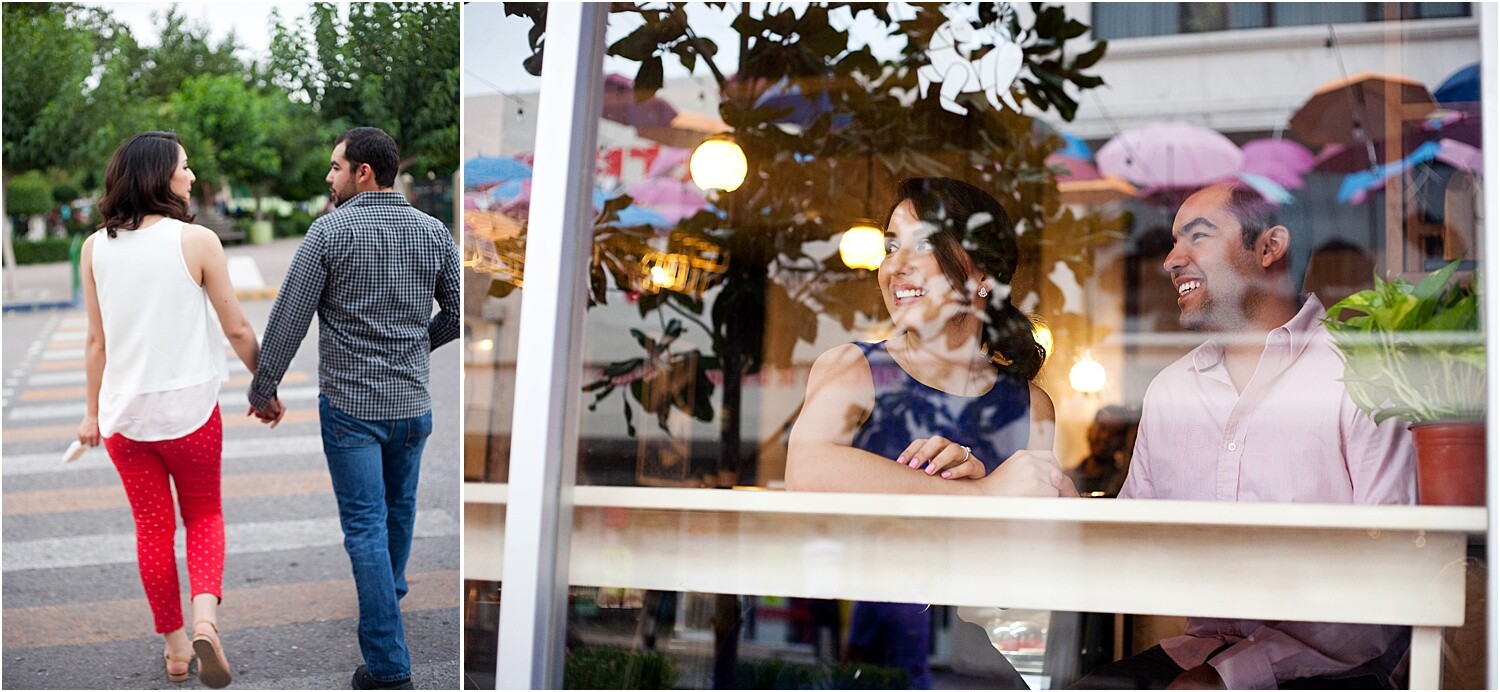
Action poses are fun and a great way to loosen nerves and get the couple more comfortable with being in front of the camera. These can include the couple walking, either holding hands or at a distance, climbing, dancing, or just talking with one another.

11 - Guide to the Best Poses for Engagement Photos

Starting with action poses can be more comfortable for a couple that is not necessarily big on kissing or being affectionate. If you’re in a location where there are activities, like an amusement park or coffee shop, have the couple do what they usually would if you weren’t around. This could be playing games, getting a coffee, enjoying some music together, walking, dancing, and talking.

12 - Guide to the Best Poses for Engagement Photos

You can also have the couple walk toward the camera while you’re out photographing the engagement session. Have them walk two or three times as you get different focal lengths and angles. Ask the couple to talk with each other or smile at one another because this looks more natural as they are walking.

Facing away from the camera

Having the couple face away from the camera can create more interesting photographs and keep the mood more romantic resulting in less posed and more natural looking photographs.

13 - Guide to the Best Poses for Engagement Photos

For one pose, have the couple stand at a distance facing away from the camera. Have the couple take one step forward and hold it as if they were walking. Have one person look back toward the camera and the other person looking down or to the side. You could have them do this as the couple is walking away from the camera. Just make sure that there is nothing in the way that could provoke a fall.

14 - Guide to the Best Poses for Engagement Photos

Another pose is having the couple face away from the camera but gets in close to each other. Here they can look at one another, hold hands, or kiss the forehead all while you are photographing from behind. Try getting the couple from a high angle, so it looks like you’re looking down at them.

Allow poses to develop naturally

While you set foundation poses and build different variations, allow the poses to develop into their own naturally. What I mean by this is that let the couple take charge in some of the poses with the kissing and getting close. Allowing for the couple to feel like they can move around within a pose can create more authentic and romantic expressions.

15 - Guide to the Best Poses for Engagement Photos

Couples feel most uncomfortable when they can’t be themselves, so during the session let them know that they are free to move and enjoy the moment. You are there to capture their love and excitement for their wedding day.

Once they have this liberty to move about in a pose, you’ll get real emotions and might even progress naturally through poses you may have thought of doing anyway!

16 - Guide to the Best Poses for Engagement Photos

Make sure to go with the vibe of the couple

Some couples aren’t romantic types and feel silly or uncomfortable doing lots of kissy or huggy shots. Try and get a feel for how the couple is. Are they playful? Active? Romantic? If after a few silly poses, you find that the couple is more on the romantic side, go for those types of poses.

17 - Guide to the Best Poses for Engagement Photos

Here are some ideas for each type of couple:

Romantic: Go with poses where the couple is close to each other. Either facing each other or hugging. Lots of closed eyes and enjoying the quiet moments of love between them. Try and photograph with a longer lens to give them space to be intimate with one another. Have them say something they love about one another while you photograph their reactions.

Fun/silly: Here you can get the couple talking and being overall silly. Try and get them to dance, tell jokes or play around at the location of the session. For example, having the couple make silly faces at one another or have one person tell a joke and get the reaction of the other person. Pose them with a little distance while holding hands to create a connection but not too close to where they feel uncomfortable having their photo taken so intimately.

Active: This couple will appreciate a good walk or even run! Have them jump, dance, climb, or even have one person piggy-back on the other! This couple is fun and needs to move around to keep them active by having them move around.

Not all of the poses have to be active if the couple is active, or romantic if the couple is the romantic type. Usually, after the first half hour, the couple has lost their nervousness and are more open to other poses. Just make sure that you keep an eye out for their natural personalities and go along with that vibe.

18 - Guide to the Best Poses for Engagement Photos

Being a little intuitive to the personality of the couple helps you create more authentic photos that they will love. An important note to remember is that some couples will be easy to pose, and others will need more direction.

In any case, let the couples know that they can move around and to not worry about holding poses for too long. Remind them to enjoy the moments and do what feels natural to them as a couple. This helps to calm nerves, and you’ll get much more real expressions than forced ones.

19 - Guide to the Best Poses for Engagement Photos

In conclusion

The best poses for engagement sessions are where you set a foundation pose and then build upon that depending on the vibe of your clients. Aim to give them a real and fun experience and document their personalities during the session. Pose them but let them feel free to move around and be themselves. They will have a great time and love their photos after!

The post Your Guide to the Best Poses for Engagement Photos appeared first on Digital Photography School. It was authored by Jackie Lamas.


Digital Photography School

 
Comments Off on Your Guide to the Best Poses for Engagement Photos

Posted in Photography


Flickr says it will spare all Creative Commons photos, announces ‘in memoriam’ accounts

10 Mar

Last November, SmugMug announced a number of changes the photo-sharing site would be undergoing in the coming months as part of a clean-up operation of sorts to help streamline Flickr assets and unused accounts. One of those changes was the news that free accounts would be limited to 1,000 images and any images over that limit would be deleted.

Almost immediately, Flickr caught flack for the decision, especially surrounding the vast amounts of Creative Commons images hosted on the photo sharing site. Within a week, Flickr announced it was sparing Creative Commons and public domain images and also sparing non-profits from the 1,000 photo cap.

Now, Flickr is going a step further. In a blog post, Flickr says it will not be deleting any public, freely licensed images from its platform, regardless of who’s operating the account.

In this spirit, today we’re going further and now protecting all public, freely licensed images on Flickr, regardless of the date they were uploaded,’ reads the blog post. ‘We want to make sure we preserve these works and further the value of the licenses for our community and for anyone who might benefit from them.

Flickr isn’t just rolling over though. To combat accounts from simply switching all their photos to Creative Commons without understanding what all it entails in hopes of still hosting their photos on the site, Flickr has disabled the bulk license change tools in the Settings menu.

‘We’ve done this to prevent community members from flipping all their images to a new license without first understanding the significant implications of the various free licenses we support. Any member (Free or Pro) can still change the license of any of their photos on the photo page.’

Additionally, Flickr is introducing ‘in memoriam’ accounts. These accounts come after concern from users about what happens to their images after they pass away (or late photographers who still have images on Flickr).

Flickr says ‘in memoriam’ accounts ‘will preserve all public content in a deceased member’s account, even if their Pro subscription lapses […] The account’s username will be updated to reflect the “in memoriam” status and login for the account be locked, preventing anyone from signing in.

Flickr has created this dedicated form to help identify accounts in need of ‘in memoriam’ status.

To help preserve the accounts of members who have already passed away, Flickr is asking for help to identify existing accounts that are deserving of ‘in memoriam’ status. A dedicated article has been added on Flickr’s Help Center to help explain the process.

Articles: Digital Photography Review (dpreview.com)

 
Comments Off on Flickr says it will spare all Creative Commons photos, announces ‘in memoriam’ accounts

Posted in Uncategorized


Android TV ‘Photos’ feature disabled after bug reveals hundreds of user accounts

08 Mar

Following reports of a bug on Twitter, Google has temporarily disabled the Photos feature on Android TV. The decision was made in light of complaints from some Android TV users who say hundreds of strangers appeared under the platform’s ‘Linked Accounts’ menu. Though those users’ photos weren’t accessible, impacted Android TV owners could view their names and profile pictures.

The issue was first reported by Android Police, which points to a video shared by Twitter user ‘Prashanth.’ In the video, hundreds of Google Photos accounts are listed under the Google Home app’s Ambient Mode, which allows users to display a feed of their Google Photos images on an Android TV or Chromecast.

As part of the Ambient Mode feature, Google makes (made) it possible to enable displaying images from other Google Photos users by linking their accounts. This feature was intended to be used with other known users — friends and family, for example — but this surprise bug had apparently linked hundreds of unknown accounts.

Android Police has identified complaints related to the Vu LED TV 55SU134, which has Android TV built-in, as well as another related to the iFFalcon 32F2A Android TV from a TCL subsidiary. Prashanth told the site that he wasn’t able to replicate the bug on a Xiaomi Mi Box 3 running Android 8 Oreo; the Vu TV was still running the older Android 7 software.

The problem may only impact older hardware that hasn’t received the latest security updates.

Though he was able to view users’ names and profile pictures under Linked Accounts and the Ambient Mode feature, Prashanth did say in a tweet that wasn’t able to view the other users’ actual Google Photos images. Google is expected to bring back the feature with a bug fix in the future.

Articles: Digital Photography Review (dpreview.com)

 
Comments Off on Android TV ‘Photos’ feature disabled after bug reveals hundreds of user accounts

Posted in Uncategorized


How to Develop Better Black and White Photos in Lightroom

08 Mar

The post How to Develop Better Black and White Photos in Lightroom appeared first on Digital Photography School. It was authored by Darina Kopcok.

Achieving great looking black & white images in Lightroom is not about converting your colour images to grayscale with the click of your mouse and calling it a day.

Black & white photography is subtle, and it takes experience to see and understand its nuances. Lightroom has a fantastic set of tools to help you create stunning black & white images.

Here are some tips and some mistakes to avoid.

Develop Better Black and White Images in Lightroom-Darina Kopcok-DPS

Converting to black and white

There are several ways to convert your color images to black & white in Lightroom.

You can use one of Lightroom’s presets or completely reduce the color saturation.

Or you can convert your color image to grayscale in Lightroom by simply hitting “V” on your keyboard, or clicking on Black & White under Color Treatment in the Basic panel.

Whatever you decide to do, know that you will have to make some tweaks in Lightroom to get the best possible result.

Develop Better Black and White Images in Lightroom-Darina Kopcok-DPS

Using Black and White Mix

Once you  have converted your image, a panel called Black & White Mix will appear under the Tone Curve panel.

The sliders here give you control over the way colors are translated into grey tones in Lightroom. When you convert to grayscale, all the colors will be at zero.

Develop Better Black and White Images in Lightroom-Darina Kopcok-DPS

Making some simple adjustments in this panel can make a dramatic difference in the quality of your photos.

For example, if you’re working on a landscape image, using the blue sliders will help you adjust the sky.

If you’re new to black and white processing in Lightroom, play around with the sliders to see how each of them affect your photo. With a bit of experimentation, you’ll get a feel for which sliders alter the various tones in your image in a way that helps you achieve the look you’re going for. You’ll also develop your signature black and white editing style.

Develop Better Black and White Images in Lightrppm-Darina Kopcok-DPS

Boost Tonal Contrast

In addition to tweaking the Black & White Mix sliders, you should make other manual adjustments in Lightroom to adjust the tonal contrast in your photograph.

Tonal contrast is the differences in brightness throughout your image. If there are stark differences between your tones – say, a very light subject against a dark background, then we would say the photo has a lot of tonal contrast.

One benefit of actually shooting in black & white is that you don’t have to ignore color and try to understand your scene in terms of light or dark tones. Shooting with your DSLR camera in Monochrome Mode will help you with your composition, especially if you’re new to black & white photography.

Develop Better Black and White Images in Lightroom-Darina Kopcok-DPS

Boost texture in your images

A key way to enhance your black & white photographs in Lightroom is to boost texture. Bringing out the texture emphasizes the details in a photograph.

One of the easiest ways to enhance texture in your black & white images is with the Clarity slider.

Clarity increases the contrast in a photograph, but not as drastically as the Contrast slider does.

You have more leeway with clarity in black & white than you do with color.

In Lightroom, there are to ways to work with clarity. One is to use the Clarity slider in the Basic panel. This is a global adjustment that affects the entire photo. You can also selectively add Clarity with the Adjustment Brush.

You want to do this when it makes sense to boost the texture in a certain part of the photo.

If you have an image where the subject is in focus but the background is blurred out, there is no point in adding clarity to the whole image. Focus on the area that you want to enhance. This will increase sharpness. Since the eye tends to go to sharper areas first, it makes sense to boost sharpness selectively. Adding clarity is one way of doing that.

Develop Better Black and White Images in Lightroom-Darina Kopcok-DPS

Mistakes to avoid

Common mistakes that photographers make are related to misuse of texture and contrast.

If you’re converting your color images to grayscale, you’ll notice that they look a little flat. You need to add some contrast, but the problem is that it’s easy to go too far and lose details in the highlights and shadows.

Look closely at your images. Are they too dark in the darker areas? Do they look muddy, or even “crunchy”–with angular rather than blurred edges?

This gives images an over-processed HDR look, which is not desirable in most cases.

Do add contrast and clarity, but fine the right balance for each particular image. The same goes for clarity.

Develop Better Black and White Images in Lightroom-Darina Kopcok-DPS

Again, the amount you add will really depend on the photograph. For example, you may want to add clarity to a portrait of a male to bring out the textures in the skin and hair, but use negative clarity to smooth the skin in a female portrait. Clarity can bring out wrinkles and imperfections in the skin and make the subject look older if not applied with care.

Another mistake photographers make when editing their black & white photos is to over-sharpen them.

When sharpening, I recommend using the Sharpening Mask.

To do this, choose the sharpening level you desire in Lightroom. Hold down the Alt/Option key and slide the Masking slider. You’ll see the image change to look something like an x-ray. This is showing you where Lightroom is intelligently sharpening your photograph.

Developing Black and White in Lightroom-Darina Kopcok-DPS

In most photographs, you don’t necessarily want every single bit of the image sharpened, the same way you don’t need texture in every part of the image. By using Sharpening Mask, you can apply the sharpening to the most important part of the photo. I often leave mine in the range of 70-90.

Plug-Ins

There are a host of plug-ins available for Lightroom that can really enhance your images and your editing process, such as Topaz Black & White, or Perfect B&W.

However, a lot of black & white photography photographers say the gold standard of plug-ins for black & white photography is Silver Efex Pro.

Silver Efex Pro has a tool called Structure, which works in a similar way to Clarity in Lightroom, but has four sliders that help you tweak your tones with a great deal of control. If you shoot a lot of black & white photography, or plan on doing so, this is definitely one plug-in I would recommend that you purchase.

Develop Better Black and White Images in Lightroom-Darina Kopcok-DPS

In Conclusion

To achieve better black & white photos in Lightroom takes a subtle hand and training your eye to look at tones instead of color.

The good thing about Lightroom is that your files are non-destructible, so feel free to tweak your images to your heart’s content. Everything is undoable with the click of your mouse.

With a bit of practice and experimentation, you’ll be developing brilliant black and white images in no time.

If you have any other tips or black and white photos you’d like to share, please do so in the comments section.

The post How to Develop Better Black and White Photos in Lightroom appeared first on Digital Photography School. It was authored by Darina Kopcok.


Digital Photography School

 
Comments Off on How to Develop Better Black and White Photos in Lightroom

Posted in Photography