RSS
 

Posts Tagged ‘PhotoPills’

How To Plan Astrophotography With The Photopills App

14 Nov

One of the most important lessons that astrophotography has taught me is the importance of planning. I’m a huge advocate of planning your photos in advance, no matter what your subject may be. With most genres of photography, you can wing it and still come home with some great photos. With astrophotography, you’re a lot less likely to get lucky if you don’t plan ahead.

how to plan astrophotography with photopills app

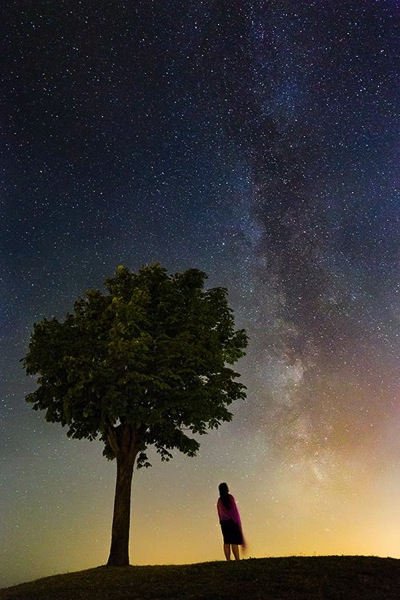
There are many factors that come into play when photographing the night sky. You can’t just pick a location and hope for the best. A successful image will depend on sunrise/set, moonrise/set, the phase of the moon, milky way position, galactic center visibility, time of year, and light levels.

If all that feels a bit overwhelming, don’t stress. There are many tools available to help you research and plan your night sky photos. I’ve used a number of them over the years, but there’s really only one that I rely on these days.

The PhotoPills App

You may have heard of PhotoPills already. It’s a popular app among landscape photographers. I’ve used it for a while now, and I can’t imagine planning my travel and landscape photos without it.

PhotoPills is a great tool for figuring out the best time to photograph the outdoors. It gives you a bunch of useful information about the sun and moon at a specific time and location, which is great for planning sunrise and sunset photos.

how to plan astrophotography with photopills app

It does so much more than that, though. It’s actually an incredibly feature-rich app that provides far more tools than I could cover here. If you’re new to PhotoPills, I recommend learning the basics of the app first. I’m just going to show you how to use PhotoPills to plan astrophotography.

Ambient Light

The single most important factor in successful night sky photography is darkness. There are three main factors that will affect the amount of ambient light in the scene and potentially ruin your photos.

The first, and most obvious, is daylight. Photographing the night sky while the sun is still shining is difficult. While you may think that you just need to wait until after sunset, it’s not quite that simple. The light from the sun illuminates the sky for a lot longer than you may realize.

As the ambient light from the sun fades in or out at the end of the day, it goes through four phases. You’ve likely heard of golden hour and blue hour. There’s also nautical twilight and astronomical twilight. You don’t need to understand what these terms mean, just that there will still be light from the sun that your camera will see.

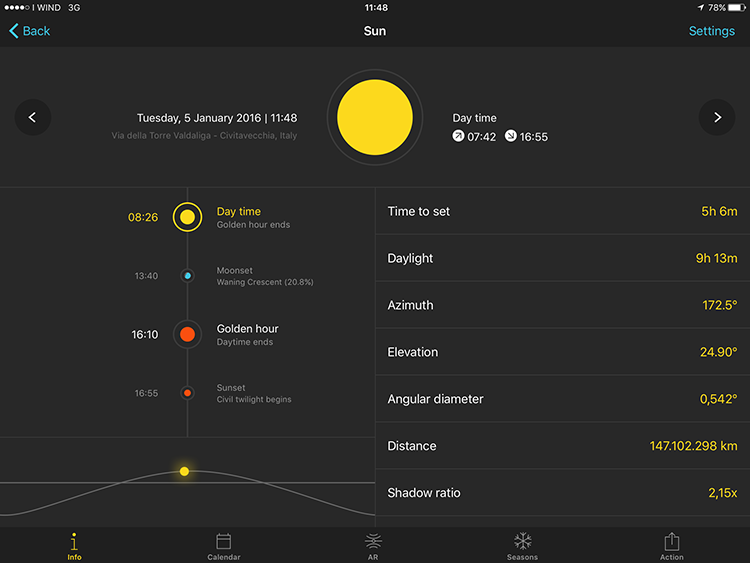
For the darkest sky possible, you want to shoot after astronomical twilight ends and before it begins again. In the PhotoPills app, open the Sun pill, select the calendar view, and tap on the date you’re planning to shoot. You’ll be able to see the exact times from golden hour and sunset, through the twilight phases, and into night time. The sky will be darkest between that time and the beginning of astronomical twilight the next day.

how to plan astrophotography with photopills app

Light Pollution

The second factor is light pollution caused by man-made light. This is most noticeable in or near built-up areas, so getting away from these is crucial.

The simplest way to find locations that have minimal light pollution is to look at a light pollution map such as Blue Marble Navigator. You can easily find locations far enough away from light pollution to photograph the night sky.

how to plan astrophotography with photopills app

The Moon

The third factor that can affect the amount of ambient light in your night sky photos is the moon. The moon can reflect a surprising amount of the sun’s light and wash out your night sky photos. It can also illuminate the foreground, which may be something you want to take advantage of. Unfortunately, you can’t have the moonlight on the foreground without it illuminating the sky also.

If you want to eliminate moonlight from your night sky photos, there are two ways to do it. The first, and easiest, is to shoot during a new moon. A new moon is the opposite to a full moon, meaning it’s completely dark. No matter where it is in the sky, it won’t reflect any light or affect your photos at all.

The second way is to plan your photos so that you’re shooting while the moon is below the horizon. That means before moonrise and after moonset. This isn’t as effective as timing your photography with a new moon, but you can come home with some great images using this technique.

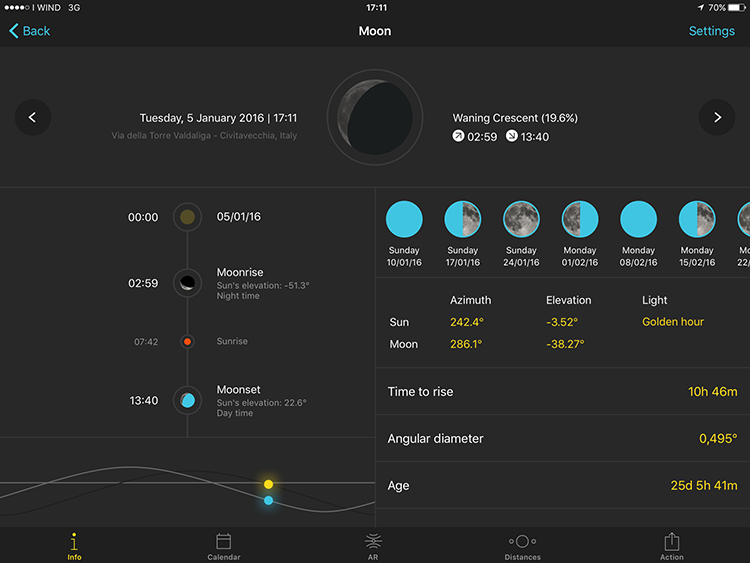
PhotoPills makes it easy to plan using both these options. To plan for a new moon, open the Moon pill and go to the calendar view. You’ll be able to look ahead and see the date of the new moon each month. The new moon is completely black with the little circle next to the date. A day either side is also usually safe.

how to plan astrophotography with photopills app

To figure out what time the moon will rise and set on a specific date, tap on that date while still in the calendar view. You’ll be shown a list of events for that date, including moonrise and moonset.

how to plan astrophotography with photopills app

The Milky Way

If you want to include the Milky Way in your night sky photos, you’ll need to consider a couple of things. Firstly, although the Milky Way is visible all year round, the galactic center is only visible for part of the year. This is between March and October, or slightly longer in the Southern Hemisphere.

The second thing you need to remember is that the Milky Way moves through the sky as the earth rotates, just like the sun and moon. What this means is that when planning your astrophotography, you’ll need to consider the time that the galactic center is visible.

PhotoPills makes this super easy. Going back to the Sun pill, you’ll see that galactic canter visibility appears in the event list for your selected date. Note that this may not be the time that the galactic center rises and sets, it may be the time that the sky is dark enough to see it.

how to plan astrophotography with photopills app

One of the coolest and most useful features of the PhotoPills app is augmented reality (AR). In the Planner pill, go to the date and location you’re planning to photograph, then tap Night AR in the option bar at the bottom. This will show you an AR view that superimposes the Milky Way over your screen.

how to plan astrophotography with photopills app

This is useful for seeing where the milky way and galactic center will be at your selected date and location. You’ll be able to see the angle and relative position of the Milky Way, as well as watch how it will move across the sky by sliding your finger across the screen.

PhotoPills Widgets

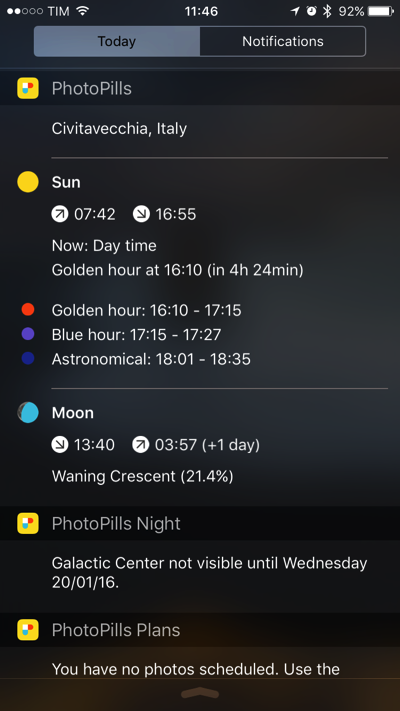
PhotoPills makes it super easy to see all this info in one place. Instead of having to go into each pill to find the relevant information you want, you can take a quick look at the PhotoPills widget and see times for the next sun, moon, and galactic center events.

how to plan astrophotography with photopills app

This won’t work for planning future photos, but if you want to see if tonight is a good night for astrophotography, you can find out at a glance. I’m sure you’ll find it useful once you have a good understanding of the right conditions for night sky photography.

Dig Deeper Into PhotoPills

As I mentioned, the PhotoPills app is incredibly powerful and feature-rich. It includes many more useful tools, such as Star Trails, Spot Stars, and Time Lapse. If you want to dig deeper and find out what PhotoPills can really do, I encourage you to buy the app and spend some time working through the User Guide on their website. There’s a wealth of tutorials and how-to videos that will help you make the most of the app.

I would love to see the night sky photos that you create with PhotoPills. Feel free to share them below.

The post How To Plan Astrophotography With The Photopills App appeared first on Digital Photography School.

Digital Photography School

 
Comments Off on How To Plan Astrophotography With The Photopills App

Posted in Photography


Photo planning app PhotoPills now available for Android

17 Mar

PhotoPills has for long time been one of the most popular photography planning apps for the iPhone. Now finally, after a long wait, the Android version has arrived on the Google Play Store.  Like its iOS-counterpart, PhotoPills for Android will set you back a hefty $ 10 but if you take your photo planning seriously this could be a small price to pay.

Among a host of other functions PhotoPills allows you to find out when and where the sun will set at a particular location, when the moon will rise and where the Milky Way will be visible. The Android version has been one year in the making and on an especially setup Android Version Page the team behind the app explains that it was the goal to offer exactly the same features, attention to detail and reliability as the iOS version. 

It’s worth mentioning that the app is still in public beta stage, with the full release expected by the end of the month. So it’s possible you might still encounter the occasional bug or malfunction. If that doesn’t put you off you can can download PhotoPills now and install it on any device that runs Android 4.1 or newer.

Articles: Digital Photography Review (dpreview.com)

 
Comments Off on Photo planning app PhotoPills now available for Android

Posted in Uncategorized


PhotoPills: The Photographer’s Swiss Army Knife

20 Feb

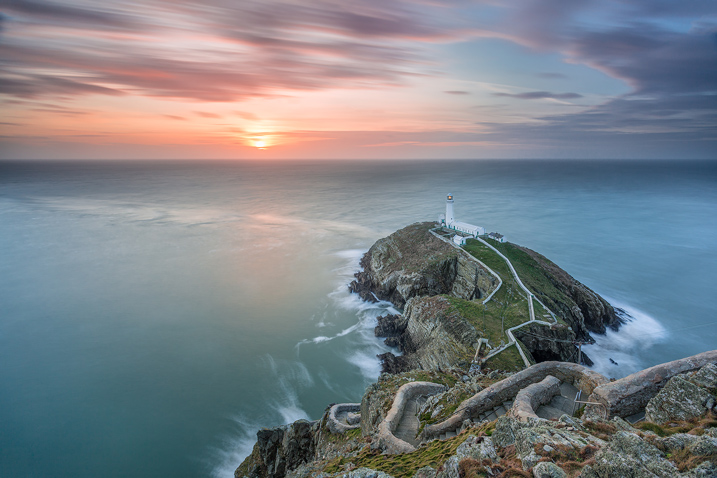
It’s 6pm, it’s cold, and the sun is on its way to set. The tripod is placed, the composition is done – now I just have to wait for the big show that Mother Nature puts on every day to happen again. The sky is threatening, but with a little luck, the sun will pierce the clouds to pass above the lighthouse in front of me.

Image 1

If I think about the first time I went out with the tripod on my shoulder, it makes me smile. I knew more or less where to go, I had no idea of the exact time at which the sun would set, nor where. Failure was inevitable!

Years have passed since then, and many things have changed. But the biggest and decisive one is in my hands right now: PhotoPills – photo planning app.

What is PhotoPills?

PhotoPills is like having a Swiss Army Knife for all photography matters in your pocket, at your service. Whether you’re a seasoned photographer, or someone who’s barely touched a camera, PhotoPills has you covered. You have a question, you get the answer.

Image 2

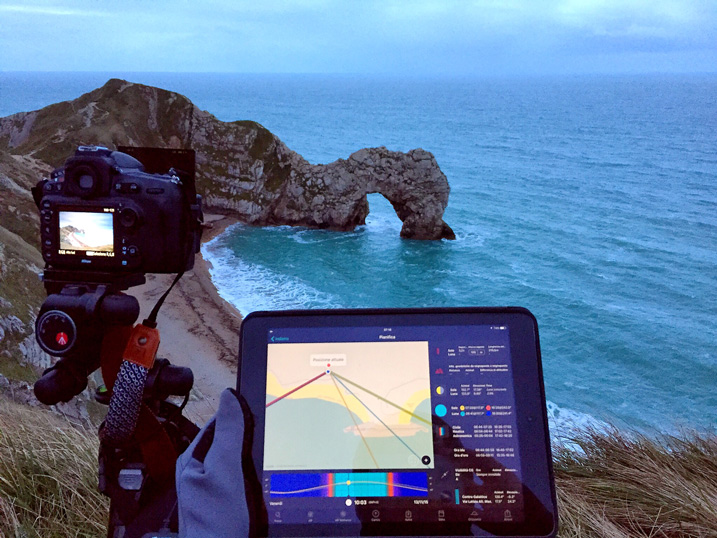
Using PhotoPills at Durdle Door (UK)

Beginners will love it. I see it in every single workshop I run. There, in the field, before deciding the frame and the shooting spot, people enjoy using the Augmented Reality views, to easily track the position and the path of the Sun, the Moon, and the Milky Way. It’s the simplest way to understand what’s going to happen next.

On the other hand, on a more advanced level, being able to plan your shots directly on a map, even the Milky Way shots, saves a ton of time. PhotoPills’ Planner is so well designed, that you can quickly figure out the perfect shooting spot, date, and time for any scene you imagine.

Image 3

PhotoPills screen menu

Everything starts from a clean and user friendly interface.

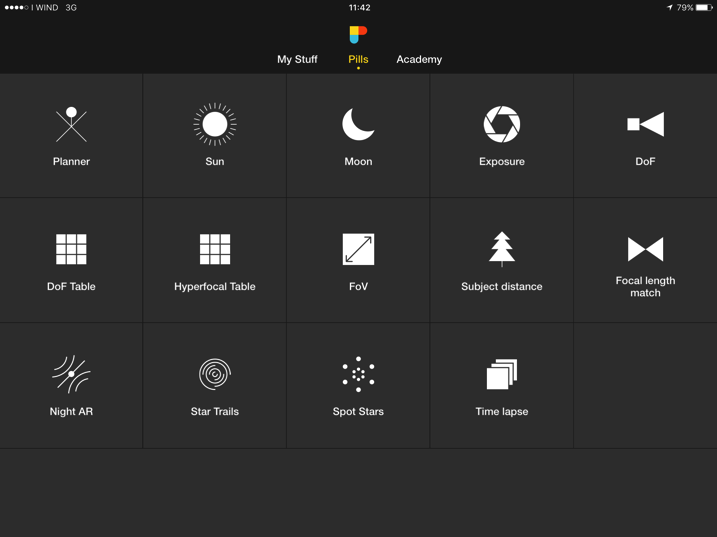
You can choose between three menus, simply through a swipe to the right or left at the top of the interface. After choosing your camera, the map type, and other settings in “My Stuff” menu, you can enter the main section called “Pills” where you have the access to all the available modules.

The possibilities are almost endless, and in this article, I’ll do my best to describe some of the things you can do with this app. Are you ready?

Widgets

Imagine that you’re going to bed (at home, or anywhere in the world) and want to know at what time the sun will rise tomorrow, when the golden hour starts, or when the Moon will rise, or what about the the galactic center visibility times?

The first thing that I love in this App, is that all you have to do is to pull down from the top of the screen and enable the three PhotoPills widgets in the notification center. If you do so, you’ll have all the key light, sun, moon and Milky Way information in just one swipe. Also, you’ll have access to the five upcoming photo plans you’ve saved using the Planner.

Image 4

I love using the widgets when I’m traveling, since it’s so easy to have everything I need on one single screen. A cool feature is that it works offline too. As it happens with the Augmented Reality views, PhotoPills doesn’t need an internet connection to give you all the key data you need.

But that is not all, in the case you want to have all this information (and much more) for a different location or date, just use the new Sun and Moon Pills. So easy, and so nice to have everything together. I really hope that an Apple Watch version will be implemented soon too.

Image 5A

Sun Pill

Image 5B

Moon Pill

Augmented Reality

In a landscape image, composition is more than fundamental. How many times have you arrived at your shooting location, and wondered where the sun would set? For me, every time – but before using PhotoPills, I was never able to have a precise answer.

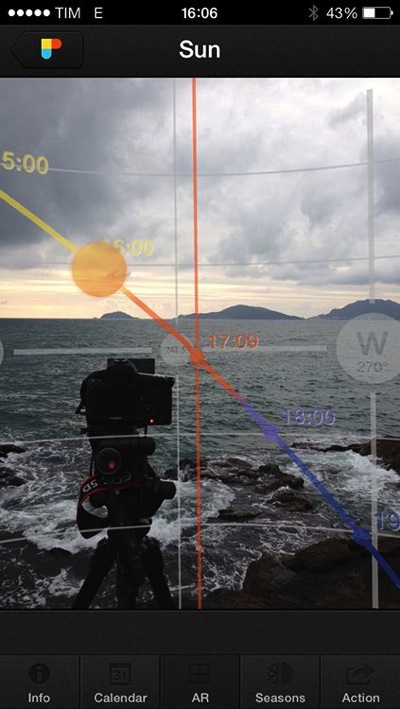
The Augmented Reality (AR) module included in the App, makes things so easy. Just point your phone at a subject, and use the AR tools available within the Sun, Moon and Night AR pills to see where the Sun, the Moon or the Milky Way will be in the image.

Image 6

Sun AR in action

Besides, and this is particularly clever, you can change the time to see how everything evolves, just by scrolling on the screen with your finger.

The application is also useful for all the star hunters out there – with the Night AR view it is easy to plan star trails shots. For example, if you’re planning to shoot a circumpolar, the Night AR view will also help you locate the North Star (Polaris). And, if you live in the southern hemisphere, PhotoPills will give you the position of the south celestial pole, right where you need to frame.

Image 7 1

A Milky Way shot planned using Night Augmented Reality

Planner

If the Augmented Reality tools are my students’ favorites, I simply love the Planner. I use it to plan every shoot.

Image 8

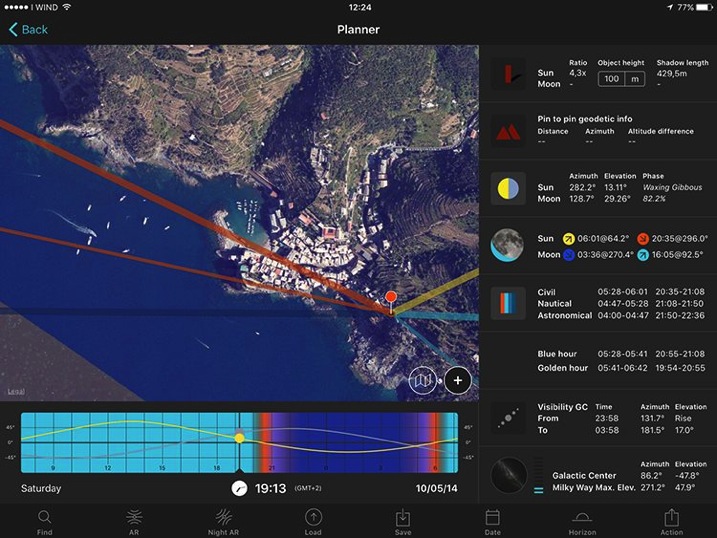
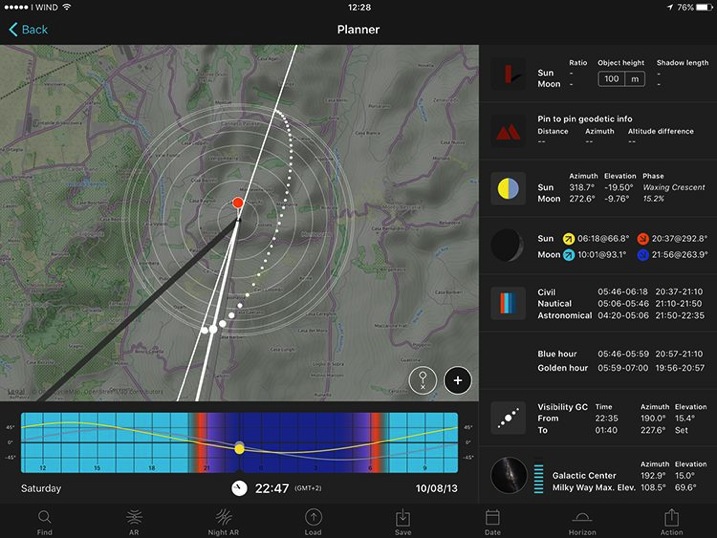
No matter if it’s a sunset in Vernazza (above), a moonrise in Iceland, or the Milky Way in Yosemite National park, the PhotoPills Planner helps me find the right time, for the alignments I’m looking to happen. It’s my imagination’s best ally.

Image 9A

Planning Pill for Vernazza shot above

Image 9B

Planning Pill for Milky Way shot above

A lovely feature, is that once I’ve figure out the shooting spot and shooting time, I can save the plan in my To-Do list of planned photos. Then, every time I have an idea, I plan it and save it in my list. This way, I make sure not to miss any of my favourite shots.

Location Scouting

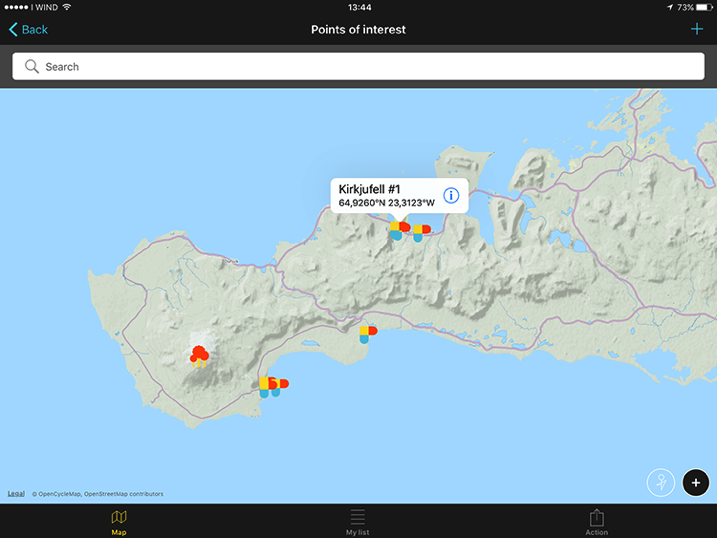
We’re all exploring new locations all the time, looking for new possibilities, and to be able to store the most valuable places in our own database is just a must. So, every time I find a place I’d like to remember and study for a possible shot, I use PhotoPills to save it as a Point of Interest.

Another useful feature is that I can upload to PhotoPills all my .kmz files, so I can bring with me all the plans already made with Google Earth!

Image 10

Point of Interest visualized on map

Calculations

Knowing the shooting time and spot is obviously the first step, but you also need to make many more decisions before pressing the shutter – this is where PhotoPills is brilliant.

These are just four of the numerous calculators I use to figure out the settings I need:

Image 11A

Long Exposure calculator

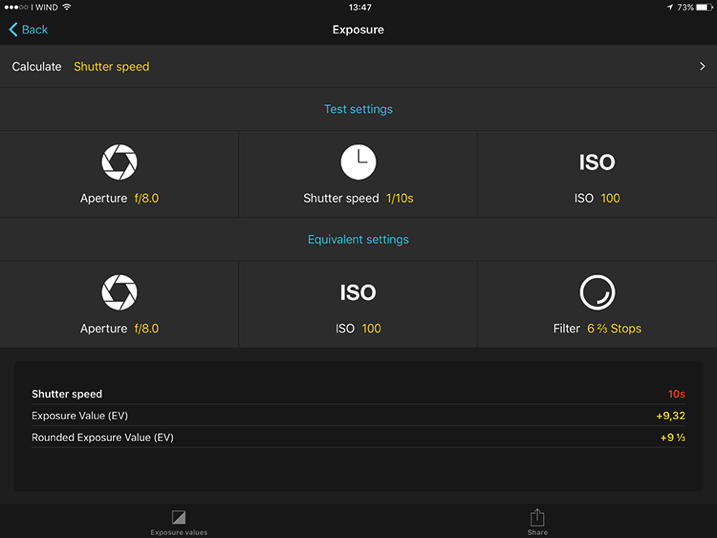
Long Exposure calculator: You already know, my favorite one! With this module I’m able to calculate the exact exposure time when using ND and GND filters. By the way, PhotoPills has the only Long Exposure calculator that allows you to convert the shutter speed for non-standard f-stop reductions.

Spot Stars calculator: When shooting the Milky Way, it helps determine the maximum exposure time that allows me to capture the stars as big bright spots. The longer the exposure time, the more light is collected by the camera sensor, and the brighter the stars will appear in the image. If I go beyond this exposure time, stars will begin to appear as trails in the image, which is something I want to avoid at all costs.

Time lapse calculator: If you’re doing time lapse photography, this calculator will save you lots of time. Just set the frames per second (24fps), the duration of the event you’re shooting (example 6 hours), the desired clip length (30 seconds) and the image size (4Mb) to get the shooting interval (30 seconds), the number of photos (720) and the total memory usage of the SD card (2.81Gb). I used to need 15 minutes to figure out all those numbers, before I started using PhotoPills.

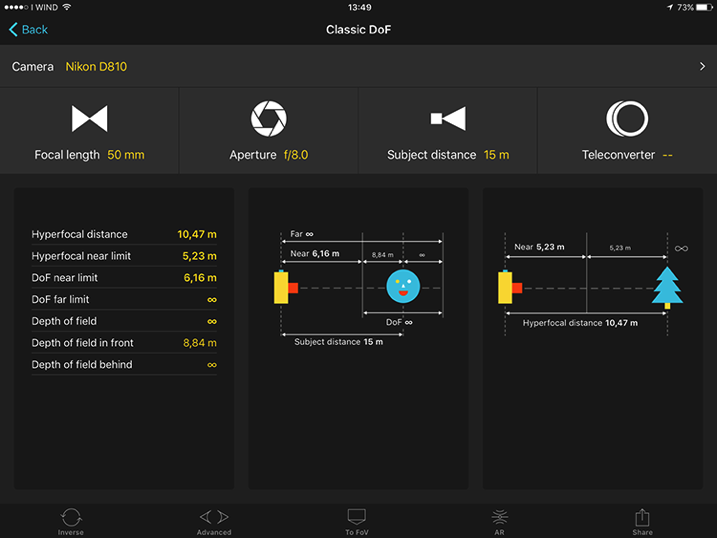
Depth of Field calculator: I use it to calculate the distance where to focus, to maximize depth of field (hyper focal distance). This becomes very useful in my night shots, since I want everything in focus, from the foreground to the stars. I simply calculate the hyperfocal distance and then I make sure to focus my lens at a slightly longer distance. This assures me that I’ll have the stars in sharp focus.

Image 12

DoF Calculator

Conclusions

PhotoPills is definitely a must have for (but not only) landscape photographers. The features are many and well-maintained, and the difficulties that you can encounter at the beginning, can quickly be overcome thanks to the Academy (a virtual university of PhotoPills where you can follow video tutorials, and read insights on each function of the application to really turn our ideas into real images).

The price of $ 9.99 in the App Store is higher than average, but is ridiculous compared to the large amount of features and practical uses, as PhotoPills replaces much of the paid, and free apps, in one go.

It must be mentioned that PhotoPills is currently available only for iPhone and iPad, but the Android version has been announced to launch in 2016.

After many months of use, now I cannot imagine a photographic adventure without this application. Once you fall into the Imagine-Plan-Shoot creative loop, you won’t be able to stop pushing your imagination, and this will lead you to discover a new world of possibilities.

Definitely, give it a try!

Pros:

  • Clean and friendly user interface
  • Many different tools in a single application
  • Cached maps for offline use
  • Possibility to import POI from .kmz files
  • Localized languages
  • Tons of tutorials

To be considered:

  • Android version still in development (release expected in 2016)

Do you use PhotoPills or another photography planning app? Please share your experiences and tips in the comments below.

googletag.cmd.push(function() {
tablet_slots.push( googletag.defineSlot( “/1005424/_dPSv4_tab-all-article-bottom_(300×250)”, [300, 250], “pb-ad-78623” ).addService( googletag.pubads() ) ); } );

googletag.cmd.push(function() {
mobile_slots.push( googletag.defineSlot( “/1005424/_dPSv4_mob-all-article-bottom_(300×250)”, [300, 250], “pb-ad-78158” ).addService( googletag.pubads() ) ); } );

The post PhotoPills: The Photographer’s Swiss Army Knife by Francesco Gola appeared first on Digital Photography School.

Digital Photography School

 
Comments Off on PhotoPills: The Photographer’s Swiss Army Knife

Posted in Photography