RSS
 

Posts Tagged ‘Photography’

Create a Theme to Step Up Your Travel Photography

23 Oct

One of the things that always drew me to travel photography is the endless variety. Every place on earth is unique. The people, the landscape, the culture, the wildlife, the architecture. Even with neighboring cities, no two places are the same.

create a travel photography theme 01

So, why is it that we tend to photograph them all the same way? When I look back through my archives from all over the world, most of my images have a similar look. If I didn’t remember the location of a photo, I likely couldn’t guess where I took it.

As photographers, we develop our own unique approach to our craft. It’s not a bad thing – it helps to develop our own style. Although, sometimes it’s worth taking a different approach for a specific location or trip. Choosing a travel photography theme for a trip can help focus and guide your photography, as well as give you a unique collection of images.

surfers create a travel photography theme

Coming Up With Your Photography Theme

I’m not talking about changing your style or learning a whole new genre, necessarily. Just taking some time to think about how you could create a theme for your next photography trip. Here are a few things to consider that could help to give your collection of images a unique photography theme.

Genre

You likely already have an idea of what genre of photography you’ll be using. This will largely come down to what you like to photograph. It will also depend partly on the location you’re going to and the gear you have available.

However, you may be tempted to photograph everything. It’s easy to fall for this temptation, I know. You’re in a new, exciting place and may never go there again. You don’t want to miss a thing. Go crazy, if you must, but try to think of a specific genre that suits the location and spend most of your time on that.

noah create a travel photography theme

You don’t want to pick a genre that won’t give you many options. Trying to photograph the milky way in New York isn’t going to happen. Neither is photographing architecture in Yosemite. Come up with something that will give you a lot of material to work with and that you will actually enjoy.

Travel photography conjures images of epic landscapes or cityscapes. You really are only limited by your imagination. Try making the local people your theme with portraiture. Spend your days practicing street photography if you’re visiting an urban location. Maybe even try your hand at wildlife photography if there’s any around.

Subject

So, you’ve picked a genre. What are you going to point your camera at? It’s time to spend some time thinking about the subject of your theme. Again, it may be an easy decision. What’s unique about the location you’re visiting? What’s it known for?

On my recent road trip up the coast of Queensland, Australia, I followed a coastal theme. If there’s one thing Australia is known for, it’s incredible beaches. It was an obvious choice.

jetty create a travel photography theme

You don’t need to go with the obvious, though. Something less obvious can actually make a more engaging collection of photos. If you’re visiting a big, concrete jungle, you could create a contrasting theme by photographing the flowers you find. Think outside the box and get more out of the location.

Of course, there’s nothing wrong with photographing the cliche. There are some incredible collections of photos that follow an obvious subject – lakes of Canada, waterfalls of Iceland, Humans of New York.

Style

The style of your photography is one of the most powerful elements in creating a photography theme. The way you choose to photograph the subject you’ve chosen can vary a lot. You may have already developed your own style. You don’t need to throw that out the window.

sand create a travel photography theme

If your photographic style suits the genre and subject that you’ve chosen, feel free to stick with it. You’ve likely worked hard to develop it. You could adapt it for this trip by turning up the volume or trying something slightly different.

If your theme uses long-exposures, you could try creating super-long exposures. If you’re doing astrophotography, maybe give star-trail photography a go. Creating an aerial theme? How about shooting panoramas with your drone?

A big factor in creating a style is focal length. A 50mm lens will create a very different image to a telephoto. As will a wide-angle or fish-eye lens. You might have a dozen lenses to choose from, or you might have one. Either way, try choosing one lens for your theme. You could even take it a step further and stick to just one focal length.

create a travel photography theme

A photography trip could be a good opportunity to try something new. Have you been wanting to get a drone and have some fun with aerial photography? Maybe it’s an opportunity to try your hand at macro photography? Travel is expensive, so buying new gear for a trip usually isn’t possible. Renting is a great option, as is borrowing gear off other local photographers.

Color

If there’s one thing that can create a consistent theme within a collection of images, it’s color. This can be both in the colors that you capture in-camera and the way you edit them in post-production. A combination of both can really bring a bunch of photos together.

shipwreck create a travel photography theme

It’s not always the case, but you may find there are certain colors that are consistent in the locations you’re photographing. Certain landscapes, for example, will have dominant colors. Green hills, blue water, yellow sand.

There are opportunities to create color themes everywhere, though. You could create a color theme in a city by photographing doors, flowers, dresses, signs, etc, that are all that color.

palm create a travel photography theme

When you import your photos to your computer, the options for editing your photos with a color theme are endless. Try playing around with the white balance and saturation sliders. Experiment with HSL and split-toning. Do something different to what you usually do, and when you find something you like, save it as a preset for your theme.

Creating a color theme doesn’t need to include advanced color grading or anything technical. Your theme might just be bright, vivid colors. It could also be the opposite. Maybe a desaturated look, or even go monotone. Black and white photography can create a very strong theme.

create a travel photography theme

As a colorblind photographer, I’ve avoided advanced color editing in the past and played it safe. Taking risks and learning to create color themes for my travel photography really helped me take my photos from mundane to unique.

Summary

Whether your trip is a family vacation, business travel, or a photography adventure, try thinking about a photography theme. Ask yourself what you could do to come home with a more cohesive collection of images that represent the location well. You might even end up with a few side-by-side on the wall someday.

Do you have any photography theme tips? If so, let us know in the comments below.

The post Create a Theme to Step Up Your Travel Photography appeared first on Digital Photography School.


Digital Photography School

 
Comments Off on Create a Theme to Step Up Your Travel Photography

Posted in Photography


Two Ways to Transform Old Photography Magazines Into Coasters

22 Oct

Photography magazines are one thing I can’t seem to throw away. My fascination with photography has culminated in a library of magazines filled with beautifully dated galleries, equipment reviews, tutorials and advice. They accumulate on my bookshelves, and quickly migrate to desktops, the tops of fridges, assorted drawers and nightstands.

While having a cup of tea the other day, I realized I’d forgotten to put down a coaster. I quickly grabbed a magazine and rested my cup on it, sparing my furniture. And it got me thinking. Could I transform some of my magazines into coasters themselves? Surely the thousands of pages I’d accumulated could be put to use as an interactive dining accessory. After all, who wouldn’t want a cute photography-themed coaster to admire while having a cup of tea?

Here are two simple ways to create striking coasters out of your old photography magazines.

The cut and paste method

You will need

  • A photography magazine or two.
  • Some coasters to stick your magazine images to. (I used simple round cork coasters from IKEA.)
  • Mod Podge (a glue and sealant) available at art supplies stores.
  • A pen or pencil.
  • A brush.

Method

First, find an image you’d like to incorporate into your coaster design. The choice here is endless. You could focus on text, photographs or whatever catches your eye.

Once you’ve selected an image, trace a circle around it (using your coaster as a template) and carefully cut it out.

Next, apply a generous amount of Mod Podge to the coaster and spread it around evenly with the paintbrush. (I put some newspaper down for this bit to protect my work surface from spills.)

Place your image face up on the Mod Podged side of the coaster and smooth out any wrinkles.

Once your coaster has dried (allow an hour or two), you’ll need to seal it. Spread a layer of Mod Podge evenly over the image with the brush. (Don’t worry, it dries clear.)

Once it has dried (again, allow an hour or two), repeat this step four times. Make sure you let the coaster dry between coatings.

Once the last layer of Mod Podge has dried, your coasters is ready to use.

The coiling method

You will need

  • A magazine.
  • A ruler and scalpel (or a paper shredder).
  • Glue. (Mod Podge works well for this project too.)
  • A paintbrush.

Method

Tear out a few magazine pages – the more vibrant the better. Cut each page lengthways into 7mm strips. (If you have a strip-cut paper shredder, you can use it instead.) You’ll need to cut up at least six pages.

Once you’ve cut your strips, its time to start curling. Select one strip of paper and curl it over itself to create a coil. Once you’ve completely curled the first strip, add a dab of Mod Podge to the end and glue it down.

Now you need to add a new strip to build on the last. Add a dab of Mod Podge to the end of a new strip of paper, and press it Mod Podge side down onto the coil where the last strip ended. Wind the fresh strip around the coil, keeping the paper nice and taut. Once you’ve completely wound it on, add a dab of Mod Podge to the end of the strip and secure it to the coil.

Keep winding your strips of paper onto the coil. For every fifth strip, add a thin a layer of Mod Podge down its entire length and wind it Mod Podge-down, around the coil. This will keep the coil together as it grows.

Keep adding strips of paper until you’re happy with the size of your coil.

It may take you a couple of hours, but the results are striking. And it’s really fun to watch it grow.

Whichever method you choose, it’s a great way to get those stunning images out of the bookshelf and onto your coffee table.

The post Two Ways to Transform Old Photography Magazines Into Coasters appeared first on Digital Photography School.


Digital Photography School

 
Comments Off on Two Ways to Transform Old Photography Magazines Into Coasters

Posted in Photography


5 Reasons to Consider Concert Photography with a Wide Open Aperture (and the Secret to Perfecting it)

21 Oct

Concert photography is arguably one of the most adrenaline-filled niches you can engage in as an image maker. Musicians, magazines, fans, and record labels alike turn to skilled concert photographers to tell a story for the momentous performance. For most music photographers (due to venue constraints) there is less than ten minutes to capture enough great images to populate a full gallery. Partner this with tumultuous circumstances such as sporadic lighting and an excitable audience and you have effectively created a photographic situation that is unlike any other.

As such, shooting with a very wide open aperture might appear to be too daunting of a task! There are common misunderstandings of how to use and work with a wide open aperture! If your inner aesthete drools over soft, dreamy photographs and creamy bokeh, then you better get ready to play with some low, low, low numbers. We are here to tell you how to photograph concerts at f/1.2, f/1.4, and f/1.8!

Wide aperture concert photography tips

Why Use an Ultra Wide Aperture?

Here are 5 reasons you may want to consider shooting concert photography with a wide open aperture.

1. Aesthetic and Style

To preface, a lot of the quality and final image look is based on the type of lens used. In the past several years, photography fans are gravitating towards the shallow depth of field aesthetic. If you’re in the business of producing commercial music photography (like myself), you’re going to want to keep following the trends and adapting to what is sought after in the industry.

Aesthetic and Style with Wide Aperture Concert Photography

An added bonus is being able to niche yourself a bit in an industry that has a lot of competition, many photographers are wary of shooting fast paced events with a wide aperture due to potential focusing issues. If you can master this art, you have something that will separate you from others.


2. Low Light Capability

Low light concert photography with wide aperture

Unless you’re shooting a big name at an amphitheater, a lot of smaller venues will have very poor lighting. You’ll need to use equipment that will illuminate the frame with whatever limited lighting is available. In these low light scenarios you need a lens with a wide enough aperture to let in more light. Using a lens that goes down to f/1.2, for example, is a great way to let enough light in and make the frame bright. Remember, the aperture is the hole the light passes through in your lens. The wider the aperture, the more light that enters the camera.


3. Shallow Depth of Field

Shoot concert photography with shallow depth of field

The wider the aperture, the shallower the depth of field. Shallow depth of field is great for live concerts because the stage can be rather cluttered compositionally. From instruments to cables, background props, and other band members, there can be a lot going on in the frame at once. Only having one subject in focus with the rest blending into a creamy bokeh makes for a much more visually pleasing and simplified image. With the depth-of-field being so shallow, whatever troubles you about the background can easily melt into a beautiful creamy bokeh.


4. Detail Shots

Capture detail in your concert photography with wide aperture

On the topic of shallow depth of field, if you are photographing for an instrument company, an aperture of f/1.8 will likely become your best friend. This is because photographs taken with a large aperture allow all of the focus to lie on the subject, and the background ceases to remain a distraction. Many instrument companies love to have their products captured in a natural usable setting, such as musicians at a live show.A shallow depth of field will keep the interest solely on your single subject.


5. Sharpness

How to achieve sharpness in your concert photography with wide aperture

Due to technological constraints, lenses that open their aperture below f/2.8 are fixed millimeter lenses (they do not zoom). As a general rule, fixed millimeter lenses tend to be sharper than lenses with a range.


Let’s Talk About the Elephant in the Room: Focusing with a Wide Open Aperture

Right where all of the benefits of an f-stop of 1.2 start to break down is the focusing. The wider the aperture and the shallower the depth of field, the more difficult it can be to focus on what you want. Pair that with a live show in which the lighting is a bit of a mess, and the subjects move spontaneously in various directions, and it sounds like the perfect recipe for a photographer migraine. However, focusing with a wider aperture doesn’t have to be so difficult- it’s just a different thought process.

The Concept of Sharpness

Sharp concert photography through composition

Really, the focus stems from a desire to have an image that is sharp. But what is sharpness? Sharpness is an interesting concept. How sharp a subject appears is a matter of two things: the focus the camera captures and the amount of contrast on your subject. The term “sharpness” is, in fact, an illusion. You see, for an image to be considered sharp, it needs to have contrast. If the there is little contrast in the image, the subject will not look three-dimensional regardless of whether the focus is perfect or not. Biologically, the way that our eyes work, our vision naturally detects edges to register sharpness, and shadows and highlights in order to record the depth in a subject. This is a very important concept to understand when answering the question of how to make images look sharp. When editing your concert photography images, be attentive to the shadows and highlights. And add contrast to define your subject.


Perfect Focus

Sharp concert photography through perfect focus and wide aperture

In terms of getting your image to actually be sharp (from being in perfect focus), here is the basic concept of how focus works in a camera. When you focus your camera on a subject, it establishes a focal plane. To get your subject in focus, it has to be on the focal plane. Focal planes happen on an x (horizontal) and y (vertical) axis. This means anything along either of those axes will be in focus, and anything not on them will be out of focus. The concern with a wide open aperture is that your focal plane is quite small. As you decrease your aperture number and make the opening wider, the invisible area in front and behind the plane of focus will get smaller and smaller, leaving you with much less wiggle-room. As such, distance from the subject plays a key role in your focus.

When shooting wide open, even the smallest diversion from either of the focal plane axes will cause your subject to be out-of-focus. You cannot take a step forward or back without the need to refocus when shooting at a wide aperture. But by keeping this in mind, you can adjust your photography technique to better accommodate the small focal plane.

Single Point Autofocus

Using single point focus and wide aperture in concert photography

A trick to help make sure that what you want in focus is indeed sharp, is to use single point autofocus. By default, your camera will probably select either the object that’s closest to the camera or what’s in the center of the frame. By using single point autofocus, you tell the camera exactly where to focus, which is extremely helpful with low aperture numbers. Refer to your camera model’s manual to find how to change the focus setting!

The Real Secret

The real secret to wide aperture concert photography

Keeping in mind how the focal plane works, this is the big trick to shooting wide open at a concert: The farther away you are from the subject, the easier it is to get the subject in focus. You can get the subject in focus and still maintain and extremely creamy depth of field.

Whether you’re in a photo pit or just in the main venue floor, your position to begin the concert shoot can significantly affect your success for the rest of the shoot. Keeping in mind that for most general photography passes your time is limited, you need to be ready to jump right into the shoot the very second the music hits your ears. My suggestion is to start on the outer edges of the pit or venue and work your way to the middle. Many concert photographers all flock to the center of the shooting zone, and begin shoving to claim their dead center spot. When you start from the edge, while the other photographers are all congregating and fighting for the center, you have much more room to move freely on the outer edge. This is where you will have an advantage to be able to move a bit further away from your subject in order to expand your plane and get that perfect focus.

Shooting concert photography in wide aperture

Now that you’ve been let in to the secret, go out there and capture some awesome concert shots!

The post 5 Reasons to Consider Concert Photography with a Wide Open Aperture (and the Secret to Perfecting it) appeared first on Digital Photography School.


Digital Photography School

 
Comments Off on 5 Reasons to Consider Concert Photography with a Wide Open Aperture (and the Secret to Perfecting it)

Posted in Photography


DPReview TV: Simple techniques for great macro photography

20 Oct

This week Chris and Jordan are joined by renowned macro photographer Don Komarechka, who demonstrates a few simple techniques that can improve your macro photos in a big way.

Want to learn more? Check out some of our other articles about macro photography:

DPReview articles about macro photography

Get new episodes of DPReview TV every week by subscribing to our YouTube channel!

Articles: Digital Photography Review (dpreview.com)

 
Comments Off on DPReview TV: Simple techniques for great macro photography

Posted in Uncategorized


Weekly Photography Challenge – Silhouettes

20 Oct

Photograph Fisher man by Saravut Whanset on 500px

Fisher man by Saravut Whanset on 500px

Silhouettes are a wonderful way to convey drama, mystery, emotion and mood to the viewers of your photos and often stand out in an album because of the combination of their simplicity but also the story that they convey. I love them because they don’t give the viewer of a clear picture of everything but leave part of the image up to their imagination to wonder about.

That’s an excerpt from a post I wrote quite some time ago, but remains one of our more popular posts on how to photograph silhouettes. Your challenge this week is to take a photograph of a silhouette and see if you can create a story that evokes imagination in the viewer. Here’s some tips to get you started:

How to Photograph Silhouettes in 8 Easy Steps

Silhouette Photography Technique

Photograph worlds appart by Carlos Canales on 500px
worlds appart by Carlos Canales on 500px

Photograph Breakup by Michael Valjak on 500px
Breakup by Michael Valjak on 500px

Looking for more inspiration? Check out these great shots:

12 Stunning Silhouette Shots

A Collection of Great Silhouette Photos

Or this post on how to use your silhouettes to tell a story will help you for this week’s challenge:

How to Create Powerful Silhouettes by Telling a Story

Weekly Photography Challenge – Silhouettes

Simply upload your shot into the comment field (look for the little camera icon in the Disqus comments section) and they’ll get embedded for us all to see or if you’d prefer, upload them to your favorite photo-sharing site and leave the link to them. Show me your best images in this week’s challenge.

Share in the dPS Facebook Group

You can also share your images in the dPS Facebook group as the challenge is posted there each week as well.

If you tag your photos on Flickr, Instagram, Twitter or other sites – tag them as #DPSSILHOUETTES to help others find them. Linking back to this page might also help others know what you’re doing so that they can share in the fun.


The post Weekly Photography Challenge – Silhouettes appeared first on Digital Photography School.


Digital Photography School

 
Comments Off on Weekly Photography Challenge – Silhouettes

Posted in Photography


Tips For Using a Grid in Off-Camera Flash Photography

15 Oct

An off-camera flash lets you create your own light, giving you new and powerful options for bringing your vision to life.

But one of the biggest challenges of striking out as an off-camera flash specialist isn’t getting the necessary equipment, or even learning how to properly expose a picture.

It’s learning how to control the light. You need to harness it, not to let it roam free.

Portrait taken using a grid

Firing a strobe into an umbrella or a softbox for the first time and instantly creating soft, even light you can use for flattering portraits is an awesome feeling. Unfortunately, the artificial light usually spills everywhere, including the places you don’t want it to go—all over your background, back into the camera to create lens flare, etc.

As we know from the inverse square law, light loses its intensity the further it travels. But if you’re lighting a portrait in a tight environment you may not have the luxury of the light falling off. Your carefully lit shot could be ruined by light bouncing here, there and everywhere.

Fortunately, a bevy of creative options are available for controlling and limiting how your flashes splash light across the image. And one of the more popular options is using a grid.

What is a grid?

A grid fits over your flash and, using a series of honeycomb tubes, restricts the direction of the light output. Grids come in a variety of sizes to give you either a narrower beam of light or a wider spread. A 10-degree grid casts a narrower beam of light, while a 40-degree grid creates a wider beam.

A grid modifier for speed light flashes

With this level of control over your light you can create the precise lighting setup for the picture in your head.

A grid modifier fitted over top of a flash unit

While other options are available for restricting light (such as snoots), a grid provides the best balance between controlling the light and providing a pleasing effect with a gradual light falloff.

When is the best time to use a grid?

As I mentioned earlier, the challenge is to stop the light where you want it to. That perfectly placed light that’s highlighting your subject might also be throwing light over other parts of your picture, ruining the delicate balance.

Where a grid really shines is in providing a precise and restricted beam of light. You can use it to highlight a detail, create intrigue, or add drama in any other way you can imagine.

An image shot with an umbrella modifier on the flash

This shot is lit using an umbrella. The light is soft and covers a wide area.


Image taken with a bare flash

This shot is lit with a flash but no modifiers. The light is harsh, but narrower than the umbrella.


Image taken using a grid

Finally, this image is taken using a grid. The light is still quite harsh, but it’s restricted to bring more focus to the subject.

Using a grid on your key light

A grid is a fun way to create drama or heighten contrast. This is typical for low key images where a grid is used to purposefully show or hide key details.

For example, you can use a grid to mimic a shadowy and dark “film noir” image. The grid restricts the light, keeping it from spilling all over the scene and helping to maintain that dark, low key effect.

A Low Key portrait taken using a grid modifier

Using a grid on a secondary light

In a multi-light setup, you may need to use a grid on your secondary lights so you don’t ruin the balance provided by your key and fill lights.

Let’s say you already have the lighting you need on your model, but you want to emphasize a background detail. A bare flash would send a lot of new light careening around the image, whereas a grid lets you achieve the look you want with the precision you need.

Lens flare from secondary light

The light from the secondary light behind and to the left of the subject is causing lens flare. Putting a grid on the light would restrict the beam and stop it from happening.

Another useful application for a grid is where your rim light is pointed back towards the camera. You may need it to separate your model from the background. But if that light spills into your lens you’ll have to deal with lens flare and lowered contrast when editing later on.

The solution? Slap a grid on your rim light. The light will be directed only where you want it to go, potentially saving you hours of post-processing work.

Give it a shot

A grid is a handy tool in any off-camera flash photographer’s bag. Their simple design makes them an affordable option and, as I said earlier, they can be used creatively on either your key or secondary lights.

Making the most of a grid is an excellent step to take towards becoming the best flash photographer you can be.

The post Tips For Using a Grid in Off-Camera Flash Photography appeared first on Digital Photography School.


Digital Photography School

 
Comments Off on Tips For Using a Grid in Off-Camera Flash Photography

Posted in Photography


Five ways Google Pixel 3 pushes the boundaries of computational photography

11 Oct

With the launch of the Google Pixel 3, smartphone cameras have taken yet another leap in capability. I had the opportunity to sit down with Isaac Reynolds, Product Manager for Camera on Pixel, and Marc Levoy, Distinguished Engineer and Computational Photography Lead at Google, to learn more about the technology behind the new camera in the Pixel 3.

One of the first things you might notice about the Pixel 3 is the single rear camera. At a time when we’re seeing companies add dual, triple, even quad-camera setups, one main camera seems at first an odd choice.

But after speaking to Marc and Isaac I think that the Pixel camera team is taking the correct approach – at least for now. Any technology that makes a single camera better will make multiple cameras in future models that much better, and we’ve seen in the past that a single camera approach can outperform a dual camera approach in Portrait Mode, particularly when the telephoto camera module has a smaller sensor and slower lens, or lacks reliable autofocus.

Let’s take a closer look at some of the Pixel 3’s core technologies.

1. Super Res Zoom

Last year the Pixel 2 showed us what was possible with burst photography. HDR+ was its secret sauce, and it worked by constantly buffering nine frames in memory. When you press the shutter, the camera essentially goes back in time to those last nine frames1, breaks each of them up into thousands of ’tiles’, aligns them all, and then averages them.

Breaking each image into small tiles allows for advanced alignment even when the photographer or subject introduces movement. Blurred elements in some shots can be discarded, or subjects that have moved from frame to frame can be realigned. Averaging simulates the effects of shooting with a larger sensor by ‘evening out’ noise. And going back in time to the last 9 frames captured right before you hit the shutter button means there’s zero shutter lag.

Like the Pixel 2, HDR+ allows the Pixel 3 to render sharp, low noise images even in high contrast situations. Click image to view the level of detail at 100%. Photo: Google

This year, the Pixel 3 pushes all this further. It uses HDR+ burst photography to buffer up to 15 images2, and then employs super-resolution techniques to increase the resolution of the image beyond what the sensor and lens combination would traditionally achieve3. Subtle shifts from handheld shake and optical image stabilization (OIS) allow scene detail to be localized with sub-pixel precision, since shifts are unlikely to be exact multiples of a pixel.

In fact, I was told the shifts are carefully controlled by the optical image stabilization system. “We can demonstrate the way the optical image stabilization moves very slightly” remarked Marc Levoy. Precise sub-pixel shifts are not necessary at the sensor level though; instead, OIS is used to uniformly distribute a bunch of scene samples across a pixel, and then the images are aligned to sub-pixel precision in software.

We get a red, green, and blue filter behind every pixel just because of the way we shake the lens, so there’s no more need to demosaic

But Google – and Peyman Milanfar’s research team working on this particular feature – didn’t stop there. “We get a red, green, and blue filter behind every pixel just because of the way we shake the lens, so there’s no more need to demosaic” explains Marc. If you have enough samples, you can expect any scene element to have fallen on a red, green, and blue pixel. After alignment, then, you have R, G, and B information for any given scene element, which removes the need to demosaic. That itself leads to an increase in resolution (since you don’t have to interpolate spatial data from neighboring pixels), and a decrease in noise since the math required for demosaicing is itself a source of noise. The benefits are essentially similar to what you get when shooting pixel shift modes on dedicated cameras.

Normal wide-angle (28mm equiv.) Super Res Zoom

There’s a small catch to all this – at least for now. Super Res only activates at 1.2x zoom or more. Not in the default ‘zoomed out’ 28mm equivalent mode. As expected, the lower your level of zoom, the more impressed you’ll be with the resulting Super Res images, and naturally the resolving power of the lens will be a limitation. But the claim is that you can get “digital zoom roughly competitive with a 2x optical zoom” according to Isaac Reynolds, and it all happens right on the phone.

The results I was shown at Google appeared to be more impressive than the example we were provided above, no doubt at least in part due to the extreme zoom of our example here. We’ll reserve judgement until we’ve had a chance to test the feature for ourselves.

Would the Pixel 3 benefit from a second rear camera? For certain scenarios – still landscapes for example – probably. But having more cameras doesn’t always mean better capabilities. Quite often ‘second’ cameras have worse low light performance due to a smaller sensor and slower lens, as well as poor autofocus due to the lack of, or fewer, phase-detect pixels. One huge advantage of Pixel’s Portrait Mode is that its autofocus doesn’t differ from normal wide-angle shooting: dual pixel AF combined with HDR+ and pixel-binning yields incredible low light performance, even with fast moving erratic subjects.

2. Computational Raw

The Pixel 3 introduces ‘computational Raw’ capture in the default camera app. Isaac stressed that when Google decided to enable Raw in its Pixel cameras, they wanted to do it right, taking advantage of the phone’s computational power.

Our Raw file is the result of aligning and merging multiple frames, which makes it look more like the result of a DSLR

“There’s one key difference relative to the rest of the industry. Our DNG is the result of aligning and merging [up to 15] multiple frames… which makes it look more like the result of a DSLR” explains Marc. There’s no exaggeration here: we know very well that image quality tends to scale with sensor size thanks to a greater amount of total light collected per exposure, which reduces the impact of the most dominant source of noise in images: photon shot, or statistical, noise.

The Pixel cameras can effectively make up for their small sensor sizes by capturing more total light through multiple exposures, while aligning moving objects from frame to frame so they can still be averaged to decrease noise. That means better low light performance and higher dynamic range than what you’d expect from such a small sensor.

Shooting Raw allows you to take advantage of that extra range: by pulling back blown highlights and raising shadows otherwise clipped to black in the JPEG, and with full freedom over white balance in post thanks to the fact that there’s no scaling of the color channels before the Raw file is written.

Pixel 3 introduces in-camera computational Raw capture.

Such ‘merged’ Raw files represent a major threat to traditional cameras. The math alone suggests that, solely based on sensor size, 15 averaged frames from the Pixel 3 sensor should compete with APS-C sized sensors in terms of noise levels. There are more factors at play, including fill factor, quantum efficiency and microlens design, but needless to say we’re very excited to get the Pixel 3 into our studio scene and compare it with dedicated cameras in Raw mode, where the effects of the JPEG engine can be decoupled from raw performance.

While solutions do exist for combining multiple Raws from traditional cameras with alignment into a single output DNG, having an integrated solution in a smartphone that takes advantage of Google’s frankly class-leading tile-based align and merge – with no ghosting artifacts even with moving objects in the frame – is incredibly exciting. This feature should prove highly beneficial to enthusiast photographers. And what’s more – Raws are automatically uploaded to Google Photos, so you don’t have to worry about transferring them as you do with traditional cameras.

3. Synthetic Fill Flash

‘Synthetic Fill Flash’ adds a glow to human subjects, as if a reflector were held out in front of them. Photo: Google

Often a photographer will use a reflector to light the faces of backlit subjects. Pixel 3 does this computationally. The same machine-learning based segmentation algorithm that the Pixel camera uses in Portrait Mode is used to identify human subjects and add a warm glow to them.

If you’ve used the front facing camera on the Pixel 2 for Portrait Mode selfies, you’ve probably noticed how well it detects and masks human subjects using only segmentation. By using that same segmentation method for synthetic fill flash, the Pixel 3 is able to relight human subjects very effectively, with believable results that don’t confuse and relight other objects in the frame.

Interestingly, the same segmentation methods used to identify human subjects are also used for front-facing video image stabilization, which is great news for vloggers. If you’re vlogging, you typically want yourself, not the background, to be stabilized. That’s impossible with typical gyro-based optical image stabilization. The Pixel 3 analyzes each frame of the video feed and uses digital stabilization to steady you in the frame. There’s a small crop penalty to enabling this mode, but it allows for very steady video of the person holding the camera.

4. Learning-based Portrait Mode

The Pixel 2 had one of the best Portrait Modes we’ve tested despite having only one lens. This was due to its clever use of split pixels to sample a stereo pair of images behind the lens, combined with machine-learning based segmentation to understand human vs. non-human objects in the scene (for an in-depth explanation, watch my video here). Furthermore, dual pixel AF meant robust performance of even moving subjects in low light – great for constantly moving toddlers. The Pixel 3 brings some significant improvements despite lacking a second lens.

According to computational lead Marc Levoy, “Where we used to compute stereo from the dual pixels, we now use a learning-based pipeline. It still utilizes the dual pixels, but it’s not a conventional algorithm, it’s learning based”. What this means is improved results: more uniformly defocused backgrounds and fewer depth map errors. Have a look at the improved results with complex objects, where many approaches are unable to reliably blur backgrounds ‘seen through’ holes in foreground objects:

Learned result. Background objects, especially those seen through the toy, are consistently blurred. Objects around the peripheries of the image are also more consistently blurred. Learned depth map. Note how objects in the background (blue) aren’t confused as being closer to the foreground (yellow) as they are in the heat map below.
Stereo-only result. Background objects, especially those seen through the toy, aren’t consistently blurred. Stereo-only based depth map from dual pixels. Note how some elements in the background appear to be closer to the foreground than they really are.

Interestingly, this learning-based approach also yields better results with mid-distance shots where a person is further away. Typically, the further away your subject is, the less difference in stereo disparity between your subject and background, making accurate depth maps difficult to compute given the small 1mm baseline of the split pixels. Take a look at the Portrait Mode comparison below, with the new algorithm on the left vs. the old on the right.

Learned result. The background is uniformly defocused, and the ground shows a smooth, gradual blur. Stereo-only result. Note the sharp railing in the background, and the harsh transition from in-focus to out-of-focus in the ground.

5. Night Sight

Rather than simply rely on long exposures for low light photography, ‘Night Sight’ utilizes HDR+ burst mode photography to take usable photos in very dark situations. Previously, the Pixel 2 would never drop below 1/15s shutter speed, simply because it needed faster shutter speeds to maintain that 9-frame buffer with zero shutter lag. That does mean that even the Pixel 2 could, in very low light, effectively sample 0.6 seconds (9 x 1/15s), but sometimes that’s not even enough to get a usable photo in extremely dark situations.

The camera will merge up to 15 frames… to get you an image equivalent to a 5 second exposure

The Pixel 3 now has a ‘Night Sight’ mode which sacrifices the zero shutter lag and expects you to hold the camera steady after you’ve pressed the shutter button. When you do so, the camera will merge up to 15 frames, each with shutter speeds as low as, say, 1/3s, to get you an image equivalent to a 5 second exposure. But without the motion blur that would inevitably result from such a long exposure.

Put simply: even though there might be subject or handheld movement over the entire 5s span of the 15 frame burst, many of the the 1/3s ‘snapshots’ of that burst are likely to still be sharp, albeit possibly displaced relative to one another. The tile-based alignment of Google’s ‘robust merge’ technology, however, can handle inter-frame movement by aligning objects that have moved and discarding tiles of any frame that have too much motion blur.

Have a look at the results below, which also shows you the benefit of the wider-angle, second front-facing ‘groupie’ camera:

Normal front-camera ‘selfie’ Night Sight ‘groupie’ with wide-angle front-facing lens

Furthermore, Night Sight mode takes a machine-learning based approach to auto white balance. It’s often very difficult to determine the dominant light source in such dark environments, so Google has opted to use learning-based AWB to yield natural looking images.

Final thoughts: simpler photography

The philosophy behind the Pixel camera – and for that matter the philosophy behind many smartphone cameras today – is one-button photography. A seamless experience without the need to activate various modes or features.

This is possible thanks to the computational approaches these devices embrace. The Pixel camera and software are designed to give you pleasing results without requiring you to think much about camera settings. Synthetic fill flash activates automatically with backlit human subjects, and Super Resolution automatically kicks in as you zoom.

At their best, these technologies allows you to focus on the moment

Motion photos turns on automatically when the camera detects interesting activity, and Top Shot now uses AI to automatically suggest the best photo of the bunch, even if it’s a moment that occurred before you pressed the shutter button. Autofocus typically focuses on human subjects very reliably, but when you need to specify your subject, just tap on it and ‘Motion Autofocus’ will continue to track and focus on it very reliably. Perfect for your toddler or pet.

At their best, these technologies allow you to focus on the moment, perhaps even enjoy it, and sometimes even help you to capture memories you might have otherwise missed.

We’ll be putting the Pixel 3 through its paces soon, so stay tuned. In the meantime, let us know in the comments below what your favorite features are, and what you’d like to see tested.


1In good light, these last 9 frames typically span the last 150ms before you pressed the shutter button. In very low light, it can span up to the last 0.6s.

2We were only told ‘say, maybe 15 images’ in conversation about the number of images in the buffer for Super Res Zoom and Night Sight. It may be more, it could be less, but we were at least told that it is more than 9 frames. One thing to keep in mind is that even if you have a 15-frame buffer, not all frames are guaranteed to be usable. For example, if in Night Sight one or more of these frames have too much subject motion blur, they’re discarded.

3You can achieve a similar super-resolution effect manually with traditional cameras, and we describe the process here.

Articles: Digital Photography Review (dpreview.com)

 
Comments Off on Five ways Google Pixel 3 pushes the boundaries of computational photography

Posted in Uncategorized


5 Mindset Shifts You Need to Be Successful in Photography

09 Oct

You love photography. You live it, you breathe it, and it’s all you can ever think of doing in your life. And you’re good – better than some of the other people you know who also love photography.

But despite all this you feel… stuck. You’re not booking jobs, getting clients or making money. And when you post your best work on social media all you hear are crickets.

So what’s the problem? Well, it may surprise you to hear it may not be a technical issue at all but rather an issue with your subconscious.Karthika Gupta Photography - mindset shifts to be successful in photography

Today I want to talk about how you can totally transform your life, your relationships and your work. It isn’t a course you can take or a YouTube video you can watch. It’s something that’s free, powerful, and completely within your control.

Changing your mindset.

Thinking differently can have a profound effect on your entire life. But here are five mindset shifts you need to be successful in photography.

1. Practice Makes Perfect

There really are no two ways about this. The best way to get better at something is to do it over and over again. The more you get out there and photograph, the more you’ll understand what you like, what makes you happy and what areas you need to improve in. Want to understand light and how it affects photos? Go out and photograph in different kinds of light. Want to photograph people? Set up shoots and practice photographing people. The more you do, the more you create and the better you become.

Karthika Gupta Photography - mindset shifts to be successful in photography 7

This was my client’s favorite photo from her photoshoot. It showcased her artwork in a unique way. The more you practice, the more you’ll start telling stories in your unique way.

One of the easiest ways to practice photography is to sign up for a 365 series, which is a commitment to create one photo every day for 365 days. You can use a DSLR, a point-and-shoot camera, or even a smartphone.

You can even take it a step further by joining one of the many online groups available. They’re created solely to encourage you to photograph and post a single photo every day for 365 days straight. They even provide photo prompts to help you stay on track so you’re constantly thinking of what to photograph.

Karthika Gupta Photography - mindset shifts to be successful in photography

Practice also makes you more confident. Now when I see a story play out, I’m not afraid to ask my clients or strangers to be actors in the story. A pub became a scene for some unique wedding photos for my clients.

One of my goals is to learn film photography. I have an old 35mm Canon AE-1, and I have run several rolls of film to try and get images that I love. The first time I used that camera, I didn’t even wind the film correctly. So I ended up sending a blank roll of film to be processed. That was $ 20 well spent.

2. Overnight Success is a Myth

This ties to the first point. You must be prepared to invest a lot of time and effort to get your work seen and acknowledged. It’s highly unlikely that you’ll be an overnight success with lots of clients and potential work  lining up. I’m not saying it’s impossible, but the probability is quite low. So instead of leaving your career to chance, why not take matters into your own hands and have a plan to do the work consistently? Learn all there is to learn about what you want to focus on in your photography and consistently put out good work.

Karthika Gupta Photography - mindset shifts to be successful in photography

It’s taken me several years and thousands of photos to train my brain to recognize light and create a story before I even click the shutter. This is one of my favorite photos that I call ‘Light and shadow: Ride and rider’. To me it shows the symbiosis between these two pairs.

3. Healthy Competition is a Good Thing

In any given industry there’s always competition. Sometimes the competition plays fair, and sometimes it doesn’t. I’m not pointing fingers at anyone or anything. I’m just stating the obvious.

Most people who picks up a camera intent on becoming a photographer do it for the money, the fame, or some combination of the two. Learn to play well with your competition. What sets you apart isn’t your skills or technique. Anyone can learn to do something if they put their mind and effort into it. What sets you apart is you. Your style, your aesthetic and the way you view something is unique. There will be clients who love what you do because of the way you do it, and there will be those who’d rather go with the other guy. That’s just part of the game. Accept it, and make friends with your competitors. It’s better to have friends in the industry you’re playing in than enemies.

Karthika Gupta Photography - mindset shifts to be successful in photography

I’d heard of double exposure before, but I never understood it until a friend and fellow photographer sat down with me and explained it step by step. Now it’s one of my favorite ways of creative photography, and my clients love it.

4. Go With the flow

I wish someone told me this when I first started my business. I was caught up in perfection – the perfect logo, the perfect website, the perfect portfolio, a printing vendor, business cards, etc. I spent so much time making sure all my ducks were in a row that I stalled the process more than I helped it along. Having a vision of what I wanted to do was getting lost in actually doing the project.

Sometimes it’s good to take a step back, figure out what the big picture is, and then keep moving along to achieving it. Perfection is a myth. Nothing is perfect, and it’s much better to get something done and accomplished than to wait until everything falls into place. Just keep moving along towards your goal.

Karthika Gupta Photography - mindset shifts to be successful in photography

Things always work out exactly how they’re meant to be in the end.

5. Have a Positive Attitude

Our life is a reflection of our attitude. Without even noticing, it’s easy to become negative and bitter towards the world and the photography industry. Why are some people more successful than us? Why do some photographers get all the jobs? Why can’t I book more clients? The questions can go on forever.

Not only does a negative attitude stop you from enjoying your life, it can also have a significant impact on your work and your craft. After all, you love this art form. That’s why you’re here, right? You want to learn, engage, and get better at it. The energy a person brings with them is contagious. We all have bad days, no matter how people portray themselves. Every time I feel angry or jealous of someone else’s success, I remind myself that just because I can see what they’ve accomplished doesn’t mean I know what they’ve gone through and sacrificed to get there. One of the best things you can do for your passion for photography is to have a positive attitude.

Karthika Gupta Photography - mindset shifts to be successful in photography

You’ll find that happy medium of working with people who really appreciate what you do and love your work. They are your ideal clients.

I hope some of these mindset shifts help you navigate the choppy photography waters. Remember, there’s no such thing as a free lunch! Success in any shape or form takes a lot of time and hard work. Roll up your sleeves, work your hardest, and you will get there.

The post 5 Mindset Shifts You Need to Be Successful in Photography appeared first on Digital Photography School.


Digital Photography School

 
Comments Off on 5 Mindset Shifts You Need to Be Successful in Photography

Posted in Photography


5 Tips for Underwater Photography with a GoPro

07 Oct

Jumping from a cliff. Diving with whale sharks. Documenting a road trip. The compact, rugged technology of the GoPro has created incredible opportunities for capturing the action of events like these. And while the GoPro is known mostly for its video capabilities, improved senor technology means it’s also a camera capable of high-quality imagery that can withstand harsh conditions such as water and dust.

And being able to shoot in adverse conditions opens new opportunities for creative photography.

In the past few months I’ve been experimenting with a GoPro Hero5 to shoot underwater photography. Although shooting underwater is a new realm for me, I’ve found that by applying generic photography knowledge I’ve grown quickly and made the GoPro work for me.

I hope you can learn and adapt what I’ve learned for your own purposes with these five tips for underwater photography with a GoPro.

GoPro, Hero5, Underwater, Photography,Salmon, Alaska

I used a GoPro under water to capture the behavior of these breeding salmon in Alaska.

1. Know the Minimum Focus Distance

You may already know that the GoPro has a very wide field of view (FOV), which lets you frame a subject with the contextual scene around it. When searching for an image, focus on your desired foreground element and then get as close to it that foreground element as you ethically can. Place your camera close and take advantage of the GoPro’s 12-inch (~30cm) minimum focus distance. Placing the foreground element about 12 inches from the camera will emphasize it while still providing surrounding context.

GoPro, Hero5, Underwater, Photography, Hawaii, Coral

I kept the minimum focusing distance in mind for this coral. The image was taken from very close while snorkeling.

2. Pre-set your Camera Field of View

Following in line with the minimum focusing distance, be sure to pre-set the FOV for your GoPro before entering the water. Even though GoPros are waterproof, I use a third-party housing to further protect the camera. And if you use a housing you can’t engage the touch screen, so you need to set the FOV first.

If you can’t get close enough to your subject, set the field of view to “Narrow”. This will require you to aim your camera precisely, which can be difficult if snorkeling or swimming. Of course, you can keep an eye on the back screen to help you compose the shot.

GoPro, Hero5, Underwater, Photography, Hawaii, Triggerfish

I used a narrow field of view to capture this image of this large trigger fish in Hawaii.

3. Set Your Camera Defaults to Maintain Image Quality

Setting your default settings ahead of time will help you capture quality photographs. GoPros have pretty good image quality in well-lit conditions, but the image graininess (noise) will increase quickly as the camera adapts its ISO to low-light conditions. You can control the image quality by setting a maximum ISO setting. With your phone connected to your GoPro, go into your settings and change the maximum ISO to a value of 800 or less. While you’re there, you may want to set the default mode to “photo”. Doing this will ensure you can quickly take a photo if your GoPro shuts off while underwater and you need to turn it back on.

GoPro, Hero5, Underwater, Photography,

Underwater conditions can be very murky and may cause your camera to boost the ISO, which will result in greater image noise.


GoPro, Hero5, Underwater, Photography, Herring, Alaska

A slower shutter speed due to low light caused some of the darting herring in this image to blur.

4. Stabilize Your Camera

If the water is cloudy or the day isn’t sunny the camera will shoot at slower shutter speeds, which may result in blurry or non-sharp images. This will be particularly noticeable if you can’t keep the camera  stable. If you’re hand-holding the camera, keep it as stable as possible. You can also mount the GoPro to a tripod and place it in a suitable location. This is more useful when a phenomena or animal is predictable, such as salmon in a river. Just as it does on land, using a tripod will help stabilize the image.

GoPro, Hero5, Underwater, Photography,Salmon, Alaska

I captured this image from a tripod. This was necessary because this salmon was wary of any movement in the river that reminded it of a bear.

If you’re out of the water and photographing something near you (think of tide pools) you can keep the camera stable by mounting it on a extension pole. You can buy one, or even build one relatively easily. A long pole will help you photograph something far away, and if you have a long pole (say 12 feet) the top of it will help counterbalance the GoPro at the bottom. If you’re using the pole in shallow water try bracing it against the bottom for further stability.

GoPro, Hero5, Underwater, Tide Pool, Photography, Sponge, Orange, Alaska

I used a long pole and a GoPro to capture an image of this sponge during a low-tide cycle in Alaska. I braced the pole against the bottom to take this image.


GoPro, Hero5, Underwater, Photography, Tidepool, Tidal, Octopus

This image combines a couple of the concepts discussed in this article. I kept the camera on a pole and maintained the minimum focusing distance to capture the image of this octopus in a tide pool.


GoPro, Hero5, Underwater, Photography,

I used a pole and a GoPro to photograph these colorful tube worms and anemones under a dock.

Another camera setting useful for stability is the time lapse mode. Set the camera to time lapse (say, one shot every second) and start taking images. Compose your shot underwater, and then hold the camera in place while it takes pictures. Since you won’t have to fumble for the trigger button it will be easier to keep it still and ensure your images are sharp.

GoPro, Hero5, Underwater, Photography,

I used the time lapse mode to capture this school of fish in the clear waters of Hawaii.

In some situations you may be able to trigger the camera with your phone. The GoPro’s wifi network will cut out under deep water, but if the camera is on a tripod with only a small covering of water you can trigger the camera remotely from a distance. You’ll need to experiment with how much water is too much for the wifi network. Remotely triggering the camera may help you ethically and safely photograph wildlife.

GoPro, Hero5, Underwater, Photography, Bear, Brown Bear

I remotely triggered this image of a large coastal brown bear moving up a river in Alaska.

Although I don’t use underwater lighting, you can avoid blurring by using strobes or other versions of underwater lighting. These will help keep your shutter speed up and your ISO low. But use them with discretion depending on your subject. In some circumstances they may be detrimental to wildlife.

5. Use a Housing for Split-Level Photography

Split-level imagery is a way to help give an image context and tell a story. To create the effect, use an underwater housing with a convex dome and then place the dome half-in and half-out of the water. By doing so you get to observe both the underwater world and the terrestrial world. I use a housing by GoPole to create split-level images capturing the streams and local salmon runs of Alaska. You can use this technique anywhere to create compelling images. You can create split-level images by hand-holding the camera or using a tripod as I mentioned earlier.

GoPro, Hero5, Underwater, Photography, Brown Bear, Coastal Brown Bear, Alaska

A GoPole dome housing was used to create this split-level image of a large coastal brown bear.


GoPro, Hero5, Underwater, Photography, Salmon, Alaska

The split-level shot helps tell the story of these spawning pink salmon under a large log in Alaska.

The Takeaway

I want to reiterate that I’m not an expert at underwater photography. But I’ve enjoyed extending my capabilities and skills to that realm. The GoPro is a fun way to learn underwater photography techniques without breaking the bank. And since GoPros are naturally waterproof, the likelihood of destroying gear is lowered substantially.

As I like to say, “pixels are cheap,” so I hope you make a lot of pixels while shooting photographs underwater with your GoPro.

The post 5 Tips for Underwater Photography with a GoPro appeared first on Digital Photography School.


Digital Photography School

 
Comments Off on 5 Tips for Underwater Photography with a GoPro

Posted in Photography


Weekly Photography Challenge – Movement

06 Oct

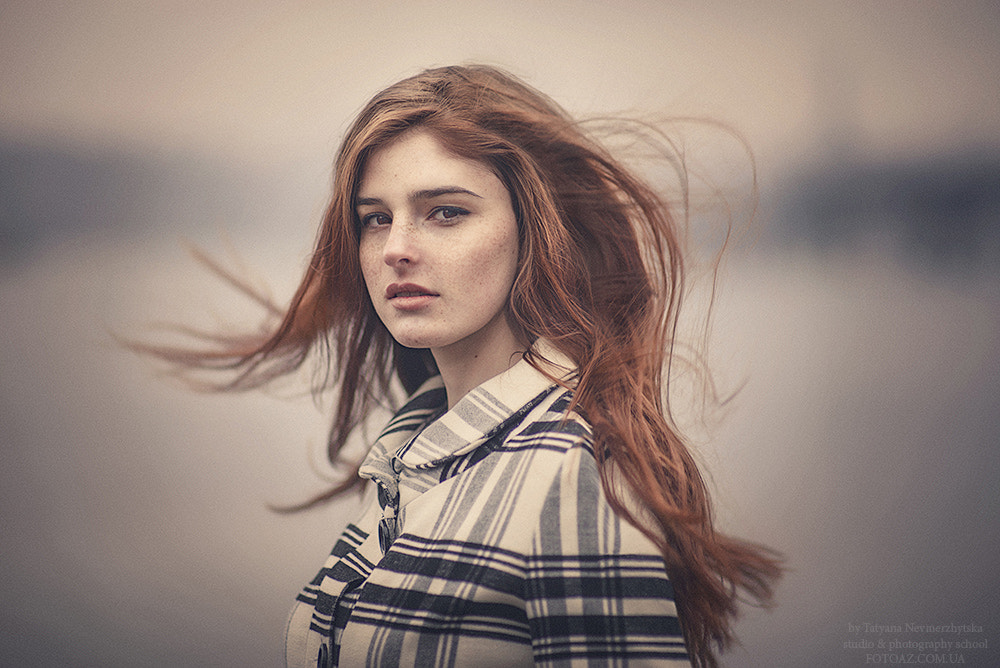
Your photographic challenge this week is to take and share a photo on the theme of movement.

*** by Tatyana Nevmerzhytska on 500px.com


You can interpret this theme in different ways, so long as there is a sense of motion. The photo above features in the following article with tips on how to use wind in your portrait shots.

Portrait Tip: Add Interest and Movement into Your Shots with Wind

Or maybe you might try experimenting with blur and movement. Here are some tips for that:

How to Capture Motion Blur in Photography

And some inspiration for where you can take these kind of shots:

13 Places Take Beautiful Motion Blur Shots

Want to focus more on a range of other shooting techniques you could use? You could try:

  • Panning
  • Zooming
  • other creative Intentional Camera Movement techniques

Or start with a beginners guide to capturing motion in your photography.

Weekly Photography Challenge – Movement

Simply upload your shot into the comment field (look for the little camera icon in the Disqus comments section) and they’ll get embedded for us all to see or if you’d prefer, upload them to your favorite photo-sharing site and leave the link to them. Show me your best images in this week’s challenge.

Share in the dPS Facebook Group

You can also share your images in the dPS Facebook group as the challenge is posted there each week as well.

If you tag your photos on Flickr, Instagram, Twitter or other sites – tag them as #DPSMOVEMENT to help others find them. Linking back to this page might also help others know what you’re doing so that they can share in the fun.

The post Weekly Photography Challenge – Movement appeared first on Digital Photography School.


Digital Photography School

 
Comments Off on Weekly Photography Challenge – Movement

Posted in Photography