RSS
 

Posts Tagged ‘Photography’

Photography podcast ‘The Group Chat’ launches with critical look at the preset market

08 Dec

Editor’s note: There is strong language aplenty in this video that is NSFW. Proceed with caution.


A new photography podcast called ‘The Group Chat’ has published its first episode: ‘Presets and Why They Suck.’ The episode is free to watch on YouTube, where hosts Christian Gideon and Nick Goodwin discuss why presents ‘are so detrimental’ to the photography industry.

In a statement to PetaPixel, The Group Chat co-creator Gideon explains, ‘Our first episode is a hard-hitting look at why the industry of selling presets to photographers is mostly BS.’ As the comment indicates, the podcast episode contains adult language and may not be suitable for certain environments.

Additional information about the show, its creators, and their workshops can be found on The Group Chat website.

Articles: Digital Photography Review (dpreview.com)

 
Comments Off on Photography podcast ‘The Group Chat’ launches with critical look at the preset market

Posted in Uncategorized


15 Global Photography Events You Should Participate In

07 Dec

Meeting experienced and amateur photographers from around the world gives you the opportunity to expand your skill set, whilst getting inspiration for your future projects. A great way to do this is by participating in photography events and competitions. Fortunately, there are countless photography events around the world for you to choose from. If you’re new to the photography scene, Continue Reading

The post 15 Global Photography Events You Should Participate In appeared first on Photodoto.


Photodoto

 
Comments Off on 15 Global Photography Events You Should Participate In

Posted in Photography


Weekly Photography Challenge – Lamps

07 Dec

The post Weekly Photography Challenge – Lamps appeared first on Digital Photography School. It was authored by Caz Nowaczyk.

This week’s photography challenge topic is LAMPS!

Image: Ant Rozetsky

Ant Rozetsky

Lamps can be beautifully designed, and they can add lovely ambient light to your photos.

Whatever form they take, we’d love you to go out and capture their many looks and feels in this week’s challenge!

They can be color, or black and white. They can be a small part of a wider composition or you can focus in on their fine details. They can add light to a portrait, or a still life scene, or an interior architectural scene, or they can be street lamps in a landscape – the decision is yours!

So, check out these inspiring pics, have fun, and I look forward to seeing what you come up with!

Image: Michelle Houghton

Michelle Houghton

Image: Roberto Lopez

Roberto Lopez

Image: Suhyeon Choi

Suhyeon Choi

Check out some of the articles below that give you tips on this week’s challenge.

Tips for Shooting LAMPS

3 Tips for Photographing Mixed Lighting in Interiors

Stealing Light – Using Street Lights for Portraits

4 Tips to Help People Photographers Shoot Interior Spaces

3 Easy Tips for Photographing Details in a Scene

Shooting Details to Tell a Visual Story

Architecture: Photographing Exterior Details

Tips for Getting Started with Still Life Photography

Simply upload your shot into the comment field (look for the little camera icon in the Disqus comments section) and they’ll get embedded for us all to see or if you’d prefer, upload them to your favorite photo-sharing site and leave the link to them. Show me your best images in this week’s challenge.

Share in the dPS Facebook Group

You can also share your images in the dPS Facebook group as the challenge is posted there each week as well.

If you tag your photos on Flickr, Instagram, Twitter or other sites – tag them as #DPSlamps to help others find them. Linking back to this page might also help others know what you’re doing so that they can share in the fun.

The post Weekly Photography Challenge – Lamps appeared first on Digital Photography School. It was authored by Caz Nowaczyk.


Digital Photography School

 
Comments Off on Weekly Photography Challenge – Lamps

Posted in Photography


What is Shape and Form in Photography?

05 Dec

The post What is Shape and Form in Photography? appeared first on Digital Photography School. It was authored by Megan Kennedy.

shape-and-form-in-photography

The words shape and form in photography are sometimes used interchangeably. However, the terms are actually two distinct visual characteristics. In this article, we’ll take a look at the difference between shape and form and their application in photography.

shape-and-form-in-photography-pink-blossom

What is a shape?

shape-and-form-in-photography-shapes

In basic terms, shape describes a flat, enclosed area of space. Shapes can be constructed with colors and lines, but all shapes are limited to two dimensions – width and length.

Curves and other irregular, flowy shapes are known as organic shapes, while angular shapes like squares and triangles are geometric shapes.

Early rock art is an early example of the use of shape in visual culture. During the Renaissance (and for many years thereafter), form was the predominant characteristic of two-dimensional art. However, with the advent of modern art, artists returned to the use of shape within abstracted and minimalist artistic movements.

Artists like Piet Mondrian, Picasso, Wassily Kandinsky and Agnes Martin all applied the language of shape to convey a visual experience.

What is form?

shape-and-form-in-photography-forms

Forms in visual art differ from shapes because they are perceived as three dimensional – they operate on width, length and depth. Forms can be either geometric or free-form, with no specific delineation or visual boundary. In two-dimensional formats like painting and photography, three-dimensional forms are generated with aspects like line, movement and value (darkness and lightness).

Artists from Leonardo da Vinci and Michelangelo to Mark Rothko and Georgia O’Keeffe are well known for their execution of form.

Shape in photography

carpark

From Anna Atkin’s cyanotype impressions to Grant Mudford’s flattened architectural depictions, shape has had a strong presence in photography since it’s inception.

Lewis W. Hine’s Steamfitter, an iconic depiction of the 1870s industrial labor, makes use of strong, flat shapes to emphasize the form of the subject.

And Harry Gruyaert and Ed Peters both incorporate bold shapes into their street photography.

Form in photography

shape-and-form-in-photography-color

Form has also had a consistent presence in photographic history.

Carleton E. Watkin’s Sugar Loaf Islands is an example of texture elevating form.

And Hiroshi Sugimoto’s Abandoned Theater series studies the power of light in sculpting form and time.

Philippe Halsman’s famous Dali Atomicus combines shapes and forms to create a dynamic and surreal portrait of Salvadore Dali.

And Robert Frank’s Parade, Hoboken, New Jersey appeals to our sense of both shape and form in photography to create an intriguing street perspective.

How to use shape and form in photography

There are endless photographic opportunities for both shape and form. Focusing on aspects like light, perspective, depth of field and color/black and white will help coax out shape and form in your photography.

Focus on light

shape-and-form-in-photography-silhouette

Depending on the angle of a light source, light can either elevate or flatten a subject. If you want an image made up of dramatic forms, aim for angled lighting to encourage shadows.

Silhouettes, on the other hand, render subjects as dark two-dimensional shapes. To create a silhouette, photograph a subject positioned against a light background with little or no front-lighting.

Get some perspective

shape-and-form-in-photography-fern_light

Sometimes form can be stimulated with a change in perspective. Photographing front-on to a subject can flatten forms into shapes. Approaching your subject from an angle reveals shadows that cultivate form.

Dive into depth of field

depth_field

Depth of field affects the way shapes and forms are read.

A shallow depth of field separates the subject from the background (and sometimes foreground) of an image, conveying a more dimensional picture.

The borderless nature of blurred forms also create a sense of activity within a photograph, contributing further to the perception of form.

Experiment with color/black and white

black_and_white_demo

To place greater emphasis on form, many photographers choose black and white over color. Often you’ll find that depth can be emphasized to a greater extent with the tonal sensitivity of a black and white scheme.

On the other hand, solid colors emphasize the ‘flatness’ of shape. Using blocks of bold color is a way to enhance the immediacy of two-dimensional structures.

Movement

What is Shape and Form in Photography?

Form is often visualized with fluid borders. This effect can be created through intentional camera movement (or ICM). ICM involves moving the camera during a long exposure (usually 1/125th or less). The results are abstracted forms that are unique, engaging and fun to make!

Conclusion

While shape and form in photography play different roles, each cultivates a distinct level of impact and engagement.

Through the use of light, perspective, depth of field, color/black and white and movement, we can use shape and form to enhance the construction of an image.

The post What is Shape and Form in Photography? appeared first on Digital Photography School. It was authored by Megan Kennedy.


Digital Photography School

 
Comments Off on What is Shape and Form in Photography?

Posted in Photography


The 6 Top Photoshop Tools for Still Life Photography

04 Dec

The post The 6 Top Photoshop Tools for Still Life Photography appeared first on Digital Photography School. It was authored by Darina Kopcok.

top-photoshop-tools-for-still-life-photography

Even if you do most of your editing in Lightroom, you’ll still find that you need Photoshop to really finesse your photos. Because it’s a pixel editor, Photoshop offers you more retouching tools and gives you further control than you can obtain from Lightroom.

In still life photography, like food and product, every aspect of your image needs to hold up to scrutiny for maximum impact. It needs to look clean and perfect.

There are certain tools in Photoshop that will help you tweak the best out of your images.

Although this article won’t go in-depth for every single tool – you’d need several articles for that – it will get you up and running in applying some basic treatments to your still life photography.

So without further ado, here are the most useful Photoshop tools for still life photography.

Photoshop for still life photography

1. Spot Healing Tool

The Spot Healing tool is one Photoshop tool that you’ll use on every still life image you retouch in Photoshop. This tool has improved greatly over the years.

Similar to the Healing Brush tool, it samples pixels from the surrounding areas to correct blemishes and imperfections. However, unlike the Healing Brush, it automatically samples the pixels without your having to specify where they should come from.

Why is this so great? Because the Spot Healing brush does this way better than it used to. This means you can remove dust and small marks very quickly.

If you’ve ever tried the Spot Removal tool in Lightroom, you’ll know that clicking on it repeatedly will quickly slow down Lightroom’s performance. Photoshop will give you better results, more quickly.

When you’re dealing with still life photography, remember that you want a clean-looking image. Zooming in on your photo at 100% and cleaning up any dust or blemishes will make a big difference in the overall aesthetic.

To use the Spot Healing tool, select it from the tool menu or hit J.

Zoom into your image and simply click on the blemish you wish to correct. It will automatically sample from an appropriate area and apply the pixels.

You can also clean up a larger area by brushing over it.

One thing to note is that if you use it repeatedly in a small area, the pixels can start looking unnatural and plastic-like.

The 6 Top Photoshop Tools for Still Life Photography

2. Patch Tool

The Patch tool is another Photoshop tool for still life photography that you’ll most likely use on the majority of your images.

It works great on small areas by creating a selection and replacing the pixels with other pixels of your choosing. It considers lighting, shade and texture when sampling an area.

The 6 Top Photoshop Tools for Still Life Photography

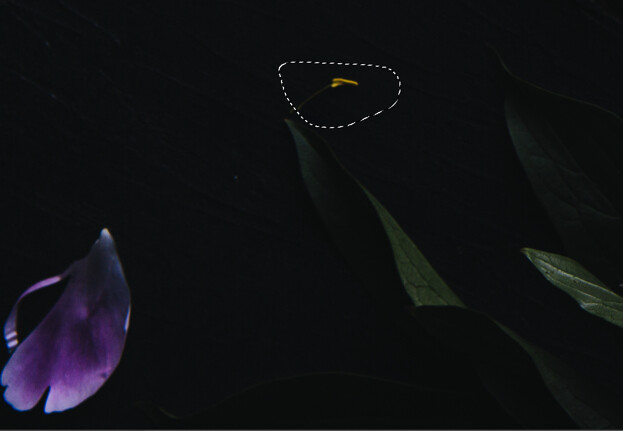
In the image below, I wanted to get rid of the yellow filament from my flower because I found it distracting.

There are many ways to do this in Photoshop, but I find the patch tool quick and seamless for this type of correction.

To use the tool, select it from the toolbar.

Draw a selection around the area that you wish to correct.
The 6 Top Photoshop Tools for Still Life Photography

Click on your mouse and drag the selection to an area that you would like to replace the selected pixels with. Let go of the cursor.

Press Command D to undo the selection.

To have greater control over the final result, make sure you have Content-Aware selected in the tool menu and play with the Structure and Color to further influence the edges.

Photoshop Tools for Still Life Photography

The 6 Top Photoshop Tools for Still Life Photography

3. Content-Aware Fill

Content-Aware Fill is sort of like the Patch tool on steroids.

It was first introduced in CS5 as a fill option in the Fill Dialog box. In 2019, Adobe improved this tool by leaps and bounds.

Content-Aware analyzes the pixels from a chosen area to determine what pixels it should use to remove unwanted objects. With the improvement, it allows you to choose exactly where you want it to sample the pixels from. It gives you so much more control and also allows you to rotate, scale or resize your selection, and preview the results.

To use Content-Aware Fill, draw a selection around the area you would like to correct. The Lasso tool makes a nice, versatile tool, but I often use the Rectangular or Elliptical Marquee tools.

Go to Edit and choosing Content-Aware Fill from the dropdown menu.

Photoshop tools for still life photography

This opens up the Content-Aware task space.

Photoshop tools for still life photography

On the right-hand side of the task space, you’ll see a Preview area that will show you how the changes are affecting your image.

If required, resize the sampling area with the Sampling Brush Tool.

You can find the tools for Content-Aware Fill in the left-hand corner of the workspace. The Brush tool is the first one on the top and the one you’ll most often use.

The 6 Top Photoshop Tools for Still Life Photography

You’ll also notice on the right-hand side of the workspace that you can make adjustments to the opacity.

The 6 Top Photoshop Tools for Still Life Photography

Save your changes as a Duplicate Layer.

I often use Content-Aware Fill to even-out my still life photography backgrounds, which tend to look less even in color and texture as I would like.

In this image of a salad, I wanted to even-out the left-hand corner of the image, which was looking too dark, despite my removing vignetting. I used the Rectangular Marquee tool to select the part that I wanted to change and brushed out the parts of the image I didn’t want sampled from.

The 6 Top Photoshop Tools for Still Life Photography

I played around with the opacity until I got something that looked good, which in this case was 66%.

4. Clone Stamp Tool

Can anyone live without the Clone Stamp tool?

No matter what kind of photography you do, you probably use the Clone Stamp tool a lot. Great retouching is largely about cleaning up the little things, which all come together for a powerful, transformative effect. Clone Stamp is one of the crucial Photoshop tools for still life photography.

The Clone Stamp tool allows you to copy pixels to a different part of the image to another. It’s great on areas where you have texture and pattern, or an edge. However, with this tool there is no real blending, so you often have to use it with other tools to get a more seamless-looking result.

Note that if you work with the Clone Stamp tool on its own layer, you can use it with other tools such as Free Transform to make further adjustments to the cloned areas.

Photoshop Tools for Still Life Photography

In the image above, I used a surface that was textured and knotty, but I wanted it to look smoother. I did this (achieving the image on the right) by cloning smoother areas over the bumpy areas.

To utilize the Clone Stamp tool, select it from the toolbar by hitting S for the shortcut, or hit Cmd/Ctrl+S 

Photoshop for still life photography

Select the area that you wish to paint the pixels from by choosing Opt/Alt. The selection point will be indicted by the crosshairs.

Paint with your cursor over the area you want to correct while making sure the crosshairs don’t pick up any pixels you don’t want.

Photoshop tolls for still life photography

5. Transform

Transform is another of the useful Photoshop tools for still life photography because it allows you to make changes and adjustments to objects in your image, like straightening and shaping.

For example, I decided to make a change to the olive oil bottle in the image below. I wanted to adjust the direction the handle was facing and to make the bottle appear larger in scale. I did this easily and quickly with Transform.

The 6 Top Photoshop Tools for Still Life Photography

Start with your background layer or your top layer. Use the appropriate tool to make a selection. In this case, I used the Lasso tool but I could have also used the Quick Selection tool.

photoshop tools for still life photography

Copy the selection onto another layer by hitting Ctrl/Cmd+J.

The 6 Top Photoshop Tools for Still Life Photography

Then hit Ctrl/Cmd+T to bring up Transform, or go to Edit and choose Transform from the Menu.

Make the adjustment by manually rotating or expanding the Transform box by clicking on the white points/squares.

photoshop tools for still life photography

Hit Enter to accept the adjustment.

Always make sure to constrain proportions when necessary.

6. Focus Stacking

If you’re shooting a product, you’ll usually need your subject to be sharp throughout. This means using a high F-stop number like F/13 or F/16. However, this requires a lot of power if you’re using flash.

You can also get lens diffraction at these higher numbers, which will degrade the quality of your photo.

The answer to shooting with a wider aperture and still getting a sharp image is to focus stack in Photoshop.

This is when you take two or three images with different focus points and blend them together to create one image file that is sharply in focus throughout. It’s a quick process and isn’t anywhere near as complicated as it sounds.

To utilize focus stacking, make sure your images have the same exposure and alignment.

Export PSD files into a folder or onto your desktop where you can easily navigate to them. 

Follow these steps:

  • Open Photoshop.
  • Go to File and choose Scripts.
  • Select Load Files into Stack.
  • Click Browse and select all the images from where you saved them initially.
  • Check the Box for Attempt to Automatically Align Source Images.
  • Click OK. Each of the images will open as a new layer in Photoshop.
  • Hold down Shift and click on the top layer in the Layers panel to highlight all the layers.
  • Under Edit, select Auto Blend-Layers.
  • Check the box for Stack Images and also for Seamless Tones and Colors. DO NOT check ‘Content-Aware.’ Click OK.
  • Save the final image.

If you have uploaded a lot of images, flatten the final image by selecting Layer -> Flatten Image -> Save.

photoshop tools for still life photography

Three images focus-stacked in Photoshop

Conclusion

Photoshop is a powerhouse of a program and there are many tools that can help you retouch your photography. The tools mentioned here are my top Photoshop tools for still life photography. They are easy to learn and utilize, and will quickly take your images to the next level.

Do you have any other Photoshop tools for still life photography that you’d like to share? Do so in the comments section!

The post The 6 Top Photoshop Tools for Still Life Photography appeared first on Digital Photography School. It was authored by Darina Kopcok.


Digital Photography School

 
Comments Off on The 6 Top Photoshop Tools for Still Life Photography

Posted in Photography


6 Ideas for Creative Funfair and Amusement Park Photography

01 Dec

The post 6 Ideas for Creative Funfair and Amusement Park Photography appeared first on Digital Photography School. It was authored by Charlie Moss.

funfair-and-amusement-park-photography

When the nights draw in its time for funfair and amusement park photography. When a fair comes to town, it’s an opportunity to photograph something new and vibrant for your portfolio. The bright lights, constant movement, and enthusiastic crowds provide endless photographic opportunities throughout the evening.

funfair and amusement park photography

My favorite time to photograph the funfair is during the blue hour – that hour or so before night truly falls. It creates an incredibly dramatic backdrop for the lights and colors that you’re going to photograph.

It’s a good idea to get on location an hour or more before the scheduled blue hour so that you can plan your route through the attractions, work out what looks interesting to shoot, and even start to plan some compositions.

But what about the actual process of taking the photos? How do you decide what to shoot and how you’re going to take the images?

Decide on your shutter speed

There’s a real risk when shooting funfair rides that they’re going to look static and very unimpressive. This usually happens because your shutter speed is too short, and so the action is frozen without any sense of movement.

funfair and amusement park photography

Lengthening your shutter speed up to half a second or more can lend a real feeling of action and excitement to your funfair and amusement park photography. But don’t forget that you’ll want to ideally put your camera on a tripod so that the rest of your shot stays clear and in focus!

It’s my preference to use shutter priority mode for this kind of image. Each ride will be traveling at a different speed, so you’ll need to adjust as you move from shot to shot in order to get the most dynamic images.

Watch the crowds

The story doesn’t stop at the rides – it’s going on all around you! Take a step back from focussing on the thrill-seeking action to see what the people on the ground are doing.

funfair and amusement park photography

Almost everyone at the funfair will make a great subject, and they’ll be bathed in gorgeous, atmospheric light from the rides and stalls. Take some time to watch the action and see where people naturally stop and do interesting things.

Look for great compositions and stand yourself in the perfect place to capture people enjoying their environment. Be ready to capture fleeting emotions and interesting behavior.

You might want to use a shallow depth of field to make your background less distracting. Getting everything in focus means there is more competing for your viewer’s attention.

Look for the unique angles

At any funfair you go to, there will be at least a dozen other photographers who are also looking for a great shot. You’re not in competition with them, of course, but it’s always nice to come home with a unique photograph.

funfair and amusement park photography

Once you’ve got a ‘safe’ shot (you know, the kind of image you often see posted online after the funfair), challenge yourself to see the same scene from a unique angle.

Here are some ideas to get you thinking:

  • Look up. See what the ride looks like when you frame it against the sky.
  • Use the architecture of the town that you’re in.
  • Shoot through something to get an interesting foreground effect.
  • Go completely abstract.
  • Experiment with leading lines.

Try an unexpected technique

The bright lights of the funfair provide an opportunity to try out techniques that you wouldn’t traditionally associate with this kind of photography. It’s a great time to experiment and see what works for an alternative take on funfair and amusement park photography.

6 Ideas for Creative Funfair and Amusement Park Photography

The shot above was taken using ICM (intentional camera movement) techniques. A long exposure combined with moving the camera can create an abstract image with a painterly feel.

You could also perhaps try zoom bursts for a different kind of dynamic action. Or have a go at making custom bokeh shapes to convey different messages in your photographs. Never stop experimenting – you don’t have to show anyone the shots if they don’t work!

Convert to black and white

Funfairs are a fabulous riot of color, but sometimes that’s not what we want in our photography. If a shot just seems too intense and busy, it’s always worth seeing if a black and white conversion works.

6 Ideas for Creative Funfair and Amusement Park Photography

When you’re deciding if a photograph is a good candidate for black and white conversion, there are a few things that you want to keep in mind. Your shot should have good contrast between light and dark areas so that the image doesn’t end up flat and lifeless.

Black and white images also often rely heavily on composition for their impact, so make sure that your subject is both interesting and well-placed in the frame.

Make sure that you experiment with different color temperatures during the black and white conversion too. The nature of the colorful and changeable lights at the funfair means that some ‘recipes’ for post-processing will work better than others.

Photograph the funfair during the day

The funfair doesn’t disappear during the day. Instead, it looks completely different. Taking your camera to the funfair during the day can open up a whole different set of possibilities to shoot.

funfair and amusement park photography

Instead of photographing the movement and excitement of the rides, try to capture the time when the fair workers are setting up ready for the day. Look around at the colors too – they’re very different from the colors you see at night once the sun has gone down!

This would be a great time to think about approaching some of the attraction holders and asking if you can shoot their portraits. And if you do this during the day, they’ll remember you when you go back in the evening, perhaps even posing for you again during a quiet moment. (Remember to get their details so that you can send them the picture.)

Time to get out and shoot!

No matter your level of experience, there’s something for everyone when it comes to funfair and amusement park photography. If you’re a beginner photographer, then taking a tripod and shooting long exposures is a great way to try night and long exposure photography for the first time.

If you’re more experienced as a photographer, then a whole world opens up with candid shots, portraits, and experimenting with creative angles and techniques.

Have you done any funfair and amusement park photography recently? Show us your pictures in the comments!

The post 6 Ideas for Creative Funfair and Amusement Park Photography appeared first on Digital Photography School. It was authored by Charlie Moss.


Digital Photography School

 
Comments Off on 6 Ideas for Creative Funfair and Amusement Park Photography

Posted in Photography


UV photography sample images (DPReview TV)

01 Dec

$ (document).ready(function() { SampleGalleryV2({“containerId”:”embeddedSampleGallery_5248183600″,”galleryId”:”5248183600″,”isEmbeddedWidget”:true,”selectedImageIndex”:0,”isMobile”:false}) });

Bright, colorful and entirely unpredictable – shooting with UV lights and fluorescent materials makes for some incredible imagery. Take a look at sample images from this week’s DPReview TV episode. Maybe you’ll be inspired to set up a science experiment like this on your own!

Articles: Digital Photography Review (dpreview.com)

 
Comments Off on UV photography sample images (DPReview TV)

Posted in Uncategorized


DPReview TV: Ultraviolet (UV) photography with Don Komarechka

30 Nov

Chris and Jordan are joined once again by Don Komarechka – part photographer, part mad scientist – to explore the incredible possibilities of shooting with UV lights. The results are vibrant, unpredictable and other-worldly, and with the right equipment, you can try it at home too.

Subscribe to our YouTube channel to get new episodes of DPReview TV every week.

  • Introduction
  • UV Lights
  • Fluorescing Minerals
  • UV Macro Techniques
  • UV Filter Comparison
  • UV Droplet Techniques
  • Conclusion

Sample images from this episode

$ (document).ready(function() { SampleGalleryV2({“containerId”:”embeddedSampleGallery_5248183600″,”galleryId”:”5248183600″,”isEmbeddedWidget”:true,”selectedImageIndex”:0,”isMobile”:false}) });
Articles: Digital Photography Review (dpreview.com)

 
Comments Off on DPReview TV: Ultraviolet (UV) photography with Don Komarechka

Posted in Uncategorized


Weekly Photography Challenge – Roads

30 Nov

The post Weekly Photography Challenge – Roads appeared first on Digital Photography School. It was authored by Caz Nowaczyk.

This week’s photography challenge topic is ROADS!

Image: Roads by Caz Nowaczyk ©.

Roads by Caz Nowaczyk ©.

I’m currently road-tripping and have been seeing plenty of Roads on my journey. I love the open road – it always feels like an adventure awaits. So that is why this week’s challenge is roads!

You can capture roads in cities or countries. The roads can be bitumen, paved, cobble-stoned or dirt. They can be the main focus of your composition or a minor part of another story.

They can be color, or black and white. They can use leading lines, patterns, light trails – the choice is yours.

So, have fun, and I look forward to seeing what you come up with!

Image: Photo by Caz Nowaczyk ©

Photo by Caz Nowaczyk ©

Image: Old Montreal. Photo by Mark C. Hughes ©

Old Montreal. Photo by Mark C. Hughes ©


Check out some of the articles below that give you tips on this week’s challenge.

Tips for Shooting ROADS

How to Achieve Cool Urban Cityscapes

How to Create Dynamic Photos of Car Light Trails

7 Tips for Urban Landscape Photography

6 Ways to Plan a Photography Road Trip

6 Tips to Master Panning Photography

28 Wondrous Images of Long and Winding Roads

Simply upload your shot into the comment field (look for the little camera icon in the Disqus comments section) and they’ll get embedded for us all to see or if you’d prefer, upload them to your favorite photo-sharing site and leave the link to them. Show me your best images in this week’s challenge.

Share in the dPS Facebook Group

You can also share your images in the dPS Facebook group as the challenge is posted there each week as well.

If you tag your photos on Flickr, Instagram, Twitter or other sites – tag them as #DPSroads to help others find them. Linking back to this page might also help others know what you’re doing so that they can share in the fun.

The post Weekly Photography Challenge – Roads appeared first on Digital Photography School. It was authored by Caz Nowaczyk.


Digital Photography School

 
Comments Off on Weekly Photography Challenge – Roads

Posted in Photography


The One and Only Thing That Will Make Your Photography Better

29 Nov

The post The One and Only Thing That Will Make Your Photography Better appeared first on Digital Photography School. It was authored by John McIntire.

make-your-photography-better

This is a fantastic time to be getting into photography.

Even if you don’t take into account the wonderful array of options you have for equipment and the like, there is an enormous amount of information available at the click of a button to anyone who wants to learn any kind of photography. There are millions (I’m sure) of written and video tutorials that you can access at a moment’s notice with a device that you keep in your pocket. There is also a huge number of courses, books and real-life photographers offering tuition and workshops all over the world. I do feel this abundance is a great thing for photography as a whole.

However, this abundance comes with a subtle trap. When fallen into, it can hinder your progress and growth as a photographer.

make-your-photography-better

With a wide array of techniques, equipment and possibilities available, now might just be the best time to start learning photography.

The trap

It’s easy to spend time consuming content and learning new things. Some outlets, like Youtube, are designed to keep you consuming for as long as possible – and long after you watched what you intended to in the first place.

The problem is, when you go from tutorial to tutorial consuming information indiscriminately, you are only part-learning it. Sure, the theory is important, but knowing something isn’t the same thing as being able to do it.

It’s also easy to sit and think about photography and what you can do with all of the information that you have accumulated.

Image: You can read about black and white conversions all you want, but until you actually put that...

You can read about black and white conversions all you want, but until you actually put that information into practice, it’s just that: information. It’s not yet a skill.

What isn’t so easy is the most important step. Reading about and thinking about photography is great, but neither one is actually photography. Putting all of that information to use is the difficult part. It’s the one thing I see people struggle with consistently (myself included at times). Boiled down, it’s basically the same thing as lusting after and buying that fancy, expensive lens, but then never using it.

Break the cycle

The cycle goes like this:

Read/watch a tutorial — think about it a bit — read/watch another tutorial — think about it a bit — rinse, lather, and repeat.

When you get stuck in a loop like this, you’re only doing half the job of learning something new. Unless we’re talking about something really easy like where the shutter release is on your camera and how to use it, most things require actual practical experience to learn properly.

Take something like Rembrandt lighting.

Sure, you can read a tutorial and know that your light source should be at a 45-degree angle to the side of your subjects and 45 degrees above and pointed down. However, if you get something like that right on the first try, there’s more luck involved then anything else.

Techniques like this have a lot of nuances that are not very easy to infer without practical experience. Many factors can interfere with getting them right that you might not be able to read about, meaning you have to figure it out for yourself.

make-your-photography-better

In this example, I had a new modifier to figure out. To do so, it was a matter of trying it at various angles and positions to see what it did and didn’t do.

The new cycle I would propose looks a bit like this:

Read/watch a tutorial — think on it — act on it — evaluate — alter — evaluate.

Keep going like this until you feel that you have a complete understanding of whatever it is you are trying to learn.

Going back to the Rembrandt example, if you’ve read a tutorial and took some time to figure out how to implement it, you could then set up a practice session and put what you’ve learned to the test.

Once you’ve tried it, you can evaluate the results.

Let’s say that the triangular highlight that appears on the shadow side of the face with Rembrandt lighting isn’t quite right.

Here you would identify that problem and then try to figure out why it has happened that way. Then you would try the technique again and again until you’ve sorted that out, and you have images with perfect Rembrandt lighting.

Image: Once you’ve figured out one technique, you can now try to break it. Add things flags an...

Once you’ve figured out one technique, you can now try to break it. Add things flags and reflectors and fill lights one step at a time as I did with the same modifier in the previous example.

You shouldn’t stop here though. Continuing with Rembrandt: now you can start to experiment and add to it.

What does the setup look like if you add a reflector?

How does it look if you add a fill light or a hair light?

What does it look like when you have your subject move into a different position?

make-your-photography-better

Taking incremental steps like these will help ensure you learn everything you want to more thoroughly.

Going through questions like these with practical, incremental experience will not only help you to learn faster but will help you to learn more thoroughly. Also, because you have intentionally tried a variety of things that probably don’t work, once those scenarios come up in the real-world application of your new skills, you will be able to identify and fix those problems immediately.

Every aspect of photography

Image: This concept encompasses every aspect of photography. From basic camera craft to lighting and...

This concept encompasses every aspect of photography. From basic camera craft to lighting and to post-processing. Focusing on one skill at a time is the fastest way to learn.

It doesn’t matter if the technique in question is a lighting pattern, using different metering modes, manual focus, or post-processing techniques. The process is the same.

Learn it. Use it. Master it.

One thing at a time

If you want to learn as much as possible in photography, there is no set order in which you do things. I do suggest, however, that you only do one thing at a time.

Early on, things will be easy (like learning where the basic controls of your camera are, how to focus, and using manual mode) and won’t take much time. If you focus on each of these basic skills in isolation, you’ll probably find that they all mesh together a lot easier. Then, before you know it, you will be tackling much more complicated skill-sets and techniques.

That said, the most important thing of all is that you need to do your best to get out and practice.

The post The One and Only Thing That Will Make Your Photography Better appeared first on Digital Photography School. It was authored by John McIntire.


Digital Photography School

 
Comments Off on The One and Only Thing That Will Make Your Photography Better

Posted in Photography