RSS
 

Posts Tagged ‘Photography’

8 Tips to Stay Motivated and Inspired by Your Photography

25 Jan

Taking photos is one of the most inspiring and exciting of pursuits. It can encourage you to have adventures, see the world in a newer, fresher way, meet interesting people – all while creating something that is totally unique to you.

“We are born makers, and creativity is the ultimate act of integration – it is how we fold our experiences into our being.” – Brene Brown
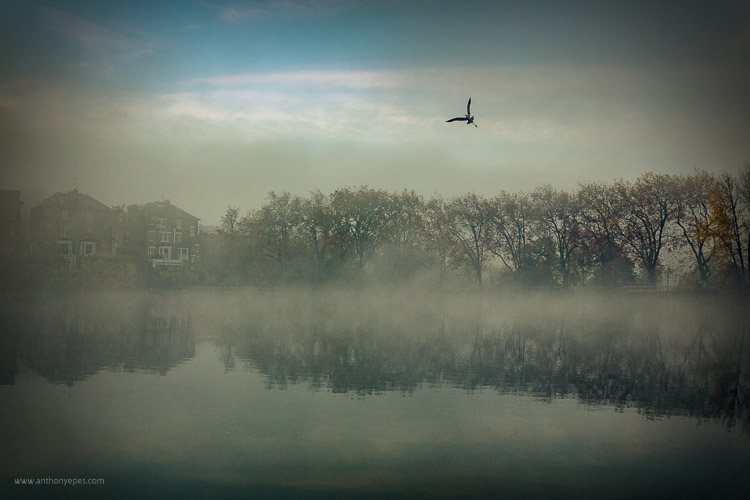
DPS AnthonyEpes 01

But what happens when your well of inspiration runs dry, when you can’t get excited by your images or you feel stuck in a rut? Most photographers, even professionals, have periods when creating feels like wading through glue. You get tired or bored with your own images.

So, why do you (we all) get stuck?

The destructive habit of habit

As most of us, you are probably immersed in habit – you do almost the same things each day, every day. Making your coffee in the same way at the same time, going to work on the same route at the same time, eating the same kind of food each evening. It’s almost like you stop thinking and just do.

“As long as habit and routine dictate the pattern of living, new dimensions of the soul will not emerge” – Henry van Dyke

Your brain has made a great effort to get you into the state of habit. It makes life easier for you so that you don’t have to make tonnes of new decisions every day. But, if you are lost in habit you aren’t seeing new things, doing new things, or trying things in new ways. Habit will strangle your creativity.

So how do you get out of this cycle?

The way to fill your life with inspiration and motivation will be different than others – depending on how you create and what drives you. Here are some ideas:
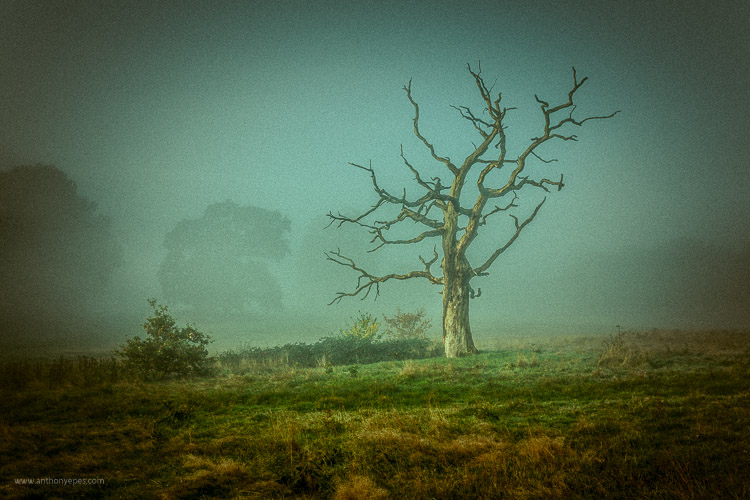
DPS AnthonyEpes 02

1 – Leave your camera at home

If you’re someone who is always out and about with your camera, taking lots of photos – abandon it for a while. It’s easy to get carried away. Instead of taking time to see and compose, you are likely just taking shot, after shot, after shot. If you are bored with the photos you are taking – this is probably what’s happening to you.

I would encourage you to start examining the world in a different way – not as a photographer, but as someone who hears, feels, smells, and absorbs the atmosphere around you. Using all of your senses is a wonderful way to help experience the same world, but in a different way. It will help you gain a different perspective.

Sound is a particularly evocative sense for me – the crackle of dry autumn leaves under my feet, the low hum of trains on a railway line in the distance behind me, the vibrating thump of music in a bar, a conversation drifting past me. Tuning in to senses that you usually don’t prioritize (because we photo lovers tend to put our sight first, don’t we) will also help you anchor yourself into the present moment, pulling you away from your busy mind, and into the world so you can eventually see more interesting and unique things.

Challenge: When you are ready to start taking photos again, set yourself the challenge of taking just three photos a day, for 15 days. If this sounds hard, then it’s the perfect challenge! This will help you be more precise and thoughtful in your approach. You will work harder to create a smaller number of better photos. So – what will you take with your three images?
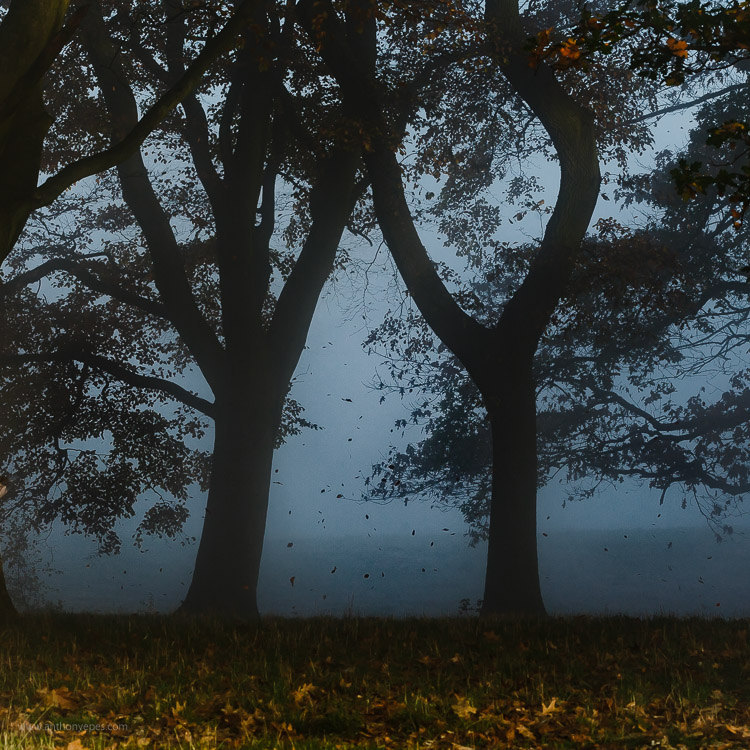
DPS AnthonyEpes 03

2 – Make taking photos a habit

Now, let’s consider the reverse. You are someone who doesn’t take photos very often – maybe you wait for an occasion like a walk in a lovely area, good light, or a holiday – then my advice is the opposite. If photography is something that you pick up only now and again, you’ll never get into the rhythm of creating, you’ll never develop the skills of really seeing the world and composing great images. The act of creating is like a muscle – the more you do it the stronger it becomes.

“You can’t use up creativity. The more you use, the more you have.” – Maya Angelou

By creating a habit of creating, you are making a declaration to yourself that photography is a very important part of your life. It also helps to get your subconscious organized in a way that it knows you are going to be calling on it more regularly. It starts preparing. I know this sounds strange but it’s like anything you do regularly, your body and your mind get used to doing it. You are in the mood and the wonderful act of creativity starts to energize you in new and exciting ways.

Challenge: If getting into the habit of taking photos is tough for you, then this is the challenge for you – take 50 photos every day, for 15 days. That will kick start your creativity, and imbue your day with the looking and seeing and noticing that is necessary to take great photos.

3 – Take photos not to see the result, but to enjoy the process
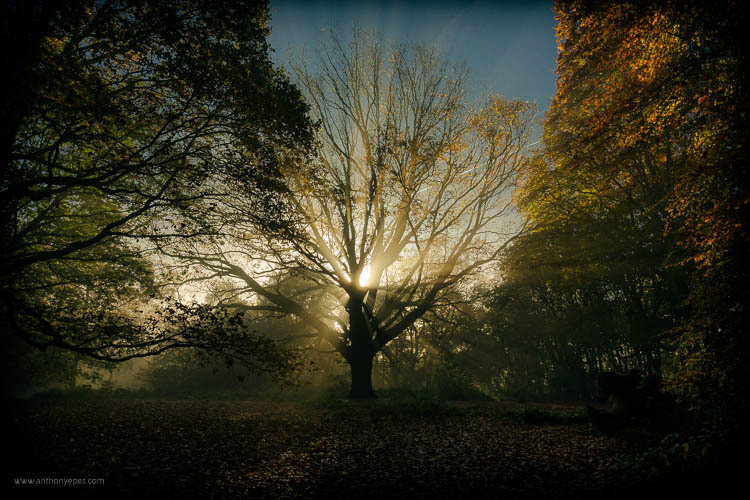
DPS AnthonyEpes 04

When you see small children making art there is a beautiful joy that they get by just doing it. From feeling the feathers before they glue them on an egg box, to painting wild splashes of colour on a sheet of white paper. In fact going out with kids, and watching them look at the world in such an open way, is great training on how to be present with the world around you.

With kids there is a complete enjoyment in the process of making – and that is something we, as photographers, sometimes forget. Perhaps because the act of creating is so instant – the click – we forget that it’s our whole creative process which leads up to that click.

“What moves me about… what’s called technique…is that it comes from some mysterious deep place. I mean it can have something to do with the paper and the developer and all that stuff, but it comes mostly from some very deep choices somebody has made that take a long time and keep haunting them.” – Diane Arbus

I do my best work when I am totally present, totally in the zone, not thinking about emails, or jobs, my to-do list, or my kids – but looking with wonder at a beautiful cloud, or some rain dripping off of a leaf. And if you need encouragement – isn’t it just great to cut yourself off from all of your responsibilities and absorb yourself in the wildness, the peace, the craziness, the beauty of the world?

4 – Start a project
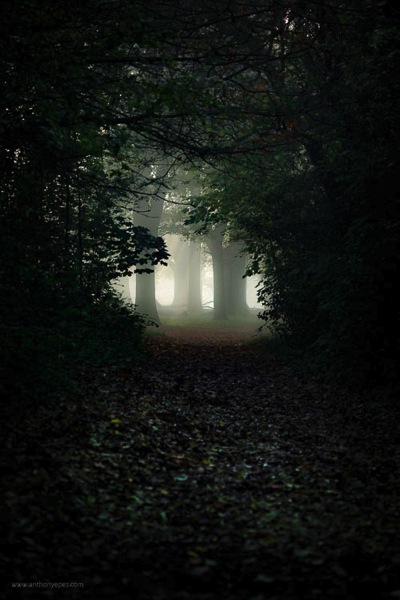
DPS AnthonyEpes 05

Sometimes I find my attention gets fragmented – with all of the work I do, my family, etc., so that I’m jumping from task to task, and not getting deeply involved in anything. A few photos here, a few photos there. This is when I like to jump into a project.

Key advice for projects: Choose a subject that you are blown-away passionate about. It could be anything – the colour violet, armpits, salt mines, trees, your kids, men with mohawks – it doesn’t matter what it is, you can bring something new to a subject if you make the effort.

“I wanted to photograph clouds to find out what I had learned in forty years about photography. Through clouds to put down my philosophy of life – to show that (the success of) my photographs (was) not due to subject matter – not to special trees or faces, or interiors, to special privileges – clouds were there for everyone…” Alfred Stieglitz

The key point is that it’s not so much about technique, but the passion. Why? Because:

  • When you hit a roadblock or life distracts you, you’ll be less likely to abandon the project if you are really excited about it.
  • Passion will help drive you to create a new and interesting perspective on your subject.
  • When you feel something when you are taking photos, you are more likely to take a photo that contains feelings. Why is that important? Because you want people to notice your photo, to feel a connection with it. Most images we look at are flat and devoid of feeling. The best photos communicate both a visual idea and a feeling, we are moved in some way by it.

“Photography for me is not looking, it’s feeling. If you can’t feel what you’re looking at, then you’re never going to get others to feel anything when they look at your pictures.” – Don McCullin
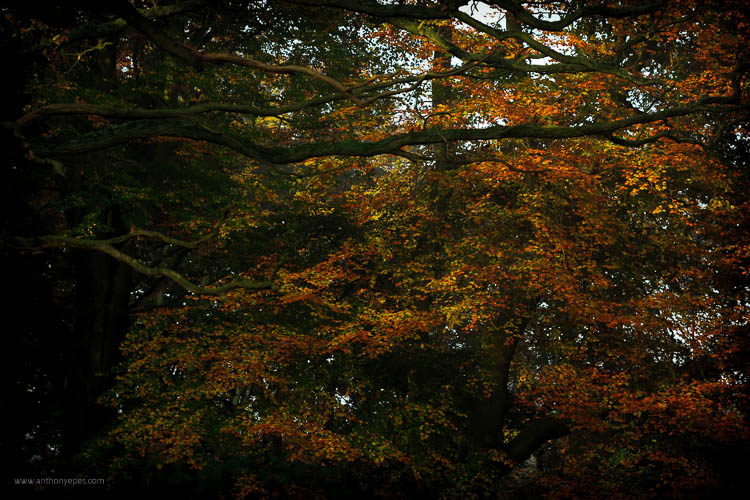
DPS AnthonyEpes 06

5 – Do something completely different

I’ve talked about how habit can be a force of good for your photography – by making you commit to a regular practice, and exercise that creativity muscle. But it can also be a negative force – you get so used to your ways of doing things, or your lifestyle, that you don’t push yourself in new ways.

Think about the kind of things you normally photograph. Now think of some you’d be terrified to photograph, and go and photograph them. So maybe you’re great at landscapes. You like photographing the odd person if they happen to be in the shot. But the idea of taking a close-up or a portrait of them terrifies you. So do that. Or you’ve always wanted to get up onto some rooftops and photograph your city from up high. But the idea of asking for permission, etc., makes you feel nervous. Just go for it!

“You may never know exactly what you need to do, or exactly where you’re going. But if you are willing to start taking tiny steps, and keep going, the dots will connect over time to create something beautiful and fulfilling.” – Lori Deschene

6 – Remind yourself why you take photos
DPS AnthonyEpes 07

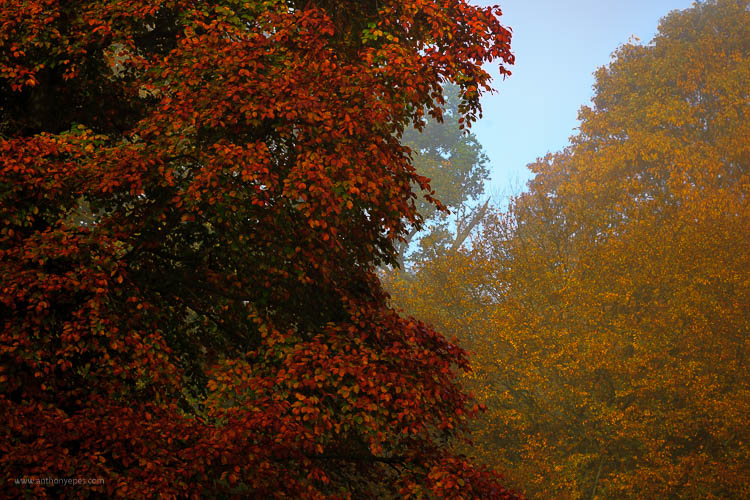
It can be easy with your photography to get into that should way of thinking – “I should take more photos! I should be better!” But scolding yourself rarely gets you anywhere (with anything). Instead, I encourage you to think about what photography really means to you, what are the benefits beyond the fun of taking that photo. How does it enrich, energize and enhance your life?

Ask yourself:

  • What does photography give me?
  • How do I want to be creative in my every day?
  • Which of my photos or projects am I really proud of?

When you connect with the reasons why you do things, it’s so much easier to stay committed and motivated.

7 – The trap of perfectionism

Often we stop taking photos, or we start slowing down or moving off on a tangent when we are working on a project, because the feeling of not being good enough starts to insidiously infect us.

“Perfectionism is the voice of the oppressor, the enemy of the people. It will keep you cramped and insane your whole life” – Anne Lamott

Who cares if you try things that don’t work. Who cares if some of your photos aren’t great? Stopping yourself from doing something you love, before you’ve done it, is crazy. Recognize you have the fear, but don’t let that stop you. Fear goes away eventually.

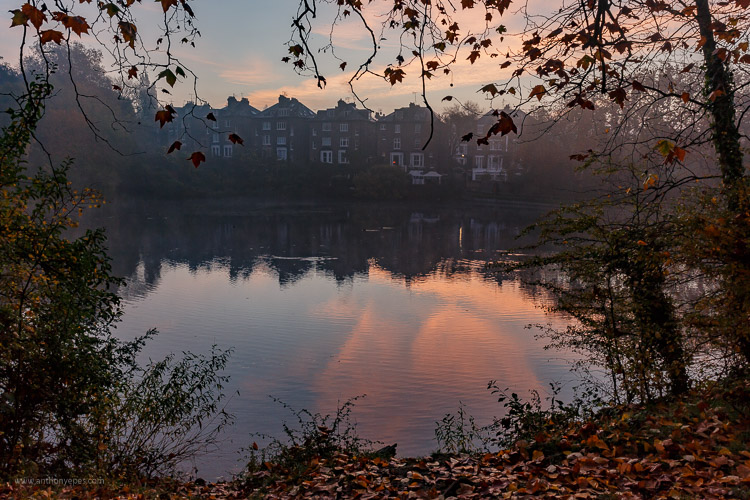
Be aimless and wander. Resist those urges to make your photo explorations productive. Ignore the output and focus instead on what you see. Listen. Follow things that spark your interest.
DPS AnthonyEpes 08

8 – Get inspiration – indirectly

I really believe that inspiration for your photos can come from all kinds of places. It just so happens that my favourite photographer of all time, Ernst Haas, agrees (if you don’t know him, look him up). He said:

“Beware of direct inspiration. It leads too quickly to repetitions of what inspired you… Refine your senses through the great masters of music, painting, and poetry. In short, try indirect inspirations, and everything will come by itself.”

So fill your life with creative inspiration of anything that moves you. Beautiful music, looking at bizarre paintings, reading wild adventure books – it doesn’t matter what it is, if it excites and moves you then it’s right for you. The more you remind yourself what feeling excited and creative feels like, the more your body and mind will imprint that into yourself.

Along that vein, I also like to remind myself of times when I have felt super creative, super in the flow, and I was taking great photos. It’s all too easy to fall into the trap of thinking that you’ll never take a good photo ever again (happens to me all the time, especially when I am starting a new book), but just think back to a time when you were taking great photos and in the zone. Remind yourself of that, and it will be easier to get back into that space.

I hope those ideas help. I’d love to know if they do – and what you do when you get stuck. Comment below, I’d love to hear.

googletag.cmd.push(function() {
tablet_slots.push( googletag.defineSlot( “/1005424/_dPSv4_tab-all-article-bottom_(300×250)”, [300, 250], “pb-ad-78623” ).addService( googletag.pubads() ) ); } );

googletag.cmd.push(function() {
mobile_slots.push( googletag.defineSlot( “/1005424/_dPSv4_mob-all-article-bottom_(300×250)”, [300, 250], “pb-ad-78158” ).addService( googletag.pubads() ) ); } );

The post 8 Tips to Stay Motivated and Inspired by Your Photography by Anthony Epes appeared first on Digital Photography School.


Digital Photography School

 
Comments Off on 8 Tips to Stay Motivated and Inspired by Your Photography

Posted in Photography


Weekly Photography Challenge – Big and Heavy

23 Jan

Previously I shared 26 solid images of heavy items done by other photographers. Things like:

  • trains
  • planes
  • automobiles
  • machines
  • large animals
  • things made of steel and metal
  • heavy metal bands if you want to stretch the meaning

You get the idea. We know this thing is heavy! On the arms and the pocketbook!

Nathan Rupert

By Nathan Rupert

Weekly Photography Challenge – Heavy

I’ve given you some ideas below but put your own spin on interpreting this one. It could even be heavy hearted, a footprint impression in the sand, you name it. Just go out with the idea of finding something to represents the them of heavy and photograph it in its best light, composition, and make it stand out.

Alan Cleaver

By Alan Cleaver

RayMorris1

By RayMorris1

.craig

By .craig

Geoffrey

By Geoffrey

Vxla

By vxla

Share your images below:

Simply upload your shot into the comment field (look for the little camera icon in the Disqus comments section) and they’ll get embedded for us all to see or if you’d prefer upload them to your favourite photo sharing site and leave the link to them. Show me your best images in this week’s challenge. Sometimes it takes a while for an image to appear so be patient and try not to post the same image twice.

googletag.cmd.push(function() {
tablet_slots.push( googletag.defineSlot( “/1005424/_dPSv4_tab-all-article-bottom_(300×250)”, [300, 250], “pb-ad-78623” ).addService( googletag.pubads() ) ); } );

googletag.cmd.push(function() {
mobile_slots.push( googletag.defineSlot( “/1005424/_dPSv4_mob-all-article-bottom_(300×250)”, [300, 250], “pb-ad-78158” ).addService( googletag.pubads() ) ); } );

The post Weekly Photography Challenge – Big and Heavy by Darlene Hildebrandt appeared first on Digital Photography School.


Digital Photography School

 
Comments Off on Weekly Photography Challenge – Big and Heavy

Posted in Photography


An Introduction to Street Photography for New Photographers

21 Jan

You may have seen a lot of candid photography all over the Internet and wondered, what is it all about? If you’ve never tried it before, or only have a bit of experience, I am going to lay out a roadmap to help you get started and improve your street photography.

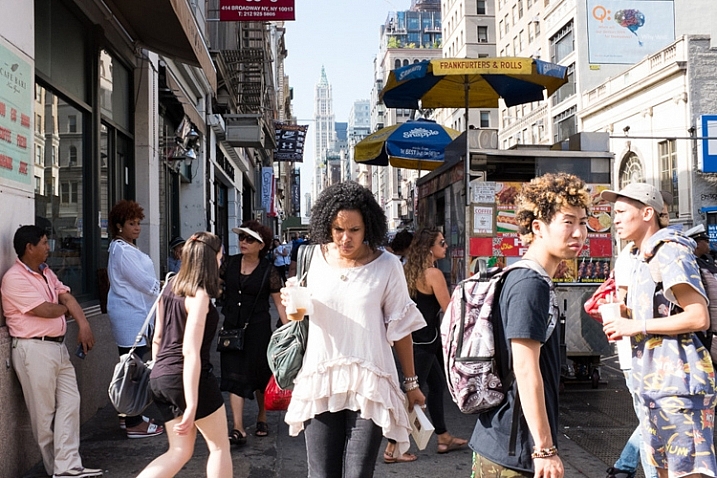
Street Corner, SoHo, NYC.

Street Corner, SoHo, NYC.

Street photography is the art of capturing life, culture, and humanity, in a candid manner. It is fascinating because a small percentage of photographers seem to be naturally drawn to it. Even before hearing about the phrase street photography, which can be a clunky term anyway, there are many photographers who prefer to point their cameras in the direction of culture and people that they’ve never met before, over mountains, sunsets, and landscapes.

However, if you haven’t done it before, street photography can be very intimidating to actually pull off. It’s one thing to admire it from afar, but it’s another to get in there and get your hands dirty. I promise though, that it’s a ton of fun and is a very rewarding art form to practice.

Here is list of my favorite tips to get you off and running.

1. Just do it

Construction Workers, Lower East Side, NYC.

Construction Workers, Lower East Side, NYC.

You can have all the tips in the world to get started. I can explain all of the techniques that I have learned from others and found so helpful over the years, and I will cover them here, but nothing beats pure, unbridled enjoyment and enthusiasm. No matter how much you learn, nothing beats the experience gained by being out there.

Street photography is one of the most difficult forms of photography, because it is so unplanned. A world of content is out there for you, and it is your job to go find it. You must develop your own visual language, to be able to see interesting moments, then to figure out how to capture them all in a quick, spontaneous instant. This takes regular practice. I’ve been doing street photography for nearly 15 years, and any time I take a month off (usually in the depressing February winter in New York), I feel very rusty when I grab the camera again.

Put in the hours, experience trumps everything. Enjoy the feeling of being out there, because it’s necessary to love it, to be able to put in the time to be successful.

2. Technical skills

Here are a few of the technical skills that are most important for street photography. I try to have my camera set up in a way so that I almost forget it’s there. So, it’s just me, and what I am seeing, and the camera doesn’t get in the way.

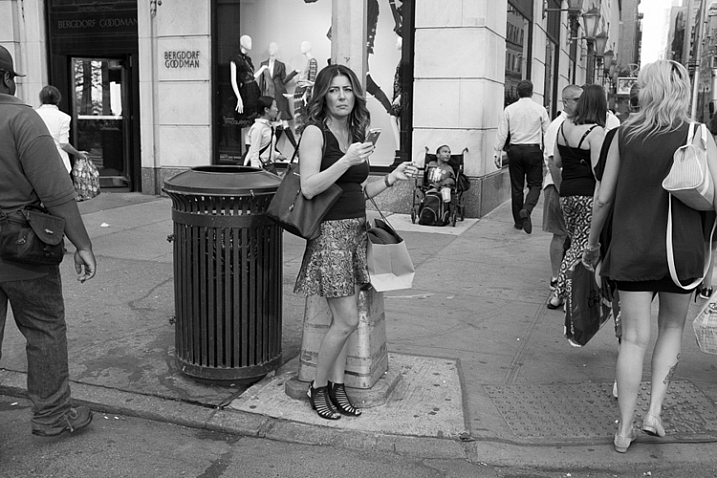
Bergdorf Goodman, 5th Avenue, NYC.

Bergdorf Goodman, 5th Avenue, NYC.

There are many different ways to set up your camera, but I prefer to shoot in Shutter Priority mode with a shutter speed around 1/250th of a second. That is a good minimum, to make sure you can freeze the motion of your subjects. In dimmer light, you can go to 1/160th and even 1/125th and still be okay. In strong sunlight you can go all the way up to 1/400th or 1/500th, but 1/250th is the number to keep in mind (as a good starting point).

Raise your ISO. There is no reason to go below ISO 400 for street photography, and I suggest staying between ISO 800 and 3200 when you’re not in bright sunlight. The reason is because, if you want to shoot at 1/250th, and you also want to use as small an aperture as possible, then something has to give, and that is the ISO.

You might be asking why it’s good to use a small aperture for street photography. That’s a creative choice of course, and sometimes the light is so low that you must shoot with as wide an aperture as possible. There are street photographers that prefer the look of a shallow depth of field for all their work. However, there are a few reasons why I believe a small aperture, and a lot of DOF is preferable. Because of the spontaneity, you never know where your subject is going to be, or if you are going to have multiple subjects at different depths. In addition, if you happen to miss the focus a bit, your subject will still be sharp if you are using a larger DOF. Finally, context is important. You are capturing culture, and surroundings are a part of the story. Do you really want to blur the surroundings away? The environment is a major part of street photography.

Greene Street, SoHo, NYC.

Greene Street, SoHo, NYC.

While a prime lens is not necessary, it can be very important for street photography, for a few reasons. First of all, zoom lenses are heavy and large. A small, light prime makes your camera a pleasure to carry around, and it looks much less imposing to your subjects. In addition, it can be a big advantage to get used to using a single focal length. You will start to learn how your camera sees, in a faster, and more intuitive way. I can’t overstate the previous sentence. When I wrote about forgetting that the camera is there, a prime lens is very important for this.

I prefer to use wide-angle primes, with 35mm and 50mm being my favorite. I like the wide-angle view because it will make you get closer to your subjects. In addition, the viewpoint will allow your foreground subjects to be more prominent and larger in the frame, while still being able to fit in more of the background, since it will be proportionally smaller. It’s a great look. If you are using a cropped camera, remember that a 35mm lens might not actually be a true 35mm view because of the crop factor, so try one that is the equivalent of a 35mm view.

3. Take photos for yourself

It is certainly important to see other people’s viewpoints and to pay attention to the images that they like, but I want you to focus on photographing for yourself. Capture an image that you love, first and foremost, and don’t worry if other people don’t get it. Street photography is still a niche genre, compared to other photography forms such as landscape, and because of that there are a lot of people that aren’t used to it.

Take weird images, take personal images, take ugly images, and take risks with what you capture. Be creative and have a good time. The more your images become a reflection of your voice and what you like, the better your work will be.

Panhandler, Broadway, NYC.

Panhandler, Broadway, NYC.


4. Shoot in a variety of locations and show us your area

A busy street corner in New York is usually the first place that comes to mind when people think about street photography, as it should be. New York has such a diversity of content, and that’s the reason why it’s one of the great meccas for street photography, but it is also only a very small part of the entire street photography world.

Street photography can, and should, be done anywhere. It can be done indoors, in coffee shops, at events, along country roads, or in small towns – you name it. Street photography is about culture and life. It is an idea, and a feeling. It doesn’t even need to have people in the images, just the hint of people.

The more you are able to capture images in the course of your daily life, the better you will become at it. Your images will be more personal and unique. For this reason, I suggest considering eventually trying a smaller camera, such as a Fuji X100T, a micro 4/3rds or mirrorless camera, or even a mobile phone camera, for the times where you don’t feel like bringing your large SLR. These cameras make it fun to capture images on a daily basis. You might bring one of these smaller cameras on a trip to the corner store, whereas a larger SLR would be more cumbersome for that situations.

5. Pick a location and wait there

Canal Street, NYC.

Canal Street, NYC.

It can be intimidating to photograph people candidly. I still feel pretty intimidated, depending on the situation. To offset this, one of my favorite techniques is to pick a location, and just hang out there for awhile. Find a spot where you think an interesting moment could happen, and then wait for it to unfold.

By waiting and not walking, you will spend more time looking around and watching, as opposed to moving. Then, when that moment happens, you will already be in position, and ready with your camera to capture it. Also, your subjects will be entering your space, instead of you encroaching on their space. If you are walking down a street and see someone that you want to photograph, it’s much tougher to get in their space, and still take a good candid photograph. By stopping and letting them come to you, not only will you be ready with your camera, but you can make it look like you are just photographing the surrounding area and they happened to enter your scene.

Go back to the same locations, over and over again at different times, and in different light. The more you get used to a location, the more you can anticipate what will happen there, and the more comfortable you will become photographing in the area. Also, people will start to get used to you being there.

Of course you should still walk around, but I prefer to break up long walks, with periods of waiting in good locations.

6. My favorite trick

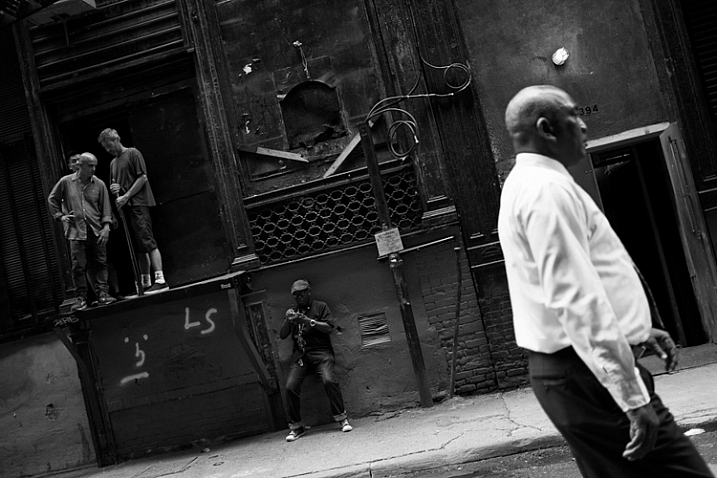
Cortlandt Alley, NYC.

Cortlandt Alley, NYC.

A natural reaction after you take a photo is to immediately take your camera away from your eye briefly. Take a picture and see. This is the number one thing that will tip someone off that you’ve taken their photograph. We don’t want to be too sneaky and creepy, but we also don’t want every person we’ve photographed to know, and stop us to figure out what we’re doing. That’s just tedious.

Whenever I capture an image of someone, I try not to remove the camera from my eye. I leave it there as they walk through the scene, as if I was trying to photograph the background and they got in the way. If you watch other photographers do this, you will see that sometimes the subjects will first think, “Hey did that person take my photo”, they will look back, and when they see the photographer with the camera still at their eye they will likely keep going, thinking that they were just in the way.

The flip side to this is when you are in an empty area, instead of a busy one. It is tougher to do this trick when there are only a couple people around, so what I will do in these situations is to aim up above, or to the side of the person, like I am photographing a building or a nice background. I will pretend to take an image or two, and then at the last second I will move the camera so that they are in the scene, in the right composition. I will quickly take the picture and remove the camera from my eye. When done right, it looks like you photographed the area above or next to them.

7. Don’t be too creepy

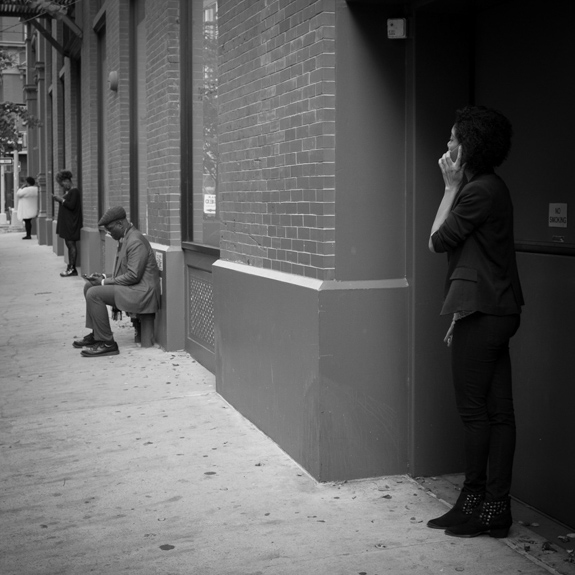
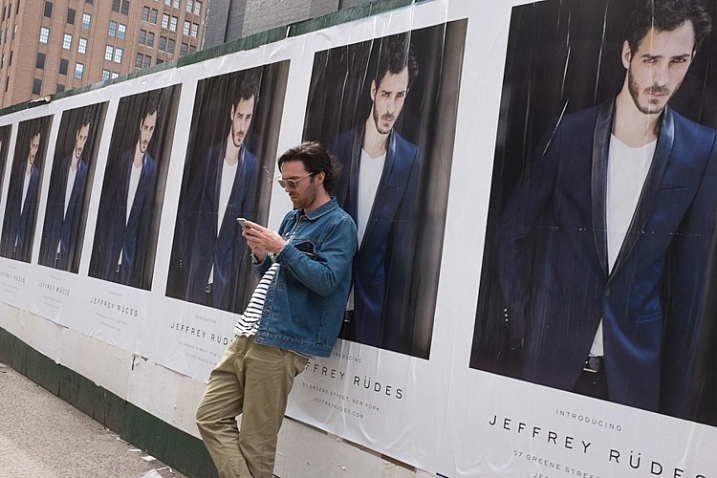
Cellphones, Nolita, NYC.

Cellphones, Nolita, NYC.

When I teach people street photography for the first time, there are inevitably those who will take five or six, or even twelve photos of one person. If you see a scene improving while you are photographing it, of course you should continue to capture the scene, but taking five or six candid photos of a person can get down right uncomfortable.

What we are doing, in my opinion, is a good thing. We are capturing and immortalizing culture and people. We do this because we like people, and unfortunately even when done as respectfully as possible, it is still a little bit creepy. We just have to accept that this is a worthy endeavor that offsets the slight creep factor. However, when you go to full on creep, it just gets uncomfortable for everyone. You don’t need to capture seven photos of a person. You don’t need to point your camera at a person for 30 seconds straight, while still pretending that you are not photographing them. If you want to do that, go up to them and ask for a portrait instead.

Take an image or two, then stop and reassess. If you see the scene developing further, put your camera down for a second. Act like you’re looking around for a way to capture the background, or pretend to play with your camera, and let the scene develop. Then, take another picture or two as it does. Just try not to point your camera at one person for too long.

8. Smile and carry a business card

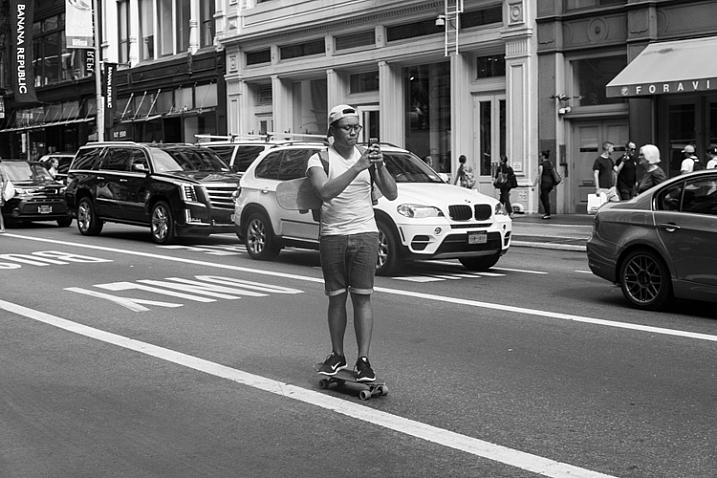
Skateboarder, Broadway, NYC.

Skateboarder, Broadway, NYC.

The more confident you act, the less people will notice you and care. If you look at master street photographers who have done this for a long time, many of them look almost invisible out there. This is not because they are necessarily sneakier, it’s because they carry themselves like they belong. They seem comfortable. When people see someone comfortably photographing in an area, they instinctively think that person belongs there. When they see someone who looks uncomfortable, like they are sneaking around, they will instinctively think they are are up to no good.

Whenever someone stops me and asks if I took their photo, I smile, say yes, and tell them that I’m a photographer doing a cultural project capturing daily life, and I thought they looked fabulous and had to capture them as part of the project (flattery goes a long way). I tell them I didn’t mean to make them uncomfortable, but it was just how I had to go about capturing the images. I carry cards to show them that I am a legitimate photographer and tell them to email me and I will send them the photo. After this, if they still seem very uncomfortable, I will offer to delete it. I’ve only ever had to delete two photos after a couple people asked me nicely. I’ve never had a bad interaction.

Of course, that doesn’t mean that others haven’t. Some photographers have certainly had bad interactions. You should make sure to pick the people that you photograph wisely, perhaps staying away from capturing someone that looks like they had a terrible day, or someone that looks angry or disturbed. Those are the situations where you are more apt to get yourself in trouble. Street smarts are important.

9. Capture images without people

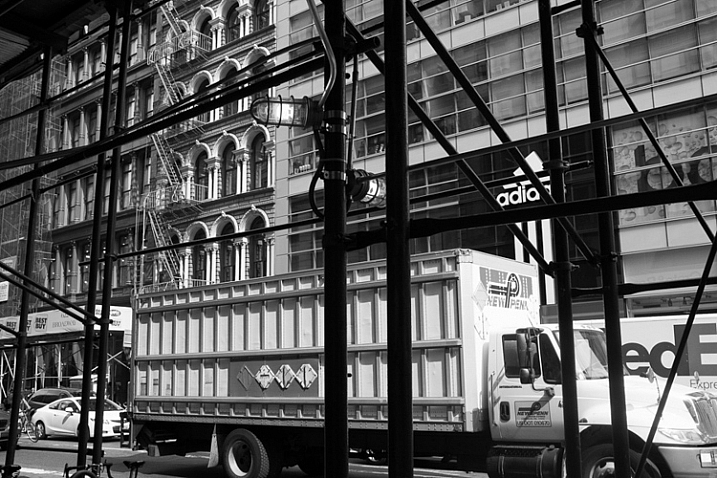
Scaffolding, Broadway, NYC.

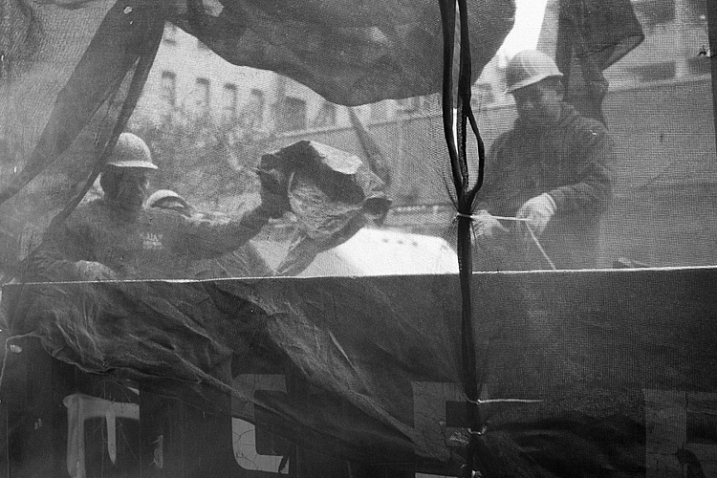
Scaffolding, Broadway, NYC.

Usually the first thing that comes to mind when street photography is mentioned, is an image of an interesting looking person, walking down the street. That is a part of street photography, but there is so much more to it.

Capture environmental images in ways that still have the feeling of a traditional street photograph. Show culture and people in ways other than just capturing them directly. Figure out how to show stories, capture ideas, and foster feeling and mood in an image. Photograph in locations where others may not think to take pictures.

10. Capture expressions

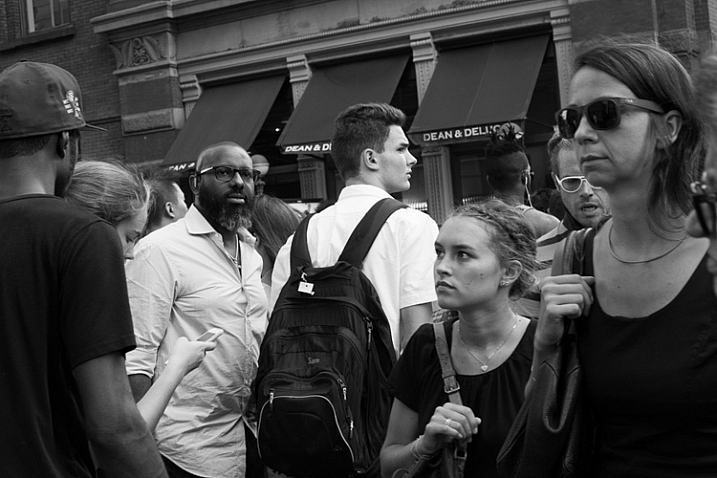
One of the skills that all the great photographers have is their ability to capture expressions. This applies as much to street photographers, as it does to portrait ones. Look to capture people’s emotions. Do they look happy, sad, pensive, or angry? I always try to look at my subject’s eyes, and wait for them to give a look that exposes something going on in their head. Usually that look doesn’t come, but when it does, I’m ready for it. This is one of the most difficult things to both notice and capture, and it comes with experience. Try hard to notice it.

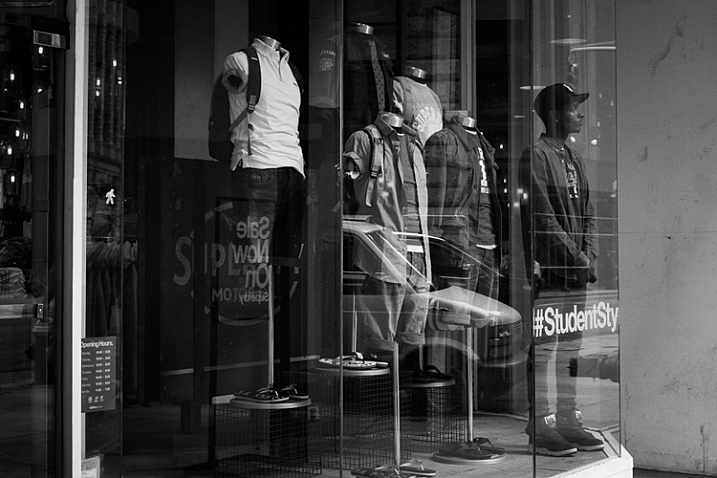
Student, Broadway, NYC.

Student, Broadway, NYC.

11. Edit and sequence your photos

Editing is just as important for your success as a photographer, as going out and shooting. Download and learn Lightroom, and learn to organize your photos well. I mark my best photos with three and five stars, to choose the decent and best photos from the day. Spend a lot of time reviewing, and narrowing down your photos, to the best of the best.

Start grouping your photos together. Learn which images work together, and figure out the reasons why. What are you trying to say and show? Can a sequence of your images create an interesting narrative? Use collections in Lightroom to group images together, without actually moving their location on the computer. Over time, you will start to identify themes, and ideas in your work, and it will help you figure out which images are your best. It will also help you know where you need to improve.

You will find that doing this will quickly help you improve when you are out shooting. The more time you spend organizing and thinking about your work, the more in-tune you will be to notice images that fit in, when you are out shooting. This is a way to help develop your voice in your photography.

12. Look at the work of other photographers

Spend a lot of time exploring the work of other photographers. This will both train your eye, and give you inspiration. It will quickly become a humbling experience. As a photographer, you don’t need to reinvent the wheel. So much has been done before, by photographers who spent decades doing it. What you need to figure out, is how to give your images a personal and modern take.

Look at both modern photographers, and go through lists of the old masters. Look at work done on busy street corners, and in quiet towns. Take it all in, then figure out what you relate to most, and build on that in your work.

13. Perfection is overrated

Greene Street, SoHo, NYC.

Greene Street, SoHo, NYC.

As a photographer, you need to become technically proficient with the camera. You need to learn to take sharp photos, that are well composed. You need to learn to see the light well. It is absolutely necessary for your growth. This is similar to a painter learning the fundamentals, before eventually gaining their voice, and going off in their own direction.

Once you have done this, is when you start to see that perfection in an image can sometimes be overrated. Your images don’t all have to be perfectly sharp, or perfectly composed. Sometimes a technical mistake will ruin a photo, but other times it may make it. Each image is completely different, and will work for completely different reasons. It is obvious when an image is ruined technically because a photographer didn’t know what they were doing, whereas it is different when it is just due to the situation presented to the photographer. If you take a look at the work of Garry Winogrand, so many of his images were slightly off-kilter. These days photographers might have decided to straightened them up a bit in Lightroom, but when you look at Winogrand’s work all together, that slight off-kilter look adds a sense of realness and spontaneity, and actually improves many of the images. The lack of perfection seems to make them better.

Have fun. Think of street photography like jazz and go a little off-kilter. Improvise and experiment. Just figure out how to find and capture, interesting and intimate moments.

googletag.cmd.push(function() {
tablet_slots.push( googletag.defineSlot( “/1005424/_dPSv4_tab-all-article-bottom_(300×250)”, [300, 250], “pb-ad-78623” ).addService( googletag.pubads() ) ); } );

googletag.cmd.push(function() {
mobile_slots.push( googletag.defineSlot( “/1005424/_dPSv4_mob-all-article-bottom_(300×250)”, [300, 250], “pb-ad-78158” ).addService( googletag.pubads() ) ); } );

The post An Introduction to Street Photography for New Photographers by James Maher appeared first on Digital Photography School.


Digital Photography School

 
Comments Off on An Introduction to Street Photography for New Photographers

Posted in Photography


8 Tips for Better Pet Photography

20 Jan

Pets have always been a big part of my life, and are important members of many of the families I photograph. I encourage my clients to include pets in their photo sessions wherever possible. Animals bring a whole new dynamic to a family photo shoot, providing a focus for the children, and a great icebreaker for all parties.

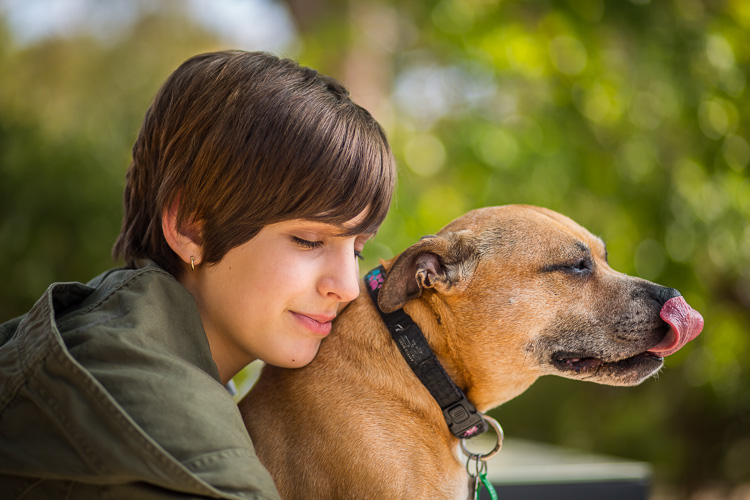
My interest in pet photography widened when a colleague invited me to join a group called Photographers for Animal Rescue. It is a group of professional photographers who, outside of their paid work, provide pro bono photographs to animal shelters. The theory behind it is that a good photograph greatly improves an animal’s chance of being re-homed, but few shelters have the budget for professional photography.

Image A

During my time with this group, I have been lucky enough to photograph dogs, cats, rabbits, and even pet rats. All of these animals have different characteristics and behaviour, and each needs to be approached differently by the photographer.

Tip #1: A word on safety

All pets, no matter how docile, have the capacity to bite or scratch. This is especially true of rescue pets, who may have experienced abuse by humans in the past, and can be mistrusting and unpredictable.

When photographing an animal for the first time, spend time getting to know each other. Allow the animal to sniff you, your clothing, and the camera. Offer treats, and gentle petting if the animal will allow you. Sudden movements or loud noises may startle a timid animal and cause it to retreat or attack.

Image ETip #2: Dogs

Humankind’s best friend is the most cooperative of all pets. Generally, dogs respond to verbal commands and treats, and can be physically positioned to take advantage of lighting and optimal shooting angles.

There is an entire article here on dPS devoted to photographing running dogs, so here I will share some tips for capturing other endearing expressions and moments.

Tip #3: My best friend

Dogs are very much part of the human families to which they belong. The most treasured photographs are often the ones in which dogs are interacting with family members. Consider when those moments of connection might occur, so that you can be ready to capture them. It may be in the moments when your child arrives home from school to a joyful canine greeting, or when your mother sits in her favourite chair with her dog on her lap.

Image B

As with human portraits, setting and lighting help to convey mood and emotion. The photo above, shot with an 85mm lens, illustrates the bond between my youngest daughter and a family dog. Light reflected off the pavement below them, and shallow depth-of-field achieved with an aperture of f/1.8, creates a soft dreamy image that evokes quiet trust and friendship.

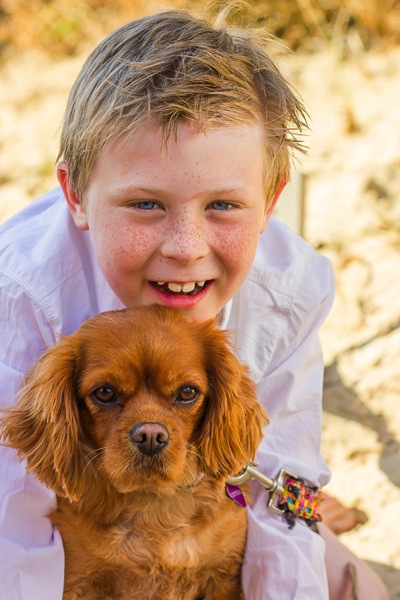
This photo of a boy and his dog was part of a family photo shoot for a client, who lives by the beach. I wanted to capture the beach environment, but the afternoon sun was too harsh to shoot. I found shade behind a beach bathing-box, and positioned my subjects to use light reflected off the surrounding sand. Boy and dog are on different focal planes, so I selected an aperture of f/5.0, which allowed me to keep both in focus while softening the background.

Image C

Tip #4: The doggy smile

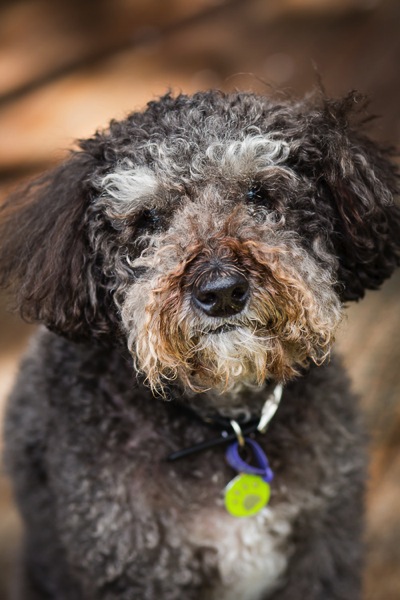
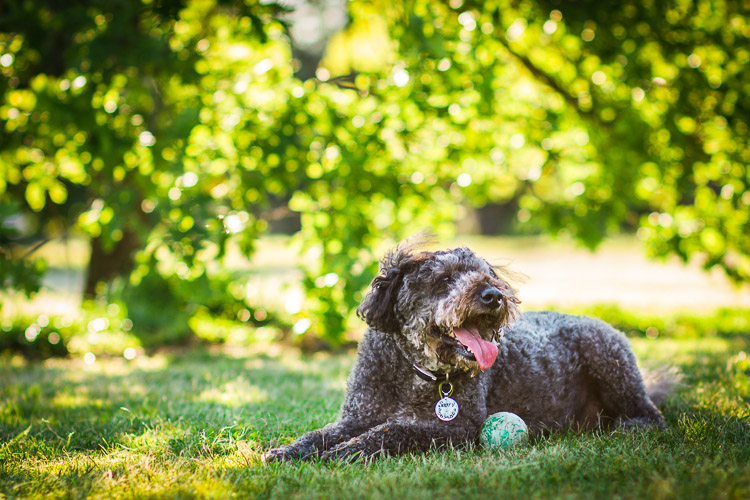
Dogs often smile during, or after, vigorous exercise. If you don’t want to photograph the dog in motion, you can throw a ball, or run around with him for a few minutes, before coaxing him into position. The image below shows our dog smiling as he cools off in the shade, following a manic ball-throwing session. The shade provides even lighting on the dog, and f/2.2 turns the leafy background into lovely bokeh.

Image D

Tip #5: The tilted head

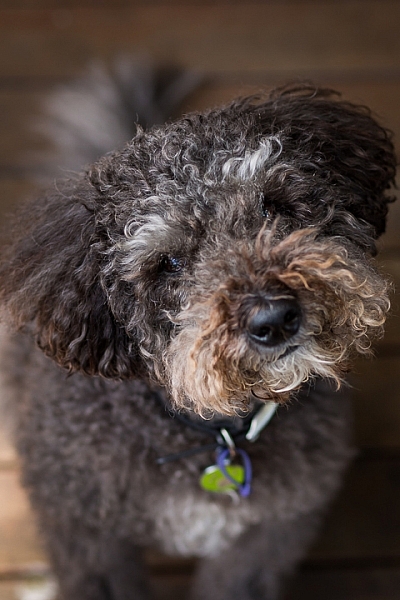
Have the dog sitting on the ground, so that you are shooting at a slight downward angle. Make whining sounds or cat noises – any sound that will pique the dog’s curiosity. Most dogs will cock their head to one side and look at you.

Image E head tilt

Tip #6: Cats

Cats, with their striking eyes and long whiskers, make rewarding photographic subjects. Unlike dogs, they won’t sit where they’re told, and will only favour you with eye contact when it suits them. Photographing cats requires patience and stealth!

Cats are natural predators, and even adults usually respond to a pom-pom, or toy dangled from a thread. Play peek-a-boo with the toy around corners, or furniture, to coax the cat into the position you want. If possible, confine the cat to a room where you can close the door.

Use your fingernails to make scratching sounds on carpet, walls, or even your camera body, and the cat will look in the direction of the sound.

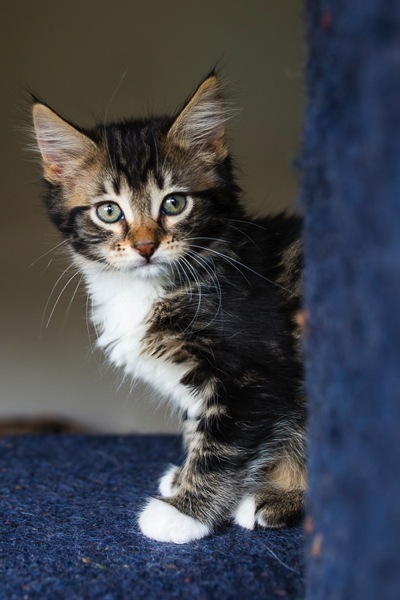
The photos of the kittens below were shot in a small room, with one window. The cats were on a multi-level climbing post, which I pulled close to the window. I stood between the window and the climbing post, and coaxed the cats to look towards the window so that I could get catch-lights in their eyes. These images were shot using ISO 2000, at f/4.0 with a 35mm lens – my go-to lens when working in tight spaces.

Image G

Image I

Image F

Image H

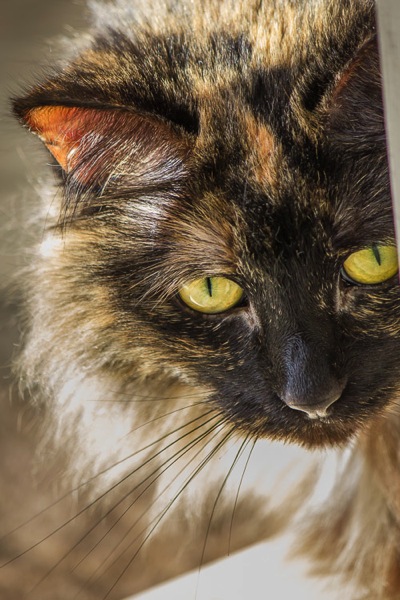
Backlighting can also be effective in highlighting fur, which creates a halo effect and frames the cat’s face.

Image J

Tip #7: Rabbits

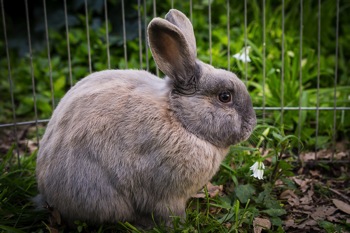
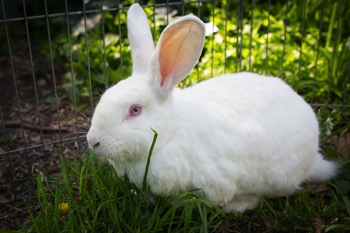
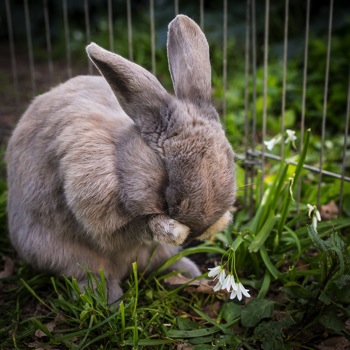
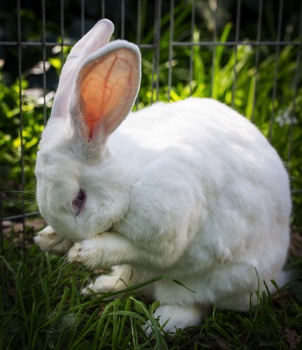
There are few things cuter than a rabbit washing its face. Rabbits love to be clean, and if you wait long enough, most will wash themselves without prompting. You can speed up this process by holding and petting the rabbit. When you put it down, it will usually be in a hurry to wash away the people smells you have left behind, so get down low and have your camera ready.

The photos below show Latte and Zeus, two rescue rabbits, photographed first in their default sitting position, and then washing their faces. Both are shot at f/4.0 using a 35mm lens.

Image K Image M
Image L Image N

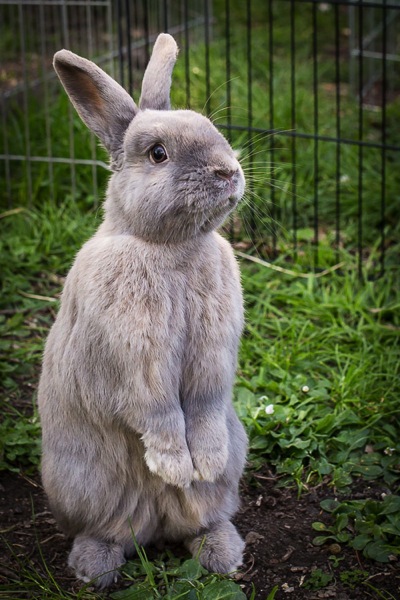
Often when placed in a new environment (e.g. taken from inside the house, to an outside enclosure) rabbits will stand on their hind legs and check out their new surroundings. Be ready to start shooting as soon as you place the rabbit in the new area. In the photo below, Latte looks like he is begging to be taken home.

Image O

Tip #8: Small critters: mice, rats and hamsters

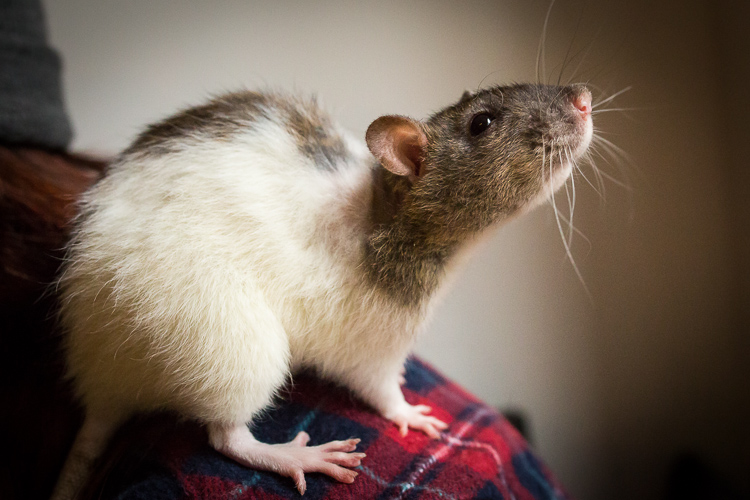
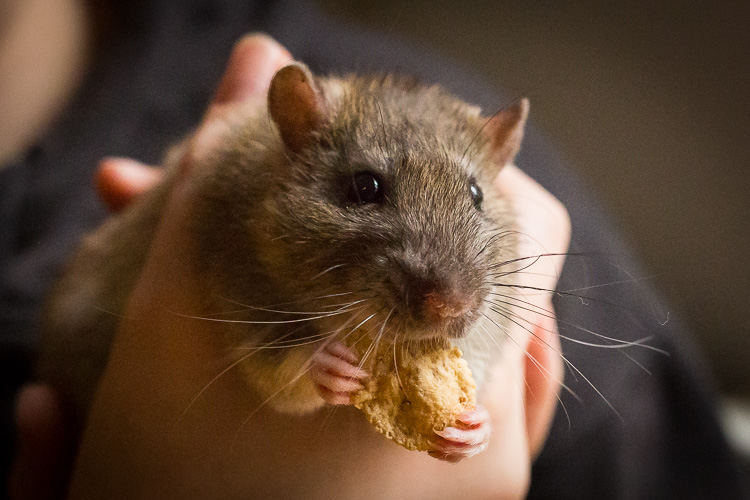
Even some of the most dedicated animal-lovers are squeamish about rodents. I love them! Most appealing are their long whiskers, and the way they hold food in their paws while they’re eating.

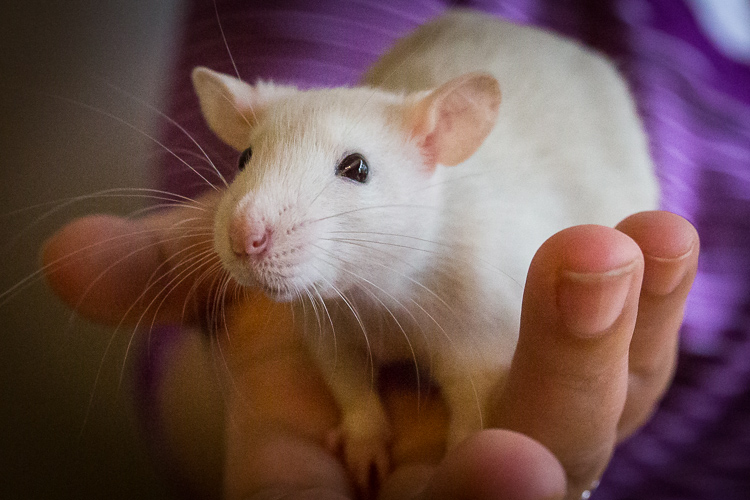
Small creatures move fast. The easiest way photograph these animals is to have someone hold them. Not only does a human hand keep the animal in place, it also conveys scale. Use a macro lens if you have one.

The photographs below show off the rat’s beautiful long whiskers. They also show how small and vulnerable they are, and that they are comfortable being handled.

Image P

Like the kitten photos, these photos of pet rats were shot using only window light. It was a dull day and the light was poor, so we brought the rats as close as possible to the window, and used a very high ISO of 8000 to 10,000. Since the images were only going to be used online, the graininess (noise) was not a problem in this instance.

Image Q

Give the animal a treat, and she will sit still as she holds it in her paws to nibble.

Image R

I hope these tips have given you some ideas for photographing the pets in your life. Please share any other tips and your pet photos in the comments below.

googletag.cmd.push(function() {
tablet_slots.push( googletag.defineSlot( “/1005424/_dPSv4_tab-all-article-bottom_(300×250)”, [300, 250], “pb-ad-78623” ).addService( googletag.pubads() ) ); } );

googletag.cmd.push(function() {
mobile_slots.push( googletag.defineSlot( “/1005424/_dPSv4_mob-all-article-bottom_(300×250)”, [300, 250], “pb-ad-78158” ).addService( googletag.pubads() ) ); } );

The post 8 Tips for Better Pet Photography by Karen Quist appeared first on Digital Photography School.


Digital Photography School

 
Comments Off on 8 Tips for Better Pet Photography

Posted in Photography


13 Steps for Editing Street Photography in Lightroom from Start to Finish

20 Jan

Favorite editing tools for street photography

I admit it, I take too many photos. I know it, and I have too many images to deal with, and unless I am getting paid to finish them and send them out to a client, they may never get processed. Are you in the same boat? Do you too have some images that have just been sitting there in your digital desk drawer?

With digital photography, and especially because of how cheap memory is (don’t forget to include web hosting sights and the cloud), more and more photos are just there and never used.  The best solution is to be more decisive, and just take fewer photos. But we all get out of hand, and sometimes just come home with more images than we know what to do with.

image

Final product after the simple steps followed below—a workflow that you can adjust to your own tastes too!

So the best thing to do is get to the grind and produce something. But it doesn’t need to be so much of a grindstone as you might think. I love taking photos more than processing and unless I am flying solo, I think I’ve got lots of people onboard with me. As you know, photography is not about broad strokes, and details are important. This set of instructions is specifically designed for street photography. But, are most of your photos from your travels? Well, streets (along with the convenient airplane) is maybe how you got there. Much of what we do as photographers crosses over into different genres of style and art. So have a go at the following tutorial, and you may find that with your own adjustments this is a recipe for more than just the street.

image

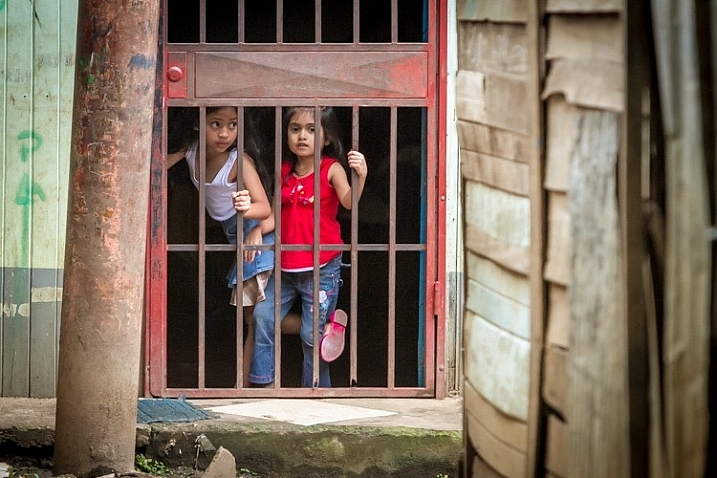
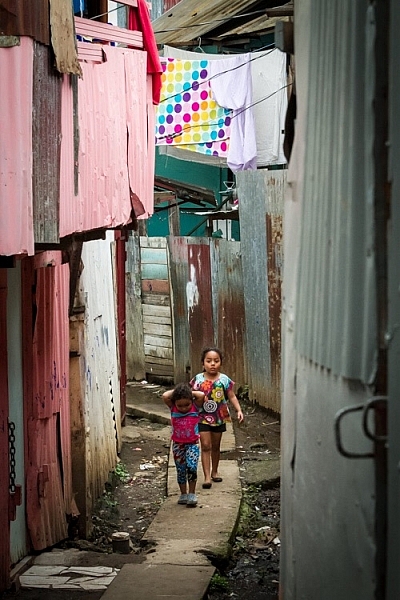
Final image of two young girls walking in the slums of San Jose Costa Rica, all editing was done following the steps below.

These instructions begin in the Library module of Lightroom, and then progress into the Develop module. There are countless modifications that can be made upon importing, categorizing them, giving them tags, etc. As the point of this tutorial is to streamline your workflow, the tips for editing will also be streamlined. So let’s get at it!

Library Module

Step 1 – Select images

Select a batch of images that are preferably in similar lighting conditions, and which have a similar theme. For example, choose a set of photos that were all shot outside over the course of a few hours, but not all night. Or a group of photos that were all shot in the rain. Lighting and theme conditions can vary, but greater variations will have potential greater variations in results.

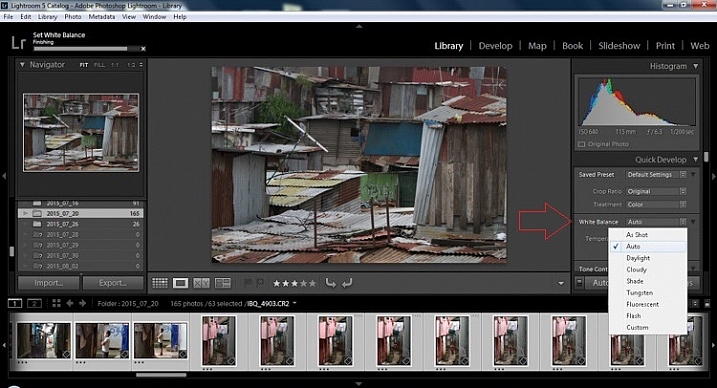
Step 2 – White Balance

In the Quick Develop Panel (at the top of the right panel in the Library Module) Select White Balance and choose Auto. Before you turn away, let me assure you that there have been more Ph.D.s awarded, and dissertations given, in creating the algorithms behind this button. If you compound the interest in dollars that has been invested in this Auto algorithm it would sustain many third and fourth quarter GDP figures for entire nations.

image

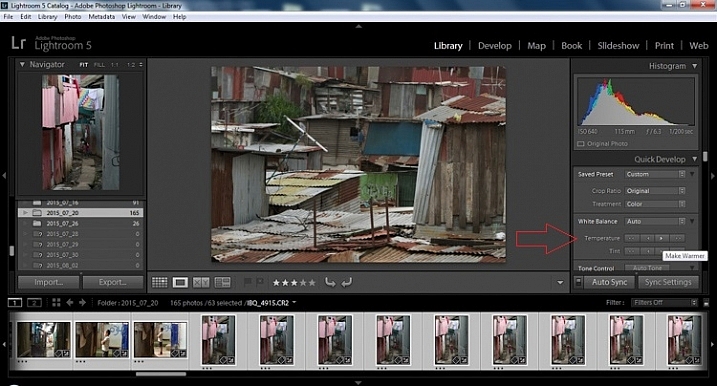
Step 3 – Warm images

Next, push the single arrow pointing right under the temperature heading indicated by the Make Warmer hint that appears if you hover over it. The single arrow will increase your warmth tone by +5. If you want plus +10 push it twice, using the double arrow will increase it in increments of +15.

2015.09.25 Street Editing Tips Lightroom 002

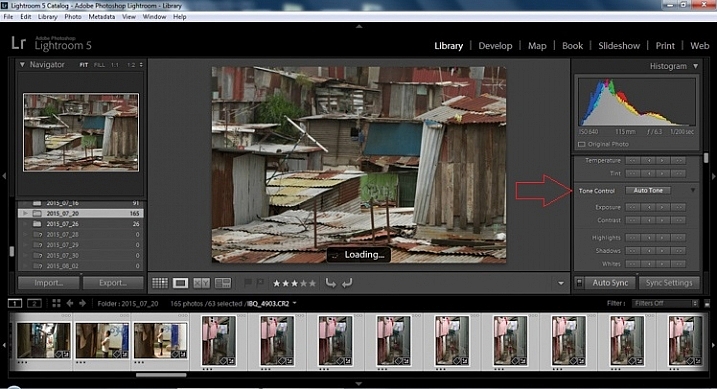
Step 4 – Auto Tone

I know it is scary, and it does make me cringe sometimes too, but anything can be shifted, tweaked, and tuned later (and should be) to your liking. This will Auto Tone your exposure, highlights, shadows, whites, and blacks to each photo individually, so it is not the same as batch editing which will be covered later.

2015.09.25 Street Editing Tips Lightroom 003

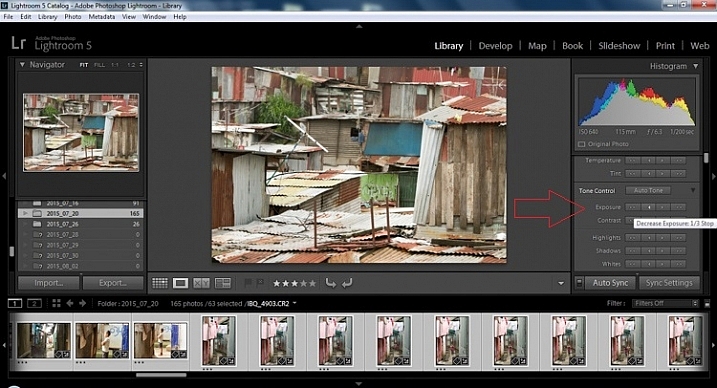
Step 5 – Decrease exposure

Select the single arrow to the left, decreasing the exposure by a 1/3 of a stop. It is minor, but keeps your darker tones (especially things like black asphalt) a little darker. Note: this is assuming you have a correct exposure to begin with – if it’s a bit out you can adjust later on a per image basis as needed.

2015.09.25 Street Editing Tips Lightroom 004

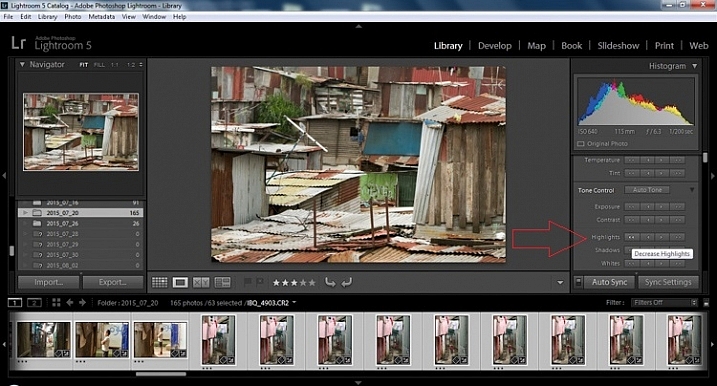
Step 6 – Decrease Highlights

For the Highlights, use the double arrow to the left, decreasing the highlights, and select it once. Be patient, as depending on how many pictures you select and your computer speed, it may take more than a few seconds. This can be monitored by looking in the top left of the screen above the Navigator window (progress bar).

2015.09.25 Street Editing Tips Lightroom 005

Step 7 – Shadows

For the shadows, use the double arrow on the right, decreasing the shadows, and click it once.

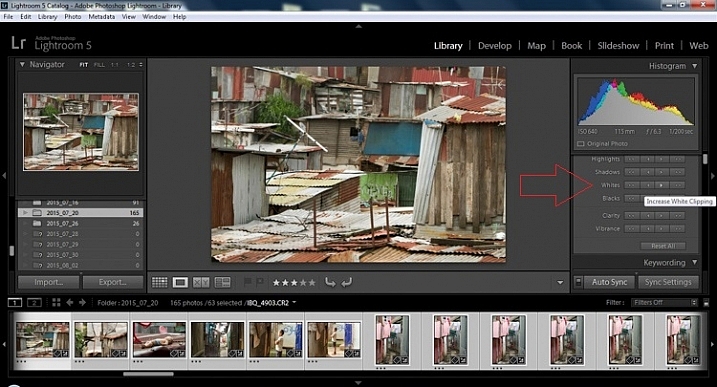
Step 8 – Whites and Blacks

Increase the white clipping by +5, by clicking the single right arrow once. Decrease the black clipping by -5 by clicking the single left arrow once.

2015.09.25 Street Editing Tips Lightroom 007

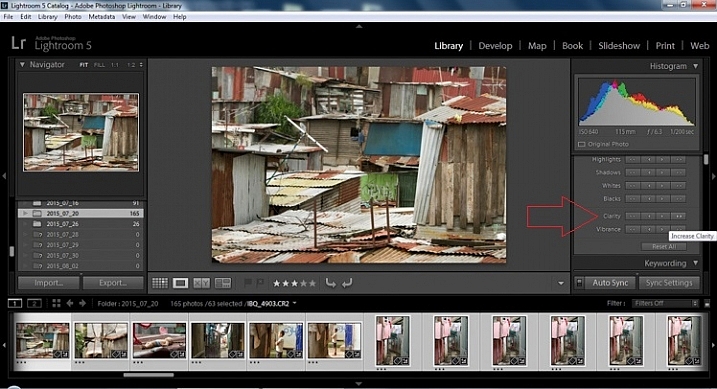
Step 9 – Clarity

Increase the clarity by +20, by pressing the double arrow to the right once (for more information about clarity please look near the end of the article which describes it in more detail).

2015.09.25 Street Editing Tips Lightroom 009

Step 10 – Vibrance

The final step in the Library module is to increase the vibrance by pressing the double arrow to the right (for more detailed information about vibrance please see below).

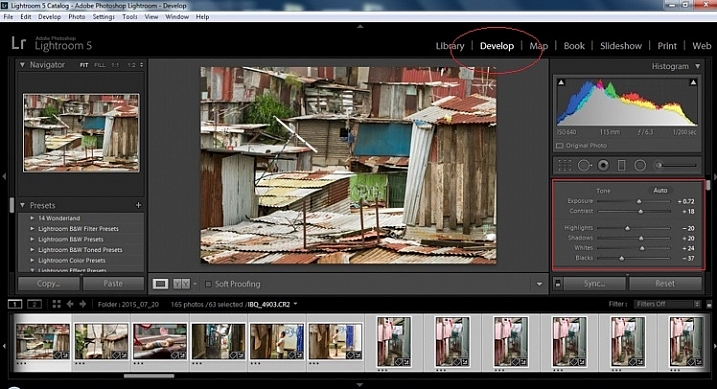
Develop Module

Now we will be moving into the Develop module. To this point, all the changes that you’ve made, have been applied to all the photos in the group, which you originally selected. Looking at the image below, you can see that despite the simple clicks made in the Library module, many delicate changes have been made. Again, all of these changes can be fine-tuned to your liking later. There are hundreds of modifications that can be made, but let’s keep those for later.

2015.09.25 Street Editing Tips Lightroom 011

Notice the sliders have moved based on the changes you made in the Library Module Quick Develop panel.

Step 11 – Lens Corrections

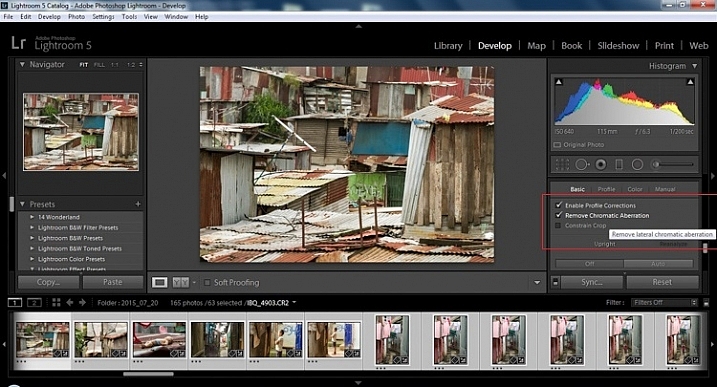
This step requires you to scroll down to the Lens Corrections Panel, and select two checkboxes. The first is Enable Profile Corrections, and the second is Remove Chromatic Aberrations. Both of these will allow Lightroom to make changes to the photo based on the lens used, and the inherent flaws that exist in that lens. A variety of corrections may or may not be included like, barrel distortion, vignetting, and as the second suggests, green and purple colors that result from diffraction in the lens.

2015.09.25 Street Editing Tips Lightroom 012

Step 12 – Detail Panel

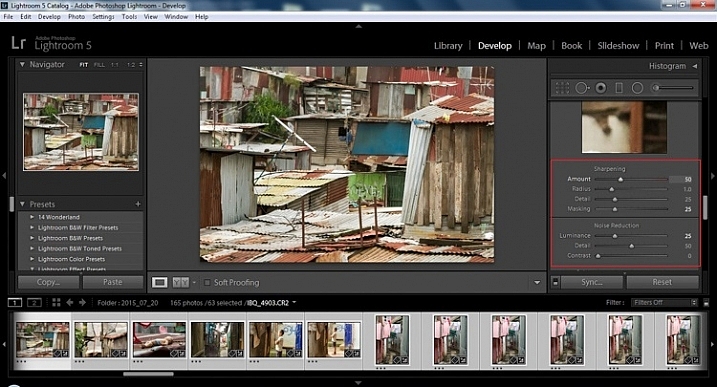
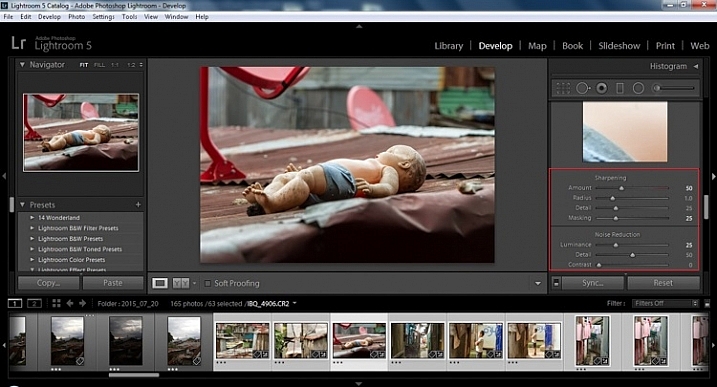
Next is to scroll up and go to sharpening, increase it to +50,  then increase your masking to +25. Finally you may or may not need to reduce noise. For this example, because the ISO was 640 the noise reduction was increased to +25. To understand, sharpening and masking in more detail and their relationship to noise reduction please read below.

2015.09.25 Street Editing Tips Lightroom 013

Are you still with me? Here is where you will thank some of those computer science majors for creating the AUTO button. This is why they get the big bucks, and it saves us large amounts of time. We don’t need to apply these changes individually.

Step 13 – Sync settings

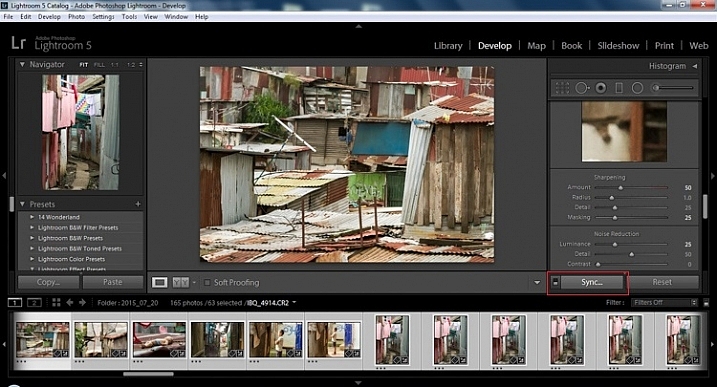
At the bottom of the Develop module there is a rectangular button that says Sync. PUSH IT! Make sure all your images are still selected before you sync (highlighted in the thumbnail strip at the bottom).

2015.09.25 Street Editing Tips Lightroom 014 sync

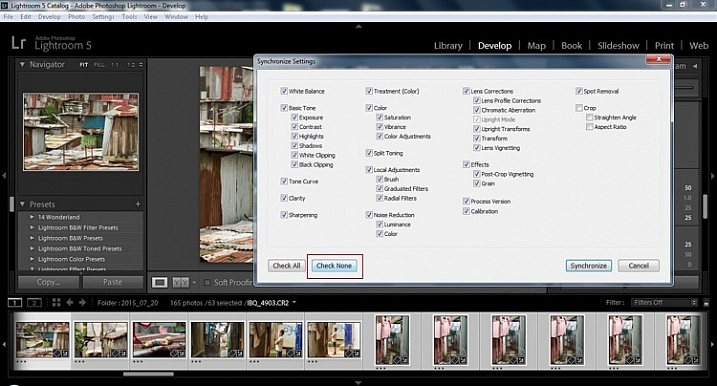
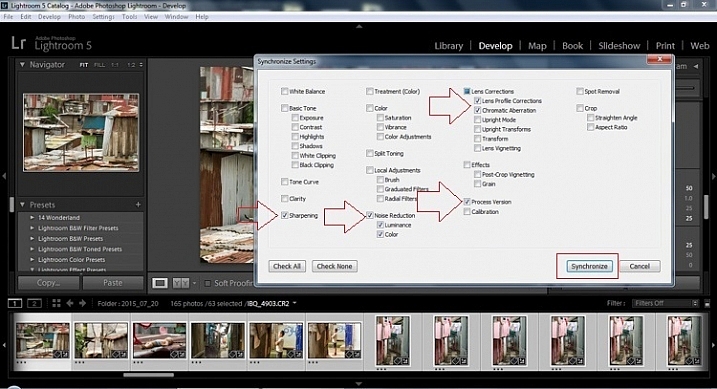
When the Synchronize Setting window pops up, select Check None. This will ensure that no unwanted changes will be made to your previous adjustments.

2015.09.25 Street Editing Tips Lightroom 015 sync check none

Now check the boxes labeled Sharpening, Noise reduction (which will subsequently select both boxes below it), Lens Profile Corrections, Chromatic Aberration, and finally Process Version. Notice these are the same adjustments that you had made in steps 12 and 13.

2015.09.25 Street Editing Tips Lightroom 016 sync check which apply

Finally, press the “Synchronize” button.

2015.09.25 Street Editing Tips Lightroom 017 verify sync

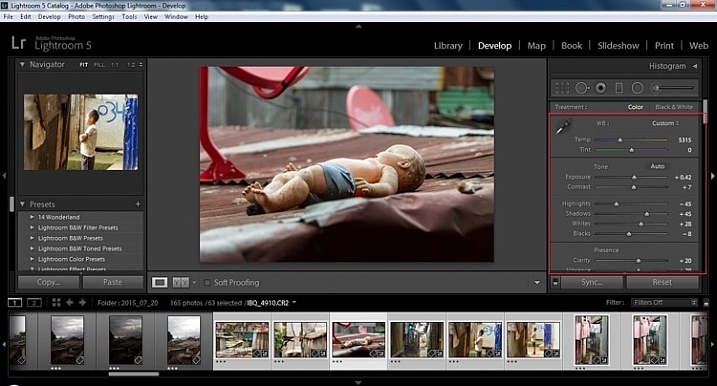
Looking at the screenshot above, you can see that the all of the selected photos have had the changes made to them.  If I were to go back and make all the individual changes to the potentially tens, hundreds, or even in bizarre cases thousands of photos, it would have taken me time that I don’t have, and neither do you. Looking at the image below you can see that the exposure, shadows, lights, whites and blacks have remained unique to the individual photo.

2015.09.25 Street Editing Tips Lightroom 018 verify sync basic settings

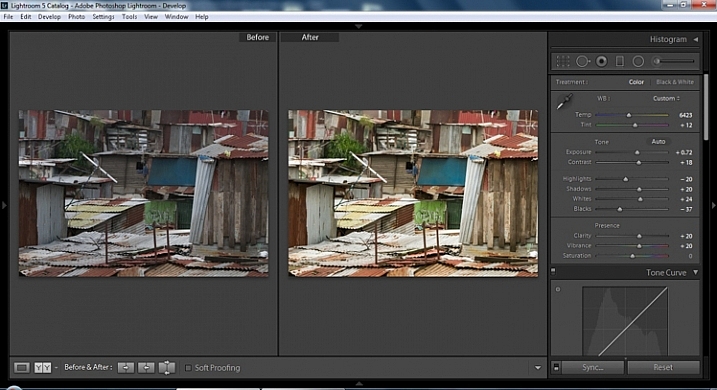
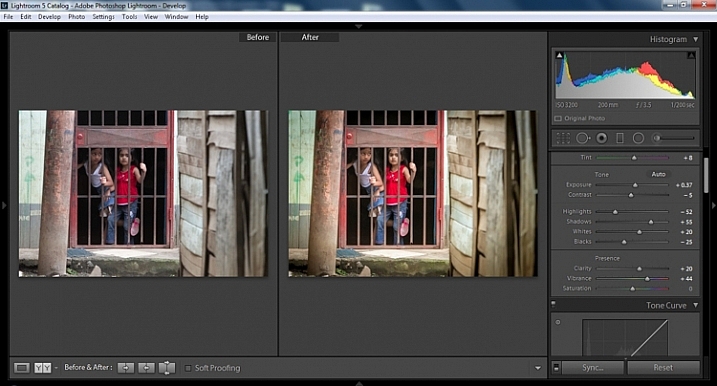
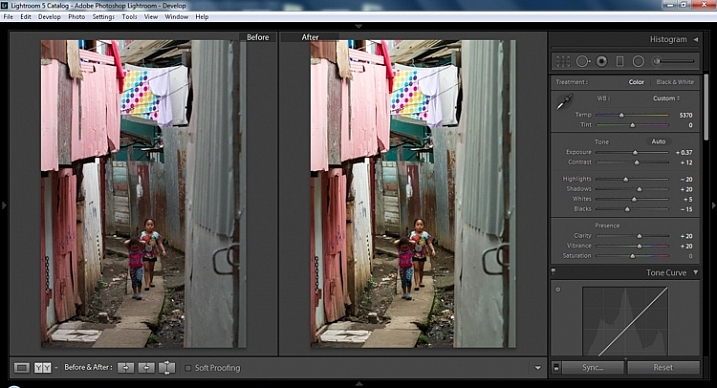
Below are simple side by side comparisons. In the last one I actually made a few additional small adjustments, and added a -10 vignette. Other than that, it is ready for export, along with almost all of the other photos that were just individually and batch adjusted. It is a bit of mix and match magic that keeps your photos natural, and true to the street.

2015.09.25 Street Editing Tips Lightroom 019 compare

2015.09.25 Street Editing Tips Lightroom 021 compare

2015.09.25 Street Editing Tips Lightroom 020 compare

Clarity

Clarity increases the contrast where two different tonal values meet. It is like contrast but on a micro scale, makes the image seem to be sharper. The lights will get lighter and the darks darker, but only where the different tone values meet, not broadly across the whole tonal range of the image.

Vibrance

Vibrance increases the tone of colors that are not already saturated. It is like a balancing scale for color. Saturation on the other hand, increases the intensity of all spectrums of light. Thus, vibrancy helps to bring out subtleties in the colors. For street photography, it brings out richness, without creating an over-saturated look. Sometimes I pull the vibrance up, and push the saturation down, to maintain an urban feel but doing so without making it look over-worked.

Sharpness

Just as I said, clarity is like contrast on the micro scale, sharpness is like clarity on a micro scale. Thus, it is like micro-micro scale. So we are still dealing with tonal values, but in even more detail. So be careful how much you increase your sharpness. Never try to rescue camera shake or blur in the photo using sharpness. “The devil is in the detail,” and this is no truer than in the sharpness slider. Because what you gain in sharpness you also increase the amount of noise (not desirable). If you have a high ISO, sharpness is more of an enemy than a friend.

EXTRA

Final image all adjustments applied

Masking

Textures will become more enhanced, but smooth surfaces will not be affected, resulting in less excess noise being introduced. This will help the street photography mood, without giving it an overly grainy feeling, or your shadows having too much noise. So how much of this movement left and right on the Masking slider is helping or hurting all your hard work? Thanks to those “AUTO guys” the Alt key on windows (Opt on Mac) will give you a grayscale impression of exactly where, and how the sharpening is impacting your photo. White indicates the area on the photo where sharpening is being applied, and black shows where it is not. You will notice that the contrasts and textures deserve most of the sharpening, alleviating your smooth tones and surfaces from the ill effects of sharpness.

Summary

So hopefully that will give you some things to try out with your images to process your street photography faster and consistently. Do you have any other tricks and tips you use? Please share in the comments below.

googletag.cmd.push(function() {
tablet_slots.push( googletag.defineSlot( “/1005424/_dPSv4_tab-all-article-bottom_(300×250)”, [300, 250], “pb-ad-78623” ).addService( googletag.pubads() ) ); } );

googletag.cmd.push(function() {
mobile_slots.push( googletag.defineSlot( “/1005424/_dPSv4_mob-all-article-bottom_(300×250)”, [300, 250], “pb-ad-78158” ).addService( googletag.pubads() ) ); } );

The post 13 Steps for Editing Street Photography in Lightroom from Start to Finish by Branson Quenzer appeared first on Digital Photography School.

Digital Photography School

 
Comments Off on 13 Steps for Editing Street Photography in Lightroom from Start to Finish

Posted in Photography


Weekly Photography Challenge – Lightweight

16 Jan

Each week we try and come up with something interesting and different for the weekly photography challenge here on dPS. The images I shared earlier of: 25 Floaty Images of Lightweight Objects might give you a hint! If you haven’t already seen them, take a look.

U.S. Army

By U.S. Army

Weekly Photography Challenge – Lightweight

You could take the term literally, like the image above of lightweight boxers, or figuratively – the choice is yours. Get creative. What things around your own home could be considered lightweight? Something soft and fluffy like a kitten, a tissue, or a feather – or perhaps something even lighter like puffy clouds on a nice day, or marshmallows.

John Watson

By John Watson

Patrik Nygren

By Patrik Nygren

Kate Ter Haar

By Kate Ter Haar

William Clifford

By William Clifford

Fatima

By Fatima

Chris Chabot

By Chris Chabot

Share your images below:

Simply upload your shot into the comment field (look for the little camera icon in the Disqus comments section) and they’ll get embedded for us all to see or if you’d prefer upload them to your favourite photo sharing site and leave the link to them. Show me your best images in this week’s challenge. Sometimes it takes a while for an image to appear so be patient and try not to post the same image twice.

(Seriously, how cute are these little guys?!)

Tim Ebbs

By Tim Ebbs

Belal Khan

By Belal Khan

googletag.cmd.push(function() {
tablet_slots.push( googletag.defineSlot( “/1005424/_dPSv4_tab-all-article-bottom_(300×250)”, [300, 250], “pb-ad-78623” ).addService( googletag.pubads() ) ); } );

googletag.cmd.push(function() {
mobile_slots.push( googletag.defineSlot( “/1005424/_dPSv4_mob-all-article-bottom_(300×250)”, [300, 250], “pb-ad-78158” ).addService( googletag.pubads() ) ); } );

The post Weekly Photography Challenge – Lightweight by Darlene Hildebrandt appeared first on Digital Photography School.

Digital Photography School

 
Comments Off on Weekly Photography Challenge – Lightweight

Posted in Photography


12 Common Newbie Photography Mistakes to Avoid

14 Jan

None of us are perfect and we all make mistakes. While some photographers might be naturally gifted, and just do amazing work from the moment a camera is put into their hands, that is not the case for most of us. Chances are, if you are new to photography, you are going to muck things up. You shouldn’t feel bad however, as you can be sure that many newbies have done exactly the same things. Here are a number of very common mistakes that new photographers make. Learn to avoid them, and you will improve your images.

1 – Centering everything in your images

The horizon line is right in the middle, cutting the image in two.

The horizon line is right in the middle, cutting the image in two.

When most of us look back at our early images, we usually see the horizon line placed very much in the middle of the image (see photo above). This is one of the most common mistakes new photographers make when they start. Sometimes it’s a good thing to do, but not always. The problem is that it cuts the image in half, and leaves people looking at the image, unsure of which half to look at, which is the intended subject.

When you take photos of landscapes, or anything with a horizon line, it is best to put the horizon on one of the third lines.The Rule of Thirds is one of the compositional guides for photography. As you get more into photography you will hear more and more about it.

With the horizon in the top third most of the ground is showing, telling the viewer what to look at.

With the horizon in the top third, more ground is showing than sky, telling the viewer where to look

It’s the same idea for your subjects. If you are photographing a person, put them to one side of the image, on one of the vertical third lines. Which line you use is up to you. Sometimes it is better to do both and see which one looks better. Experimenting is the key to getting great photographs.

2 – Taking attention away from the main focus in the image

Without meaning to, you may include something in your frame, that takes the focus off the main subject in the image – things like bushes, or a light post that is just a line through the image. It goes back to the previous point about giving your subject so much attention, that you aren’t taking the time to look around it.

3 – Cutting things off at the edge of the frame

It is amazing how many times you can look at someone’s photo and ask, “Why have you cut off their feet?” They then look back at you blankly, saying they had never noticed it before.

LeanneCole-common-newbie-mistakes-0029

Be careful not to cut off parts of limbs, like feet, when you are taking photos.

It is a very typical thing that newbies do. It may not be the feet, but it could be someone’s hand or the top of their head. It can happen in architecture and landscapes as well; the tip of a church dome will be missing, or the top of a tree.

It is all about learning to look at your subject and making sure you concentrate on getting them all in the frame. If you can’t fit them in the image, then you need to make decisions about what you will include, and what to crop off. Often if you take more than two thirds of a leg away it looks deliberate. If you only take one third away it looks like you weren’t paying attention.

Missing toes or feet.

Missing toes or feet.

Make sure to include feet.

Make sure to include feet.

4 – Thinking that having a great camera is enough

“I bought this fantastic camera and I paid a lot of money for it, but my photos don’t look great.” There is an assumption that if you have a good camera, you will automatically take amazing photos. This is not the case.

Just because you have a great camera, doesn’t mean you don’t need to learn photography. It is the person behind the lens that is responsible. If you see amazing photos by other photographers, that it is because they have learned about composition, and how to use their camera properly. Scroll to the bottom for links to more beginner articles to help you with this one.

5 – Not looking behind your subject

“Look at the tree coming out of that person’s head.” This similar to the previous point. You need to consider everything in the frame. You can usuallt remove the tree from their head by taking one or two steps to either side.

LeanneCole-common-newbie-mistakes-0027

Look behind your subjects and make sure there aren’t things like trees coming out of their heads.

leannecole-newbiemistakes-portrait

Slight camera reposition and no tree coming out of her head any more.

6 – Taking only photo of a subject and from a common viewpoint

We all see people who want to take photos of a building, they walk straight up to it, take one photo from the middle position, and that’s it.

Think about other angles you can use as well. Try moving to the left, the right, or both. Take some from low camera angles and then some standing up. As you take more shots, you will learn what works and what doesn’t. Again, it is all about experimenting.

LeanneCole-common-newbie-mistakes-0031

Taking a photo of a place by standing right in front of it. 

7- Having a really good camera and never learning how to use it properly

If you get an amazing camera that is capable of so many things, and never take it off auto, you are missing out on a lot. Learning to use your camera is one of things you can never regret. While you may be able to get some great photos with it on automatic, if you learn about aperture, shutter speed, and ISO, you will have more control over your images. It is usually something that no one is ever sorry about doing.

Once you have the basics worked out, you can then learn more advanced things like long exposures and HDR. The world of photography really opens up to you when you know how to use your camera to its full potential.

8 – Not giving your camera enough time

I was at an event once and I handed my camera over to friend to grab a few shots for me. When I got home and looked at the photos he had taken, they were all out of focus. I realized that he was pressing the shutter release without giving the camera time to focus properly.

You have to learn how to let the camera focus for you and give it time to do that. They are fast, but not always fast enough. The same goes with exposure, you have to give it the time to get the correct exposure. It doesn’t ask for a lot, so just give it the time it needs.

9 – Forgetting to check the settings you used the last time

It’s common for newbies to go out to take photos, making adjustments on their camera for what they are shooting at the time. But, the next time they go out to shoot, they forget to look at how the camera was set up. Afterwards, when they put the images on the computer, they realize they have lots of photos that didn’t turn out, because the camera settings were wrong for that subject or situation.

I was photographing a four day event a few years ago, and I couldn’t work out why some photos were really overexposed, while some were really dark. It took nearly three days to realize it was because my camera was set on auto bracketing (AEB). It was around that time I had just started taking photos at different exposures (bracketing) and had forgotten about it. Now I pick it up straight away.

LeanneCole-common-newbie-mistakes-0028

Checking your camera setting when you take photos in case the last time you were out your were underexposing or bracketing your images.

Always look at the settings you have on the camera. Check what the aperture is set to. Work out if you have it on manual, shutter priority, aperture priority or auto. Be aware of what the ISO is at all times. It is a good habit to get into, to check them all every time you start.

Make sure you have a memory card in the camera too. I have gotten into the habit of leaving the card out of my camera, and when I pack my gear to go somewhere, I put the card in the camera. It is part of my routine now, I also pack an extra as well.

10 – Never turning the camera vertically

One thing you often notice with new photographers is that they only use their camera in landscape mode. They never seem to consider turning their cameras up on the side, to shoot vertically. It isn’t always necessary to do so, but some subjects would benefit more from that orientation. When you are taking photos, try turning the camera into the portrait mode (vertical) and see if you can get a better image.

leannecole-newbiemistakes-horizontal

Don’t always have your camera in landscape mode, like this image, turn the camera up into portrait mode as well.

Try vertical for a different perspective.

Try vertical for a different perspective.

11 – Not asking for help

You should never be afraid of asking for help. Generally, photographers are more than happy to help someone who wants to learn. Don’t badger people with too many questions, but asking a few questions isn’t going to hurt.

12 – Don’t panic

A friend was telling a story about how she was in a Cathedral taking photos and they were all turning out black. She started to panic and couldn’t work out why. Once she calmed down she realized it was because her ISO was too low.

If you get into a situation where your photos are not working, don’t panic. Think logically about it. In most cases it is going to be your aperture, shutter speed or ISO. Just take the time to think about them and check the settings. You will work it out.

Have fun

The best advice anyone can give you is to enjoy your time with your camera. Explore the world around you. Remember that the mistakes you make are being made by nearly everyone in your situation. You aren’t alone.

googletag.cmd.push(function() {
tablet_slots.push( googletag.defineSlot( “/1005424/_dPSv4_tab-all-article-bottom_(300×250)”, [300, 250], “pb-ad-78623” ).addService( googletag.pubads() ) ); } );

googletag.cmd.push(function() {
mobile_slots.push( googletag.defineSlot( “/1005424/_dPSv4_mob-all-article-bottom_(300×250)”, [300, 250], “pb-ad-78158” ).addService( googletag.pubads() ) ); } );

The post 12 Common Newbie Photography Mistakes to Avoid by Leanne Cole appeared first on Digital Photography School.

Digital Photography School

 
Comments Off on 12 Common Newbie Photography Mistakes to Avoid

Posted in Photography


6 Mistakes to Avoid in Long Exposure Photography

13 Jan

Do you want to get better at creating long exposure photos? Long exposure photography is famous for tranquil and serene landscape shots, but when engaging in this type of photography there are many pitfalls that can ruin your shots. Below you will find a list of 6 common mistakes and how to avoid them. Shaken and Blurred Photos Even though Continue Reading

The post 6 Mistakes to Avoid in Long Exposure Photography appeared first on Photodoto.


Photodoto

 
Comments Off on 6 Mistakes to Avoid in Long Exposure Photography

Posted in Photography


A Beginner’s Guide to Doing Black and White Photography

12 Jan

If you’ve never tried black and white photography before, you may be wondering what the appeal is. After all, isn’t it a little like black and white television or silent movies – an anachronism in our modern, high-tech age?

Black and white photography

The answer is no, definitely not. In the photography world, black and white is considered an art form. Some would even say only the best photographers work in monochrome. It’s a medium with a rich history, (look at the work of Ansel Adams, Edward Weston or Henri Cartier-Bresson for examples) and a bright future.

Just as importantly, working in black and white can help you become a better photographer. How? It’s all to do with composition.

Colour is very powerful, and tends to dominate the photo so much that it’s difficult to see other elements like tonal contrast, texture, shape, form and quality of light. Experienced photographers instinctively see these things, regardless of whether they work predominantly in colour or black and white. But if you’re just starting out, you may need some assistance to do so, and working in black and white photography will help you.

Black and white photography

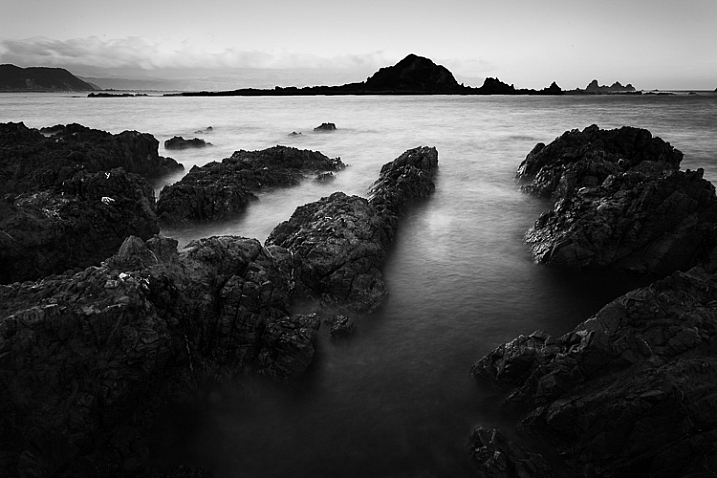
Black and white emphasizes the textures of the rocks and sea in this landscape photo.

Naturally, there are certain subjects that tend to work better than others in black and white; two in particular are landscapes and portraits. If this is your first time shooting in black and white, then these are great subjects to try out.

Black and white photography

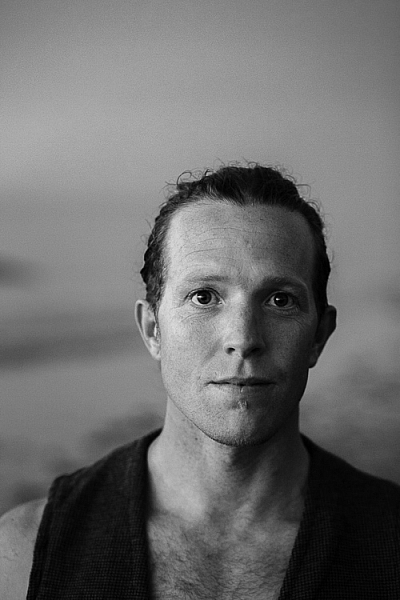
Black and white portraits emphasize expression and quality of light.

Black and white on your camera

Before digital photography the only way to work in black and white was to use black and white film. Thankfully, now it’s much easier to work in black and white, just by switching your camera to Monochrome Mode (check your camera’s manual if you are unsure how to do so, look for Picture Styles settings).

Cameras with electronic viewfinders automatically display the image in black and white, helping you see how the image will look, before you press the shutter. If you have a digital SLR you will get the same effect in Live View. This may be useful if you are working with your camera on a tripod (for instance, taking a landscape photo).

Usually at this point I advise you to use the Raw format. In the long run it’s easier than using JPEG, and gives you better image quality. But I appreciate that if you’re new to photography you may still be working exclusively in JPEG. The rest of this article works on this basis.

Working in Monochrome Mode

Once in monochrome mode you will see some extra options. They help you set your camera up to produce the best results. Again, check your manual if you are not sure where to find them.

Colour filters

The colour filter settings are left over from the days of film photography. Photographers would buy coloured filters, and use them to alter the tones in black and white photos. For example, if your scene includes a blue sky, then using a yellow filter will make the sky a little darker, an orange filter makes it even darker, and a red filter darker still.

Black and white photography

This scene works quite well in black and white, but it’s not nearly as dramatic as it could be.

Black and white photography

Applying the Red filter setting makes the blue sky go much darker, creating a much more dramatic version of the same scene.

There is also a place for green filters, which can bring out more detail in green subjects like leafy forests. Those four coloured filters (red, orange, yellow and green) have made their way onto most digital cameras as black and white settings.

Contrast

If you take a photo in flat light (for example, a portrait of somebody standing in the shade) the photo may look flat (two dimensional). So, you need to compensate by increasing the contrast. You can either do this in Photoshop or Lightroom after the photo has been taken, or you can do it in-camera with the contrast setting.

Black and white photography

The model was standing in the shade when I took this photo. The light lacks contrast, and the black and white photo is flat.

Black and white photography

Increasing contrast creates a much stronger image.

Cropping and the square format

Most modern cameras let you change the aspect ratio. The reasons why you might want to do that are a little complex, but the main one is that it lets you shoot in the square format, something you may already be used to if you use an app like Instagram on your smartphone. If your camera has an electronic viewfinder, it will display a square image for you, making composition much easier.

Black and white photography

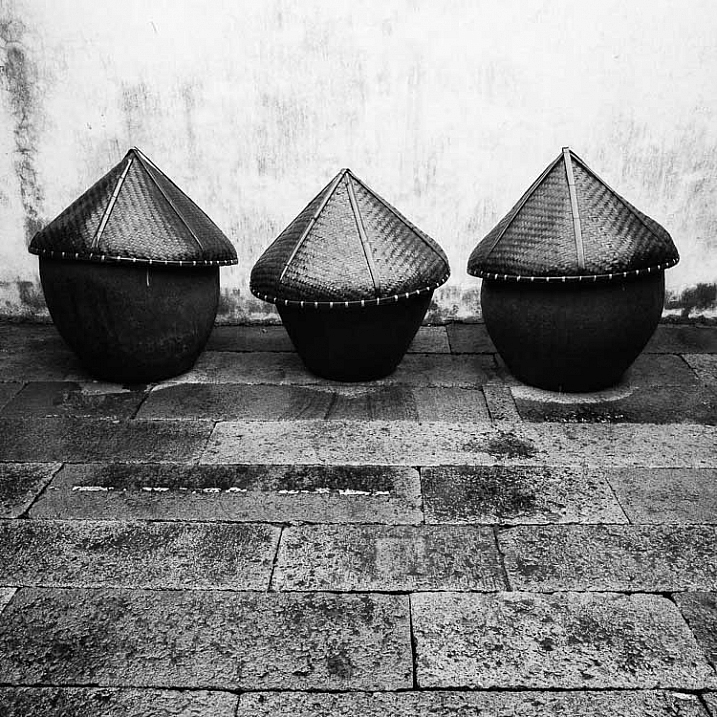
Cropping to the square format emphasizes the shapes of the three pots.

Toning

Finally, you may have the option to tone your images. To be honest, unless your camera lets you apply toning affects subtly, I wouldn’t bother with these, as the effect is usually too strong.

Have fun!

Black and white is a beautiful medium to work in, one which you will appreciate the more you practice. In the meantime – have fun and enjoy yourself. You are following a path trodden by some of the most famous names in photography. And of course, if you have any questions about working in black and white, please let us know in the comments.


Masterlng Lightroom: Book Three – Black & White by Andrew S Gibson

Mastering Lightroom: Book Three – Black & White

My ebook Mastering Lightroom: Book Three – Black & White goes into the topic of black and white in depth. It explains everything you need to know to make dramatic and beautiful monochrome conversions in Lightroom, including how to use the most popular black and white plug-ins. Click the link to visit my website and learn more.

googletag.cmd.push(function() {
tablet_slots.push( googletag.defineSlot( “/1005424/_dPSv4_tab-all-article-bottom_(300×250)”, [300, 250], “pb-ad-78623” ).addService( googletag.pubads() ) ); } );

googletag.cmd.push(function() {
mobile_slots.push( googletag.defineSlot( “/1005424/_dPSv4_mob-all-article-bottom_(300×250)”, [300, 250], “pb-ad-78158” ).addService( googletag.pubads() ) ); } );

The post A Beginner’s Guide to Doing Black and White Photography by Andrew S. Gibson appeared first on Digital Photography School.

Digital Photography School

 
Comments Off on A Beginner’s Guide to Doing Black and White Photography

Posted in Photography


Weekly Photography Challenge – Panoramic Photos

09 Jan

Panoramic or ultra wide views of scenes are popular and work well for many different subjects.

David Yu

By David Yu

David Yu

By David Yu

Weekly Photography Challenge – Panoramic Photos

If you have never done a panoramic photo now it your chance to try it. The simplest way to create one is to just crop a regular image into one that is really long and narrow. Make sure the subject fits the format and you aren’t cutting off anything important to the composition.

The other, more complex way to make a pano is to shoot a series of images and stitch them together, usually using Photoshop. We have a few articles here on dPS on how to do that if you need some tips:

  • How to do Landscape Panoramic Photography
  • How to Shoot Panoramic Photos
  • Getting Started in Panoramic Photography (beginner)
  • Step By Step How to Make Panoramic HDR Images (advanced)
  • HDR Vertorama Photography – How to Create Mind-bending Images (advanced)
  • Step by Step Using Merge to Panorama in Lightroom (beginner)
Guy Lejeune

By Guy Lejeune

David Kingham

By David Kingham

Stavros Markopoulos

By Stavros Markopoulos

Jeff Wallace

By Jeff Wallace

Vonderauvisuals

By vonderauvisuals

Inefekt69

By inefekt69

Share your images below:

Simply upload your shot into the comment field (look for the little camera icon in the Disqus comments section) and they’ll get embedded for us all to see or if you’d prefer upload them to your favourite photo sharing site and leave the link to them. Show me your best images in this week’s challenge. Sometimes it takes a while for an image to appear so be patient and try not to post the same image twice.

Howard Ignatius

By Howard Ignatius

Chuck Coker

By Chuck Coker

Don Whitaker

By Don Whitaker

Linus W

By Linus W

googletag.cmd.push(function() {
tablet_slots.push( googletag.defineSlot( “/1005424/_dPSv4_tab-all-article-bottom_(300×250)”, [300, 250], “pb-ad-78623” ).addService( googletag.pubads() ) ); } );

googletag.cmd.push(function() {
mobile_slots.push( googletag.defineSlot( “/1005424/_dPSv4_mob-all-article-bottom_(300×250)”, [300, 250], “pb-ad-78158” ).addService( googletag.pubads() ) ); } );

The post Weekly Photography Challenge – Panoramic Photos by Darlene Hildebrandt appeared first on Digital Photography School.

Digital Photography School

 
Comments Off on Weekly Photography Challenge – Panoramic Photos

Posted in Photography