RSS
 

Posts Tagged ‘Photographers’

Railroad Safety for Photographers

10 Nov

by Lori Peterson

If I walked into your yard and just started taking photos, would you call the police or would you just ignore it?

If you have a studio and I waltzed in with my camera and models and started shooting my latest and greatest session, would you have me removed immediately?

Chances are that after initial shock wore off you would be calling the police and asking them to get me out of your studio or off of your property.

It might an extreme example, but realistically this is what happens when a photographer brings their client, props, and their camera onto railroad tracks to shoot.

Railroad tracks are private property. They are not public property. It is illegal to shoot on railroad tracks. You can see what your particular state says about even being on the tracks by going HERE.

You might say “Well, these tracks are abandoned”. Unused tracks are not abandoned. They are still owned by the railroad company and you are still trespassing.

Ignorance of the law will only get you so far when you are confronted by a police officer or a tragedy because you didn’t follow the law. It is virtually impossible for the railroad companies to cover every inch of track with signs that warn them that they are trespassing.
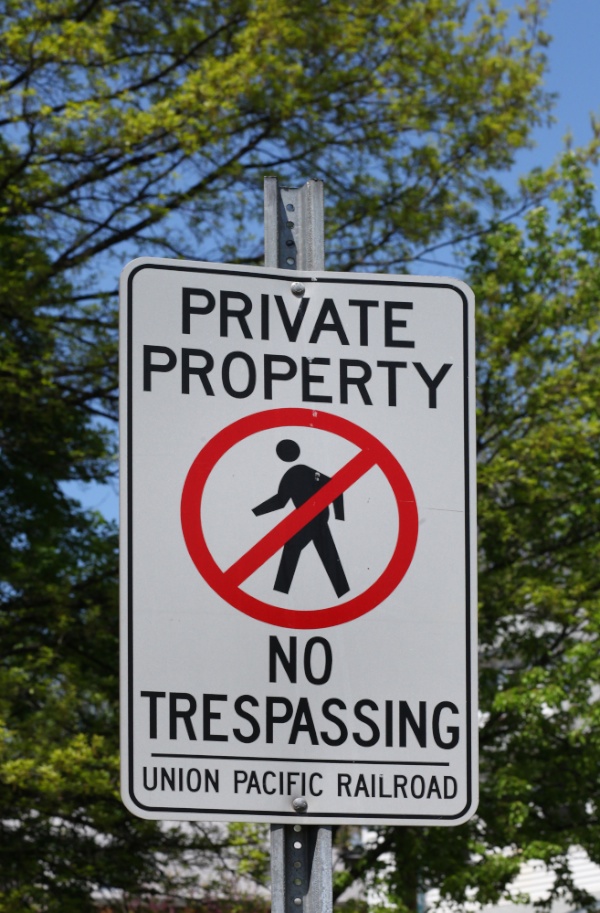
railway photography safety

You might say “We can hear the trains coming.” Not all trains will sound their horns. Trains cannot stop as quickly as a car. It takes approximately one mile for a train to come to a stop. Trains travel between 79-125 mph even though it may not look like they are going that fast.  If you are driving 125 mph and a child ran out in front of you, would you have time to react to stop in time to not hit the child? No, you wouldn’t. Now think about all the cars that are attached to that front of the train. The force of the trains coming to a quick stop in time to avoid a tragedy is unimaginable. Even moving at a slower speed it would be very hard for a train to come to a complete stop to avoid hitting people who are on the tracks.
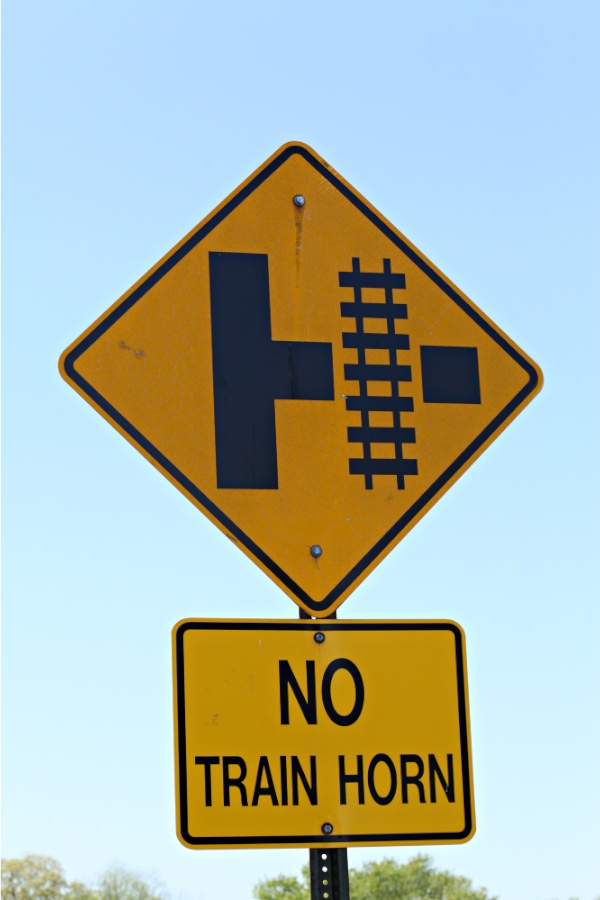
railway safety photography

I recently had an exchange with a photographer and we talked about her shooting on active railroad tracks. Her response when she found out that it was not only illegal but dangerous was “There are about 6 other photographers that take pictures in this location that I know of. As far as accidents, the trains have came many times while we are out there & the lights and little gate things come down way in advance.”

Where is the logic or the pure common sense in her defense of being on the tracks? There is none. She clearly stated that she was on active tracks and she clearly dismissed any danger. In her portfolio there are images of small children on suitcases and several props around them. There are images of pregnant women lying down on the tracks. Client safety clearly is not a priority.

Trains can move in two directions. The railcars can be pushing the locomotive instead of the locomotive pulling the railcars. Someone in the locomotive might see you on the tracks, but by the time they communicate with the back of the train that is pushing those railcars it would be too late.

When you bring clients onto railroad tracks you are putting them at risk and you are putting yourself at risk. You or your client could get hurt or killed. You are also putting the people who are operating that train at risk. The potential pile-up when they have to abruptly stop means you are putting more people at risk. A train derailment can mean chemical spills and property damage to any nearby homes. A photographer causing accidents on the tracks would be responsible for the any injuries or deaths, derailments, chemical spills, property damage, delays in shipping, etc.

Photographers will imitate other photographers. Client education is a key component when it comes to railroad tracks and safety. If your client asks for a session on railroad tracks, explain to them about the laws and the fines for being on the tracks.. As the photographer, you are the one ultimately responsible for the photo shoot. If anything happens it is your business, your finances, and your name on the line. Photographers need to educate other photographers that shooting on tracks is NOT acceptable and then they need to work on educating their clients that shooting on tracks is dangerous on too many levels to get that clichéd image.

For further reading about railroad safety and photography:

Amtrak’s guidelines for photographers is outline on their website

If you are found shooting in areas that are owned by Amtrak that are considered a part of their restricted area, and this includes the tracks, you can be subject to fines, arrest, and seizure of your camera and equipment.

Union Pacific has very specific policies regarding their tracks, whether they are active or inactive. They not only fine photographers who trespass on their tracks, but if they find the images online, they will request that they be removed.

Operation Lifesaver has published an article regarding railroad track safety and it can be found HERE.

Download a pdf copy of Why Photographers Must Stay Away from Train Tracks HERE

Lori Peterson is an award winning photographer based out of the St. Louis Metro Area. Her dynamic work ranges from creative portraits to very unique fine art photography. Lori’s work can be seen at www.loripetersonphotography.com and also on her blog at www.loripetersonphotographyblog.com. You can follow her on Facebook at https://www.facebook.com/LoriPetersonPhotography.

Post originally from: Digital Photography Tips.

Check out our more Photography Tips at Photography Tips for Beginners, Portrait Photography Tips and Wedding Photography Tips.

Railroad Safety for Photographers

The post Railroad Safety for Photographers by Guest Contributor appeared first on Digital Photography School.

Digital Photography School

 
Comments Off on Railroad Safety for Photographers

Posted in Photography


50 More Incredible Tumblr Blogs for Photographers

04 Nov

Tumblr is a magic land of GIFs, memes and photography. If you step into this world, you should know in advance that there is no looking back. Browsing through the images can take you hours, so you may even forget to feed your pet! But no worries: Tumblr will help you go through it – there are tons of cute Continue Reading

The post 50 More Incredible Tumblr Blogs for Photographers appeared first on Photodoto.


Photodoto

 
Comments Off on 50 More Incredible Tumblr Blogs for Photographers

Posted in Photography


Google+ reaches out to photographers with new imaging features

30 Oct

hdr_scape.png

Google is reaching out to photographers once again by announcing a bevy of forthcoming features on its social networking site Google+ that will be a boon to photographers: full-resolution photo backups for iOS users, improved search through advanced photo recognition software, and better image editing tools. See what else is new on connect.dpreview.com.

News: Digital Photography Review (dpreview.com)

 
Comments Off on Google+ reaches out to photographers with new imaging features

Posted in Uncategorized


The World’s Greatest Tip for Photographers: The Photographic Project

14 Oct

“Give a man a fish and you feed him for a day. Teach a man to fish and you feed him for a lifetime.” Being a photographer is a lot like being a writer; you have good days, and you have bad days. Some of those not-so-great days can bring a whole multitude of different annoyances: the weather, dead batteries, Continue Reading

The post The World’s Greatest Tip for Photographers: The Photographic Project appeared first on Photodoto.


Photodoto

 
Comments Off on The World’s Greatest Tip for Photographers: The Photographic Project

Posted in Photography


Reddit Photographers Share the Coolest Pictures Ever to Blow Your Mind

11 Oct

Today, it’s easier than ever before to put your photo in front of a huge audience by using social media websites like Flickr, Pinterest, Tumblr and Reddit. All of them allow you to share your artwork with the public at once, ask for a piece of advice from some photography communities and just discuss any topic with like-minded people. Let’s Continue Reading

The post Reddit Photographers Share the Coolest Pictures Ever to Blow Your Mind appeared first on Photodoto.


Photodoto

 
Comments Off on Reddit Photographers Share the Coolest Pictures Ever to Blow Your Mind

Posted in Photography


Ironic Typography Posters That Show the True Photographer’s Life

09 Oct

There is a chance you’ve seen a few posters with quotes about photographers on Facebook, Pinterest, Tumblr or other social-media platforms before. I’m talking about quotes like “Owning a camera does not make you a photographer” or others like “Life is like photography–we develop it from the negatives,” which all the photographers tend to share. Today, I’d like to bring Continue Reading

The post Ironic Typography Posters That Show the True Photographer’s Life appeared first on Photodoto.


Photodoto

 
Comments Off on Ironic Typography Posters That Show the True Photographer’s Life

Posted in Photography


What’s new in Photoshop CC for Photographers

29 Sep

Photoshopcc for photographers opener

The new Photoshop CC hasn’t launched without a lot of controversy. There are some very valid reasons not to like the fact that the only way to get your hands on this new release is via the Creative Cloud. However, putting delivery methods and subscription software issues aside, let’s look at what is in the new Photoshop CC for photographers so you can see what you’ll get if you upgrade or what you’re foregoing access to if you don’t.

Photoshop CC has a few new additions and one update that will be of interests to photographers. There’s little here that you can’t live without but some of these additions you may want to live with!

Liquify as a Smart Object

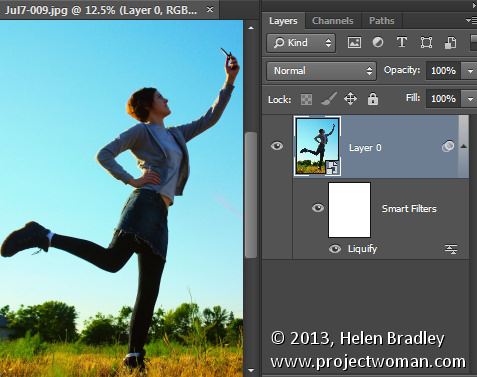
In previous versions of Photoshop the Liquify filter was one of the few filters that you could not apply to a Smart Object layer. That meant that any changes that you made using the Liquify Filter were permanent changes to the image which could not be undone, and they couldn’t be easily altered or blended back into the image in a non-destructive way. Now it’s possible to apply the Liquify Filter to a Smart Object layer so that the edits that you make to the image using the liquify filter can be edited later on if desired. They can be removed by disabling the filter, they can be blended using a layer blend mode, masked and edited.

Photoshopcc for photographers 1

ACR as a Filter

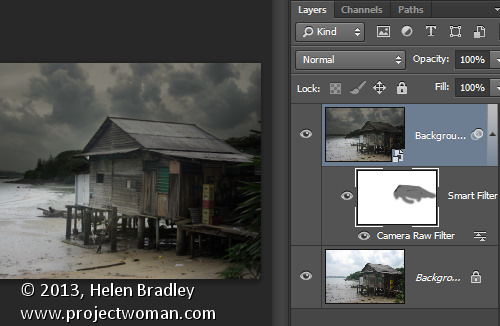
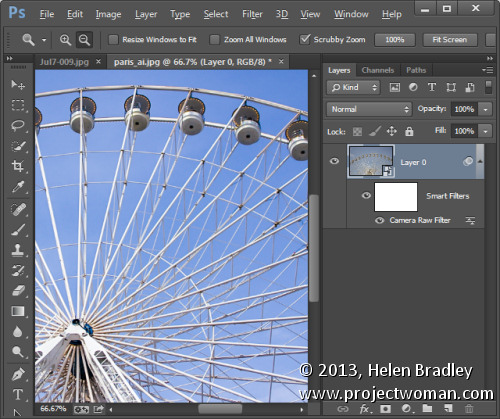
New to Photoshop CC is the ability to apply changes which previously could only be made in Adobe Camera Raw (ACR) to an image from inside Photoshop. The new Camera Raw Filter lets you apply ACR edits to a layer and even to a Smart Object layer in Photoshop. This makes almost all the tools in ACR available to be used in Photoshop as an editable filter. To access this feature, choose Filter > Camera Raw filter.

Photoshopcc for photographers 2

Squaring up objects with Upright

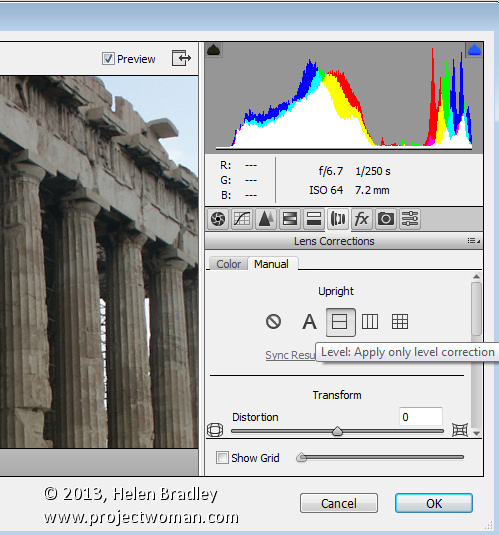
While not technically an addition to Photoshop, the Upright feature is new to Adobe Camera Raw (ACR) for Photoshop CC. So, if you have Photoshop CC, you have access to Upright in ACR (and as a filter adjustment via the Camera Raw filter too).

The Upright tool can automatically straighten an image and remove keystone distortion which is apparent when shooting tall buildings, for example. It is found in ACR in the Lens Correction panel – click the Manual tab.

Photoshopcc for photographers 3

Fix blurry images

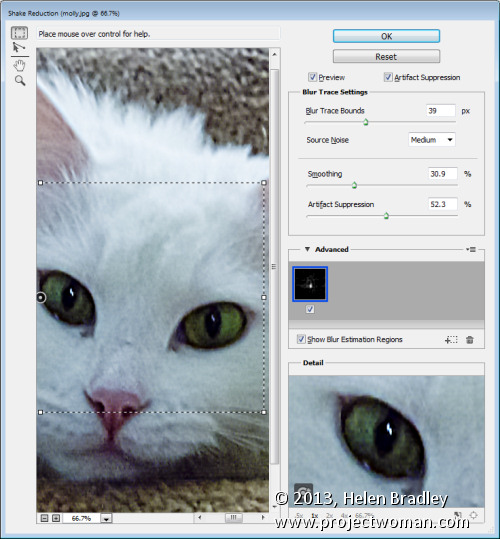
The new Shake Reduction filter in Photoshop CC helps deal with blurry images. It won’t fix them all and, of course it’s always preferable to get the image sharp in camera, but it can fix some burry shots particularly those captured in good light with a zoom lens and it can help sharpen text in images.

To find the tool, choose Filter > Sharpen > Shake Reduction.

Photoshopcc for photographers 4

ACR features in Photoshop CC

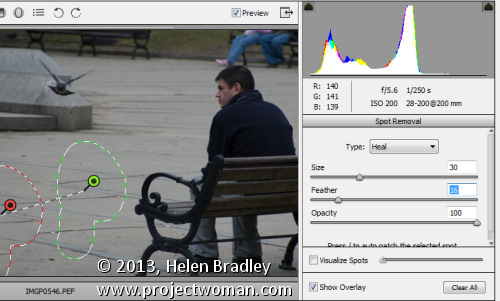
In addition to the Upright feature available in ACR there are other new and improved features in ACR that you can access if you have Photoshop CC. These include the improved Spot Removal tool which can be used like a paintbrush to select an element in an image to fix – this makes it easier to use where the problem area is not circular. In addition the new Radial Gradient tool lets you add a radial gradient to an image to apply fixes and creative effects.

Photoshopcc for photographers 5

A Better Upsampling algorithm

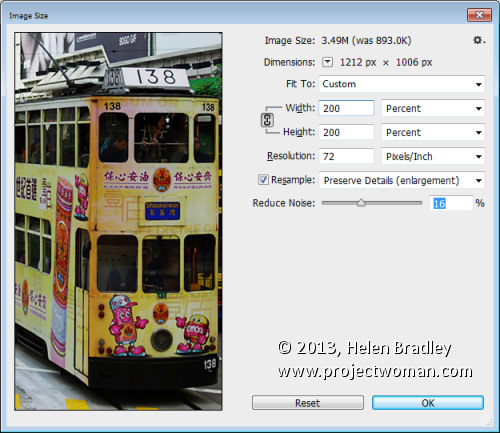
You may already know that there are problems inherent in enlarging images because Photoshop needs to make additional pixels where pixels did not previously exist. The new resizing algorithm in Photoshop CC improves the results when you are enlarging an image.

Choose Image > Image Size and enlarge the dialog so that you can see things clearly on the screen. Set the final image size, for example if you want to enlarge by 200 percent set 200 percent as the width and height. Click the Resample checkbox and from the dropdown list choose the new Preserve Details (Enlargement) option. The preview image shows the result of upsizing using this option.

This new algorithm helps you enlarge images for printing retaining the sharpness in the image and avoiding pixelated edges.

Photoshopcc for photographers 6

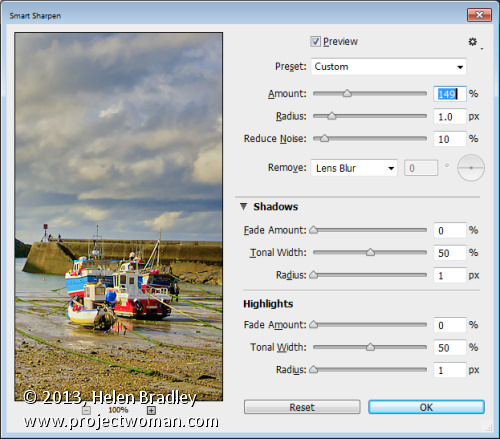
Updated Smart Sharpen Filter

Sharpening has been improved in Photoshop CC with changes to the Smart Sharpen filter. To see it at work choose Filter > Sharpen > Smart Sharpen and again enlarge the dialog so that you can see the effect on the image. You can now adjust the Amount and the Radius for the sharpening. Typically radius should be in the region of 0.5 to 1.5 pixels for most images. You can also choose to reduce noise as you sharpen. The shadows and highlights area allows you to fade sharpening, for example, in the shadow areas applying it more strongly to the highlights where noise will be less visible. You can also select to remove Gaussian blur, Lens blur or Motion blur if these blur issues affect your image.

Photoshopcc for photographers 7

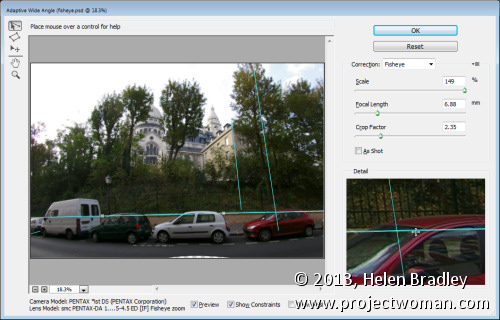
Adaptive wide angle

The new Adaptive Wide Angle Filter helps you remove problems encountered when shooting with wide angle lenses. Choose Filter > Adaptive Wide Angle and choose the problem to correct from the Correction dropdown list. Set the sliders for the Focal Length and Crop factor to remove distortion. You can also draw on the image to add constraints. These lines should be positioned over objects in the image that you want to be straight. Photoshop will use the constraints to determine the correction to apply to the image and, as a result, you can remove much of the distortion problems with an image. This filter can be applied using a Smart Object layer so that the results will be editable.

Photoshopcc for photographers 8

Behance integration

Behance is a community where you can showcase your work so that others, including businesses looking to find creatives, can find you and examples of your work. If you use, or plan to use, the Behance online creative community then you will appreciate that you can now post images from Photoshop CC direct to Behance. To do this you choose File > Share to Behance.

Photoshopcc for photographers 9

Regular Program Updates

One benefit of the new Photoshop CC which Adobe is encouraging is program updates. Delivery via the Creative Cloud means that Adobe can now deliver program updates as they become available rather than having to wait for the next new release. This means that fixes for problems can be rolled out more quickly. Of course this can be a double edge sword – if you’re on a slow connection or you have a capped internet service – the frequency and size of these can be time consuming and expensive to download and install.

Photoshopcc for photographers 10

New Pricing for Photographers

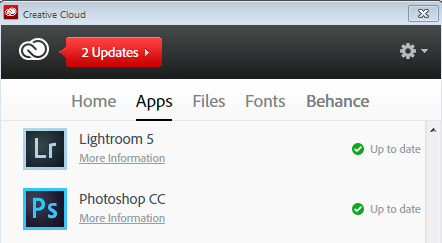
Adobe copped a lot of flak from users over the bundling and pricing of its Creative Cloud applications. As a result, it was recently announced that users with Photoshop CS3 or later could sign up for the Photoshop Photograph Program. This limited time offer (it expires December 31, 2013), gives you access to Photoshop CC, Lightroom 5, Bridge CC, 20GB of cloud storage and a Behance ProSite. It requires an annual commitment and is USD $ 9.99 plus taxes billed monthly (check the website for the cost in your local currency).

Photoshopcc for photographers 11

Post originally from: Digital Photography Tips.

Check out our more Photography Tips at Photography Tips for Beginners, Portrait Photography Tips and Wedding Photography Tips.

What’s new in Photoshop CC for Photographers


Digital Photography School

 
Comments Off on What’s new in Photoshop CC for Photographers

Posted in Photography


Tablets for photographers: A versatile tool in your capture workflow

26 Sep

tablets.jpg

Tablets may be used as versatile tools in your photographic workflow, providing instant feedback as you shoot on a much larger format screen than your camera’s tiny LCD and helping you experiment with a final look while you still have the opportunity to make major changes on set. We’re looking at tools and tips for integrating a tablet into a live shoot with a DSLR, whether you’re shooting tethered or wirelessly. Learn more on connect.dpreview.com.

News: Digital Photography Review (dpreview.com)

 
Comments Off on Tablets for photographers: A versatile tool in your capture workflow

Posted in Uncategorized


Decaying dresses make photographer’s landscapes personal

22 Sep

Ascention.jpg

Jean Albus mixes dresses into her Montana landscapes by letting them decay, sometimes for years, before photographing them. She hopes their weathered forms invoke emotions about aging, memory, transformation and more. Her final images sometimes feature a dress as she’s found it, sunken into the elements. She also often superimposes the worn dress over another image of the landscape, floating the decaying dress within “Big Sky Country.” A new video explains her process. Click through to see more.

News: Digital Photography Review (dpreview.com)

 
Comments Off on Decaying dresses make photographer’s landscapes personal

Posted in Uncategorized


Apple’s new iOS 7 from a photographer’s perspective

19 Sep

overview_whatis.jpg

While early reviews of the iPhone 5c and 5s may have mobile tech fans talking hardware today, the bigger news in our opinion is actually Apple’s free iOS 7 software update. iOS 7 offers plenty of features aimed specifically at mobile photography enthusiasts, and we’re taking a look at the updated Camera and Photos app today on connect.dpreview.com.

News: Digital Photography Review (dpreview.com)

 
Comments Off on Apple’s new iOS 7 from a photographer’s perspective

Posted in Uncategorized