RSS
 

Posts Tagged ‘Photo’

DIY Photo Recipe Book

01 Aug
Extra photos for bloggers: 1, 2, 3

Remember cookbooks?

Those dusty tomes that somehow accumulate on your kitchen shelves but you hardly ever crack open?

It’s time to give the ol’ recipe book a 21st century twist.

Just mix one part millennial obsession with technology, a dash of old-fashioned printing, mix in your photo expertise and pair it with some quality cocktails to get the coolest recipe book, ever.

How to Make a Photo Recipe Book

(…)
Read the rest of DIY Photo Recipe Book (379 words)


© Lauren for Photojojo, 2014. |
Permalink |
No comment |
Add to
del.icio.us

Post tags:


Photojojo

 
Comments Off on DIY Photo Recipe Book

Posted in Equipment


4 Steps to Less Stressful and Easier Photo Editing

31 Jul

Have you ever returned to your computer with a memory card full of photos and become overwhelmed at the idea of going through all of them?

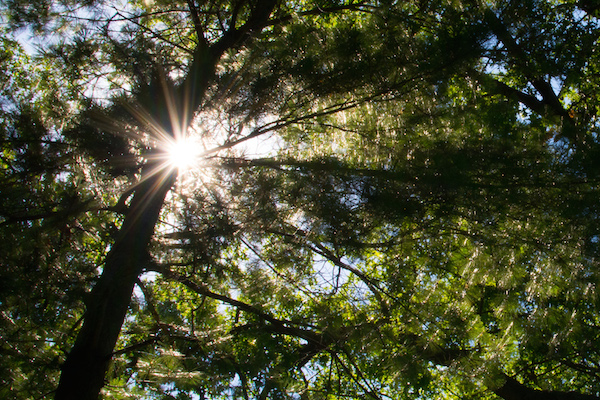
Tree starburst

The thought of sorting and analyzing so many pictures can seem so daunting it’s sometimes hard to even know where to start! Often we find ourselves copying the contents of our cameras to our computers and letting our precious memories collect digital dust, though we promise ourselves we will get around to organizing them – someday. Modern technology has made this task easier, with various software and cloud-based services even promising to find your best photos for you. And while these digital assistants certainly have merit, I like to take a different approach to dealing with all the images I capture.

The following tips will help you streamline your photography workflow and make the task of sifting through your images not only easier, but a lot more enjoyable too. While I work mostly in Adobe Lightroom, these general practices will apply no matter which photo editing software you use.

Step 1: Get rid of bad photos

This is the first thing I do when sorting through pictures, and it’s a tough hurdle to overcome because I have a tendency to want to save everything. But this step will make all the difference in managing your growing photo library, especially if you have never done it before.

Let’s say you went on a summer family trip to a national park, and you returned home with thousands of pictures to deal with. It might be tough, but as you look through them, try to think about what images will matter the most to you a year from now. You might have had a wonderful time at the Grand Canyon during your vacation, but will you really want 50 pictures of your child looking down at the great abyss? What about the ones where he is blinking, out of focus, or looking the other way? It is likely that two or three good pictures are all you need. In this first step, it’s up to you to find the ones that best encapsulate your experience as a whole, and ditch the rest.

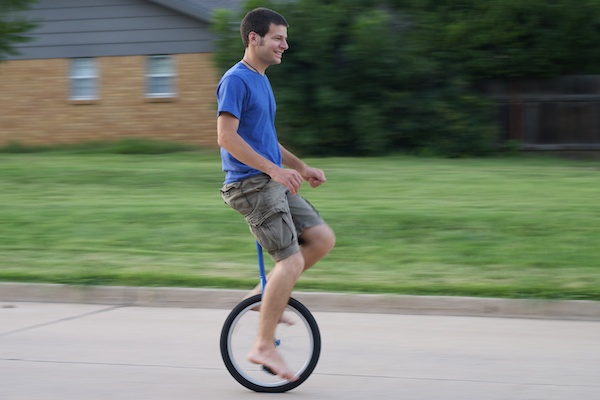
Unicycling

I captured close to 100 photos on my brother’s recent visit, but this is one of just a handful I really need to remember the day, and all the things we did.

This approach might seem coldhearted and cruel, but it’s a necessary step in taming the photo-management beast. When you revisit the pictures from your summer trip a couple years from now, you won’t need a thousand of them to help you remember the experience. A tenth of that will probably be perfectly appropriate. If you hang on to every last one you might find that they become an albatross around your neck, weighing you down so much that you don’t even want to look back at your pictures because there are just so many of them.

To put things in another perspective, think about a time when one of your friends wanted to show you photos from his or her family trip. How long did it take you to grow tired of looking at the same types of images over and over? You could have easily gotten the point with just a few pictures, and then spent time visiting with your friends about the events surrounding the photos.

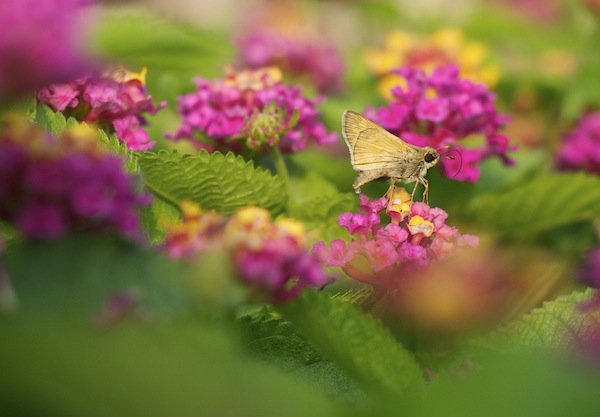
Moth

Of all the photos I took during this nature walk, this was one of only a few that I decided to keep. And in the years since, I haven’t missed the others at all.

One nice advantage of using a photo management program is that you can remove unwanted photos without actually deleting them from your hard drive. In Lightroom, pressing the “X” key on a photo will mark it as rejected, so it will no longer show up in your photo library but will still exist on your computer. This helps soften the initial blow, and then you can go back later and actually delete the rejected photos if you so desire. Alternatively, you can press the “P” key to flag a photo as one of your favorites, or assign star ratings to the images you like best. Then you can instantly sort out your best shots later down the line, and delete the rest when you are ready.

Step 2: Basic Editing

After culling your pictures to find the ones you like most, the next step is to perform basic edits and save the real heavy lifting for later. After removing the duds from my most recent camera import, I typically go through each of the remaining images and apply the simplest of edits such as crop, straighten, and exposure. Not much else is needed at this stage, as you are essentially preparing your photos for any real edits that might need to be done later. These basic adjustments are very quick, and you can churn through your recent batch of vacation, birthday, or hiking photos in a manner of minutes or hours instead of days or weeks.

You can also copy and paste adjustments, so if you have a dozen similar photos you can edit one and then apply those adjustments to the rest with a simple keystroke. This is also a good time to do apply some rudimentary organization to your photos as well, using tools like keywords, flags, categories, or star ratings. Be careful not to get caught up in editing any single photo in depth at this stage. The goal of Step 2 is to dig a little deeper into the photos you like, which will help you decide where to concentrate your efforts if you do need to do more intensive edits afterwards.

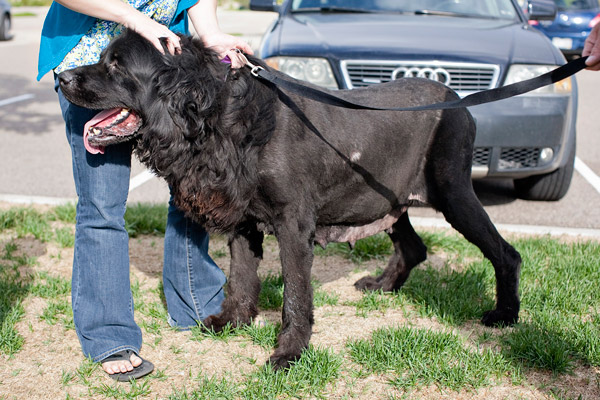
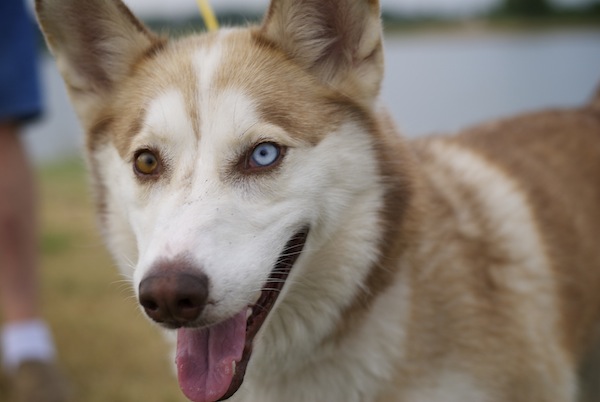
Husky

I had to crop this photo in order to draw the viewer’s attention to the dog’s eyes.

Step 3: Advanced Editing

By this point you should now have a curated set of photos that you really like, with some mild corrections applied to help them look a little more pleasing. Now it’s time to perform the types of more detailed edits that will help your images truly shine. Advanced adjustments to a photo’s white balance, color saturation, contrast, and other parameters, while also applying localized improvements like dodging and burning can take a long time, but the results are well worth it.

It’s important to do this step last, or else you can easily wind up spending a great deal of time editing a single picture early in the process only to realize there are plenty of better ones that should have had your attention instead.

Family

This family photo turned out fine, but I had to do some color corrections and other enhancements to get it to look how I really wanted. By doing this step last I was able to devote more time to the editing process and not worry about processing hundreds of additional images.

Step 4: Walk Away

This might sound silly, but often the most useful activity you can do when editing your photos is nothing at all. Take a break, get a coffee, head out for a walk, or just go to bed and come back to your pictures the next day with a fresh set of eyes. I’m amazed at how often I stare at a photo performing detailed adjustments trying to get things just right, only to leave my computer and return after a short hiatus and realize the solution was much easier than I realized at first.

As a case study in how all this works, let me share the following example. My brother and I recently I spent an afternoon at the beach trying to get pictures of a rock hitting the water. When I got back to my computer I found that we had over 50 of images to go through, and following the aforementioned workflow strategies helped make things much easier. After importing the images into Lightroom I went through and rejected about 35 right off the bat. That left me with a much more manageable set, so I cropped and applied some basic adjustments to the remainder. This helped me realize that I needed to reject more of them, now that I was looking at the cream of the crop in greater detail, and I ended up with three photos to edit more extensively. When I was finished, I ended up with exactly one photo from the afternoon that I really liked.

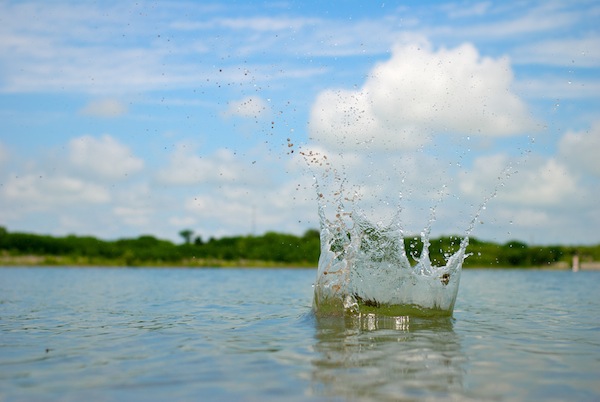
Water splash

Not only is this the best photo out of the many I shot that day, but looking at it allows me to remember many other things about the afternoon as well. I don’t need a hundred poorly-composed, out-of-focus pictures to remember a fun afternoon at the beach. Instead I have this one and just a couple others that all serve to bring back some amazing memories.

Following this simple process, and adjusting it to suit your individual needs, can transform photo sorting from a tedious chore into an activity that is enjoyable, relaxing, and fun.

The post 4 Steps to Less Stressful and Easier Photo Editing by Simon Ringsmuth appeared first on Digital Photography School.


Digital Photography School

 
Comments Off on 4 Steps to Less Stressful and Easier Photo Editing

Posted in Photography


How To Upcycle Any Book Into A Photo Album

10 Jul
Extra photos for bloggers: 1, 2, 3

If a picture tells a thousand words, how many words would a book turned into a photo album tell?

Give your loose photos a new home by turning any old book into a rad new photo album.

Rewrite history (books) or be the hero in a graphic novel with a quick snip and a slide.

Hardback, paperback or horseback, we’ll show you how to turn any book into a photo album!

Learn How to Turn All Your Books Into Photo Albums

(…)
Read the rest of How To Upcycle Any Book Into A Photo Album (223 words)


© Erika for Photojojo, 2014. |
Permalink |
No comment |
Add to
del.icio.us

Post tags:


Photojojo

 
Comments Off on How To Upcycle Any Book Into A Photo Album

Posted in Equipment


A Different Kind of Photo Tour to Israel with Vibe Israel

06 Jul

I was recently invited on a photo tour called Vibe Israel by a non-profit organization called Kinetis, I wanted to share my experiences of the trip with you.

Who are Kinetis?

Six of us were on this tour of Israel, a tour to show what Israel has to offer to photographers, to show a different side to Israel compared with the one you might typically see in the news. The different styles and personalities of the six photographers on the tour made for a fantastically fun and inspirational few days.

simon-pollock-melbourne-kinetis-tour-israel

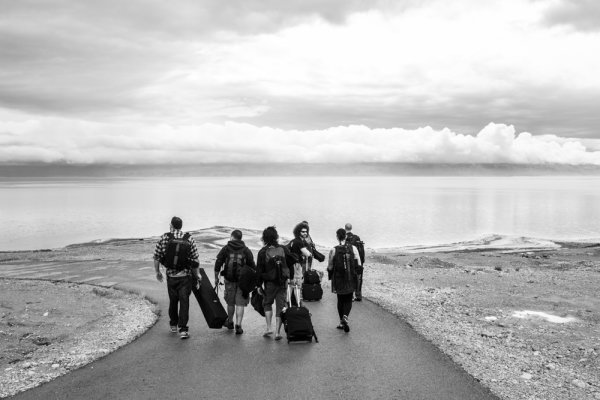
Heading down to the Dead Sea with the crew

Travelling with the specific purpose of photography can be a daunting thing, especially with the ever present fear of having your precious camera gear gate checked when you’re about to embark your flight. Is my bag overweight? Will ground crew single me out? Do I look like I’m struggling with this bag? All of these things play through my mind on every flight I’m about to catch, sometimes even when I’m not travelling with a heavy bag! I’ve been very fortunate thus far to have not been stopped for a heavy, or overly large, camera bag at the gate and this trip was no different (although I did have my backpack sent through the Xray machine four times).

I was travelling with a MindShiftGear Panorama camera backpack, the beauty of the Panorama is that you can use both the belt section and the top insert section to put your gear – if you get stopped and asked to gate check your bag, you can pretty much break it down into sections and nine times out of ten you’ll get it through, onboard with your camera gear. The few basic pointers for trying to get you and your camera onboard that I quietly recite to myself every flight are:

  • Smile, but not so much that people think you’re up to something
  • Don’t carry your bag like it’s about to rip your arms off – if it is, you should perhaps rethink anyway
  • Have a plan to take your heaviest camera and heaviest lens out of your bag and hang it around your neck if asked to gate check due to weight – a camera, 99% of the time, will become a personal item and won’t be included in the bag weight
  • Be polite – ground crew have a job to do, so don’t go off at them, it won’t help – I promise you this
  • Insurance really is a good thing! (I’m insured with PPiB if you’re in Australia / were interested)

There’s a lot to be said for only packing what you’re going to need – will I need to take a 100mm macro lens to Israel? Will I use my 5.8mm fisheye? As it happens, I used both of those lenses and I’m glad I packed most of my gear, but I did use a two bag strategy/ Doug Murdoch, president of thinkTankPhoto camera bags writes about it on his blog, a quick interesting read. I had a small laptop bag with my Apple MacBook Air 13″, a WD My Passport Pro 2TB drive for content and all the cables, pens, paper, passports, tickets, etc. Then my camera backpack and my roller bag with my tripod, clothes and another flattened out camera shoulder bag (for short wanders down through markets where I didn’t want to take a backpack) and this combo proved to work really well for me.

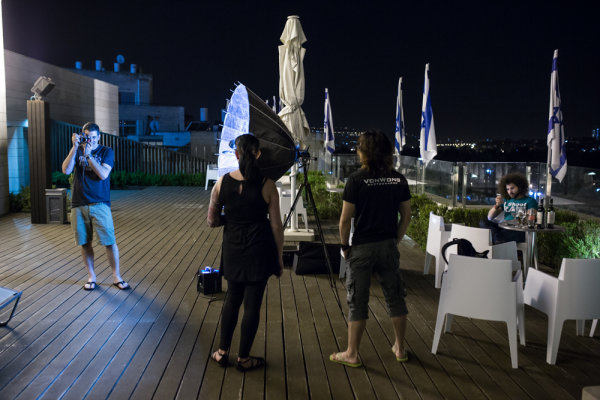
So we’re packed, we’re flying, we’re there. I’ve been to Israel once before and was very excited to go back. Arriving into Tel Aviv quite late, then driven to Jerusalem to meet up with the others, we stayed at this great place called Abraham Hostel on the first night (if you’re travelling on a budget, it’s a great place to stay) before travelling across to the hotel we were all meeting at, Dan Boutique Hotel. Thankfully they were totally fine with us setting up Ben’s Broncolor and blasting away on the roof!

On the roof playing with light...

On the roof playing with light…

A quick introduction to the people on the tour: Adam Lerner, Mike Kelley, Rebecca Litchfield, Benjamin Von Wong, Jared Polin and Simon Pollock (me – Hi!). Mike isn’t in the photo above as he likes to go to bed at 8 p.m. every night hehe. The next day, after a tour of the old markets and surrounding area in the old city of Jerusalem, we headed for the Dead Sea, each of us with different ideas for what we wanted to do when we arrived there – fashion, portraits, landscape, it was set to be an epic adventure.

Church of the Holy Sepulchre at 16mm

Church of the Holy Sepulchre at 16mm

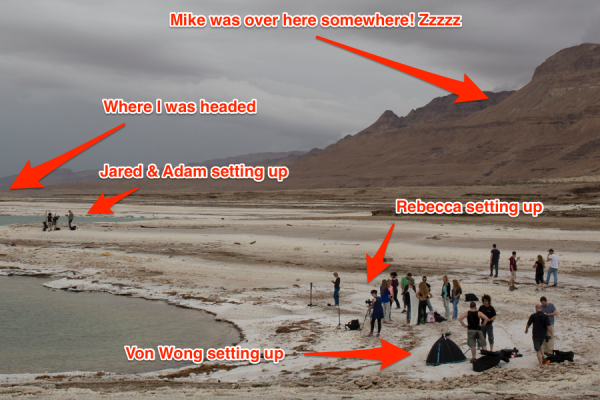
Arriving at Ein Gedi, the rain was starting to set in and with a call time of around 4 a.m., it was pretty much a quick dinner and directly to bed – poor Eyal had to put up with my snoring, sorry Eyal! The rain hadn’t stopped the next morning, and we were told that with the Dead Sea clouded in, it was something people rarely get to see. As it turned out, the road was washed away in a couple of places and we had a pretty hard time getting the models, stylists and hair and makeup folks into the area of the Dead Sea that we were using for the shoot – thanks to some handy local wrangling and a police vehicle, we were all set to go once the weather cleared, and clear it did. Here’s a setup shot and a few photographs from the shoot day at Ein Gedi.

Dead-Sea-Kinetis-Israel-Tour-Simon-Pollock

To give you an idea of where we were…

I was very fortunate to essentially have my own personal guide from epic photo tour company, PhotoTeva which was fantastic as I’m certainly no landscape photographer, but had an amazing time taking in the amazing scenery unfolding before me.

The-Dead-Sea-PhotoTeva-Simon-Pollock-Kinetis

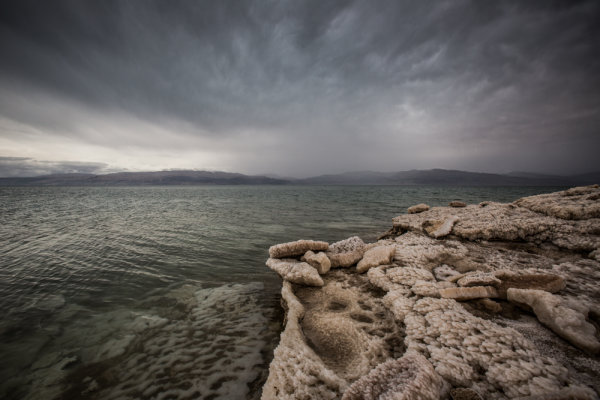
The storm rolled through…

Protecting your gear and keeping it off the deck was pretty important. The water is ultra salty (1/3rd salt, someone was saying) and the ground we were on was all salt – very sharp salt (see, I used the macro lens).

dead-sea-salt-kinetis-simon-pollock-israel

The salty residue was super sharp and happy to cut you up!

dead-sea-salt-kinetis

Anything that didn’t move fast enough was essentially ‘salted’

We only had a day at the Dead Sea and were supposed to head out into the desert to stay together in a big tent. The weather had other ideas and we all piled in the super bus and headed back to Tel Aviv for an impromptu camp out on our new friend, Adi’s floor. A highlight of the trip – impromptu awesome. When you’re travelling on a holiday, and things don’t go to plan, you do your best to make the best of the situation that you’re placed in – this was certainly the case and we had a fantastic evening before checking in to The Diaghilev Live Art Boutique Hotel (which I highly recommend if you’re travelling to Tel Aviv).

The next couple of days were filled with amazing food, adventures and people – rather than bore you with my musings, I’ll tell this part of the adventure in photographs.

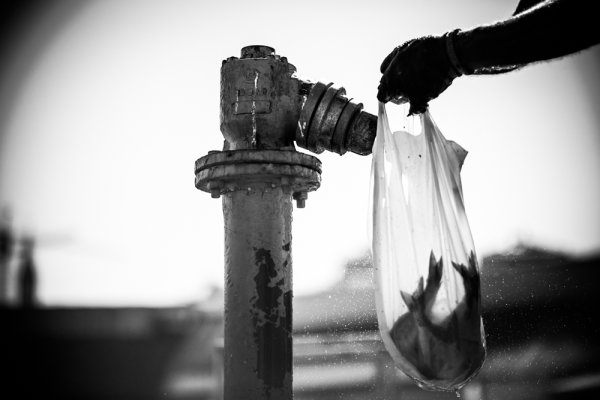
Jared, Adam and I visited a fish market where the fish come off the boats and are snapped up by people waiting on the dock.

Adam Lerner, a portrait...

Adam Lerner, a portrait…

The fish market...

The fish market…

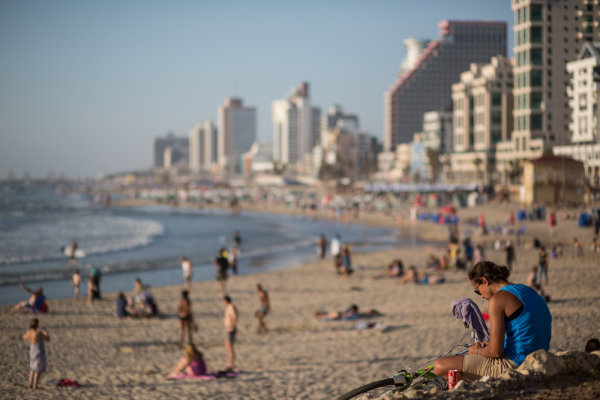
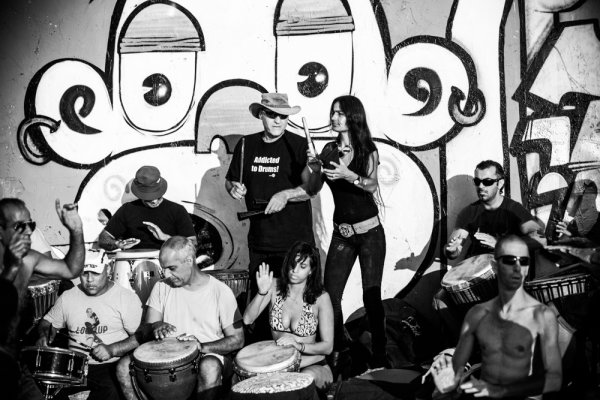
We managed a little beach time and happened across a great drum circle!

A Tel Aviv beach...

A Tel Aviv beach…

Addicted to drums...

Addicted to drums…

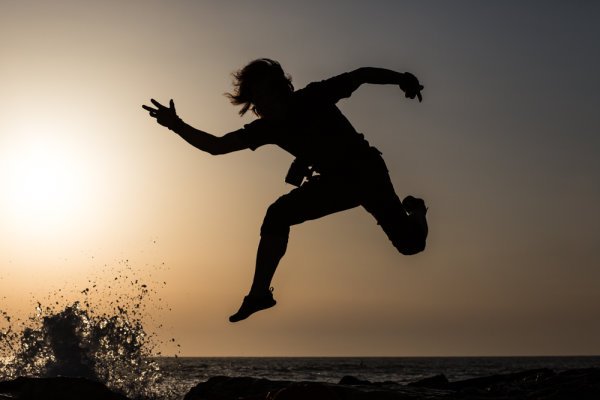
Von Wong takes flight...

Von Wong takes flight…

Fro Knows...

Fro Knows…

The fish market...

The fish market…

With only a day or two left to run, we had a load more to pack into our schedule, a visit to Israeli photojournalist and Canon Ambassador, Ziv Koren. We spent some time talking to Itzik Canetti, who has developed a nifty laser focus system for photographers, and we were hosted by Wix on our last evening, for drinks on the roof of their building – stunning.

Simon-Pollock-Kinetis-Israel-Ziv-Koren

Simon-Pollock-Kinetis-Israel-Ziv-Koren

Simon-Pollock-Kinetis-Israel-Ziv-Koren

Simon-Pollock-Kinetis-Israel-Ziv-Koren

That was essentially the tour

kinetis-simon-pollock-israel-tour

The point of the photo tour was for us to see a different side of Israel, a creative and vibrant side – and that was exactly what we saw. Lots of tech startup, lots of art and culture, some great coffee and amazing food. If you’re thinking about going somewhere on a photo tour, I’d certainly put Israel on your list! Big thanks to Kinetis and the whole team that made this trip possible. You can learn more about the not for profit work that Kinetis do on their website.

The post A Different Kind of Photo Tour to Israel with Vibe Israel by Sime appeared first on Digital Photography School.


Digital Photography School

 
Comments Off on A Different Kind of Photo Tour to Israel with Vibe Israel

Posted in Photography


Photo Shoot Ride-along – Photographing Cocktails

05 Jul

In this article you are going to join me on a real client photo shoot photographing cocktails and learn how we created the final images. You can see a previous ride-along doing head shots on a white background here.

Hacking_Photography_cocktail_photos-8911

Client brief

The client is a 1960′s Tiki themed cocktail bar in downtown San Diego. They just revamped their cocktail menu and needed photos for advertising, marketing, social media, and PR.

Setting up

The bar is to the left of some foldable colored glass windows. I decided to open these windows to let in some natural light to the bar top. I didn’t get a photo with the windows open as I was in a rush, but here is the bar setup:

Hacking_Photography_cocktail_photos-8951

With these windows open there was nice soft, indirect lighting.  I decided quickly that I wanted to use the back of the bar as the background.

Selecting the aperture

I grabbed a glass with pineapple leaf garnishes for a quick test. I set my camera on the bar, selected aperture priority, set the glass in front of it, shot at f/20, and got this:

Hacking_Photography_cocktail_photos-8701

Meh. After seeing this I decided I didn’t want to see all the details in the background because it was competing with the glass. I dialled the aperture to f/3.5 and took another test shot:

Hacking_Photography_cocktail_photos-8700

Much better. The glass was being lit from the natural light coming through the windows to the right of the glass. The problem was that the back bar was too dark.

If I overexposed to get the background brighter then the glass would have been overblown. The solution? Use a strobe to light the background.

Lighting the background

Now that I had the cocktail the way I wanted it, I needed to throw some light on that background. I recomposed the photo and got this:

Hacking_Photography_cocktail_photos-8705

I grabbed an Alien Bee 800 strobe and popped on a 40 degree grid to keep the light beam tight.  I didn’t want the light to spread over the whole area, just the back bar. I placed the light on the far left side of the bar and popped the flash.  Note: I didn’t end up using that umbrella.

Hacking_Photography_cocktail_photos-8735

You can see the back bar was now lit up.

Hacking_Photography_cocktail_photos-8706

Much better! It wasn’t quite there yet, but we were getting closer.

The light from the strobe wasn’t evenly spread across the background. See the hot spot of highlights on the top left side in the photo above?  That needed to go.

I angled the strobe so the light would cast across the background instead of just the left side.  I grabbed another garnish glass and took a test shot:

Hacking_Photography_cocktail_photos-8711

Much better. Now I had the background the way I wanted it. From there it was simply a matter of composition.

Composition

I had been planning on filling the frame with each cocktail vertically until the client mentioned they wanted space to the side of each photo to write editorial content.

Instead of shooting with my 100mm f/2.8 macro lens I shot this all on a 24-70mm f/2.8 lens.

Hacking_Photography_cocktail_photos-8730

How cool is that garnish? A dolphin playing with a ball in its mouth – awesome. This left some room off to the right for editorial content.

Hacking_Photography_cocktail_photos-8751

I decided to switch this up and leave some space on the other side. This is helpful for magazines that alternate left and right pages.

Hacking_Photography_cocktail_photos-8847

Sometimes breaking the rules is fun.  Shooting this cocktail straight down the middle clearly makes it the focus but still leaves room off to the sides for editorial.

Hacking_Photography_cocktail_photos-8875

The “hero” shot

Sometimes shooting from a low angle and slightly angling the camera upward can give a cocktail a ‘big’ appearance.

Hacking_Photography_cocktail_photos-8876

 Wrapping up

All in all it was a pretty straight forward shoot. I had to do a little problem solving with balancing natural light and artificial light, as well as how to best compose the cocktails.

The client is happy with the images and so am I.

Did you find this helpful?

If so, let me know in the comments. I would love to take you on more client photo shoots with me and show you how they come together. Now I’m off to enjoy a nice Tiki cocktail!

The post Photo Shoot Ride-along – Photographing Cocktails by Mike Newton appeared first on Digital Photography School.


Digital Photography School

 
Comments Off on Photo Shoot Ride-along – Photographing Cocktails

Posted in Photography


Perspectival Street Artist Pierces People in New Photo Shoot

02 Jul

[ By WebUrbanist in Art & Street Art & Graffiti. ]

street art neon colors

Known for his geometric art installations, Aakash Nihalani is back with a mind-bending sequence of shots that show humans interacting with his reality-warping work.

street art bent blue

street art abstract geometry

street art person pairs

street art interactive geometry

In Landline, individual and paired persons become part of the project, standing in front of urban surfaces and seemingly skewered by abstract shapes.

street art skewered figures

pierced orange rectangle neon

White shirts become backdrops for black squares sliced from each set of outfits, shot through in turn by bright neon pink, green, orange and blue rectangles.

street art straight yellow

"Landline" by Aakash Nihalani

"Landline" by Aakash Nihalani

For more of this artist’s work, including additional closeups that show the trick behind each sequence, you can follow his posts on Eye Scream Sunday.

Share on Facebook


[ By WebUrbanist in Art & Street Art & Graffiti. ]

[ WebUrbanist | Archives | Galleries | Privacy | TOS ]


WebUrbanist

 
Comments Off on Perspectival Street Artist Pierces People in New Photo Shoot

Posted in Creativity


How to Create a Sun-shower Photo on a Cloudy Day

30 Jun

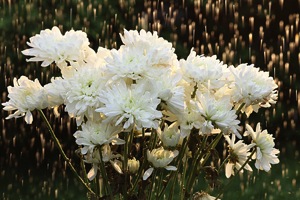
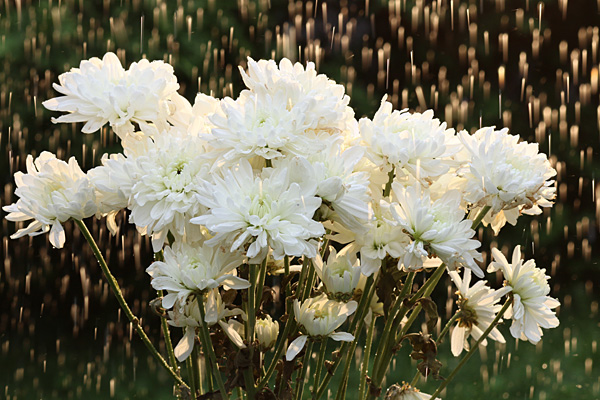
Flowers rain CTObackflash

Yes, You Can Change The Weather!

You just brought home a bunch of beautiful flowers, and you’d love to get an interesting photo of them. You take them outside, but it’s a dark, cloudy day. The light is boring, and the forecast is for several days of overcast weather. By the time the sun finally comes out, your flowers may have wilted.

What should you do? Well, you can change the weather. Really, you can by using your off-camera flash and a simple garden hose to create a sun-shower. Thanks to Canon’s wireless flash system you can, in the words of the Temptations, have sunshine on a cloudy day.

Here’s how to create a sun-shower photo on a cloudy day:

Equipment used:

  • Canon EOS 70D
  • Canon 85mm f/1.8 USM lens
  • Canon 430 EX II Speedlight flash
  • Flashpoint Heavy Duty Lightstand
  • Adorama Universal Swivel Holder
  • Velbon GEO E535D Carbon Fiber Tripod
  • Expoimaging Rogue Gel Universal Lighting Filter Kit

The idea here is to use a wireless flash to recreate the effect of direct sunlight, and adjust the light so it looks natural. Then, to simulate rain, just add water. The flash will create dynamic specular highlights as the water sprinkles through the image. The goal is to go beyond a simple “record” shot of your flowers (or whatever it is you are photographing) and load up your photograph with visually interesting elements.

Step 1: Waterworks

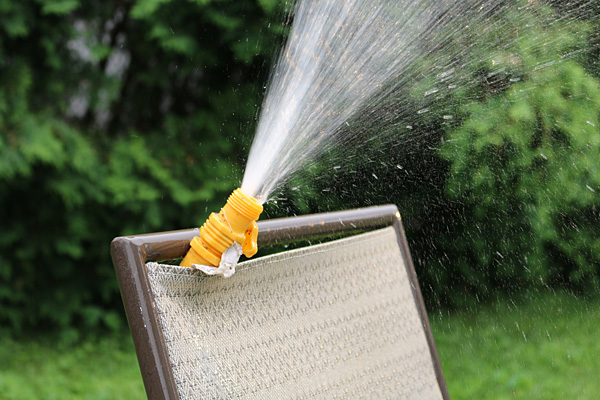
To make this happen, you’ll need a garden hose and sprinkler, with either a nozzle at the end of the hose, or an oscillating sprinkler. If you live in a home with a yard, you most likely already have these. In this example, a hose with a built-in, controllable nozzle was available, so that’s what was used. Make sure the nozzle or sprinkler head is placed in a fixed position, either to the side of or behind the flowers, with the water hitting the flowers but not falling where the flash or camera will be placed.

Caution: Don’t bring your camera gear out yet, it might get wet during this phase.

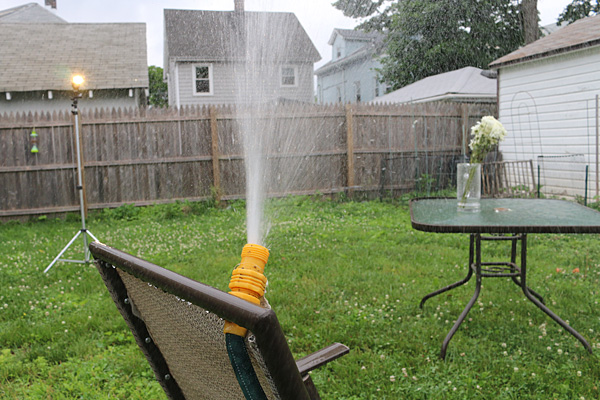
Setup rainmaker

Be prepared to improvise. In this case, a lawn chair was pressed into service as a way to hold the hose nozzle in place.

Once you’ve adjusted your “rain,” turn off the water and bring out your photo gear.

Choose a longer focal length lens (medium telephoto) and shoot with a wide aperture. This will help blur the background and create separation between background and foreground. An added benefit: the farther working distance between camera and subject will hopefully allow you to position the camera at a safe distance from the path of the water.

Step 2: Composition

Set up your camera (a tripod is highly recommended), focus on the flowers, and compose. Find a dark background to maximize contrast from the “rain,” and leave some room at the top of the image to show the water drops. Just for fun, take a few “before” pictures for future reference.

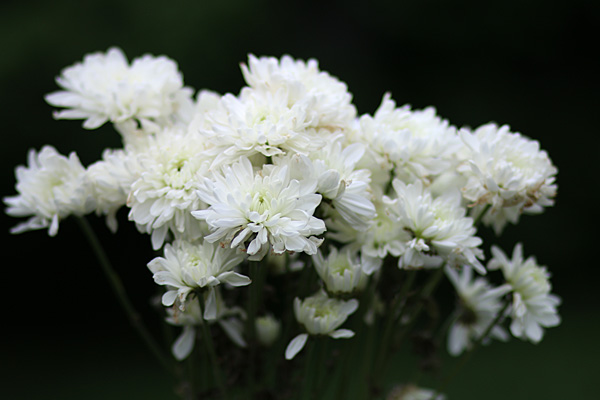
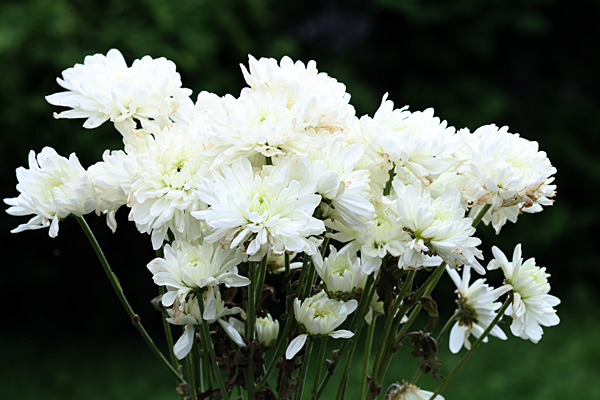
Flowers noflash

Before – here is the composition, with no added light. It’s okay, but not terribly exciting. Exposure: 1/1000th at f/1.8, ISO 400.

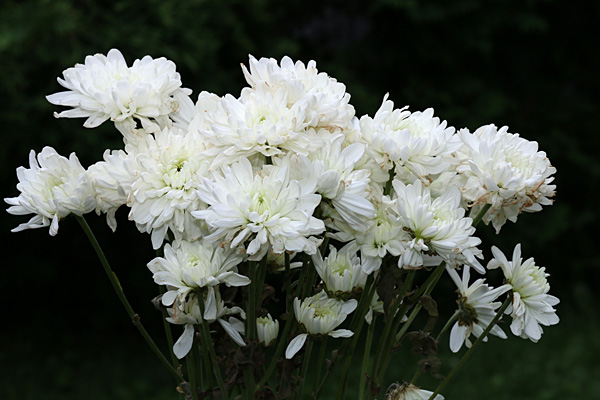
Flowers oncameraflash

Same composition, with the 70D’s built-in flash turned on. You can see more detail, but the lighting is flat and still uninteresting. 1/250th at f/13, ISO 400

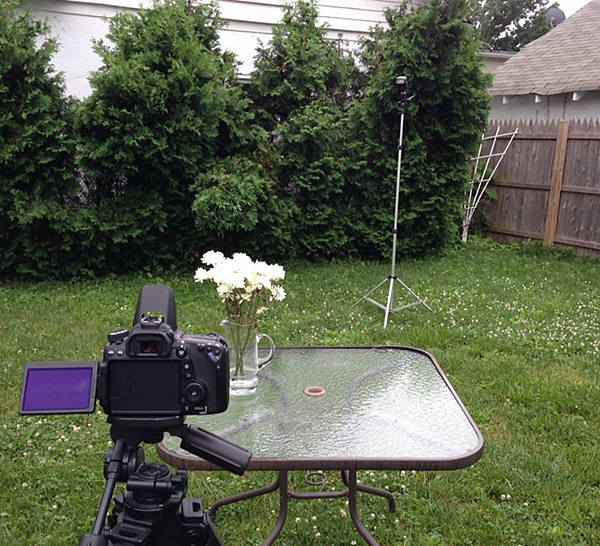
Setup behindcamera

All lined up – with the hose aimed at the flowers off to the left, the camera (in this case, a Canon EOS 70D with a Canon 85mm f/1.8 lens) was brought in, and a flash on a light stand was moved behind and slightly to camera right of the flowers. The dark shrubs behind the flowers provide a good contrast.

Step 3: Cue the “sun”

Turn on the flash. Don’t know how to operate a Canon DSLR or G-series compact? Scroll to the end of my article on Using Off-camera Flash to Fix Lighting Problems for Outdoor Portraits to get step-by-step instructions on how to trigger Canon off-camera flash wirelessly. You can control the flash intensity and, through trial and error, find the best exposure for illuminating the flowers.

Flowers plainbackflash

Now we have the backlight flash turned on, but the lighting ratio of ambient to flash light is wrong, and the flowers are overexposed while the effect of the backlighting is barely visible. You may need some trial and error, adjusting the EV and flash intensity settings until you get the right combination. Exposure: 1/250th at f/11, ISO 400

Hint: When adjusting the exposure and flash intensity, check your results in the LCD monitor, but also turn on the histogram to make sure the light is not falling off the chart.

Step 4: Warm up the light

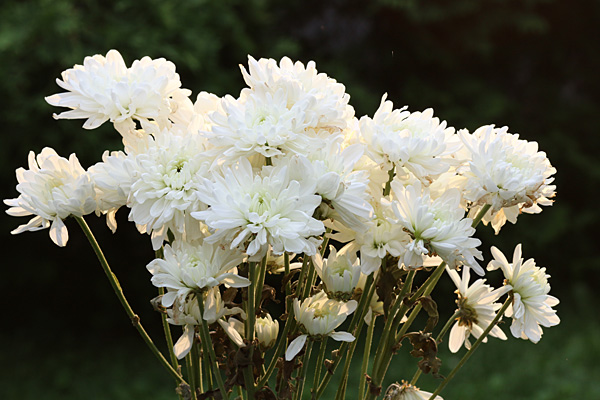
While overhead sunlight is fairly neutral, sunlight in the early and later part of the day takes on a pleasing warm tone. That’s why they call this time of day the Golden Hour. You can emulate this light by using full CTO Orange gel, available in the Expoimaging Rogue Gel Universal Lighting Filter Kit. Now it looks like you’re shooting in late afternoon or evening.

Flowers CTObackflash

Sunset? Nah, it’s the middle of the day. But thanks to the cloud cover and a Full CTO Orange gel over the backlight, it looks like sunset. Exposure: 1/250th at f/11, ISO 400. (make sure to set your shutter speed no higher than your camera’s sync speed)

Setup all

Flowers are placed, flash is gelled, and the “rain” is on. You’re ready for the final shot.

Step 5: Make it rain

Now that the composition and exposure are set and the light is gelled and in place, it’s time to turn on the water.

Flowers rain CTObackflash

It’s a late afternoon sun-shower. This is what your final result could look like. But wait, the drops seem to be going up. Why is that? See below. Exposure: 1/250th at f/11, ISO 400.

In this final shot, the flowers drenched in a sunlit downpour in the middle of a dark, dreary day. There’s one thing that would make this shot better, and that would have been switching to rear-curtain flash sync. In the final example here, the drops appear to be going up because the flash is triggered at the beginning of the exposure. Change your flash settings to rear curtain sync and the drops will be going in the right direction. (There wasn’t time to make the change here because it had started to rain for real, ending the session.)

Have fun transforming your backyard into an outdoor set and creating all kinds of weather.

The post How to Create a Sun-shower Photo on a Cloudy Day by Mason Resnick appeared first on Digital Photography School.


Digital Photography School

 
Comments Off on How to Create a Sun-shower Photo on a Cloudy Day

Posted in Photography


5 Tips for Creating a Photo Essay with a Purpose

24 Jun

As a photographer, you are a storyteller. The nouns are your subject matter; the verbs are the color and contrast that keep the story moving. A cast of characters all working together to get your point across. Instead of proper grammar, you ensure proper exposure. Instead of spelling errors, you watch for tack-sharp focus. For those times when the story is especially important and meaningful, or for when one image doesn’t say it all, there is the photographic essay. With blogging and social media, photo essays are more popular than ever: humorous or emotionally relevant, sparking debate or encouraging compassion, each with a story to tell.
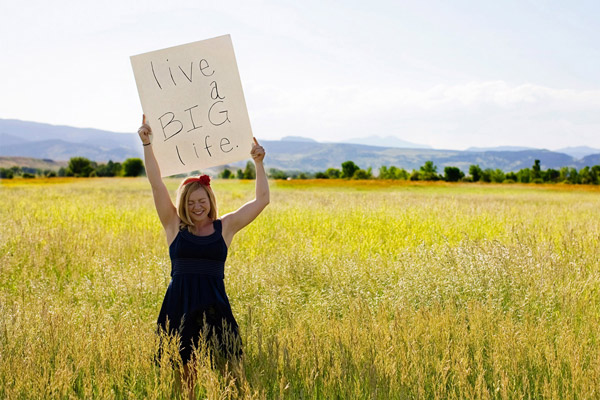
melanie1

I’ve mentioned before that taking on a photo project is one of my favorite ways to reignite my love for photography, but beyond that, it’s a great way to get your message across and have your work seen by a larger group. A photo essay is intriguing; it’s something to talk about after people hear that you’re a photographer and want to know about the glitz and glamour of it all. It’s the perfect thing to tell them after you’re done going on and on about all of the red carpets, the celebrities, the fame, and the fortune. It also can be extremely satisfying and kick-start your creative wonderment.

By definition, a photographic essay is a set or series of photographs intended to tell a story or evoke emotions. It can be only images, images with captions, or images with full text. In short, it can be almost anything you want it to be. Which is where I struggle most–when the options are limitless. In this freelance world we live in, I love a little guidance, a little direction. Ideally, someone to tell me exactly what they want and promise to be thrilled with whatever I produce, for my fragile artist ego can’t take any less. While I continue my quest for that, I offer you these 5 tips for creating your own, completely without bounds, photographic essay:

1) Let it evolve on its own

Each time I’ve had a very specific concept in mind before I started shooting, it’s never been the end result. An example: for a hot minute, I offered a “day in the life” session to my clients. I was photographing so many of the same clients year after year that I wanted to be able to offer them a different spin on the portrait sessions I was doing for them. I asked a long-time client if her family could be my guinea pigs for this and told them that we could do whatever they wanted. We went out for ice cream, had a mini dance party in their living room, and I photographed a tooth that had been lost that very morning. Then, very last, I photographed the two young daughters with notes they had written, which to be honest, I’m not even sure how they had come about. I rushed home after the session and edited those last note pictures first just because they were so different from what I usually shoot, and posted them on my personal Facebook page the heading Notes Girls Write.


sarah

gracie

Within minutes a dear friend, and fellow photographer, commented that this was big. Bigger than just the two pictures. She and I would spend the next year working on a photo essay that became a blog, that in turn became a book entitled Notes Girls Write. We photographed hundreds of women of all ages with their notes, each one later expressing having their portrait taken with their own words was an extremely powerful moment for them. Beyond my beautiful children, the fact that I can make a bed with hospital corners like no one’s business, and the award I won in the 4th grade for “Most Patient”, Notes Girls Write is one of my proudest accomplishments. It evolved on its own, starting from a few similar photographs that struck a cord in viewers and becoming a large and powerful project, one of the biggest markers in my career so far.


lindsay1

IMG_6287b

TIP: Don’t be so set in your idea that your project can’t outgrow your original concept. Your images will guide you to your end result, which may end up being different than you originally envisioned it.

2) If you think there’s something there, there’s likely something there

For the last year I have been a “foster mom” with a dog rescue group. Volunteers transport dogs that would otherwise be put down from overpopulated shelters, or seized from terrible situations, to my area, where dog adoption rates are much higher. These dogs live in foster homes while they receive medical care and basic training so that they can be adopted out to loving homes. It’s incredibly rewarding. Especially when I had hardwood floors.

I knew from the first time I met the transport van I wanted to document what it looked like: a van full of dogs that just narrowly escaped death arriving to temporary homes where they will experience a level of love and care which they’ve likely never known. I tear-up every time I see it. I am also put to work every time I am there, so taking photos while holding onto a 100 pound German Shepard is tough. It’s going to take me several trips to have enough images to do anything with, but that’s fine. I have no idea what I will be doing with these photos. I know they will find a home somewhere: maybe with the rescue group to raise awareness, or to help bring in volunteers, or maybe they will do nothing more than document my own story with volunteering, or perhaps something more. I’m not sure yet, but the point is that I have the images, ready for their time, whenever that is.
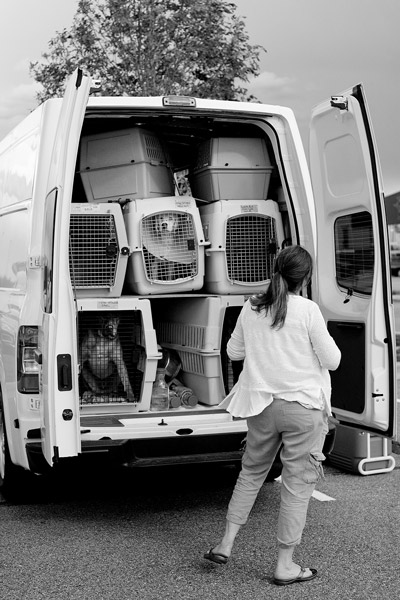
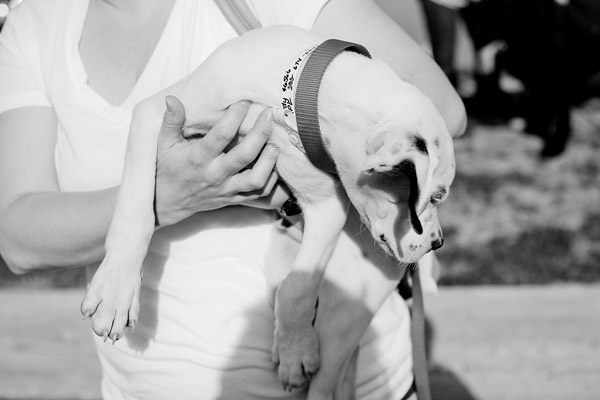
dog1

dog2

dog3

TIP: If you think there is something to it, there likely is. Even if it’s just a personal passion project. Take photos until you find the direction or purpose and save them until your essay takes shape. You may not end up using all, or any of the images, but in continuing to take photographs, your project will be defined.

3) Shoot every single thing

I’m the “World’s Worst Over-Shooter”. Need one image? Let me take a hundred so we know we have it. Luckily for my bad habit, the photographic essay needs over shooting. Whether you know what your plan is, or have no idea want your end result will look like, the more coverage you have, the better. This is one of the few times I push my luck and ask my subjects to work for me until they never want to see me again (I only photograph people though, so if you are photographing mountains or something, you have the added advantage of not pushing people until they cry or yell). Don’t be shy. Shoot everything you know you don’t need, just in case you need it. Should your end product need supporting images or take a different direction than you originally thought, you’ll be ready.

Take advantage of digital (if that’s how you shoot) and fill a memory card. You may end up trashing everything, or you may not. I had no idea that my Notes Girls Write project would span for as long as it did, but because I didn’t turn down anyone who was interested in the very beginning I ended up with some shots that told complete stories and expanded on the original concept.
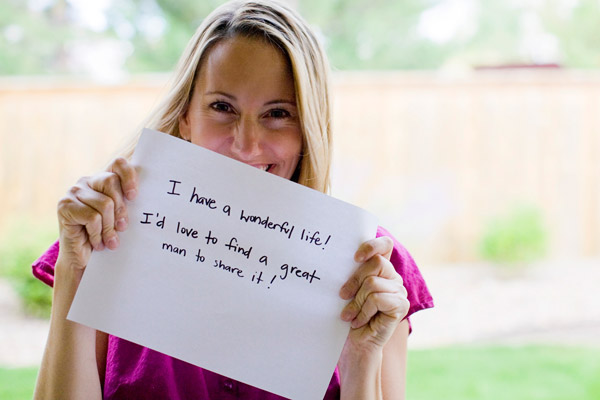
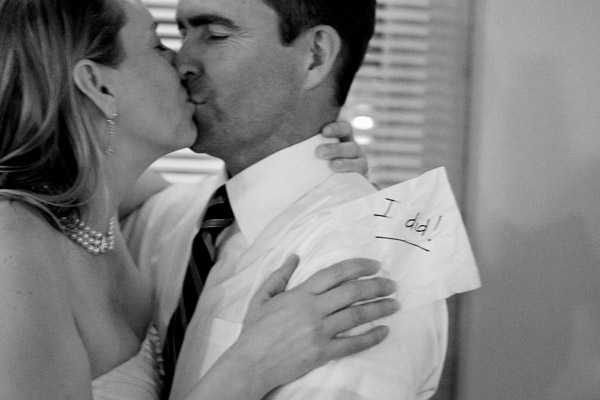
sarah2

sarah3

TIP:  Think big. If you are shooting an essay where mountains are your subject matter, see the mountain in pieces and photograph the surrounding trees, rocks, and whatever else. This will save you having to return to the beginning of the project for supporting shots, or having to reshoot if your essay takes a different turn than you planned.

4) Ask for help with image selection

I struggle with this one–I let my personal feelings get involved. Throughout our Notes Girls Write project I was constantly picking images based on my personal feelings–the subjects that I had connected with more, and the girls that I knew were most interested in the project. This is where it is so helpful to have someone else help. Someone who has no personal feelings towards the images and will help you pick based only on the strength of the image and not your own feelings. Even if people were not involved as subjects, you tend to have personal feelings toward images that the general public may not see the power behind.

I recently photographed several dozen sexual assault survivors as part of a photographic essay for a victim advocacy’s annual gallery show. This event is meant to put faces on the survivors and raise awareness, and has been a large local event for years. I was thrilled to be selected to be the exclusive photographer, though this was one of the hardest projects I’ve ever taken on. The photo sessions themselves, whether five minutes or 30, were extremely emotional for the survivors and in the time I spent with them, I often learned a lot about their journey and experience. This made it difficult for me to pick which final images would be used for the show, based only on the power of the image and not my personal feelings. In the end several select friends helped me narrow each survivor’s images down, and the subjects themselves selected which would be the final image used, as ultimately this is their story.

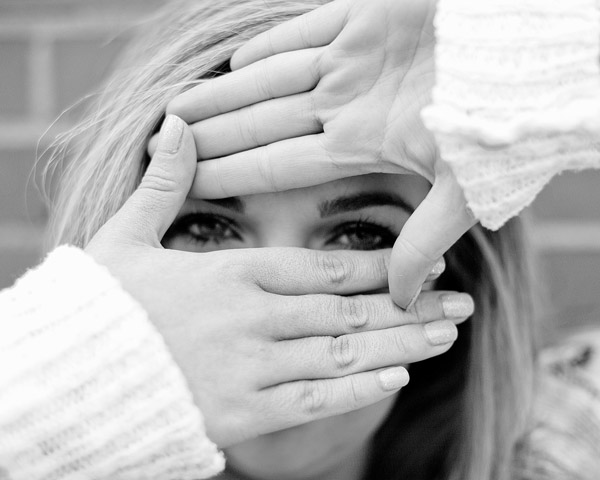
SAVA1

SAVA2

SAVA3

TIP: All creative work is personal, and looking at photographs we take ourselves is incredibly hard to do with clear eyes. We see the mistakes, the personal feelings, the shot that could have been better. It’s impossible to always set these aside so when working on a project that is incredibly important to you, or large in scale. Have others help you decide what images to use for your final pieces. Bring in people who are interested in photography and people that aren’t. People that know about your subject matter and people that don’t understand it at all. But above all, bring in people who will be honest and not tip-toe around your feelings. Lastly, also bring a thick skin.

5) Tell your story, in fact shout it from the rooftops if you can

Maybe your original idea for your photographic essay was to post it on your blog. Awesome, nothing wrong with that, but are you sure it can’t be more? Shop it around, who can it help? Does this benefit a group, an organization, or a person? Could it inspire people? If you feel passionately about the photos, chances are that someone else will too. Your photographic eye doesn’t stop when your shooting is done. If you felt compelled to take the time to create a photographic essay, there are likely “readers” for your story.

img_6359b

TIP: This isn’t the time to be humble. Taking on a photo essay is a large endeavour. While there’s nothing wrong with having it be something you only did for your own personal growth, showing it around can be helpful both in experience and longterm benefit. Post it on social media, find appropriate places your essay could be displayed, and think about how it helped you. Every single photo essay I have done has led to an outstanding connection, or more work, and there is nothing wrong with getting those things along with the personal gain of accomplishing something you’re proud of.

The ideas are truly for a photographic essay are limitless. Truly.

Want a few more ideas for projects, try these?

  • Using a Photography Project to Spark your Creativity
  • Photography projects that make you feel alive
  • Jumpstart Your Photography – Start a 365 Project
  • 8 Photo Projects in Your Own Backyard

Have you ever done a photographic essay? What is your experience? Share with in the comments if you have, or have considered it. If you haven’t, what are you waiting for?

The post 5 Tips for Creating a Photo Essay with a Purpose by Lynsey Mattingly appeared first on Digital Photography School.


Digital Photography School

 
Comments Off on 5 Tips for Creating a Photo Essay with a Purpose

Posted in Photography


Canon Japan announces Digital Photo Professional and EOS Utility updates

17 Jun

shared:Canon_Logo_Lrg.png

A press release that appeared on Canon Japan’s website today indicates that Canon will be upgrading its Digital Photo Professional and EOS Utility applications. According to a translation of the release, DPP will be a ‘significant’ upgrade and will be available free as of June 26th. Read more

News: Digital Photography Review (dpreview.com)

 
Comments Off on Canon Japan announces Digital Photo Professional and EOS Utility updates

Posted in Uncategorized


Deep Dive: Inside Benjamin Von Wong’s shipwreck photo shoot

13 Jun

VonWong_Underwater_Tulamben-11.jpg

Benjamin Von Wong isn’t afraid of a little drama. His work incorporates elements of fantasy, turning models into otherworldly creatures and fire-breathers. So who else might you expect to find at the helm of an underwater shoot with two models, a team of divers and a shipwreck? Yep, he went there. Take a look at some of the photos and watch a behind the scenes video to see how he pulled it off. See gallery

News: Digital Photography Review (dpreview.com)

 
Comments Off on Deep Dive: Inside Benjamin Von Wong’s shipwreck photo shoot

Posted in Uncategorized