RSS
 

Posts Tagged ‘Outdated’

Pay Phones to Free Wi-Fi Hubs: NYC to Replace Outdated Booths

16 Jan

[ By Steph in Gadgets & Geekery & Technology. ]

pay phones NYC

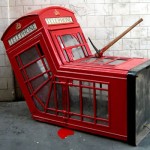
If you’re old enough to remember making quarter calls on pay phones, you might also be old enough to recall an edgier, grittier, graffiti-covered New York City, when the streets were lined with mom and pop shops and punk legends vomited on the sidewalk outside CBGB. Whether you mourn those days or celebrate the city’s evolution, slick corporate facades and general gentrification have swept most of that away, but somehow, the fossil-like remains of half-functional phone booths still stand on many corners. Soon, that will change, too.

link nyc 1

In an age in which just about everybody has a cell phone and people under 25 barely even know what a landline is, the need for these booths has vastly diminished, and they tend to just take up valuable sidewalk space. Soon, most of them will be replaced with something the city could actually use: a system of free, super-fast wi-fi hubs via a project called LinkNYC. These hubs transmit ‘gigabit wi-fi,’ which is up to 100 times faster than average public wi-fi and mobile LTE networks.

link nyc 2

link nyc 4

In addition to offering wi-fi to anyone nearby equipped with their own device, the kiosks will feature built-in tablets that enable web browsing, maps, directions and access to city services like transit. Lest you worry that marginalized people who can’t afford gadgets won’t be able to make calls, the kiosks also offer free phone calls to anywhere in the U.S. using either the Vonage app on the tablet or the tactile keypad and microphone. You can plug in your own headphones for privacy, and there’s a dedicated red 911 button for emergencies. Oh, yeah: you can charge your gadgets here, too.

link nyc 3

The streamlined design of the hubs takes up less public space, and illuminated ads on the sides fund the whole shebang. The city is in the process of replacing over 7,500 pay phones across five boroughs with the kiosks. LinkNYC is currently in beta phase, with trial kiosks going up around the city and at least 500 more set to be installed by summer 2016.

top image via: runs with scissors/Flickr Creative Commons

Share on Facebook


[ By Steph in Gadgets & Geekery & Technology. ]

[ WebUrbanist | Archives | Galleries | Privacy | TOS ]


WebUrbanist

 
Comments Off on Pay Phones to Free Wi-Fi Hubs: NYC to Replace Outdated Booths

Posted in Creativity


Proper Disposal of Outdated Media: A Cautionary Tale

17 Sep

If I were to guess, I’d say it’s safe to assume that you’ve accumulated quite a sizable image library. Regardless of whether you’ve been shooting digitally for a decade or even just a year or two, all of those ones and zeros dancing happily inside your computer as image files are piling up. Don’t forget about all of those photos you’ve scanned in from your film days. Digitized any slides lately? How about the photo stream from your phone? Megabytes become gigabytes, gigabytes become terabytes, and over time the sheer volume of data can become mind boggling.

You’re backing it all up, right? Of course you are.

I think that being neurotic about backing up our images is pretty much a universal character trait of photographers. Or should be. When I shoot a wedding the cards are all backed up once before I even leave the venue. When I get home they are dumped from the cards to the computer. Then again to an external hard drive. I can’t think about anything else until the entire shoot exists in three places. I’m a little less uptight about commercial shoots, but only a little. For those, I only require a double backup. But it doesn’t end there. The catalog on my main drive automatically syncs to an external hard drive. Once a month it all gets synced to a second external drive which is stored off-site. And if that’s not enough, I’m starting to use the Copy cloud storage service as well. It’s like wearing a belt AND suspenders.

But technology changes over time, which means that our methods of backing up our data also change. In the grand scheme of things, it wasn’t that long ago that you were backing up your images on CDs. Towering piles of them. The piles began to shrink just a bit when DVDs became a viable option. External hard drives? Awesome. But then the clouds parted and we were suddenly able to store our prized data among them. Over time, those piles of shiny discs become obsolete. Once everything is backed up on current media, the obvious thing to do would be to trash the discs and outdated media, right?

Not so fast. And this is where our cautionary tale really begins.

First, a little background. The photo below is the bridge at Northside Drive and Bankhead Highway in downtown Atlanta. Originally built in 1912, it was a major thoroughfare into the city long before the interstate highway system was even an idea on a drafting board. Years of progress, neglect, and shifting priorities– as well as the fact that the far end of the bridge now simply stops in mid-air 100 feet above some railroad tracks– have transformed it into “The Bridge to Nowhere.”  The bridge has become a haven and encampment for some of Atlanta’s homeless population. I’ve photographed it several times over the years.

bridge-to-nowhere-guyer-photography

This particular image did not come from my hard drive or any of my backups. This image came off a Flickr photostream. Not MY Flickr photostream, but A Flickr photostream. This photo had been part of a multi-DVD backup that I simply threw in the trash several years ago when I switched to external hard drives. I have no earthly idea how, why, or where these discs were found, or what possessed the finder to check what was on them. Apparently he/she could not have just been a run-of-the-mill, garbage-picking identity thief like everyone else. No. This culprit was content to post eight of my photos to their Flickr page.

bridge-to-nowhere-guyer-photography2

We are practically hard-wired to protect our personal and financial information by shredding or otherwise destroying it before it goes in the trash. Sometimes I even throw pieces of stuff away in different trash cans. Do you really want your images showing up on a photo sharing site without your knowledge? How about a stock agency? Obviously, the answer is a resounding NO. So, what do you do?  Simple. Destroy the backup before you dispose of it.  Some shredders are powerful enough for discs. If you don’t have a shredder, a hammer, screwdriver, knife, letter opener, or any sharp object can inflict enough damage to the disc surface to prevent anyone from misappropriating your images. External hard drives and jump drives can either be physically destroyed, or be wiped and rendered unrecoverable with programs like KillDisk.

As technology continues its upward march, concerns over the best way to dispose of digital media will hopefully become less and less of an issue. With bigger and bigger file sizes– particularly from cameras with full frame sensors– backup storage options are becoming more and more sophisticated, hopefully making concerns over proper disposal eventually a moot point. In the meantime, however, they’re your photos. Protect them.

Post originally from: Digital Photography Tips.

Check out our more Photography Tips at Photography Tips for Beginners, Portrait Photography Tips and Wedding Photography Tips.

Proper Disposal of Outdated Media: A Cautionary Tale


Digital Photography School

 
Comments Off on Proper Disposal of Outdated Media: A Cautionary Tale

Posted in Photography