RSS
 

Posts Tagged ‘Options’

Some Options for Backing Up Your Photos Online

27 Jan

Backing up your data is an essential part of your photography workflow. While many photographers still advocate for using physical external hard drives, there are also many online services where you can store your images. In this article, I will go over the pros and cons of several popular sites to backup your photos online. Please note that these photo solutions are constantly changing their features, so always check with them directly to verify any details.

Photo backups versus photo sharing sites
Some Options for Backing Up Your Photos Online

It’s important to note the differences between a designated photo backup services and photo sharing websites. Traditional photo backup services such as Backblaze and CrashPlan focus purely on backing up data and can be set to backup an entire computer or hard drive. This is good in the sense that you can have everything you’ve ever created on your computer saved to the cloud. However, these backups end up being extremely large files and they take extra time to retrieve. So if you need to constantly and quickly access your backed up photo data, it may not be wise to rely solely on these types of providers.

Photo sharing sites, on the other hand, are not meant to be comprehensive backups of your entire computer. Many of these sites impose limits on the types and sizes of files that can be uploaded. Thus, photo sharing websites are best used to upload, store, and share edited photos.

How I backup my photos

My advice is to have a backup for your backup. As a professional photographer who shoots primarily in RAW, I have terabytes of data to store, but I don’t generally need frequent access to those original files. I opt for CrashPlan to do automatic backups of my RAW images, in addition to storing them on external hard drives.
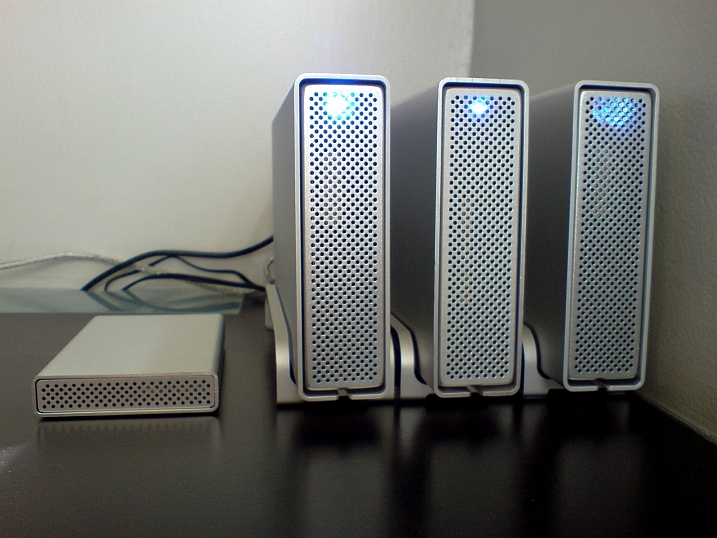
Charles Wiriawan

Image By Charles Wiriawan – external hard drive method of backing up.

My photography business is such that I constantly need to dig up old high-resolution photos to present to clients, and CrashPlan doesn’t give me easy, immediate access to those files. So I save edited, high-resolution copies of every photo I take and upload them to SmugMug. This way, I have quick access to the photos and can easily prepare an online gallery to share and sell images to clients. I also have Google Photos set to do automatic online photo backups anytime I save a new JPG image to my computer. In the end, I have four ways of backing up my photos.

Backup Services

These are comprehensive backup and cloud storage solutions meant to hold large amounts of data. Set them to automatically backup your entire computer or hard drive, and practically any file type or size will be accommodated. On the plus side, these backup solutions are pretty affordable for what they offer. However, it can take a long time to backup huge files, and file restoration can also take a bit of time.

Backblaze

One of the most popular backup solutions, Backblaze can automatically backup an unlimited amount of data from a single computer (note; it will connect and backup external drives as well). There’s no restriction on file type or size, and there’s only one pricing plan. It costs $ 5.00 per month or $ 50 USD per year for a Backblaze account. You can even pre-pay $ 95 for a 2-year plan. It’s an affordable and reliable solution for making sure everything on your computer is backed up.

Some Options for Backing Up Your Photos Online backblaze

CrashPlan

Virtually the same as Backblaze, CrashPlan also offers automatic computer backups. The main difference is that CrashPlan offers several different subscription plans. Included in the free plan is an automatic backup to a local hard drive or another computer. If you want to backup your data to CrashPlan’s cloud, the cost is $ 5 per month to backup one device for unlimited cloud storage and mobile file access. To add an extra device (as many as 10), the Family Plan is available for $ 12.95 per month.

crashplan Some Options for Backing Up Your Photos Online

Amazon Cloud Drive

At $ 11.99 a year for unlimited photo storage (or free for Amazon Prime members), Amazon offers competitive cloud storage solutions, but at some expenses. The main downside to Amazon Cloud at the moment is its lack of features when compared to other more established solutions. For example, a desktop client must be used to upload files larger than 2GB, there are no automatic backup features, and stored files are not automatically updated. Given these underdeveloped features, Amazon Cloud Drive at this moment seems more like an off-site hard drive rather than a true backup solution.

amazon-online-photo-backup

Microsoft OneDrive

Formerly known as SkyDrive, OneDrive is Microsoft’s cloud storage solution that works with Windows, Mac, iOS, and Android devices (but still no Linux). Base plans include a generous 15GB of free storage. Paid plans start at $ 1.99 a month for an extra 100 GB, or $ 6.99 for 1TB of space. The main downsides are a slow upload and download speed, a 10GB size limit per file, and the need to have a Microsoft, Outlook, or Xbox Live account in order to access OneDrive. This may be a hurdle for those who don’t use any Microsoft or Windows products.

onedrive-online-photo-backup

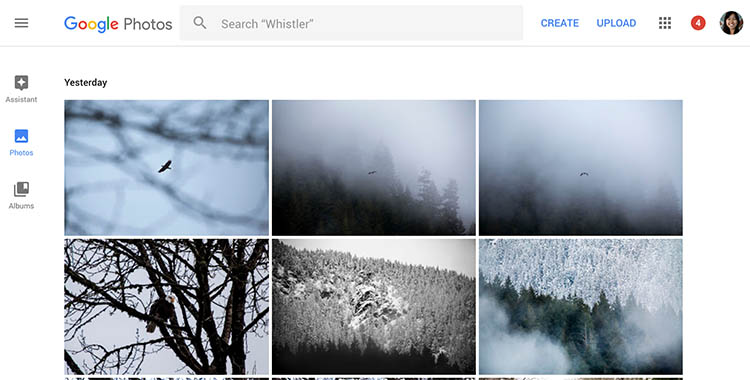
Google Photos

The photo storage solution offered by Google takes a slightly different approach than that of Dropbox or Flickr. Google Photos offers unlimited backup of a wide variety of file formats (including RAW images). You can also set automatic backups to occur whenever a new photo is taken on your mobile device or saved to your computer. However, all photos and videos must be under 16 megapixels or 1080p HD video.

If you upload larger files under the unlimited plan, your files will be compressed to fit these maximum size requirements. The only way to upload original, full resolution images is to opt for a plan with limited storage. In a way, this makes sense. You pay for more storage space if you need it.
google-photos-online-photo-backup

Photo Sharing and Image Hosting Websites

These websites were not originally meant to be comprehensive backup solutions. However, many photographers have begun using them as such. Most of these websites have limitations when it comes to data storage or file types that you can upload. Thus, they may not be the best all-around backup solution for your photos, depending on your needs.

Dropbox

One of the most popular tools to backup photos online is Dropbox. It exists in the form of a mobile app, website, and desktop app and allows you to store all types of media including photos, documents, videos, and other files. Anything you add to Dropbox can be immediately accessed anywhere when you log in via the corresponding website or app.

Using the free version gives you 2MB of storage space, but you can purchase additional space. Dropbox made an attempt at pushing an automatic photo backup feature in the form of Dropbox Carousel. However, this app along with Dropbox’s email app Mailbox shut down in early 2016. Thus, it’s questionable if they will make future investments into further feature development.

dropbox-online-photo-backup

Flickr

Yahoo’s venerable photo solution, Flickr, has withstood the test of time and continues to be popular among amateur and professional photographers. Even with a free account, you get 1TB of photo storage space. However, you cannot get more than 1TB of space, even with a paid Flickr Pro account. Instead, the paid account just removes ads and gives you access to your account stats. While Flickr isn’t the best for sharing photos with clients, it does give you the option to license and sell your photos.

The main downside to Flickr has to do with file size limits. Uploaded photos cannot be more than 200MB and videos must be 1GB or less in size. Additionally, RAW images cannot be uploaded.

flickr-online-photo-backup

SmugMug, Zenfolio, and Photo Shelter

These three paid photo-sharing websites are popular for presenting and selling photos to clients:

  1. SmugMug
  2. Zenfolio
  3. PhotoShelter

However, the push for offering unlimited photo storage has elevated these sites into becoming viable ways for photographers to backup images. All three sites also offer components that help you build your photography website. SmugMug and Zenfolio are among the most affordable, while PhotoShelter is more expensive.

In Conclusion

So which photo backup solution is best for you? It truly depends on what media you are looking to backup, how often you will access it, and your budget. Whichever solution you choose, remember to always have a backup for your backup. Also, please remember that these services are constantly offering new promotions and features. The information in this article may change, so always check directly with the provider to verify details.

How do you backup your photos? Let us know in the comments below.

googletag.cmd.push(function() {
tablet_slots.push( googletag.defineSlot( “/1005424/_dPSv4_tab-all-article-bottom_(300×250)”, [300, 250], “pb-ad-78623” ).addService( googletag.pubads() ) ); } );

googletag.cmd.push(function() {
mobile_slots.push( googletag.defineSlot( “/1005424/_dPSv4_mob-all-article-bottom_(300×250)”, [300, 250], “pb-ad-78158” ).addService( googletag.pubads() ) ); } );

The post Some Options for Backing Up Your Photos Online by Suzi Pratt appeared first on Digital Photography School.


Digital Photography School

 
Comments Off on Some Options for Backing Up Your Photos Online

Posted in Photography


Zeiss adds super-wide and tele- options to Milvus line

11 Sep

Zeiss has announced it’s adding 15mm F2.8, 18mm F2.8 and 135mm F2 options to its manual focus Milvus line. Counting these three, there are now nine lenses in the Milvus range. Zeiss puts an emphasis on robust construction with their full metal barrels, video-friendly features and optical designs that minimize chromatic aberration and distortion. 

The new lenses will be available in October. The 15mm F2.8 will cost $ 2699/€2699, the 18mm F2.8 will cost $ 2299/€2299 and the 135mm F2 will cost $ 2199/€2199.

Press release

Three new lenses for the ZEISS Milvus family

The lens family with manual focusing for DSLR cameras is now also available with focal lengths of 15, 18 and 135 millimeters

Oberkochen, September 8, 2016

Two super-wide angle lenses, the ZEISS Milvus 2.8/15 and ZEISS Milvus 2.8/18, and the telephoto lens ZEISS Milvus 2/135 have expanded this family of manual focus lenses for DSLR cameras, bringing the total number of ZEISS Milvus focal lengths to nine. “The ZEISS Milvus family of lenses is an invaluable investment for the future due to its excellent imaging quality and its large range, which now covers 15 to 135 millimeters,” says Christophe Casenave, product manager at ZEISS Camera Lenses. Delivery of the new ZEISS Milvus lenses begins at the end of October 2016.

For high-end DSLR cameras

“The ZEISS Milvus lenses have been designed in particular to fulfill the requirements of today’s powerful digital cameras and those of the future thanks to their high imaging performance, even in difficult lighting situations,” says Casenave. The new lenses are characterized by a harmonious bokeh and very high degree of flare control due to the T*® anti-reflective coating from ZEISS. Further optimization of the lens coating has also ensured less likelihood than ever of ghosting, flare or shading effects, even in critical lighting situations. And all ZEISS Milvus lenses come with a floating elements design, which compensates imaging errors at different distance settings.

ZEISS Milvus for video

The new ZEISS Milvus lenses also allow the user to create high-quality film shoots with a pleasing cinematic bokeh. “Due to their extremely high contrast rendition, the lenses fulfill the most modern video standards of 6K and higher, and have uniform color characteristics,” said Casenave. All ZEISS Milvus lenses have a focus ring with a very large rotation angle to enable precise focusing, and are made of comfortable rubber to ensure a good grip while focusing. The De-Click function on lenses with a ZF.2 mount lets cinematographers set the aperture in a soft and infinitely variable way so they can work professionally in changing lighting conditions. The ZEISS Milvus lenses’ robust full-metal barrel ensures long and reliable usage. In addition, the lenses are protected against dust and spray water. The robust metal lens shade is an integral part of the overall product design and included with all ZEISS Milvus lenses.

The new focal lengths of the ZEISS Milvus family are also compatible with the ZEISS Lens Gears, providing filmmakers with additional value-add. The ZEISS Lens Gears, which are made of high-quality aluminum with a hardened surface coating, slide into the respective lens and are attached to the focus ring by turning two counter-rotating rings through a simple mounting procedure.

The new ZEISS Milvus lenses in summary:

ZEISS Milvus 2.8/15:

This super wide-angle lens with a field of view of 110 degrees allows every photographer to consciously compose using extreme perspectives. The lens has excellent imaging performance – even with an open aperture – thanks to the correction of color errors. Color fringing and distortion are minimal. This is all thanks to a ZEISS Distagon® lens design with 15 lens elements in 12 groups, including two aspheric lenses, special glass with anomalous partial dispersion, and the floating elements design. A removable lens shade and the 95-millimeter filter thread also make this lens the ideal companion for special applications with additional slide-in filter holders.

ZEISS Milvus 2.8/18:

This compact super-wide angle lens with a newly calculated ZEISS Distagon optical design has 14 lens elements in 12 groups, including two aspheric elements. The ZEISS Milvus 2.8/18 has a short close-up distance of 0.25 meters and internal focusing. With an angular field of 99.9 degrees, this lens is the ideal companion for landscape and architectural photography, as it allows creative shots to be taken using unusual perspectives. The filter thread has a diameter of 77 millimeters. The ZEISS Milvus 2.8/18 delivers outstanding imaging performance and very good distortion correction.

ZEISS Milvus 2/135:

This fast telephoto lens delivers excellent correction of all color errors. Thanks to a large aperture and pleasing bokeh, it is the perfect lens for portrait photography from a medium distance. The angular field is 18.7 degrees. The short minimum object distance of 0.80 meters makes this lens even more versatile. It has an optical design with 11 lens elements in eight groups and, like the ZEISS Milvus 2.8/18, a filter diameter of 77 millimeters.

Price and availability

The delivery worldwide of the three new lenses will begin at the end of October 2016. The lens shade is included with the corresponding lens. Sales prices are EUR 2,699 (including 19% German VAT) or 2.699US$ for the ZEISS Milvus 2.8/15; EUR 2,299 (including 19% VAT ) or 2.299US$ for the ZEISS Milvus 2.8/18; and EUR 2,199 Euro (including 19% German VAT) or 2.199US$ for the ZEISS Milvus 2/135. For ambitious cinematographers and photographers, a set solution is also available for up to six ZEISS Milvus lenses. A discount of 8% is available with the purchase of three to four lenses. Purchasing more than five lenses gives the user a 10% discount.

Articles: Digital Photography Review (dpreview.com)

 
Comments Off on Zeiss adds super-wide and tele- options to Milvus line

Posted in Uncategorized


Should you Study Photography at College or are There Better Options Now?

30 Jan

If someone were to ask me whether it’s worth going to college or university to study for a degree in photography I would find that a difficult question to answer. I don’t think there is much value in studying photography at college, yet I don’t want to destroy anyone’s dreams (the good news is that there are plenty of other less expensive paths to a photography career).

If you are thinking about studying photography at tertiary level, these are the two most important questions to ask:

  1. What will you learn during your course?
  2. How much will it cost you?
photography education

You can learn a lot about photography by going to Amazon and spending a few hundred dollars on photography books, or purchase ebooks like on offer here on dPS. I’ve learned far more from books than I ever did from my photography degree.

What will you learn?

The first is important because, incredible as it may seem, you may not actually learn much while taking a photography degree. I know this is true because I studied photography at what was supposedly the UK’s top photography college, only to find that the level of teaching was so low, that I made my way through the three year degree learning next to nothing.

Let me give you an example. In our third year, the tutor gave a single one hour class per week. After a few weeks he gave up on doing that because only five or six students (out of a total of around 30) were turning up. The reason for the low turnout? Most of the others were so worried about writing the required thesis that they couldn’t concentrate on photography. And the reason they were so worried? The same tutor had spent weeks explaining how the thesis would be one of the most difficult things they had ever done, without giving any practical support or solutions to us.

Another example (bear in mind that I took my course between 1996 and 1999). We had one computer between 90 students, with an out of date version of Photoshop installed on it. The college had identified digital photography as an important trend – yet didn’t support the students enough to learn it.

GotCredit

By GotCredit

The truth is that degree courses are a tremendously inefficient way to learn. Whereas a typical working week is filled with 40 odd hours of work, a typical week in our course only had a few hours work. The rest of the time was wasted.

Plus, you may have the additional living costs of moving to another part of the country to study, and the loss of income from not being able to work a full time job while you are at college.

My theory is that our course was caught in bit of a time warp – the tutors probably came from an era when it was normal for arts courses to take a relaxed approach to education. University education was free in the UK at that time, and there was little concept of students paying for an education and expecting to receive value for money in return. Whether that has changed since then I have no way of knowing – I hope so.

The world of education has changed tremendously since I was at college. You can go online and learn by reading the blogs of some of the top names in the business. You can buy books, ebooks and video courses for just about any aspect of photography you care to learn about. Computers are much cheaper, and almost every student would have one.

You can also learn by taking workshops with some of the best photographers in your field. They may seem expensive, but it is a pittance in relation to the cost of obtaining a degree.

photography education

dPS writer Valerie Jardin runs photography workshops in the United States, Australia and Europe.

If you were going to study a photography degree today, the main question you have to ask is, what value does it give you over and above what you can learn from books, online resources, and workshops? Here are some ideas.

Interaction with other photography students: If you struggle to find like-minded people to talk about photography with, then this may be an attraction.

Industry experience: Does your course give you actual experience working in the area of photography that you want to get into?

Industry contacts: Very important, as these contacts will help you when you leave college to embark on your career.

Solid business training: Most photographers are self-employed, so it is essential to know the basics of self-employment and running a business. If your chosen course doesn’t teach these, then don’t even consider it. You won’t be prepared for the practical side of a career in photography.

An understanding of the newer ways of earning money from photography: Do the tutors on your course understand the emerging world of the business of workshops, and creating ebooks and video courses to sell online? This is important because these are all ways you can bring income into your business. One day there may be more money to be made from teaching photography, than from doing commercial photography assignments, and you need to be ready for that possibility.

The quality of your tutor:. Is there a highly regarded tutor at your college who can help you get started on your journey as a professional?

Another important factor is that drive and determination, combined with some innate creative talent, good business sense, and a willingness to learn are the primary characteristics you need for a successful career in photography. How many of these are taught at college?

photography education

Digital Photography School has a fine selection of photography ebooks for you to learn from.

How much will your course cost?

How much will your photography course cost you to study? The answer varies widely because it depends on where you live, and where you’d like to study. Bear in mind that graduating from college with lots of debt is a financial handicap that may hold you back for many years to come. Don’t forget to factor in living costs, and loss of income, as well as the cost of the course itself.

A good exercise is to calculate how much your course is going to cost you each week. Then, once you know how much you will learn during each week, you get a true idea of value.

In my opinion, the only reason that you should get into debt for an education is if you are studying something such as medicine, engineering or law which holds the promise of a lucrative career path at the end of it.

GotCredit

By GotCredit

Photography doesn’t have that lucrative career path. Some photographers make lots of money, some don’t. Lots of photography students (including some from my course) end up in careers other than photography. There are no guarantees in this business, and you need to be aware of that.

In the book The Millionaire Next Door the authors take in-depth look at the characteristics of the typical American millionaire. Most of them leave school early, start a successful business, and build it up. Very few millionaires have a college education. Why? The years spent studying (and therefore not working or building up a business) and the debt built up during that time prevents most people, regardless of qualifications or earning potential, from building up enough income or assets to become millionaires.

The solution

If you have a burning desire to make a living from photography, then look at these learning opportunities first.

  • Books and ebooks
  • Video courses provided by photographers and organizations like Lynda.com

    photography education

    DPS has two video courses for photographers. There are countless others available online.

  • Workshops (half-day and full-day)
  • Longer workshops (two days to a fortnight)
  • Part-time courses provided by local schools and colleges
  • Online courses provided by organizations like the New York Institute of Photography (I have no experience of these courses and no idea whether they are any good, so do your research).

All of these will be significantly less expensive than a photography degree, and can be carried out in your spare time while you have a full-time job.

Another approach is to look for a job in the industry. While you might not immediately be able to get a position that you really want (such as an assistant for a prestigious advertising photographer) you may be able to work in a related position.

For example, you might get a job working for a picture agency, a job as a receptionist in a portrait studio, a position working for a photography magazine, a job as a picture editor somewhere – you get the idea. There are lots of possibilities, and working as closely as you can to the area you want to end up will give you the opportunity to learn from established professionals and make the contacts you need to develop your career.

Given my experiences I would never advise anyone to study photography at college or university. However, I appreciate that there must be courses that are far better than the one I took. If you had a positive experience studying photography at college I’d love to hear about it, please post your comments below and let’s discuss it.


Mastering Photography

Mastering Photography ebook by Andrew S Gibson

My ebook Mastering Photography: A Beginner’s Guide to Using Digital Cameras introduces you to photography and helps you make the most out of your digital camera. It’s aimed at beginners and will teach you how to take your camera off automatic and start creating the photos you see in your mind’s eye. Click the link to learn more or buy.

googletag.cmd.push(function() {
tablet_slots.push( googletag.defineSlot( “/1005424/_dPSv4_tab-all-article-bottom_(300×250)”, [300, 250], “pb-ad-78623” ).addService( googletag.pubads() ) ); } );

googletag.cmd.push(function() {
mobile_slots.push( googletag.defineSlot( “/1005424/_dPSv4_mob-all-article-bottom_(300×250)”, [300, 250], “pb-ad-78158” ).addService( googletag.pubads() ) ); } );

The post Should you Study Photography at College or are There Better Options Now? by Andrew S. Gibson appeared first on Digital Photography School.

Digital Photography School

 
Comments Off on Should you Study Photography at College or are There Better Options Now?

Posted in Photography


Options and Choices for Photographers To Help You Avoid Injury

10 Jul

Have you been noticing little aches and pains lately, especially around your arms and back? If you do a decent amount of photography, your camera may be the culprit. While photography is largely seen as a hobby or art form, make no mistake about the fact that lugging gear around can be serious physical activity, especially as you accumulate more gear over time.

Consider this: a Canon 5D Mark III body only weighs 1.9 lbs (860 grams), and a Canon 70-200 f/2.8 telephoto lens weighs 3.28 lbs (1.49 kg). Combine the two, and you’ve got over 5 lbs of gear to tote, not to mention the added weight of extra lenses, tripods, lighting gear, etc. As a result, it’s not uncommon for longtime photographers to develop chronic pain in their backs, wrists, shoulders, and arms due to the stress of carrying so much gear. The bottom line is that being a photographer can slowly, but surely, lead to chronic injuries over time if you don’t take proper precautions. Here are a few tips to help keep your body in top shape while toting camera gear around, and avoid injury.

Dave Dugdale

By Dave Dugdale

Choose the right gear

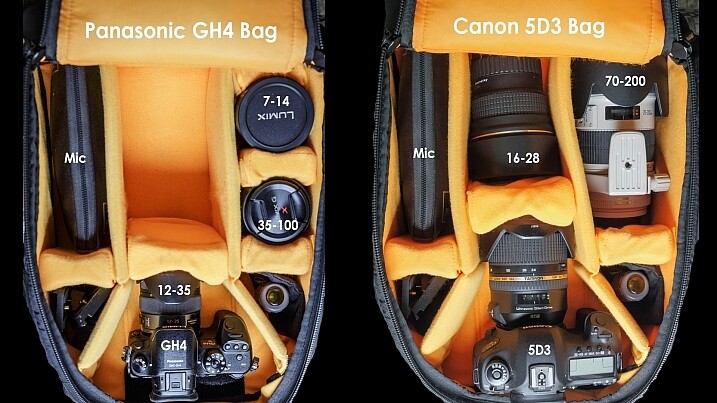
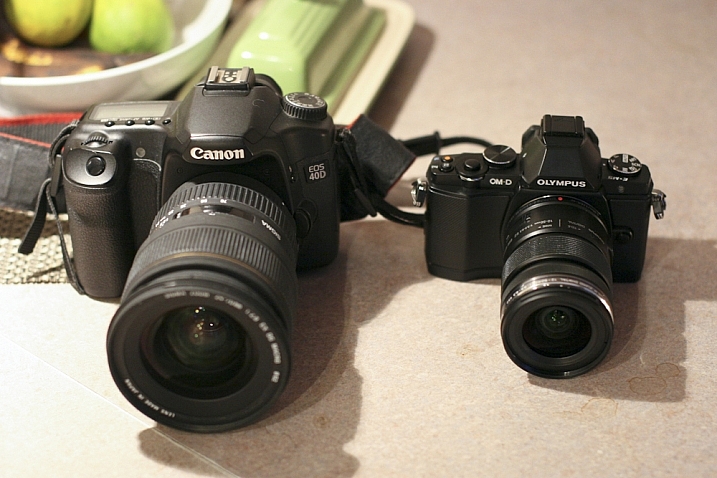
If you’re just starting out in photography or considering replacing your current camera gear, keep in mind that there are many smaller, lighter camera systems that may be easier on your body. Mirrorless cameras from camera manufacturers such as Sony and FujiFilm (as well as Olympus and Panasonic) are becoming renowned by both amateurs and professionals for their superior image quality and significantly smaller camera bodies and lenses. Depending on your photography needs and budget, you may want to invest in smaller, more ergonomic gear, that won’t weigh your body down.

Peter Anderson

By Peter Anderson

Select the best bag and accessories

Camera bags come in all flavors today, ranging from messenger bags, backpacks, and even stylish purses. While fashion can certainly impact your camera bag choice, be sure to also consider how comfortable that bag will be in the long run. Medical professionals often recommend selecting bags with symmetrical designs that equally distribute the weight across your body. This usually means opting for a backpack, or rolling bag with wheels, to move large amounts of equipment from one photo shoot to the next. If you choose a bag that will be carried on your shoulders or some part of your body, be sure not to overload it with too much gear. As a rule of thumb, a truly ergonomic bag you carry on your body should not weigh more than 10 percent of your body weight, and you should not carry a heavy bag for longer than 20 minutes at a time.

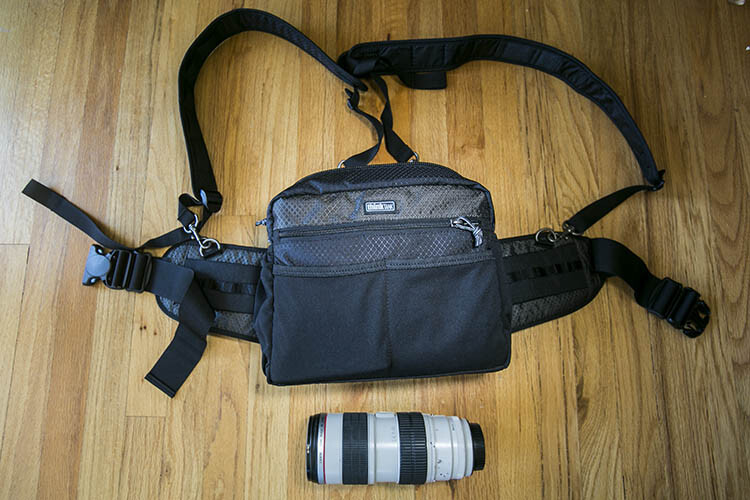
Think Tank Changeup Bag photographer ergonomics

While actively shooting, consider investing in camera accessories that will help alleviate camera weight in the long run. Some options include monopods for sports or wildlife photographers, ergonomic camera or wrist straps, and holster or belt pack systems (like the ThinkTank one shown above). In summary, choose one or several accessories that will help distribute your gear’s weight between your hips and shoulders so that one part of your body doesn’t bear the bulk of the burden.

Practice good ergonomics while shooting

1. Correct your posture

One of the leading causes of injury among photographers is poor posture. If you plan to spend long hours at a photo shoot, keep the following posture tips in mind:

  • First, always make sure to protect your lower back by keeping your pelvis in a neutral position and your core muscles (abs, side, and back) taut.
  • Secondly, make sure your knees are slightly bent (not locked) and your feet are spread at least shoulder-width apart, forming a wide base of support, not unlike the legs of a tripod.
  • Finally, always be mindful of your shoulders, making sure they are dropped down and pulled back, and keep your chin tucked in. These two posture tips will help avoid common neck and back pain as well as headaches that commonly arise among photographers.
DeusXFlorida (7,110,780 Views) - Thanks Guys!

By DeusXFlorida

2. Take frequent stretching breaks

When you have a moment to rest during a shoot, don’t just sit down. Remove your gear, and stretch your muscles and joints.Rotate your head in a clockwise and counterclockwise motion to stretch out your neck. Do the same movement with your hips to loosen your lower back. Reach high into the sky and rotate your arms like a windmill to reach your shoulders and upper back. Finally, do some squats and lunges to keep your quadriceps and legs supple. Above all, remember to not just focus on your arms and wrists. If you’re a photographer who likes to shoot from every possible angle, this means you’re likely squatting, kneeling, bending, and rotating nearly every part of your body to get those shots. As a result, pay equal attention to stretching out all the major muscle groups in your whole body.

Chris Hunkeler

By Chris Hunkeler (stretch often)

Don’t forget about post-processing ergonomics

Good posture and ergonomics shouldn’t be forgotten once you’ve put the camera down. Considering all of the time you spend in front of your computer, offloading memory cards, sorting and editing photos; you’ll want to make sure your work station is also suited for maximizing your posture. Suggested accessories include a standup desk, computer monitor risers, ergonomic mouse and keyboard, and foot stools to elevate and correct your posture while in a seated position.

Take care of your body as well as you take care of your gear. You can replace a broken camera, but not a broken you. If you have any other tips for avoiding injuries please share in the comments below.

googletag.cmd.push(function() {
tablet_slots.push( googletag.defineSlot( “/1005424/_dPSv4_tab-all-article-bottom_(300×250)”, [300, 250], “pb-ad-78623” ).addService( googletag.pubads() ) ); } );

googletag.cmd.push(function() {
mobile_slots.push( googletag.defineSlot( “/1005424/_dPSv4_mob-all-article-bottom_(300×250)”, [300, 250], “pb-ad-78158” ).addService( googletag.pubads() ) ); } );

The post Options and Choices for Photographers To Help You Avoid Injury by Suzi Pratt appeared first on Digital Photography School.

Digital Photography School

 
Comments Off on Options and Choices for Photographers To Help You Avoid Injury

Posted in Photography


Polaroid Cube+ adds Wi-Fi and two bright new color options

27 Jun

Polaroid has added a new member to its Cube camera family: the Cube+. Introduced at CE Week 2015 in New York, the Cube+ includes Wi-Fi, which is not included in the original model. As with the first generation, the Cube+ can record 1080p video and uses a single-button design. Read more

Articles: Digital Photography Review (dpreview.com)

 
Comments Off on Polaroid Cube+ adds Wi-Fi and two bright new color options

Posted in Uncategorized


Post-processing RAW Files – ACR Compared to Some Free Software Options

07 Mar

What is RAW?

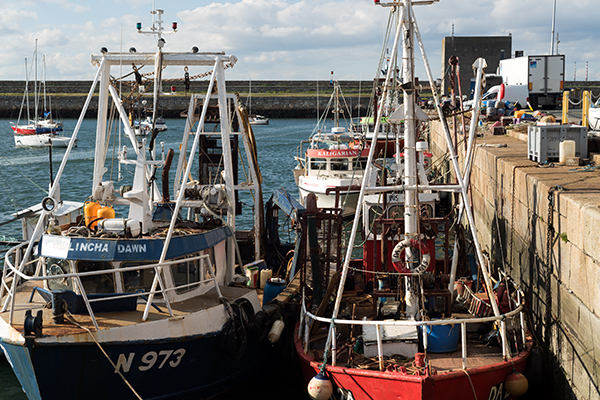
Title-imageA RAW file is really the digital negative, which means that all the data is stored waiting to be unleashed via a RAW Editor. Unlike a jpeg file which has been edited in-camera (or in post-processing) and is a compressed 8-bit file.

Why shoot RAW?

The main benefit to shooting RAW is simply to have as much information as possible in the file. When you upload a RAW file onto your computer the white balance, and tonal corrections have to be set manually. More detail can be retrieved from the highlights and shadows. It is then saved as a jpeg or some other format. The RAW file always remains in its original state.

Shooting RAW has become more commonplace as cameras have the option, built-in and RAW editing software is more widely available on both Mac and PC. In this article, I will be testing out two RAW editors which are free to download. Yes, no purchase necessary. The main RAW editor that I will go into more detail on is Adobe Camera Raw (ACR), which comes with Photoshop and is my primary go-to RAW editing software.

As a side note, this article is by no means a complete in-depth review of the pros and cons of each of the the three RAW editors. I merely wanted to test Photoshop’s ACR against some of the RAW editors that are available to download for free, such as GIMP and RawTherapee.

A few years back, I was using ViewNX (now ViewNX2), which is Nikon’s RAW free editing software. Canon (DPP) and other major camera manufacturers have their own RAW proprietary software. But I found ACR just got better with each new release. I usually bring my images into Photoshop when I’ve done the initial edits in ACR. It means my workflow is quite efficient as I’m using ACR and Photoshop side-by-side.

The Basics

When you open ACR or any RAW editor, the user interface can be a bit daunting for the uninitiated. The range of adjustments and all the features of ACR would require several articles alone.

So, let’s look at the basic adjustments where I begin the editing process of my RAW files. These adjustments are fundamental to any RAW editor. Similar adjustments can also be found in the Develop module of Lightroom and in Photoshop Elements 12 and 13. Let’s begin with Adobe Camera Raw, otherwise known as ACR.

Adobe Camera Raw (ACR)

ACR-UI

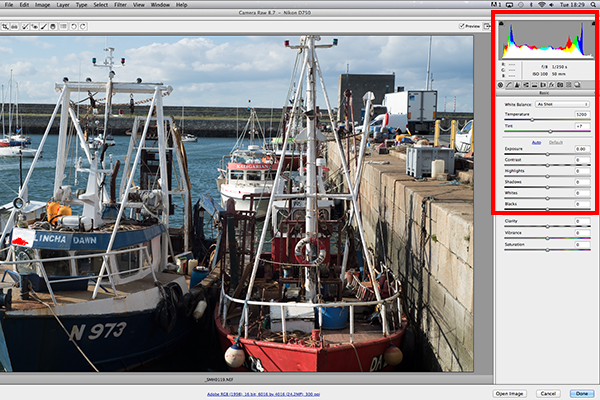
The interface when a RAW file is opened in ACR

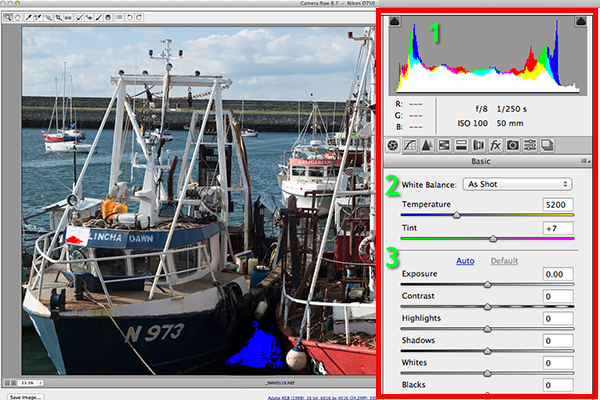
When I open a RAW file in ACR, White Balance is my first port of call. This is about the color temperature of the image depending on the light source. If the white balance is incorrect, then a color cast will occur on your image. It may look slightly blue, orange or green.

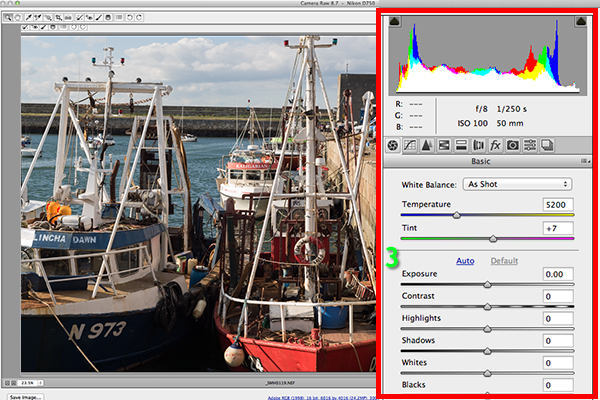
The 3 important focus points in the Basic panel in ACR

The three important focus points in the Basic panel in ACR

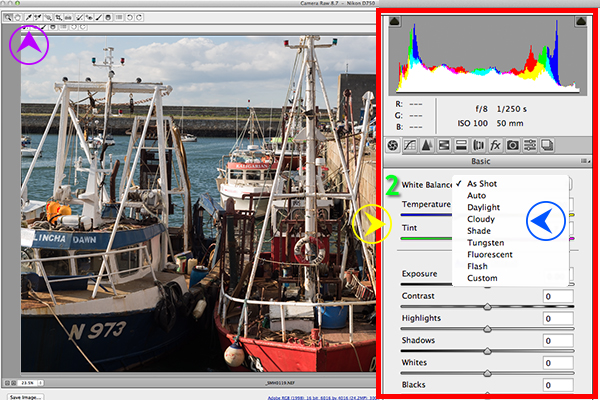
In ACR, there are three ways to adjust White Balance.

3-ways-to-edit-WB

Three ways to edit White Balance in ACR:
1. White Balance Tool
2. Presets
3. Temperature and Tint Sliders

  1. The White Balance Tool is my least favourite. The idea being that you click anywhere on the image that is suppose to be gray. I find this tool hit and miss.
  2. There are number of presets that are worth experimenting with, if you are new to RAW editing. Try Auto which is a good place to start.
  3. You can then adjust the Temperature and Tint sliders for finer tweaking and control. I favour these two sliders the most in my workflow.

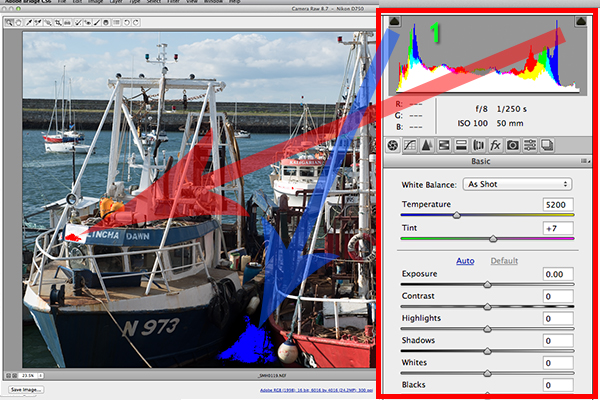
Just above the Temperature and Tint sliders, you have the histogram panel. Click on the the two black triangles. These indicate the highlight (left) and shadow (right) areas that have been clipped (see photo below). As you can see in this image, the areas highlighted in red indicate where the clipping has taken place in the whites. Similar to the shadows, blue indicates where the shadow areas have been clipped.

Highlights-shadows-clipping

Highlights-shadows-clipping in the Histogram.

When adjusting the White and Black sliders keep an eye on the black triangles in the Histogram chart. These triangles turn green when clipping occurs. Alternatively, you can hold down the Alt key while dragging the Blacks slider across to the left until the darkest area of the image starts to appear. Similar for the Whites slider, hold down the Alt key and drag the slider to the right until the brightest part of the image begins to show.

I tend to leave the Exposure slider until after I have adjusted the Highlights and Shadow sliders.

Exposure-contrast

Exposure and Contrast sliders.

The Contrast slider gives your image that final punch but go lightly.

edited-image

Final edited image from the basic adjustments in ACR

All edits done in ACR are non-destructive. Editing RAW files can be easily done in one pass, especially if you have captured the image that you want in-camera. However, there are no layers in ACR or Lightroom, so if you need further editing where layers are required you will need to use Photoshop or GIMP.

GIMP

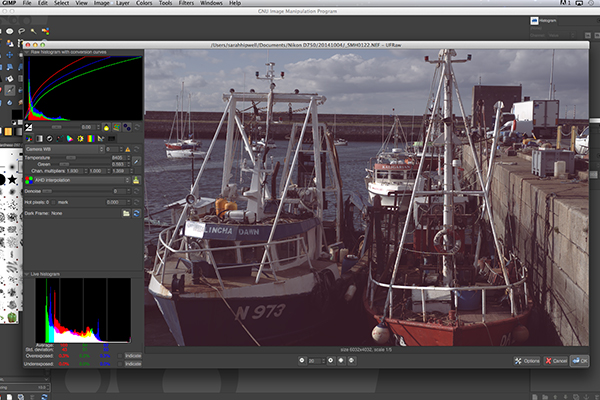
So this brings us to the next RAW editor, UFRaw. This comes pre-installed in GIMP, version 2.8. I’ve never used GIMP before now and I was really curious and enthusiastic to try it out. It has the reputation of being as powerful as Photoshop for editing – and the fact that it is free, is a bonus.

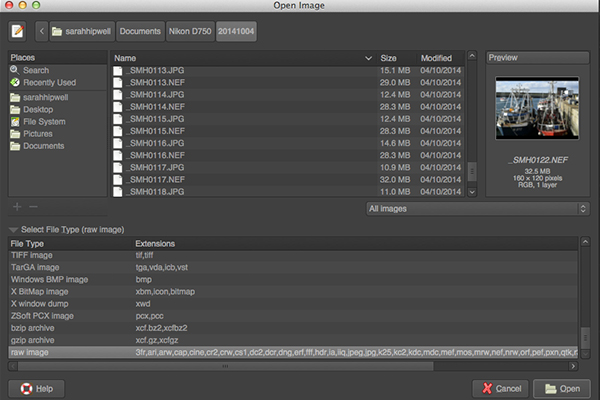
I presumed that by opening a RAW file that the UFRaw editor would launch automatically. It didn’t. After a quick research online. I found a solution. I had to go to File>Open>Select file. I then had to Select File Type and scroll down to the bottom of a list and click on ‘raw image’. Once I opened the image in question. It did not resemble anything like the image I had taken on the day. Normally when I launch a RAW file in ACR, it would be similar to the jpeg version.

Opening-RAW-file-in-GIMP

The UFRaw editor does not launch automatically. A few clicks gets you there.

The interface was completely alien to me, and I didn’t find it particularly user friendly. I played around with the sliders for awhile but I couldn’t get the image to look right at all. I tried adjusting the White Balance but I couldn’t get rid of a green/grey color cast on the image. By not having the familiar sliders in ACR, I was a bit lost to be honest. I really wanted to like UFRaw, as it is a free software for Mac and PC. To be fair, this was my first attempt at using the software, so I’ll put the mea culpa (blame) on me as opposed to the software.

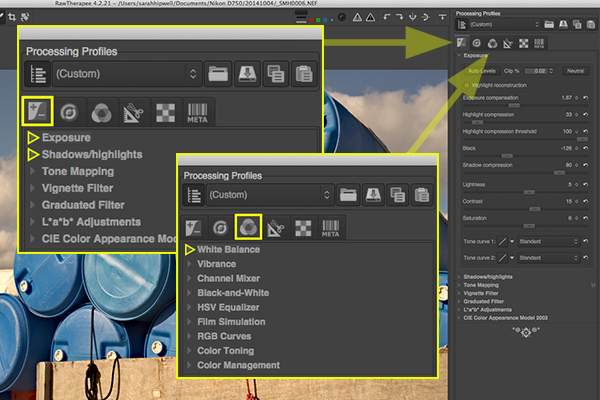
RAW-file-opened-in-GIMP

The UFRaw editor UI in GIMP

RawTherapee

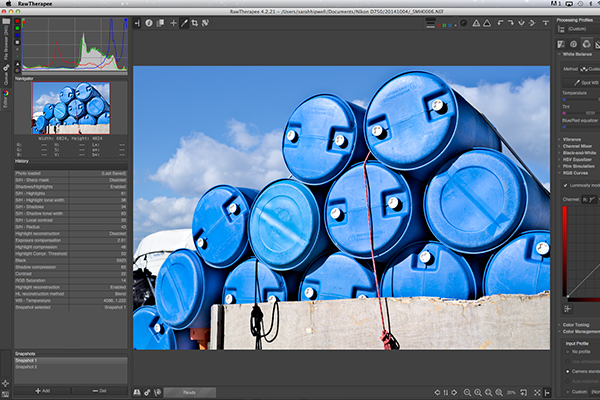
Now onto RawTherapee. I love the name. I wasn’t expecting much after trying out GIMP’s UFRaw but I was completely surprised and impressed. RawTherapee is available in 64 and 32 bit forms for Mac OS X and Windows. It also supports a huge range of supported cameras and manufacturer filetypes.

RawTherapee-UI

RawTherapee interface

This RAW editor is quite rich in features. Even so I found the user interface very intuitive, and after a few minutes I felt right at home. I quickly adapted to the menu system and found it very easy to navigate around. The editing panels are on the right.

RawTherapee-adjustment-sliders

Highlighted adjustment sliders that are similar to the ones in ACR.

Summary

If you haven’t edited a RAW file before, I would highly recommend that you try it out. The options are varied whether you decide to purchase Lightroom, or choose to pick from the many RAW editors that are free to download. The choice is really up to you. Another free RAW editor that has just been launched is Affinity Photo and it looks really promising (currently in beta for Mac only).

googletag.cmd.push(function() {
tablet_slots.push( googletag.defineSlot( “/1005424/_dPSv4_tab-all-article-bottom_(300×250)”, [300, 250], “pb-ad-78623” ).addService( googletag.pubads() ) ); } );

googletag.cmd.push(function() {
mobile_slots.push( googletag.defineSlot( “/1005424/_dPSv4_mob-all-article-bottom_(300×250)”, [300, 250], “pb-ad-78158” ).addService( googletag.pubads() ) ); } );

The post Post-processing RAW Files – ACR Compared to Some Free Software Options by Sarah Hipwell appeared first on Digital Photography School.


Digital Photography School

 
Comments Off on Post-processing RAW Files – ACR Compared to Some Free Software Options

Posted in Photography


Shopping for a New Tripod? Here are a Few Options to Check Out

05 Oct

If you’re in the market for a new tripod, or perhaps looking to buy your first one here’s some help for you from the folks over at B&H Photo Video.

You can check out these dPS articles as well:

  • Beginner’s Guide to Tripods
  • Different Tripods for Different Subjects – Which to Choose?
  • How to use Your Tripod (it’s not as simple as you think!)
  • An Introduction to Tripods
  • How to buy a tripod

The post Shopping for a New Tripod? Here are a Few Options to Check Out by Darlene Hildebrandt appeared first on Digital Photography School.

Digital Photography School

 
Comments Off on Shopping for a New Tripod? Here are a Few Options to Check Out

Posted in Photography


Blackmagic Design introduces PL Mount options for Production Camera 4K and Cinema Camera

13 Sep

Blackmagic Design has announced the addition of two new PL mount options to its line of professional motion picture cameras. The Production Camera 4K and Cinema Camera are now available with a PL mount, complementing existing EF and passive Micro Four Thirds models. Read more

Articles: Digital Photography Review (dpreview.com)

 
Comments Off on Blackmagic Design introduces PL Mount options for Production Camera 4K and Cinema Camera

Posted in Uncategorized


20 June, 2013 – Wide Angle Options for Sony NEX

20 Jun

Just published today is our latest report – Wide Angle Options for Sony NEX, by Rich Kattlemann. There are more alternatives than you might think.


The Luminous Landscape – What’s New

 
Comments Off on 20 June, 2013 – Wide Angle Options for Sony NEX

Posted in News


The Best Options for a Great Portable Lighting Kit

27 Jan

In the last two installments we covered basic three and five light studio lighting and that was good. Studio lighting is great if you have a place to work and provided your subject can come to you. There’s an old Arabic proverb that says when you can’t bring the mountain to your studio, you have to find a way to Continue Reading

The post The Best Options for a Great Portable Lighting Kit appeared first on Photodoto.


Photodoto

 
Comments Off on The Best Options for a Great Portable Lighting Kit

Posted in Photography