RSS
 

Posts Tagged ‘Ninja’

Nikon D850 Filmmaker’s Kit includes Atomos Ninja Flame, three lenses and two microphones

20 Mar

$ (document).ready(function() { SampleGalleryV2({“containerId”:”embeddedSampleGallery_2583191598″,”galleryId”:”2583191598″,”isEmbeddedWidget”:true,”selectedImageIndex”:0,”isMobile”:false}) });

Nikon looks to be positioning its D850 as a serious video rig with today’s announcement of a D850 Filmmaker’s Kit. The kit includes the camera body, three AF-S Nikkor lenses (20mm F1.8G ED, 35mm F1.8G ED, 85mm F1.8G), an Atomos Ninja Flame external recorder, ME-1 shotgun and ME-W1 wireless mics and an extra EN-EL15A battery.

Purchased separately, these items cost nearly $ 6300, so the kit’s MSRP of $ 5499 is a nice discount. The Filmmaker’s Kit will be available for purchase in late March.

Press Release

For the U.S. market, Nikon Inc. is excited to announce the all-new Nikon D850 Filmmaker’s Kit, a custom bundle specifically designed for content creators and filmmakers looking to take full advantage of the D850’s extensive video capabilities and controls. The key component of the kit, the award winning Nikon D850 offers incredible features, including full-frame 4K UHD video capture at 24/30 fps, 8K and 4K time-lapse, focus peaking, zebra stripes, HDMI output and enhanced audio control.

The Nikon D850 Filmmaker’s Kit will include three prime NIKKOR lenses which are ideal for content creation, and exhibit the clarity and sharpness needed for 4K Ultra HD video; AF-S NIKKOR 20mm f/1.8G ED, AF-S NIKKOR 35mm f/1.8G ED, and the AF-S NIKKOR 85mm f/1.8G. The kit will also contain an external 4K Atomos Ninja Flame recorder/monitor (with power kit, docking station and coiled HDMI cable).

The Nikon D850 Filmmaker’s Kit will be available in the U.S. for the suggested retail price (SRP) of $ 5,499.95 and will go on sale at the end of March 2018.

The Nikon D850 Filmmaker Kit includes the following:

  • Nikon D850 DSLR (with supplied accessories)
  • AF-S NIKKOR 20mm f/1.8G ED lens
  • AF-S NIKKOR 85mm f/1.8G lens
  • AF-S NIKKOR 35mm f/1.8G ED lens
  • Extra EN-EL15A battery
  • ME-1 Stereo Microphone
  • ME-W1 Wireless Microphone
  • Atomos Ninja Flame External Recorder (with supplied accessories)
  • Custom foam inserts (can be used in hard case for transporting, hard case sold separately)

Articles: Digital Photography Review (dpreview.com)

 
Comments Off on Nikon D850 Filmmaker’s Kit includes Atomos Ninja Flame, three lenses and two microphones

Posted in Uncategorized


Atomos introduces Ninja Inferno off-camera recorder

24 Mar

Atomos has launched the Ninja Inferno, the latest in its line of off-camera recorders for video shooters. The Ninja Inferno has almost the exact same feature set as the company’s top of the line Shogun Inferno, including 4K/60p recording, a 1500 nit display with 10-bit color, and the ability to record direct to ProRes or DNxHR formats. It also includes the company’s Atom HDR technology, which matches the Log curves from major camera manufacturers to the Ninja’s display in order to show the full Log signal on the HDR screen, meaning that cinematographers can see vibrant, true to life colors while recording in Log.

The major difference between the Ninja Inferno and its big brother, the Shogun Inferno, is that Atomos has removed a few features that, while important to shooters using high end video equipment, often go unused by DSLR or mirrorless filmmakers. These include SDI plugs, Genlock and Raw recording capability. The result is that Atomos is able to make the Ninja Inferno available at a very aggressive price point of $ 995, compared to $ 1995 for the Shogun version.

The Atomos Ninja Inferno mounted on the new Panasonic GH5. Together, these make a compelling combination for a budget filmmaker.

Of particular interest, Atomos is promoting the Ninja Inferno as the ‘ultimate accessory’ for the new Panasonic GH5, and there’s a reasonable case to be made for this. It’s a good match for the GH5’s 10-bit signal and Log video, but more importantly it supports 4K/60p 4:2:2 recording, one of the GH5’s more prominent features. Also, since the GH5 doesn’t include SDI ports or shoot Raw video, users are unlikely to miss those features on the Ninja Inferno, while benefiting from the much lower price.

We’ve had a pre-production copy of the Ninja Inferno for a few days and have been giving it a workout, so stay tuned for our hands-on report.


Press Release:

HDR 4Kp60 Ninja Inferno Shipping now in conjunction with GH5 for $ 995

Prices slashed across the 4K HDR line up

Melbourne, Australia – 23rd March 2017: Today, Atomos brings the power of 4Kp60 10-bit ProRes recording and HDR monitoring to the GH5 for an amazingly low price of just $ 995.

“Our message to video Pro’s is to Go HDR 4Kp60 Today showcased by the GH5 and Ninja Inferno combo”, said Jeromy Young CEO and co-founder of Atomos. “For less than $ 3k it’s an unbeatable total package especially when considering having 4K HDR content ready for clients, Netflix and YouTube is a must”.

Atomos has always led the way advancing the quality, affordability and simplicity of filmmaking by adding professional features to popular Japanese cameras. Atomos are again first to launch a portable HDR 4Kp60 10-bit 422 monitor recorder. Timed with the release of the powerful Panasonic GH5 and a $ 995 price point Ninja Inferno empowers the masses.

Just as the original Atomos Ninja broke open DSLR filmmaking by giving the Canon 5DMKIII professional Apple ProRes recording & the original Atomos Shogun pioneered 4K with the Sony a7s and Panasonic GH4, the Ninja Inferno now arms the Panasonic GH5, the hottest camera of 2017, with HDR Apple Pro-Res 10-bit 4:2:2 4Kp60 over HDMI 2.0 – a feat not possible internally on the GH5. This marks another incredible Atomos breakthrough – professional 10-bit color resolution, 4:2:2 color accuracy, high frame rate 4K 60p video resolution & all with the incredible brightness range that HDR delivers in PQ or HLG.

Apart from being an obvious companion for the new GH5, the Ninja Inferno is the world’s first HDMI monitor-recorder to accept 4K DCI signals from cameras like the Panasonic GH4 / DVX200 / HCX1000 / UX180 / HCX1, Sony FS7 / Z100 and the JVC LS300. Support for the 4096 DCI standard unlocks cinema recording from these 4K video & mirrorless DSLRs.

For the Ninja Inferno, like its flagship sibling the Shogun Inferno, we have created the ultimate monitor through end-to-end custom engineering of all components. It starts with a 1920×1200 resolution LCD panel and add 10-bit processing in highlights and equivalent 10+ bit resolution in blacks. This is achieved through the patented AtomHDR engine which when combined with our custom Atomos-built backlight allows the power of 1500nits to be utilized for High Bright Rec709 or HDR PQ/HLG at 10+ stops. The full-size HDMI 2.0 connection bypasses the camera’s internal limitations by recording to 4Kp60 4:2:2 10-bit pristine video in grading-friendly Apple ProRes or Avid DNxHR. The Ninja Inferno upgrades mirrorless and DSLR camera audio by including balanced XLR input and 48V Phantom Power, negating the need to purchase separate audio recorders. For on set review, the wide angle 7” calibrated screen, playback controls, playlist and XML tagging make the Ninja Inferno the perfect client or director’s monitor, with playout to the latest HDR PQ/HLG or SDR TV’s. The Ninja Inferno is equally adept in the editing suite as it is in the field with the recorded files dropping directly onto the timeline of all the major NLE editing and grading software with the HDMI input capable of accepting HDR signals to make the Ninja Inferno an unbelievably affordable HDR reference monitor for portable or in studio color grading.

The Ninja Inferno, which is shipping now for MSRP $ 995, is the ultimate camera accessory for the GH5, the popular Sony FS7 or cameras with 4K DCI output & other 4Kp60 / 4Kp30 / HDp60 cameras looking for a future proof monitor-recorder.

HDR now comes free across the Atomos 4K Line-up

Timed with the release of the Ninja Inferno, Atomos have driven down the price of the existing line-up, passing on the volume savings they receive due to the popularity of the entire HDR range. The Shogun Flame and Ninja Flame are now $ 995 and $ 795 respectively (both models ship with mains power supply, recording caddy & travel case. The Shogun Flame also ships with an XLR breakout cable). To complement all models in the line-up, Atomos have developed a tailored Accessory Kit and Power Kit that arm users with everything needed to power, control, dock, charge and safely carry the units at an amazing price. The flagship Shogun Inferno continues to ship as is today.

Product New Price (MSRP ex tax)
Shogun Flame $ 995 ($ 1695 saving of $ 700)
Ninja Inferno $ 995
Ninja Flame $ 795 ($ 1295 saving of $ 500)
Accessory Kit $ 295
Power Kit $ 149

Articles: Digital Photography Review (dpreview.com)

 
Comments Off on Atomos introduces Ninja Inferno off-camera recorder

Posted in Uncategorized


Atomos releases new ‘Flame’ versions of Shogun and Ninja recorders

21 Mar

Atomos, a name synonymous with off-camera video capture, has announced the release of its Atomos Flame series of field monitors, the Shogun Flame and the Ninja Flame. The new series kicks the monitors’ performance up a couple notches with some new features while also addressing some common requests from existing users.

Most notable is support for HDR (high dynamic range) video. The new monitors include the AtomHDR image processing engine which can display 10 stops of dynamic range to match 10-bit Log footage from cameras, revealing details in shadows and highlights that would be clipped on traditional monitors. Log formats from most major camera manufacturers are supported, including Canon, Sony, Panasonic, JVC, Arri, and Red.

HDR is made possible in part by the bright 1500 nit panel, which the company tells us is about four times brighter than existing models. However, even if you’re not shooting HDR this extra brightness could be very helpful. Atomos says it’s so bright that it should allow for easy outdoor monitoring without a hood.

One improvement sure to please a lot of videographers is a hot-swappable dual battery system that lets you keep shooting uninterrupted, along with an improved battery charger which is three times faster. Additionally, both models have ‘battle-ready armor’ to keep working in the field. We’re not sure what ‘battle-ready’ really means when it comes to video gear, but some extra bumpers will definitely let videographers worry a little less about every little bump to their equipment. Both models record 4K/HD to 10-bit 4:2:2 ProRes or DNxHR using standard SSDs.

The Ninja Flame is an HDMI only model with an MSRP of $ 1295. The Shogun Flame supports both SDI and HDMI, including bi-directional conversion, XLR audio inputs and outputs, LTC/Genlock connectivity and Raw to ProRes/DNxHR recording for some Sony and Canon cameras (not specified). It has an MSRP of $ 1695.

The Flame series is expected to ship the week of March 28.


Press release:

Atomos Ignites HDR & High Brightness in the Field: 1500 nits, 10 stops, 10 bit from $ 1295

Melbourne, Australia – 22nd March 2016: In the same way that the original Atomos Shogun helped fast track the transition from HD to 4K filmmaking, Atomos are intent on delivering 4K HDR to everyone with the launch of the Shogun Flame and Ninja Flame.

The Atomos Flame Series delivers the world’s most advanced 7” field monitor, accurately displaying 10 stops of the luminance detail of Log with 10 bit HDR Post Production color accuracy, for the first time in a field monitor. The AtomHDR engine not only resolves HDR brightness detail (dynamic range), with 10-bit color accuracy it also resolves 64 times more color information than traditional 8-bit panels. For Rec709 standard dynamic range scenes, the 1500nits brightness aids with outdoor shooting as does the upgraded continuous power management system that will keep you shooting longer in the field. Of course you also get the professional 4K/HD ProRes/DNxHR Recording, Playback and Editing that has made Atomos famous. Shogun Flame and Ninja Flame are available for sale in quantity week of March 28th, from the authorized Atomos reseller network.

“HDR is simply amazing, it’s the next revolution for filmmaking, once again Atomos are first with the technical solution to make it quicker, easier and more affordable for filmmakers” said Atomos CEO and co-founder Jeromy Young, “Anyone that sees HDR, from content creators to consumers are immediately sold, – more life like shots and real world detail. Our job is to open up HDR to all filmmakers by removing the technical and affordability hurdles that might slow its progress.”

The Flame series of monitor-recorders are equipped with the AtomHDR engine, utilising the power of the 1500nit panel in tandem with Atomos’ patent pending image processing to resolve the brightness detail of Log camera signals with the color accuracy of 10 bit HDR images mastered in post production. This means that the usual complications of exposing Log signals on a washed out image are eliminated – with AtomHDR you simply frame, expose, focus and shoot. All major camera makers log formats are supported – Sony, Canon, Panansonic, Arri, Red and JVC.

The monitor itself is a calibrated 7” 1920×1200 325ppi IPS with upgraded 10-bit color accuracy, resolving 1.07 billion colors compared to the 16.7 million colors of traditional 8-bit panels. This all but eliminates the color branding seen on traditional panels and in tandem with AtomHDR lets you see images as you would with your own eyes.

For existing SDR, Rec709 delivery or scenes that do not have the wide brightness variation required for HDR shooting, switch to traditional video mode (Rec709) and activate a Brightness slider that lets you take advantage of the impressive “Daylight Viewable” 1500nits of brightness emanating from the Flame units. This adds huge versatility for the Flame series – if you have scenes that call for HDR, activate the AtomHDR mode. If you don’t, switch to High Bright mode for outdoor monitoring hood free.

Shogun and Ninja Flame have a rugged built in armour ensuring it is battle-ready for the field and also now inherits the Atomos patented continuous power system pioneered on our HD range.  The hot-swappable dual battery system automatically swaps to the second battery when power is low, allowing hot swapping to new fresh batteries.  This coupled with our new improved battery charger which is 3 times faster means that power is always taken care of. 

The addition of AtomHDR, the 1500nit brightness, 10-bit colour accuracy and Continuous power genuinely positions the Flame Series as the best 7” Field Monitors in the world, but as we know with Atomos they are much more than monitors alone, featuring advanced recording, playback and editing capability as well. Both units record 4K/HD direct from the sensor to 10-bit 4:2:2 Apple ProRes or AVID DNxHR/DNxHD onto affordable yet reliable SSD’s from the world’s leading media brands. They also feature on the fly 3:2 and 2:2 pulldown removal and advanced recording features such as Timelapse & Pre-roll. Playback with controls is possible on screen or out to larger monitors and you can even use the built-in focus, framing and exposure tools to judge the shot and then start tagging to make decision making in Post faster and easier. 

The Ninja Flame is a HDMI only model with all of the above features and ships with a host of accessories including a HRPC hard case, a snap-fast HDR sunhood, fast battery charger, control cable, 2 x NP-F750 4 cell batteries, USB 3 Docking Station, D-Tap Cable, 5 x Master Caddy Cases and a 12 V 3A AC-DC Power Adapter. MSRP is US $ 1295

The Shogun Flame is a HDMI & SDI model with bi-directional SDI/HDMI conversion, Raw to ProRes/DNxHR recording for select Sony and Canon cameras, balanced XLR audio input/output and LTC/Genlock connectivity. It features the same above accessories as well as the XLR breakout cable for an MSRP of $ 1695.

Flame Series Key Features:

  • With a Dynamic range to match that of a 10-bit camera LOG footage, AtomHDR monitors deliver the detail in highlights and shadows usually clipped on traditional monitors.
  • A highly advanced field monitor even in non-HDR scenarios with 1500nits brightness for outdoor shooting, native full HD resolution and optional calibration to ensure natural LCD colour drift can be corrected over time.
  • Record direct from the sensor in pristine 4K UHD (up to 30p) or record high frame rate HD (up to 120p)
  • long with recording the high pixel density of 4K, the Ninja and Shogun Flame also record higher resolution 10-bit colour information and more precise yet efficient 4:2:2 colour encoding.
  • Recording to Apple ProRes and AVID DNxHR visually lossless edit-ready codecs ensure you capture full individual frames like film, providing more flexibility and creativity in post.  Can be delivered to any standard – never worry about having your footage technically rejected due to the format again.
  • Ready for real-word conditions with built-in armour protection, dual battery hot-swappable continuous power system to ensure you always have power and a raft of included accessories including a new fast charger and snap-fast sun hood.
  • Our patented hot-swappable dual battery system for continuous power is backed up with the included power accessories (2 x 4-cell batteries, D-Tap adaptor and blazingly fast battery charger)
  • An arsenal of creative weapons including focus and exposure tools, 3D Custom Looks, Waveforms (LUMA and RGB) and Vector Scopes ensure you set the shot up perfectly every time.
  • XLR audio via breakout cables for Shogun Flame or 3.5mm line level input with audio delay, level adjustment and dedicated audio meters with channel selection for Ninja Flame.
  • We support affordable, readily available SSDs from the world’s most trusted media brands.

The Flame Series is shipping (March 28th) for a MSRP of:

Shogun Flame

  • US:   $ 1,695 ex. TAX
  • EU:   € 1,695 ex. VAT 
  • GBP: £ 1,295 ex. VAT
  • AUD: $ 2,695 Inc. GST

Ninja Flame

  • US:   $ 1,295 ex. TAX
  • EU:   € 1,295 ex. VAT 
  • GBP:  £ 995 ex. VAT
  • AUD: $ 2,049 Inc. GST

About Atomos

Atomos exist to help creative professionals cut through technology barriers by creating easy to use, cutting edge products including 4K & HD Monitor-recorders, a pocket size ProRes recorder, signal converters & power management solutions. Each product serves a different need but all share the common benefit of enabling a faster, higher quality and more affordable production schedule for video professionals. 

Website: www.atomos.com

Articles: Digital Photography Review (dpreview.com)

 
Comments Off on Atomos releases new ‘Flame’ versions of Shogun and Ninja recorders

Posted in Uncategorized


Like a Ninja: Tokyo Apartment is Only for the Nimble

12 Jun

[ By Delana in Architecture & Houses & Residential. ]

1 ninja house

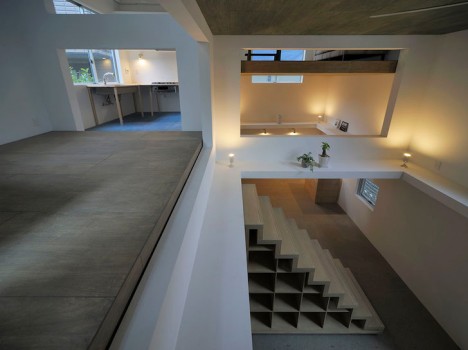
A tiny 750 square foot apartment is definitely not a lot of space for two people, but this couple was lucky enough to find an exceptionally creative architect. This Tokyo home had a lot of room to grow vertically, so Hiroyuka Shinozaki Architects used floating floors and a series of stairs and ladders to create a spacious living area and studio.

2 open home layout ninja house

3 top floor unfinished space ninja house

The interior of the home is virtually free of walls and even features huge cutout areas in some of the floors. The architects named it House T, but the owners call it a “ninja house.” Their reasoning behind the name? The couple feels that they have to be as nimble as ninjas to navigate the innovative interior.

4 nimble interior ninja house

5 house t tokyo

Large hanging lights and the wide-open space fill the combination home/studio with bright, cozy light. Part of the space is largely unfinished, with plywood floors and very little furniture. It contributes to the austere yet homey feel of the apartment.

6 light filled open floor plan ninja house

7 nimble ninja house tokyo

In addition to the absence of walls, many of the home’s functions and features were built into the walls to maximize available floor space. A decent amount of storage is built into the home’s central set of stairs. While walking along ledges and tiptoeing around holes in the floor might not be for everyone, the pair who live in the apartment say that the unique layout – and the unusual way in which they have to navigate it – has made them healthier.

Share on Facebook


[ By Delana in Architecture & Houses & Residential. ]

[ WebUrbanist | Archives | Galleries | Privacy | TOS ]


WebUrbanist

 
Comments Off on Like a Ninja: Tokyo Apartment is Only for the Nimble

Posted in Creativity


5 Ninja Tips to Speed Up Your Lightroom Workflow

11 Dec

Currently on for 33% OFF is Johny’s Lightroom Essentials for Landscape Photographers Course. Grab it now, only until December 23rd, 2014.

DSC 8831 Edit
Here are five things that will make a huge difference to your Lightroom workflow by making you more efficient and saving you time.

1. Solo Mode

Solo Mode

Do you get frustrated scrolling up and down the panels looking for the right adjustment or setting? If so, then your frustration is over. Right click on one of the panels and in the drop down menu, select Solo Mode. Solo Mode only allows you to have one panel open at a time, so every time you open a panel the last one you had opened, closes. This allows you to easily see all the panels at once and find what your looking for quickly.

2. Auto Advance

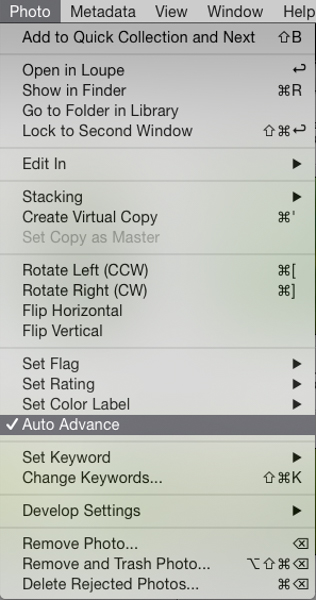
The best way to find your keeper images after a shoot is by using flags. All you need to do is use the keyboard shortcuts; P for pick, and X for reject. This is a super fast way to power through your shoots. The problem is once you pick or reject an image you need to then click a right or left arrow key or mouse click on the next image to make the next selection. That’s where Auto Advance comes in. To turn it on make sure you’re in the Library module, then in the menu under Photo select Auto Advance. With this enabled, each time you flag an image Lightroom will move to the next image in the film strip automatically. This may not sound like a huge thing but believe me, when you have several hundred images to sort through saving one keystroke on each image will save you heaps of time.

Auto Advance

3. Quick Collections

Collections are super important in Lightroom. Using them is the best way to quickly switch between groups of images in the Develop module without switching back to the Library module and digging through your folders. Quick Collections is a term I’ve coined, but honestly this is the quickest way to create a collection. It’s really simple. Just grab a folder of images you want to make a collection from, then click and drag the folder to the collections panel. Once you see a blue bar appear, drop the folder and BOOM, instant collection.

Quick Collections

4. Turning Off Auto Show Panels

To give you more real estate on the screen it’s a great idea to hide the side panels when you are not using them. The perfect place to do this is with left panel in the develop module as most of the time everything you need is in the right panel. The problem is once it’s hidden and every time you mouse over to the left of the screen the panel pops out. That might be fine a couple of times but after a while you’ll find that it becomes annoying and starts to slow down your workflow. It’s easily fixed by right clicking on the panel disclosure triangle, and selecting manual from the drop down menu. This will stop the panel from opening automatically. When you want it back, just click on the triangle to show the panel.

Turn Off Auto Show Panels

5. Decluttering the Lightroom Interface

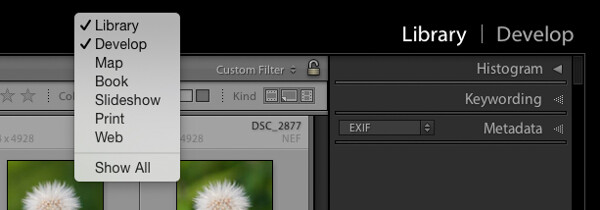
Learning Lightroom can be very overwhelming especially when you see all the modules in the top bar and all the different panels and settings. There is so much going on in the interface, it can lead to what I call Lightroom burnout. The tip here is to turn off the modules and panels you aren’t using by cleaning up the interface. This allows you to only focus on just the things you are learning or need to use regularly. Just right click on the top bar or any of the panels, and in the drop down menu select what module or panel you want to hide, repeat the process to unhide.

Declutter

Like a lot of software there are many ways to achieve the same outcome. I encourage you to keep refining your workflow until you find the perfect system that works for you. Give these five tips a go; they will not only save you time, but help you on your way to achieve what I call Lightroom bliss. That is when you get to a place using Lightroom where there’s no more frustration or confusion, and it’s just all about having fun with your photography and creating beautiful images.

Dancing Gulls

DSC 8638

Currently on for 33% OFF is Johny’s Lightroom Essentials for Landscape Photographers Course. Grab it now, only until December 23rd, 2014.

googletag.cmd.push(function() {
tablet_slots.push( googletag.defineSlot( “/1005424/_dPSv4_tab-all-article-bottom_(300×250)”, [300, 250], “pb-ad-78623” ).addService( googletag.pubads() ) );
} );

googletag.cmd.push(function() {
mobile_slots.push( googletag.defineSlot( “/1005424/_dPSv4_mob-all-article-bottom_(300×250)”, [300, 250], “pb-ad-78158” ).addService( googletag.pubads() ) );
} );

The post 5 Ninja Tips to Speed Up Your Lightroom Workflow by Johny Spencer appeared first on Digital Photography School.


Digital Photography School

 
Comments Off on 5 Ninja Tips to Speed Up Your Lightroom Workflow

Posted in Photography


Photo Ninja adds preliminary support for X-Trans Raw images

03 Oct

AppIcon-2-_dragged_-1.png

Another contender has entered the relatively small ring of Raw converters that can work with Fujifilm’s X-Trans sensors: Photo Ninja. The latest version of this already-capable image editor has added ‘preliminary’ support for X-Trans Raw, and early results seem promising. To see how this $ 129 software performs, click through to see side-by-side comparisons.

News: Digital Photography Review (dpreview.com)

 
Comments Off on Photo Ninja adds preliminary support for X-Trans Raw images

Posted in Uncategorized


2013 Kawasaki Ninja ZX6R 636 Following 2009 Kawasaki Ninja ZX6R Canyon Ride GoPro 960 HERO HD

14 Feb

Check My CHANNEL To See More Videos : www.youtube.com Sport bike Motorbike Motorcycle VLOG Edited By: Michael / FaithfulTrigger Please Check Out My Previous UpLoad. Please Click The Links Bellow : Motorcycle SportBike Sunday Ride w/ The Makabayan Riders GoPro 960 HERO HD Video Test www.youtube.com Riding My 2009 Kawasaki Ninja ZX6R OnBoard Camera GoPro 960 HERO HD Video Test www.youtube.com Street Ride The Makabayan Riders Getting Gasoline OnBoard Camera On Ninja ZX6R GoPro 960 www.youtube.com Street Ride With The Makabayan Riders Motorcycle SportBike GoPro 960 HERO HD Video Test www.youtube.com The Makabayan Riders Filipino Group Riders Fun Under The Sun Canon PowerShot ELPH 110 HS Video Test www.youtube.com Nikon D7000 Nikkor 18-300mm f/3.5-5.6G ED VR Lens UnBoxing First Impression Personal Review www.youtube.com Canon PowerShot ELPH 110 HS UnBoxing Sample Photo & Video www.youtube.com Near Death Experience Close Call Cheating Death Sport Bike Motorcycle www.youtube.com The Chase 2 Kawasaki Ninja ZX6R 2009 & 2013 Playing Around On ACH Canyons GoPro 960 HERO HD www.youtube.com 2009 Kawasaki Ninja ZX6R Monster Edition Street Ride Splitting Lanes Cruising Motorcycle Sport Bike www.youtube.com Angeles Crest Highway 2 Canyon Ride 2009 & 2013 Kawasaki Ninja ZX6R 636 & Ninja 250R www.youtube.com SportBike Ride Kawasaki Ninja ZX6R Splitting Lanes Street Rider GoPro 960 HERO HD Video Test www.youtube.com


17 November, 2012 – Atomos Ninja 2 Review

17 Nov

External video recorders are about more than improved image quality. Find out more in my review of the least expensive model that includes a monitor, the Atomos Ninja 2.


Sean Reid, at ReidReviews, does some of the most in-depth camera reviews of anyone online or in print. He has just published his look at the remarkable Sigma DP2 Merrill, which I raved about here a couple of months ago. If you’re considering one of these Sean’s review is compulsary reading. ReidReviews is a subscription site.


 "Every time I go back to a module I had already seen, I learn additional things.  I have never seen tutorials that have the excellent mix of what the features are, 
how to use them, enough of the under-the-hood information 
and concepts so that I can utilize the features creatively and efficiently, 
and just enough humor to keep the motivation level high.  Wow!" 


The Luminous Landscape – What’s New

 
Comments Off on 17 November, 2012 – Atomos Ninja 2 Review

Posted in News


Taco-Man – Plays Teenage Mutant Ninja Turtles (NES)

05 Nov

www.youtube.com Click here to watch Taco-Man: Plays Raid 2020 (NES) Taco-Man Plays Teenage Mutant Ninja Turtles (NES) Written and Animated by Sam T DIRECTOR’S CHANNEL: www.youtube.com DIRECTOR’S WEBSITE: www.ebolaworld.com Machinima Happy Hour is home to the best animation and shorts Machinima has to offer. Check back every weekend for updates on all your favorite shows like Sanity Not Included, Two Best Friends Play, Freeman’s Mind, Sonic For Hire and more! http – – – – – – – – – – – – – – – – – – – – – – – – – – – – – – – – – – – – – – This video will show you: How to make Machinima How to tell stories through videogames How to play Teenage Mutant Ninja Turtles – – – – – – – – – – – – – – – – – – – – – – – – – – – – – – – – – – – – – – Like Machinima on Facebook! facebook.com Prove your gaming skills on the Respawn Army app therespawnarmy.com FOR MORE MACHINIMA, GO TO www.youtube.com FOR MORE GAMEPLAY, GO TO: www.youtube.com FOR MORE SPORTS GAMEPLAY, GO TO: www.youtube.com FOR MORE MMO & RPG GAMEPLAY, GO TO: www.youtube.com FOR MORE TRAILERS, GO TO: www.youtube.com Tags: yt:quality=high machinima “video games” “Atari Jaguar” “Club Drive” Ebolaworld Taco-Man tacoman Video Games retro old driving classic “how to” teenage mutant ninja turtles “teenage mutant ninja turtles” shredder footsoldier foot clan soldier krang april o’neil Leonardo Raphael Donatello Michelangelo splinter new york manhattan city
Video Rating: 4 / 5

Here’s a background i made for one of the PhysinArmoury directors. It took me around 25mins to make and i tried something new with the text. Hope you guys like the video. Director’s Youtube: www.youtube.com Director’s Twitter: www.twitter.com PhysinTV Hubs: www.youtube.com www.youtube.com www.youtube.com www.youtube.com www.youtube.com www.youtube.com PhysinTV Website: www.physin.co.cc

 
Comments Off on Taco-Man – Plays Teenage Mutant Ninja Turtles (NES)

Posted in Animation Videos


Ask A Ninja – 03.15.11 Smoke Bomb!

11 Nov

You got questions? Ninja’s got answers! Leave those questions in the comments. Buy the theme song and help support indie music! itunes.apple.com
Video Rating: 4 / 5

Find them all, I dare ya. Gilad Chehover – Drums | Guy Bernfeld – Bass | Or Paz – Guitar facebook.com Recording, mixing, pianoing and feminine singing by Eyal Amir ( www.youtube.com ) Drums recorded by Martial Bouhassira le Photography – Dafna Sasson le Second Unit- Tamari Goddard le Editing & After Effects – Or Paz le Animation – Tom Trager
Video Rating: 4 / 5