RSS
 

Posts Tagged ‘Minor’

Sigma releases slew of minor firmware updates for its lenses, mount adapters

25 Jan

Sigma has unveiled a number of firmware updates for its lenses and adapters to improve features and address various issues.

Specifically, Sigma has published firmware updates for its 45mm F2.8 DG DN for Sony E-mount, 100–400mm F5–6.3 DG OS HSM for Canon EF-mount, some of its Sigma SA-mount lenses and its MC-11 SA-E/EF-E mount converter.

The Sigma 45mm F2.8 DG DN for Sony E-mount has received firmware version ’02,’ that Sigma says corrects an issue wherein blur can occur when using the lens with Sony’s in-body image stabilization. You can download firmware version ’02’ for macOS and Windows computers on Sigma’s support page.

The Sigma 100–400mm F5–6.3 DG OS HSM for Canon EF-mount has received firmware version ‘2.06,’ which ‘[optimizes] the operation of Mode 2 in Optical Stabilizer when used in combination with the SIGMA MOUNT CONVERTER MC-21 EF-L.’ It’s not a major update, particularly if you don’t use the MC-21 adapter, but even if you aren’t experiencing the issue, it’s still a good practice to keep your firmware fresh. The updated firmware is available within Sigma’s Optimization Pro program, which works alongside its USB Dock to upgrade the in-lens firmware.

Our initial hands-on with Sigma’s 100-400mm F5-6.3 lens back in 2017.

Sigma has also released firmware updates for a number of its SA-mount lenses. The Sigma 85mm F1.4 DG HSM now has ‘reduced the aperture drive noise’ when used with the MC-21 SA-L adatper, while the Sigma 14–24mm F2.8 DG HSM has improved autofocus when used with the MC-21 SA-L adapter.

Both the Sigma 100–400mm F5–6.3 DG OS HSM and 500mm F4 DG OS HSM lenses for Sigma SA-mount have also received an update that optimizes ‘the operation of Mode 2 in Optical Stabilizer’ when used with the MC-21 SA-L adapter. All of these updates can be downloaded through Sigma’s Optimization Pro program, which is available for macOS and Windows computers.

Lastly, Sigma has released a firmware update for its MC-11 SA-E and EF-E converters. The updates, which can be installed via Sigma’s Optimization Pro program, adds support for the aforementioned lenses in their respective mounts.

Articles: Digital Photography Review (dpreview.com)

 
Comments Off on Sigma releases slew of minor firmware updates for its lenses, mount adapters

Posted in Uncategorized


Sony releases minor firmware updates for a9 II and 24mm F1.4 GM, 135mm F1.8 GM lenses

17 Jan

Sony has released minor firmware updates for its a9 II camera system, as well as its 24mm F1.4 GM and 135 F1.8 GM lenses.

For the a9 II, firmware version 1.01 improves the FTP transfer functionality to speed up how soon after shooting photos the images can be transferred. Additionally, the firmware update corrects a condition where the camera can sometimes turn off at random times when looking back through Raw images and improves JPEG image quality when shooting under certain, unspecified conditions.

Both the 24mm F1.4 GM and 135mm F1.8 GM receive, via firmware ’02,’ improved aperture response when the lenses are attached to Sony’s a9, a9 II and a7R IV camera systems, as well as the ability to select ‘Focus Priority’ from the ‘Aperture Drive in AF” menu when attached to Sony’s a9 camera system.

You can download firmware version 1.01 for Sony a9 II camera systems, as well as firmware version ’02’ for Sony’s 24mm F1.4 GM and 135mm F1.8 GM lenses for mac OS and Windows computers on Sony’s website. Details and instructions on how to install the firmware can be found on the respective download pages.

Articles: Digital Photography Review (dpreview.com)

 
Comments Off on Sony releases minor firmware updates for a9 II and 24mm F1.4 GM, 135mm F1.8 GM lenses

Posted in Uncategorized


Canon releases minor 1.6.0 firmware update for its EOS R full-frame mirrorless camera

06 Dec

It’s been just over two months since firmware version 1.4.0 for the EOS R was released, but Canon is back at it again with a minor firmware update that adds support for a new lens and addresses a number of small bugs.

Firmware version 1.6.0 doesn’t bring any major autofocus changes as firmware version 1.4.0 did, but it does add support for Canon’s new RF 85mm F1.2L USM DS lens and fixes a number of issues:

  • Corrects a phenomenon in which the function or setting value assigned to the control ring may change when the control ring is operated in Eco mode.
  • Corrects a phenomenon in which the camera may stop operating properly during “auto-transfer” when using Camera Connect with a Wi-Fi connection.
  • Corrects a phenomenon in which high-speed synchronization with the use of an external flash may not operate properly depending on the camera’s setting for C.Fn2 “Set shutter speed range”.

Firmware version 1.6.0 is available to download on Canon USA’s website.

Articles: Digital Photography Review (dpreview.com)

 
Comments Off on Canon releases minor 1.6.0 firmware update for its EOS R full-frame mirrorless camera

Posted in Uncategorized


Ricoh announces minor 1.11 firmware update for its GR III camera system

30 May

Ricoh has released firmware version 1.11 for its GR III camera. It’s not a major update, but if you own a GR III, it’s still worth your time to update it.

According to the changelog, firmware version 1.11, an upgrade from 1.10, corrects an issue where playing back a movie on the camera caused the frame rate to drop, as well as an issue where the incorrect firmware was displayed when the GR III was plugged into a macOS computer. Additionally, the update smooths out a number of under-the-hood problems for improved stability.

To update the firmware on your GR III, follow the following steps, as shared by Ricoh:

[1] Provide a formatted SD memory card for the update software. The download file is self-extracting. The following file is extracted. fwdc239b.bin: This is the updated firmware Copy the above Firmware file [fwdc239b.bin] to the root directory in the SD card.
[2] Insert the battery into the camera and confirm the battery is full by battery level indicator then turn the camera off.
[3] Insert the update SD card (prepared in step 1) into the camera and close card cover.
[4] Turn the camera power on while pressing [Menu] button.
[5] [Update the camera firmware] is displayed Select [Execute] by 4-way button and press [OK] button.
[6] The firmware update will start and [Updating] is displayed. *Do not turn OFF the camera while updating.
[7] When update is completed, “Update completed” will be displayed
[8] Turn OFF the camera and remove the SD card from camera. *Confirm the version of firmware with above [How to check version].
[Caution] When updating is finished, the update SD card still contains the Firmware file. If you want to use this card to take pictures, format the card by the camera to delete firmware file first.

You can download the firmware update (28MB) for macOS and Windows computers on the Ricoh GR III download page.

Articles: Digital Photography Review (dpreview.com)

 
Comments Off on Ricoh announces minor 1.11 firmware update for its GR III camera system

Posted in Uncategorized


Fujifilm issues minor firmware update for its X-T3 mirrorless camera

08 Feb

Fujifilm has announced a minor firmware update for its X-T3 mirrorless camera.

Firmware version 2.10 adds the ability to record video files over 4GB in size as a single file. With the new firmware, the file is recorded as a single file so long as the memory card being used is 64GB or larger. If a 32GB card or smaller is used, the filming will continue without interruption, but the files will be separated as the X-T3 has previously done.

The firmware also addresses unspecific ‘defects’ throughout the camera.

To download firmware version 2.10 for the Fujifilm X-T3, head over to Fufjifilm’s download page. More details on how to install the firmware can be found there as well.

Articles: Digital Photography Review (dpreview.com)

 
Comments Off on Fujifilm issues minor firmware update for its X-T3 mirrorless camera

Posted in Uncategorized


Nikon D850 firmware 1.01 fixes long exposure green cast and other minor bugs

18 Jan

Nikon has released the first firmware update for its 45.7 MP full-frame D850 DSLR. Firmware version 1.01 comes with fixes for the following issues:

  • Users exiting the Clean image sensor menu entry after adding it to and entering it via My Menu would be returned not to My Menu but to Setup Menu.
  • Photos taken with On selected for Long exposure noise reduction would sometimes have increased noise or shadows with a greenish cast.
  • Slight aperture reset lag would sometimes occur after shooting at shutter speeds under 1/10 s (type E and PC-E lenses excluded).

These all sound like minor issues, but it is reassuring to know Nikon is taking the continuous improvement of its products seriously. If you own a D850 and want to update to the new firmware, you can find all information and download links on the Nikon website. If you are considering the D850 as your next camera, check out our full review bellow:

Nikon D850 Full Review

Articles: Digital Photography Review (dpreview.com)

 
Comments Off on Nikon D850 firmware 1.01 fixes long exposure green cast and other minor bugs

Posted in Uncategorized


Lessons you can learn from master photographers – Minor White, Ansel Adams, and Syl Arena

09 Jun

The reason I have put pen to paper (fingers to keys) is to share with you some simple tips and knowledge that can be gained from taking a look at some notable photographers. Some would even argue that these people are among some of the most creative and artistically idolized craftsmen who have ever captured light with a box. If you’re just starting out on your photographic journey these tips from some of the masters will hopefully help you along.

Minor White
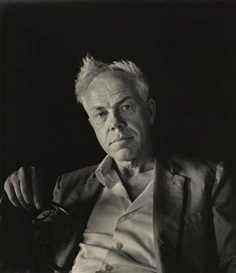
Minor White by Imogen Cunningham

Portrait of Minor White by Imogen Cunningham

Born during the summer of 1908 in Minneapolis, Minor White held jobs as a waiter, bartender, and even worked in military intelligence during World War II. He was a very spiritual man and his beliefs spilled over into his photography. Co-founder of Aperture magazine along with Ansel Adams and other notable photographers, Minor was also an early advocate of the Zone System pioneered by Adams and Fred Archer. An early practitioner of infrared photography, White ventured into an array of subject matter but his work with the small, and often overlooked scenes and objects, such as frost on glass and dilapidated structures remain some of his most acclaimed.

Lessons you can learn from Minor White:

Make photographs all the time, even if you don’t have a camera.

Minor said that he was “always mentally photographing everything as practice”. This is solid wisdom for any photographer of any skill level. Unfortunately, the realities of most of our lives limit the time we get to spend with a camera in hand. The good news is that our artistic mind is never absent. Think about which exposure would blur that passing train just right. What aperture would give me enough depth of field to put that entire table into focus? You’ll be more prepared next time when you have your camera handy.

Don’t overlook small objects and details.

Some of Minors’ most celebrated works were of seemingly mundane or otherwise less than notable subjects. Be on the lookout for details and textures of things that you see every day. This is especially useful if you have an interest in abstract photos.

Drops of rain on my back door glass. Easily overlooked.

Rain on glass small

Simple occurrences made more interesting with a little creative thinking.
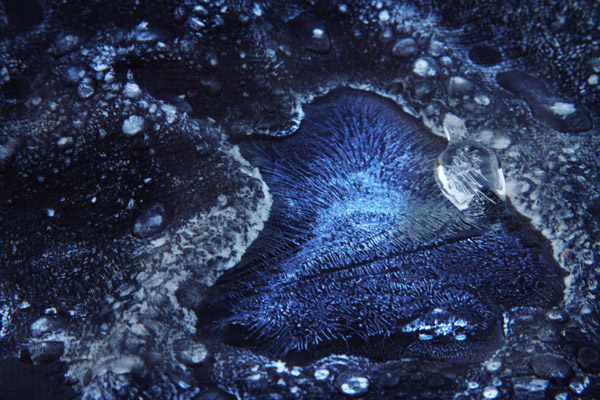
Ice on Firepit small 1

The early morning blue hour made this frost and ice on the cover of my fire pit look otherworldly.

Ansel Adams
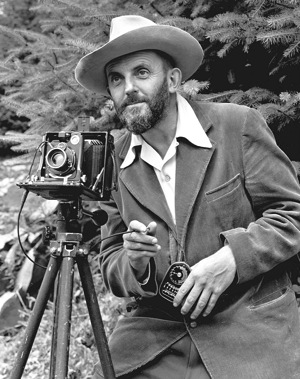
Ansel Adams self portrait

The portrait of Ansel Adams taken by J. Malcolm Greany around 1947

Chances are, you have heard at least something about Ansel Adams, even if that something is that he was a famous early photographer. It’s true, he is considered by more than a few to be one of the best photographers of the twentieth century. There have been volumes filled with the ins and outs of this photographic master. Born on February 20th, 1908 into a well established family in San Francisco, Ansel Adams discovery of photography was unplanned. Ansel was a gifted piano player. An exceptional piano player in fact, so exceptional that he was set to become a professional concert pianist until he decided to commit himself fully to photography. Honestly, the next sections could be titled “What can Ansel Adams NOT teach you?”. The man was such a force in the early days of modern photography that it almost seems unfair to point out only a few practices that will help you improve your own work. However, I have managed to list some basic tips from Ansel Adams that you can put into action in order to make you a better photographer right now.

Lessons you can learn from Ansel Adams:

Slow down

I’m sure you’ve heard this before and possibly have read about the importance of slowing down and making your photographs with more deliberate intentions. Our crushingly convenient modern era of virtually unlimited and relatively low cost film (i.e. digital photography) has lent itself to making us potentially sloppy in our shooting. We sometimes press the shutter button entirely too often in order to get a suitable image for processing. I will shamefully raise my hand and admit that I too am guilty of this spray and pray method of shooting, more so in my earlier photography days right after I made the leap from analog to digital.

I did myself a favor, that I also encourage you to do for yourself, and decided to take things more seriously. Ansel would consider all aspects of his composition: from the elevation and tilt of his camera, the perspective of his lenses, the cast of shadows, even the future effects of the wind on the clouds. There will be times when you are racing against a sunset or you will be trying to catch some specific or fleeting moment and at those times you must shoot quickly and intuitively. Usually, however, we rush for no perceivable reason and often overlook or forget small changes that can make or break an image. So the next time the muse slaps you across the face to make an image, calm yourself down and work the problem. Think about what it is you are trying to do. Put yourself into the correct mindset to make better images and you might find, strangely enough, that your images become better also.

Teach yourself to see the finished product before you make the exposure.

The act of seeing or visualizing is another subject that has been touted by the photographic community many times. Visualization is one of those things that really can’t be brought about by technical instruction in the traditional sense; meaning there are no classes on visualization. Ansel Adams himself remarked that visualization cannot be taught, it is be learned. Think about that concept.

It’s undeniably true that some people learn faster than others when it comes to visualizing finished prints. However, it is equally true that no one started out being able to see in their mind’s eye the final result of a photo. Like most things, it takes practice, as well as patience, and more than a healthy helping of sheer determination. When you begin to see the print before it is made, then really all that stands between you and your vision is the selection of techniques which, similarly, require just as much determination and commitment to master.

Use a tripod

To reiterate, please, use a tripod whenever and wherever possible. A tripod is one of the single most important tools you can use to increase the focal clarity and sharpness of a photograph. Minimizing camera shake and vibration is key to making crisp images, period.

Colorflowersmall

By using a tripod I eliminated the need to worry about vertical camera movement in the macro shot above. Ansel tells us that the ideal tripod is “a cubic yard of solid concrete with a 1/4″ X #20 bolt head sticking out of the top”. If you don’t have a huge block of cement lying around to attach your beloved camera to, then the next best thing is to obtain a quality tripod and use it.

Having some way to keep your camera absolutely still is essential when working with long exposures like the image below.
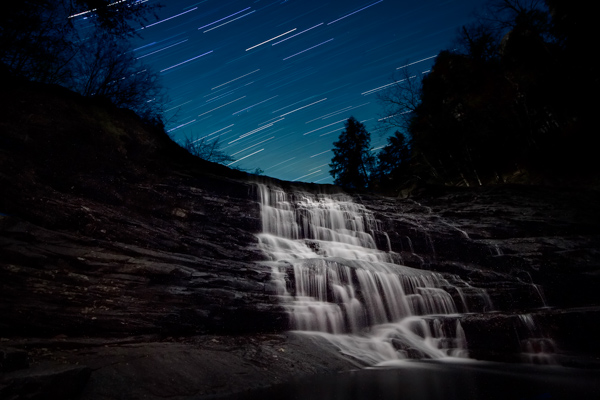
Cane Creek Cascades Star Trail Color3

Exposure time: approximately forty seven minutes. This long exposure time would not have been possible without the use of a tripod.

Using a tripod (correctly) also forces you to, again, slow down and think about the photograph you are intending to make. dPS has a superb article on tripod employment that can be found here.

Syl Arena

Syl Arena

Photo by Vera Franceschi

Syl Arena, is a uniquely humble and genuine person, author, teacher, lecturer, and a speedlite Jedi. He is a magician of sorts when it comes to creating and moulding light. Syl currently resides on the west coast around San Luis Obispo, California. His biography is brief and barely mentions any notable achievements of which there are many. The lessons I learned from him actually lean more towards the philosophical than the technical. That being said, you will find this section contains no real insight from Mr. Arena concerning artificial light manipulation or photographic technique in general. For that I would highly suggest you check out his blog or his new Q&A site for loads of information.

My first introduction to Syl was through the gift of one of his books (thanks Mr. Veneman), “LIDLIPS: Lessons I didn’t learn in photo school“. In that book, this highly educated, highly skilled, highly successful, highly haired photographer simply and truthfully listed page by page the things he was never taught. They ranged from personal revelations on the photographic process to small background stories of some of his location shoots. He mentioned nothing about technique or gear really, just lessons from his life as a picture maker, unpretentious and sincere.

Lessons you can learn from Syl Arena:

Don’t be afraid.

Your limited gear, your perceived skill level, your lack of obvious subject matter, your lack of confidence, fear of trying something new; don’t be afraid of any of these things, or anything else for that matter. You will never have the all of the best gear so don’t let it worry you. Instead, learn to make the best use of what gear you have. You will never learn all there is to know about making photographs so learn what you can, where you can. Feeling like you’ll never get an image just right? You are your own worst critic, so don’t hide your work from the world.

Be inspired, not intimidated.

This is one of the hardest things to overcome, especially if you are just beginning to learn about photography. It’s easy to feel envious or even jealous of other photographers work. This can sometimes lead to convincing yourself that your work has no merit. Chances are, that image you’re envying and ogling over is a product of hard work, patience, diligence, determination, perseverance, and many other great words that the thesaurus can produce.

Viewing other artists work is one of the best ways to grow your own creativity.

Take the work as seriously as you want, but not yourself.

As you grow and learn as a photographer, remember that we all started out understanding absolutely nothing about photography; so keep that in mind the next time someone asks you a question about one of your photographs in a less than learned way. Most likely, you have learned something from someone who was nice enough to teach you. Please pay it forward.

Have you learned any lessons from other master photographers? Who is your mentor? Please share in the comments below.

The post Lessons you can learn from master photographers – Minor White, Ansel Adams, and Syl Arena by Adam Welch appeared first on Digital Photography School.


Digital Photography School

 
Comments Off on Lessons you can learn from master photographers – Minor White, Ansel Adams, and Syl Arena

Posted in Photography


Canon’s premium PowerShot G16 and S120 get minor updates

22 Aug

HR_G16_3Q_CL.png

Canon has announced its PowerShot G16 and S120 premium compact cameras – both of which get only minor updates compared to their predecessors. The G16 has the same lens, sensor, and design, but with Wi-Fi, a DIGIC 6 processor, a 12.2 fps burst mode, and a 1080/60p video mode. The Canon S120 has Wi-Fi like the S110 and gains a slightly faster lens (F1.8-5.7 vs F2.0-5.9), a 12.1 fps burst mode, and 60p video recording. Click through for more.

News: Digital Photography Review (dpreview.com)

 
Comments Off on Canon’s premium PowerShot G16 and S120 get minor updates

Posted in Uncategorized


For A Minor Reflection – Okyrrd

05 Jan

For a Minor Reflection is a post-rock band from Reykjavík, Iceland. Their music is best described as energetic, melodious post-rock, though being the natural creative visionaries they are, the band expand and even subvert their style with almost every song. Song: Okyrrd Artist: For A Minor Reflection Album: Reistu Thig Vid, Solin Er Komin A Loft (2007) Photography by Irene Suchocki.
Video Rating: 4 / 5

See The Full Dead Rising 2: Off The Record Show Here!!! ? goo.gl ? Dead Rising 2: Off The Record – Walkthrough Part 31 – Even More Poker! In this episode Chris Jay takes the survivors from the poker game back to the safe house and plays even more poker! =-=-=-=-= Director =-=-=-=-= By Chris Jay: http: goo.gl/IBKzm =-=-=-=-=-=-=-=-=-=-=-=-=-= ?Dead Rising 2: Off The Record ? At Captivate 2011, Capcom’s annual press show, the company announced that it was releasing Dead Rising 2: Off the Record, as a reinterpretation of the game with Frank West from the original Dead Rising as the main character. The game was released for the same consoles on October 11 in North America, October 13 in Japan, and October 14 in Europe for a discount retail price. Off the Record is intended as a complete reimagining of Dead Rising 2, with new missions, cutscenes, environments, enemies, and weapons. The photography mechanic from the first Dead Rising is also included. There are technical and system upgrades, such as optimization of loading times and improved network performance. Off the Record also features a new sandbox mode. This allows players to explore Fortune City without the obstacle of time. Off The Record has received mostly positive reviews, with the changes and additions both praised and panned. Developer ? Capcom, Blue Castle Games Publisher ? Capcom Genre ? action-adventure horror-comedy Release Date ? October 11th, 2011 Platforms ? Xbox 360, PS3, Microsoft Windows
Video Rating: 4 / 5