RSS
 

Posts Tagged ‘Mini’

Which instant camera should I buy? 2016 Instax mini roundup

24 Nov

Instax Roundup 2016

Let’s face it, it seems a little odd that a site called Digital Photography Review would dare take a step backward in to the world of analog photography. But truth be told, we all were delighted by handling physical prints from these cameras. Some of our editors began their careers in a darkroom, and with Instax mini images there’s just a little zest of the ‘magic’ of development as an image first appears. After that’s over, you’re left with a business-card sized talisman, artwork, souvenir, memory, or whatever else a photograph can become.

It’s not just us who are hooked on the smiles and joy instant photography can bring; sales of Fujifilm Instax cameras are expected to reach 5 million units this year, and they’re not even the sole manufacturer of cameras that use the format. 

Plus, the affordable options make great gifts, and are some of the cheapest ways to give the gift of photography over the holiday season. So we wondered: which one is best? 

We decided to step into the world of instant for a few days to find out which camera is best for gifting to newcomers, and which is best for a photographer to gift to themselves. We selected eight cameras that all use the Instax mini format – which is now available in color and black and white (purists rejoice!) – and spent a little time with each to find out which is most fun, and which one is most rewarding. 

The contenders are:

Fujifilm Instax mini 8
Fujifilm Instax mini 70
Fujifilm Instax mini 90
Lomography L’instant
Lomography L’instant Automat
Lomography LC-A+ Instant Back
Leica Sofort
MiNT InstantFlex TL70

Articles: Digital Photography Review (dpreview.com)

 
Comments Off on Which instant camera should I buy? 2016 Instax mini roundup

Posted in Uncategorized


Godox launches mini radio flash unit for Sony mirrorless cameras

23 Nov

Flash and accessory manufacturer Godox has announced a new small flash unit that it says is designed to go with the Sony mirrorless range of cameras. The Godox TT350S features 2.4GHz radio control and TTL exposure metering, and offers a guide number of 36m@ISO 100. The company says that the unit is compatible with the Sony a7R II, a7R, as well as the a58 and a77ll SLT cameras. Some RX models are also able to pair with the unit.

The radio controlled system allows the TT350S to work alongside other Godox radio flash units and studio heads, and the flash can operate as a master or slave in multiple-head set-ups. Three groups are programmed into the control system along with 16 channels, while the maximum working range is said to be 30m. High speed sync is provided via an HSS mode that can work with shutter speeds of up to 1/8000 sec, and the unit can be switched from TTL to manual operation to make use of 22 output levels from 1/128th power. An automatically zooming head covers focal lengths of 24-105mm, and a hinge allows the head to tilt but not to swivel.

The TT350S is powered by two AA batteries which the company claims should be good for 210 full power bursts. There is no official pricing yet, but one UK ebay seller is offering pre-orders for £73 and says delivery is expected early January.

For more information about the TT350S visit the Godox website.

Articles: Digital Photography Review (dpreview.com)

 
Comments Off on Godox launches mini radio flash unit for Sony mirrorless cameras

Posted in Uncategorized


Lume Cube returns to Kickstarter with the Life Lite mini LED cube

01 Nov

Lume Cube launched the first generation of its high-powered LED-lighting cube for smartphones and action cameras back in 2014. Now, the company has returned to Kickstarter to raise funding for its follow-up product Life Lite. Compared to the original Lume Cube the Life Lite is about half the size and weight but, at 1000 lumens, still offers approximately 70% of the Lume Cube’s light output. 

As before, you can control one Life Lite, or several units, via a smartphone app and a Bluetooth connection. The Life Lite is waterproof down to 10m/33ft, making it suitable for filming surfing and other water-based activities. There are multiple levels of strobe mode for creative lighting effects, a physical multifunction button and a custom fresnel lens. The emitted light has a color temperature of 5600K and the light is charged via a microUSB connector. A full charge gives you approximately 30 minute of illumination. 

The Life Lite also comes with an internal magnet and a standard tripod mount, allowing for attachment to a wide range of metallic objects and camera support systems. You can secure a Life Lite now by pledging $ 39 on the project’s Kickstarter page. Shipping is planned for March 2017. 

Articles: Digital Photography Review (dpreview.com)

 
Comments Off on Lume Cube returns to Kickstarter with the Life Lite mini LED cube

Posted in Uncategorized


Fujifilm to introduce monochrome instax mini film

06 Sep

Fujifilm has announced monochrome film for its instax instant cameras and Share printer. It will go on sale worldwide in October, and like the color film, will be sold in cartridges of 10 sheets each. No price has yet been given for the monochrome film, but currently a twin pack of color film with 20 sheets goes for about $ 12.

Press release

“instax mini film Monochrome”
A new film that expands the possibilities of photographic expression using instax film

September 6, 2016

PHOTOKINA 2016, COLOGNE, GERMANY, September 20, 2016—FUJIFILM Corporation (President: Kenji Sukeno) is pleased to announce the launch of the “instax mini film Monochrome”, which will be released worldwide in October 2016.

The “instax mini film Monochrome” responds to the increasingly sophisticated demands of users, enabling them to expand the artistic potential of their photographic expression and adding a further dimension of fun to use instax cameras and films.

Product Name: “instax mini film Monochrome”

Availability: From October 2016

Main features:

  • Includes 10-frame, printable instax monochrome film.
  • Expands the potential for artistic, fashion and street photography.

Fujifilm is committed to offering new products and services that meet various consumer needs by leveraging innovative technological advancements. Fujifilm is also dedicated to enhancing the enjoyment of photography worldwide, and encourages users to experience the value of shooting, preserving, displaying and gifting photo images that deliver the message of “enrich your life with photographs.”

Articles: Digital Photography Review (dpreview.com)

 
Comments Off on Fujifilm to introduce monochrome instax mini film

Posted in Uncategorized


Build-A-Bug: Mini VW Beetle Model Made of LEGO Blocks

21 Jun

[ By SA Rogers in Design & Products & Packaging. ]

lego bug main

Assemble a miniature model of the iconic Volkswagen Beetle with a new kit from LEGO, reproducing the car in minuscule detail from a surfboard-holding roof rack to a four-cylinder air-cooled engine and fuel tank. The VW Beetle Creator Expert Kit comes with 1,167 pieces including the car’s characteristic round headlights, curved fenders and a body painted vivid sky blue.

lego bug 7

lego bug 5

lego bug 8

On the outside, you’ll find front and rear bumpers, license plates, flat windshields, exhaust pipes, side mirrors and virtually every other feature you’d see on a full-sized version of the car, down to a couple logos and the kind of bumper stickers you see on surfers’ cars in Malibu. Open the front lid to reveal the spare tire, or the rear to access the engine bay.

lego bug 9

leg bug 3

lego bug 6

The beige interior forward-tilting seats, a dashboard and steering wheels, and if you tilt the rear seat forward, you’ll find a storage space hiding a fabric beach towel. The top of the car can also be removed to access the inside, and included accessories like a cooler and surfboard can be mounted to the roof rack.

lego bug 1

lego bug 10

lego porsche

The kit is available for $ 99.99 USD on July 14th for Lego VIPs, with everybody else getting access on August 1st. This release comes on the heels of a similarly detailed Porsche ‘911 GT3 RS’, a Technic kit of 1:8 scale with 2,704 pieces costing three times as much. That kit is still sold out, so LEGO fans who want the Beetle kit for their own collections will have to act fast.

Share on Facebook


[ By SA Rogers in Design & Products & Packaging. ]

[ WebUrbanist | Archives | Galleries | Privacy | TOS ]


WebUrbanist

 
Comments Off on Build-A-Bug: Mini VW Beetle Model Made of LEGO Blocks

Posted in Creativity


mini Plaster Hand is a camera mount on a belt

10 Jun

Hong Kong-based company miniorenji has introduced a new camera mounting product called ‘mini Plaster Hand.’ Unlike tripods, mini Plaster Hand is a camera mount on a belt designed to strap around rails and poles for steady shots in areas where tripods are inconvenient or banned. The mount can be used with or without a ball head.

Mini Plaster Hand is designed for use with all camera types, according to miniorenji, including point-and-shoot, mirrorless and DSLR cameras. The model is equipped with a flat plate and 1/4-inch screw; the plate can be placed on flat surfaces or strapped onto rails using the belt. When strapped onto a rail, a camera bag or other weighty item can be attached to the belt strap as a counterbalance weight. Mini Plaster Hand weighs 103g / 3.6oz and measures 60mm wide x 82mm high x 12mm deep (2.4 x 3.2 x 0.5-inches).

Minioreji is seeking funding for production on Indiegogo, where you can pledge $ 40 for a mini Plaster Hand unit and 1.2kg ball head.

Via: Indiegogo

Articles: Digital Photography Review (dpreview.com)

 
Comments Off on mini Plaster Hand is a camera mount on a belt

Posted in Uncategorized


Takeway launches R1 Mini Ranger Clampod for action cameras

04 Jun

$ (document).ready(function() { SampleGalleryV2({“containerId”:”embeddedSampleGallery_0938055042″,”galleryId”:”0938055042″,”isEmbeddedWidget”:true,”standalone”:false,”selectedImageIndex”:0,”startInCommentsView”:false,”isMobile”:false}) });

Camera clamp manufacturer Takeway has announced a miniature version of its T1 Clampod that it is aiming at the action cam market. The R1 Mini Ranger Clampod features a screw-close clamping jaw that can be adjusted for gripping on to flat surfaces or around cylindrical poles. The jaw offers a choice of three clamping ‘teeth’ so users can select the most appropriate for the type of surface the clamp is being attached to.

The head features a quick release plate that allows cameras to be attached and detached easily – Takeway claims the R1 can cope with a maximum load of 300g. Its load capacity makes it suitable for small to medium sized flash units too, such as the Canon Speedlite 430EX RT, though not top-of-the-range models. The aluminum clamp itself weighs 73g, and the jaw can attach to tubes of between 10-32mm in diameter and flat surfaces of between 5-32mm thick.

The Takeway R1 Mini Ranger Clampod will cost £29.94/€39.95. For more information visit the Takeway website.


Press release:

Kenro unveils new additions to Takeway range

Kenro Ltd, the specialist photo & video distributor, has expanded its range of Takeway camera clamps with the introduction of the new R1 Mini Ranger Clampod, together with an expanded range of Clampod accessories.

Kenro is the UK and Ireland’s exclusive distributor of the versatile Takeway Clampod mini tripod and clamping system.

Following hot on the heels of its ingenious larger brother – the T1 Clampod introduced last year – the new R1 Mini Ranger version is aimed at action cameras, mobile phones and GPS devices. SRP is just £29.94.

It is ideal for fixing onto cycle or motorcycle handlebars for filming outdoor adventure activities, but it will actually clamp onto anything 5-32mm thick so the applications are numerous. The R1 Mini Ranger has a quick release plate so an action camera or other device can be quickly loaded into place.

It can be used as a camera support aid in inaccessible places where handheld or tripod use is not possible, plus it can also be used with a flex neck for precise positioning in even more difficult places.

Clampod accessories, also recently launched, include:

Tablet Holder (TY102)
The optional tablet holder is compatible with tablets from 7” to 10.2” – such as iPad, Note 10.1 etc. The stored holder is only 15 cm x 6.4 cm, the max opening for tablet width is 20cm. SRP is £17.94.

Smartphone Holder for Sports (TY103)
This is a smartphone holder for dynamic use – such as motorcycles, bicycles, scooters, skateboarding etc. Even with violent shaking, a smartphone will not easily fall out. It is designed for smartphones from 4” to 5.7” in size. SRP is £15.54.

G1 Mini Tripod (TYG1)
The G1 is a table-top device which fits direct to cameras etc, via its 1/4” screw thread. It is designed to be used with the TYB01 Ball Head and T1 Clampod. Size folded: 15 x 11 x 7cm. Size extended: 9.5 x 4 x 2.4cm. SRP is £17.34.

Flex Neck (TYFN01)
The Flex Neck is 11cm long and fits the camera plate of the T1 or R1 Takeway Clamps along with the TYB01 Ball Head. Its bending action enables the user, in conjunction with a Takeway Clamp, to operate at more extreme angles. SRP is £22.14.

Ball Head (TYB01)
This mini Ball Head is designed mainly for use with the Takeway R1 Ranger, G1 Tripod or Flex Neck. It has a load capacity of 3kg and features a Quick Release Plate. SRP is £22.74.

Paul Kench, Kenro’s managing director, says: “When we introduced the original T1 Clampod, it provided users with a great looking, excellent quality and very handy device to clamp digital cameras to virtually anything and it has been very well received.

“This success led Takeway to design a smaller clamp aimed at the action cam and handheld device user, and the R1 Mini Ranger Clampod fits the bill perfectly. With its extended range of accessories, Takeway now has an extremely versatile and cost-effective device clamping system.”
All quoted prices are SRP guide, including VAT.

Articles: Digital Photography Review (dpreview.com)

 
Comments Off on Takeway launches R1 Mini Ranger Clampod for action cameras

Posted in Uncategorized


A small project: iFixit Samsung NX Mini disassembly guide

17 Apr

iFixit Samsung NX Mini disassembly guide

As far as small cameras go, the Samsung NX Mini is one of the most impressively small we’ve come across. The Mini manages to fit a 20.9MP 1″-type sensor into a super-slim body that’s just 22.5mm thick. It’s been discontinued, but when we saw iFixit post a disassembly guide for the littlest NX we just had to see what was inside. See some of the highlights from a safe distance here, and if you’re feeling adventurous head over to iFixit and find a step-by-step guide to taking the NX Mini apart.

iFixit Samsung NX Mini disassembly guide

After removing the battery and various screws from the battery compartment and external flash port, you’ll be ready to unscrew the lens mount. That teeny, tiny lens mount.

Image courtesy of iFixit

iFixit Samsung NX Mini disassembly guide

Removing a few more screws from the bottom of the camera frees the front housing, revealing the sensor and NFC chip. Relative to the camera body, the 1″-type sensor looks pretty big.

Image courtesy of iFixit

iFixit Samsung NX Mini disassembly guide

The NFC target lives on top of the battery compartment, which can be removed as seen here to reveal the motherboard underneath. The sensor cover has also been removed at this stage, giving a better view of the 20MP chip underneath. And that’s the next bit to go…

Image courtesy of iFixit

iFixit Samsung NX Mini disassembly guide

A little spudger action frees the sensor module from the motherboard so it’s ready to be carefully removed.

Image courtesy of iFixit

iFixit Samsung NX Mini disassembly guide

There’s one more screw to remove to disconnect the motherboard, and just above it is the Wi-Fi antenna. Of course, you’ll want to carefully disconnect the ribbon cables connected to the motherboard before it goes anywhere.

Image courtesy of iFixit

iFixit Samsung NX Mini disassembly guide

This step requires some careful spudger work to release the ribbon cables…

Image courtesy of iFixit

iFixit Samsung NX Mini disassembly guide

…and once those have all been removed the motherboard is free.

Image courtesy of iFixit

iFixit Samsung NX Mini disassembly guide

The flash assembly is the last piece to come out of the chassis, and takes with it the Wi-Fi antenna as it’s removed.

Image courtesy of iFixit

iFixit Samsung NX Mini disassembly guide

The tilting LCD twists free of the housing and there you have it – one tiny camera in lots of tiny pieces. Check out the whole guide on iFixit for the play-by-play disassembly instructions.

Image courtesy of iFixit

Articles: Digital Photography Review (dpreview.com)

 
Comments Off on A small project: iFixit Samsung NX Mini disassembly guide

Posted in Uncategorized


Mini Modernists: 15 Designer Toys for Young Architecture Fans

22 Mar

[ By Steph in Design & Products & Packaging. ]

mini modernist blokoksha 2

Foster an appreciation for fine modernist architecture and design from an early age with Bauhaus dollhouses, Eames block sets, mini Corbusier lounge chairs and urban planning board games. There’s a minimalist dollhouse that doubles as a coffee table, a Matryoshka-style set of paper modernist estates and of course, the pleasingly all-white Architecture Studio set by LEGO. Sure, you can get these architectural toys and games under the pretense that they’re for your kids, but we all know it’s really you who’ll be playing with them.

Home Puzzle, Babel Tower Game & Archiblocks by Cinq Points
mini modernists home puzzle 1

mini modernists home puzzle 2

mini modernists home puzzle 3

mini modernists babel tower game

mini modernists home puzzle 4

A 3D puzzle made up of 17 minimalist white pieces that fit together into a house shape, the ‘Home Puzzle’ by Cinq Points is greater than the sum of its parts. The individual pieces are made to resemble pieces of furniture as well as buildings in a town, so kids can use their imagination to change the purpose of each shape. The Babel Tower game is like an architectural version of Jenga, while the Archiblocks construction set is “designed to capture modularity, balance and composition, their form giving them an intergenerational appeal.”

Qubis House Modernist Doll House & Coffee Table
mini modernist qubist 1

mini modernist qubis 2

mini modernist qubis 3

Functioning as a modernist dollhouse for kids and a coffee table for adults, the Qubis Haus features sliding panels made of wood and perspex so the ‘architect’ can create various room layouts. Made of solid birch, it has clean modern lines honoring a period of architecture that’s not often seen in doll houses.

Dollhouse-Sized Modernist Furniture
mini modernist furniture 1

mini modernist furniture 2

mini modernist furniture 3

Not just any old furniture should be placed inside a modernist dollhouse. From the Vitra Design Museum Shop comes a series of iconic pieces in miniature form, true to scale and replicating the originals down to the smallest details including the materials, the grain of the wood and the reproduction of the screws. The collection includes chairs by Charles Eames, Marcel Breuer, Frank Lloyd Wright and Mies van der Rohe.

Eames House Blocks

mini modernist eames blocks

mini modernist eames blocks 2

mini modernist eames blocks 3

Bring the famous Eames House and Studio to your coffee table or playroom with this “authentically engineered” set of 36 alphabet blocks created in direct collaboration with the Eames family. The colors were so carefully matched to the original, the block set requires 29 separate hand-pulled print passes when it’s being produced.

Blokoshka: A Modernist Architectural Matryoshka

mini modernist blokoshka 1

mini modernist blokoksha 2

mini modernist blokoshka 4

Rather than dolls, this nesting paper set reveals one modernist building after another, getting successively smaller and smaller as you pull them apart. The Blokoshka set by ZUPAGRAFIKA comes pre-cut and pre-folded so you can put them together and take them apart as many times as you like (or until the paper starts to disintegrate.) “Inspired by the former Eastern Bloc concrete modernist estates, Blokoshka is a playful tour inside out the ‘sleeping districts’ of Moscow, plattenbau constructions of East Berlin, Warsaw estates built over the ruins of old ghetto, and the panelak blocks in Prague.”

Next Page – Click Below to Read More:
Mini Modernists 15 Designer Toys For Young Architecture Fans

Share on Facebook


[ By Steph in Design & Products & Packaging. ]

[ WebUrbanist | Archives | Galleries | Privacy | TOS ]


WebUrbanist

 
Comments Off on Mini Modernists: 15 Designer Toys for Young Architecture Fans

Posted in Creativity


How to Shoot a Pine Cone Time-lapse: A Mini Tutorial

03 Mar

This week over at our sister site, SnapnDeals, we have a great deal running where you can get 20% off Time-Lapse Photography: A technical and practical time-lapse tutorial guidebook for all skill levels designed to get you out the door and shooting now!

How to Shoot a Pine Cone Time-lapseIn this lighthearted mini-tutorial we’ll take an 80/20 approach to creating a simple time-lapse of a common pinecone (in this case a Black Pine).

For a more general introduction to time-lapse photography view: Time-lapse Photography Tutorial: An Overview of Shooting, Processing and Rendering Time-lapse Movies.

You already know that pine cones are nature’s mysterious seed pyramids, but did you know they have a gender? Yes, there are both female and male pine cones. Did you also know that pine cones are an interesting time-lapse subject? Go get a female pine cone, and give it a shot. Let this whole male/female Nature Notes youtube revelation be your last straw, or should I say pine needle that breaks your procrastination. Here was my result:

Here’s how to make your own pine cone time-lapse:

Step 1. Find pine cones

Collect some good looking pine cones (preferably female: watch the Nature Notes video above). Look for good cones in fresh condition, without rot or discoloration, uniform shape, and bottoms that provide support for upright standing. I’d grab two or three for variety, and a dog chew backup. Here’s an example of an open found pine cone.

Pinecone bts1

Step 2. Make them close

Pine cone motion is all about moisture, it’s a hydromorphic response. In high moisture environments pine cones close. In low moisture, over time, they open. This video showing both opened, and closed cones, with visible moisture is a perfect learning example.

To close a cone, simply put it in a cup of water and leave it for an hour or two. That’s it.

Step 3. Prepare for the opening shot

Key thoughts: Steady (consistent) lighting, simple background, camera position, power. Let’s take these one by one.

Steady light: Light fluctuations in a sequence of time-lapse images are bad, as they create unappealing bright and dark frames in the rendered movie, better known as time-lapse flicker (learn much more about that here). Chose a room that you can cordon off for a day or so to prevent disturbances, and block all light from any windows. Move any light sources near the photo white box, to provide a constant uniform brightness, then adjust their positions to eliminate shadows.

Background: Completely up to you creatively. I chose a minimal white background, using a simple inexpensive white box. By slightly overexposing each shot, you can effectively eliminate almost all appearances of a background.

Camera position: Choose one or more angles from which to shoot. I chose first, a front downward angle, and a second fully vertical angle from above.

Power: A pine cone bloom from closed to opened may last anywhere from 8-24 hours, so you’ll need an AC adapter for your camera to make sure it keeps going.

Step 4: Craft the time-lapse and begin

We talked a little bit about avoiding stray light sources in the room where you are shooting, as these changes introduce time-lapse flicker into the image sequence. Having your camera in any automatic mode may also introduce flicker. To get the best possible consistent exposure over many frames, shoot in manual mode, set a manual white balance, manual ISO, and manual focus. In the example video above I used a Sony A7s and FE 90mm f/2.8-22 Macro G OSS lens.
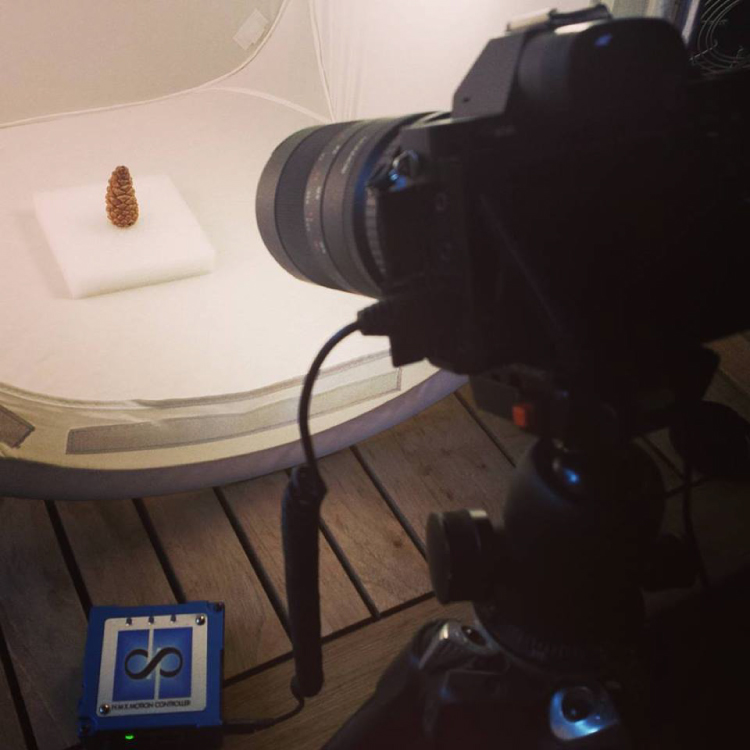
Pine cone bts2

Exposure: Six seconds at ISO 200, f/22, produced a great image, and just started to wash out the brighter white background. You can push the whites a little further in post-production, and really create a clean image background.

Time-lapse interval: To be honest I didn’t know how long I would be shooting, or when the action would begin. Times will vary, as no two cones and no two climates, or indoor humidity levels are exactly alike. The side angle pine cone shot took from about 9:00 a.m., to 3:00 a.m. the following morning, approximately 18 hours. I chose a 30 second interval, and set the shot count to infinity, so it would continually shoot until it was manually turned off. When unsure of how quickly to shoot, or how many frames to capture, it’s always good to capture more, rather than less. You can always speed up a time-lapse with too many frames, but if you don’t get enough shots and miss important movement, you are usually stuck.
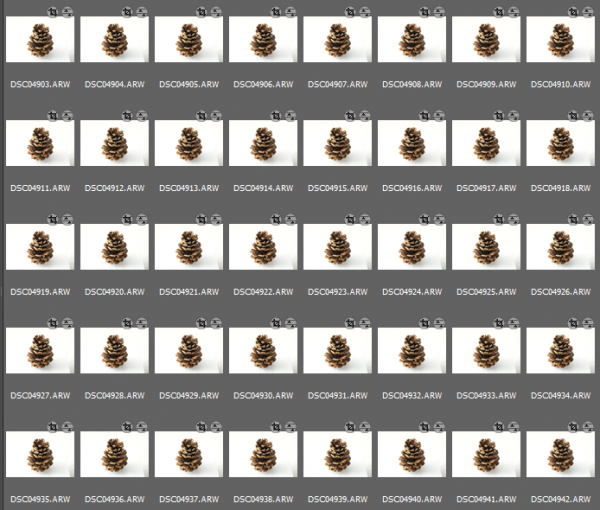
Capture

These 30 second exposures, over 18 hours, resulted in about 3,246 images. That’s a lot of frames. Pine cones are slow. Much slower than I anticipated, and my interval was pretty fast capturing more frames than necessary for smooth movement. For your experiment I’d recommend increasing your interval time to about 50 seconds, or one minute. Having a longer interval time will result in less photos, and with the slow moving nature of the bloom it will not result in a jumpy or less smooth cone opening video.

Step 5: Adjust the exposures and render the time-lapse

The beauty of Lightroom, or Adobe Bridge and other applications, is that you can adjust the exposure on a single reference photo, then apply those changes across all your photos. Simple – and so is rendering the basic time-lapse. There are several different applications to choose from, to turn your collection of images into a video – varying from free and inexpensive, to not so inexpensive. Fear not, you can learn much more about time-lapse rendering in previously mentioned article, but the diagram below provides an overview of time-lapse software and applications.
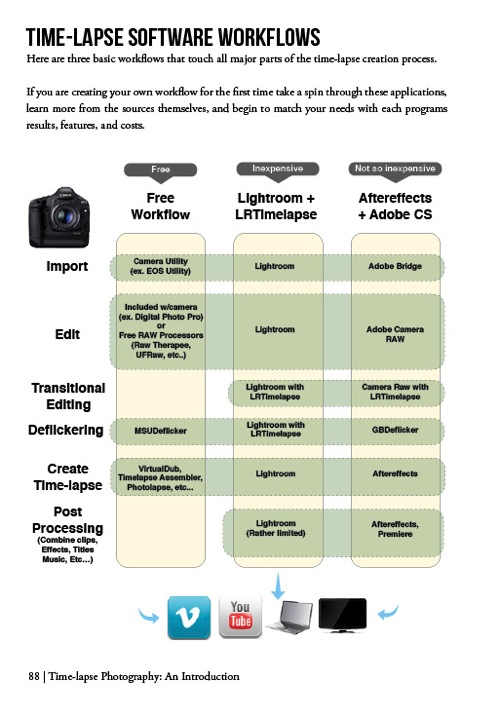
Timelapse Photography by Ryan Chylinski Book Preview6

Patience is your most valuable commodity for this project. From pine cones to The Milky Way, I hope this mini peak into the world of creative time-lapse photography has ignited your curiosity to learn more. Time-lapse has a way of slowing the world for the photographer, while at the same time accelerating it for everyone else. I shoot time-lapse because it alters the way I think, it challenges my view of the world, and teaches me things I can bring back and share with everybody else. It’s a real honor and privilege to partner with you on this training journey. I hope is helpful and I would love to hear from you in the comments below.

This week over at our sister site, SnapnDeals, we have a great deal running where you can get 20% off Time-Lapse Photography: A technical and practical time-lapse tutorial guidebook for all skill levels designed to get you out the door and shooting now!

googletag.cmd.push(function() {
tablet_slots.push( googletag.defineSlot( “/1005424/_dPSv4_tab-all-article-bottom_(300×250)”, [300, 250], “pb-ad-78623” ).addService( googletag.pubads() ) ); } );

googletag.cmd.push(function() {
mobile_slots.push( googletag.defineSlot( “/1005424/_dPSv4_mob-all-article-bottom_(300×250)”, [300, 250], “pb-ad-78158” ).addService( googletag.pubads() ) ); } );

The post How to Shoot a Pine Cone Time-lapse: A Mini Tutorial by Ryan Chylinski appeared first on Digital Photography School.


Digital Photography School

 
Comments Off on How to Shoot a Pine Cone Time-lapse: A Mini Tutorial

Posted in Photography