RSS
 

Posts Tagged ‘LIVE’

Live coverage of the Google Pixel 2 launch on DPReview

05 Oct

10:45am PT

That’s all folks! You can learn more about these products on the Google Store right now. As for us, we’ll be running over to get our hands on the new Pixel 2 and Pixel 2 XL in person, and see if they really are the world’s best smartphone camera. Stay tuned or our hands-on take later today!

10:43am PT

The Google Clips camera looks for clear moments to capture. You can clip it anywhere. It features an F2.4 lens, 130° field of view, and captures short ‘clips’ that can be saved as motion photos, videos, or high res stills. You can choose which high-res still to save by navigating through a clip. When reviewing clips on your phone, just swipe right to save any one.

Will cost $ 250 and is “coming soon.”

10:40am PT

“A camera that takes photos for you, so you can enjoy the moment and get shots you could never get before.”

Starts with an AI engine at the core of the camera. Google Clips looks for “moments” by analyzing the scene and capturing photos automatically, so you can be part of the moment you’re capturing.

10:38am PT

One more photography update, having to do with candid photography that lets you be part of the moment as the photographer.

Meet Google Clips: a new lifelogging-style camera designed with parents and pet owners in mind.

10:37am PT

Here’s something they did NOT mention when talking about the new screen: the new Pixel 2 wide gamut display claims to offer “100% DCI-P3 coverage.” While OLEDs often offer close to full DCI-P3 coverage, our Technology Editor Rishi Sanyal is a bit skeptical of the 100% figure and wants to see an actual CIELAB diagram. Some estimates ‘cheat’ by counting extended gamut outside of the P3 space in one color to make up for the lack of gamut coverage in another color. We’ll have to wait and see, but most OLED coverage estimates max out at 99% DCI-P3 coverage.

Plus, we’re still waiting to find out if the Pixel 2 phones offer proper color management to provide accurate color on these wide gamut displays. Even the original Pixel phones offered wide gamut displays, but displayed wildly inaccurate colors because of the lack of proper color management and display profiles.

10:30am PT

Worth noting about that DxOMark score of 98: that’s an aggregate of Photo and Video scores.

The Samsung Galaxy Note 8 still beats the Google Pixel 2 in the Photo category, scoring 100 to the Google Pixel’s 99. The Pixel’s insane Video score of 96 is what gives it that high overall score. In Video, the iPhone 8 Plus scored an 89 and the Note 8 only scored an 84. We’re guessing this high score is largely due to the smooth video the combination of optical + electronic stabilization enables.

Here’s DxOMark’s full review.

10:27am PT

Feature breakdown:

  • Ultra Vivid OLED Display
  • Super Fast Charging
  • Water Resistant
  • The Fastest Fingerprint Sensor
  • Smartest Assistant
  • First Phone with Google Lens
  • Exclusive AR Stickers
  • World’s Highest-Rated Camera

Pre-orders start today.

10:23am PT

12MP F1.8 rear camera with OIS. Smaller 1/2.55″ sensor though (1/2.3″ on last year’s models). HDR+ still takes a burst of shorter exposure shots to preserve highlights, then combines (averages) them to reduce noise. The latter essentially simulates the effect of a larger sensor. While this works very well for static scenes, it can be problematic for moving objects like running kids.

Portrait mode in the Pixel 2 uses Google’s computational photography tech. No second camera required. Just split pixels on the sensor combined with machine learning. This allows both the front and back camera to use Portrait Mode.

It’s actually quite clever: the phone creates a rudimentary depth map using Dual Pixel technology and machine learning. Or, as our Tech Editor explains it, “The pixels are split just like on Canon Dual Pixel sensors. And the Samsung Galaxy. It’s used for phase-detect AF (fast focus) as well as to create a rudimentary depth map using the left and right perspectives viewed from behind one lens. Smart.”

And you no longer have to move the camera upward while taking a photo in Portrait mode. You can just snap a shot. This would make it work better with slightly moving subjects compared to the original Pixel phones. Sadly, Portrait mode is not simulated in real-time as it is on recent iPhones.

Oh, and the Video mode uses OIS and EIS at the same time. We’ve seen this on 1″-type compact cameras and some ILCs like Canon M-series and the Olympus E-M1 Mark II, but it’s a first for smartphones. This should lead to incredibly smooth video!

10:20am PT

Pixel camera now!

“With Pixel 2, we have reimagined smartphone photography. DxOMark has issued Pixel 2 an unprecedented score of 98.”

That trounces the iPhone 8 Plus and Samsung Galaxy Note 8 which both scored 94.

10:18am PT

Augmented reality updates now. Very similar to the AR updates we saw with Apple and the new iPhones—inserting furniture or games into the real world through augmented reality.

Something ‘exclusive’ to Pixel 2 are AR stickers that interact with the world and with each other… because Google needed something to compete with Apple’s Animojis.

10:14am PT

Talking about Google Lens now. Using pictures, machine learning technology, and Google Assistant to pull information out of images and tell you all about them. Like pulling phone numbers off a flyer, or… telling the difference between muffins and chihuahuas (their example, not ours).

10:10am PT

Squeezing the phone triggers Google Assistant, so you can ask it to take a selfie. And it uses Machine Learning to tell if that squeeze was “intentional.”

Still waiting on more comprehensive updates about the camera. Hopefully it’s not all software and AI-based improvements. We’re really hoping for some hardware updates like OIS and maybe a bigger sensor or better processor.

*fingers crossed*

10:05am PT

Pixel 2: Full HD OLED display on the smaller 5-inch model. 100,000:1 contrast ratio. More than twice the contrast ratio of phones in its class (save for the iPhone X). Comes in three colors: Kinda Blue, Just Black, and Clearly White.

Pixel 2 XL: Less bezel, ‘gently curved’ screen, wide color gamut display, integrated circular polarizer so you can view the screen through sunglasses, 538 ppi (up from 534 ppi in the first Pixel XL). Comes in two colors: Just Black and ‘stylishly simple’ Black and White. We’re told the screen is optimized for VR, which may mean a pixel arrangement more amenable to high magnification.

“We don’t set aside better features for the larger device.” OOOO sick burn on Apple.

And yes, they are both IP67 dust and water resistant! On par with the iPhone, but a bit short of Samsung’s IP68. That’s a big upgrade from the IP53 rating of last year’s phones (what do IP ratings mean?).

10:00am PT

Google VP Mario Queiroz on stage, getting ready to talk about a ‘smarter’ and ‘simpler’ smartphone.

The Google Pixel 2, designed “with the best of Google built in.” Comes in 2 sizes, 5-inch and 6-inch XL. More Google Assistant capabilities and will “continue to offer the best photography.”

9:58am PT

One hour later, we’re FINALLY about to hear about Pixel 2 and Pixel 2 XL!!!

9:55am PT

The 12.3-inch Quad HD touchscreen is nice, it’s the first laptop with Google Assistant built in, and the laptop comes with the new Google Pen that can be used in concert with Google Assistant. 2,000 levels of pressure sensitivity… wonder how well photo editing in Lightroom on the Pixelbook works with the pen?

9:49am PT

*Sigh*…

Still waiting on the Google Pixel 2 launch. Moving on to Pixelbook from Google Home. It’s like they’re TRYING to torture the photo nerds. Let’s see if there’s any photo-centric reasons to be excited about the Pixelbook…

9:35am PT

We’re getting a bunch of Google Home updates/announcements. There’s a small one now… something about fabric… they needed 100+ tries to find an appropriately grey grey… cool stuff… clearly we’re very interested in this part.

*insert Jeopardy waiting music here*

9:21am PT

Next generation of Google devices are “fast” and “easy to use” and “anticipate your needs.” Products that get faster and more helpful over time thanks to machine learning.

9:19am PT

Rick Osterloh: “Pixel had the best and top rated smartphone camera. We’re really proud with how well the Pixel did as our first generation smartphone.”

He’s not wrong. But there’s a lot of room to improve…

Rick is talking about the challenges facing hardware development. So Google is going to take a “different approach” to smartphone [photography] advances by living at “the intersection of AI, software and hardware.”

9:12am PT

Pichai is confident that Google is at the forefront of driving the shift to this AI-first future.

One of the major leaps forward Google has made, is in Object Detection, which he says is now at 45% accuracy! The company is using this tech in Google Lens and, says Pichai, in the Google Pixel smartphones.

9:05am PT

Google CEO Sundar Pichai on stage. Started with a somber note about the horrifying tragedy in Las Vegas, and the natural disasters around the world.

Now talking about how Google is using machine learning technology to improve everything from Google Maps, to parking difficulty prediction, to Google Translate. Pichai is “excited about a shift from a Mobile-first to an AI-first world.”

This shift will no doubt have a major impact on the future of mobile photography.

8:59am PT

Are you ready? The Google DJs are winding down the music.

8:45am PT

We’re officially inside the SF Jazz Center waiting for the presentation to start! A few things we’re hoping for: optical image stabilization, better depth of field simulation with live preview, and a much more durable Pixel 2/XL on par with the iPhones (IP67 rating) or even Samsung’s Galaxy Note 8 (IP68 rating).

8:30am PT

Hot on the heels of Apple’s own smartphone announcement, Google is taking on the iPhone 8 Plus and iPhone X with its own release. In T-minus 30 minutes, Google is set to unveil the Pixel 2 and Pixel 2 XL (among a few other things) and we’ll be covering the launch live from San Francisco on Twitter and on this page.

Watch the livestream with us, and keep refreshing this page for up-to-the-minute takes on all things photography related from the Google event.


Articles: Digital Photography Review (dpreview.com)

 
Comments Off on Live coverage of the Google Pixel 2 launch on DPReview

Posted in Uncategorized


Feature-boosting Panasonic GH5 Firmware 2.0 is officially live

28 Sep

The long-awaited ‘Firmware Update Version 2.0’ for Panasonic’s GH5 is officially live today. The update was teased when the camera was first unveiled, and more details about the update were released in August. But even then, the official release date was a mystery. We only knew that it would drop at ‘the end of September.’

Well, it turns out ‘the end of September’ meant today: September 27th, 2017.

If you own a GH5 you’ll want to head to Panasonic’s support website and download this firmware update ASAP. You can get a full breakdown of the features this update adds or improves upon here, but here’s a quick list of the most prominent boosts:

  • 400Mbps All-I compression options in 4K (200Mbps in 1080)
  • Higher resolution 4:3 video capture for shooting with anamorphic lenses
  • Hybrid Log Gamma shooting mode (HDR TV-ready Log shooting)
  • More responsive autofocus, especially in 24p video shooting
  • USB-based tethered shooting option with free Mac/Win software
  • Additional Stabilization mode steadier hand-held video
  • Improvements to 6K and 4K Photo modes

Grab the free update for yourself at this link, and be sure to check out our full Firmware Version 2.0 feature breakdown while your camera updates:

GH5 Firmware 2.0 Feature Breakdown

Articles: Digital Photography Review (dpreview.com)
 
Comments Off on Feature-boosting Panasonic GH5 Firmware 2.0 is officially live

Posted in Uncategorized


Aurora HDR 2018 pre-orders go live ahead of September 28 launch

13 Sep

Macphun has started taking pre-orders for Aurora HDR 2018, giving both Windows and Mac users a chance to purchase the software ahead of its launch later this month. The pre-order period will run from September 12-27 and includes a special lower price of $ 89 for new customers versus the regular $ 249 rate. Existing Aurora HDR customers can update for $ 49.

The Aurora HDR 2018 pre-orders are bundled with four free bonuses: a travel photo training video by Matt Granger, five sets of HDR Brackets by Pros, a 3-month membership to Zenfolio, and an HDR training video by Trey Ratcliff. According to Macphun, these bonuses have a value of $ 150.

Head to the Aurora HDR 2018 site to pre-order. The software will be available starting on September 28.

Via: CanonRumors

Articles: Digital Photography Review (dpreview.com)

 
Comments Off on Aurora HDR 2018 pre-orders go live ahead of September 28 launch

Posted in Uncategorized


Lighting 103: How Designers Gel Live Performances

09 Sep

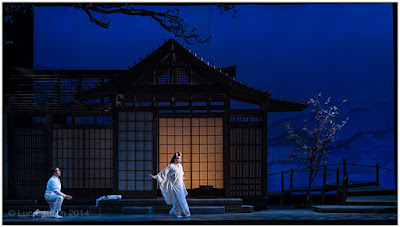
Abstract: A dynamic, 3-D scene and hundreds of sources—a talk with a theatrical lighting designer


Photo ©Lucas Krech

Today in Lighting 103, a little side trip. Fair warning: we are taking a bit of a deep dive. For some of you this will make your eyes glaze over. But for others, it'll be a very cool look into the way live performance lighting designers think with respect to color.

No worries; we'll be back in the center of the bell curve in the next installment.

A Chat with Lucas Krech

New York-based Lucas Krech is a lighting designer who works with operas, dances, plays and performance pieces. He is also is a photographer, which is how we originally intersected via Twitter.

A ways back, I wrote to him to find out a little more about how people approach the process of lighting live performances. What I got back was basically a firehose/brain dump that gave me a fascinating look into how he thinks. Read more »
Strobist

 
Comments Off on Lighting 103: How Designers Gel Live Performances

Posted in Photography


Where Gods Live: Forest Environment Enhanced by Live Digital Projections

01 Aug

[ By SA Rogers in Art & Installation & Sound. ]

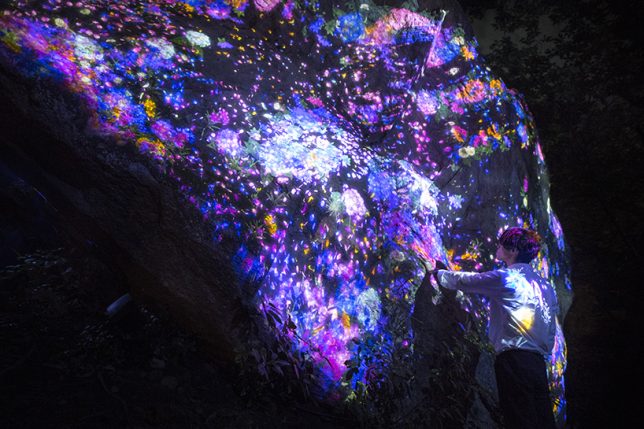
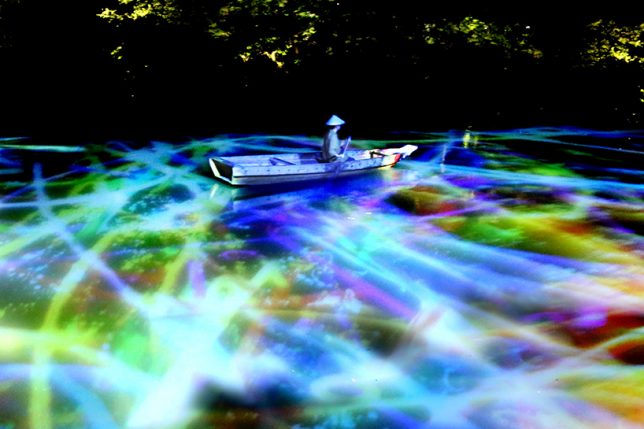
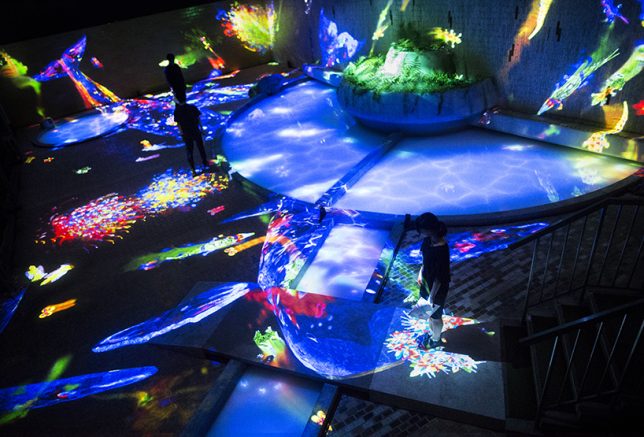
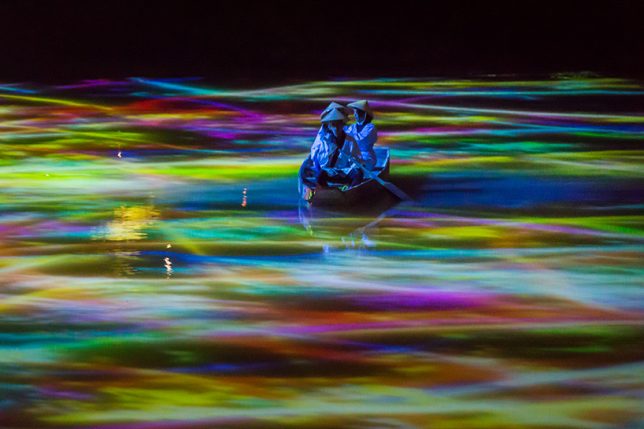
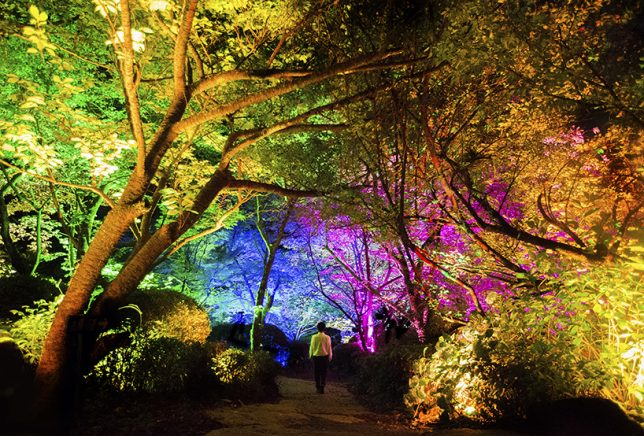
As if forests aren’t magical enough already, the Japanese art/technology collective Teamlab will be live-projecting their signature transforming visuals onto the surfaces of Mifuneyama Rakuen Park, giving visitors the feeling of being on an alien planet. ‘Forest Where Gods Live’ is a collection of individual installations with names like ‘Ever Blossoming Life Rock,’ Drawing on the Water Surface Created by the Dance of Koi and Boats,’ ‘Memory of Continuous Life’ and ‘Resonating Forest.’

“TeamLab is executing an art project called ‘Digitized Nature’ where ‘Nature Becomes Art.’ The concept of the project is that non-material digital art can turn nature into art without harming it. We exist as part of a process of eternal continuity of life and death, a process which has been continuing for an overwhelmingly long time. It is hard for us, however, to sense this in our everyday life. It was when we were wandering through the woods that we realized the shapes of those giant rocks, caves and forests, that have been formed over an infinite amount of time, are the continuous cycle of life itself.”

“By applying digital art to this unique environment, the exhibition celebrates a massive chunk of life that nests on such continuity. In Mifuneyama Rakuen, we got lost in the ambiguous border of garden and forest, and finally, we have come to realize we exist on the borderless continuity between nature and humans.”

Sponsored by Japanese beauty brand Shiseido, the awe-inspiring installation will be in place throughout the 500,000-square-meter garden located in the Saga prefecture July 14th through October 9th, 2017. If you can’t make it out there in person to experience the immersive exhibit firsthand, taking some time to delve into the individual pieces on the teamLab website is well worth it. The collective has produced a number of videos showing their projections in action, with descriptions of their inspiration behind each one.

Share on Facebook


[ By SA Rogers in Art & Installation & Sound. ]

[ WebUrbanist | Archives | Galleries | Privacy | TOS ]


WebUrbanist

 
Comments Off on Where Gods Live: Forest Environment Enhanced by Live Digital Projections

Posted in Creativity


Join us and the Nikon D7500 for a Facebook Live chat Friday, June 9th, 1pm EST

11 Jun

DPReview editor and music photographer Dan Bracaglia took the Nikon D7500 along with his D750 to shoot the Big Bldg Bash music festival in Seattle.

On Friday, June 9th at 1pm EST, he’ll join fellow editor Carey Rose on Facebook Live to talk candidly about how it fared as well as his thoughts on how it fits into Nikon’s current lineup. We’ll also be fielding your questions live – join us!

Articles: Digital Photography Review (dpreview.com)

 
Comments Off on Join us and the Nikon D7500 for a Facebook Live chat Friday, June 9th, 1pm EST

Posted in Uncategorized


Out of Gas: Abandoned Station Will Live its Golden Years as a Venue

06 Jun

[ By SA Rogers in Architecture & Offices & Commercial. ]

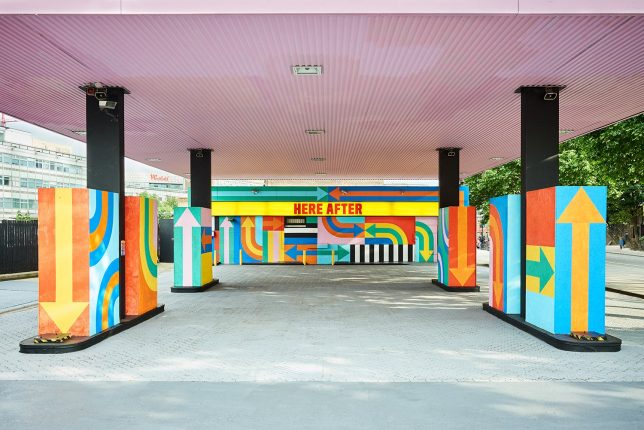
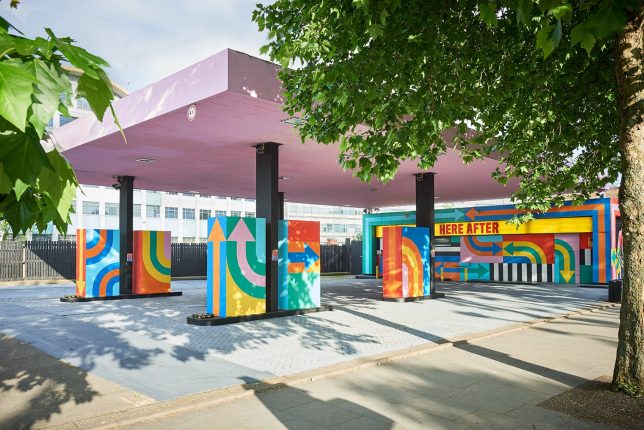
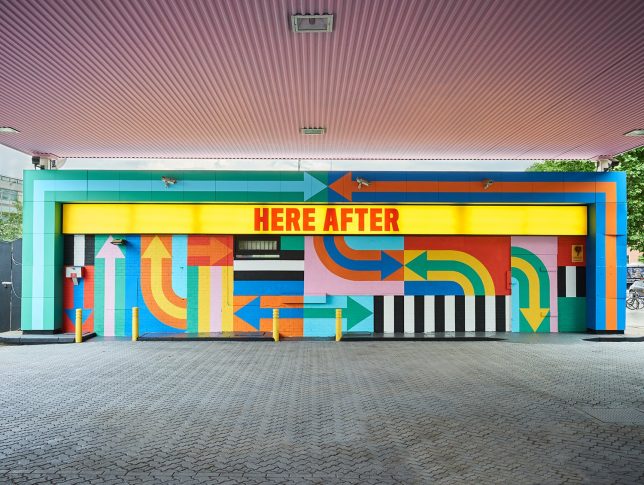
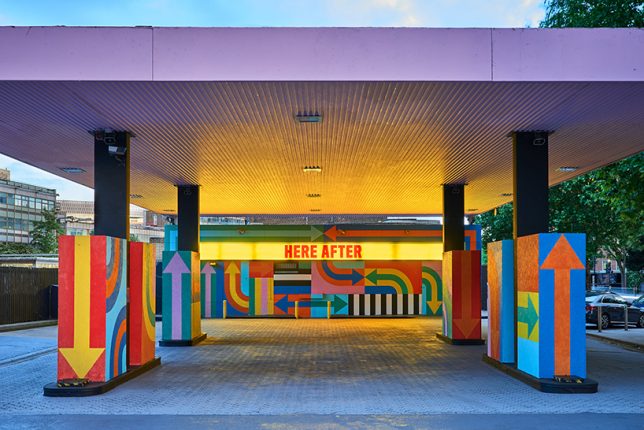
A formerly abandoned gas station in London’s White City district may have outlived its usefulness in its original purpose, but it’s got a new, more relaxing job to do in the ‘hereafter.’ If all those pastel colors didn’t tip you off, the station is in retirement, and it will live out its golden years acting as a colorful venue for pop-up events in the midst of a decade-long urban regeneration effort aiming to create a “thriving, creative neighborhood.”

The station, located on Wood Lane, sits between the BBC’s former headquarters at the Television Centre and White City Place, the former BBC Media Village, both of which will reopen this year after redevelopment. Designer duo Craig & Karl, aka Craig Redman and Karl Maier, took inspiraiton from the bright colors of a television test card for the station’s cheerful new palette and decorated it in their signature graphic style.

“We view this project as the petrol station’s second life, or ‘wonder years,’ which led us to use the words ‘here after’ as a reference to heaven or utopia,” say the designers. “Now that the petrol station has fulfilled its duty, so to speak, it’s free to enjoy itself.”

In a jam-packed, space-challenged city where so few people even own vehicles, this is an especially fitting and fun revitalization of a disused urban space. Doesn’t it make you wish all gas stations were treated as art objects?

Share on Facebook


[ By SA Rogers in Architecture & Offices & Commercial. ]

[ WebUrbanist | Archives | Galleries | Privacy | TOS ]


WebUrbanist

 
Comments Off on Out of Gas: Abandoned Station Will Live its Golden Years as a Venue

Posted in Creativity


Top 5 Essential Photography Tips I Can’t Live Without

29 May

These are my big five photography tips which I would take with me to a desert island, the ones I can’t live without. For those who have not had the pleasure, that is a reference to the BBC Radio Four program, Desert Island Discs, which has been running for more than 70 years. The simple premise of the program is that guests choose just eight pieces of music they’d want if they were going to be marooned on a desert island.

Desert island

I think that these lists are much easier to complete if given criteria. This is my Desert Island Big Five. They are chosen on the basis that if you could only apply five ideas to your photography for the rest of your shutter button pushing days, perhaps on a desert island, these would be the ones which I would recommend.

#1 – Follow guidelines not rules

Did you ever see the first Pirates of the Caribbean movie? Captain Barbossa (played with menace by Geoffrey Rush) chastised the main character Jack Sparrow (Johnny Depp), that he could not do something, because “It is not in the Pirate Rule Book”. With great, exaggerated, cheeky charm, and great comic timing, Jack Sparrow replied “I do not think of it as a RULE book … more as GUIDELINES …”

It is my strong belief that all articles and photography tips, such as this one, should be considered in the same way. The first rule is that there are NO rules, there are only guidelines. You should do just as you like. If you enjoy taking the photographs, processing them, and then you enjoy looking at the results, that is enough. Pleasing yourself and no one else is absolutely enough.

If you want to take photographs of people’s feet, go ahead! If you want to take a photograph of … well, what exactly do you think this might be (below)?

What is it? It is actually the bottom of a curtain, with the morning light streaming in. Not a common photographic topic, but it is an image of reasonable interest.

There are no rules, only guidelines, Do what you like! Do whatever turns you on! I could live with that suggestion alone on my desert island.

This next photograph follows the suggestion of having no rules. I think it is unlikely that any rule is going to tell you to photograph the bottom half of someone’s face, right? This photograph also leads on to the next guideline.

#2 – Fill the frame

A good photography tip and guideline to live by is that the subject of the photograph should not be in doubt, it should fill the frame.

This is an unusual school building in Al Ain, in the UAE.

The photograph above shows the scene well enough. However what is interesting in the scene? The subject of the photograph is really the arches. If they are allowed to fill the frame, don’t you think that it becomes a much better photograph (as below)?

Then, I think the framing of the following photograph is quite interesting. There is no need to include the entire opening of the front of the shop, nor much beyond the stretched out arm of the potential customer. The subject of the photograph is the colored lamps and they fill the frame here nicely.

I think I will take this one. The brightly colored lamps are the subject here and there is no need to include any more of the scene to tell the story.

Put another way, look at whatever you are photographing, get close, then get closer yet again.

New Delhi train station.

This very handsome man sitting on the platform of the train station in Delhi caught my eye. It is an okay scene and tells a bit of the story of India. But he is really the subject, so get closer.

Closer

Then get closer again.

Is a star born? Fill the frame with the subject. This potential Bollywood star is the subject, so he should fill the frame.

As I have already mentioned, advice such as this is best taken as a guideline, not a rule. To prove that point, I agree with most people who seem to prefer the middle shot, the second one, in the above series.

You might say there are two photography tips in one here. First, fill the frame; secondly, get closer. However, both usually result in the same thing. There are other considerations, however, such as the engagement with a portrait subject, or the choice of focal length.

You can fill the frame or get closer according to whatever works for you. For Mr. Bollywood, my memory is of zooming in and moving closer to the subject.

#3 – Ignore the subject

So now you have decided on your subject and gotten closer. It may then seem a little contradictory to tell you to ignore the subject for this next tip. But your photograph will be better if you do so.

You have already decided that the subject is interesting. The decision has already been made that the face, that flower, or the landscape is worth photographing. The face, the flower, or the lake are not going to change much, right? So really, you do not have to keep staring at it, you can now let your eye wander away.

I suggest that it is a really good idea to let your eye take at least a quick look around the edge of the frame. As a general guideline, it is best to have tidy edges in your frame.  That means there is nothing sticking in and distracting from the subject.

Distracting things on the edge of the frame take away from the subject, the blue smiley face.

Examples

Here is an example. A small girl in Cebu, in The Philippines.

I am not saying that it becomes a much better photograph once edited. However, with a slightly tighter crop, and a bit of Photoshop to dull of the distraction in the top left corner, the photograph is more concentrated on the subject, and it is a better image.


Please note that recognizable shapes, the triangle over the girl’s left shoulder, and bright colors, as in the top left, tend to be especially distracting.

The image below was taken for a client in Qatar when Doha’s new airport was being built.

Is it just me, or is that portion of a circle at the bottom, in the front of the frame really distracting? It is very much just a small detail, but it is surely attention to such details that is going to move your photography forward. Next time, when you take a similar shot, you might frame a little bit more precisely. I would like to think that I would. I certainly do not like fixing things in Photoshop, but this is better, isn’t it?

Again, you might say that this is two rules, sorry guidelines, in one. However, I think that it is a natural consequence of looking around the edges of the frame that you will also check the background. This is one I did not get quite right. These people are not flattered by the pole growing out of his head.

The well-known bird photographer Scott Bourne once said that he looked around for a good background then waited for a bird to fly past. You would have to ask him, but I do not think he was joking.

For showing off a cheeky little face, plain white works well. I wanted to photograph a number of the children who lived in a house and just plonked them in front of a plain wall. I found a good background, and waited for the children to fly past!

Cheeky!

But that does not mean that you must have a plain background. It is a question of checking out the edges and being aware of the background. Sometimes the background can even become an important part of the photograph.

Stairway from heaven?

Here is a contrasting background using complementary colors.

#4 – Atomic powered

You may well have heard that you should work the scene. I was only ever half sure what that meant. It might help you, as it helped me when I heard the simple advice, “move your feet”.

Then I later heard that idea expanded upon, and an image from my high school science class was revived. The image is of an atom, with the nucleus and electrons (have I got that right?).

By SVG by Indolences.Recoloring and ironing out some glitches done by Rainer Klute. – based off of Image:Stylised Lithium Atom.png by Halfdan., CC BY-SA 3.0, Link


The nucleus, the red and black middle, is the subject. You, the photographer, are the electrons, the blue dots. You are moving over, under, and around the subject. Standing tall, crouching low, walking left, walking right, and working that subject. Looking for the best way to show what you want to show, to tell the story you want to tell.

Created by working the scene and trying different camera angles.

It is not normal to take a photograph of the top of someone’s head. But I hope you agree that this makes an interesting image (above).

Nor is it normal to angle your camera at 45 degrees, tilted over from the horizontal, then point the camera up at an even steeper angle. But this image below seems to tell some of the stories of Singapore’s Clark Quay and the Central Business District. The situation has been worked by moving the camera out of its traditional position in the horizontal and vertical axes.

You must take the shot above, it is mandatory, but it has been taken quite enough times, hasn’t it?

Then, by walking round this very famous building, you can see it in a different way, one that tells a bit more of its glorious tale. The side of the Taj Mahal, as shown below, has its own beauty.

So, the fourth guideline is that you should move around your subject like electrons move around the nucleus of an atom.

There is a bonus to this guideline as well. There is a clear implication that if you have decided that a subject is worth taking one photograph of, you should take ten! If you ever shot with film, you’ll understand that the incremental cost was quite high. When David Bailey shot six rolls of Kodachrome, it probably cost $ 200. Now, in the digital age, the incremental cost is negligible. So do not be shy about taking more photographs.

#5 – Guideline of Thirds

This is the famous, Guideline of Thirds.

Have you heard of it before? Perhaps not, but you may well have heard of the Rule of Thirds. Like many other clichés, it has attained that status because it works! It is so well known but, even then, I have heard people get it wrong. Still, though, I think it is better thought of as the Guideline of Thirds in my opinion.

In your mind, divide the frame by drawing two equally spaced vertical lines, and similar horizontal lines. The image below tells the story easily. This guideline works well with a square frame too, and we would then be able to describe it and use it as a tic-tac-toe board.

You now have a frame divided into nine equal pieces. Three equal horizontal sections, three equal vertical sections, hence the name thirds.

Place your subject on those lines, and the most significant items on the intersections of those lines. Got a tree? Position it on one of the horizontal and vertical lines (where they intersect as seen below).

A river might be placed along one of the horizontal lines.

Place the most significant items, the sun, the human eye, or a cat walking across a street, on the intersections, where the vertical and horizontal lines cross. These are called the power points.

Combining all three, you will have this as your composition.

Very simply, the accepted wisdom is that this arrangement below.

Looks more interesting, more dynamic, than this.

Of course, you cannot move trees and rivers and other stationary objects. However, you can move around and practice the fourth guideline. Often you can find a position where the major elements of the shot are aligned with the thirds, or somewhere close.

If you consciously practice using the rule of thirds it will be a good step in the right direction to creating more interesting photos. Stick with it, practice, and you will soon find that you do not have to really think about it. It soon becomes instinctive. Later you might move on to other guidelines for composition. There are many others, but if I could choose only one to take and use on my desert island this would be it.

I can tell you that this was taken with no conscious application of the Rule of Thirds. I would suggest it has at least some interest. And, lo and behold.

Here is another example.

I know with absolute certainty that The Rule of Thirds was not in consideration when I took this street shot in Jakarta, Indonesia. I wanted one of the drawings to be fully in the frame and as he is the artist, I wanted his hands in the frame too. Again, I am not claiming that this is a great work of art, but I think I can claim that it has some harmony and cohesion. Throw the grid at it and we see . . .

His hands and face, sit pretty much on the intersections of the lines.

A modest realization along the way, with this aspect of my photographic journey, was in respect to the horizontal lines and the placement of the horizon. Still not a rule, only guideline, but it seemed to me that if the sky was interesting, and it was the major subject of the photograph, then you might want to put the horizon on the lower third line. That simply gives more of the frame over to that stormy, wispy cloud-filled, or deep sunset filled sky. Simply, it is consistent with the guideline of fill the frame with the subject.

Boracay sunset, Philippines.

If it is the land which offers the subject for a photo, it usually works if you place the horizon along the upper third.

Beautiful Philippines golf course.

As I have already suggested, there are other compositional guidelines, which you might move on to using at a later date. But the Rule of Thirds, or as you might be better thinking of it, Guidelines of Thirds, is a very good place to start.

In summary

Looking at and understanding light, using a frame, empty space, leading lines, symmetry, contrast, and so on – there are many good guidelines. But these are the five essential photography tips which I would choose to use if I could select no others.

  1. Follow guidelines not rules
  2. Fill the frame with the subject
  3. Check your frame edges and the background
  4. Move yourself
  5. Guideline of Thirds

I would recommend that you could survive very well with the above big five on a metaphorical or, indeed, literal desert island.

The post Top 5 Essential Photography Tips I Can’t Live Without by Richard Messsenger appeared first on Digital Photography School.


Digital Photography School

 
Comments Off on Top 5 Essential Photography Tips I Can’t Live Without

Posted in Photography


Facebook Live: Sony a9 impressions so far

25 May

The new Sony a9 landed in our office a few days ago, and we’ve been using it non-stop. Editors Rishi Sanyal and Carey Rose hosted a Facebook Live discussion to share their early impressions about the camera so far, as well as to answer live questions from our audience.

We apologize in advance for some audio difficulties. We’ll fix it for next time!

Articles: Digital Photography Review (dpreview.com)
 
Comments Off on Facebook Live: Sony a9 impressions so far

Posted in Uncategorized


Join us on Facebook Live to talk about the Sony a9

24 May

Join us on Facebook Live for a first look at the new Sony a9!

The new Sony a9 landed in our office a few days ago, and we’ve been using it non-stop. Join editors Rishi Sanyal and Carey Rose on Facebook Live to see what they think of it so far, as well as to ask them any questions you might have. 

Date: Wednesday, May 23

Time: 9:30 AM Pacific (12:30 PM Eastern, 16:30 UTC, 17:30 BST, 18:30 CEST)

Visit our Facebook page to watch live or ask questions about the a9

Articles: Digital Photography Review (dpreview.com)
 
Comments Off on Join us on Facebook Live to talk about the Sony a9

Posted in Uncategorized