RSS
 

Posts Tagged ‘Light’

Report: The next GoPro will shoot 4K 120fps video, offer screen, light and mic accessories

16 Aug

Photo Rumors, citing sources based in China, is reporting a number of specs for the next generation of GoPro action cameras and has a set of purported images of the unreleased device.

According to Photo Rumors’ information, the action camera — expected to be called the GoPro Hero 8 — will be announced in September 2019.

The updated action camera is said to feature a new design with an optional housing that features cold-shoe mounts on the top and side for attaching accessories. Photo Rumors specifically mentions microphone, LED light and screen accessories. The leaked renderings show off the LED light and screen accessory, the latter of which appears to have a USB-C port on the side of it.

In terms of specs, Photo Rumors is reporting the action camera will be able to shoot 4K video at 120 fps and Full HD at 480 fps, all powered by a 12-megapixel sensor and GoPro-designed GP2 chipset. It’s also said the camera will feature an improved lens design for better image quality.

As with all rumors, the specifications should be taken with a grain of salt, but the renderings look identical to past product images from GoPro and the specifications do align with the incremental improvements GoPro has made over the years to its action camera lineup.


Image credits: Image via Photo Rumors, used with permission

Articles: Digital Photography Review (dpreview.com)

 
Comments Off on Report: The next GoPro will shoot 4K 120fps video, offer screen, light and mic accessories

Posted in Uncategorized


Video: Taking natural light portraits in a backyard shed

11 Aug

Photographer Irene Rudnyk has published a new video demonstrating how she captured portraits in her backyard using a garden shed and natural light. The process was fairly simple, involving a backdrop, large circular reflector, and two-step ladder, the total cost of which was minimal, camera gear aside.

The portraits were captured using a Mamiya 645 camera with a Mamiya 80mm F1.9 lens and Porta 400 film, as well as on digital using a Canon 5D Mark III with a Canon 85mm F1.2 lens. Two of the portraits captured during the photoshoot are available on Rudnyk’s Instagram account. Rudnyk’s other work can be found on 500px.

Articles: Digital Photography Review (dpreview.com)

 
Comments Off on Video: Taking natural light portraits in a backyard shed

Posted in Uncategorized


Elinchrom launches ELM8 portable continuous LED light from Light & Motion

06 Aug

Elinchrom has launched its new ELM8, a continuous LED light that it claims is the ‘most portable, powerful and progressive modular system’ of its kind. The ELM8 was made in partnership with LED light manufacturer Light & Motion and is fully integrated with Elinchrom’s existing lighting system.

The ELM8 is battery-powered and compact, measuring 20.5 x 9.6 x 9.6cm (8 x 3.7 x 3.7in) and weighing only 1.2 kg (2.6 lbs). When fully charged, Elinchrom says the light can run for between 50 and 245 minutes (around 4 hours) before needing recharged, a process that takes two hours.

The ELM8’s specifications include:

  • CRI: 93
  • TLCI: 94
  • Color Temp: 5600 K
  • LUX: 16320 (at 1m w/Fresnel)
  • Light Output: 8000 Lumens
  • Native Beam Angle: 120°
  • Water Resistance: IP54
  • Impact Resistance: 1m (3.2ft)
  • Charge Time: 2hrs
  • Radio Control: Skyport Protocol
  • Distance Range: up to 100m
  • Skyport: 20 Frequencies / 4 Groups
  • Phottix: Phottix Odin II Transmitter

Elinchrom has a number of accessories that work with the ELM8, including multiple reflectors, diffusers, the company’s micro USB charger kit and a remote control. The ELM8 continuous LED light is available now for €1379 ($ 1699 USD).

Articles: Digital Photography Review (dpreview.com)

 
Comments Off on Elinchrom launches ELM8 portable continuous LED light from Light & Motion

Posted in Uncategorized


How to Understand Light and Color to Improve your Photography

05 Aug

The post How to Understand Light and Color to Improve your Photography appeared first on Digital Photography School. It was authored by Rick Ohnsman.

The morning sun shone through my kitchen window, catching the vase with a rose in it on the window sill.  A low cross-light highlighted the texture on the rose, while the purple glass vase cast a pattern of colored light across the counter.  The photographer in me studied the light, saw the potential for a photo, and went to get the camera.

Image: From observing the sun shining through a vase on the window sill to the finished image, this...

From observing the sun shining through a vase on the window sill to the finished image, this idea started with simply seeing the light.

A simple observation of light.  That’s how a photo can start – learning to really see the light. Understanding its properties, knowing how to control and shape it – those are the things that will take you from a casual snapshooter to a creative photographer. It’s a matter of crafting photographs rather than simply taking snapshots.

George Eastman helped bring photography to the masses with his development of roll film, simple cameras, and readily available processing.  You’ve certainly heard of the company he founded – The Eastman Kodak Company.  Eastman understood the importance of seeing the light.

He put it like this:

“Light makes photography. Embrace light. Admire it. Love it. But above all, know light. Know it for all you are worth, and you will know the key to photography.” – George Eastman

Image: The vase set-up led to experiments with glasses, colored water, and more exploration of light...

The vase set-up led to experiments with glasses, colored water, and more exploration of light.

Harnessing the light

The rest of the photo session explored the interplay of light, color, shadow, texture, shape, and pattern.  From shots of the glass vase and rose, I switched to glasses and vases filled with water dyed with food coloring.  I experimented with different camera angles, positioning of the subjects, and different background objects. I shaped the light with cardboard “flags” and the Venetian blinds through which the sun was streaming to allow different looks.
The low angle of light also provided ways to cast shadows and projections of color.
How to Understand Light and Color to Improve your Photography

In this case, the light source was simply the early morning sun.  I could have created other effects had I used artificial lights, say a snooted Speedlight to cast a beam of light right where I wanted it.

Studio photographers become masters of light manipulation by using their knowledge and a variety of lights and light modifiers.  Their skills draw upon understanding the properties of light and how to harness it.

Landscape photographers may not be able to create their own light, but they also understand its properties. They know when, where, and how to make the most of the light presented to create the look they seek.

Light Physics – the properties of light

You need not become a physicist to be a photographer, but a little understanding of the properties of light can be beneficial to your work.  So, a little science knowledge can help your art.  Left-brain, right-brain – good photographers use both sides.

What is light?

Light is photons of energy.  It has both wave and particle properties.

Electromagnetic spectrum

Human eyes can only see a very tiny portion of what is called the Electromagnetic Spectrum.  Some photographers use Infrared photography to go a little further past the red end of the visible spectrum, and ultraviolet light sources can take us a bit further past the violet end.  Specialized cameras can also capture X-rays.

How to Understand Light and Color to Improve your Photography

Human eyes see only a tiny portion of the Electromagnetic Spectrum, that portion we call Visible Light.

(transferred by Penubag (talk · contribs) on 05:04, 15 May 2008 [CC BY-SA 2.5 (https://creativecommons.org/licenses/by-sa/2.5)]

Properties of light

When speaking of light, we often refer to its properties.  These are:

Quantity – (Also called Intensity or “Brightness”)

Quality – Photographers will use the terms “Hard” or “Soft” light.

Technically, these refer to the shadows cast, not the light itself.  The hard or softness of a shadow (a place where the light is blocked), depends on the size of the light source relative to the subject.  Thus the sun, which is, in reality, huge, can cast harsh shadows (hard light). This is because as a pinpoint of light in the sky, its relative size to the subject is small.

On an overcast day, the whole sky may be the light source – nature’s giant softbox – and the shadows are soft or non-existent.

Direction – Light waves travel in straight lines.  They can be redirected however through Reflection or Refraction.
Reflection – Light hitting an object can bounce off that object.  In fact, anything we see is a result of light bouncing off that object.  The apparent Color of an object is due to what colors (wavelengths) are absorbed versus those reflecting.  A red apple is that color because it absorbs all other colors in the spectrum and reflects only the red wavelengths.
With highly reflective objects, the angle the light hits an object will be the same angle it is reflected. The angle of incidence = the angle of reflection.

RefractionLight can pass through some objects and be refracted or redirected.  Put a pencil in a half-full glass of water, and you will see how the light is refracted differently as it passes through the air versus the water and the glass. Camera lenses shape light through refraction. The image projected on the camera sensor is actually inverted. It is the same as it was when view-camera photographers threw a cape over their heads to see the image on a ground glass before making their photo.

Image: Dewdrops act as tiny lenses refracting the light passing through them.

Dewdrops act as tiny lenses refracting the light passing through them.

Light waves can:

Pass through transparent or translucent objects.

Transparent objects – little if any light is scattered as the light waves pass through – i.e window glass.

Translucent objects – Some light passes through the object but waves are scattered and objects on the far side are not clearly visible.

Reflect or bounce off an object  – We call highly reflective objects “shiny.”  They will often produce Specular highlights.  Objects which break up and bounce light in many directions have a matte quality and Diffuse the light.

Be scattered – Light waves are bounced in different directions

Be absorbed – As discussed, objects have color because they absorb some (colors) wavelengths and reflect others.  Because light has energy, the more light energy an object absorbs the warmer it will be.  This is the reason black, (which absorbs most of the light energy), warms faster than does white, which reflects most of the light.

Be refracted (bent) as light passes through.  Denser objects refract light more (pencil in a glass of water shows example air vs water vs glass).  Diamonds have a very high “index of refraction” and thus are sparkly.

Shadows – Shadows are formed where light is blocked.  Photographers seeking to understand light can learn much by studying shadows as they will give clues to the other qualities of the light.

Image: This abstract image is all about the light and shadows

This abstract image is all about the light and shadows

Dispersion – Visible light can be separated into its component colors due to different degrees of refraction through an object. (This is how prisms work and how rainbows are formed)

Image: A rainbow is an example of white visible light being split into its component colors when the...

A rainbow is an example of white visible light being split into its component colors when the raindrops refract the light and disperse it.

The Speed of Light – Light travels faster than sound at approximately 186,000 miles per second (300,000 km/s).  Sunlight takes 8 minutes, 20 seconds to reach us.  From the next nearest star, Alpha Centauri, light takes 4 years to reach us.  At night we see the light from stars that took hundreds of thousands of years to reach us.  Currently, the most distant star observed by astronomers is over 9 billion light-years away.

Photography and light

We know that without light there is no photography.  Building on the basics of light physics, we photographers have further ways to define light and how we use it.

Photography and color

General photography works within the visible light spectrum.  We use the Kelvin temperature scale to describe the color of light.  For example, a candle’s flame is 1,200K, which is towards the red-orange end of the scale, and a cloudless day is 10,000K, which is at the blue end.

White balance

The human brain is good at correcting colors under different light so that we usually see “correct” colors. Cameras need some help.  Using White Balance, we can index the color we want to be white or neutral in color, and all other colors in the scene will use that as a reference and adjust accordingly.  Thus images shot in daylight, with flash, or under tungsten or fluorescent lights can all be adjusted for “correct” color.

A huge advantage of saving images in the Raw format is you can correct this later when editing. Unfortunately, .jpg images lock the white balance in during the capture.

Image: The color of old tungsten light is quite warm, about 3200K on the Kelvin scale. This could ha...

The color of old tungsten light is quite warm, about 3200K on the Kelvin scale. This could have been white-balanced to be more neutral, but for this image, the warm light added to the antique look desired.

Image: With light, all colors combined equal white. With ink, all colors combined equal black.

With light, all colors combined equal white. With ink, all colors combined equal black.

Color models

RGB

Your camera can interpret the world of color and reproduce it on a color monitor, but in reality, it really only “sees” three colors, Red, Green, and Blue (RGB).  All other colors are created from these three.  Use a magnifying glass to see the pixels on your monitor, and those are the only colors you will see.

Your camera sensor can also only capture those three colors.

If all three of those colors or light combine at full intensity, the result would be pure white.  Because colors record by adding one to another, the term “Additive” is used.

Any of over 16 million colors can be defined using the RGB model, which has 255 steps of each color.  So, white would be 255, 255, 255.  Black is no light and therefore has an RGB value of 0, 0, 0.  Pure red would be 255, 0, 0.  A mixed color like pure yellow is 255, 255, 0, and something like a deep purple shade might be 113, 58, 210.

Image: Pure Red is a primary color in the RGB (Light) model with an RGB value of 255,0,0 but in the...

Pure Red is a primary color in the RGB (Light) model with an RGB value of 255,0,0 but in the CMYK (Ink) model it’s a mixture of Yellow and Magenta.

CMYK

The RGB model works fine in cameras and monitors where we add light to the blackness to create color.  When printing, however, we are starting with a white piece of paper and subtracting from that white to create color.

Instead of red, green, and blue being the primary colors, printers use Cyan, Magenta, Yellow, and Black  (CMYK)  to create all other colors.  (“K” is used for Black because it is the last letter of the word and not used by any other color, i.e. (B)lue).  To save costs on ink, and to produce deeper black tones, unsaturated and dark colors are produced by adding black ink instead of just the combination of cyan, magenta, and yellow. So, while in the RGB model, pure red is defined as 255, 0, 0 the same exact color in the ink printing world of CMYK is something like 0, 100, 100, 0.

So as not to make your head hurt any further, I will not get into the complexities of color spaces, printer profiles, gamut and how we can be sure what we saw is what the camera captures and finally appears on a print.  That’s a whole other and a quite complex subject.  For now, know it is a lot of science and a perhaps a touch of magic.

Instead, you can read more about those topics here:

  • Color Management Can Be Easy
  • How to Prepare Images For Publication – Part One


How photographers control light

As photographers, especially in studio photo work, we have the tools and the means to control the light.

Here are the basic things we can do:

Transmit – Using lights of various kinds we can transmit light onto our subjects.  We control the quantity, direction, and color of the light source.  By changing the relative size of the light source to the subject, we can also control the hardness/softness of shadows.

Reflect – All objects reflect light to varying degrees (which is why we and the camera can see them).  How that reflected light plays off of objects, or how we might use other objects, (reflectors) to bounce light into a scene is one way we shape and control the light.

Image: Many of the principles of light discussed in this article are present in this shot. Can you i...

Many of the principles of light discussed in this article are present in this shot. Can you identify them?

Diffuse –We can cause the light emitting from the source to scatter to varying degrees, (diffused), by shining it through translucent materials.  This how softboxes and other light modifiers work.

Block – As light travels in a straight line, anything between the source and the subject blocks the light and creates a shadow.  How and where we create shadows is as important as where we allow light to cast.  Photographers use things like Flags, Gobos, and Cookies to cast and control shadows.  An example, a “barn door” on a lighting instrument is a type of flag.
Image: This image is all about the light. The backlit leaves are translucent and pass a portion of t...

This image is all about the light. The backlit leaves are translucent and pass a portion of the light striking them, filtering out some colors and passing the golden parts of the spectrum through them.

When nature lights the scene – Landscapes – Landscape photographers and those using only natural light sources don’t have the same controls over the light, but they still need to understand it to become master photographers.

Learning how light works, how direct sun, diffuse light, time of day, season, angle, diffusing factors like fog, smoke, rain, and other “atmospherics” affect the image are all a huge part of becoming a student of light.  A skilled studio photographer can create light.  A skilled landscape photographer knows when and where to be and then very often, simply “waits for the light.”

Image: A smoky sky filters out many of the colors of the light and passes the warm yellow and red to...

A smoky sky filters out many of the colors of the light and passes the warm yellow and red tones. The side of the wheat facing the camera receives no light and so is silhouetted against the sun. Learning to see the light is key to becoming a good photographer.

Becoming a student of light

Sure, you can just get out some glassware, fill it with colored water, place it in the sun and make some pretty pictures.  I encourage you to do that. It’s fun and you will likely make some nice images.  You need not know the physics and terminology to make nice photos.  But I encourage you to take it a step further.  Use it as an exercise to further your understanding and become a trained observer of light because I really believe George Eastman had it right –

Know light. Know it for all you are worth, and you will know the key to photography.


understand-light-and-color-in-photography

The post How to Understand Light and Color to Improve your Photography appeared first on Digital Photography School. It was authored by Rick Ohnsman.


Digital Photography School

 
Comments Off on How to Understand Light and Color to Improve your Photography

Posted in Photography


Steps For Better Product Photography in Natural Light

18 Jul

The post Steps For Better Product Photography in Natural Light appeared first on Digital Photography School. It was authored by John McIntire.

Taking photos of products can seem like a daunting task. If you look at a lot of advertising, you will find yourself inundated with a lot of high-end product photography that can seem (and probably is) out of reach for a novice. The thing is, not all product photography is equal. In many cases, a much simpler approach will do the job just fine.

This article will guide you through a process that can get you started taking product photos with minimal equipment. In these examples, you don’t even need a studio, just a backyard, and decent weather. You will also see that you can replace some dedicated kit (reflectors and diffusers in this case) with some basic and cheap substitutes.

What you need

With one optional exception, you will only need some basic kit to go through the process outlined here.

Camera – There’s not much to say about this one. You will need a camera.

Lenses – To get the best results you will want to choose a lens with a close focusing distance (if your products are relatively small) and a focal length that will give you the option to fill the frame.

If the products that you are photographing are quite small, you may want to opt for a macro lens. Fast lenses aren’t much of a concern here as you will want to choose an aperture that ensures complete focus on all parts of your subject.

Tripod – Because this is still-life photography, you absolutely should use a tripod. The reason should become clear as this tutorial progresses, but it will make your life so much easier.

An outdoor space – As for the where, all you need to get started with this tutorial is an open outdoor space. Even a small backyard will do. Anywhere that will lend you a decent, clean background will do.

Tissue paper – In lieu of a dedicated diffuser, you can use tissue paper. For ease of use, you can mount this in a frame of some description with clips or a bit of tape. This allows you to control and manipulate the natural light in your photos. I did use a dedicated diffuser in this tutorial, but tissue paper will work just as well.

White and black card (foamcore works well) – Use these as reflectors and flags respectively to give you further control over the manipulation of the light.

Backgrounds (optional) – Using the environment as a background will be fine a lot of the time, but sometimes you may need something different.

Don’t want to rely on what’s there? Bring your own backgrounds, such as these purpose-made boards or use plain colored paper. The choices are endless.

Color Management – Depending on what you are photographing and whom you are creating product photography for, color management may be optional, or it may be a legal requirement.

Tools like the ColorChecker Passport are indispensable for getting accurate colors in your images.

Even if it’s not necessary for your situation, it’s still a good idea.  The word ‘product’ implies that you are selling something. Even if you’re only creating an eBay or Facebook Marketplace listing, ensure an accurate representation of what you are selling. It is a means of treating the people you are selling to with respect. If you’re providing commercial services to a paying client, then that accurate representation of the product may be a legal requirement. Do your research and find that out before you get started.

Note: While you can use tissue paper and foamcore to great effect, I still believe you should buy a 5-in-1 reflector or two. These give you access to white and silver reflectors, diffusers and flags. Godox sells one for $ 15, so there’s no excuse. You can also use 5-in-1 reflectors as a background in a pinch.

Getting started

With your gear collected, this process is relatively straightforward.

Step 1: Find a space

better-product-photography-5

Finding a space that gives you plenty of room to work and gives you a decent background may be the most important step in all of this.

As long as you are photographing small(ish) objects, where you choose to set up isn’t very important. Since the focus of your image is solely the product, other elements like the background won’t be taking up very much space in your frame in most cases. As long as you can find a space that gives you a clean background (or somewhere to place your own) and gives you plenty of room to work, you will be fine.

If you are working with small objects at a close distance to the camera, work with small apertures like f/16. If you want an out of focus background, you will want to ensure there is a good distance between your subject and the background.

Without going into the math, the closer your camera is to the subject, the shallower the depth of field becomes. When you are really close (especially with macro lenses), the focal plane reduces to a tiny sliver. To combat this, use small apertures.

In terms of lighting, as long as there is light, you will be fine. If you have all of the equipment listed at the top of this article, you will be able to manipulate the light in most situations.

Broad daylight? No problem. Shade? No problem. Any time of day will work except for the night where you would probably need to add an external light source of some description.

Step 2: Set up

better-product-photography-4

As this spot was lit by direct sunlight, I put the diffuser up before doing anything else.

Now that you are in your space, pick where you want to set up and decide where you are going to photograph your product. Place your camera on a tripod and ensure that you have a good idea of how you are going to frame your product.

You can now evaluate your lighting. If you’re in open daylight, setup the tissue paper as a diffuser over where your product is going to be. You can fine-tune this later, but any diffusion you may be using should be in place before you start anything else. Diffusion material is going to affect the color of your images. Having it in place allows you to see the light as it’s going to appear in your photos while you are working on your composition.

Step 3 – Color Management

better-product-photography-3

With the light diffused, take your steps towards color management. You want to do this before placing your subject to avoid moving it.

If you are opting to replicate accurate colors, do it now. Place your grey card (or whatever tool you’ve chosen) where your product will be under the exact lighting conditions that your final images will be created with. Take a photo of the card. If you’re setting the white balance in-camera, do it now. If you’re using a tool like the ColorChecker Passport shown in the example images, you can save it for the software later.

Step 4: Place your subject

Place your subject where you want it for your desired composition. Once that’s done, you can begin modifying the lighting. (This image is with the diffusion panel removed)

The next step is to place your product in situ for the composition that you want. Adjust the subject and the positioning of the camera until you have your desired effect. I find it is important to get this right at this stage. With this done, you are free to adjust everything else (such as the lighting) while being able to compare any test shots. It also allows you to blend multiple exposures later (providing it would be permissible to do so).

Step 5: Choose your aperture

better-product-photography-2

Details are essential when you are selling something. The image on the left is shot at f/4 and you will see many of the details are concealed by depth of field. In the right-hand image, all details are present, but the background is less obscured.

With products, most of the time, you will want to choose an aperture that provides maximum focus on the whole of the subject. Since the depth of field is most affected by the distance of the camera from the subject, small objects close to the camera (particularly with a macro lens) will lead you to use much smaller apertures than you might typically use in other situations. If you need to, take a few test shots at various aperture settings. Review the results until you have the desired effect. Depending on your camera, you may find the depth of field preview button useful here as well.

Shooting tethered is also a great way to be able to see if there is enough depth of field in your images.

Step 6: Evaluate the lighting

Here, the subject is lit with unmodified light. You can see that the contrast is high and there is missing detail in both the shadows and highlights.

With everything in place, you’re just about ready to go. Here is where you can fine-tune your lighting to your heart’s content.

Adding the diffuser above the subject helped to even out the exposure between the background and the subject. All details are now present.

Reflective

Use your white card(s) to fill in any shadows that may be providing too much contrast in your images. The beauty of using a card is you can cut it into any size and shape to match any need you have so that you are only reflecting where the extra light needs to be. For the most part, you are going to want to avoid heavy contrast in product photos, so feel free to use reflectors generously.

A bit of white mount board at camera left has filled in that side of the subject just a tiny amount. It makes the exposure evener.

Subtractive

In the event that there’s light falling on your subject where you don’t want it, use your black card as flags. For example, if the main source of light is coming from behind your subject, you can use a flag to shape that light so that it is only falling on your product where you want it. You can also use flags to darken areas around your subjects, such as the surface it is resting on, to put more emphasis on the product itself.

Introducing a flag to camera right has darkened that side of the subject. It has increased contrast just a bit and reduced the impact of the specular highlight on the droid’s head.

This step may seem optional, and to be fair, it pretty much is, but if you want your images to stand out, this is by far the most important step. The more attention to detail and effort you place into getting the lighting right, the better your photos are going to be.

It pains me to suggest that you could to move your camera at this point. However, as a last resort, if you’re having problems controlling the contrast in your images, you can set your camera to spot metering mode and evaluate where your reflectors need to be from there.

That said, if your light is suitably diffused, you shouldn’t have to resort to that. Alternatively, you could use a second body or a light meter if your subject is big enough.

Step 7: Final shot

better-product-photography-1

The final image with minimal post-processing.

With all of the prep work done, you can now take your final shot. If all has gone well, you should have a well-lit, well-exposed image in the composition of your choice. Going through all of these steps should also mean there is very little to do in terms of post-processing.

That’s it

Is this the only way to take photos of products? Absolutely not. It’s not even close to the only way to do things outdoors. This is just one easy method to help you get results with minimal gear.

Hopefully, you’ve come to the conclusion that you don’t need a fully decked out studio and a myriad of specialist and obscure equipment to achieve better product photography results. Basic equipment, basic camera craft and attention to detail can take you a long way and get you results that will help you to sell whatever it is you are trying to sell.


better-product-photography-natural-light

The post Steps For Better Product Photography in Natural Light appeared first on Digital Photography School. It was authored by John McIntire.


Digital Photography School

 
Comments Off on Steps For Better Product Photography in Natural Light

Posted in Photography


Kinetic Light Painting vs Light Painting

16 Jul

The post Kinetic Light Painting vs Light Painting appeared first on Digital Photography School. It was authored by Simon Bond.

One of the most exciting techniques in photography is light painting. This is an area of photography that can be carried out in several ways. In this article, you’ll learn about both kinetic light painting and regular light painting, what the difference is, and the different techniques employed by these styles. So engage the hyperdrive and put your creativity up to light speed today!

What is light painting?

This photo has used camera rotation to add more interest to this photo of some skyscrapers.

Light painting happens when a source of light moves across the frame of a camera during a long exposure. You’ll almost certainly need a tripod to practice good light painting photography, though there are some abstract light paintings you can do handheld.

The exposure time is typically between two and thirty seconds in length, but some photos expose for much longer and use the bulb function.

The simplest light painting you can do is to use a torch to spell your name. The complexity of light paintings can then go up as different tools are used to produce increasingly complex and beautiful light patterns. Light painting has a cousin though, and that’s kinetic light painting. This works slightly differently.

How does kinetic light painting differ?

With regular light painting, your camera will stay completely still, while a light source in front of the camera gets moved. However, with kinetic light painting, the camera or elements of the camera are moved, while the light source stays completely still. The movement of the camera is the reason this is called kinetic light painting.

The two main methods available to move the camera are moving the lens or moving the camera body.

Light painting techniques

Let’s look at the different light painting techniques you can try. These almost certainly need a tripod to carry out correctly.

Light writing

This is often considered the simplest of the light painting techniques. A regular torch is all that’s needed, along with a camera and tripod. You don’t have to use a torch; a sparkler or the glowing embers at the end of a piece of wood work too.

You now need to write your word, or perhaps a shape in the sky. Make sure you use a long enough exposure to complete the light writing you’re going to attempt. Also note that you’ll need to write as a mirror image, so when you write the “S” or any other letter, make sure it’s backward.

In this photo, embers were used to spell the country name, India.

Lighting an object

Instead of aiming your light source at the camera, you’re going to aim it away from the camera so it can light up an object. It’s likely you’ll also be stood behind the camera when you’re lighting up an object, but in some cases, you will need to stand in front of the camera. When stood in front of the camera, ensure no part of the light source shines towards the camera; it’s likely to ruin the photo.

Now stroke over the object you wish to paint – literally – as if your light source was a brush. Ensure you get an even distribution of light. You can experiment with sidelight if you wish to bring out more textures in your object. This technique will likely involve longer exposures of ten or more seconds.

Light orbs

These are created by attaching a light source to a piece of string and then spinning it.

The typical light you’ll use for this is a torch, LED light, or fairy lights bunched together. In addition to spinning the light source, you’ll need to rotate around the central point of rotation. Imagine your hand is the central point. You need to orbit your hand while spinning the light source.

It can be tricky to create the perfect light orb, so you’ll need to practice this technique.

Light orbs look great in photos, they take a bit of practice to get right though.

Light Spirograph

This is similar to creating a light orb, and once again you’ll be placing a light source on the end of some string. This technique is carried out indoors. The string is attached to a hook, with the hook attached to the ceiling.

Place the camera directly below and in line with the light source. Turn the lights in the room out, and ensure no outside light is shining into the room from a window.

Now set the camera to expose for 10 or 15 seconds. Pull the string back, and allow the light source to spin in an elliptical shape. Now check your result, and repeat if needed.

This shows interesting patterns from a light Spirograph.

Created your own light trails

This is the area of light painting that’s perhaps the most fun. There are lots of tools out there you can use. Anything that lights up will work. This is where the patterns can get more complex, but the key to good light painting is to keep it simple.

Have a look at some of these tools, and see which one appeals to you.

  • Lightsaber – These don’t emit a strong point of light, but you will be able to use them to create smooth panels of light. As the light isn’t strong, it’s likely you’ll see the scene behind the light painted area, sometimes a desirable trait.
  • Glow stick – These work in a similar way to a lightsaber, and the amount of light they produce are low so you’ll need to use this in a dark place.
  • Wire wool – Pack some fine wire wool into a whisk, attached to some string. Now set the wire wool on fire and spin! Sparks will fly, but take care not to cause a fire or burn yourself.
  • Fairy lights – Use battery operated fairy lights for light painting. Use them to create a light orb, or attach them to a stick and make your own D.I.Y. light stick.
  • LED light stick – This is your all-in-one light painting mega tool. It’s expensive but you’ll be able to produce more or less any light painting effect. And you only need one device to do it.
  • Hula-hoop light – These are a little like the LED light sticks. Only instead of a stick, the programmable lights are now in a hula-hoop. They’re often used by dancers but also work very well in photography as well.

In this photo, you can see light patterns created using an LED light stick.

Light trails

You don’t always need to make your own light trails. There are plenty of opportunities to photograph moving lights created by others! You have no control over how these lights move, however, you can choose places with predictable light trails, and you can choose where to stand.

The following are examples of where you can photograph light trails.

  • Traffic trails – The most obvious and easiest light trail is formed by moving vehicles. It’s nice and predictable as well, as everything will move along a road network.
  • Boat lights – Boat light trails are a little more difficult to photograph. Choose a location with regular boat traffic, perhaps a river taxi area. Finally, be prepared to take several exposures, and merge them together in Photoshop. Boats move a lot slower than cars, so they won’t move through your frame in a single 30-second exposure.
  • Stars – Use a series of 30-second exposures and stack them together to form one photo. It’s best to aim at the north star or southern crux, this will lead to stars rotating across the sky.

Car light trails are one of the easiest and most popular form of light painting.

Kinetic light painting techniques

While regular light painting often needs additional equipment, kinetic light painting only needs a camera, lens, and a tripod. The lens you’ll need is a factor; you’ll learn about that in a moment.

The following are the different ways you can move your camera to create light paintings.

Camera zoom

This is a technique that uses the movement of a zoom lens to produce a light painting. The idea is that you use a long exposure and that during the exposure, you move the focal length of the lens. With nighttime light painting, it’s best to zoom out, starting at the lenses longest focal length. The best lens to use here is a superzoom 18-300mm lens since this gives you more choice over the focal distance range you’ll use for the photo. If this lens isn’t available a wide or mid-range zoom lens is the next best option.

  • Abstract – To create this type of photo, zoom in on some lights. Now expose for two or three seconds, and continuously zoom out during the exposure.
  • Two-step – With this approach, you’re going to combine the abstract zoom burst described above with a regular photo. To do this, first pre-compose your photo at the final focal length you’ll finish your photo at, and focus in manual mode. Now zoom into the central area you’ll zoom out from. Take a 30-second exposure. The first 2-3 seconds will be the zoom burst, and the remaining exposure time will be the regular exposure.
  • Flash – You can combine zoom with flash photography as well. The flash will freeze your subject, usually a person, and then you can zoom out for the remaining part of the exposure. Use a shorter one-second exposure for this method.

This photo has used a zoom burst to create light patterns. The photo is cropped in so that the central zoom area is off-center.

Camera rotation

Another type of kinetic light painting is camera rotation.

This works best when rotating from the head of a tripod, and for that reason, you’ll often be using a worm’s eye perspective for this photo. Once again, you can take this as an abstract, two-step or you can combine it with flash. This type of photo really needs a wide-angle lens. You might even experiment with a fisheye lens.

  • Abstract – Look for a light source that’s tall and vertical, preferably lit from top to bottom. A skyscraper or tower is ideal. Use a two to three-second exposure and continuously rotate the head of the tripod during the exposure.
  • Two step – Once again, you’re going to combine the abstract photo described above with a regular nighttime long exposure. This time when pre-composing, make sure you make a note of the angles of degree on your tripod head that you begin the exposure at. Now take a 30-second exposure, once again rotating the camera head during the exposure. However, this time, when you reach the number on your tripod head that you started the exposure, it’s time to lock the camera in position for the remaining exposure time.
  • Flash – Use a one-second exposure time, and aim the flash at your subject. Now smoothly rotate the camera around the central point of your photo. This must be done handheld, making this a tricky technique to get right.

You can use flash in combination with a zoom burst, as seen in this photo.

Random camera movement

The two above techniques use controlled movements of the camera for light painting. The moving part can only move in one way, so you get smooth lines through the photo.

It’s also possible to use random movements of the camera to produce light paintings as well. You can even do this using the two-step approach used for zoom and rotation.

The abstract approach is easiest. Use some fairy lights and randomly move your camera in front of them. To use the two-step approach, you’ll need to move the camera around in some random motion. Once finished, lock the camera in position for the remaining exposure time.

Other movements can be used for kinetic light painting. The risk is the photo becomes too busy.

Conclusion

There are many forms of creativity in photography, especially at night. Light painting is a great technique to experiment with, and kinetic light painting is an interesting sub-genre of this that’s really worth exploring.

Have you tried light painting before? How about kinetic light painting?

Here at digital photography school, we’d love you to share your experiences of these techniques, together with any photos you have taken, or will take having read this article.


kinetic-painting-vs-light-painting

The post Kinetic Light Painting vs Light Painting appeared first on Digital Photography School. It was authored by Simon Bond.


Digital Photography School

 
Comments Off on Kinetic Light Painting vs Light Painting

Posted in Photography


Real-World Scenarios and Solutions to Deal with Too Much Light in Photography

11 Jul

The post Real-World Scenarios and Solutions to Deal with Too Much Light in Photography appeared first on Digital Photography School. It was authored by Erin Fitzgibbon.

Natural light is beautiful light

If you’re a lover of natural light when creating photographs, then you’re like me – you love light. You love how it streams in windows and how it creates shadows. There’s so much wonder in the way light naturally falls into place. In many situations, it’s amazing to let nature take its course and create a beautiful view.

The reality is, however, while we can always go with the flow, sometimes Mother Nature doesn’t cooperate with the requirements of human life. There are times when Mother Nature gives you way too much light.

So the question becomes, “How do I deal with all this light?”

Let’s look at some real-world scenarios and discuss solutions to deal with too much light in photography.

Scenario #1: Intense light streaming through a window

As someone who often shoots interior design photographs for a magazine, I run into this situation all the time. I arrive at a house to find big beautiful windows casting a lovely soft light on a part of the room and a bright glare in areas close to the window. We usually use HDR to solve this issue. There are times, however, when you can’t set up a tripod as space does not allow this kind of luxury.

In the situation below, the restaurant had amazing, huge windows. It allowed much light into the room – great for those who were dining. The situation was not-so-great for photographing clear, detailed images. If you take a look at the photograph below, shot during a family event, you can see how bright windows can affect your images in a more personal situation.

dealing with too much light in photography - shows shadows

The big windows behind the display are somewhat blown out, but not horribly so. The problem is the light on the cake and other items are very dull.

In this scenario, the bright light from the big windows behind the display detracts from the cake and the sign. The sign is in shadow if you expose the photograph to reduce the brightness of the background. If you expose for the sign, then the light behind becomes very distracting and detracts from the look of the photograph.

dealing with too much light in photography - overexposure

Using a different combination of settings and the light on the cake and sign is much better, but this image still is not great.

The final composition

In this case, the solution was to use the items being photographed to block out some of the light from behind. I changed the angle from which I was shooting and tried to fill the frame with the items from the display table.  Now the photograph is exposed correctly, and have a more attractive memory of a family occasion.

dealing with too much light in photography - composition

I changed the angle to block out the brighter lights outside, creating an even lighting situation. If I post-processed this image, it will do quite nicely to document the day.

Scenario #2: Bright afternoon sunshine and you can’t move people into the shade

At family outings or special occasions, it can be difficult to get people to move. You have to deal with the shadows and squinting that the intense summer sun creates. And what if you don’t have a flash?

Last summer, I shot photographs and wrote an article about building birch bark canoes using traditional Indigenous methods. There’s no way I could ask the Elder working on the canoe to move his whole operation into a place to allow me to take nicer photographs of him. He was working, and he was not going to move everything for me.

Adapting to a situation is important

As you can see in the photograph below, the sun was quite bright, and I didn’t have a flash. He was wearing a white shirt, and his skin is darker, so there’s a challenge when exposing for this type of dynamic range. The color photograph is relatively flat. It doesn’t have the type of depth, or look I like to have for my images.

From an art standpoint, this image would never work. From a journalist standpoint, they are less picky about these types of issues, but there had to be a balance.  The editor of the article, however, did agree that the bright light did take away from the photograph. Our solution was to post-process using black and white. The advantage of black and white is it allows you to hide washed-out colors and lessens the effect of blown-out whites. It is an option to consider when working in such harsh lighting conditions.

dealing with too much light in photography

Here is the unedited photograph. I did my best to balance the exposure for bright light and harsh shadows.


dealing with too much light in photography - to show extreme light

In black and white, I could control the image a little more and process it to show items like the strength in the Elder’s arms.

Scenario #3: Intense spots of light

In some situations, the light is just right in parts of a scene, but in others, it’s just too bright. It creates glares and reflections you don’t want in your photographs.

In this situation, you could once again use HDR. There are some other options to consider, as well. Consider using a flash to fill in shadows created when you balance out the lighting. In the situation below a flash and a diffuser were used to create more even lighting. The hanging lights are still bright, but unfortunately, there was nothing that could be done about those. The only way to minimize their distraction was to have the woman active. The viewer will notice that the woman is pouring the wine, and it helps to keep them focused on something other than the bright lights in the scene.

In some cases, you may have to accept defeat when it comes to light. However, you can take steps to minimize the influence the lights can have on your photograph.

dealing with too much light in photography - using a flash for lighting

By adding a flash I was able to reduce the shadows on her face.

Conclusion

Light is both a blessing and a challenge when your taking photographs. Sometimes you will have to think quickly. You will need to find ways to problem solve and manage the lighting effectively. There are lots of ways to create photographs, even in the most difficult situations, so try to think carefully about the scene before you. Try to be creative when managing challenging situations.

Please, by all means, share your toughest lighting situations and how you were able to deal with too much light in photography in the comments below.


dealing with too much light in photography

The post Real-World Scenarios and Solutions to Deal with Too Much Light in Photography appeared first on Digital Photography School. It was authored by Erin Fitzgibbon.


Digital Photography School

 
Comments Off on Real-World Scenarios and Solutions to Deal with Too Much Light in Photography

Posted in Photography


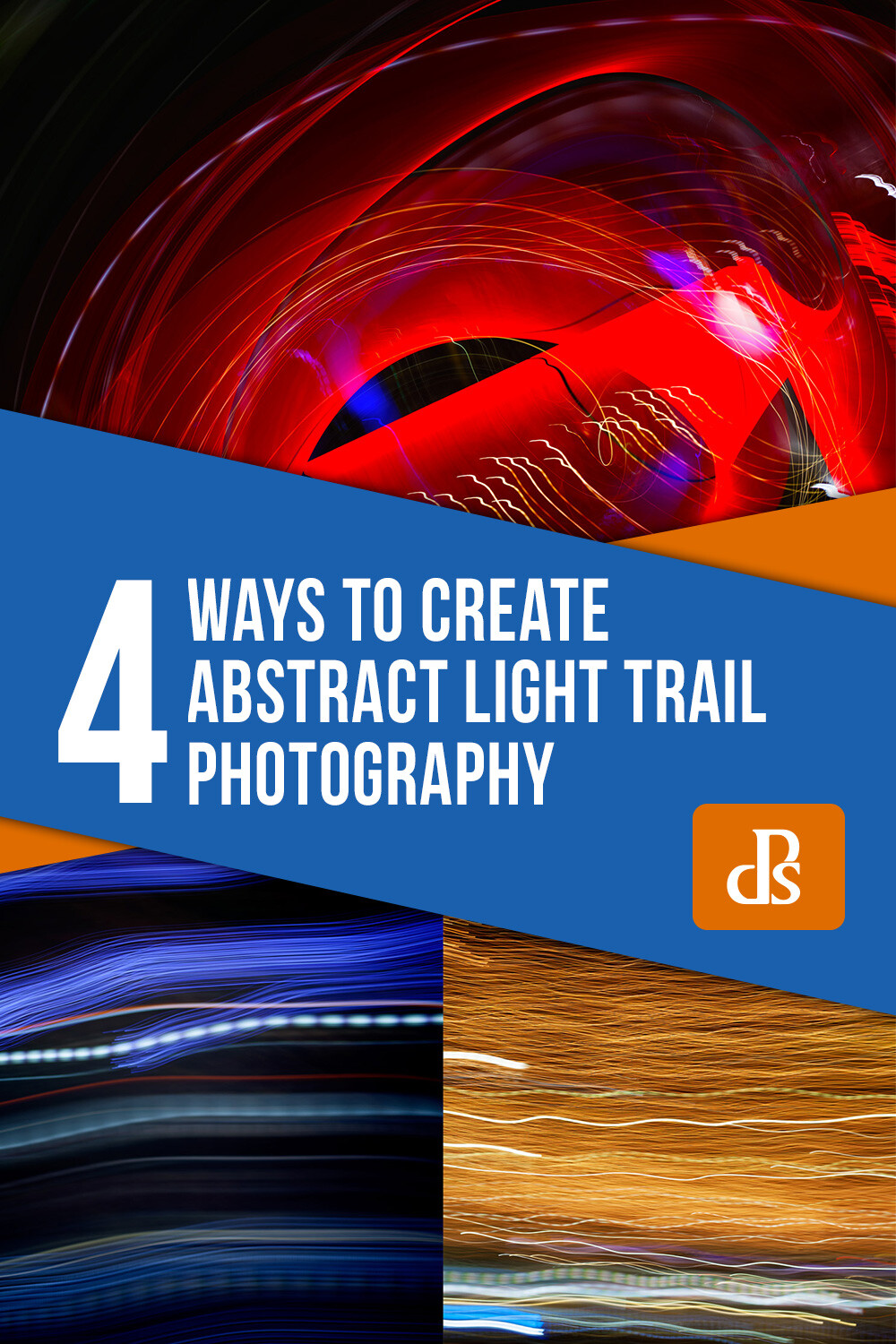
Get Moving – Four Ways to Create Abstract Light Trail Photography

08 Jul

The post Get Moving – Four Ways to Create Abstract Light Trail Photography appeared first on Digital Photography School. It was authored by Megan Kennedy.

Light trail photography is a unique facet of photography. By combining slow shutter speeds with light and camera movement, fascinating abstract photography can be made. Here are four abstract light trail photography techniques to experiment with in your own photographic practice.

What is abstraction?

Before we get started, let’s talk about abstraction. Abstract photography (often called non-objective, experimental or conceptual photography) is photography that does not have an immediate association with the visual world. Instead, abstract photography uses aspects like color, light, texture, shape, and form to evoke an emotional response from a viewer.

Often, in light trail photography, light trails complement a scene or subject. However, in abstract light trail photography, it’s the light trails themselves that are the sole conveyor of meaning. By erasing any other context, the viewer relies solely on the nature of light and photography to read a photograph. This creates intriguing photography that captures and holds the attention of the viewer as they visually unpack the image before them.

When to make abstract light trails

Although it can be done in daylight, abstract light trail photography is best carried out in the evening, at night, or in a dark room indoors. This is to minimize distraction and enhance the efficacy of our chosen light source/s.

What to photograph for abstract light trails

Traffic lights, building lights, car lights, phone light, glow sticks, torches, neon signage… there is an abundance of light sources available to photograph at night. With the right camera settings and technique, almost any point of light can be used to create an interesting light trail.

Camera tossing

Abstract light trail photography rests on the nature of the light source/s (brightness, movement, color etc) and the behavior of the camera (exposure settings, camera movement etc). For example, during a long enough exposure, a set of car lights will leave a trail as they pass by, whereas a stationary light source requires camera movement to activate an abstract light trail. Camera tossing predominantly involves the latter, physically moving the camera to achieve interesting abstract light trail results.

Taken over two seconds at f/4 and ISO 100, this tangle of lights demonstrates the path of the camera as it is tossed in the air.

A disclaimer…

Camera-tossed abstract light trails involve the tossing of a camera into the air during an exposure. Purists argue that a true camera toss means that the camera is tossed without the use of a guiding hand or camera strap. This is why for this method, I strongly advise you to use an old, cheap camera. A compact camera works well. You can even use a phone with a durable case.

I wouldn’t recommend taking your DSLR out for some air-time (although I must admit I did use my 5D MKII with a 50mm lens for some camera tossing sessions). If you aren’t keen on risking your camera, (which is totally understandable) skip forward to camera swinging and keep an eye out for old tossable cameras on sale or in local charity shops.

How to camera toss

The first step to camera tossing is to find somewhere safe to toss. Camera tossing in a quiet location, over grass or carpet is a good idea.

Once you’ve found a good spot with an interesting light source or two, it’s time to organize your camera settings. I went with a shutter speed of one or two seconds to allow the camera movement to really gain traction. I then set my aperture to f/4 and my ISO to 100.

Set your focus to manual. Aim your camera lens at the light source/s and adjust your focus. You can aim for the sharp rendering of the light source/s, or take intentionally unfocused shots for softer light trails.

Depress the shutter button and quickly toss the camera in the air (10-30 cm is high enough, though you can go higher if you’re game). Catch the camera as gently as possible and have a look at your results. Make any amendments to your exposure and have another go.

When you are happy with your exposure and focus, start introducing different throwing methods. Try spinning the camera as you flick it into the air, or throwing it carefully so that the lens is orientated at a particular angle for the duration of the exposure. The results between different throwing techniques can be quite pronounced, so take some time to experiment a little.

Taken at f/8 at 1/4th of a second, I left my lens unfocused to introduce a soft quality to the resulting photograph.

Camera swinging

A variation on camera tossing, camera swinging involves swinging your camera by your (firmly secured) camera strap.

Find a light source and take a few photographs to determine exposure and focus. Just like camera tossing, you want a longer shutter speed to give the camera movement time to take shape. For camera swinging, I started with an exposure of two seconds at f/4 with an ISO of 100.

Once you’ve settled on an exposure, make certain that your camera strap is fastened to your camera. Double-knot, even triple-knot your strap to hold it in place. You really don’t want your camera to go flying once you start swinging.

Two examples of camera swinging. Different light sources make varying light trails.

When you’re ready, depress the shutter button and have a go at gently swinging your camera back and forward like a pendulum. When the exposure finishes, check your results and make adjustments to your camera settings or technique as required.

The possibilities for camera-swung imagery are endless. Each swing creates unrepeatable paths of light from one image to the next, so again, don’t be afraid to experiment a little. Try jumping while swinging your camera or spinning around in a circle with your camera fastened to your wrist.

Moving your body

Not all abstract light trail photography is based around swinging and tossing your camera. Light trails can also be created by moving your body with a camera in hand.

Locate an interesting light source and figure out your exposure with a few test shots. I found that the combination of a one-second exposure at f/4 with an ISO of 100 was a good starting point.

Depress the shutter button and start moving. Ever seen those inflatable tube men, dancing around in the wind? Well, you don’t have to go THAT crazy, but shifting your arms up and down, twirling around, doing a little dance or moving from a sitting position to a standing position are great examples of camera-body movement.

As long as the shutter is open, and the lens is pointed toward a light source, the movements you make will be recorded in the image, creating kinetic abstract imagery.

Moving subjects

As an alternative to moving yourself around, photographing a moving light source can create dynamic light trail imagery too.

Star trail photography is the photography of stars as they appear to transit the night sky. Though it is us that is rotating on earth, the star trails illustrate our perception of the celestial sphere as a moving body.

Car trail photography records the movement of car lights in darkness, revealing trails that trace the routes of traffic in a given setting. For a more abstracted image, isolate the car trails from the surrounding landscape.

Physiography is a method of light painting that can be done in your darkened living room. Suspend a light source on a string and let it swing over your camera during a long exposure. The results are often surprising and intricate, documenting the path of the light source as it swings through the air with diminishing momentum.

This physiogram traces the path a moving light source has taken while suspended over a camera

Burning steel wool photography is another form of recording light trails. Though it can be a little hazardous, the results are quite spectacular.

abstract light trail photography

Burning steel wool leaves golden trails of light not dissimilar to this example of camera movement.

Conclusion

When the day turns to night, many pack up their photography gear and head home. But night time doesn’t necessarily mean that photography is over for the day.

Creating abstract imagery with light is an intriguing aspect of photography. Through the use of camera and/or subject movement you can create fascinating imagery that engages and intrigues an audience.

Go out and try these techniques for yourself, and share your abstract light trail photography with us in the comments below.


4 ways to create abstract light trail photography

The post Get Moving – Four Ways to Create Abstract Light Trail Photography appeared first on Digital Photography School. It was authored by Megan Kennedy.


Digital Photography School

 
Comments Off on Get Moving – Four Ways to Create Abstract Light Trail Photography

Posted in Photography


Godox SL60W Review – A Light for Those that Don’t Like Flash

07 Jul

The post Godox SL60W Review – A Light for Those that Don’t Like Flash appeared first on Digital Photography School. It was authored by Sean McCormack.

The SL60W is a monobloc-style LED continuous light from Godox. Godox is probably more well known for its excellent flash systems, which incorporates everything from small Speedlites to 600W battery flashes. We’ll see if they can also match this excellence in continuous light with the Godox SL60W.

About the light

While taking the look of a monobloc, the Godox SL60W is actually smaller than a typical studio flash head. It still weighs in at a hefty 1.6kg. First impressions of this light in the box were that it was a little smaller than I expected and that although it looked plastic, it looked well made.

Removing the light hood revealed the LED itself and the aluminum heatsink. It gave the light an immediate hi-tech look – instantly increasing the perceived build of the lamp. The heatsink, combined with the internal fan, keeps the LED chip cool.

As the LED lamp is a combined controller chip and LED, it means the light has a high CRI, translating to accurate and consistent color in use. Rated at 5600k ±300, this is daylight balanced, which matches your midday light and any flashes you may have.

In the box are a long IEC cable, a Bowens mount reflector and remote control. The remote needs AAA batteries (not included). The remote can be set to 16 channels with 4 groups, the same as the light. This allows for a large number of lights to be controlled remotely. While the remote does appear to allow temperature changes, this light is white light only. You can dim the light from 100-10%. A single pushes give 1% changes while holding down the + or – buttons speeds this up. You can also turn the LED off from the remote, while the light remains powered up.

As well as the remote, you can dim the light from the dial on the back, and power on and off.

The included reflector has a pop-out hole that allows an umbrella shaft to run through, for better on-axis light modification.

Specifications

The Godox SL60W has the following specifications:

  • AC Power Supply: AC 100~240V 50/60Hz
  • Channels: 16
  • Groups: 6 Groups (A-F)
  • Power: 60W
  • Color Temperature: 5600k ± 200K
  • 100% Illuminance (LUX): 4100 (1M)
  • 100% Luminous Flux: 4500
  • Color Rendering Index: >93
  • TLCI (Qa): >95
  • R9: >80
  • Light Brightness Range: 10%-100%
  • Operation Temperature: 10-50ºC
  • Safe Temperature: <70ºC
  • Dimension: 23X24X14cm (without lamp cover)
  • Net Weight: 1.61kg approx

The key things to note are that the light can be used worldwide and has high color accuracy.

Why continuous light?

Despite having years of experience with flash, I get that it takes time to learn. You’re effectively guessing what the light will look like, every time. With continuous light, there is no guessing. You turn it on and modify it as you see fit. Every change you make is there before your eyes. You can immediately see if it’s bright enough, and whether or not moving the light will improve the shot.

The first and foremost thought about using the SL60W is that what you see is quite literally what you get. No guessing or external metering required. Your in-camera meter will give an accurate reading and those on mirrorless with preview simulation on will see the shot in-camera before shooting (same for Live View users with Exposure Simulation on).

You’re reading this article at a photography site, but it’s worth mentioning that this light is perfect for basic lighting applications for video such as YouTube channels. Yes, it has a fan, but the light position behind camera mixed with directional mics should minimize this during recording.

Changing the look

You may be considering this light for food or product photography, so here’s how you can change the look of the light to get a variety of photo options. There are a few ways of getting modifiers onto the light. The most basic is the umbrella slot in the stand mount, coupled with the standard reflector. You can use either bounce or shoot-through umbrellas for this.

Further options open up with the Bowens mount. Any modifier than can fit a studio light with a Bowens  S-type mount will work. As most studio lights have modeling bulbs that heat up inside the modifier, it should work no bother with the SL60W.

Hard light

With just the included reflector you get a crisp hard light. Placing the edge of the light roughly 2-feet from the side of the plate gives you an in-camera reading of 1/400sec ISO200 at f/2.4. (My Fuji has a default ISO of 200).

By bringing in a white foamcore card from the opposite side, it fills in the shadows. While the hard shadows from the reflector are still visible, the bounced light softened the overall look.

Soft light

By placing a shoothru umbrella on the light, you’ll get a softer light, but at the expense of lower power. This is because you tend to lose about two-stops of light when using any kind of diffuser modifier.

I’m using a Westcott double fold with the black back removed. The umbrella edge is also about 6-inches closer to the plate than the reflector, giving you a reading of 1/160 ISO200 at f/2.4. Not quite a full two-stop drop, but close. Notice how much softer the shadows are, even without a bounce card.


Adding your card again makes a difference. You could increase the shutter speed to compensate, but this sample hasn’t changed to show the increased light in the scene

Lighting product

With photographing products, it’s similar. Here’s the hard light scene on some colorful products. The high CRI means that you know you have good color accuracy here.

First, the reflector.

Using the white reflector card:

And the umbrella:

Finally, here’s how the umbrella looks with the foamcore card.


If you’re shooting for e-commerce, or even like this situation where you need to create product shots for reviews or tutorials, the SL60W makes it remarkably easy.

Here are a few random shots in this vein.

Godox SL60w lighting a product set

I’ve started making camera wrist straps and bracelets, so this light makes it easy to capture shots of my work.

Portraits

Again, the “what you see is what you get” factor is great. Using Fuji’s iOS app, I could pose myself easily for this self-portrait. Here I’ve used a Neewer 26″ Octagonal Softbox. This is now my go-to YouTube video setup.

Conclusions

The Godox SL60W is a keenly-priced continuous light with accurate color, good remote control, and more than adequate output for most of your indoor lighting applications. As well as photo applications, you’ll find it’s also usable for video – something more and more photographers are involved in.

If you need more light, the Godox SL200W is a higher-powered option.

I can’t speak to the long term reliability of the product yet, but I do own quite a few Godox products – some for quite a few years – and they still function perfectly.


Godox SL60W Continuous Light

The post Godox SL60W Review – A Light for Those that Don’t Like Flash appeared first on Digital Photography School. It was authored by Sean McCormack.


Digital Photography School

 
Comments Off on Godox SL60W Review – A Light for Those that Don’t Like Flash

Posted in Photography


The Lumecube Strobe is an anti-collision light for drones

25 Jun

Lumecube, a company known for its ultra-portable lighting solutions, has released a new product in the shape of an anti-collision light for drones.

The Lumecube Strobe can be attached to any drone using 3M Dual Lock technology and weighs only ten grams, minimizing the impact on flight performance and time. It’s designed in line with all FAA guidelines for anti-collision lighting and, according to Lumecube, is visible from more than three miles away.

The light is visible from 360 degrees and can flash white, red or green, depending on the color filter attached. There are also multiple light modes, including a fast speed of 60 strobes per second. The Stobe uses a micro-USB cable for charging and, according to Lumecube, provides more than two hours of run time in fast strobe mode. A button lets you cycle through various strobe modes, including a continuous lighting mode.

The Strobe is available now for $ 49.95. More information can be found on the Lumecube website.

Articles: Digital Photography Review (dpreview.com)

 
Comments Off on The Lumecube Strobe is an anti-collision light for drones

Posted in Uncategorized