RSS
 

Posts Tagged ‘Light’

More than a speed light: Shooting with the Rotolight Neo 2

18 Feb

Introduction

One Neo 2, lit by another Neo 2.

Artificial lighting falls into two categories: Continuous and strobe. Continuous lighting is a great option for beginning photographers, because you can see your results before tripping the shutter (also, they’re handy for the whole ‘video’ thing). Unfortunately, the continuous lights of yesteryear were very power hungry and put out a ton of heat to get light levels that even approached a small, battery-powered strobe.

The advent of LED lights changes this somewhat, offering users a more convenient means of entry into the world of continuous lighting. But their power output still pales in comparison to even a low-end hotshoe flash. Plus, even basic studio strobes come with modeling lights to help with setup, and many on-camera flashes now have LED lights for video shooting in dim conditions.

But Rotolight has come from the other direction; instead of a strobe that happens to include a continuous light source, the Neo 2 is a continuous light source that happens to be capable of strobing at a respectable power output.

The Neo 2’s high-speed sync feature allowed me to get some nice fill-light on Allison’s face at a wide aperture while still exposing for the direct-sun highlights in the scene.
Nikon D5 | Nikon 105mm F1.4G @ F2.8 | 1/1000 sec | ISO 100
Photo by Carey Rose

Designed to be versatile for both on-the-go photographers and videographers, the Neo 2 packs a ton of neat features into a truly portable package. Let’s take a closer look.

Key features

  • Continuous light power of 2000 lux at 3 ft
  • Strobe power of F8, ISO 200 at 3 ft (AC power – roughly half this on batteries)
  • Zero recycle time for strobe work
  • Built-in Elinchrom Skyport receiver for remote high-speed sync triggering (up to 1/8000 sec)
  • Battery or AC power
  • 85,000 full-power flashes or 1.5 hours continuous light on battery power
  • Color temperature adjustable from 3150 – 6300K

Of particular interest to me was the ability to control color temperatures without using gels, the wireless triggering with high-speed sync (HSS) capability, and the lack of any sort of recharge time, even on batteries.

I’m primarily a stills photographer, so I brought along a set of Neo 2’s to a few situations where I’d ordinarily be tempted to use a speedlight. In some ways, they’re hugely impressive, but in others, well, there’s a little ways for Rotolight to go.

Getting started with continuous light

The Rotolight Neo 2’s controls – two clickable rotary dials and a power switch.

As a continuous light, the Neo 2 is really straightforward. You hit the power button on the back of the light; one rotary knob controls the brightness, and the other controls the color temperature. Because the color temperature is varied depending on a ratio of brightness between cool and warm LEDs on the panel, a mix of the two – around 4100K – will give you maximum light output.

When I was wrapping up our iPhone X review, I wanted to take a photograph of the phone being splashed with water, but I wanted to be able to fire the fastest bursts I could to catch just the right moment. That’s tough with a traditional strobe, but perfect for continuous lighting.

Sony a9 | Sony 90mm F2.8 Macro | ISO 6400 | 1/1000 sec | F5.6

I took this shot in an office building lounge area, with some ambient light, the Neo 2 directly behind the subject and firing back at the camera at full power, and my cell phone LED giving a bit of kick to the corner of the phone closest to the camera.

I set a Sony a9 to shoot at its maximum rate of 20fps (which uses an electronic shutter, and therefore is incompatible with traditional strobes anyway), and fired away as my coworker nervously emptied the cup of water from an exaggerated height. The end result, though a little noisy because of the shutter speed I wanted, has all the drama I was envisioning.

Here’s another example of using the Neo 2 in continuous mode in the same room, but with a different subject.

Fujifilm X-H1 | ISO 200 | 1/100 sec | F1.4
Photo by Jeff Keller

Part of what makes a continuous light so fun and easy to use is the instant feedback of how the image looks, and with the Neo 2, it’s small enough and powerful enough to be great for product work. This could be particularly valuable for those who aren’t necessarily comfortable with flash photography, but are looking to up their production value for an eBay or Etsy store.

Then I took our Neo 2 set into the studio for some macro shots, and things weren’t so straightforward any more.

Strobe time

This is the time where I advise you to do what you really should do anyway: read the manual. While the Neo 2’s are perfectly intuitive just as constant lights, using them in flash mode is a little tricky at first, particularly if you’re using the optional Elinchrom Skyport radio controller.

But after some reading (and re-reading) of the manual and a healthy dose of trial and error, I was able to consistently control each of the Rotolights independently in terms of flash output, color temperature and modeling light output right from the transmitter.

Fujifilm X-T2 | Fujifilm XF 80mm F2.8 Macro| ISO 200 | 1/250 sec | F5.6

Though the HSS capability of the system is limited to whichever system you choose at purchase, our Nikon transmitter worked perfectly fine on a Fujifilm X-T2 up to that camera’s maximum sync speed.

For the above image, one Rotolight was behind the subject to the right, with one of the included diffusion panels on the front so that individual LEDs aren’t discernible, and I set the color temperature to the cooler side. There’s an additional Rotolight off camera left providing some fill, and the extra highlights you can see in the reflections off of the iPhone’s lenses are non-dimming ceiling lights.

Overall, it’s a nice system for macro work, but if you require really deep depth of field, your ISO will climb quickly (a later shot with this same setup at F22 required ISO 3200). But at the very least, for macro work, you can place the lights very close to your subject.

Balancing with daylight

One of the main issues with using continuous LED lights as a one-stop shop solution for lighting became apparent anytime you took them outdoors. Without a huge panel and accompanying huge battery, overcoming sunlight or even bright overcast conditions was a non-starter, and you really were just better off with a strobe. The Rotolight Neo 2’s, it turns out, split the difference nicely.

Rotolight Neo 2
Nikon D700 | F4 | 1/125 sec | ISO 200
Ambient Only
Nikon D700 | F4 | 1/40 sec | ISO 200

Although I tend to like each of these images for different reasons, you can clearly see that the single Neo 2 off to camera left changes the feel of the scene entirely. By raising my shutter speed to take the background brightness down, I can ‘shape’ the light effectively with the Rotolight, while still maintaining context. Plus, with high speed sync, I could use the Rotolight to overpower the ambient entirely in this situation, if I wanted to.

Let’s look at how the Neo 2 copes with a much brighter scene involving direct sunlight.

Ambient only
Nikon D5 | F2.8 | 1/1000 sec | ISO 100
Rotolight Neo 2
Nikon D5 | F2.8 | 1/1000 sec | ISO 100

In this situation, I exposed for the brightest highlights in the scene while still maintaining a fairly shallow depth of field. Then I brought in the Neo 2 at maximum power to see if it could keep up – I really like the effect it has here. It’s soft, but the added fill light looks almost like it could be a reflection off of another building.

But for this situation, I needed to place the Neo 2 pretty darn close to my subject. This was necessary because, over the course of using our Neo 2’s, they would completely synchronize with our Nikon’s all the way up to 1/8000 sec – but between 1/1000 and 1/2000 sec, I started to notice a reduction in the light’s intensity.

A mediocre BTS photo, courtesy of my cell phone, shows how close the Neo 2 was to the subject.

As it happens, this 1/1000 sec shutter speed made for a good exposure for the ambient in this scene while still allowing the Neo 2 to operate optimally. But it should be pretty apparent that in bright conditions, you’ll struggle with framing your subjects wider than just head-and-shoulders with the Neo 2, to say nothing of trying to get a second evenly lit person into the scene.

The recycle time

Instant recycle time means 11fps bursts with flash are as easy as it is for Andrew to juggle this soccer ball.
Nikon D5 | Nikon AF-S 14-24mm F2.8 G | ISO 6400 | 1/1000 sec | F2.8
Photo by Carey Rose

For the above casual demo, I wanted to see just how effective and reliable the Neo 2’s were when shooting bursts. With zero recycle time and 85,000 full power flashes per battery charge, sports and action could be a really neat use case for these lights.

I cross-lit Andrew with two Neo 2’s – one upper camera left, one lower camera right. Check out the illumination on the grass in the lower right to see just how consistent the output is, even as the stadium lights caused some flicker at these shutter speeds.

ISO 6400 | 1/800 sec | F2.8
Photo by Carey Rose

It should be noted, though, that the D5 was set to 11fps instead of its maximum of 12fps – with the current setup, the Neo 2’s would occasionally fail to fire during the D5’s highest burst speed. That said, having 11fps at my disposal as Andrew went through a few penalty kicks still gave me lots of options to choose from.

Thoughts and takeaways

The Rotolight Neo 2 is a really clever device, and the more I use them, the more I enjoy them. I can envision myself really taking advantage of their versatility in a previous job of mine; I could use them as indoor interview lights for an on-location video, and then bring them outdoors to get a nice portrait of the subject to go along with the video. Two uses, one solution, and my bag is that much lighter.

Again, a Neo 2 lit by another Neo 2.
Nikon D750 | Micro-Nikkor 55mm F2.8 AI-s | ISO 100 | 1/125 sec | F8

The quality of the light is nice and soft, and the instantaneous recycle time and long battery life (for strobing) are appealing. The consistency of color accuracy, even during burst shooting, impresses further.

There’s also a litany of features that are far beyond the scope of this experience; impressive lighting simulations, like the glow of a fire or flashes of lightning, are built-in. The CRI (color rendering index) is very high, good enough for broadcast television.

And yet, I can’t help but feel that these are a bit of a niche product, that their appeal will be limited. For people that are primarily stills shooters, smaller, cheaper, battery-powered flashes will offer you far more power (you may need to get some light modifiers to approach the softness of the Neo 2’s).

For dedicated video shooters, you may find you need more power if you’re in bright conditions. For beginners just getting into artificial lighting, there are basic LED light panels all over the Internet for less than the cost of a tank of gas.

Despite all of this, I think that the Rotolight Neo 2’s have their place as a high-end, portable and versatile lighting solution, admittedly for a very specific type of customer. And more than anything else, I’m excited to see how Rotolight continues to develop this technology into the future.
Articles: Digital Photography Review (dpreview.com)

 
Comments Off on More than a speed light: Shooting with the Rotolight Neo 2

Posted in Uncategorized


Samsung teases Galaxy S9 low light and slow-mo performance

16 Feb

On the 25th of February, Samsung will unveil its latest flagship phone, the Galaxy S9, and the Korean company is already heavily teasing some of the new model’s new and improved camera features in a couple of short teaser videos on its Korean Youtube channel.

The first video (above) shows several low-light scenes in quick succession. Towards the end there is the silhouette of a deer in near darkness. The animal’s head brightens up when the number 9 appears around it, hinting at some kind of low-light mode or improved low-light capability in the camera.

Previous rumors have mentioned a variable F1.5/F2.4 aperture. The lower value would be one of the fastest apertures on any smartphone camera, but we’d suspect Samsung will add some clever multi-frame-stacking technology on top of that to achieve usable exposures in very low light and manage noise.

Another video is a quick succession of action-packed scenes. At the end, a skydiver is almost frozen in time as the number 9 appears, hinting at some kind of super-slow-motion capture. From what we know so far, the S9 will come with a 480fps 1080p Full-HD slow-motion mode.

These kinds of teasers always leave you with more questions than answers, but fortunately we’ll know more in 10 days time when the device is launched. We’ll be at the event in Barcelona, so stay tuned for more details!

Articles: Digital Photography Review (dpreview.com)

 
Comments Off on Samsung teases Galaxy S9 low light and slow-mo performance

Posted in Uncategorized


SLC-1L-02: One light, Inside the Frame

06 Feb

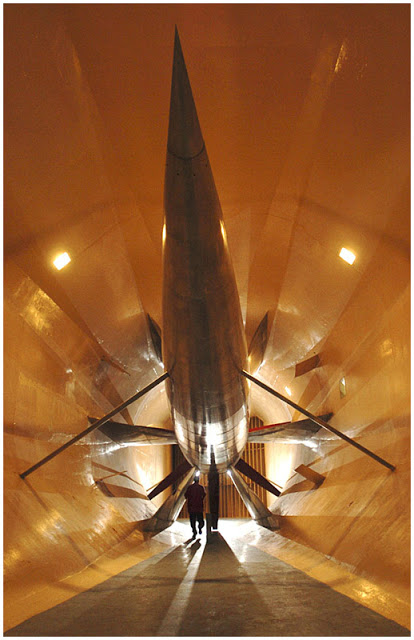
Long-time readers will recognize this shot, of the Glenn L. Martin Wind Tunnel in Maryland, as the photo from the very first post on Strobist in 2006. I was happy with it when I shot it. And to some degree, I still am.

But looking at it today, there are definitely some things I would approach differently. So let's walk through it, bearing in mind what we've learned since way back then.Read more »
Strobist

 
Comments Off on SLC-1L-02: One light, Inside the Frame

Posted in Photography


Review of the Magilight LED Light Painting Wand

04 Feb

I’ve followed my friends Eric and Kim for some time, often marveled at their creativity and the tech side of things, too. Watching people that make art like they do, well, it makes you want to try it out! I can’t dance, and I don’t really have access to the locations those guys do, but I still wanted to try it out. Jump forward and I’m offered a review unit of a forthcoming tool called Magilight by Fotorgear.

Magilight is still available on IndieGoGo for $ 199 + Shipping as of the time of writing this review.

Review of the Magilight LED Light Painting Wand

What’s in the box

Breaking it down into basic terms, Magilight is an aluminum strip with a handle. The strip has 144 RGB LEDs along it, and the handle has batteries and the controls. The handle is plugged into the strip via a curly cable (attached and included). After you charge it up (charger included in the kit) and insert the two batteries (also included) into the handle, it’s a simple single press to turn the Magilight on, and then a case of selecting what you would like to do.

Review of the Magilight LED Light Painting Wand

You have multiple options for what sort of things you can do with the light, including images that you can “print”. Or you can just make a neat pattern surrounding a model or a subject of some kind. For example, using the Magilight behind a model as seen below, or lighting an object.

Review of the Magilight LED Light Painting Wand

First impressions

So, I’ve now taken delivery of the bright little aluminum beastie, and upon first inspection, it’s very well made. Although if you don’t pack it back in its bag with the included protection tube, and you treat it badly, you might bend it. But if you have any common sense, that’s easily avoidable!

I will admit, I didn’t charge my batteries right away, I was keen to see what it could do, so I put them in and took the light out in the backyard at night to try it out!

Review of the Magilight LED Light Painting Wand

I call this Strange Fruit.

Ease of use

I will admit that if the unit did come with instructions, I didn’t read them right away! These are a digital download and include a very good quick start guide. But it’s very easy to navigate the menu and find the different included light patterns (I’m not 100% sure what to call them…presets?). Switching between a line drawing and any of the included presets on the MicroSD card that came with the unit is very easy.

Review of the Magilight LED Light Painting Wand

Yes, this spooky thing is included along with so many more!

The two photos above are from the first night I had the unit and just flicked it on to see what I could do. Well, I’ve since used it for half a week and while it certainly does take a little while to get used to, it’s a great lighting tool.

The aluminum handle has a 1/4″ 20 thread in its base, so if you wanted to you could mount it to something. It also has a sleeve around the main handle that you can hold to spin the whole unit around and make those cool light circles. It works well, as long as you don’t get too excited and hit it against things while spinning (apologies to my 8-year-old, he wasn’t impressed haha!).

Getting the hang of it

It takes a little trial and error, getting to know how fast to move the light, what settings you should set your camera to etc. But it doesn’t take all that long to get the hang of it, and there are many tutorials on the web (you can start with the basics of Light Painting here on dPS). I was pleasantly surprised that within about 10 minutes I could get a really fun image out of the Magilight!

Review of the Magilight LED Light Painting Wand

Master 4 asked me to make his bike look cool!

After four or five evenings messing about with Magilight, the batteries were still going. But they are also easily recharged using the included charger, and the unit can be all packed away in the included, well-padded black nylon zip-up case.

Upon searching to see what info is out there about this light, I came across this page (remember I mentioned Eric and Kim up the top). Well, I had no idea… (but it makes perfect sense) and there’s a video of Eric and Kim using the light – great!

?

Minor issues

There were a couple of little minor things that bothered me. One was that I should have removed the batteries to transport the unit. I think all the moving around in the case had turned the unit on, and I traveled a few hours and then went to use Magilight and she was flat. Thankfully the included charger plugs into any USB power source!

The other minor issue being that the little memory card, I think, needs a little protective cover or door of some kind. I found that if I moved a certain way (I can’t actually pinpoint which way I was moving when it happened) that I could pop the MicroSD out of its slot. It didn’t come out fully, so it wasn’t lost, but it had to be put back in and then I had to re-select all the options.

The last thing is that when it beeps, it’s kinda loud. So when I turned “sounds” off, I sort of expected them to be off, but they come back on! I have heard that little things like this will be fixed by launch.

Conclusion

In summary, this Magilight is a really fun and innovative tool for light painters, the build quality is really good (though, naturally we’ll see how it goes after 6 months) and the functionality is very good.

I give this wannabe Lightsaber a brightly lit 4 out of 5 stars rating. (if the niggles are worked out for launch, you can call it a 5!) Great job.

Editor’s note: This product will be competing with the popular, but more expensive PixelStick. Let’s see how it does! 

The post Review of the Magilight LED Light Painting Wand by Sime appeared first on Digital Photography School.


Digital Photography School

 
Comments Off on Review of the Magilight LED Light Painting Wand

Posted in Photography


Gallery and impressions: The Tamron 100-400mm F4.5-6.3 is light, sharp and stabilized

28 Jan
Shot on the Canon EOS 80D.
ISO 800 | 154mm | 1/200 sec | F5.6

The Tamron 100-400mm F4.5-6.3 Di VC USD is a well-priced ($ 800) telephoto lens with a useful zoom range. Available in both Canon EF and Nikon F mount, this lens is useful on both full-frame and crop bodies, offering a 150-600mm equiv. field of view on the latter. We first saw it at PPE 2017 and were impressed by its reasonable size and weight given its reach – at 1.11 kg / 2.45 lb – it is the lightest lens in its class.

See our Tamron 100-400mm F4.5-6.3 sample gallery Optically, the 100-400mm is constructed of 17 elements arranged in 11 groups, including low-dispersion elements to correct for aberrations. It also features multiple coatings to reduce ghosting and flare, as well as a protective fluorine coating on the front element. Image stabilization is crucial when it comes to long zoom lenses and Tamron’s optical Vibration Correction system offers the equivalent of 4 stops of correction (CIPA rated).

Shown with the optional tripod collar attached, sold separately for $ 130.

Key Specifications:

  • 100-400mm zoom range
  • 150-600mm equiv. field of view on APS-C
  • F4.5-6.3 maximum aperture
  • VC Image stablization
  • Dust and moisture resistant
  • Silent AF
  • Florine coating on front element
  • Minimum focus distance: 1.5m
  • Maximum magnification ratio: 1:3.6
  • Filter thread: 67mm
  • Available in Canon EF and Nikon F mount

Wildlife and outdoor sports shooters can take solace in the fact that this lens is moisture resistant, with eight rubber gaskets, including one at the base of the lens mount. It’s compatible with Tamron’s TAP-in Console, allowing users to update firmware and/or fine-tune AF. It can also be used with the company’s 1.4X and 2X teleconverters. An A035TM accessory tripod collar is sold separately for $ 130.

Shot on the Canon EOS 5DS R.
ISO 200 | 100mm | 1/1600 sec | F4.5

Design and Handling

According to Tamron the lightweight design of this lens is mostly due to its magnesium alloy internal construction, though it is worth noting the outer shell of the lens is plastic (the lens mount is metal). The lens telescopes when zoomed, increasing in length about 50%. At its most compact it is about 20 cm / 7.8 in long.

Well-constructed, solid feeling and well-balanced, nothing rattles around inside the lens when shaken (my favorite test). Zooming from 100mm to 400mm requires a one quarter turn of the large rubberized zoom ring (located at the front of the lens).

Zooming from 100mm to 400mm requires a one quarter turn of the large rubberized zoom ring

‘Lens creep’ is an annoying fact of life when using telescoping lenses, fortunately it was not an issue during field testing. Just in case, there is a lock on the lens barrel (which can only be used when the zoom is retracted in to 100mm).

Toward the base of the lens barrel you’ll find an AF/MF switch as well as as a controller for selecting one’s VC (vibration compensation) mode: Mode 1 is for normal stabilization, Mode 2 is for use when panning. Users can also turn off VC completely, which useful if you’re on a tripod. Just below the focus ring is the focus distance scale window.

Performance

Hand-held at 400mm, shot using a 1/125 sec shutter because I live in Seattle and it is always dark outside. Shot on the Canon EOS 80D
ISO 800 | 400mm | 1/125 sec | F6.3

Tamron is pitching this lens as appropriate for sports and wildlife shooters, two groups that require reliable AF and effective stabilization. Fortunately, our real world usage shows the 100-400mm excelling in both areas.

The image stabilization system proved effective at helping to eliminate camera shake at shutter speeds I’d ordinarily not feel comfortable using, given the focal length used. The moment you engage AF the IS system kicks in – with one’s eye to the finder the effectiveness of the compensation is immediately apparent.

Autofocus is both silent (hello ultrasonic drive) and fast (powered by two processors). Acquisition is nearly instant in AF-S and it’s equally fast and impressive in AF-C. Users can expect it to maintain focus on the moving subjects they point it at, assuming their camera body is up to the challenge.

Image Quality

The lens is sharp through the zoom range, out of focus areas are also inoffensive. Shot on the Canon EOS 5DS R.
ISO 400 | 400mm | 1/500 sec | F6.3

Though this lens has a slow maximum aperture and is best used for daylight shooting, all signs point to it being optically very good. Our copy of the 100-400mm was well-centered and universally sharp across the frame at all focal lengths we shot. Ghosting and flare are rare.

[It is] universally sharp across the frame at all focal lengths we shot

Chromatic aberration is also really well controlled, though it does appears in some images. Lateral CA is easy to correct in Adobe Camera Raw and other Raw processing programs.However axial CA, which you can see in this shot, is much more difficult to correct for. We also noted some vignetting when used on full-frame, but that is also fairly easy to correct in post.

Bokeh is about what we would expect for a complex telephoto lens. It can look nice toward the longer end, when there’s good subject separation, but closer to 100mm, it can look a little busy, as is the case in this shot.

Conclusion

For travel photographers looking for a casual, lightweight telephoto lens to explore with, the Tamron 100-400 F4.5-6.3 is a solid choice. Shot on the EOS 5DS R.
ISO 400 | 143mm | 1/1250 sec | F5

The Tamron 100-400mm F4.5-6.3 is a great telephoto lens for daylight photography, whether your subjects are moving or not. It offers fast, silent autofocus, good stabilization and is optically impressive at all focal lengths. All that comes in a weather-resistant package that also happens to be the lightest in its class.

We feel comfortable giving it our recommendation

Priced the same as the Sigma 100-400mm F5-6.3 DG OS HSM, the most obvious difference between the two is the Tamron is faster on the wide end, F4.5 vs F5 (and it’s also a hair lighter). That aside, the two offer very similar features like image stabilization, multi layer coatings and special elements for dealing with CA. We’ll have to revisit the Sigma to see just how well the two compare. But having spent a good amount of time with the Tamron, we feel comfortable giving it our recommendation.

What we like:

  • Sharp, versatile zoom range on both APS-C and full-frame
  • Lightest lens in its class
  • Moisture and dust resistant
  • Impressive image stablization
  • Silent AF is fast and accurate

What we don’t:

  • Slow aperture range
  • Pricey tripod collar sold separately
  • Vignettes on full-frame (though easy to correct)

$ (document).ready(function() { SampleGalleryV2({“containerId”:”embeddedSampleGallery_6541892592″,”galleryId”:”6541892592″,”isEmbeddedWidget”:true,”selectedImageIndex”:0,”isMobile”:false}) });
Articles: Digital Photography Review (dpreview.com)

 
Comments Off on Gallery and impressions: The Tamron 100-400mm F4.5-6.3 is light, sharp and stabilized

Posted in Uncategorized


It’s not the low light king, but here’s why we’re excited about the GH5S

26 Jan

There’s no getting around physics. The GH5S uses an oversized Four Thirds type sensor – pretty big for a video camera – but still kinda small when compared with the 36 x 20.3mm expanse of silicon the Sony a7S II uses to shoot video. As you’d expect, the GH5S can’t simply leap this vast chasm using only some sensor improvements, better noise reduction and a little moxie. It’s good but, in spite of anything you may have read, it’s not magic.

Read our analysis of our side-by-side shooting with the Sony a7S II

And yet, the more we test and use the camera, the more excited we are by it.

For a start, our shooting suggests that GH5S can outperform the a7S II whenever you require a depth-of-field that the Panasonic can offer. That alone means the GH5S will perform better than the Sony in some circumstances and can work across a greater range of lighting conditions than its IS-enabled sibling, the GH5.

But that’s not the end of it. The ability to shoot Log footage in 10-bit means that it can retain a lot more subtle tonal information than the 8-bit output of the Sony. So although the deep shadows might be more susceptible to noise than the a7S II, the quality of the midtones in the final footage may well be better preserved and more tolerant of grading.

That’s before you consider the features such as waveforms and vectorscopes that the GH5S inherits from the GH5, features that really aid setting exposure when shooting Log. Add to this the existing ecosystem that’s grown up around the GH series and the full picture reveals itself. We’re currently shooting the GH5S with a 0.71x SpeedBooster and a Sigma 18-35mm T2.0 CINE lens and can’t wait to show the results. If only Seattle would drop out of Log mode for a moment…

Articles: Digital Photography Review (dpreview.com)

 
Comments Off on It’s not the low light king, but here’s why we’re excited about the GH5S

Posted in Uncategorized


How to Photograph Light Trails from the Back Seat of a Car

21 Jan

Photographic light trails are a beautiful effect. You’ve no doubt encountered them before. Photographers perch over a vantage point and trace the trajectory of cars navigating an urban landscape using a slow shutter speed. The result renders a fluid trail tracing around the environment in a variety of shapes and colors.

Think of this project as a new take car light trails. We’ll still be recording passing light sources – but we’ll be capturing them from inside of the car instead. The result is just as striking inside as it is outside. You might have an old car or a fresh new one – it doesn’t matter! You get an impressive effect regardless.

How to Photograph Light Trails from the Back Seat of a Car

Safety

First, a little caveat. Safety is the priority here. As we are going to shoot from the back seat of the car, you will need a pal as the driver. Do not try and take photos while driving – it can only end badly. Having a buddy as a driver will allow you to concentrate on what you are doing while the driver can focus on driving. It’s strictly a team effort.

Another safety point, try not to obscure the rear-view mirror. Hunch down a little to save the obstructing the driver’s view. For the best effect, photographing at night is ideal – so be extra aware of the limited visibility.

Equipment

What you need to do this:

  • Camera
  • Sturdy Tripod
  • A friend
  • A car

Setting up

It can be a rough ride trying to get everything set up in a moving car, so set up before hitting the road. First, clean the glass. Give your windshield and windows a good clean to avoid spending countless hours cloning out unfortunate bugs in post-production. Next, set up your tripod in the car. You’ll have to do some adjusting to get the camera level with the windshield.

Just keep in mind, the tripod just adds extra stability. It’s impossible to take a sharp slow shutter speed image while driving along in a fast car. But the tripod is far more stable than photographing by hand. I use a Manfrotto tripod because it’s nice and heavy to keep things a little steadier.

Sit the tripod so two legs rest against the front seats, with your camera peeking through the gap between the headrests. Be sure your camera is securely attached before heading out. You don’t want a camera bouncing around in a moving car.

Method

Once you are packed and ready,  it’s time to set off. Take a few test shots on your camera. As I mentioned before, this project works best at night, otherwise, you won’t get much of a result at all – just blown out exposures. In addition, the variety of lights will be much more apparent at night, with a good mix of color and shape.

Next, try to familiarize yourself with the car’s handling so you can expect certain lumps or bumps and the car’s response. I’m not saying you have to become a car-psychic, but higher cars behave differently from one to another. The interior of a car also has an impact on how your photographs will turn out. You may have to incorporate a dashboard or interior lighting too. I chose to keep the dashboard lighting in my images to maintain the process of the photograph.

The next step is all experimentation! You’ll get an endlessly diverse result with every exposure. I recommend setting your camera to ISO 100 so you can use shutter speeds between 10 and 30 seconds. If you have a shutter release, give the B (Bulb) setting a try too. Just take a few moments to find a comfortable position. You can keep your tripod a little steadier if you brace yourself against the legs of the tripod and the front seat.

How to Photograph Light Trails from the Back Seat of a Car

In this image, the driver is making a turn which creates the horizontal lighting effect.

How to Photograph Light Trails from the Back Seat of a Car

You can choose to include your friend in the review mirror. Just make sure you warn them in advance and don’t obstruct their visibility for too long.

How to Photograph Light Trails from the Back Seat of a Car

You can tell how rough this section of road was due to to the jagged lights. You can also see the illuminated settings on the dashboard. I felt that including them adds to the final image and the process leading up to each photograph.

How to Photograph Light Trails from the Back Seat of a Car

By swiveling the camera to focus on a different area of the car you can record light sources from two angles of the frame.

How to Photograph Light Trails from the Back Seat of a Car

On a rainy night, the windshield gets a little fogged, diffusing the lights at this interchange.

How to Photograph Light Trails from the Back Seat of a Car

By unfocusing your camera, you can create some colorfully abstract patterns and bokeh.

How to Photograph Light Trails from the Back Seat of a Car

Conclusion

Photographing light trails inside the car is a quick and easy way to capture a unique perspective. We know the world outside the windshield is a wonderful one, but sometimes it takes an abstract project like this one to truly bring it alive. While I’ll admit it ain’t Top Gear, it does have some pretty amazing results.  I would love to see some of your results below!

The post How to Photograph Light Trails from the Back Seat of a Car by Megan Kennedy appeared first on Digital Photography School.


Digital Photography School

 
Comments Off on How to Photograph Light Trails from the Back Seat of a Car

Posted in Photography


Tips for Making the Most of Morning Light for Portraits

12 Jan

There’s something about taking photos in the magical morning light that makes my heart so happy. Maybe it’s because of the extra effort it takes to be outside in the crisp morning air when your family is still in bed. It could also be because morning sessions are more uncommon, so they feel a little more special. Most likely it’s because that soft, beautiful light just glows, and looks just a little different from the light later in the day, or evening.

How to Make the Most of Magical Morning Light

If you’re a night owl, and can’t imagine getting out of a nice warm bed just to take some pictures, let me try and convince you to give it a try. You might become a morning person, just for that incredibly gorgeous morning light.

Time it Right

The best time to start a morning session is right around sunrise. I have an app on my phone that will tell me what time the sun rises in my area on any date. I like to start about 15 minutes after sunrise. The light level is usually fairly low right at sunrise, so I give a little bit of time for things to lighten up before starting.

The nice thing about using that morning golden hour versus the evening golden hour is that you can take as much time as you need. In the evening you have to decide when it’s the exact right time to start. You want to use the best light right near sunset, but you don’t want to start too late and not have enough time before it’s too dark. If you start too early, you could be done before the beautiful golden sunset light shows up.

Morning light at sunrise takes care of that problem. You start with that gorgeous glowy light and shoot until you’re done. No light is ever wasted.

How to Make the Most of Magical Morning Light - portrait

Morning Weather is Usually Good

Depending on where you live, you might have better luck with the weather in the morning. In my area, it’s usually less windy than it can get in the afternoon. Most mornings are calm and still. Oftentimes there’s a light hazy cloud cover that makes any shooting direction work, so you can use your backgrounds to their fullest extent.

More often the rain and storms come a little bit later in the day. It’s not always the case that you get beautiful weather in the morning, but more often than not, it’s perfect conditions for shooting.

The only negative would be during the colder times of the year when mornings are brisk, or even downright freezing. I just instruct my subject to dress warm, and I wear fingerless gloves and a coat with pockets, so I can try to keep my hands as warm as possible.

How to Make the Most of Magical Morning Light - golden portraits of two girls

Morning Light has a Special Quality

There’s a softness to morning light that you just don’t see most afternoons and evenings. It feels like it wraps around the subject a little more, and has a bit less intensity compared to light later in the day. It can be easier to work with because you won’t have as much glare in your lens when backlighting (facing your subject away from the sun).

You can face your subject toward the sun easier too, because the light isn’t quite as harsh, so they don’t squint as much. The shadows on faces aren’t as pronounced, and everything feels a bit softer. The light isn’t usually as warm as it is in the evening, so sometimes I warm the photos up a bit more in post-processing, but there are times when the cooler light is simply stunning.

How to Make the Most of Magical Morning Light

Be Different, Learn Something New

Many times when I’ve shared photos from a morning session, people have told me that they love the photos, but they don’t quite know what makes them so special. Most photographers are out there during the evening golden hour, and that little bit of difference you’ll see in a morning photo will set you apart from everyone else.

Your photos will have a quality to them that other photographers might not be able to put their finger on. I don’t do every photo session in the morning, in fact, most of my sessions are later in the day, but doing something different, outside of the norm, sets you apart from other photographers, and it also opens you up to more inspiration and creativity.

Every time we do something a little different, we learn new things, and sometimes discover something new that takes our photography to the next level. Shooting in the morning is just one of those things you can do differently, but it’s a big one. It might even be a game changer for you.

How to Make the Most of Magical Morning Light

Wake Up

How do you convince your next photography subject to get up early in the morning and get ready for a photo session when they could be sleeping longer? How do you convince yourself to get out in the brisk morning air with your camera when you could be snuggled under the covers?

The best way to convince anyone is to look at the results. I’ve had clients get up at 4:00 am to be ready for a session because beautiful photos were more important than a little bit more sleep. They can always take a nap later. If you can convince one person to give it a try, you might convince a lot more to do it too, once they see those photos.

You will love the feeling of accomplishing something wonderful first thing in the morning, and then having the rest of the day to edit and play. So, set that alarm and give that morning light a try!

How to Make the Most of Magical Morning Light

Are you a lover of a beautiful sunrise and glowing morning light? Share your morning photos, people or nature, in the comments. I’d love to see what you’ve captured while your neighbors were still in their pajamas!

How to Make the Most of Magical Morning Light

The post Tips for Making the Most of Morning Light for Portraits by Melinda Smith appeared first on Digital Photography School.


Digital Photography School

 
Comments Off on Tips for Making the Most of Morning Light for Portraits

Posted in Photography


Panasonic Lumix DC-GH5S vs Sony a7S II low light shootout

11 Jan

We shot the Panasonic GH5S against the Sony a7S II to see whether the video-centric Lumix can wrest the low-light crown away from its full frame rival. We’ll let you draw your own conclusions, but our initial assessment is that the Panasonic comes closer than we expected, and outperforms the Sony when you need to maintain a certain depth-of-field or when you shoot in Log.

Click here to download a ProRes version of the video (8.0GB)

Notes:

We shot both cameras side-by-side, which explains the slight perspective difference. The GH5S’s oversized ‘multi aspect’ ratio sensor means it also offers a wider field of view even when using equivalent focal lengths.

We shot at a range of ISOs in both the camera’s REC709 modes and their respective Log gamma modes, then matched the footage up alongside one another. We’ve kept all post-processing to a minimum, with only very minor color and brightness adjustments applied to provide consistency between the two cameras.

We felt Panasonic’s noise reduction is significantly more effective than Sony’s

Most sequences were shot so that both cameras had the same exposure settings. These are marked as ‘Exposure Matched’ in the video. However, there are times when you need to achieve a certain depth-of-field. These clips, which required us to stop the Sony down by two stops, are indicated as ‘Depth-of-Field Matched.’

We felt Panasonic’s noise reduction is significantly more effective than Sony’s and, especially when combined with its ability to shoot 10-bit 4:2:2 footage, helps it perform well when compared with the Sony, especially below ISO 12,800 and when shooting in Log. However, it’s also worth noting the yellow blocking that can infest high ISO footage from the GH5S.

For a more detailed assessment, head to our first impressions review.

Read our Panasonic Lumix DC GH5S
First Impressions Review

Articles: Digital Photography Review (dpreview.com)

 
Comments Off on Panasonic Lumix DC-GH5S vs Sony a7S II low light shootout

Posted in Uncategorized


How to Create Dynamic Photos of Car Light Trails

09 Jan

Nothing says futuristic, dynamic, and dramatic like a well-done traffic light trail photo. This is a genre of photography that almost all landscape photographers will have dipped into, it’s like a right of passage. The kind of images you can create make others want to go out and buy their first tripod.

Indeed getting a good photo of light trails will justify carrying around that heavy tripod perhaps all day long. There are lots of things to consider when taking this type of photo, and in this article, you’ll learn straight away what it takes.

How to Create Dynamic Car Light Trail Photos

This photo was taken from a residential building overlooking this amazing traffic intersection in Shanghai.

Choosing the right location

The most important thing to creating light trail photos is to go to a place where there will be lots of moving lights! This should be obvious, but some places are better than others. In all cases, the light trails will be part of the frame and either the main subject or the leading lines that direct the viewer to your main subject. In most cases your location is going to be urban, so let’s look at the options.

How to Create Dynamic Car Light Trail Photos

This light trail photo of the Colosseum in Rome uses light from a passing bus.

1 – Down on the street

A busy main road can be a good place to take light trail photos. The chances are you’ll be photographing a famous landmark from your locale, and using light trails will give the photo a more dynamic feel.

  • Position yourself so the light trails either lead up to your landmark or disappear off into the distance beside it.
  • When a safe traffic island is available, experiment with photographing from the middle of the street. This will give you both white headlights, and red rear lights.
  • It’s easier to control the intensity of the light from rear lights. So it’s often best to position yourself to photograph light trails as the traffic is moving away from the camera.
  • Photograph during blue hour as much as possible, this should be the case for all cityscape photos.
  • The best light trails are produced when buses drive past. They have lights that will fill your frame, as these vehicles are taller and lit up more.
  • The height at which you have your tripod set can dramatically affect your results when photographing at street level. The lower the tripod, the “higher” the lights will appear in your frame.
  • If you don’t want the lights to paint across the entire photo, experiment with an external shutter release, and the bulb function on your camera. Bulb allows you to open and close the shutter when you choose, so you can close it and end the exposure before the moving vehicle completely moves through your photo.
How to Create Dynamic Car Light Trail Photos

In this case, the Bulb function was used so that the light didn’t paint over the building on the right.

2 – Get up high, and photograph from above

Taking photos from a high vantage point is often a sure fire way of getting good results. This is especially true when it comes to taking light trail photos. There are two choices when it comes to this, you can go to the public area, or try for the trickier private access.

  • Public area – The easiest and safest option, though this likely means 1000’s of other people will also visit the same spot. This will commonly be a pedestrian footbridge over a road, a viewpoint from a mountain, or perhaps a viewing gallery in a tall building.
  • Private property – The best policy here is to ask permission. The other approach is riskier, more clandestine, and more in keeping with a genre of photography called urbex. At this time access to private rooftops is becoming increasingly difficult, in no small part because some people enjoy filming daredevil stunts from such locations. So do your research on a location you would like to photograph, and be respectful if you are lucky enough to get access. In some cities, rooftop bars can offer great views, but if you wish to bring a tripod in then emailing the business ahead of time is advised.
How to Create Dynamic Car Light Trail Photos

This high vantage point was achieved by contacting a rooftop bar in advance and getting permission to photograph from their location.

3 – Embrace the great outdoors

Of course, anywhere there’s a road can be a good location for light trail photography. Roads that wind their way up a mountainside will look great in a photo, you just need a good vantage point. Even photos from a lower position can look nice with a single stream of light, which can create a nice minimalist feel to your photo.

Photos taken in these locations may require very long exposures to allow the vehicle to drive through the frame. The best solution here is to take a series of 30-second exposures, and then stack the results later in Photoshop (or use an ND filter to cut the light and get longer exposure times).

How to Create Dynamic Car Light Trail Photos

This location is in Taiwan. To reach the viewpoint there were several bits of rope I had to climb up, as the side of the mountain was steep.

How to take long exposures of car light trails

Once you have settled on your location it’s time for the fun to begin! Taking these photos well does require some technical knowledge, let’s break this down here.

  • Compose your photo, and ensure the light trails complement the frame you wish to produce.
  • Arrive around 30-minutes prior to sunset. This will give you time to plan your photo and to take additional photos for digital blending if needed.
  • Ensure the camera is steady, this is challenging in strong winds. To achieve this use a heavy tripod, and where possible hook your camera bag under the center column. The heavier the tripod, the less likely it will be moved by the wind. Avoid putting up the middle extension tube on the tripod, as this introduces more instability and movement.

  • You can focus the camera using Live View. In Live View, zoom (using the magnify view button + not zooming your lens) into an area of the frame such as a sign. Now set your lens to manual focus. Choose an object to focus on that is towards the back of the mid-ground in your photo. Keep the camera in manual focus, so that the camera doesn’t change focus when you press the shutter button.
  • An additional option is to use digital blending to balance the light throughout the scene. Digital blending is a post-processing technique that requires a set of bracketed photos at -1, 0 and +1 exposure (or -2, 0, and +2).
  • Using an aperture of f/11 or smaller will create a starburst effect on any street lights that are in your frame. But the larger the aperture the brighter the light trails will be, so a balance is needed.
  • Now everything is set for you to take your photo. The light trail photo needs to show continuous light moving along the road. Make sure your exposure is long enough for this to happen, usually this is at least 15 seconds. To avoid camera shake use an external shutter release, or the camera’s self timer. If the camera isn’t in Live View, use the mirror lockup, this prevents shake on dSLR cameras when they expose.
How to Create Dynamic Car Light Trail Photos

This frame required several stacked images to enhance the amount of traffic in the photo.

Enhancing your light trail photo in post-processing

As with all photography, you can enhance your image in post-processing to get an even better result. There are two principal techniques that can be used to achieve this.

  • Digital blending – In order to use this technique you will need a set of bracketed images to work with. This technique will allow you to balance the level of light throughout the scene.
  • Photo stacking – The next option, usually done in conjunction with digital blending, is photo stacking. You can use this to intensify the light trails within your photo. The concept is to take photos of multiple traffic light streams and overlay the images on top of each other.
How to Create Dynamic Car Light Trail Photos

There aren’t many better places to photograph light streams on boats than Venice!

Other types of light trail photos

There are lots of other ways to use light trails in your photography. Here are a few other ideas you can try, that will complement your other light trail photos.

  • Boat lights – Boats on the water produce beautiful light trails, with the added bonus of reflections. The speed of boats is much slower though. This means an exposure of around two minutes or stacking several photos together to complete the light trail.
  • Create your own – You don’t need cars to create light trails, in fact, you can just use a light source and make your own. To have the most fun with this purchasing a Pixelstick is a great idea.
  • Kinetic light painting – Static lights can be turned into light trails, you just have to move your camera! Try out zoom bursts, or camera rotation to see some amazing results.
How to Create Dynamic Car Light Trail Photos

The u-bein bridge in Myanmar is a classic photograph. You won’t see light trails here unless you make your own!

Time to hit the road, and get some light trails

Now it’s time to get out there and try this amazing style of photography. I’m sure many of you have taken car light trail photos, so share your best work with the community in the comments below.

What style of photo do you like best? Are there any further tips that you use for your photos that you’d like to share? As always share your thoughts, ideas, and work below and let’s talk about car light trail photography.

How to Create Dynamic Car Light Trail Photos

Time to get on your bike, and out there taking light trail photos!

The post How to Create Dynamic Photos of Car Light Trails by Simon Bond appeared first on Digital Photography School.


Digital Photography School

 
Comments Off on How to Create Dynamic Photos of Car Light Trails

Posted in Photography