RSS
 

Posts Tagged ‘Levitation’

How to Take Floating Photos – Levitation Photography [video]

26 Jan

The post How to Take Floating Photos – Levitation Photography appeared first on Digital Photography School. It was authored by Caz Nowaczyk.

In this great video from, Dunna Did It, you will learn how to create Levitation photography. That’s right, you’ll learn how to take floating photos!

?

What you need:

  1. Camera to shoot with
  2. Tripod
  3. Photo Editing software

How to create levitation photography:

  • Set up your object that you are photographing.
  • Put your camera’s settings to the required settings based on your lighting and room.
  • The trick is to take one photo holding it with your left hand, and then one holding it with your right hand.
  • Be sure to turn on you turn Grids ON in your camera.
  • Line up your camera in the same spot for each shot using your grid.
  • Use manual focus for each shot because you want the focus to be exactly the same for each photo.
  • Hold your camera with one hand and line it up to your grid, focus and take the photo.
  • While still holding it, reach with your other hand and grab the opposite side (keeping the camera in the same position). Let go with the other hand, and take the 2nd photo. Try this as many times as you need to.
  • Choose and edit your best photos in Lightroom (or the editing program of your choice).
  • Once you have the two you want to combine, jump to Photoshop (press cmd+E mac, ctrl+E win) and choose Edit in Photoshop.
  • Go to the image held with the left hand and double-click the layer in the Layer Palette to make it an editable layer.
  • Then choose Cmd+A to select all, then Cmd+C to copy.
  • Jump to the other image, double click the layer in the Layers Palette to make the layer editable.
  • Then choose Cmd+V to paste the other image you copied into the new image.
  • Lower the opacity of the top layer to about 36% so you can see how well you can line them up.
  • Move the top layer until it is lined up.
  • Next, we want to take the top layer and delete to parts we don’t want.
  • Put a layer mask onto the top layer and select your Brush Tool (use a soft brush by turning down the hardness).
  • Change your foreground color in your toolbar to black to paint out areas of the layer mask.
  • Paint out the areas you don’t want. To fine-tune, make your brush smaller and continue to paint out areas you don’t need.
  • Check all your lines around your image to ensure they line up.
  • Do any further edits you want and you are done!

You may also find the following articles helpful:

How to do Digital Blending in Photoshop to Create a Composite Photo

How to Create A Simple Composite: Photoshop Creative

How to Make a Composite Wine Bottle Image using Photoshop Layers

Preparing your Model and Background for a Successful Composite

How to Shoot and Create a Composite Image for a Product Advertisement

A Guide to Create Eye-Catching Composite Images


The post How to Take Floating Photos – Levitation Photography appeared first on Digital Photography School. It was authored by Caz Nowaczyk.


Digital Photography School

 
Comments Off on How to Take Floating Photos – Levitation Photography [video]

Posted in Photography


Spherical Tires: Magnetic Levitation for Driverless Vehicles

19 Mar

[ By WebUrbanist in Technology & Vehicles & Mods. ]

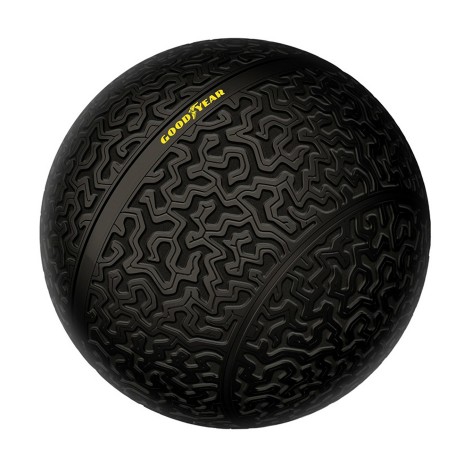
magnetic levitation sphere tires

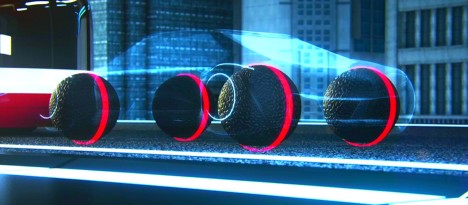
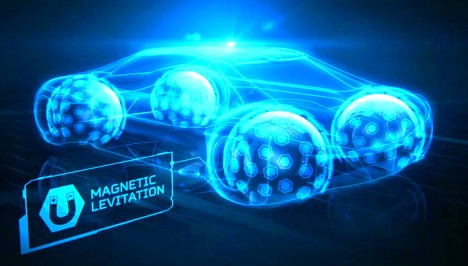
The Eagle 360, a new tire design concept from Goodyear, is a rounded sphere held in place by magnetic fields and designed for a smoother ride in your future driver-free car.

The biggest advantage, of course, is omnidirectional steering capabilities, since the wheels have no orientation, unlike their forward-or-backward circular predecessors.

goodyear tire concept

An organically-patterned, 3D-printed tread is designed to adapt like a sponge to different road conditions, while built-in sensor relay surface measurements to the onboard computer. Faster response times and immediate reaction capabilities in multiple directions all work toward improving passenger safety and comfort.

goodyear tire diagram future


“By steadily reducing the driver interaction and intervention in self-driving vehicles, tires will play an even more important role as the primary link to the road,” said Goodyear’s senior vice president Joseph Zekoski.

goodyear maglev tires

“Goodyear’s concept tires play a dual role in that future both as creative platforms to push the boundaries of conventional thinking and test beds for next-generation technologies.”

Share on Facebook


[ By WebUrbanist in Technology & Vehicles & Mods. ]

[ WebUrbanist | Archives | Galleries | Privacy | TOS ]


WebUrbanist

 
Comments Off on Spherical Tires: Magnetic Levitation for Driverless Vehicles

Posted in Creativity


Air Bonsai: Magnetic Levitation Kit Lets You Float Little Trees

21 Feb

[ By WebUrbanist in Design & Furniture & Decor. ]

floating air bonsai plant

Taking bonsai approaches to the next level, a Japanese company based out of Kyushu has raised over half a million dollars so far for its levitating (and rotating) tree system.

floating tree collection

The fauna in question span quite a range, from flowering plants to pine trees to mosses. The magnetic levitation tech supports up to 250 grams of whatever species you prefer (up to a few inches in width), powered via a simple AC adapter.

floating plant diy kit

floating tree demo

Of course, you can further decorate your little floating worlds however you like, with ceramic figures, lava rocks or other scene-setting touches.

floating bonsai tree system

The system comes as a DIY kit priced starting at around $ 200, depending on whether you wish to get both the mechanical system and a starter plant or just the technology portion. There are also both modern and traditional-looking, hand-crafted bases, depending on your aesthetic preferences.

Share on Facebook


[ By WebUrbanist in Design & Furniture & Decor. ]

[ WebUrbanist | Archives | Galleries | Privacy | TOS ]


WebUrbanist

 
Comments Off on Air Bonsai: Magnetic Levitation Kit Lets You Float Little Trees

Posted in Creativity


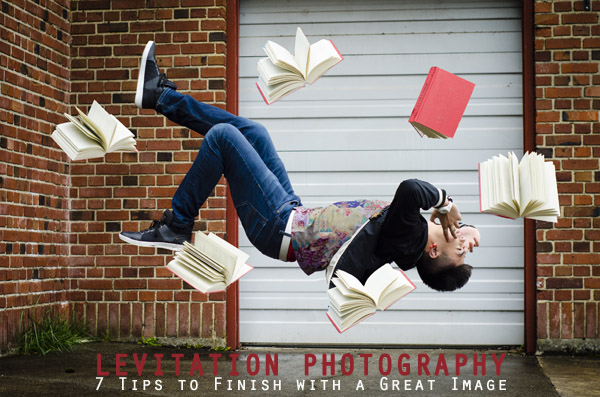
Levitation Photography 7 Tips for Getting a Great Image

11 Jun

Image1

Levitation images are magical! They draw the viewer in and make them think about what’s not quite right. If you search the internet for levitation photography, you will find amazing examples. However, levitation photography hasn’t become wildly popular yet. I assume it’s because levitation photography looks really difficult. I think most people would be surprised to learn that in its most basic form, it’s just compositing two or more images in editing software.

Like most portrait photographers, I shoot what I’m good at, and mostly stay inside my little portrait box. Recently, I decided I needed to get my creative juices flowing again and get out of my comfort zone. Levitation photography caught my eye. I learned the basics of how to create such images from posts like this: How to Shoot a Mysterious Levitation Photo.

My first levitation experiment was rough, to say the least. I knew the basics of how to accomplish a levitation photograph, but the images turned out mediocre. The best part though, was coming home after the shoot and writing down all the things I had learned to make my levitation images better for the next time. Below, you’ll see the lessons I learned, so you don’t have to learn the hard way.

Preparing for the Shoot

Tip #1 – Gather Your Equipment

In order to create a levitation photograph, you must have: a camera (that has manual focus capabilities), a tripod, a willing model, a strong fan (if your model has medium to long hair), and something to prop your model up (a stool, chair, or ladder). If you have a camera remote, bring that along too.

Tip #2 – Tell Your Model What to Wear

Clothing can make or break a levitation image.

  • Solid color clothing is best. Prints and patterns can make it difficult if you need to clone out certain parts of clothing or liquefy fabric.
  • Tell your model not to wear a jacket or sweater. Anytime the model lays upside-down, or sideways, the garment should be hanging down. But if he/she is laying on a stool, the jacket won’t be able to naturally hang leaving the image looking less realistic.
  • If you’re going for a feminine levitation shot, long dresses, skirts, or extra flowing fabric can help create the look you’re going for.

Tip #3 – Shoot on a Cloudy Day

Sun and harsh shadows have the potential to create a lot of extra work for you in post-production. Editing out the stools and ladders, yet keeping a realistic shadow of your subject can turn into a job for Photoshop experts.

During the Shoot

Tip #4 – Shoot from a Low Angle

You will want to shoot from a low perspective to give the illusion that your subject is high in the air. However, be mindful of how low you are. If you are lower than the prop your model is standing/laying on, the prop will block parts of his/her body. It is safest to shoot in line with the top of the prop your model is on. Having your model situated at the very front of the prop will also lessen the chance of cutting into the body.
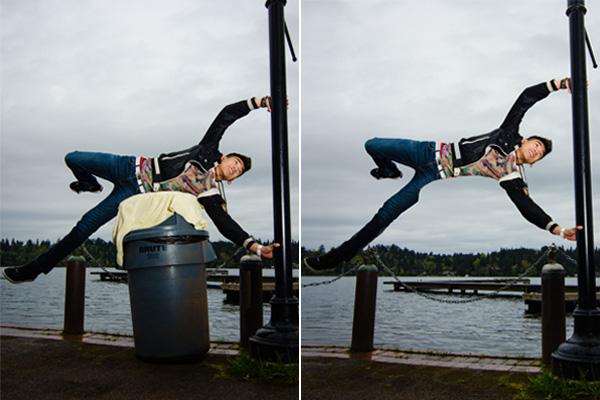
Image2

When I erased the garbage can, parts of the model’s body looks like it went missing since it was hiding behind the garbage can.

Tip #5 – Always Photograph the Empty Background

When preparing to photograph the frames that will create your final levitation image, follow these steps.

  1. Set up your shot with your model in the frame.
  2. Plan the angle you are going to shoot from and set up your camera on the tripod.
  3. When your model is in place, choose the focus point on your subject.
  4. Set your camera to manual focus and don’t touch it!
  5. Take the different shots suggested below, in Tip #6, without moving your focus point or your camera.
  6. After you’re sure you’ve captured all the images you need with your model and props, remove EVERYTHING from the scene. Photograph ONLY the empty background. This is the most important image you will take.
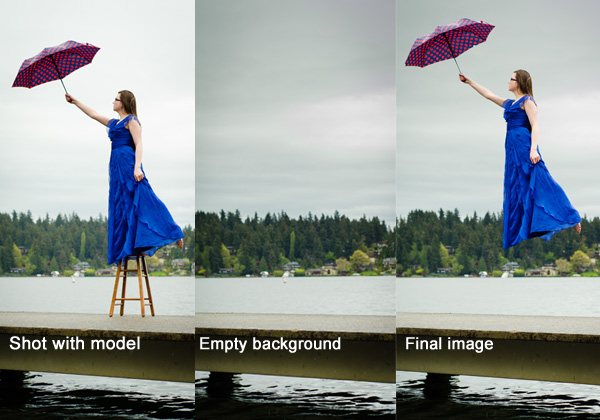
Image3

Tip #6 – Take Multiple Shots to Create One Image

The most basic levitation image is a composition of two or more frames. At the bare minimum, you will need at least a shot of the background and one of the model in that background.

Most great levitation images use a few more frames to add interest and make the final image more provoking. Here is a list of some shots you might want to take all without changing the focus and position of the camera:

  1. Model on the prop(s) – the focus of this shot is on what the arms, legs, and body are doing.
  2. Hair and facial expression – the focus of this shot is to capture the models expression and hair moving like it would naturally if the model was really in that position (floating straight up, blowing behind her, etc.). *Hair dryers and small fans are not strong enough to propel hair in specific directions. The longer and heavier the hair, the more powerful the fan needs to be.
  3. Clothing – the focus of this shot is to capture the movement of the clothing (if needed). If your model is being pulled one direction, what direction should the loose fabric be moving?
  4. Additional props – the focus of this shot is to photograph any extra props you want in the picture (if desired).
  5. Empty background – see Tip #5 above to learn more about the importance of this shot.
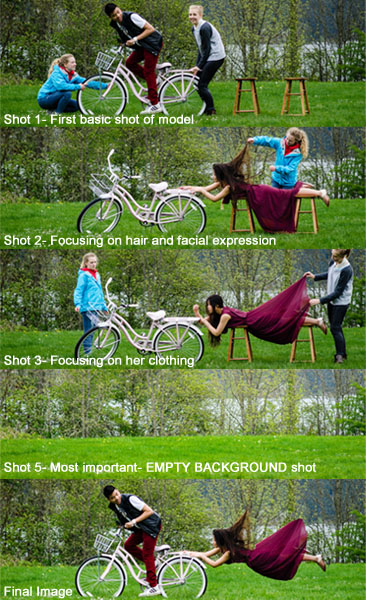
Image4

Shot 2 is a perfect example of how a strong fan would have made the shot more realistic with her hair blowing behind her instead of being held up by an assistant. We did not need to photograph additional props for this image, therefore, we did not do a “Shot 4″ for this composition.

After the Shoot

Tip #7 – Putting the Images Together

Many levitation photographers use Adobe Lightroom and Photoshop to create their final images. Regardless of your software choice, it is recommended to first color correct the series of shots so they are all the same. Lightroom has a great “sync” feature to make sure the exact same settings are applied to the entire series of images.

Next, open the images in an editing software like Photoshop. Start with the empty background image. Next, add in the main image of your model as a layer with a “Reveal All” mask. Simply use a black paintbrush on the mask to remove the props supporting your model. The end of this article describes each step in more detail. Repeat those steps for each frame you’d like to add. Finally, you can merge your layers and put the finishing touches on your final image. Then voila, you have a gorgeous piece of levitation art.
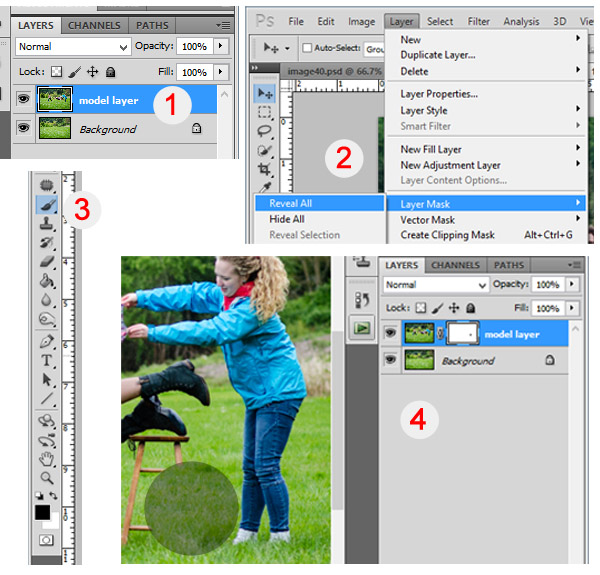
Image5

1 – Empty background shot is the bottom layer, with the model image above it. 2 – Select the model image and go to “Layers”> “Layer Mask” > “Reveal All”. 3 – Select the paintbrush, make sure it is black. 4 – Simply brush over the props that you don’t want to show in the final image.

Creating levitation images lets your fantasies become “realities”. Don’t let the laws of physics prohibit you from creating true art For more inspiration, search 500px.com for levitation images. You’ll be amazed.

Your Turn

Have you tried creating a levitation photograph? What was your experience? Do you have any additional tips that would help those getting started? Let us know in the comments. Also, feel free to include a link in the comments to your levitation work. We’d love to see what you create!

The post Levitation Photography 7 Tips for Getting a Great Image by Danielle Ness appeared first on Digital Photography School.


Digital Photography School
 
Comments Off on Levitation Photography 7 Tips for Getting a Great Image

Posted in Photography


100 Magical Levitation Photography Examples to Inspire You

25 Dec

People say that floating in the air or straightforward levitation is impossible. Everything is possible if you can use Photoshop! Of course, you can jump in the air and stay there until that pesky, old gravity tells you otherwise, but it’s not the way to impress your viewers. If you try to take a shot of a jumping person, it Continue Reading

The post 100 Magical Levitation Photography Examples to Inspire You appeared first on Photodoto.


Photodoto

 
Comments Off on 100 Magical Levitation Photography Examples to Inspire You

Posted in Photography


How to do Levitation Photography

05 Nov

We got sent a link recently to a website called yowayowacamera.com and were quite inspired by some of the shots she did. Her works involves “Levitation Photography”, which is basically shots that make the subject look like they are floating in mid air. Kai, who should’ve been doing something else decided to go out to try it for himself. Visit: yowayowacamera.com Pricing Reference: www.digitalrev.com
Video Rating: 4 / 5

 
Comments Off on How to do Levitation Photography

Posted in Photography Videos