Weird lens guru Mathieu Stern is back at it with a new video that shows images captured with two $ 20 Carl Zeiss projector lenses he converted into camera lenses.
As with many of Stern’s DIY projector lens projects, both of these lenses — a 120mm F1.9 and a 105mm F1.9 — lack any way to focus and don’t have any adjustable aperture. While the adjustable aperture isn’t quite so easy to address, the video briefly shows how he uses an M65 Helicoid ring adapter to give manual focus abilities to the lens. Although not shown in the video, Stern then uses an M65 to Sony E-mount adapter to use the custom lens to his Sony camera.
The resulting imagery captured with the lenses produces pronounced ‘swirly’ bokeh and gives a very sharp separation between the subject and the background. It’s not going to win any resolution or edge-to-edge sharpness contests, but considering you can pick up similar projector lenses for around $ 20 or so online and a set of adapters for your camera for roughly $ 50 or so, it’s a cheap way to get some unique shots.
Stern has a full list of the components he used in the video’s description on YouTube. You can find more of his work on his YouTube channel and website, which also features his always-growing ‘Weird Lens Museum.’
The post Photographing Stars Using a Kit Lens appeared first on Digital Photography School. It was authored by Adeel Gondal.
Nikon D5100 | 18mm | 20 sec | f/3.5 | ISO 1600
Have you seen those amazing starry sky and Milky Way photographs from professional photographers and wondered how to create similar results? Have you never tried because you thought you didn’t have the proper equipment?
Let me tell you, “You are wrong!”
If you own a normal DSLR or mirrorless camera, you can create stunning star photos with only a kit lens.
In this article, I will explain the whole process of photographing stars with your kit lens. I’ll give you step-by-step instructions in the easiest possible way – so that, even if you don’t have much technical knowledge, you can start capturing star photos like a pro.
Let’s dive right in.
The star photography basics
To get started, you need to have following points in mind:
You must shoot in a place away from the city lights. The less light pollution you have, the more chance you’ll have of getting clear stars.
You’ll want a moonless night. Stars can also be shot on a full-moon night, but the brighter the moon is, the more light pollution it creates, and the stars will not be as prominent.
You’ll need a normal DSLR or mirrorless camera with a standard 18-55mm kit lens (such as this Canon lens or this Nikon lens).
You’ll also want a tripod.
You can Google your surroundings to find locations that are far away from the city (check out Dark Sky for a helpful interactive map).
You should know beforehand in what direction, and at what time, the moon is going to rise. That will help you a lot with the composition of your images.
However, a moonless night is always best to shoot stars – so I recommend checking the current moon phase before heading out.
Additionally, you can use a compass app on your smartphone to locate the North Star for star trails. To get an idea of the stars above your location, you can download an app called Star Chart (for iOS or for Android) or Google Sky. Both of these apps also show you the direction of the Milky Way, so you can shoot it directly and get amazing results.
I also recommend checking out PhotoPills; this app offers an incredible suite of features for the beginner (or more advanced!) night sky photographer.
Anyway, these apps are pretty accurate. With their help, you can see Mars, even with your naked eye (I’m sure you’ve seen Mars before, but were likely unable to differentiate it from the surrounding stars).
If you want to plan a future shoot or look for an appropriate time to shoot the Milky Way in your location, you can download the desktop app Stellarium. Just pop in your coordinates, and it will show you the direction of the Milky Way at a specific date and time.
Thanks to Stellarium, you can know the exact time of year the brightest part of Milky Way will be above your location (so you can do some amazing star photography!).
Nikon D5100 | 18mm | 20 sec | f/3.5 | ISO 1600
Key camera settings for photographing stars
Now let’s get to the important part of photographing stars with a kit lens:
Camera settings.
You will need to take control of your camera, so you’ll want to keep it in Manual mode.
Change the shooting mode to Manual and adjust your setup to the following settings:
Focal length
Set your focal length to the widest possible option. In the case of a kit lens, this will often be 18mm.
While you can technically choose any focal length you want, the more you zoom in, the fewer stars you will be able to capture.
Plus, your optimum exposure time before star trails start to develop will decrease as you increase your focal length (see the 500 Rule, discussed in the shutter speed section below).
Aperture
Setting your aperture to the widest option is key here; for my kit lens, this is f/3.5.
By using the widest aperture your lens allows, more light will enter through your lens.
And this will result in brighter stars and a brighter Milky Way!
Shutter speed
If you are only shooting stars and the Milky Way, I recommend a shutter speed of 20 seconds.
Why 20 seconds?
Here’s the answer:
A shutter speed of under 20 seconds will result in less light reaching the camera sensor.
And a shutter speed of over 20 seconds will start to create star trails. In other words, the stars will move visibly across the sky.
In fact, there’s a handy equation for calculating your shutter speed, called the 500 Rule:
The optimum exposure before you start getting star trails is calculated by dividing 500 by your focal length (you’ll need to divide the answer once more, by around 1.5, if you are using a cropped sensor.)
So in the example of an 18mm lens on a cropped sensor, divide 500 by 18, for an answer of 27.78. Then divide this again, by 1.5, to get 18.52, which is roughly 20 seconds.
Make sense?
Nikon D5100 | 18mm | 20 sec | f/3.5 | ISO 1600
ISO
Start by keeping your ISO at 1600. You can then increase it later, depending on your results.
But keep in mind:
The greater the ISO, the more noise there will be in your image.
Now, this does depend on the signal-to-noise ratio of the camera body you are using; high-end cameras tend to offer the best high-ISO noise performance, and even modern consumer cameras feature decent results at high ISOs. But try to boost the ISO on an older camera, and you’ll end up with all sorts of unwanted noise.
Remote shutter release
You’ll want to have a remote shutter release to avoid camera shake from hitting the shutter button.
If you don’t have a shutter release, just use your camera’s 2-second or 10-second timer.
That will minimize any blur in the picture due to camera shake.
You should also switch off any “vibration reduction” or “image stabilization” technology included in your camera or lens, because this technology can actually increase blur during long-exposure images.
Focusing your lens to infinity
After dialing in all these settings, here’s the only important thing left to do:
Focus your lens to infinity.
Now, a kit lens doesn’t have an infinity marker on it, so you’ll need to use hyperfocal distance values to focus your lens.
Here’s what you do:
Mount your camera and lens on a tripod, and focus on any bright object at a distance of 20 feet or more.
(If you are in the dark and struggling to focus, you can point a flashlight toward your camera and use this as a point of focus.)
Once the lens is focused beyond 20 feet, its hyperfocal distance will project to infinity and your stars will be sharp. This will also help get everything in the foreground sharp, too.
Don’t forget to switch your lens to manual focus; otherwise, it will start to hunt for focus when the shutter is pressed.
You may be wondering:
Why is focusing to infinity so important?
If your lens is not focused to infinity, you will capture a Milky Way image. However, the stars will not be as sharp and they’ll appear bigger, like this:
My lens was not focused to infinity.
And this:
My lens was not focused to infinity.
And this:
My lens was not focused to infinity.
You’ll get a similar result if you use a too-long shutter speed and produce star trails.
So make sure you pay careful attention to both your settings and your point of focus.
A quick tip for photographing stars
Once you reach your location, it’s better to first sit in the dark for at least 15 minutes to let your eyes adjust to the surroundings. This will help you see a lot of stars (and even the Milky Way) with your naked eye. It will also help you compose your images better – because it’s easier to create beautiful compositions when you can see!
Plus, enjoying your surroundings for a while is better than simply shooting as soon as you reach the site.
Post-processing your star photos
When it comes to post-processing your star images, there are two things you should know:
First, always shoot in RAW. This will give you a lot of room for post-processing (that won’t affect the image quality).
Second, some post-processing is always needed to get optimum results. You can find many tutorials on how to post-process Milky Way images, including some here on dPS!
Capture stunning star trails
If you are satisfied with your shots, the next step is to capture star trails.
Simply locate the North Star using the Star Chart app discussed above.
Then keep the North Star in your composition, because this is the star that all other stars rotate around.
For star trails, all camera settings will remain the same, except that you can increase the shutter speed to 30 seconds.
Alternatively, you can go with faster shutter speeds (i.e., 20 seconds or faster, especially if there are lights in the area and 30 seconds results in overexposed images).
Keep your camera on its continuous shooting mode, and let it capture as many exposures as possible. The more pictures you have, the more clear your star trails will be. Of course, continuous shooting will only create a series of short star trails; later, you can join all the exposures in Photoshop or use special software to create full trails (such as StarStaX).
For instance, this shot is a combination of 18 separate exposures:
Alternatively, you can capture one shot of the stars and make star trails with it using the HM Technique:
Star trail created in Photoshop using the HM Technique
And you’re also free to have fun with Photoshop:
Fun in Photoshop!
Once you’ve nailed photographing the Milky Way, try including foreground objects for better compositions:
Nikon D7000 | 18mm | 20 sec | f/3.5 | ISO 1600
Photographing stars using a kit lens: conclusion
You’re all set to shoot your own stars!
With the help of a kit lens, you can create some beautiful star photography – the kind that’ll make you happy and impress your friends, too.
You could even try creating panoramas to get more of the Milky Way in your composition, like this:
So happy shooting, and keep me updated with your results! And if you need any help, let me know down in the comments.
The post Photographing Stars Using a Kit Lens appeared first on Digital Photography School. It was authored by Adeel Gondal.
Don’t ask why Yongnuo decided to showcase a full-frame E-mount lens on an APS-C camera body…our guess is as good as yours.
Chinese accessory and lens manufacturer Yongnuo has announced the release of a new 35mm F2 autofocus lens for full-frame Sony cameras.
The new lens is constructed of nine elements in eight groups, including one low-dispersion element and one aspherical element. The lens also features what Yongnuo calls a ‘nano-multilayer coating,’ but doesn’t specify what elements this coating is applied to.
The 35mm F2 has an aperture range of F2-F16, uses a seven-blade aperture diaphragm and has a minimum focusing distance of ‘about’ 35cm (13.7”). Its autofocus is driven by a digitally-controlled stepping motor (DSM) and an onboard USB-C port will allow for firmware updates, should Yongnuo release any to improve function or compatibility.
A diagram of the lens’ optical construction.
While constructed mostly of plastic, the lens features metal bayonet mounts and uses gold-plated contacts, which transmit, in addition to data for autofocus and aperture control, EXIF data. Also present is a switch for turning on and off autofocus, as well as a Function (Fn) button that can be customized to perform a certain action or bring up a certain menu.
There’s no word on when exactly the lens will go live or how much it will retail for, but you can keep an eye out on Yongnuo’s online shop and Amazon shop.
Off-the-wall photographic company Lomography has introduced a 35mm film camera that shoots 104mm long panoramic images through a lens that we are encouraged to fill with water. The company claims the HydroChrome Sutton’s Panoramic Belair camera is the world’s first 35mm format panoramic camera with a liquid-filled lens. Not surprising you might think, but they had to specify ‘35mm’ as in 1859 pioneering British photographer Thomas Sutton invented a panoramic camera with a water-filled lens that recorded on curved plates.
The camera has a plastic body and a lens that offers the angle of view of a 32mm. There is a chamber in the lens construction that allows users to add a liquid of their choice to create unusual effects. The liquid as such doesn’t form part of the focusing characteristics of the lens so much as operates as a form of filter. Clear water delivers a low saturation washed-out look, while adding weak coffee creates a sepia feel. Lomography recommends colored food dyes, tea and even diluted soy milk!
Images record across the entire width of the 35mm film used in the camera, so the emulsion around sprocket holes is exposed too allowing users to include the holes in their picture or to crop them off. Focus is fixed and the lens has an aperture of F11. Other smaller apertures can be achieved with the use of aperture plates, and shutter speeds are limited to 1/100sec, B(ulb) and T(ime). Cable release and tripod sockets help to keep the camera still during long exposures as well as for multiple exposures, and a hot shoe and a PC socket provide the means for a burst of flash.
Below are a handful of sample images, provided by Lomography:
The Lomography HydroChrome Sutton’s Panoramic Belair Camera is available now and costs $ 79 / £75. For more information see the Lomography website.
Press release:
The Lomography hydroChrome SuTTon’S panoramiC BeLair Camera
GO LOOPy WITH LIQUIDS, WILD FOR THE WETLOOK AND CRAzy WITH COLORS!
The world’s first 35 mm format panoramic camera with a liquid- filled lens
Unique experimental lens to step up your creativity and craft unexpected liquid effects
A fixed-focus lens with extra aperture plates for versatile renderings
Undeniably analogue aesthetic with lomo vignetting and perforated edges across panoramic shots
A fun introduction to experimental photography suitable for all creative spirits
A CREATIVE NEW CAMERA IS BORN An inspiring new invention, the HydroChrome Sutton’s Panoramic Belair Camera combines some of Lomography’s best-loved features into one exciting analogue innovation. The sweeping panoramic perspective of the Belair body meets the thrilling and unpredictable effects of the Sutton Liquid Lens with exposed sprocket holes to boot. Affordable, ingenious and incredibly simple to use with almost no need for settings, this new edition to the Lomography camera family invites creative spirits and first-time photographers alike to dive into an ocean of colorful experimentation.
EXPERIMENTAL, ENCHANTING, LIQUID EFFECTS The HydroChrome soaks up the scenery and drenches spectacular sprawling shots with special liquid looks. The unique Sutton lens lets you inject liquid into a circular dial, creating distinctive filters and luscious liquified scenes. With just the simple addition of clear water, you can achieve vintage aesthetics, washed-out tones and radiant blur too – every concoction creates unprecedented, unpredictable effects. Check out the HydroChrome Liquid Guide for inspiration and tips.
UNDENIABLY ANALOGUE AESTHETICS The HydroChrome makes experimenting easy. As well as a totally unique lens, this camera comes with a further two built-in features to explore – sprocket holes and panoramic exposures. Artistic minds can let their imagination run wild as they craft panoptic shots complete with lo-fi dreamy aesthetics, authentically analogue perforated edges, and extraordinary liquid effects, all on easy-to-use 35 mm film. Creative photographers can also experiment with multiple, long and pinhole exposures as well as four interchangeable aperture plates for versatility in a variety of lighting conditions.
TECHNICAL SPECIFICATIONS
Film Type: Standard 35 mm film Exposure Area: 104 mm × 35 mm Lens Angle of View: 32 mm Aperture: f/11 with f/16, f/22, f/32 & f/168 pinhole aperture plates Focus: Fixed-Focus Lens Focus Range: Focus-Free, 1.5 m – Infinity Shutter Speed: N (1/100), B (Bulb) T-Shutter: Individual T-Shutter Lever Viewfinder: Sports Viewfinder Multiple Exposure: Yes Tripod Socket Thread: Standard Tripod Socket Flash Sync: PC-Sync Socket & Hot-Shoe Cable Release Socket: Yes Price: 79 USD
DJI has announced the release of its new DJI Pocket 2, a second-generation three-axis mini camera.
The updated camera drops the Osmo nomenclature its predecessor bore and improves its performance across the board. Despite keeping its compact size, weighing just 117g (4.2oz), the Pocket 2 has a larger sensor and wider lens than the Osmo Pocket, which DJI claims has dramatically improve image quality for both photos and video.
The new 1/1.7” sensor (Osmo Pocket had a 1/2.3” sensor) works in tandem with a new 20mm (equivalent) F1.8 lens to capture 16MP photos in standard mode and up to 64MP images in high-resolution mode. The Pocket 2 can record 4K video at up to 60fps at a 100Mbps bitrate. DJI has added HDR recording and the device now offers up to 8x zoom using the 64MP high-resolution mode or 4x lossless zoom when shooting at 16MP or in 1080p.
DJI has also improved the focus system, which should make it easily to track moving subjects faster and more accurately than with the Osmo Mobile. The Hybrid 2.0 AF feature uses a combination of contrast and phase detection to deliver these performance improvements.
DJI Matrix Stereo also improves upon one of the weakest points of the Osmo Mobile—audio. The new audio system uses an array of four microphones to capture what DJI calls an ‘immersive audio experience.’ DJI has added a number of audio features, including Directional Audio, SoundTrack and Audio Zoom. Below is a description of the new features straight from DJI:
’Directional Audio enhances sound recording from those microphones to pick up as much detail as possible, with SoundTrack adjusting the audio based on where the camera is facing, while Audio Zoom narrows the sound field when zooming the camera in. To further filter out unwanted background sounds, an optional wind noise reduction helps keep the audio clean in outdoor settings.’
As with nearly all of DJI’s products, there’s a handful of pre-programmed shooting modes included with the Pocket 2:
Pro Mode: Control advanced camera settings such as ISO, shutter speed, EV, and focus mode.
ActiveTrack 3.0: Select a subject and let DJI Pocket 2 keep it in the frame automatically.
Slow Motion: Capture the fast-moving world in slow motion with a max speed and resolution of 8x at 1080p.
Timelapse, Hyperlapse, Motionlapse: Speed up the world around you with the varying effects of three different time-lapse operations. Hyperlapse automatically integrates Electronic Image Stabilization (EIS) for added smoothness. Users have the ability to save individual images separately, record in RAW format, and use ActiveTrack 3.0.
Panoramas:
180° Pano: Captures four photos for sweeping landscape images.
3×3 Pano: Merges nine images for a wide and detailed view.
Livestreaming: Livestream directly to Facebook, YouTube, or RTMP.
Story Mode: Preset camera movements, color profiles, and music make it easier to choose a template, record the moment, and share to social media instantly.
Other features include a new Fast Wake option that will instantly turn on the device so you don’t miss any action, a Drop Aware function that will ‘take preventative measures when it senses the gimbal falling’ and a Pause Recording feature that will quickly pause video recordings.
With new hardware comes new accessories, including a charging case, wireless microphone set, waterproof housing, a more compact control wheel, an extension rod, a (more) wide-angle lens attachment, a wireless module and a smartphone support system. All of the above features and more can be controlled with the free DJI Mimo smartphone app, available on both Android and iOS.
The DJI Pocket 2 can be purchased in two configurations: the DJI Pocket 2 with the Mini Control Stick and Tripod mount for $ 349, or the DJI Pocket 2 Creator Combo, which includes the Mini Control Sitck, tripod mount, wide-angle lens attachment, wireless microphone with windscreen, the do-it-all handle and the micro tripod for $ 499. Units can be purchased through DJI’s online store and authorized DJI retailers.
The post How To Find Your Lens’ Sweet Spot: A Beginner’s Guide to Sharper Images appeared first on Digital Photography School. It was authored by Dena Haines.
Are you tired of blurry images?
It’s time to learn how to capture sharper images by finding your lens’s sweet spot. This will give you more confidence, save time, and help you take better photos.
In this article, you’ll learn:
How to find your lens’s sweet spot (for sharper images)
Why you should shoot in Aperture Priority mode (and how to use it)
How to perform a test to get the sharpest image every time
How important your lens’s sweet spot really is
In the above images of the clock, the one on the right is sharper. Look closely at the words. The f/9 image is sharper throughout because it was shot using my lens’s sweet spot. The f/3.5 one was not.
First, take a look at your lens
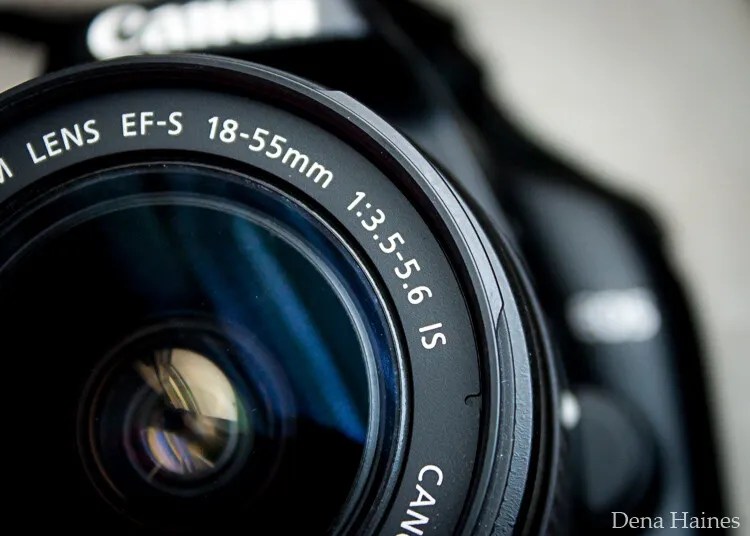
In this beginner’s guide, we’ll use an entry-level zoom lens as our example. Most kit lenses (the basic lens that comes with a DSLR) generally shoot their sharpest at a mid-range aperture setting. To determine the mid-range aperture of your lens, you’ll need to know its widest (or maximum) aperture setting. This is located on the side or end of the lens and will look something like 1:3.5-5.6.
For example, here it is on my Canon 18-55mm zoom lens:
This means that when my lens is zoomed all the way out to 18mm, its widest aperture is f/3.5. When zoomed all the way in to 55mm, its widest aperture is f/5.6.
The rule for finding that mid-range sweet spot is to count up two full f-stops (aperture settings are called f-stops) from the widest aperture. On my lens, the widest aperture is f/3.5. Two full stops from there would bring me to a sweet spot of around f/7.1.
Use this chart to count your f-stops:
By Robin Parmar
There is some wiggle room in what counts as mid-range, so anything from f/7.1 to f/10 will capture a sharp image. Once you know the mid-range aperture of your lens, you can do an easy test to get your sharpest image. To perform the test you’ll need to shoot in Aperture Priority mode.
Take control with Aperture Priority mode
Shooting in Aperture Priority allows you to choose the aperture setting you want, which gives you more creative control than Auto mode.
By controlling the aperture setting, it’s much easier to get a sharp image. And because your camera still chooses the ISO (if it’s set to Auto ISO) and the shutter speed automatically, it’s very easy to use.
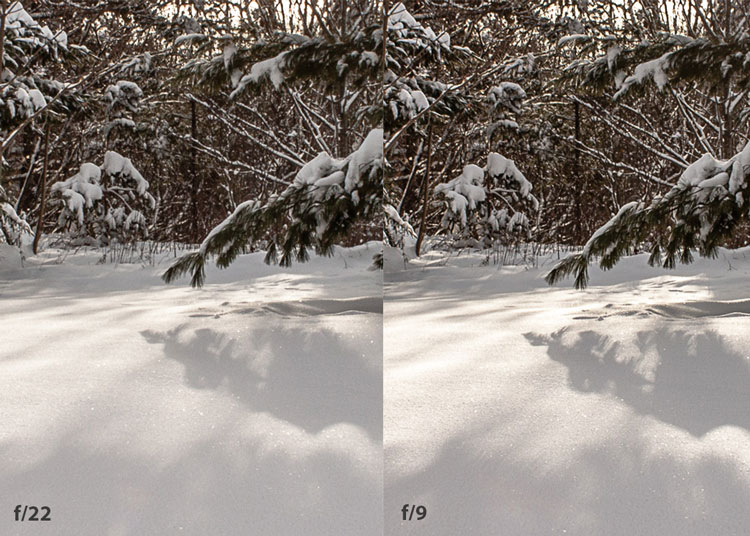
You’ve probably heard that apertures like f/16 and f/22 are best for keeping everything in focus. While that can be true, focus does not always equal overall sharpness. Choosing a mid-range aperture will give you sharper images throughout. You can improve your photos even further by reducing camera shake by way of a tripod and a remote shutter release (or your camera’s self-timer).
Here’s an example of how shooting in your lens’s sweet spot will give you sharper images:
In the above image, the f/9 shot is sharper than the f/22 one. The needles and shadows are not as soft or blurry as in the f/22 shot (look at the crispness and sparkles in the snow, too).
Switching from Auto to Aperture Priority mode
To take your camera off of Auto and put it in Aperture Priority, just turn the large mode dial to Aperture Priority. This is what that looks like on my Canon (on Nikon and other brands look for the “A”).
Auto mode is the green rectangle; Aperture Priority mode is the Av (or A on a Nikon). Once your camera is in Aperture Priority mode, turn the smaller main dial (shown here on the top of my Canon) to choose your f-stop.
As you turn that dial, you’ll see the f-number changing on your screen. In the next picture, it’s set to f/9.5:
Perform a lens sweet spot test
Once you have your camera set up on a tripod, performing a sweet spot test only takes a couple of minutes. To begin, put your camera in Aperture Priority mode, then compose your shot and take photos at varying apertures. Start with a shot at the widest aperture, then rotate that main dial a couple of times (to narrow the aperture) and take another shot. Keep doing that until you’ve taken seven or eight photos.
Upload your photos to your computer and zoom in. You’ll quickly see which aperture settings gave you the sharpest overall image.
This next photo of my daughter was shot using natural light. Shooting in my lens’s sweet spot gave me a pretty sharp image, even in this low light setting:
The close-up of the mug shows the advantage of shooting in the lens’s sweet spot. Whenever you want to make sure you get the sharpest capture possible, take a shot at each mid-range setting: f/7.1, f/8, f/9, and f/10.
Getting your sharpest images
Now that you know your lens’s sweet spot, it’s time to practice. I hope you’re as pleased with the results as I’ve been!
I love shooting in natural light, and learning how to capture sharper images in low light has made me so much happier with my photos.
Tips for capturing the sharpest images
Shoot in Aperture Priority mode
Choose a mid-range aperture (usually f/7.1 to f/10)
Use a tripod and a remote shutter release (or your camera’s self-timer) to reduce camera shake
Take a series of shots at f/7.1 through f/10 when a sharp capture is especially important
But don’t stop there. Keep playing with settings in Aperture Priority mode. It’s awesome to get images that are sharp throughout, but there’s a lot more to aperture than that.
Learn more about aperture and depth of field here.
The post How To Find Your Lens’ Sweet Spot: A Beginner’s Guide to Sharper Images appeared first on Digital Photography School. It was authored by Dena Haines.
Cosina has announced (translated) the release of its new Voigtlander Nokton Vintage Line 50mm F1.5 Aspherical II VM lens, an updated version of its predecessor, which was released back in June 2013.
The second-generation lens features an entirely redesigned optics system and a more compact body to match. It’s constructed of eight elements in seven groups, has an aperture range of F1.5-F16, uses a 12-blade aperture diaphragm and has a minimum focusing distance of 70cm (27.5”). The lens measures in at just 55mm (2.17”) diameter and 37mm (1.5”) in length.
The left and center lenses are the aluminum models; the right lens is the brass version.0
The lens is constructed almost entirely of metal, with knurled rings for manually adjusting both the aperture and focus. Interestingly, Cosina is offering the lens in two different versions: a multi-coating version (MC) and a single-coating version (SC). In its own words, Cosina says the MC version ‘aims to reproduce colors as neutral as possible’ while the single coating ‘reproduces classical colors.’
Below is a sample gallery of images captured with the lens and provided by Cosina:
Cosina is offering the lens in black and silver versions constructed of aluminum, while a more premium model constructed of nickel-plated and black-painted brass is also available.
All versions of the Voigtlander Nokton Vintage Line 50mm F1.5 Aspherical II VM lens use a bayonet VM mount that can be used with Vessa and M-mount cameras (not including the Bessa L and R). The Japan launch date is October 22 for all models and pricing is listed at ¥100,000 (~$ 950) for the aluminum models and ¥115,000 (~$ 1,100) for the brass model. Currently, no information on availability outside of Japan is mentioned.
The post 6 Tips for Near-Macro Photography with a Telephoto Lens appeared first on Digital Photography School. It was authored by Elliot Hook.
Macro photography is the art of capturing the fine detail of very small subjects that may not be seen by the naked eye. Technically, to fall under the category of “macro,” the subject should be captured with a reproduction ratio of 1:1 (i.e., the subject will be captured on the sensor at 100% life-size).
Macro lenses are specially designed to minimize the focusing distance, allowing the photographer to get closer to the subject and therefore increase the reproduction ratio.
There are a number of techniques that can be used to help achieve the desired magnification without a dedicated lens (extension tubes, close-up filters, and reversing rings). However, one of the less common techniques is to use something that you probably already have in your bag: a telephoto lens.
Milking Bonnet Fungi (Mycena galopus)
Telephoto lenses offer extreme magnification, but generally have much larger minimum focusing distances. This pushes the photographer farther from the subject and therefore reduces the reproduction ratio. Some telephoto lenses, when combined with camera systems utilizing smaller sensors, are able to offer 1:1 magnification (true macro). However, typically, telephoto lenses are limited to close-up photography at near-macro reproduction ratios.
Using a telephoto lens for this kind of work offers a couple of advantages over a dedicated macro lens that are a direct result of the large minimum focus distance. Because the working distance to the subject is in the region of 1 meter (compared to the 15-30 cm working distance of standard macro lenses), the risk of disturbing your subject as you compose your shot is much reduced.
Also, given the extra distance between the camera and the subject, you are much less likely to cast a shadow over your subject, and you have a lot of freedom with the lighting you can employ to light the subject, both natural and flash.
Common Blue butterflies, mating (Polyommatus icarus)
Using a telephoto lens for such precise work is not without challenge, so here are a few tips to help maximize your chances of getting that near-macro shot with your telephoto lens:
Due to the extreme focal length, the risk of reduced sharpness due to camera shake is higher. Therefore, it is imperative to use a tripod and a remote shutter release to try to limit lens/camera movement.
Even on a tripod, images can still suffer from camera shake. Try to use a tripod collar for your telephoto lens, so that the lens is clamped directly to the tripod, reducing the chances of “lens wobble.” If not, use the “1/focal length’” shutter speed rule to help capture sharp images. (I always use 1/effective focal length, where you multiply your focal length by the sensor crop factor to give the focal length in 35 mm terms.)
Be aware of the depth of field. Using extreme focal lengths at such close distances can reduce the depth of field to fractions of a millimetre. Therefore, to ensure the subject is sharp throughout, use a small enough aperture to ensure the depth of field extends across your whole subject (there are websites and apps to help you do this).
If you want to capture your subject in focus from front to back, ensure that it is parallel to your sensor. The depth of field will be so narrow at the extreme focal lengths that you may not have more than a few millimetres to play with. Therefore, position yourself accordingly to maximize your chances of capturing a sharp image.
If your telephoto lens as an AF/MF switch, switch it to manual focus and compose/focus the shot manually. You may find that, when focusing manually, the minimum focusing distance decreases, meaning that you can get closer to your subject, increasing the magnification.
Use a teleconverter to increase the focal length, but retain the same minimum focusing distance. This will allow you to significantly increase the magnification of the subject, without having to move any further away. Increasing the focal length in this way will have consequences on your choice of shutter speed and aperture, but as long as it is taken into consideration, a teleconverter can successfully be used to increase the reproduction ratio.
Common Blue Damselfly (Enallagma cyathigerum)
Using a telephoto lens for near-macro photography will typically not allow you to magnify your subject as far as if you were using a dedicated macro lens, but you will be able to test the water to see if macro photography is something you enjoy without having to splash out on any additional kit.
If you do decide that macro photography is for you, by putting this technique into practice, you will learn a lot of good fieldcraft that will be beneficial when you get around to picking up that new macro lens.
The post 6 Tips for Near-Macro Photography with a Telephoto Lens appeared first on Digital Photography School. It was authored by Elliot Hook.
Last October, Funleader started a Kickstarter campaign to help raise funds to produce its ridiculously small 18mm F8 pancake lens for Sony E mount and Leica L mount camera systems. As promised in its campaign, it started shipping to global backers in December 2019 and now, nine months later, the lens is available to purchase by the general public in three additional lens mounts.
The pancake lens is constructed of six multi-coated elements in four groups, has a 100º field of view on a full-frame camera and is made of aluminum. The lens measures just 15mm (.59in) and weighs only 80g (2.8oz), making it only marginally larger than the lens cap you probably keep on your camera to keep the mirror and sensor protected.
Funleader designed the lens around its hyperfocal distance, ensuring everything from 80cm (2.6ft) to infinity is in focus at its F8 aperture.
Below is a sample gallery of images taken with the lens and various cameras:
The Funleader 18mm F8 cap lens is available for Canon RF, Fujifilm X, Leica L, Nikon Z and Sony E mount camera systems. Funleader has it available on its website for $ 150 with free worldwide shipping.
TTartisan is back with its latest lens, an ultra-affordable 35mm F1.4 lens for APS-C mirrorless camera systems.
The fully-manual TTartisan 35mm F1.4 lens retails for just $ 80 and is available for Canon EOS M, Fuji X, Micro Four Thirds and Sony E mount camera systems. It’s constructed of seven elements in six groups, has an aperture range of F1.4-F16, uses a ten-blade aperture diaphragm and has a minimum focusing distance of 28cm (11”).
The front filter thread is 39mm and the lens measures in at 44mm (1.73”) long, 56mm (2.2”) diameter and weighs just 180g. Below is a sample gallery of images captured with the lens, provided by Photo Rumors, an authorized retailer of TTartisan gear.
You can purchase the lens over on Photo Rumors’ online shop or any other authorized TTartisan retailer.