RSS
 

Posts Tagged ‘leaving’

Non-Photographic Activities To Improve Your Photography Without Leaving Home

12 May

The post Non-Photographic Activities To Improve Your Photography Without Leaving Home appeared first on Digital Photography School. It was authored by Ana Mireles.

activities to improve your photography

What makes a good photograph? Is it more about the form or the content? The great photographer Cartier Bresson once said, “to photograph: it is to put on the same line of sight the head, the eye, and the heart.” So, here are some suggested activities to improve your photography by exercising your mind.

There are lots of things you can do to improve your photography without leaving home – from getting inspiration and exercising your analytical perception to gaining introspection to focus your mind. In this article, you’ll find some ideas to get you going.

activities to improve your photography
1/6 sec. f/8 ISO 200

Find inspiration online

Being stuck at home doesn’t mean you can’t visit a museum anywhere in the world. Using Google Arts & Culture, you can take virtual tours of some of the biggest museums. Also, you can zoom into the masterpieces; seeing details you could never appreciate in person.

activities to improve your photography online

If virtual museums aren’t enough for you, check out a library. They also hold valuable heritage and have much of it available online. One of the biggest ones is the World Digital Library from UNESCO. Here, you can get free access to thousands of books, documents, and photos from all over the world.

Inspire your photography from books

If traditional searches aren’t giving you what you need, look for some innovative thinking. Thanks to current technology, you can get inspired using an unusual starting point. For example, with “Color Palette” you can look for artworks that share the same colors.

Another favorite of mine is “From a picture to a thousand stories.” It helps you find books through words or concepts.

transversal thinking to improve your photography

If you prefer the behind-the-scenes to the artwork itself, follow podcasts with artist talks. For example, Dialogues where “Each episode pairs two exceptional makers and thinkers.”

Also, look for the different initiatives museums around the globe have launched during this time, like #StayAtHomeStedelijk, that features mini-documentaries.

Learn how to draw

Artistic disciplines often complement each other because of the different skills you develop by practicing them. One of the most direct links is between drawing and photography.

Learning to draw is an activity that improves your photography because it teaches you to actually see what’s in front of you. It also allows you to analyze how light interacts with objects of different shapes and materials.

For example, this will come in handy when you’re setting up studio lighting.

activities to improve your photography
1/5 sec. f/8 ISO 200

Understanding shadows also helps you when you’re making photo-composites. That is because you need coherent shadows to fully integrate the subject into the background. You also need to consider how it will affect the other subjects to get a realistic result. Drawing can help you understand all of this.

Meditate

There are many techniques and traditions for meditation. There’s no right or wrong way to do it in this case. Just choose the one that works for you.

Some of the benefits of meditation include self-awareness, a decrease of anxiety, and therefore increased perception.

All of these are good things for you to focus on your photographic practice and unleash creativity.

Meditation as an activity to improve your photography
1 sec. f/22 ISO 200

Sometimes you can’t even think of a good idea for your next project; other times you can’t find the right angle for a certain topic. This is often the result of a busy life that won’t give you time to reflect because it requires action.

If you work at uncluttering your mind, you may find it easier to overcome these blocks. A related activity that covers both mind and body is yoga, so you can consider doing that as well.

Join a virtual ‘Salon’

Artistic and intellectual gatherings have taken place to fuel some of the greatest movements throughout history. So, why wouldn’t it be a good activity to improve your photography? The idea is, that through conversation, you can exchange knowledge and refine ideas.

Online groups and gatherings for feedback and inspiration

Thanks to current technology, you don’t have to leave your house to meet like-minded people or receive feedback on your projects.

Even reflecting on current events with other artists may influence your work.

Look for Facebook groups, discussion blogs, or even host your own salons with your colleagues via video conferences. The possibilities are endless.

Conclusion

There’s a number of activities to improve your photography that don’t necessarily imply making a photograph. If you find yourself without the possibility of leaving the house or picking up your camera, use this time to exercise your mind. You’ll notice the difference the next time you go out to shoot.

Share in the comments section any other activities to improve your photography that you find useful.

The post Non-Photographic Activities To Improve Your Photography Without Leaving Home appeared first on Digital Photography School. It was authored by Ana Mireles.


Digital Photography School

 
Comments Off on Non-Photographic Activities To Improve Your Photography Without Leaving Home

Posted in Photography


Chief Design Officer Jony Ive is leaving Apple to start new design firm

03 Jul
Jony Ive and Tim Cook at the September 2018 launch of iPhone XR | Photo provided by Apple

Apple has announced that Jonathan ‘Jony’ Ive, Apple’s chief design officer, is leaving the company ‘later this year to form an independent design company which will count Apple among its primary clients.’

Ive’s departure is a monumental one considering the impact he’s had on Apple products since he was hired in September 1992. From the original, iconic iMac to Apple’s new Apple Park headquarters in Cupertino, California, which is estimated to have cost upwards of five billion dollars to construct, Ive has played a critical role in the look and—arguably more importantly—feel of Apple products for more than two decades.

No one person will assume the role of chief design officer, a title more or less created for Ive. Instead, as Apple explains below, two other design team leaders within Apple are expected to fill the void Ive is leaving behind1:

Design team leaders Evans Hankey, vice president of Industrial Design, and Alan Dye, vice president of Human Interface Design, will report to Jeff Williams, Apple’s chief operating officer.

It’s unknown how much interaction will occur between Apple and Ive’s new design firm, but John Gruber of Daring Fireball says:

This angle that he’s still going to work with Apple as an independent design firm seems like pure spin. You’re either at Apple or you’re not. Ive is out.

Gruber also points out that despite Ive leaving Apple, there’s little doubt his impact on Apple will remain for years to come, regardless of the role his design firm will have with the design of Apple products:

Apple’s hardware and industrial design teams work so far out that, even if I’m right and Ive is now effectively out of Apple, we’ll still be seeing Ive-designed hardware 5 years from now. It is going to take a long time to evaluate his absence.

Time will tell the impact Ive’s departure will have on Apple and its products.


1AppleInsider has a great run-down of who Evans Hankey and Alan Dye are.

Articles: Digital Photography Review (dpreview.com)

 
Comments Off on Chief Design Officer Jony Ive is leaving Apple to start new design firm

Posted in Uncategorized


How to Create Great Photos without Leaving Home

17 Feb

Photos home easy 01

So you want to take pictures; or do you want to be a photographer? I deal with a strikingly similar question every time I swing a golf club; I want to be a golfer, but with life events and time constraints the reality is I merely play golf. Fortunately, making a great photo doesn’t consume the amount of time 18 holes does and since you’re here reading this, it’s safe to say you want to be a photographer.

WHAT TO PHOTOGRAPH?

Portraits, landscapes, sports, oh my! As a new photographer it is incredibly tempting to photograph everything, and that’s a good thing as it will help you understand where your true passion lies. However, I am a firm believer that early success leads to more success.

Let me say that again – early success leads to more success.

As a new photographer there is no better feeling than capturing a truly excellent photo; and if you’re anything like me, time is very limited. Luckily with a simple understanding of light, your home is a great place to create stunning photos.

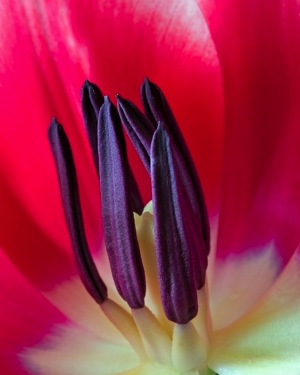
All of the photos in this article were shot in my home. I do not have a home studio, and as I mentioned earlier, I also have little spare time; but that’s ok because you don’t need either to make great photos. The photos of the tulip and baseball were shot with a cheap piece of white poster board and available light from a window.

USING WINDOW LIGHT

While there are no “essentials” to creating great photos with available light from a widow, I always use a tripod and would highly recommend one. However, if you do not have a tripod, you’ll need to raise the ISO to increase your shutter speed if you plan to hand-hold your camera. A generic rule of thumb is you’ll need a shutter speed of 1 divided by the focal length of your lens. For example, I used a 100mm lens for the tulip, and shot it at f/16 and an 8 second exposure. If I did not have a tripod, I would have had to increase the ISO (and realistically open the aperture as well) until I had a shutter speed of 1/100 (because I was using a 100mm lens) to keep the image sharp; but since I was making use of a tripod, an 8 second exposure was no problem.

There are endless opportunities for photography with available window light. Again, you could certainly hold your camera if you raised the ISO, but I would suggest the following as rough guidelines for photographing next to a window:

Photos home easy 02

  • Use a tripod, or raise your ISO until the shutter speed is 1 / the focal length of your lens
  • If using a tripod, set your ISO as low as possible
  • Set your camera to manual mode and the aperture to around f/11, then adjust the exposure via shutter speed from there

For a clean seamless background, such as the baseball photo here, grab a cheap piece or poster board from the school or office supply aisle at your favourite box store.

What do you do once you’re bored shooting next to the window, or want to learn something more? Stay at home of course!

WHAT’S NEXT? LEARN ABOUT LIGHT

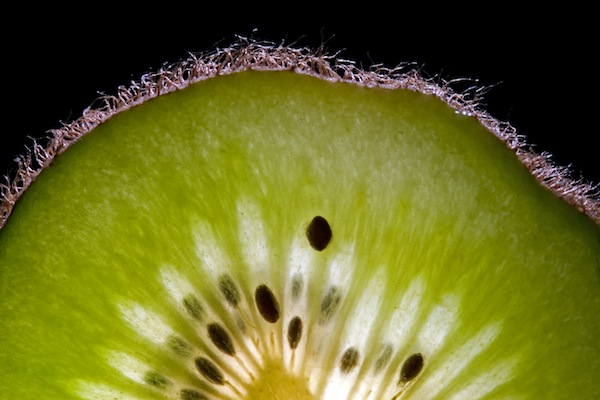
There’s plenty of room to grow with your photography in the house. After all, what’s the underlying foundation of photography? Light! Even if you don’t have a flash you can still learn about lighting at home. Don’t have an off camera flash? No problem, I bet you have a flashlight! I created the photo of the kiwi fruit in a bathroom with the lights off and a flashlight lighting the fruit from behind.

Photos home easy 03

I would take a photo, look at it on the camera’s LCD, and then adjust the angle of light from there. So what if I spent an abnormal amount of time in a dark bathroom by myself, and got strange looks from my wife. I learned a lot about how the position of the light effects the look of the photo, and made a cool photo!

Bottom line, you don’t need a flash to learn lighting and take a great photo, all you need is a dark room (very dark, as in no light at all) and a flashlight.

Photos home easy 04

USING FLASH

So what about flash? I think using flash in photos is the key to creating photos that stand out from the rest. If you have a speedlite or other hot shoe flash, the best thing you can do to take your photography to the next level is learn to use it. After that, the next best thing you can do is take it off the camera when you use it. The photo of the little yellow guy smiling and the red silhouette of the golfer were both shot using off camera flash, and aside from a few tweaks in post processing, they look very close to what was produced in the camera with help from the flash. Once you understand about positioning and light fall off, you’ll be able to manipulate the light in such a way that creates great photos right in the camera.

Photos home easy 05

The point being here, and something you’ll learn either in due time, or right now as I tell you, all great photos have one thing in common: great light. Whether you use light from a window, a flash, or light from something as simple as a flashlight – there are numerous ways you can get great light right in the comfort of your own home.

To recap, here’s what I used in the photos:

  • Flower and baseball- window light, white poster board, and a tripod
  • Kiwi fruit- tripod and a flashlight
  • Golfer – single off camera speedlite with a red gel fired into a seamless paper
  • Little yellow smiling guy – white seamless paper, and a single off camera flash handheld above and to the left of the camera

Once you create one photo with great light at home, I guarantee you will be hooked! Best of luck to you, now go shoot!

The post How to Create Great Photos without Leaving Home by Brian Barthel appeared first on Digital Photography School.


Digital Photography School

 
Comments Off on How to Create Great Photos without Leaving Home

Posted in Photography


Nikon D5300 adds pixels, Wi-Fi, and GPS while leaving AA filter behind

17 Oct

D5300_GR_18_55_front.png

Nikon has announced its new D5300 midrange DSLR which, as you might have gathered, is the follow-up to the D5200. New features include the omission of an AA filter from its 24MP CMOS sensor, a larger 3.2in articulated LCD and also a slightly larger optical viewfinder, 1080/60p video, and built-in Wi-Fi and GPS. Nikon claims that the D5300’s Expeed 4 processor improves performance (allowing for 5 fps burst shooting) and photo quality, while reducing power consumption. You’ll be able to pick up the D5300 this month, in your choice of black, red, or gray. Click through for more details. 

News: Digital Photography Review (dpreview.com)

 
Comments Off on Nikon D5300 adds pixels, Wi-Fi, and GPS while leaving AA filter behind

Posted in Uncategorized


Queen Mary 2 Time Lapse Leaving Newport, Rhode Island

07 Jan

Short time-lapse of the Queen Mary 2. Leaving Newport, Rhode Island on September 28 2011. A few dolly moves using my hybrid dynamic perception dolly. Music “The Cabin” by stockfinster Shot with Nikon D300 Nikon D200 Edited on a HP 8560w mobile workstation with Adobe CS 5.5
Video Rating: 5 / 5

 
Comments Off on Queen Mary 2 Time Lapse Leaving Newport, Rhode Island

Posted in Nikon Videos


Leaving One Color In & The Rest Black & White

03 Nov

Have you ever wanted to turn your images into better looking shots? We are about to show you. Just look at this free online video tutorial on offer: In this free online video tutorial hosted on the website Luv2Help.com, They show you Leaving One Color In & The Rest Black & White. That is why Jonas De Jong recommends watching the video tutorials for Photoshop available for viewing at the website http
Video Rating: 4 / 5

This specific tutorial is a single movie from chapter two of the Photoshop CS3 Portrait Retouching Essentials course presented by lynda.com author Chris Orwig. Watch more at www.lynda.com The complete course has a total duration of 10 hours and 19 minutes. Photoshop CS3 Portrait Retouching Essentials table of contents: Introduction 1. Retouching Roadmap 2. Correcting Color and Tone 3. Cleaning Up Images in Camera Raw 4. Cleaning Up Images in Photoshop 5. Structural Image Enhancements 6. Reducing and Removing Wrinkles 7. Enhancing Eyes 8. Enhancing Eyelashes and Eyebrows 9. Improving Hair 10. Improving Faces and Bodies 11. Fixing Teeth 12. Improving Makeup 13. Enhancing Skin 14. Softening Skin Conclusion
Video Rating: 0 / 5

 
Comments Off on Leaving One Color In & The Rest Black & White

Posted in Retouching in Photoshop


Star Trek TMP Enterprise leaving the Dock “old version”

14 Apr

The complete new version of this animation is now online, look into my channel !

Taj Mahal, Agra, India – is one of the 7 wonders of the world. The 3d presentation is developed by TAPAS. TAPAS is the best 3d animation training institute. TAPAS offers training in multimedia and 3d animation. TAPAS offers training in architecture, 3d architectural visualization, 3d walkthroughs , 3d perspectives. TAPAS is the best multimedia 3d animation training institute in hyderabad.