RSS
 

Posts Tagged ‘Isn’t’

7Artisans teases 50mm F1.0 lens, in case the 50mm F1.1 isn’t quite fast enough

18 Jul
Look closely on the 7Artisans website, and you’ll see an as-yet unannounced 50mm F1.0 lens front and center.

Chinese lens manufacturer 7Artisans made some waves two weeks ago when they quietly revealed four affordable and fast lenses for various mirrorless mounts. Those lenses are available on Amazon and eBay, but one lens is being shown off on the 7Artisans website that doesn’t appear anywhere else online: a super-fast 50mm F1.0.

Unfortunately, all we have is this photograph. The lens looks a lot like the company’s 50mm F1.1, but you can see that lens next to the F1.0 in the lineup, so it’s not some CGI typo. The lens diameter is even different—55mm vs 52mm for the F1.1.

No, this is its own lens, we just don’t know what mount it will be made for or, just as importantly, why the heck a company would choose to make both a 50mm F1.1 and 50mm F1.0—seems a bit silly. Here’s a close look at the lens:

Admittedly, the 50mm F1.1 lens announced a few weeks back is only available in Leica M mount. People would no doubt be thrilled by an equally affordable ($ 370 USD) lens available for the Sony E, Fuji X, or MFT mounts.

As soon as this lens becomes official or pops up on Amazon alongside the other 7Artisan lenses, we’ll let you know.

Articles: Digital Photography Review (dpreview.com)

 
Comments Off on 7Artisans teases 50mm F1.0 lens, in case the 50mm F1.1 isn’t quite fast enough

Posted in Uncategorized


Opinion: 6 reasons why VR isn’t ready to succeed, and 1 reason why it will

06 Jun

Virtual reality*, or VR, has the potential to break one of the basic tenets of photography: that it’s fundamentally a medium based on looking at an image, rather than being immersed in, or part of, an image. However, despite years of technology development, VR has never quite gained traction beyond tech enthusiasts.

The problem certainly isn’t a lack of innovation or investment. In the consumer market, companies like Samsung, Ricoh, and Nikon have all introduced 360º cameras at reasonable price points, and while they’re fun, none has come up with a product that rocked the world.

At the professional level, companies like Google and Nokia have put a lot of R&D into platforms and products, and while they’ve achieved some level commercial success, VR remains a somewhat niche market. Meanwhile, media organizations such as The New York Times and USA Today have created good content, but the masses aren’t exactly rushing to it.

In late 2015 and 2016, The New York Times sent Google Cardboard to all their subscribers in preparation for watching VR content.

At a personal level, I’m excited about VR technology and its potential change the way we experience imaging. I’m even the guy that came back from NAB2016 so enthusiastic about VR that I wrote an article to tell you why it would succeed. While I still think I’m right – at least in the long run – I’ve now had a couple years to analyze the industry, poke and prod dozens of products, and talk with experts ranging from camera designers to Hollywood studio executives. And here’s what I’ve found:

VR isn’t ready to succeed.

Note that I didn’t say it won’t succeed, but that it’s not ready yet. I’m convinced VR will see its day as a transformational technology, but you’re going to have to wait. With that in mind, here are six reasons why VR isn’t ready to succeed, and one reason why it will, in the end.

Six reasons why VR isn’t ready to succeed:

1. The viewing hardware is too cumbersome

I almost don’t need to point this out because it’s the most obvious factor, but the way we currently view VR content sucks. It generally requires large, bulky headgear that straps to your skull like a helmet, as well as whatever headphones you need for sound. In short order, it becomes uncomfortable enough that your desire to remove the hardware exceeds your desire to see whatever is coming out of it. That’s not a recipe for consumer success.

I loosely equate today’s VR headsets to 1981’s Osborne 1 portable computer. Sure, you could take it with you, but portable computers never achieved any type of critical mass until the advent of what we know today as the laptop. Similarly, VR viewing devices won’t see wide adoption until they are small, comfortable, and unobtrusive. They need to get to the point where it’s like putting on a pair of sunglasses.

The Osborne 1 computer (1981). Image by Wikimedia user Bilby, released under Creative Commons license.

2. The display technology isn’t good enough

Anyone who has tried a VR headset, even one of the better ones, knows how pixelated the image looks. Unfortunately for VR, high resolution displays that appear as sharp as a printed magazine page have become the norm, and have raised the bar of consumer expectations. Until consumers can look into a VR headset and see an image that achieves this level of clarity, or at least something close to it, it’s a no-go. After all, it’s virtual reality. To be convincing it must look real.

3. It doesn’t ‘just work’

Let’s say you can get past the cumbersome headgear that makes you look like a spaceman from a 1978 home movie, and that you don’t mind a screen that looks like it has a chain-linked fence in front of it. You still have to get it to work. Admittedly, there’s been progress in this area, but using VR often requires some level of technical know-how and a willingness to tinker. We often talk about technology that ‘just works,’ but until it’s simple enough that the least tech savvy among us can set it up, VR will remain in the realm of tech enthusiasts.

4. VR capture technology needs to get better

Assuming you can solve the problems mentioned above, you still need to fill a virtual space with a lot of data for it to be convincing. That means you either need cameras with lots of resolution, or simply a lot of cameras (which is the current approach). To keep costs down, most VR camera setups rely on small sensors, which come with their own set of tradeoffs.

Even with professionally-oriented cameras such as the Nokia OZO, most of the content I’ve seen has mediocre dynamic range with crushed blacks and clipped highlights, as well as occasional stitching errors. Consumers have been trained to expect higher quality, and their tastes reflect that. Sure, you could build a cage to hold ten Arri Alexas, but that’s not an accessible option for most content producers.

The Nokia OZO is arguably one of the better VR cameras on the market today, and one that has achieved some level of commercial success. However, the imagery it produces is still below the standards consumers have become accustomed to. You can order it online for $ 40,000.

5. Nobody has agreed on common conventions for VR content

This one’s a bit more nebulous, but it’s actually pretty important. VR is new enough that conventions for things like how to film a scene, how to tell a story, or the best way to present information are still being invented. That’s a huge opportunity for content creators, but it also creates a disconnect with viewers. Until there’s a consistent expectation for what VR is, and how it’s experienced, it will be challenged to reach a broad consumer audience.

6. You’re stuck in place:

Most VR experiences today simply place you at the center of a spherical space. Although you can choose where to look, that’s generally the limit of your engagement with the scene. It’s certainly possible to create compelling VR content within this constraint, and I’ve seen great examples of VR films that do so, but for the average person who’s going to post a VR video on social media, their friends will get tired of it quickly. The really important leap will come when viewers can move around a scene.

I never thought I’d say this, but Facebook to the rescue! The video below shows off some technology that begins to address this problem. (In fairness, other companies are working on this type of technology as well, but Facebook wins because the video was easy to find…)

The one reason why VR will succeed:

VR content can be very compelling

Despite all these challenges, VR will eventually succeed for the simple reason that VR content can be extremely compelling. Even within the limitations of current technology, I’ve seen VR films, experiences, and news stories that were far more powerful and engaging than they would have been on a flat screen. In my post-NAB2016 article I called out two examples, Notes on Blindness: Into Darkness and Witness 360: 7/7, neither of which could have delivered the same impact without an immersive medium.

VR will need to overcome the limitations I’ve outlined above to expand beyond early adopters and enthusiasts, but once it does it has the potential to change the way we interact with digital imagery in very fundamental ways. Imagine being in the middle of a documentary film instead of watching it from across the room. Or, for still photo enthusiasts, imagine visiting someone’s online photo gallery and moving through 360º images with all the resolution and color fidelity one might expect from a Nikon D810. I don’t know how long it will take, but technology has a remarkable way of working these things out given enough time.

I’ll end by posing two questions, and I’m genuinely curious what the DPReview audience thinks about them. 1) Have I missed anything important in my list above?, and 2) Assuming we can get past the technology challenges and VR becomes insanely good, and unobtrusive to use, would you use it? Let me know what you think.


* For the purpose of this article, I’m focused on VR as a technology for digital imaging, and excluding applications like computer gaming (which has a very different target audience and requirements)

Articles: Digital Photography Review (dpreview.com)

 
Comments Off on Opinion: 6 reasons why VR isn’t ready to succeed, and 1 reason why it will

Posted in Uncategorized


Flying drones over the internet isn’t the future we wanted, but it’s the one we’ve got

25 Mar
You’re flying… kind of! Cape lets registered users fly drones in remote locations. Takeoff and landing are handled automatically by the drone.

We were promised jetpacks, but as many-a-scholar has noted, here we are knocking on 2020’s door and we are still jetpackless. We have, however, managed to put countless drones into the sky. While jetpacks are scarce, a drone can be had for as little as $ 15 and as much as, well a hell of a lot more than that. Anyone can fly a cheapo drone into their living room wall, but if you want to fly a bigger drone somewhere cool there are costs, logistics and federal guidelines to contend with. What’s an apartment-dweller with big drone flying ambitions to do?

Enter Cape: a service that lets you fly real drones in real outdoor locations, without leaving the comfort of your home or your web browser. No license, no learning curve, no expensive crashes. Flight locations are exclusively located in California at this point, and the service is in beta so its developers expect to work out some bugs and improve latency before launch. Deep into a stretch of grey Seattle weather, flying a drone around a sunny California desert sounded fantastic to me.

Just sitting at my desk in Seattle, flying over the Sacramento River. You know, no big deal.

How I learned to stop worrying and love the drone

Cape’s locations include desert and coastal sites including San Francisco Bay, the Salton Sea and Sacramento River. Each has its own hours and days of availability, but most are available weekdays until 5pm Pacific Time. Provided your internet connection is robust, all you need to do is select a site that’s available and hop to the controls of your very own DJI Inspire 1.

Your flight begins with a diagram of your keyboard control shortcuts overlaying the camera’s live feed. Getting started just requires pressing ‘enter’ to initiate autopilot take-off. And there you are – soaring above the California desert with the press of a button.

When your session starts, you’re met with this handy controls diagram.

Cape’s drones are as dummy-proof as you’d hope they would be. A map in the corner of the screen indicates where your aircraft is in the geo-fenced zone. You can’t go beyond the zone’s boundaries, can’t crash your drone into another drone, and can’t stray outside of minimum and maximum altitudes – autopilot will kick in and prevent you from doing any of these things.

You quite literally learn the controls on the fly, but they’re easy to master. There’s some lag, but it was honestly less than I expected. In no time, I was zooming across a little patch of California desert at a reasonable speed and legal altitude. There wasn’t much to see, since that’s how deserts are, aside from some distant brush and pixelated mountains on the horizon.

And on that topic: considering you’re flying a drone that could very well be a world away, the live feed resolution isn’t bad. At best it looks like a Google Street View image, but most of the time it’s a bit more pixelated than that as it catches up with your movements. This translates to a slightly less awe-inspiring experience than, say, actually being there to gaze on some distant desert mountains.

I’m trying to drown this drone and it’s having none of it.

It’s a small world after all

The zones feel small once you’ve flown from one edge to the other, and by necessity the controls are pared down to a minimum. If it’s a truly realistic piloting experience you’re hankering, I’m not sure it’ll scratch that itch. Playing tennis on a Nintendo Wii is convenient and fun in its own way, but it’s not the same experience as playing on a real court with a racquet in your hand. You don’t come away with the same satisfaction when so much is done for you.

So if it doesn’t quite provide the same excitement as flying a drone in person, is it escapism that Cape can provide? Sure, getting a peek at the sun for the first time in days, even virtually, felt pretty nice. I can attest to how strong the desire is around Seattle to be somewhere sunny right now. I got a little bit of that escapism from Cape, but not so much that I’ll be racing back to fly somewhere else tomorrow.

But really, when you think about what Cape allows you to do, it’s kind of incredible. You’re controlling an aircraft hundreds, maybe thousands of miles away, in real time. Finding visually rich places where those drones can be operated safely and legally seems like a tricky balance. Cape’s website says the company is working on ‘unlocking new locations,’ and if one of those locations is in say, Norway or Iceland, then you’d definitely have my attention.

It’s not jetpacks, but maybe we’re getting closer.

Articles: Digital Photography Review (dpreview.com)

 
Comments Off on Flying drones over the internet isn’t the future we wanted, but it’s the one we’ve got

Posted in Uncategorized


Why Off-Camera Flash Isn’t as Scary as you Think

23 Jul

Flash

The word alone has the potential to cause dread, even among experienced photographers, bringing to mind images of overexposed faces and red eyes. Because of this, many photographers avoid flash altogether, keeping a safe distance at all times. I think that’s too bad.

It’s a missed opportunity. Sure, flash may not always be applicable to your situation – but it’s very helpful to have another tool in your bag of tricks if and when it is needed.
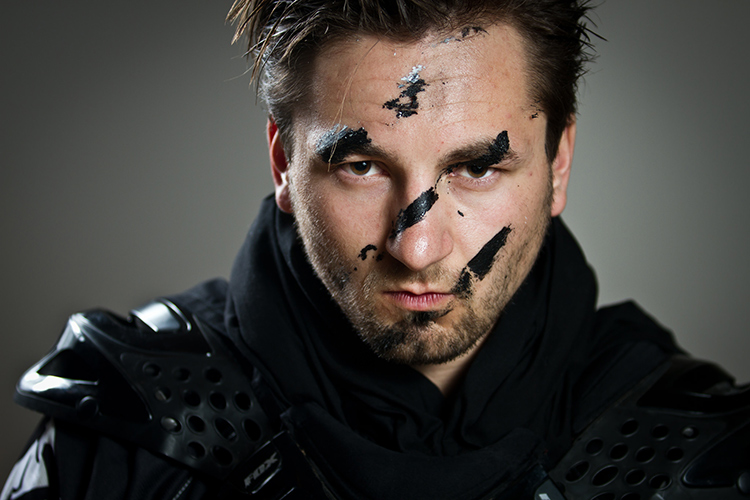
Portrait

Off-camera flash gives you an incredible amount of control. Yes, understanding natural light is an important part of being a photographer – but working with off-camera flash lets you create your own lighting conditions. You can even mimic the elusive golden hour.

This guide will explain off-camera flash in its simplest components, giving you the knowledge to begin to experiment, and to explore how it could help your photography.

What you need to start

When I talk about off-camera flash, you might be picturing something like this:
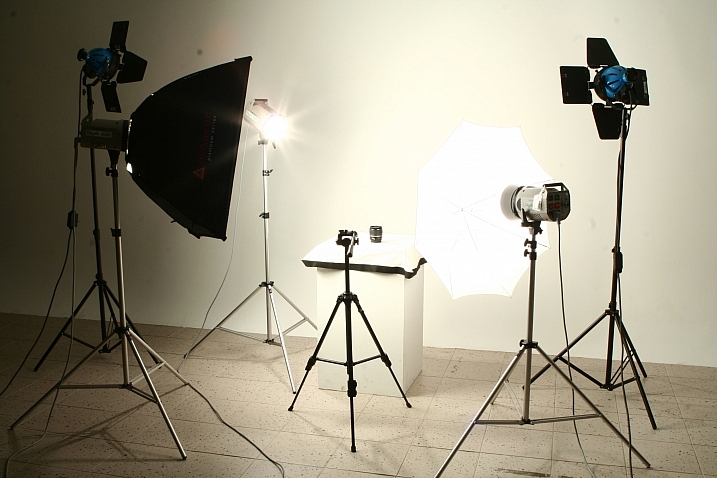
? ?? / Chris Lim

By ? ?? / Chris Lim

If that’s the case, I don’t blame you for being a bit nervous. In reality, all you need to get started with off-camera flash photography is:

  • A camera
  • An independent flash unit
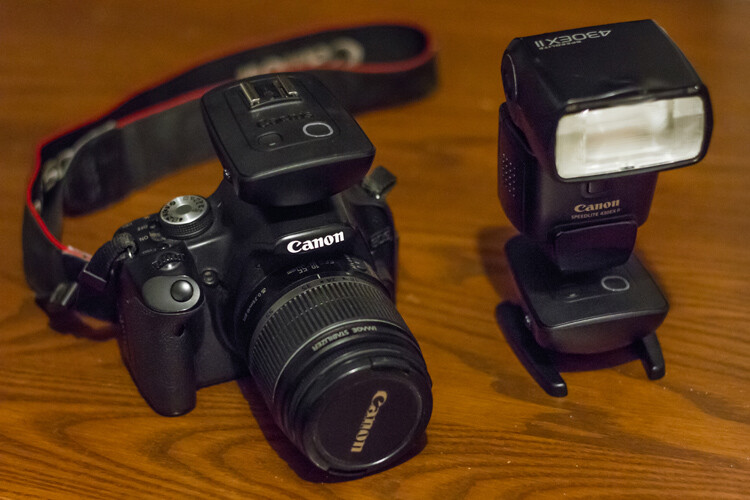
  • A way to make them fire simultaneously
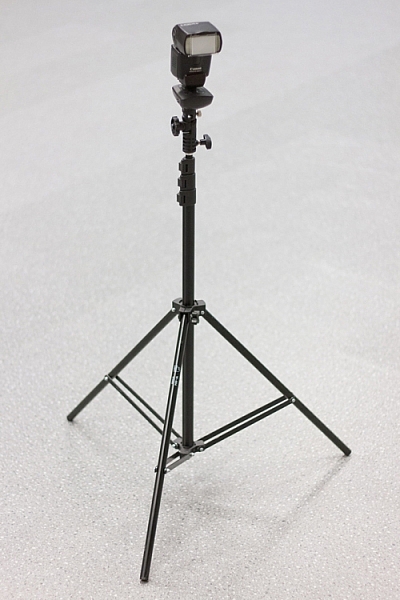
  • Something to hold your flash, like a light stand or a friend
light-stand-1 light-stand-2

Once you take your flash unit off of the camera, it won’t know that it is supposed to fire when you hit the shutter button. Fortunately, there are several ways that you can sync your flash.

Built-In Flash Control: Some cameras have a built-in setting that uses the pop-up flash to tell your off-camera flash to fire. Most flash units have a sensor on the front that recognizes the sudden burst of light (optical sensor), and fires accordingly.
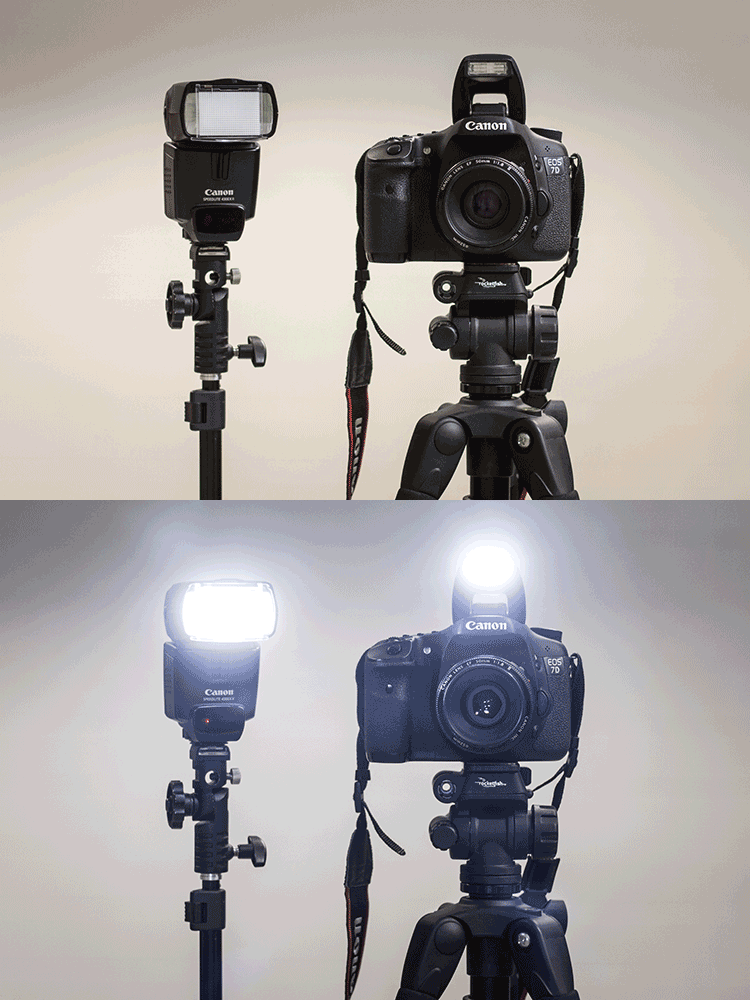
pop-up-flash

Flash Sync Cord: This is a cord that runs from your camera to the flash. Think of it like an extension cord. These are useful and reliable, but it also limits how far away the flash can be from your camera.

Wireless Radio Transmitters: The preferred option, radio transmitters can sync your flash to your shutter even if they are at a significant distance away.
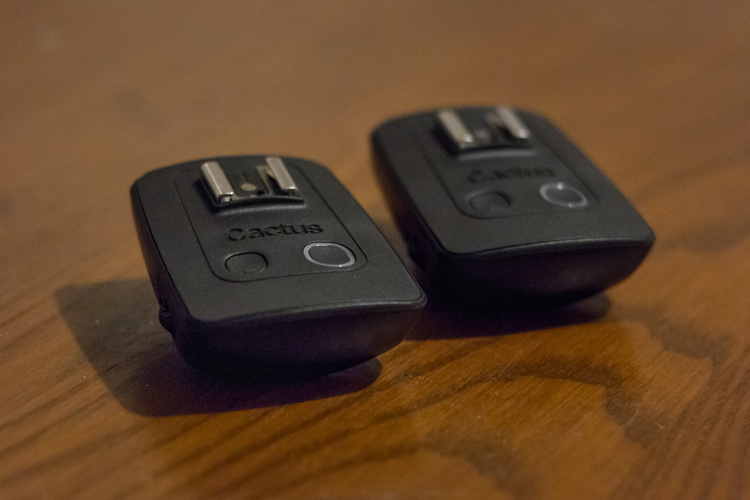
bts-6855-edit

Cactus brand remote triggers

bts-6859-edit

One remote goes on the camera, the other attaches to the flash. When the camera fires the one on the camera sends a signal to the other remote to fire the flash.

Editor’s note: for more great tips read, A Beginner’s Guide to Working With Flash Off-Camera

The basics – controlling your off-camera flash

When you use a flash on-camera, it can determine the correct power settings and fire accordingly (TTL). Once you take the flash off the camera, however, you’re going to need to tell both the camera and the flash what to do manually.
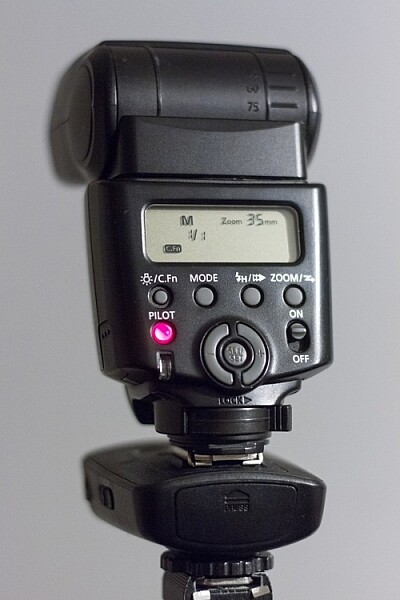
bts-6851-edit

M is Manual mode, and 1/1 is full power. Zoom level shows 35mm. Read the user manual for your flash to see how to adjust these items.

If that sounds scary, just take a deep breath – we’ll get through this together.

Fortunately, controlling flashes is quite simple. In manual mode (on the flash), you choose the amount of power at which the flash fires. This is expressed as a fraction: 1/1 means the flash is firing at full power, ¼ means the flash is firing at a quarter of its total power, and so on. Easy, right?

Alright, so now we know how to control the flash. What about the settings on your camera?

This is the cool part. You can control the effects of the flash using your ISO and aperture. Adjusting these two settings controls how sensitive your camera sensor is, and how much light it can collect.

So here are the four ways to make the flash in your image stronger (more flash):

  • Turn up the flash power
  • Move the flash closer to your subject
  • Turn up the ISO
  • Make the aperture wider (smaller f-stop number)

Piece of cake! Is your flash in your picture too strong? Well, simply do the opposite of one of the criteria mentioned above (turn the flash down, move it away from the subject, turn the ISO down, use a smaller aperture).

You’ll notice that I haven’t mentioned shutter speed yet. That’s because your shutter speed doesn’t affect flash at all.

Well, almost not at all. Every camera has a flash sync-speed. This is because if the shutter speed goes too fast, it won’t sync perfectly with the flash (the shutter will open and close before the flash goes off). As a result, part of your picture won’t see the effects of the flash – resulting in a black bar across part of the shot. For most consumer cameras, your maximum flash sync speed will be around 1/200 or 1/250. Keep your shutter speed under that (slower like 1/125th or 1/60th) and you’ll be fine.

flash-sync-1

Correct sync speed used the flash lights the entire image

flash-sync-2

If your shutter speed is too fast (higher than the sync speed) you will get something like this, where part of the image is not lit by the flash and is dark, or even black.

Two exposures: Ambient and flash

This is the key to understanding off-camera flash photography.

Think of every picture taken with flash as being two exposures, overlapped on top of each other. The way you decide to balance the ambient lighting and the flash, sets the tone for the image. Let’s take it one layer at a time, and you’ll see how easy it can be to build an image using off-camera flash.

THE FIRST LAYER: AMBIENT LIGHTING

Ambient light is that which is already available in the area from the sun, window light, street lights, etc. At certain times of the day, your ambient light is going to be quite nice, like at Golden Hour. Other times, you may not be so lucky.

Sunsets, for example, are especially tricky. This is because in order to bring out the colour and texture of a sunset, you need to keep the exposure dark – and as a result, your subject will be completely silhouetted.

Here’s the first step for taking your off-camera flash picture – ignore your flash altogether. Turn it off.

Find the normal, correct exposure for the existing (ambient or available) light, and then adjust your settings to intentionally make your image too dark. The darker your ambient exposure, the more dramatic the light from your flash will be.
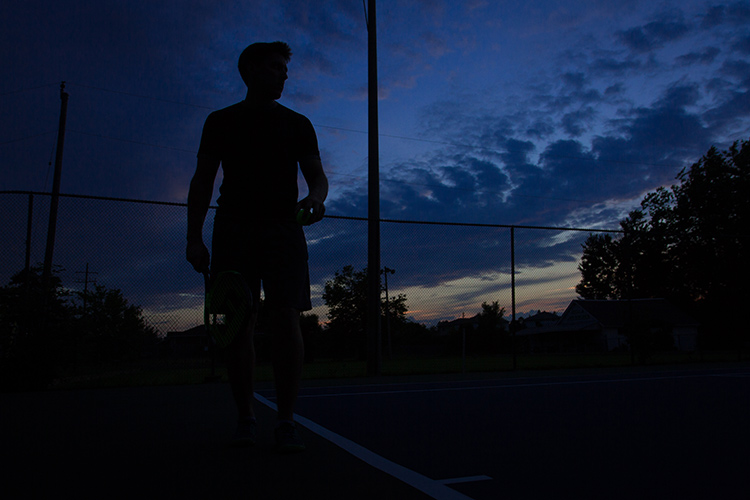
1 ambient

Here is my exposure for the ambient light (above). We’re off to a good start! For this shot, I want to keep the dark, dramatic sky in the background, and I will rely on my flash to light up the tennis player.

THE SECOND LAYER: FLASH

Alright, now turn on your flash. By using flash to light my subject, I can get the best of both worlds – my sky remains dark and dramatic while my subject is well-lit.

It will probably take a few shots to get your lighting right. That’s perfectly normal! Use the tips mentioned in the previous section to add more or less power to your flash.
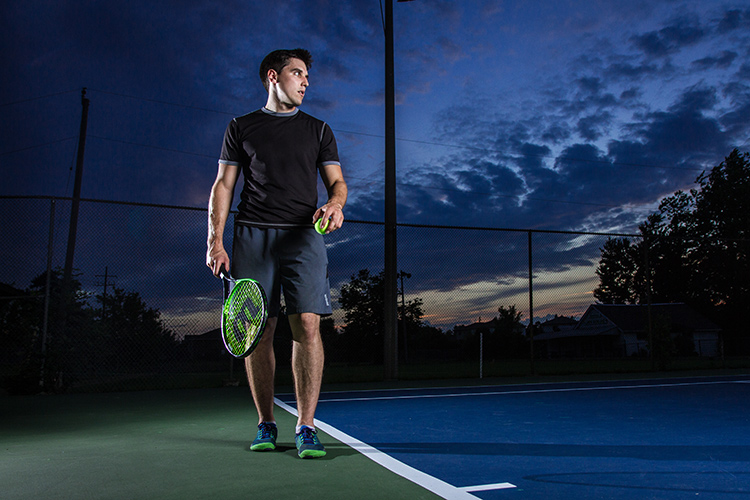
1 flash

When we add the flashes, we get to keep the dramatic background, with the benefit of crisp lighting on our subject. This shot simply isn’t possible without flash.

You can use what you know about ambient and flash lighting to set the tone of the image.

If you keep your ambient light levels high, the flash will add just a kiss of light. If you start with a very dark ambient image (like the one above), your flash will sculpt and define the image much more strongly.
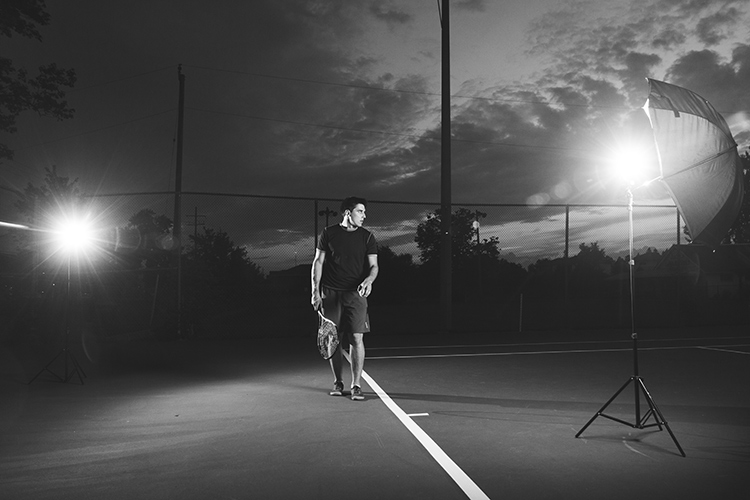
1 behind the scenes

Here’s the behind-the-scenes of our setup. Since the light is hitting the subject from an angle, it is dramatic and shows shape much more effectively than if the flash had been on the camera. One flash is to camera right, bouncing into an umbrella to soften it, the other is to camera left (and behind the subject) to add an accent light.

Putting it into Practice

Here’s another example, this time using flash to give a simple kick, to a liven up a portrait.

2 natural

This was shot with no flash, exposed for the skin tones.

2 ambient

Ambient light only, darkened for the background.

The first step was to push the “correct” exposure down, making the overall image darker, so that we could use flash to highlight the subject.

2 flash 2 double flash

In the image above (left), the flash is coming from just left of the camera. It brightens the subject up (compared to the background), and makes the image seem more three dimensional. The background also pops more than it did with the “correct” exposure.

If we want to, we can play around with the effects of a second flash (above right), maybe letting it aim directly toward the camera to create some lens flare?
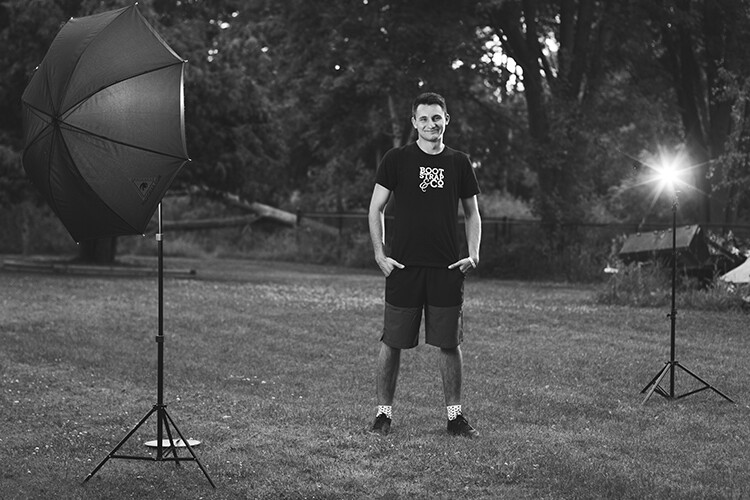
2 behind the scenes

Here’s the simple setup.

Shaping and modifying your light

Well done! You’ve made it through the basics of off-camera flash photography. Next, you can push your newfound skill to a whole new level by learning how to modify the light.

If you’re familiar with how the light on a cloudy day is softer than the light on a sunny day, then you already know nearly everything you need to know about flash modifiers.

The basic rule is this: the larger the light source, the softer the light.

A flash unit is a small light source that creates harsh shadows. That isn’t always so flattering.

The purpose of umbrellas, soft boxes, and other light modifiers, is to make the source of light larger. This softens the light, which is especially useful for portraits.

flash-3

Learning how to modify light lets you build a style that matches your image.

Looking for a gritty photo? Shoot with a bare flash (no modifiers) and get sharp shadows. Looking for softer, more flattering light? Use a softbox.

Practice, practice, practice

Once you’ve got a feel for how to use your flash off-camera, you’ll have a whole new world of photography to explore. Try it. The worst thing that can possibly happen is that you’ll learn something.

Using digital equipment gives you the ability to try things without any financial repercussions. Learning flash photography through trial and error was probably pretty expensive back in the days of film; today you can fire as many shots as you need in order to learn, without breaking the bank.

Nobody ever got off-camera flash right on their first try – experiment and stick with it, and you’ll add a valuable new tool to your bag of tricks.
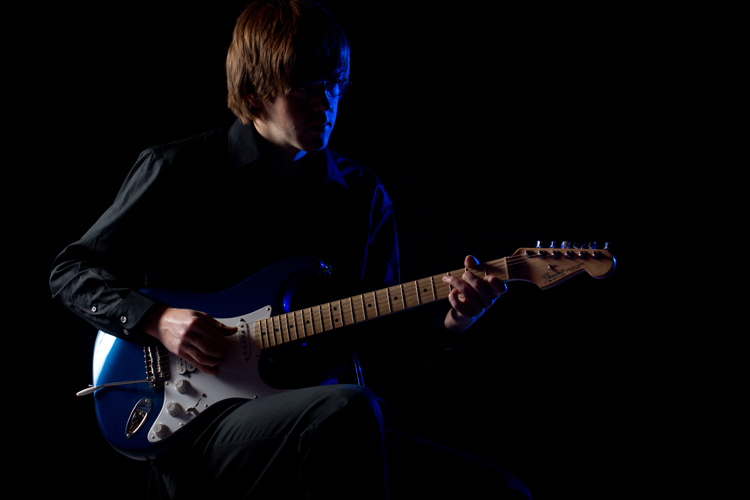
flash-2

More articles for you to read on dPS about off-camera flash:

  • How to Create Compelling Wide-Angle Portraits Using One Off-Camera Flash
  • 9 Steps to Get Over Your Fear of Off-Camera Flash
  • Supporting Your Off-Camera Flash – Tripods, Monopods or Light Stands?
  • Beginners Guide to Using TTL Off-Camera Flash
  • How to Get Started with Off-Camera Flash Photography – Start With One!
  • Getting Started with Off-Camera Flash
  • How to Balance Off-Camera Flash and Ambient Light on Location
  • A Beginner’s Guide to Working With Flash Off-Camera
  • The Ultimate Flash Photography Guide FAST FLASH FOR PORTRAIT PERFECTION a dPS ebook

googletag.cmd.push(function() {
tablet_slots.push( googletag.defineSlot( “/1005424/_dPSv4_tab-all-article-bottom_(300×250)”, [300, 250], “pb-ad-78623” ).addService( googletag.pubads() ) ); } );

googletag.cmd.push(function() {
mobile_slots.push( googletag.defineSlot( “/1005424/_dPSv4_mob-all-article-bottom_(300×250)”, [300, 250], “pb-ad-78158” ).addService( googletag.pubads() ) ); } );

The post Why Off-Camera Flash Isn’t as Scary as you Think by Frank Myrland appeared first on Digital Photography School.


Digital Photography School

 
Comments Off on Why Off-Camera Flash Isn’t as Scary as you Think

Posted in Photography


Why Aperture Priority Mode Isn’t Always the Best Choice

03 Jul

There are a lot of common mistakes to make in photography, but possibly the most frequent is to shoot in Aperture Priority mode when it’s not the best choice.

There are many situations where shooting in Aperture Priority is ideal, such as when you are using a tripod and your shutter speed does not matter, when you are in strong sunlight, when you are shooting a scene with a wide-angle lens and nothing is moving, or when you want a very shallow depth of field for aesthetic purposes.

However, in most other situations it is beneficial to shoot in Shutter Priority mode (or manual mode).

Lamborghini, SoHo

Lamborghini, SoHo – Shutter Speed priority can be much more effective for Street Photography, where spontaneous shots occur frequently, and freezing motion is very important.

I see this problem most often when people are traveling. They will stick their camera on Aperture Priority for the entire day, forgetting that the light sometimes will not be strong enough to yield a shutter speed fast enough to offset camera shake or to freeze moving subjects, particularly if their lens aperture does not go below f/4 or f/3.5.

The result is that they will come home and many of their images will be blurry, when they didn’t have to be.

Your shutter speed is the first line of defense for creating a sharp image. The rule of thumb is that the shutter speed should be at least one over the focal length of the lens to offset handheld camera shake. I like to add a little extra speed to that to be safe, so if you are shooting at 50mm on a full frame camera, I would keep the shutter speed at least at 1/80th. On a cropped sensor however, such as an APS-C camera, a 50mm might be the equivalent of an 80mm view, so I would shoot at least at 1/100th of a second.

You can see, especially if you are using a telephoto focal length, how quickly and easily your shutter speed can go below this threshold when on Aperture Priority and not in strong, direct light.

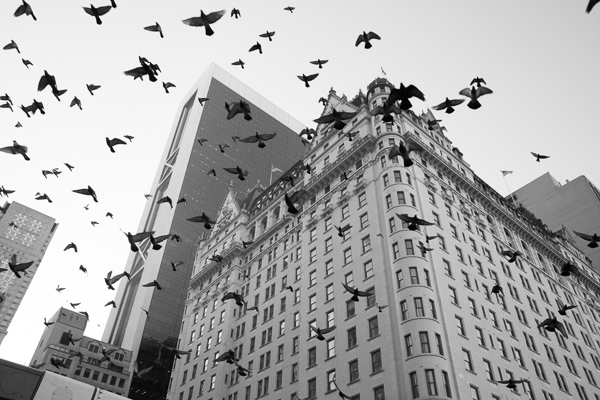
Plaza Hotel

The Birds and Plaza Hotel. A spontaneous shot on Shutter Priority at 1/500th and ISO 800.  On Aperture Priority there is a much stronger chance that I would have yielded too slow of a shutter speed, especially since it was overcast and late in the day.

When there are moving subjects in a scene such as people, 1/320th or 1/250th is often a good shutter speed to freeze their motion. So when traveling, I use 1/320th as my baseline shutter speed and will lower it for the situations where there is no motion or when the light is extremely low. This guarantees that no matter what I capture, it will be sharp, including the spontaneous moments. Often, because I shoot this way and prefer to also shoot with an aperture of f/8 or above, I will raise the ISO to 800, 1600, or even 3200 in areas with very low light. This will add more grain/noise to the image, but especially on the newer digital cameras you will quickly notice that the technical quality and sharpness of your images will actually be improved, despite this grain.

Now you might be saying that you are able to shoot in Aperture Priority mode (or Manual mode) all of the time and can pay attention to the corresponding shutter speeds so you never have a problem. That’s great, and in that case, please keep shooting in Aperture Priority. I do not want to stop you from shooting in a way that works well for you. If you know your camera settings well then you can effectively shoot in any situation with any of these modes.

However, I teach a good amount of students and I would guess that about 80 percent of them come in shooting in Aperture Priority. Then, when I look at their photos, for a good portion of these students, way too many of their photos turn out blurry, or have some sharpness issues. They will pay attention to their aperture but then zoom for a shot and not notice that the shutter speed is lower than their focal length, or not notice that is too low to freeze the motion of a subject. I find that switching them over to Shutter Priority for these situations puts the shutter speed in their mind first and then they can pay attention to the corresponding aperture to achieve the largest depth of field possible (if you are purposely looking to create a shot with a shallow depth of field, then Aperture Priority would be ideal.)

Particularly for travel photography in cities or in areas with people, often when I explain to students to try photographing around 1/320th of a second and a higher ISO, they quickly remark about how much sharper their photos become.

Give it a try and see if yours do too.

The post Why Aperture Priority Mode Isn’t Always the Best Choice by James Maher appeared first on Digital Photography School.


Digital Photography School

 
Comments Off on Why Aperture Priority Mode Isn’t Always the Best Choice

Posted in Photography


Opinion: Why the FZ1000 isn’t just another superzoom…

12 Jun

FZ1000_opinion-1.jpg

Superzoom cameras offer DSLR-style ergonomics and enormous zoom ranges, which make them very popular among novice photographers and enthusiasts looking for a ‘take everywhere’ option for travel and day-to-day shooting. They have not, traditionally, impressed us with their image quality. The Panasonic Lumix DMC-FZ1000 is a very different beast though, and has impressed us with its specification, performance and price. In this short article, editor Barnaby Britton explains why the FZ1000 is definitely not ‘just another superzoom’. Read more

News: Digital Photography Review (dpreview.com)

 
Comments Off on Opinion: Why the FZ1000 isn’t just another superzoom…

Posted in Uncategorized


‘Liking Isn’t Helping’ – ad campaign uses jarring press photos to spur action

03 Jul

flood_1.jpg

It’s all very well ‘liking’ a charitable cause on Facebook, but what difference does it make? Crisis Relief Singapore is running an ad campaign called ‘Liking Isn’t Helping’ which uses photos showing victims of war and natural disasters to encourage volunteerism – with an ironic twist. The images are composites of real press photos and Facebook-style thumbs ups, accompanied by the message that ‘Liking isn’t helping’. Click through for more details.

News: Digital Photography Review (dpreview.com)

 
Comments Off on ‘Liking Isn’t Helping’ – ad campaign uses jarring press photos to spur action

Posted in Uncategorized


Why your Camera isn’t a Superhero

20 Mar

A Guest Contribution by Draycat

7361147094 a8705ae0ca nThe day my first SLR camera arrived I was excited. I’d already put my point and shoot at the bottom of a drawer knowing that I wouldn’t need it anymore – this would be the beginning of a new era; no more crappy pictures for me.

For the first few minutes I just sat admiring the box, anticipating what this was going to do for my ‘photography’. Then I slowly removed everything from the box with the same care that a surgeon would do removing a kidney, and then sat again admiring all the curves and buttons on the camera body. This was a new experience for me and I wanted to savour the moment.

I had always worked on the premise that all the best images had been shot with good cameras so now that I finally had one I expected it to do magic for me. I’d seen so many great images taken with SLR cameras that part of me felt that my photography would transform overnight and within a few days National Geographic would be calling me begging me to shoot for them. I would become an image superhero, transforming to the photographic equivalent of Spiderman from Peter Parker just by lifting up the camera. All my friends would wish they could take pictures like me, and all because of my new SLR.

After waiting what seemed like two days for the battery to charge, I carefully inserted it into the camera and went out for my first photographic Spiderman adventure in my local area. I shot flowers, traffic lights and bicycles. Then went home to see what these potential Pulitzer prize winning shots looked like. I started up the computer, put in the memory card, clicked on the folder and waited for the magic to appear.

One by one the pictures came up on the screen, and with each one I grew more and more disappointed. There was no magic – in fact they looked exactly the same as my old point and shoot pictures. And what was worse was that it was actually more difficult to shoot these ‘exactly the same as my old shots’ photographs because I suddenly had to consider these strange alien concepts like aperture, ISO and shutter speed. Not at all what I was expecting. I ripped up my new superhero costume designs and unpacked my carefully prepared ‘packed in case National Geographic call me to suddenly fly out’ suitcase. It was going to be a while before any of my images would look anything like the amazing images that I’d seen.

I went on the internet and ordered a book – a kind of beginner’s guide to photography. Then I picked up the manual and started to read…..

The point? Well sometimes we focus too much on the gear – the latest bodies, lenses, accessories, but the reality is that often it doesn’t actually improve our photographs. Our camera isn’t a superhero – it is simply a box that records light.

It is us that determines what that light looks like and ultimately that is what makes great images. So next time you find yourself in a camera shop looking at new equipment ask yourself realistically ‘how specifically will this help me to create better images?’ If you can pragmatically answer then go ahead and knock yourself out, but if you can’t then perhaps it’s time to practice more with what you have instead of buying something new. Learn and practice the basic principles of photography because they will serve you well no matter what equipment you have. Remember many of the great photographers shot fantastic images with cameras most of us wouldn’t even look at today. Make yourself the superhero, not the camera.

Draycat is British photographer, teacher and writer currently based in Tokyo, Japan. See more from him at his Website on Twitter on Facebook and on Youtube.

Post originally from: Digital Photography Tips.

Check out our more Photography Tips at Photography Tips for Beginners, Portrait Photography Tips and Wedding Photography Tips.

Why your Camera isn’t a Superhero


Digital Photography School
 
Comments Off on Why your Camera isn’t a Superhero

Posted in Photography


A Perfectly Valid Choice: Light That Isn’t There

14 Dec

I'm as guilty as the next guy when it comes to over-the-top lighting. And why not? It's fun, it's cool and it can amp up an otherwise boring scene.

But that kinda stuff is not always necessarily the best choice. Often the best light is light that doesn't call attention to itself, but rather allows your camera to see a scene the way your eye would normally see it.

Take this biz portrait for example, which looks pretty natural but in fact is lit by three different sources. Read more »


Strobist

 
Comments Off on A Perfectly Valid Choice: Light That Isn’t There

Posted in Photography


[MODIFIED] General Computers – For Speed, CPU Speed Isn’t Everything

01 Aug

Plan on upgrading a computer or buying a new one? Look at more than just the CPU speed for faster performance.

Note that this tip is geared towards beginning computer users…

If you are in the market for a new computer or are considering upgrading an older machine, you might think that the CPU speed is the sole factor in determining how fast you will be able to work. You couldn’t be more wrong:…

Read more at MalekTips.
New Computer and Technology Help and Tips – MalekTips.Com

 
Comments Off on [MODIFIED] General Computers – For Speed, CPU Speed Isn’t Everything

Posted in Technology