RSS
 

Posts Tagged ‘into’

Volta packs an 8,000mAh power bank into the handle of a camera rig

13 Nov
A new Indiegogo campaign is seeking funds for Volta, an 8,000mAh power bank packed into a camera rig top handle. The product features multiple 1/4″ and 3/8″ screw mounts, a removable ‘handle component,’ and two interchangeable 21700 batteries, which are the same power cells used by Tesla.

The top handle design is presented as a convenient way to tote around an extra power bank — one that, in the case of Volta, features a USB-C port on the front of the handle offering 7.4v versus the 5v commonly offered by commercial external batteries. When Volta isn’t needed as a handle, that component can be removed to use it as an ordinary power bank.

The team behind Volta presents the device as being akin to the combination of an NPF-970 battery and a top handle, but as noted by DIY Photography, the claim doesn’t quite hold up. The 8,000mAh capacity comes from two 4,000mAh power cells wired in series, which works out to 29.6Wh; Sony’s 6,600mAh NP-F970 7.2v battery, on the other hand, features 47.4Wh.

Regardless, the Volta is available to back on Indiegogo with pledges starting at $ 32 USD. Shipping to backers is expected to start in December 2019, assuming the campaign is successful and everything goes according to plan.

Via: DIY Photography


Disclaimer: Remember to do your research with any crowdfunding project. DPReview does its best to share only the projects that look legitimate and come from reliable creators, but as with any crowdfunded campaign, there’s always the risk of the product or service never coming to fruition.

Articles: Digital Photography Review (dpreview.com)

 
Comments Off on Volta packs an 8,000mAh power bank into the handle of a camera rig

Posted in Uncategorized


The DoBox Pro (sort of) transforms your iPad Pro into a laptop

01 Nov

A new Indiegogo campaign is seeking funding for DoBox Pro, an accessory designed to transform Apple’s iPad Pro into a ‘full’ laptop. The DoBox Pro features an array of ports alongside a keyboard and trackpad, enabling iPad Pro owners to use Ethernet, HDMI, USB-A accessories and more.

The iPad Pro is one of the most popular tablets on the market, offering consumers powerful hardware combined with a large high-quality display and access to some of the best mobile apps for creatives. The product naturally comes with restrictions inherent to tablets, however, forcing some users to carry around a laptop in addition to the tablet.

Though tablet docks with built-in keyboards aren’t a new idea, they’re generally limited to just the keyboard functionality. DoBox Pro expands beyond that, adding in a large trackpad that utilizes iPadOS’s pointer Accessibility feature, which is similar to, though not the same as, a laptop’s cursor.

The DoBox Pro features a built-in 16,000mAh battery, which is more than double the capacity of the iPad Pro 11’s 7812mAh battery, plus a backlight for the keyboard and support for M.2 SATA storage with capacities up to 2TB. The laptop base can be connected with the USB-C port found on the newest iPad Pro models and the Lightning connector on iPad older models.

The product is being funded on Indiegogo, where the team behind it is offering DoBox Pro for pledges of at least $ 119. The ‘early bird’ units are expected to start shipping to backers in April 2020.


Disclaimer: Remember to do your research with any crowdfunding project. DPReview does its best to share only the projects that look legitimate and come from reliable creators, but as with any crowdfunded campaign, there’s always the risk of the product or service never coming to fruition.

Articles: Digital Photography Review (dpreview.com)

 
Comments Off on The DoBox Pro (sort of) transforms your iPad Pro into a laptop

Posted in Uncategorized


How to turn your DSLR into a Digital Pinhole Camera

17 Oct

The post How to turn your DSLR into a Digital Pinhole Camera appeared first on Digital Photography School. It was authored by Adam Welch.

how-to-turn-your-dslr-into-a-digital-pinhole-camera

For all the advances made over the last 190-some-odd years of photographic history, at its primordial core, a camera is a highly simplistic apparatus. Our cameras are just light-proof boxes except for an opening that allows a small amount of light to enter. Any photograph ever made owes its creation to the technology of the camera obscura, from the Latin words meaning “a dark box” or “a dark room.” These magical devices project images consisting of light rays which pass through a singular, relatively small opening (aperture), thus casting the inverted scene inside the darkened space. If you were to add an optical element (lens) and an image receptor (digital sensor, film, other material) then, my friends, you have yourself an essentially modern camera system.

how-to-turn-your-dslr-into-a-digital-pinhole-camera

Even today, some cameras operate without lenses, relying only on the raw essentials of image-making to produce a photograph. These are “pinhole cameras” and consist of the bare-bones of photo-making – a light-proof box with an aperture and an image receptor.

A pinhole camera is, in fact, so easy, so simple, that you can morph your current DSLR or mirrorless digital camera into a surprisingly efficient pinhole camera. You can do so, using only a few basic materials that you likely already have on hand.

Not only is making your own digital pinhole camera a great project for all ages, but it is also an excellent way to “reset” yourself if you’ve become a little burnt out with your current photography gear.

For lack of a better phrasing, using a pinhole camera is arguably the most “pure” form of photography you can practice, in terms of tools involved. Let me show you how to turn your DSLR into a pinhole camera.

What you’ll need

As with most things, you can make your digital pinhole camera as simple or as complicated as you would like. For this example, I’m going to show you the most basic construction method I have used thus far. Now, let’s get down to business.

Materials:

  • An interchangeable lens digital camera. Although there is little chance of damaging your camera, I still recommend using a camera that you don’t rely upon daily. The reason being that you will have a small opening in which dirt or moisture could enter your camera. For our example, I’m using the back-up for my back-up; a Canon 7D MK1.
  • Aluminum foil
  • A pin or thumbtack
  • Tape. Preferably opaque such as electrical or gaffers tape
  • Scissors

how-to-turn-your-dslr-into-a-digital-pinhole-camera

That’s it! Yes, really. This is the basic materials that you need to turn your camera into a digital pinhole camera.

A brief introduction to pinhole photography

Before we continue, let’s take a quick time-out to talk about a few of the basic principles of pinhole photography. First of all, this is not going to be a tutorial for making a perfect digital pinhole camera.

Believe it or not, although incredible lacking complication, pinhole photography is an extremely nuanced craft. There are formulas for figuring out the optimum aperture size (the pinhole), and how to determine the actual F-stop you will be shooting to calculate exposure.

Even though we’ll be forgoing the complexities, it’s still good to have grounded knowledge in the principles of pinhole photography before you start.

Focal length

For our purposes, the focal length of your pinhole camera will be practically equal to the focal flange distance (FFD) or your camera. The FFD is just a fancy way of saying how far it is from the lens mount of your camera to the image sensor plane. Most cameras will have a symbol that demonstrates the image plane location.

How to turn your DSLR into a Digital Pinhole Camera

Check out this handy database over on Wikipedia for finding the FFD for your particular camera. In our case, the FFD is 44mm, which is also our effective focal length. This will come into play when we learn about optimal aperture size for the pinhole camera; which we’re about to talk about right now.

Optimal aperture (pinhole) size

Believe it or not, there is a beautifully elegant equation derived by none other than Joseph Petzval which helps us to determine the best size for the opening of our pinhole camera based on the focal length. In our case the FFD, and the wavelength of light. The equation is as follows:

How to turn your DSLR into a Digital Pinhole Camera

In the formula “d” is the diameter of the pinhole, “f” is the focal length, and lambda (the “l” with a kickstand) is the wavelength of light. Unless your goal is to make an extremely precise pinhole camera, you can essentially forgo all of the information in this section. Still, if you’re a camera nerd like me, it’s cool to know.

So, based on our formula, my “optimum” pinhole diameter is about .011mm, which is TINY. In fact, if we were to manage it, our effective aperture at 44mm focal length would be about F/157. Again, this is all just food for thought, and it won’t actually play into our final pinhole. You won’t need to crunch any numbers to turn your DSLR into a digital pinhole camera. So let’s move on to the good stuff!

Putting it all together

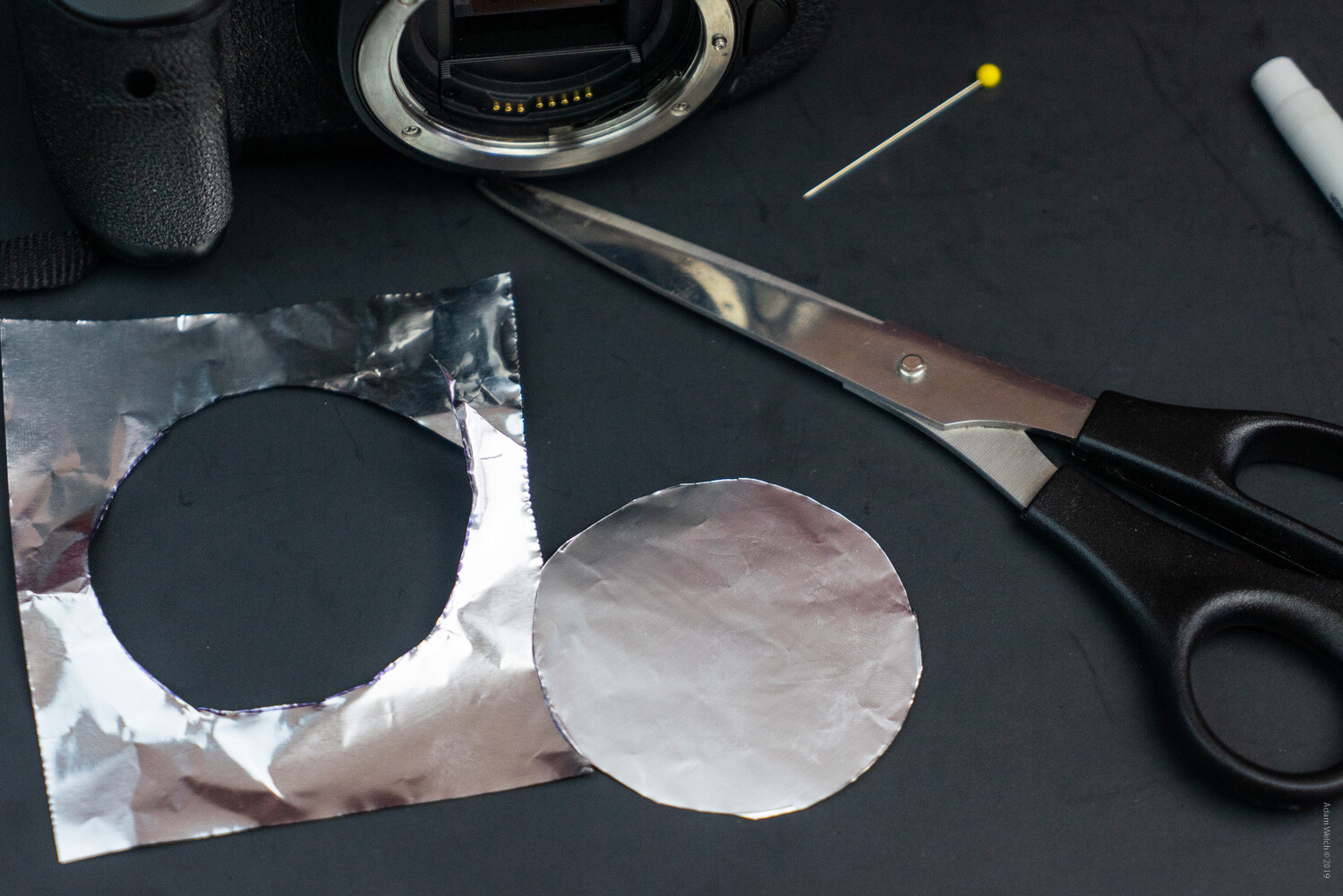
Now, let’s get to making our pinhole camera. As we’ve said before, this will be an extremely simple construct. We’ll begin by cutting out our aluminum foil diaphragm. This is the operable component of the entire system, as it will be what we eventually use to form our pinhole aperture.

Keep in mind that aluminum foil has a shiny side and a matte side. This will come into play later. A piece of foil 3×4 inches (7.6×10.2cm) should be plenty for almost all cameras.

Image: Shiny side…

Shiny side…

Image: …matte side.

…matte side.

Creating the Aperture

I like to use the front cap for the camera to trace a rough outline for the diaphragm. Just flip the cap over and this will give a good approximation of the front surface of the camera flange. Feel free to trace the outline on either side of the foil. Don’t worry if you don’t have a front cap to use as a guide, cut the foil as best as you can, making sure to leave some overlap.

how-to-turn-your-dslr-into-a-digital-pinhole-camera

Remember to trace the cap (if you have one) face down.

How to turn your DSLR into a Digital Pinhole Camera

Throughout the cutting process, try to keep the foil as unwrinkled and flat as possible.
how-to-turn-your-dslr-into-a-digital-pinhole-camera

Next, it’s time for our bravery test. We need to make our pinhole now. If you remember from earlier, our “optimum” pinhole size is .011mm. Of course, we won’t be able to achieve this exactly, so the best we can hope for is to make the smallest hole with the tools we have on hand. The pin I’m using has an approximate diameter of .77mm, which is still much larger than our optimum calculated hole size. So we’ll try to make the opening as small as possible using just the tip of the pin.

Lay the foil shiny side up on a semi-firm surface like a cutting board, or in our example, a piece of poster board. Aim for the approximate center of the foil disk and lightly press down with the pin. Don’t attempt to press the pin completely through the disk. Just a small amount of pressure will likely be sufficient to puncture the foil.

How to turn your DSLR into a Digital Pinhole Camera

And there you have it; our freshly minted pinhole.

how-to-turn-your-dslr-into-a-digital-pinhole-camera

From here, it’s just a matter of fixing our new pinhole diaphragm to the front of the camera.

Mounting the pinhole

Center the pinhole diaphragm as close as possible to the lens mount of your camera. Then, carefully tape the foil to the lens flange. I’m using a few pieces of electrical tape. It’s a good idea to use tape that is as opaque as possible and one which won’t leave excessive residue on your camera once it’s removed. Again, keep the foil as flat as you can.

How to turn your DSLR into a Digital Pinhole Camera

how-to-turn-your-dslr-into-a-digital-pinhole-camera

Begin at the outsides of the foil and be sure that the tape seals the diaphragm as tightly as possible. After this, I like to add a few more pieces of tape to the front of the foil for added strength. A delicate touch is required here. Be mindful not to cover your pinhole!

how-to-turn-your-dslr-into-a-digital-pinhole-camera

I know it’s difficult to believe, but you’ve just made a pinhole camera!

Tips for shooting with your pinhole camera

As you have likely already assumed, pinhole cameras make use of relatively small apertures. As such, shooting with them will require longer exposure times. So, a tripod will always be a good idea to have on hand for your pinhole work. Furthermore, it will be complicated to compose your images visually. However, this doesn’t mean that you can’t shoot your pinhole camera handheld!

Here are some suggestions for getting the most out of your pinhole camera when shooting with and without a tripod:

  • Bump up that ISO. Use the highest ISO you are comfortable with in order to bring the required shutter speed into a manageable range for handheld shooting.
  • Forget the viewfinder. While it’s perfectly acceptable to keep the camera held to your eye, it won’t benefit you all that much. Try shooting with the camera in a “waist level” configuration, holding it close to your body for added stability.
  • Pinholes love long exposures! Try mounting your pinhole camera on a tripod and lowering your ISO for some great long exposure images. That small aperture is your friend when it comes to super long exposure photography.
  • Protect your camera. Remember, you are now shooting without the protection of a lens. Even though the pinhole is extremely small, dirt and moisture can still make their way into the internal components of your camera.
  • Be ready to observe any and all dirt present on your sensor. Seeing as you will be shooting at extremely narrow apertures, any specs of dust or dirt on your camera’s sensor will be readily apparent.
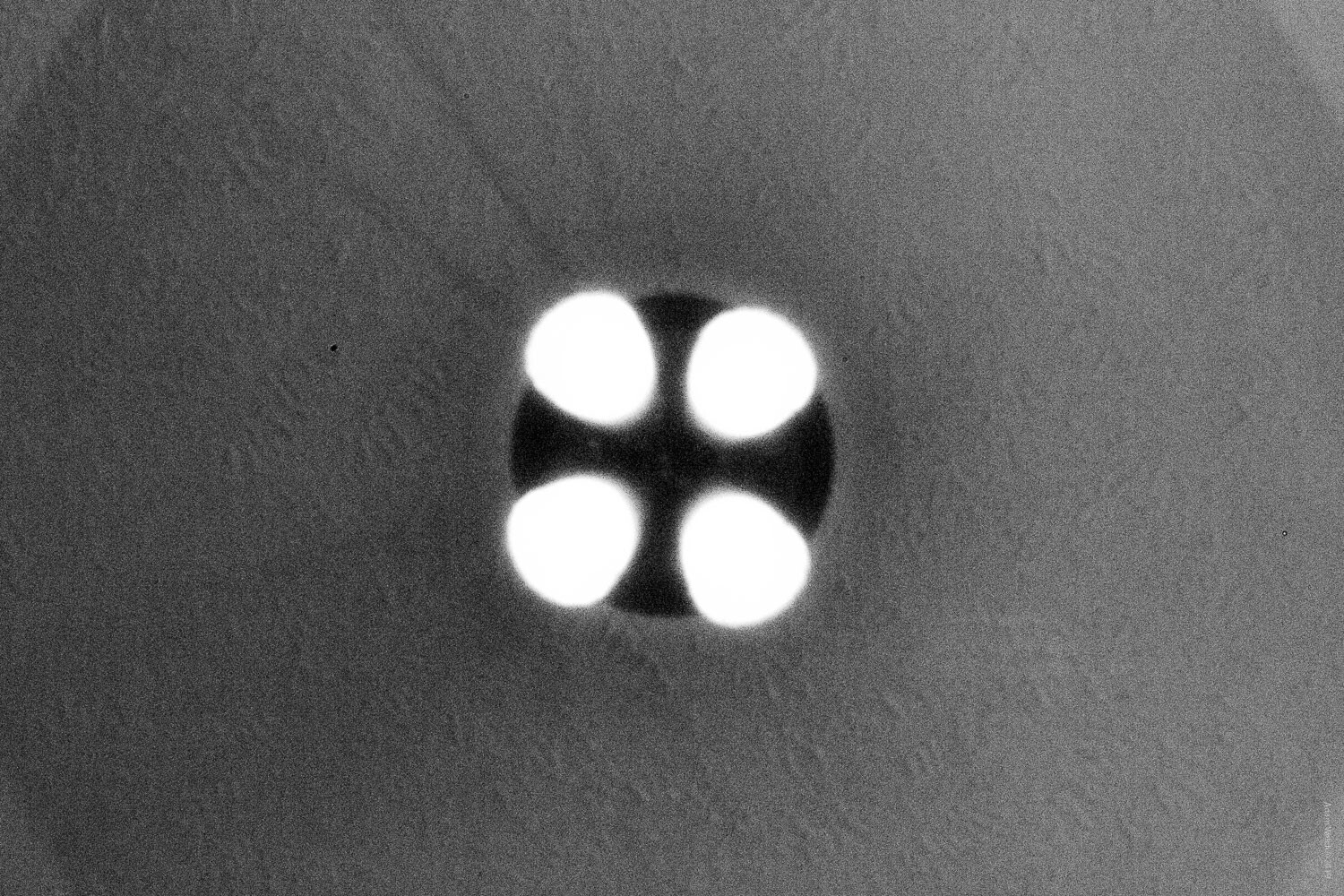
  • Try a few extra pinholes. There is no rule saying you have to limit yourself to a single aperture. A few additional pinholes can produce some amazing effects. Experiment with different numbers and configurations of pinholes.
  • Embrace the blur. By its very nature, pinhole photography is imperfect. Remember that the beauty of working with a pinhole camera stems from the simplistic nature of the method itself.
  • Pinhole photography works great in black and white. Converting your pinhole images to black and white can change the entire dynamic of the photo.

Here are a few examples of images I made with my converted pinhole DSLR:

How to turn your DSLR into a Digital Pinhole Camera


How to turn your DSLR into a Digital Pinhole Camera

How to turn your DSLR into a Digital Pinhole Camera

How to turn your DSLR into a Digital Pinhole Camera

How to turn your DSLR into a Digital Pinhole Camera

How to turn your DSLR into a Digital Pinhole Camera

How to turn your DSLR into a Digital Pinhole Camera

These last two images were made after I introduced three additional pinholes…

how-to-turn-your-dslr-into-a-digital-pinhole-camera

how-to-turn-your-dslr-into-a-digital-pinhole-camera

Ways to improve your pinhole camera

You can make more heavy-duty pinhole apertures using more sturdy materials and by more precisely measuring and cutting your pinholes. Of course, this means additional work and will likely require much more advanced tools. Still, we can make our pinhole camera perform much better through some simple ingenuity.

The best way to up-the-ante of your digital pinhole camera is by adding a bit of flocking to the inside surface of the diaphragm. Flocking is just a way of reducing reflections and glare inside of the camera by darkening the components that might produce these sorts of problems.

Even though we faced the matte side of the foil inward (told you this would come into play), we can still help further reduce the reflections by darkening the inside of the foil. The easiest way to do this is to use a black permanent marker to darken the inside surface of the diaphragm.

Image: Careful not to color over the pinhole. The aperture is extraordinarily delicate.

Careful not to color over the pinhole. The aperture is extraordinarily delicate.

This will help to reduce stray light rays that can degrade image quality. An even better solution is to add dark tape to the inside of the diaphragm. This will make for a much more efficient flocking material. If you plan to add tape flocking, it’s a good idea to apply it prior to making your pinhole. Again, leave a small amount of room around the aperture so that the diaphragm remains as thin as possible.

How to turn your DSLR into a Digital Pinhole Camera

Final thoughts on pinhole cameras

While I was making the images for this article, I realized what might be the greatest benefit of turning your DSLR or mirrorless camera into a pinhole camera; it makes you forget. What I mean by this is that when you use such a simple camera, most of your worries over composition and tack-sharp focus seem to fall away. It’s an odd feeling, really.

What’s more, given the fact that you’re shooting at such small apertures, it produces an enormous depth of field. This means that the entire scene will technically be “in focus.”

At the same time, you know that without the benefit of a lens, the entire photo will simultaneously be less sharp, even dreamlike. When operating under these conditions, it forces us to strip away our pretenses and focus (photo humor) on the core values of our images.

If you’ve never used a pinhole camera before, I hope that this tutorial has shown you that it is incredibly easy to turn your DSLR into a digital pinhole camera. Follow the steps shown here, and you can have a digital pinhole camera in your hands in less time required to read this article.

Have you ever used a pinhole camera? If so, be sure to share your thoughts and images in the comment section below!

Author’s note: While the method shown here poses little risk to your camera, I strongly urge you to only attempt projects such as these using equipment that you wouldn’t mind being damaged. As always, use good judgment and proceed at your own risk.

The post How to turn your DSLR into a Digital Pinhole Camera appeared first on Digital Photography School. It was authored by Adam Welch.


Digital Photography School

 
Comments Off on How to turn your DSLR into a Digital Pinhole Camera

Posted in Photography


Duet Display adds support for turning Android tablets into secondary displays

03 Oct

Duet Display, the software that was launched as a way to turn an iPad into a secondary Mac display, has launched support for Android. The new Duet Display for Android app enables users to turn an Android smartphone, tablet, or Chromebook into an extra display for use with a PC or Mac computer, a feature that is particularly useful when working outside of the office.

Apple made the Duet’s main product defunct with the launch of its Sidecar feature, which now directly offers a way for using an iPad as a secondary Mac display. Users had anticipated an eventual arrival of Duet Display for Android given the sudden change in its primary market.

As with iPad, Android and Chromebook users can turn their devices into secondary displays for a main PC or Mac computer by connecting the two with a USB cable. Users must install the free Dual desktop client on their computer and the Duet Display Android app on their supported secondary device.

Duet supports gestures and touch control, enabling users to scroll and zoom, among other things, directly on the secondary device. The Duet Display for Android app costs $ 19.99 USD, but is temporarily discounted on the Google Play Store at $ 9.99 USD.

Articles: Digital Photography Review (dpreview.com)

 
Comments Off on Duet Display adds support for turning Android tablets into secondary displays

Posted in Uncategorized


The Polaroid Lab turns your digital smartphone photos into analog instant prints

10 Sep

Polaroid Originals has introduced the Polaroid Lab, a new instant printer that will turn your digital smartphone photos into instant prints.

The Polaroid Lab appears to be a rebranded version of Impossible Project’s Instant Lab released back in 2013, but offers a few new features and brings a retro-inspired design.

Like the Instant Lab, the Polaroid Lab uses your smartphone’s screen as a projector of sorts to capture the image on an instant photo. The process requires you to download the Polaroid Originals app on your Android or iOS smartphone. Once downloaded, images can be selected and edited before prepping them for their analog conversion.

Three lenses and multiple mirrors inside the Polaroid Lab take the image on the screen and focus them on any Polaroid i-Type film. When the red button on the base of the Polaroid Lab is pressed, the image is transferred to the instant film and ejected from the device.

The Polaroid Lab features an internal battery that’s rechargeable via Micro USB. Polaroid Originals says it supports iOS devices running iOS 11 or newer going back to the iPhone 6S and Android devices running Android 7 or newer for the current devices from major manufacturers.

The Polaroid Lab will retail for $ 129.99 / EUR €129,99 / GBP £119 when it ships. Polaroid Originals says the Polaroid Lab is ‘coming soon’ but fails to provide specifics beyond that. For more information, visit the Polaroid Originals’ website and sign up to receive more information on the Polaroid Lab as it’s released.

Articles: Digital Photography Review (dpreview.com)

 
Comments Off on The Polaroid Lab turns your digital smartphone photos into analog instant prints

Posted in Uncategorized


Emojivision uses computational photography to turn your photos into emojis

04 Sep

A free new camera app for iOS called Emojivision allows you to capture images composed entirely of emoji. The app was created by Gabriel O’Flaherty-Chan, according to TechCrunch, which reports that Emojivision uses computational photography to break an image down into its core color palette, then rebuilds it using similarly colored emoji in near-real-time.

The app can be used to take any image, as with the native camera app, and also to apply the emoji filters to existing images located in the phone’s camera roll. The app is free, but enthusiastic users can pay $ 2.79 USD to get additional emoji packs. For developers, the Emojivision project is located with technical details on GitHub.

Articles: Digital Photography Review (dpreview.com)

 
Comments Off on Emojivision uses computational photography to turn your photos into emojis

Posted in Uncategorized


Nitecore leaps into the world of optics with 5 new full-frame cinema lenses

26 Aug

Nitecore, a Chinese company known for its rechargeable flashlights and third-party battery equipment, has taken an unexpected leap into to the world of optics with its Superior Prime lineup, a collection line of prime cinema lenses for full-frame camera systems.

The five lens lineup includes a 25mm T2.1, 35mm T2.0, 50mm T2.0, 75mm T2.0 and 100mm T2.0. The exact specifications for each lens are detailed in the below graphic, but across the board, the lenses measure 117mm long (with the PL mount) and 95mm diameter for seamless swapping when using gears and other cinema equipment. Nitecore says the lenses will be available with interchangeable PL, Canon EF and Sony E mounts, but will ship with the PL mount in the original packaging.

The exact details on the coating technology used aren’t specified, but Nitecore says the lenses ‘are designed with a unique optical coating which ideally controls dispersion while retaining plentiful details to create low contrast and a stylized flare.’ The 75mm T2.0, in particular, is also ‘specially optimized on the skin details in a portrait,’ although we’re not exactly sure what they’re referring to with that statement.

There are currently no details on pricing or availability. We have contacted Nitecore in an attempt to get more information and will update this article accordingly if we hear back.

Articles: Digital Photography Review (dpreview.com)

 
Comments Off on Nitecore leaps into the world of optics with 5 new full-frame cinema lenses

Posted in Uncategorized


Video: How to upcycle old TVs and monitors into a natural-looking light source

16 Aug

Matt of YouTube channel DIY Perks has shared a video showing how old televisions and computer monitors can be repurposed to create a natural-looking light source that gives off a similar look to window light.

The 13-minute video walks through the entire process, with Matt taking the time to explain each step of the project and each element involved in upcycling an otherwise faulty display into a cheap, DIY light source.

A screenshot from the video showing the difference the fresnel lens panel makes in preventing light falloff.

One of the key components that makes the light coming from TV and monitor backlights look so natural is a fresnel lens. As Matt explains in the video, these fresnel lenses, combined with additional diffusers, helps to reduce the inverse square law.

The process itself is a bit cumbersome and will vary greatly from one TV/monitor to the next, but the basic principles seem to apply to most displays. You can either choose to re-wire the light source used in the original display or use Matt’s more convenient solution, which is to remove the original light source and put LED light strips in place so wiring and powering the setup is more convenient. Matt even links his preferred LED light strips, which have a decent CRI rating for the most natural-looking light.

A screenshot from the above video showing Matt reinstalling the diffusion panel in one of his upcycled light builds.

Unless you have the tools on hand, it isn’t likely an evening project, but it doesn’t appear to be too difficult either, especially considering similarly-sized light sources will come at a much higher cost than the DIY solution.

Of course, be sure to properly recycle any components not used in the rebuild to minimize waste.

Articles: Digital Photography Review (dpreview.com)

 
Comments Off on Video: How to upcycle old TVs and monitors into a natural-looking light source

Posted in Uncategorized


Photographer turns old computer parts into functional large format ‘Frankenstein’ camera

07 Aug

Iranian photographer Alireza Rostami has introduced the world to his ‘Frankenstein’ camera, a functional product handmade from old and broken computer components. According to Rostami, who recently spoke with DPReview, he purchased his first computer in 1999, a moment he said he’ll ‘never forget.’

Rostami explains that as he upgraded the computer over the years, he saved the older hardware, including the motherboard. ‘One day I thought, I can turn my old computer into a device that works again!’ Rostami said. ‘And I thought, well, why not make a camera?’

Rostami crunched the numbers and developed a design for his large format camera, which features a Linhof large format lens and film back, as well as a low-power battery that powers the camera’s computers fans, adding to the overall aesthetic. Rostami says his computer camera is suitable for landscape photography without adjusting the focus but can be readjusted for other uses by utilizing a universal lens ring and changing the lens.

Below is a video walkthrough of the camera, shared with DPReview by Rostami:

‘Unfortunately, I don’t have access to high-end technology,’ Rostami notes on Instagram, explaining that he’d like to make a different model that functions as both a computer and camera. Despite that, Rostami is pleased with the current version, saying, ‘I find the camera very exciting and beautiful, like something out of science fiction. I have a very unique camera now.’

View this post on Instagram

Part 3 … video This is my Frankenstein camera . I make it with my broken Camputer . #apple #technology #camera #largeformatcamera #Instagram #newyork #usa #windows #google #yahoo #news #microsoft

A post shared by Alireza Rostami (@alirizarostami) on

Selfies captured with the Frankenstein camera are available on Rostami’s Instagram account. The photographer has shared a number of other DIY photography projects, including a camera transformed into a watch and a modified lens that produces dreamy, otherworldly images.

Articles: Digital Photography Review (dpreview.com)

 
Comments Off on Photographer turns old computer parts into functional large format ‘Frankenstein’ camera

Posted in Uncategorized


NYC’s iconic 101 Park Avenue skyscraper was turned into a giant camera last month

11 Jun

Photographer Brendan Barry, founder and director of Positive Light Projects and creator of numerous unusual cameras, recently transformed the 46th floor of NYC’s 101 Park Avenue skyscraper into a massive camera obscura. The camera was part of the larger Skyscraper Camera Project installation that was live from May 13 to 16 in the iconic Manhattan tower.

Barry, accompanied by photography students, looks over a negative captured as part of the Skyscraper Camera Project.

Barry has crafted different types of cameras out of a variety of unexpected materials, including a medium format camera built in a pineapple, a 4×5″ camera that incorporates a log and a 35mm ‘butternut squash camera.’

According to the CBS affiliate WLNY, Barry gathered with 20 photography students on Saturday, May 11, to blackout 160 windows in the 46th floor of 101 Park Avenue. Lenses were installed in the dark space, enabling the team to project large images onto screens inside of the skyscraper. Below is a short feature WLNY created on the project:

The project was conceived by Favorite Child Creative founder and director Nicholas Kalikow, according to The Phoblographer. The 46th floor of the skyscraper was available during that time, offering a 360-degree view of the Manhattan skyline and the unique opportunity for this installation.

One of the many images captured with the skyscraper camera obscura.

During the workshop, Barry and participants produced what may be the largest analog photographs of New York City; they measure up to 45″ x 93″. The photos were developed in an on-site darkroom. In addition to transforming the floor into a large camera, the team also created a functional camera replica of the skyscraper.

Below is a collection of behind-the-scene images from the project that Barry kindly shared with DPReview:

$ (document).ready(function() { SampleGalleryV2({“containerId”:”embeddedSampleGallery_0560645838″,”galleryId”:”0560645838″,”isEmbeddedWidget”:true,”selectedImageIndex”:0,”isMobile”:false}) });

Barry’s other work can be found on his website.

Articles: Digital Photography Review (dpreview.com)

 
Comments Off on NYC’s iconic 101 Park Avenue skyscraper was turned into a giant camera last month

Posted in Uncategorized