Tag: into

  • Tiny lens turns your smartphone camera into a microscope

    micro.jpg

    There is a large number of third party lens attachments for smartphones available. You can choose from fisheye, wide-angle, macro or tele lenses, or even attach an entire camera module. The Micro Phone Lens Kickstarter project is different though. It’s a minuscule lens attachment made from a scratch-proof polymer that turns your smartphone or tablet into a microscope with a 150x magnification factor. Learn more

    News: Digital Photography Review (dpreview.com)

  • Transforming Furniture: Fitting 5 Rooms into 640 Square Feet

    [ By WebUrbanist in Design & Fixtures & Interiors. ]

    transformingspaces2

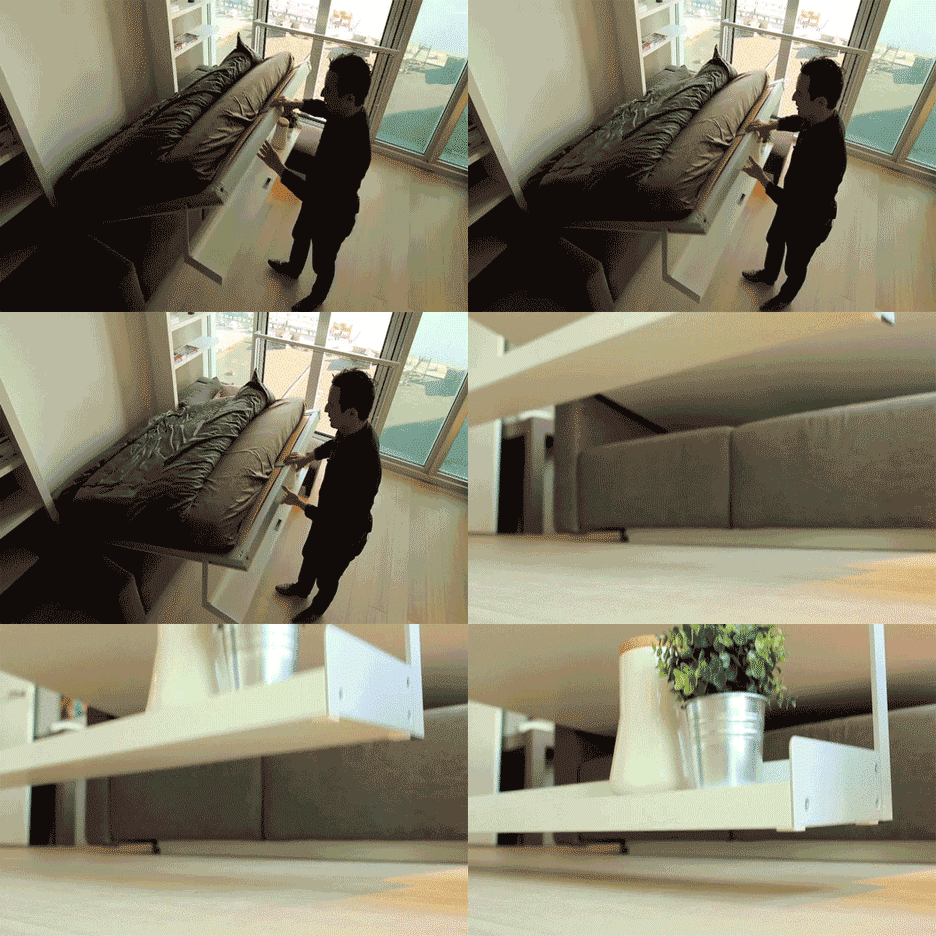
    With a mostly-open floor plan tucked into 60 square meters of space, the design challenge was to effectively fit the functionality of five rooms into the footprint of two.

    transformingspace

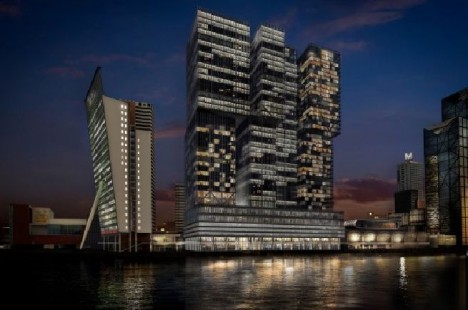
    The De Rotterdam project by star architect Rem Koolhaas, a Netherlands native and head of OMA, is the biggest building in the country but, being all about density, sports some of its smallest apartments as well.

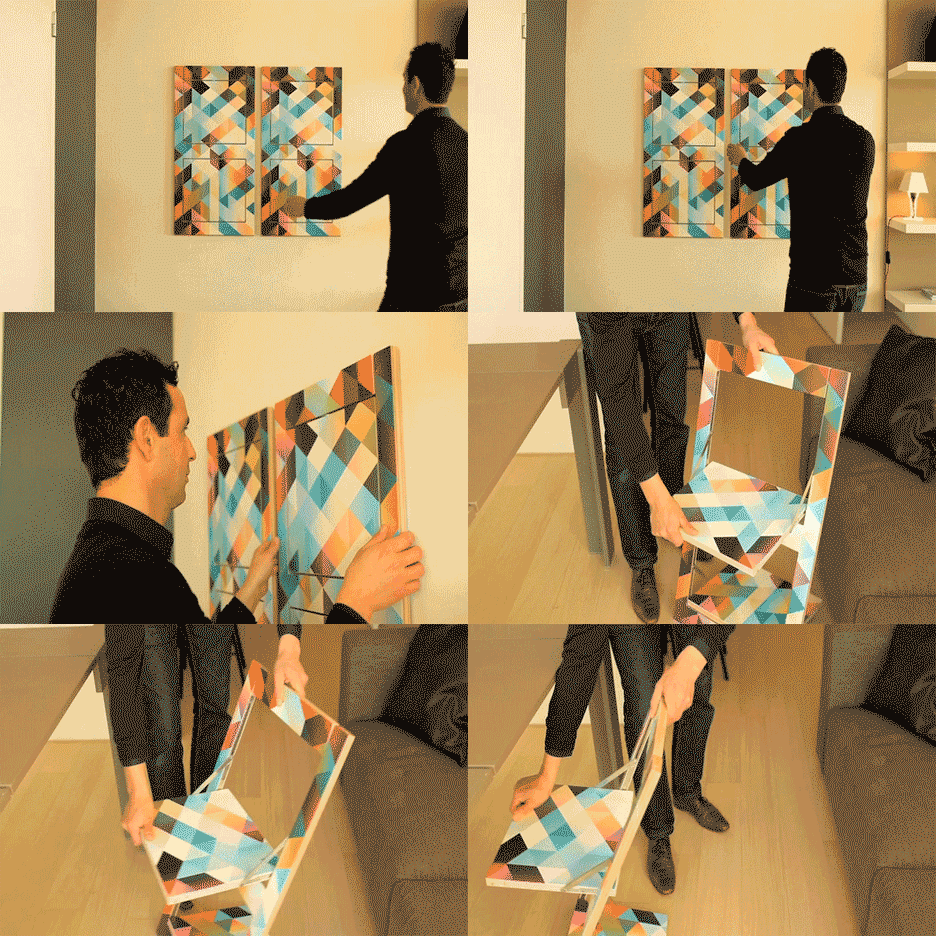
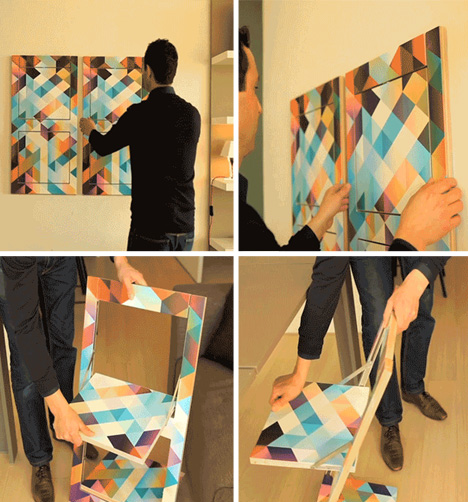
    A series of convertible furniture designs by Clei Italia makes it possible to expand side surfaces into dining tables, hang spare chairs on the wall and turn both desks and sofas into beds on demand.

    de rotterdam apartment complex

    The project’s developer,  Wim De Lathauwer, explains that the Dutch are used to thinking in multi-functional terms – making the most of every inch (or rather: centimeter) of available area.

    transforming chair design wall

    The approach not only to makes these small apartments livable for singles or couples, but also to allow the units to support surprisingly large gatherings and overnight guests as well. The living room and kitchen combination becomes a bedroom, dining room or office as needed.

    Share on Facebook


    [ By WebUrbanist in Design & Fixtures & Interiors. ]

    [ WebUrbanist | Archives | Galleries | Privacy | TOS ]


    WebUrbanist

  • Snapseed features creep into Google+ for Android app

    google3.jpg

    Google has launched an update for its Google+ for Android app, which offers many features found in the popular editing program Snapseed. Most of the new features are imaging-related and make Google+ a more powerful image editing, storing and sharing platform. Integration with Google+ allows continuous editing across devices, and editing is non-destructive. See more on connect.dpreview.com.

    News: Digital Photography Review (dpreview.com)

  • Pop-Up Parks: Brackets Turn Scaffolding into Furniture

    [ By Steph in Design & Furniture & Decor. ]

    Softwalks Pop Up Scaffolding Park 1

    Scaffolding is ugly, and steals valuable sidewalk space from city residents – but with a simple kit of parts that fit onto the frame with brackets, it transforms into an instant pop-up park. The Kit of Parts by Softwalks includes fold-up chairs, planters, counters, light reflectors and decorative screens that snap right onto scaffolding to create impromptu public spaces that encourage congregation and conversation.

    Softwalks Pop Up Scaffolding Park 3

    Softwalks Pop Up Scaffolding Park 2

    Inspired by the interaction with urban environments that’s fostered by sidewalk cafes and by the sturdiness and ubiquity of scaffolding (or ‘sidewalk sheds’), the designers came up with a few essential components that make for a comfortable resting place. Leaving scaffolding up for long periods of time can have a negative effect on businesses, communities and sidewalk culture, and Softwalks saw an opportunity to change that.

    Softwalks Pop Up Scaffolding Park 4

    The pop-up park kit can’t be ordered by just anyone, and there’s a reason for that: the designers don’t want people potentially interfering with active construction sites in a dangerous way. But lots of scaffolding is ‘passive.’ The Softwalks team found that in New York City, when businesses fail the mandatory 5-year facade inspection, they sometimes leave scaffolding up for a long time to avoid having to do expensive repairs. In one case, scaffolding remained in place for 12 years.

    Softwalks Pop Up Scaffolding Park 5

    The design team identified an ideal site to install the parts for the pilot project, ensuring that there was plenty of room for pedestrians, and plan to make the kit available to cities for use at special events, street festivals and for temporary installations.


    Share on Facebook


    [ By Steph in Design & Furniture & Decor. ]

    [ WebUrbanist | Archives | Galleries | Privacy | TOS ]


    WebUrbanist

  • Sony Cyber-shot DSC-WX350 puts latest tech into travel zoom body

    DSC-WX350_Black_Front-1200.png

    The Sony Cyber-shot DSC-WX350 features an 18.2 megapixel BSI CMOS sensor and the company’s latest Bionz X processor, and puts it into a slim body with a 20X, 25-500mm equivalent F3.5-6.5 lens. The WX350 also shoots up to ten shots at 10 fps, records 1080/60p video, and has a ‘Motion Shot feature’ for capturing things like golf swings. And, like most of Sony’s midrange cameras, the WX350 also has Wi-Fi with NFC. The camera will ship in March for $ 320.

    News: Digital Photography Review (dpreview.com)

  • Subtractive Street Art: Sculptural Murals Cut into City Walls

    [ By WebUrbanist in Art & Street Art & Graffiti. ]

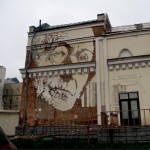
    cut face wall mural

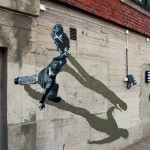
    Vhils is adept at carving, cutting and peeling to reveal art inside solid surfaces, but his artistic experiments also include carefully-calculated explosions to create pictures and phrases when the dust settles and debris clears.

    mural multi level city

    mural subtracted painted art

    mural alley family portrait

    While this Portuguese artist (real name: Alexandre Farto) has exhibited in galleries, his 3D building-side murals are somehow especially sublime, tied as they are to gritty urban contexts and turning crumbling paint, plaster and brick into physically and emotionally layered portraits.

    mural experimental stencil explosion

    mural explosive wall art

    His work with explosives is also powerful, playing with both relentless reality of controlled demolition and the festivity of fireworks, with elements of unpredictable chaos thrown into the mix.

    Next Page – Click Below to Read More:
    Subtractive Street Art Sculptural Murals Cut Into City Walls

    Share on Facebook


    [ By WebUrbanist in Art & Street Art & Graffiti. ]

    [ WebUrbanist | Archives | Galleries | Privacy | TOS ]


    WebUrbanist

  • Instant Monster Truck: Converting Cars into Snowmobiles

    [ By Steph in Technology & Vehicles & Mods. ]

    Convert Truck Snowmobile 1

    Anyone who has driven in heavy snow has witnessed an overconfident driver in a 4×4 go whizzing down the icy street only to fishtail or veer off into a ditch. Four wheel drive may not turn vehicles into magical snow beasts that can handle the worst of winter conditions, but these will: the Track N Go system, a series of treads that installs in just fifteen minutes to basically turn an ordinary vehicle into a monster truck.

    Convert Truck Snowmobile 2

    While monster trucks may seem ridiculous when seen on the streets in summertime, watching them tackle four-foot snow banks without a hitch might give some of us a twinge of envy when we’re sliding along at ten miles an hour after the latest blizzard. The Track N Go system is a series of four treads that lock onto a vehicle’s wheels to provide traction that tires can’t match.

    Convert Truck Snowmobile 3

    There’s a catch: you can’t exactly install these things on your Toyota Camry. They’re for 4x4s only, and they’ll set you back $ 25,000. But being that smug driver going where other vehicles can’t, and actually knowing that your car can handle it, might just be priceless.

    Convert Truck Snowmobile 5

    Of course, there have already been some Southerners perking up asking, do they work in mud? The answer is ‘maybe’ – they were developed specifically for snow, and mud trials haven’t started yet.

    Share on Facebook


    [ By Steph in Technology & Vehicles & Mods. ]

    [ WebUrbanist | Archives | Galleries | Privacy | TOS ]


    WebUrbanist

  • Drop-Leaf Desk: Small Side Table Converts into Work Surface

    [ By WebUrbanist in Design & Furniture & Decor. ]

    small space modular desk

    Designed as carefully as it is hand-crafted, this Tablet Desk has a deceptively streamlined look that hides a series of modular features and space-saving strategies, all made with technology in mind.

    small desk close up

    small desk in context

    If setting aside a whole room for a home office is simply not an option, this dual-purpose wooden desk and end table lets you put work aside with relative ease, then flip out extra surface area supported with magnetized wooden legs.

    small desk magnet legs

    small digital work surface

    Both the original two-toned and the newer 2.0 version from UK design studio Bee9 combine efficient storage and work space with minimal materials. Each also has a small-as-possible physical footprint, all oriented toward digital-first and future-proof use cases.

    small desk hidden cords

    small desk tablet area

    Modular panels and other moving components acknowledge that users will have wants and needs that cannot be universally anticipated, including ways to route cords (and places to keep them out of the way) and vertical surfaces against which to lean tablets or other devices.

    The making-of video above shows the initial Tablet Design being carefully constructed – watching it reveals some of the subtle detailing and much of the behind-the-scenes effort required to integrate all of the necessary functionality.

    small desk modular panels

    small desk open design

    From the designers: “Deceptively simple and endlessly adaptable, the Bee9 tablet desk is designed to redefine where you can put a desk. Frugal in its use of material and space, the desk [plus] side table makes optimum use of limited space.”

    Share on Facebook


    [ By WebUrbanist in Design & Furniture & Decor. ]

    [ WebUrbanist | Archives | Galleries | Privacy | TOS ]


    WebUrbanist

  • Tamas Dezso offers glimpse into post-Communist Romania

    Tamas_Dezso_Epilogue_0015_574.jpg

    Tamas Dezso is a fine art documentary photographer based in Budapest. Since 2011 he has been documenting the disintegration of former Communist Romania’s infrastructure in a series of photographs called ‘Notes for an Epilogue’. In his own words, the purpose of the project is to ‘render a world which may disappear forever imperceptibly and very rapidly due to the transitional nature of the [Communist] era’. See gallery

    News: Digital Photography Review (dpreview.com)

  • Techniques for Working Textures Into Your Photography

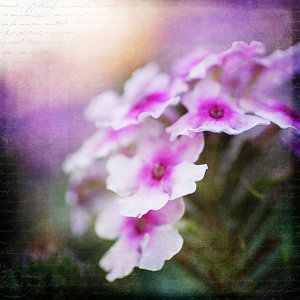
    Textured-purple-flower-600Where do you begin when you are considering using textures in your photography? I suggest you begin with the absolute best photo possible. Adding a texture to a bad photo does not make it a good photo. You want to make sure you have it exposed correctly, composed well, have a clear subject and not too much in the competing in the background competing. Textures work best with photos that are not too busy to start. Once I have chosen the photo I am going to work with, I do all of my edits before I add the texture, including adjusting the colors and sharpening.

    In this article I’ll share some of my techniques for working textures into your photography.

    Sharpening your image

    You want to sharpen your photo before you add the texture. This is so that your subject is sharp and the texture isn’t over sharpened compared to the subject. You want the texture to enhance your photo, not compete with it. When I sharpen the photo I use the high pass filter as opposed to the unsharp mask. I like this method best because it defines and clears up all the edges of your subject without over-sharpening all the fill areas. Below is how I do this and the settings:

    1. Duplicate your background layer and while that duplicate copy is still highlighted, go up to the Filter menu and select: Other > Highpass filter
    2. Set the filter radius between 6 and 10 pixels (or higher) depending upon how sharp you need to have your photo, but be careful not to over sharpen.
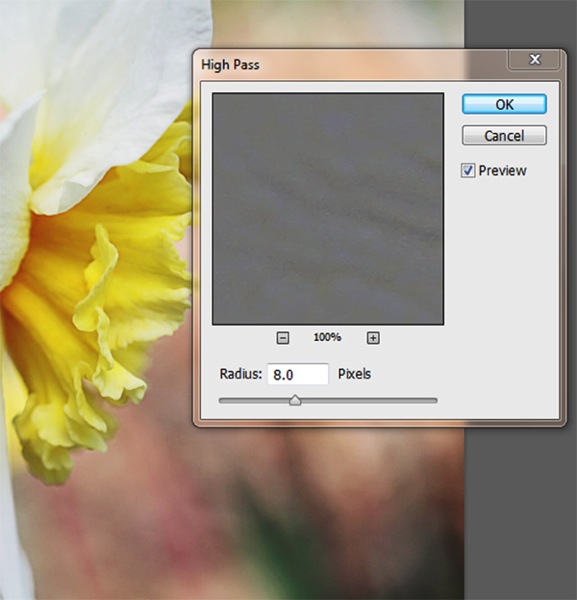
      Sharpening highpass pop up
    3. Next change the blending mode of this layer to “Softlight” or “Overlay”. Overlay is stronger than Softlight, so test out each option to see what works best for your image.
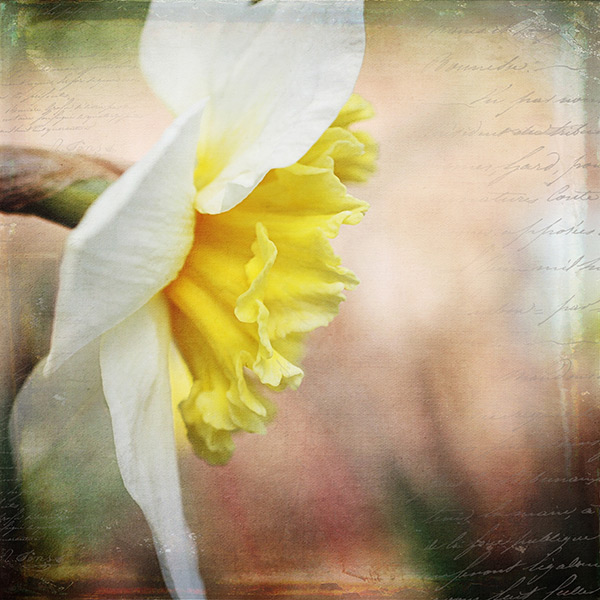
    Textured-yellow-flower-600

    Finished image with texture and vintage paper applied

    Once I am finished adding my textures to the photo I might do a final sharpen at the end if needed.

    How to erase texture and still retain tone, plus a few extras

    Once you are finished with your edits and sharpening, you are ready to add the texture. One concern people have in adding texture is how to erase the texture from the subject without it being obvious. You wouldn’t want to have the face of a baby be texturized, for instance, but you would want the face to match the rest of the photo in color and tone.

    5 Steps:

    1. Place the selected texture on your photo. Do this by going to: “File > Place” in the top menu. Then select the texture image you want to use. It opens up as a new layer on top of your photo, ready to resize. Do that, then I right click the texture layer and choose “rasterize”, so it will no longer be a Smart Object. Change the blend mode and opacity of the texture layer to suit your image, such as “Softlight” or “Overlay”. At this point you are just manipulating the texture and not worrying about erasing it yet.
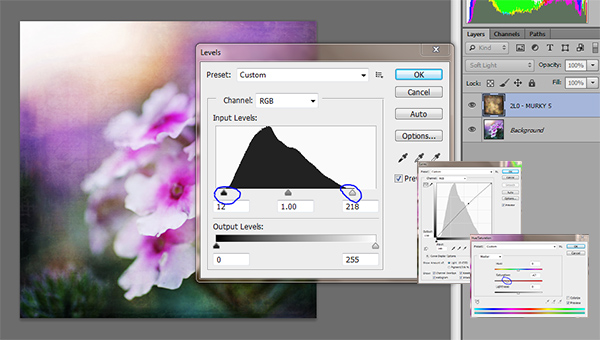
    2. While the texture layer is still highlighted, there are a few techniques you can do to the layer before you move on. Adjust the levels, curves, and the saturation of the texture layer to make the texture more vivid or pronounced, but not more opaque. I work in Softlight mode a lot as it brings out some of the texture without changing the mode.Levels curves saturation
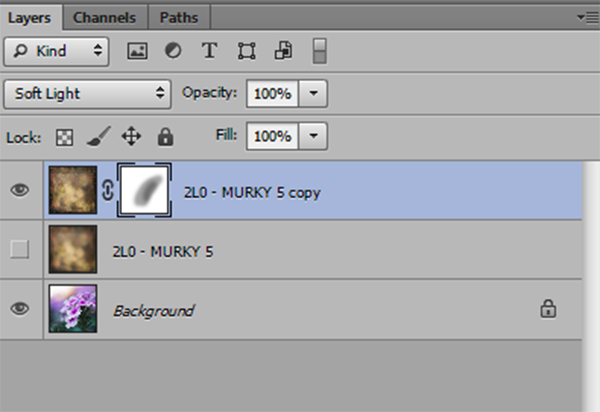
    3. Once you are happy with the way the texture is working with the image, duplicate the texture layer and apply a Gaussian blur set to about 60 pixels to the bottom texture layer so it gives you the exact tones of the texture. Get to the Gaussian blur box by going to “Filter > Blur > Gaussian blur”. Next, turn off the bottom layer that you just added the blur to.
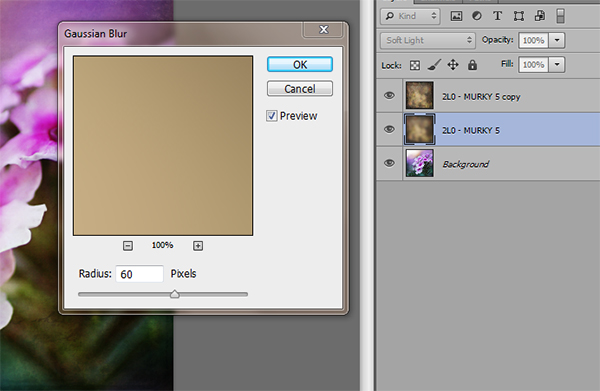
      Gaussian blur
    4. Add a mask to the top layer. With a soft black brush, set to about 30% opacity, ybegin to brush off the texture in any areas where you don’t want it. By using a low opacity you can slowly build up the amount you are removing. If you remove too much simply change the brush to white ,and wipe some of the texture back on. Make sure while you are doing this that you have the mask box selected (it will have square brackets around it) not the image itself.Sharpening mask
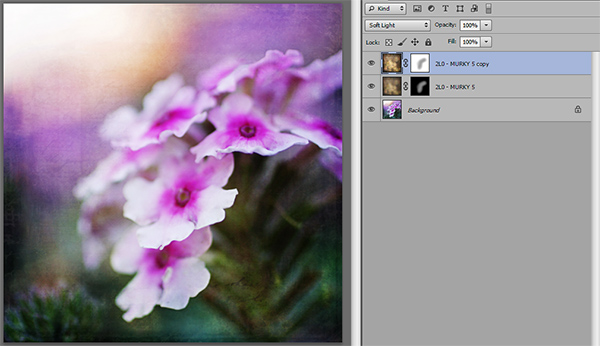
    5. Once you are happy that the texture is removed from all the important areas – select the mask box, hold down “Shift + Alt” and drag the mask box from the top texture layer to the bottom texture layer. Now you have applied the mask to the blur layer, and you have inverted it at the same time. Turn that layer back on and you will notice the tone where you erased the texture has the same coloring as the rest of your photo.Sharpening finished

    Using vintage papers in your photography

    Working with vintage papers is another fun aspect of textures that you can use in your photography. I get vintage papers from several great sources including my own family documents from the mid 1800’s, flea markets, online searches, Etsy, etc. I have curated several collections on my website for sale if you don’t want to go through the trouble of searching for them yourself. I especially love vintage French papers because of their wonderful scripts, markings, and fancy headers.

    Part One

    Working with the vintage papers is the same as working with textures. Place the paper on your photo in the approximate location that you want to use it. You will notice in the sample that I have placed it on the top of the many textures I have used in this photo, but you can place it on any layer that you want, to get the look you are trying to achieve.
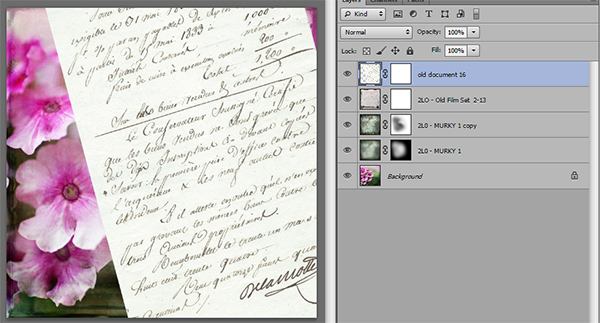
    Textures vintage paper

    Part Two

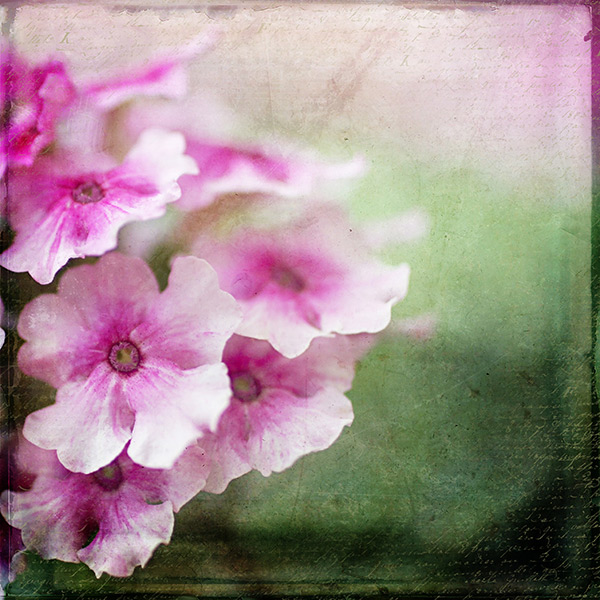
    Next, adjust the layer using the darkening blending modes: darken, darker color, color burn, linear burn, and multiply. Experiment with them all to see which one works best on the photo. The goal is to make the paper part of the document disappear, and have just the writing remain. Then just adjust the opacity to suit your taste. You can add a mask to this layer if you want to strategically erase some of the text which I do quite often.
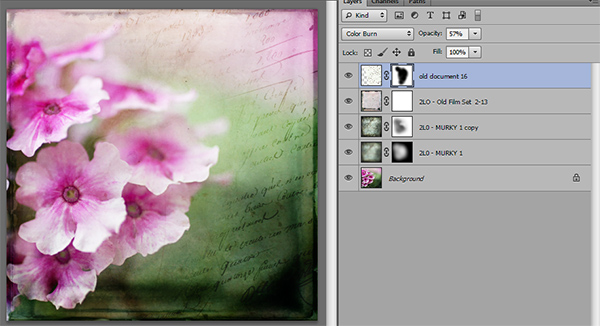
    Vintage paper texture

    Finished image

    Finished image

    I hope you will give some of these techniques a try whether you are new to textures or have been doing them for years. If you do, please share in the comments below!

    Further reading on using textures in your photography:

    • How To Create Your Own Unique Textures and Apply Them To Your Photography
    • Textures Made Simple
    • How To Apply Textures To Your Photographs

    The post Techniques for Working Textures Into Your Photography by Denise Love appeared first on Digital Photography School.


    Digital Photography School