RSS
 

Posts Tagged ‘into’

The ‘90s Are Calling: How to Hack a Payphone into a Boombox

06 Dec

[ By SA Rogers in Gadgets & Geekery & Technology. ]

payphone-boombox-hack-1

When you pick up this bright yellow receiver, you won’t hear a dial tone on the other end – what’s waiting for you instead is some of the worst music the 1990s had to offer. The ‘90s are calling and they want their boomboxes, payphones, ugly neon colors and alt rock radio hits back, but maybe you want to keep them by completing this hack yourself. A ‘digital alchemist’ calling himself Fuzzy Wobble explains how to procure an old payphone and load it up with music so it can be two obsolete objects at once.

payphone-boombox-hack-3

“When I first started this project I suspected payphones would be hard to get, expensive, and a hassle to hack. I was wrong on all three! Online I was able to get city-grade cast-iron/stainless payphone for relatively cheap. And the hack, surprisingly, turned out to be quite elegant!”

payphone-boombox-hack-gif

payphone-boombox-hack-5

Follow along step-by-step on Instructables to learn how to control the keypad, switches and audio on a payphone, whether you actually want to make your own ‘90s boombox or use it for some other audio project. The tutorial will tell you where to find a payphone and how to program the guts using modern electronic components like the Adafruit MP3 Maker Shield and the Arduino Mega, as well as offering the code and laser cuter templates.

“I would so totally just use this to rick roll people,” says one Instructables commenter. Sure. That’s no less relevant to our current world than The Offspring, Semisonic and Coolio.

Share on Facebook


[ By SA Rogers in Gadgets & Geekery & Technology. ]

[ WebUrbanist | Archives | Galleries | Privacy | TOS ]


WebUrbanist

 
Comments Off on The ‘90s Are Calling: How to Hack a Payphone into a Boombox

Posted in Creativity


How to Turn Your Images into Kaleidoscope Patterns

29 Nov

This tutorial is a lot of fun, transforming photographs into kaleidoscopic wonders, often with surprising results. The resulting kaleidoscope patterns make fantastic desktop backgrounds and wallpapers too.

Remember kaleidoscopes? Those curious tubes with an array of mirrors and colorful beads inside? As a kid, I would while away sunny weekends straining my eye against the viewing aperture, hypnotized by the endless combination of shapes, patterns, and colors. Although I now spend most of my time looking through the viewfinder of a camera, the magic of the kaleidoscope remains in my mind as an early foray into image making.

Step 1 – Setting up the canvas

kaleidoscope-01

First, select a photograph. I’ve chosen this photograph of some fungi growing on an old tree stump. From my own experimentation I’ve found images with bold, contrasting colors and negative space result in the best kaleidoscopic images.

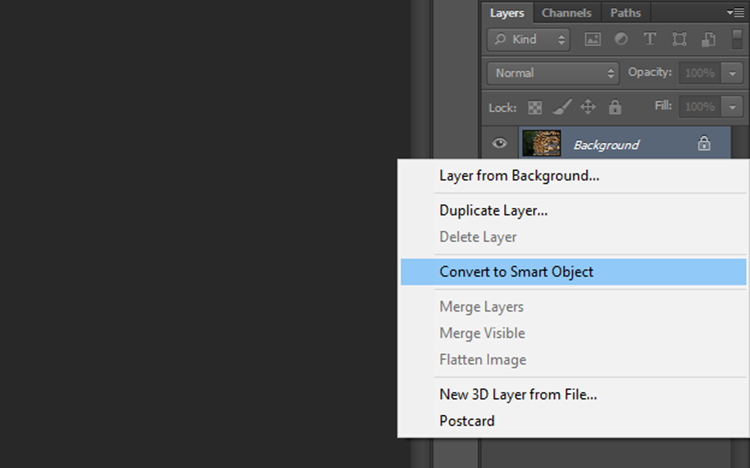
Once you have selected an image and opened it in Photoshop, right click on the image in the layers panel and select Convert to Smart Object. This will enable you to move the image around the canvas.

kaleidoscope-02

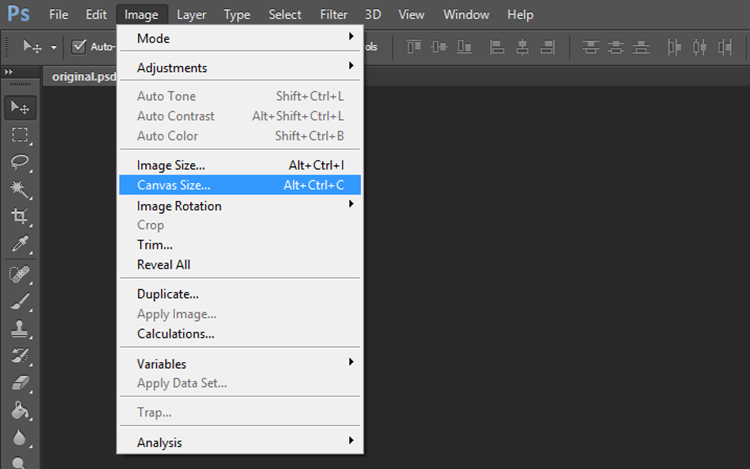
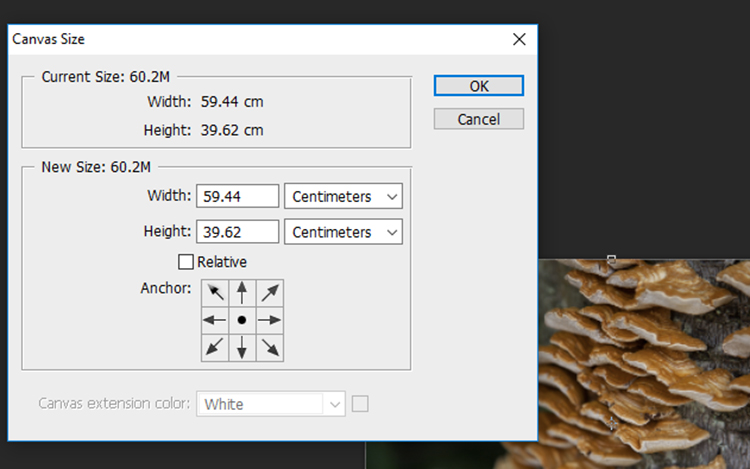
Now we need to add some space around the image. Go to Image > Canvas Size and a window will pop up with the dimensions of your current image.

kaleidoscope-03

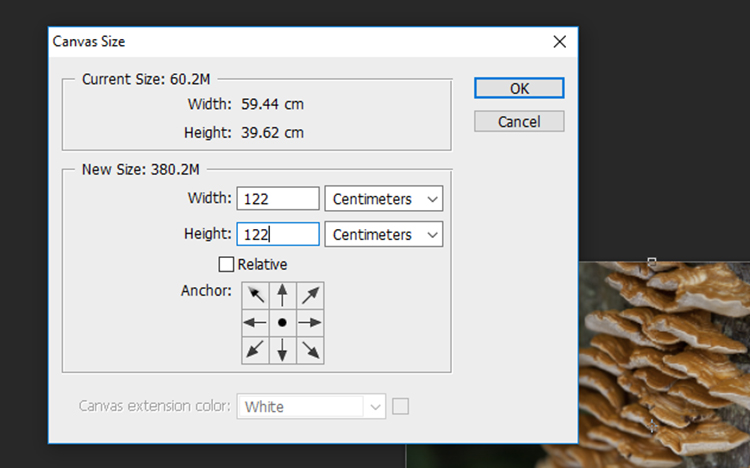
To calculate the dimensions of the canvas, look at the largest side of the image, double that figure and add four. For example, the image I selected was originally 59.44 x 39.62cm so I multiplied 59 by 2 to get 118m then added 4 to get 122. Add the same value to the smaller side of the image so that the canvas will be square. Click OK.

kaleidoscope-04

kaleidoscope-05

Step 2- Creating the template

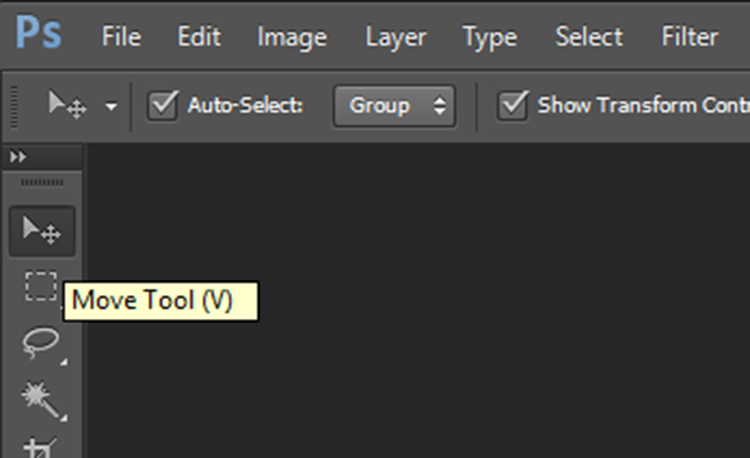
Zoom out so you can view see the entire canvas and select the Move Tool located at the top of the left toolbar.

kaleidoscope-06

kaleidoscope-07

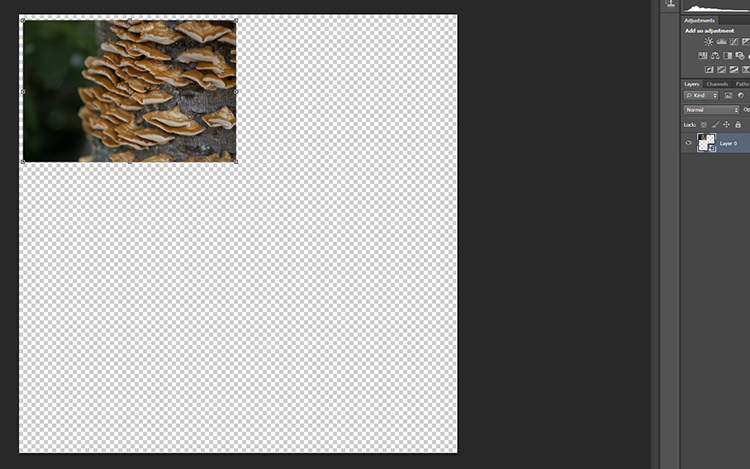
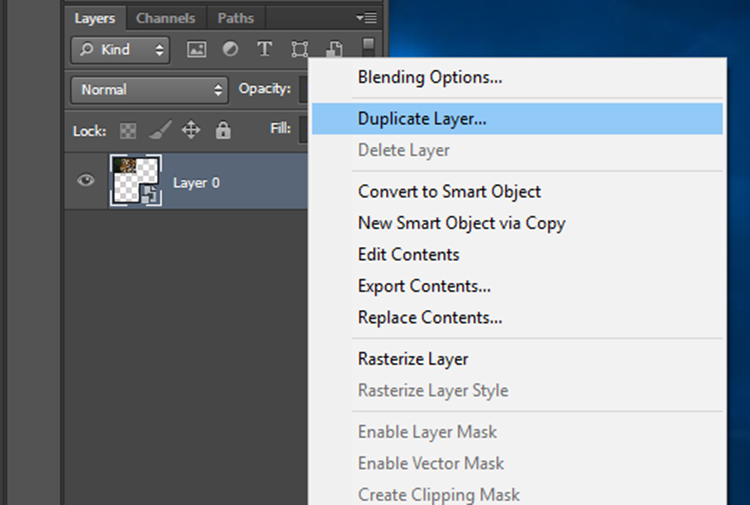
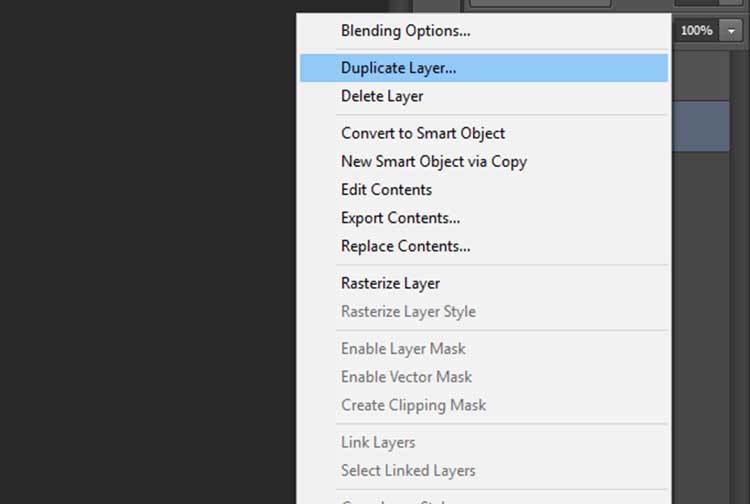
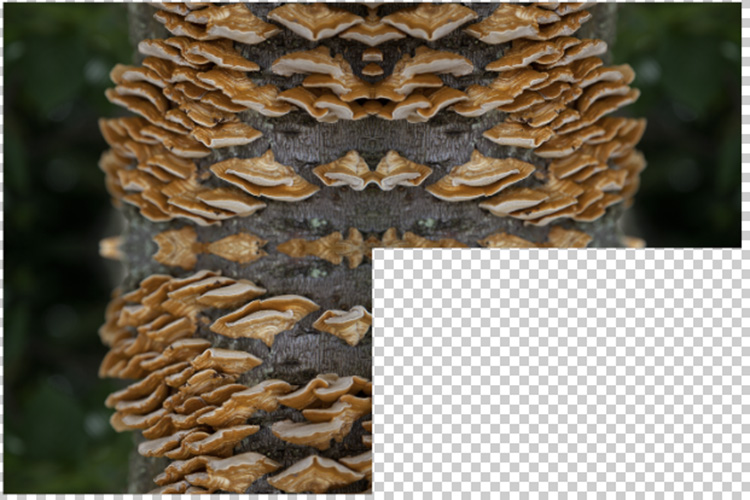
Click on your photograph on the canvas, and with the left mouse button depressed, drag the image to a corner of the canvas. Leave a few centimeters between the image and the edge of the canvas. Don’t worry about making this too exact as we will crop it to more exact proportions later. Now, duplicate this layer by right clicking it in the layers panel and selecting Duplicate Layer (or use the keyboard shortcut Cmd/Ctrl+J).

kaleidoscope-08

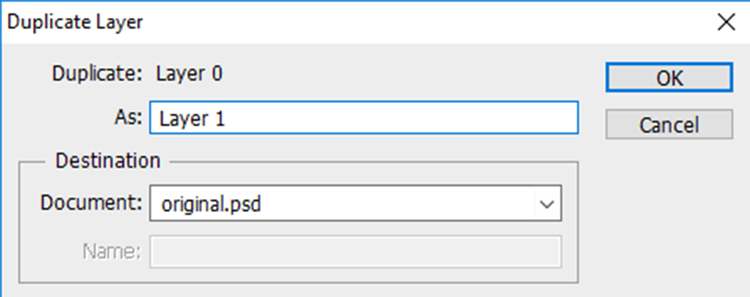
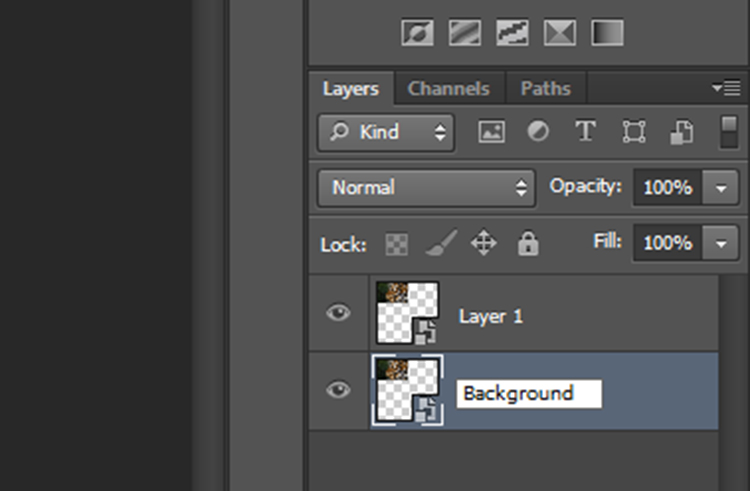
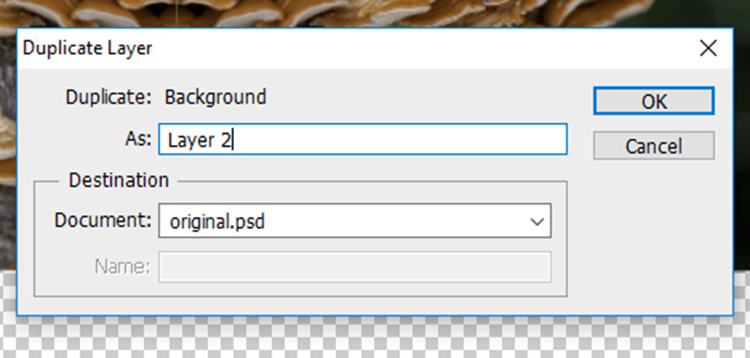
In the Duplicate Layer prompt, rename this layer as “Layer 1” as we will be duplicating a number of layers over the next few steps. Click OK and a new layer will appear in the layers panel.

kaleidoscope-09

Rename the original image layer as “Background” by double clicking on the name “Layer 0” in the layers panel. This will help avoid confusion later.

kaleidoscope-10

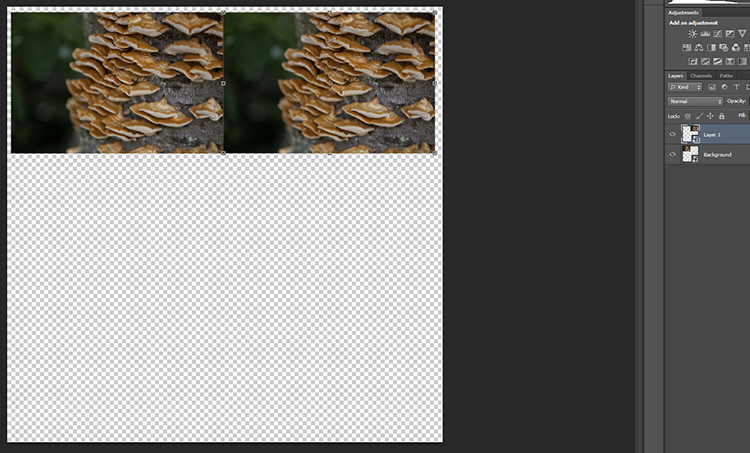
At the moment, both layers will be in the same spot on the canvas, with Layer 1 sitting on top of Background. With the Move Tool selected, click on the top layer, and with the left mouse button depressed, drag Layer 1 next to the Background image.

kaleidoscope-11

kaleidoscope-12

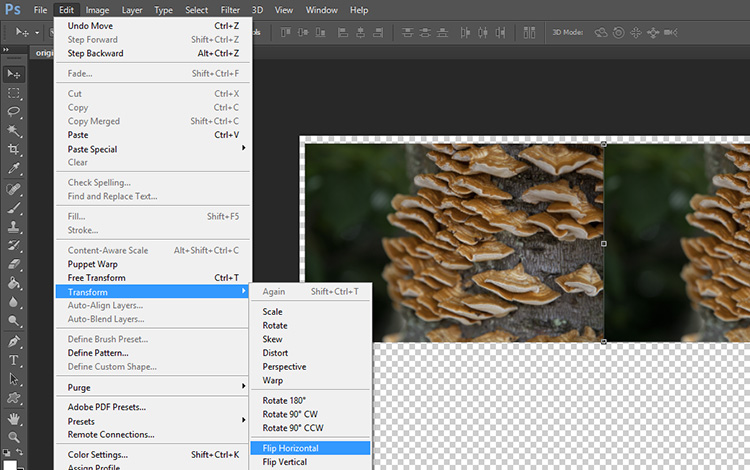
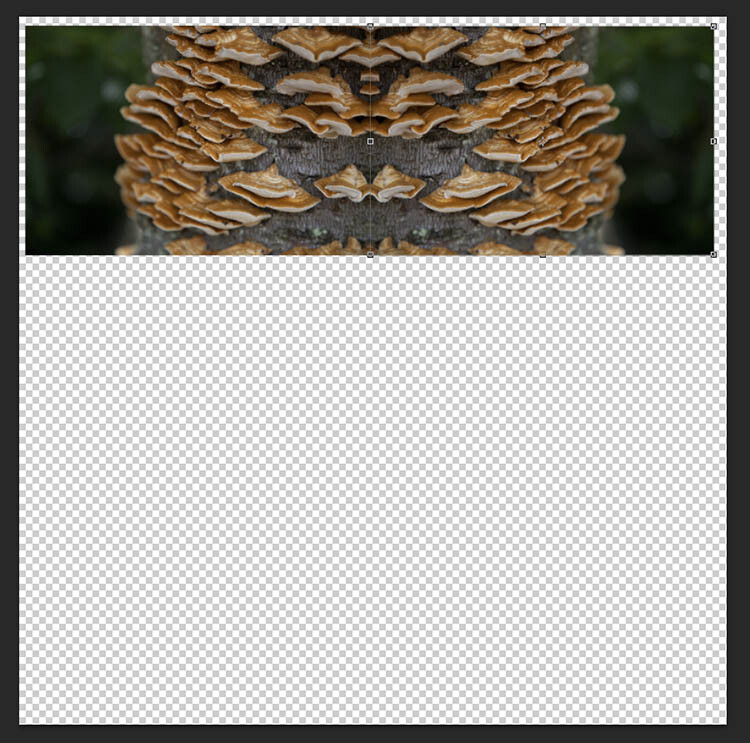
Keeping Layer 1 selected, click Edit on the main toolbar and then Transform > Flip Horizontal. Layer 1 will flip to create a mirrored image of the Background.

kaleidoscope-13

Your image should look something like this now.

Just two more to go!

Duplicate the Background layer again, and when the prompt window appears, rename it “Layer 2”.

kaleidoscope-14

kaleidoscope-16

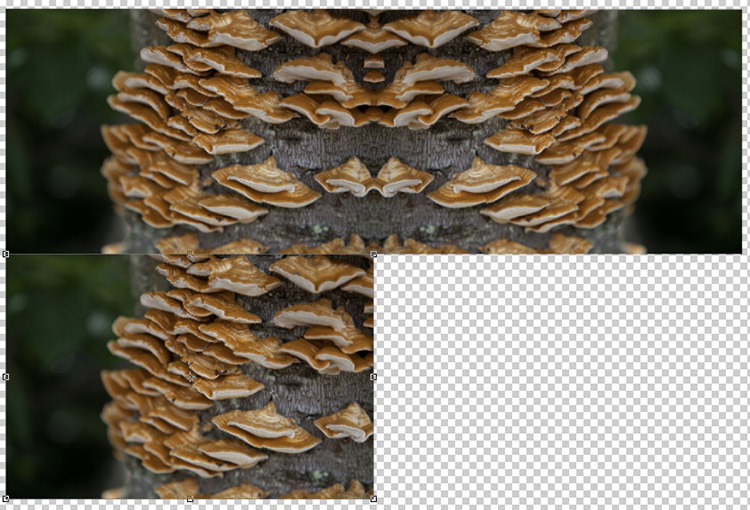
With the Move Tool selected, click on the newly created Layer 2 (which will be over Background). Keep the left mouse button depressed, and drag Layer 2 underneath Background.

kaleidoscope-17

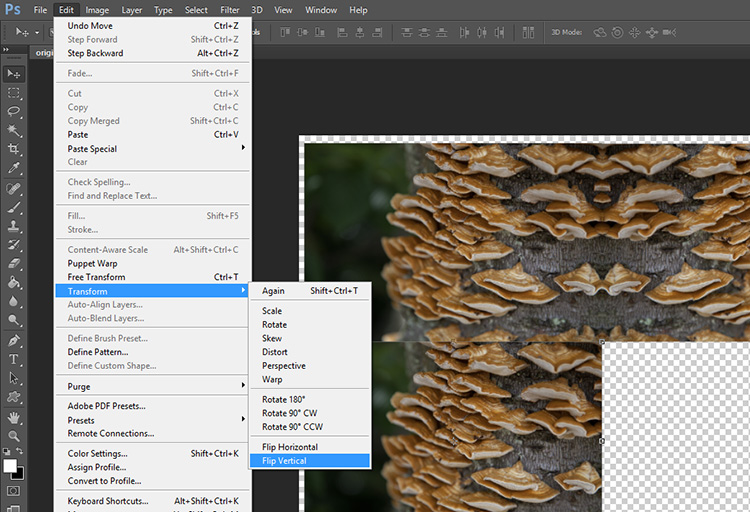
With Layer 2 selected, click Edit on the main toolbar and then Transform > Flip Vertical. Layer 2 will flip vertically to create a mirrored image of Background from below.

kaleidoscope-18

kaleidoscope-19

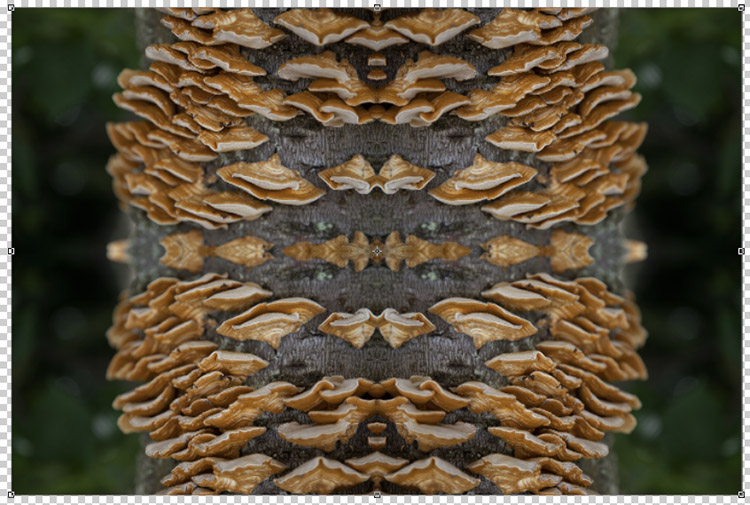
Duplicate Background one more time, this time naming the layer “Layer 3”. With the Move Tool selected, click on the newly created Layer 3 (which will be over Background) and with the left mouse button depressed, drag Layer 3 into the remaining slot to complete the rectangle.

With Layer 3 selected, click Edit on the main toolbar and then Transform > Flip Horizontal. To complete the pattern, keep Layer 3 selected click Edit on the main toolbar and then Transform > Flip Vertical.

kaleidoscope-20

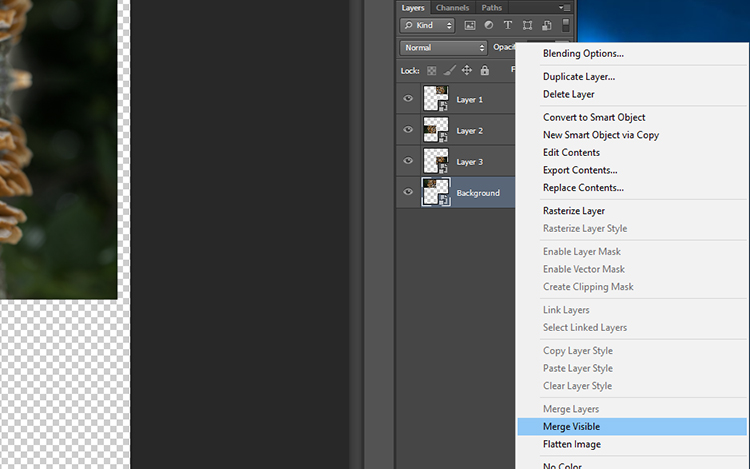
The next step is to merge the layers of the rectangle you have made so that it can be moved around as one layer. To do this, right-click on the layer titled Background in the layers panel and select Merge Visible.

kaleidoscope-21

If it hasn’t done so automatically, it is a good idea to rename this merged layer as “Background” so it will be easier to keep track of which layers are where. You now have the template for your kaleidoscopic image!

Step 3 – Creating the kaleidoscope

Select the Background layer, and with the Move tool selected, drag the layer into the center of the canvas. Right-click on Background in the layers panel and select Duplicate Layer. Rename this layer as “Layer 1”.

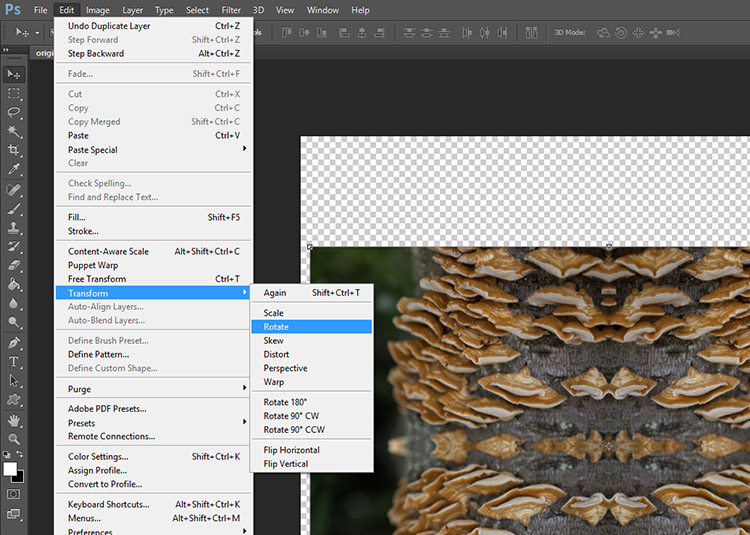
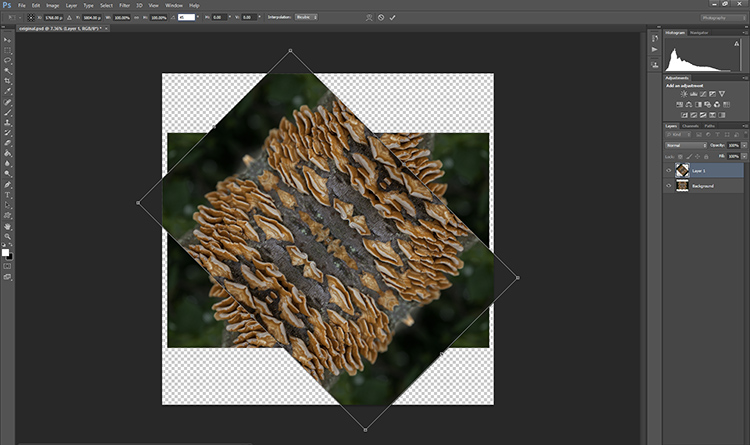
With Layer 1 selected, click Edit > Transform > Rotate.

kaleidoscope-22

In the Transform settings panel, there is a text box next to the symbol of an angle. In this text box, type 45 and press enter. Layer 1 will be rotated to a 45-degree angle.

kaleidoscope-23

kaleidoscope-24

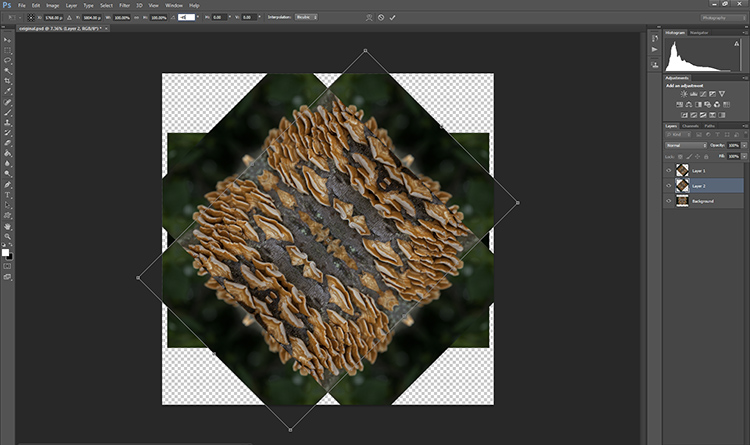
Duplicate Background again, this time renaming the layer “Layer 2”. With Layer 2 selected in the layers panel, click Edit > Transform > Rotate. In the Transform settings panel, in the text box next to the angle symbol, enter -45 and press enter.

kaleidoscope-25

kaleidoscope-26

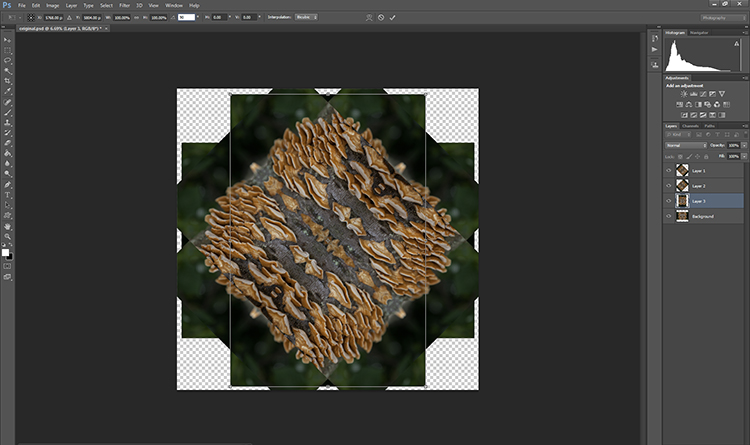
Duplicate the Background layer one last time, renaming the layer “Layer 3”. With Layer 3 selected in the layers panel, click Edit > Transform > Rotate. In the Transform settings panel, in the text box next to the angle symbol, enter 90 and press enter. The layer will be rotated 90 degrees.

kaleidoscope-27 kaleidoscope-28

Step 4 – Blending Modes

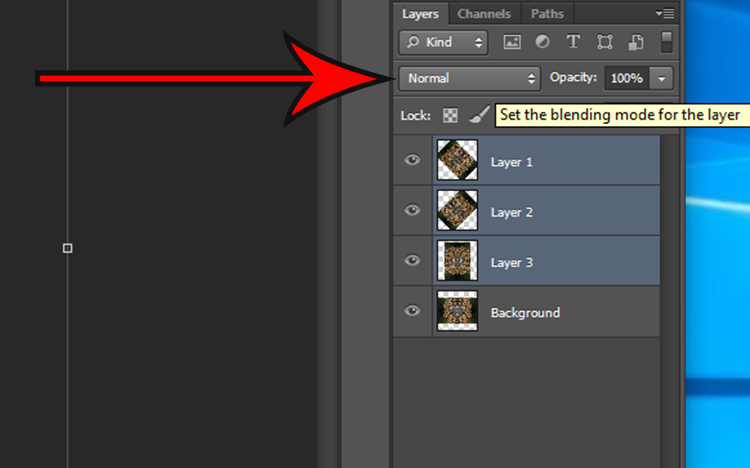
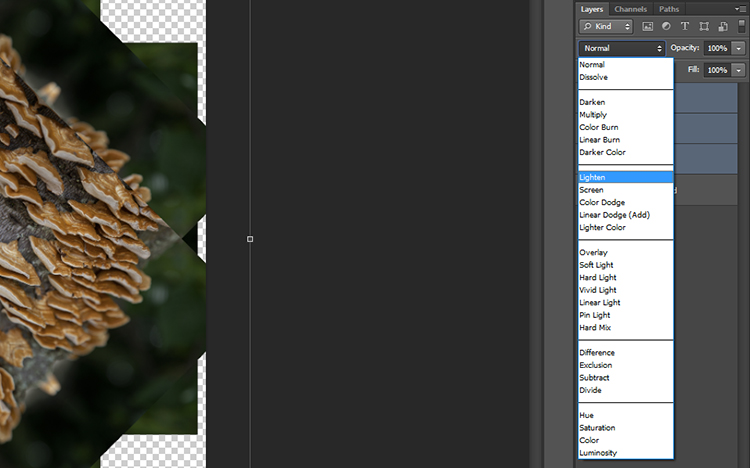
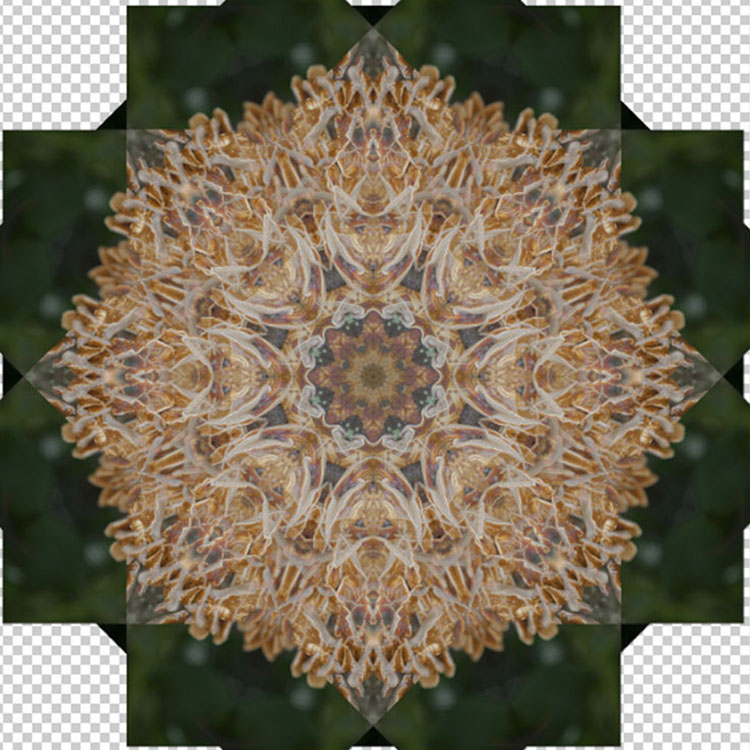
Select the top three layers in the layers panel by holding down the shift key and clicking on Layers 1, 2, and 3. With the layers selected, click on the Blending Mode drop down menu (red arrow below) and select the Lighten option. The selected layers will blend to form a kaleidoscope pattern.

kaleidoscope-29

kaleidoscope-30

kaleidoscope-31

Crop it

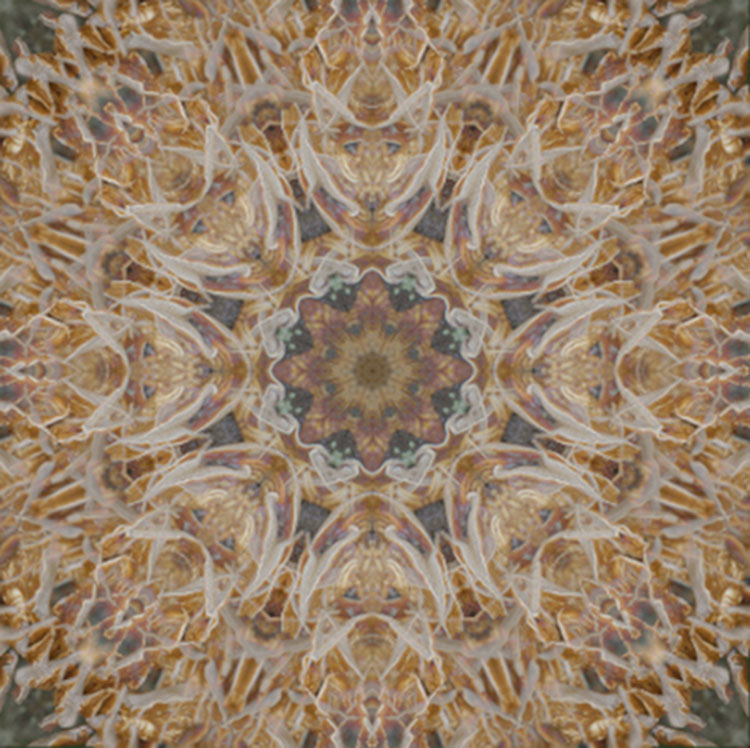
To neaten up the image you can crop the edges of the kaleidoscope down to a square or rectangle. With the Crop Tool selected, hold the shift key on your keyboard and drag the corners of the Crop Tool over the image to create a square or rectangle. When you are happy, press enter and save the image via File > Save As.

kaleidoscope-32

Step 5 – Making a desktop background

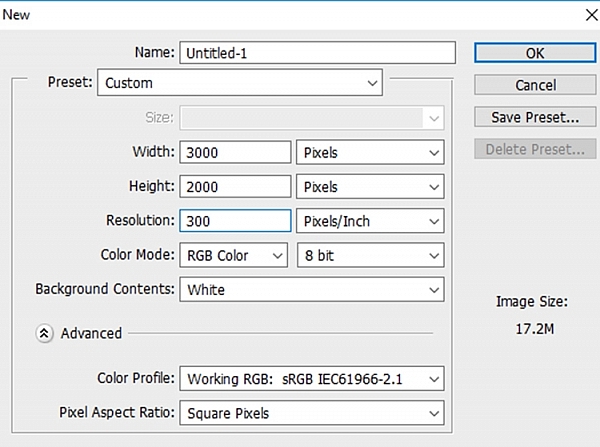
To make a wallpaper effect, open a new Photoshop document by selecting File > New and entering the dimensions 3000 pixels by 2000 pixels in the text boxes. Make sure the resolution set to at least 300 pixels/inch, so it will look nice on a large monitor screen.

kaleidoscope-33

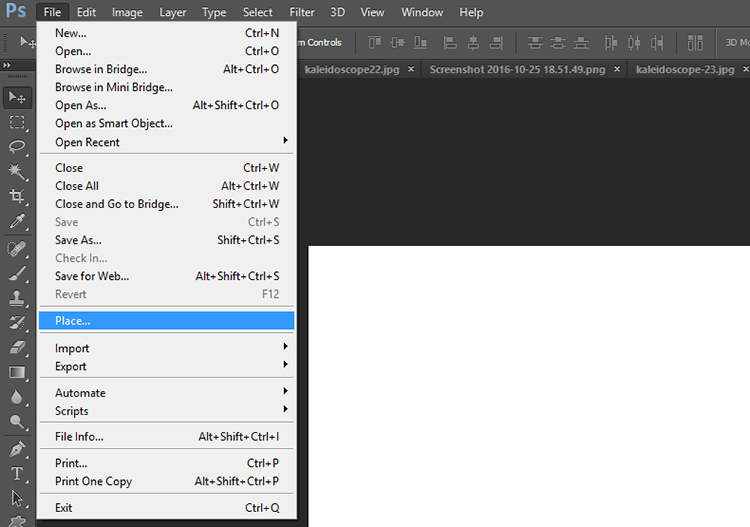
Select File > Place… and select your new kaleidoscope file.

kaleidoscope-34

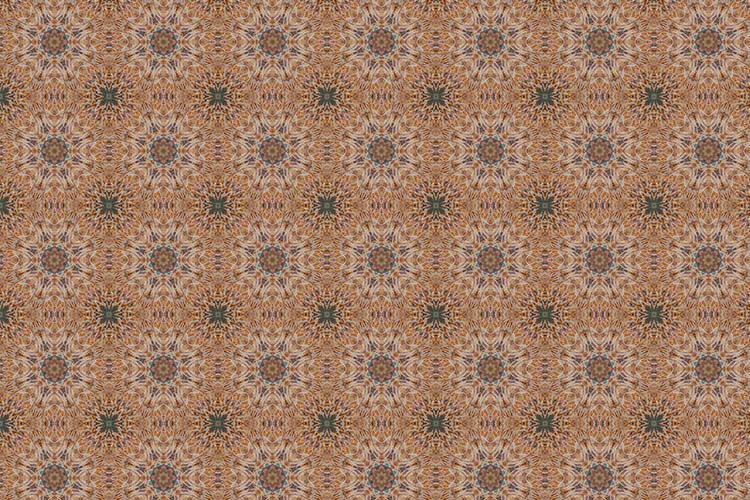
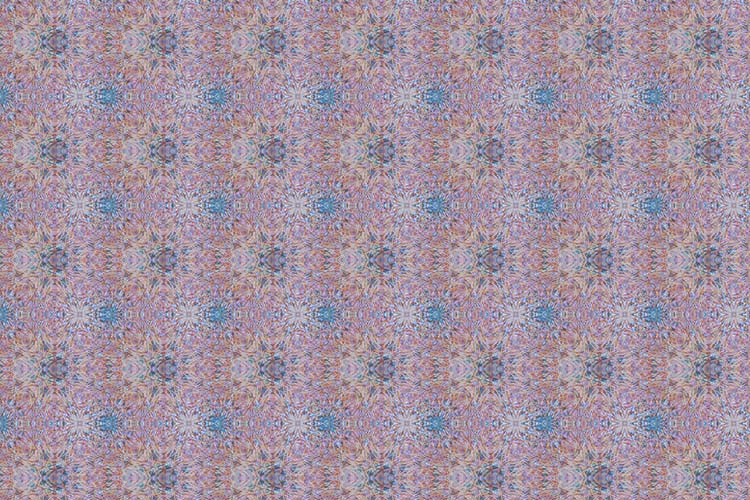
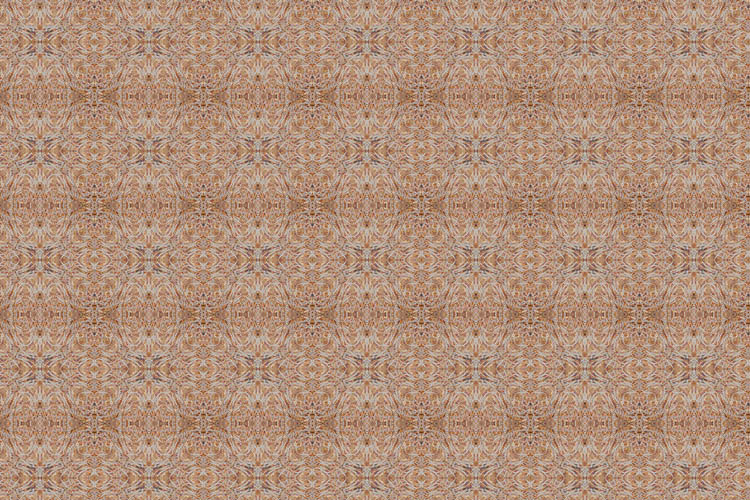
Once placed in the Photoshop canvas, you can choose to duplicate the image any number of times to create an interesting pattern, or add layers on top of one another and have fun experimenting with more Blending Modes. The possibilities are endless! Here are a few ideas.

Have you done this technique before to make a kaleidoscope pattern? Please share your results in the comments section below.

desktop

desktop-01

desktop-02

googletag.cmd.push(function() {
tablet_slots.push( googletag.defineSlot( “/1005424/_dPSv4_tab-all-article-bottom_(300×250)”, [300, 250], “pb-ad-78623” ).addService( googletag.pubads() ) ); } );

googletag.cmd.push(function() {
mobile_slots.push( googletag.defineSlot( “/1005424/_dPSv4_mob-all-article-bottom_(300×250)”, [300, 250], “pb-ad-78158” ).addService( googletag.pubads() ) ); } );

The post How to Turn Your Images into Kaleidoscope Patterns by Megan Kennedy appeared first on Digital Photography School.


Digital Photography School

 
Comments Off on How to Turn Your Images into Kaleidoscope Patterns

Posted in Photography


Evolution of Decay: Watch American Buildings Fall Into Ruin Over 40+ Years

19 Nov

[ By SA Rogers in Abandoned Places & Architecture. ]

detroit-time-lapse-2

Architecture that was at its prime in the 1970s has slowly fallen into decline and often ruin thanks to decades of neglect, especially in America’s poorest and most racially segregated communities, including Gary, Detroit, Camden and Harlem. Many of these structures were historically significant, built between the late 1880s and the 1920s, but when no budget exists to care for them and entire cities are left behind by economic progress, the forces of nature and decay take over.

screen-shot-2016-11-18-at-10-01-16-am

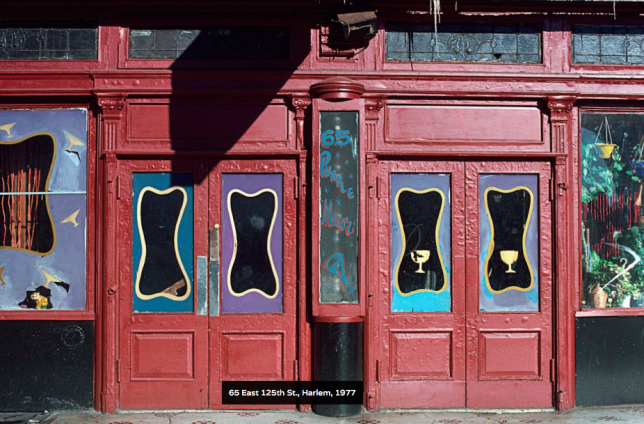
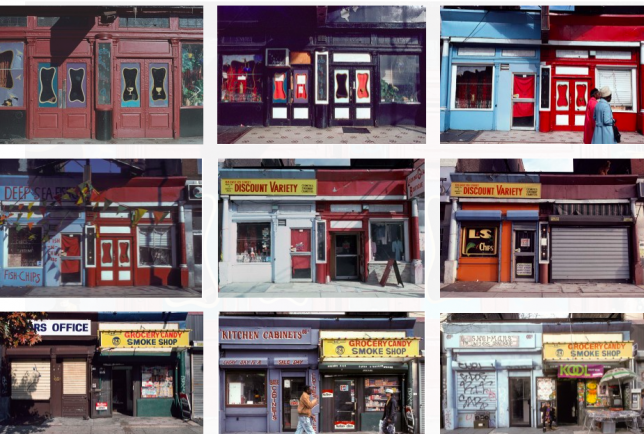
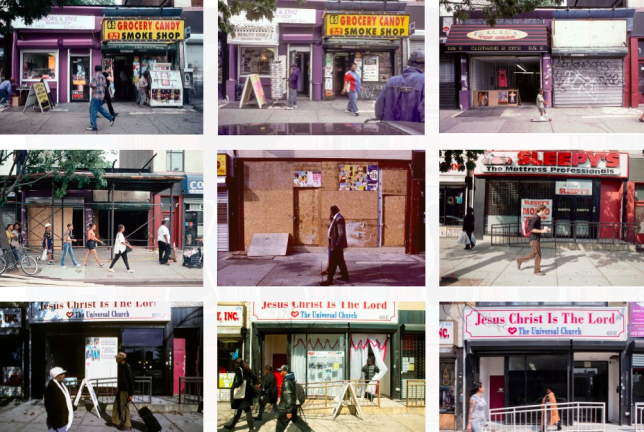
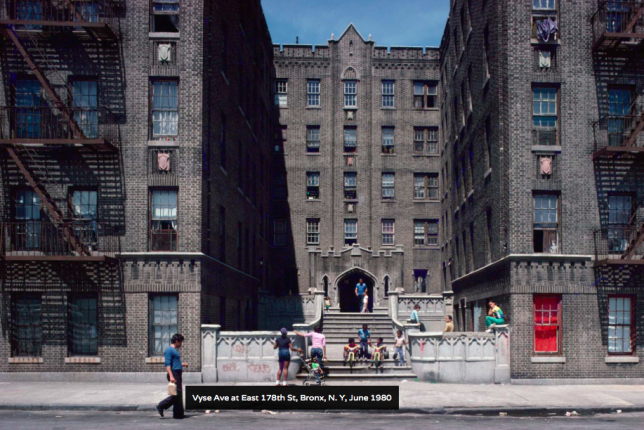
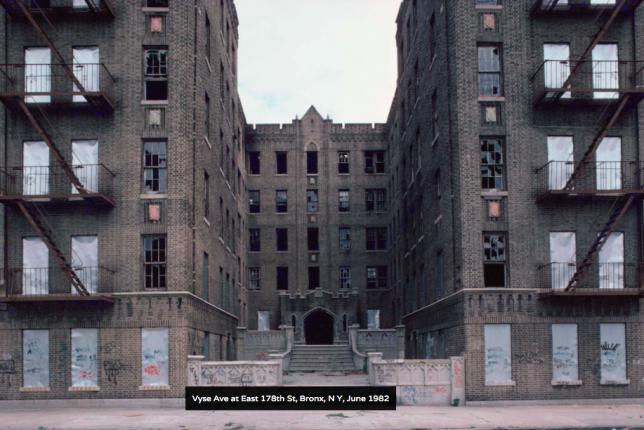
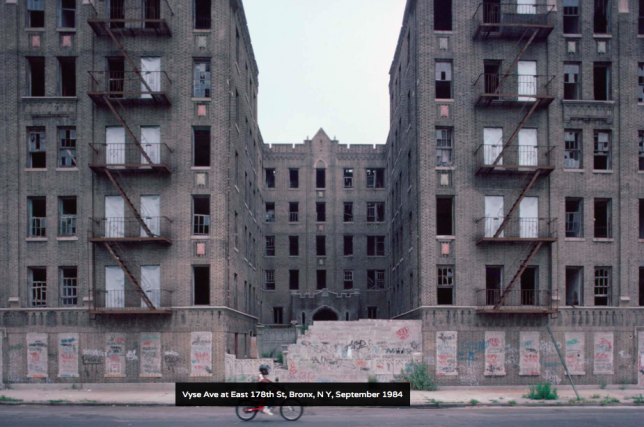
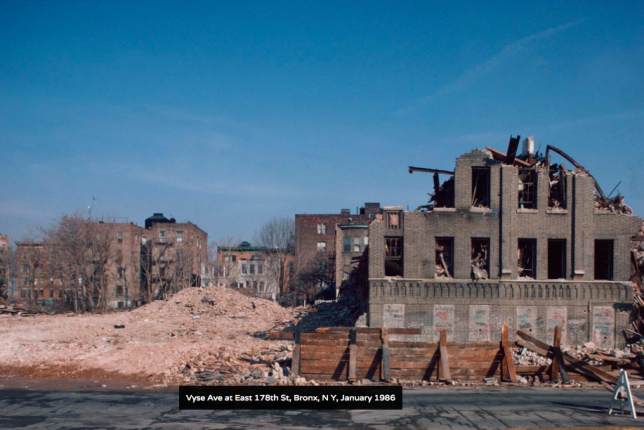
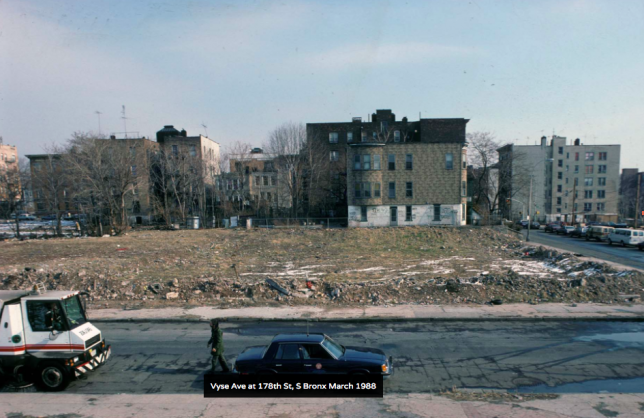
In a potent visual representation of poverty in America’s urban centers and the loss of historic architectural character via demolition, Chilean-born photographer Camilo José Vergara has spent the last 40+ years documenting the downfall of dozens of structures and city streets. The resulting series, ‘Tracking Time,’ is a time-lapse in slow motion, photographing the same buildings once every few years.

screen-shot-2016-11-18-at-10-01-52-am

screen-shot-2016-11-18-at-10-02-16-am

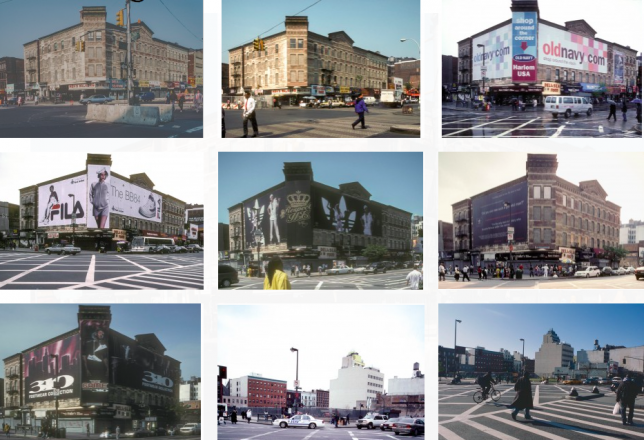
One old shop in Harlem gets painted several times over, has its stained glass windows knocked out, loses a facade to an ugly garage door and is split up into multiple smaller businesses before finally being boarded over and transformed into a mini-mall-style church in 2014.

screen-shot-2016-11-18-at-10-21-00-am

screen-shot-2016-11-18-at-10-21-08-am \

screen-shot-2016-11-18-at-10-21-22-am

screen-shot-2016-11-18-at-10-21-30-am

screen-shot-2016-11-18-at-10-21-38-am

screen-shot-2016-11-18-at-10-21-50-am

screen-shot-2016-11-18-at-10-22-01-am

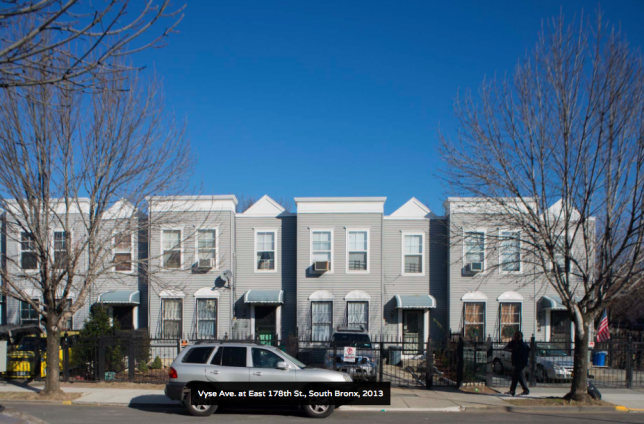
A massive brick building in South Bronx becomes modest row houses, while The Ransom Gillis House in Detroit (top) sinks into the ground, its bricks falling in clumps, the roof caving in, ivy and trees taking over. It’s almost completely obscured by greenery before a restoration brings it back to its former glory.

screen-shot-2016-11-18-at-10-00-54-am

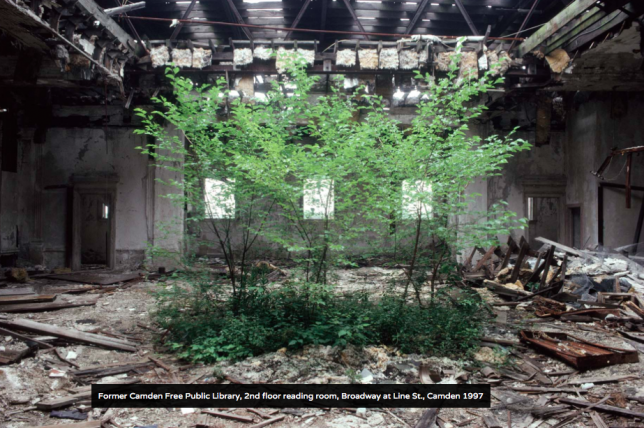
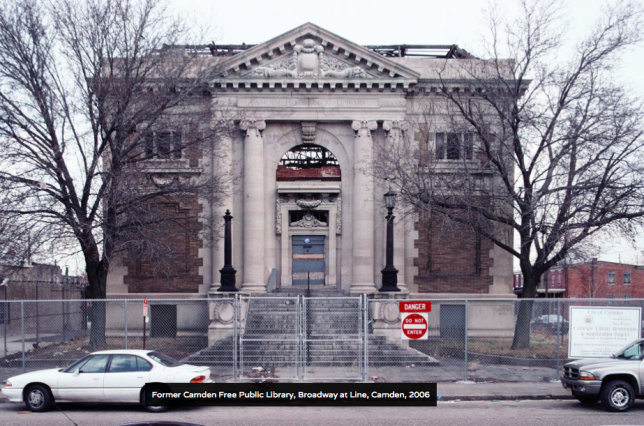
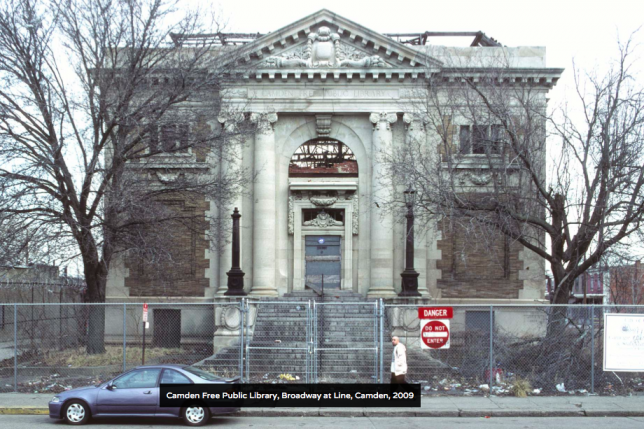
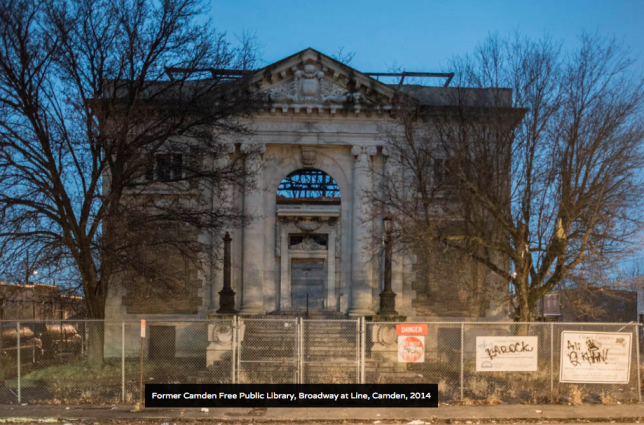
But other stories aren’t so positive, since people care more about mansions than they do about public housing projects, row houses, and modest residential neighborhoods. Occasionally, Vergara ventures inside to show us that even though the facades still look beautiful, like that of the former Camden Free Public Library, the interiors are utterly destroyed.

screen-shot-2016-11-18-at-10-10-30-am

screen-shot-2016-11-18-at-10-10-40-am

screen-shot-2016-11-18-at-10-11-08-am

screen-shot-2016-11-18-at-10-11-24-am

screen-shot-2016-11-18-at-10-11-54-am

It can be a heartbreaking journey but also a fascinating one, watching some of these structures remain the same for many years while the world changes around them before transforming into something new. And some do manage to endure.

Share on Facebook


[ By SA Rogers in Abandoned Places & Architecture. ]

[ WebUrbanist | Archives | Galleries | Privacy | TOS ]


WebUrbanist

 
Comments Off on Evolution of Decay: Watch American Buildings Fall Into Ruin Over 40+ Years

Posted in Creativity


Scan to CAD: Software Turns Volumetric Snapshots into Usable 3D Models

17 Nov

[ By WebUrbanist in Gaming & Computing & Technology. ]

scan

Bringing a critical gap between 3D scanning technology and functional outputs for architects, designers and homeowners, Canvas can scan a room in minutes then generate useful CAD software files.

Raw scans of spaces can be helpful in terms of generating rough measurements and usable as a baseline for a more rigorous three-dimensional model, but it takes time and energy to translate between the two. So while they are great for point-to-point measurements and as-built drawings, such scans are limited in terms of letting someone rework or envision changes to a structure.

3d-sensor-technology

Occipital, the startup behind Structure Sensor, wants to make that transition smooth, painless and effectively automatic. After a users scans a room (or a whole house) with their iPad, they can send away for CAD files that will be returned in two business days. They can then plug those files into software of choice, like Sketchup, and begin remodeling their space.

3d-design-capture

The company calls their vision “augmented home” and pictures their software and hardware getting increasingly refined over time to the point where on-the-spot shots can be immediately transformed into precise and full-color 3D files.

3d-space-model

“I think we’ll probably look back at today as a time, just like the 1830s, when we just started to have photographs,” says Adam Rodnitzky, the company’s VP of marketing. “We’re now entering the era when we’re going to start having a 3D record of the world around us.”

Share on Facebook


[ By WebUrbanist in Gaming & Computing & Technology. ]

[ WebUrbanist | Archives | Galleries | Privacy | TOS ]


WebUrbanist

 
Comments Off on Scan to CAD: Software Turns Volumetric Snapshots into Usable 3D Models

Posted in Creativity


Hutong Hostel: Modern Micro-Hotel Squeezes into Historic Chinese Context

13 Nov

[ By WebUrbanist in Boutique & Art Hotels & Travel. ]

hutong-above

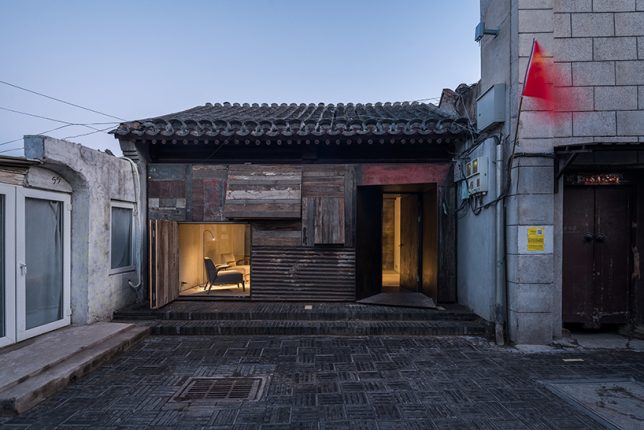
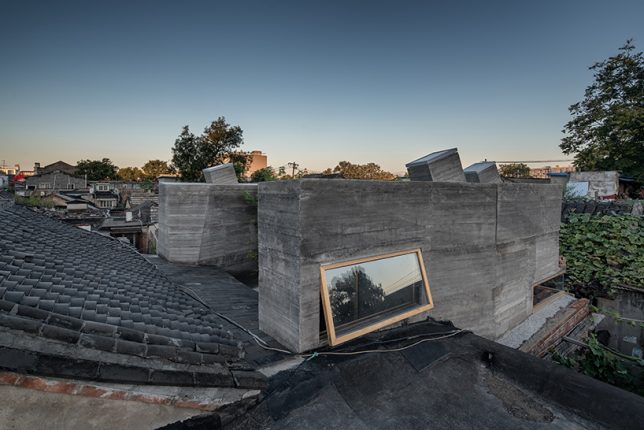
Traditional hutongs found in Beijing wind in upon themselves, organically shaped by the forces around them to create nesting neighborhoods that are cozy and serene. Alleys branch off of larger alleys and even larger streets as visitors make their way deep into the heart of huge city blocks.

modern-hutong-space

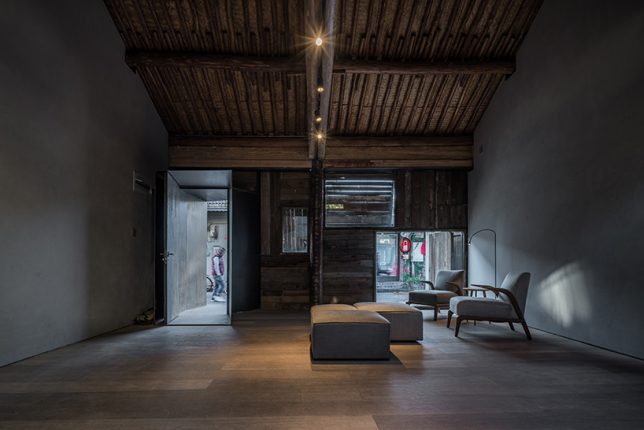
This new hostel project by ZAO and Standard Architecture builds on the long tradition of hutongs and measures just 320 square feet. It represents a Brualist/Modernist take on the alley-based architecture of China’s capital.

hutong-street-facing

hutong-shared-living-room

An expansion of previous hutong projects – including a co-living courtyard, library and gallery space – this hostel brings small-scale social housing into the mix.

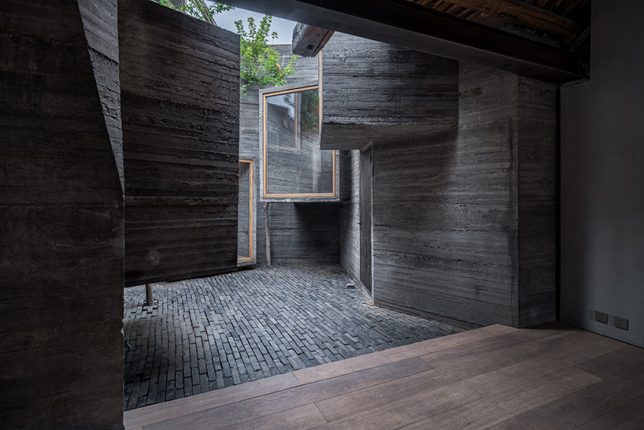
hutong-brutalist-interior

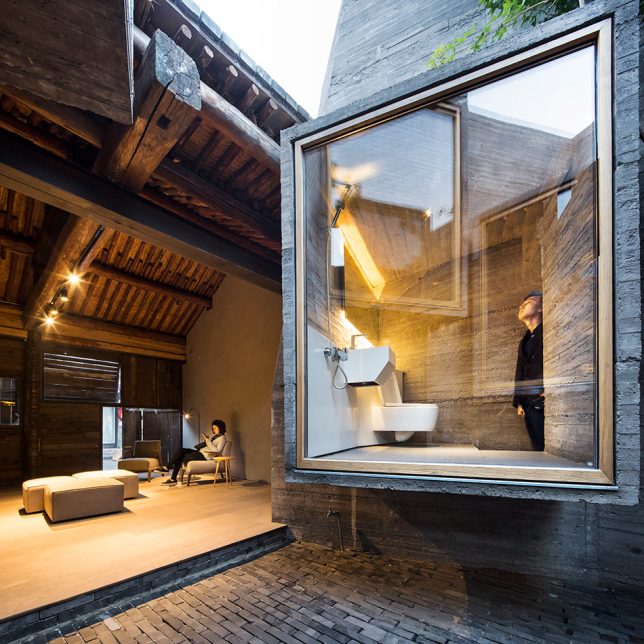
hutong-bathroom

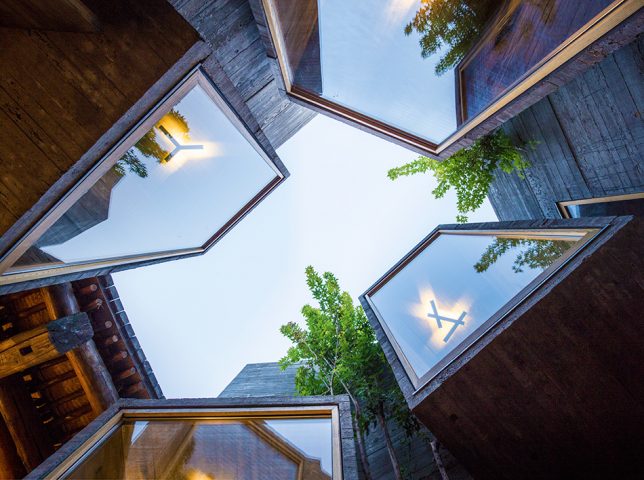
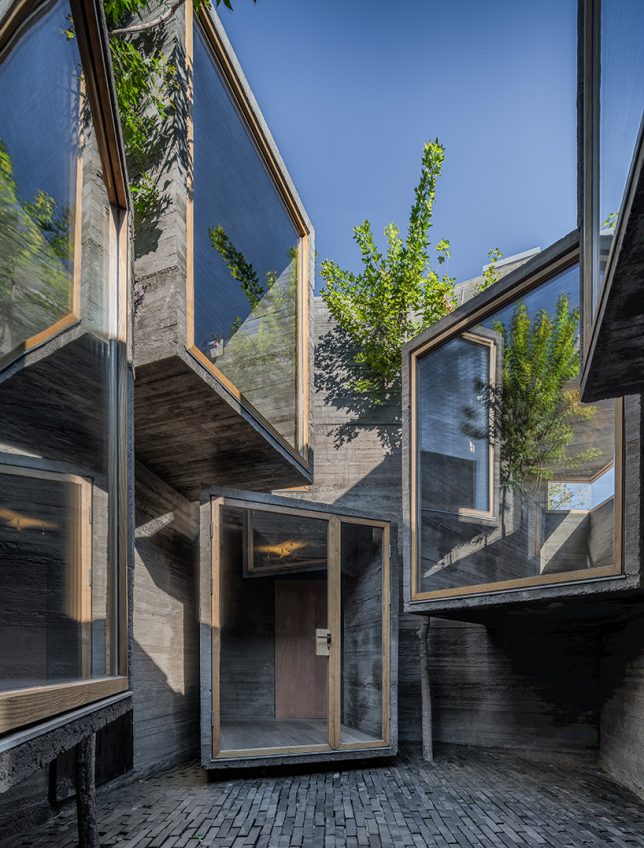
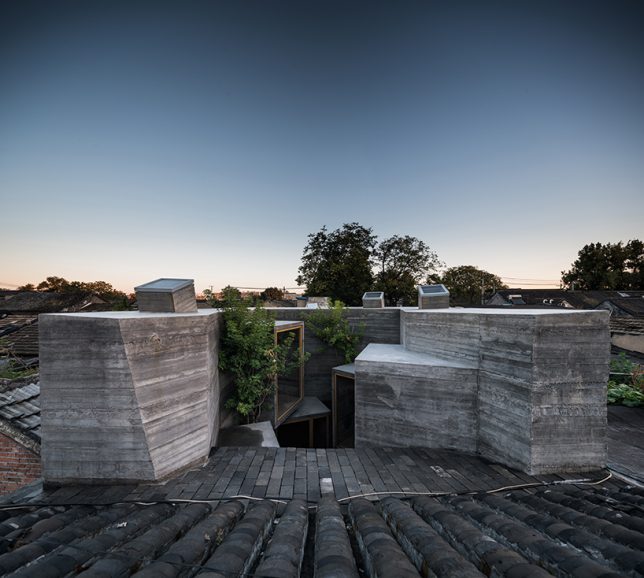
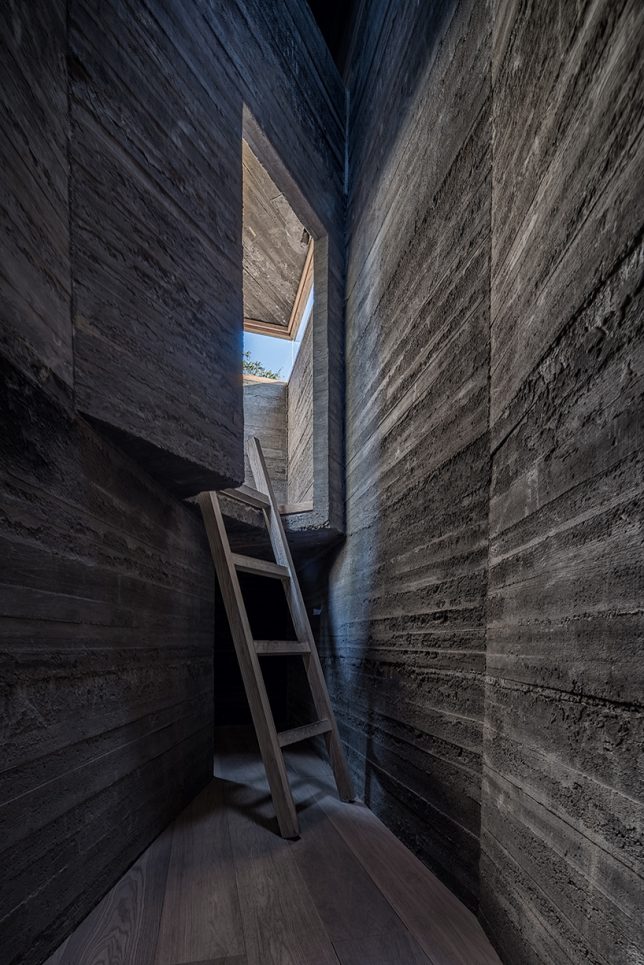
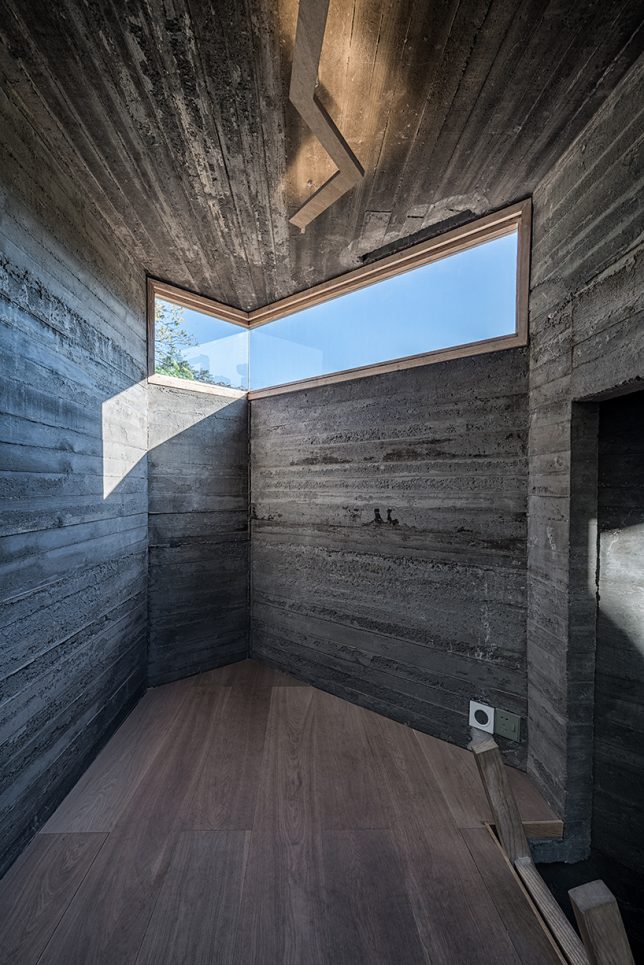
Guests enter through a semi-public transitional space, much like the branching alleys and courtyards of a normal hutong, then enters a complex of angular architecture forms composed of concrete and glass.

hutong-hostel

hutong-skylights

A series of extruded volumes rise up slightly above the adjacent rooflines to access views, air and light from beyond the compressed confines of the site. The courtyard at the heart of the plan serves to connect it to the neighborhood, acting as a liminal zone for guests and community members alike.

interior-room

hutong-second-floro

“The result is an architectural operation that brings back the courtyard as a generator of the program, as it activates the building by creating a direct relationship with its urban context,” say the architects.

Share on Facebook


[ By WebUrbanist in Boutique & Art Hotels & Travel. ]

[ WebUrbanist | Archives | Galleries | Privacy | TOS ]


WebUrbanist

 
Comments Off on Hutong Hostel: Modern Micro-Hotel Squeezes into Historic Chinese Context

Posted in Creativity


Art of Camouflage: Flying Bird Silhouettes Blend into Broken Window Voids

09 Nov

[ By WebUrbanist in Art & Installation & Sound. ]

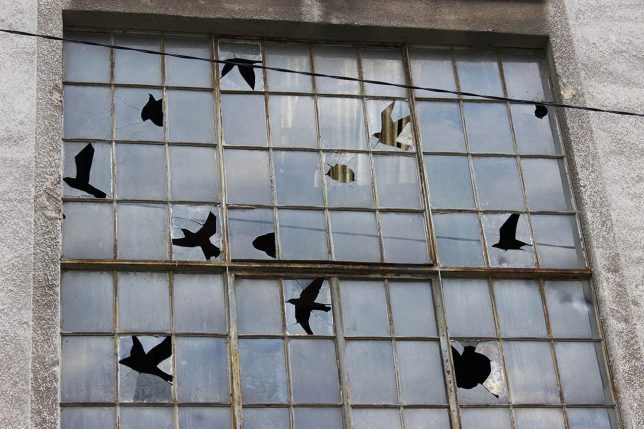
cracked-glass-frame-art

A boy aiming his slingshot into the sky seems to aim both at the broken windows of an abandoned building but also a series of birds that seem to appear in the gaps of cracked glass, transfixed in various stages of flight.

broken-glass-bird-art

Artist Pejac is well known for his negative-space interventions, from pealing back paint chips to carefully reveal brick beneath to other contextual installations. Much of the art is in the craft: a meticulous removal (or breaking) of materials to slowly reveal some new whole, much like a sculptor chips away at a marble edifice.

bird-window-boy-shooting

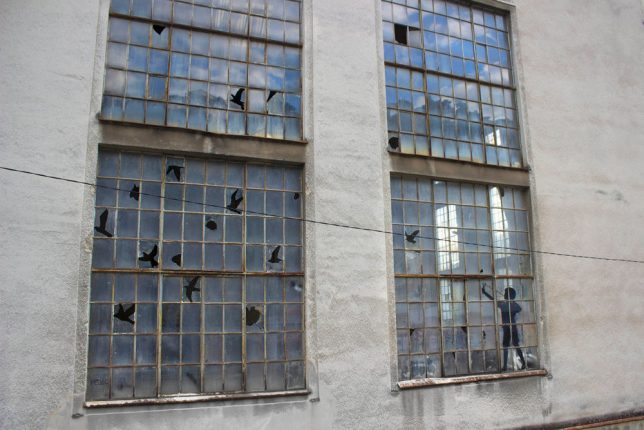
This latest piece was produced during his residency with the Museum of Modern and Contemporary Art in Rijeka, Croatia, where he spent multiple weeks crafting site-specific works.

bird-windows-power-plant

Camouflage (Tribute to René Magritte) is set in the huge windows of an old paper factory power plant, depicting a flock of birds that might be hard to spot were it not for the outline of a boy taking aim below them. His figure calls attention to the larger work, signalling a passer by the existence of something both large and subtle going on in the frame.

boy-taking-aim

painted-boy

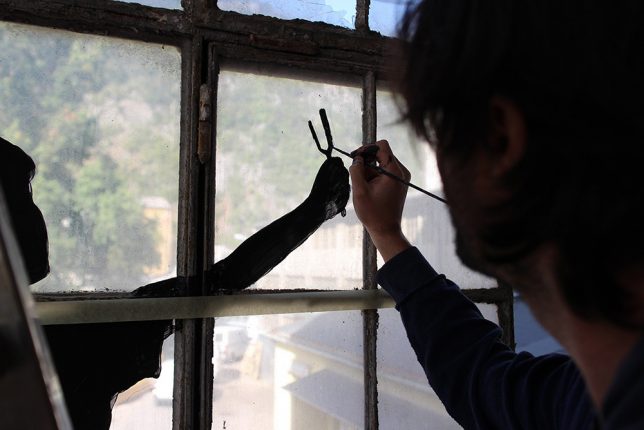
The implied story is one about hunting and survival, the birds disguising themselves against a backdrop of broken window panes, making them harder for the child to spot. The boy, too complex a figure to render through even the most craftily broken glass, is painted over a series of panes (images by Sasha Bogojev).

Share on Facebook


[ By WebUrbanist in Art & Installation & Sound. ]

[ WebUrbanist | Archives | Galleries | Privacy | TOS ]


WebUrbanist

 
Comments Off on Art of Camouflage: Flying Bird Silhouettes Blend into Broken Window Voids

Posted in Creativity


World’s First All-Electric Mobile Office Built Into a Nissan Van

29 Oct

[ By SA Rogers in Technology & Vehicles & Mods. ]

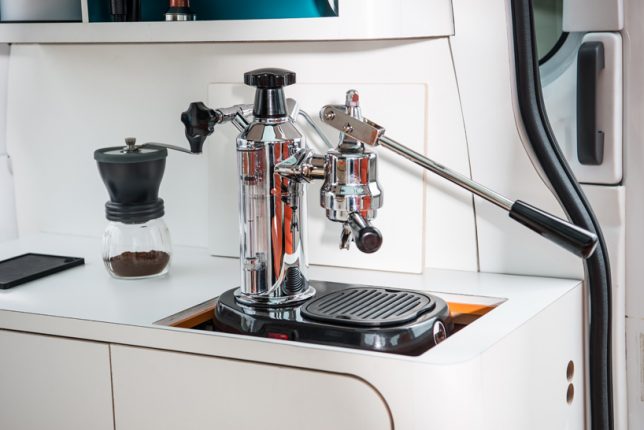
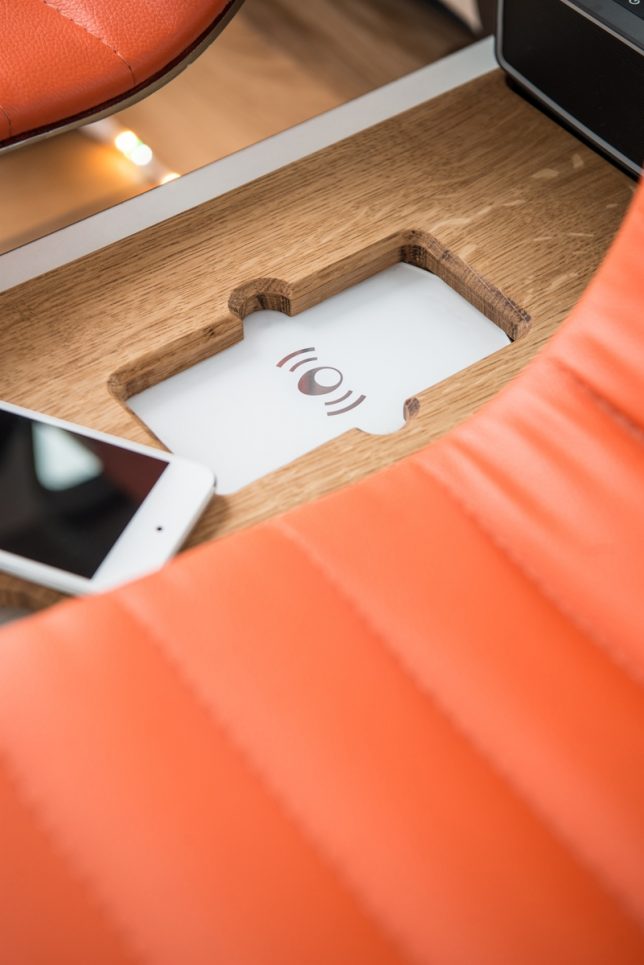
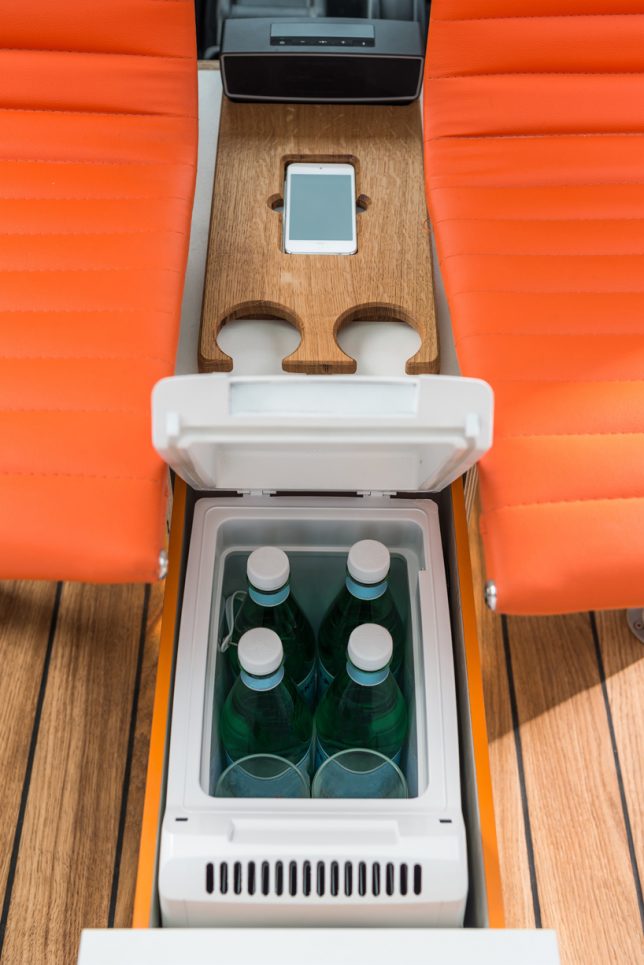
Who wants to sit in a stale, noisy central office when they could take their job – not to mention the coffee maker – on the go instead? This Nissan vehicle houses the world’s first all-electric mobile office, and it’s more than just a fold-down desk in the back of a van. The whole enviable setup includes a panoramic glass roof, wood flooring with built-in LED lights, an intelligent system that adjusts the lighting and color, wireless mobile charging and an espresso machine that pops up out of the counter.

Devised to show off what the e-nv200 van can do, the mobile office concept spotlights changing workspace trends, especially as flexible and remote working becomes more widespread. Lots of workers are no longer chained to permanent desks anymore, with the freedom to do their jobs from any number of places.

nissan-mobile-office-2

nissan-mobile-office-3

nissan-mobile-office-1

Both of the side sliding doors on the e-nv200 can be opened, along with the split rear doors, to open up the office to the worker’s chosen surroundings. Drive the van to the park, a beach or any other spot that inspires you and helps you focus, pull out the floating deck at the rear and enjoy working conditions most of us can only dream about.

nissan-mobile-office-4

The fold-down desk console features a built-in touch screen computer, wireless mouse and keyboard along with storage space and stationery supplies, and there’s even a mount inside one of the rear doors for a folding Brompton bike if you want to take a break and get some exercise. Watch the video to take in all of the details.

Share on Facebook


[ By SA Rogers in Technology & Vehicles & Mods. ]

[ WebUrbanist | Archives | Galleries | Privacy | TOS ]


WebUrbanist

 
Comments Off on World’s First All-Electric Mobile Office Built Into a Nissan Van

Posted in Creativity


Microsoft Surface Studio morphs the photographer’s desktop into a studio

27 Oct

$ (document).ready(function() { SampleGalleryV2({“containerId”:”embeddedSampleGallery_6194580448″,”galleryId”:”6194580448″,”isEmbeddedWidget”:true,”standalone”:false,”selectedImageIndex”:0,”startInCommentsView”:false,”isMobile”:false}) });

Microsoft today expanded its Surface lineup, announcing the ‘world’s thinnest LCD monitor’ but in an exciting form factor: a touch-based all-in-one desktop PC with a 28″ 4.5K PixelSense display. The 4500 x 3000 3:2 display sports 13.5 million pixels, and at 192 PPI almost approaches the 218 PPI figure of the 5K Retina iMac, but with 10-point multi-touch capabilities. Like the 5K iMac, the display’s color gamut extends to DCI-P3 (25% larger than sRGB), something photographers routinely editing and printing will appreciate. Microsoft is calling the 10-bit display ‘TrueColor’.

But the real story here is the touch-based, pen-enabled display. Wacom Cintiq: take a hike. Apple iMac: mice and Wacom pens are so yesterday. The Surface Studio literally combines these devices into one, allowing you to draw directly on the surface with the precision Surface Pen. With a simple push of the screen, you can adjust the angle of the display down to a 20-degree orientation – then use it like a drafting table. And the new Bluetooth Surface Dial radial accessory will allow you to change settings, like the color you’re drawing with or brush size, on-the-fly. The display and dial sense each other, and with time and adoption we expect to see all sorts of creative solutions emerge that integrate the capabilities of the display, dial and pen. 

The new Microsoft Surface Studio is a powerful all-in-one desktop with a 28″ 4.5K wide-gamut PixelSense display touting touch, pen and dial capability. It easily folds down to drafting table-esque low angle for easy drawing and image editing.

A number of apps at launch, like Paint 3D and Sketchable, will support enhanced capabilities with the dial and pen, and we expect creative applications, like Adobe’s Creative Suite, to quickly follow suit, particularly because Microsoft has made it easy for developers to do so. Microsoft’s approach with Windows 10 and its hardware products prioritizes a unified app experience across all devices. With one operating system, app developers simply build new UI layers on top of existing apps, meaning less work for developers (than building a whole new app for, say, iOS) and, perhaps more importantly, a consistent user experience: Photoshop on the Surface is just like Photoshop on a desktop PC, but with an added pen/touch layer. 

Microsoft’s approach prioritizes a unified app experience across all devices. 

To keep the display on the Surface Studio thin, Microsoft put a lot of the guts of the Surface Studio in the base, and the specs are impressive. Three configurations ranging from $ 2,999 to $ 4,199 are available, all using Intel’s 6th generation Quad core i5/i7 processors with 8, 16, or 32GB RAM. Every Studio comes with a dedicated nVidia discrete GPU, with the lower two configurations using the GTX 965M with 2GB GDDR5 memory, and the highest configuration using the GTX 980M with 4GB GDDR5 memory. There are a number of connectivity options, including 4 USB 3.0 ports, SD card reader, Mini Displayport, Bluetooth 4.0, 802.11ac Wi-Fi, Gigabit ethernet, and Xbox Wireless. A 5MP/1080p Windows Hello capable front-facing camera is built in, as are 2.1 Dolby Audio speakers, and dual microphones.

Microsoft also announced three new Surface Book models with Performance Bases, touting 6th generation Intel Core i7 processors and more than twice the graphics processing power of the original Surface Book.

Windows 10 Creators Update promises ease of creation, sharing and experiencing 3D models and mixed reality (with accompanying VR headsets).

Microsoft is pushing their Surface solutions as tools for creatives, with a big focus on 3D. To that end the Windows 10 Creators Update, slated for early 2017 release, updates a number of apps to allow users to work seamlessly with 3D models, including ones they can generate themselves by scanning real-world objects with their phone. The popular Paint app will now be Paint 3D, and over the next year the popular Microsoft Office suite will also gain 3D capabilities. The Creators Update also promises ease of creation, sharing and experiencing mixed reality. Microsoft announced that HP, Lenovo, Dell, Acer and ASUS will ship the first VR headsets capable of mixed reality through the Creators Update.

Microsoft’s newly announced products are available for pre-order today, and early adopters of the Surface Studio will get a free Surface Dial. For more coverage and details on today’s launch event, head over to Microsoft’s dedicated site on the launch event.

Press Release:

NEW YORK — Oct. 26, 2016 Microsoft Corp. on Wednesday unveiled a broad vision to empower a new wave of creativity with a major update coming to more than 400 million Windows 10 devices and the introduction of Surface Studio, Surface Dial and a more powerful Surface Book.

Expanding the Surface family, Surface Studio is a new class of device that transforms from a workstation into a powerful digital canvas, unlocking a more natural and immersive way to create on the thinnest LCD monitor ever built.1 With a stunning ultra-HD 4.5K screen, Surface Studio delivers 63 percent more pixels than a state-of-the-art 4K TV. Surface Studio works beautifully with pen, touch and Surface Dial — a new input device designed for the creative process that lets you use two hands on the screen to compose and create in all new ways.

Launching as a free update in early 2017, the Windows 10 Creators Update will enable anyone to create, share and experience in 3-D and mixed reality, connect people faster to those they care about most, and empower every gamer to be a broadcaster. And with the Creators Update, Microsoft Edge will be the first browser to fully embrace 3-D.

“At Microsoft, our mission is to empower every person and every organization on the planet to achieve more,” said Satya Nadella, CEO, Microsoft. “With Windows 10, Microsoft Surface and the medium of Mixed Reality, we aim to empower the builders, the makers and the creators with the tools to create, collaborate and express themselves in new ways.”

Surface Studio turns your desk into a creative studio

Surface Studio is a new class of device designed for how people naturally create and bring ideas to life. The 28-inch PixelSense™ Display immerses the user in 13.5 million pixels of pure, true-to-life color, and the Zero Gravity Hinge allows the screen to effortlessly adjust to each stage of the creative process. When the screen transitions from Desktop Mode to Studio Mode, it sits at a 20-degree angle, the same angle as a standard drafting board, making it ideal for sketching, writing and designing.

The 6th Generation Intel® Core™ processors accelerated by a discrete NVIDIA® GeForce® GPU deliver smooth and immersive graphics performance and the power to run professional programs such as Siemens’ NX™ software,2 taking people through their workflow from end to end. Now architects can sketch their ideas with the Surface Pen, put them into production using powerful 3-D modeling software, and review and mark up plans with a client, all on one device.

Surface Studio starts at $ 2,999 estimated retail price (ERP) USD. It is available for pre-order today in the U.S. through Microsoft Stores, MicrosoftStore.com and BestBuy.com, and will begin shipping in limited quantities this holiday with broader availability in early 2017.

Surface Dial — a new spin on creativity

Surface Dial is a new peripheral designed for the creative process. It integrates with Windows 10 to work with Surface for a faster and more intuitive way to scroll, zoom and navigate. The Dial also enables a set of unique experiences exclusive to Surface Studio. When you place the Dial directly on the screen, it brings up a set of digital tools specific to the app that is open, allowing people to more seamlessly move through their workflow. For example, with Surface Dial, artists can change the color or the size of their brush tip as they paint without ever moving the pen away from the screen. The combination of Dial, pen and touch creates a more immersive and tactile way for people to create in digital environments. Partners like BlueBeam Inc.,2 Drawboard,2 Mental Canvas,2 Siemens PLM Software,2 Silicon Benders,2 Smith Micro Software, Inc.2 and StaffPad have already optimized their software to take advantage of the new experiences Surface Dial provides.

Surface Dial is available for pre-order today in the U.S. through Microsoft Stores, MicrosoftStore.com, select Best Buy locations and at BestBuy.com, and will be available for $ 99 ERP USD starting Nov. 10.

The most powerful Surface Book yet

Microsoft also introduced Surface Book with Performance Base, making the most powerful laptop in its class even better. The three new Surface Book models feature 6th Generation Intel® Core™ i7 processors and pack more than twice the graphics processing power as the original Surface Book. Plus Surface Book with Performance Base brings 16 hours of battery life3 into the same sleek, versatile design people love. With Surface Book with Performance Base, engineers can spin 3-D CAD models with thousands of parts, designers and developers can render large files quickly, and gamers can play more of their favorite games. No other laptop combines similar battery life, performance and pixels in as lightweight a package.

Surface Book with Performance Base starts at $ 2,399 ERP USD. It is available for preorder today at Microsoft Stores,4MicrosoftStore.com and select retailers in the U.S., Canada, Australia and New Zealand, and is available starting Nov. 10.

The Windows 10 Creators Update

Empowering everyone to create, share and experience in 3-D

With the Windows 10 Creators Update, Microsoft unveiled a comprehensive vision across hardware and software to bring 3-D to everyone.

Microsoft introduced a new way to bring your ideas to life with Paint 3D. Building on the popularity of Microsoft Paint, with more than 100 million monthly users on Windows, Paint 3D will be your all-new, easy-to-use 3-D art studio. The company also introduced the new online community Remix3D.com, connecting creators and creations around the world. Remix 3D will enable all-new scenarios for creators, including the ability for Minecraft players to share their 3-D creations broadly with the Remix 3D community.

To inspire a new wave of creativity, Microsoft is partnering with Trimble to bring the 3-D modeling program Sketchup — and its millions of creators and creations from 3D Warehouse — to Remix3D.com.

To further demonstrate the possibilities of 3-D in Windows 10, Microsoft showed how easy it is to use your phone to capture a real-world object in 3-D — like a sand castle from your family vacation — to save, personalize and share as a 3-D memory or photo. To bring your ideas to life, Microsoft is also adding support for 3-D in Word, Excel and PowerPoint over the next year, which means with the Windows 10 Creators Update, Office features will work seamlessly with 3-D models.

Everyone is welcome to start creating and sharing in Paint 3D today by joining the Windows Insider Program at insider.Windows.com. To learn more about 3-D in Windows 10, go to http://www.Remix3D.com.

Empowering everyone to experience mixed reality

Mixed reality blends the virtual world with the real world to change the way people create, communicate, learn and play across virtual reality, augmented reality and everything in between. To demonstrate the possibilities of mixed reality, the company showed a proof of concept together with Houzz — a leader in home renovation and design. Using the Microsoft Edge browser on HoloLens, Houzz users could preview products in their own home before they buy. Microsoft Edge was the first browser to bring inking to the web, and will be the first browser to fully embrace 3-D.

The Creators Update will be the most powerful and affordable way to experience mixed reality. Microsoft announced that HP, Lenovo, Dell, Acer and ASUS will ship the first VR headsets capable of mixed reality through the Creators Update. Coming in 2017, these accessories will contain built-in sensors to enable inside-out, six-degrees of freedom for simplified setup and to more easily move around your home as you experience virtual worlds —no markers required.

Less powerful VR accessories today start at over $ 500 ERP USD. With the Windows 10 Creators Update, the new VR accessories will work with affordable laptops and PCs and start at just $ 299 ERP USD.

Windows 10: the best platform for 4K gaming and in-game broadcasting

Gaming has exploded in popularity as both spectator entertainment and as a sport. The Windows 10 Creators Update will make it easy for every gamer to create and enjoy live game streams and customized eSports tournaments on the fastest, most reliable multiplayer network, Xbox Live.5

The Creators Update will include Beam system integration on Xbox One and Windows 10 for interactive broadcasting and viewing of gameplay on Xbox Live, with even more features yet to be announced. And with interactive broadcasting, you don’t just watch your favorite streamer play, you interact in real time right along with them.

The Creators Update will also bring the power of user-generated tournaments via Arena on Xbox Live, where anyone can define the rules of competition, invite friends and track tournament progress seamlessly across devices, whether it’s on Windows 10 or Xbox One.

Plus, with a Windows 10 gaming PC, you’re able to play games like “Forza Horizon 3,” “Gears of War 4” and more in 4K,6 the highest possible visual fidelity that this holiday’s biggest blockbusters can deliver.

A faster way to connect and share with people who matter most

With the Windows 10 Creators Update, Microsoft is putting the people you care about most at the center of your experience — right where they belong — with Windows MyPeople. Now, with the Windows 10 Creators Update, your most important friends, family and co-workers will be instantly accessible across any Windows PC.

With MyPeople, you can pin your favorite contacts to the Windows task bar and easily drag and drop any document, photo or video right on top of the contact for easy sharing. Get unique notifications, called “Shoulder Taps,” from your most important people and easily open and see an integrated view of emails, IMs, shared documents and more, all in one place. The Windows MyPeople experience will be integrated across Universal Windows Platform (UWP) apps for easy sharing.

More to come

Windows Insiders will be able to preview the Windows 10 Creators Update through the Windows Insider Program at https://insider.Windows.com. 3-D and mixed reality for everyone, in-game broadcasting and MyPeople are just some of the new experiences coming to the Windows 10 Creators Update in early 2017. Additional productivity, creativity, security and gaming features will also be included and announced soon.

Microsoft (Nasdaq “MSFT” @microsoft) is the leading platform and productivity company for the mobile-first, cloud-first world, and its mission is to empower every person and every organization on the planet to achieve more.

1 Average cross-section thickness across entire display

2 Sold separately

3 Surface Book with Performance Base features 16 hours of battery life for local video playback.

4 Where available

5 Network claim: Independent IHS Markit study, June/July 2016. Tested on Xbox One versus PlayStation 4 on top five selling games with matchmaking; results may vary, not an endorsement. Visit xbox.com/betternetwork.

6 Games sold separately. 4K functionality available with supported games, monitors and graphics chips. Check PC to determine graphics chip compatibility.

Articles: Digital Photography Review (dpreview.com)

 
Comments Off on Microsoft Surface Studio morphs the photographer’s desktop into a studio

Posted in Uncategorized


Life After Death: Organic Burial Pods Turn Human Bodies into Living Trees

12 Oct

[ By WebUrbanist in Culture & History & Travel. ]

capsule-burial-pod

Amidst a huge array of natural burial initiatives and urban cemetery alternatives, the Capsula Mundi stands out as a sustainable solution that serves wishes of the deceased as well as the land of the living.

living-circle

Italian designers Anna Citelli and Raoul Bretzel developed this solution in part to challenge constrictive existing laws surrounding burials in their home country.

capsule-comparison

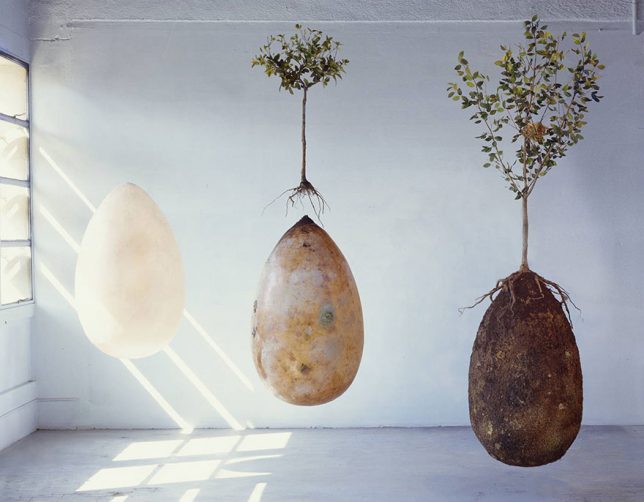
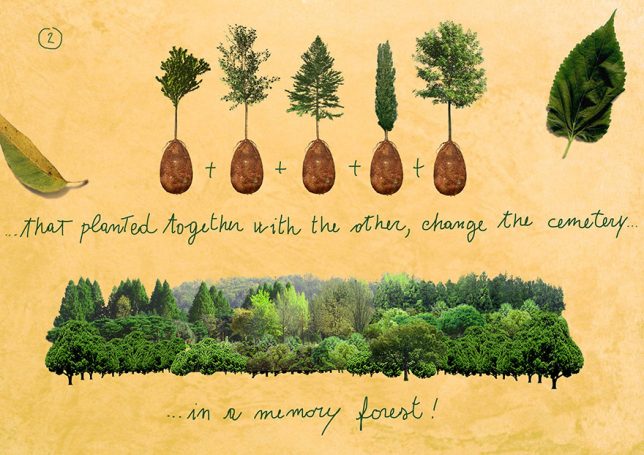
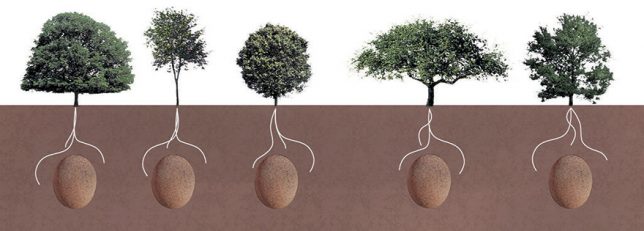
Essentially, a body is interred in an organic and biodegradable burial capsule situated beneath the seedling of a chosen tree. Instead of filling graveyards with caskets and stone monuments to the deceased, this system would populate parks with living memorials – trees over tombstones. In turn, family and descendants can come to visit and care for the plants in honor of their loved ones.

pod-concept

Many other “green” burial solutions are generally not as ecological as they would first appear. Cremations, for instance, generate huge amounts of carbon dioxide in the burning process. And, of course, traditional burials are not very sustainable – chemicals, caskets, concrete, stone and space are all wasted in an effort to preserve something that will inevitably return to nature, one way or another.

tree-of-death

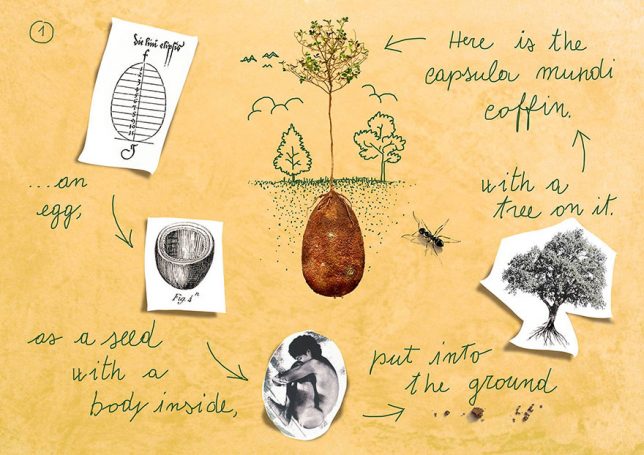
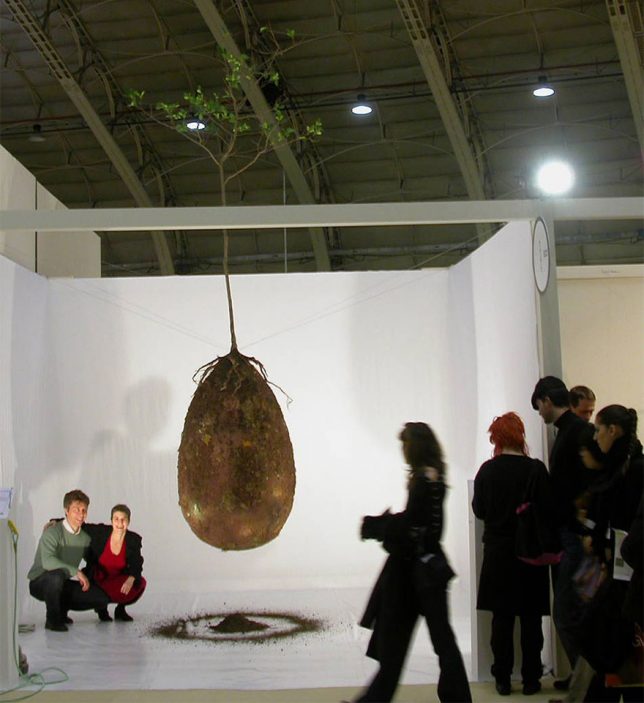
More from the project website: “Capsula Mundi is a cultural and broad-based project, which envisions a different approach to the way we think about death. It’s an egg-shaped pod, an ancient and perfect form, made of biodegradable material, where our departed loved ones are placed for burial. Ashes will be held in small Capsulas while bodies will be laid down in a fetal position in larger pods. The pod will then be buried as a seed in the earth.

pod-reality

“A tree, chosen in life by the deceased, will be planted on top of it and serve as a memorial for the departed and as a legacy for posterity and the future of our planet. Family and friends will continue to care for the tree as it grows. Cemeteries will acquire a new look and, instead of the cold grey landscape we see today, they will grow into vibrant woodlands. The project is still in a start-up phase, but encouraged by worldwide enthusiasm for our concept, we are working to make it become a reality.”

Share on Facebook


[ By WebUrbanist in Culture & History & Travel. ]

[ WebUrbanist | Archives | Galleries | Privacy | TOS ]


WebUrbanist

 
Comments Off on Life After Death: Organic Burial Pods Turn Human Bodies into Living Trees

Posted in Creativity


Smart Body Art: MIT Temporary Tattoos Turn Your Arm into a Touchpad

27 Sep

[ By WebUrbanist in Gadgets & Geekery & Technology. ]

temporarytattoo

Simple but powerful, these conductive tattoos communicate data and actions to paired electronic devices, translating touch actions into digital activations. As biohacking and other transhumanist interventions go, this technology represents a relatively light-touch approach with potential appeal to a broader audience beyond your typical body hacker.

A collaboration between the MIT Media Lab and Microsoft Research, DuoSkin combines high-tech geekery with everyday fashion, putting circuits right on your skin for easy access. There are four essential configurations at work: a basic button for single-click actions, a slider to scroll, another slighter for continuous scrolls and a complex lattice that acts as a track pad.

tatooo-series

They look like gold and silver flash tattoos but perform a variety of technological feats, thanks to a microcontroller and wireless communication unit. Connected to smartphones, computers or other gadgets, DuoSkin can be used like a touchpad controller, or can change color based on temperature, or can pull and transmit biological data (and combinations thereof).

swipe-tattoo-mit

Imagine: answering the phone, skipping a track in your podcast queue, turning on a TV or turning down the music with a quick swipe to your forearm. The fact that this system is easily removable is one of the key selling points, a harbinger of future mass-market tech that can be applied, taken back off and discarded, just like any other temporary tattoo.

tattoo-with-lights

From the design team: “DuoSkin is a fabrication process that enables anyone to create customized functional devices that can be attached directly on their skin. Using gold metal leaf, a material that is cheap, skin-friendly, and robust for everyday wear, we demonstrate three types of on-skin interfaces: sensing touch input, displaying output, and wireless communication.”

tattoo-complex

“DuoSkin draws from the aesthetics found in metallic jewelry-like temporary tattoos to create on-skin devices which resemble jewelry. DuoSkin devices enable users to control their mobile devices, display information, and store information on their skin while serving as a statement of personal style. We believe that in the future, on-skin electronics will no longer be black-boxed and mystified; instead, they will converge towards the user friendliness, extensibility, and aesthetics of body decorations, forming a DuoSkin integrated to the extent that it has seemingly disappeared.”

Share on Facebook


[ By WebUrbanist in Gadgets & Geekery & Technology. ]

[ WebUrbanist | Archives | Galleries | Privacy | TOS ]


WebUrbanist

 
Comments Off on Smart Body Art: MIT Temporary Tattoos Turn Your Arm into a Touchpad

Posted in Creativity