RSS
 

Posts Tagged ‘History’

[MODIFIED] Google Chrome – Clear Browsing Data including Cookies, Flash Cookies, Cache, History, and Saved Passwords

07 Apr

For privacy, clear the data Google Chrome stores regarding your browsing history.

Even though Google Chrome supports “Incognito” browsing where history information is not kept and cookies are removed after browsing (press CTRL + SHIFT + N to open an “Incognito” window), you might accidentally forget to use this mode. You might also wish to remember cookies for a few hours while checking e-mail, chatting on social networking, or accessing your bank account online, then later decide to clear your tracks for privacy.

Google Chrome supports a feature where without the use of any extensions, you can clear browsing and download histories, the cache, cookies, Flash cookies, saved passwords, saved form data, and/or other details….

Read more at MalekTips.
New Computer and Technology Help and Tips – MalekTips.Com

 
Comments Off on [MODIFIED] Google Chrome – Clear Browsing Data including Cookies, Flash Cookies, Cache, History, and Saved Passwords

Posted in Technology


Monument & Void: Massive Stone Museum of Mayan History

07 Feb

[ By WebUrbanist in Architecture & Public & Institutional. ]

mayan museum central void

Commissioned for Guatemala City, this weighty megalithic structure is set to be the largest museum commemorating Mayan culture and history in Central America. Its architectural success, however, comes as much from its empty spaces as from its imposing structure, as evidenced by the eight-story central void shown above.

mayan museum plynth megalith

At a glance, the building looks like a monolithic box set upon a piecemeal plinth, the latter helping to give the former a sense of impossible mass. This humbling exterior gives way to an only somewhat-more-human-scaled series of spatial experiences inside.

maya museum monolithic void

Heavy stone-clad walls pierced by patchwork voids conspire to reinforce the sense of visual thickness that permeates the project, referencing ancient Mayan temples in terms of architectural materials and concepts but also sheer scale.

mayan museum exterior forest

This region-referencing design resulted from international collaboration between Harry Gugger Studio of Switzerland and Over,Under of Boston. More details from these firms below.

mayan museum gallery room

“The new Museo Maya de América is among the most ambitious cultural projects under development in Central America. It is planned to house one of the world’s most significant collections of objects, artefacts, artworks, textiles and knowledge relating to the history and culture of the Mayan Civilisation.”

mayan museum scale figure

“Located on the northern edge of L’Aurora Park, the new museum building will form the culmination of a cultural axis that includes the Guatemalan Museum of Contemporary Art and the Children’s Museum. This dense cluster of cultural institutions, in tandem with the large open spaces of the adjacent park will become a focal point for tourists and residents alike.”

mayan museum monolithic facade

An open central “void extends down in to the parking levels below ground, providing an interesting route up into the museum and a special place to display underworld-related artefacts. The landscaped roof of the museum is once again given back to the public with a series of different areas including a restaurant and terrace, roof gardens and viewing decks all accessible from the Cenote.”

mayan museum exploded axon

mayan museum central void

“The large surface of the roof will also be used to collect rainwater in a manner recalling traditional Maya practices by drawing water through a series of channels into the Cenote, enhancing the museums commitment to the environment through water recycling.”

Share on Facebook


[ By WebUrbanist in Architecture & Public & Institutional. ]

[ WebUrbanist | Archives | Galleries | Privacy | TOS ]


WebUrbanist
 
Comments Off on Monument & Void: Massive Stone Museum of Mayan History

Posted in Creativity


Nomadic Urbanism: Futuristic Walking City Draws on History

08 Jan

[ By WebUrbanist in Architecture & Cities & Urbanism. ]

walking city rendering

The notion of a mobile city is not new, but in this case, the architect has gone to great lengths to construct a vision that could conceivably be built. So while it may look like fantasy at first glance, it is rigorously researched and has deep roots in built environments that have really been made to move.

walking city closeup angle

walking city route speculation

The design of this Very Large Structure by Manuel Dominguez proposes a plug-and-play platform set atop a series of treads that would house everything from housing and restaurants to hospitals, libraries, sports facilities and even universities. Their mobility would provide dynamic equilibrium of urban and rural populations, facilitated in part by energy self-sufficiency generated on board via renewable sources.

walking city axon diagram

walking city assembly inspiration

“Even though I am very attracted to science fiction and utopical and distopical architecture, I was more interested in investigating real life technology” its designer explains. “These included open-air mining machinery, shipyard installations, logistic and management in super-ports and super vessels, space technology and eco-villages.”

walking city mist

walking city comic strip

The idea of the Walking City has a rich history. In a 1960s Archigram article, Ron Herron proposed massive robotic mega-structures that would dynamically follow available natural resources and work, providing human resources and manufacturing capabilities on demand. Like some meta-robot out of a 1980s cartoon, these mobile platforms could join to form temporary metropolises as well.

Next Page – Click Below to Read More:
Nomadic Urbanism Futuristic Walking City Draws On History

Share on Facebook


[ By WebUrbanist in Architecture & Cities & Urbanism. ]

[ WebUrbanist | Archives | Galleries | Privacy | TOS ]


WebUrbanist

 
Comments Off on Nomadic Urbanism: Futuristic Walking City Draws on History

Posted in Creativity


3 Lightroom History Tips

06 Nov

Lightroom history tips opener

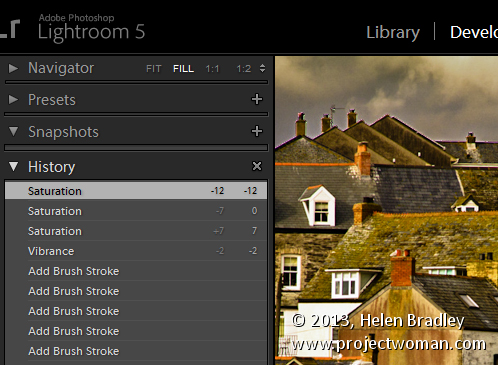
Like Photoshop, Lightroom has a History feature that shows a list of the fixes you’ve applied to an image. It can be used to wind back changes that you have made to an image. Unlike the Photoshop history, the Lightroom history entries don’t disappear when you close Lightroom – they remain accessible from one instance of Lightroom to the next.

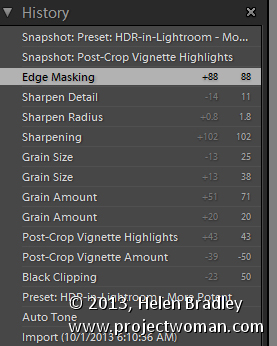
The History panel is on the left in the Develop module. Click to open it and you’ll see a list of the edits made to the image. These read from bottom to top so the topmost history setting is the one you applied last to the image. These History settings show not only the sliders you adjusted when editing the image but also the final value of that slider and the amount of change you made at that step.

Lightroom history tips 1

You can wind back the history of changes that you’ve made to the image by clicking any of the entries in the History panel. Until you make further changes to the image you won’t lose the later history states if you click on an earlier one. So you can click from one history state to the next to view the image at that point in the editing process.

If you click to view an image at an earlier stage of its editing and then start making changes to the image you will lose all the later history states – they’ll be replaced by your new edits.

3 Lightroom History Tips

Here are three handy tips for working with Lightroom History:

1. Delete History

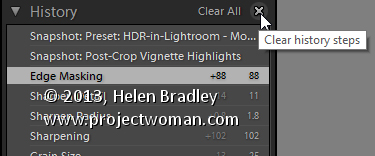
You can delete the Lightroom history for any selected image. To do so, click the X (Clear All) button in the top right of the History panel. This removes the history steps from the History panel – it doesn’t actually remove the edits from the image – it just clears the History panel.

Lightroom history tips 2

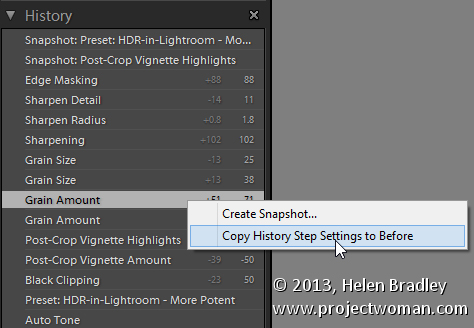
If you are like me you will use the backslash key (\) in the Develop module to compare the image Before and After your edits. However, sometimes you will want to compare the After version with the image as it was part way during the editing process – not as it was when you imported it.

You can set the Before version of an image to be the image as it was at any earlier History step. To do this, right click the History step that shows the image at the point you want to make the Before image and choose Copy History Step Settings to Before. If the most recent history step isn’t selected, select it to return to the current state of the image. Now, when you press the Backslash key you will compare the current state of the image with the selected history state.

You can also drag and drop History steps to do the same thing. So, if you are viewing the Before image you can drag and drop any History step onto the Before version and that will become the new Before version. Again – you don’t lose any history steps when you do this, you’re just creating a different Before version of the image.

Lightroom history tips 3

3. Create a Virtual Copy

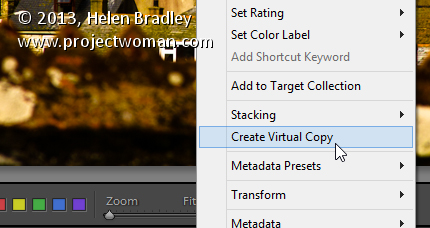
When you are part way through editing an image you might want to go back and try a different editing process but also keep the version of the image you are working on. You can use the History panel to facilitate this. Start by selecting the History step where you want to begin an alternative method of editing the image. Right click the image and choose Create Virtual Copy. This creates a new Virtual Copy – its starting point is the current History step – it has no other History steps associated with it. Also note that this new Virtual Copy is the currently selected image.

Lightroom history tips 4

Before beginning to work on this image, click the original image in the filmstrip to reselect it and click the last History step in the list to return this version of the image to your current editing point.

You’ll now have two versions of the image – a virtual copy extracted from the image at the point at which you want to begin an alternative editing approach and the original version with all your current edits in place.

Post originally from: Digital Photography Tips.

Check out our more Photography Tips at Photography Tips for Beginners, Portrait Photography Tips and Wedding Photography Tips.

3 Lightroom History Tips

The post 3 Lightroom History Tips by Helen Bradley appeared first on Digital Photography School.


Digital Photography School

 
Comments Off on 3 Lightroom History Tips

Posted in Photography


The Ultimate, Detailed History of Photography That Will Blow Your Socks Off!

04 Sep

Although everyone understands the importance of photography in our daily lives, very few know about how this seemingly magical art form developed. The following is a detailed look into the long history of photography that has lead to the cameras we know and love today. 500 BC – 1700s Beginning back in China and Greece around 500 BC, ancient philosophers Continue Reading

The post The Ultimate, Detailed History of Photography That Will Blow Your Socks Off! appeared first on Photodoto.


Photodoto

 
Comments Off on The Ultimate, Detailed History of Photography That Will Blow Your Socks Off!

Posted in Photography


Sanna Dullaway Adds Color to the Most Iconic Photos in History

19 Aug

Screen_Shot_2013-08-13_at_6.14.49_PM.png

General-interest blog The Roosevelts has posted a selection of artist Sanna Dullaway’s colorized images, showing what iconic images might have looked like to the photographer that captured them. Among the (exceeding well-done, it must be said) adjusted images are Malcolm Browne’s iconic shot of monk Thich Quang Duc’s self-immolation, Alfred Eisenstaedt’s famous image of the kiss in Times Square on VJ Day, and Anne Frank’s haunting 1942 portrait. Click through for a selection of shots, and links to both the full article and Sanna’s website.

News: Digital Photography Review (dpreview.com)

 
Comments Off on Sanna Dullaway Adds Color to the Most Iconic Photos in History

Posted in Uncategorized


Animated History of Western Architecture in Just 15 Minutes

25 Jul

[ By WebUrbanist in Art & Photography & Video. ]

design in a nutshell

These six super-short videos are an architectural tour de force for visual learners bent on absorbing as much as possible in as little time as needed. Narrated by actor Ewan McGregor, the Design in a Nutshell series (all playable below) presents whole history of Western architecture (and related design fields). This historical tour is highly engaging, thanks to lovely animations and engaged narration complete with famous examples and dynamic illustrations.

design architectural history series

Diagrams and dramatic descriptions will carry you through from Gothic Revival to Arts & Crafts and Bauhaus, then onto Modernism and Postmodernism. For the design-inclined, these educational mini-films should be enough to whet your appetite, leaving you to want more on each of these movements. But meanwhile, since you may be in a hurry, let us forgo further description and get started below:

Created by The Open University, a distance-learning institution based in the United Kingdom, these are by no means exhaustive, but they are a great introduction to thinking about architecture. Visually, they can begin to help you when it recognizing and understanding time-specific and universal themes, and start to connect what you see in cities around you to design theories and historical contexst. Or, if you already know the basics, simple share these with friends you want to get excited about built environments instead!

Share on Facebook


[ By WebUrbanist in Art & Photography & Video. ]

[ WebUrbanist | Archives | Galleries | Privacy | TOS ]


WebUrbanist
 
Comments Off on Animated History of Western Architecture in Just 15 Minutes

Posted in Creativity


Come Photowalk in the Biggest Photowalk In History with My Pals Trey Ratcliff and Robert Scoble — We’re Giving Away Google Glass!

09 May

New Videocast Photo Talk Plus Premiers Live Tonight at 8PM PST

Next Tuesday evening, May 14th at 5:30pm, my good pals Trey Ratcliff, Robert Scoble and the awesome team at Google+ Photos will be joining me for an historic and truly epic photowalk in San Francisco. We think it will probably be the largest photowalk ever held in the history of photowalking — already almost 600 people have signed up! We will start the walk in Yerba Buena Gardens in downtown San Francisco.

Most exciting, one of our lucky photowalkers will win Google Glass. That’s right, a winner will be selected randomly — you must pre-register for the walk here and must be present at the end of the photowalk in person to win. We will go over the rules and details on how to win the Glass at the photowalk.

This is a free event open to everyone regardless of skill, experience, camera type, etc. Bring your Holga/Diana or your Canon 5D Mark III or your Rebel or your Android phone — or even that other phone that I can’t ever remember the name of ;)

We will be announcing more details between now and the event, but you won’t want to miss this fantastic San Francisco event. We will have a great afterparty too where we can all geek out about photography.

See you there!


Thomas Hawk Digital Connection

 
Comments Off on Come Photowalk in the Biggest Photowalk In History with My Pals Trey Ratcliff and Robert Scoble — We’re Giving Away Google Glass!

Posted in Photography


Billingham marks 40 years of history

20 Feb

Screen_Shot_2013-02-19_at_12.16.48_PM.png

UK camera bag manufacturer Billingham is celebrating its 40th anniversary this year, and its new 2013 catalogue highlights the development of its products released from 1973 to the present. Billingham was founded in 1973 in the West Midlands, in England. As well as an interesting overview of the company’s history, Billingham’s 2013 brochure also includes information about and specifications of all current models of bags and optional accessories along with details about the materials and construction methods used in the creation of its premium products. Click through for a link to the catalogue. 

News: Digital Photography Review (dpreview.com)

 
Comments Off on Billingham marks 40 years of history

Posted in Uncategorized


Computer History Museum shares original Adobe Photoshop source code

16 Feb

splashscreen.png

The source code of the original version of Adobe Photoshop has been made available by The Computer History Museum, based in California. Photoshop started off in the 1980s as a program called ‘Display’ written by Thomas Knoll, before being renamed ‘Photoshop’ in 1990 – the year that the first version of the software shipped to customers. The download, which is available for non-commercial use with the permission of Adobe, consists of around 128,000 lines of code. Click through for more details (and some nostalgia-inducing screenshots of Photoshop 1).

News: Digital Photography Review (dpreview.com)

 
Comments Off on Computer History Museum shares original Adobe Photoshop source code

Posted in Uncategorized