RSS
 

Posts Tagged ‘Hero’

GoPro Hero 9 Review: Is It the Perfect Action Camera for You?

19 Dec

The post GoPro Hero 9 Review: Is It the Perfect Action Camera for You? appeared first on Digital Photography School. It was authored by Suzi Pratt.

GoPro Hero 9 review

Every fall, GoPro releases a brand new version of its popular and classic action camera, the GoPro Hero. Some years, it’s a significant release with big changes, and other years, it’s an incremental step forward.

Where does the brand new GoPro Hero 9 fall into place, and should you buy this camera?

Read our GoPro Hero 9 review to find out.

GoPro Hero 9: Overview

Since GoPro is practically the inventor of action cameras, you’re probably at least partially familiar with the GoPro Hero.

It’s always been a compact, rectangular camera that’s rugged – waterproof, crushproof, and made primarily for the outdoors. Listed below are a few significant GoPro Hero camera releases:

GoPro Hero 5

In terms of GoPro history, the GoPro Hero 5 was a significant camera for a couple of reasons.

It was the first GoPro that was waterproof, so you didn’t need to stick it in a waterproof housing for underwater shooting.

Plus, the Hero 5 was the first GoPro with a built-in LCD display screen on the back of the camera.

Every GoPro since the Hero 5 comes with both of these features.

GoPro Hero 9 Review

GoPro Hero 7

The next major GoPro release was the Hero 7.

This was the first GoPro camera with built-in HyperSmooth, which promised “gimbal-like stabilization.” Every GoPro with HyperSmooth has amazing video stabilization, even in the roughest conditions. In fact, depending on your personal video quality preferences, you may not even need to use a gimbal or external stabilizer with newer GoPro models.

The Hero 7 was also the first GoPro Hero to include custom shooting presets via the back-facing LCD touchscreen for easy camera operation.

GoPro Hero 9

The latest GoPro release is the first to include a built-in front-facing screen (more on this below). It’s great for vlogging, taking selfies, and composing your shots while standing in front of the camera.

Additionally, the Hero 9 boasts the highest resolution of any GoPro camera. At 23.6 megapixels, the resolution is roughly double that of its predecessors. This allows for shooting higher-resolution photos (20 megapixels) and videos (up to 5K).

From here on out, I’ll be talking solely about the GoPro Hero 9.

GoPro Hero 9 Review
Left to right: The GoPro Hero 7, Hero 8, and Hero 9.

Design and ergonomics

Aside from the inclusion of the front-facing screen and the relatively large size, the Hero 9 looks like many other modern GoPros. It has two physical buttons – one on top and one on the side – and a rear touchscreen LCD.

Accessing the camera’s many features is quite simple, thanks to the inclusion of shortcuts and presets that can be accessed via the rear LCD.

The Hero 9 is powered by a rechargeable battery. It can also be charged via the USB-C port, the only built-in port on the camera. If you desire additional ports such as a 3.5mm microphone jack and a micro HDMI port, you need to buy the GoPro Hero 9 Media Mod (more on this below). The Hero 9 uses a single micro SD card to record.

The Hero 9 is waterproof up to 33 feet (10 meters) without a waterproof housing, though dive housing can be used to further waterproof the camera.

Finally, the Hero 9 can be used without a cage, thanks to the built-in folding fingers on the bottom of the camera. That way, you have the mount directly on the camera base.

GoPro Hero 9 Review
The GoPro Hero 9 (left) can be mounted without a cage. The Hero 7 and all cameras prior require a cage to be mounted.

GoPro Hero 9 Pros

Now let’s take a look at some of the GoPro Hero 9’s best features, starting with:

Best photo and video quality ever

Thanks to the Hero 9’s impressive resolution, image quality is at an all-time high. You can now shoot 20-megapixel photos in both JPEG and RAW format, and videos can be shot at 5K/30p or 4K/60p.

Even if you don’t intend to export a 5K video, shooting at this resolution can be beneficial for post-production. When you shoot at 5K, you can crop your video later without sacrificing resolution. You can also take high-quality still shots from your 5K video footage.

Front-facing screen

While some may scoff and say that front-facing screens are only important for vloggers, don’t knock it until you try it. Being able to see your composition from the front of the camera will change the way you shoot. It’s especially helpful when you stick the camera in a tight corner.

But if you’re still not sold on the front-facing screen, there’s an option to disable it and simply display camera settings instead.

front-facing screen on the GoPro Hero 9
The GoPro Hero 9 with the front-facing screen.

HyperSmooth stabilization

Shaky video footage has been long gone since the Hero 7 first debuted with HyperSmooth. Somehow, GoPro keeps finding ways to improve HyperSmooth, and it’s in its third version with the Hero 9.

Besides eliminating video shake from sports footage, HyperSmooth helps with another GoPro feature: TimeWarp.

Essentially a moving time-lapse, TimeWarp is great for conveying the passage of time while on the move (think walking, hiking, or driving), and HyperSmooth keeps that footage stable.

Horizon Leveling and Scheduled Capture

A new feature on the Hero 9 is Horizon Leveling. When enabled, this automatically keeps your video’s horizon straight.

Since the camera tends to be mounted on a moving subject, keeping the horizon straight is something that many GoPro users often struggle with.

Scheduled Capture is another new feature that allows you to schedule ahead of time when the GoPro should start shooting. It’s especially helpful for creating time-lapses.

Improved internal microphones

Ever since the GoPro was designed to work without a cage, the sound quality has gradually improved. The Hero 9 has three built-in internal microphones, and they do a great job of picking up audio. The only time the audio seems muddled is after the camera has been submerged in water.

If you want to get the best possible audio out of the GoPro, you can do so by adding an external microphone. However, for that you’ll need to buy the Media Mod (discussed below).

GoPro Hero 9 in the Media Mod
The GoPro Hero 9 inside of the Media Mod.

Mods

Starting with the Hero 8, GoPro began releasing Mods to add features to its cameras.

The main Mod is the Media Mod, which is aimed at vloggers. This Mod includes cold shoe mounts for adding accessories, a micro HDMI port, a 3.5mm mic jack, and built-in microphones.

Despite the added cost, the Media Mod delivers on its promises and turns the GoPro into a viable vlogging camera.

Other available Mods include the GoPro Light Mod (a glorified flashlight), a front-facing Display Mod, and the ultra-wide Max Lens Mod.

(Most of these Mods are intended for newer GoPros, so if you own an older GoPro, be sure to check its compatibility before purchasing Mods.)

the Media Mod
The Media Mod (available for Hero 8 and Hero 9 only) includes cold shoe mounts, built-in mics, a micro HDMI port, a USB-C port, and a 3.5mm microphone jack.

Lots of third-party accessory options

Since GoPro has been around for so long, there are tons of third-party accessory makers selling all kinds of things to expand the functionality of GoPro cameras.

Some accessories are specific to GoPro models (i.e., form-fitting cages), but many accessories, such as mounts, lights, and microphones, can be used with every GoPro out there.

Cons

No camera is perfect, and the GoPro Hero 9 is no exception. Let’s take a look at the drawbacks of this action camera:

Larger size

To accommodate a larger battery and the front-facing LCD, the Hero 9 is the biggest GoPro ever. It’s still a small camera, but its slightly larger size means that any previous form-fitting cages you might own will no longer fit.

You’ll also have to buy Hero 9 batteries and a battery charger.

Poor low-light shooting

While the GoPro Hero 9 has a larger megapixel count than previous GoPro Heros, it performs miserably in low-light conditions. If you want to shoot photos or videos after the sun goes down or indoors, use the Light Mod or consider a different camera.

Buggy software

In my experience, most modern GoPros are prone to freezing bugs, and the Hero 9 is no exception.

The good news is that there’s a fast way to reset the camera should it freeze:

Simply hold down the Record and Power buttons for a few seconds, and the camera will reboot.

GoPro Hero 9  with the Max Lens Mod
An HDR SuperPhoto taken with the GoPro Hero 9 and the Max Lens Mod.

Firmware updates

Almost immediately after the Hero 9 came out, GoPro released a statement saying that two firmware updates would be on the way before the end of 2020.

These firmware updates promised fixes such as:

  • Increased touchscreen sensitivity
  • Image quality improvements for 4K shooting
  • GPS accuracy
  • Scheduled Capture bug improvements
  • External microphone compatibility with the GoPro mic adapter
  • More possible fixes on the way

One firmware update was released in October 2020, and the second was delayed from November to December 2020. In GoPro’s own words, “The more we test HERO9 Black in the field and the more feedback we receive from users, the more we identify little upgrades that will have huge impacts on the user experience.”

Not everyone will find the issues listed above to be a problem, but if you’re suffering from any, just know that a fix is on the way.

Should you buy the GoPro Hero 9?

Now that I’ve gone through the bulk of this GoPro Hero 9 review, it’s time to ask:

Who should think about purchasing the Hero 9?

If you have an older GoPro…

If you have a model older than the GoPro Hero 7, the Hero 9 will seem like a huge upgrade.

Not only is the image quality better, but you’ll also have a touchscreen with presets for easier control, buttery-smooth video, and better sound quality.

If you have the Hero 7 or 8, there’s no need to upgrade unless any of the key features, such as the front-facing screen or 5K video, have appeal.

If this is your first action camera…

For those new to the action camera market, you’re in luck – because there are a lot of good options. There’s the cheaper DJI Osmo Action or the modular Insta360 One R, both of which are excellent picks. It’s worth researching both of those cameras to see if they better fit your needs.

However, if you want a tried and true action camera that has the best image quality, stability, and sound on the market, then the GoPro Hero 9 is the best that money can buy. You can grab it here.

What do you think? Are you interested in purchasing the GoPro Hero 9? Let me know in the comments below!

The post GoPro Hero 9 Review: Is It the Perfect Action Camera for You? appeared first on Digital Photography School. It was authored by Suzi Pratt.


Digital Photography School

 
Comments Off on GoPro Hero 9 Review: Is It the Perfect Action Camera for You?

Posted in Photography


Photographer David Burnett with his large-format, wooden camera was the real hero of today’s impeachment hearings

14 Nov

Photographer David Burnett (L), pictured in the press pack at today’s first public session of the ongoing impeachment hearings.

As diplomat William Taylor and State Department official George Kent took their seats in the House today to begin their public testimony, their entry was heralded by a noisy fluttering sound, as attendant photographers shot off hundreds of continuous frames on their Canon and Nikon DSLRs. But one man stood alone, among the fray: David Burnett, veteran, multi award-winning photographer, co-founder of ContactPressImages and large format film enthusiast.

The camera is an ‘Aero Liberator’ – Made by John Minnicks, the Liberator is a custom-made camera, which takes 4 x 5 plates. Judging by today’s footage of David using it, continuous shooting speed is limited to about one frame every five or six seconds.

Articles: Digital Photography Review (dpreview.com)

 
Comments Off on Photographer David Burnett with his large-format, wooden camera was the real hero of today’s impeachment hearings

Posted in Uncategorized


GoPro Hero 7 Black Review – 5 Things I Love and Dislike About this Camera

11 Feb

The post GoPro Hero 7 Black Review – 5 Things I Love and Dislike About this Camera appeared first on Digital Photography School. It was authored by Suzi Pratt.

The GoPro Hero 7 Black is hands down the best action camera on the market right now. With meaningful updates such as incredible stabilization, improved built-in sound, and better app integration, GoPro makes a compelling case for even its most loyal user base to upgrade to the latest model. If you’re on the market for an action camera, read on to find out 5 big reasons why the GoPro Hero 7 Black is the best one for you.

GoPro Hero 7 Black Review

Specs

GoPro released three new action cameras in September 2018: the Hero 7 Black, White, and Silver. The Hero 7 Black is their most premium model at US$ 399, with the other two being stripped down versions. GoPro’s mid-tier camera is the Hero 7 Silver. Priced at US$ 299, the Silver has most of the features of the Hero 7 Black minus Hypersmooth; it’s also capped at taking 10-megapixel photos compared to the Hero 7 Black’s 12 megapixels. GoPro’s new entry-level camera is the Hero 7 White. At US$ 199, you get the same 10-megapixel sensor as the Hero 7 Silver. Most features are retained except for the ability to shoot in 4K video.

Besides the price difference, the Hero 7 Black is also the only model to receive three new key features: HyperSmooth, live streaming, and TimeWarp video. More on all of these features below.

Look and feel

The Hero 7 Black retains the same rubberized design that was first introduced with the Hero 5 Black. Side-by-side, it looks almost identical to the Hero 6 Black. Both cameras have the same 2-inch touchscreen, button placement, and the same ports (USB-C and micro HDMI). They even use the same replaceable batteries.

Before you gripe about GoPro retaining the same camera design, consider this: reusing old designs means you can keep using the same GoPro accessories. This is key as GoPro, and many third-party manufacturers such as Joby have created some truly helpful accessories to get more use out of the camera. So if you have mounts, cages, or adapters for the Hero 5 or 6, rest assured that you can use them all with the Hero 7 Black as well.

GoPro Hero 7 Black Review

5 things I love about the GoPro Hero 7 Black

1. Hypersmooth

Hands down the best feature about the GoPro Hero 7 Black is Hypersmooth. GoPro claims it is the very best in-camera video stabilization on the market, adding gimbal-like stabilization to video footage. After profuse testing, it’s hard to argue. Shooting with Hypersmooth enabled does indeed produce ultra-smooth footage akin to what you would get if you used a gimbal. In turn, this seems to kill the GoPro Karma Grip gimbal as it seems the Hero 7 Black can record video just fine without it.

You can shoot in Hypersmooth even when shooting at 4K 60fps at full resolution. Just be mindful that Hypersmooth can’t be enabled when shooting in 4:3 aspect ratio, and also when shooting in Full HD at 240fps and 120fps.

2. TimeWarp

Also new on the Hero 7 Black is a feature called TimeWarp. In a nutshell, this is timelapse video with HyperSmooth applied. The resulting effect is being able to capture timelapse videos that are ultra stable. This is key for time-lapsing anything with movement, such as driving, hiking, walking, running, or biking. When using TimeWarp, you have the option to record at several different speeds including 2x, 5x, 10x, 15x, and 30x.

3. Same form factor as Hero 5 and 6

On the outside, GoPro made almost no change to the Hero 7. It looks exactly the same as the Hero 5 and 6, and even uses the same batteries. This is actually a good thing. If you’ve invested in GoPro cages or batteries before, you can reuse them with the Hero 7. Also, many third-party companies have created accessories for the Hero 5 and 6. You can use these just fine with the Hero 7.

One design change I’d love to see in future GoPros: a camera that comes with its own mount and doesn’t need to be put in a cage.

4. Touchscreen with revamped UI

While GoPros have had touchscreens for several models now, the user interface has been revamped in the Hero 7 Black. Key information such as resolution and framerate are condensed at the bottom of the screen, while battery life and remaining memory card space are in the upper portion of the screen. Portrait mode has also been added, allowing you to shoot vertical photos and videos for platforms such as Instagram Stories or IGTV.

Speaking of social media, the Hero 7 Black now allows for live streaming. Using WiFi or cellular service, you can conduct a 720p live stream on Facebook. At this time, live streaming to other platforms (ie. YouTube) isn’t yet enabled.

GoPro Hero 7 Black Review

5. Seamless smartphone integration

One of my biggest gripes about modern cameras is how terribly unreliable their smartphone integrations are. While most cameras offer Wi-Fi and Bluetooth connectivity for remote control via smartphones and easily transferring images, it’s always hit or miss whether or not these features will work. With the GoPro, connectivity is the most responsive and reliable I’ve ever seen on a camera. This makes it very easy to use your smartphone to control the GoPro and review photos and videos immediately after capture. Well done, GoPro.

5 things I dislike about the GoPro Hero 7 Black

For all of the things that GoPro improved in the Hero 7 Black, there is still room for improvement. Here are 5 features in particular that I would like to see refined and improved in future generations.

1. Unresponsive screen

While the Hero 7 Black’s touchscreen is largely improved, it has one major shortcoming: it’s not very responsive! This problem also extends to GoPro’s other two buttons. In general, it’s hit or miss whether the GoPro will react to buttons being pushed or the touchscreen being swiped. This can be very frustrating, especially when trying to shoot spontaneously.

GoPro Hero 7 Black Review

2. Voice commands are unreliable

Another feature that is hit or miss is voice control. New on the Hero 7 Black are two voice commands that can control the GoPro: “GoPro capture,” and “GoPro Stop capture.” While useful in theory, these voice controls seem to work about half of the time.

3. No mic jack

In the past, GoPro was notorious for having awful built-in microphones. All of that changed with the Hero 7 Black, which offers remarkably improved in-camera sound. However, there are still instances that require enhanced sound capture via a lavalier (lapel) microphone or shotgun mic. Unfortunately, GoPro has withheld the mic jack from the Hero 7 Black, opting instead to give us USB-C and micro HDMI ports. GoPro does offer a solution in the form of a mic jack adapter. However, it is bulky and expensive, and you must use GoPro’s adapter (other brands will not work).

GoPro Hero 7 Black Review

4. Battery life

Of all the things GoPro improved in the Hero 7 Black, one thing that remains unchanged is battery life. It’s hard to give an estimated battery life as it depends on how you are using the camera. But in general, one battery lasts about an hour when shooting in 4K. Luckily, all three Hero 7 models come with a USB-C port to allow for charging via a wall socket or external battery. However, it is still a wise idea to carry several spare batteries with you.

GoPro Hero 7 Black Review

5. Low light performance

All three Hero 7 models have an f/2.8 aperture. This means they are decent at shooting in low light, but the video and photo quality still leaves room for improvement. In the case of the Hero 7 Black, it also seems that HyperSmooth is automatically disabled in low light conditions, further worsening the low light performance. In general, you’ll get the best photo and video performance out of your Hero 7 if you use it in daylight or good lighting conditions.

In Conclusion

Despite some shortcomings, the GoPro Hero 7 Black is easily the best action camera on the market right now. GoPro made significant and actually useful improvements on this camera and it is worth using not only for action scenarios but everyday use as well. Agree or disagree? Let me know in the comments below!

GoPro Hero 7 Black Review


You may also like these reviews from Suzi:

Moment Smartphone Lens Review for Photography and Videography

Fujifilm X-T3 versus Fujifilm X-H1: The Best Mirrorless Camera for You?

Essential Tools for Making Videos on Your Mirrorless Camera

Gear Review: Lensbaby Sol 45 Field Test

Equipment List for Making Better Smartphone Videos

The post GoPro Hero 7 Black Review – 5 Things I Love and Dislike About this Camera appeared first on Digital Photography School. It was authored by Suzi Pratt.


Digital Photography School

 
Comments Off on GoPro Hero 7 Black Review – 5 Things I Love and Dislike About this Camera

Posted in Photography


Adobe Portfolio – This Unsung Hero of Creative Cloud Could Save You Money

24 Aug

I have used Adobe Lightroom since version 4 in 2012. After upgrading to version 5 and 6 in the following years, have really grown to appreciate its workflow, comprehensive suite of editing tools and the digital asset management.
When Adobe switched to a subscription model for Lightroom and announced they would no longer offer the product as a standalone license, I started looking at other options because I didn’t want to be locked into a perpetual pricing model. I was already paying nearly $ 100/year for a website and as a hobbyist photographer with a family and a full-time job, the thought of paying another $ 120/year for Lightroom seemed crazy.
That is until I discovered Adobe Portfolio and had a complete change of heart.

Adobe Portfolio website landing page

A bit of background

In 2015 I got serious about doing photography work for clients. At that time, I recognized the need to have a professional easy-to-use website to attract clients and showcase my work. I tried a number of options before settling on Squarespace.

Their $ 96/year fee was entirely reasonable to me because it provided access to dozens of templates as well as a worry-free website I did not have to update or maintain like a self-hosted WordPress installation requires. I appreciated how easy Squarespace was to use as well as its rich set of features including blogging, podcasting, and even tools for buying and selling goods and services.

A few years later as I was investigating software options to replace Lightroom, I stumbled across Adobe Portfolio entirely by accident. I certainly never intended this barely-mentioned service to be the fulcrum on which my decision to subscribe to the Adobe Creative Cloud Photography Plan would rest!

The more I examined what Portfolio had to offer the more I realized that the subscription which includes Portfolio along with Lightroom and Photoshop would be ideal for my needs as a part-time photographer.

This is the homepage for my own Adobe Portfolio site. When users hover over one of the sections with their cursor it shows the name of that particular photo gallery.


While Squarespace handled all my website needs with aplomb, it also offered many things I did not use at all. Portfolio, on the other hand, is almost anemic by comparison but uniquely suited to fit the basic needs of most photographers.

It does not have all the options, tools, integrations, and flexibility of other platforms including Squarespace, Wix, Weebly, and WordPress. But as a photographer who just wanted a simple way to showcase my work, it fit the bill perfectly.

For me the choice was clear. I could sign up for the Creative Cloud Photography plan for only a few dollars more than what I was paying for my Squarespace website and get Lightroom, Photoshop, and a beautiful website that did everything I needed. I canceled my Squarespace account, signed up for Creative Cloud, and couldn’t be any more pleased with how things have worked out.

Start with a theme

If you have a Creative Cloud plan you already have access to Portfolio and you can get started by visiting myportfolio.com and entering your Adobe ID. After that, you begin the process of building your website by selecting a theme. Right away you may notice one of the significant shortcomings of Portfolio compared to other website services. There are only eight themes from which to choose. This dearth of options can be a source of frustration if you’re used to a myriad of themes on other platforms.

Adobe Portfolio themes

Some photographers might balk in horror at the idea of only having eight template options but I saw it as a way of streamlining my design approach. I couldn’t spend hours poring over different templates if I only had eight to choose from, so it only took me a few minutes to select one that suited my tastes just fine.

The templates do allow for some editing and customization but you are limited to the basic look and feel of how they are laid out. This approach is similar to how many mainstream website platforms operate and is well suited to photographers who would rather spend their time taking and editing pictures instead of poring over lines of HTML code.

It’s also worth noting that you can change templates at any time. So if you are not sure where to start you can just pick one that you like and begin editing with the freedom to change it later. I settled on the Mathias template but any of the eight options would work well for photographers who want a simple, pleasing, and functional website.

Lightroom Integration

The ace in the hole for Portfolio and a standout feature that allows it to really shine despite its lean feature set is the way that it integrates seamlessly with Lightroom. This is a huge boon for photographers who rely on Lightroom for their editing and digital asset management, and one of the big reasons it makes sense to consider Portfolio as a worthwhile website platform.

On the editing screen, there is a giant blue Add Content button which gives you access to four different options: Page, Lightroom Album, Gallery, and Link. Any photo collections in Lightroom CC, or those you have synced with Lightroom CC from Lightroom Classic CC, will show up as options when you click Lightroom Album. There is no need to export images and upload them individually. Choose Lightroom Album and the full Lightroom Web interface will load which will let you select any of the albums to be automatically displayed on your website.

You can also manually upload pictures via drag-and-drop interface but I found it much easier to manage images by loading them from Lightroom.

add content Adobe Portfolio

Editing Website Content

In addition to loading images directly from Lightroom, you can create content right from within Portfolio. This is useful if you want a few image galleries to showcase your work while also having elements like an About Me and pricing pages. Individual pages can contain blocks of text and images with captions, and elements can be re-ordered using a simple drag-and-drop interface. There’s even an option for inserting a Contact page which can contain many different fields that you are free to customize.

After creating a Page, Lightroom Album, or Gallery the ever-present floating menu lets you edit the unique characteristics of the element you just created. This floating menu took me a little while to get used to but now I don’t mind it at all.

My contact page using Portfolio.

It never really goes away but you can expand and collapse the panes and use the three horizontal lines at the top to move it around so it’s not in your way. While you can’t go so far as editing the actual CSS code you can make changes to things like background color, page header, and fonts.

editing options Adobe Portfolio

It won’t take you long to get the hang of this workflow but you also may get frustrated at what initially feels like a criminal lack of options. As you poke around with the tools available you will likely hit some brick walls, just as I did, when you find out you can’t insert pull-quote text boxes, customize the appearance of individual blocks of text, or embed elements such as a blog feed. Slideshow options are limited as well, and this is where some people might hang their head in frustration and run back to WordPress with open arms.

However, keep in mind that the purpose of Adobe Portfolio is to offer a simple way for photographers to showcase their work. It’s not supposed to be a comprehensive all-in-one web publishing platform, and within the context of that framework, the limitations in terms of choices and options make a little more sense. You can add a custom logo, change the appearance of your pages, embed dozens of web elements, and even password-protect your site if you so choose.

site options box - Adobe Portfolio

Portfolio lets you use a custom domain name as well, and though this process is fairly straightforward it does add a little extra to the cost of the service. Portfolio nor Adobe cannot actually register your domain so you will need to go to a third-party site like Dreamhost, Hover, or Register to set it up. Most domain names cost about $ 15/year which isn’t much but it does bring the total cost to around $ 135/year when you add that to a Creative Cloud subscription.

setting up your page in Adobe Portfolio

The Happy Middle Ground

The entire idea of a website might seem like somewhat of an anachronism in today’s social media-saturated internet. Many photographers have elected to forego a traditional web presence entirely in favor of building a brand and following on social media.

The downside of this approach is that your audience experience can be tainted by design decisions and embedded advertising entirely beyond your control, and there are always going to be a subset of potential clients who choose not to engage on social media at all and will, therefore, miss out on the chance to view your work.

My family portrait gallery.

Websites might not have the shine and excitement that they once did but there are still plenty of good reasons to build and maintain your own presence on the internet. To that end, Adobe Portfolio offers a compelling set of features for literally no cost at all if you already subscribe to any of Adobe’s Creative Cloud plans.

If you don’t currently subscribe to Creative Cloud but do pay a third-party provider to host your website you might want to give Portfolio a second look. Think of it as paying about the same as you are now for a website, but with the added bonus of world-class photography software like Lightroom and Photoshop thrown in at no extra charge.

Adobe Portfolio options

Your opinion of Adobe Portfolio will likely depend on your needs for a website and your expectations of what Portfolio can offer. If you want an extensive do-everything website solution, Portfolio is going to fall short in many respects and you’d be better off with something like Squarespace.

But if you want a simple platform that lets you display your work for the world to see, in a manner that you choose, without any intrusive third-party advertising or corporate mining of your personal data, I can’t recommend Portfolio highly enough.

Rating: 5/5

The post Adobe Portfolio – This Unsung Hero of Creative Cloud Could Save You Money appeared first on Digital Photography School.


Digital Photography School

 
Comments Off on Adobe Portfolio – This Unsung Hero of Creative Cloud Could Save You Money

Posted in Photography


GoPro unveils entry-level GoPro HERO action cam that costs just $199

29 Mar
Photo: GoPro

It seems the rumors and leaks from earlier this week were spot on, and right on schedule (a day early, actually) GoPro has revealed its new, entry-level action camera: the $ 200 GoPro HERO.

The HERO is the cheapest action camera GoPro has ever announced, coming in at the same price tag as the HERO5 Session while boasting several features that are reserved for the company’s regular line (read: not the Session lineup) of action cams. If you’re keeping track, the HERO lineup of action cams now goes: GoPro HERO ($ 200), GoPro HERO5 ($ 300), and GoPro HERO6 ($ 400).

As GoPro SVP of Product, Meghan Laffey, explains, GoPro is hoping that the lower price-of-admission into the GoPro action cam family will entice first-time users who would otherwise pick up a third-party option or just keep using their phone. “HERO is a great first GoPro for people looking to share experiences beyond what a phone can capture,” says Laffey. “HERO makes it easy to share ‘wow’ moments at a price that’s perfect for first-time users.”

Photo: GoPro

There’s not much to say about the GoPro HERO that wasn’t already revealed in Monday’s leak, but here goes. The main features are exactly what we expected.

The camera captures 1440/60p and 1080/60p video and 10MP stills, features a 2-inch display, voice control, electronic video stabilization, waterproof to 10M (30-feet) out of the box, and compatibility with all of the current GoPro HERO mounting accessories on the market (30+ from GoPro itself).

Finally, the camera also features compatibility with the GoPro and Quik Stories mobile apps, the latter of which can automatically edit your captured footage into ready-to-share highlight videos.

Photo: GoPro

The entry-level GoPro HERO action camera is available starting now from the GoPro store and online retailers alike for $ 200. To learn more about the GoPro HERO or pick one up for yourself, click here.

Press Release

GoPro Launches Entry-Level HERO Camera 2018

$ 199 HERO Joins $ 299 HERO5 and $ 399 HERO6, Making GoPro Accessible to All

GoPro, Inc. has added a new HERO camera to the family. On sale now, HERO is a $ 199, go-anywhere, capture-anything camera that makes it easy to share experiences that would be difficult to capture with a phone.

HERO features a 2-inch touch display, is waterproof to 30 feet and is extremely durable, making it the perfect GoPro for kids, adventurous social sharers and travelers.

“HERO is a great first GoPro for people looking to share experiences beyond what a phone can capture,” says Meghan Laffey, GoPro’s SVP of Product. “HERO makes it easy to share ‘wow’ moments at a price that’s perfect for first-time users.”

Sharing cool experiences with HERO is simple. It offloads your photos and videos to the GoPro app which creates fun, shareable videos for you, automatically. No more fumbling with your SD card or plugging your camera into a computer. HERO makes it simple.

Those looking for the ultimate GoPro-experience can subscribe to GoPro’s PLUS subscription service. Cloud backup, damaged camera replacement, 20-percent off accessory discounts and more are included with a PLUS subscription for just $ 4.99 a month, cancellable anytime.

HERO is available today at retailers around the world and on GoPro.com. Key features include:

  • Award-Winning Image Quality: HD Video (1440p60 and 1080p60) and 10MP photo performance
  • 2-Inch Touch Display: Using HERO is as easy as using your phone thanks to its touch display
  • Voice Control: Tell HERO to start and stop recording, take a photo, turn off and more
  • Waterproof + Extremely Durable: Waterproof up to 30’ (10M) and designed go everywhere your smartphone can’t
  • Video Stabilization: HERO features video stabilization that helps smooth out the shakes
  • Smartphone Compatible: HERO offloads your photos and videos to the GoPro app which creates fun, shareable videos for you, automatically
  • Body and Gear Mountable: compatible with 30+ GoPro mounting accessories

Articles: Digital Photography Review (dpreview.com)

 
Comments Off on GoPro unveils entry-level GoPro HERO action cam that costs just $199

Posted in Uncategorized


Leaked: GoPro to reveal entry-level ‘HERO’ action cam this week, will cost $200

27 Mar

A major leak earlier today confirmed what rumors have been claiming for over a week: GoPro is preparing to release an entry-level version of its HERO action cam. The new camera—ostensibly just called the GoPro HERO—will feature the same styling as its high-end HERO6 sibling but, thanks to some pared down specs, is allegedly priced between $ 180-$ 200.

According to this leaked PDF courtesy of Nokishita, the GoPro HERO will shoot 1080/60p and 1440/60p video as well as 10MP stills at up to 10fps, can capture timelapse video at 0.5 second intervals, is waterproof to 10m (~33 feet) out of the box, and features a 2-inch touchscreen on the back.

The PDF (which is in French) also specifies that the camera features WiFi and Bluetooth connectivity, voice control, and compatibility with GoPro’s one-touch Quik Stories highlight video creation in the GoPro app.

The leak does not cover price or release date; however, Photo Rumors is reporting that the new HERO camera—also seen in the leaked images above—will cost between $ 180 and $ 200, and Nokishita writes that the HERO will be announced on March 30th. If that turns out to be the case, be sure to check in with DPReview this Friday for the official details.

Articles: Digital Photography Review (dpreview.com)

 
Comments Off on Leaked: GoPro to reveal entry-level ‘HERO’ action cam this week, will cost $200

Posted in Uncategorized


GoPro HERO cameras undergo torture test: a dip in liquid nitrogen

20 Dec

Industrious YouTube user Grant Thompson recently subjected the GoPro HERO5 Session and HERO5 Black cameras to a chilly torture test: dunks in liquid nitrogen. He first tested the experiment with an older Session camera, hoping to avoid the destruction of two perfectly good new cameras if death proved swift. However, the older Session held up surprisingly well, and so he put the two new cameras to the test, literally freezing them solid. See the results in the video above.

Via: PetaPixel

Articles: Digital Photography Review (dpreview.com)

 
Comments Off on GoPro HERO cameras undergo torture test: a dip in liquid nitrogen

Posted in Uncategorized


How to Go Beyond the Hero Image and Get Real Storytelling Photos

02 Nov

Good photography is really about telling stories, and that’s where all the lessons of composition, juxtaposition, lines, and focus fall short. Compelling images tell compelling stories, but the hard part is recognizing that story. I’ll tell you a story of how I missed the opportunity to do that, and look at some ways you can add more storytelling into your photography.

A bear story with a moral

I was camped on a low tundra bench above a swift blue river in Alaska’s western Arctic. Our green canoes lay upside down next to the kitchen tent, and the willows along the river were flecked with the first autumn yellow. It was early when I crawled from my tent, stood and stretched. While still reaching skyward I saw another form rise from the tundra a stone’s throw away, a young grizzly giving me a curious look. I dropped my arms and turned just in time to see its sibling offering me a similar stare from a bit farther back. These bears were three-year-olds, spending their first summer away from their mother, ursine-teenagers, and just as troublesome. Unlike the many adult bears we’d encountered on our journey down the river, these two didn’t yet know to give humans a wide berth.

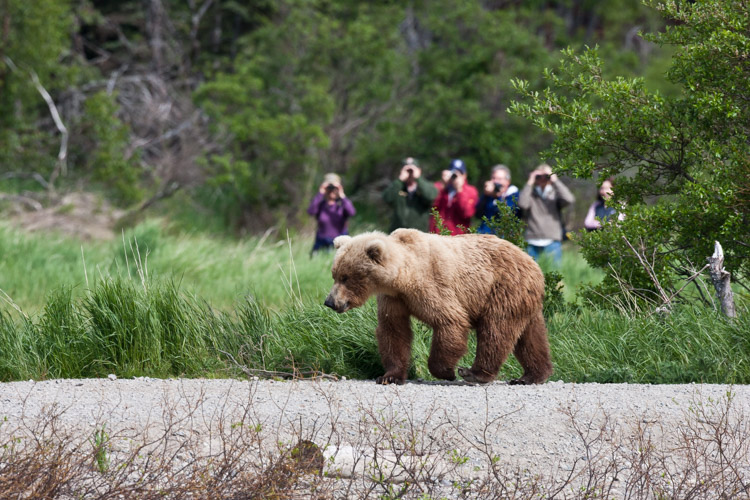
In Katmai National Park at the famous Brooks Falls tourists are inescapable. In this image, I embraced that part of the story of being there.

In Katmai National Park at the famous Brooks Falls tourists are inescapable. In this image, I embraced that part of the story.

Safety first

They backed off, after I shooed them with a wave of the arms, though not far enough. I woke my co-guide, and together we herded them away from camp and down onto the gravel bar below. One of the two young bears, rather than wandering off, decided to push my buttons and walked straight over. When off hiking or away from camp, you always give bears the right of way, but in camp, you can’t do that. Bears cannot learn that camps are places to explore.

Standing on the low bench, I knew that I could not let this mischievous youngster enter our camp. I stepped forward as he approached, right to the edge of the cut bank, and started speaking to the bear in a low steady voice. “I can’t let you up here, you have to back off. Back off. Now.” The bear paused in its approach, then stepped forward again. I raised a can of strong pepper spray, and held it up, ready to fire. The bear took another step forward, and then another until he was just eight feet away.

Hard lesson learned

And that’s when I felt a sudden moment of regret. Not for my behavior around this young, dumb bear, (in that, I knew I was doing the right thing) but for the fact that my camera lay in my tent. This beautiful (if troublesome) beast was so close I could count his whiskers. What a photo-op I was missing! But I pushed that aside, and spoke again, “One more step and you are getting it in the face. Don’t do it”, I said. “I’ll give you a count of three, then you are getting sprayed. One. Two…” before I could say three the young bear thought better of his situation, turned and ambled back to the river, swam across with his sibling, and disappeared.

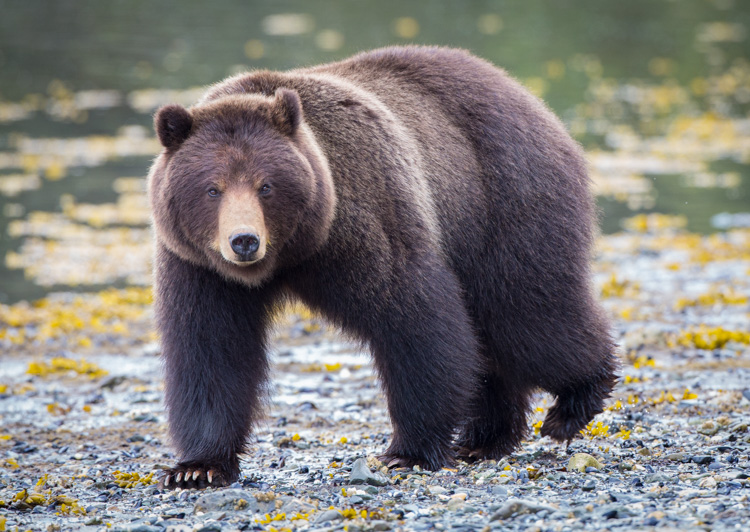
Similar to the story I related above, this bear approached a group of photographers I was a part of on Admiralty Island, Alaska. He came very close, and I regret not taking a moment to show a wider shot with the group of us in the frame.

Similar to the story I related above, this bear approached a group of photographers I was a part of on Admiralty Island, Alaska. He came very close, and I regret not taking a moment to show a wider shot with the group of us in the frame.

Think outside the frame – the moral

In retrospect, as I thought about the images I missed, I realized that it wasn’t the frame-filling portraits of the bear that would have been so spectacular about that moment. It was the story that went with it. Facing the bear down with a can of pepper spray, the bear testing us, and his eventual retreat. That’s where the compelling images were, not in the missed photos of the bear, but in the missed story that went with it.

If I had a camera in that moment with the bear, even if I’d been on the sidelines, I know I would have blown it and gone for the wildlife portraits, missing the much more interesting interaction that was taking place.

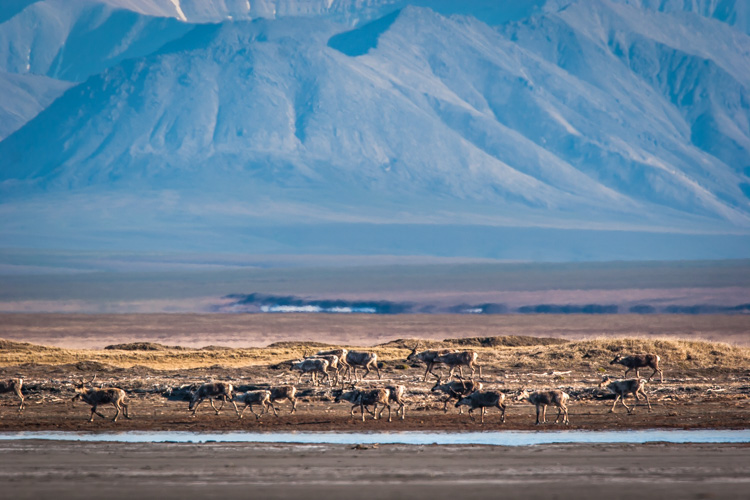
Here a herd of caribou is seen migrating across the coastal plain of the Arctic National Wildlife Refuge in Alaska. This image tells a more important story of movement, landscape, and perspective than a more typical portrait of an animal would.

Here a herd of caribou is seen migrating across the coastal plain of the Arctic National Wildlife Refuge in Alaska. This image tells a more important story of movement, landscape, and perspective than a more typical portrait of just an animal would.

Learn from the best

Take a look at any issue of National Geographic. Many, even most, of images that are selected are storytelling images, not illustrations. The compositions are atypical, often showing the interaction of people or animals within the scene. Those photographers stepped back from a typical composition and explored their surroundings in a way that most of us, myself included, usually forget to do.

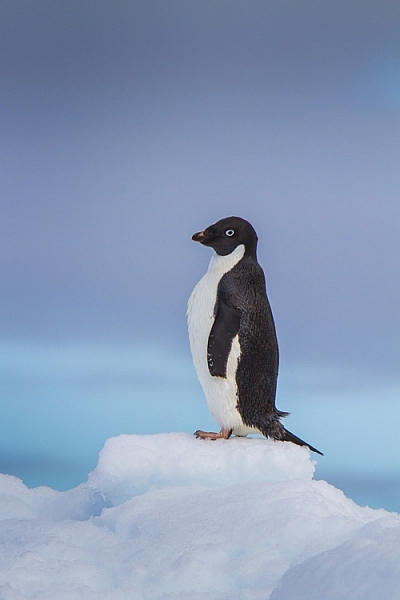
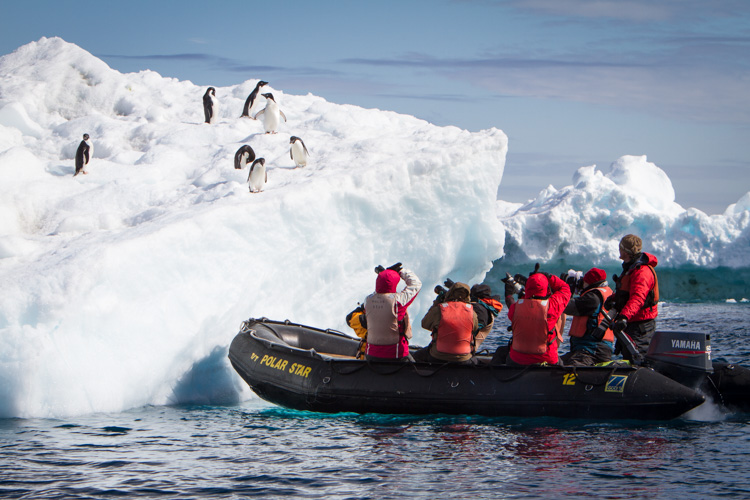
This image of an Adelie Penguin on an iceberg, I made in Antarctica. Getting close to wildlife is easy there, and the following image provides information to see just how easy.

This image of an Adelie Penguin on an iceberg, I made in Antarctica. Getting close to wildlife is easy there, and the following image provides information to see just how easy.

A zodiac pull right up to an iceberg with Adelie Penguins.

A zodiac pulled right up to an iceberg with Adelie Penguins.

Look around

This is an easy lesson to say, a much harder one to perform in the field because the real story is often easy to miss.

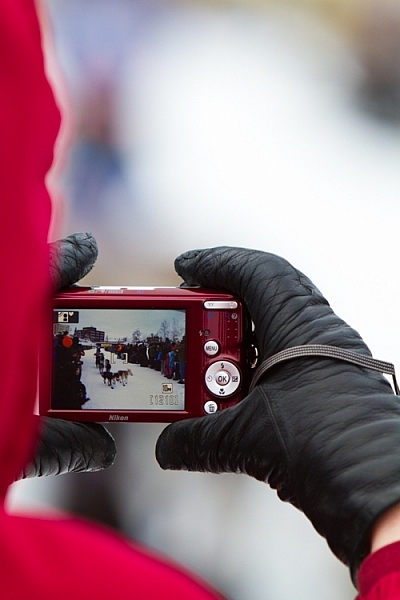
Another example: I was photographing the start of the Yukon Quest sled dog Race in Fairbanks, Alaska, where I live, a few years ago. I’d been concentrating on the passing dogs, the smiling mushers, and been studiously avoiding the crowds of people that surrounded me. At one point a spectator raised a point and shoot in front of my shot, I was irritated, but in that moment I was forced to pause. It clicked, and I realized that the real story was the crowd of mushing fans, out on a cold morning to watch the race. I changed my composition and made an image of the spectator’s camera. That shot is much more telling of the experience than any of my previous photos.

Here, the scene of the dog teams seen through a spectator's camera is more telling of the experience of the start of the Yukon Quest.

Here, the scene of the dog teams seen through a spectator’s camera is more telling of the experience of the start of the Yukon Quest.

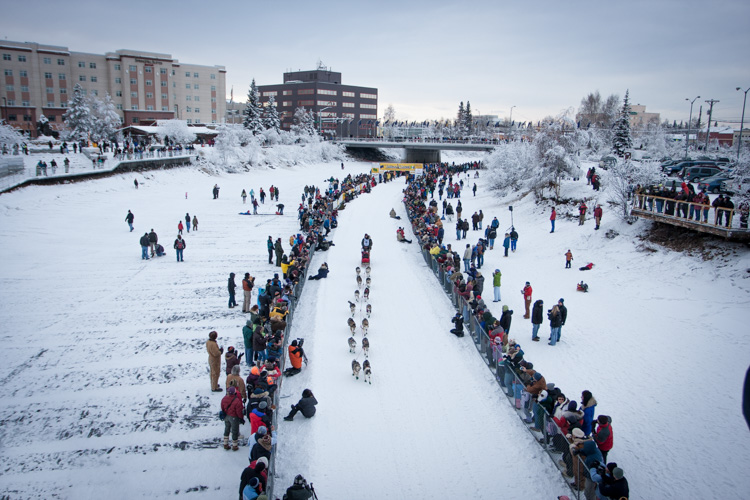
This broad perspective is also an effective way to tell the story, showing the rows of spectators and the buildings of Fairbanks in the background.

This broad perspective is also an effective way to tell the story, showing the rows of spectators and the buildings of Fairbanks in the background.

Sometimes it’s a sudden realization like mine at the mushing race, but often, you have to put some effort into the real story. You need to break away from the scene you think you should be photographing, pause, and look around. Consider not just the scene, but the experience. What are you, or those around you, feeling, seeing, and doing?

Stay open to your surroundings

While being focused on your subject is vital to creating good images, it’s important not to close yourself off too much. Take the time to look around. Literally step away from your tripod, and turn 360 degrees while paying attention. What else is out there? Have you been missing anything as you’ve been staring through your viewfinder? What happens if you back up and show the surroundings?

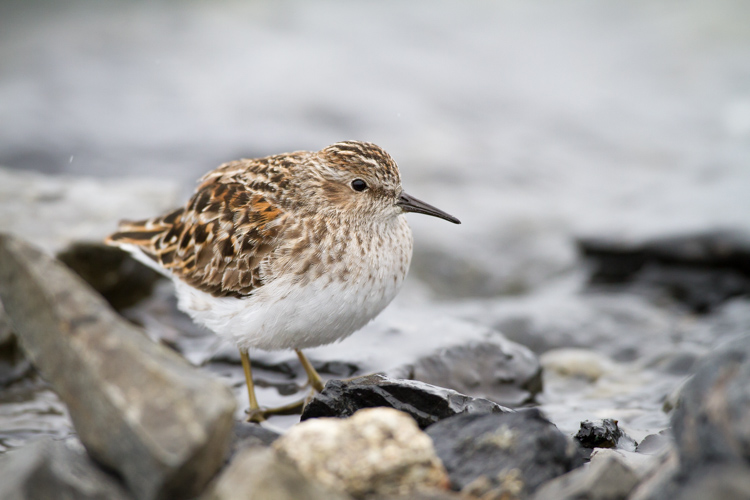
While an image of single bird, in this case a Least Sandpiper is nice portrait, it is more of an illustration than a story.

While an image of a single bird, in this case, a Least Sandpiper is a nice portrait, it is more of an illustration than a story.

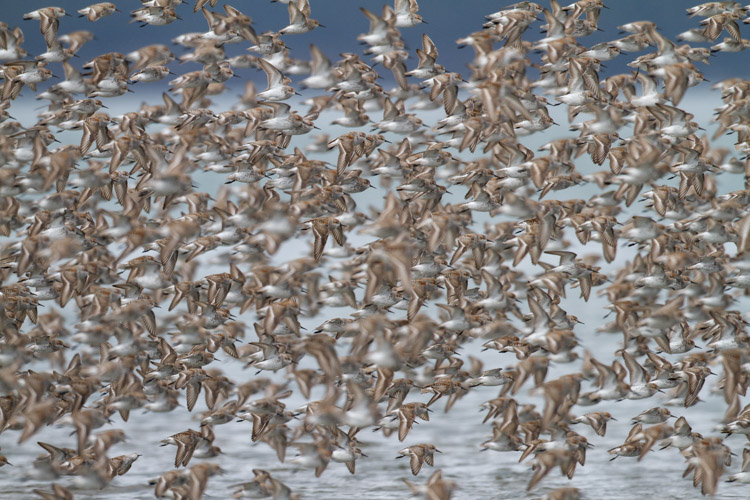
A large flock of shorebirds, when compared to the single-bird portrait, is more telling of the lives of the birds, and their epic migrations.

A large flock of shorebirds, when compared to the single-bird portrait, is more telling of the lives of the birds, and their epic migrations.

Think in terms of stories

That real story can be told within a single image, but there are also other strategies. Though an entire article is required to discuss the photo essay (5 Tips for Creating a Photo Essay with a Purpose), I do want to note that you can always think through your story using a series of images. This is also a good way to make the classic images you strive for while simultaneously capturing the storytelling ones as well.

Telling the real story is important not just for the quality of our images, but also for the quality of our experience. These storytelling images may not have the flash and glamor of a bear portrait or a sprinting sled dog, but it will help your viewers know the story, and that really is where the real excitement lies.

googletag.cmd.push(function() {
tablet_slots.push( googletag.defineSlot( “/1005424/_dPSv4_tab-all-article-bottom_(300×250)”, [300, 250], “pb-ad-78623” ).addService( googletag.pubads() ) ); } );

googletag.cmd.push(function() {
mobile_slots.push( googletag.defineSlot( “/1005424/_dPSv4_mob-all-article-bottom_(300×250)”, [300, 250], “pb-ad-78158” ).addService( googletag.pubads() ) ); } );

The post How to Go Beyond the Hero Image and Get Real Storytelling Photos by David Shaw appeared first on Digital Photography School.


Digital Photography School

 
Comments Off on How to Go Beyond the Hero Image and Get Real Storytelling Photos

Posted in Photography


The Secret to Finding the Hero Angle in Food Photography

27 Jun

Have you ever stared at a photo of a food dish, and instantly thought that something looked a little odd? Like the shot wasn’t quite bang on, but you can’t quite put your finger on what it is? Chances are the dish hasn’t been shot using its hero angle.

Rachel Korinek Food Photographer DPS Hero Angle 12

You can have the freshest ingredients, the maddest styling skills, and be able to tame ever changing natural light, but if your angle isn’t complimentary to the food you’re shooting – you’re missing out on the full potential of creating a powerful food image.

Never fear though, the secret to finding the hero angle in food photography is simple. Just approach the shoot with two things in mind; the height of the dish and/or the props, and the layers contained in them.

The Height of Your Dish and Props

The height of food basically falls into two categories; tall or flat.

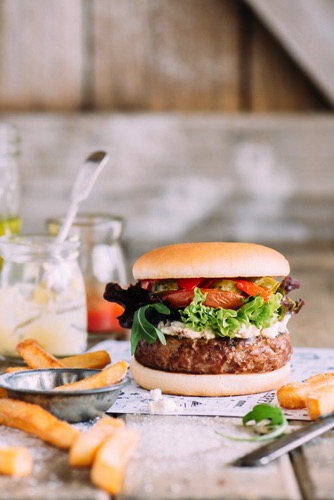
Tall subjects are simply anything with height – like a bundt cake, an ice cream cone, or a burger with the lot. For tall subject you will usually default to shooting somewhere between a 45 degree angle to straight on. Going beyond 45 degrees can sometimes limit being able to see the full dish and layering.

Flat subjects are simply anything whose width is inherently larger than its height – like a tart, a cookie, or a pancake. For these types of subjects, default to shooting somewhere between straight above and a 75 degree angle. Going too close to 45 degrees will also accentuate their flat qualities.

Rachel Korinek Food Photographer DPS Hero Angle 8 Rachel Korinek Food Photographer DPS Hero Angle 5

But what about everything else? What about soup, salad, or how about liquids? I am so glad you asked, because this is where the fun starts.

There are quite a few foods that are dependant on serve-ware. A burger or cake can hold their own, but liquids, soups, salads, and puddings cannot. Which category these guys fall into is dependent on the food styling prop in which they are presented.

Take soup for instance, is it being served in a bowl, or is it a fancy cold soup served in a tall shot glass? The salad, is it served on a plate or a large glass bowl? What sort of holder is the liquid in; tall, short, opaque? Is it in a flat tray because you’re about to freeze it and turn into granita?

Oh the possibilities are endless! But remember, they all fall into two categories, so you’ve got a 50/50 shot of getting it right. I’m pretty sure you’ve got this.

The Layers in Your Dish and on Set

There are two things to consider when thinking about layers in food photography. The layers present in your food dish and the layers present on set.

Layers in a dish are the number of visual components in a recipe. The classic example is a burger with seven layers, bun, meat patty, cheese, sauce, slice of tomato, lettuce, bun. Or a layer cake with seven layers, cake, jam, cream, cake, jam, cream, cake. So to get the best food photography shots, you’ll want to choose an angle that exposes these layers in their best light.

Rachel Korinek Food Photographer DPS Hero Angle 6 Rachel Korinek Food Photographer DPS Hero Angle 7

Layers on set are the number of elements or props that you have on your set (props) on top of one another. For example, napkin, plate, and garnish would be three layers and would appear on top of one another. I don’t count the food/recipe as a layer as it is the subject and will always be present. If the prop layers are an important part of telling the food story, you’ll want to make sure your angle captures those elements too.

Putting it all Together

Now that you’ve thought about the height of your dish and the layers, you can marry those two, in order to figure out your hero angle. Let’s look at some examples.

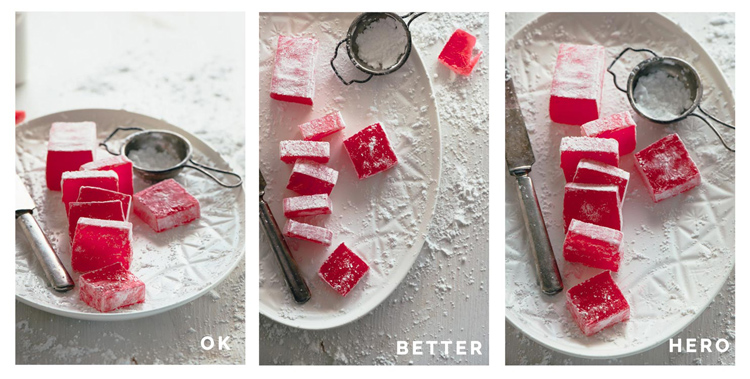
This is a little game I like to play called; Okay, Better, Hero. There is nothing wrong with any of these shots I’m about to show you per say, but there can only be one hero, right? That’s what we’re aiming for, so let’s dive right in.

Turkish Delight (a flat dish without layers)

Rachel Korinek Food Photographer DPS Hero Angle 1

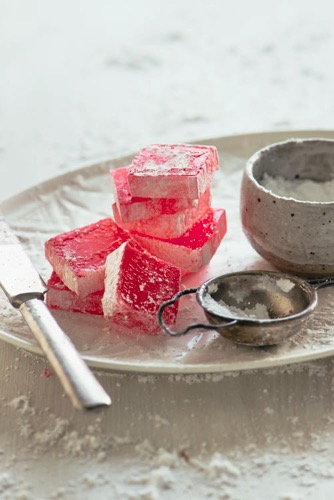
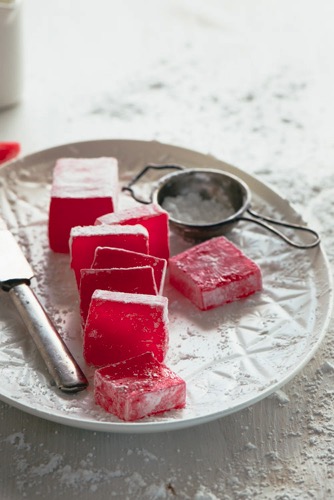
I shot this Turkish delight with a 105mm micro (macro) lens, at a 25 degree angle, overhead, and 75 degree angle respectively.

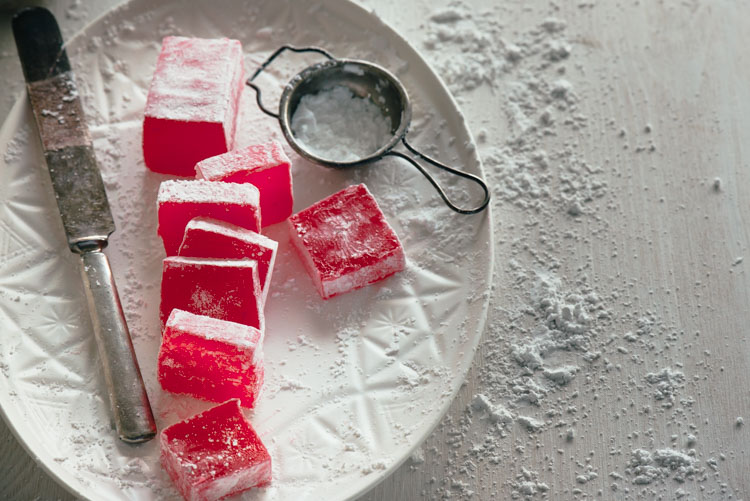
Because this is such a flat dish, you may expect that the overhead angle would be the most flattering. But really the 75 degree shot is hero angle, here is why. It is so close to overhead, yet allows you to capture the gorgeous light coming through the Turkish delight which adds to the richness of its colour.

25 degrees also captures the colours, but accentuates the flatness of the dish, and detracts from the overall feel.

Rachel Korinek Food Photographer DPS Hero Angle 11
Horizontal variation, shot at the same angle.

The Burger (tall dish with layers)

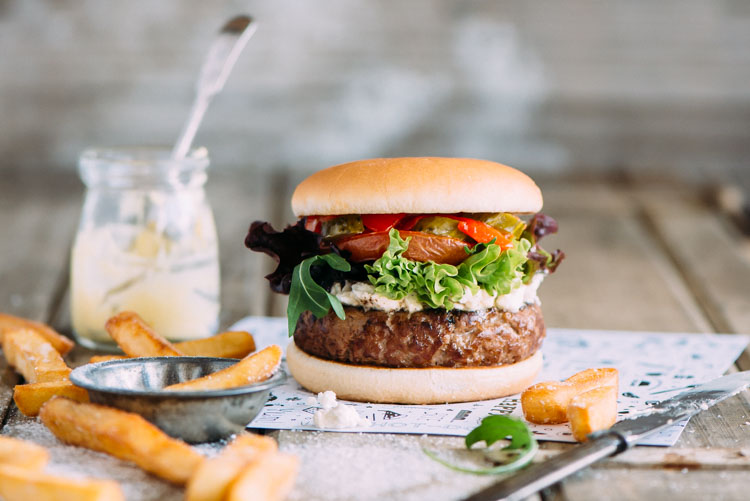
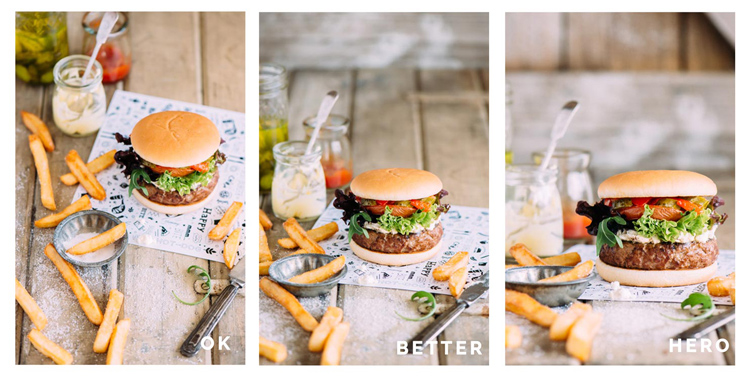
I shot this burger with a 105mm micro (macro) lens, at a 45 degree angle, 25 degree angle, and straight on respectively.

Rachel Korinek Food Photographer DPS Hero Angle 4

The hero angle is the one shot straight on, because it allows the viewer to focus on all the delicious layers, and elongates the height of the burger which you naturally expect to be a tall food. Your mind thinks, the taller the burger, the more ingredients, and the more bang for your buck you get.

The 45 degree angle doesn’t give you enough context of the layers, and the 25 degree angle makes the top burger bun look too flat.

Kale Pesto (tall dish without layers)

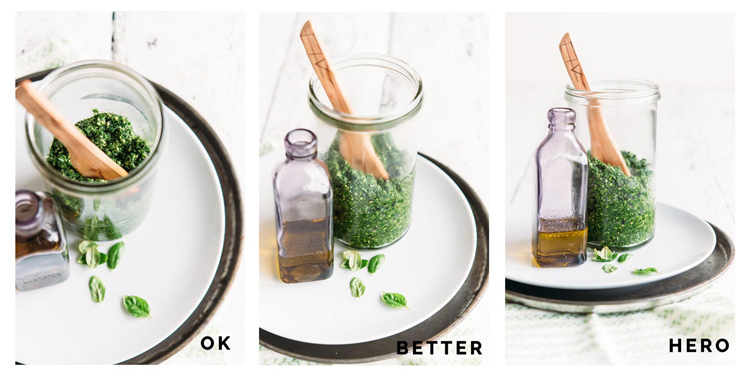
I shot this with a 60mm micro (macro) lens, at a 85 degree angle, 45 degree angle, and straight on.

Rachel Korinek Food Photographer DPS Hero Angle 3

Pesto, being a sauce or condiment, is dependant on the serve-ware in which it is presented. As you want to show that there is enough of the pesto to coat an entire family size dish of pasta, it was shot in a tall glass. This also complimented the tall spoon, and bottle of oil in the shot as props.

The 45 degree angle is workable, but straight on one is the hero angle here. It allows for an overall sense of how the dish is being served and stored, while still allowing the viewer to comprehend its texture.

If you want to get into the nitty gritty, the 45 degree angle allows for reflection of the plate to show up in the glass, hindering the ability to see the texture of the pesto.

Egg and Bacon Muffins (flat with layers)

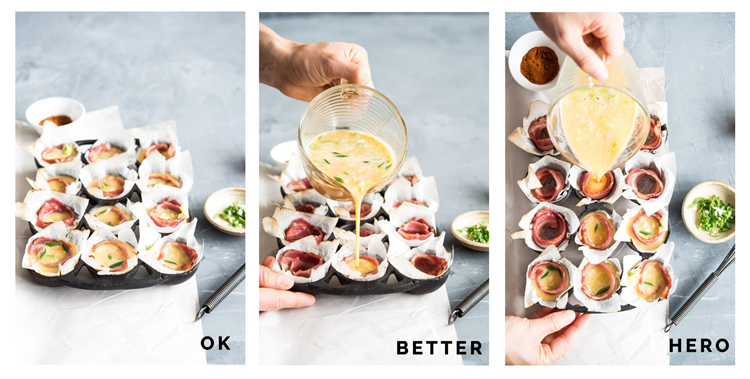
I shot this with a 60mm lens, at a 45 degree angle, 30 degree angle, and from directly overhead.

Rachel Korinek Food Photographer DPS Hero Angle 2

Here the 45 degree angle accentuates the flatness of the dish, but does show the layers. The 30 degree angle is better, but it doesn’t show the full layers of the dish as much as the overhead shot does. That’s why the overhead shot is the hero angle in this case. It allows you to see right into the dish, while still getting the action of the egg filling being poured into each compartment.

Putting Finding That Hero Angle Into Practice – 5 Take Aways

Next time you’re doing a food photography shoot, put the following into practice:

  1. Thinking about whether your dish falls into the tall or flat category.
  2. Are there layers in your dish, or through your use of props on set?
  3. For tall foods, especially those with layers, explore angles between straight on and 45 degrees.
  4. For flat foods, explore angles between overhead and 75 degrees.
  5. Take a few shots with different angles outside the recommended ones above, and look for the OK, better, hero shots.

Do you have a favourite angle for food photography that you can always rely on? Please share in the comments below, as well as your food shots.

googletag.cmd.push(function() {
tablet_slots.push( googletag.defineSlot( “/1005424/_dPSv4_tab-all-article-bottom_(300×250)”, [300, 250], “pb-ad-78623” ).addService( googletag.pubads() ) ); } );

googletag.cmd.push(function() {
mobile_slots.push( googletag.defineSlot( “/1005424/_dPSv4_mob-all-article-bottom_(300×250)”, [300, 250], “pb-ad-78158” ).addService( googletag.pubads() ) ); } );

The post The Secret to Finding the Hero Angle in Food Photography by Rachel Korinek appeared first on Digital Photography School.


Digital Photography School

 
Comments Off on The Secret to Finding the Hero Angle in Food Photography

Posted in Photography


Hero shot: Rollocam introduces Hercules pocket motorized dolly

26 Apr

$ (document).ready(function() { SampleGalleryV2({“containerId”:”embeddedSampleGallery_8306737849″,”galleryId”:”8306737849″,”isEmbeddedWidget”:true,”standalone”:false,”selectedImageIndex”:0,”startInCommentsView”:false,”isMobile”:false}) });

A pocket-sized motorized camera dolly that runs on an AAA batteries is in the works from US company Rollocam. Hercules is programmable and consists of a three-wheeled body with a tripod screw and a single press-button controller. It’s designed to drive in straight lines or arcs, and is suitable for making movies as well as time-lapse sequences. A collection of accessories also allow it to rotate for 360° panoramas, while different sized wheels alter the speed at which it can travel. Two of the wheels are hinged to allow the user to set a curved path of travel, and the whole unit disassembles for packing away.

Rollocam says the device can support a 10lb weight, and that it can travel at seven speeds, from 2.5 to 20.3cm/1 to 8in per second, according to the wheels fitted. In time-lapse mode it can be set to travel between 0.13 and 12.7mm/0.005 and 0.5in, across eight settings, with intervals of 1 to 60 seconds.

Launched as a Kickstarter project last year the campaign raised over $ 380,000, and as the funds increased additional features were added – such as the use of magnets on the metal Rollocam track to stop the dolly and send it back in the other direction. The company says it is also now working on a camera trigger that synchronizes with the traveling dolly so that time-lapse frames can be recorded in an automated move-shoot-move sequence.

The basic Hercules costs $ 125 on a pre-order deal, and the premium kit with extra wheels, a panorama plate and a mounting plate for heavier cameras costs $ 249. For more information visit the Rollocam website.

Articles: Digital Photography Review (dpreview.com)

 
Comments Off on Hero shot: Rollocam introduces Hercules pocket motorized dolly

Posted in Uncategorized