RSS
 

Posts Tagged ‘Hard’

Choosing Hard and Specialty Modifiers

03 Sep
We tend to start out using soft light at a 45-degree angle because it is an easy fix, and it’s hard to go seriously wrong doing that.

But there are all kinds of light mods, and often choices other than default soft ¾ light can be more interesting. My favorites are snoots, grids and ring adapters.


Snoots are like little tunnels you attach to your flash to block part of the light beam. Snoots are not rocket science — we are just blocking some light. And cardboard works just fine to create tight zones of light that you can use to create something like the photo above.

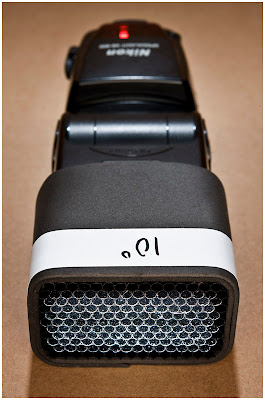
For grid spots, which work like snoots but have a much more beautiful fall-off to the edge of the light, you can DIY them out of straws but it is a pain in the ass and not really worth the effort for many. My advice? Get a Honl eighth-inch grid and be done with it. They are indestructible, and they fit all speedlights.

I’d nix the velcro mounting system, however. Mod it with elastic for quick changes and you’ll be good to go.
__________

A less expensive (but flash-specific) alternative are the DIY-ish grids from SaxonPC. (Seen above, more info on those here.)

Also in the specialty mod category are speedlight ring flash adapters. They turn your small flash into a donut of light that can give you a beautiful, shadowless look for key or fill. My two favorites here are the Orbis. and the RoundFlash. Both have a very good quality of light. Both have advantages and disadvantages.

For the record, I have owned five different commercial ring flashes (and adapters): Profoto, ABR800, Ray Flash, RoundFlash and Orbis. I use the Orbis more than all of the others combined.

Whatever you do, avoid the Chinese knockoffs of the Ray Flash. They are light-sucking pieces of junk, and are rarely anywhere near color correct. But they are cheap!

If you are that broke, you’ll be better off home-brewing a cardboard DIY ring flash adapter.

NEXT: Cases and Carts


Strobist

 
Comments Off on Choosing Hard and Specialty Modifiers

Posted in Photography


Impossible adds B&W ‘Hard Color’ Limited-edition Instant Film

11 Jul

Instant-print maker Impossible has added a new line to its ‘special’ and ‘limited’ editions with a 600-type film that features a colored frame surrounding the image area. Joining a line of tinted emulsions and animal-skin-printed frames, B&W 600 Hard Color features a warm high-contrast emulsion with frame surrounds in eight different vivid colors. Read more

Articles: Digital Photography Review (dpreview.com)

 
Comments Off on Impossible adds B&W ‘Hard Color’ Limited-edition Instant Film

Posted in Uncategorized


[MODIFIED] Disk Usage Utility – Display a Directory Tree Representation of What is Taking Up Hard Drive Space

29 Apr

Find out why your hard drive is running out of space by scanning it with TreeSize Free.

TreeSize Free for Windows can help you determine what is taking all your hard drive space by displaying a directory tree. After selecting a drive or folder for scanning by running the application or selecting TreeSize Free from a folder’s right-click menu, you can change options such as displaying a folder’s size, allocated space, usage percent, or file count. File size can be reported in gigabytes, megabytes, kilobytes, or a combination (“automatic units”).

Other features include sorting files and folders by name or size, showing details of each subdirectory inside a directory tree, and performing filters so only certain paths or files are visible. A report can be printed from the results. Options include forcing the application to only use one thread (if you are performing other CPU-intensive tasks simultaneously), displaying or not displaying compressed files and folders in blue, and choosing the gradient colors used in the background of each folder to represent disk usage….

Read more at MalekTips.
New Computer and Technology Help and Tips – MalekTips.Com

 
Comments Off on [MODIFIED] Disk Usage Utility – Display a Directory Tree Representation of What is Taking Up Hard Drive Space

Posted in Technology


Weak Yen masks hard times as Mirrorless and DSLR sales decline

26 Feb

X-E2.png

Manufacturers are putting on brave faces as compact sales continue their decline and interchangeable lens camera sales fail to shine. Canon, Fujifilm, Nikon and Olympus have all put out their financial results covering the Christmas period, and there’s little to be positive about, with falling sales of interchangeable lens cameras being reported by the industry’s biggest players.

News: Digital Photography Review (dpreview.com)

 
Comments Off on Weak Yen masks hard times as Mirrorless and DSLR sales decline

Posted in Uncategorized


19 January, 2014 – Hard Skills and Soft Skills

20 Jan


Alain Briot. Longtime contributor to Luminous-Landscape changes direction a bit in his essay Hard Skills and Soft Skills. This will be a new series in his essays. Hard skills are factual,technical and quantifiable. Soft skills on the other hand are subjective, artistic and difficult to quantify. Read on to see how these skills are part of the photographic creative process.


We have just published our newest video titled "The Rangefinder: Truth, Mystique & Practice – Leica M240"

In Our Store, do a search for ‘Rangefinder’. For those wishing to purchase it individually, the price is $ 12.50. It is without extra charge for our annual subscribers.


Explore The Land Of Polar Bear – Luminous-Landscape’s Svalbard Workshops this July.  This is a small group workshop and a truly special chance to photograph the Arctic wildlife, especially Polar Bears.


You can win an all-expenses paid photographic expedition to Antarctica, along with air fare from anywhere in the world. The value of this prize is $ 15,000.

The Luminous Landscape wants you to try any of our more than 60 training or travel videos and our new free video player. Each purchase is an entry, and an annual subscription that includes all previous as well as new videos counts as six entries. The winner of a free lifetime subscription is also chosen from each month’s entries.

FIND OUT MORE


The Luminous Landscape – What’s New

 
Comments Off on 19 January, 2014 – Hard Skills and Soft Skills

Posted in News


Blickfang: The Hard Way

19 Nov

Das Leben ist verdammt hart. Aber auch verdammt schön.

So könnte man zusammenfassen, was man in den Bildern von Vitas Luckus sehen kann. Und dass man sie heute überhaupt sehen kann, ist eine große Sache, denn Vitas Luckus war ein „verbotener“ Künstler.

Der litauische Fotograf lebte von 1943 bis 1987, wurde also gerade einmal 44 Jahre alt. Ich weiß wirklich nicht mehr, woher ich den Bildband „The Hard Way“* habe, wahrscheinlich einfach ein glücklicher Flohmarktfund und Spontankauf.

Der Band präsentiert eine Auswahl des fotografischen Lebenswerkes, das vom Künstler selbst noch kurz vor seinem Tod zusammengestellt wurde. Seine Frau hat die Arbeit am Buch danach weiter betreut.

Vitas Luckus hat das Leben in seinem Heimatland Litauen und Ländern wie Aserbaidschan, Estland und Georgien, die er bereiste, in seiner rohen Form festgehalten. Straßenszenen, Freunde und Fremde in ihren Wohnungen. Kinder beim Spielen und Erwachsene bei gesellschaftlichen Anlässen.

Dabei hat er immer versucht, den Ausdruck der absoluten Wahrheit ins Zentrum seiner Bilder zu rücken. Herkömmliche Kompositionen und Gestaltungsrichtlinien hat er gnadenlos über Bord geworfen, denn er sah sie als Hürden auf dem Weg zum wahren Realismus.

Er wollte seine fotografische Sprache perfektionieren. Dieses Ziel verfolgte er hartnäckig und experimentierte sowie übte dadurch mit schier unerschöpflicher Energie. Vielleicht hatte er damit die Energie für sein ganzes Leben schneller verbraucht als andere.

In fact he regarded photography as a laconic language for communicating many things simultaneously. In order to say everything he wanted, he aimed to master it perfectly.

Aber:

The world seemed to open up and speak to him without a medium; it was speech itself. […] The Baltic wind shaking petals and blowing sweepings […] says a lot to those wo can listen. This was a shock to Luckus. It was not he who had something to say to the world – he merely had to listen, and his purified language was only necessary for asking his questions correctly.

Vitas Luckus - The Hard Way © Aileen Wessely

Gemein ist fast all seinen Fotos, dass die Lebensfreude in den Gesichtern die ebenfalls sichtbare Traurigkeit überwiegt. Beides ist wahrzunehmen, oft auch die Härte der Umstände, in denen die Menschen leben. Aber sie lieben ihr Leben von ganzem Herzen.

Sie sind einfallsreich: Einige Männer spielen wie oben zu sehen trotz und mit Krücken Eishockey. Ein anderer Mann lässt sich von einem Handtrockner den Mundraum fönen. Paare tanzen ausgelassen in kargen Räumen. Dreckige Hände verrichten Feldarbeit.

Und fast alle von ihnen lachen in die Kamera. Einige scherzen miteinander. Die Zuversicht quillt aus allen Ritzen, durch die auch der Wind pfeift. Die Lebenslust spricht aus den Zahnlücken, durch die auch das nur selten üppige Essen rutscht.

Vitas Luckus’ Witwe Tanya Luckiene hat dem Buch folgendes Zitat von Jelena Sergejevna Bulgakova vorangestellt, das in Worte fasst, was man in Vitas Luckus’ Fotos sehen kann:

In spite of everything, in spite of the fact that there were dark clouds, horrifying clouds, if you were to suggest that we led a tragic life I would react by saying that we didn’t. It was the most beautiful and buoyant, the most joyful life you can imagine. The world has never seen a happier woman that I was at the time.

So wurde Vitas Luckus von energischen Menschen, dynamischen Situationen und der Lebensfreude der Welt an sich angezogen. Für seine Art, diese Bilder aufzunehmen, gab es nur keinen Raum in der damaligen Kunstszene, weshalb er ins Abseits geriet.

Zu seiner Lebenszeit gab es nur zwei Ausstellungen seiner Arbeiten in Litauen. Seine erste internationale Publikation im tschechischen Magazin „Photography Review“ wurde zum Skandal, sodass die gesamte russische Auflage eingestampft wurde.

Heute gibt es über Vitas Luckus nicht einmal einen deutschen oder englischen Eintrag in der Wikipedia und nur die eine Buchveröffentlichung. So stark wirkt die Unterdrückung der Verbreitung seiner Bilder also immer noch nach. Das sollte sich ändern. „The Hard Way“ ist gebraucht für 10 – 20 € zu haben. Also los.

Informationen zum Buch
„Vitas Luckus, Photographer, Lithuania 1943 – 1987. The Hard Way“
Seiten: 144
Abbildungen: 116, schwarzweiß
Sprache: Englisch
Vorwort von Laima Skeiviene, Biografie, Nachwort von Herman Hoeneveld
Verlag: Edition Stemmle

* Das ist ein Affiliate-Link zu Amazon. Wenn Ihr darüber etwas bestellt, erhalten wir eine kleine Provision, Ihr zahlt aber keinen Cent mehr.


kwerfeldein – Fotografie Magazin

 
Comments Off on Blickfang: The Hard Way

Posted in Equipment


Natural Light: Making the Most of Hard Light

07 Sep

Hard light

In a previous article I explored ways of taking photos in soft light. Today, I’d like to look at the opposite of that, and discuss the idea of taking photos in hard light.

In the earlier piece I wrote about matching the light to the subject. That’s an important concept to understand – especially when it comes to hard light, a type of lighting considered by many photographers to be unsuitable for most types of photography.

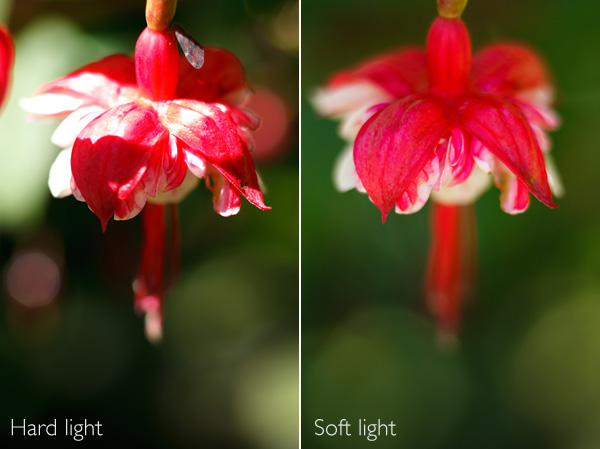
I’m not saying those photographers are incorrect. Hard light doesn’t suit every type of subject, and if you’re trying to take a photo in hard light that you really shouldn’t be taking, then nothing you can do is going to work. Here’s an example from the earlier article:

Hard light

The flower had to be lit by soft light for the image to work. In hard light, there was too much contrast. The light didn’t suit the subject.

What is hard light?

Hard light comes from a light source that is relatively small compared to the subject. It creates strong, clearly defined shadows.

For example, hard light is cast by the sun when it is high in the sky on a cloudless day. The light gets softer as the sun dips towards the horizon at the end of the day. If clouds appear, or the air is hazy or polluted, that may also soften the light.

If you use portable flash you will also know that the light from an unmodified flash unit is very hard. That’s because the light comes from a relatively small light source – the flash head isn’t very big. That’s why photographers use lighting modifiers with flash units, to effectively make the source of the light larger, which makes the light softer. You can read more about using portable flash here and here.

Now, let’s look at how you can make hard light work for you, with some practical examples:

Hard light

I took this photo in Burano, an island near Venice, at around 2.30pm in summer. The light was very hard. But look at the long shadows on the wall of the building. The sun was nearly overhead, and a little to the right. From that position, the light rakes over the surface of the building, picking out the texture (I also used a polarising filter to deepen the colours). Noticing scenes like this, and recognising the photo opportunity, is just a matter of training your eye to see where the light is falling.

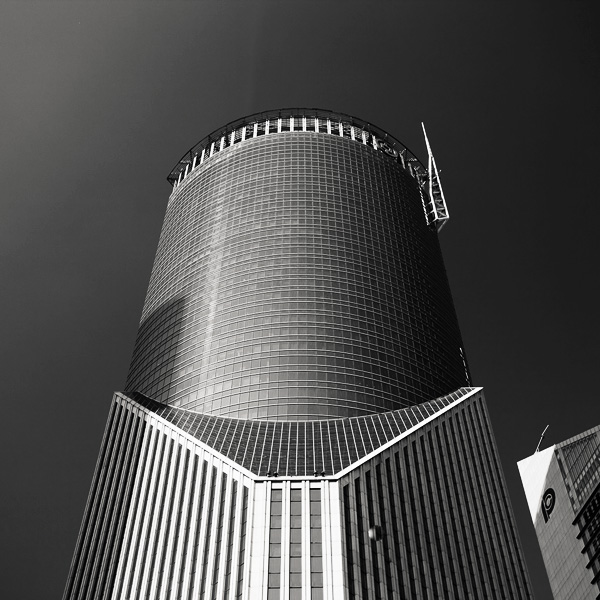
Architecture is an ideal subject when the light is hard. If you are in a city or urban area during the middle of a sunny day, you can often take good photos of the buildings.

Convert to black and white

Photos taken in hard light are often more interesting in black and white than colour. Colour photos may look bland when illuminated by hard light from the overhead sun.

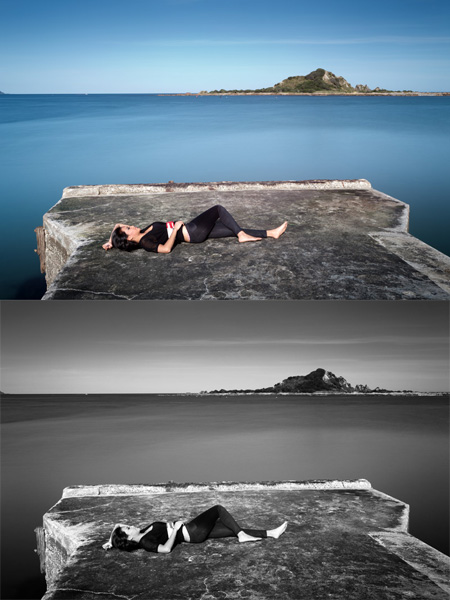
Here’s an example of long exposure photography that I took around 2pm in the afternoon. I used a nine stop neutral density filter to obtain a shutter speed of 30 seconds. It looked a little boring, so I converted it to black and white.

Hard light

Finally, here’s a photo taken at around 2.30pm in the middle of summer:

Hard light

We were on the beach and the light was very hard. There was no way that I could take a portrait using natural light alone. I used an on-camera portable flash unit (itself a hard light source) and used that to overpower the light from the sun. It acted like a powerful fill light, filling in the shadows cast by the sun. Compare that to this portrait (from my article about soft light):

Hard light

Two different types of light, two completely different effects. Bear in mind that hard light plus flash won’t be flattering to everybody, and will generally work better with men than women. Again, it comes back to the idea of matching the light to the subject.

Mastering Photography

Hard light

My latest ebook, Mastering Photography: A Beginner’s Guide to Using Digital Cameras introduces you to digital photography and helps you make the most out of your digital cameras. It covers concepts such as lighting and composition as well as the camera settings you need to master to take photos like the ones in this article.

Post originally from: Digital Photography Tips.

Check out our more Photography Tips at Photography Tips for Beginners, Portrait Photography Tips and Wedding Photography Tips.

Natural Light: Making the Most of Hard Light


Digital Photography School

 
Comments Off on Natural Light: Making the Most of Hard Light

Posted in Photography


Cloud Storage: Why an External Hard Drive is Not Enough

11 Aug

A contribution from Lori Peterson

IMAGE 01A few years ago I shot a beautiful, heartfelt wedding. The bride’s grandmother had just gotten out of the hospital after a terrible fall. Her grandfather was not doing well, but he was managing the care of her grandmother in addition to taking care of himself. They made it a huge family occasion and created a beautiful, family oriented evening.

Celebrations continued to the later hours in the evening and then the bride and groom left to spend their first few days as man and wife. It was a beautiful, perfect day. The images I shot in camera looked just amazing and seemed to really capture the essence of the day.

I went home and loaded all the images onto my computer and then backed them up to my external. I edited a few images so that the bride and groom could have some sneak peeks of their wedding photographs to share with their friends and family.

A few days later my husband noticed that my computer was not displaying the photograph slideshow that I have my computer set to play. We sat down and looked at my computer together. While we were sitting there all of the images started disappearing off my computer. I thought “Well, at least they are on my external!” I apparently got too hopeful way too fast. My external and my hard drive crashed at the same time. While we sat there trying to figure out what was going on my computer’s hard drive and the external hard drive were dying….and wiping away all of the images they had.

We have a friend who works for a computer repair store. We called him. We immediately took over the external and left it waiting and hoping for a phone call and for him to say that they recovered the images. I couldn’t even think straight, it was the only thing on my mind.

Our phone finally rang, but he was not able to give us good news. Our external hard drive had crashed and wiped out all of the data on it. Nothing was able to be recovered. Not one image. I was frantic. I now had to call the bride and tell her that all of the images from that day were gone. All of them, except for their sneak peeks. Those little fragments were all that remained of their day.

That was one of the hardest phone calls I have ever had to make. I wanted to tell them in person, but I honestly felt that setting up a meeting to tell them this would make it worse for them. I picked up the phone and dialed the number. I explained what happened. I apologized profusely. She was disappointed and heartbroken, that much you could tell. She was also understanding and forgiving as well. As it turns out, just a few weeks before their wedding, their own computer had abruptly died. They wanted to get it repaired, but according to their computer technician, there was absolutely nothing they could do to save the computer, the photos, and the documents on the computer. When the computer died, it took all of its information with it, just like mine had done.

At this point refunding her money and offering her the world was on my agenda because I felt awful about the entire situation. I was surprised by how well they took the news. They knew that the situation was not one I created or that they created. It was just a by-product of our relying on our technology to keep everything safe. Sometimes it fails and lets us down.

On that day I vowed that would never, ever happen again. That was not a situation I was going to put myself into ever again. This is when I started researching cloud storage. I wanted something that immediately backed up my computer. I wanted a safety net. The external was just not a big enough safety net for me anymore.

You can get overwhelmed when you are looking for cloud storage by the number of providers available. You should factor in what you are looking to backup. Is it just your computer? What about an external? Photos or documents? Or all of it.

One of the easiest and cheapest options for backing up everything is BackBlaze. For $ 5 a month it will back up one computer and any external plugged into that computer. It will back up everything except your Operating Systems and applications. All your files, photos, and documents will be securely backed up and you can retrieve them in the event of any emergency.
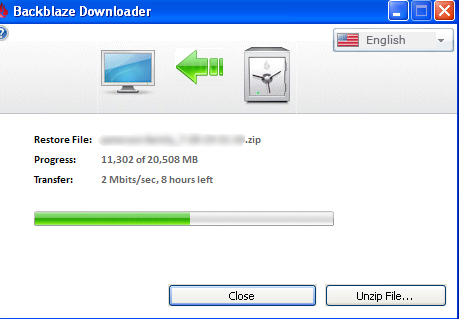
IMAGE 02

Carbonite is another option. For one computer to be backed up their pricing begins at $ 59.99 per year. If you have an external hard drive that you also want backed up they have plans that begin at $ 99.99 per year.

Dropbox, Copy, and Google Drive all have free plans for anywhere from 15-18 GB of storage. Depending on your needs they have other plans that begin at $ 4.99 per month for 100GB and they go up from there. Dropbox does have an add on for $ 3.99 a month that lets you have unlimited undo history for those moments when you accidentally delete something and realize that you really should have kept it.

Whatever your situation, having a backup plan is always a good idea. If you are a photographer, it’s even more important to have that peace of mind not only for you but for your client as well. There are pricing structures and plans to fit every budget and every need, because sometimes technology fails. Don’t have to make that phone call like I did. Back your photos and documents up and then back them up to cloud storage. It’s inexpensive and well worth it to invest in some sort of extra storage.

Lori Peterson is an award winning photographer based out of the St. Louis Metro Area. Her dynamic work ranges from creative portraits to very unique fine art photography. Lori’s work can be seen at www.loripetersonphotography.com and also on her blog at www.loripetersonphotographyblog.com. You can follow her on Facebook at https://www.facebook.com/LoriPetersonPhotography.

Post originally from: Digital Photography Tips.

Check out our more Photography Tips at Photography Tips for Beginners, Portrait Photography Tips and Wedding Photography Tips.

Cloud Storage: Why an External Hard Drive is Not Enough


Digital Photography School

 
Comments Off on Cloud Storage: Why an External Hard Drive is Not Enough

Posted in Photography


New School ICON Hard Top FJ40 just completed!

24 Nov

This video shows you around a great hard top FJ40 ICON we just finished crafting for a client. Please review and enjoy! www.icon4x4.com 818-785-1728

 
Comments Off on New School ICON Hard Top FJ40 just completed!

Posted in Nikon Videos


Awesome File Back Up and Recovery for Photo Editing – Thermaltake BlacX Duet Hard Drives Dock

03 Jul

artoftheimage.blogspot.com – If you’re like me, you’re always looking to add more hard drives for photo storage and photo editing. The Thermaltake BlacX Duet eSATA and USB2.0 Hard Drives Dock is one AWESOME little gem! I have the single hard drive version, but just picked up the DUET which features spots for two hard drives in a single dock! It hooks up via eSATA for SUPER FAST speed, and also via USB 2.0 for greater compatability with devices that don’t have eSATA.