RSS
 

Posts Tagged ‘HandsOn’

Hands-on with the Nikon D5

13 Jan

Hands-on with the Nikon D5

Back in November Nikon teased us by announcing that a new D5 DSLR flagship camera was in development. Fortunately, we didn’t have to wait long for ‘development’ to turn into ‘product.’ At CES 2016 we got the chance to meet the D5, up close and personal.

At its core is a brand new 20.8MP FX-Format CMOS Sensor and Nikon’s EXPEED 5 image processor. It uses a new autofocus system with 153 AF points, 99 of which are cross-sensor. Compared to the D4s, those AF points are spread out to cover a greater portion of the frame. The D5 also features updated AF algorithms. In terms of speed, it is capable of 12 fps bursts with AF and 14 fps with the mirror locked-up.

The new AF system, coupled with the camera’s 180k-pixel RGB metering sensor, should also result in improved subject tracking capabilities. The metering sensor has doubled in resolution compared to the 91k-pixel sensor in the D4s. The D5 is also capable of 4K UHD video capture (albeit with a 3 minute limit and a nearly 1.5x crop factor).

As you would expect, the D5 feels like a brick in your hand. Maybe two bricks, actually. That’s not a complaint. It’s what we’ve come to expect from Nikon’s flagship cameras.

Hands-on with the Nikon D5

The D5 looks very similar to its predecessor, the D4s. In fact, in terms of their dimensions, the two cameras are exactly the same. Don’t be fooled by the familiar looks, though, the D5 is an entirely different camera beneath its magnesium alloy body.

For one, it is now capable of native ISOs ranging from 100-102,400 and expandable from ISO 50-3,280,000, (the upper ISO is Hi-5). We shot a couple images at ISO 102,400 using the D5 on display in Nikon’s booth at CES. And though we were unable to take the images with us to download and inspect closer, our initial impressions of the highest native ISO offered on the D5 are positive.

Hands-on with the Nikon D5

In-hand, the D5 feels exactly like a professional camera should; it is well-weighted and offers plenty of grip to wrap your hands around, with ample control points. Three of those points are custom function buttons that can be set to one of numerous functions by the user (a few other buttons remain re-assignable as well). And like Nikon’s flagship cameras before it, the D5 has a built-in vertical grip with a dedicated shutter and dual control dials.

Because this camera is designed for use by the world’s top photojournalist and sports photographers, in what could often be less-than-deal conditions, it is built extremely tough. The entire body is constructed from magnesium alloy and it is fully weather-sealed. The shutter is also rated to 400,000 actuations.

Hands-on with the Nikon D5

The 3.2-inch 2.36 million-dot LCD is a serious upgrade over previous models and other cameras typically sporting a 1.2 million-dot LCD. Images on it look really crisp. The LCD is also touch-sensitive, though according to Nikon PR, it can not be used to select AF points when shooting stills using the optical viewfinder (a feature available on both the D5500 and now the D500). We were told that the D5’s touch capabilities are largely gear toward video shooting.

A new, programmable Fn-3 button has been added to the back of the camera, where the info button previously was on the D4s. Aside from that change, the back of the D5 is largely the same as the D4s, which is a good thing. The AF sub-selector joystick remains in the same exact spot (right below the AF-On button). In use we’ve found the sub-selector to be the most efficient way to select an AF point, compared to using the somewhat slower-to-use D-pad. And we are happy to see the sub-selector also make its way to the Nikon D500.

One design tweak that may go unnoticed can be found in the area around the viewfinder: it is now removable. Simply slide it up. Nikon engineered the camera this way to make it easier to attach a rain hood. According to Nikon PR, the company is currently developing a hood specifically for the D5, which will likely be announced in the coming months. 

Hands-on with the Nikon D5

It’s nice to see the ISO button move to a more logical spot, right by the shutter, on top of the camera. Previously, many photographers would remap the movie record button to ISO, but the presence of a dedicated ISO button will be a boon for one-handed operation.

The mode button has also moved (to make way for the ISO button) to the top left. The video record button has also migrated a bit further out on the grip, making it easier to hit with your shutter finger while your eye is to the finder. 

Hands-on with the Nikon D5

The D5 comes in two flavors, either with dual CF or dual XQD slots. For those seeking to make the most of the D5’s speed capabilities, the XQD version is going to be the better option – we’ve heard reports that with fast XQD cards, the camera will really take 200 Raw shots before slowing down its shooting speed. Still, many shooters, especially pros, have invested heavily in CF, and it is nice to see Nikon continuing to support CF in its higher-end offerings.

Users also have three different size options for saving raw files. Raw sizes medium and small result in 12-bit lossless compress NEF files, while full size Raw images can be shot in up to 14-bit lossless uncompressed NEF files. We’ll be curious to check if bit-rate drops at the highest shooting speeds: for example, we found 6fps on the D7200 to cause a small loss in dynamic range due to 12-bit readout.

As with all dual slot Nikon DSLRs, users can elect to shoot Raw+JPEG and have their Raw files save to a separate card from their JPEG files (or not).

Hands-on with the Nikon D5

The D5 gains an additional Function button on the front of the body (to the left of the lens mount) compared to its predecessor, the D4s. In hand, we found the new Fn-2 button to be very easy access whether you are gripping the camera vertically or horizontally. This addition of this button makes more customizable one of the most customizable DSLRs in the industry.

Speaking of the gripping the camera, the D5 is extremely comfortable to hold: the the grip is quite large, and very deep. With a camera this size, a solid grip is paramount to the overall ergonomics of the camera. 

Hands-on with the Nikon D5

There are plenty of ports on the D5, including a Nikon 10-pin, USB 3.0, 1/8″ headphone, 1/8″ microphone, HDMI C and LAN ports. 4K video can be outputted over HDMI, which is one way around the 3 minute time limit for internal 4K capture. That said, at this time, we do not know how good the signal being sent is – particularly whether or not the video is truly sampled at 8 or 10 bits per color channel.

Hands-on with the Nikon D5

Here you can see all of the ports, once the rubber seals have been pulled back. USB 3.0 is a bump up from the USB 2.0 port on the D4s. Wi-Fi functionality can be added to the D5 via WT-5A and WT-4A Wireless Transmitters.

Hands-on with the Nikon D5

Compared to a (relatively) normal-sized head, the D5 is enormous. Then again, when it comes to this class of camera, the large size is expected. Here you can see just how easy it is to access that new Fn-2 button with the camera held vertically.

Hands-on with the Nikon D5

The D5 uses the same EN-EL18a battery as its predecessor. It is CIPA rated to last 3780 shots per charge, meaning you likely won’t be reaching into your bag often for an extra battery. From our experience, that should be more than enough shots to get most users through a full day of shooting, and then some.

Articles: Digital Photography Review (dpreview.com)

 
Comments Off on Hands-on with the Nikon D5

Posted in Uncategorized


Top 5: Hands-on with Nikon D500

08 Jan

Top 5: Hands-on with Nikon D500

CES 2016 has turned into a big event for Nikon thanks to the release of the company’s new D500 and D5 DSLRs. We were able to get some hands-on time with both cameras, and it’s fair to say that we’re impressed with what we’ve seen so far.

Fans of Nikon’s performance-oriented APS-C cameras have been imploring the company for years to release an update to the well regarded D300s. (OK, maybe ‘imploring’ is the wrong word – shouting, demanding, and even begging may be more accurate.) The wait is finally over, and Nikon has come through with the long anticipated D500, a camera sure to appeal to those who have waited so long.

Standout features include a 20.9MP APS-C (DX) sensor, a significantly overhauled autofocus system, 10 fps shooting, and 4K/UHD video recording.

Top 5: Hands-on with Nikon D500

One of the obvious questions many have asked is ‘What happened to the D400?’ Nikon tells us that since this camera shares much of the same underlying technology and performance characteristics with the D5 that it made more sense to align the names of the two cameras as well. Bad news: if you’ve been waiting for the D400 it looks like you’re not going to get it. Good news: you can get a D500 instead. 

As you would expect, the D500 feels very solid in your hands and there’s no doubt this camera is intended to be a workhorse. The top and rear of the camera are magnesium alloy, while the front is made of carbon fiber. Nikon claims it has the same level of weather sealing as the D810.

Video shooters will be excited to learn that the camera shoots 4K/UHD (3840×2160) video at up to 30p internally. Additionally, it can output uncompressed video over HDMI (we’re still waiting for confirmation of the bitrate) and it’s even possible to do both simultaneously should you require it. To keep your shots steady, the camera includes 3-axis (horizontal, vertical, rotation) electronic VR in video that should work with any lens, but that particularly benefits when combined with optical VR in certain Nikkor lenses to yield incredibly stabilized video footage – with X, Y, roll, pan and tilt corrections in total. These 5-axes of stabilization we tend to see more in competitive mirrorless offerings, such as in the E-M5 II, or with the slew of 1″-type compacts we saw recently from Sony and Canon. So it’s encouraging to see in a more dated form factor like the DSLR. We haven’t yet had a chance to test this last feature in person but it’s definitely on our to-do list as soon as we get a chance.

In addition to the HDMI port for uncompressed video out, there are also microphone and headphone jacks as well as a USB 3.0 connection.

Top 5: Hands-on with Nikon D500

The bright viewfinder provides 100% coverage at 1.0x magnification and is a good match for the new 153-point AF system. In fact, it’s the same AF system that you’ll find on the D5. Since the AF system was developed for a full frame camera it provides coverage that extends almost to the edges of the frame. Of those 153 AF points, 99 are cross-type for enhanced precision. 

Another feature Nikon added to the camera (which we really want to test when we get hold of a production sample) is ‘Auto AF Fine-Tune.’ It’s designed to use the live-view image on the sensor to auto calibrate the phase detect autofocus system for any particular lens. We’ve been looking forward to this type of feature for years since in theory should greatly ease the process of micro-adjusting lenses.

Top 5: Hands-on with Nikon D500

The D500 gives you much, though not all, of the performance of the D5 in a smaller, crop-sensor body. For example, it can shoot 10 fps with a 200 shot raw buffer. To do this it utilizes the same EXPEED 5 image processing engine as the D5. In our hands-on test we were impressed with continuous shooting. Even the sound of the shutter firing at 10 fps is somehow satisfying, and that 200 shot raw buffer is… awesome.
Top 5: Hands-on with Nikon D500

The D500 includes dual card slots, including one XQD and one SD card slot. If you want to get the maximum performance out of the camera you’ll want to use XQD cards, which have higher write speeds (and come at a higher cost).

To get photos off the camera you can, of course, copy files from the card(s). However, the D500 also includes Nikon’s new SnapBridge technology that utilizes a bluetooth connection between the camera and a smart device, such as a mobile phone. Once paired, SnapBridge provides an ‘always on’ connection to the camera and supports features such as automatic upload of images and the ability to embed GPS data from a phone into EXIF data. Also, thanks to NFC it’s possible to perform ‘tap to connect’ procedure to pair a device. This is similar to the system Samsung has implemented on recent NX cameras and we’re looking forward to using SnapBridge on the Nikons.

Top 5: Hands-on with Nikon D500

The rear control layout should feel very familiar to Nikon users – there aren’t a lot of surprises here. The 3.2 inch touch screen is very bright and works well. We had no problem using it even under the bright, glaring lights of convention center booths and demo areas.

Top 5: Hands-on with Nikon D500

Similar to the rear control layout, the top plate should feel familiar to high-end Nikon users.

The D500 also includes a built-in time-lapse feature. The camera can create 4K time-lapse sequences in-camera, and can utilize auto-ISO to create smooth transitions during capture.

Top 5: Hands-on with Nikon D500

MB-D17 battery

The D500 is powered by Nikon’s EN-EL15 battery, the same one used on many other Nikon models including the D750, D810, and D7200. We’re always happy to see this type of consistency across models as we hate having to carry a bag full of mismatched batteries around with us.

On the D500 this battery can power the camera through 1240 shots according to CIPA standards. In addition to the internal battery, Nikon has also produced a grip. The MB-D17 battery/grip provides an extra battery and duplicated controls for vertical shooting.

Top 5: Hands-on with Nikon D500

The 3.2 inch, 2.4 million dot rear touch screen extends from the body and flips up and down – a great feature for getting those low to the ground or overhead shots. It’s both bright and sharp.

Top 5: Hands-on with Nikon D500

Unlike the D300s, the D500 does not feature a built-in flash, making it one of the few features to disappear from the D500’s feature set, compared to its nominal predecessor. While we’re disappointed to see the flash omitted, Nikon assures us that they’ve made the change in order to achieve the maximum level of durability and weather sealing. Of course, the D500 is compatible with Nikon Speedlights, including the newest radio controllable flash, the SB-5000.

Overall, we’re very impressed with what we’ve seen in the D500. It may have been a long wait for those wanting to upgrade from the D300s, but we think the wait was worth it. This is a camera that has the technical chops and rugged build that should provide top-notch performance and stand up to almost anything you can throw at it. It’s also a great companion body for those who use a D4s – or maybe even a new D5 – for times when small size or long telephoto reach is critical.

The D500 is scheduled to ship in March and will be available for $ 1999.95 body only or $ 3069.95 with Nikon’s 16-80mm F2.8E ED VR lens.

Articles: Digital Photography Review (dpreview.com)

 
Comments Off on Top 5: Hands-on with Nikon D500

Posted in Uncategorized


Hands-on with the Panasonic Leica DG Vario-Elmar 100-400mm F4-6.3 lens

08 Jan

Hands-on with the Panasonic Leica DG Vario-Elmar 100-400mm F4-6.3 lens

Panasonic has just announced the Leica DG Vario-Elmar 100-400mm F4-6.3 Leica DG Vario-Elmar lens for its LUMIX G range of Micro Four Thirds System cameras. We’ve gone hands-on with the high-end, super-telephoto zoom that sports the longest focal length available for the MFT system. 

Hands-on with the Panasonic Leica DG Vario-Elmar 100-400mm F4-6.3 lens

With a whopping 35mm-equivalent focal length range of 200-800mm, the Leica DG Vario-Elmar 100-400mm affords the longest focal length available for the MFT system. This should make it a boon for photographing birds, wildlife, and landscapes – without breaking your back due to weight and size.

Hands-on with the Panasonic Leica DG Vario-Elmar 100-400mm F4-6.3 lens

In fact, as you can see here, the 100-400mm Leica lens is quite hand-holdable, which is remarkable for the 800mm equivalent reach the lens provides. Naturally, the small size and weight do come at a cost: with an equivalent maximum aperture of F8 and F12.6 on the 200mm and 800mm equivalent ends, respectively, subject isolation and noise performance on a MFT camera won’t be the same as what you might get with a full-frame 800mm F5.6 lens. Which, by the way, would run you $ 13k and weigh your pack down an extra 10 pounds. This lens weighs a modest 985g, or ~2.2 lbs in ‘Merican.

Hands-on with the Panasonic Leica DG Vario-Elmar 100-400mm F4-6.3 lens

Can you spot the difference from the last image? It’s subtle, but in this shot we’ve extended the integrated shift-away lens hood that reduces sun glare. The hood just snaps back and forth, which makes it quite convenient – no need to take the hood off, flip it around, and reattach it.

Additionally pictured here is the Unlock <–> Lock ring which allows you to lock the zoom, so the barrel doesn’t extend inadvertently.

Hands-on with the Panasonic Leica DG Vario-Elmar 100-400mm F4-6.3 lens

Here’s the lens at its shortest, zoomed out to 100mm. Focal length demarcations are provided for 100, 150, 200, 250, 300, 350, and 400mm.

There’s a focus range limiter which allows you to limit focus to subjects only beyond 5m. A direct AF/MF switch allows you to shut off AF, and a Power O.I.S. switch allows you to engage or disengage the the image stabilization system. If you’re using a DMC-GX8 you can use both the optical image stabilization in the lens and the built-in sensor-shift stabilization to provide incredibly effective vibration reduction.

Hands-on with the Panasonic Leica DG Vario-Elmar 100-400mm F4-6.3 lens

Here we’ve extended the lens to its maximum telephoto setting: 400mm. While the lens extends quite a bit at this setting, it still remains very hand-holdable. Impressively, the lens sports a durable, gapless construction so unwanted dust or light rain shouldn’t damage it. As such, the lens is described as weather sealed.

Hands-on with the Panasonic Leica DG Vario-Elmar 100-400mm F4-6.3 lens

A convenient, two-part tripod mount is integrated into the lens. It’s a rotatable mount that allows for quick and easy swapping between landscape and portrait orientations. Unlock the tripod mount screw with your left hand and…

Hands-on with the Panasonic Leica DG Vario-Elmar 100-400mm F4-6.3 lens

… speedily turn the mount 90º for portrait orientation shooting.

Hands-on with the Panasonic Leica DG Vario-Elmar 100-400mm F4-6.3 lens

Under the hood, this lens packs some impressive features. Among them: a 9-blade aperture for smooth out-of-focus highlights, and a 240 fps drive AF linear motor with high speed and precision for fast focus. With the correct lens profiles, we hope Panasonic cameras with Depth from Defocus (DFD) technology will be able to focus this lens quickly for fast-paced shooting.

Focus is also silent, which means you can use autofocus during filming without the focus drive ruining your soundtrack.

Hands-on with the Panasonic Leica DG Vario-Elmar 100-400mm F4-6.3 lens

And that’s not all. The lens is constructed of 20 elements in 13 groups, with one aspherical and a number of extra low dispersion elements to ensure minimal flaring and other optical artifacts. The lens also boasts an impressive minimum focus distance of 1.3m, yielding 0.25x magnification (0.5x equivalent).

The lens, which is made in Japan, will be available in mid-April for $ 1799.99.

Articles: Digital Photography Review (dpreview.com)

 
Comments Off on Hands-on with the Panasonic Leica DG Vario-Elmar 100-400mm F4-6.3 lens

Posted in Uncategorized


Far-reaching: Panasonic Lumix DMC-ZS100 / TZ100 hands-on preview

07 Jan

Panasonic Lumix DSC-ZS100 / TZ100 basic specs

Panasonic is using CES 2016 to announce the latest two models in its series of travel zoom cameras (known as the TZ series in most of the world or ZS in North America). While one of them is a logical replacement for the existing models, the TZ100/ZS100 is a genuinely more advanced thing altogether, squeezing a 1″-type sensor into a body only slightly larger than we’ve become used to from cameras in this category.

Traditionally travel zooms have used small sensors (~29mm2) to allow the inclusion of long lenses in a small overall package. Impressively, the ZS100 fits a much larger sensor (~116mm2) while still offering a useful zoom range and sensibly-sized form factor. The larger sensor offers better image quality, which has prompted Panasonic to offer a maximum ISO of 12800 on the ZS100, with an extended setting of 25600.

ZS100 / TZ100 Lens

The ZS100 has a 10X zoom, offering a 25-250mm equivalent reach – just enough range to classify it as a proper superzoom. And, in all honesty, probably enough for most applications for many people: we suspect the push beyond 80x zooms has as much to do with being able to boast a bigger number on the store shelves than because contemporary consumers find themselves needing so much more zoom than they used to.

The ZS100’s lens starts out as a very respectable F2.8 maximum aperture but very quickly slides towards the F5.9 that you’re limited to at full zoom. By 50mm equivalent it’s already dropped to F4 (F11 equiv., given the crop factor), and it’s at F5.1 (F13.9 equiv.) by the time you get to 100mm equivalent – this isn’t about to offer you shallow depth-of-field portraits. The camera does use Panasonic’s Depth-from-Defocus system that interprets subject distances based on an understanding of its lens characteristics – we’ve found this system to support surprisingly effective at subject tracking on previous cameras.

Viewfinder specs

The ZS100 has a 1.166M-dot equivalent viewfinder. That word ‘equivalent’ makes clear that the finder features a field-sequential design, updating red, green and blue information one after the other, rather than including separate color elements at each ‘pixel’ position. The 0.2″ finder is pretty small which the optics don’t do much to rescue. On the plus side it does include an eye sensor to allow automatic switching when you come to use it.

Using the viewfinder pulls the battery life down to 240 shots per charge from the otherwise pretty typical 300 shots per charge.

Higher-end ambitions

It’s not just the sensor that suggests the ZS100 is the most serious travel zoom in the series so far. It features two full control dials, a full-sized dial on the top plate of the camera as well as a ring around the outside of the lens. It also gets a touchscreen (something even the flagship LX100 doesn’t have) that can be used either just to point-and-shoot or to reposition the the AF point while shooting through the viewfinder.

In addition, the ZS100 has four customizable buttons, along with five touchscreen slots that can be customized for more fast access.

One thing that detracts from its higher-end ambitions is the camera’s construction: the camera feels rather lightweight an insubstantial. This is only an impression, of course: we have no way of knowing how durable the build quality is at this point. What’s certain, though, is that it doesn’t have the reassuring heft that we usually encounter in cameras costing this much.

4K capabilities for both movies and stills

As you’d expect from Panasonic, the ZS100 offers 4K video recording and a host of features based around it. As well as the video recording itself: UHD capture at up to 30p (25p for the TZ version), the camera offers a range of photo features derived from the video feed. 

There’s the now-familiar 4K Photo mode of course, which records short clips of video so that you can grab individual frames from it, including an option that captures the 30 frames before and after you hit the shutter. Then there’s post-shot focus, which shoots video while racking focus from the nearest to the further object it can find in the scene, so that you can choose the perfectly focused shot. The ZS100 is the first Panasonic camera to have a dedicated button for the mode.

4K Live Cropping

New to the ZS100 are two as-you-shoot video options that benefit from the camera’s 4K capabilities. The first is the option to crop a 1920 x 1080 region from 4K video then produce a stabilized pan across the rest of the 4K frame. The other gets the camera to zoom in on a 1920 x 1080 region of the frame, as the video runs (akin to the ‘Ken Burns effect’). These effects are easily achieved in most high-end editing software but their inclusion in the ZS100 means they can be generated in-camera and incorporated into video clips cut together using less expensive or free software.
Wi-Fi

Just to top it all off, the the ZS100 includes Wi-Fi and in-camera Raw conversion, allowing images to be fine-tuned before passing them off to your smart device. Panasonic’s ‘Image App’ allows remote control of the device and all the other things you’d expect of a contemporary connected camera.

The only thing that’s missing is an NFC antenna – between the cost of the hardware and the fact that Apple won’t let iOS owners utilize NFC for anything so frivolous as camera connection, Panasonic chose to use on-screen QR codes to communicate the necessary connection credentials to other devices.

A more conventional offering

Alongside the ZS100/TZ100, Panasonic has also announced the ZS60, which will be known as the TZ80 outside North America. This model is much more in keeping with the travel zoom models Panasonic has built before (a subset of the market it pioneered).

The ZS60 uses a small 18MP CMOS sensor, allowing it to pack a 24-720mm equivalent zoom into a small package. The downsides are that it’s never a terribly fast lens (F3.3-6.4, or F18-35 in equivalent terms) and it loses the ZS100’s large thumb dial on the top plate, making do with a smaller combined dial/four-way controller. Beyond this, the features it offers are broadly similar to the ZS100 (including 4K video capture), just with a lower maximum ISO setting and no electronic shutter mode. It will sell for around $ 450.

Panasonic ZS100 / TZ100 in context

It’s been two-and-a-half years since Sony introduced the first compact with a 1″-type sensor and redefined what is possible from a compact camera. Since then, as you might expect, the number of 1″-type compacts have continued to expand. Up until now it’s been possible to choose from pocketable cameras with short zooms or much larger cameras with more reach, what there hasn’t been is something offering a little of both. The ZS100 finally fills this gap: a small camera with a big sensor and a long zoom. The cost is that rapidly dropping aperture as you zoom, of course.

The small, field sequential viewfinder is the other other compromise that stands out on the ZS100 but that seems more likely to hit the $ 699 price point, rather than just a size concern. To put this price in perspective, it’s the same as the launch price of Canon’s G7 X, $ 100 less than the viewfinder-touting Canon PowerShot G5 X and Sony Cyber-shot DSC-RX100 Mark III, all of which have considerably shorter (but brighter) lenses.

Articles: Digital Photography Review (dpreview.com)

 
Comments Off on Far-reaching: Panasonic Lumix DMC-ZS100 / TZ100 hands-on preview

Posted in Uncategorized


Hands-on with the Miggo Splat Flexible Tripod

15 Dec

I’ll admit that the inside of my camera bag can yield some interesting surprises. Sometimes they are slightly less interesting objects, like half eaten apples and business cards for people I don’t remember.

More often, however, the items are far more practical (I guess apples can be considered practical) such as colored gels, diffusers, and waterproof camera covers. Another handy little gadget I often roll around with is a small GorillaPod. Although it is useless for supporting my hulking DSLR, it does come in handy for off-camera flash placements and shooting with a GoPro.

Since I’ve been using this little tripod for years, I jumped on the opportunity to take GorillaPod’s new competitor, the Miggo Splat for a spin.

What is the Miggo Splat Travel Tripod?

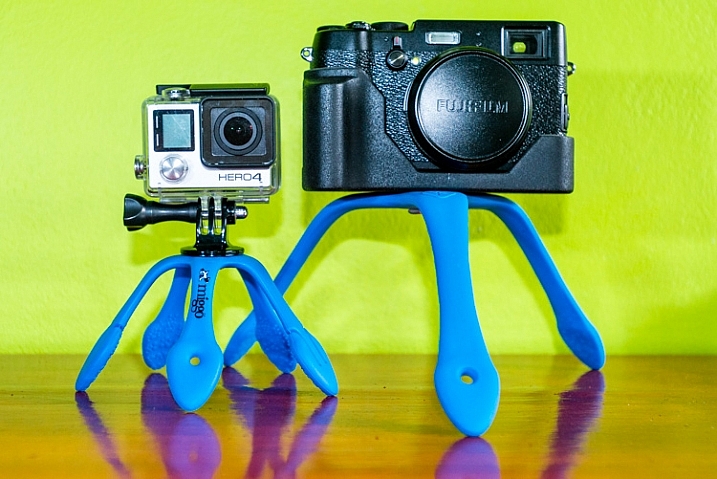
The Splat Flexible Tripod, a recently released product from a newly established (2014) company called Miggo, is similar to a GorillaPod but has flat, flexible, rubber-covered metal legs – opposed to the ball-and-socket setup that GorillaPods utilize.

the miggo splat tripod

The Miggo Splat is a portable tripod with flexible metal legs covered in rubber.

At the time of writing, Miggo has three options of the Splat Flexible Tripod available: one for DSLRs with three legs ($ 25), a mirrorless version and an Action cam (GoPro) version both with five legs (both are 10.99 on Amazon.com). Although I only have the DSLR and action cam versions for review, the specifications of the mirrorless and action camera versions appear identical on Miggo’s website.

  • Maximum load is 500 grams/1.1 lbs for the Splat Flexible Tripod for Go-Pro and Action cameras, and the Splat Flexible Tripod for P&S and Mirrorless Cameras (so if your mirrorless system is more than 1.1 lbs opt for the DSLR version)
  • Maximum load is 1200 grams/2.6 lbs on the Splat Flexible Tripod for DSLR Cameras

First Impressions

I immediately liked the idea of the Miggo Splat. Sometimes the GorillaPod needs too much tweaking to get all the ball-and-sockets lined up.

Although they are not heavy (75 grams/0.16 lbs for the action cam, 111 grams/0.24 lbs for the DSLR version), both of the tripods seem to be very solid, intended to last a while. I did wonder if you were to bend the legs in the same direction many times, how long it would take for the metal to weaken and break. However, shortly thereafter I learned that they offer a five year warranty so that put my worries at ease.

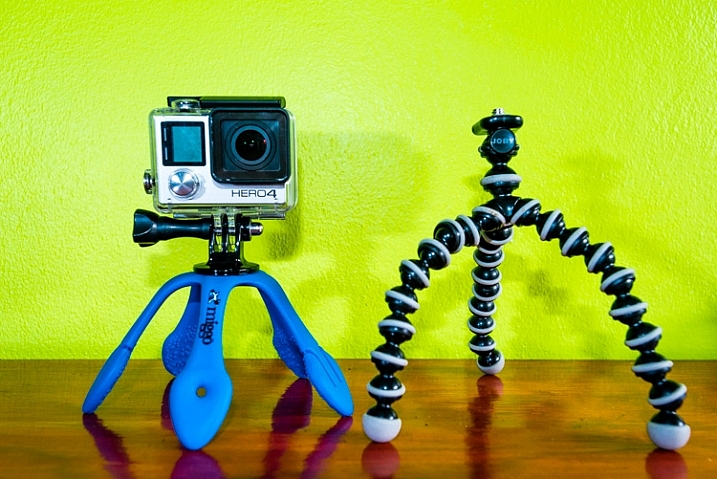
the splat beside a gorillapod

The Splat Flexible Tripod for Go-Pro and Action cameras, shown beside the GorillaPod equivalent.

I had two other immediate concerns about the Splat: the legs on the action cam version seemed a little short, and the rubber coating didn’t seem very sticky, which may allow it to slide around too easily.

I did like the addition of a hole at the end of one of the legs which enables you to hang it from a nail, stick, etc., or move the mounting screw and place the camera on that arm. Two feet on the action cam version have two small tabs that can be used for further creative placements.

In the Field

Mounting the cameras on the tripods, I was disappointed that there is no quick release, just a threaded screw. The DSLR Splat has a little hinged ring on the screw head to aid in attachment, but the Action Cam version leaves you fumbling around for a coin or key as a makeshift screwdriver to affix the camera.

GoPro and Action Camera Splat

The Splat Flexible Tripod for Go-Pro and Action cameras comes with a standard GoPro mount with female threads to enable you to attach the camera to the tripod since GoPro doesn’t provide one for you (seriously GoPro???). The disappointment here is that it is only a simple swivel and not a 3-way adjustment so it can be a bit of a pain to get level shots. I would be surprised if Miggo didn’t introduce a small ball head for their tripods in the near future – it would be immensely more versatile with one.

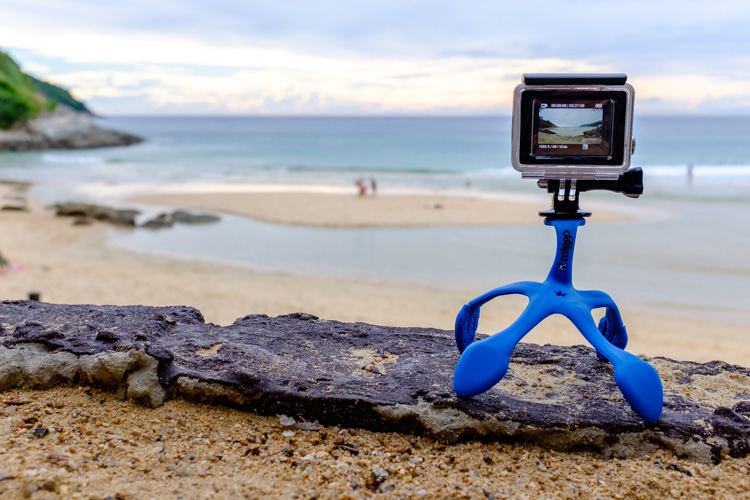
To circumvent the problem of not having a ball head, you can mount the camera on the end of one of the arms. This works pretty well with the action cam, as the leg is short and you have more of them, and the camera is light. The other advantage is the ability to have the camera protrude forward of the tripod so to avoid capturing the tripod in images, due to the extreme wide angle of view with these cameras. However, curving the leg creates a nice little spring so if there is any movement, or even a moderate breeze, the camera bounces around.

miggo splat action cam version

You can mount the camera at the end of one of the Splat’s legs to level it.

Having five legs is definitely the way to go; any less and the Splat would take a serious hit in practicality. It’s a bit tricky to get a firm attachment while wrapping the legs around objects. I tried to mount the GoPro on the handlebars, and elsewhere, of my motorcycle but the metal springs outward slightly when trying to wrap tight and the top-heavy setup slides around.

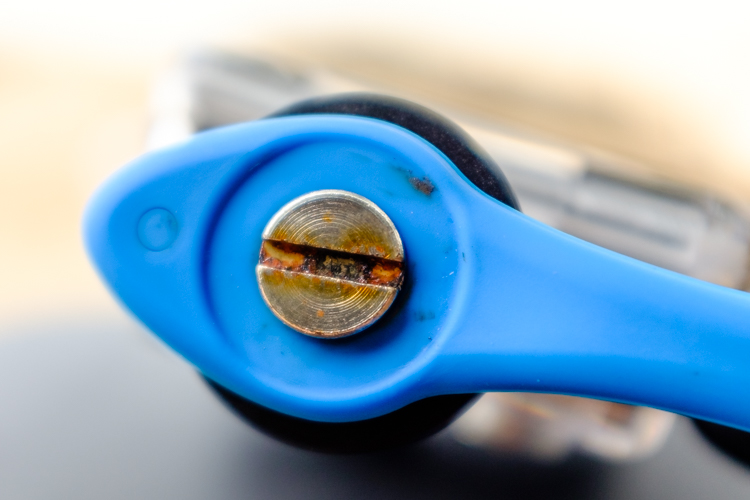
Folding the legs all together under the camera creates a nice handle for getting more stable videos. As such, I used the Splat in this fashion while going out for a snorkel and it does help greatly. Unfortunately, the attachment screw (made from brass according to their website) rusted immediately.

rust on the miggo splat

Apparently the Splat isn’t designed to be submerged in salt water.

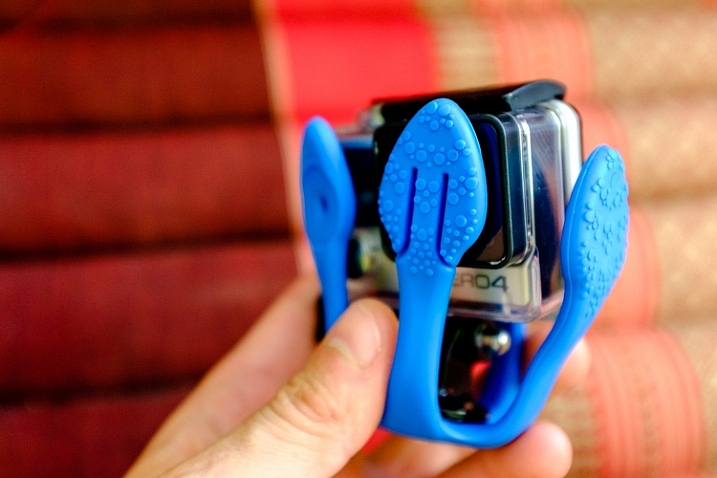
Folding the legs the opposite way encapsulates the camera adding a layer of protection. I assumed this to be a gimmick but it proved to be one of the best features of this gadget.

DSLR Splat

As soon as I laid eyes on this tripod I knew they screwed up only giving it three arms.

First of all, if you try to mount the camera on the end of the arms (there is a hole to accommodate the mounting screw or to hang the tripod off of a nail) it is very difficult to stabilize the camera and it just bounces around or the arm slowly bends.

the miggo splat attached to a tree

Although it’s uses are limited, the DSLR Splat can come in handy.

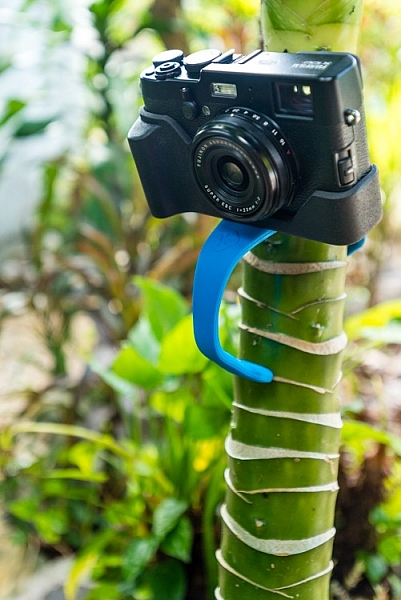
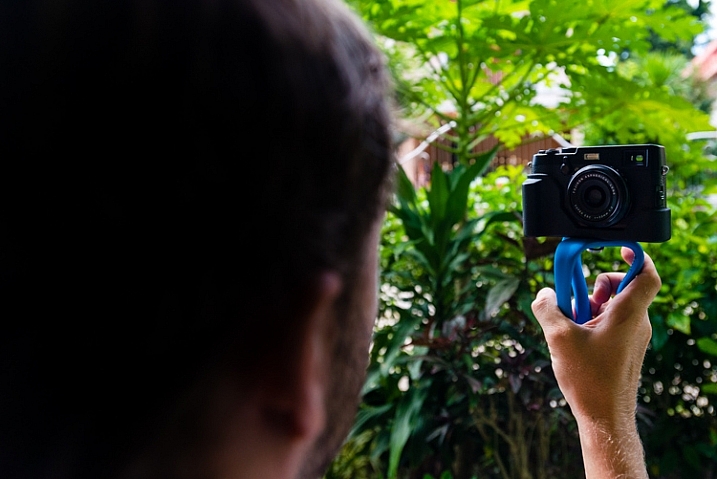
Since my DSLR is too heavy for this version of the Splat, I took it for a spin with my Fujifilm X100T, which it handled with ease. Again though, with only three legs and no ball head, it took way too much fumbling around in most cases to get a well-framed shot, while keeping the camera level and stable. However, it is a good compact, lightweight, and sturdy option to tote along for selfies, to get sharper images, for low light shots, and for HDR or time-lapse. It slides perfectly into the back of my camera bag where I don’t even notice it.

the miggo splat for selfies

The Splat can be contorted into a useful handle.

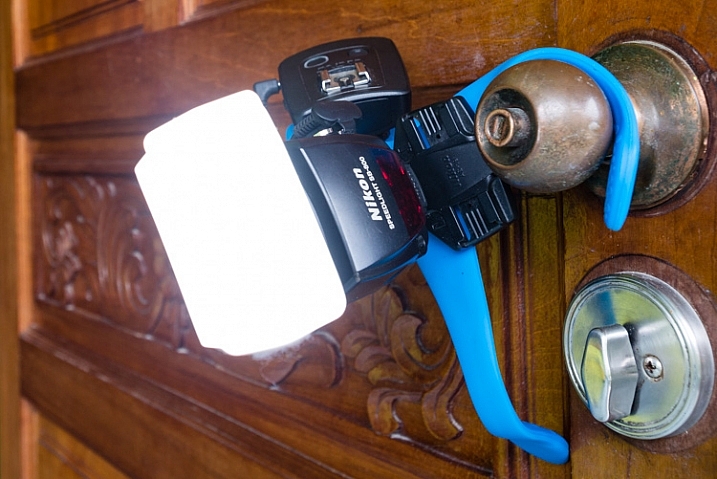
As I had presumed, for my needs this tool would prove way more useful to support off-camera lighting. My largest speedlight (Nikon SB-900), with a wireless trigger, easily fit within the weight capacity of the Splat.

the miggo splat holding a speedlight

I found the DSLR Splat far more useful for creative speedlight placements.

It also doubles as a way to simply keep equipment off the ground where it is dusty, muddy, or wet.

Conclusion

With the addition of accessories to enhance the usefulness of these tripods, they will be very cost-effective, quality tools to add to your gadget bag.

As it stands I feel that the action cam version is the better of the two for actually taking pictures or video. I could easily see leaving my GoPro attached to the Splat most of the time. It’s light, unobtrusive, and protects the lens.

the miggo splat protecting a gopro lens

The Splat doubles as protection for your camera.

The DSLR version I find fairly useless for actual photography but everyone’s needs vary. If you want something inexpensive, light, and simple, it’s a good option for the price. However, if you want a convenient means of expanding your creative off-camera lighting techniques, I definitely recommend the Splat.

Does the Miggo Splat Flexible Tripod seem like the kind of accessory that you would find useful?

Ratings:

  • Splat Flexible Tripod for Go-Pro and Action cameras: 4.5 STARS
  • Splat Flexible Tripod for DSLR cameras: 2.5 STARS

googletag.cmd.push(function() {
tablet_slots.push( googletag.defineSlot( “/1005424/_dPSv4_tab-all-article-bottom_(300×250)”, [300, 250], “pb-ad-78623” ).addService( googletag.pubads() ) ); } );

googletag.cmd.push(function() {
mobile_slots.push( googletag.defineSlot( “/1005424/_dPSv4_mob-all-article-bottom_(300×250)”, [300, 250], “pb-ad-78158” ).addService( googletag.pubads() ) ); } );

The post Hands-on with the Miggo Splat Flexible Tripod by Jeremie Schatz appeared first on Digital Photography School.


Digital Photography School

 
Comments Off on Hands-on with the Miggo Splat Flexible Tripod

Posted in Photography


Hands-on with Canon’s new PowerShot G5 X, G9 X compacts

24 Oct

Canon’s new PowerShot G5 X and G9 X offer 1-inch sensors in compact, easy-to-use bodies. The G9 X is similar in to Canon’s popular PowerShot S-series, while the G5 X takes the guts of last year’s G7 X but with much more enthusiast-friendly ergonomics. We got our hands on both new models this week at the Photo Plus Expo in New York. Read our first impressions

Articles: Digital Photography Review (dpreview.com)

 
Comments Off on Hands-on with Canon’s new PowerShot G5 X, G9 X compacts

Posted in Uncategorized


Big and fast: Hands-on with Zhongyi 135mm F1.4 Speedmaster

24 Oct

Chinese manufacturer Zhongyi optics has announced a new lens, the stupendously large Zhongyi 135mm F1.4 Speedmaster. The company is aiming to make less than 100 units, and expects the lens to appeal to specialized stills photographers and filmmakers. We got up close and personal with a prototype this week at the Photo Plus Expo show in New York. Read more

Articles: Digital Photography Review (dpreview.com)

 
Comments Off on Big and fast: Hands-on with Zhongyi 135mm F1.4 Speedmaster

Posted in Uncategorized


20:20 vision: Hands-on with Sigma’s 20mm F1.4 ‘Art’

23 Oct

Sigma has grown its ‘Art’ lineup of prime lenses again, with a new 20mm F1.4 for Canon, Nikon and Sigma mounts. The new 20mm F1.4 DG HSM | Art  is designed for full frame DSLRs, and Sigma claims that the 20mm F1.4 is the result of new production technologies including a 59mm double aspherical element. The new 20mm will go on sale from November priced at £849.99/$ 899.99, and we just got our hands on a sample at the Photo Plus Expo in New York. Click through for some first impressions

Articles: Digital Photography Review (dpreview.com)

 
Comments Off on 20:20 vision: Hands-on with Sigma’s 20mm F1.4 ‘Art’

Posted in Uncategorized


A lot to Leica? Hands-on with the Leica SL (Typ 601)

21 Oct

Last year Leica entered the mirrorless ILC market with its T (Typ 701). And now, just in time for the PhotoPlus Expo later this week in New York the company is going big – and we mean big – with the SL (Typ 601), a full-frame mirrorless model for enthusiasts with a high credit limit. Read more

Articles: Digital Photography Review (dpreview.com)

 
Comments Off on A lot to Leica? Hands-on with the Leica SL (Typ 601)

Posted in Uncategorized


Hands-on with the Sony A7S II

19 Oct

Sony has gradually been updating its Alpha line of full frame mirrorless cameras, and the a7S II is the latest to get the update treatment. The original a7S gained a bit of a cult following as an outstanding HD video camera, thanks to its full sensor readout, outstanding HD video, and impressive low light capability. As a result, it should come as no surprise that Sony has largely aimed the a7S II at the videography crowd. Click through to read more

Articles: Digital Photography Review (dpreview.com)

 
Comments Off on Hands-on with the Sony A7S II

Posted in Uncategorized