RSS
 

Posts Tagged ‘Guide’

Holiday Gift Guide 2016: New This Year

21 Nov

Get over here, we found the bright side!

Eight totally great things that came out of 2016.

See the very best gifts for photographers, that we added to the Photojojo Shop this year.

(…)
Read the rest of Holiday Gift Guide 2016: New This Year (0 words)


© laurel for Photojojo, 2016. |
Permalink |
No comment |
Add to
del.icio.us

Post tags:


Photojojo

 
Comments Off on Holiday Gift Guide 2016: New This Year

Posted in Equipment


2016 Holiday Gift Guide: $500 and up

20 Nov

2016 Holiday Gift Guide: $ 500 and up

Shopping for photographers is hard. In fact, shopping in general is hard. We’d like to help everyone involved out a little bit, whether you’re shopping for a photographer or taking a break from the stress of holiday shopping to #treatyoself. If you’re really looking to invest in a gift that keeps on giving, we’ve got some ideas for big budgets.

Fujifilm X70

$ 700/£499
buy now | fujifilm.com

Photography and travel: the eternal love/hate relationship. Photographers love taking photos while they travel, but hate carrying the gear they need to make high quality images. If you know a frustrated traveling photographer, encourage him or her to slim down and simplify with the Fujifilm X70. With a fixed Fujinon 18.5mm (28mm Equiv.) F2.8 Lens, 16.3MP APS-C X-Trans CMOS II Sensor, 77-point AF system, 1080p video, and a 0.5 second startup time the X70 is not likely to disappoint in the quality image department.

But perhaps equally impressive is the fact that Fujifilm was able to incorporate physical controls for aperture and shutter speed, shooting modes, exposure compensation and eight customizable buttons all in a compact body that measures 4.45 x 2.52 x 1.73 in (113 x 64 x 44 mm) and weighs just 12 oz (340 g). Your traveling photographer will be able to take this camera anywhere and come home with excellent images.

DJI mavic pro Drone (ships Dec 1)

$ 1000/£999
buy now | dji.com

Drones are a lot of fun. They allow photographers to photograph and film from angles and locations that would otherwise be extremely expensive (helicopter time is around $ 600/hr) or downright impossible. But until now, high quality drones have been fairly bulky to carry around. The DJI Mavic Pro changes that with a clever folding design that allows the drone to pack up to about the size of a small loaf of bread.

Despite the small size, the Mavic Pro offers a 4K video/12MP still camera stabilized by a 3-axis gimbal. Flown with the included controller or directly from a smartphone, it has multiple flight modes to assist in tracking, framing, and ground/obstacle avoidance. With a 27 minute flight time, 4.3 mile range, top speed of 40 mph (64 kmh), and a form that fits into a small backpack, the DJI Mavic Pro is ready to go anywhere.

Microsoft Surface Pro 4 – 256GB / 2.4 GHz Intel Core i5 

$ 1075/£1050 
buy now | microsoft.com

Is it a tablet? Is it a laptop? Since the Microsoft Surface Pro 4 can run the full version of Adobe Photoshop, does it really matter? With up to a 3.4 GHz Intel Core i7 processor, 16GB of ram, and 1TB of storage, the Surface Pro 4 packs a lot of computing power in a very small 1.73 lb (0.8 kg) package. In addition to the ability to run Photoshop and Lightroom, photographers will appreciate the 12.3″ 2736 x 1824 screen, built in SD card reader, 9 hour battery life (depending on usage) and a clever Pixelsense pen/stylus that takes away all the pain of trying to manipulate tiny photo details with fat fingers. For those who think tablets are good for nothing more than Netflix and Angry birds, the Surface Pro 4 will be a real eye opener.

Olympus PEN E-PL8 w/14-42mm lens

$ 650/£499
buy now | getolympus.com

We often know people who are interested in photography, but don’t know where to start. They would like to step up from their phone camera, but find a trip to the camera store or browsing Amazon to be overwhelming. Not only are there a staggering array of options on the shelves, but the complexity of today’s high end digital cameras make ‘serious’ photography seem inaccessible. A great solution for these people is the Olympus PEN E-PL8 with 14-42mm (28-84mm equiv.) F3.5-5.6 lens kit.

The E-PL8 strikes a great balance between being easy to use and non-threatening for the new photographer, and producing high quality images. On the outside, the body and controls are clear and straightforward. On the inside, the imaging guts of the E-PL8 are the same as the highly rated Olympus E-M10 II, a 16 MP Live MOS sensor with 1080p HD video capabilities. A 3-axis in-body image stabilization system will help keep images sharp and videos smooth, and 14 Art Modes encourage creativity.

Perhaps most importantly, the E-PL8 provides an entry into the Olympus Micro Four Thirds system. So when the time comes for an E-PL8 owner to step up to a more advanced camera, lenses and accessories will be able to move along with them.

Panasonic DMC-LX10 (avail Nov 28)

$ 700/£600
shop.panasonic.com | buy now

If you’ve done any photography equipment research as part of your holiday shopping, you could be forgiven for thinking that the world revolves around DSLRs, mirrorless cameras and a few select compacts. Where are the high-quality-yet-pocketable, large-sensor fixed-lens cameras? Panasonic’s reply is the newly released Lumix DMC-LX10 (also known as the LX15 in some markets).

With a 1”-type 20.1 MP sensor, a Leica 3x DC Vario-Summilux 8.8-26.4mm (24-72mm equiv.) F1.4-2.8 lens and a shirt-pocket size, the LX10 continues Panasonic’s long history of high-end compact cameras. A 180-degree upward tilting touchscreen, 4K video capability and five-axis image stabilization round out the feature set. Packed in a suitcase for a trip around the world or a purse for a trip to the beach, the LX10 should be an excellent companion.

Profoto D2 500 Air TTL Monolight two light kit

$ 3000/£2410
buy now | profoto.com

A photographer afflicted with Gear Addiction Syndrome will experience many different stages. Point and shoot to DSLR, small prime lens to big constant F2.8 zoom, and small bag under the desk to camera closet overflowing with cameras and tripods and accessories.

Lighting upgrades are just as momentous, and the move from speedlights to studio strobes is an important evolution for those who are serious about studio and portrait photography. Speedlights are great learning tools and can produce wonderful results, but they simply do not have the power or flexibility that something like the Profoto D2 500 Air TTL Monolight can provide.

With 500 Ws of power and an incredibly fast 0.03-0.6sec recycle time, the D2 500 has power and quickness that no speedlight can match. 10 stops of adjustment, up to a 1/8000 high speed shutter sync, built in radio triggering, and optional Canon or Nikon TTL capabilities help to harness and control that power. Upgrading into the world of serious studio lighting is a big step up, but for many photographers, it is an important one.

Mola Mantti 43.5-Inch Beauty Dish

$ 800/£642
buy now | mola-light.com

One of the most popular lighting accessories in recent years has been the ‘Beauty Dish.’ With a light quality more soft and even than on-camera flash but more directional than a softbox, beauty dishes are a staple of the fashion industry. Unsurprisingly, studio photographers have found that they make excellent portrait options. However, virtually all beauty dishes are 16-28″ in diameter and are more suitable for head and shoulders or 1/2 body shots. To get the beauty dish lighting effect for full-body or group portraits at reasonable working distances requires a particularly big dish.

They don’t come much bigger than the Mola Mantti 43.5″ beauty dish. It is a beast of a dish and will provide the perfect lighting to make next year’s family holiday photo look like it came from the pages of Elle Magazine.

Sigma 85mm F1.4 Art lens

$ 1200/£722
buy now | sigmaphoto.com

The 85mm focal length is a classic. These lenses are beloved for their compact size and large apertures. They’re perfect for environmental portraits because of their short working distance and perfect for tighter shots because of their ability to blur the background. An 85mm lens would be a great gift for any photographer interested in boosting their ‘people photography’ game. Right now, there is arguably no better 85mm lens on the market than the Sigma 85mm F1.4 Art.

With a super fast F1.4 aperture, 14 elements in 12 groups, and a newly updated Hyper Sonic Motor, this lens maybe the most technologically advanced 85mm lens ever designed. With its creamy wide-open bokeh and sharpness across the frame, the Sigma 85mm F1.4 Art lens will make portraits pop like no slow kit zoom lens ever could.

iPhone 7 Plus

$ 770/£620 
apple.com

One trillion photos were estimated to have been taken in 2015. The camera type that took 75% of those images? No, it wasn’t a DSLR or a mirrorless or any other high-end tool from the photographic industry. It was the camera in our pockets, the smartphone. A smartphone is the camera we have with us for almost every waking minute of our day. As everyone knows, the camera you have with you is better than any camera you leave at home.

So if 75% of our images are going to come from our phones, it behooves any serious photographer to prioritize camera quality when deciding on a phone. The Apple iPhone 7 Plus should be a strong contender for that choice. A fast F1.8 aperture, 4K video, optical image stabilization, and water resistance are all standout features. Even more impressively, its innovative dual camera design gives you two focal lengths to choose from (28mm and 50mm), allows 2X optical zooming, and can use data from both to simulate narrow depth of field in a special ‘portrait’ mode.

DNP DS620A dye sub printer

$ 900/£1120
buy now | dnpphoto.com

Do you know someone that simply loves to print photos for friends and family? Do they have a library full of photo albums? Have they taken out a second mortgage to pay for inkjet ink cartridges? Do they spend more time waiting in line at the local photo lab than they do with their family? Maybe it’s time for them to step up to a professional dye sublimation printer.

The DNP DS620A can produce everything from 2 x 6″ photo strips to 6 x 8″ prints and in high-speed mode will create a 4 x 6″ photo in just 8.3 seconds. More compact than most inkjet printers, the DS620A’s dye sublimation technology will not dry out or clog in between uses. To top it all off, at $ 0.14 per 4×6, prints from the DNP DS620A are cheaper than most photo labs. Plus – no waiting in line.

Leica M-P ‘Grip’ by Rolf Sachs edition

$ 15000/£12050
leica-camera.com

Looking for that special gift for the photographer who has absolutely everything? Need to make sure that the Ansel Adams in your life stands out from the crowd at the next preschool holiday pageant? Look no further than the Leica M-P ‘Grip’ by Rolf Sachs edition. The already high-end Leica rangefinder’s familiar leather body covering was replaced with red-nubbed rubber (reminiscent of a shower mat) that Leica says, ‘lend the camera a uniquely eye-catching look and simultaneously create an entirely new haptic experience.’

For most of us, just trying not to drop the $ 15,000 special edition M-P would be enough of a haptic experience. But perhaps that is why Leica and Rolf Sachs thoughtfully provided the extra grip. But if you’re paying that much for a camera, it would be nice to have something more than a shower mat keeping it from hitting the floor. Perhaps something like this handy wrist strap?

Articles: Digital Photography Review (dpreview.com)

 
Comments Off on 2016 Holiday Gift Guide: $500 and up

Posted in Uncategorized


2016 Holiday Gift Guide: $100-500

19 Nov

2016 Holiday Gift Guide $ 100-500 

Shopping for photographers is hard. In fact, shopping in general is hard. We’d like to help everyone involved out a little bit, whether you’re shopping for a photographer or taking a break from the stress of holiday shopping to #treatyoself. In this price range you’ll find more than just stocking stuffers.

Cooph Photographer Hoodie

$ 127/€119/£102
cooph.com

Have you often wondered why the photographer in your life is wearing a boring normal-people sweatshirt? This holiday season you have a chance to set that straight with the Cooph Photographer Hoodie. Made of 100% organic soft and comfy cotton, the Photographer Hoodie has a classic style that Cooph says is ‘cut specifically for photographers.’

There’s an integrated zippered lens pocket, a lens cleaning cloth in a hidden pocket, an integrated sleep mask for those long flights, and thumbholes for warmth during those chilly on-location mornings. The whole thing even has built-in snaps to fold into a pillow. We’re not sure that it’s going to make anyone a better photographer, but it might make them warmer and more stylish.

Think Tank Airport Advantage Rolling Camera Bag 

$ 250/£230
thinktankphoto.com

Airplane travel isn’t much fun for most people these days, and it is especially un-fun for photographers. Checking luggage? The TSA (and who knows else) almost certainly go through it. So most of us prefer to keep gear in our carry-on luggage. But with carry-on size and weight requirements becoming more and more strict, photographers need a pretty specifically sized bag that is as light as possible in order to get everything on board.

Think Tank’s Airport Advantage rolling camera bag was designed with exactly this in mind. At 12.7 x 19.5 x 7.3 in (32.3 x 49.5 x 18.5 cm) it is designed to meet both US and international carry-on size requirements, and its light 5.9 lb (2.7 kg) weight allows you to pack gear in while staying under weight limits. Depending on layout, the Airport Advantage fits up to 2 gripped DSLRs with 3-4 lenses, and offers a dedicated sleeve for laptops up to 15 in.

Lomography Lomo’Instant Automat Film Camera

$ 150/£129
lomography.com

Does the photographer in your life need to slow down a little? Do they ramble on too often about megapixels, high ISO noise and autofocus points? Could they stand to be entranced by the magic of a slowly appearing instant photo? Then you need to get them the Lomography Lomo’Instant Automat. Using Fuji Instax Mini film, the Lomo’Instant Automat aims to be the most advanced automatic instant camera ever. That said, there are only two exposure modes, automatic and bulb, and two flash modes, on and off.

All the Lomo favorites are here: four-icon zone focusing, color gels, multiple exposures, and add-on accessory lenses. The photos are creamy, dreamy and maybe not all that sharp, but that’s kind of the fun of it. As Lomo says, ‘Don’t think, just shoot: live fearlessly in the now, be your own inspiration, and create your own universe.’

Ricoh Theta SC – $ 499/€465

$ 300/£250
theta360.com | buy now

The Ricoh Theta SC doesn’t quite offer everything its Theta S predecessor does. But it comes with a cheaper price tag and all of the essential features, and it’s a great way to try out 360-degree capture without much of a commitment. The Theta SC uses twin spherical lenses with 14MP sensors to capture 360 degree images and video that can be viewed on devices like the Samsung Gear VR, or shared to social media from Ricoh’s Theta S app.

Panasonic DMC-LX10 (avail Nov 28)

$ 700/£600
shop.panasonic.com | buy now

If you’ve done any photography equipment research as part of your holiday shopping, you could be forgiven for thinking that the world revolves around DSLRs, mirrorless cameras and a few select compacts. Where are the high-quality-yet-pocketable, large-sensor fixed-lens cameras? Panasonic’s reply is the newly released Lumix DMC-LX10 (also known as the LX15 in some markets).

With a 1”-type 20.1 MP sensor, a Leica 3x DC Vario-Summilux 8.8-26.4mm (24-72mm equiv.) F1.4-2.8 lens and a shirt-pocket size, the LX10 continues Panasonic’s long history of high-end compact cameras. A 180-degree upward tilting touchscreen, 4K video capability and five-axis image stabilization round out the feature set. Packed in a suitcase for a trip around the world or a purse for a trip to the beach, the LX10 should be an excellent companion.

Tenba Cooper 13 DSLR

$ 245/£220
tenba.com | buy now

Every photographer needs a sleek, functional shoulder bag that isn’t too bulky and doesn’t scream ‘steal me.’ It’s a market segment that has seen many options over the years. But for the 2016 holiday season, it would be foolish to not take a look at the Tenba Cooper 13 DSLR-sized messenger. Designed to hold a DSLR with 2-3 lenses, the Cooper 13 DSLR’s peach-wax cotton canvas exterior and full grain leather trim checks boxes in the style department. The quick access top zipper, expanding external side pockets, 13″ laptop sleeve and silent opening velcro will probably be the features that photographers are most impressed with in use. The Cooper bags are personal favorites at DPR and we highly recommend them.

DJI Osmo Mobile

$ 300/£300
dji.com | buy now

Are you constantly made to watch shaky, nausea-inducing video footage taken by a budding videographer using a smartphone? Let’s face it, smartphones are ergonomic disasters as far as videos are concerned and any shift in grip or slight jostle causes the footage to jump like there was an earthquake.

Enter the DJI Osmo Mobile, a 3-axis gimbal that steadies out even the shakiest footage. Designed to hold phones from the compact iPhone SE to large phablets such as the Google Pixel XL, the Osmo Mobile is simple enough that even children figure out how to use it in minutes. For those who want more control, DJI’s Go app allows changes to shutter speed, ISO and white balance from the phone and the Osmo Mobile’s handle offers physical controls for controlling shooting modes and operation. Throw in a three hour battery life and that’s a lot of steady footage.

WD 2TB My Passport Wireless Pro Portable External Hard Drive

$ 185/£189
wdc.com | buy now

No digital photographer is ever going to turn down more storage space. What if that storage space also happened to be battery powered, 802.11ac (5 ghz) Wi-Fi enabled and also include an SD 3.0 card reader? I suspect most photographers would flip at the chance to get their hands on that device.

The WD 2TB My Passport Wireless Pro portable external hard drive is meant to be a compact on-the-go wireless NAS (network attached storage) device for downloading full memory cards in the field and accessing them via wi-fi or USB 3.0 when back at your computer. Its 6400 mAh battery gives up to 10 hours of power (depending on use) and can even be used to charge USB connected devices such as smartphones and action cameras.

Tamrac Nagano 12L Backpack

$ 120
tamrac.com

Who wants to carry 5 lb (2.2 kg) of backpack when they’re already carrying 20 lb (9 kg) of gear? Nobody, that’s who. So if you know a photographer who carries a lot of gear on their back, give them the lightweight Tamrac Nagano 12L backpack this year. At a featherweight 2.2 lb (1.0 kg) the Nagano weighs a fraction of similar packs and still holds a DSLR 3-4 lenses and accessories. There’s room for an 11 in tablet or computer or a hydration bladder if liquid is more important than computing. Dual, stretch pockets accommodate a water bottle on one side, and a compact tripod on the other.

Adobe Photoshop/Lightroom CC membership

$ 120/year
adobe.com

There’s no denying that Adobe Photoshop and Lightroom are the photo editing gold standard. The reason they haven’t been replaced by something new is because they remain the best option for most photographers. Yes, great photos can be made, edited and shared without Photoshop or Lightroom. But if the photographer on your list doesn’t have these two programs, you probably can’t go wrong giving them the gift of 12 months of access to Adobe Photoshop CC and Lightroom CC. They will be able to install the programs on up to two computers and multiple mobile devices. They, and their photos, will thank you.

Articles: Digital Photography Review (dpreview.com)

 
Comments Off on 2016 Holiday Gift Guide: $100-500

Posted in Uncategorized


2016 Holiday Gift Guide: up to $100

18 Nov

2016 Holiday Gift Guide: up to $ 100 

Shopping for photographers is hard. In fact, shopping in general is hard. We’d like to help everyone involved out a little bit, whether you’re shopping for a photographer or taking a break from the stress of holiday shopping to #treatyoself. Our first round of gift suggestions make for great stocking stuffers that won’t put a strain on your budget.

Rode VideoMic Me phone mic

$ 59/£47
rode.com | buy now

One of the fastest and easiest ways to polish your video work is to improve the sound quality. While phones may be able to put a 4K video camera in your pocket, their microphones are made for voice calls, not Hollywood. Since carrying an external audio recorder around for mobile videos is somewhat impractical, allow me to suggest the Rode VideoMic Me.

The VideoMic Me is a compact and lightweight directional microphone that connects right to a smartphone’s headphone socket (sorry, iPhone 7/7 Plus users). The mic’s directional pattern will keep ambient noise at a minimum and make your subject’s audio easier to hear. There is a passthrough 1/8 in (3.5 mm) headphone jack on the back that allows audio monitoring while recording (app dependent). It even comes with a tiny ‘dead cat’ windscreen for shooting in adverse weather.

BlackRapid Breathe Sport Camera Strap

$ 82/£82  
blackrapid.com | buy now

When hiking or engaging in other fast-paced activities, photographers are often stuck with their camera stabilized, but inaccessible in a pack, or having it accessible, but bouncing and swaying around on a camera strap. BlackRapid’s Sport Breathe strap is designed specifically to help avoid that problem.

Available in right or left hand versions (so make sure you get the correct one), the Breathe’s ergonomic, moisture-wicking pad is designed to be slung over the photographer’s shoulder with the camera hanging upside down on their opposite hip for quick and easy access. A second strap crosses under the user’s armpit and further stabilizes the camera when needed.

Domke F-5XB Shoulder Bag – Ruggedwear

$ 80/£72
tiffen.com | buy now

Not every camera bag needs to be able to carry as much gear as a pack mule. Many photographers enjoy shooting with one camera body and a couple small fast primes, or just own a small mirrorless kit for travel. Either way, a small tough bag is a handy accessory to have around.

While bag designs come and go, the Domke F-5XB quietly keeps on doing its job. Perfectly sized for a small body and a lens or two, the F-5XB can be carried with its ‘gripper’ shoulder strap or attached to a belt as a waist-pack. The Ruggedwear fabric sheds water much better than the old canvas Domke bags, and like your favorite pair of jeans, it will look even better as it ages.

Agua By Miggo ‘stormproof’ water resistant camera bag

$ 68/£44
mymiggo.com | buy now

Living in the Northwest, I’m quite familiar with rain. I’m also quite familiar with the hassles involved with trying to keep camera gear dry while out in that rain. Waterproof camera bags either have giant stiff zippers or slow and frustrating roll-top closures. Neither lends itself to giving you easy access to your gear.

Miggo’s Agua bags are designed to protect a camera in the harshest downpour, but still keep it accessible for when the clouds part and that double rainbow appears. With a clever split open design, double layer impact and moisture protection, and an IPX3 water resistance certification, the Aqua 45 keeps the elements at bay.

Amazon Basics Circular Polarizer 77mm

$ 16/£13
amazon.com | buy now

A circular polarizer is something that many beginner photographers do not understand and thus, do not bother with. I see far more photographers out and about with $ 2000 lenses than I do using the humble polarizing filter. Perhaps they would change their tune if they saw just what a difference a polarizer can make for colors, glare and reflections.

High-end polarizers can be very expensive, particularly for 77mm F2.8 zoom lenses. While you can certainly find higher quality filters than the Amazon Basics Circular Polarizer, at $ 16 you won’t find a better value for the money. Every photographer should give one of these a try and see what a polarizer can do for their photography.

Datacolor Spyder5Express

$ 100/£85
spyder.datacolor.com | buy now

As photographers, we go through a tremendous amount of work to create our images. We huddle freezing in the mud waiting for the perfect mountaintop sunrise, we spend hours adjusting every studio light just-so and we even risk getting soaked at a children’s birthday party water balloon fight. Why then, would a photographer take a chance that their hard-won image would end up with incorrect colors by the time it makes it to the printer or social network posting?

Color calibration isn’t the most glamorous aspect of photography (though, come to think of it, neither is waiting in the freezing mud). But if photographers want their photos to accurately reflect the colors they captured, they need to make sure that their monitor is displaying them correctly. Give the photographer in your life the gift of accurate color with the Datacolor Spyder5Express.

The Spyder5Express’s simple 4 step process takes just minutes to to calibrate a monitor with its 7-detector optical engine. Seeing the before and after examples right there on their own monitor will make any photographer wonder why they waited so long to calibrate.

Peak Design Cuff wrist strap

$ 20/£20
peakdesign.com | buy now

Not everyone needs a shoulder/neck strap for their camera. Sure, they leave a photographer’s hands free. But they can be bulky, snag on things, and dangle into the shot from time to time. Sometimes all one needs is something to make sure the camera can’t be dropped off a cliff.

The Peak Design Cuff strap is simple, lightweight and foolproof. Installed or removed in seconds with Peak Design’s clever anchor attachments, the Cuff takes up a tiny corner of a camera bag and yet can save thousands of dollars of camera gear. It can even be worn as a bracelet to keep it at hand in between uses.

Cam Caddie Scorpion Jr. Video Camera Stabilizing Handle

$ 25
camcaddie.com | buy now

Cameras these days can capture exceptionally high video quality. Everything from DSLRs, mirrorless cameras, GoPros and even phones offer 1080p and even 4K resolution. However, almost none of them are designed ergonomically for filming. They can be difficult to keep level over the course of a long shot and impossible to hold steady while moving.

If you have a budding Steven Spielberg in your life, take a look at the Cam Caddie Scorpion Jr. camera stabilizing handle. It can hold cameras up to 2kg/4.5lbs, has a comfortable foam grip and an adjustable accessory shoe for mics, small monitors and LED lights. With a little luck, you’ll never be forced to watch shaky drifting video footage again.

Canon Selphy CP1200 dye sublimation printer

$ 96/£96 
canon.com | buy now

Despite living in an age of Instagram, Flickr and Pinterest, most folks still get a little thrill when they get a printed photo. My children think a printed photo is such a novelty that it MUST be a special thing and fight over who gets to keep it. Inkjet printers can provide amazing quality, but ink is expensive, the prints are damaged by moisture and the print jets can clog without regular use. Digital printing is inexpensive and quick at photo labs, but if there isn’t a lab nearby, slow mail order may be the only option.

The Canon Selphy CP1200 offers an excellent middle ground. At the price of an inexpensive inkjet, the CP1200 is a printer that can output 4 x 6 prints in at little as 47 seconds. Because the dye sublimation process is water resistant, just like a photo lab print, the prints will be protected from both liquid and little sticky hands. Media for the CP100 includes both the paper and dye ribbon. At $ 28 for 108 sheets, prints come out to $ 0.26 each.

PhotoMemo Photographer’s Memo Book 2pk

$ 10
shootfilmco.com

Looking for a stocking stuffer? These PhotoMemo Photographer’s Memo Books are designed for a photographer’s note taking needs. Each two-page spread is designed as a ‘roll journal,’ which has space to record shooting data, camera/lens choice, film type, and more. It also offers ample area for free notes, sketches, lists, and anything else.

The books measure 13.9 x 9.5 cm/5.5 x 3.75 in and has 22 2-page spreads (48 pages in all). The cover paper is 100lb Neenah Environment Desert Storm paper, and the pages are 60lb Finch Opaque Smooth archival quality paper. Okay, so it’s a little more useful for film shooters, but for those who enjoy the retro feel, like to record shooting info, or heck, still shoot film, the PhotoMemo is a clever little memo book.

Articles: Digital Photography Review (dpreview.com)

 
Comments Off on 2016 Holiday Gift Guide: up to $100

Posted in Uncategorized


Holiday Gift Guide 2016: Our Most Popular Gifts

15 Nov

The holiday season is swiftly approaching. So, we’ve rounded up our most popular gifts.

Gift for phoneographers, DSLR slingers and anyone who has ever enjoyed a photograph.

Snap them up for your photo loving pals … while we’ve still got ‘em.

(…)
Read the rest of Holiday Gift Guide 2016: Our Most Popular Gifts (0 words)


© laurel for Photojojo, 2016. |
Permalink |
No comment |
Add to
del.icio.us

Post tags:


Photojojo

 
Comments Off on Holiday Gift Guide 2016: Our Most Popular Gifts

Posted in Equipment


The Ultimate Guide to Street Photography

27 Oct


Download “The Ultimate Guide to Street Photography”

We respect your email privacy

// Special handling for facebook iOS since it cannot open new windows
(function() {
if (navigator.userAgent.indexOf(‘FBIOS’) !== -1 || navigator.userAgent.indexOf(‘Twitter for iPhone’) !== -1) {
document.getElementById(‘af-form-241780858’).parentElement.removeAttribute(‘target’);
}
})();

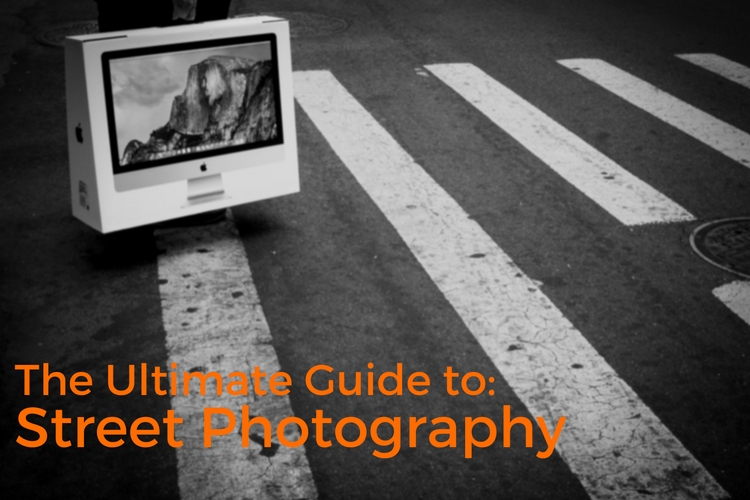
In this extensive article, I will help you understand more about street photography, how to do it, and all the things you need to think about including equipment, ethics, and even legalities. This is the ultimate guide to street photography to help get you started in this genre of photography.
the-ultimate-guide

OUTLINE

  1. What is street photography?
  2. Ethics and overcoming your fear.
  3. The law and street photography.
  4. A few of the most important tips to get you started.
  5. Equipment.
  6. Camera settings.
  7. Composition and light.
  8. Advanced tips.
  9. Content and concepts of street photography.
  10. Editing.
  11. Master street photographer research.

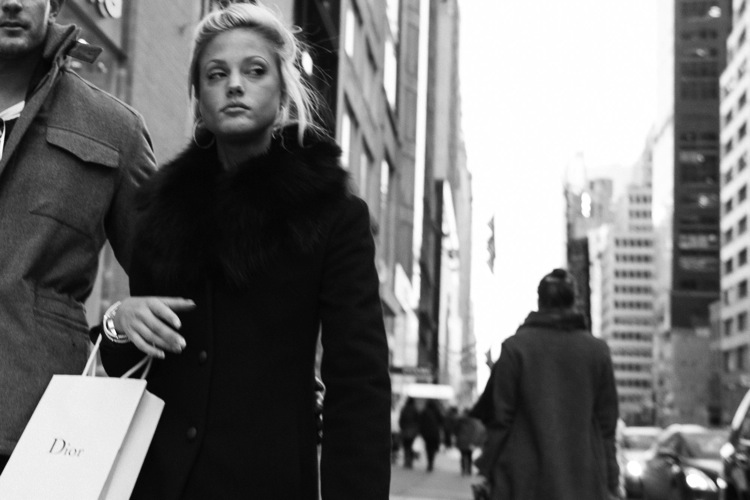
1 dior 5th avenue nyc

1. WHAT IS STREET PHOTOGRAPHY?

Street photography is an inherently clunky term, and because of this, there are many street photographers that dislike it. They consider themselves photographers, plain and simple.

The first image that typically comes to mind for the term street photography, is an image of a stranger just walking down the street in a city like New York, London, or Tokyo. This is a huge part of street photography of course, but it is only one part, and it can cause confusion over the true meaning of what street photography really is all about, and how it can be done.

Street photography is candid photography of life and human nature. It is a way for us to show our surroundings, and how we as photographers relate to them. We are filtering what we see, to find the moments that intrigue us, and to then share them with others. It’s like daydreaming with a camera.
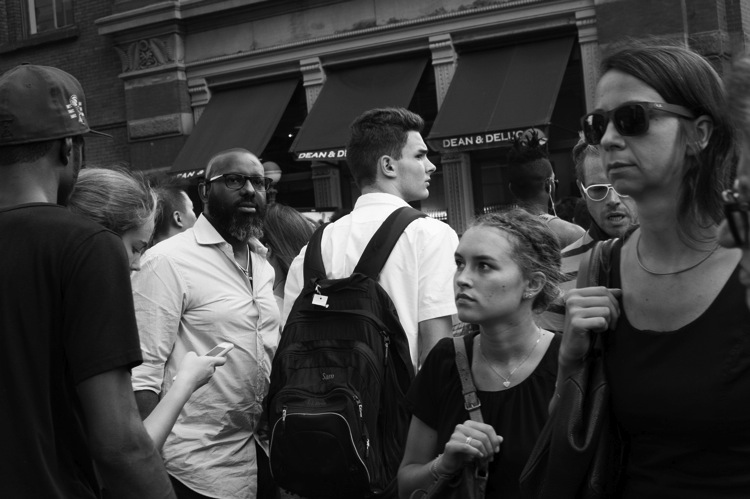
2 prince and broadway

People do not need to be present for an image to be considered a street photograph. The photograph does not need to be taken in a city, or in a busy market. It can be taken anywhere and can portray nearly anything, as long as it isn’t posed or manipulated. It can be shot at a family barbecue, or in the middle of 5th Avenue in New York City.

While many may consider the term clunky, there is an elegant side to it as well; that I think is often missed. The street is the most public and accessible of places. Street photography is the most public and accessible form of photography. Anyone can do it. You do not need an expensive camera. You do not need a big studio, professional lighting, or beautiful models. We all have the same content out there, and it’s up to us to figure out how to capture that and bring it home.

In addition, while technical quality is always important to every form of photography, it is not celebrated in street photography in quite the same way. A nature or landscape image needs to be sharp. It usually needs to be able to be printed at large sizes with great technical quality. In these genres, you can pick the perfect location, frame it the perfect way, choose the perfect equipment and settings, and continue to come back until you get the perfect lighting.
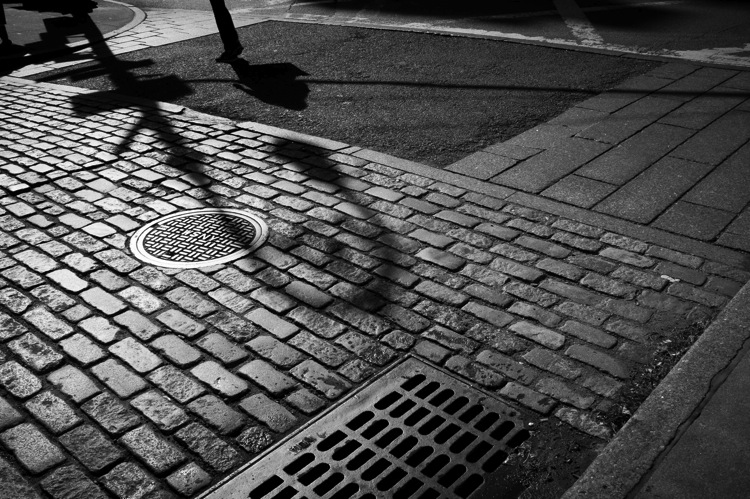
Cobblestone

With street photography, on the other hand, the best image of your life can pop right in front of you on the way to get your morning coffee. This spontaneity is what’s celebrated. That is why grainy images, slightly off-kilter framing a-la Garry Winogrand, or imperfect focus will not always ruin a street photograph. Sometimes they will, and we must aim for technical mastery, but other times they can add to the realness of the moment. Sometimes these deficiencies may actually improve the image.

But these are decisions that can’t be taught. Many of them are spontaneous and instinctive. That is why you can’t buy or read your way into mastery of street photography. You are on the same plane as every other photographer. The only thing standing between you and them is the time spent out there paying your dues, waiting for those intriguing moments to occur, and improving your ability to notice and bring them back with you.

2. ETHICS AND OVERCOMING YOUR FEAR

Let’s not sugarcoat this – street photography is an intrusive form of photography, and sometimes it can be creepy to the subjects. Photographing people candidly usually means that you do not have their permission beforehand.
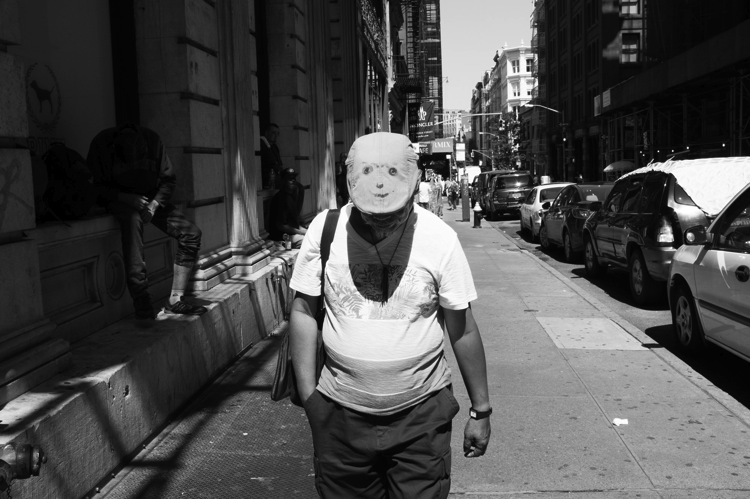
3 smiley face soho

This is something that you will have to come to terms with to do street photography. For every image you capture, no matter how beautiful or interesting, there is the chance that the subject may not like seeing it. Some will, but there are some that will not.

This is the moral cost of doing this type of photography. Most of us do this because we like people, and we like exploring, and capturing culture. The camera is just a way to bring back moments that we see and enjoy. These images have value – both current, and historical value. When you look at images from the 1920s, 1950s, 1970s, or even from fifteen years ago, what are the most interesting images? Usually, it’s the ones that people and culture. These are the photographs that so many find fascinating because there is a lot of cultural value to them.

Fear is one of the toughest obstacles to overcome for beginners, and these moral quandaries can make it even tougher. The main idea to keep in mind is that getting caught does not have to be that bad.
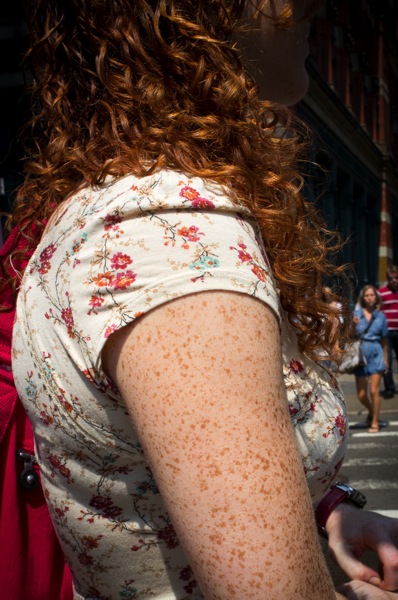
4 shades of red

Think about the first time that a comedian bombs on stage, and how important it is to get that out of the way for the first time so that they no longer have to worry about it. Similarly, it’s an important moment when you speak to someone, after having taken his or her candid photograph for the first time.

Keep in mind that when done right, this will usually happen infrequently. But, you want to be confident, and comfortable in what you will say if someone asks you what you are doing. I will say that I am a photographer who is doing a project capturing the culture and people of New York, and I thought they looked fabulous (flattery is key). If they ask further, I will explain more and tell them that I did not mean to make them uncomfortable and that I’m happy to delete the image if they prefer. Only twice, have I ever had to delete a photograph when the person asked me nicely. Those are pretty good odds.

You do not need to delete the photograph of course; that’s a decision you need to make for yourself. I do this type of photography because I like people, and if they seem truly uncomfortable in the moment, then I have decided to delete the images for their benefit and my conscience.
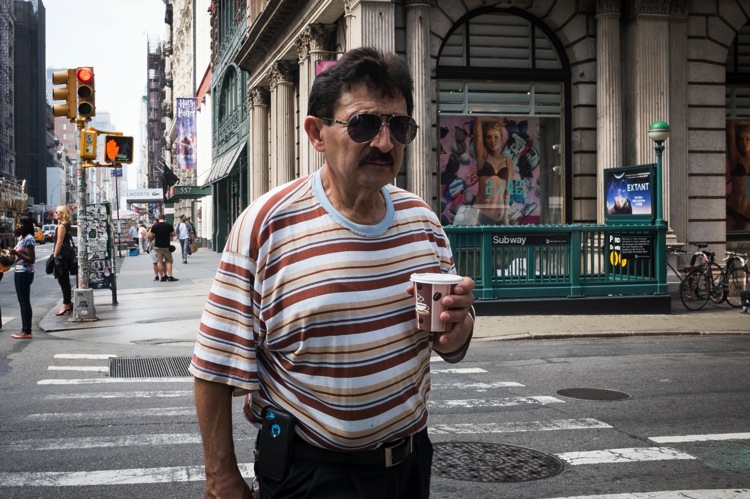
Joe soho

If someone catches you, own up to it. Do not be combative. Even if it is in your legal right, you do not need to use that as your argument. You don’t need to argue at all. Make sure to keep a smile on your face no matter what.

Stealth is obviously good for street photography, since if every single person noticed you taking their photo, it would just make things immensely time-consuming and difficult. However, keep in mind that the stealthier you try to act, the weirder you can actually look. Sometimes, being obvious and taking photos in a direct way can be the least confrontational strategy. The more obvious you look, the less people will think that you could possibly be doing anything wrong. If so, why be so obvious?

Finally, consider starting somewhere busy, such as at a fair or a market. If you are just learning, go where there are a lot of people, so that you will be less noticeable. This is a great way to get over the initial hump, and as you improve, you can then maneuver to completely different places.

3. THE LAW AND STREET PHOTOGRAPHY
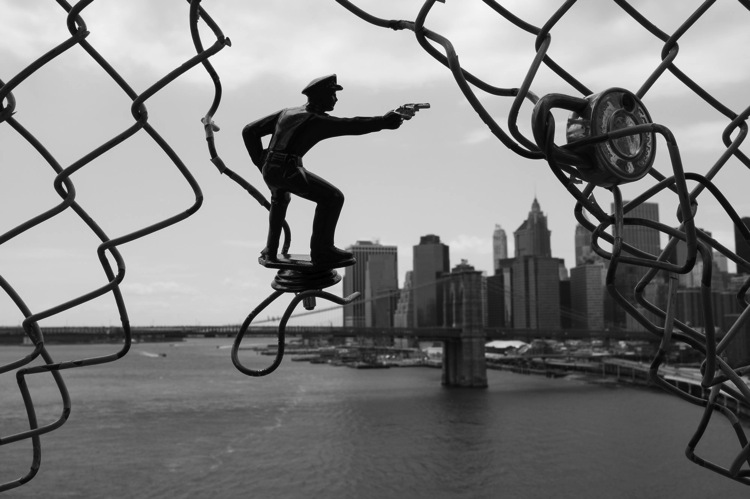
5 police manhattan and brooklyn bridges

Disclaimer: Regarding the law and street photography, do your own research into your local laws, as I am not an expert in this matter. Do not hold me (or dPS) accountable for what is said here, but these are just my own beliefs, based on my research. Do your own due diligence, and get familiar with the laws in your area, or places where you travel.

All countries have different laws, and street photography without permission is illegal in some places. Some make it impossible to do street photography at all, while in other areas photographers may decide to ignore the laws. In some countries, street photographers will continue to take candid images, but only images where the person’s face is unrecognizable.

In the U.S. and U.K., there is no right to privacy in public. This means that you can legally take photographs of anyone in a public place. On private property, that right goes away, but many street photographers choose to ignore that and do not differentiate.
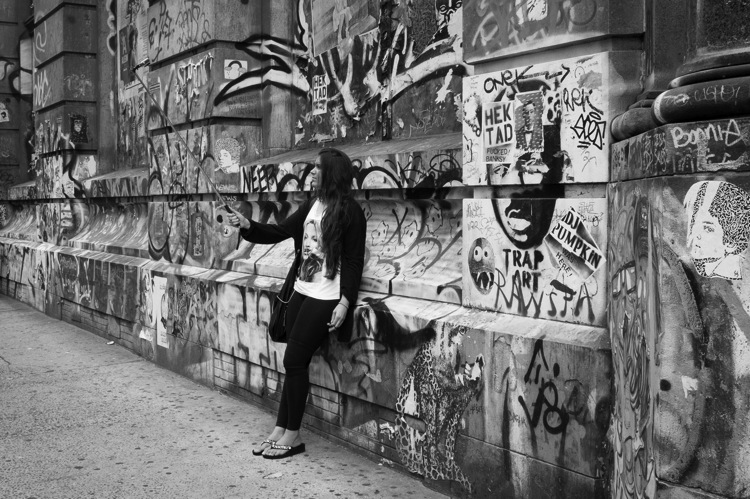
Graffiti selfie

Note: the very definition of that term, public place, may vary from one country to the next – but generally includes things such as’ parks, sidewalks, roads, outdoor common areas of office buildings, and other similar places. Most indoor locations would be considered private spaces such as; shops, churches, schools, and office buildings.

You can use photographs taken in public places for artistic purposes, without the need for a model release. This means you can sell them as fine art prints, or as illustrations for books or cards. However, you cannot use these images for commercial or advertising purposes without a model release of any person in the image. You cannot use the image to promote a product, and you cannot use it in any way that may insinuate something against the person that is untrue.

Legal rights aside, it can also be smart to research an area that you are traveling to so that you can find out what practicing street photography is like there. In some places, it is much easier to do this type of photography, while in others people may be much more confrontational. One of the reasons that New York is a great mecca for street photography is because the people are very used to seeing cameras.
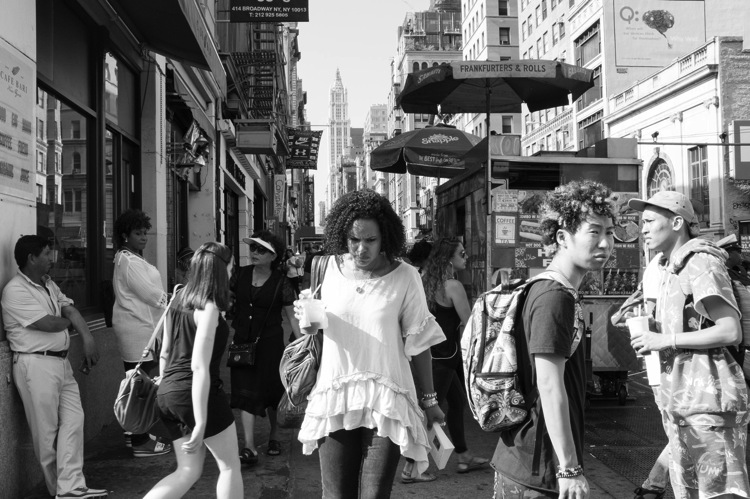
6 canal street

You also want to assess people before you decide to take a photograph of them. It’s usually not worth it to photograph anyone who looks very angry, or who might have some mental disability. Use your judgment, and if your gut says no, then wait for the next one. There are a lot of opportunities out there.

4. A FEW OF THE MOST IMPORTANT TIPS TO GET YOU STARTED

We will cover more technical concepts regarding street photography later on, but I want to start you off with a few of the most important tips to consider when you walk out the door. These are the ones that I think can help you out the most.

The best tip I can possibly give you is to find a good spot and just wait there. If you only shoot while you are walking, you will come across many wonderful locations, but will only give yourself a brief moment to capture the right image there. Instead, find the right location, and then just wait for the right moment to happen. By hanging out in one area, you will be able to funnel more of your attention towards observing, and your coordination with your camera will be faster. Finally, people will be entering your personal space instead of you entering their space. It makes a big difference to capturing good shots, in a way that is comfortable for both parties.
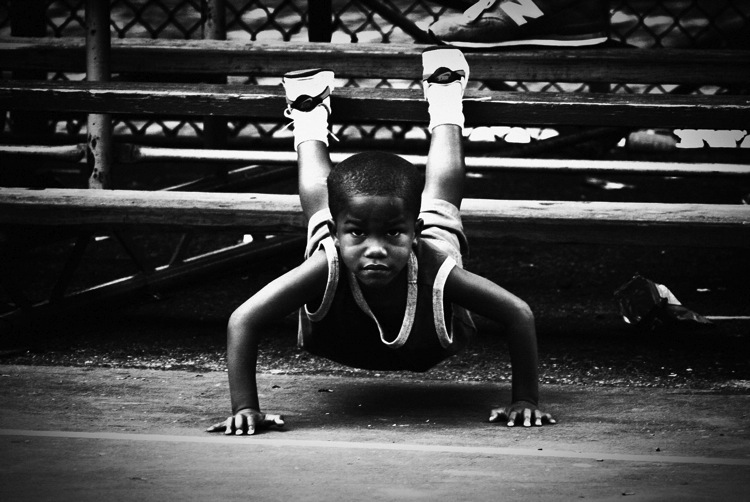
7 pushups rucker park

The next very simple tip refers to the camera snap, which is something that most photographers do instinctually. Try it, and take a photo. The second you take a photograph; you will likely immediately move the camera away from your eye slightly. This is what tips off people, to the fact that you have taken their photo. Instead, after you capture an image, hold the camera there until the subject leaves your scene. It will lead the person to think that you were just photographing the background and that they were in the way, or will confuse them enough to leave you alone.

Next, consider photographing within your everyday life, near where you live. It’s a common misconception to think that you can only do street photography well in the most interesting of areas, or that you will get better photographs if you travel to New York. That is not true. The best photographers can take good images anywhere, and it doesn’t have to be a highly populated area for you to be able to take interesting images. In fact, it may give you an advantage, because you do not have as much competition.

I want to take this point further and have you try an exercise. Think about the least interesting areas, near where you live to photograph. Go there and force yourself to figure out how to take good photographs.

5. EQUIPMENT
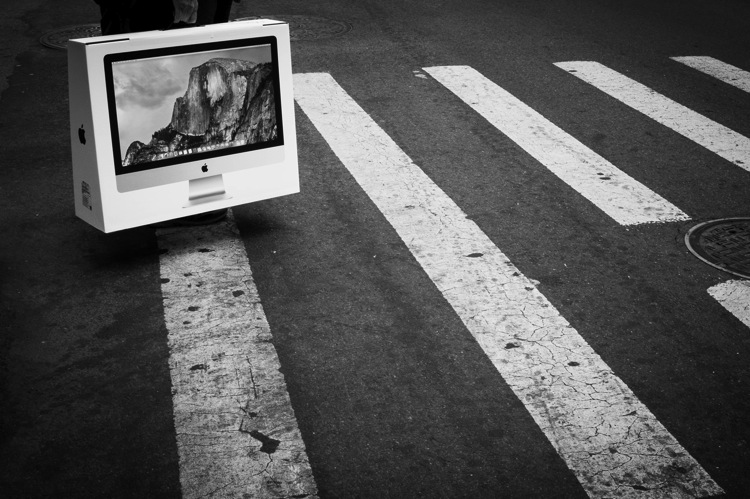
8 yosemite soho

You can do street photography well, with really any type of camera. You can do it with an SLR and a long zoom lens, and you can do it well with a camera phone.

However, different equipment will have different advantages. A zoom lens will give you more obvious opportunities at different distances but will be heavier, more noticeable, and more cumbersome. A prime lens will constrict you to images at a specific distance from the camera, but will also be light, freeing, and fun to use.

Traveling light will give you a lot more flexibility. Mirrorless, micro four thirds cameras, or even a camera phone, will allow you to take images more easily, in places where a large camera would stand out too much. They are lighter and thus more fun to shoot with, which will allow you to enjoy photography in situations where you normally wouldn’t take your SLR.

Prime lenses, while constricting you to a specific focal length, will actually give you a big advantage. You will begin to see the world more intuitively with that focal length, and while the limitation will stop you from being able to capture certain shots, you will become even better at capturing images within the constraints of that focal length. Because of this, you will become quicker, and more spontaneous with your camera.

6. CAMERA SETTINGS
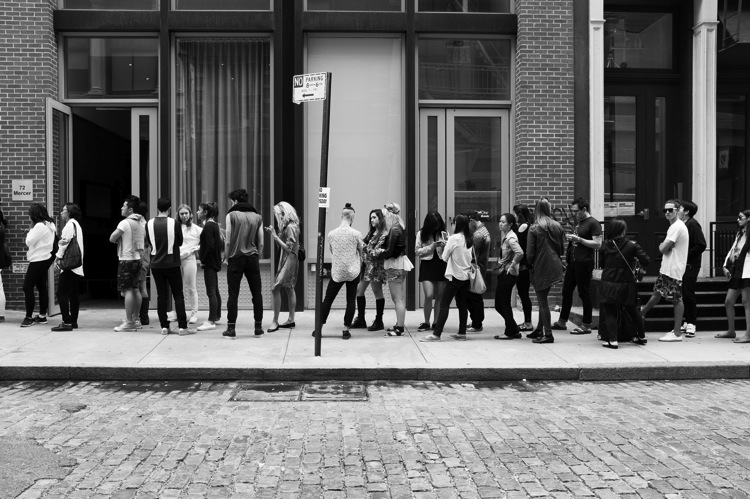
9 sample sale

Many photographers shoot in completely different ways for street photography. There is no correct way, but there are some factors to consider. Also, if you have photographed in the same manner for a long time, I would consider being open to trying other ways of shooting to get out of your comfort zone. It can be good to switch things up every once in awhile.

Some photographers choose to have a lot of bokeh in all of their images. This is a fine way to shoot, but you also have to consider that in the fast moving genre of candid photography, if you are photographing at f/2.8 and you miss the focus slightly, you will probably ruin the shot. It will be tougher to capture images with multiple subjects at different depths shooting wide opened. By choosing to blur the surroundings; you will also remove some of the context and background from the image, which can take away some of the meaning or storytelling.

For these reasons, I usually try to shoot with as much depth of field as possible. I find that with the variety of situations that you can come across suddenly in street photography, this strategy allows you to succeed more often than not.
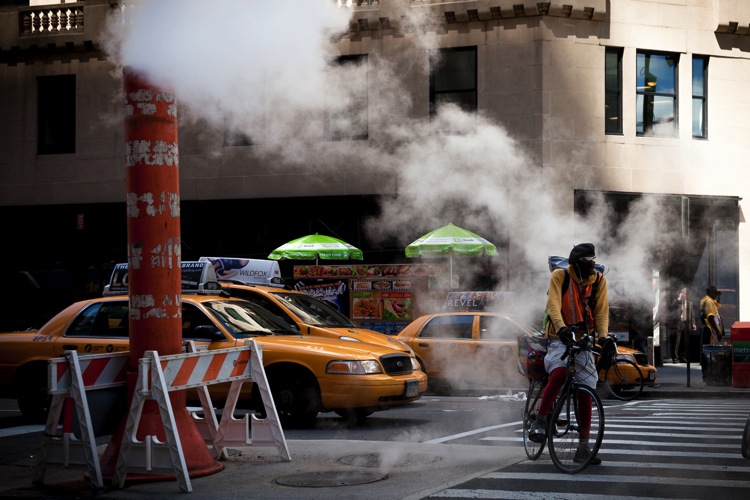
10 bike messenger

It is important to pay strict attention to your shutter speed, much more than you would for genres of photography where your subject is not moving. You need a fast shutter speed to freeze the motion of people. I prefer to use 1/250th in the shade and 1/400 or 1/500th in direct sunlight. In darker situations, I will go to 1/160th and sometimes 1/125th.

Now imagine that you are trying to squeeze as much depth of field as possible out of your camera. What is the ideal way to set up your camera to achieve this? The first thing to do is to set your ISO. You should not be afraid to raise your ISO up to high numbers. Grain (or noise if you prefer) is good here. Test your camera out to see how it looks at high ISOs, not just on the monitor, but in different sized prints. With newer cameras, you can easily go to ISO 1600, 3200, and for some even 6400.

With a digital camera on the more advanced of the spectrum (e.g. the Fuji X100 line), I will typically set my camera at ISO 400 in sunlight, 800 in light shade, 1600 in dark shade, 3200 at dusk, and 6400 at night. With entry-level digital cameras, I would probably cut a stop out of that, so 3200 at night, 1600 at dusk, and so on.
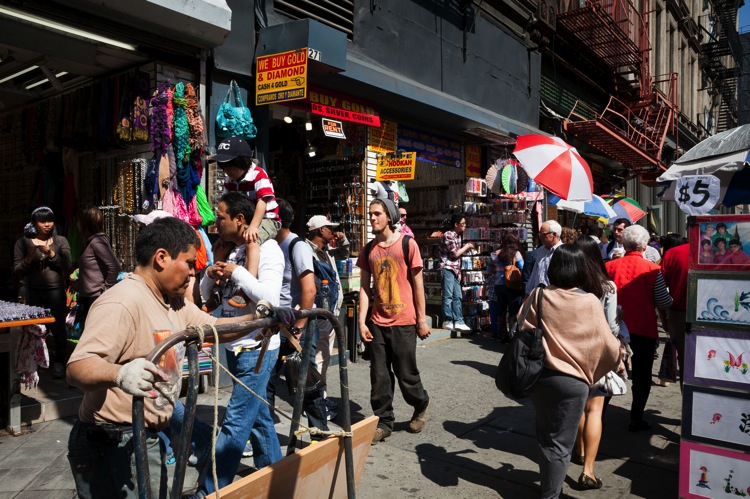
11 canal street

The reason for a higher ISO is that it will allow you to have both a fast shutter speed to freeze motion and a smaller (higher numbered like f/8 or f/11) aperture, so that there is as much depth of field as possible in the image.

Finally, I will set my camera to shutter priority mode. You can shoot manual, but I prefer shutter priority because you will often be shooting into the sun one moment, and away from it the next, so the necessary settings will be completely different. I prefer not to have to change my settings every time I turn my body. In consistent lighting situations, indoors, or at night, I will go to manual mode, and for the photos where I want a very shallow depth of field, I will shoot on aperture priority at a low number (like f/2.8), and choose a much lower ISO.

7. COMPOSITION AND LIGHT
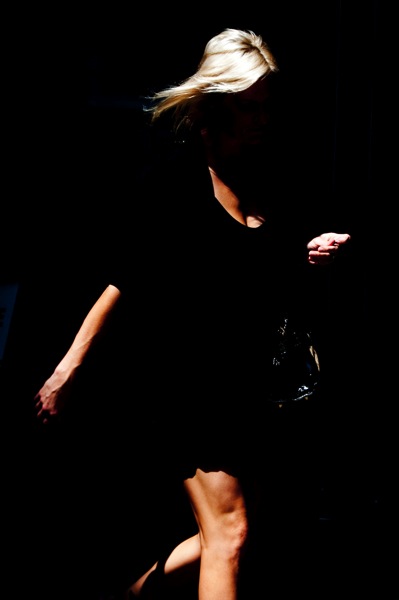
12 blonde soho

Composition for street photography works the same way that it does for every other genre, but there are a few things that I want you to consider. Compose your street photographs the same way that you would compose your landscape images. Assess the scene and arrange all of the elements together. Instead of a tree here and a mountain there, you might place a fire hydrant here and a ladder there. Every element counts just as much as they do in a traditional landscape, no matter what it is, and the best street photographers have a way of bringing everything together in just the right way.

Sometimes, the subject alone is all that counts, and you will want to frame it, or blur the background away, forgetting about everything else. But that’s only sometimes. A lot of photographers will shoot this way 100% of the time, especially when first starting out, but that’s a mistake. Try to see beyond the main subject, and see if you can combine it with other elements to create a more complex scene. Can you create relationships between subjects to add new meaning to an image? Whether or not you decide to make the surroundings prominent, you always need to be aware of them. I would prefer that you intentionally decide to not include elements of the background, rather than to not notice them at all.
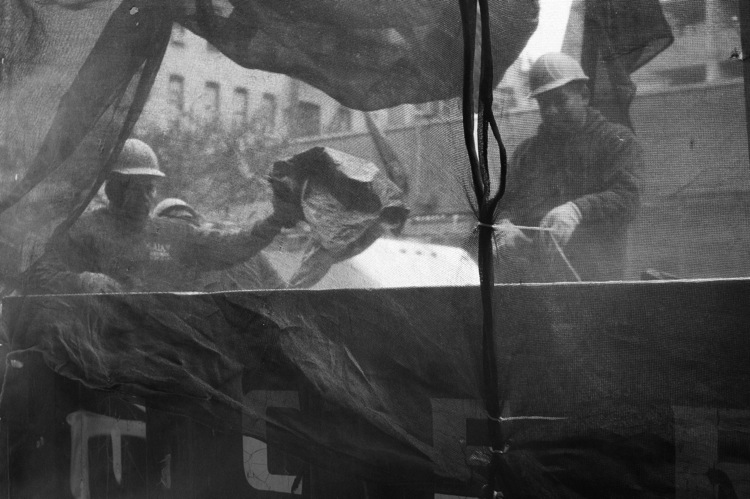
Construction workers

You always want to keep an eye out for your main light sources. How does the light hit your subject, and where is it located in relationship to that subject? How is it hitting the background? What color is the light, and are there multiple light sources? These are ideas that you will usually pay attention to for every type of photography, but it is important to understand for street photography that there is no best time or lighting. The harsh midday light will be just as beautiful and interesting as the warm, even dawn or dusk light. Since you are at the whim of your environment, it is very important to be able to see and maneuver yourself to get the most out of the light in any location. The beauty of street photography, though, is that it will teach you how to work with light very quickly.

Some photographers will use a portable flash to illuminate their subjects and separate them from the background. This can create a great look, but also keep in mind that flashing a stranger in the face can be very confrontational. Also, when the flash is too strong, it can take away from the feeling of reality in the photograph, which is a look that some photographers desire, so it is a decision you will have to make. A surreal look might be something that you are going for, and in that case, a flash could be a big asset.

8. ADVANCED TIPS
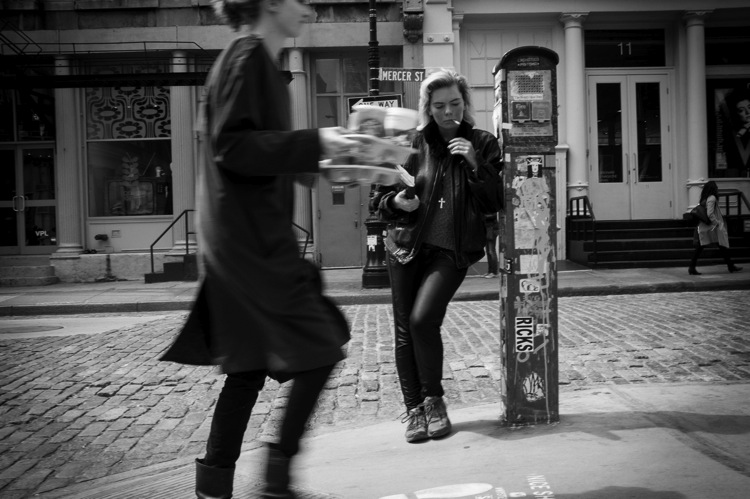
13 youth soho

Facial expressions and gestures

When capturing images of people, photographing them just walking down the street, or standing in place, is not enough. To take your image to the next level, that person needs to have a strong facial expression or gesture in their body.

As humans, we feel what another person is feeling, through their facial expressions. When you’re out shooting, one of the first things you should be doing is paying attention to people’s eyes and the expressions they show. Similarly, you can see subtle cues from a person’s body, so keep an eye out for how a person may be expressing themselves through their body, hands, legs, and feet.
Imperfection

The beauty of street photography is often in its imperfections. You do not need to try and make a photograph perfect in every way. Strong grain (or digital noise), an image that is slightly askew, an element that is slightly in the way, or imperfect lighting, are all examples of what can make an image feel real. While any of these things have the ability to ruin a photo, sometimes they can get in the way just enough to make it feel like a natural moment. So while you should always aim for technical mastery, realize that imperfections can be beneficial, and even necessary.
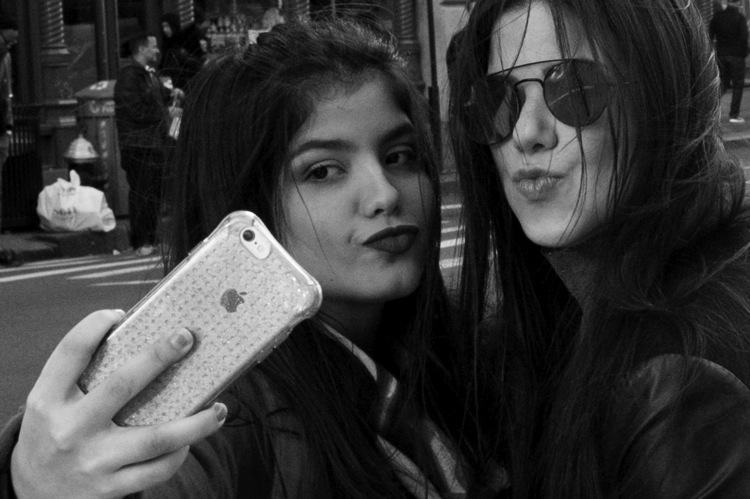
14 selfie soho

Zone Focusing

Zone focusing is simple to learn, fairly difficult to master, and agonizing to explain in writing (it’s much easier to just show someone how to do it). Basically, zone focusing is the strategy of turning your autofocus off and using manual focus. When done well, it can allow you to capture consistently sharper images in a variety of situations.

The goal is to pre-focus your camera to a certain distance. I typically choose between eight and 10 feet away, which is the most common distance where I like to capture my subjects. Then, when subjects enter the range that you are pre-focused for, you can click the shutter without having to waste any time focusing. The fraction of a second that it will save, and the added freedom this allows, will take you a long way.

I usually only zone focus at 35mm and wider, although sometimes I will do it up to 50mm on bright days. The reason for this is because the further you zoom in, the more accurate you have to be with your focus to get your subject sharp. It becomes very difficult to zone focus over 50mm.
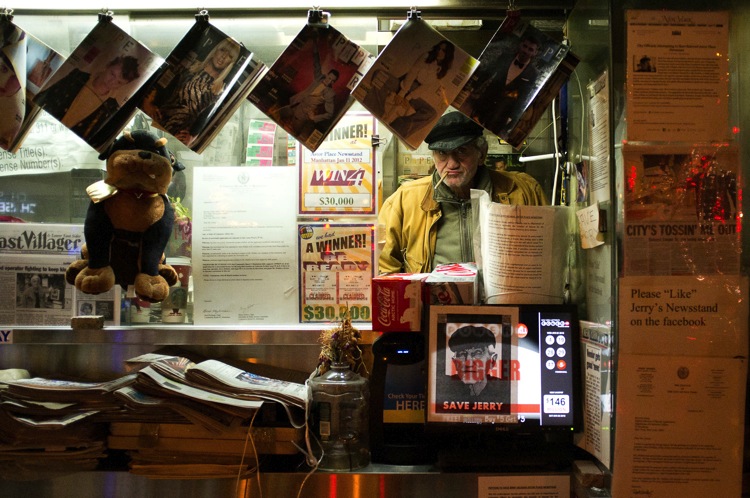
Jerry delakas astor newsman

Zone focusing is very easy to screw up at first. If you do not gauge the distance correctly, you can easily miss the focus entirely. It is much easier to start off in bright sunlight, because with a 35mm or wider focal length, and an aperture of f/11 to f/16, there will be a huge depth of field. So if you miss the focus by a bit, your important subjects will still be sharp.

You can, and should learn to zone focus in darker situations, and at apertures up to f/2. It’s much more difficult, though, so take your time getting there, but it’s very possible and it just takes practice. When zone focusing at shallower apertures, you can even learn to move the focus ring without looking, so if you are focused at 10 feet and a subject appears five feet away, you can move the focus instinctively to that distance without even looking (this is how sports shooters did it before autofocus existed). This is the pinnacle of skill with zone focusing and takes a lot of practice, but it is very possible to learn to do well.

9. CONTENT AND CONCEPTS OF STREET PHOTOGRAPHY
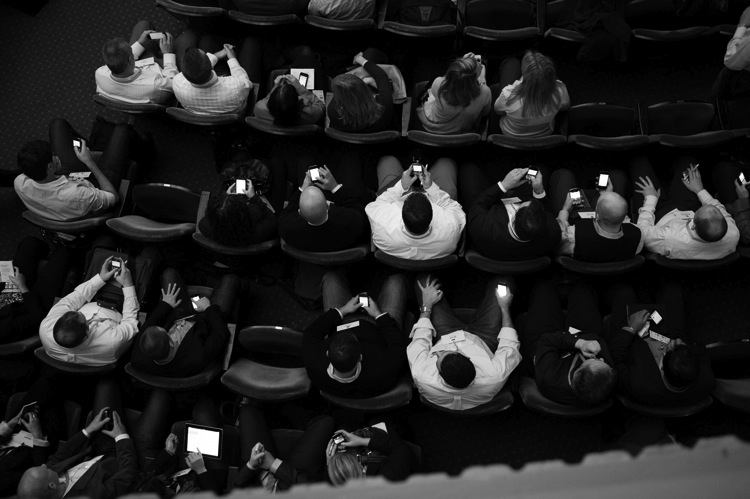
15 cellphones

The toughest step in all of this is to figure out what it is that you actually want to capture and create. What do you want your photographs to be of, and what do you want them to look like?

If you look at the works of any great street photographer who has done it for long enough, there will be many consistencies in their work. Maybe these consistencies last throughout their entire lifetime, or maybe it changes in different bodies of work, but they are there and should be studied to help you find your own.

The longer you shoot, the more you will begin to understand what you are drawn to. You will begin to see types of photographs that you are attracted to, and you will begin to seek them out when you are photographing. Think about what you are trying to portray with your photography. Occasionally, you will have big ideas right away, but often it will take a lot of time for these ideas to grow and develop naturally.

Sequencing is also important to many photographers. While it is not a necessary aspect of street photography, it is a way to place unrelated images together, to create a larger narrative. This is why the book has become, in my opinion, the best way to show street photography. Each image takes on even more importance and meaning when surrounding by other photos. There is a lot of power in how you decide to display your work.

10. EDITING
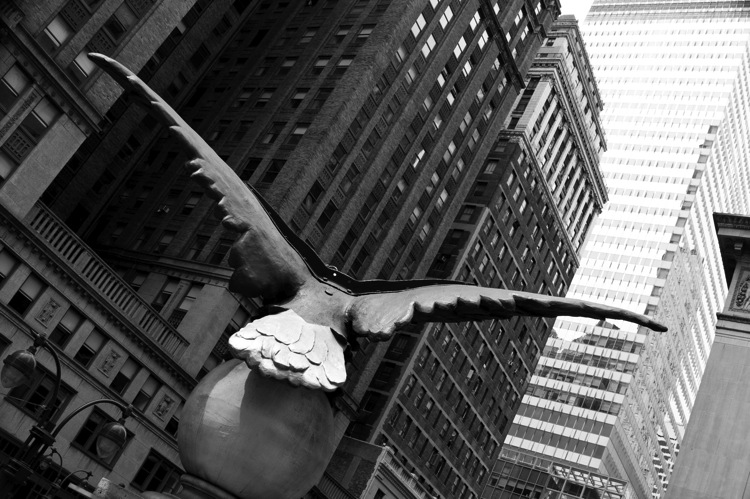
16 soaring eagle grand central

Editing is half of the battle for becoming a good street photographer. When you are out photographing, it is best to be spontaneous and to get lost in the moment, but editing is when you begin to really think about your work in a larger setting. It is where you can explore themes and ideas as they start to pop up in your photography. It is when you can combine similar images to create a larger story. It is where you can develop a style in both look and content. Because of all of this, the time that you put in editing will then help you when you are out shooting. You will notice more because you will have a better idea of what you are looking for, and this will make you a much better photographer.

Consider using Lightroom’s star rating and collection system to organize your best work, and to put photographs with similar themes together. Find consistencies in your work, and images that play well off each other, and create collections for them. Constantly tinker, add, remove photos, and change the order in these collections.

Technically, when editing your work it is important to consider how vital realism is to the genre. Yes, many photographers celebrate the surreal and the extraordinary moment, but they do this only if those moments actually happened. Street photography obsesses over realism, and a made up moment is not a true street photograph. Similarly, an image that is over-edited, so as to make it look fake, will kill the spirit of street photography. The image does not have to be perfect. You do not have to have every detail in the shadows and highlights. While you should do enough post-production to make it look right, always take a step back and consider whether or not you’ve overcooked it.

11. MASTER STREET PHOTOGRAPHER RESEARCH
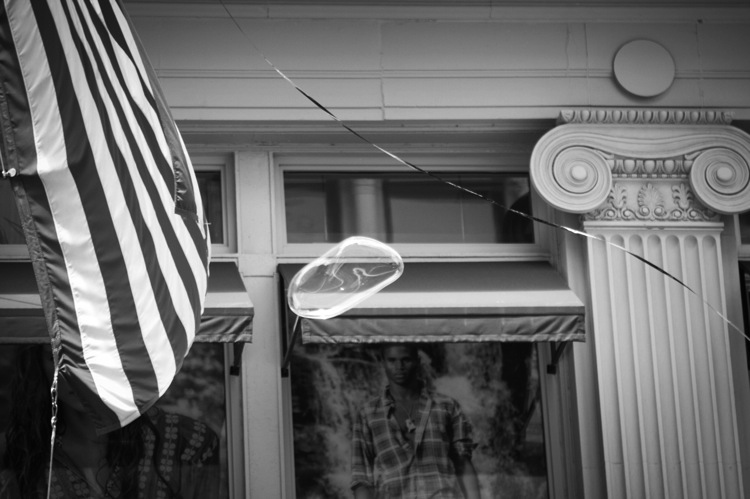
17 bubble soho

The final step is to research the work of other street photographers. This is something that you should start from the very beginning to gain inspiration and to understand more about what you are capable of achieving in this genre. Consider the work of photographers who shoot in a variety of locations, including big city, rural, and suburban. Purchase books on a consistent basis, as learning from the book format is still very important. There are many affordable street photography books, to go alongside the expensive ones.

Take special notice to the street photographers whose work you do not like at first. Many people will immediately disregard a photographer at first glance, without delving deeper. The issue with street photographs is that they are often different and weird, and it can be impossible to truly get a sense of what a photographer is trying to portray by seeing just a few photographs. Read about the history and location of the photographer, look through as much of their portfolio as you can, and then try to figure out what they were trying to say. Sometimes you will find yourself with a completely new appreciation for the photographer, and see things in their work that went right over your head with your first look.
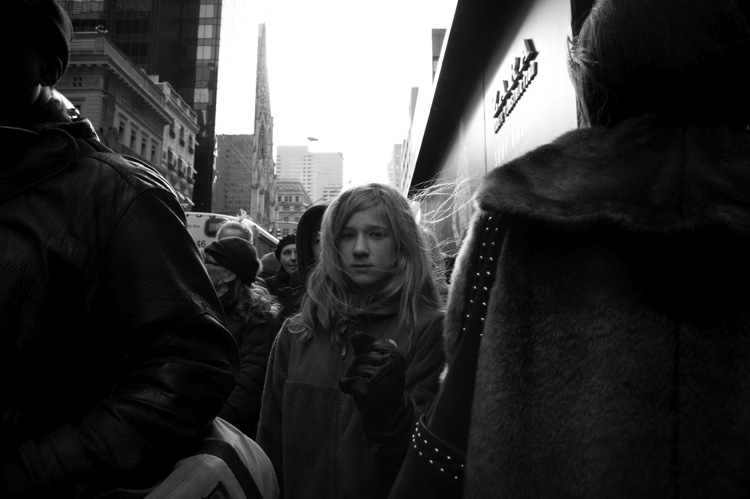
18 mona 5th

Here is a list of photographers to start off with for your research. It is not an exhaustive list, but it will help get you going:

  • Henri Cartier-Bresson
  • Garry Winogrand
  • Robert Frank
  • Helen Levitt
  • Lee Friedlander
  • William Eggleston
  • Walker Evans
  • Daid? Moriyama
  • Martin Parr
  • Elliot Erwitt
  • Joel Meyerowitz
  • Mary Ellen Mark
  • Bruce Davidson
  • Saul Leiter
  • Trent Parke
  • Alex Webb
  • Vivian Maier
  • Bruce Gilden

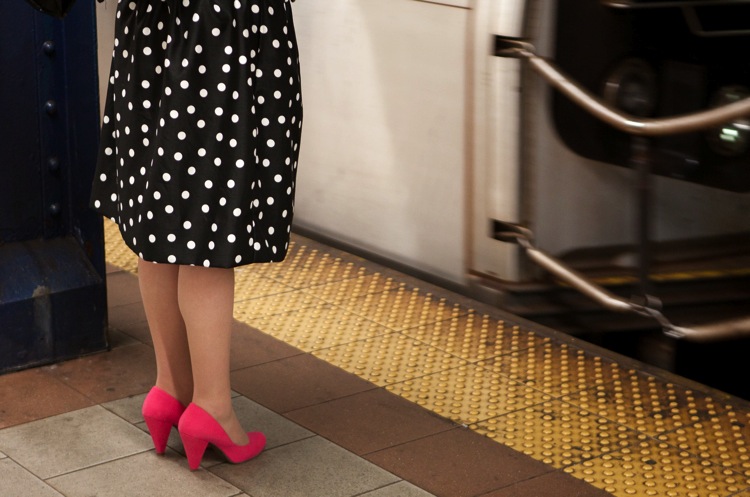
19 polka dots and pink shoes

I hope this ultimate guide to street photography has answered some of your questions about this genre of the craft. If you have any others that haven’t been answered or have some comments to add, please do so below.

Now go out and photograph as frequently as possible, and have fun with it.


Download “The Ultimate Guide to Street Photography”

We respect your email privacy

// Special handling for facebook iOS since it cannot open new windows
(function() {
if (navigator.userAgent.indexOf(‘FBIOS’) !== -1 || navigator.userAgent.indexOf(‘Twitter for iPhone’) !== -1) {
document.getElementById(‘af-form-241780858’).parentElement.removeAttribute(‘target’);
}
})();

googletag.cmd.push(function() {
tablet_slots.push( googletag.defineSlot( “/1005424/_dPSv4_tab-all-article-bottom_(300×250)”, [300, 250], “pb-ad-78623” ).addService( googletag.pubads() ) ); } );

googletag.cmd.push(function() {
mobile_slots.push( googletag.defineSlot( “/1005424/_dPSv4_mob-all-article-bottom_(300×250)”, [300, 250], “pb-ad-78158” ).addService( googletag.pubads() ) ); } );

The post The Ultimate Guide to Street Photography by James Maher appeared first on Digital Photography School.


Digital Photography School

 
Comments Off on The Ultimate Guide to Street Photography

Posted in Photography


Beginner’s Guide to Doing DSLR Video Clips

06 Oct

The video function on your camera is probably one that you don’t play with very often. It’s often disregarded – after all, DSLR cameras are not exclusively video cameras are they? But did you know that some big budget films, including The Avengers, have scenes shot on DSLR cameras? In fact, The Avengers used the Canon EOS 5D Mark II and 7D cameras on the set!

Dave Dugdale

By Dave Dugdale

Understanding your camera’s video mode opens a world of opportunities to you. Filming is great for recording a developing scene, rather than trying to record a sequence in a still image. As a wildlife photographer, I use film to record sequences of behaviour with wildlife. For obvious reasons, it’s much easier to convey something that occurs over time with moving images. Whether you work with wildlife or not, I hope the following guide to taking DSLR video helps you to unlock the potential of your camera’s video mode.

#1 Understand frame rates

When you’re shooting a video, you’re actually recording images at a very fast frame rate. These are then played back so quickly that the human brain sees one moving image. Depending on where or what you are shooting, the frame rate you go for will vary. It’s worth noting that the frame rate your camera can shoot video at is different to the frame rate at which it can shoot still images.

Movies are shot almost exclusively at 24 frames per second. Television doesn’t have an internationally accepted frame rate. For example, in Europe and many other countries, videos are shot in PAL format at 25 fps. In North America, and also Japan, videos are shot in NTSC format and at 29.97 fps (often written as 30 fps).

Steven Worster

By Steven Worster

#2 Choose your shutter speed

Big movie cameras will likely have rotary shutters. They are semicircular and spin around to expose the sensor for each frame. Filmmakers would then adjust the shutter angle to alter the amount of motion blur in a video and how smooth the movement appears to the eye.

DSLR cameras almost exclusively use curtain shutters. You don’t need to worry too much about the workings of the shutter for this. Just remember that to convey normal motion in your video, and avoid static uncomfortable viewing of your video, you should shoot at 1/ double the frame rate.

So, if you are shooting at 25 frames per second, then you should choose a shutter speed of 1/50th second. You can balance the exposure using the aperture or ISO. The following video illustrates the differences in motion blur with different shutter speeds.

#3 Do both wide and close-up shots

It can be easy to train your camera on an event, set it to record and leave it alone. But how many films or videos have you watched where the camera angle or composition never changes? Very few, if any. One of the best ways to keep the viewer’s attention, and add a professional touch to your videos, is to shoot one scene in a number of different compositions.

This is why shooting video with a zoom lens is so handy. You can zoom out to record your wide shots, and then zoom in to record close-ups that highlight the details of whatever you are filming. It allows you to jump between clips, keeping the viewer’s attention.

If you were to just show one clip for 30 seconds solid, it is likely that the viewer would become bored. If you cut between compositions, then their interests are peaked. It also allows you to skip through time, cutting between more interesting parts of a sequence (although you need to be careful that the scene looks the same and flows – that’s known as continuity).

Take a look at this example:

#4 Focus manually

It’s super tempting to use autofocus when you first start filming, especially if you’re recording a moving subject. But autofocus makes the lens search for the focus, and once it starts trying to refocus in your video then it looks very amateur. Instead, pull the focus manually.

You’ll need to practice this technique, but it’s not as hard as it sounds. Using a smaller aperture helps too. In big film productions, there are entire jobs for focus pullers – this is a guy who manually focuses the lens for the cameraman.

#5 Take filler shots

Make sure you record the little details around your subject of the film. It might be water hitting a leaf, or the wind blowing through trees. It could be anything. But filler clips let you pad out your final film with extra details, meaning that you don’t require footage of your target throughout the whole film.

This is particularly useful in wildlife films, as it helps to transition time and events more easily by breaking up different clips. It works in a similar way to the wide and close-up shots mentioned in tip #3 above.

#6 Record sound externally

Big productions never record sound directly from the camera. They’ll have a sound man with a boom pole, holding it over people talking. This removes the interference of you actually working the camera, but it also ensures sound receives the attention it deserves. A film without sound is often a bad film, but a film with only sound can paint a picture easily.

For wildlife, we record sound at a later date. Very rarely is it recorded at exactly the same time. Instead, it is dubbed onto the footage during editing. Here’s an example:

Notice how it helps the clips to flow into one another? I am definitely not a sound expert, but it helps to make a conscious effort to improve your sound recordings.

In Conclusion

Video is a fantastic medium, I love it. There is a reason we are transfixed by film and television. Quality film production is an art, just like photography, and it is great fun to try your hand at it. So switch over to the video mode of your camera and see what you can put together.

If you’ve made any DSLR films yourself, please share them in the comments below.

googletag.cmd.push(function() {
tablet_slots.push( googletag.defineSlot( “/1005424/_dPSv4_tab-all-article-bottom_(300×250)”, [300, 250], “pb-ad-78623” ).addService( googletag.pubads() ) ); } );

googletag.cmd.push(function() {
mobile_slots.push( googletag.defineSlot( “/1005424/_dPSv4_mob-all-article-bottom_(300×250)”, [300, 250], “pb-ad-78158” ).addService( googletag.pubads() ) ); } );

The post Beginner’s Guide to Doing DSLR Video Clips by Will Nicholls appeared first on Digital Photography School.


Digital Photography School

 
Comments Off on Beginner’s Guide to Doing DSLR Video Clips

Posted in Photography


A Guide to Black and White Conversion in Photoshop

04 Sep

Black and white photography is as popular as ever. If you’re one of the many photographers who adore it, you know why that is the case. On one hand, black and white conversion removes the distraction of color from an image. It can help you to create evocative and dramatic images, that concentrate on the forms and shapes of a subject as a whole. On another level, black and white photographs can be reminiscent of a time gone by, one of film canisters and darkroom chemicals.

With digital photography, it doesn’t matter whether you come to black and white from a stance of nostalgia, or approach it as a tool for visual storytelling. The tools to create it are the same either way. These tools, however, are many, and can be confusing if you’re approaching Photoshop (or any post-processing tool) for the first time.

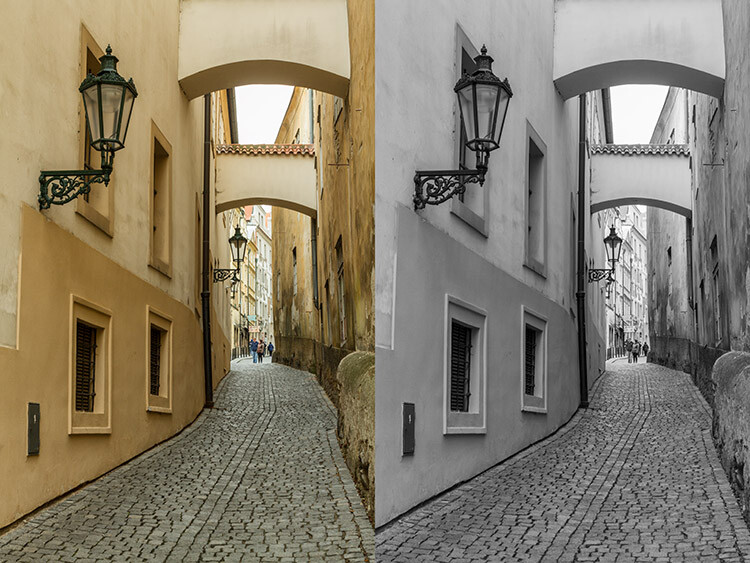
Black and White Conversion in Photoshop image of a city

Photoshop conversions

Photoshop alone has many methods to create black and white conversions. Some of them are quite useless, and should be avoided. Others are very powerful, yet won’t work well in every instance. However, it is important to know and understand as many of the tools as possible. No two images are alike, and every image requires its own treatment. While one tool may provide perfect results, another image from the same shoot might require the use of an entirely different tool for the best results.

In this tutorial, we’ll work through nine different methods for black and white conversions in Photoshop. By following along with your own images, you will be able to quickly develop an understanding of the many tools available. Some of these methods work at the press of a button. While others take a few minutes, they offer absolute control over every aspect of the tonality of your photographs.

The basic techniques

The first four black and white conversion techniques are very basic, and will not lead to good results in most instances. I can already hear you asking; “If they’re so bad, why are they in this article?” They are here so that you will be aware of them, and know to avoid them. Also, some of them (like the Grayscale method) are among the few clearly labeled in Photoshop as black and white conversions. By actively knowing about them, you will be able to save time later when you come across a tool you previously weren’t familiar with.

This isn’t to say that they don’t have their uses. Often these techniques can be used as part of a much larger retouching workflow. But, for straight black and white conversions, these methods will leave you with muddy tones and lacklustre results.

It’s important to note, that this article concentrates on the black and white conversion process only. With the exception of the Gradient Map tool, you will still need to consider using some other post-processing techniques (blemish removal, contrast adjustments) on your images, for the best results.

1) Grayscale mode

black-and-white-conversions-in-photoshop-greyscale-example

Converting your images to Grayscale is fast, but the cost is a loss of control, and a lot of file information.

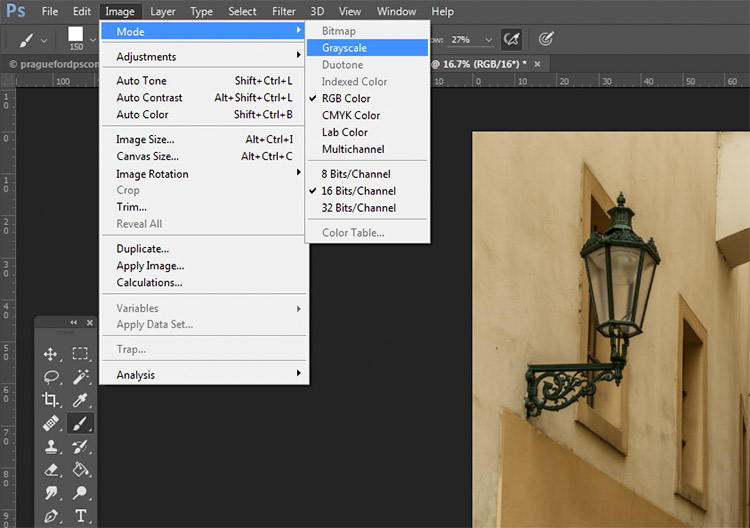
This method is as simple as it gets. In Photoshop, go to your toolbar and click Image > Mode > Grayscale. When prompted to discard your color information, click discard.

black-and-white-conversions-in-photoshop-greyscale-method

Out of all of the options, this is the one to avoid at all costs. The act of discarding all of the color information from your images is a destructive technique. That makes it difficult, if not impossible, to make changes later if you decide you don’t like the output. Also, as you’ll see in later techniques, that discarded color information is what gives you the most control over the tonality in your images.

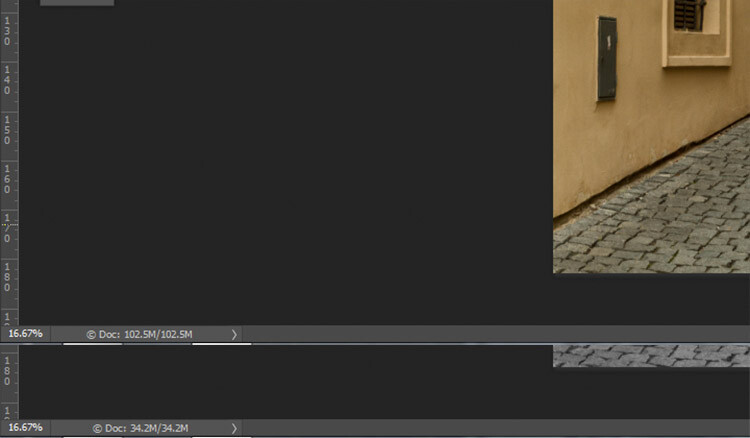
black-and-white-conversions-in-photoshop-greyscale-filesizes

Here, you can see how much data was lost when converted to Grayscale. The converted image (bottom) has nearly 2/3 less data than the original image (top).

The best advice for this conversion method is to try it, acknowledge it, and then avoid it at all costs.

2) Desaturate

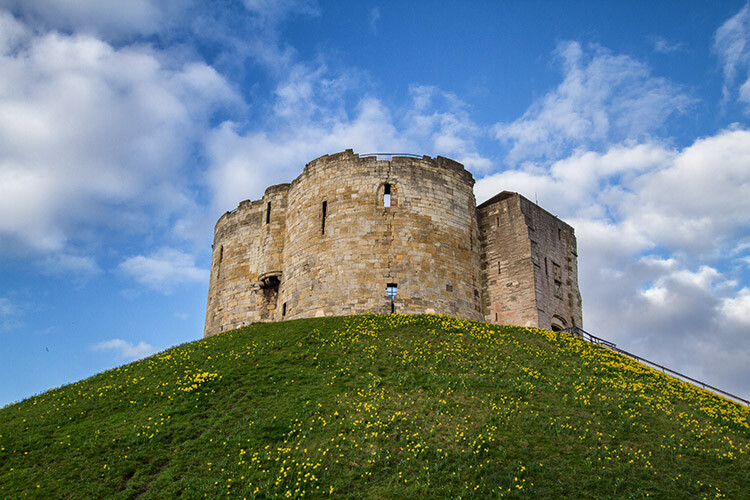
black-and-white-conversions-in-photoshop-desaturate-color-example

Original Image

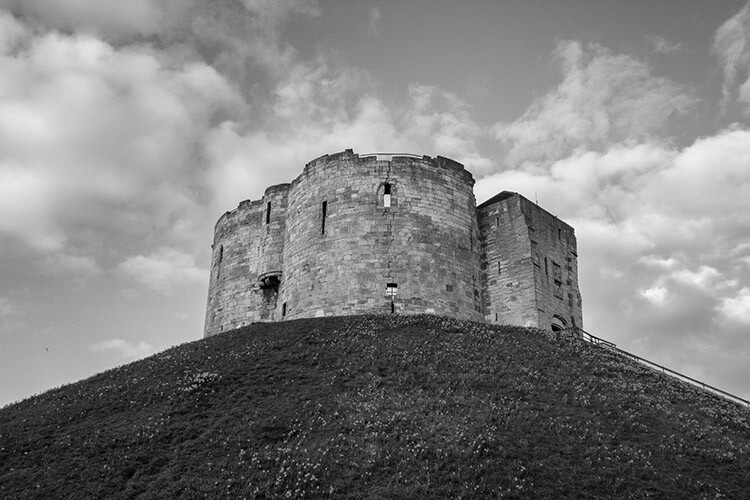
black-and-white-conversions-in-photoshop-desaturate-bw-example

Converted to black and white using the Desaturate command.

Unlike the Grayscale method, using the Desaturate command does not discard the color information from your image. It is, however, still a destructive technique, as it does not allow you to alter or control any aspects of the conversion once it’s made.

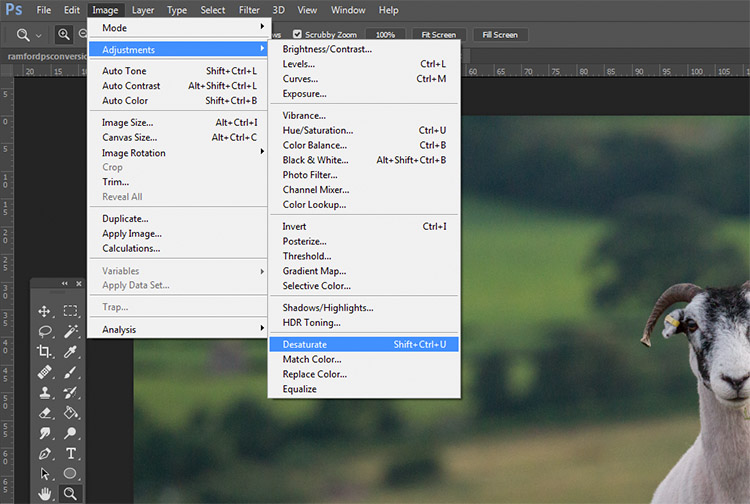
To Desaturate your image, go to your toolbar in Photoshop and choose Image > Adjustments > Desaturate

black-and-white-conversions-in-photoshop-desaturate-method

Once again, as a destructive technique, I encourage you to avoid this tool whenever possible.

3) Hue/ Saturation layer

black-and-white-conversions-in-photoshop-huesaturation-color-example

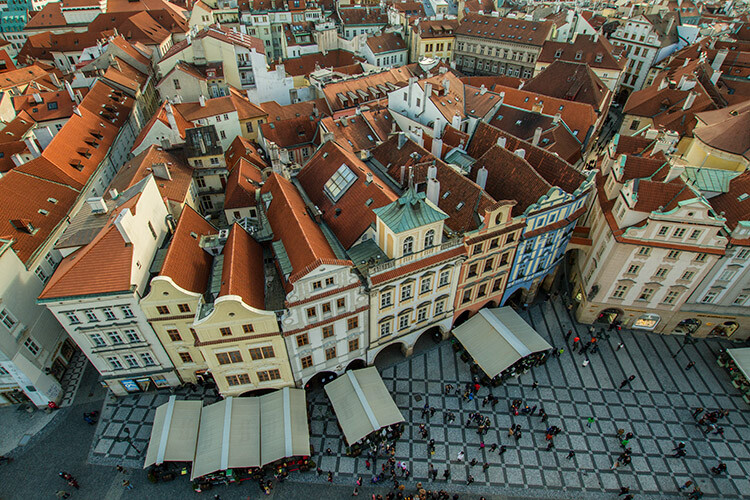
Original image

black-and-white-conversions-in-photoshop-huesaturation-bw-example

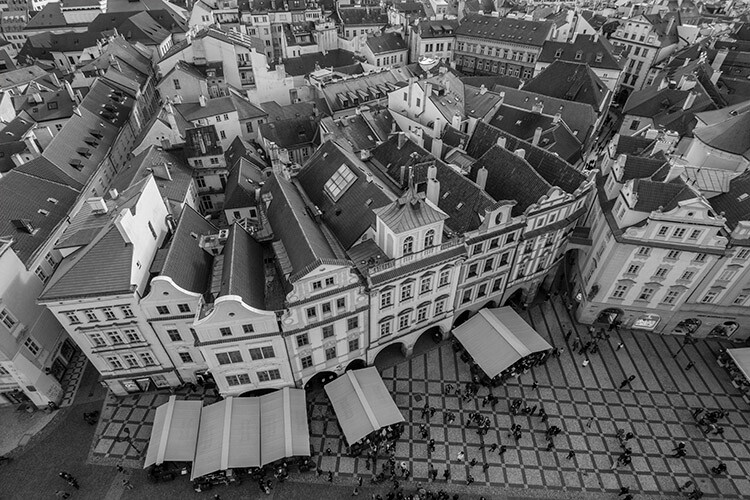
Converted to black and white using a Hue/Saturation adjustment layer.

By using a Hue/Saturation adjustment layer, you will get the exact same results as the Desaturate method, with one exception. Because this is an adjustment layer, it can be changed or discarded at any time, without any alteration to your original image, making this a non-destructive technique.

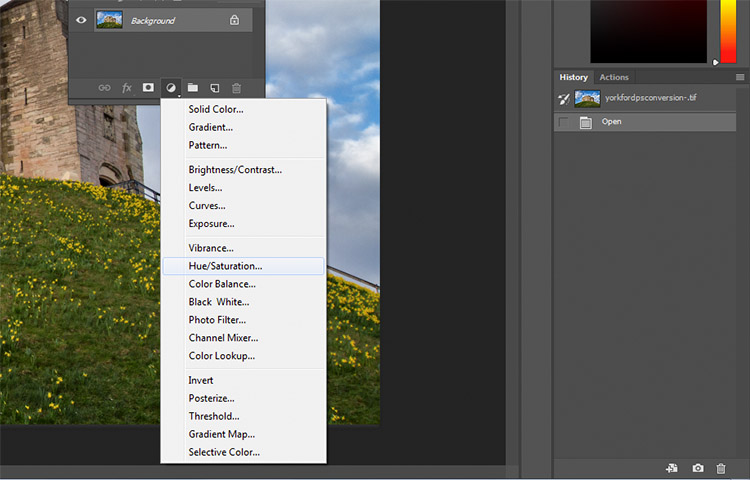
To convert your image with this method, find the Create new fill or adjustment layer button (circle that is half dark, half white) at the bottom of the Layers Palette and choose Hue/Saturation (you can also select it from the Adjustments panel if you have it visible).

black-and-white-conversions-in-photoshop-huesaturation-method1

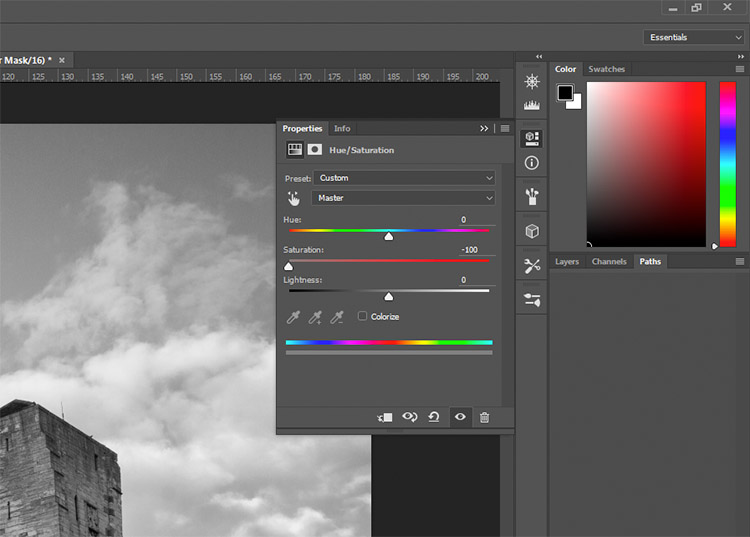
In the layer properties tab that should have opened, find the Saturation slider and move it across to -100.

black-and-white-conversions-in-photoshop-huesaturation-method2

This is still not an ideal method, as it offers no control in the actual conversion process.

4) Solid black or white layer

black-and-white-conversions-in-photoshop-blacklayer-color-example

Original image

black-and-white-conversions-in-photoshop-blacklayer-bw-example

Converted to black and white using a solid black layer, set to the Color blending mode.

Another easy method of converting your image to black and white is to create a new layer filled with black or white, then set the blending mode to Color. Again, this technique offers no control over the actual conversion, so it’s best avoided.

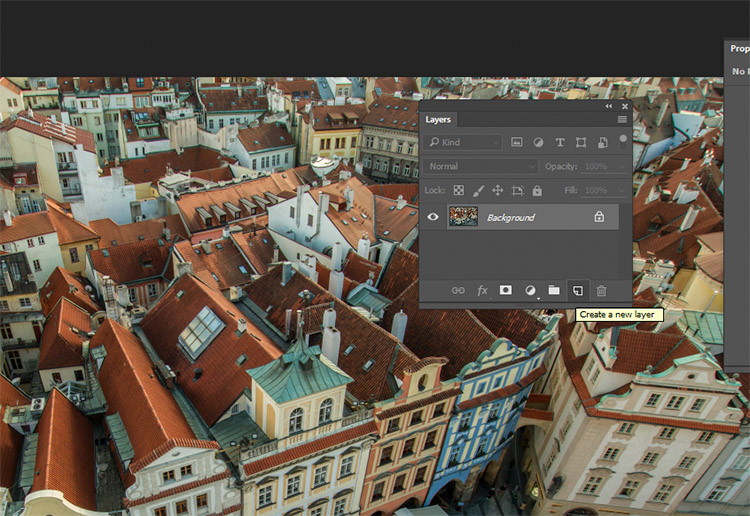
To do this, create a new empty layer by pressing the New Layer button on the layer palette (ctrl/cmd+shift+N).

black-and-white-conversions-in-photoshop-blacklayer-newlayer

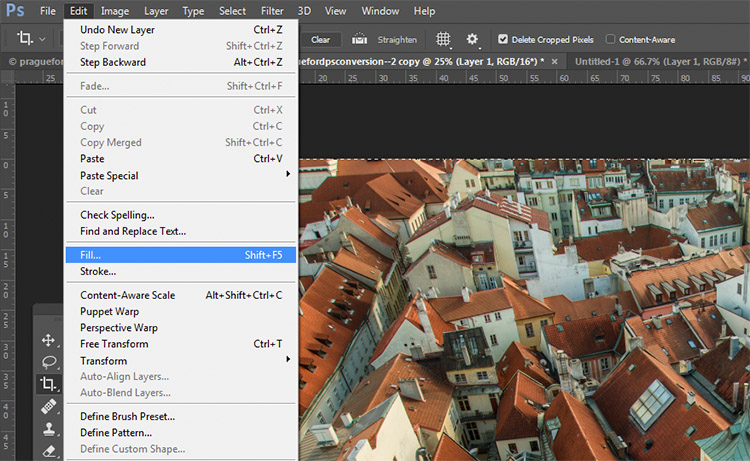
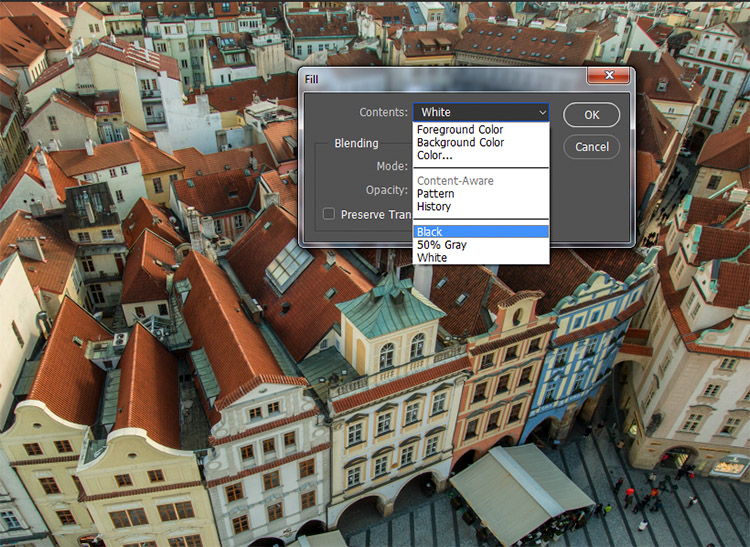
With the empty layer selected go to Edit>Fill (shift+f5) and choose either black or white. Your image should now be filled with the color you selected.

black-and-white-conversions-in-photoshop-blacklayer-fillblack-and-white-conversions-in-photoshop-blacklayer-fill2

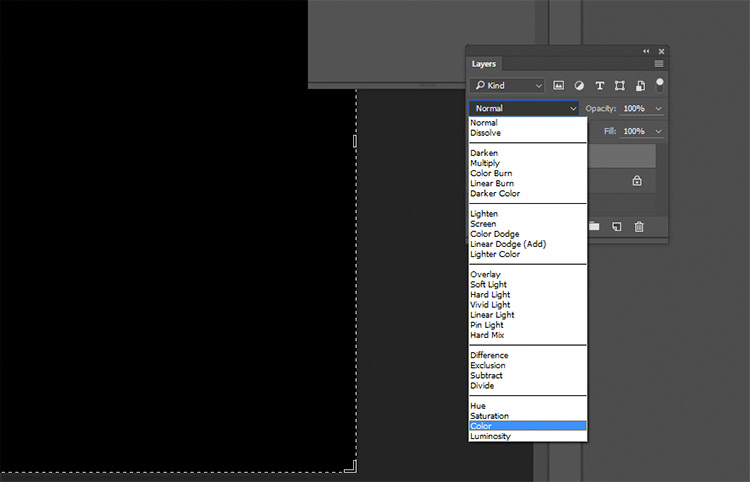
On the layer palette, find the drop down menu for the blending modes and choose color.

black-and-white-conversions-in-photoshop-blacklayer-blending

Intermediate Techniques

The previous four techniques are very basic, and offer you very little control, if any, over the actual conversion of your image to black and white. Now that you’re aware of them, you know what to avoid if you want the best results. The following techniques offer you a range of control over your black and white conversions, however, they take a bit more effort to get right.

5) Channels

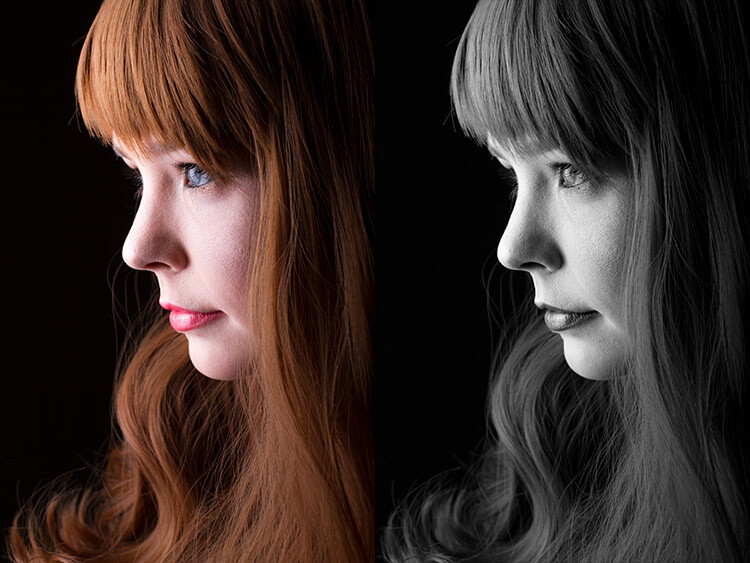
black-and-white-conversions-in-photoshop-channels-example

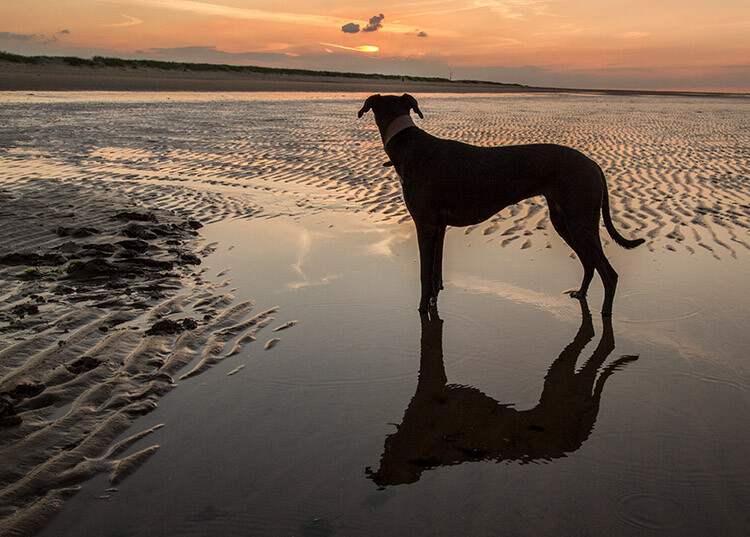
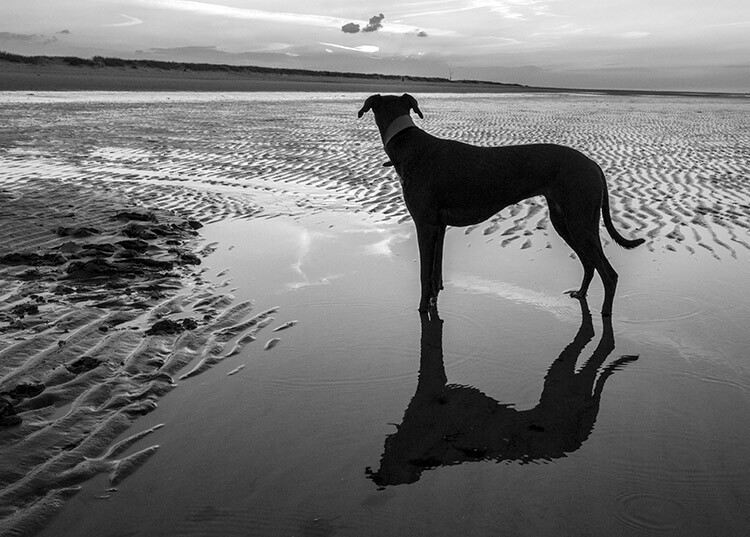
Left: Original image
Right: Converted to black and white by using Channels

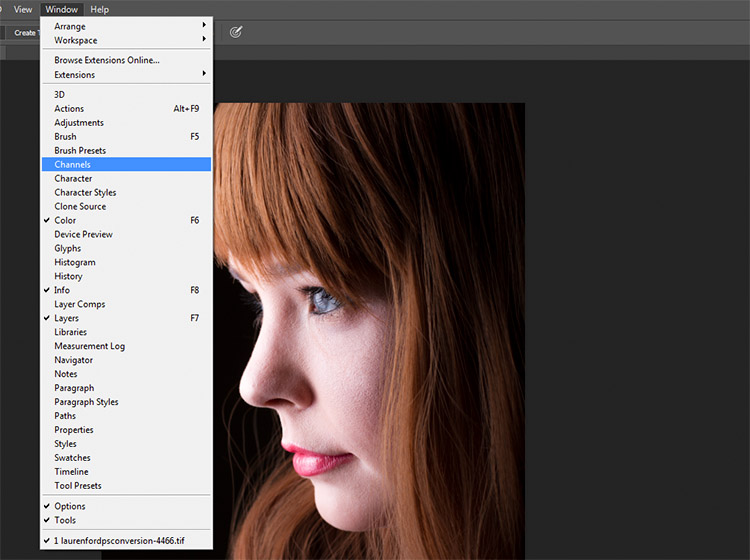
Out of all of the techniques presented in this tutorial, this one may be the least obvious. To start, you want to make sure that you can see the Channels tab in your layer palette. If it’s not visible, go to Window in the top menu bar and make sure Channels is ticked.

black-and-white-conversions-in-photoshop-channels-window

This is a destructive technique, so please make sure you are working on a copy of your original image in case it goes wrong. If you’re unsure, go to Image>Duplicate to have Photoshop create a second instance of your file to work with.

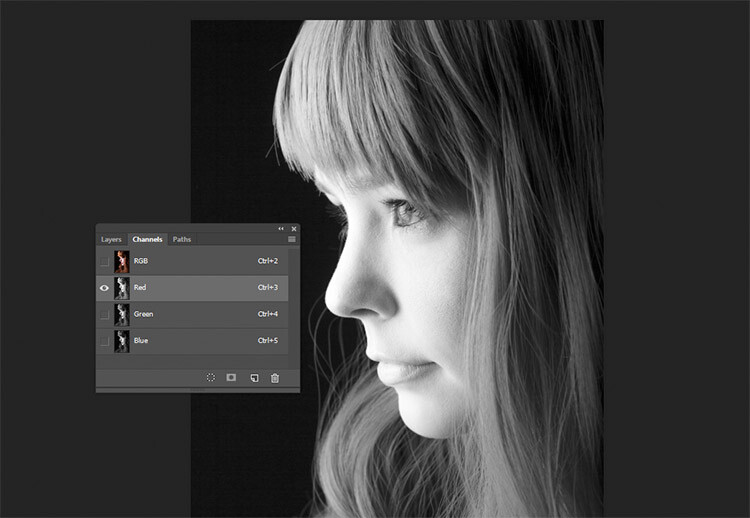
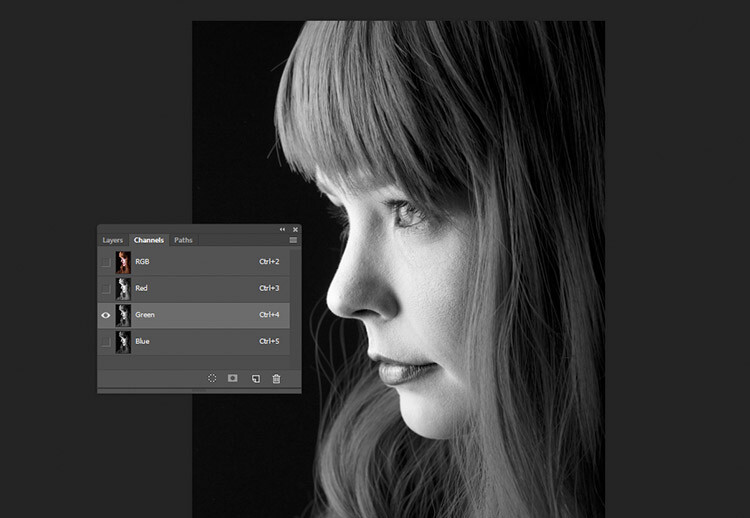
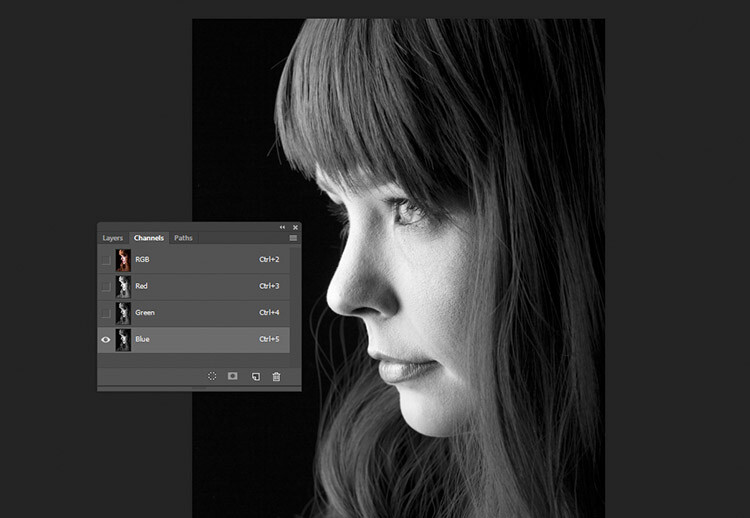
With the Channels tab selected, you should see four sections (they appear as layers would in the Layer Palette) labeled RGB, Red, Green and Blue. If you select the Red, Green and Blue Channels in turn, you will see variations of your image in black and white as it relates to the color information in your image.

black-and-white-conversions-in-photoshop-channels-redchannel

Red Channel

black-and-white-conversions-in-photoshop-channels-grenchannel

Green Channel

black-and-white-conversions-in-photoshop-channels-bluechannel

Blue Channel

To use this to convert your image, choose the channel that has the most pleasing effect on your image. This will vary depending on your subject, and the range of colors in your photos. Once you’ve made your choice, make sure you click on the channel you wish to work with. Now, on the toolbar, choose Select>All (ctrl+A or cmd+A). With the selection active go to Edit>Copy (ctrl/cmd+C)

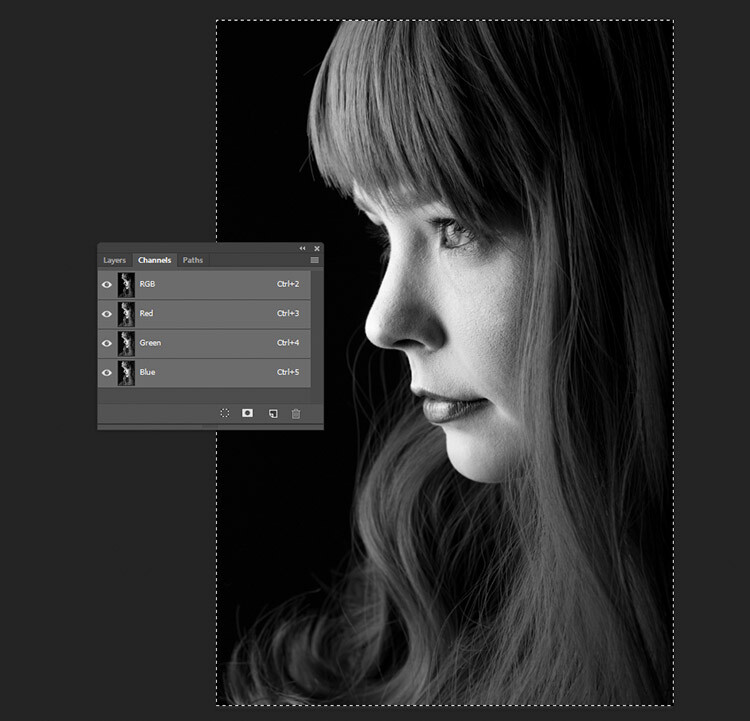
The next step is to paste the selected channel into the other two. In this case, Green is copied and pasted into the Blue and Red channels. One at a time, select the other two channels and go to Edit>Paste (ctrl/cmd+V).

Once that is done, click on the RGB channel and you should see that your image has been converted to black and white. While this technique does not offer complete control over the conversion, it can still be used to great effect.

black-and-white-conversions-in-photoshop-channels-pasted

The final result with the Green channel, pasted into the Red and Blue channels.

6) Channel Mixer adjustment layer

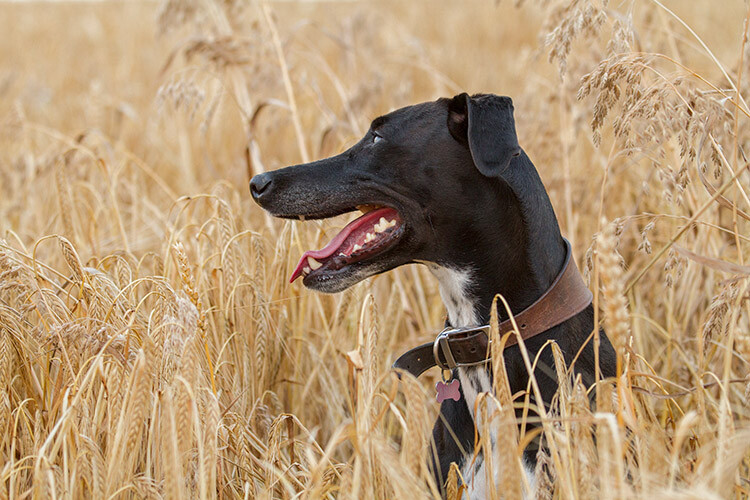
black-and-white-conversions-in-photoshop-channelmixer-colorexample

Original Image

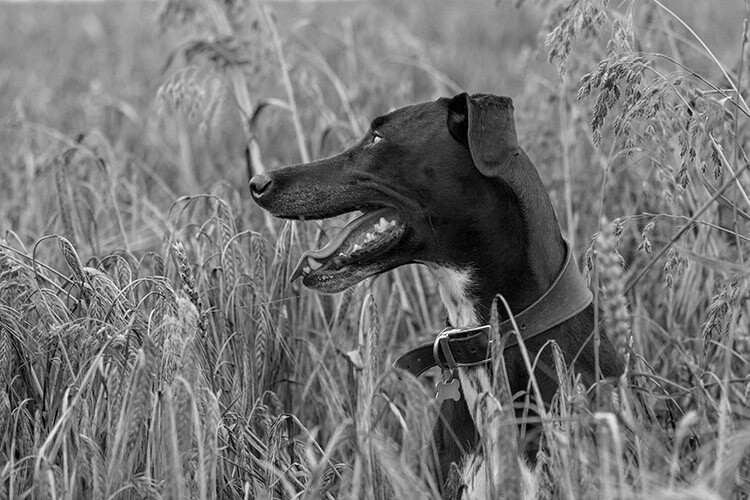
black-and-white-conversions-in-photoshop-channelmixer-bwexample

Converted to black and white using a Channel Mixer adjustment layer.

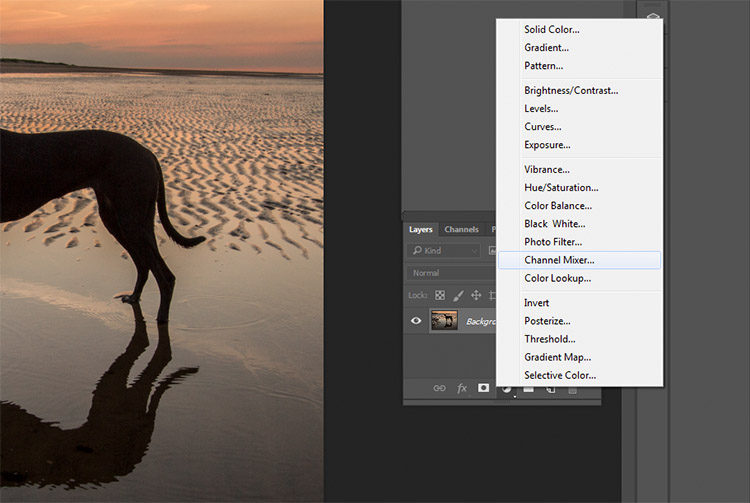
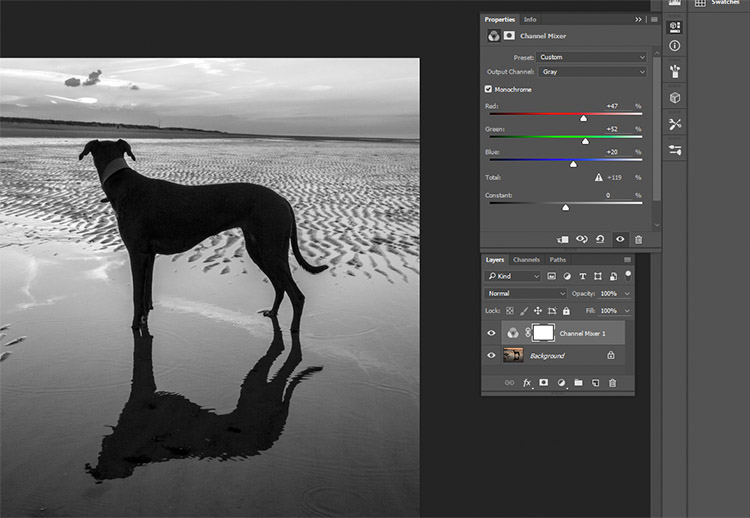
For a bit more control, you can use a Channel Mixer adjustment layer, as a non-destructive technique. On the Layer Palette, find the Create new fill or adjustment layer button and choose Channel Mixer (or select it from the Adjustments panel).

black-and-white-conversions-in-photoshop-channelmixer-layer

On the properties tab for the Channel Mixer layer, click the box that says Monochrome.

To fine tune your image, you can adjust the red, blue and green sliders until you get the effect you desire. These sliders are not very forgiving, so try to keep the adjustments small to avoid destroying the highlights and shadows in your image.

black-and-white-conversions-in-photoshop-channelmixer-layerproperties

7) Black and White adjustment layer

black-and-white-conversions-in-photoshop-blackandwhitelayer-color-example

Original image

black-and-white-conversions-in-photoshop-blackandwhitelayer-bw-example

Converted to black and white using a Black and White adjustment layer.

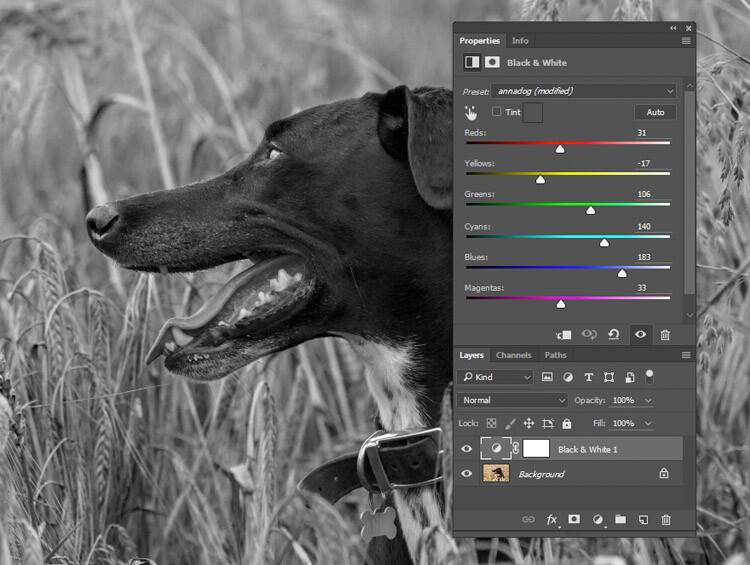
Okay, this one’s pretty obvious in function. It’s also pretty powerful, but it’s not always the best choice. However, it is a good starting point in many cases. As such, this technique will likely become your go-to black and white conversion method, especially if you’re just starting out.

To start, find the Create new fill or adjustment layer on the Layer Palette and choose Black and White (or select it on the Adjustments panel).

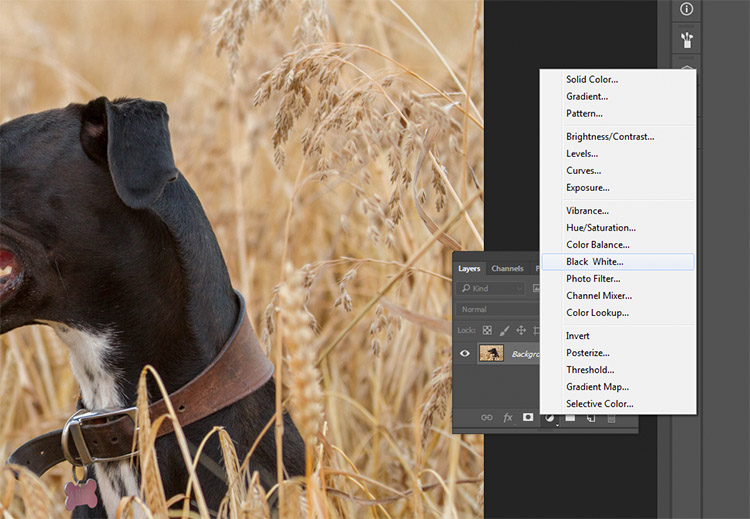
black-and-white-conversions-in-photoshop-blackandwhitelayer-method

Your image will be converted to black and white, and in the properties tab, you will now see an array of color sliders. Moving these sliders to the right will brighten any tones associated with that color. Moving them to the left will darken those tones. The idea behind these sliders is to emulate the effect that colored lens filters used to have on black and white film.

black-and-white-conversions-in-photoshop-blackandwhitelayer-sliders

Moving the Reds and Yellows slider to the left brings out the detail in the grass by darkening the tones associated with those colors.

For portraits, the most noticeable changes will come from moving the red and yellow sliders. For landscapes, the blue and green sliders will be more useful.

As with any adjustment layer, if you change your mind later, you only need to return to the properties tab and alter the sliders to your heart’s content. This is non-destructive editing.

8) Gradient Map

black-and-white-conversions-in-photoshop-gradientmap-example

Left: Original Image
Right: Converted to black and white using a Gradient Map adjustment layer.

The Gradient Map is easily the most powerful of all the black and white conversion tools. It allows you to control every aspect of the tonality of your image. Because of this control, it’s also the most complicated and hardest to use. It is worth knowing though, and a bit of practice will make it an invaluable tool on your belt.

Make sure your foreground and background colours are set to black and white. You can do this by pressing D on your keyboard. Now, find the Create new fill or adjustment layer on the Layer Palette and choose Gradient Map.

black-and-white-conversions-in-photoshop-gradientmap-layercreation

Make sure the gradient that is selected is black to white. Your image is now monochromatic, and you may notice that this technique gives it higher contrast to begin with, than the other methods.

black-and-white-conversions-in-photoshop-gradientmap-basigradient-example

This is an example of how an image might look with a Gradient Map layer, and no further adjustments.

Note: If your image looks like a negative after making the adjustment layer, just click the Reverse box in the layer’s properties tab.

black-and-white-conversions-in-photoshop-gradientmap-reverse

If your image looks like a negative, it just means your foreground and background colors are backwards. Just click the Reverse box in the Gradient Map’s properties tab.

If you forgot to reset your foreground and background colors, your image probably looks like a colored mess. Just click in the gradient in the properties tab, and choose the black and white gradient to fix this with little error.

black-and-white-conversions-in-photoshop-gradientmap-colorgradient

Forgetting to reset your foreground and background colors may result in something like this image. To fix it, just choose the black and white gradient (circled in blue) in the presets section of the Gradient Editor.

At this stage, you may feel that this enough. However, the Gradient Map offers a lot more in terms of control over tonality of the image.

In the properties tab, if you double click the image of the gradient, the Gradient Editor will open. Towards the bottom of this screen, you will see a visual representation of your gradient. There are also be a set of sliders that show either black or white.

If you move the bottom sliders inward, you will increase the contrast in your image. Moving the black slider in, will deepen the shadows, while moving the white slider in will brighten the highlights (which direction those are will depend on whether you have reversed the gradient or not). This is an effective way to increase contrast in your image without leaving the conversion layer. Do watch your histogram for shadow and highlight clipping though.

Click into the image of the gradient to enter the Gradient Editor.

Click into the image of the gradient to enter the Gradient Editor (note my gradient here is reversed)

black-and-white-conversions-in-photoshop-gradientmap-whiteslide

Moving the white slider to the right (circled in red) will brighten the highlight tones in this image. Moving the lower black slider (to the left) will deepen your shadows.

black-and-white-conversions-in-photoshop-gradientmap-clickslide

If you wanted to darken your highlights or brighten your shadows, you can change the colour of the sliders. To do this, double click on one of sliders. In this image, the dark tones are more intense than I would like, so I double-clicked the shadow slider as circled in the above image.

You should then see a Color Picker colour palette (if you don’t see red as shown below, just click the H for Hue). Click into the far left hand side of the palette, and slide the cursor up and down until you get the tone you want for your darkest shadows(or highlights if you chose them). Try to only use colours all the way to the left in the palette. Anything even a bit to the right will have a color tint to it.

black-and-white-conversions-in-photoshop-gradientmap-blacktones

By selecting a colour just above pure black, the shadow tones in the image are brightened significantly.

To really take control over your image’s tonality, you can also control your mid-tones with the Gradient Map. Click just underneath the gradient bar and create a new slider.

black-and-white-conversions-in-photoshop-gradientmap-newslider

To control the mid-tones in your image, create a new slider in the Gradient editor by clicking and dragging under the gradient.

Double clicking this slider will open a color palette. Choose a grey tone (light if you want to alter lighter tones, dark if you want to alter darker tones) and press okay.

black-and-white-conversions-in-photoshop-gradientmap-newwhitetones

Choose a color relevant to the tones you want to alter in your image.

Now drag the slider to a point where it affects the image in the way you desire. If your tone is wrong, just double click the slider again and pick a new shade. You can make as many of these sliders as you need. This gives you absolute control over every tone in your image.

At first, it may be difficult to get used to this tool, but practice will make it easier. The Gradient Map is by far the most powerful black and white conversion tool for your images.

9) Adobe Camera Raw

black-and-white-conversions-in-photoshop-ACR-example

Left: Original Image
Right: Converted to Black and White in Adobe Camera Raw

The last method involves converting your image to black and white at the raw processing stage. Doing this, doesn’t grant you absolute control over your tonality, but it is still quite a powerful possibility. Because you’re working with a raw file, no matter what changes you make, the file information will remain untouched, making this a completely non-destructive technique. It also grants you access to the rest of the tools available in raw processing after you’ve converted your image, giving you a more polished result without having to open your image in Photoshop.

To start, open your image in ACR (Adobe Camera Raw) by opening your raw file with Photoshop. On the toolbar to the right, you should see a row of icons. Find the one that’s called HSL/Grayscale and click it.

black-and-white-conversions-in-photoshop-ACR-HSL

You should see a box labeled Convert to Grayscale. Click it.

black-and-white-conversions-in-photoshop-ACR-mono

To convert your raw file to black and white in ACR, click the Convert to Grayscale box in the HSL tab.

From here, you have access to a bunch of sliders that act the same way as if you were using a Black and White adjustment layer in Photoshop. Play around with them until you’re happy with the way the tones appear in your image.

black-and-white-conversions-in-photoshop-ACR-zoom

While adjusting the sliders, zoom in to areas like skin tones, so you can watch exactly how the sliders are affecting your image.

If you go back to the Basic panel, you have access to all of the basic functionality in ACR. Here you can process your raw file as normal, and you can go back to the HSL panel to alter your sliders at any point (before you leave ACR).

black-and-white-conversions-in-photoshop-ACR-rawcontrols

By doing your black and white conversion at the raw stage, you still have access to all of the processing tools in ACR. Take advantage of these to get a more polished result, before even entering Photoshop.

Once you’re done, export your image in your preferred format (or open it directly into Photoshop) and there you have it.

The right tool for the job

If you’ve followed each of these tutorials through, you will have gained at least a basic understanding of how to use each for black and white conversions in Photoshop. Now, ask yourself the following questions:

  • Which of these tools worked best for me?
  • Which of these tools did I enjoy using?
  • Which of these tools did I hate using?
  • Which of these tools created results that fit my tastes?

In the end, the best tool for the job is the one that gets you the results that you are looking for (even if it’s the tools that I’ve urged you to avoid). Just keep practicing, and you’ll be able to figure out which tool is best, before you even start working on your image.

How do you use Photoshop for your black and white conversions? Please share in the comments below.

googletag.cmd.push(function() {
tablet_slots.push( googletag.defineSlot( “/1005424/_dPSv4_tab-all-article-bottom_(300×250)”, [300, 250], “pb-ad-78623” ).addService( googletag.pubads() ) ); } );

googletag.cmd.push(function() {
mobile_slots.push( googletag.defineSlot( “/1005424/_dPSv4_mob-all-article-bottom_(300×250)”, [300, 250], “pb-ad-78158” ).addService( googletag.pubads() ) ); } );

The post A Guide to Black and White Conversion in Photoshop by John McIntire appeared first on Digital Photography School.


Digital Photography School

 
Comments Off on A Guide to Black and White Conversion in Photoshop

Posted in Photography


Gear Guide Update: Phottix Ares Remotes

26 Aug

At $ 55 a set, the Phottix Ares remotes bring a ton of value to the table, making them our recommended pick for photographers building out a beginner’s lighting kit. For many photographers, in fact, these are the only remotes they will ever need.
See the newly updated Gear Guide: Remote Triggers post for more info.
Strobist

 
Comments Off on Gear Guide Update: Phottix Ares Remotes

Posted in Photography


A photographer’s guide to Cuba

12 Aug

$ (document).ready(function() { SampleGalleryV2({“containerId”:”embeddedSampleGallery_1774365849″,”galleryId”:”1774365849″,”isEmbeddedWidget”:true,”standalone”:false,”selectedImageIndex”:0,”startInCommentsView”:false,”isMobile”:false}) });

Veteran traveler and photographer Michael Bonocore returned from a recent trip to Cuba thoroughly enchanted by the country. Photographers have long been drawn to Cuba’s breathtaking scenery, historic architecture and friendly locals, and in the U.S. in particular, interest in traveling to the island nation is at a high as restrictions on travel have been relaxed somewhat.

It’s becoming easier than ever to get to Cuba, but a few pointers can help set travelers in the right direction – especially those looking to photograph the country’s vibrant towns and landscapes. Bonocore has shared some tips for getting around the country and making the most of your time there over on Resource Travel. Even if you’re not planning a trip to Cuba, you might find yourself seriously considering one after you’ve looked through his photos.

Resource Travel: The Untold Culture of Cuba

Have you photographed Cuba? Have any tips to share? Leave them in the comments below.

Articles: Digital Photography Review (dpreview.com)

 
Comments Off on A photographer’s guide to Cuba

Posted in Uncategorized