RSS
 

Posts Tagged ‘Google’

Google Chrome – Google’s Own Screen Capture Tool Supports Full Page Capture, Editing, and Sharing

07 Jun

Take screen captures of entire web pages viewed in Google Chrome, then add highlights to focus on important elements and share the captures via Facebook.

Looking to capture screenshots while browsing the web in Google Chrome, and want to print and share them with friends and coworkers? While many screen capture extensions exist, you may wish to consider Google’s own Screen Capture tool.

Features include visible web tab or freeform region capture, plus the ability on many pages to capture the entire page with the screen capture tool handling horizontal and vertical scrolling (the author tested this on a couple of pages with good results – your mileage may vary with especially large pages)….

Read more at MalekTips.
New Computer and Technology Help and Tips – MalekTips.Com

 
Comments Off on Google Chrome – Google’s Own Screen Capture Tool Supports Full Page Capture, Editing, and Sharing

Posted in Technology


Google Glass – The Experience

30 May

While at the Google+ Photographer’s Conference this past Tuesday and Wednesday I had the great fortune of being able to try the prototype of Google Glasses from Project Glass. These glasses provide a heads up display of sorts and also include a built in camera allowing you to capture some amazing photos and videos with a perspective that really hasn’t existed to date. So what were they like?

Trying out the Google Glasses prototype


They weren’t too heavy and they were very easy to wear. Considering what is packed into this small form factor it’s tough to believe how much functionality you actually get out of them. They include a camera, a heads-up screen to review photos and review augmented reality data tied to what you’re seeing and where you are (this later part was not seen nor tested). Unfortunately for me I’m left-eye dominant and the glasses were for a right-eye dominant person. For this reason to really see much I had to wince, closing my left eye.

Much of the recent news about them center on how bad they look, but they could be far worse and given the prospect of what information and value they provide it may be a small price to pay. Clearly given the Google+ Photographer’s Conference was centered around photography much of the discussion about them focused on their photographic and video potential. The Google Glasses photo examples shown during the presentation showed off the unique perspective they provide. Having both of the photographers hands in the scene is one noticeable difference between what is produced with the glasses versus a standard camera, but it is ultimately the point of view perspective (head height, looking down, around and with a wide field of view) that makes them stand out.
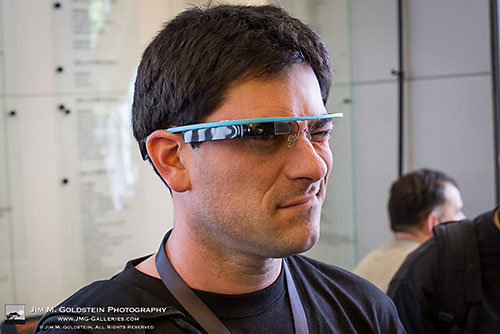
Wincing to see the display with my right eye due to the fact I’m left-eye dominant


The resolution of the images, types of sensor used and the manner in which the photos are downloaded wasn’t discussed, but  to be honest the technical details were easily lost in the moment. It was a very overwhelming moment to see this technology at the prototype stage. It’s so radically different that it takes your breath away when you see it and handle it. As you handle the glasses you’re overwhelmed with the feeling that you’re holding the future in your hands. It’s very sci-fi feeling.

When I originally read the news about them I was skeptical, but after trying them on for a short test drive I think they could be great. The one thing that would be weird though is if everyone is wearing them and you’re taking pictures of each other you’ll have the glasses on versus having a more natural glass free presentation of your subjects. As a one-off it’s cool, but if everyone is running around with them on I’m not sure if people will really want the people photos they’d produce. Who knows. I’d rather deal with that dilemma and reap the rewards they provide than not.

Bonus photo provided of Peter Hurley in amazement as he learns about Google Glass from Dr. Marc Levoy. Note Peter was kind enough to take the photos of me wearing the glasses.

Photographer Peter Hurley taking in the Google Glasses demo by Dr. Marc Levoy


Project Glass: One Day (promo video)

Later in the day I had the good fortune of meeting Sergey Brin who was wearing his personal copy of Google Glasses
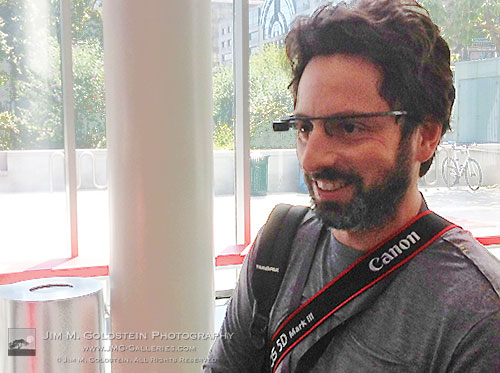
Sergey Brin wearing his Google Glasses at the Googe+ Photographer’s Conference in San Francisco on May 23, 2012

Copyright Jim M. Goldstein, All Rights Reserved

Google Glass – The Experience

flattr this!


JMG-Galleries – Jim M. Goldstein Photography

 
Comments Off on Google Glass – The Experience

Posted in Equipment


Google Maps – Map of the Dead, so You can be Prepared for the Zombie Invasion

20 May

Find food, weaponry, pharmaceuticals, hardware, and other essentials to help ward off the coming zombie invasion.

There are many interesting uses of Google Maps available online. This one may actually save your life.

… when a horde of flesh-eating zombies is on your tail and you’ve got to find food and ammo, that is. The “Map of the Dead” bills itself as a “Zombie Survival Map”. Enter your location (or let the map find you), and quickly see if doctors and pharmacies, police and military installations, or shopping facilities are nearby. Turn on the “Danger Zones” map to look for areas containing “man-made structures” that may hide a greater number of zombies….

Read more at MalekTips.
New Computer and Technology Help and Tips – MalekTips.Com

 
Comments Off on Google Maps – Map of the Dead, so You can be Prepared for the Zombie Invasion

Posted in Technology


Google Chrome – View Kittens and Pandas Everywhere!

14 May

Replace ugly images on webpages viewed in Google Chrome with pandas and kitties.

Have you visited a website inside Google Chrome and found that the images got you down? Wish you saw something cute instead?

The Cutify extension lets you replace photos on webpages with images of baby goats, bunnies, kittens, red pandas, and sloths. That’s right – if you’d rather not see an image of a reality TV star, political figure, or arrogant athlete you can right-click on their photo and choose “Cutify” – “Cutify to Cute Kittens”. It’s that simple….

Read more at MalekTips.
New Computer and Technology Help and Tips – MalekTips.Com

 
Comments Off on Google Chrome – View Kittens and Pandas Everywhere!

Posted in Technology


Google Gmail – Automatically Archive a Conversation you Respond to

05 May

Respond to a lot of email in Gmail and need to keep your Inbox clean? Send your e-mail and archive the conversation in one step.

Are you a very popular individual or work a job such as customer service that requires sending a lot of e-mail via Gmail? Or are you just looking for another way to keep your Inbox clean? If so, you may often find yourself replying to e-mail conversations and then immediately archiving them.

With the “Send & Archive” feature in Gmail Labs you can do both in just one step by adding a “Send & Archive” button below your composed messages….

Read more at MalekTips.
New Computer and Technology Help and Tips – MalekTips.Com

 
Comments Off on Google Gmail – Automatically Archive a Conversation you Respond to

Posted in Technology


Facebook Lightbox vs Google+: which better presents your images?

12 Feb

Icon.jpg

Facebook is making its first steps towards taking photography seriously with the launch of its Lightbox display interface. The change, which is being rolled-out to users in the coming weeks, darkens the rest of the screen when a photo is selected and shows images in greater detail than before (up to 960 pixels in each dimension). How does this presentation compare to the more obviously photo-friendly Google+ service?

News: Digital Photography Review (dpreview.com)

 
Comments Off on Facebook Lightbox vs Google+: which better presents your images?

Posted in Uncategorized


Google Earth in 3D red cyan glasses needed

11 Nov

Google Earth Anaglyph
Video Rating: 5 / 5

 
4 Comments

Posted in 3D Videos


Google Gmail – Show Unread Message Count as an Icon

07 Oct

Glance at your web browser’s Tab Bar to see how many new messages are in your Gmail Inbox.

Do you keep a web browser tab or window open all the time waiting for an important message in your Gmail Inbox?

One way to more easily see at-a-glance whether or not new mail has arrived inside your Inbox is to place the number of new messages directly in the browser / tab icon – see the below screenshot for an example:…

Read more at MalekTips.
New Computer and Technology Help and Tips – MalekTips.Com

 
Comments Off on Google Gmail – Show Unread Message Count as an Icon

Posted in Technology


[MODIFIED] Google Chrome – Report a Malfunctioning Web Page, Crash, or Other Issue

07 Oct

If you are experiencing crashes in Google Chrome, pages that are not displaying correctly yet work fine inside other browsers, or if you have run into a suspected phishing site, report your findings to Google.

If you’re having trouble with a particular web page while browsing the web in Google Chrome, and if the page displays and works correctly with Firefox, Internet Explorer, and other web browsers, you can report the problem to Google.

Or, is Google Chrome crashing often? Are you having difficulty with syncing preferences across machines? Have you run across a potential phishing webpage (a site that looks official but you can tell is trying to steal your personal information)? You can report these issues to Google as well….

Read more at MalekTips.
New Computer and Technology Help and Tips – MalekTips.Com

 
Comments Off on [MODIFIED] Google Chrome – Report a Malfunctioning Web Page, Crash, or Other Issue

Posted in Technology


Google Chrome – Merge Your Browser Windows and Popups Together

25 Sep

Merge all Google Chrome windows together into one with multiple tabs, manually or automatically, via JoinTabs.

While browsing the web in Google Chrome for a long period of time, you’re likely to create multiple tabs to browse several sites simultaneously. You may even create new Google Chrome windows, or websites may automatically open in new windows.

If you have several windows open simultaneously and would like to clean up your display by merging everything into one Google Chrome window containing multiple tabs, you can do so by dragging and dropping the tabs onto one main window. However, if you have several windows open with many tabs in each window, this dragging and dropping can be a chore. With the “JoinTabs” extension you can perform this merge with just one click. Plus, you can have JoinTabs automatically merge popups into one window if you’re tired of sites opening up new windows….

Read more at MalekTips.
New Computer and Technology Help and Tips – MalekTips.Com

 
Comments Off on Google Chrome – Merge Your Browser Windows and Popups Together

Posted in Technology