RSS
 

Posts Tagged ‘Google’

Google demonstrates view behind the Glass wearable camera

21 Feb

R0~TS520x0~cms_posts_8520361839_Screen_Shot_2013-02-20_at_10.22.50_AM.png

Google has announced that its ‘Glass’ interactive head-mounted camera is now available for beta testing. Users who want to get their hands on an early version of the augmented eyewear can apply on social media channels, Google+ or Twitter. The company released a video today to promote the technology, showing what the world looks like through its camera. Read more about the Google Glass and instructions to sign up for beta testing on connect.dpreview.com

News: Digital Photography Review (dpreview.com)

 
Comments Off on Google demonstrates view behind the Glass wearable camera

Posted in Uncategorized


Google Maps-Inspired Birdhouse Guides Birds Home

01 Feb

[ By Steph in Design & Products & Packaging. ]

Google Maps Birdhouse 1

This little orange icon tells us just where we need to go on Google Maps – and now it shows birds where home is, too. Designer Shuchun Hsiao has created a series of birdhouses modeled after the Google Maps destination icon, and placed them all over urban locations in China.

Google Maps Birdhouse 2

The Google Birdhouse Project makes the iconic marker a navigational landmark for birds, and seeing them on walls will undoubtedly cause a few human double-takes.

Google Maps Birdhouse 3

Says the designer, “Google Map had created a remarkable landmark icon, showing the sites on its street views. To search for a landmark with online google map, we can scroll to zoom from the satellite, soon we’ll be able to wander on streets, virtually.”Google Maps Birdhouse 4


“Birds, have the most real experience of google map. Birds can fly through the city, through streets. A birdhouse becomes their destination as google map does.”

Share on Facebook


[ By Steph in Design & Products & Packaging. ]

[ WebUrbanist | Archives | Galleries | Privacy | TOS ]


WebUrbanist

 
Comments Off on Google Maps-Inspired Birdhouse Guides Birds Home

Posted in Creativity


Google updates Image Search with preview panel

29 Jan

shared:google.png

Google has rolled out an updated version of its Image Search feature with faster browsing speeds and a redesigned UI. Users can now view larger versions of images in a preview window with an option to flip through images using arrow keys, and limited metadata, including the pixel dimensions of the original file, is displayed alongside the thumbnail. Click through for more information and a link to Google’s blog post.

News: Digital Photography Review (dpreview.com)

 
Comments Off on Google updates Image Search with preview panel

Posted in Uncategorized


Google+ Long Exposure Photowalk! Thanks to Chris MacAskill and SmugMug!

11 Jan

We had a great Google+ long exposure photowalk this past weekend.

Chris MacAskill and his team from SmugMug came out on Sunday morning and put together a wonderful behind the scenes sunrise photo shoot at the Golden Gate Bridge. Check it out!


Thomas Hawk Digital Connection

 
Comments Off on Google+ Long Exposure Photowalk! Thanks to Chris MacAskill and SmugMug!

Posted in Photography


The Eye of God – Recreating Andreas Gursky (Google Earth Remix)

26 Dec

www.flachware.de As many young photographers, I always dreamt about flying around the world, visiting spectacular spots and places, just like Superstar Andreas Gursky does. So finally I decided to stop dreaming and just do It …in Google Earth. So here is my personal remake of Andreas Gursky’s megapicture. www.fastcompany.com
Video Rating: 4 / 5

Life as a portrait photographer… some clients are more lovely than others.
Video Rating: 5 / 5


Best Practices for Communities on Google+

21 Dec

Community Coffee

I love communities. There are great big giant communities that are social networks themselves, but then there are smaller and more intimate communities where over time you really do get to know people better. These have always been the communities that I end up liking best. Places where you can go and eventually some really cool people end up setting up part of their daily internet experience there. I used to use Flickr groups for these sorts of communities, now I use Google+ (for a lot of specific reasons).

Google+ communities are new though and so I thought I’d take a few minutes to point out some best practices for how to engage, grow and participate in communities.

1. If you are starting a new community yourself, there are several important things to think about. How you manage and grow your community will have a lot to do with the success. For starters, you must be committed to moderating the community. This means showing up, doing a lot of the grunt work (removing spam, managing members, etc.).

I think it’s important to be as friendly as you can and to welcome new members personally even when you have time.

It’s also important that you grow the community. If it is a public community, try and get the word out. Promote your community on Twitter, Facebook, Flickr and your other social networks. Be sure to use the invite feature on Google+ to invite your friends — you may have to break down some of your larger circles into less than about 190 blocks of individuals if you want to invite a circle. Did you know that you can “share” your community to your current G+ stream? Consider putting a link to your G+ community on your G+ profile page. Don’t over invite someone to your community though. If you invite them once and they decline that’s probably enough. If you keep inviting them you will feel spammy.

Think about why you are starting a community. Should you even start one? What is unique about yours? Does it make sense to start a new general community for photograpy, or is there some unique area of photography you want to explore (portraits, urbex, long exposure, a specific geographic area, etc.)

2. Communities are best started with a closer group of friends. Find some of your friends who share your passion for whatever your community is about and make them mods. Make sure that they are on board with helping to manage, grow and promote the community as well.

3. Be nice. The worst communities are full of negative people. Try to avoid these types as much as possible — not just on Google+ but in life in general. :)

As a leader of a community especially it’s your job to try and set the tone. I’m all for free speech, but I’d recommend against allowing bullying and harassment in your community. If you see it call it out gently. If someone is a real problem or trolling consider banning them.

4. As a participant in a community be thoughtful when you join a community. Are there rules? Try to figure out what these rules are. Try to engage with others on their posts first before starting lots of your own. Nobody likes spam. Don’t just show up to a community to post your photos and leave, or to promote some other community and leave, or worst of all dump commercial spam or links to stupid websites. Make sure you are posting the right thing in the right area. Some communities don’t want you to post dumb mind numbing photos in the discussion threads. Maybe there is a specific place for you to dump your photos. Find out where that is first.

5. The best communities are about discussions. Participate in these discussions. Find good ones that you like and get to know people through participation. +mention people specifically by name in community discussions. Unfortunately Google+ communities don’t bump threads yet :( and so this may be the only way that someone knows you are engaging them in a conversation in a community of fast moving threads.

6. Consider adding the most active members of your community to a specific circle. This helps you look at their stuff outside of the community as well. Circle sharing is also a great way to help promote your community. For the main community that I’m involved in, Light Box, I’ve created a circle for everyone who gets a photo voted into our Light Box. I shared it when it hit 100 members, 200 members and will share it next when it hits 500 members, 1,000 members, etc.

7. Pro Tip (thanks Ricardo Lagos): When you start a community make a separate private community just for your mods. Here you can hash out issues that come up with the community. You can discuss problems together privately and discuss policy issues. While you certainly will want to get the larger community opinion on the guidelines or direction of your community, having a smaller place for those most invested to figure things out is good too.

8. Add different sections to your community. Create an FAQ.

9. Try out different communities, but don’t try out too many. I think it’s a good practice to check out a bunch of communities to see where you like hanging out. Different communities will have different flavors. If you spread yourself too thin though it will be harder to get to know people there. Take some time finding a few communities that you really like and then once you settle in invest more time with those communities. Remember the key to enjoying a great community is individual participation.

10. Remember not to neglect your other participation on G+. It’s easy to get sucked into a community and end up spending all of your time there. As much as communities can become really nice little watering holes where you become better friends with some members over time, remember that the world is big and that one of the things that still is nice about G+ is that there is a whole big network out there without community walls. Some people will not want to join communities. Some people don’t have TIME to join communities. Make sure to take some time keep up with these folks as well. :)


Thomas Hawk Digital Connection

 
Comments Off on Best Practices for Communities on Google+

Posted in Photography


NowNow | Cydia Tweak: Replace Siri With Google Voice

18 Dec

Retweet this video: clicktotweet.com How To Get FREE Paid Apps [No Jailbreak] – youtu.be Name: NowNow Version: 1.0 Description: replace Siri [on enabled devices] or just get a nice Voice Assistant! With NowNow you are now able to replace or add Google Voice Search and have it as your default voice assistant! Requirements: Google Search app [Available in the App Store for free] Repo: Big Boss Price: FREE Developer: Nick Frey FOLLOW ME FOR UPDATES HERE: Twitter: www.twitter.com Facebook: www.facebook.com Subscribe to my vlog channel: www.youtube.com Blog: www.SenseiPhone.com About SenseiPhone SenseiPhone covers the latest iPhone jailbreaks, tweaks, apps, firmware, latest iOS news, and more! We are mastering iPhone from all aspects. We bring everything about iPhone to our readers (you) in an easy and interesting way. Our goal is to make you a master of iPhone, like us. Intro visual done by: YouTube.com Intro Music done by: YouTube.com Music provided by: YouTube.com Equipment Used to Produce this Video: Camera: Nikon D5100 Lens: Nikon DX AF-S NIKKOR 18-55mm Mic: Blue Snowball Editing Software: Final Cut Pro X Lighting: Cowboy Studio Lighting Kit
Video Rating: 5 / 5


Thinking of Starting a Photo Community on the Web? Should You Do It on Flickr or Google+?

15 Dec

Google+ Communities vs Flickr Groups

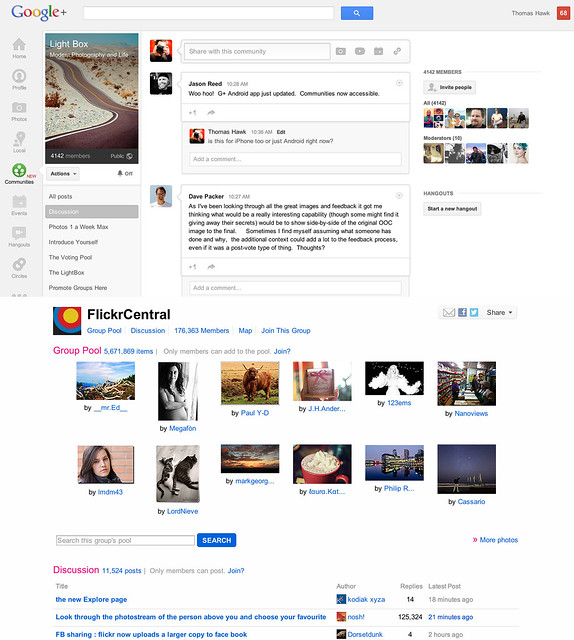
Google+ launched their new communities last week and I’ve spent a lot of time exploring how they work since launch. I’ve also spent quite a bit of time super active over the past eight years in Flickr groups. Google+ communities are a lot like Flickr groups, but there are key differences, advantages and disadvantages to both. I thought I’d write a post comparing the two. I’ve long held that Flickr groups represent Yahoo’s best chance for social going forward.

So here’s the smackdown.

1. Thread bumping. Flickr wins. Probably the most significant problem with G+ communities is that they do not bump threads. With Google+’s new communities discussion topics are only shown by most recent post. Unfortunately the most recent post is not always the most interesting/engaging post. What’s more, because threads are not bumped upon a new comment, almost every thread over 24 hours in an active community on Google+ dies. Good conversations should last more than 24 hours. Flickr solves this problem by simply bumping each thread back to the top of the discussion forum anytime someone makes a comment on it. This is a far better way to keep a discussion forum active and engaged.

2. Muting discussions. Google+ wins. One of the problem with Flickr is that there is no way to screen out discussions that you are not interested in. If I don’t care about football, why should I have to see a thread about football in my favorite photography forum. At Google+ the answer is simple. Just go to the thread and choose to “mute this post.”

3. Photo pools. Flickr wins. At G+ you are forced to try to use typical discussion threads to post photos. Flickr, by contrast has a group photo pool that is associated with each group. Although it’s tempting to see photo pools as more of a photography niche feature, I’d argue that every community potentially has photos to share. Even if the photos are not artistic oriented photography, every group of people will potentially want to share photos with each other. Ideally, a group/community should be allowed to have more than one photo pool/album with settings to allow how content can be shared in those pools.

4. Community activity. Google+ wins. Even less than two weeks old, communities on Google+ are far more active than Flickr. Individuals are far more engaged and the rate of velocity around community conversations is much higher at Google+.

I started a new community called Light Box on Google+. It’s based on a voting game similar to voting groups I’d created on Flickr in the past. On Google+ the group already has over 4,000 members in less than a week. At Flickr it would take me months to build a group up that large. The G+ community is already 20x more active than any voting group/game I’ve ever seen on Flickr. When it comes to community velocity there is simply no comparison. Google+ communities are some of the most active I’ve ever seen anywhere on the web.

5. Invite process. Google+ wins. Google allows you to invite participants in circles up to around 195 people max. Sending out one invitation to 195 people is a lot easier than the way that Flickr allows you to invite people. On Flickr you can only invite a single member one by one by one by typing their individual name — wayyyyy too much work.

6. Sticky threads. Flickr wins. One of the thing Flickr allows a group owner/moderator to do is to make certain threads sticky so that they always stay at the top of the discussion threads. This is helpful if you have a group/community FAQ or other material that is important to stay prominent to the membership. At present you cannot make sticky threads at Google+.

7. Adult oriented communities. Flickr wins. Although there are some deep underground private communities on G+ focusing on nudes, G+ by TOS doesn’t allow nudity and this content is subject to being removed. On Flickr, they do allow nudity as long as it is properly flagged as nudity. In Flickr’s case this has resulted in both communities discussing artistic fine art nudes, but also a pretty seedy amateur underground porn network as well. Flickr routinely deletes many of the most offensive adult oriented communities, but if fine art nudes are your thing, you’re probably more likely to find these communities on Flickr than G+.

8. Moderating community membership. Flickr wins. It’s much easier to moderate community members in Flickr groups than in Google+ communities. On G+ you must scroll through an entire list of community members in order to find the person you wish upgrade to moderator or ban from your community — page after page after page after page. With any large community on G+ this is a very cumbersome process. Flickr by contrast has a powerful search tool which allows you to search for a member my name to upgrade or ban them.

9. Blocking members. Google+ wins. It cannot be overstated how important a good blocking tool is to community management. Inevitably some community members will not get along. Especially since Flickr allows obvious anonymous troll accounts to inhabit communities, users need some way to immediately protect themselves against bullying and harassment. Flickr’s community blocking tools are weak and non-existent. By contrast Google+ provides users a powerful blocking tool which turns anyone invisible that you choose to block.

Even more important than this user option is the tone that is set in communities because of it. When you know that you can be blocked by other people you are nicer and more polite. I wrote a post a while back about how Google+ is the nicer community for photographers on the web. Flickr groups are routinely full of trolls, jerks and assholes. Even the ones who are tolerable oftentime pride themselves on abusing other community members with their snide, disparaging comments. They think it’s cool to be “snarky.” On Google+ these people are routinely dismissed and blocked and the overall tone is far more positive.

10. Mobile tools. Google+ wins Earlier this week Flickr rolled out a new version of their iPhone app that has a simple thread reader for Flickr groups. The app is AWESOME by the way. When Google+ rolled out communities last week they did not have support for mobile, but today they added it for both iPhone AND Android. I would suspect that a group thread reader will be coming to a future Android app for Flickr.

11. Group/Community recommendation. Google+ wins. On Flickr I am recommended groups that are years old, super dead and with zero activity in them. These are old groups that some Flickr employee chose to highlight years ago. By contrast on G+ I’m recommended communities that really are personally directed and targeted towards me. These are communities that are thriving and active. I’m guessing that there may be some Google curation of these recommendations, but what I’m seeing feels much more algorithmically based and the algorithm recommending communities on G+ feels super smart and personalized to me.

12. Hangouts. Google+ wins. From time to time you will want to get more involved with the members of your community than just discussion threads. With Google+ you can hold a hangout and do live video/voice interaction with other members through Google’s hangout feature. Flickr doesn’t have anything like this.

13. SEO. Google+ wins. While both Google+ and Flickr offer you private communities with an option to not index the community for the web, both also allow public communities that can be indexed for the web. With any public community you will want to have your community index well in search on the web. Google promotes Google+ posts by the people that you follow — if you are searching for a group on the web, there is a much better chance that you will find groups by your friends on Google+. Already my new Light Box group indexes for the first page search results for Light Box when I search regular Google and am logged in. Personalized search gives your group an advantage for being found on Google by your contacts and friends.

The final verdict? Google+ communities win. In my opinion Google+ communities are far more engaging, active, positive places to hang out than Flickr groups. As much as I enjoyed Flickr groups in the past, I think all of my community time going forward will be happening on Google+ instead. While I’m optimistic that team Flickr can/should create a better group experience for users, it may be too little too late at this point.

While Flickr does have Google+ beat on some important features like thread bumping and photo pools, these features are not enough to make up for the current velocity and dynamic advantage that Google+ communities have. Social photographers have been leaving Flickr groups over the past few years as they’ve been setting up camp at G+. Now G+ gives them the one thing that they missed from Flickr, a solid community experience. I suspect that communities on G+ will only get better and better in the weeks ahead. Google+ tends to release things in beta form, bugs and all, and then iterate very rapidly. I’m confident that some of their limitations today will be improved in the future. Hopefully they even give us thread bumping and photo pools like Flickr. :)


Thomas Hawk Digital Connection

 
Comments Off on Thinking of Starting a Photo Community on the Web? Should You Do It on Flickr or Google+?

Posted in Photography


Apple and Google teaming up to buy Kodak patents

13 Dec

shared:kodakextColor.jpg

Financial news service Bloomberg is reporting Apple and Google are working together to purchase some of Kodak’s imaging patents. The companies are said to be working together – lending more weight to reports in the Wall Street Journal from back in August. The story suggests the two companies, along with the groups of smaller companies with whom they’d been preparing bids, will offer more than $ 500m for the patents. Such a figure would give Kodak access to $ 830m of external funding that is dependent on the value of the patent deal.

News: Digital Photography Review (dpreview.com)

 
Comments Off on Apple and Google teaming up to buy Kodak patents

Posted in Uncategorized


Apple and Google teaming up to buy Kodak patents

10 Dec

shared:kodakextColor.jpg

Financial news service Bloomberg is reporting Apple and Google are working together to purchase some of Kodak’s imaging patents. The companies are said to be working together – lends more weight to reports in the Wall Street Journal from back in August. The story suggests the two companies, along with the groups of smaller companies with whom they’d been preparing bids, will offer more than $ 500m for the patents. Such a figure would give Kodak access to $ 830m of external funding that is dependent on the value of the patent deal.


News: Digital Photography Review (dpreview.com)

 
Comments Off on Apple and Google teaming up to buy Kodak patents

Posted in Uncategorized