RSS
 

Posts Tagged ‘Google’

Google Earth and Maps updated with higher quality satellite imagery

30 Jun

$ (document).ready(function() { SampleGalleryV2({“containerId”:”embeddedSampleGallery_8496580915″,”galleryId”:”8496580915″,”isEmbeddedWidget”:true,”standalone”:false,”selectedImageIndex”:0,”startInCommentsView”:false,”isMobile”:false}) });

Google has updated both Google Earth and Google Maps with higher-quality satellite imagery using images mostly taken by NASA and the USGS’s Landsat 8. According to the company, the refreshed imagery provides truer colors and greater detail in comparison to the previous content captured by Landsat 7, helping provide what Google calls its ‘freshest global mosaic to date.’

The company pored over more than 700 trillion pixels’ worth of Landsat images to choose the clearest photos. Before this imagery refresh, Google’s mapping products included satellite imagery captured, in same cases, nearly two decades ago. Google has rolled out the new images to all of its mapping products; the content can be viewed on both the ‘satellite’ layer on Google Maps and on Google Earth.

Via: Google Lat Long Blog

Articles: Digital Photography Review (dpreview.com)

 
Comments Off on Google Earth and Maps updated with higher quality satellite imagery

Posted in Uncategorized


STG Uploader app allows Sony cameras to upload directly to Google Photos

14 Jun

A new unofficial app called STG Uploader enables Sony cameras compatible with PlayMemories Camera Apps to upload content directly to Google Photos. Running the application will prompt the user to set up a Wi-Fi access point, after which the user will authorize the app to place an oAuth token on the camera’s SD card, a safer alternative to saving the user’s Google username and password on the camera.

Full instructions on installing the app are located on the Sony-PMCA-RE Github. Once installed and set up, users are presented with a simple screen that shows how many photos are ready to be uploaded to Google Photos and how many have already been uploaded. An upload status bar is provided, as well as an option for erasing the upload database.

According to a user at SonyAlpha Rumors, the app uploads photos in full resolution. Images uploaded directly will appear in Google Photos with the name ‘SonyUpload’ followed by the date. Note that formatting the SD card will cause the oAuth token to be erased and the app setup process will have to be repeated.

Via: SonyAlpha Rumors

Articles: Digital Photography Review (dpreview.com)

 
Comments Off on STG Uploader app allows Sony cameras to upload directly to Google Photos

Posted in Uncategorized


India says no to Google Street View, citing security concerns

13 Jun
Launched in 2007, Google’s Street View service uses imagery captured by cameras mounted on cars, backpacks, bicycles and snowmobiles. Today, the service covers locations all over the globe.

Indian officials have told the BBC that the country has rejected Google’s plans to image its towns and cities as part of its expanding Street View service. Citing security concerns around ‘sensitive defense installations,’ officials point out that planning for the 2008 Mumbai attacks was believed to have involved photographic reconnaissance. As such, the country believes, Street View could compromise national security.

This isn’t the first time that Google’s Street View service has attracted concerns. Several countries have at one time or other raised privacy and security worries. The Czech government has banned the company from taking any new imagery (current Street View images of Prague are frozen at 2014), and in 2010, almost 250,000 Germans requested that Google blur images of their homes.

Articles: Digital Photography Review (dpreview.com)

 
Comments Off on India says no to Google Street View, citing security concerns

Posted in Uncategorized


Ricoh Theta and Theta S apps add support for Google Cardboard

03 Jun

Good news for users of Ricoh Theta and Theta S 360-degree cameras: the corresponding apps now support the use of ‘head-mounted displays’ for viewing your images and videos in their full 360-degree glory. This of course includes Google’s budget Cardboard viewer. 

When viewing images or video in the app you can now choose between standard screen or two different virtual reality modes, single or double lens, the latter of which will work with Google cardboard. Until now, Theta users had to upload their content to a compatible service in order to view them using Cardboard. Now, thankfully this additional step is no longer necessary. The Ricoh Theta and Ricoh Theta S app can be downloaded from the Google Play Store.

Articles: Digital Photography Review (dpreview.com)

 
Comments Off on Ricoh Theta and Theta S apps add support for Google Cardboard

Posted in Uncategorized


Painting in VR: Kingspray Graffiti Simulator & Google Tilt Brush

24 May

[ By WebUrbanist in Art & Drawing & Digital. ]

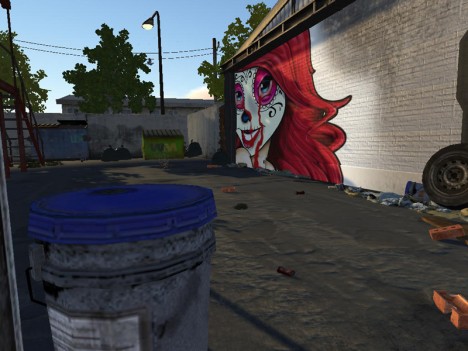
graffiti simulator

Virtual reality is not just about interacting with people at distance, or engaging with static worlds designed by others – it can also be a place where users are invited to create their own works of art and design. Games and apps like the two featured here (in videos below) are opening up new digital worlds for creatives to explore and shape.

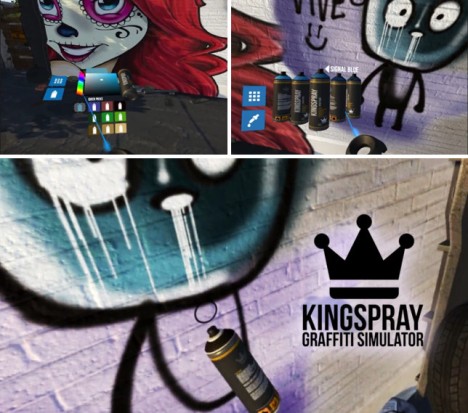
graffiti simulator experience

The Kingspray Graffiti Simulator, currently in development, gives players a palette and can of spray paint, adding realism through trips and spraying effects. Walking around the simulated world, artists can paint over and re-tag, then walk around to view other works and step back to enjoy the view.

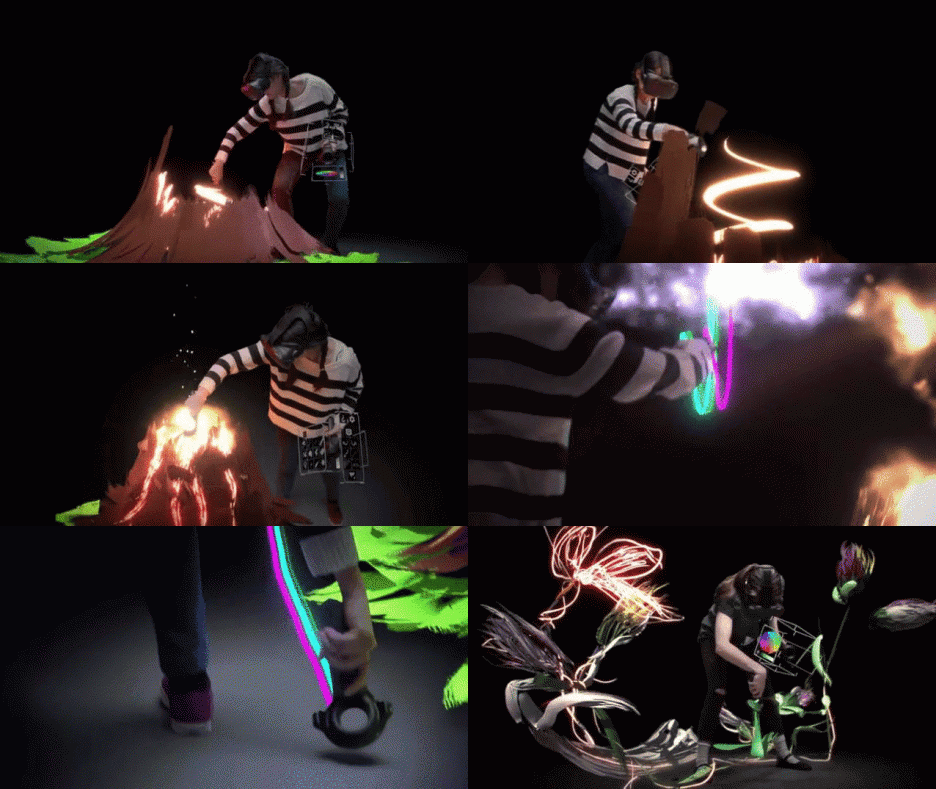
tilt brush artworks

The Tilt Brush app from Google lets users sketch and draw in three dimensions. While the Graffiti Simulator places you in 3D space painting 2D surfaces, the Tilt brush actually lets you paint in space all around you. In turn, the finished pieces can be experienced from various perspectives by the artist and viewers invited to share the experience.

3d art

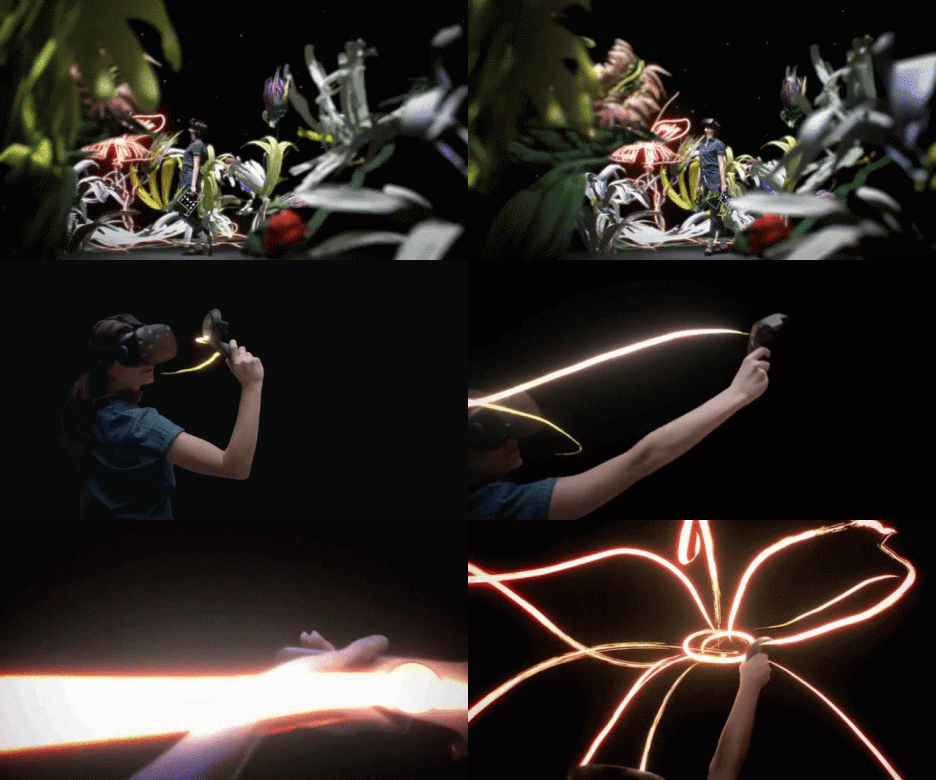
light painting

“Tilt Brush, at its core, is a virtual reality painting application. It creates something anyone can use, intuitively, for kids, artists, and absolutely anyone,” say the app’s developers. “Within the first 30 or 45 seconds, anyone can start VR painting and making marks in space all around them… It allows everyone to see how powerful VR is and how transformative it will be.”

Share on Facebook


[ By WebUrbanist in Art & Drawing & Digital. ]

[ WebUrbanist | Archives | Galleries | Privacy | TOS ]


WebUrbanist

 
Comments Off on Painting in VR: Kingspray Graffiti Simulator & Google Tilt Brush

Posted in Creativity


The 5 Best Google Nik Color Efex Pro 4 Filters and How They Can Amplify Your Images

21 May

The Google Nik collection has been considered one of the top photographic effect plugin suites for a few years now, and it just got better in a big way – as of March 24th, 2016, it’s available free of charge.

This move has been applauded by many, yet accompanied by caution with by some, since a few analysts see this as the beginning of the end for the software suite. This is all speculation of course, and regardless of what the future holds for the Nik collection, it is a highly useful set of tools that can benefit any photographer, of any skill level.

Nik color efex pro

Color Efex Pro

The highlight of this set has always been the all-around workhorse, Color Efex Pro. The current version, Color Efex Pro 4, is a complete package in itself, featuring a variety of effects of the highest quality. Although you can sort the list of effects by photo type (landscape, portrait, etc.), there is a lot to explore.

Let’s go through five of the most useful and effective tools available in this package, and see how they can boost the appearance and effectiveness of your images.

Foreword

As with all of the tools within this suite, the filters described below include a Control Points feature within the panel of individual filter controls. This feature is invaluable, and allows you to add positive or negative points anywhere in the image, adding or reducing the effect of the filter in targeted areas. Each point can be individually controlled to modify range of effect and opacity. Combining these points with the filters gives you almost unlimited control of how the filters will effect your final photograph. I encourage you to play around with the control points, and you’ll quickly see how they can help you turn your image into the picture you initially envisioned.

1 – Bi-Color Filters

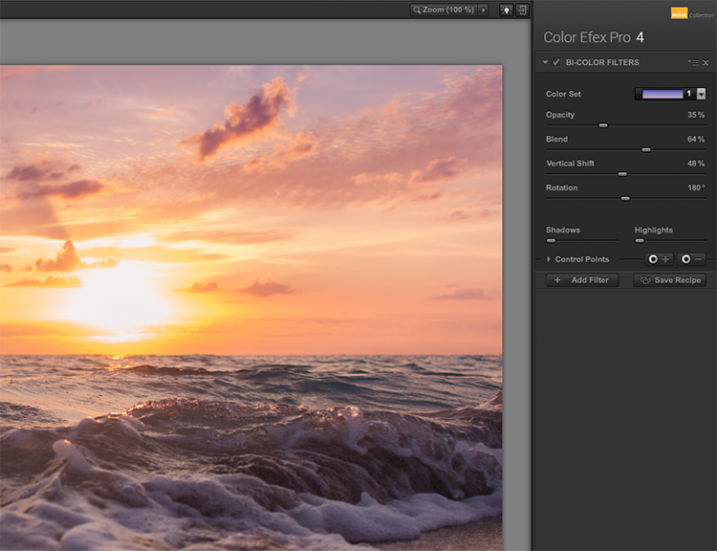
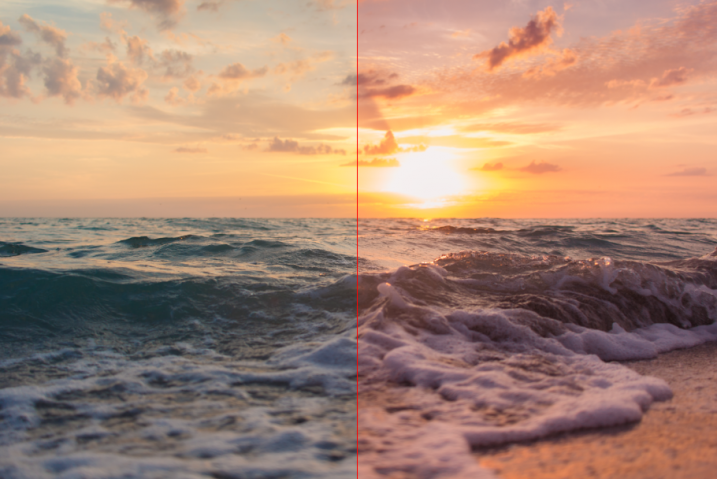
This filter is meant to simulate standard bi-color filters that would normally be affixed to your camera lens. Two preselected colors are blended together along a plane and mixed with your original image, creating a very customizable look that can completely change the tone of the photograph.

Although another bi-color filter is available that allows you to choose the two colors to be blended, the original filter has already selected many color combinations divided into five shade groups, such as browns, cool/warm, violet/pinks, and so on.
Nik color efex pro

Once you have selected a color set, you can further modify the appearance of the filter by adjusting several sliders, including Opacity which allows you to increase or decrease the intensity of the overall effect, and Blend slider, which softens or sharpens the line between the two colors. The entire effect can be rotated around the image using the Rotation slider.
article_cep4_screen6

Once you have mastered the controls for adjusting the bi-color filter effect, you can then move on to the User Defined Bi-Color Filter, which has similar controls, and allows you pick any two colors to blend with your image.

2 – Contrast Color Range

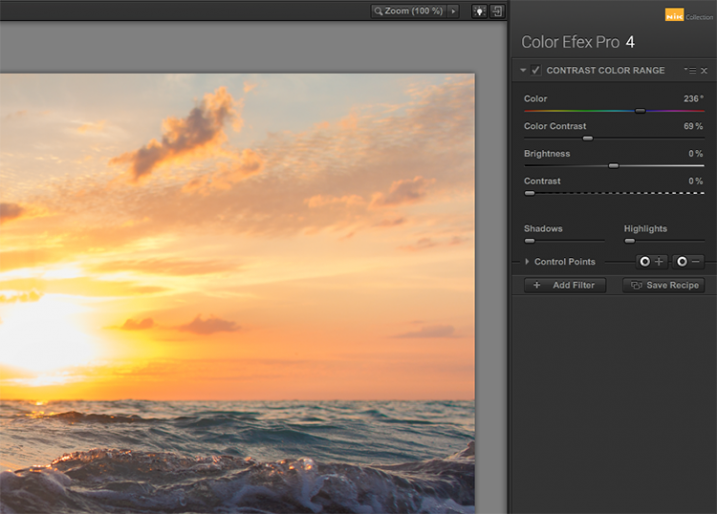
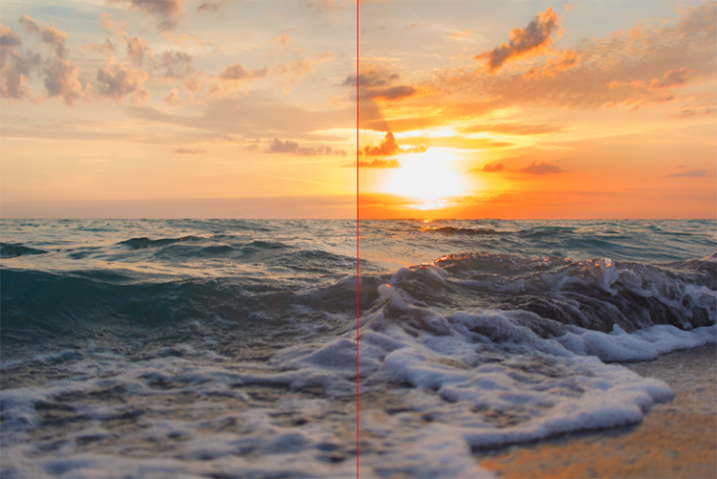
The Contrast Color Range filter allows you to selectively modify contrast within certain colors of a photo. Selecting a color will cause that color range to become lighter or less saturated, and colors opposite of it to become darker or more saturated. For example, selecting a blue or purple color range in an image featuring a sunset (with a lot of orange within the photo) will intensify the red and orange colors, making the sunset much more dramatic.
Nik color efex pro

The two main tools to understand here are the Color, and Color Contrast sliders. The Color slider will select the color range, while the Color Contrast slider will adjust the intensity of the effect by increasing or decreasing the contrast between the color selected and its reciprocal.
Nik color efex pro

Below these are controls for Brightness and Contrast, which behave similarly to their counterparts in Photoshop or Lightroom.

3 – Detail Extractor

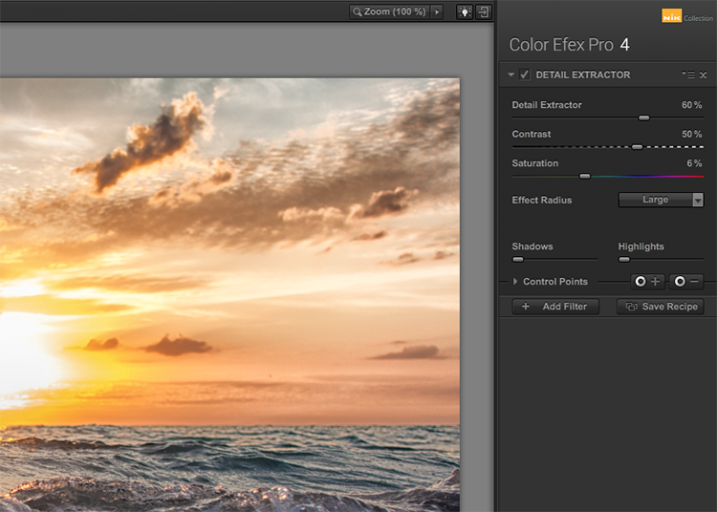
While most users might argue in favor of using the excellent Pro Contrast filter (discussed below) over the Detail Extractor, I’d argue that it depends on what look you’re going for. For a smoother, less enhanced result, Pro Contrast would definitely be the way to go, but to add insane levels of drama to your image, the Detail Extractor is just what the doctor ordered.
Nik color efex pro

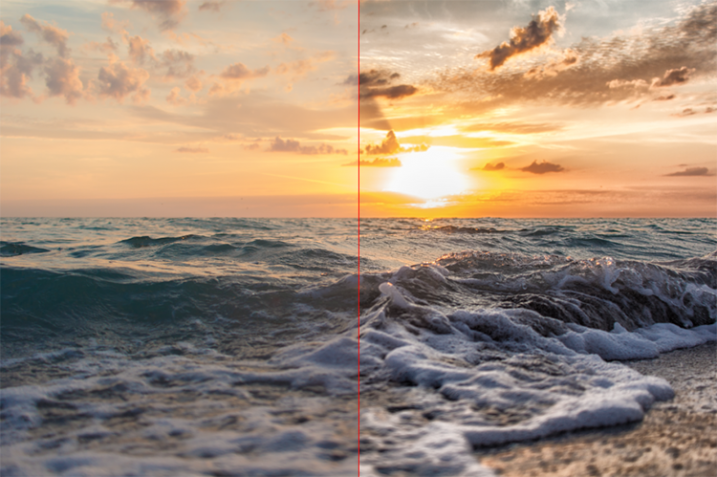
This tool adds that drama by disrupting the balance of shadow and light within the photo, to pull much more detail, giving you a dark and gritty stylized result that can really grab the viewer’s eye.
Nik color efex pro

The main control used to create the effect here, is the Detail Extractor slider. Moving it to the right increases the amount of details highlighted. In addition to Contrast and Saturation adjustments, there is also an Effect Radius adjustment available, which allows you to target whether fine or large elements within the image are modified.

4 – Pro Contrast

Without a doubt, the Pro Contrast module in Color Efex 4 is my favorite filter by far. Admittedly, half of my interactions with the Nik Filters involve me making all of my adjustments in Lightroom, and using Color Efex 4’s phenomenal Pro Contrast to add the bit of drama and flair I’m looking for, without going over the top and getting an overcooked result.

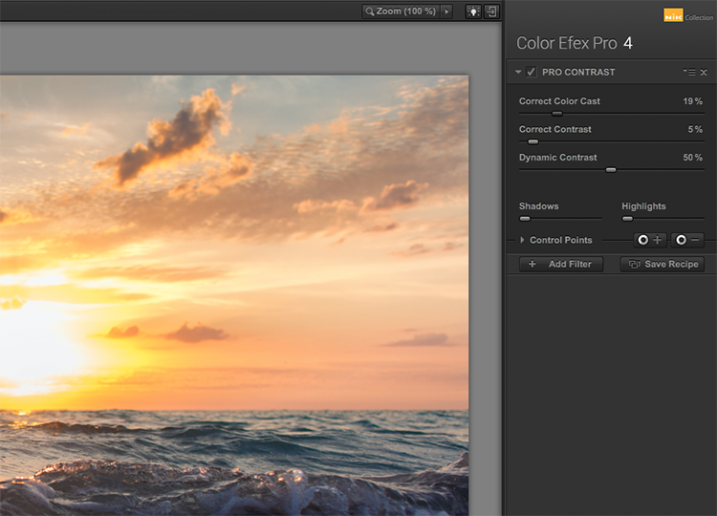
The tool analyzes the image to determine how the contrast adjustment will affect the loss in detail inevitable in this type of correction, and minimizes it. The filter can turn a flat, lifeless, image into a colorful and vibrant photo with almost perfect levels of contrast.
Nik color efex pro

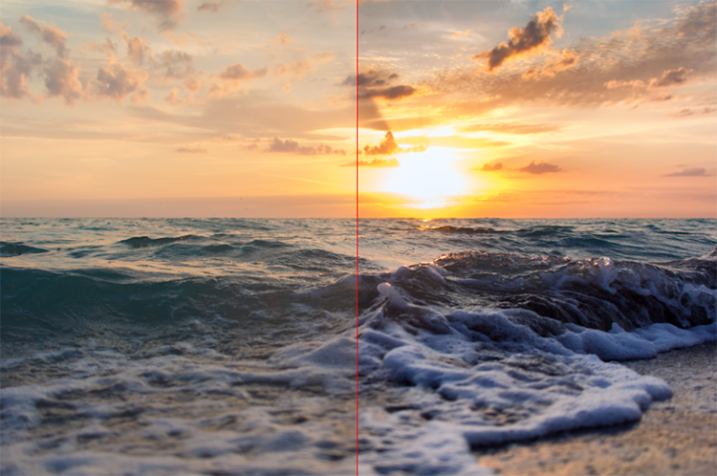
Pro Contrast features three sliders, each one of them important to the final result. Correct Color Cast analyzes the photo, and produces an algorithm to remove any inherent color cast it finds. Moving the slider to the right will reduce this cast and smooth out the tonal scheme of the image. In the ocean sunset image shown here, applying Correct Color Cast removes the orange hue cast upon the waves in the foreground, and returns them to their proper blue.
Nik color efex pro

Correct Contrast applies a general contrast adjustment based on the tonality of the image, as analyzed by the software. Finally, Dynamic Contrast introduces the real magic; areas of the photo that are flat are boosted in contrast, while areas already featuring high contrast are not. This allows for a rich, beautiful enhancement, without muddy tonal structures and details that might normally be lost.

5 – Reflector Efex

We all understand the need for a reflector when creating portraits; whether it be a natural-light or studio situation, certain areas of our subject (usually a person’s face) are befallen with shadows due to the interaction of the subject with the light being used. Reflectors allow us to bounce light onto our subject, and target it to fill in these areas of shadow, producing an even layer of light.
Nik color efex pro

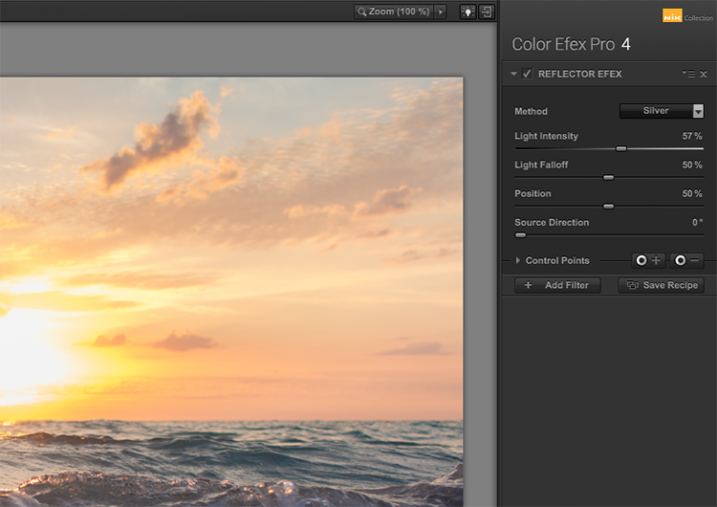
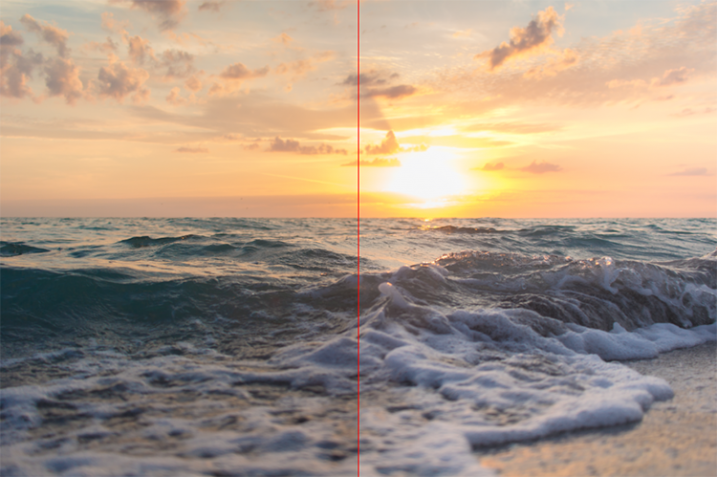
The Reflector Efex filter takes that concept and turns it up to 11, by simulating a silver or gold reflector’s use within your image, and allowing you to modify it in a number of ways to illuminate the photo exactly as you envision it.

First, you select a Method, which is effectively picking which color of reflector to use; gold, soft gold, or silver. You’ll then use the Intensity slider to select how much light will be bounced onto the image. This is equivalent to adjusting power output of a studio light, or the harshness of sunlight in an outdoor situation.
Nik color efex pro

The Light Falloff and Position sliders allow you to adjust how softly or sharply the effect of the bounced light trails off, as well as the position of this falloff. Finally, the Source Direction adjustment lets you change the position of the reflector; if you need light directed to your subject’s left side, you would position the Source Direction between 270° and 360°, which is the bottom, to bottom right corner of the frame.

Conclusion

We don’t know what the future holds for the Nik collection, as a price reduction to zero doesn’t bode well for continued enhancements or updates of any kind. But, for users of the software this may not matter, as it is already an integral part of many photographer’s toolkits, amateurs and professionals alike. The entire collection is of incredible value. But, Color Efect Pro 4 in particular, features these, and many more tools that can be incorporated into your everyday photographic workflow from Lightroom or Photoshop, and give your images a competitive edge!

What about you? Do you already use Google’s Nik Collection? If not, will you try it now after it has been changed to a free product? Are there other filters within the collection you find just as useful for your own workflow? Sound off below please, ladies and gents!

googletag.cmd.push(function() {
tablet_slots.push( googletag.defineSlot( “/1005424/_dPSv4_tab-all-article-bottom_(300×250)”, [300, 250], “pb-ad-78623” ).addService( googletag.pubads() ) ); } );

googletag.cmd.push(function() {
mobile_slots.push( googletag.defineSlot( “/1005424/_dPSv4_mob-all-article-bottom_(300×250)”, [300, 250], “pb-ad-78158” ).addService( googletag.pubads() ) ); } );

The post The 5 Best Google Nik Color Efex Pro 4 Filters and How They Can Amplify Your Images by Tim Gilbreath appeared first on Digital Photography School.


Digital Photography School

 
Comments Off on The 5 Best Google Nik Color Efex Pro 4 Filters and How They Can Amplify Your Images

Posted in Photography


Google teams with IMAX to create next-gen VR rigs for the film industry

21 May

At its I/O developer conference this week, Google announced a new partnership with IMAX to develop next-gen VR camera rigs for use in the film industry. These camera rigs will be different than Google’s previously unveiled GoPro VR rig, but will likewise utilize the company’s Jump virtual reality platform for post-processing. The cameras are being created in part with tech from Chinese company Yi Technology. Likewise, IMAX has announced plans to open VR experience spaces in six locations across the US.

The companies haven’t revealed any details about the planned cameras at this time, except that they will feature Jump integration. The announcement comes at a time when competing high-end VR cameras have made public debuts, including the 4K-capable $ 2500 Sphericam 2 and Nokia’s $ 60,000 OZO camera.

Via: Yahoo

Articles: Digital Photography Review (dpreview.com)

 
Comments Off on Google teams with IMAX to create next-gen VR rigs for the film industry

Posted in Uncategorized


Google Art Camera uses robotic system to take gigapixel photos of museum paintings

19 May

The Google Cultural Institute, an online virtual museum with high-quality digitizations of artifacts from across the globe, recently added more than 1,000 ultra-high-resolution images of classic paintings and other artwork by Monet, Van Gogh and many others. A new robotic camera system Google has developed called ‘Art Camera’ has made it possible for the organization to add digitizations faster than ever before.

Previously, Google’s collection included only about 200 digitizations, accumulated over approximately five years. Art Camera, after being calibrated to the edges of a painting or document by its operator, automatically takes close-up photos of paintings one section at a time, using a laser and sonar to precisely adjust the focus. This process results in hundreds of images that are then sent to Google, where they’re stitched together to produce a single gigapixel-resolution photo.

Instead of taking the better part of a day to photograph an item, as the old technology did, Art Camera can complete the process in less than an hour; speaking to The Verge, Cultural Institute’s Marzia Niccolai said a 1m x 1m painting can be processed in half an hour. Google has built 20 Art Cameras and is shipping them to museums around the world for free, enabling the organizations to digitize their artwork and documents. The resulting gigapixel images can be viewed here.

Via: Google Official Blog
 

Articles: Digital Photography Review (dpreview.com)

 
Comments Off on Google Art Camera uses robotic system to take gigapixel photos of museum paintings

Posted in Uncategorized


Getty accuses Google of anti-competition practices, files complaint in EU

30 Apr
Ian Walton / Getty Images

Getty Images, one of the largest photo agencies in the world, has filed a complaint with the European Union’s Competition Commission because Google won’t budge on making high resolution photographs freely available from its Images search engine. Getty says that as users can see images in high resolution via the results window in Google Images there is no incentive for searchers to click through to the owner’s website. Getty maintains that the practice of showing searched images at high resolution deprives websites of traffic, while also making it easier for Google users to download and use images without paying a license fee to the copyright owner.

In an open letter posted on the Getty Image’s website, the companys General Counsel, Yoko Miyashita, says ‘Our complaint focuses specifically on changes made to Google Images in 2013, which have impacted the competitiveness of our business by siphoning off traffic and promoting piracy – to the detriment of the 200,000 contributors who rely on us to earn a living. On a broader scale, this has impacted the interests of content creators around the world, allowing Google not only to profit from their work, but also to reinforce its role as the internet’s dominant search engine and thus maintain its monopoly power.’

The changes Miyashita mentions, that were made in January 2013, are those which saw Google shift from serving searchers a thumbnail sized image to allowing users to see and download full-sized images. The service even allows users to specify the size of image they want to see. Getty argues ‘Once an image is displayed in high-resolution, large format, it is immediately consumed – there’s very little reason to go see it somewhere else. This format change immediately diverted traffic away from Getty Images, and from the websites of Getty Images’ customers and those of other image creators, deterring users from leaving Google’s platform to engage with content through legitimate sources. This, in turn, negatively impacts content creators’ ability to monetize users’ interest through licensing and advertising, and reduces the level of reinvestment available for the creation of new content.’

Getty says it has been in talks with Google for three years, but that Google’s attitude has been that image creators should either accept the search engine’s terms or opt-out of image search. Getty says it is fighting to protect its interests and those of its contributors, but also to protect the entire image-making industry.

Getty’s complaint is part of a wider investigation of Google by the European Competition Commission in which the search giant faces questions about restrictive practices in the way it serves search results as well as the compulsory apps that come with devices using the Android operating system.

For more information, and to read Yoko Miyashita’s open letter, see the Advocacy page on the Getty Images website. 


Press release:

Getty Images to file competition law complaint against Google

Getty Images, a world leader in visual communications, will today file a competition law complaint against Google Inc. with the European Commission. The complaint follows on from Getty Images’ submission in June 2015, when it joined as an interested third party in support of the European Commission’s existing investigation into Google’s anti-competitive business practices. 

The Commission’s current proceedings against Google are wide-reaching, with Google accused of distorting search results in favour of its own services. This affects a myriad of industries, from media companies like Getty Images, to comparison shopping and travel websites. Just last week, a further set of proceedings were issued against the search engine, to address Google’s business practices around its Android mobile operating system.

Getty Images’ complaint focuses specifically on changes made in 2013 to Google Images, the image search functionality of Google, which has not only impacted Getty Images’ image licensing business, but content creators around the world, by creating captivating galleries of high-resolution, copyrighted content. Because image consumption is immediate, once an image is displayed in high-resolution, large format, there is little impetus to view the image on the original source site. These changes have allowed Google to reinforce its role as the internet’s dominant search engine, maintaining monopoly over site traffic, engagement data and advertising spend. This has also promoted piracy, resulting in widespread copyright infringement, turning users into accidental pirates.

Getty Images’ General Counsel, Yoko Miyashita says: ‘Getty Images represents over 200,000 photojournalists, content creators and artists around the world who rely on us to protect their ability to be compensated for their work. Google’s behavior is adversely affecting not only our contributors, but the lives and livelihoods of artists around the word – present and future. By standing in the way of a fair marketplace for images, Google is threatening innovation, and jeopardizing artists’ ability to fund the creation of important future works. Artists need to earn a living in order to sustain creativity and licensing is paramount to this; however, this cannot happen if Google is siphoning traffic and creating an environment where it can claim the profits from individuals’ creations as its own.’

Miyashita continues: ‘Getty Images believes that images have the power to move the world by spurring action and driving change. It is key that these issues with Google are addressed and that the dominant search engine in Europe leads users to legitimate sources for imagery, rather than creating an environment that benefits Google alone. A fair marketplace will allow photographers to continue to capture the ground-breaking imagery that informs and impacts the world every day.’

Getty Images firmly supports a more image-rich, digital world, but one that recognizes and remunerates the content creators who create this imagery. In 2014, Getty Images launched its embed tool, which revolutionized the visual content industry by making imagery available for easy, legal sharing at no cost for non-commercial use. This embed functionality provides consumers with an easy, legal alternative to the ‘right click,’ an alternative that ensures the content creator is appropriately credited for their work and that the image is clearly traceable to Getty Images in the event that a user wishes to license the image for a commercial purpose.

Visit Where We Stand  to learn more about how Getty Images is working with policy makers and industry groups to defend intellectual property and ensure a fair marketplace for content creators.

Articles: Digital Photography Review (dpreview.com)

 
Comments Off on Getty accuses Google of anti-competition practices, files complaint in EU

Posted in Uncategorized


20 Random Thoughts on Google Photos in a Rambling Stream of Consciousness Format

10 Apr

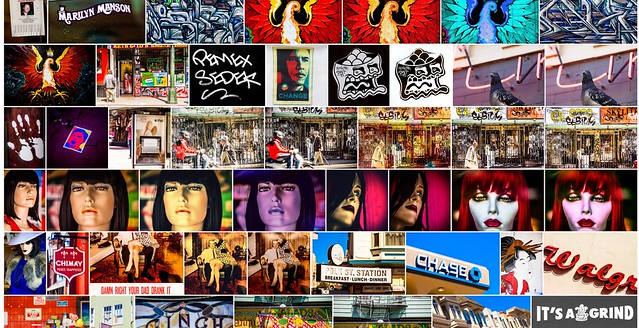
Google Photos Mosaic

Not exactly beat poetry, this list is a rambling mess of 20 things that I thought about today about my experience with Google Photos.

This list is very poorly written and absolutely lacks coherence. It’s a stream of consciousness jumble of unrelated thoughts about Google Photos.

I’ve been using (and uploading to) Google Photos non-stop since it launched. I think the service holds great promise but is also flawed in some ways at the same time.

Disclaimer: these are my experiences. My experiences are probably different than yours. I likely have more photos on Google Photos than 99.999% of users, so things that may be broken for me may work perfectly for you.

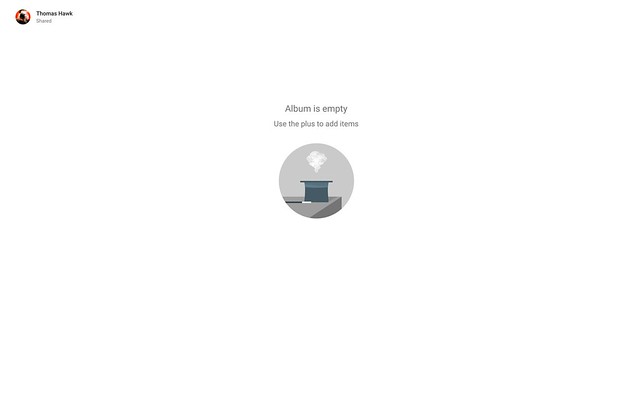
Album is Empty

1. My single biggest complaint about Google Photos is how long it takes to generate shareable links to content. Being able to share a photo or album or video by creating and copying a link is a nice feature, but in my case it typically will take several minutes to several hours in order for that link to actually work. When I create a link and copy and paste it I always get: “Album is empty use the plus to add items,” when I first try to share or access that album.

Link sharing should be instantaneous (like it is on Flickr), but even if it is not it would be better for the user to get some sort of messaging saying “your album will be ready in 27 minutes, come back later” or something like that. For the first six months or so I just thought sharing by link simply did not work, now I know it’s just a delay thing.

2. Google face tagging is awesome! It’s wonderful to have my family and friends’ photos grouped by face and I love that I can go back and put their name on them. Unfortunately Google Photos would appear to limit you to 200 different people at which point the tagging functionality will no longer tag any new people. In my case Google Photos early on chose to facial tag a lot of musical acts that I photographed at Coachella leaving no space for other real friends that I wish were in there.

I’m not sure why there is such a low 200 face limit or why there should be any limit at all. At a minimum, Google Photos should let me manually tag people and then run facial recognition on these people instead of the random 200 that the software has selected.

3. I wish Google Photos had a public sharing option. Private by default is nice, but it would also be nice to be able to make some photos in the service public.

No Keywords in Google Photos
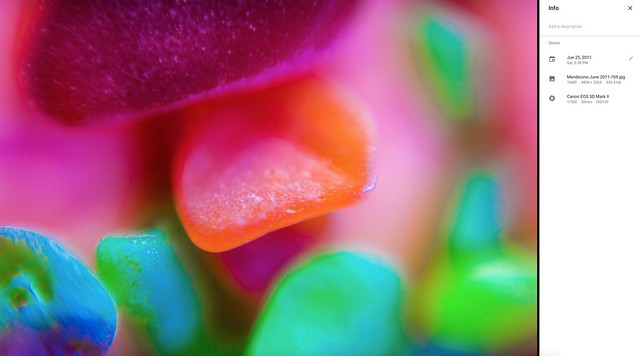
Your titles, descriptions and keywords do not get uploaded with Google Photos.

4. I wish Google Photos used all of the careful keywords and metadata that I embed in my photos. One of the nice things about Flickr is that when I add descriptive keywords to my photos in Lightroom and save them to the file Flickr automatically populates the tags along with the photo’s title and description. Google Photos ignores this data. I’m not sure why Google Photos does not care about this data as I would think it would be very useful for search and also very easy to include with uploaded photos. If Google Photos can bring in the iso and shutter speed setting with my photos, why not the keywords too?

5. Google Photos gives you a “card dismissed” message when you dismiss a card using Google Photos’ assistant. This message disappears after about 10 seconds. The problem is that if you are trying to go through a number of different Google automatic creations the page jumps as this message disappears. This makes you accidently click on the wrong place on the page all the time when trying to process more than one creation at a time. This message is not important enough to justify the instability it creates for use on the page.

6. On March 22, Google Photos announced smarter auto albums. It’s been several weeks now and I have not had a single automatic album suggested for me yet by Google Photos assistant. It would be nice to experience what these are like.

7. Since Google Photos launched I’ve found that it takes much longer to upload my photos to Google+, usually as long as 2 minutes or so to upload a photo. Not sure that this has anything to do with Google Photos.

8. Google Photos seems to do a little better job uploading photos than it did in the early days. In the early days sometimes it would only upload 50 photos for me in a single day. Now it typically will upload several hundred a day, but it’s still going to be a long time before it finishes with the 489,052 remaining in the current batch — and then I will still have many more batches to upload. By contrast Amazon Photos does not resize my RAW files at all and goes about 10x as fast.

9. Sharing very large albums with people does not work. At present Google Photos will not allow you to share over 2,000 photos at once. I spent a long time trying to figure out how to share all of the photos I’ve taken with my friend Scott Jordan with him the other day. Finally I had to give up trying and just create a new Google Account that we could both share and reupload all of the photos to that account. That was a pain and there should be a better way for people to share larger albums of photos.

10. Auto facial recognition is good but if it can’t auto tag everyone, Google Photos should let you manually tag people. A combination of automatic AI facial recognition with manual user tagging would make more complete collection.

11. When scrolling through your main Google Photos Library Google Photos will let you fast forward many years into the past. For example, it will start by showing me photos I took yesterday but then I can pull the slider all the way down and easily jump to say photos from 2010. When you are scrolling through photos of people Google Photos has facial tagged though they will not let you jump forward this way. If you have a lot of photos of someone getting to the year 2010 can take a very long time if you have to scroll through everything to get to that time.

12. Sometimes thumbnail versions of photos load very slowly on Google Photos. Other times they render quickly. Not sure why the diffference at times.

13. When I search for cats on Google Photos it brings up a lot of photos of my black labradors. If Google Photos uploaded my keywords they would probably have a better idea that it was a dog in the photo than a cat.

14. The share photos to Facebook functionality doesn’t work for me on Google Photos. Sharing Photos to Google+ seems to work just fine though.

15. Google Photos has only identified 143 “things in my photos.” I’ve collected over 2,000 albums on Flickr, many dedicated to specific things. My Flickr albums are much better organized than my Google Photos albums. Flickr allows me to build albums by my keywords though, Google Photos does not. After using the service as long as I have with as many photos as I have I feel like it should have identified more than 143 things.

16. I have to launch Google Photos and the Assistant to get it to add photos from my iPhone to Google Photos on wifi. I wish as soon as my phone connected to wifi photos from my phone just automatically uploaded to Google Photos, even without having to launch Google Photos app on my phone.

17. When you can get album sharing to work it can be a very powerful way to share photos with people. Here’s an album of all of the photos that Google Photos recognizes of my friend Robert Scoble by face. This includes both my processed and unprocessed photos so the quality is very mixed. I bet Robert hasn’t seen some of these photos.

18. I love how much infinite scrolling Google Photos uses. Paging sucks. Flickr should take notice of how much better Google Photos does infinite scrolling.

19. I wish there was a way I could see how many photos I’ve uploaded to Google Photos. Actually there is a way. Thanks Thomas O’Brien. So far I’ve uploaded 748,892 photos to Google Photos.

20. I wish in the share menu for Google Photos there was embed code where you could embed the photo on your blog or somewhere else on the web.


Thomas Hawk Digital Connection

 
Comments Off on 20 Random Thoughts on Google Photos in a Rambling Stream of Consciousness Format

Posted in Photography