RSS
 

Posts Tagged ‘Give’

Picture Pumpkins: Give Your Halloween Memories a Gourdy Glow

21 Oct
Extra photos for bloggers: 1, 2, 3

We’ve all been there.

You’ve braved the pumpkin’s innards and spent hours etching its Titian-hued flesh.

Then, the neighbor’s cat dashes by the window (or was that a ghost?) and suddenly you’ve lopped the smirk right off of Jack O. Lantern’s face.

It’s time to defy the exacting standards of our annual October undertaking and replace them with a more photo-realistic (because we’re using a real picture!) and totally classy (because we’re framing it!) pumpkin.

It’s a gourd revolution!

Make a Simple Picture Pumpkin

WHY IT’S COOL

Our pumpkin art isn’t merely more simple than the traditional Jack O’Lantern. It looks fantastic, too!

By day, the frame makes your pumpkin look like a doyenne of decor. By night? The flickering light from the faux-candle makes the photo dance around like a still from an old-timey movie, which is both cool and a little creepy.

Just how we like our All Hallows’ Eve decor.

INGREDIENTS:

  • A pumpkin with one relatively flat side
  • Your favorite seasonal photo
  • Tracing paper
  • Tape
  • A printer
  • A knife or pumpkin-carving tools
  • A flat frame (we found one at on the unfinished-wood aisle at our local craft store)
  • 2 Nails
  • A hammer
  • A flameless candle (safety first!)

STEP 1: PICTURE PERFECT

Dig through your mom’s albums for a Halloween photo of yore.

Bonus points if it involves: a Teenage Mutant Ninja Turtle; a Renaissance poet; DJ Jazzy Jeff and/or the Fresh Prince; or all of the above.

Scan your photo and edit as needed. We found that over-saturating a bit really help the final product pop.

STEP 2: ENTER THE PRINTER

Tape your tracing paper to a piece of printer paper to make it sturdy enough to run through the printer.

Print the picture, then set it aside to dry.

STEP 3: GET GRUESOME

Slice off the top of your gourd and pull out its guts. Don’t forget to make a notch in the lid so it goes back on easy-peasy in the dark.

(Never carved a pumpkin? Our girl MStew shows you how it’s done.)

STEP 4: YOU CUT A HOLE IN THE … PUMPKIN

Grab a buddy to hold the frame in place on the pumpkin’s relatively flat side. Use your carving tools to mark your cutting lines; you’ll want the hole in the pumpkin to be just a bit larger than the frame’s photo opening.

Complete the carving and pop out the excess pumpkin.

STEP 5: GET ATTACHED

Trim the photo, tape it to the frame, and then nail the frame into place. We recommend a nice scroll-y frame so you don’t have to nail through the wood.

STEP 6: LIGHT IT UP

Wait until dark. Insert a flameless candle and gasp with delight. (Or lug the pumpkin to the darkest part of the basement and bask in your handiwork’s glory right away!)

TAKING IT FURTHER

  • Don’t toss all of those innards! Save the pumpkin seeds and roast ‘em up.
  • Dig up a bunch of photos to create a multi-pumpkin trip down memory lane!
  • Amp up the spooky: Put a ghost in your pic!

Related posts:

  1. Photojojo’s Guide to Scary Photo Pumpkins Live in NYC or San Francisco? Come to our Photo…
  2. Glow-in-the-Dark Photograms: Turn Your Photos into Spooky Glow-in-the-Dark Wonders Extra photos for bloggers: 1, 2, 3 All Hallow’s Eve:…
  3. Turn an Etch-a-Sketch into a Kitschy Picture Frame in Just a Few Minutes With just two dials and some aluminum powder, George Vlosich…

Photojojo

 
Comments Off on Picture Pumpkins: Give Your Halloween Memories a Gourdy Glow

Posted in Equipment


Chronicler of NYC art scene can’t give away his collection

05 Jun

05PHOTOGRAPHER-popup.jpg

For nearly forty years, photographer D. James Dee has documented artwork and installations for seminal artists like Jean-Michel Basquiat, Julian Schanbel and prominent New York City galleries. He’s now closing up shop and faces the prospect of finding a home for roughly 250,000 color slides and negatives that chronicle the explosive growth of the Soho art scene of the 70s, 80s and 90s. So far he’s found no takers. Is this trove of recent art history headed for the dumpster? Click through to read more. (via The New York Times)

News: Digital Photography Review (dpreview.com)

 
Comments Off on Chronicler of NYC art scene can’t give away his collection

Posted in Uncategorized


Dear Marissa Mayer, Please Give Us a Tool to Better Block Bad Actors on Flickr

26 May

As an opinionated blogger, watching Flickr roll out recent changes to the site this past week has been an interesting experience, to say the least.

Thanks, Marissa Mayer, for making Flickr awesome again. Thanks also to the Flickr team who have worked so hard to roll out these changes. The new Flickr is the most photo immersive experience anywhere on the web. It is far more engaging and far more beautiful than I ever could have imagined.

Witnessing and countering in the vile hatefest that the Flickr Help Forum has become this past week has also been interesting. Simply for expressing my opinion in a public feedback forum on the new design, I’ve been called a shill, a troll, a sock puppet, a scrotum sack, and many things far worse that I don’t really feel like printing.

I’ve been told that my photography is absolute crap, been accused of working for Yahoo, of being related to Marissa Mayer, of trying to pump up Yahoo’s stock price by supporting the changes — my work, motives and integrity have all been subject to relentless attacks there.

There is little civility in a forum taken over by the ugliest and most vulgar of what the web represents.

The vandalization of Marissa Mayer’s own Flickrstream, and the encouraged vandalism in the same forum, saddens me. To see someone leave an offensive comment on a Mother’s Day Photo, of all things, makes Flickr less of a place to want to spend time.

One Flickr staffer had to actually turn off public comments on his Flickrstream. “You are going to hell,” was the comment that made him turn them off.

There is, at least, a partial answer to this problem: give us a tool to block other users on Flickr.

Flickr already does have a blocking feature of course, it’s just super weak and only prevents someone from leaving a comment on one of *your* photos.

On the other hand, even if you block someone, they can still attack you in all sorts of other places on Flickr, where you spend time. Flickr users should be able to use the public areas of the site without being subject to vile personal attacks. The Help Forum, Groups, other people’s photos, all should be places where Flickr users can visit and feel safe and comfortable.

I left Flickr groups for good a few years back (so did a lot of my friends). The reason why I left was that groups were becoming too ugly. Especially as an opinionated and high profile user, I found myself subject to constant terrible attacks. There was nothing that could really be done about this. Sure, you could report someone violating the Flickr Community Guidelines to Flickr, and maybe 5 days later their account would be deleted, but then they’d just make up a new troll account and be right back at it over and over again.

It was simply easier to just leave the public community of Flickr than to deal with the hate.

When I first joined Google+, I saw some of these same bad actors appear over there, too. I’d watch both myself and my good friends be attacked by others — jealous, petty haters and trolls, mostly. But then Google did a really smart thing. Google rolled out a really strong blocking tool and, just like that, all the hate went away.

You see, on Google+, when you block somebody, they become entirely invisible to you. They are entirely filtered out of all of your views on G+. Poof. Gone for good, not just in your stream, but *everywhere* for you on the site — and that has made Google+ a far better, nicer and more polite place for community than Flickr. Where the Flickr community is a negative hatefest, the G+ community is the most amazing, optimistic, supportive community I’ve ever known online.

You see, blocking the worst of the web doesn’t just filter it out of your view. The more significant thing that it does is it *encourages* civility.

Right now on Flickr we have no power against incivility. People can be as nasty and as rude and as ugly and as disrespectful as they want. They can spam the Flickr help forum with images of excrement (as they actually did last week) and you can’t do a damn thing about it — but if you give us the ability to block these bad actors, then their power is reduced. They know that as soon as they begin the ugliest of hate that the vast majority of positive contributing members will simply block them. Their audience is diminished and soon they are standing on a soap box shouting only to the 10 or so other users who share their hate filled outlook on life.

Before I quit using Flickr groups, one particular nasty member was looking at the photos that I was favoriting (this is forced public and Flickr won’t allow me to control who gets to see it — unlike on G+ where it is private) and this person began leaving vile comments on every photo that I was commenting on. This way, every single one of their comments was showing up in my recent activity, even though I’d blocked them from commenting on my own photos. That’s just wrong.

If Flickr wants to be a place where community can flourish, they need to give us tools to protect ourselves from the hate.

Marissa, I don’t need to tell you how bad the hate can be on Flickr. If you’ve reviewed your own Flickrstream this past week, you know what I’m talking about. It’s deplorable. Especially when any user can so easily just keep making anonymous troll account after anonymous troll account — please, give us a tool to remove the bad actors from our Flickr experience.

This week’s new design work was fantastic, now let’s go to work on improving the community for those of us who want to positively contribute there as well.


Thomas Hawk Digital Connection

 
Comments Off on Dear Marissa Mayer, Please Give Us a Tool to Better Block Bad Actors on Flickr

Posted in Photography


6 Easy Ways to Give your Photographs a Compelling Narrative

10 Apr

Everybody loves a good story. Knowing this fact is what separates a good photographer, from an exceptional one. With this knowledge, a photographer has a whole breath of tools at their command to trap the viewer, and cause them to be spellbound! Below I have listed 6 of the best ways to give your photographic approach the artistic edge of Continue Reading

The post 6 Easy Ways to Give your Photographs a Compelling Narrative appeared first on Photodoto.


Photodoto

 
Comments Off on 6 Easy Ways to Give your Photographs a Compelling Narrative

Posted in Photography


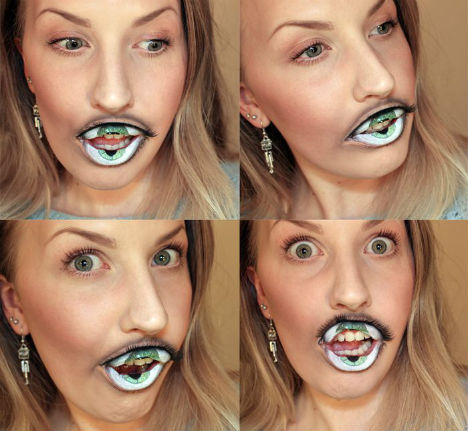
Give Your Eyeteeth: Surreal Hyper-Realistic Lip Makeup

27 Feb

[ By Steph in Art & Drawing & Digital. ]

Eye Teeth Makeup 1

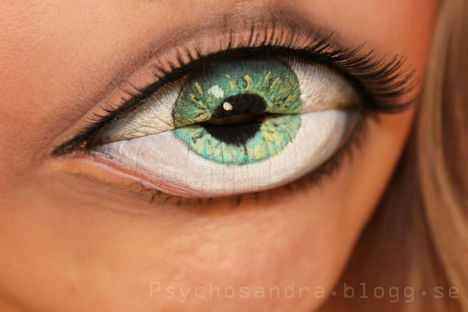
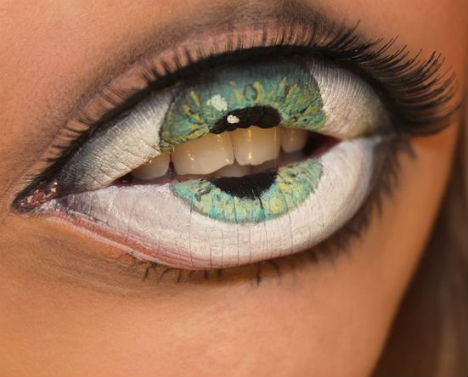
The word ‘eyeteeth’ has taken on a new meaning with a set of surreal and disconcerting images from Swedish makeup artist Sandra Holmbom. While most of Holmbom’s looks are much more conventional, the artist occasionally creates dramatic effects that incite a double-take. The image of an eyeball parting to reveal a set of teeth seems like something from a nightmare.

Eye Teeth Makeup 2

Eye Teeth Makeup 3

“Pretty, it’s not, but I had fun anyway,” Holmbom says of the look.

Eye Teeth Makeup 4

Eye Teeth Makeup 5

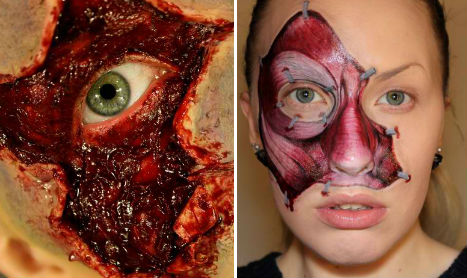
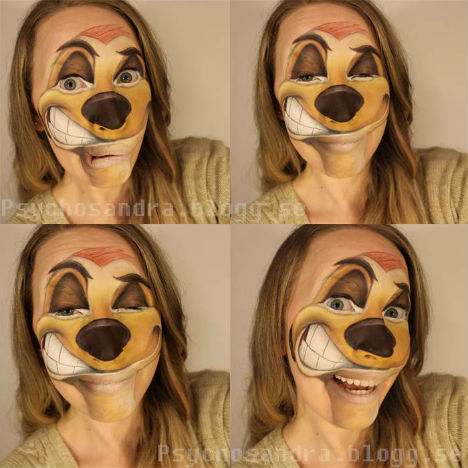
The makeup artist has also created gory effects like exposed musculature and wounds, as well as more humorous looks, like the character ‘Timon’ from the animated Disney movie ‘The Lion King.’ See more at her blog.

Share on Facebook


[ By Steph in Art & Drawing & Digital. ]

[ WebUrbanist | Archives | Galleries | Privacy | TOS ]


WebUrbanist

 
Comments Off on Give Your Eyeteeth: Surreal Hyper-Realistic Lip Makeup

Posted in Creativity


Give Thanks for 5 Eye-Opening Black Friday Infographics

22 Nov

[ By Steph in Culture & Cuisine & Global. ]

Black Friday, that annual post-holiday shopping ritual sharing more than a few characteristics with Spain’s Running of the Bulls, is starting earlier than ever this year, with many stores opening at 8 or 9pm on Thanksgiving Day. While many people participate in this frenzy of commercialism with the relish of a competitive athlete, others find the whole thing a bit baffling. Here are 5 infographics offering some interesting facts about this year’s festivities. Click each image to view full-sized.

Nearly a quarter of American adults plan to start shopping before 3am on Black Friday, according to a survey by market research firm Lab42. Shoppers also plan to spend more money.

In fact, $ 60 billion is expected to be spent this year, compared to $ 41 billion in 2008. 160 million people plan to shop on Black Friday, or about half the U.S. population – more than the number of people who voted in November’s election.

Mobile technology is playing a larger role than ever in holiday shopping, particularly during ‘Cyber Monday’, the Monday following Black Friday.

Why should you consider shopping at small local businesses rather than big box stores? This infographic lays out all of the ways in which small businesses benefit communities.

Another infographic from Manolith throws in a little bit of everything, telling shoppers how they can prepare, giving stats on Black Friday violence, and peeking into shoppers’ carts.


Want More? Click for Great Related Content on WebUrbanist:

10 Black Friday Shopping Tips By Urban Ninjas

Black Friday . . . are you preparing to battle the holiday shopping crowds? Brush up on your ninjas skills before you go into the battle of the urban ninjas.
3 Comments – Click Here to Read More »»


Visualizing Architecture: 15 Building-Centric Infographics

Learn about the history of architecture, the design process, architectural styles, the world’s tallest buildings and more with these 15 building-centric infographics.
Click Here to Read More »»


Share on Facebook


[ By Steph in Culture & Cuisine & Global. ]

[ WebUrbanist | Archives | Galleries | Privacy | TOS ]


WebUrbanist

 
Comments Off on Give Thanks for 5 Eye-Opening Black Friday Infographics

Posted in Creativity


Microsoft Word 2010 – Give Your Text a Healthy Glow

13 Aug

Text can stand out in a Word 2010 document by glowing in a variety of colors and sizes.

Among the many ways you can make text stand out in Microsoft Word 2010 is to have it glow. You can choose from a variety of pre-made glow effects, or go nuts and tweak the color of the glow, its size, and its transparency.

1. Select the text that you would like to glow….

Read more at MalekTips.
New Computer and Technology Help and Tips – MalekTips.Com

 
Comments Off on Microsoft Word 2010 – Give Your Text a Healthy Glow

Posted in Technology