Another lens from Fujifilm’s roadmap is making its way to retailers, and that’s the XF 16mm F1.4 R WR wide prime. This lens, equivalent to 24mm on APS-C, has a nine-blade aperture, flare-reducing Nano-GI coating, and a minimum focusing distance of 15cm/6 in. It’s also sealed against weather and dust and can function at temperatures as low as -10C/+14F. More details
Tag: Fujifilm
-
Fujifilm announces firmware updates for X100T, X-T1, S1 and several X-mount OIS zoom lenses
Fujifilm has rolled out firmware updates aimed at fixing quirks in the X100T and X-T1, improving image quality in the FinePix S1 superzoom, and improving OIS functionality in several X-mount zoom lenses. Read more
-
X-Transformed? Fujifilm X30 Review
The X30 is the latest iteration of Fujifilm’s line of premium compact cameras. Featuring a 12MP X-Trans sensor coupled with a 28-112mm equivalent fast zoom, the X30 is a capable camera, made more enjoyable compared to its predecessors by the addition of a high-resolution electronic viewfinder. Our man in England, Damien Demolder has been shooting with one and shares his take. Read review
-
Retro, refined: Fujifilm X100T reviewed
The Fujifilm X100T offers seemingly small improvements on its predecessors, the cult classic X100 and X100S. Its 16MP X-Trans CMOS II sensor and fixed 35mm equiv. f/2 lens are now accompanied by an all electronic shutter mode with increased 1/32000sec maximum speed, redesigned hybrid viewfinder and an upgraded 1.04m dot rear LCD. Find out how much of an impact these incremental updates make. Read review
-
CP+ 2015: Fujifilm interview – ‘our lenses are waiting for higher-resolution sensors’
We recently returned from the CP+ show in Yokohama, Japan. When we were there we sat down with executives from most of the major camera and lens manufacturers to get their insights and opinions on the challenges facing their companies and the market as a whole. One of them was Toshihisa Iida, Senior Manager Sales & Marketing at Fujifilm’s Optical Device & Electronic Imaging products division. Click through for the full interview
-
Fujifilm XF 16-55mm F2.8 R LM real-world samples gallery posted
Fujifilm’s XF 16-55mm F2.8 is a weather-sealed zoom covering a 24-83mm equivalent range. With a fast F2.8 constant aperture, manual aperture control and a new Nano-GI coating to reduce flare, it’s a high-end lens to be sure. Take a look at how it performs in the real world. See gallery
-
CP+ 2015: Fujifilm shows prototype roadmap lenses
We’re at the CP+ show in Yokohama Japan where Fujifilm is showing off several forthcoming lenses, previously mentioned on the company’s 2015 and 2016 roadmap. We spoke to Fujifilm at the show, and got our hands on some prototypes – some working, some not – to get a sense of how they feel and operate. Click through for some images
-
Fujifilm adds new lenses and teleconverter to official X-Series roadmap
A new macro lens, a miniature standard prime and a teleconverter have been added to the Fujifilm X-Series roadmap, while a previously hinted-at lens has been given a definite focal length range in an announcement from the company’s headquarters. The chart released indicates that a 1.4x teleconverter will be the first of the new products to become available in the second half of this year. Learn more
-
Fujifilm adds film simulation to Raw File Converter EX 2.0 and tethered shooting for X-T1
Fujifilm is to release a new version of its Raw File Converter EX at the end of the month, bringing the film simulation modes used in its X-series cameras to the Silkypix-based desktop software package. Initially the new feature will be available for files shot with X-T1, X-A2, X100T, X30 and XQ2 cameras, but the company has said that other models will be included in a further update at a later time. Read more
-
Fujifilm X-T1 Firmware Update: New Features
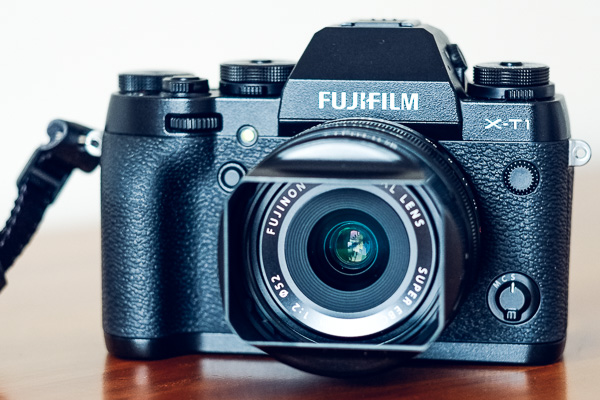
In December 2014 Fujifilm released the latest firmware upgrade (version 3.00) for its X-T1 camera. More than a minor upgrade, the new firmware adds a number of new features that greatly enhance the camera’s capabilities. Let’s take a look at ones most likely to be of interest to X-T1 owners.
By the way, if you’d like to learn more about firmware (for all makes of camera) then read our article Updating Your Camera’s Firmware – What is it and Why It’s Important.
Electronic Shutter
A new electronic shutter allows you to take photos at shutter speeds of up to 1/32000 second (the fastest mechanical shutter speed available is 1/4000 second). This enables you to take photos in bright light with prime lenses at wide aperture settings, something the lowest available ISO speed of 200 (when shooting Raw) makes difficult.
Sports and action photographers shouldn’t get too excited though, as the rolling shutter effect may cause distortion in moving subjects.
Another advantage of the electronic shutter is that it is completely silent, something that street photographers (and others who prefer to work unobtrusively) may appreciate.
AF+MF
The X-T1’s autofocus is extremely accurate but there may be times when you want to override it. Now you can do so by enabling the new AF+MF feature. When it’s activated (you need to be in AF-S mode) press the shutter button half-way down to activate autofocus, then turn the focus ring on the lens to override the camera. Essentially, it lets you switch from auto focus to manual focus without having to move the Focus mode selector.
This will help you out in those rare instances when the camera’s autofocus fails to lock on the subject, or if you want to shift the point of focus (perhaps to utilize the depth-of-field bar that appears in the viewfinder).
Classic Chrome Film Simulation
Film Simulation settings are one of the strengths of the Fujifilm system and they seem to have been thought through a bit better than the equivalent settings from other manufacturers. The result is that the Fujifilm cameras have gained a reputation for creating excellent quality JPEG files.
Classic Chrome is Fujifilm’s latest Film Simulation setting, giving a faded, slightly vintage, high contrast look to the photo that you might expect from an older type of slide film.
Classic Chrome is also available in the latest versions of Lightroom and Adobe Camera Raw.

A photo processed using the Velvia Film Simulation setting.

A photo processed using the Classic Chrome Film Simulation setting. Note the difference in the hue and saturation of the colours.
Natural Live View
The view of the subject seen through the X-T1’s electronic viewfinder (or on the LCD screen in Live View) is affected by the white balance and Film Simulation settings selected by you, the photographer. While this may help you visualize how the final photo will look, I’m sure you may miss the neutral view presented by optical viewfinders. Natural Live View fixes this by giving you a neutral view of the scene unaffected by Film Simulation, contrast or white balance settings.
The new EVF Color and LCD Color menu options also lets you change the hue of the electronic viewfinder or LCD screens.
Quicker Access to AF Frame Buttons
Now you can switch the active autofocus frame using the four selector buttons on the back of the camera, without having to press the bottom button beforehand. This makes adjusting the AF frame while looking through the viewfinder much easier.
The only downside is that the selector buttons can no longer be used to access functions such as white balance and Film Simulation selection. You can compensate for that by adding them to the Quick menu.
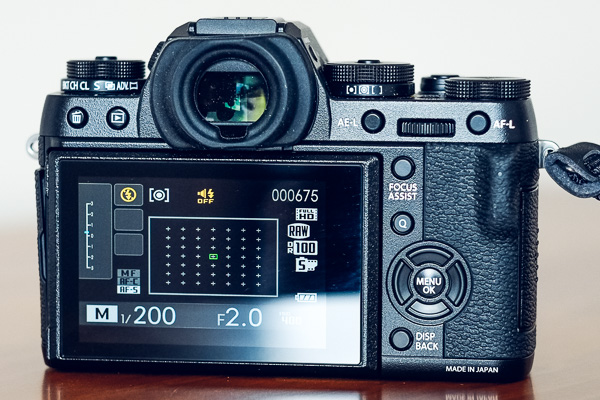
With the new firmware upgrade, you can select the active autofocus frame using the four selector buttons, without having to press any other buttons first.
Customized Quick Menu Layout
Pressing the Q button on the back of the camera brings up a Quick menu with sixteen functions. The idea of the Quick menu is to give you rapid access to the most used menu items without having to navigate your way through the camera’s menu system. Now, with the latest firmware upgrade, you can choose which functions (from a list of 25) you’d like to appear in the Quick menu, and which order they are displayed in.
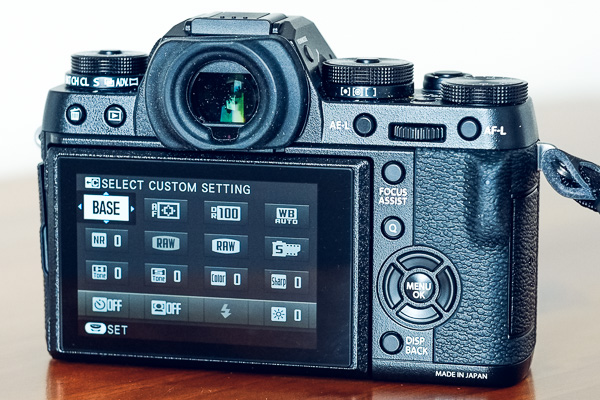
The default Quick menu displayed with earlier firmware versions. After upgrading to version 3.00 you can customize the Quick menu with the settings you need to access the most.
More New Features
The full list of new features is available on the Fujifilm website.
Which firmware version do I have?
To see which firmware version your X-T1 camera has (I believe this works for all Fujifilm cameras) turn the camera off, hold down the Disp/Back button and turn the camera back on. The camera displays the currently installed firmware versions for both the body and lens.
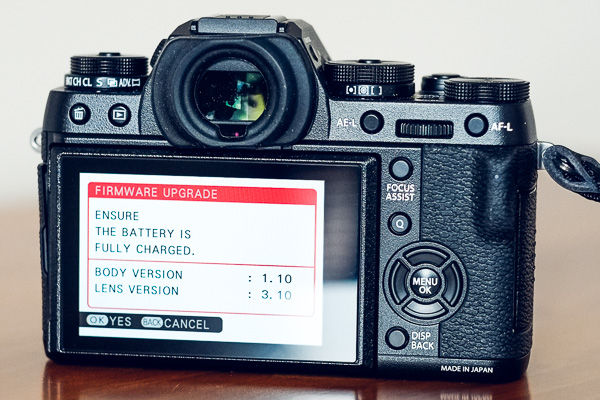
This Fujifilm X-T1 has firmware version 1.10 installed, and hasn’t yet been upgraded to the new firmware.
How do I install new firmware?
Start by going to this page on the Fujifilm website, scrolling to the bottom and clicking I Agree. You can download the new firmware file on the next page, which also contains instructions on how to load it into your camera. You’ll need a newly formatted memory card to do so.
Have you tried out the firmware update for the Fujifilm X-T1 yet? Please let us know what you think of it in the comments.
Mastering Photography

My ebook Mastering Photography: A Beginner’s Guide to Using Digital Cameras introduces you to digital photography and helps you make the most out of your digital cameras. It covers concepts such as lighting and composition as well as the camera settings you need to master to take photos like the ones in this article.
googletag.cmd.push(function() {
tablet_slots.push( googletag.defineSlot( “/1005424/_dPSv4_tab-all-article-bottom_(300×250)”, [300, 250], “pb-ad-78623” ).addService( googletag.pubads() ) ); } );googletag.cmd.push(function() {
mobile_slots.push( googletag.defineSlot( “/1005424/_dPSv4_mob-all-article-bottom_(300×250)”, [300, 250], “pb-ad-78158” ).addService( googletag.pubads() ) ); } );The post Fujifilm X-T1 Firmware Update: New Features by Andrew S. Gibson appeared first on Digital Photography School.