RSS
 

Posts Tagged ‘from’

Haunting photos from inside the wrecked cruise ship Costa Concordia

09 Jul

In August of 2014—two years and seven months after the cruise ship the Costa Concordia sank off the coast of the Tuscan island Giglio, claiming 32 lives—photographer Jonathan Danko Kielkowski swam aboard to document what was left.

At that point, the ship had only recently been raised from the bottom of the ocean, having spend two and a half years partially submerged—a home for sea life and wild superstitions about how its sinking was some sort of omen. After all, it did sink almost exactly 100 years after the Titanic.

But Kielkowski wasn’t going there to document fantasy. He wanted to capture raw, abandoned, decrepit reality.

To his credit, when the ship arrived in Genoa to be scrapped, Kielkowski tried to get a permit and capture the photos legally. But a permit was impossible to acquire, and after being turned back by the Coast Guard once, he tells DIYP he finally succeeded in swimming to the ship in the dark, camera gear and clothes towed along in a small rubber dinghy.

He got in, set up, and once the sun came up he got to shooting. Using his Canon 5D Mark II with a EF 16-35mm F2.8 attached and a small, sturdy tripod, he wandered around the wreck for 6 hours and captured some 500 photos.

“It was pitch black inside the wreck and most parts of the ship had no lights installed at that time,” he wrote in response to one photographer’s criticism, explaining how the photos were captured. “The expose time for most of the images is well over 5 minutes.”

Technique aside, for Kielkowski, those photos provide a distant echo of the nightmarish fear 4,000 passengers must have felt as they tried to evacuate a sinking ship.

The photos above and many others besides were eventually collected into a photo book, Concordia, published by White Press. To learn more about or order the book, visit this link. And if you’d like to see more of Jonathan’s work, visit his website or give him a follow on Facebook and Instagram.


All photos © Jonathan Danko Kielkowski, used with permission.

Articles: Digital Photography Review (dpreview.com)

 
Comments Off on Haunting photos from inside the wrecked cruise ship Costa Concordia

Posted in Uncategorized


What makes a great photo: Wise words from a veteran photographer

09 Jul

What makes a ‘great’ photo? The question keeps professionals and weekend warriors alike busy arguing, practicing and learning. In this video, one photography veteran shares his insights into that question, born of decades immersed in the world of photography.

The video is, first and foremost, a tribute created by photographer Jesse James Allen for and about his mentor Charlie Howse.

“This is a tribute my mentor, who in 2007 showed me how to create an image before the shutter was ever pressed,” writes Allen in the video’s description. “His time and teachings greatly influenced my career.”

But throughout the video the same theme comes up over and over again: what makes a ‘great’ photograph?

Howse touches on several different aspects of ‘great’ photography. He starts with the personal impact of an image—a photograph that’s indelibly tied to what you were feeling and thinking at the moment you pressed the shutter—before moving on to a common debate topic: technology vs art.

“For far too long, I thought that in order to have a great image, it has to be technically a great image,” says Howse. “And I’m coming to realize that the technical aspect of an image is less important than the artistic or the compositional aspect of an image, or the interestingness of the subject matter.”

More important by far than the best gear, says Howse, is knowing how to ‘make an image’ rather than simply ‘take a picture.’ How to pose. How to compose. How to connect.

What we’ve written above just barely scratches the surface of the full video. Howse goes on to talk about the difference between a snapshot and a portrait, about why he chooses to shoot large format, and about the next generation of photographers and what they should focus on.

Maybe it’s too much to hope that a five minute video can shape the way you look at the world and capture a photograph. Then again… what do you have to lose? Click play up top and let us know what you think of Howse’s advice in the comments.

Articles: Digital Photography Review (dpreview.com)

 
Comments Off on What makes a great photo: Wise words from a veteran photographer

Posted in Uncategorized


How to Make $500 a Month From Your Photography Hobby with Microstock

09 Jul

I am an amateur photographer, but I make around $ 500 in revenue from my photos each month. Photography is a hobby for me, but it can be an expensive hobby at times. This money pays for photography software, computer hardware, and lenses, so the hobby I love doesn’t cost a dime. This article will discuss how I did this with microstock, and provide tips on how you can do the same.

How to Make $  500 a Month From Your Photography Hobby with Microstock

Making your first buck

In 2010, I wanted to improve my photography so I purchased an entry-level DSLR and started to actively study how to become a better photographer, mainly from resources on the internet. As I tried different techniques, compositions, and camera settings, I posted my photos to sites like Flickr, Facebook, and 500px. In the beginning, I didn’t get very many views or likes but still enjoyed posting and learning from other photographer’s photos on those sites.

After shooting, learning, and posting for two and a half years, a design company saw a photo of mine on Flickr and asked if they could purchase a commercial license. I did a couple of quick searches about licensing and pricing on the internet, then sold my first commercial license for $ 75. This is the first photo I ever licensed.

How to Make $  500 a Month From Your Photography Hobby with Microstock

Pay for your hobby

Before this first sale, I hadn’t considered selling licenses to my photos. However, I had gotten to the point where I wanted to upgrade my entry level DSLR and lenses to a full frame system but couldn’t justify the cost for my hobby. However, I could justify the cost to myself (and my wife) if the money for the upgrade came from licensing my existing photos.

Microstock

So, I started researching photo licensing and learned about microstock sites. These sites are websites that act as an intermediary between buyers of photo licenses and photographers. They are called “micro” because they typically sell photo licenses for less than where professional photographers have historically set their prices.

As a result, there is a lot of negative information about microstock sites on the Internet. Despite this negative information I decided to try posting my photos on Shutterstock, one of the most popular microstock sites. At the time, I had only made one sale ever so I felt that getting a small payment for each sale was better than no payment at all.

The first month I made less than $ 10 with 55 photos accepted by Shutterstock. However, I kept uploading my photos when I had time. A monthly later I had 100 photos on the site. In my third month, I checked my stats one morning and found I made $ 56 dollars from selling extended licenses from these two photos.

How to Make $  500 a Month From Your Photography Hobby with Microstock

How to Make $  500 a Month From Your Photography Hobby with Microstock

A work in progress – keep at it

This was a bit of beginner’s luck because after that I didn’t have a day with more than $ 50 in sales for many more months. But it kept me motivated to continue uploading my photos to Shutterstock and even upload to multiple other microstock sites as well.

I also started uploading my better photos to art-on-demand sites like Fine Art America. These sites allow you to upload your photos, set a price, and create a storefront for anyone to purchase prints of your photos. When someone purchases the art, these sites handle the payment, printing, and shipping of the photo and send you money from the sale.

Lastly, I upgraded my photo blog to sell licenses directly from my website. Despite the fact that my photos are available on all the popular microstock sites, stock photo buyers continue to see my photos on social media and purchase licenses directly from my website.

How to Make $  500 a Month From Your Photography Hobby with Microstock

Realistic numbers – don’t expect to get rich

Two years after my first photo license sale, my monthly revenue from photos was about $ 500 a month. This $ 500 is an average, with my biggest month was $ 1400, while some months have been lower. Now that my photos have been posted, they can continue to get sales indefinitely. In 2016, I did not have much time for photography and only posted eight photos over the course of the year. However, I still averaged $ 460 a month in revenue from the photos I had posted in previous years.

These revenue numbers are for all the photos I have posted online. I only post my best photos from each day out shooting. My current online portfolio of all my photos is around 700 total. Microstock sites don’t accept all of my images, so on some of the sites, I only have 300 photos accepted and up for sale there. Doing the math, my photos earn less than $ 1 a month on average (per photo). And in reality, it is even less because I have one photo that has earned over $ 4000 over the years, while others have gotten no sales.

How to Make $  500 a Month From Your Photography Hobby with Microstock

However, I am fine with this because I take the photos I want to take and then post to stock sites to see if they sell. Photography is still a hobby and the pleasure it gives me comes first, making money is secondary. Often, the photos I like best are not the best sellers on microstock sites. For example, I prefer the photo of me and my shadow below because I really enjoyed making it, but the snapshot I took of a split trail while on a hike, sells much better.

How to Make $  500 a Month From Your Photography Hobby with Microstock

How to Make $  500 a Month From Your Photography Hobby with Microstock

What sites work best

Although I have posted a portion of my collection to over 20 sites over the years, all of these sites can be categorized into one of two types; microstock and art-on-demand. 75% of my photography revenue has come from microstock sites, while only 8% came from art-on-demand sites. The remaining 17% is through direct sales from my photography website.

I have tried a number of art-on-demand sites over the years but currently only post to Fine Art America because it is the only site where my images consistently sell. I have also tried many microstock sites. Typically, if I hear of a new one, I will upload 100 of my best photos to begin. If I start to get sales, then I will upload the rest of my collection. Here are my top five microstock sites based on earnings. I currently only post to these five sites as I have found the other ones aren’t worth the time it takes to post the photos.

  • Shutterstock
  • 500px
  • Fotolia / Adobe Stock
  • 123RF
  • Big Stock Photo (Owned by Shutterstock)
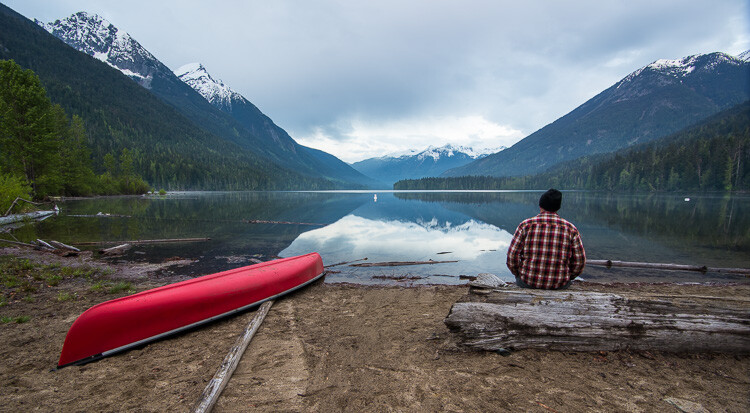
How to Make $  500 a Month From Your Photography Hobby with Microstock

Last tips for you

If you are an amateur photographer who wants to make additional revenue from photo licenses, here are the steps you can take:

  • Post your photos to social sites. My favorite is 500px, but I have also started posting to Instagram, and I still post to Flickr, which was my favorite a couple of years ago.
  • Setup your own photography blog. My blog does not get as many photo views as my social sites, but all my social sites link back to my photo blog. It makes it easy for potential buyers to purchase licences if they see them on social media. I used Squarespace for my blog because it was easy to set up in one day.
  • Upload photos to Shutterstock. Most microstock photographers who post their revenue on the web list Shutterstock as a top earner. So it is likely that if your photos will sell, they will sell on Shutterstock more than other sites, making it a good place to start.
  • Upload photos to other stock sites. Once you see some success on Shutterstock then go ahead and post your top photos to other microstock sites.

How to Make $  500 a Month From Your Photography Hobby with Microstock

Conclusion

It has been seven years since I decided to take photography seriously and I have improved a lot over the years. However, I still have a lot to learn, but these days the software, courses, and gear that help me make photos are all paid for by revenue from the sale of photo licenses, rather than out of the family budget from my day job.


NOTE from the dPS team: Check out our Going Pro Kit with more stock photo success tips and other ways to make money through your photography

The post How to Make $ 500 a Month From Your Photography Hobby with Microstock by James Wheeler appeared first on Digital Photography School.


Digital Photography School

 
Comments Off on How to Make $500 a Month From Your Photography Hobby with Microstock

Posted in Photography


‘Above Bellingham’ soars from bay to Mount Baker

02 Jul
‘Above Bellingham’ takes you all the way from the shores of Bellingham Bay to the top of Mt. Baker, highlighting the City of Subdued Excitement from the air.

Earlier this year, visual journalist Kjell Redal released the second video in his ‘Above’ 4K drone video series, this time turning his attention to the city of Bellingham, WA. The video ably encapsulates the so-called ‘City of Subdued Excitement’ as well as its immediate surroundings, featuring mountain bikers charging through forests, skiers charging through some Mt. Baker powder, and beautiful flyovers of some of Bellingham’s picturesque waterfront.

We chatted with Redal about his experience in making the video, his background and some challenges along the way.


DPR: To start off, tell us a little about yourself, your background and what you do.

Kjell Redal: I’m a video producer and visual journalist from Colorado originally, but I’ve been in Washington for the last four years, recently finishing school at Western Washington University. I’m trained as a journalist so I enjoy finding real-life storylines that inspire, entertain, scare and teach people. I like to tell these kinds of stories through even better visuals and I’ve found that drones help a lot in the latter part of this goal.

That uniqueness of perspective was what really attracted me to the tech as a cinematic tool.

What spurred you to get into drone flying and video capture?

Before I started flying, I remember seeing a lot of travel videos on Vimeo’s Staff Picks channel that included shots unlike any I’ve ever seen. I remember one of them in this Iceland video where a drone was recording while moving only about a foot over these flowers at a decent speed and it was the first time I’ve seen that camera movement from that angle. That uniqueness of perspective was what really attracted me to the technology as a cinematic tool.

Hiking trails and stellar views are plentiful in the greater Bellingham area.

What was the inspiration for ‘Above Bellingham?’

Above Bellingham came as the second part in my ‘Above’ series where I feature two towns I’ve come to know well via the air. My first video in the small series was ‘Above Boulder’ which featured scenes from my hometown. I tried to capture both the iconic places from the two areas in both videos, as well as some less well-known spots that give the cities their character.

Tell me a little about how the video has been received.

The video was received great! I had a lot of people tell me thanks for capturing a place they know and love from a new perspective. I can only think of one minor negative comment about drones on the comment board for that one.

The DJI Phantom 3.
Image via: DJI

What were the biggest challenges you experienced throughout this project? Did you have any crashes or issues with the FAA?

I haven’t had a crash on either of these projects (knock on wood) and got my FAA certification to fly commercially in September of last year. Other than the test being a bit more difficult than I expected, as well as full of what I saw as fairly irrelevant information to drone pilots, like reading airport-issued weather reports and guidelines for flying at ridiculously high altitudes, everything went pretty smooth during the productions.

I did get some heat after the Boulder video went out though. I didn’t realize the city had out-and-out banned drones before I started filming (something they can’t really do according to the FAA, see paragraph 9). I followed all the FAA regulations for flying in the airspace and nothing more than angry commenters came of it, but I think I’d have a fairly solid federal preemption claim were the city to have pressed charges.

And lastly, what drone(s) did you use for this project?

I used a DJI Phantom 3 4K for all of last year, and just got a Phantom 4 Pro this spring – looking forward to the next big project to go with the new drone!


To see more of Kjell Redal’s work, check out his portfolio at kjellredal.com.

Articles: Digital Photography Review (dpreview.com)

 
Comments Off on ‘Above Bellingham’ soars from bay to Mount Baker

Posted in Uncategorized


Tips from a pro: photographing fireworks with John Cornicello

30 Jun

Photographing fireworks with John Cornicello

Seattle-based photographer John Cornicello specializes in portraits, but has been photographing fireworks for years. He’s presented a class on it for CreativeLive, and with the Fourth of July weekend upon us, we figured we’d take a look at some of the major takeaways from Cornicello’s class.

For the nitty gritty details, check out Cornicello’s blog post on the subject here. All images and content used with permission.

Location

Once the show starts, you’re not likely to spend much time running around for different vantage points, although this of course depends on the length of said show. If possible, scout in advance, and look for clean views without power lines or trees in the way.

Scouting in advance is particularly advisable because it’s harder to spot these distractions in the darkness, and if you’re not careful, you can have black silhouettes intruding in your otherwise perfect image.

Looking for establishing landmarks can give your photos a little more context, to “establish a setting and help tell a story,” Cornicello says.

Stability

Most obviously, a tripod is the best tool for the job here. If you don’t have one and can’t get one in time, other options – outdoor furniture, fenceposts, the roof of your car – can all work in a pinch, but you won’t have the flexibility a tripod offers.*

If you must use those other options, keep in mind you can adjust the height angle of your camera with whatever props you can find to wedge underneath it; a wallet and cell phone combination can be all you need to get your lens up to the correct height.

If you have the means, a remote trigger can help keep the camera from moving at all from a press of the shutter button. Lastly, since you’ll be focusing near infinity and likely not moving much, it’s best to stabilize your focus by locking it in manual focus if your camera allows that.


* It’s true that many cameras have extremely effective built-in image stabilizers these days, but few of them are up to multi-second shutter speeds, regardless of whether you’re zoomed out or in. The possible exception may be Olympus’ newer interchangeable lens models, but you’re still likely to get more keepers by stabilizing your camera externally.

Exposure

Now this is one that Cornicello says people tend to overthink. As he says, ‘Fireworks are bright!’ You don’t necessarily need to raise your ISO to astronomical levels or have a fast lens to get good results. So let’s switch into ‘Manual’ mode and get everything dialed in.

Keep your ISO around 100 or 200 and stop down the lens – F8 is a good starting point, though Cornicello notes that displays have been getting brighter, so F11 or F16 may be necessary. Start with a 1/2-second or 1-second shutter speed time, and adjust your shutter speed from there as necessary depending on how many bursts you want to capture in a single image.

Also, it’s okay to chimp here to check that your settings are working as intended – just don’t get too carried away and miss the whole show.

And please, if your camera has a built-in flash, make sure it’s disabled. “The flash won’t help with the fireworks… but it will tend to annoy the people around you,” Cornicello says.

Gear

You’ll need a camera of some sort; having a full-frame DSLR or high-end mirrorless camera is obviously great, but even an app offering manual control of your smartphone camera will get you some usable images.

Zoom lenses are great for fireworks, as they let you change up your framing without having to leave your carefully scouted location. And since we’re stopping down, even a kit lens with a basic interchangeable lens camera or fixed-lens camera will work fine.

Cornicello points out that a zoom lens not only allows you to zoom to change your composition between shots, but you can also experiment with zooming during your exposure; you can also play with the manual focus during your exposure to mix things up further. We’ve touched on this earlier, but if your camera or lens features in-camera stabilization, it’s best to shut it off as they are mostly meant for handheld applications.

A few other goodies to have on hand? Cornicello recommends a small flashlight to help you change settings in the failing light, as well as extra batteries and a large memory card. Earplugs are, of course, down to personal taste and requirements.

The wrap

Photographing fireworks can be a fun way to turn a social outing you were already planning for into a photo outing with relative ease. If you’re new to photography, or just got your first interchangeable lens camera or a pocket camera with manual controls, it’s a great way to experiment and become more comfortable with exposure settings.

Head on over to John Cornicello’s blog for, in particular, more details on exposure and useful gear to have for the occasion.

And of course, we mustn’t forget the most important piece of advice Cornicello has to offer: Have fun!

Do you have any other tips or tricks you use when photographing fireworks? Have some images of your own you’d like to share? Let us know in the comments!

Articles: Digital Photography Review (dpreview.com)

 
Comments Off on Tips from a pro: photographing fireworks with John Cornicello

Posted in Uncategorized


Underwater Photography Tips from Aquapac

27 Jun

A wise crustacean once said that it’s better down where it’s wetter.

Singing crabs normally should not be trusted, but when it comes to photography, he does have a point.

So we turned to a more trust-worthy source, our pals at Aquapac – makers of the Underwater DSRL Case – for their top underwater photography tips.

So waterproof up your favorite cam and dive right in to this wonderful splashy world.
(…)
Read the rest of Underwater Photography Tips from Aquapac (449 words)


© laurel for Photojojo, 2017. |
Permalink |
No comment |
Add to
del.icio.us

Post tags:

The post Underwater Photography Tips from Aquapac appeared first on Photojojo.


Photojojo

 
Comments Off on Underwater Photography Tips from Aquapac

Posted in Equipment


Should You Switch from Photoshop to Affinity Photo?

22 Jun

If you are considering the switch from Photoshop to Affinity Photo, you might wonder how it will affect your photo editing workflow. And how will just a tiny loss in features (for a big drop in price) affect your options for photo editing? Keep on reading to find out how your workflow will change, what you will miss and what Continue Reading

The post Should You Switch from Photoshop to Affinity Photo? appeared first on Photodoto.


Photodoto

 
Comments Off on Should You Switch from Photoshop to Affinity Photo?

Posted in Photography


Hyperloop Hotel: Zoom from City to City in a Luxury Lodging Pod

22 Jun

[ By SA Rogers in Drawing & Digital. ]

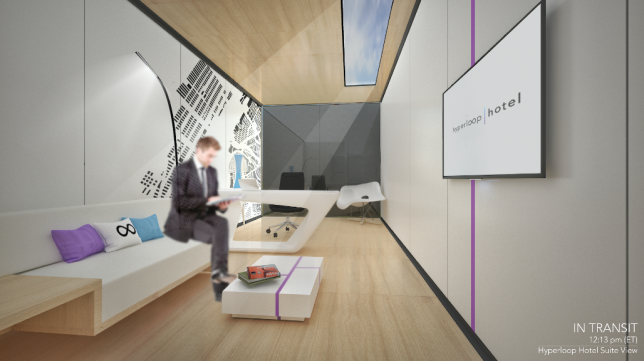
Hyperloop transit is about to make the world a whole lot smaller, and with it could come a system of luxurious private pods outfitted like high-end hotel rooms so you can zoom from one city to the next in unprecedented comfort. While it might seem like there’s little need for such cush train cars when your trip takes less time than ever, the Hyperloop Hotel aims to solve the problem of where you’re going to stay while traveling.

Developed by Radical Innovation Award winner Brendan Siebrecht, the Hyperloop Hotel consists of shipping containers that double as traveling guest suites, able to ‘dock’ themselves at any of 13 different hotel stations in cities like Seattle, Portland, Las Vegas, Los Angeles, Austin and New York City. While the nightly fee hasn’t been set yet, Siebrecht reveals that for a fee of $ 1,200, guests can even visit multiple cities in a single day. That’s right, you could maintain a comfy home base while having breakfast on the East Coast, lunch in the South and dinner on the West Coast.

It might sound too futuristic to be real, but Hyperloop One is already being tested in Las Vegas and could be carrying passengers by the year 2020, so it’s actually not that far away, assuming the technology stays on track (pun intended.) But the hotels definitely wouldn’t come cheap – it would cost about $ 10 million to build each one. The pods themselves feature a bedroom, office, bathroom and living room, with a glazed wall that can be covered while you’re in motion.

“I believe the Hyperloop One is the next big innovation in transportation in the United States and possibly the world,” Siebrecht told Business Insider. “I wanted to explore ways in which this technology could transform the overall travel experience and hospitality.”

Share on Facebook


[ By SA Rogers in Drawing & Digital. ]

[ WebUrbanist | Archives | Galleries | Privacy | TOS ]


WebUrbanist

 
Comments Off on Hyperloop Hotel: Zoom from City to City in a Luxury Lodging Pod

Posted in Creativity


Photos from the edge of the earth: World Photography Organization interviews Kiliii Yuyan

18 Jun
An Iñupiaq whaling crew cleans the hide of a polar bear that attacked their camp the previous day. Many Iñupiaq believe that declining sea ice has lead to these animals starving.
Photo by Kiliii Yüyan

Seattle-based photographer and traditional kayak-maker Kiliii Yüyan has spent years documenting the lives of people who live at the edges of the world. We’ve had the pleasure of working alongside him in Seattle and Alaska, but his work has also taken him as far as central Australia and Scandinavia.

In an interview with the World Photography Organization, Kiliii goes into detail about his current project, featuring the Iñupiaq whaling community of Utqiagviq (formerly known as Barrow, AK) and explains what motivates him as a photographer.

A humpback whale and calf feed on anchovies in the waters of Monterey Bay.
Photo by Kiliii Yüyan
California Condors feed on a stillborn calf. Photo by Kiliii Yüyan

Read the full article at worldphoto.org

Watch Kiliii’s talk at PIX 2015

Articles: Digital Photography Review (dpreview.com)

 
Comments Off on Photos from the edge of the earth: World Photography Organization interviews Kiliii Yuyan

Posted in Uncategorized


New Pro Light Bumblebee family from Manfrotto targets still, video and drone users

15 Jun

Manfrotto has introduced a new collection of outdoor backpacks and messenger bags that are designed to cope with extreme environments and to allow users to carry loads of kit. The largest backpack in the Pro Light Bumblebee series, the Bumblebee-230 PL can hold a DSLR with vertical grip with a 70-200mm F2.8 zoom attached as well as an extra ten lenses, according to Manfrotto.

The series comprises two backpacks and two messenger bags all of which can hold a laptop as well as cameras and lenses. The backpacks have configurable internal dividers so the main compartment can be arranged for high-end still or video cameras, lenses and accessories. These backpacks also have a tripod holder and the Bumblebee-230 PL features a lens pouch on the waistband strap.

$ (document).ready(function() { SampleGalleryV2({“containerId”:”embeddedSampleGallery_0518829044″,”galleryId”:”0518829044″,”isEmbeddedWidget”:true,”standalone”:false,”selectedImageIndex”:0,”startInCommentsView”:false,”isMobile”:false}) });

The two messenger bags, the Bumblebee-M30 PL and M10 PL, can also be configured to hold a small gimbal with their XtraSecure handheld gimbal strap. The larger of the two, the M30 PL can also be used to carry a DJI Mavic plus the Osmo gimbal camera.

The messenger bags have NoiseFree Velcro for silent access to the main compartments and all of the Bumblebee bags have DuoFace rain/sun covers. For more information see the Manfrotto website.

Prices:
MB PL-B-230 Bumblebee-230 PL Backpack $ 279.99
MB PL-B-130 Bumblebee-130 PL Backpack $ 229.99
MB PL-BM-30 Bumblebee M-30 PL Messenger $ 149.99
MB PL-BM-10 Bumblebee M-10 PL Messenger $ 129.99

Press release

Manfrotto Launches New Pro Light Bumblebee Camera Bag Family

Performance, Quality & Comfort, Redefined

Manfrotto, a leading global innovator and manufacturer of premium photo, video and lighting support products and accessories, has launched the new Pro Light Bumblebee bags – perfect for professional and amateur photographers and videographers who work outdoors and want a reliable carrying solution. With this collection, users can stay comfortable in the harshest of conditions despite high temperatures, extreme cold or high humidity.

The new Pro Light Bumblebee family is an exceptional assortment of high-performance camera backpacks and messenger bags which perfectly embody Manfrotto’s Italian heritage. This family introduces Manfrotto’s unique-to-the-market breathable harness system that greatly reduces photography gear fatigue, allowing image makers to cover more ground and locate the best spots for the perfect shots.

Inside, the bags’ innovative designs safeguard the latest professional equipment options. The renowned Camera Protection System (CPS) dividers take extra care of camera bodies and lenses. They are fully adjustable and built to distribute weight evenly and avoid tension to the body.

The new Manfrotto Bumblebee backpacks are designed to take stress and heat off the shoulders, neck and lower back and feature Manfrotto’s state-of-the-art AirSupport breathable harness and back panel, adjustable sternum support, shaped hip and waist support systems. A side handle helps users put the pack on or take it off, while elastic side pockets keep water bottles outside the critical gear zone.

The removable Manfrotto CPS insert safeguards equipment right at the heart of the pack and keeps it organized with the efficiency of a portable studio:

  • The Bumblebee-230 PL backpack protects a gripped DSLR with a 70-200/2.8 lens attached and 10 additional lenses or an attached 400/2.8 with five additional lenses. In video configuration, it protects a disassembled modular camcorder like the Canon C100 with numerous lenses & accessories. It also fits a 17” laptop in its own padded compartment.
  • The Bumblebee-130 PL backpack keeps a high-end CSC or a DSLR safe with a 70-200/2.8 lens attached and eight additional lenses or an unattached 400/2.8 with three additional lenses. In video configuration, it protects disassembled modular camcorders like a SONY FS-5. It also fits a 15” laptop in its own padded compartment.

The entire internal space is padded to protect camera gear but can be also configured to accommodate accessories and personal gear as well. The main zipper comes with four pullers, which can be divided by a stopper into a top and lower compartment. Just open the top zipper for rapid access to frequently used contents from above.

A smart NeverLose tripod connection secures both longer and shorter tripods on the side of the pack. The connection straps are stitched in the side pocket and can be tucked away when not in use for a tidier appearance and to prevent straps getting lost.

The bigger Bumblebee-230 PL also features a lens pouch located in the waist belt. When not in use, the pouch can be flattened by tightening the webbing strap. (This feature is not available in Bumblebee-130 PL.)

Manfrotto’s new Bumblebee Messengers have significantly raised the bar for their category: a combination of flawless design and reliable performance, they meet all the needs of demanding professionals who travel light and fast. Like the backpacks, the messengers’ body-gripping fit and 3-point AirSupport harness system is breathable and perfect for prolonged outdoor use. The length of the strap can be rapidly adjusted using the EasyGrip buckle.

Despite their compact size, they hold a substantial amount of professional gear:

  • The Bumblebee M-30 PL Messenger protects a DSLR with a 70-200mm/2.8 lens attached and three additional lenses, a handheld gimbal (such as a DJI Osmo) and a 15” laptop in their own padded compartments, with all the necessary accessories.
  • The Bumblebee M-10 PL Messenger keeps a CSC/DSLR safe with a 24-70/4 lens attached and two additional lenses (including 70-200/2.8) and a handheld gimbal (such as a DJI Osmo) and a 13” laptop in their own padded compartments, with all the necessary accessories. It can also carry a full set DJI Mavic plus the Osmo gimbal camera.

These bags introduce the XtraSecure handheld gimbal-carrying solution – a stretchable band that holds the gimbal’s moving parts so it can be taken out quickly. The area can also be used as a traditional lens compartment if there is no gimbal in the bag.

Manfrotto’s Bumblebee Messengers feature a secure silent quick-access flap. When shooting in quiet environments (e.g. during a ceremony), apply the NoiseFree Velcro silencer to keep a low profile. The broad front organizer keeps everything on hand. There are two bungee cord straps to hang a small tripod, monopod or selfie pole, which are also protected by the front flap. The Bumblebee Messengers can hold a gripped DSLR body when you take out the laptop from its compartment.

All the bags of the Bumblebee collection come with a DuoFace sun/rain cover to protect from rain, reflect sunlight and keep the gear cool and dry all day long.

Key features:

  • Breathable design – comfortable carrying solutions for professional and amateur outdoor photography
  • Super lightweight construction – carry more lenses and stay comfortable even with prolonged use
  • High-performance materials – rip-stop fabric and the Manfrotto Protection System safeguard equipment

The following models are now available nationwide:

MB PL-B-230 Bumblebee-230 PL Backpack $ 279.99
MB PL-B-130 Bumblebee-130 PL Backpack $ 229.99
MB PL-BM-30 Bumblebee M-30 PL Messenger $ 149.99
MB PL-BM-10 Bumblebee M-10 PL Messenger $ 129.99

Articles: Digital Photography Review (dpreview.com)

 
Comments Off on New Pro Light Bumblebee family from Manfrotto targets still, video and drone users

Posted in Uncategorized