RSS
 

Posts Tagged ‘from’

Blog Project: Your Best Photos From 2017

22 Dec

It’s that time of year again and if you’re a regular JMG-Galleries reader that means one thing…
it is time to kick off the 11th annual best photos of the year blog project. This is by far my most popular blog project with hundreds of photographers taking part last year (see Best Photos of 2016,  2015, 2014, 2013,  2012, 2011, 2010, 2009, 2008 and 2007).  It’s great to see the community of photographers that have developed around this blog project. As always I hope the exercise of picking your best photos helps improve your photography (10 Ways to Top Your Best 20xx Photographs).

So without any further delay here is how you take part to submit your best photos of 2016.

How to Participate (Read Carefully)

  1. Review & select your best photos from 2017.
    Note: Photo edit carefully narrowing down your results to your best 10 or 5 photos. Reference Pro Tips: Photo Editing with Gary Crabbe for pointers.
  2. Create a blog post on your website or a Flickr/500px set containing your best photos from 2017.
  3. Complete the form below by Tuesday JANUARY 2rd at 11:59PM PST to take part. The following Tuesday, or thereabout, I’ll post a link to all submitted sites and photos on my blog. Throughout the week I’ll also share the results across all my social media accounts.

Spread the Word!
Feel free to spread the word of this project on Twitter, Facebook, Instagram, Google+, photo forums you frequent and/or your blogs. All who are interested in taking part are invited.


Loading…

The post Blog Project: Your Best Photos From 2017 appeared first on JMG-Galleries – Landscape, Nature & Travel Photography.


JMG-Galleries – Landscape, Nature & Travel Photography

 
Comments Off on Blog Project: Your Best Photos From 2017

Posted in Equipment


FAA bans drones from flying near 7 nuclear facilities

20 Dec

The Federal Aviation Administration has officially designated seven Department of Energy (DOE) facilities as drone no-fly zones, restricting UAVs from being operated within 122m / 400ft of any of the following sites:

  • Hanford Site, Franklin County, WA
  • Pantex Site, Panhandle, TX
  • Los Alamos National Laboratory, Los Alamos, NM
  • Idaho National Laboratory, Idaho Falls, ID
  • Savannah River National Laboratory, Aiken, SC
  • Y-12 National Security Site, Oak Ridge, TN
  • Oak Ridge National Laboratory, Oak Ridge, TN

All seven sites are nuclear facilities (though not all of them are active), including multiple research facilities. The FAA has established the no-drone designation at the DOE’s request, doing so under its Title 14 authority. The FAA refers to these new bans as UAS National Security restrictions, and they’ll become effective on Friday, December 29. The agency will soon update its B4UFLY app to show the new restricted airspace.

According to the FAA, there will be select instances in which a drone operator could get a permit to fly within one of these restricted regions, though the operator will need to get permission from the FAA and/or the facility itself. The cases in which these permits may be granted weren’t specified. These new restrictions follow similar ones applied to Department of Interior facilities and military bases.

Via: Engadget

Articles: Digital Photography Review (dpreview.com)

 
Comments Off on FAA bans drones from flying near 7 nuclear facilities

Posted in Uncategorized


KUVRD Universal Lens Cap protects any lens from dust and water

19 Dec

$ (document).ready(function() { SampleGalleryV2({“containerId”:”embeddedSampleGallery_8206056277″,”galleryId”:”8206056277″,”isEmbeddedWidget”:true,”selectedImageIndex”:0,”isMobile”:false}) });

KUVRD has launched a one-size-fits-all Universal Lens Cap (ULC) designed to protect lenses from hazardous elements, including dirt and water, as well as minor drops. Simply called the KUVRD Universal Lens Cap, this ULC is made with silicone that can stretch to accommodate various lens shapes and sizes, including both the front and rear of the lens.

Here’s a quick intro, not that the concept isn’t pretty self-explanatory…

In addition to being water- and dust-proof, KUVRD explains that its ULC “never falls off” and helps absorb shocks.

One cap will absorb a little bit of a drop, but photographers who desire a greater degree of bump/drop protection can layer several KUVRD ULCs, placing one lens cover over another until you have several very snug layers of rubber between your lens and the elements. When not in use, KUVRD can be folded and stored in a compact area, such as a pocket or wallet.

KUVRD is seeking funding for its Universal Lens Cover on Kickstarter, where it has very quickly exceeded its $ 2,500 funding goal with about $ 72,000 in pledges. Backers who pledge at least $ 30 and share the campaign on social media are offered two Universal Lens Covers. Shipments will be available globally and are expected to start in March 2018.

Articles: Digital Photography Review (dpreview.com)

 
Comments Off on KUVRD Universal Lens Cap protects any lens from dust and water

Posted in Uncategorized


DPReview Instagram takeover: Barney’s photos from Mexico

18 Dec

Have you followed us on Instagram yet? Now’s a great time to, since over the next three days we’ll be turning our account over to Barney, where he’ll be sharing photos from a recent trip to central Mexico. It’s the trip that cemented the Leica M10 as his Gear of the Year, and provided plenty of opportunities to photograph the beauty of the region – from the captivating architecture of Queretaro to the jungle of San Luis Potosi and points in between.

Give us a follow and stay tuned!

Articles: Digital Photography Review (dpreview.com)

 
Comments Off on DPReview Instagram takeover: Barney’s photos from Mexico

Posted in Uncategorized


Famed Chinese rooftopper falls to his death from 62-story skyscraper

15 Dec
Photo: Weibo

Editor’s Note: We have decided not to post the video of the tragedy, or even link to it. Please, if you value your life, do not engage in ‘rooftopping’ or other risky activities for the sake of a ‘cool’ photo. There are legal and safe ways to capture great photos from tall places.


Performing dangerous stunts to capture exciting photos has long been hotly debated, but that hasn’t stopped some people from continuing to do incredibly dangerous things for the sake of a few Instagram likes. “Rooftopping,” the act of climbing a very high structure to take images showing the distance to the ground, is one of the most popular of these activities, and it recently claimed the life of 26-year-old Chinese rooftopper Wu Yongning.

Yongning regularly engaged in risky photo shoots. Hanging off of tall buildings earned him more than 60,000 followers on Weibo and a portfolio of unique, if vertigo-inducing and deeply unsettling, images. In the end, it also claimed his life.

Photo: Weibo

According to Channel NewsAsia, Yongning fell from the 62-story Huayuan Hua Centre while filming an attempted stunt to win 100,000 CNY (about $ 15k USD / €13k EUR) from an unnamed sponsor. Yongning reportedly planned to use the money to fund his wedding and help pay his mother’s medical bills.

A camera that had been set up to record the stunt captured Yongning’s final moments, showing him performing a couple of pull-ups while hanging off the edge of the skyscraper. Tragically, Yongning didn’t have the strength to pull himself back onto the rooftop afterward, and without anyone there to help him back up, he eventually lost his grip and fell.

The incidence happened on November 8th.

Recent public awareness of the tragedy has prompted Chinese state media to warn against performing unsafe social media stunts for money and/or attention.

Articles: Digital Photography Review (dpreview.com)

 
Comments Off on Famed Chinese rooftopper falls to his death from 62-story skyscraper

Posted in Uncategorized


Switching from Lightroom to ACDSee Photo Studio: Making the Jump Easy

14 Dec

Let’s be honest – over the past couple of months, more than enough has been said about Adobe’s recent change in policy regarding how the latest versions (yes, all two of them) of Lightroom are to be purchased and used. Articles have been written, disappointment expressed in some volume, silver linings spotted where there seemed to be none.

There’s also a good chance that you have made up your mind regarding the change to do one of the following:

  • To stick with CC and Classic.
  • To start the fairly painful process of moving on to a different piece of software.
  • Or to put off the decision for as long as the already-purchased version of Lightroom supports RAW files from your camera.

From Lightroom to ACDSee Photo Studio: Making the Jump Easy

Thus, we are not here to discuss Adobe’s brilliant decisions or lack thereof. This article is meant for those who chose the second option. Specifically, for those, who have decided to switch from Lightroom to ACDSee Photo Studio Ultimate. Hopefully, the last article I wrote on ACDSee Photo Studio has helped you make up your mind whether or not this software is suitable for your needs. If it is, I will try to help make the transition as painless as possible.

An important disclaimer: as before, the license for this copy of ACDSee Photo Studio Ultimate has been provided by ACD Systems. Having said that, even though ACD Systems has asked me to write this article, it has not been dictated by the company in the slightest. My words are always my own, as are your reasons for switching or otherwise. More than that, ACD Systems never implied they expect anything but integrity.

Direct transfer from Lightroom

I am afraid I will have to start with some disappointment, so I will try to rip off the bandage as quickly as possible. As of today, there is absolutely no way to transfer editing data from Lightroom to any other post-processing software or vice versa. It’s the result of closed-standard tools and database format that each software developer uses – not even sharpening is equivalent, let alone tonal adjustments.

So, the progress you have made with Lightroom is bound to remain accessible via Lightroom only, at least as far as RAW files themselves are concerned. For all the convenience catalog systems provide, this is one of the downsides – switching to a new RAW converter can really be a hassle.

From Lightroom to ACDSee Photo Studio: Making the Jump Easy

It may not be possible to transfer edits from LR to ACDSee, but Photo Studio sure has a lot of tools to cover most post-processing tasks.

But if you are here, I am guessing you have decided to push through the process now rather than become even more tied-in with the system Adobe is sticking to, and have even more to deal with at a later date. One solution you are left with is exporting full-size JPEG images from your Lightroom Catalog for any future needs (uploads to social media or websites, for example). But should you ever need to tweak a setting or two, you will either have to go back to Lightroom, or start from zero using ACDSee or an alternative tool.

Mind you, this caveat is only really valid for two or three years at the most, since there is a good chance that after a couple of years your taste in post-processing – as well as your skill – will have changed noticeably. I know mine has. Still, it is something that you will need to accept as an unavoidable result of having been part of such a closed system.

It is my hope that, over time, software developers such as ACD Systems will work out a way to read Adobe’s (and other) databases and interpret adjustments in an equivalent manner so that none of the edits – at least not those most prominent – would be lost when switching.

Now that the bandage is off, let’s go through what can be achieved with Photo Studio Ultimate.

Importing Lightroom Catalog Data

As I have mentioned in the previous article, culling and adding metadata information is an enormous pain for me. I am sure I am not the only one who just wants to get on with post-processing. Having to assign ratings and keywords all over again for images that have been organized in Lightroom would be insufferable. It is an enormous relief that this is something ACDSee Photo Studio Ultimate can greatly help you with.

Photo Studio has the functionality to import ratings, color labels, keywords, and collections from any Lightroom Catalog, thus preserving the major image organizing-structure of your portfolio. The process of importing this data is very easy to initiate and requires minimal effort.

1. Find the Adobe Lightroom Database Import tool

While in Manage Mode, select the Tools menu at the very top of the screen. There, navigate to Database > Import > Lightroom Database, which is located at the very bottom of the Import submenu. This will open the Lightroom Database Import Guide.

From Lightroom to ACDSee Photo Studio: Making the Jump Easy

2. Select Data and Catalog to Import

As soon as you launch the Lightroom Database Importer, a dialog with a short introduction to the tool’s functionality will pop up. Click Next, and you will be given options to specify which database entries you want to be imported, as well as the location of the Lightroom Catalog itself.

From Lightroom to ACDSee Photo Studio: Making the Jump Easy

2.1 Ratings

This is the star-based filter assigned with numeric keys (1 through 5) in Lightroom. ACDSee does not have stars as such, but it provides a numeric rating that is equivalent for all intents and purposes. If you check this option, ACDSee will interpret the ratings you have assigned with Lightroom and apply the same values.

2.2 Labels

This specifically refers to color labels that both Lightroom and ACDSee support. Again, by default, the labels that ACDSee provides are exactly the same as those found in Lightroom, so files marked with a Red label in a Lightroom Catalog will be marked with the same color in ACDSee after the data from the Catalog is imported.

2.3 Collections

These are a bit more complicated than Labels and Ratings and not something Photo Studio promotes as a means to managing your files, at least not by default. But if you were using Collections in Lightroom to sort your images, ACDSee will readily take over.

Simply select the Panes menu and enable Collections there and a new navigational tab will become available. Located right next to the Folders tab in Manage mode, it will list all the Collections that the imported Catalogs contained, along with the images assigned to those Collections.

It has been a couple of years since I last used Collections in Lightroom, preferring to stick with simple filters now, but it is nice to know this option is available and neatly integrated.

From Lightroom to ACDSee Photo Studio: Making the Jump Easy

2.4 Keywords

These are perhaps self-explanatory. Any keywords that you applied in Lightroom to any given RAW file will be seen by ACDSee too. This is useful for when you want to find images of specific locations, events, or people, provided you specified those keywords in Lightroom in the first place. Obviously, if you have not, ACDSee offers enough image management tools to have you covered.

2.5 Location

ACDSee will navigate to the default Lightroom Catalog in the Pictures folder on your computer, so keep in mind you may need to change the location. There is no way to select several Catalogs at once, so if you have more than one (which is very likely), the Catalog Import process will need to be repeated once for each one.

From Lightroom to ACDSee Photo Studio: Making the Jump Easy

Make sure Lightroom is not running while attempting to Import a Catalog.

Depending on the size of the Catalog being imported and your computer hardware specifications, the process might take up to a few minutes to finish. In fact, it took ACDSee over 30 minutes to process my Catalog. More than enough time to take a break from work and have a cup of coffee (you will have to wait for the Import to finish before you can use Photo Studio for anything else).

Admittedly, the Catalog was quite large, with a year’s worth of RAW files, and stored on an external hard drive on top of that. And not the fastest sort either. Be that as it may, importing will certainly be quicker than having to apply the filters and ratings manually, and nowhere near as tedious.

From Lightroom to ACDSee Photo Studio: Making the Jump Easy

Once the process is finished, you will find (upon navigating to the corresponding folder) your RAW files to contain the same labels, ratings, and metadata entries as applied in Lightroom. Honestly, this is great. The only omission that I can think of is that ACDSee does not seem to take Flags into account, so any images you may have marked with Pick or Reject Flag in Lightroom will not have the filter imported.

Part of the reason is that ACDSee simply has no Reject Flag equivalent, even if marking a file with backslash key tags it in a similar fashion to how Pick Flag works in Lightroom. Something to improve upon perhaps.

From Lightroom to ACDSee Photo Studio: Making the Jump Easy

The ratings and labels Lightroom is showing…

From Lightroom to ACDSee Photo Studio: Making the Jump Easy

…are now transferred to ACDSee. And it gives you a good before-after glimpse too/

Plugins are added

Here is something that’s as unexpected as it is brilliant; ACDSee supports plugins designed for Adobe Photoshop. If you have been using Lightroom, this may be of relevance to you, too, as so many of these plugins are also meant for Adobe’s standalone RAW converter and image management software.

I have no idea how much work had to go into this little trick, but it is a massive attraction for anyone who is not fully satisfied with the extent of default ACDSee tools.

From Lightroom to ACDSee Photo Studio: Making the Jump Easy

Long time no see, Silver Efex. Fancy finding you here.

While I have not done any extensive testing – I rarely, if ever, use plugins anymore – I was able to verify this with one of the most well-regarded plugin packs by Nik Software (now owned by DxO after being nearly killed-off by Google). Color Efex worked like a charm. I encountered an occasional error here and there, but often to no direct effect on the functionality of the software or the plugin, so while annoying, it was rarely terminal.

I also tried a couple of plugins by Topaz some time ago and they worked without issue. The full list of officially supported tools can be found here.

From Lightroom to ACDSee Photo Studio: Making the Jump Easy

It is necessary to path the location of the already-installed plugins. To make sure ACDSee can locate the plugins correctly, first go to Edit mode. Then, select Options from the Tools menu at the top of the screen, or simply hit Alt + O. Once the Options panel is displayed, choose Edit Mode from the list on the left. There, you will be able to select the GPU that ACDSee will use to speed up processing, among other things.

What we need is the bottom-most field called Adobe Photoshop Plugin Paths. A couple of directories will be listed by default, but in some cases (as with Nik), they won’t be enough. You need to specify where the plugins are located. Since I am interested in using Nik Software, I added (click the Add button) a new path that leads to C:\Program Files\Nik Collection. The destination of your plugins might be different, so make sure you set the path correctly. Once you’re done, click OK.

From Lightroom to ACDSee Photo Studio: Making the Jump Easy

If the plugins are supported and the path has been specified accurately, you will find the plugins listed in the Photoshop Plugins section of the Tools menu (still in Edit Mode).

I won’t claim there is no chance of errors happening – after all, those plugins were never really intended for anything but Adobe. Yet the fact that they work so well despite that is an impressive and convenient achievement no matter how you look at it.

Just keep in mind that not everything might work as expected every single time, or it may take time for some plugins to be properly supported.

Final Words

Breaking and rearranging an established workflow is not a pleasant experience. Especially if the previous routine worked well and it is the company’s decisions, rather than the quality of the tool, that has become an issue. With that in mind, it is good to know that less-dominant software developers are going out of their way to show how welcoming they can be.

ACDSee Photo Studio Ultimate attempts to make the transition from Lightroom as simple and straightforward as possible, not only by offering a plethora of powerful (and often similar) post-processing tools but by also taking steps towards preserving any image organizing you may have already done with Lightroom.

It’s not perfect and there is certainly room for improvement (perhaps edit transfers are not as far-fetched as they might seem?), but what has been done is by no means a small feat and will save any new user hours of rating and filtering what has already been done before.

Whichever software you will find yourself choosing next (or sticking with), there is plenty for the giant developers to learn from such attention to detail.

Disclaimer: ACDsee is a paid partner of dPS

The post Switching from Lightroom to ACDSee Photo Studio: Making the Jump Easy by Romanas Naryškin appeared first on Digital Photography School.


Digital Photography School

 
Comments Off on Switching from Lightroom to ACDSee Photo Studio: Making the Jump Easy

Posted in Photography


19 inspiring entries from the Sony World Photography Awards

13 Dec

19 of the best entries from the Sony World Photography Awards

The Sony World Photography Awards—one of the largest annual competitions in the world of photography—is just a month away from closing its entries. To remind photographers of this deadline (and just maybe brag a little bit about the quality of the entries they’ve received so far—World Press Photo has released a teaser of 19 stunning entries submitted to the competition so far.

From perfectly composed black-and-white street portraits, to spectacular wildlife images, to landscape photos that’ll rev up your wanderlust, there’s a little something for everyone in this Holiday teaser.

Scroll through the slideshow to see them all for yourself. And if you’re planning to submit your own entry, you can do so for free right here. Just remember: the submission deadline for the Open, Youth, and National Award competitions is January 4th, 2018, and the deadline for the Professional – Best Series of Works competition is January 11th, 2018.

Press Release

New images released to mark one month until deadline of 2018 Sony World Photography Awards

December 5, 2017 – Photographers worldwide have just one month left to enter the 11th edition of the Sony World Photography Awards. To mark this deadline, the World Photography Organisation, the creators of the Awards, today releases a new selection of entries from the Open competition. Submitted by photographers from around the world, the images cover a wide variety of topics, from stunning aerial landscapes to intimate portraits and animals in the wild.

The internationally acclaimed Sony World Photography Awards are one of the most important fixtures on the worldwide photographic calendar, with many of its shortlisted and winning photographers gaining global exposure and recognition. Last year’s Photographer of the Year, Frederik Buyckx (Belgium) said, “Being named Photographer of the Year has given me more exposure than I could ever have imagined. It has opened doors but, just as importantly, the awards has also encouraged me to keep on working on my personal projects.”

Past shortlisted photographer Simon Butterworth (UK) said “It’s impossible to overstate the importance of this achievement to my career, the global coverage was amazing, in fact, interest in my work as a direct result of the awards continues to this day.”

All entries to the Awards are free at www.worldphoto.org/swpa

Deadlines and Jury

The 2018 judges have been tasked to reward the very best contemporary photography from the past year across the following competitions:

Open – best single image
Youth – photographers aged 12-19, best single image
National Award – best single image taken by a local photographer from 60+ countries Deadline: January 4, 2018

Professional – best series of works
Deadline: January 11, 2018

The juries are chaired by Mike Trow, Picture Editor, British Vogue (Professional competition) and Zelda Cheatle, Curator (Open, Youth competitions and National Awards). Full details about the 2018 jury can be found at www.worldphoto.org/sony-world-photography-awards/2018- judges

Key dates

The shortlist for all competitions of the Awards will be announced on February 28, 2018. The Open and National Awards winners will be announced March 20, 2018. The Photographer of the Year and the Professional category winners will be announced April 19, 2018.

Prizes and exhibition

Prizes include $ 25,000 (USD) for the Photographer of the Year and $ 5,000 (USD) for the overall Open competition winner. All category winners will receive the latest Sony Digital Imaging equipment and Professional category winners are flown to London to attend the Sony World Photography Awards dinner on Thursday April 19, 2018.

The Awards’ winning and shortlisted images will once again be exhibited at Somerset House, London. Running April 20 – May 6 2018, the exhibition will also include exclusive new works by the recipient of the Outstanding Contribution to Photography Award, to be announced in January 2018. Previous recipients include Martin Parr (2017), RongRong&inri (2016), Elliot Erwitt (2015) and Mary Ellen Mark (2014)

19 of the best entries from the Sony World Photography Awards

Back to the future by Sung Lok Cheung | Image © Sung Lok Cheung, Hong Kong (China), Entry, Open, Portraiture (Open competition), 2018 Sony World Photography Awards


The photo was taken at TeamLab, Dance! Art Exibition, Shenzhen, China, in a venue called the Crystal Universe. The light illusion is an artwork that uses an accumulation of light points to create a sculptural body.

By this time, I had been waiting with my friend for the right composition to happen. I saw a little girl in a red dress running around. I kept on waiting and waiting expecting that she would come to the perfect spot. Luckily she ran out again by the channel. I found it is so called “The Decisive Moment”. I couldn’t wait to press the shutter, when the lighting was perfectly right, to create a beautiful moment. It looked like the girl was crossing a time tunnel.

That is why I put “Back to the Future “ as the title of my photo. I was inspired by the idea that opportunities are to be left to those who are well prepared. Or, to put it another way, that good preparation is the way to become successful. By pressing the shutter at the right moment, an amazing photo was finally realised.

19 of the best entries from the Sony World Photography Awards

Life in Macau by António Leong | Image © António Leong, Portugal, Entry, Open, Street Photography (Open competition), 2018 Sony World Photography Awards


Macau is probably better known as a gambling city near Hong Kong, but very few know that it is the most densely populated city in the world—over 18,000 people packed in a km square. High rise residential buildings are everywhere in town. How many stories are in each Kilometer cube?

19 of the best entries from the Sony World Photography Awards

African Mystery by Matthieu Rivart | Image © Matthieu Rivart, France, Entry, Open, Wildlife (Open competition), 2018 Sony World Photography Awards


The photo was taken during my last trip in Kalahari (Kgalagadi Park, South Africa), last September. The Kalahari lions are famous for their black mane.

After a long drive through the park, I came across two of them, sharing a springbok kill. A violent fight took place between the two to get the best pieces. They ultimately headed towards the nearby waterhole, where they got a rest during the sunset, which gave me the perfect opportunity to capture their legendary beauty.

19 of the best entries from the Sony World Photography Awards

Morning Glory by Huibo Hou | Image © Huibo Hou, United States of America, Entry, Open, Landscape & Nature (2018 Open competition), 2018 Sony World Photography Awards


Morning glory hot spring in Winter, Yellowstone National Park, USA

19 of the best entries from the Sony World Photography Awards

The Horns at sunrise by Vincent Chen | Image © Vincent Chen, China, Entry, Open, Landscape & Nature (2018 Open competition), 2018 Sony World Photography Awards


I took this photo in Torres del Paine National Park in Chile’s Patagonia region in Feb 2017.

I came to this secluded viewpoint in early morning and was fortunate to get pretty amazing weather. The sunshine shone onto the famous Cuernos del Paine peaks—they looked magnificent and incredible.

19 of the best entries from the Sony World Photography Awards

On White by Chris MacDonald | Image © Chris MacDonald , Canada, Entry, Open, Wildlife (Open competition), 2018 Sony World Photography Awards


A red fox stands in the snow. I was out for a hike in the early January snow when I cam across a set of fox tracks. I followed them around a curve and found this fox standing in a clearing. I got down to my knees quickly to try not to scare him off and started taking pictures.

As some of the heavy snow fell of the trees, he paused and turn to see what was making the noise. I have photographed this fox over many years. His nose is so distinctive it helps to identify him. By getting low, it gave me the snow in the background to create the isolated effect of white.

19 of the best entries from the Sony World Photography Awards

Untitled by Oliver San Juan | Image © Oliver San Juan, Philippines, Entry, Open, Street Photography (Open competition), 2018 Sony World Photography Awards


This photo was taken somewhere in the famous Divisoria Market of Manila, and shows 3 generations of men.

First is a kid that seems to be playing, the middle-aged man in the center seems to be thinking of something deeply, while the last man sits very relaxed while reading a newspaper. It is like an evolution from being a playful kid to a relaxed, worry-free old man.

19 of the best entries from the Sony World Photography Awards

Newspaper… by Martin Schubert | Image © Martin Schubert, Czech Republic, Entry, Open, Street Photography (Open competition), 2018 Sony World Photography Awards


I was waiting on a tram in Prague, and this man was sat eating a snack. First, I photographed the scene from another angle, but when I noticed the poster behind him I moved fast to the right place and shot this picture. After 30 seconds he stood up and left.

19 of the best entries from the Sony World Photography Awards

Little Indian by Virgilio Liberaton | Image © Virgilio Liberato, Philippines, Entry, Open, Portraiture (Open competition), 2018 Sony World Photography Awards


The photo is taken around March or February 2017, when its still cold here in Kuwait. Its a park we shoot in actually here in Kuwait, where its not allowed to shoot at any park or location unless you have permits—let’s just say I’m a run and gun photographer.

The park is named Green Island. It’s near the seaside and not too many photos were taken there because you need to pay to get into the park. It was a little bit cold at that time, so not too many people were going to the park. The model is wearing a Native American headdress because we can’t bring extra people on that shoot, and its also not allowed for that headdress to be seen here in Kuwait.

This scene was just timing. We had finished our shoot, and while going home I found the spot that would be great for her: a bush that she could pass through, but only a little space so I imagined letting her pass by and calling to her. In the instant I captured her eyes, its hard for her because of small thorns of the bushes.

So thats how I got her photo. Paying attention at the last minute helped me find that great spot, which I didn’t see when we came to the location.

19 of the best entries from the Sony World Photography Awards

Nattfari, Húsavík by Matteo Redaelli | Image © Matteo Redaelli, Italy, Entry, Open, Travel (Open competition), 2018 Sony World Photography Awards


Whale watching is a wonderful experience to enjoy if you travel across Iceland. This boat, Náttfari, is a traditional Icelandic wooden boat sailing the most of the year around Skjalfandi Bay, where you can enjoy this majestic and unique experience of whale watching.

The afternoon I took this picture was really unexpected because the morning the weather was truly better. That is the fun part of Iceland. I feel joyful when a normal morning suddenly transforms into an unusual afternoon. That was exactly what happened during this day.

I remember that it was very cold but at the same time so nice because was unexpected such a lot of snow around Skjalfandi Bay on Náttfari. Knowing that the Bay was surrounded by humpbacks whales was another point for the wonderful experience it was. I love to travel and share my time with nice people as the crew was on Náttfari for the time I was there for a scientific project.

19 of the best entries from the Sony World Photography Awards

Lunch Break by Omer Faidi | Image © Omer Faidi, Turkey, Entry, Open, Street Photography (Open competition), 2018 Sony World Photography Awards


At lunchtime in my office, I went out to the balcony and when I saw the workers at the construction site next door, I said “wow!” I went back inside to get my camera and shot them from the 6th floor. They were looking very peaceful and natural.

I returned shortly after, and the moment had passed.

19 of the best entries from the Sony World Photography Awards

Jump by Milo Angelo Ramella | Image © Milo Angelo Ramella, Italy, Entry, Open, Wildlife (Open competition), 2018 Sony World Photography Awards


Jump: A snowy owl flies, alarmed by the call of another female.

19 of the best entries from the Sony World Photography Awards

Wanma Pentium by Shen Jianfeng | Image © Shen Jianfeng, China, Entry, Open, Travel (Open competition), 2018 Sony World Photography Awards


My image was taken in July 2017, in the grassland grazing area of Wulangbu Dam in Inner Mongolia, China.

19 of the best entries from the Sony World Photography Awards

The Big Meringue by Placido Faranda | Image © Placido Faranda, Italy, Entry, Open, Landscape & Nature (2018 Open competition), 2018 Sony World Photography Awards


Scala dei Turchi (The Turkish Steps) is a white cliff in Realmonte (Sicily), made of a soft limestone and a blinding white marlstone. Natural erosion has created steps on the cliff face, making it look soft and sinuous, like a Big Meringue covered with sprinkles (the people sitting and walking on it).

The origin of the name “Turkish Steps” is intriguing. While there is a big resemblance to Pamukkale (Turkey), the designation of “Turkish” was given centuries ago by local people, for the frequent raids carried by Turkish pirates on this area. Legend says they would find a shelter for their boats behind this rocky formation, and then climb the “steps” of the cliff and raid the villages.

Today, Scala dei Turchi is a wonderful spot for viewing the sunset, as the bright white marl turns into a strong orange. Only after shooting this image, while watching it on a bigger screen, did I notice the newlywed couple in the frame kissing for their wedding photoshoot. Exactly at the edge of the cliff.

19 of the best entries from the Sony World Photography Awards

K means kite by Krzysztof ?wik | Image © Krzysztof ?wik, Poland, Entry, Open, Street Photography (Open competition), 2018 Sony World Photography Awards


The kite competition on the Marseille beach. France.

19 of the best entries from the Sony World Photography Awards

Papuma by Haryadi Bakri | Image © Haryadi Bakri, Indonesia, Entry, Open, Enhanced (Open competition), 2018 Sony World Photography Awards


The picture of Papuma taken on 8 October 2017 on my 7 day trip to Bromo Mountain, then to Papuma Beach at East Java, Indonesia.

It was my first time visiting Papuma beach, at Jember City. I arrived at midnight from the Surabaya night train after finishing my 3-night trip hunting star trails at Bromo mountain.

Papuma Beach is not actually at the city, but far on the southern tip of the coastline. I had to return to to beach 3 times in a day just to make sure I had the right location for capturing the clouds and the stars at night—sadly, it was very cloudy at night, so I’m combining the star trails from Bromo mountain.

That’s it, but before combining, I made sure the south pole in the picture is in the right position as the real location. No doubt, this is the image that I wanted to create.

19 of the best entries from the Sony World Photography Awards

The child and the reindeer by Pehuen Grotti | Image © Pehuen Grotti, France, Entry, Open, Travel (Open competition), 2018 Sony World Photography Awards


Every morning, all the reindeer are released so they can graze all day, and at night they all come back themselves. Here we can see one of the Tsataan children taking care of his reindeer before the cold night comes.

19 of the best entries from the Sony World Photography Awards

Golden Happy Hour by Hans Gunnar Aslaksen | Image © Hans Gunnar Aslaksen, Norway, Entry, Open, Landscape & Nature (2018 Open competition), 2018 Sony World Photography Awards


This image was taken in October in a small bay in Larvik, southern Norway. Larvik is a small town south of Oslo.

The location for this image is not far from where I live. It is kind of a secret gem that few people know about. I discovered the place and its potential on a local hike I did. I have been here several times under different weather conditions. This location is quite tricky as it needs perfect waves to work. That means that they cant be to big or else you and the camera will get soaked. But calm water will not add enough interest and dynamic to the image.

This specific evening the waves where just perfect. Just big enough to wash over the stones and not to big so I could get a low angle with the camera. The setting sun was also in a perfect position—the low sun was not obstructed by clouds and it lit up the rocks in the bay beautifully.

I knew that the sun would set in just half an hour, so I had to work fast and find the best composition. The light just got better and better and I knew that I had a chance to capture something special. I tried to anchor the shot with the beautiful stones in the foreground and experimented with different shutter speeds to create interesting movement in the waves. I tried to make every element lead up to the sunstar for a strong composition. I am very pleased that also the clouds acts as leading lines towards the setting sun.

19 of the best entries from the Sony World Photography Awards

Frazzled by Zhayynn James | Image © Zhayynn James, India, Entry, Open, Wildlife (Open competition), 2018 Sony World Photography Awards


A handsome alpha male Lion-tailed Macaque keeps a wary eye on the rest of his troop after a drink of water. They are one of the most endangered primate species in the world and are highly endemic to the Western Ghats of South India.

Their species is fragmented across the Western Ghats in pockets and their future, much like this male’s mane, looks frazzled.

Articles: Digital Photography Review (dpreview.com)

 
Comments Off on 19 inspiring entries from the Sony World Photography Awards

Posted in Uncategorized


Our favorite finalists from the Comedy Wildlife Photography Awards 2017

13 Dec

$ (document).ready(function() { SampleGalleryV2({“containerId”:”embeddedSampleGallery_0618474546″,”galleryId”:”0618474546″,”isEmbeddedWidget”:true,”selectedImageIndex”:0,”isMobile”:false}) });

Later this week, on December 14th, the Comedy Wildlife Photography Awards will reveal the winning photos for 2017, each chosen from a pool of 40 finalists revealed earlier this month. The 40 images showcase fun and funny scenes captured by wildlife photographers around the globe: singing elephant seals, a laughing mouse, macaques on a motorbike, and more.

More than 3,500 images were submitted to the competition this year.

The Comedy Wildlife Photography Awards goes by the tagline “conservation through competition,” providing photographers with an lighthearted contest through which they can share fun photos of wildlife while helping raise conservation awareness.

You can see our favorite finalists in the gallery above, then head over to the contest’s website to see all 40, view a gallery of last year’s wildlife comedy finalists, or check out the 2015 and 2016 winners.

Articles: Digital Photography Review (dpreview.com)

 
Comments Off on Our favorite finalists from the Comedy Wildlife Photography Awards 2017

Posted in Uncategorized


7 Style Tricks to Steal from Other Artists

11 Dec

You’ve been taking photos for quite a while now but suddenly you notice your shots are looking a bit the similar. Same locations, same light, same style, same subjects.

Yes, you can travel to new places once in a blue moon, but you itch to get out with your camera all the time taking inspiring shots.

Welshrobin

You want to create something new and individual but there is always that nagging feeling that everything’s been done.
Yes, friends and family love what you do, but you want to make an impression on your peers. Maybe even enter a competition or two.

Well, you can break out of the same old same old ruth, here’s how. Just borrow a little style from other artists – they’ve been making images for thousands of years and are well practiced at bringing in the new.

7 Ideas to get you out of a rut

1. Andy Warhol Pop Art

Rowanpopart - Seven Style Tricks to Steal from Other Artists

Warhol is famous for his multi-image saturated color artwork such as his portrait of Marilyn Monroe and his Campbell’s soup cans. There is little depth created and the work is all about the surface patterns.

For this first steal you need a straight forward head and shoulders shot against a plain background. There are dozens of videos on YouTube that show you the process for creating pop art, which is quite straight forward, even for a novice at photo manipulation. Choose colors to suit your decor or mood. It’s a lot of fun scrolling through the hues and selecting the color combinations that grab you.

2. Rothko’s Color Fields

Mark Rothko’s paintings are often a field of just one color. They are full of texture, light and shade and nuances of hue and tone. Completely abstract, they still encompass a gamut of emotions from calm reassurance to dark solemnity. Other works include bands of color or two juxtaposed fields.

For this style, try photographing a field full of texture and color such as rapeseed in golden hour light for a picture full of joy. A windswept, sandy beach or a derelict urban factory wall make great subjects to try.

You could create bands of color with long exposures and intentional motion blur smoothing out features that may distract from the visual idea.

The field of orange ephemeral leaves here is offset with the solid green of the tree for changes in texture and color. This would be a good subject for the motion blur technique.

Beechpath - Seven Style Tricks to Steal from Other Artists

3. Escher’s Perspectives

Famed for his impossible changes of perspective and tessellating patterns, Escher also looked at the natural world capturing unusual, thought provoking views. One of those was a woodcut of tire tracks holding a puddle reflecting trees. It’s one of those pictures where you do a double take. This isn’t the same as including reflections in rain covered streets, it’s more about capturing another world where the rest of the scene is merely background.

This example is a small pool in a beech wood. There is just enough “right way up” detail to explain the view point but not enough to change the subject.

Pooltrees - Seven Style Tricks to Steal from Other Artists

4. Monet and Impressionism

The work of the Impressionists is hugely popular, full of light and sparkle. This was achieved by placing complementary colors such as orange and blue next to each other. Your eyes mix the colors and create a myriad of tones that seem to dance across the surface.

You can recreate this effect by looking out for natural occurrences of complementary colors such as these orange and gold leaves against a blue sky. Overexposing the shot slightly helps to give the high key and luminance you need for this to work well.

Beech tree blue sky - Seven Style Tricks to Steal from Other Artists

5. Rembrandt and Chiaroscuro

Rembrandt was a master of Chiaroscuro, the use of deep changes in tone from dark to light adding drama and mood. He mostly used this style for portraits, his brightly lit figures coming out of a deep dark background.

It’s a lovely technique you can use on your portraits, as Rembrandt did, using a dark room and a simple light source such as a lantern. You could also use this style to add a different dimension to still life or macro subjects such as this ox eye daisy.

In this case the background was in shadow behind the flower and a reflector was used to direct more light onto the bloom itself. A little tweaking with Photoshop increased the depth of the darks.

Daisy - Seven Style Tricks to Steal from Other Artists

6. Mondrian Grid Patterns

Blocks of pure color carefully arranged and separated by black lines of a grid were Mondrian’s stock in trade.

To replicate this style, you could look out for grid patterns occurring in the environment, such as different color fields separated by stone walls, paintwork in urban decay, windows in office or apartment blocks, and reflections on water surfaces. You could even set up a still life on a black table using found textures and colors.

In this photo, the initial attraction was the colored reflections, the duckling was a happy accident!

Duckling red water - Seven Style Tricks to Steal from Other Artists

7. Mandalas

These are currently hugely popular across creative fields from adult coloring books to crochet.

This is a great style to use to organize still life subjects containing lots of small items in a cohesive structure. It can be most enjoyable and therapeutic to create the mandala in the first place. You then have the added bonus of the photo opportunity at the end.

This photo used a selection of fruit, leaves, and nuts on a slate table mat background. Nothing went to waste in this one.

You could try autumn leaves, sea shells on the sand, sweets, or mixed media. Get the family to join in for some creative bonding.

Fruitmandala - Seven Style Tricks to Steal from Other Artists

Conclusion

So now it’s over to you. You can take some of these ideas and maybe some of your own inspired by this article and run with them. It’s time to get out with your camera and look around with an artist’s, as well as a photographer’s eye. Good luck, happy shooting, and please come and share your results in the comments below.

The post 7 Style Tricks to Steal from Other Artists by Janice Gill appeared first on Digital Photography School.


Digital Photography School

 
Comments Off on 7 Style Tricks to Steal from Other Artists

Posted in Photography


Tips for Aerial Photography from Small Planes and Drones

20 Nov

At its heart, good photography is about showing people views of the world they would not otherwise see. That might be; places your viewers have not visited, impossible ways of seeing to the human eye such as long exposures and night photography, but most often this novelty comes in the form of a different perspective. Even familiar scenes and objects can make compelling photographic subjects if we are willing to explore them from new angles.

Tips for Aerial Photography from Small Planes and Drones

Aerial photography is one of my favorite ways to provide that novel perspective. I’m fortunate to spend a lot of time in small planes. My life in Alaska is full of flights in bush planes to remote places in the state. While only occasionally do I fly specifically to make aerial images, I find simply going to and from different locations provides ample opportunity.

The second way I frequently use to access an aerial perspective is by flying drones. While both techniques get me the elevation I want, the photographic experience is very, very different. The two methods, planes and drones, require very different ways of thinking about image-making.

Tips for Aerial Photography from Small Planes and Drones

Here are a few tips to improve your aerial photography images, whether you are shooting from a plane or using a remote drone.

Airplanes

While big passenger jets are great for getting us from one place to another quickly, they are lousy photography platforms. Sure, I’ve made some images from jet windows, but they inevitably follow the same formula. There’s an airplane wing in the foreground with some sunset or mountain beyond. It gets old. Plus the perpetually fogged or scratched windows will destroy your image quality. Except for the occasional phone snap, I rarely bother with it anymore.

Small, single-engine planes, however, are a different story and can be an amazing platform for creative aerial photography.

Tips for Aerial Photography from Small Planes and Drones

Sharpness

Attaining a sharp image is a major challenge because airplanes are vibration-filled nightmares. Here are four things to help you improve sharpness:

  1. Use a fast shutter speed. I like anything over 1/1000th of a second.
  2. Don’t brace your lens or arms on the plane. Hold your camera and elbows free of the window. If you touch the plane, the vibrations will be transmitted straight into your camera. I tuck my arms against my sides and hold the lens an inch or so away from the window glass.
  3. Focus at infinity. I often shoot manual focus from the air and pre-set my focus point to infinity. Everything you are seeing from the air will be in focus when the lens is set to infinity, so don’t even bother with autofocus.
  4. Shoot wide open. The depth of field is not a problem from a 1000 or meters from your subject. So a take advantage of the extra shutter speed provided by your fastest f-stop.

Lens Choices

Tips for Aerial Photography from Small Planes and Drones

When flying 100+ mph at low altitude, the landscape passes very quickly. If you don’t act quickly, you’ll miss the shot. That’s why I like zoom lenses for aerial photography. I can quickly compose with different focal lengths, without having to change lenses or cameras. I favor a wide to moderate zoom. A 24-105mm or similar lens is about right.

Communication

Usually, in a small plane, you’ll be in direct communication with your pilot, who might be willing to help you out with your photography. When I’m flying over something interesting, but a wing or strut is in the way, I’ll often simply ask the pilot to tip a wing one way or another. Pilots are often happy to accommodate you.

Tips for Aerial Photography from Small Planes and Drones

You can also ask them to make slight turns, or even circle if there is something particularly compelling. If you’ve chartered a flight for photographic purposes, feel free to ask for what you want.

I recommend talking to your pilot ahead of your trip to discuss what kind of images you want, and how he or she might be able to help you. If it is a photography-specific flight, you may even be able to remove windows or doors from the plane.

Tips for Aerial Photography from Small Planes and Drones

Remember your pilot is the final judge of what is acceptable in terms of safety and time. If they say they can’t do something, they can’t. Don’t push them into something with which they aren’t comfortable.

Composition

There are almost as many ways to shoot from an airplane as there are from the ground so any discussion of composition runs the risk of leading us deep into the photographic weeds. However, the general rules of landscape photography still apply. Remember depth, foregrounds, and the way lines connect the image.

Tips for Aerial Photography from Small Planes and Drones

Some shots from the air could be details of the landscape below, but more often they will be sweeping landscapes. I like to place elements in the frame that guide the eye through; a river, a mountain valley, or a highlight like a lake or patch of colorful ground.

The altitude at which you are flying will also dictate your options. When making aerial images of mountain environments (my usual subject) I prefer the plane to be below the level of the surrounding peaks. This perspective still provides a sense of grandeur, while maintaining the unique aerial perspective. Ask your pilot if you can fly lower or higher, and they may be able to help you out if conditions are safe.

Tips for Aerial Photography from Small Planes and Drones

Drones

Flying a remote copter or drone is a very different experience from being up high yourself. There are advantages, but also some drawbacks.

First the drawbacks. Most consumer grade drones limit you to one focal length. Without the ability to zoom or change lenses, most drone shots tend to have the same wide-angle look. To change the scene, you’ve got to move the drone. Drones also have limited ranges, elevation capabilities, and at times, limiting regulations.

Tips for Aerial Photography from Small Planes and Drones

Some locations, like national parks in the United States (and many other countries) are off-limits for drones. Range limitations also mean that you have to get yourself close to your desired subject. So if you want to make images of some remote, or difficult to access location, you’ll still have to do it on the ground.

The advantages, however, are many. Cost is a big one. For the price of a couple hours charter of a small plane, you can buy a decent drone, literally. Flexibility is another. If you want to go make some aerial photos, you simply do it, no waiting around for a pilot or plane charter. If the light is right, you just go fly.

The biggest advantage for me, though, is composition flexibility. You can create an image from a few meters off the ground, to a couple hundred. You can also spend the time necessary to get the composition right. The drone sits still when you want it to, or you can adjust to your heart’s desire.

Composition

I like to fly my drone fairly low. I find the combination of altitude and wide angle lenses make everything look less dramatic and smaller if I’m flying too high. 20-30 meters off the ground is probably my favorite height, but of course, it varies on where I’m flying and the image I’m creating.

Remember to take advantage of the many camera angles drones allow. Shooting straight down is almost impossible from a plane. But with a drone, it’s as easy as angling your camera.

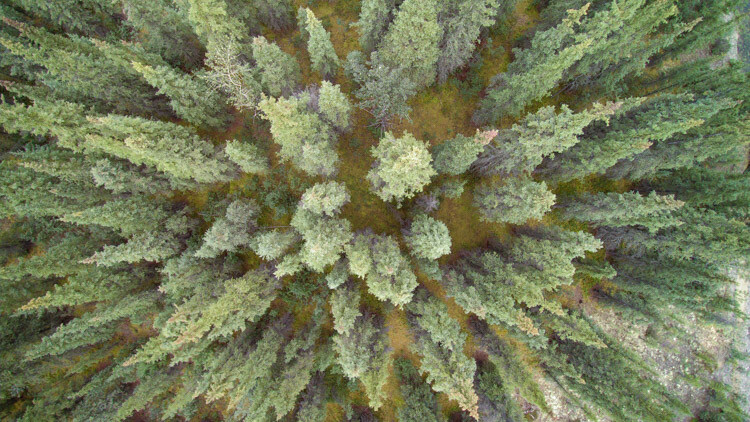
Playing with lines and patterns is a drone specialty, so take advantage of the way the world looks from above. Play with dividing your images into parts using the natural variations in the landscape. Trees from above, for example, create a starburst pattern, not a typical way humans see a forest!

Tips for Aerial Photography from Small Planes and Drones

The flexibility provided by drones is extraordinary. Don’t be afraid to experiment with aerial images of places a plane could never fly.

Drone Warning

Follow the rules! Flying a drone in a dangerous area like around airports, or at the scene of an emergency is not only irresponsible it can be life-threatening. Be aware of the laws surrounding drones, and fly only in areas where it is allowed, and at permitted elevations.

Lastly, be respectful of others. Don’t fly over private property if you don’t have permission, and be aware of how your flight is impacting the experience of others. Simply put, don’t be a jerk.

Tips for Aerial Photography from Small Planes and Drones

Conclusion

Aerial photography is a gateway to new ways of seeing. Whether you are shooting from the passenger seat of a Cessna or from your phone screen using a drone, there are abundant opportunities to make new and exciting images. Explore it and share with me what you make!

The post Tips for Aerial Photography from Small Planes and Drones by David Shaw appeared first on Digital Photography School.


Digital Photography School

 
Comments Off on Tips for Aerial Photography from Small Planes and Drones

Posted in Photography