RSS
 

Posts Tagged ‘Free’

onOne Software’s Perfect Effects 8 available for free

06 May

Screen_Shot_2014-05-05_at_11.18.07_AM.png

onOne Software is offering its Perfect Effects 8 Premium Edition plugin for free for a limited time. It gives you hundreds of creative presets, fully customizable filters and ability to combine effects. Perfect Effects 8 works as a standalone application (Windows or Mac) or integrates with Adobe Lightroom, Aperture and Photoshop. Go to the onOne Software site to get this fully licensed version – worth $ 99.95 – for free. Learn more

News: Digital Photography Review (dpreview.com)

 
Comments Off on onOne Software’s Perfect Effects 8 available for free

Posted in Uncategorized


Graphic Stock’s 7-Day Free Download Extravaganza

28 Apr

As a photographer—whether an amateur or a pro—you know that you can more than appreciate having a huge supply of stock images ready to use. You usually never know when they can come in handy, but you know well how they can come in handy, more than you think. That’s why it’s a comforting thought to realize that Graphic Stock Continue Reading

The post Graphic Stock’s 7-Day Free Download Extravaganza appeared first on Photodoto.


Photodoto

 
Comments Off on Graphic Stock’s 7-Day Free Download Extravaganza

Posted in Photography


Glow-in-the-Dark Highways: Free Lighting Hits the Streets

28 Apr

[ By WebUrbanist in Technology & Vehicles & Mods. ]

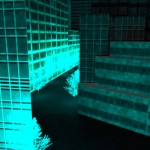
smart highway now reality

Proposed just two years ago, this alternative solar-powered passive streetlight system is now already a reality, deployed along motorways across the Netherlands. As one reporter put it after riding along the newly-transformed highways: “It looks like you are driving through a fairytale.”

sustainable_highway_2

smart highway changing lights

This is just the beginning of a Smart Highway approach designed to adapt surfaces to the needs of drivers. Constituent ideas include the display of relevant contextual information directly on roadways (including traffic and weather conditions) as well as direct wireless car charging.

smart highway side lights

smart highway road system

Other new ideas from Studio Roosegaarde include the possibility of turning street materials into smog attractors, reducing the spread of pollutants by pulling harmful particulates right out of the air. Despite the compelling design component, their creator describes these innovations as reforms rather than designs – ways of improving everyday life and personal safety.

Share on Facebook


[ By WebUrbanist in Technology & Vehicles & Mods. ]

[ WebUrbanist | Archives | Galleries | Privacy | TOS ]


WebUrbanist

 
Comments Off on Glow-in-the-Dark Highways: Free Lighting Hits the Streets

Posted in Creativity


Open-Source Street Store Offers Free Clothes for Homeless

05 Mar

[ By WebUrbanist in Design & Guerilla Ads & Marketing. ]

pop up store hangars

Donated boxes of right-sized clothing can be a boon for those who cannot afford another choice, but this clever approach empowers people in need to choose their own apparel.

pop up sidewalk homeless

pop up shoppers

The Street Store assistants set out flat-pack cardboard hangars, signs and stands along sidewalks and fences, encouraging people to drop off clothing. Volunteers also help passerby in need package what what they find, and those with something to give find a place to put their donations.

pop up helper volunteer

Though the project was started in Cape Town, South Africa, as a collaboration between M&C Saatchi Abel and the Haven Night Shelter Welfare Organisation, it is offered as open-source to applicants from around the world who wish to use the files and create their own  regional variant.

pop up shop volunteer

The open-air approach makes everything more accessible for both donating and recipient parties; it also renders indoor spaces and infrastructure redundant, enabling pop-ups to happen in various public spaces.

pop up cardboard elements

pop up street store

As for the first day’s effort in the project’s original city: “Over 1,000 homeless people visited our store that day. Each put together an outfit that they wanted. An outfit, that for many, was the first they had ever been able to choose for themselves.”

Share on Facebook


[ By WebUrbanist in Design & Guerilla Ads & Marketing. ]

[ WebUrbanist | Archives | Galleries | Privacy | TOS ]


WebUrbanist

 
Comments Off on Open-Source Street Store Offers Free Clothes for Homeless

Posted in Creativity


Free Overnight Shipping and Instant Gifts that Practically Teleport Themselves

23 Dec

It’s not too late to grab a wow worthy photo gift!

You can use overnight shipping until 11am PST/2pm EST, and it’s FREE on a few of our most amazing gizmos.

Plus, we’ve got FUTURE GIFTS! Photo gadgetry so cutting edge it doesn’t exist yet! Give the gift of being first in line to receive a wireless phone flash, 3D photo taker/viewer or a real live photo drone.

Automatic Life-logging Cam

Autographer uses 6 sensors to collect photos and data. ? More

Sony QX100 Smart Lens

Amazing optics, a huge sensor and yr phone as a vewfinder. ? More

Instant Photo Lab

Make Polaroid-like prints from your iPhone pix, instantly. ? More

Polaroid SX-70 Cameras

Iconic polaroid cams in pristine working condition. ? More

Are your present presents lackluster?
Try a future present!

We’ve been to the future and back — but we didn’t leave empty handed. Here are three of our favorite new gizmos slotted for 2014, available for gifting now!

Poppy lets you capture and share the world the way you really experience it: in three dimensions. Use your iPhone to take 3D photos and video! Then, view and share them too.


$ 69 in the Shop


Iris is a self-piloting quadrocopter … yeah, a drone! And, it has a high quality GoPro photo/video camera mounted right up front. It’ll fly just where you tell it too, filming all the way.


$ 1049 in the Shop


Nova is an off board flash for phoneographers. It talks to your phone via Bluetooth to flash when you snap a pic. You choose the color temp and brightness with an app.


$ 59 in the Shop


Photojojo Gift Cards

Can’t decide? Leave the tough decisions to your giftee. → More


Phoneography 101

An eight lesson course in photo basics, on your phone! → More


© Aaron for Photojojo, 2013. |
Permalink |
No comment |
Add to
del.icio.us

Post tags:

Comments Off on Free Overnight Shipping and Instant Gifts that Practically Teleport Themselves

Posted in Equipment


Getting to Know Picasa – a Free Image Editor and Browser by Google

20 Dec

Getting to know Picasa

If you’re looking for an image browser and editor that is feature packed and easy to use then Picasa just may be the only bit of software you’ll ever need. It may not have all the advanced features you would expect from some of the more well-known image editors but it is a nice piece of software that punches way above its weight, and what’s more, it’s free and available for both Mac and Windows platforms.

Photo editing picasa 01

Before I get started I will state unequivocally that I have never in the past or present worked, in any capacity, for Google or any of its subsidiaries. Furthermore, I have never received payment of any kind for writing about their products. I wish!

I recently ran a digital photography course in Perth, Western Australia and was asked by my boss to use Picasa as the editing software. I was sceptical at first about what I could achieve with freeware, mainly because I was used to working with the Adobe Creative Suite, and initially protested. But after downloading and trialling Picasa, I was pleasantly surprised to find it’s actually quite a useful and feature-packed piece of software.

So what exactly is Picasa?

According to Google, it’s software that helps you “organize, edit and upload photos”. When you download and install Picasa, the first thing the software will do is trawl through your computer, and attached hard drives, looking for image files such as jpegs, bitmaps, tiffs. In fact Picasa recognizes most image file types, including Photoshop PSD. So what you’ll end up with is a large library of pictures organized chronologically in folders, which is handy for finding that holiday snap you took several years ago. How long this all takes will depend on how many images you have on your computer or hard drive, so be patient and wait until it has finished collating.

Browsing

Once Picasa has catalogued all your pictures you can then start to browse, organize, and edit, as well as having the option of grouping them into Albums. One of the nice things about Picasa is that it’s non-destructive. So edits you make to photos can be undone. Picasa also stores all edits as separate files so your original pictures are left intact. Picasa also scans your hard drive and updates itself whenever you add more pictures so it’s always up to date.
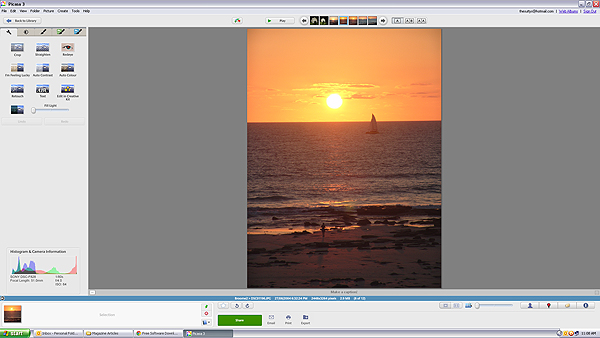
Picasa main screen 01

Picasa’s main browsing interface is simple and easy to navigate

You also have the ability to import photos directly from cameras and portable drives using the import function in the top left hand side of the browser. Simply connect the device to your computer and navigate to the photographs on your device. Once you have all your pictures imported, and in their respective folders, you are ready to start editing.
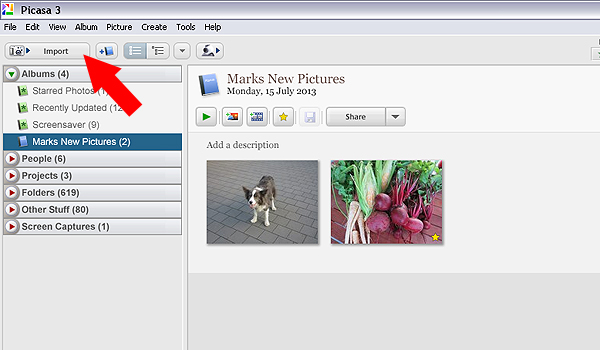
Picasa import button 02

Use the import function to download from a digital camera or portable hard drive

Editing and effects

To begin editing you simply double click on a picture in the Picasa browser. This activates the editing functions and you can begin making changes to your selected photograph.

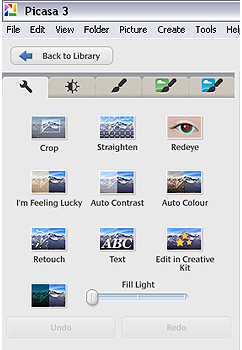
There are five tabs at the top left-hand side of the editing window:
Use the import function to download from a digital camera or portable hard drive

Use the import function to download from a digital camera or portable hard drive

TAB #1 COMMONLY NEEDED FIXES

The tools in this tab gives you control over cropping, straightening, red-eye removal, basic brightness and contrast adjustments. There are some automated features too such as “Auto contrast” and “Im feeling lucky”, which all deliver varied results. The “Edit in Creative Kit” feature has been discontinued but there is the opportunity to edit online inside Google+. There’s also a “Text” tool for adding some titles and information to your selections as well as a “Retouch” tool for fixing blemishes and scratches.

TAB #2 CONTRAST ADJUSTMENTS

The second tab gives you more brightness and contrast options and a greater level of control. It includes sliders to adjust the amount of fill light and shadows in your picture, and you also have the ability to change highlights. There’s a temperature control feature but in reality this simply adds either a blue or sepia tint to the picture which simulates daylight or interior colour temperatures.

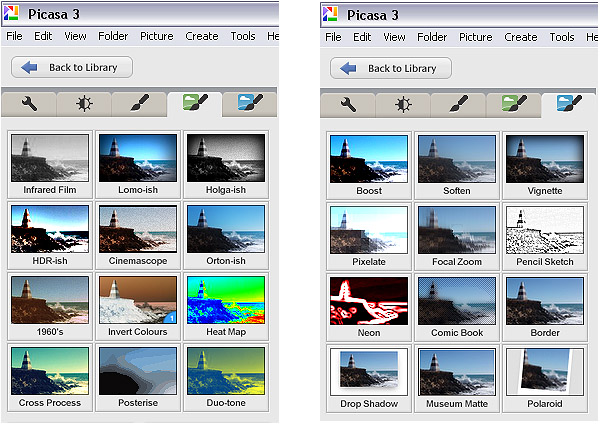
TAB #3 FILTERS

The third tab is where Picasa starts to offer some cool features. Here you will find a series of twelve preset filters such as sharpening, film grain and black and white. Most of the filters are adjustable so you can control the amount of each effect applied to a photograph.

TABS #4 and 5 MORE FUN FILTERS

Similarly, tabs four and five continue to offer you even more fun filters to apply to your photographs, with twenty four additional styles.
Picasa effect previews 04

The image filters in Picasa offer a wide range of modern and classic effects

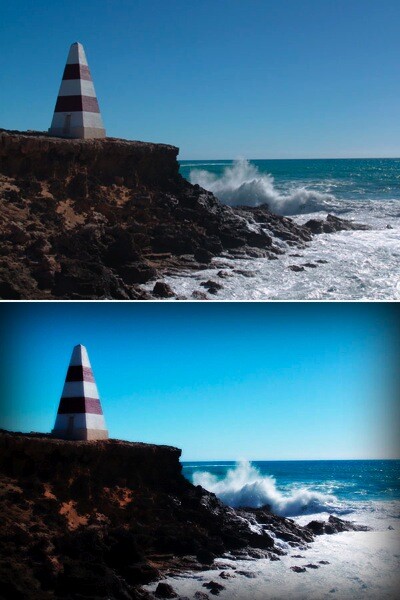
In the picture below I applied the Orton-ish filter and a Vignette to get a softening, yet dynamic effect.
Picasa before and after 05

Video

So, you’ve messed around for a few hours and now have a dozen images you want to show off to friends and family. Well Picasa’s bag of tricks doesn’t stop there. In fact, there’s some very useful output options available should you want to either print, make a video, or simply upload your pictures to the web.
Picasa create video icon 06

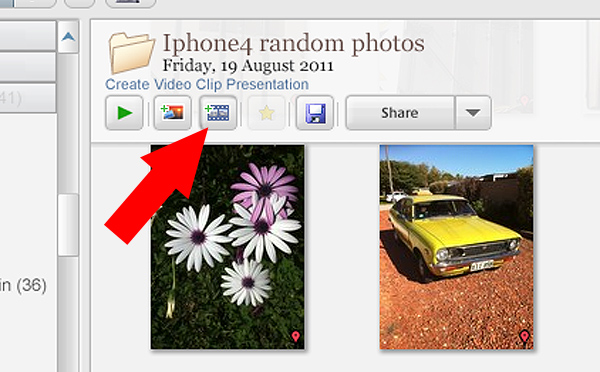
Making videos is simple and fun in Picasa. Just click the “Create Video Clip” icon to get started

By selecting a group of pictures in the browser and selecting “Create Video Clip Presentation’ it puts your selected pictures onto a simple video timeline. You can then add titles, and even import a music sound track to go with your pictures. If you’re not happy with the selection order you can shuffle the pictures, and then output the file to one of several video formats, including high definition 1080P.

There’s also the option of making a collage for print, screen or for the web. There are tons of options and it takes very little time to come to grips with how it all works.

Other features

If you think that’s impressive, wait, there’s more! If you have a free Google+ account you can upload and share your pictures right from the Picasa browser, to Picasa’s Web Albums photo sharing site with very little effort. Just make sure you familiarize yourself with the privacy settings before you start uploading and always read the terms and conditions.

On the downside,

On the downside Picasa has limited raw editing features, so if you want to try something more advanced then you will have to look elsewhere. That said there’s enough features in this little program to keep most people happy.

Bottom line on Picasa

Picasa is really a fun and easy program to use and the learning curve isn’t too steep. If you need an application that is primarily for browsing and organizing, then this is a handy program. Although the editing capabilities are basic there are some useful features such as geotagging, keyword tagging, face recognition and a range of exporting options. But if you are a serious photographer that needs a program that can do some heavy lifting then perhaps you’ll need something more robust.

Picasa will certainly appeal to a broad demographic and it is really intended to perform many of the most common photographic tasks. It can also speed up the process of getting your pictures online. While I was reluctant to start using this program I have warmed to it. So if you need a photo organizer and editor that’s quick, easy and – dare I say – fun to use then perhaps give it a go.

Download it:

  • Picasa for Windows
  • Picasa for Mac OSX

The post Getting to Know Picasa – a Free Image Editor and Browser by Google by Mark Sutton appeared first on Digital Photography School.


Digital Photography School

 
Comments Off on Getting to Know Picasa – a Free Image Editor and Browser by Google

Posted in Photography


Free Shipping Deadline *Extended*

19 Dec

Only a few hours left for FREE SHIPPING for Christmas delivery!

USPS’s reindeer are packing up their very last sleighfuls.

We’ve EXTENDED our free shipping ’till 11am PST/2pm ESt, but then it’s really over.

Ready? Set! SHOP NOW →

Sony QX Smart Lens Cams

Amazing optics, a huge sensor and yr phone as a vewfinder. → More

Polarizing Smartphone Lens

Pros’ secret weapon! Cut down on glare for brighter colors. → More

Automatic Life-logging Cam

Autographer takes photos for you. Limited Time! $ 100 off → More

The Pro Phone Filter Stack

Warm, cool and rainbow your pix with a trio of glass filters. → More

Instant Photo Lab

Make Polaroid-like prints from your iPhone pix, instantly. → More

Eye-fi Wireless SD Card

Photos go from DSLR to a phone or compy, wirelessly. → More

Polaroid Z340 Camera

A digital camera that prints photos too. ON SALE! $ 50 off → More

Snack Cap Lens Caps

Give your camera and delicious and protective treat. → More

Instax 90 Instant Cam

The newest tiniest Fuji Camera gives you creative control. → More

Photo App Pins

Pin your favorite app’s icon to your bag, hat, corkboard or pal. → More

Polaroid SX-70 Cameras

Iconic polaroid cams in pristine working condition. → More

Smartphone Film Scanner

Scan 35mm film directly to your phone to edit and share. → More

iPhone Adventure Suit

Take photos underwater with a suit of armor on your iPhone. → More

Instagram Necklaces

Wearable #nofilter, #selfie and Instagram “Like” icons. → More

The Kick iPhone Light Studio

Dial up any color under the sun with app controlled LEDs. → More

The Glass Diana DSLR Lens

Get the lo-fi look w/ the clarity of glass on your DSLR. → More


© laurel for Photojojo, 2013. |
Permalink |
No comment |
Add to
del.icio.us

Post tags:


Photojojo

 
Comments Off on Free Shipping Deadline *Extended*

Posted in Equipment


Free Coupons for All!Plus, Gift Ideas For Your Camera

10 Dec

We’re giving away $ 2, $ 5, $ 7 and $ 10 coupons all day long!

Simply follow us on Twitter (we’re @Photojojo), give us a RT and visit the Shop to collect your coupon.

Not sure what to spend your free Photojojo bux on? We’ve talked to your camera and have its wishlist right here.

Check out our gifts for DSLRs, Androids, iPads and more …

Snack Cap Lens Caps

Your camera looks hungry. Give it a tasty (protective) treat. → More

Gorillapod for SLRs

This bendable tripod will hold your DSLR to any surface. → More

The Triggertrap

Turn your phone or tablet into a remote for your DSLR. → More

Give ANY DSLR Wi-FI!

Send photos from your DSLR to phone or laptop as you shoot! → More

iPad Telephoto Lens

See 10 to 12 times farther, with adjustable focus. → More

Sony Wireless Lens

Give your iPad a massive sensor and professional optics. → More

A charger + built-in battery

The Bolt Charger doesn’t need an outlet to charge you up! → More

Wireless Shutter Remote

Take photos from 30 feet away. Perfect for photobooths! → More

The Instax 90 Instant Cam

The newest from Instax w/ double exposure and bulb modes. → More

Print straight from your cam!

The Polaroid 2300 takes digital photos and prints on the go. → More

Rare Film Pack

Three rolls of rare, imported, or discontinued 35mm film. → More

Mini Instagram Projector

Project a slide wheel of your IG photos anywhere. → More

Polarizing Smartphone Lens

Cut down on glare to up contrast and color saturation. → More

Instagram #Necklaces

Sport your very own #nofilter, #selfie or IG Like symbol. → More

Instant Camera iPhone Decal

A tribute to an old fave, for your phone. → More

Olloclip 4-in-1 iPhone Lens

A fisheye, telephoto, wide angle and macro lens, all in one. → More

Super Fisheye Phone Lens

The widest angle lens in the shop! For fishey phone photos. → More

Phoneography Starter Kit

Everything a new phoneographer needs in a giftable case. → More

Smartphone Spy Lens

See the world from a whole new angle (on the sly). → More

The USB Chargecard

A charging cable that fits in your wallet. → More


Glif+ Phone Stand

$ 20

$ 25 BUY!


Egg Carton Film Case

$ 20

$ 15 BUY!


Memory Card Speed Reader

$ 45

$ 35 BUY!


Instax Mini 50s Camera

$ 125

$ 110 BUY!


Handy Dandy Hand Strap

$ 40

$ 35 BUY!


The iPhone SLR Mount

$ 249

$ 180 BUY!


© laurel for Photojojo, 2013. |
Permalink |
No comment |
Add to
Plus, Gift Ideas For Your Camera”>del.icio.us

Post tags:


Photojojo

 
Comments Off on Free Coupons for All!Plus, Gift Ideas For Your Camera

Posted in Equipment


Frame-Busting Art: 2D Graffiti Figures Break Free from Walls

28 Nov

[ By WebUrbanist in Art & Street Art & Graffiti. ]

figure frame breaking

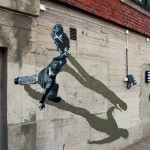
Treating abandoned buildings and urban surfaces more like pages in a book than bricks to tag, this street artist brings an illustrator’s touch and storyteller’s approach to his unique graffiti.

figure suicidal jumper man

figure jumper up close

Though based in the Netherlands, Daan Botlek frequently ranges far from Rotterdam to cities including Berlin and Bangkok, where he draws surreal scenes with imaginary characters.

figure art subway door

Some of these creations seem to be contemplating dangerous acts, while others fight through their artificial environments or even with one another.

figure art wall scene

figure art frame play

figure art frame two

These much-humanized, frame-breaking figures are only one facet of his portfolio, but they uniquely bridge the gap between the artist’s experience with illustration on the one hand and street art on the other.

figure 3d cube art

figure abandoned building graffiti

Aside from on-paper drawings and character creation, his other public art series include a set of white cubes, again reprising this three-dimensional approach to bring objects, in this case, off the page (or wall, as it were).

Share on Facebook


[ By WebUrbanist in Art & Street Art & Graffiti. ]

[ WebUrbanist | Archives | Galleries | Privacy | TOS ]


WebUrbanist

 
Comments Off on Frame-Busting Art: 2D Graffiti Figures Break Free from Walls

Posted in Creativity


23 November, 2013 – Free C1 Training Video Offer

24 Nov

Phase One has announced  that this weekend, the first 50 people to complete a purchase of a Capture One Pro 7 single user license in the Phase One online store will receive an unique voucher code to use at Luminous-Landscape, which grants a 100% discount on the tutorial a – USD $ 60 value.


The Luminous Landscape – What’s New

 
Comments Off on 23 November, 2013 – Free C1 Training Video Offer

Posted in News