RSS
 

Posts Tagged ‘Free’

Free Little Libraries: 25 Contextual Designs & Creative Reuses

19 Jun

[ By Delana in Architecture & Public & Institutional. ]

antique style little free library

Little Free Libraries have been popping up all over the U.S. – and in other countries as well – since 2009. The movement began in Wisconsin, where Todd Bol built a tiny replica of a schoolhouse and put it on a post in his front yard. The sign on the box read “Free Books,” and anyone passing by was welcome to take a book and leave a book. Above: a library in Toronto.

brown house little free library

green roofed little free library

Over the years, the movement grew. The Little Free Library boxes started popping up all over. The original was made from recycled materials, and Bol eventually teamed up with an Amish carpenter to start making the tiny libraries. You can now buy your own Little Free Library or, like a lot of people have done, get creative with your very own design.

triangular little free library

red cabinet little free library

green parrot little free library

Each official Little Free Library gets its own registration number. In January of 2015, LFL estimated that there were about 25,000 of the tiny lending boxes around the world, with thousands more being built every year. As word of mouth spreads and people get more interested in sharing books with their communities, the libraries continue to pop up everywhere.

Next Page – Click Below to Read More:
Free Little Libraries 25 Contextual Designs Creative Reuses

Share on Facebook


[ By Delana in Architecture & Public & Institutional. ]

[ WebUrbanist | Archives | Galleries | Privacy | TOS ]


WebUrbanist

 
Comments Off on Free Little Libraries: 25 Contextual Designs & Creative Reuses

Posted in Creativity


Google rolls out standalone Photos app with unlimited free storage

29 May

Confirming rumors from earlier in the week, Google has announced its new Photos app – a standalone service that separates the photo component of its Google Plus app. It’s available now for Google and iOS and comes with unlimited free storage of 16MP or smaller images. Read more

Articles: Digital Photography Review (dpreview.com)

 
Comments Off on Google rolls out standalone Photos app with unlimited free storage

Posted in Uncategorized


Nikon to offer free newlywed portraits at New York’s City Hall next week

28 May

Nikon will be offering newlywed portraits for free to couples who marry at the New York City Hall on June 4th and June 5th. Couples married at City Hall will be treated to a free portrait session with pro photographer and Nikon Ambassador Joe McNally, working out of a 20-foot ‘Wedding Truck’ studio. Read more

Articles: Digital Photography Review (dpreview.com)

 
Comments Off on Nikon to offer free newlywed portraits at New York’s City Hall next week

Posted in Uncategorized


15 More Free WordPress Themes for Photographers

15 May

Are you looking for free photography themes? Here you’ll find 15 incredible designs developed especially for the purpose. Who can use them? We guess these WordPress themes will be useful for artists, designers and developers. In a word, for everybody who wants to save some money on his/her future website design. Free themes don’t have 24/7 support like their premium Continue Reading

The post 15 More Free WordPress Themes for Photographers appeared first on Photodoto.


Photodoto

 
Comments Off on 15 More Free WordPress Themes for Photographers

Posted in Photography


Big Free Library: Public Pavillion Built of 50,000 Stacked Books

09 May

[ By WebUrbanist in Architecture & Public & Institutional. ]

lacuna large volume art

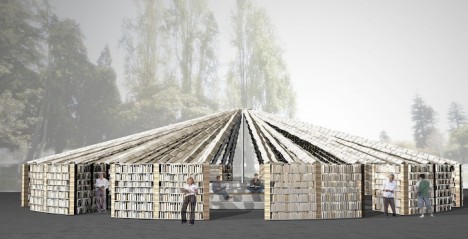
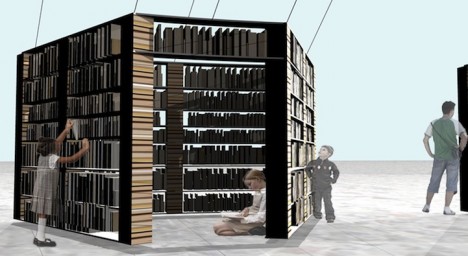
Stacked books form the structural columns of this remarkable structure while support beams in between serve as shelves for even more volumes that can be borrowed, all scanned and donated by the Internet Archive. Even the roof is formed of reading material, featuring fluttering book pages suspended from support wires. Like Free Little Libraries, this huge book repository offers its wares to anyone who wants to take a novel to read and (optionally) return, in turn letting each person who interacts with it to permanently shift its shape.

lacuna building structural books

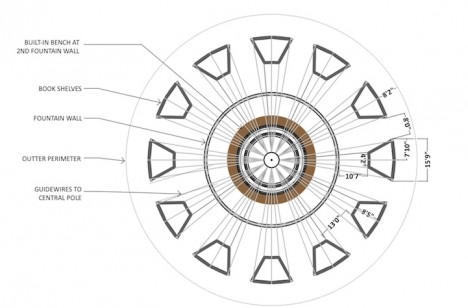
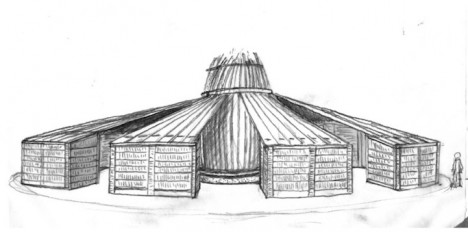
Opening in one month at the Bay Area Book Festival, this temporary building is made to dissolve – the act of removing books from its shelves will change the way it looks and how light passes through its emptying walls. Reading benches in and around its twelve alcoves provide spaces for retreat or interaction.

lacuna structural design diagram

The title of this project, Lacuna, is also an obscure word referring to missing pages or sections of a book. Its creators FLUX Foundation have a great deal of experience building robust but interactive public art and architecture, including large-scale projects for Black Rock City (as part of the Burning Man festival). Over 200,000 books were actually donated by the Internet Archive, but the remaining 150,000 volumes will be saved for future similar projects.

lacuna project sketch

The Book Festival will also feature talks and readings by hundreds of authors as well as other structures and exhibits. More on the design and its inspiration: “Lacuna is a temple to books. Each of the twelve alcoves of Lacuna are formed by pillars created out of stacked books. Connecting these pillars are shelves filled with books. Above, fluttering book pages attached to guy-wires create a thatch-like roof, creating a space in which visitors literally, and figuratively, inhabit the interiority of books and their contents. “

Share on Facebook


[ By WebUrbanist in Architecture & Public & Institutional. ]

[ WebUrbanist | Archives | Galleries | Privacy | TOS ]


WebUrbanist

 
Comments Off on Big Free Library: Public Pavillion Built of 50,000 Stacked Books

Posted in Creativity


Free Pennant Party w/ Every Instant Camera!

27 Apr

Let’s get your pennant party started, hip-hip-huzzah!

Today only, we’re giving you a pennant pack FREE when you buy any one of seven incredible instant cameras. If you’ve been waiting to pull the trigger on buying your favorite instant camera, today is the day!

Use the pennants for an impromptu photo booth and pop off prints instantly. Insta-fun, right?

Get Your Pennant Party Here!
(…)
Read the rest of Free Pennant Party w/ Every Instant Camera! (0 words)


© Erin for Photojojo, 2015. |
Permalink |
No comment |
Add to
del.icio.us

Post tags:


Photojojo

 
Comments Off on Free Pennant Party w/ Every Instant Camera!

Posted in Equipment


Free Download: VSCO Film Pack 00 includes Tri-X and Kodak Gold Film presets

24 Apr

Who doesn’t love free stuff? Visual Supply Co has been churning out Photoshop and Lightroom-compatible film presets for some time now. To date, they’ve released seven different ‘Film Packs’ each containing presets that mimic both classic and contemporary film stocks. Now, they’re offering one for free. Read more

Articles: Digital Photography Review (dpreview.com)

 
Comments Off on Free Download: VSCO Film Pack 00 includes Tri-X and Kodak Gold Film presets

Posted in Uncategorized


Free Lenses For Everyone!TODAY ONLY

09 Mar

Whoa Nelly, we’re throwing in a free phone lens with every order TODAY ONLY (it’s March 9th 2015)!

Finally, a perfect excuse to pick up that goodie you’ve been eyeing. Perhaps you fancy one o’ these …

Browse a Few of Our Faves Below

Or, Grab a Free Lens Now
(…)
Read the rest of Free Lenses For Everyone!
TODAY ONLY (10 words)


© laurel for Photojojo, 2015. |
Permalink |
No comment |
Add to
TODAY ONLY”>del.icio.us

Post tags:


Photojojo

 
Comments Off on Free Lenses For Everyone!TODAY ONLY

Posted in Equipment


Post-processing RAW Files – ACR Compared to Some Free Software Options

07 Mar

What is RAW?

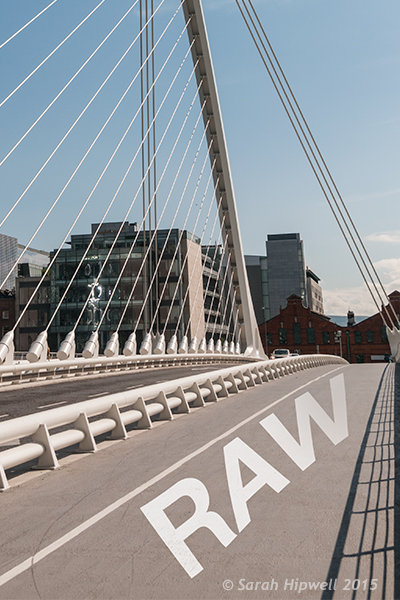
Title-imageA RAW file is really the digital negative, which means that all the data is stored waiting to be unleashed via a RAW Editor. Unlike a jpeg file which has been edited in-camera (or in post-processing) and is a compressed 8-bit file.

Why shoot RAW?

The main benefit to shooting RAW is simply to have as much information as possible in the file. When you upload a RAW file onto your computer the white balance, and tonal corrections have to be set manually. More detail can be retrieved from the highlights and shadows. It is then saved as a jpeg or some other format. The RAW file always remains in its original state.

Shooting RAW has become more commonplace as cameras have the option, built-in and RAW editing software is more widely available on both Mac and PC. In this article, I will be testing out two RAW editors which are free to download. Yes, no purchase necessary. The main RAW editor that I will go into more detail on is Adobe Camera Raw (ACR), which comes with Photoshop and is my primary go-to RAW editing software.

As a side note, this article is by no means a complete in-depth review of the pros and cons of each of the the three RAW editors. I merely wanted to test Photoshop’s ACR against some of the RAW editors that are available to download for free, such as GIMP and RawTherapee.

A few years back, I was using ViewNX (now ViewNX2), which is Nikon’s RAW free editing software. Canon (DPP) and other major camera manufacturers have their own RAW proprietary software. But I found ACR just got better with each new release. I usually bring my images into Photoshop when I’ve done the initial edits in ACR. It means my workflow is quite efficient as I’m using ACR and Photoshop side-by-side.

The Basics

When you open ACR or any RAW editor, the user interface can be a bit daunting for the uninitiated. The range of adjustments and all the features of ACR would require several articles alone.

So, let’s look at the basic adjustments where I begin the editing process of my RAW files. These adjustments are fundamental to any RAW editor. Similar adjustments can also be found in the Develop module of Lightroom and in Photoshop Elements 12 and 13. Let’s begin with Adobe Camera Raw, otherwise known as ACR.

Adobe Camera Raw (ACR)
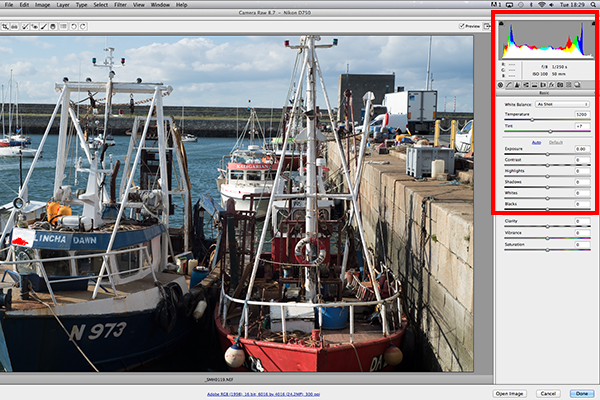
ACR-UI

The interface when a RAW file is opened in ACR

When I open a RAW file in ACR, White Balance is my first port of call. This is about the color temperature of the image depending on the light source. If the white balance is incorrect, then a color cast will occur on your image. It may look slightly blue, orange or green.
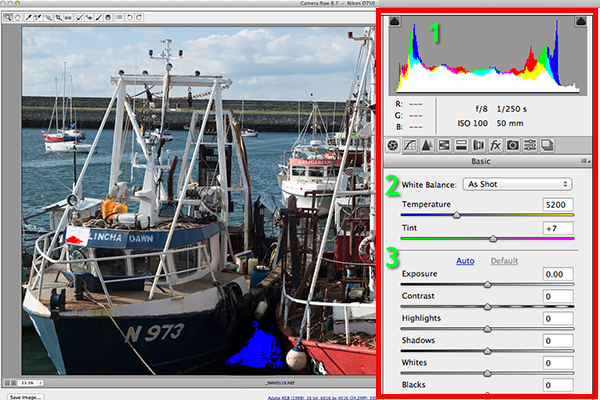
The 3 important focus points in the Basic panel in ACR

The three important focus points in the Basic panel in ACR

In ACR, there are three ways to adjust White Balance.
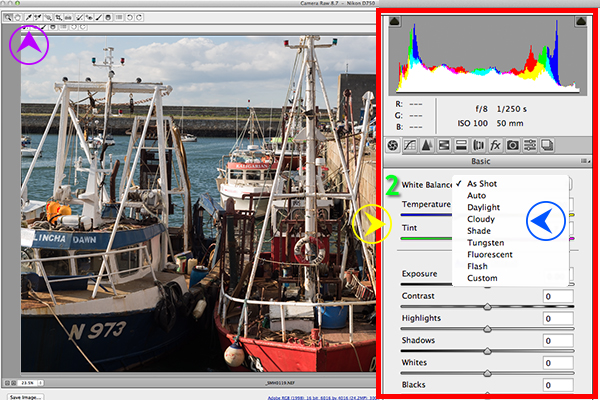
3-ways-to-edit-WB

Three ways to edit White Balance in ACR:
1. White Balance Tool
2. Presets
3. Temperature and Tint Sliders

  1. The White Balance Tool is my least favourite. The idea being that you click anywhere on the image that is suppose to be gray. I find this tool hit and miss.
  2. There are number of presets that are worth experimenting with, if you are new to RAW editing. Try Auto which is a good place to start.
  3. You can then adjust the Temperature and Tint sliders for finer tweaking and control. I favour these two sliders the most in my workflow.

Just above the Temperature and Tint sliders, you have the histogram panel. Click on the the two black triangles. These indicate the highlight (left) and shadow (right) areas that have been clipped (see photo below). As you can see in this image, the areas highlighted in red indicate where the clipping has taken place in the whites. Similar to the shadows, blue indicates where the shadow areas have been clipped.
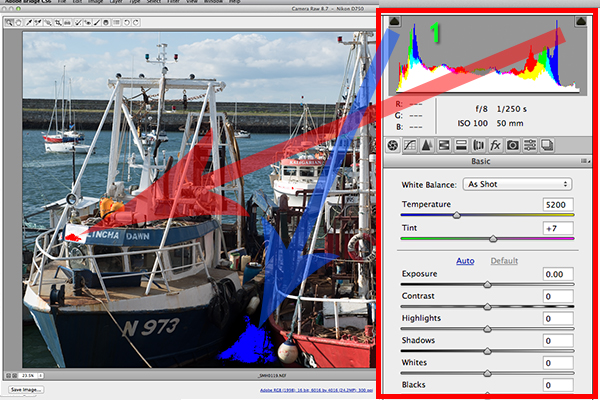
Highlights-shadows-clipping

Highlights-shadows-clipping in the Histogram.

When adjusting the White and Black sliders keep an eye on the black triangles in the Histogram chart. These triangles turn green when clipping occurs. Alternatively, you can hold down the Alt key while dragging the Blacks slider across to the left until the darkest area of the image starts to appear. Similar for the Whites slider, hold down the Alt key and drag the slider to the right until the brightest part of the image begins to show.

I tend to leave the Exposure slider until after I have adjusted the Highlights and Shadow sliders.
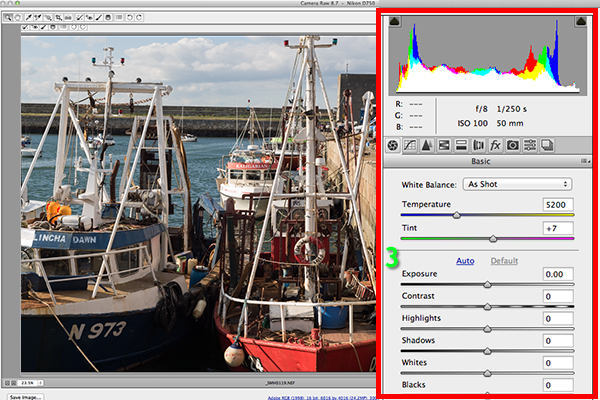
Exposure-contrast

Exposure and Contrast sliders.

The Contrast slider gives your image that final punch but go lightly.
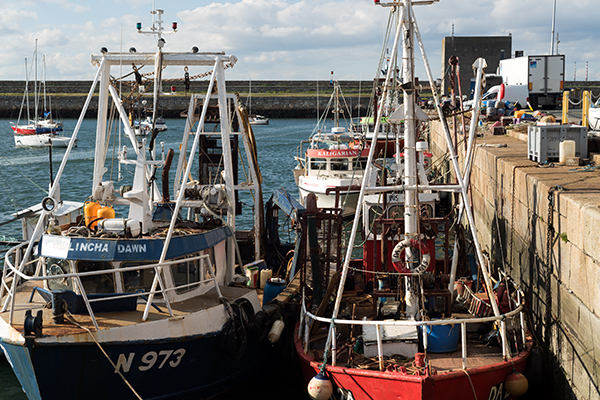
edited-image

Final edited image from the basic adjustments in ACR

All edits done in ACR are non-destructive. Editing RAW files can be easily done in one pass, especially if you have captured the image that you want in-camera. However, there are no layers in ACR or Lightroom, so if you need further editing where layers are required you will need to use Photoshop or GIMP.

GIMP

So this brings us to the next RAW editor, UFRaw. This comes pre-installed in GIMP, version 2.8. I’ve never used GIMP before now and I was really curious and enthusiastic to try it out. It has the reputation of being as powerful as Photoshop for editing – and the fact that it is free, is a bonus.

I presumed that by opening a RAW file that the UFRaw editor would launch automatically. It didn’t. After a quick research online. I found a solution. I had to go to File>Open>Select file. I then had to Select File Type and scroll down to the bottom of a list and click on ‘raw image’. Once I opened the image in question. It did not resemble anything like the image I had taken on the day. Normally when I launch a RAW file in ACR, it would be similar to the jpeg version.
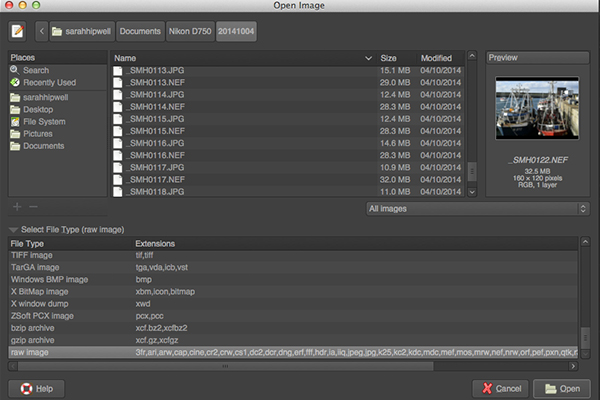
Opening-RAW-file-in-GIMP

The UFRaw editor does not launch automatically. A few clicks gets you there.

The interface was completely alien to me, and I didn’t find it particularly user friendly. I played around with the sliders for awhile but I couldn’t get the image to look right at all. I tried adjusting the White Balance but I couldn’t get rid of a green/grey color cast on the image. By not having the familiar sliders in ACR, I was a bit lost to be honest. I really wanted to like UFRaw, as it is a free software for Mac and PC. To be fair, this was my first attempt at using the software, so I’ll put the mea culpa (blame) on me as opposed to the software.
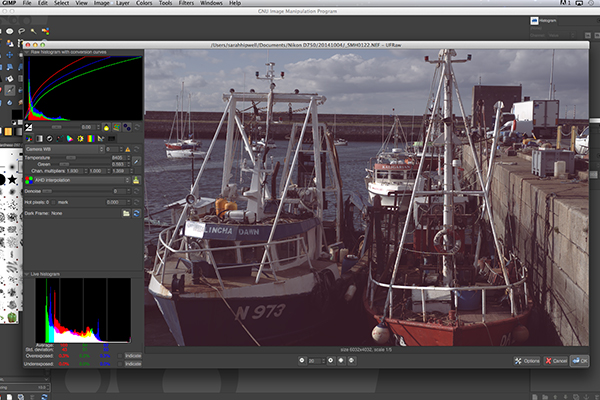
RAW-file-opened-in-GIMP

The UFRaw editor UI in GIMP

RawTherapee

Now onto RawTherapee. I love the name. I wasn’t expecting much after trying out GIMP’s UFRaw but I was completely surprised and impressed. RawTherapee is available in 64 and 32 bit forms for Mac OS X and Windows. It also supports a huge range of supported cameras and manufacturer filetypes.
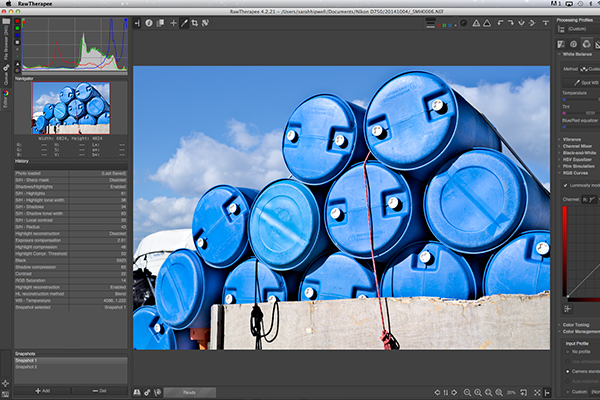
RawTherapee-UI

RawTherapee interface

This RAW editor is quite rich in features. Even so I found the user interface very intuitive, and after a few minutes I felt right at home. I quickly adapted to the menu system and found it very easy to navigate around. The editing panels are on the right.
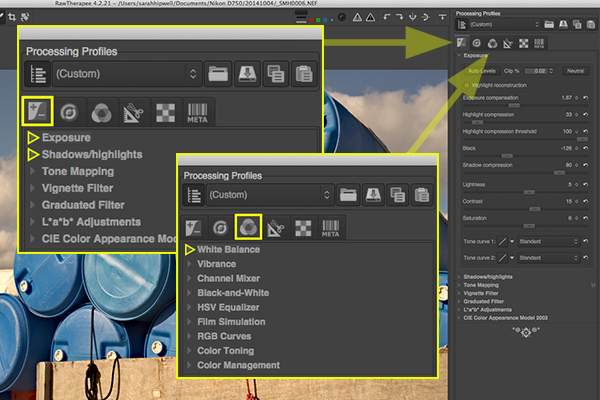
RawTherapee-adjustment-sliders

Highlighted adjustment sliders that are similar to the ones in ACR.

Summary

If you haven’t edited a RAW file before, I would highly recommend that you try it out. The options are varied whether you decide to purchase Lightroom, or choose to pick from the many RAW editors that are free to download. The choice is really up to you. Another free RAW editor that has just been launched is Affinity Photo and it looks really promising (currently in beta for Mac only).

googletag.cmd.push(function() {
tablet_slots.push( googletag.defineSlot( “/1005424/_dPSv4_tab-all-article-bottom_(300×250)”, [300, 250], “pb-ad-78623” ).addService( googletag.pubads() ) ); } );

googletag.cmd.push(function() {
mobile_slots.push( googletag.defineSlot( “/1005424/_dPSv4_mob-all-article-bottom_(300×250)”, [300, 250], “pb-ad-78158” ).addService( googletag.pubads() ) ); } );

The post Post-processing RAW Files – ACR Compared to Some Free Software Options by Sarah Hipwell appeared first on Digital Photography School.


Digital Photography School

 
Comments Off on Post-processing RAW Files – ACR Compared to Some Free Software Options

Posted in Photography


Magic for Nothing: The Best Free Photo Editors 2015

25 Feb

If you are serious about photography, you’ll likely want to start editing your photos soon. Or maybe you’re already editing photos, perhaps on a work or school computer, and you’re ready to set up your own photo editing station at home. Either way, the most popular photo editing options, such as Photoshop and Lightroom, while fantastic programs, might be outside Continue Reading

The post Magic for Nothing: The Best Free Photo Editors 2015 appeared first on Photodoto.


Photodoto

 
Comments Off on Magic for Nothing: The Best Free Photo Editors 2015

Posted in Photography