RSS
 

Posts Tagged ‘Flash’

Godox unveils AD-L LED lamp head for its AD200 pocket-sized flash

24 Aug

Godox has launched a new AD-L LED head for its Witstro AD200 portable ‘pocket’ flash, enabling users to swap the speedlight or bare-bulb head out for an LED unit. The AD-L LED head features 60 LEDs and an overall output of 3.6 watts, making it ideal for use as a lamp when necessary. The LED head simply slides into place on the AD200, making for rapid exchanges between heads.

The AD-L LED head is currently listed as available online for $ 25.

Articles: Digital Photography Review (dpreview.com)

 
Comments Off on Godox unveils AD-L LED lamp head for its AD200 pocket-sized flash

Posted in Uncategorized


Review of the Polaroid Pro Studio Digital Flash Umbrella Mount Kit

22 Aug

One of the biggest challenges for amateur photographers is getting comfortable with shooting with off-camera flash. Not only does the technique take much time to master, but lighting equipment is expensive! This is where Polaroid is aiming to help out. The new Polaroid Pro Studio Digital Flash Umbrella Mount Kit might be a mouthful to say, but it is exactly what it says: a portable umbrella lighting kit. What it doesn’t mention is that it is also very affordably priced for the amateur photographer (under $ 65!). Find out more details about the new Polaroid lighting kit below!

Review of the Polaroid Pro Studio Digital Flash Umbrella Mount Kit

What’s Included

Altogether, this lighting kit weighs a total of 8.5 lbs and runs $ 64.99 USD. According to the product description, the “Polaroid Digital Flash Umbrella Mount Kit includes all of the essential lighting equipment you will need.” These items include:

1) Two Light Stands

These Polaroid brand light stands are three-sectioned twist locks AND they are air cushioned. They fold down to 26 inches and can extend as high as six feet and hold up to 15 lbs. The weight of the light stands isn’t stated, but they’re not heavy at all. This means they travel very easy, but you’ll have to compromise some stability and support.

Review of the Polaroid Pro Studio Digital Flash Umbrella Mount Kit

2) Two Umbrellas

Umbrellas are one of the simplest, most compact ways to beautifully diffuse light. Polaroid smartly includes two white satin umbrellas with this lighting kit. Both umbrellas have a removable black backing, allowing you to use it as a bounce or shoot through umbrella. Best of all is the fact that the removable backing is stiffer, with sturdier end caps than competing (even higher-end) umbrella brands like Westcott. This makes it much easier to put the backing back on the umbrella.

These octagonal umbrellas are about 33 inches in diameter, which might be a miss for those who need a larger size. But based on the sturdiness of the light stands, you probably don’t want to stick overly large and heavy umbrellas on those stands anyway.

Review of the Polaroid Pro Studio Digital Flash Umbrella Mount Kit

Review of the Polaroid Pro Studio Digital Flash Umbrella Mount Kit

3) Two Cold-Shoe Mount Umbrella Adapters

The last components of this lighting kit are the cold-shoe mount adapters. These allow you to attach the umbrella to the light stand, and mount a speedlight flash. Polaroid’s own adapters each have a swivel, umbrella socket, and a cold-shoe mount that should fit most standard speedlight flashes. The adapters are adjustable, allowing you to shift the angle of the whole setup.

Review of the Polaroid Pro Studio Digital Flash Umbrella Mount Kit

Review of the Polaroid Pro Studio Digital Flash Umbrella Mount Kit

4) A Carrying Case

One of the best parts about the Polaroid Pro Lighting Kit is that all of the above items come delivered in a perfectly sized carrying case. The bag is about 29 inches long, 8 inches wide, and 7 inches high. It’s also very lightweight and holds all of the lighting kit components, with room to spare. The inclusion of the carrying case is a really nice touch, as many other lighting stand providers almost never include a case.

Polaroid Pro Studio Light Kit

What’s Not Included

You may have noticed that a few critical lighting kit items were omitted: a camera, flash units, and flash triggers. Thus, this does not include all of your “essential lighting equipment you will need,” so note the need to purchase these additional items. On the bright side, there are some affordable flashes and triggers on the market that you can add to keep your overall lighting kit inexpensive.

  • Instead of Canon or Nikon brand flashes, consider the Polaroid PL-190 TTL Flash.
  • Instead of Pocket Wizards, consider Yongnuo RF-603 Flash Triggers.
Review of the Polaroid Pro Studio Digital Flash Umbrella Mount Kit

Note: Flash unit and flash triggers are not included.

This kit is for you if…

If you’re just getting started with off-camera flash and studio lighting equipment, the Polaroid Pro Kit is a great way to start out. The kit is affordable while providing you what you need. It may not hold up in the long run, but at this price, buying a second kit doesn’t hurt. Also, if you’re a pro photographer needing a lightweight, portable lighting kit for on-the-go shoots, this may meet your needs as well.

For photographers needing extremely durable lighting stands or umbrellas bigger than 33 inches, this kit probably isn’t for you. It costs $ 64.99, and you get what you pay for. If you’re needing equipment for a pro studio for daily use, spend more money on heavier-duty gear.

Verdict

After testing out the Polaroid Pro Studio Digital Flash Umbrella Mount Kit, I fell head over heels in love with it. The kit isn’t much different from my current setup (two Manfrotto 5001B Nano light stands with Westcott umbrellas). While my Manfrottos feel sturdier than the Polaroid light stands, the price of one Manfrotto stand is nearly equal that of the entire Polaroid Pro kit. Not so terrible.

I used this lighting kit on a couple of on-location food photography photo shoots and was pleased with the results, plus the kit’s extreme portability. Sample photos taken with the Polaroid Pro kit are shown below. All images were shot with a Canon 5D Mark III with 24-70mm f/2.8 lens and Canon 580 EXII Speedlight Flashes.

For simple professional jobs where I’d use a 33-inch umbrella, the Polaroid Pro kit is ace. However, if I were planning to work with bigger, heavier lighting units or modifiers, I’d definitely turn to a heavier duty option.

The post Review of the Polaroid Pro Studio Digital Flash Umbrella Mount Kit by Suzi Pratt appeared first on Digital Photography School.


Digital Photography School

 
Comments Off on Review of the Polaroid Pro Studio Digital Flash Umbrella Mount Kit

Posted in Photography


Video: Six lighting tips for flash photography newbies

22 Aug

If you’re taking our advice from this morning and buying your first flash soon, a few beginner tips on mixing flash with ambient light will really help you take advantage of your new gear. Enter Mango Street’s Daniel Inskeep and Rachel Gulotta, who teamed up with photographer and filmmaker Daniel DeArco to share just that.

Mango Street is known for their simple tutorials targeted at beginners, but they mainly use natural light for their photography. So when the topic turned to artificial lighting, they asked DeArco to come on and share some advice. Over the course of two videos, DeArco offers six different tips for getting great results when you mix artificial and natural light.

Video 1

  1. Keep it Simple: Prioritize one light source first. In this case, DeArco prioritizes the natural light.
  2. Have a go-to hard light and soft light setup
  3. Experiment: Knowledge of studio lighting will make you a more well-rounded photographer

Video 2

  1. Use a strobe + reflector as a fill light on your subject to avoid blowing out your background
  2. Look for sun reflecting off buildings to provide a hair light and use your favorite strobe and modifier as a fill
  3. Use a blocked or just-out-of-frame strobe to fake a sunset if you miss golden hour

If you found the tutorials helpful, you can see more from both Mango Street and DeArco on YouTube. And if you’re inspired by these techniques, check out our OpEd from this morning on why your next gear purchase should be a flash, not a new lens:

Don’t buy another lens, buy a flash instead

Articles: Digital Photography Review (dpreview.com)

 
Comments Off on Video: Six lighting tips for flash photography newbies

Posted in Uncategorized


Tips for Using Off-Camera Flash at Weddings

21 Aug

Over the past eight years of shooting weddings, I have slowly evolved in how I work. I believe that’s normal for most photographers. Most will start as “natural light” photographers. I actually began a little ahead and was using one on-camera flash, bouncing it off of the ceiling. Next, I dabbled in some off-camera flash very lightly and steadily grew my skills over the years.

I will say, that life is so much easier for me now, and I can create so much more with off-camera flash than I could when I began. I’m not sure where you are in your journey, but I’m here to help you speed up the process. In this article, I’m going to share all of my different off-camera lighting setups for weddings.

Off camera flash weddings 02

Use flash when needed

Let me start off by saying that I don’t use off-camera flash the entire day. I still use natural light when I need to and I’ll use on-camera bounce flash when that’s appropriate. These on and off-camera flashes are just tools that I use to create, just like a painter uses different brushes and paints. I can’t necessarily tell you when to use them; that’s up to you and your personal preference. My suggestion would be to keep an open mind, practice these ideas, and see what works best for you.

Photographing details

I start using off-camera flash pretty early in the wedding day when I’m shooting details. For most situations, I try to keep it simple and use one flash at a 45-degree angle to the subject. To keep light from going everywhere and to create a more dramatic photo, I usually use a MagGrid from MagMod.

Off camera flash weddings 01

I’ll use this setup for ring shots, a few of the dress, flowers, possibly shoes, and other details. It works really well for the ring shot because I’m usually shooting at such a high aperture that I need a lot of light. I also make sure to take some with natural light or a bounce flash just in case the couple doesn’t like the dramatic look.

Off-camera flash for portraits

The newest way I’ve been using off-camera flash, and I just love it so much, is for creating portraits. If you really want to create something cool and different for your clients, this is the way to do it. There are many ways to do this (too many to mention here), but I’ll share some of my favorite setups.

Off-camera flash setups for wedding portraits

The groom usually doesn’t get much attention on the wedding day. He is just along for the ride. I try, though, to give him the spotlight and create something fun. This setup is basically the same as the detail shot. I’ll use one single flash with a MagGrid. The big difference is I lower the ambient light so the flash is really all that is seen.

Tips for Using Off-Camera Flash at Weddings

One light dramatic setup for the groom.

To do this, start off without the flash. Adjust the ISO, shutter speed, and aperture until the photo is pretty dark. Then, bring in the flash. Try to position the off-camera flash at a 45 degree angle, in relatively close to the subject. The further away the light is the more it will spread. I try to keep most of the focus on his face.

Another fun trick is to do this with all the groomsmen and put it together later in Photoshop. I did this recently with a group that all had super hero shirts under their suits. It created a very dramatic, fun photo. All you have to do is move your flash to one person, take a photo, and then move to the next one. Either put the camera on a tripod or try to keep it in the same position and height. Then, later, you just line them all up and use layers to hide and reveal the parts you want.

Tips for Using Off-Camera Flash at Weddings

The bride and her dress

The bride is the star of the show, so you need to make sure you create lots of photos of her and the dress. I will usually spend twice as much time with the bride as I do the groom. I also use a few different lighting patterns with her to give her more variety.

I don’t do it often, but you can actually use the same lighting setup that we did for the groom, with the bride. It’s going to create a dark portrait, but one thing I do differently is I make sure there aren’t any crazy shadows on her face.

Sometimes I have the bride turn her head toward the light or I rotate the flash more to light her entire face. It’s good to try this out occasionally, but make sure you give her some other options.

Tips for Using Off-Camera Flash at Weddings

Grid for Bride Tips for Using Off-Camera Flash at Weddings

One flash dramatic lighting setup.

In most cases, I use a much softer light with the brides, to open up shadows instead of creating something dark. I use my small flashes for some situations, but when we are outside I usually go to my larger flash, the Xplor 600. This gives me more power and I can put a softbox or octabox on it to soften the light.

My go-to bride setup is to put the sun behind the bride and then light the front of her. A lot of wedding photographers will do it this way without adding the light to the front. This can work, but you are left with a blown out background and possibly deep shadows in the eyes.

With my lighting setup, you can have the background exposed correctly and remove those nasty shadows. I still place the flash at a 45 degree angle but there are a few other things that make the photo look completely different. One, using a softbox or Octabox softens the light and allows it to illuminate most of the subject while the MagGrid kept the light pretty hard and focused.

One flash off-camera balanced with natural light.


Also, the exposure is going to be different. Turn off the flash and get a proper exposure for the background instead of it being pitch black. Then, turn the flash back on to light your subject and adjust power as needed. As far as setting the background exposure, I prefer bumping up the shutter speed versus bumping up the aperture. You can only do this, though, if your flash can do high-speed sync.

Off-camera flash setups for group photos

Another tough situation to light is the family portrait setup. If we are outside that isn’t really a problem, but if we’re indoors, the light is usually pretty bad. To keep everyone in focus, I also use a smaller aperture, which just makes matters worse.

I’ve used a few different off-camera flash setups for family portraits, and honestly, I’m not sure which I prefer. If you only have one flash, I’d put it at about a 30-degree angle.

If you have two flashes, there are two different ways to set it up. You can put both flashes, at equal power, at opposite 45 degree angles. This will cover everything, but it can make some weird shadows. The other option is to keep one light at 45 degrees and bring the other closer to the camera and lower the power. This is the basic main light and fill light setup.

Family portrait Tips for Using Off-Camera Flash at Weddings

Family portrait lighting with two flashes.
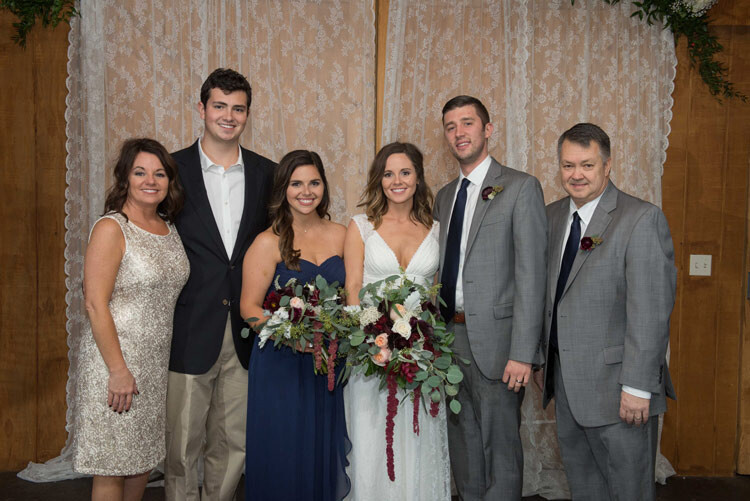
Tips for Using Off-Camera Flash at Weddings

The problem I’ve run into with this is that the people further away from the main light don’t get as much light. The last thing to consider is whether to bounce it or use direct flash. Bouncing is going to create a more even lighting, but it uses more power and doesn’t work if the ceilings are dark or if you’re outside. Direct flash takes less power, but the light tends to be harsher and create darker shadows.

Sometimes I will try one setup and then quickly switch to another if things aren’t working. You might find yourself doing this as well.

Off-camera flash at the wedding reception

Creating lighting for the dance is one of my favorite things to do. You really can create some amazing shots. My general setup is two off-camera flash, opposite each other, with MagGrids attached. This really creates a moody effect, but you can get some dark shadows.

Tips for Using Off-Camera Flash at Weddings

Dance lighting setup, two flashes.

With this setup, I keep a flash on top of my camera, and sometimes I’ll use it to bounce some fill light into the scene. When I’m done with the first few dances and the big groups get out there, I remove the grids so the light will cover a larger area. As far as my position, you can move around with this light setup and get some really different looks. For the most part, I try to keep one light beside me at a 45-degree.

One quick warning: make sure your lights are secure and out of the way. People will run into them and knock them over, and you don’t want broken equipment and/or injuries and a potential lawsuit.

Off-camera flash for creative wedding portraits

The last scenario that I use off-camera flash at weddings is for doing creative portraits with the couple. I really enjoy taking them away from the action once it has gotten dark to create something special. These are more of a creative, artsy portrait, and they are often my favorite shots from the wedding day.

Tips for Using Off-Camera Flash at Weddings

Two-light backlit setup with blue gel on the background.

The possibilities are pretty endless with this, so I’m just going to run through how I do it in general. The first thing I do is find an interesting background. This could be the front of the venue or some place with an interesting structure and hopefully some kind of lights. Next, I figure out where I want to place the couple. I like to have them be part of the environment, so I position them where I can do a full length shot and still capture the background.

Now we are ready to figure out the off-camera lighting setup. My go-to setup is a front light at 45 degrees with a grid and another flash behind the subject. With the backlight, I’ll either have the light aimed at the couple to give them a glow, or I’ll aim it at the background to show off the structure more. If you want to get a little funky or artsy, throw a colored gel on the backlight. After I’ve done that, I usually remove the front light and just aim the backlight at them and make a silhouette. If you know what you’re doing, you should be able to pull these shots off in less than 10 minutes and send the couple back to the party.

Off camera flash weddings 05

Tips for Using Off-Camera Flash at Weddings

One light backlit setup.

Conclusion

I know that was a lot of information and you may be overwhelmed. If you are feeling confused, reread each section and look at the diagrams. If you’re still confused, feel free to comment, and I’ll help you out.

Also, don’t feel like you have to try all of these setups at once. Remember, weddings are a once in a lifetime event, so avoid going in there if you aren’t confident in what you are doing. Practice at home and start by trying one of these setups. Practice some more and then try out other setups. Do this for one year and at the end of that year, I bet you’ll be in a whole new level, and you’ll never go back to your old way of shooting weddings.

The post Tips for Using Off-Camera Flash at Weddings by Bryan Striegler appeared first on Digital Photography School.


Digital Photography School

 
Comments Off on Tips for Using Off-Camera Flash at Weddings

Posted in Photography


Don’t buy another lens, buy a flash instead

21 Aug

Introduction

A bounced, on-camera flash was a quick way for me to take some photo booth snaps in a very dark room without having to set anything up off-camera.

When people really get into photography and start saving their pennies for new gear, one of the first things they buy tends to be a lens, like a telephoto or a fast prime. However, if you’ve already got a lens or two and you’re thinking you’d want another, let me suggest that you pick up an external flash instead.

Why, you ask? What’s wrong with natural light? After all, those insert-name-brand-here flashes are just way too expensive.

With the abundance of cheap flashes pouring out of China these days, you should be able to get a TTL, or ‘through the lens’ metering flash for around $ 50 US. If it’s your first flash, a cheapie one will do just fine, and TTL metering will help you get out and get shooting with it in no time.

If you’re ‘into photography’ enough to have a couple of lenses, then it’s time to consider one of these as well.

Even a ‘natural light’ shooter can benefit immensely from a better understanding of how light works, and what better way to experiment with light than controlling your own? You may even find that, using artificial lights, you can spend less time looking for shade or big bay windows, and sometimes, you can get away with shooting at the ‘wrong’ time of day.

‘Even a ‘natural light’ shooter can benefit immensely from a better understanding of how light works, and what better way to experiment with light than controlling your own?’

Lastly, having a flash simply provides you with another tool with which to create images. It’s just another option you didn’t have before. It can open up new possibilities, and perhaps lead you in a creative direction you never expected. And as you grow, you may find there are some situations that you’d simply never get away with not using strobes.

Getting started using TTL

Even if you tend to use your camera in ‘Auto’ or ‘P’ modes, you can gain instant benefits from a small, inexpensive flash. As stated earlier, it’ll be important to get TTL capability, which is kind of like ‘Auto’ or ‘P’ for flash.

Room a bit dim? A ceiling-bounced flash is one of the easiest ways to brighten it up without looking too unnatural.

So how does TTL work? Before taking the photo, the flash fires a quick burst that reflects off your subject and travels through the lens to the imaging or metering sensor in the camera, which then takes a reading and tells the flash what power it should use. And because this is all happening at the speed of light, there is no perceptible lag in this process.

The best part is that if you’re finding your flash is looking too bright or too dim, you can dial in exposure compensation on the flash itself, just like you can on your camera. These are two separate exposure compensations; the flash exposure compensation value will only affect the flash output.

And TTL isn’t just to be pooh-pooh’d as the ‘amateur’ option either, as it can work incredibly well. Many of Joe McNally’s excellent shoots with both speedlights and bigger strobes are controlled using TTL and biasing them up or down with exposure compensation.

On-camera flash Bounce flash
Taken on a Nikon D3400 in full auto.

One of the best ways to get instantly better pictures as a result of your new flash is to mount it to the top of you camera, point it up at the ceiling, and photograph some friends indoors. Instead of producing portraits with very bright faces and an almost black background, which built-in flashes tend to do, you’re bouncing the light off the ceiling, where it cascades down and lights everything a little more softly.

It’s like the difference between shooting in direct sunlight versus shooting on a cloudy day. In direct sunlight (like with direct flash pointed at your subject), you get pretty harsh shadows and more contrast between those shadows and the highlights. With the flash pointed at the ceiling, it’s spread out more, similar to how clouds will diffuse sunlight, and shadows are much softer as a result.

A practical case for TTL, or ‘How I Shoot Dimly Lit Events’

One of my favorite aspects of TTL metering actually involves keeping my camera in full manual, with the flash doing all of the ‘automatic’ work for me. This is particularly useful at dimly lit events and wedding receptions, where I’m moving around quickly and almost always using bounce flash, as described just above.

Ambient lighting only.

This first shot is a good example of an approximate base exposure for the ambient lighting in the room. By that I mean that the ambient lights aren’t totally blown out, and the background is a little dark but still provides a bit of context. This is important as I mostly want the flash to bring out my main subject without the entire rest of the frame looking horribly under-or-overexposed.

In this particular case, I actually like this dark, moody look for the sax player. But these sorts of ambient, ‘moody’ shots won’t work for everyone all the time. So let’s see what difference a flash can make, and how I like to incorporate it in these situations.

Added bounce-flash with TTL.

This second image has some exposure adjustments to bring up the ambient a little more, but I’ve added a flash mounted to the top of the camera. It was bounced at the ceiling in TTL mode and the flash exposure compensation was adjusted to underexpose slightly.

Of course, these images are extremely different in terms of ‘mood,’ but I’ve found that this method of adding ‘pops’ of bounce flash to subjects at events can allow me to more effectively freeze motion without raising my shutter speed, as well as shoot my lenses a little more stopped down to give me some leeway for focus errors.

What about you?

Image taken with a single off-camera flash through an umbrella.

Are you a flash shooter, or a natural light purist? TTL or all manual, all the time? Let us know in the comments if you’ve got any strobe tips or tricks that have made a difference to the types of photography you enjoy.

Articles: Digital Photography Review (dpreview.com)

 
Comments Off on Don’t buy another lens, buy a flash instead

Posted in Uncategorized


Flip to flop: the pocket camcorder flash in the pan

17 Aug

Whether it’s the Walkman, Photoshop or the GoPro, every now and again a product comes along that so perfectly epitomizes the form, that its name is taken to represent the entire category of products (whether its maker likes it or not). For a couple of years, the Flip Video pocket camcorder was just such a device. The dead giveaway being that you can probably picture what I mean by ‘Flip Video’ but not by the phrase ‘pocket camcorder.’

In a manner similar to GoPro, the Flip wasn’t necessarily the most technologically innovative product, but it represented a novel arrangement of components in such a way that it heralded a new class of devices. Rather than making you carry around a full-sized camcorder, the Flip squeezed a small sensor, a battery and some memory together in a genuinely pocketable package.

The first units captured VGA resolution, which wasn’t as undesirable as it now sounds, since standard (1950s) definition TV still ruled the world in the mid 2000s. In fact the Flip Video grew out of a device so simple that could only be used once, with the expectation that its output would be transferred to DVD (which, for all their ‘digital quality,’ are essentially ‘widescreen’ standard definition discs).

A video camera, in your pocket!

In the classic ‘it only has to be good enough‘ fashion that Allison highlighted earlier this week, the Flip was a raging success. The first version, launched in 2007, captured a claimed 13% of the total camcorder market within a year of launch and for a while they seemed like the only video devices anyone was buying.

By 2009, though, the Flip Ultra HD brought 1280 x 720 video and, with its 8GB of internal memory, could capture 2 hours of footage. A flip-out USB connector allowed this footage to be offloaded and some basic sharing software was accessed in the same manner. Above all, though, it remained simple. There was a tiny screen and a big red button to start recording. Beyond this there were directional buttons to activate the digital zoom, buttons for play and delete and that’s pretty much it.

No need to carry cables or software: you could just connect the flip-out USB socket

The speed with which the Flip phenomenon emerged meant the whole sector was comparatively mature by the time DPReview conducted a roundup/introduction. By 2010, Flip itself had dropped a little off the pace and rivals such as Panasonic, JVC, Kodak (remember them?) and Sony (whose ‘Bloggie’ branding just didn’t pass into common parlance as smoothly as Walkman had) had not only started to muscle-in, but had already moved to Full HD capture. Imagine that!

The Flip Mino HD shot 720p video: resolution so high that not everyone had a TV that could show it, yet.

As is probably very apparent from the footage included in our introductory article, I knew nothing whatsoever about shooting video, but since all you could do is hold the camera up the right way and hit the big red button, that didn’t really matter. We were all going to be the next Kubrick. Or, at least, were going to imperil our friend’s mobile data limits by taking advantage of Facebook’s newly-added video capabilities.

Flip finally flops

This talk of mobile data already hints at what would eventually wipe out the entire class, but interestingly, I think, the Flip itself didn’t die as a result of the challenge from smartphones. Smartphones with video were still comparatively rare (though clearly visible in the offing) and the Flip was a successful product in a comparatively buoyant market when the plug was pulled.

The quality wasn’t great, but pocket camcorders could be pretty fun

Instead, its downfall was that the company got bought by the wrong buyer. Network infrastructure company Cisco bought Flip Video in 2009, during a period in which cash-rich companies were diversifying into just about anything that seemed internet-related. But just two years later, under pressure from shareholders, it closed most of its consumer division to refocus on its core business. Interestingly, there doesn’t appear to have been any attempt to sell the business, which suggests there was already a significant question mark hanging over it.

The pocket camcorder class would persist for another couple of years but would soon enough be rendered irrelevant by the camcorder you already have with you (sound familiar?). Perhaps there were lessons the wider camera industry could learn from the brilliant but short-lived impact of the Flip Video. You can bet GoPro has given it plenty of thought.


The Flip cam: My first time filmmaking

by Dan Bracaglia

Still image from ‘They Dream,’ a short film I shot on the Flip Mino (close to actual resolution) in 2008. While Richard was reviewing cameras for DPReview, I was busy getting my degree and making (bad) artsy short films.

I remember the Flip fondly, specifically the Flip Video Mino which debuted in the summer of 2008.

I was an undergraduate at Rutgers University and the editor in chief of our student newspaper, the Daily Targum when MTV reached out to me, along with editors of other college papers with a proposition: we’ll send you a Flip cam to keep if you use it to make and submit a short film back to the network (specifically MTVU). Having shot, but never edited video footage before, I was intrigued and obliged their offer.

The device, capable off 640 x 480 video seemed way ahead of its time. It could capture up to an hour of footage on 2GB of internal memory, offered a built-in microphone, a postage stamp-sized LCD, digital zoom, and best of all, had a built-in USB for charging and off-loading footage.

The day it arrived I brought it out to a university-sponsored concert to get some test shots even though there was a strict no-video policy. I figured the Flip was small enough, no one would pay me any mind. I was wrong, as I was instead bombarded by curious classmates, eager to check out the strange new device.

‘The Flip cam removed a major mental barrier for me in terms of making movies.’

The short film I ended up submitting, titled ‘They Dream,’ represented my first foray into the world of video editing, and was hacked together over the course of an all-nighter using iMovie. Without giving too much away, I warn you that it is both amateurish and embarrassing. But artsy cliches and bad editing aside, The Flip cam removed a major mental barrier for me in terms of making movies. Suddenly, the labor of getting the shot became as simple as pulling the Flip out of my pocket, turning it on and pressing record.

I still own the Flip cam and it still works. In fact I recently plugged it in and found a whole cache of questionable college-age footage, shot by both me and by friends. Another reminder of how simple it was to operate (and how wild my college years were). So thank you Flip cam, for introducing me to the wide world of video capture and editing. By today’s standards your footage may be bad, your audio crap and your digital zoom laughable, but at the time, you were the bees knees and and integral part of my visual development.

Articles: Digital Photography Review (dpreview.com)

 
Comments Off on Flip to flop: the pocket camcorder flash in the pan

Posted in Uncategorized


Godox A1 smartphone flash trigger officially released, costs $70

17 Aug

$ (document).ready(function() { SampleGalleryV2({“containerId”:”embeddedSampleGallery_7042663521″,”galleryId”:”7042663521″,”isEmbeddedWidget”:true,”standalone”:false,”selectedImageIndex”:0,”startInCommentsView”:false,”isMobile”:false}) });

The Godox A1 smartphone flash trigger is finally official. After being announced unofficially over Facebook and teased further with some studio portrait samples, the phone flash and 2.4GHz flash trigger is now available for pre-order.

Chinese company Godox is a rising star in the lighting world thanks to a growing repertoire of affordable, surprisingly versatile and often innovative speedlight and monolight options. The Godox A1 arguably falls into that last “innovative” category: a trigger and flash designed specifically for use with smartphones.

The unit itself features a 1W ‘modeling lamp’ and a daylight-balanced 8W flash with 5 different power settings between 1/1 and 1/16, but chances are good photographers won’t be using those two options much. What’s more interesting is the 2.4GHz trigger built into the unit, which allows you to control Godox’ own X system gear wirelessly using an iPhone app.

Capturing professional-looking, artificial light portraits with a smartphone seems a bit more feasible now.

The flash trigger costs $ 70 and is available for pre-order starting today. Out of the box, the Godox A1 will be compatible with iPhone 6s and newer Apple phones, but Android support is coming soon, starting with Huawei and Samsung phones in September (which might be before the flash arrives on anybody’s doorstep anyhow).

To learn more about the Godox A1, or if you want to pre-order your own, head over to the Godox website by clicking here. And be sure to keep an eye out for a review of the Godox A1 in the coming month: a test unit is winging its way to the DPReview offices as I type this.

Articles: Digital Photography Review (dpreview.com)

 
Comments Off on Godox A1 smartphone flash trigger officially released, costs $70

Posted in Uncategorized


Amazon sells an AmazonBasics flash for Canon and Nikon DSLRs for just $28

09 Aug

$ (document).ready(function() { SampleGalleryV2({“containerId”:”embeddedSampleGallery_5138648754″,”galleryId”:”5138648754″,”isEmbeddedWidget”:true,”standalone”:false,”selectedImageIndex”:0,”startInCommentsView”:false,”isMobile”:false}) });

If you’re looking to get into artificial lighting for dirt cheap, there’s a new ‘most affordable’ option in town. It turns out Amazon sells what looks to be a clone of the already cheap (~$ 70) Godox VT560 for the rock bottom price of just 28 bucks through the AmazonBasics brand.

PetaPixel spotted the speedlight earlier today, and the response has been pretty positive so far. Sure, the “AmazonBasics Electronic Flash for DSLR Cameras” can’t be radio triggered and doesn’t feature useful options like TTL metering, but at $ 28 nobody in their right mind would expect it to.

Instead, what you’re getting is a Canon and Nikon compatible speedlight with three modes (Manual, Slave 1, Slave 2), PC sync port for firing your flash off-camera without a master, 8 levels of power control, and a guide number of 33. Reviews so far are decent at an average of 3.9 our of 5 stars, with some calling the flash “unbeatable for the money,” although at least one reviewer said the flash failed on-location after working fine at home.

To find out more about the ultra-affordable speedlight, or if you want to pick it up for yourself, click here.


*FULL DISCLOSURE: dpreview.com is a wholly-owned but editorially independent subsidiary of Amazon.

Articles: Digital Photography Review (dpreview.com)

 
Comments Off on Amazon sells an AmazonBasics flash for Canon and Nikon DSLRs for just $28

Posted in Uncategorized


Studio portraits taken with the Godox A1 smartphone flash trigger

08 Aug
Photo: Godox

When Godox first teased its off-camera flash and 2.4GHz flash trigger for smartphones, the Godox A1, on Facebook a few weeks ago, people got very excited. Unfortunately, we weren’t really able to see what this trigger could do since the only images Godox released of the flash trigger in action were some silly behind the scenes toy photos.

Today, they fixed that.

In a new blog post about the release event for the upcoming flash and trigger, Godox didn’t just rehash the same details about the A1 that we already knew, they also showed off some professionally-shot studio portraits captured with an iPhone 7 Plus, the Godox A1 and a Godox 600II monolight. You can see a photo of the setup above.

All of the photos were shot wide open at f/1.8 (no other option really…) with the ISO set to 25 and the shutter speed at either 1/30 or 1/20 sec. Have a look for yourself:

$ (document).ready(function() { SampleGalleryV2({“containerId”:”embeddedSampleGallery_5198490931″,”galleryId”:”5198490931″,”isEmbeddedWidget”:true,”standalone”:false,”selectedImageIndex”:0,”startInCommentsView”:false,”isMobile”:false}) });

The post is mostly about the big reveal itself, which will happen at an event on August 12th at 1:30pm Shenzhen time (1:30am Eastern). But the sample portraits give you a good idea of the kind of photography a product like the A1 opens up to smartphone photographers.

Still no word on how much the Godox A1 will cost or when you’ll be able to order one for yourself, but we’ll get that info to you just as soon as it becomes available. In the meantime, take a look at the sample gallery above, and let us know what you think of the A1 and these smartphone studio portraits.


All photos courtesy of Godox.

Articles: Digital Photography Review (dpreview.com)

 
Comments Off on Studio portraits taken with the Godox A1 smartphone flash trigger

Posted in Uncategorized


Flash Shopping Guide – 5 Things to Consider When Buying a Speedlight

07 Aug

Lighting is one of the most challenging aspects of photography and is often the thing which makes or breaks a photograph. There are several problems when you shoot with the built-in flash on your camera. The images appear washed out (overexposed), have red-eye, and many other issues. Using the built-in flash also creates harsh shadows, and gives you a rather flat-looking image.

External flashes, or speedlights, are photographic equipment which can be used to compensate for the pop-up flash. They allow far superior control over the lighting and exposure of an image, even in low-light shooting conditions.

Use a speedlight or flash to create better lighting.

For newbies in the field of photography, and even for people who have been shooting for quite a bit of time, choosing the correct external flash can be a huge challenge. There are countless brands on the market today offering a huge variety of flashes which makes it all even more confusing.

Below are the five essential things that we felt must be considered, before investing your money on an external light source. Read this if you are about to buy a new flash or speedlight for the first time.

Flash Shopping Guide - 5 Things to Consider When Buying a Speedlight

#1 – The Brand

Initially, buying a flash was really simple. If you wanted to buy a speedlight then you had to buy it from your camera manufacturer – usually Nikon or Canon. Today the situation is completely different, and the market is flooded with several other companies that sell speedlights such as; Yongnuo, Godox, Nissin, etc. So you can opt to buy the flashes by your camera manufacturer or purchase one sold by one of the third party companies.

Although the flashes sold by Nikon, Canon, etc., are really expensive compared to the third party options, many photographers believe that they are still a better buy as they have a longer life, are more durable and are more compatible with their DSLRs.

However, even the third party speedlights these days are increasingly giving competition to the big brand names in terms of performance, durability, and more. Another plus is that they are a lot cheaper. A flash by Godox is much easier on the pocket than one by Canon, which is a welcome point for many looking to buy their first flash.

#2 – Flash Life and Longevity

Speedlights are just like any other bulb, as in they too have a limited life before which they “burn out” and stop working. Thus, before purchasing any speedlight, be it of any company or any model, do some research about its longevity, and the amount of time it can be used effectively before it needs to be replaced.

If a flash does not fire properly and at full power, then it would disturb the lighting of an image and give you an unusable photograph as well in many cases.

#3 – Flexibility

Flash light buying guide 4

Light from a speedlight used off-camera with light modifiers.

Apart from its many drawbacks, another major restriction with the pop-up flashes are that they are completely fixed and not movable at all. They only point in one direction, forward, and cannot be moved along with the camera. Thus, the light being fired cannot be controlled or bounced, as per the photographer’s wish.

This is why it is important to check the flexibility of a flash unit before purchasing it. If the head of the flash you buy cannot be moved, tilted, or angled up-down, left-right, etc., then that defeats the very purpose of using it. A speedlight is used to bounce light around, reflect it off different surfaces, and so on, and if the flash doesn’t have that much control, then using it would virtually be a waste of time.

#4 – Automatic (TTL) or Manual Control

There are two types of flashes or speedlights – TTL and fully manual. TTL simply stands for Through The Lens, which is a type of automatic flash.

Flash light buying guide 5

Do you need TTL or will a Manual flash suffice for your needs?

A manual flash has to be told and directed by you, as to how much light is to be emitted. Any change in the power of the light emitted by a manually controlled flash has to be done by you according to your requirements. These manual flashes are cheaper because their build is much simpler and more basic than a TTL flash.

A TTL flash, on the other hand, is an automatic speedlight, which interacts and communicates with the camera to determine the optimal amount of light required to illuminate a particular scene properly. An additional advantage of TTL flashes is that they can also be used in full manual mode, if you wish, for greater control.

TTL flashes have proven to be extremely accurate and reliable. Although there is a slight chance that they might not give the expected results. But that is a very minimal risk.

#5 – Flash Recycle Time

This is a point to consider especially by sports and action photographers, who often have to shoot multiple bursts of shots together. The recycle time or recycle rate is simply the time taken between two pops/firings of the flash for it to be ready to fire again. The recycling rates are usually always mentioned by the manufacturers in terms of seconds.

The specs for a speedlight will usually have two different times mentioned (e.g. 0.3-5 seconds). The lower number denotes how soon another flash shot can be taken if the flash produces its lowest light output (lowest power setting) while the higher number indicates the time it will take before taking another flash shot when it has generated its maximum light output (full power).

Flash light buying guide 6

If you need a flash that recharges and is ready to go quickly, make sure to check the recycle rate before you make your purchase.

The important recycling time to consider is the one at maximum output. Always aim to get a flash that has a shorter maximum light output time. However, even along with keeping this point in mind, remember that you also need to buy a proper battery for your flash to get the recycle rate mentioned by the manufacturer.

Conclusion

So, it all comes down to what you are comfortable with when buying a flash, depending on your usage needs and budget. To begin with, you can go with a basic manual flash and once you start understanding the application of a speedlight you can always upgrade. Nowadays, the third party flashes are almost on par with the brands such as Canon and Nikon, so nothing is stopping you from capturing creative frames irrespective of your budget.

The post Flash Shopping Guide – 5 Things to Consider When Buying a Speedlight by Kunal Malhotra appeared first on Digital Photography School.


Digital Photography School

 
Comments Off on Flash Shopping Guide – 5 Things to Consider When Buying a Speedlight

Posted in Photography