RSS
 

Posts Tagged ‘first’

Sci-Fi to Reality: Giant Manned Robot Method-2 Has Taken Its First Steps

03 Jan

[ By SA Rogers in Conceptual & Futuristic & Technology. ]

method-2-manned-robot-main

Looking and working remarkably like the robots in the 2009 movie Avatar, the 1.5-ton, 13-foot-tall ’METHOD-2’ by South Korean firm Hankook Mirae Technology has officially taken its first steps. Engineers and reporters watched the robot navigate the company’s facility on its massive mechanical legs, traversing about ten feet before reversing. It appears to be remote-controlled for this exercise, while previous videos have shown how it functions with a human ‘pilot’ sitting inside.

The idea is that METHOD-2 will be able to help people reach the kinds of hazardous destinations that are currently too unsafe to navigate, and it’s easy to imagine this thing walking down the street like a superhero after a disaster. It sounds like the company is currently working out the mechanics of the robot itself, and it’s unclear whether it’ll ultimately be able to climb over obstacles, negotiate uneven terrain or withstand harsh climates.

method-2-robot-gif

method-2-manned-robot-6

Its first planned expedition is into the space between North and South Korea known as the DMZ (demilitarized zone), the world’s most dangerous border, but it’s still got about a year of planning and tinkering to get it into shape. Right now, it requires a tether for power. Its arms weigh 300 pounds each and are controlled by the pilot’s own limb movements.

method-2-manned-robot-3

method-2-manned-robot-4

Unsurprisingly, the robot was designed by Vitaly Bulgarov, who previously worked on the Transformers films and helped design Boston Dynamics’ bipedal robots. Yang Jin-Ho, chairman of Hankook Mirae Technology, says the robot is still taking its ‘baby steps’ but ultimately aims to “bring to life what only seemed possible in movies and cartoons.”

method-2-manned-robot-5

method-2-manned-robot-7

METHOD-2 is already getting lots of interest from companies who want to purchase one, and the price tag is expected to run around $ 8.3 million. The final version is expected to be ready for potential buyers by the end of 2017.

Share on Facebook


[ By SA Rogers in Conceptual & Futuristic & Technology. ]

[ WebUrbanist | Archives | Galleries | Privacy | TOS ]


WebUrbanist

 
Comments Off on Sci-Fi to Reality: Giant Manned Robot Method-2 Has Taken Its First Steps

Posted in Creativity


Fresh out of the box: getting started with your first interchangeable lens camera

25 Dec

Fresh out of the box: Getting started with your first ILC

For the more established and experienced photographers of the internet, I will borrow the dedication page to Mark Z. Danielewski’s “House of Leaves:”

This is not for you.

This article is for your elderly neighbor, your young nephew or niece, or anyone whose photographic journey up to now begins and ends with a smartphone.

If this describes you, then hello. Welcome. You, budding photographer, have decided to embark on a new hobby, or an extension of something you’ve enjoyed on a mobile device, and this holiday season you have purchased (or been gifted) an interchangeable lens camera of your very own. You may not  know why exactly you wanted or needed one – or even that some cameras come with lenses that detach in the first place.

Let’s unravel the basics here, so you can get from the box-opening to the picture-taking as quickly and as free from headaches as possible.

Opening the box

In most interchangeable lens camera kits, you will have the following:

  • Camera body
  • Lens (or two)
  • Charger
  • Battery
  • Neck strap
  • Software CD (how quaint)
  • User manual
  • Warranty registration card

The first thing to do is to remove the charger and set the battery on to charge. No point in being frustrated at not being able to take photos because of a low battery.

The second task is to remove the camera and lens, remove the body cap from the camera and the back-end cap from the lens (it will be on the end with a metal or plastic mount with electrical contacts – the front of the lens will likely have the brand name and some other writing on it), and attach them.

There will be red or white markings denoting where to line the lens up relative to the camera, and normally, you’ll turn it clockwise to lock it in – with Nikon lenses, however, you rotate the lens counter-clockwise to attach it.

Get Strapped

Now is also a great time to attach the included camera strap, because nothing is quite so effective at ruining complicated electronics and optics as an accidental tumble onto cement (it happens to the best of us). Also, very few cameras actually come with memory cards these days, so you’ll want to go pick one up – no need to go crazy, a decent 16GB memory card will be plenty for casual shooters, and should be affordable.

Lastly, instead of throwing out that warranty card, fill it out. Cameras are complicated, and should you encounter any strange issues of yours that aren’t directly your fault, the warranty will help you out there.

You can also add your camera to your homeowners’ (or renters’) insurance policy, which may cover theft, accidental damage, or more.

Let’s take some pictures

Okay, now that you’ve sat staring at your camera for a while and have killed the time by reading a couple more online reviews on it, let’s put the charged battery in and actually turn the thing on.

You’ll be prompted to go through and set the date and time, which is advisable – when you go to put the photos on your phone, computer or the internet, the ‘date taken’ is a common method of keeping your images organized. If you notice any odd (read: buggy) behavior from the camera, go ahead and check the manufacturers’ website to see if there have been any firmware updates – and they’ll have easy instructions for installing them.

Which mode?

Keep the camera in fully ‘Automatic’ mode, which is usually the only option on the mode dial that’s green (the ‘Mode Dial’ will usually have P, A, S, M options among other icons such as a floating head for the ‘portrait’ preset, some small mountains for ‘landscape,’ and so on). On Olympus cameras, there’s a setting called i.Auto on the mode dial, and on Fujifilm cameras, you’ll want to flip the ‘Auto’ switch, or on the lower-end models, go to ‘SP+’ mode.

The half press

Unlike a smartphone, most interchangeable lens cameras provide you with a two-step process for taking a single picture. You’ll want to press the shutter button (it should be logically placed under your index finger while you hold the camera) very lightly – we call this a ‘half-press.’ What this does is signal to the camera that you’re intending to take a picture, at which time it will focus on whatever is in front of you, and it will pick an exposure (it will decide how bright to make the resulting image). Press the shutter down all the way now, and you’ll be greeted with some sort of shutter noise indicating that a photo has been taken. Yeehaw!

Flash

Many interchangeable lens cameras have flashes that you, the user, must pop up yourself if you wish to use them. General rule of thumb? If your photos are coming out too dark, too blurry or too grainy, pop up the flash. The camera should know to use it when it’s popped up and you’re in an automatic mode.

On some cameras, such as Nikon and Canon models, the camera will choose for you whether to pop the flash up or not. They’re often wrong about this, particularly with subjects that are very far away (the flash isn’t that powerful). However, if you are shooting a photograph of a person on a bright day with the sun overhead, the flash pop will fill in some shadows on your subject’s face – this is called ‘Fill Flash,’ and it’s usually a good thing. The flash can also handy if you’re trying to take family photos indoors and are getting blurry or grainy results.

In any case, those flash-happy Canon and Nikon models have a setting right next to the ‘Auto’ setting on the mode dial, that looks like a crossed-out lightning bolt. That’s the same automatic mode as before, but the camera will refrain from popping up the flash at all.

Easy as that

What’s next? Well, start taking pictures. They can be of anything, don’t worry about it. Take photos of things you find pretty, or funny, or just because you like them. Cats! Always take pictures of cats.

Experiment with putting your subject slightly off-center (look up the Rule of Thirds for more on this – though it’s more of a guideline than an actual rule). It’s a common temptation to zoom in to a subject, instead of using your feet to actually get closer – experiment with both. Think about fun places to go in your own town that you can bring your camera to – a friend’s barbecue, or the zoo, a park, a museum (check photography rules beforehand, though). Be sure and keep the front of your lens clean, preferably with a microfiber cloth – you’ll inevitably get fingerprints and dust on it, which is fine, but they can make everything look a bit hazy.

When you get a little more comfortable, start thinking about using lines to lead a viewer’s eye through the scene. Pay attention to contrast between light and shadow, and look out for interesting textures. There’s tons of free resources on the internet to help you out here.

The most important thing you can do with that spiffy new camera, though? Just use it and have fun

Articles: Digital Photography Review (dpreview.com)

 
Comments Off on Fresh out of the box: getting started with your first interchangeable lens camera

Posted in Uncategorized


Shots from a drone help photographer take first place in Travel Photographer of the Year awards

18 Dec

2016 Travel Photographer of the Year

Joel Santos, Portugal Winner, Travel Photographer of the Year 2016/www.tpoty.com

Salt Desert, Danakil Depression, Afar, Ethiopia. This unique aerial photo shows the salt miners guiding a dromedary and donkey caravan through this desert’s unique salt patterns.

A photographer from Portugal has won the £4000 top prize in 2016’s Travel Photographer of the Year competition with a pair of portfolios of volcanic landscapes and, in contrast, a document of the life of fishermen in Ghana. Joel Santos is the first Portuguese winner of the competition, as well as the first to win with a set of images shot from a drone.

Winners of other categories in the competition went away with cash and accessories, while the best portfolios in the ‘Mankind’, ‘Land, Sea, Sky’ and ‘Journeys & Adventures’ sections won a Fujifilm X camera and lens. The Young Travel Photographer of the Year was Darpan Basak, a 14-year-old from India, while an 18-year-old from the USA, Courtney Moore, won the 15-18-year old category, and Ankit Kumar from India won the 14 and Under section.

The competition attracted entries from 123 countries, and a selection of the winning images will be exhibited in Hull, UK, between 18th May and 30th June, and again at the University of Greenwich, London, during August.

For more information and to see the winners in all categories visit the Travel Photographer of the Year website.

Press Release

ON TOP OF THE WORLD

Travel Photographer of the Year 2016 winners are revealed

From fiery lava flows to a magical, snow-swirled New York street scene that echoes an impressionist painting and from the imperious gaze of an elusive, endangered Iberian lynx to wonderfully minimalist images of West Kirby, England, the winning images in the 2016 international Travel Photographer of the Year awards (TPOTY) have been revealed, and they are stunning.

Photographers from 20 countries have won awards, and the winning images will go on show at TPOTY exhibitions at the UK City of Culture celebrations in Hull from 18th May to 30th June 2017 and at 10 Stockwell Street, Greenwich at the University of Greenwich, London from 4th August to 3rd September 2017.

Joel Santos becomes the first-ever Portuguese overall winner in the award’s 14-year history, beating photographers from 123 countries to take the title of Travel Photographer of the Year 2016. His winning entry features a delicate and intimate portfolio depicting traditional fishing in Ghana and – in another first for TPOTY – an aerial portfolio captured using a drone, giving a bird’s eye view of one of the hottest places in the world, Ethiopia’s Danakil Depression.

The Young Travel Photographer of the Year 2016 is 14-year old Darpan Basak from India, 18-year old Courtney Moore (USA) won Young TPOTY 15-18 and Ankit Kumar (India) won Young TPOTY 14 and Under.

In the portfolio categories, former overall TPOTY winner Craig Easton won ‘Land, Sea, Sky’, with two German photographers – Sandra Bartocha and Stephan Fürnrohr
– each being awarded ‘Best Single Image’ in the category. China’s Ruiyuan Chen took first place in ‘Mankind’, with Jeremy Woodhouse (UK) winning the award for Best Single Image, and Beniamino Pisati (Italy) won ‘Journeys & Adventures’, with Lluís Salvadó (Spain) winning Best Single Image.

In the single image categories, ‘Shaped by Light’ was won by Chinese photographer Biran Zhao, Michele Palazzo (Italy) won ‘Cities – Architecture & Spaces’ and Luke Massey (UK) won ‘Wildlife & Nature’.

Briton Alison Cahill came first in the New Talent award, and fellow Brit Rufus Blackwell won the HD video category Travel Shorts. Finally, Italy’s Marina Spironetti took first prize in Smart Shot, the category for images taken on a mobile phone or tablet.

Travel Photographer of the Year is judged by an international panel of judges that includes Deputy Editor in Chief, Fotomagazin, Germany, Manfred Zollner, champion jockey turned travel photographer Richard Dunwoody and Jerry Tavin (co-president of Glasshouse Images and founder of Young Photographers’ Alliance).

Awards and prizes
In addition to the significant international exposure that comes with winning TPOTY, Joel Santos receives £4,000, a selection of StaaG luxury leather travel goods and sterling silver accessories (worth over £1250), £500 to spend on the Páramo clothing of his choice, and a Plastic Sandwich personalized leather portfolio case.

For their success in Journeys & Adventures; Land, Sea, Sky, and Mankind, Beniamino Pisati, Craig Easton and Ruiyuan Chen each receive a Fujifilm X-Series camera and lens of their choice. The winner of the Best Single Image award in each portfolio category receives a giclée fine art print from Genesis Imaging.

Biran Zhao, Luke Massey and Michele Palazzo, the winners of Shaped by Light; Wildlife & Nature, and Cities – Architecture and Spaces will each enjoy a five or six- day winter or summer voyage for two people along Norway’s stunning coastline with Hurtigruten, and receive a Torres Insulator Jacket from Páramo.

Alison Cahill receives a set of luxury leather travel goods from StaaG, a personalized leather portfolio case from Plastic Sandwich, Photo Iconic tuition and a Páramo Halcon Traveller jacket for winning New Talent, while Marina Spironetti and Rufus Blackwell each win £500, a Páramo Halcon Traveller jacket and a Plastic Sandwich portfolio case, for winning ‘Smart Shot’ and the HD Video category respectively.

Young TPOTY winner Darpan Basak receives £500, Photo Iconic photography tuition and a Plastic Sandwich leather portfolio case. Each Young TPOTY age group winner receives £250 plus Photo Iconic photography tuition. The awarded photographers in Young TPOTY also receive destination guides from SNAPP Guides, as do certain awarded photographers in a number of other categories

To see all the winning images across all categories, visit the 2016 Winners’ Gallery at www.tpoty.com.

2016 Travel Photographer of the Year

Joel Santos, Portugal Winner, Travel Photographer of the Year 2016/www.tpoty.com

Lake Bosumtwi, Ashanti, Ghana. The Ashanti people fish from the traditional wooden padua.

2016 Travel Photographer of the Year

Courtney Moore, USA (age 18) Winner, Young TPOTY 15-18/www.tpoty.com

Island Beach State Park, New Jersey, USA. On a particularly windy day, this fox was sitting only a few yards away from the ocean as sand pelted against his fur.

2016 Travel Photographer of the Year

Ankit Kumar, India (age 13) Winner, Young TPOTY 14 and Under/www.tpoty.com

Lake Natron Tanzania. A flock of Lesser flamingos take flight above Tanzania’s salt and soda Lake Natron.

2016 Travel Photographer of the Year

Beniamino Pisati, Italy Winner, Journeys & Adventures portfolio/www.tpoty.com

Bayankhongor, Mongolia. Horses are present in all aspects of life in Mongolia. A popular saying is: “A Mongol without a horse is like a bird without wings”.

2016 Travel Photographer of the Year

Alison Cahill, UK Winner, New Talent, Eye to Eye/www.tpoty.com

Son & Dad Barbers, George Town, Penang, Malaysia. Portrait of Elyas the head barber and owner of Son & Dad.

2016 Travel Photographer of the Year

Craig Easton, UK Winner, Land, Sea, Sky portfolio/www.tpoty.com

West Kirby, Wirral, UK. A lone Buddhist monk walks around the boundary wall of the West Kirby Marine Lake.

2016 Travel Photographer of the Year

Ruiyuan Chen, China Winner, Mankind portfolio/www.tpoty.com

Daliang Mountains, Sichaun province, China. Portraits of the ethnic Yi people, who live in great poverty.

2016 Travel Photographer of the Year

Biran Zhao, China Winner, Shaped by Light/www.tpoty.com

Baiyu County, Ganzi, Sichuan Province, China. Every morning, the nuns walk around the mountain as practice lesson. Regardless of the season, they walk year after year, day in and day out.

2016 Travel Photographer of the Year

Luke Massey, UK Winner, Wildlife & Nature/www.tpoty.com

Sierra de Andújar National Park, Andalucia, Spain. In 2001 there were less than 100 Iberian lynx left in the wild. Fifteen years later there are now more than 400, but it is still, unfortunately, the rarest cat in the world.

2016 Travel Photographer of the Year

Rudi Sebastian, Germany Joint Runner-up Wildlife & Nature/www.tpoty.com

Berlin, Germany. In a small pond at the rural border of Berlin, male moor frogs in their bright blue mating colour try to mate with a common toad, which almost drowned. It took about 30 minutes before she managed to free herself and reach dry ground.

2016 Travel Photographer of the Year

Michele Palazzo, Italy Winner, Cities: Architecture & Spaces/www.tpoty.com

Flatiron Building, Manhattan, New York, USA. While walking through the Jonas snowstorm that swept across the East Coast, I captured this shot of the Flatiron Building against a backdrop of swirling snow.

Articles: Digital Photography Review (dpreview.com)

 
Comments Off on Shots from a drone help photographer take first place in Travel Photographer of the Year awards

Posted in Uncategorized


Action-packed: Sony a6500 First Impressions

22 Nov

Sony a6500 First Impressions

by Dan Bracaglia

ISO 200, 1/3200 sec at F4. Shot using the 70-200mm F2.8 G Master lens. JPEG edited to taste in Adobe Lightroom.

I spent two and a half days shooting in Austin, Texas with the Sony a6500 on a Sony-sponsored press trip. This was the first time most journalists, including myself, had got a chance to put hands on the camera, let alone shoot with it. One of my favorite things about these trips is getting to talk to other writers to see how their experiences with the camera compare. While specific opinions on the a6500 varied, there was one aspect of the camera everyone seemed to agree on: the touchscreen on the a6500 is a letdown.

Of course the addition of a touchscreen is not the only thing the a6500 has going for it, the camera also receives 5-axis in-body image stabilization, new menus, a deeper buffer and front-end LSI (which stands for Large Scale Integration – basically an additional chip providing more processing power). Not to mention it retains the 425-point on-sensor PDAF system, the same viewfinder, the same video specification and the same 8 fps burst rate (with Sony’s implementation of live view) as its mid-range sibling, the a6300 (11 fps with no live view).

Usability and speed

ISO 6400, 1/1000 sec at F2.2. Shot using the 85mm F1.4 G Master lens. JPEG edited to taste in Adobe Lightroom.

We spent the first day shooting all sorts of fast action subjects, including basketball. I’ve shot a lot of college basketball games in my life (close 100) but this was the first time shooting a game using a mirrorless camera. And you know what? I really enjoyed it! I mainly stuck to the ‘wide’ AF area, though occasionally switched to the ‘Flexible Spot-M’ option. In both cases my hit rate was just as good as when using a sports-oriented DSLR: nearly all my shots were in focus! 

I found the responsiveness of the shutter, from the time I pressed it, to the time the photo was taken, near instantaneous. And following the action at 8 fps was no problem, I didn’t notice any EVF lag (I switched the EVF refresh rate from it default of 60 fps to 120 fps).

“My hit rate was just as good as when using a sports-oriented DSLR.”

In the two days with the camera, Sony managed to cram in not only an opportunity to shoot basketball, but the chance to also shoot skateboarding, tennis, rodeo, lacrosse, live music and flying disk dogs. In each scenario, I walked away impressed with the hit rate. Simply put, for action photography the a6500’s AF system, fast burst rate and a deep buffer make it a very tempting/capable choice.

This image was part of a 50+ photo burst. ISO 6400, 1/3200 sec at F4. Shot using the 85mm F1.4 G Master lens. JPEG edited to taste in Adobe Lightroom.

Furthermore, while shooting long bursts, I almost never encountered a ‘Writing to memory card, unable to operate’ error screen, which is a breath of fresh air having used the a6300. Even after shooting a burst of 50 or so Raw+JPEG files, I was able to hit the playback button and see the most recent image to clear the buffer. The a6500 also features a buffer countdown in the upper left corner so that users know how many images are left before it’s fully cleared.

New Menu

Sony makes some of the most technically capable cameras on the market but the user experience has always been a bit rough around the edges. Of course many folks, by dedicating the time to learn and work around Sony’s peculiarities, they are able to tolerate any U.I. shortcomings and get the most out of these cameras. But for the rest of us, picking up a Sony for the first time can feel confusing, frustrating and uninspiring.

Menu heads are now color-coded and there is a dedicated video menu.

The a6500, with its new menu system and faster processing is a major step in the right direction for overall usability. Menu heads are color-coded and there is now a separate video menu. But there is no ‘My Menu’ style option for customizing a menu page, something offered by most other camera makers. To some degree, we’d have just preferred a customizable menu over Sony’s reorganization, to collate most-used menu items that still remain unassignable to the camera’s Fn menu.

On a positive note, I encountered far fewer error screens than I’m used to when shooting with a Sony. Still, I did occasionally hit one. And there is nothing worse than trying to dial in a setting only to encounter an ‘Invalid operation,’ screen. Hey Sony, instead of tossing up an error, why not make a suggestion so that users know what settings to change to avoid more error messages (and include direct access to the setting that needs changing)?

The touchscreen

I had super high hopes going into this shooting experience that the a6500’s touchscreen was going to be awesome. It’s not. I owned an LG Dare cellphone in 2008 and the a6500’s touch implementation reminds me of that. It’s unresponsive when tapping and laggy when dragging one’s finger. Not only that, the touchscreen cannot be used for anything other than moving AF points and flipping through images in playback. How silly is that? Numerous times I found myself hitting the Fn.menu button and then tapping one of the icons on the screen, only for nothing to happen.

Furthermore, the a6500 is a premium camera with a premium price point, but only one top plate control dial. A touchscreen is the perfect answer to a lack of physical control points, but by limiting its use, Sony shot themselves in the foot.

“The touchscreen on the a6500 is the one feature of this camera that does not feel up to par with everything else.”

Still, its encouraging to see touch capability make its way into this line of camera. No doubt Sony knows how to make a decent touchscreen: it manufactures smartphones for crying out loud, so here’s hoping the next generation actually nails the touchscreen. Because the touchscreen on the a6500 is the one feature of this camera that does not feel up to par with everything else.

It’s not completely without merit though. I quite enjoyed using the flip-out screen at the skatepark we visited to get super low angles and the touchscreen allowed me to easily choose my point of focus. Still, the focus squares can be difficult to see in very bright or very dim light.

ISO 640, 1/1600 sec at F5.6. Shot using the Somny 10-18mm F4 lens. JPEG edited to taste in Adobe Lightroom.

Using the touchscreen as an AF touchpad was also a disappointing experience. The responsiveness is not fast enough, the points are hard to see and there is a noticeable delay when dragging one’s finger around (pretty much the same experience as just using the touchscreen).

There are three touchpad area modes: ‘Whole Screen,’ ‘Right 1/2 Area’ and ‘Right 1/4 Area.’ The ‘area’ refers to which portion of the screen will activate touchpad AF and are meant to help avoid accidentally changing one’s AF point with say, your nose. When using ‘Right 1/2 Area’ for instance, only the upper half of the right side of the screen will engage the touchpad. And when using ‘Right 1/4 area’ only the upper quarter of the right side of the screen will engage the touchpad. Honestly, I was hard put to tell the difference between ‘Whole Screen’ and ‘Right 1/2 Area.’ Also when I put the camera in ‘Right 1/4 Area’ I found it nearly impossible to get the touchscreen to work at all!

I also found it pretty difficult, though possible, to use touchpad AF when shooting through my left eye. There is an option to turn the touchpad off when shooting vertically, so as to not change one’s AF point with their nose. But seeing how unresponsive the touchscreen is, I never ran into this issue. I guess that’s one plus of the lack of responsiveness. Users can choose whether to just use the touchscreen, just the touchpad, both or neither.

Using the Touchscreen during video capture

Like all Sonys, the ‘Lock-on AF’ area modes are greyed-out when shooting video. And as such, there is no intuitive way to tap-to-track when recording video. You can track (though not tap) by assigning a button to toggle ‘Center Lock-on AF’ on and off. But shooting video this way is pretty annoying as you must wait until your subject is dead center to begin tracking. Also the ‘Center Lock-on AF’ option seems to use an older tracking algorithm.

In the ‘Wide’ AF area mode, if you tap the screen, it turns on something called ‘Spot AF,’ which just maintains focus on the chosen point. Based on this video by cinema5D, I’m convinced there is some way to use touch-to-track in video mode. I have a hunch that if you turn ‘Spot AF’ off in the menu and tap the screen, it may engage tracking. I’ll have to wait until we get the camera into the office to confirm this, but either way, engaging tap-to-track in video mode is far from intuitive and the exclusion of lock-on AF area modes in video is inexcusable at this point.

Image Stabilization

ISO 3200 1/2 sec at F4.5. Shot using the 24mm F1.8 Zeiss lens. JPEG edited to taste in Adobe Lightroom.

It’s exciting to see image stabilization make its way into Sony’s APS-C mirrorless line. Initial impressions using image stabilization to shoot stills are positive. The above image was shot at 1/2 sec using the 24mm F1.8 lens. Ordinarily I could probably hold a shot steady, with no IS, down to about 1/30, maybe on a good day, 1/25 sec. So right there we’re seeing a nearly 4-stop advantage using IS at a normal-ish equiv. focal length.

Using IS while recording video made it easier to shoot hand-held at wide to normal focal lengths, like in the clip above. However at longer focal lengths the IS system is very jumpy. You can see an example of that in the clip below.
Having just finished testing video IS on both the Panasonic FZ2500 and Panasonic G85, I’m not all the impressed with the Sony’s video IS performance. Of course both the cameras mentioned use smaller sensor, which in theory should be easier to move around. But more to the point, those cameras offer something the a6500 does not: an option to combine mechanical IS with electronic (digital) IS. Although digital IS tends to slightly crop (and then upscale) footage and therefore costs some image quality, it can lead to impressively glidecam-esque footage.

Physical Improvements over the a6300

The a6500 (left) features two top plate custom keys and toothier dials compared to the a6300. The battery door on the a6500 (left) has also been redesigned. It seems less flimsy than that on the a6300. The camera also gains a deeper grip.

The a6500 gains some very minor physical improvements over the more basic model, including an additional top plate custom function (C2) button. The C1 button has moved to the top shelf, and is now eminently more usable than the one that provided almost no haptic feedback on the a6300. A comfier grip, more similar to that offered on the a7 II models. The control and mode dial also have a nicer tooth to them and the bottom battery door has been redesigned and now feels more secure.

The Takeaway

Make no mistake, the Sony a6500 is a very good camera. It’s lightweight, fast and capable. Still, I can’t help but think Sony may have benefited holding off on the release to spend more time refining it. After all, it is the company’s top tier APS-C mirrorless offering (this despite one top plate control dial). Because some aspects of the camera operation just feel unrefined.

For instance, when shooting 4K video, the screen automatically dims. There is no way to use the ‘Sunny Weather’ option: it’s simply greyed out. This makes the a6500 nearly impossible to use in bright sunlight while shooting 4K video with the LCD. And I’m told the reason is to mitigate overheating, which seems like a thoughtless fix to a known issue, and one that creates a new issue entirely. 

I always close with a rock and roll shot: ISO 1600, 1/800 sec at F2.2. Shot using the 85mm F1.4 G Master lens. JPEG edited to taste in Adobe Lightroom.

The image stabilization is useful when shooting stills, but initial impressions in video mode have us less impressed. The new LSI processor goes a long way to making the a6500 a more usable camera than the a6300. The buffer depth, while we have yet to fully max it out, is impressive. And the camera does not lock users out of settings while the buffer clears. The new menus are also a step in the right direction. Still, there is room for improvement in terms of organization of items and adding a customizable page.

Two days shooting with it proved to me that the a6500 is the most usable Sony APS-C camera on the market and certainly a refinement over the mid-level a6300. I was impressed at how capable it is for sports and action (almost no noticeable EVF lag) and it can certainly capture some lovely-looking 4K video (just watch out for rolling shutter). But the touchscreen, one of the main things you get for the extra $ 400 over the a6300, is simply not good enough. And for that reason I didn’t love the a6500, but I did like it.

Articles: Digital Photography Review (dpreview.com)

 
Comments Off on Action-packed: Sony a6500 First Impressions

Posted in Uncategorized


10 Tips for Doing Your First Family Portrait Session

15 Nov

Photographs from a good family portrait session will be treasured for many years to come. It’s an incredibly rewarding area of photography, but it can also be a little daunting for new photographers. You need to build a rapport with the family fast, keep the children on board, and meet the parents’ expectations with gorgeous photographs.

Family portrait FAMILY GROUP

So where do you start? Which camera settings should you choose?

Here are some important pointers to make your first session go smoothly, and to help you take great family portraits.

1. Get down to their level

Get down to a child’s eye level. This will lead to far more engaging photographs, as well as helping you to interact better with the child.

Family portrait INDIV GIRL flowers

2. Use Centre point focus

Different focus settings suit different photographers, but center point focusing tends to be the most useful for family portraits. As you take more and more family portraits, you’ll get a feeling for whether this suits you, But it’s a great starting point for your first session.

3. Choose an appropriate aperture

Your aperture settings will be influenced by the style you prefer. As a starting point, many lifestyle family photographers choose to shoot wide open for individual portraits (f/2.2 works really well), and around f/5.6 for group shots to ensure everyone is in focus.

Family portrait DAD AND SON opt

This was taken at f/5.6.

Family portrait INDIV GIRL park

This was shot at f/2.2.

4. Starting shutter speed

You will probably find yourself needing a slightly faster shutter speed for family portraits than you’d need for many other kinds of portraits. Children move fast, and sometimes unpredictably! A good setting to start with is 1/250th, which will give you flexibility for children rolling over or waving. If you have a situation where someone is moving very fast, such as a child jumping or racing off into the distance, choose a much faster shutter speed like 1/800th.

Family portrait BABY opt

This was taken at 1/800th]

5. Use Auto ISO

While you’re familiarizing yourself with the apertures and shutter speeds that work for you on family portrait sessions, consider setting your ISO to auto. The results are usually satisfactory, and it’s one less thing to think about on the day. As you gain experience and confidence, you can start to select the ISO as you go along.

6. Metering mode

Certain metering options seem to suit some photographers better than others. As you take more family portraits, you’ll soon see which works best for you. To start with, try using spot metering for individual portraits, and evaluative metering for a group shot.

Family portrait MUM AND BABY

This was taken with the evaluative metering mode.

7. Shoot in RAW format

The editing options open significantly in Lightroom, and you’ll have a far greater range of colors and detail recorded if you shoot in the RAW format.

8. Auto White Balance

Set your white balance to auto if you’re doing a location shoot. You’ll be working in a variety of locations with different lighting, and you won’t have much time for setting white balance as you go. Correcting white balance is an easy edit in Lightroom, so you’d be better off spending the time engaging with the family you’re photographing.

9. Choose your lenses

Consider which lenses to take with you to the family portrait session. If your budget doesn’t stretch to having several lenses, consider renting some. It can be surprisingly economical, and it gives you the opportunity to try out different focal lengths to see which suit you best.


Family portrait BABY

This was taken with an 85mm lens.

Using several lenses throughout a family portrait session will give you lots of variety in the images, as well as meaning you can cope with most locations. A zoom lens like a 24-70mm will give you lots of flexibility, or a popular prime lens for family portraits is an 85mm lens, which is very flattering for portraits. A wide lens like a 35mm will help you to set the scene.

As you gain experience photographing families, you’ll develop a sense for which lenses suit you best. That’s a good time to invest in the best quality lenses you can afford.

Family portrait SIBLINGS INSIDE

This was taken with a 35mm lens.

10. Set limits

Limit yourself to taking five versions of each scene. This will train your eye to look for the details and expressions you want to capture and to make sure you ultimately combine them all in one photograph.

Conclusion

So there you have it – family portraits in a nutshell. Practice makes perfect, though, so be prepared to work hard and hone your camera skills. Above all, a friendly and professional attitude combined with careful preparation for each family portrait shoot should make for happy clients and repeat business.

Please share your family portrait tips and photos in the comments section below.

googletag.cmd.push(function() {
tablet_slots.push( googletag.defineSlot( “/1005424/_dPSv4_tab-all-article-bottom_(300×250)”, [300, 250], “pb-ad-78623” ).addService( googletag.pubads() ) ); } );

googletag.cmd.push(function() {
mobile_slots.push( googletag.defineSlot( “/1005424/_dPSv4_mob-all-article-bottom_(300×250)”, [300, 250], “pb-ad-78158” ).addService( googletag.pubads() ) ); } );

The post 10 Tips for Doing Your First Family Portrait Session by Louise Downham appeared first on Digital Photography School.


Digital Photography School

 
Comments Off on 10 Tips for Doing Your First Family Portrait Session

Posted in Photography


Olympus STF-8 Macro Flash is first weatherproof model of its kind

08 Nov

Olympus has announced what it says is the first ever macro twin flash with a weatherproof construction: the new STF-8 Macro Flash. This model is, according to Olympus, both splashproof and dustproof with construction that can withstand temperatures as low as -10°C / 14°F. Features include a guide number of 8.5 when both heads fire and of 6 when one head fires, as well as full TTL auto-sync, removable heads, customizable positioning, and manual output control down to 1/128.

The new Macro Flash is compatible with the following lenses:

  • M.ZUIKO Digital ED 30mm F3.5 Macro
  • M.ZUIKO Digital ED 60mm F2.8 Macro
  • M.ZUIKO Digital ED 12-40mm F2.8 Pro

Says Olympus, users can also attach third-party step-up and step-down rings to use other lenses. The STF-8 is available to preorder from some retailers now, including B&H Photo, for $ 479 / $ 600 CAD. Shipping will start in January 2017. 

Source: Olympus

Articles: Digital Photography Review (dpreview.com)

 
Comments Off on Olympus STF-8 Macro Flash is first weatherproof model of its kind

Posted in Uncategorized


DPReview Asks: What was your first camera?

04 Nov

We recently asked ten well-known photographers a simple question: “What was your first camera?” Some of the answers may surprise you.

Articles: Digital Photography Review (dpreview.com)

 
Comments Off on DPReview Asks: What was your first camera?

Posted in Uncategorized


G-Technology introduces its first SSD portable stand-alone drive

01 Nov

Storage company G-Technology has announced a new stand-alone SSD storage device that it claims can manage transfer speeds of up to 540MB per second. The G-Drive slim SSD uses a USB 3.1 interface and requires no external power source to run. Designed to be used with Mac computers the 500GB and 1TB drives, which come finished in silver or ‘space gray’, can be formatted for PC using the company’s Windows Format Wizard software. The drives come with a ‘high-quality’ USB Type-C to Type-C cable as well as a Type-C to Type-A cable.

The drives are set to retail for $ 229.95 and $ 379.95, and are available now – with the space gray option an Apple Store exclusive.

For more information see the G-Technology website.

Press Release

G-TECHNOLOGY G-DRIVE LINEUP OF PORTABLE SOLUTIONS EXPANDED WITH SOLID STATE TECHNOLOGY AND FAST USB-C™ CONNECTIVITY

G-Technology®, a trusted premium storage brand by Western Digital (NASDAQ: WDC), today announced the expansion of its G-DRIVE portfolio, with its first solid state portable drive, the G-DRIVE slim SSD USB-C. The new drive brings faster interface speeds with USB-C connectivity and expanded external storage for next-generation computers such as MacBook and the all-new MacBook Pro, perfect for consumers and creative professionals across the world.

Available in 1TB and 500GB capacities, the G-DRIVE slim SSD USB-C delivers super-fast solid state drive performance of up to 540MB/s. It features the speedy 10Gb/s USB 3.1 Gen 2 interface, taking full advantage of the SSD performance. The included high-quality Type-C to Type-C cable and Type-C to Type-A cable, allows this drive to operate with any computer featuring Thunderbolt 3, USB-C or USB 3.0* ports. Requiring no external power source, the G-DRIVE slim SSD USB-C will ensure that high-quality videos, photos and music will be readily available whether traveling in the field, back at home or in the office.

“G-Technology continues to embrace advanced technologies in its line of products, and is excited to announce its fastest portable consumer storage solution to date,” said Mike Williams, vice president, advanced technologies/G-Technology, Content Solutions Group, Western Digital. “The G-DRIVE slim SSD USB-C embodies our commitment to delivering products that offer exceptional performance, style, and reliability, while combining SSD technology with the latest USB-C interface ensures users will have the latest technology and performance at their fingertips.”

Plug-and-play for Mac®, this sleek drive is available in space gray and silver, making it a perfect companion for a MacBook or MacBook Pro. The MSRP for the 500GB capacity is $ 229.95 and the 1TB is $ 379.95*. The product is available for purchase today at G-Technology resellers with the space gray model available exclusively at Apple Stores in early November.

G-Technology also announced today a new rose gold color for its G-DRIVE mobile USB-C line up, adding to its portfolio that also includes space gray and gold. Featuring a fast 1TB 7200RPM hard drive for transfer speeds of up to 136MB/s, the G-DRIVE mobile USB-C is compatible with any Thunderbolt 3, USB-C or USB 3.0 system**. The G-DRIVE mobile USB-C, is available in your favorite Apple colors, now at Apple stores, with rose gold coming in early November. The silver G-DRIVE mobile USB-C is available today at G-Technology resellers. The drives can be purchased at a manufacturer’s suggested retail price (MSRP) of $ 119.95*.

“When I am out on location I need fast, reliable portable storage solutions to help keep up with demanding shoots. With sleek designs and super speeds, I know I can count on G-Technology drives as my go-to back up and transfer solutions, wherever I need to be,” said Jeremy Cowart, celebrity photographer and G-Team Ambassador.

The G-DRIVE mobile USB-C and G-DRIVE slim SSD USB-C are easily reformatted for Windows users with the G-Technology Windows Format Wizard. For more information on G-Technology offerings, please visit www.g-technology.com.

Articles: Digital Photography Review (dpreview.com)

 
Comments Off on G-Technology introduces its first SSD portable stand-alone drive

Posted in Uncategorized


World’s First All-Electric Mobile Office Built Into a Nissan Van

29 Oct

[ By SA Rogers in Technology & Vehicles & Mods. ]

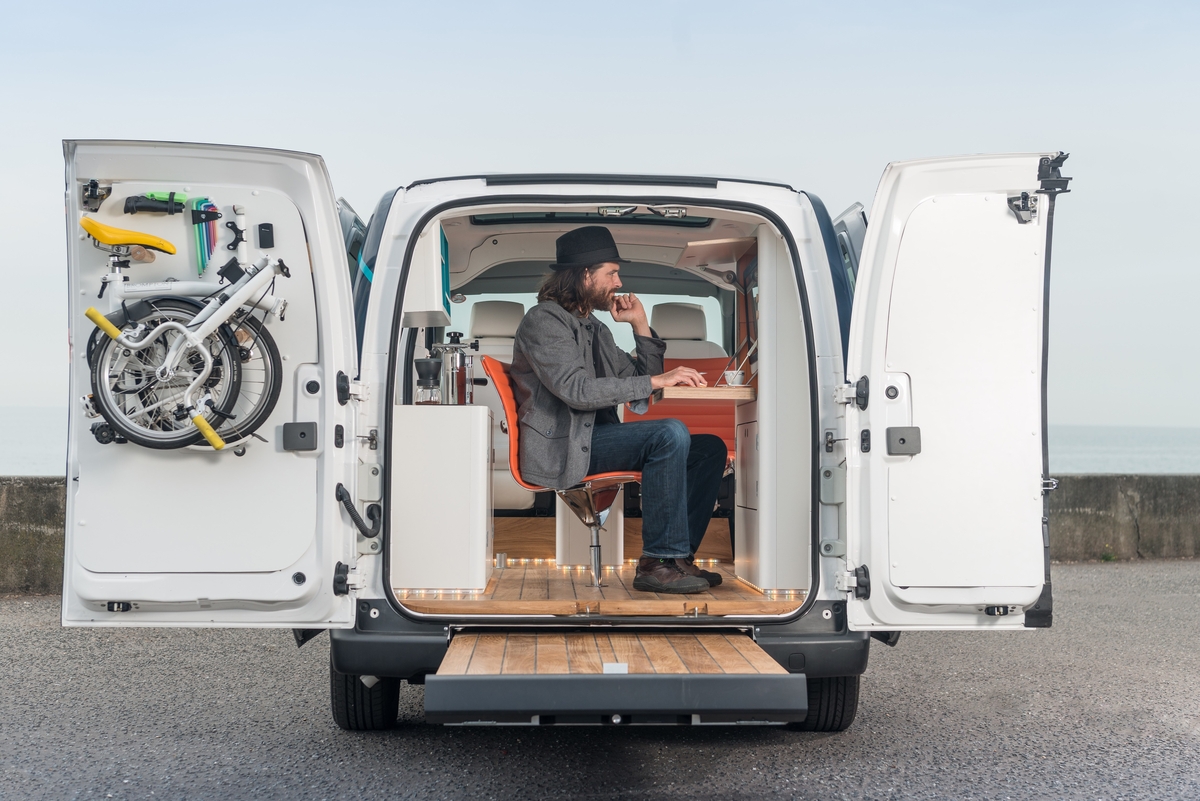
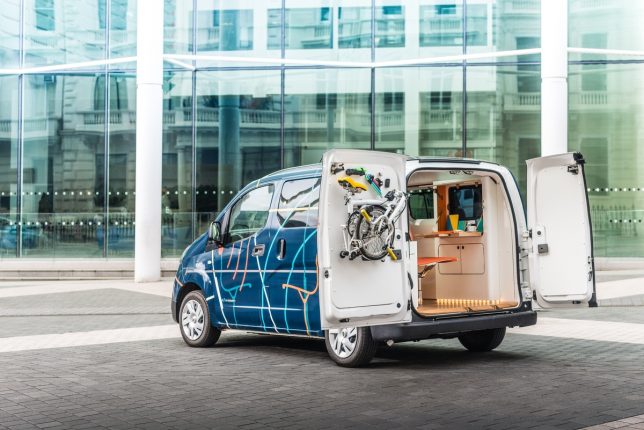
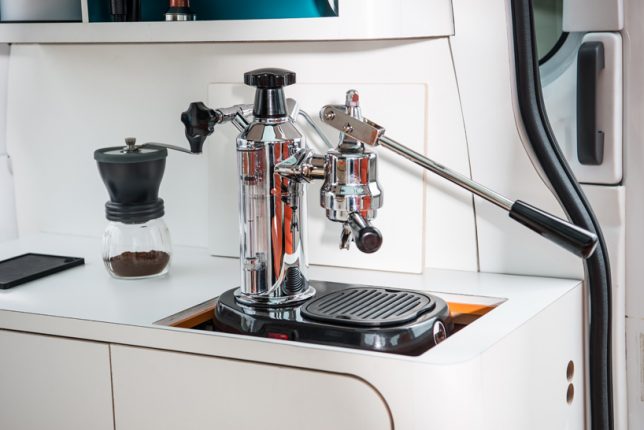
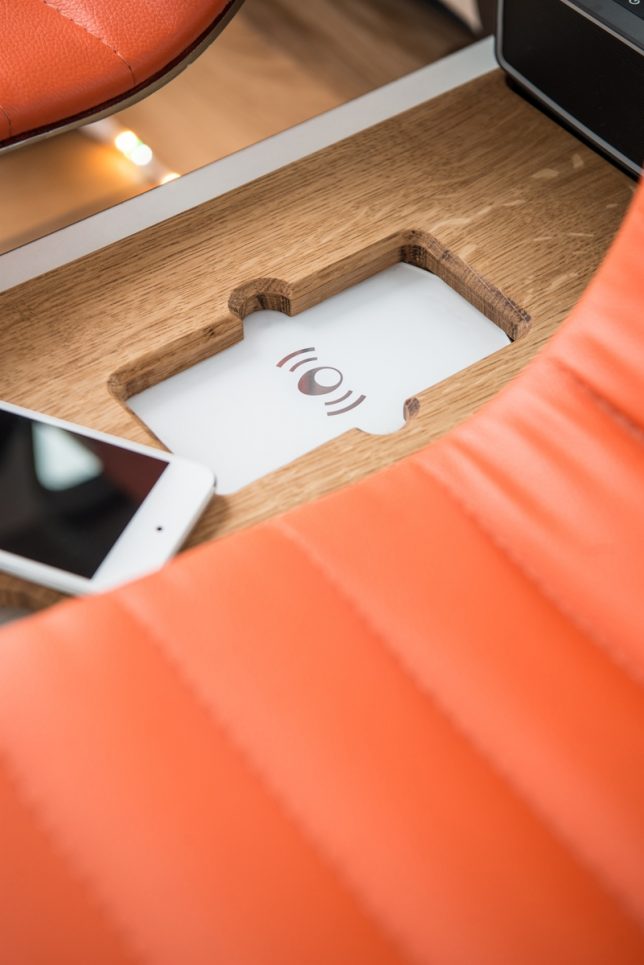
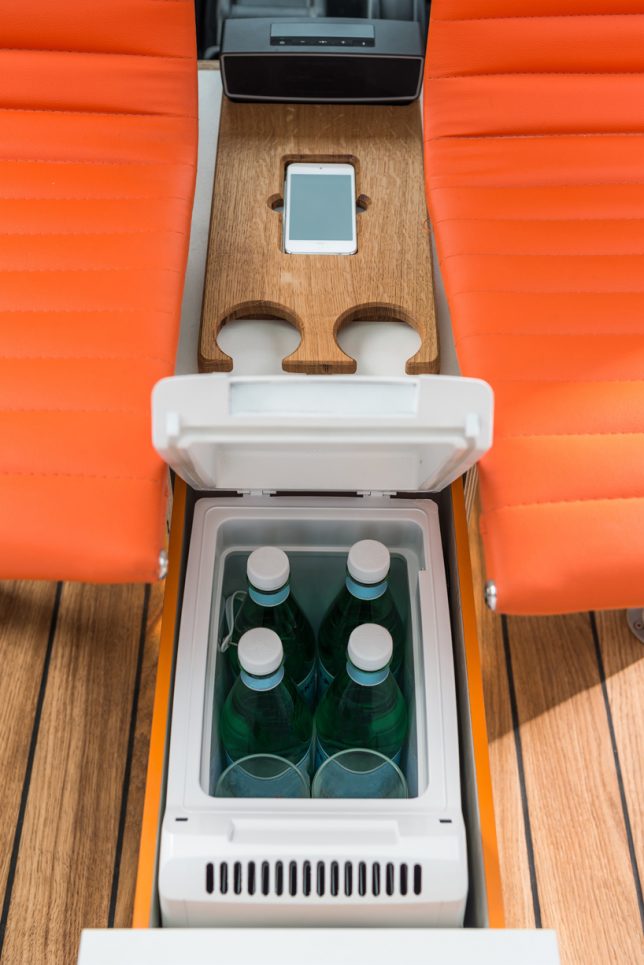
Who wants to sit in a stale, noisy central office when they could take their job – not to mention the coffee maker – on the go instead? This Nissan vehicle houses the world’s first all-electric mobile office, and it’s more than just a fold-down desk in the back of a van. The whole enviable setup includes a panoramic glass roof, wood flooring with built-in LED lights, an intelligent system that adjusts the lighting and color, wireless mobile charging and an espresso machine that pops up out of the counter.

Devised to show off what the e-nv200 van can do, the mobile office concept spotlights changing workspace trends, especially as flexible and remote working becomes more widespread. Lots of workers are no longer chained to permanent desks anymore, with the freedom to do their jobs from any number of places.

nissan-mobile-office-2

nissan-mobile-office-3

nissan-mobile-office-1

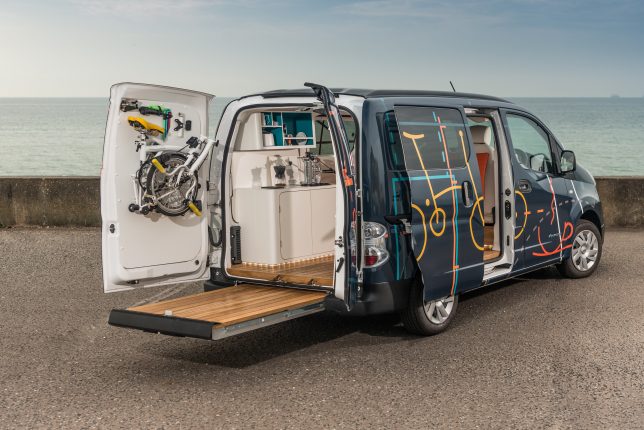
Both of the side sliding doors on the e-nv200 can be opened, along with the split rear doors, to open up the office to the worker’s chosen surroundings. Drive the van to the park, a beach or any other spot that inspires you and helps you focus, pull out the floating deck at the rear and enjoy working conditions most of us can only dream about.

nissan-mobile-office-4

The fold-down desk console features a built-in touch screen computer, wireless mouse and keyboard along with storage space and stationery supplies, and there’s even a mount inside one of the rear doors for a folding Brompton bike if you want to take a break and get some exercise. Watch the video to take in all of the details.

Share on Facebook


[ By SA Rogers in Technology & Vehicles & Mods. ]

[ WebUrbanist | Archives | Galleries | Privacy | TOS ]


WebUrbanist

 
Comments Off on World’s First All-Electric Mobile Office Built Into a Nissan Van

Posted in Creativity


Ansel Adams’ Arca-Swiss 4×5 View Camera is the first of its kind at auction

14 Oct

$ (document).ready(function() { SampleGalleryV2({“containerId”:”embeddedSampleGallery_5494411773″,”galleryId”:”5494411773″,”isEmbeddedWidget”:true,”standalone”:false,”selectedImageIndex”:0,”startInCommentsView”:false,”isMobile”:false}) });

Heritage Auctions will soon be the first auction house to ever offer an Ansel Adams 4×5 view camera. The camera is part of a complete outfit including an Arca-Swiss 4×5 View Camera, three lenses, a pair of Graflex graphic film pack adapters, compendium lens hood, extra bag bellows, Wratten gelatin filters, a dark cloth, original carrying/shipping case, tripod and more. 

This view camera collection was used by Ansel Adams from 1964 to 1968, according to the auction house, after which point he gave the camera to his then-assistant Liliane de Cock, who used it as part of her own career. The camera and related accessories were acquired directly from the photographer’s family. Heritage Auction doesn’t list the condition, saying only that it is ‘available upon request.’ However, it estimates the lot as being worth between $ 70,000 and $ 100,000, and is seeking an opening bid of $ 35,000.

You can view the auction listing here.

Via: PetaPixel

Articles: Digital Photography Review (dpreview.com)

 
Comments Off on Ansel Adams’ Arca-Swiss 4×5 View Camera is the first of its kind at auction

Posted in Uncategorized