RSS
 

Posts Tagged ‘Final’

Post-Processing: The Final Phase of Studio Product Photography

22 Apr

For the final installation of this series we will be exploring the third and final cog to the product photography studio. We will discuss the system that will allow you to catalog and edit your images to get them web ready in a hurry. For this we are going to deploy Lightroom. I am sure that there are other programs that can be inserted here since we are only doing some minor adjustments and renaming. If you have Lightroom fire it up and follow along.

SHOOTING TETHERED

I like to shoot tethered whenever I work in studio for a few reasons. The first being that I can see the image I just shot on a large monitor. I can zoom in and see details that are difficult to get to on the back of a camera screen. The second reason is that I have all the shots automatically sorted into the correct folders.

SETUP THE TETHER

To get started with tethering in Lightroom go to File > Tethered Capture > Start Tether Capture.

Studio product photography processing 01

From there you will enter the tethered settings. I always put the product name as the session name, in this case “Stan Lee” since I am shooting action figures. Next is the naming, I let the filename remain the part number (or product name) but add a number sequence to the end. You can do whatever works for you to differentiate the shots.

Next choose the location where you want Lightroom to store your images. In this case I am going to have all of the shots go into the folder for my client “XYZ” so I make a folder called “XYZ Product Images”. Lastly add the metadata information, in this case my contact and copyright information. Then hit OK.

Studio product photography processing 02

Next you will get a little display that you can position anywhere on your Lightroom screen, I like to put it up at the top. It shows that the camera is connected.

*TIP* If nothing is showing up check that you camera is turned on and that the cable is connected. If that fails, reboot your camera, reboot Lightroom and remove and reconnect the cable. This usually clears up 99% of tether issues. Below the camera make is the part number and the rest of your camera settings.

Studio product photography processing 03

(You can read all about my camera setting on my other DPS article here; Tips for Fast and Effective Studio Product Photography. Now that you have your tether capture all setup you can begin taking photos.

Studio product photography processing 04

THE PHOTO SHOOT

For this shoot my client wants two angles of this Stan Lee action figure. So I use our basic lighting setup (discussed in this article; Equipment Tips for Quick and Efficient Studio Product Photography) and take the first shot.

Let’s take a look at this shot in Lightroom Develop module. Hit the D key to enter the develop module, or click Develop at the top of Lightroom. Make sure your clipping detection is turned on by hitting the J key.

Studio product photography processing 05

What I am trying to accomplish here is to blow out the background. If it were blown out we would be showing red (clipped) in Lightroom. We aren’t seeing that, which means I need to decrease the shutter speed to let in more light. Let’s try 1/3 of a stop for a bit more additional light and shoot again.

Studio product photography processing 06

Set the exposure

Now we are cooking with fire. All of our subsequent shots will be dialled in making less work. It is not necessary to have the entire background clipping. In fact, for some subjects it will likely mean you have lost a ton of contrast in the image. This amount of red is okay for this subject.

Keep in mind white and reflective products will become overexposed must sooner than darker ones, so set your exposure accordingly. Even if you have zero red on the background it is okay, there Lightroom tools that will make quick work of the background. But remember that every bit of extra work you do later in Lightroom costs time so try to get it right in camera.

*TIP* With this product photography studio setup it is so easy to get many product angles in such a short amount of time. It’s always wiser to shoot extra angles now rather than have a client ask for others later. Now that we have four angles of Stan Lee let’s switch to the next product.

Change the product

Studio product photography processing 07

Click the little gear icon on the tether tool which will bring up the Tether Capture Settings and you can change your session name to the new product number, in this case, “Wookiee”. Hit the tab key twice, because, as you can see the sequence number is retained from the last shot and it reads shot number 5. Hit the number 1 key and then hit OK or Enter.

You are now setup to take the next shot and all of these new images will go into the “Wookie” folder but stay in the main project for XYZ Products.

Studio product photography processing 08

Just as before, we will take four angles for the client to make sure we have enough.

Studio product photography processing 09

If we expand the navigator pane you can see that we have two product folders, “Stan Lee” and “Wookie” and there are four images in each. We can view all the images by selecting the “XYZ Product Images” folder. We are now done with the tether tool so you can close it.

Studio product photography processing 10

THE EDIT

Typically this is where I will grab all the images from the shoot and export them as small files for client proofs. The client chooses the images they want and then we edit those. Let’s pretend they’ve already given us their list and begin the edits.

Make the background white

Hit the D key to enter the develop module, or click Develop at the top of Lightroom. The first thing I like to do is make sure that the background is blown out (pure white with no detail). To do this, make sure your clipping highlight feature is turned on, (hit J on the keyboard if it’s not).

Since our shot could use a little help at the bottom we will increase the whites with an adjustment brush. Hit the K key and with a new brush enter +1.00 on exposure and +40 on whites (I have saved this preset as its own brush called “blowout”). Turn on Auto Mask, it does a good job of keeping these settings from inadvertently bleeding onto the subject if you get a little too close. Now simply paint the white background and it will clip the whites. If it doesn’t, finish painting, then add a new brush and paint again.

Studio product photograph processing 11

Global adjustments

Hit your K key once more to return to image adjustments. Turn off clipping highlights by hitting the J key. This helps you to focus on the subject during the adjustments. For this image I added +20 contrast, -30 blacks, +30 clarity and +20 saturation.

You can easily sync these settings to the rest of the product image by bringing up the filmstrip at the bottom of Lightroom. If you don’t see your filmstrip, click the little up arrow at the bottom of the develop module. Now select your first image, hold you Shift key and click the last image. Click the Sync button in Lightroom to apply the settings to all the selected images.

Studio product processing 12

We will select Basic Tone, Clarity and Color to sync just those effects to the rest of the images.

Studio product processing 13

Click Synchronize and the rest of the products will get the same adjustments. Keep in mind you still need to go back to each image and ensure their backgrounds are properly clipped as well. You can use the Adjustment Brush feature as before. Our Stan Lee products are now on completely white backgrounds and they look great.

Alternate method

For the Wookie products I will show you a slightly faster albeit sometimes not as accurate method. Enter the Develop module, and instead of using an Adjustment Brush let’s see if the Whites slider will clip the background. For this image I added +93 to the Whites slider.

Studio product processing 14

Worked like a charm. Now let’s finish giving this little guy some additional love. I added +20 contrast, -30 blacks, and +20 clarity. Additionally I added some sharpness found in the Detail pane. This time, when we select all of our Wookie products and synchronize I will click the Check All button.

Studio product processing 15

When I do a quick look at the rest of my Wookie products they all look great. These are ready to export and it took me less than two minutes to edit all four images.

Studio product processing 16

Studio product processing 17

Studio product processing 18

Conclusion

Assuming you already have a calibrated monitor, the only other thing you might want to do is add a custom color profile for you camera to Lightroom. This will ensure that your product colors remain true, which is very important. You can see how to do that with this dPS article; How to Use the X-Rite ColorChecker Passport to Obtain Perfect Color.

This concludes my three part series for studio photography and how to inject some speed into it. I hope you enjoyed it. Thank you for reading.

The post Post-Processing: The Final Phase of Studio Product Photography by Jacob Macias appeared first on Digital Photography School.


Digital Photography School

 
Comments Off on Post-Processing: The Final Phase of Studio Product Photography

Posted in Photography


Light’s L16 camera is in final stages of testing

15 Apr

$ (document).ready(function() { SampleGalleryV2({“containerId”:”embeddedSampleGallery_3689211902″,”galleryId”:”3689211902″,”isEmbeddedWidget”:true,”standalone”:false,”selectedImageIndex”:0,”startInCommentsView”:false,”isMobile”:false}) });

Light has been teasing images of its first prototype L16 cameras for a while now. Today, it offered a look inside production of its Design Verification Test cameras as well as a peek at the camera’s current design, as noted by LightRumors. Next month, beta testers will receive pre-release cameras, and emails have gone out to pre-order customers with shipping details. In other words, things are getting real.

Light announced its L16 camera in 2015, presenting a compact camera with 16 lenses using folded optics. Its 16 13MP sensors can be used to create up to a 52MP composite image, and it will offer 28mm, 70mm and 150mm equivalent focal lengths. Light’s website mentions that the camera will go on sale to the general public at the end of 2017.

Articles: Digital Photography Review (dpreview.com)

 
Comments Off on Light’s L16 camera is in final stages of testing

Posted in Uncategorized


Hasselblad X1D final production sample gallery

15 Apr

Of the recent digital medium format releases, one could argue the Hasselblad X1D carries the most-revered name. Based around a similar 44 x 33mm sensor found in the Pentax 645Z and Fujifilm GFX-50S, it offers the most ‘portability’ of the three, especially when coupled with its smaller leaf shutter lenses. Does the image quality live up to the name? Check out our samples to find out.

View our Hasselblad X1D sample gallery

View our Hasselblad X1d beta sample gallery

$ (document).ready(function() { SampleGalleryStripV2({“galleryId”:”4234210046″}) })

Sample photoSample photoSample photoSample photoSample photo

Articles: Digital Photography Review (dpreview.com)

 
Comments Off on Hasselblad X1D final production sample gallery

Posted in Uncategorized


Pete Souza captures Obama’s final day in the White House

21 Jan

Pete Souza, the official photographer for now-Former President Obama, posted a series of photos on his Instagram account showing the Obama’s final departure from The White House. Like the Former President, Souza plans on taking some time off, sleep late and ‘do whatever the wife wants me to do.’

All of the photos Souza took during his eight-year tenure as White House photographer are archived here.


President Obama leaves the Oval Office this morning for the last time. What a great experience I’ve had the past eight years. Every photo I’ve posted to this account has been archived and locked at @petesouza44. This account (@petesouza) will now be my personal account so I hope you will continue to follow me. I expect to be very active on Instagram although I may not post that much initially as I try to take a little break, sleep late, do whatever my wife wants me to do, go the gym every day, see some concerts, watch some movies, read some books, drink some wine….you get idea.

A photo posted by Pete Souza (@petesouza) on


Another view of President Obama leaving the Oval Office for the last time this morning (taken with remote camera).

A photo posted by Pete Souza (@petesouza) on


President Obama waves from the steps of Executive One helicopter following the inauguration of Donald Trump at the U.S. Capitol.
A photo posted by Pete Souza (@petesouza) on


Farewell.
A photo posted by Pete Souza (@petesouza) on

Homepage photo by Susan Sterner

Articles: Digital Photography Review (dpreview.com)

 
Comments Off on Pete Souza captures Obama’s final day in the White House

Posted in Uncategorized


Zaha Hadid’s Legacy: Proposal for London by the Architect’s Final Students

11 Oct

[ By SA Rogers in Architecture & Cities & Urbanism. ]
bishopsgate-proposal-2

The legacy of famed architect Zaha Hadid continues to unfold months after her death at age 65 as a long list of her final projects continue in various stages of development, from those currently under construction to concepts that may forever remain unbuilt. But even putting aside the many outstanding and unrealized designs remaining on her firm’s docket, Hadid’s influence on modern architecture lives on through the work of her students at the Yale School of Architecture.

bishopsgate-proposal-8

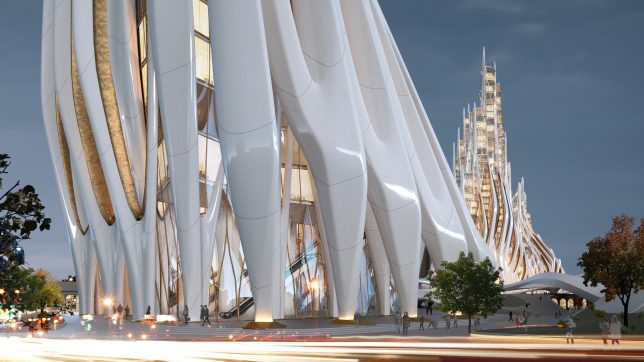
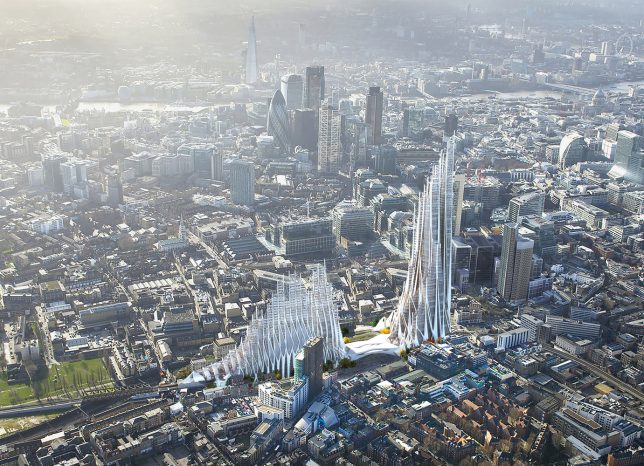
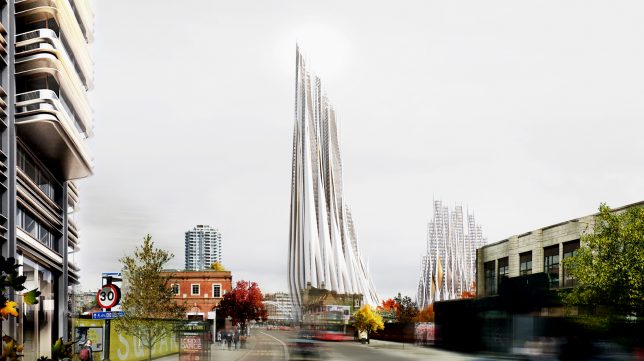
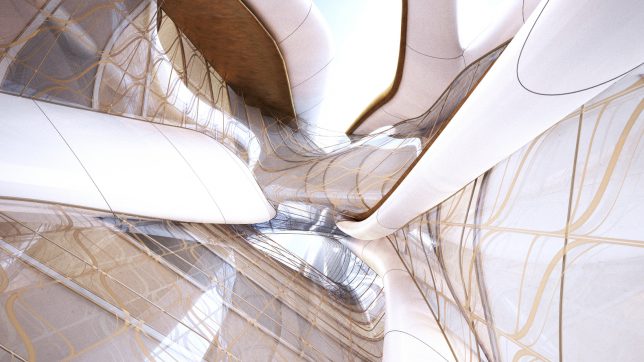
During their semester-long project at Zaha Hadid’s final studio course, a group of students envisioned a striking new development for London’s Bishopsgate Goodsyard, a flowing white complex in the architect’s signature biomimetic style. Consisting of a high-density residential tower, a mid-rise block and a train station acting as a bridge between the two, the proposal adds some height and visual interest to the largest undeveloped piece of land remaining in central London.

bishopsgate-proposal-1

bishopsgate-proposal-5

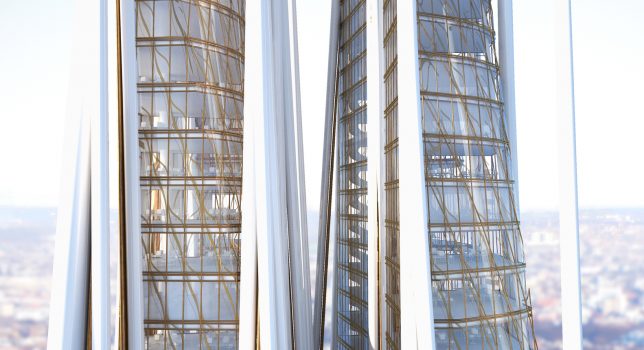
Lisa Albaugh, Benjamin Bourgoin, Jamie Edindjiklian, Roberto Jenkins and Justin Oh present a futuristic network of  gleaming white structures with a skeletal appearance, as if someone took the carcass of some extinct megabeast and reassembled it into a deconstructed approximation of a Gothic cathedral. The spaces between the rib-like columns are filled in with wavy walls of glass decorated with veinous ribbons of gold.

bishopsgate-proposal-3

bishopsgate-proposal-4

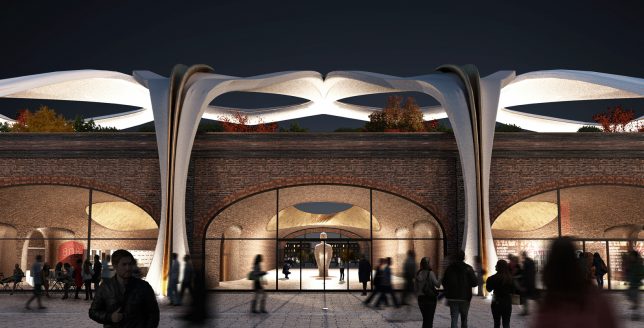
Viaducts at the base act as access points to a series of public spaces, including a park landscape, connecting the various functions within the complex. All of the different elements that would normally be contained within a traditional tower core are instead spread into individual ‘strands,’ like the elevators, stairs and mechanical systems, freeing up the tower’s center for unusual cross-views out of all that glass.

bishopsgate-proposal-6

bshopsgate-proposal-7

It would seem that the proposal is pure fantasy, given that the developers of the site, Hammerson and Ballymore, have already produced their own proposal. But Londoners have made it clear that they aren’t too keen on that design, with over 11,000 residents signing a petition against it. Critics argue that the developers’ proposal “would result in unacceptable and avoidable significant negative impacts” to the neighborhood.

Share on Facebook


[ By SA Rogers in Architecture & Cities & Urbanism. ]

[ WebUrbanist | Archives | Galleries | Privacy | TOS ]


WebUrbanist

 
Comments Off on Zaha Hadid’s Legacy: Proposal for London by the Architect’s Final Students

Posted in Creativity


Yosemite Trademark Dispute Name Changes – The Final Straw

26 Apr
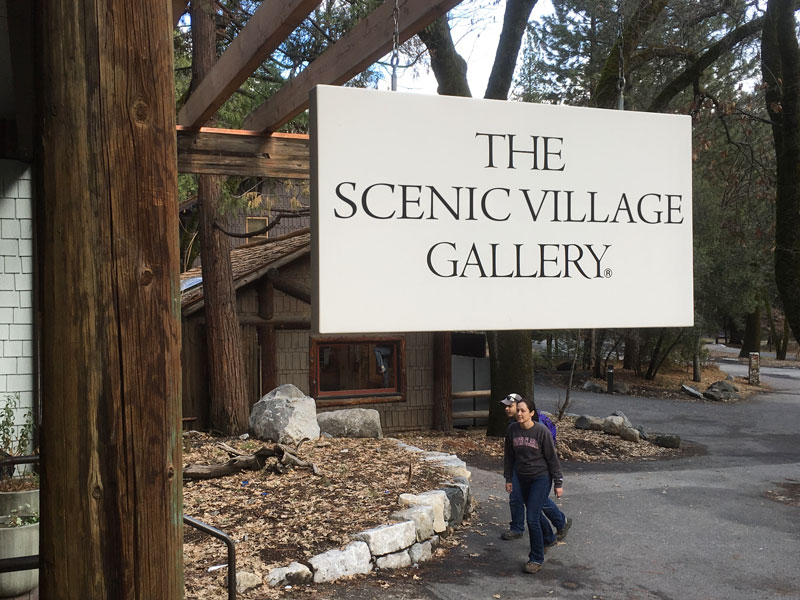
"The Scenic Village Gallery" formerly "The Ansel Adams Gallery"

“The Scenic Village Gallery” formerly “The Ansel Adams Gallery”

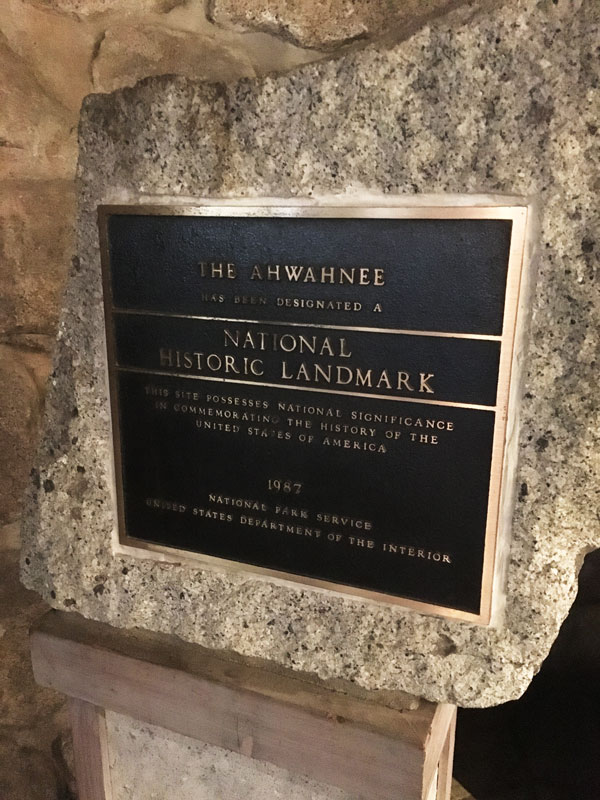
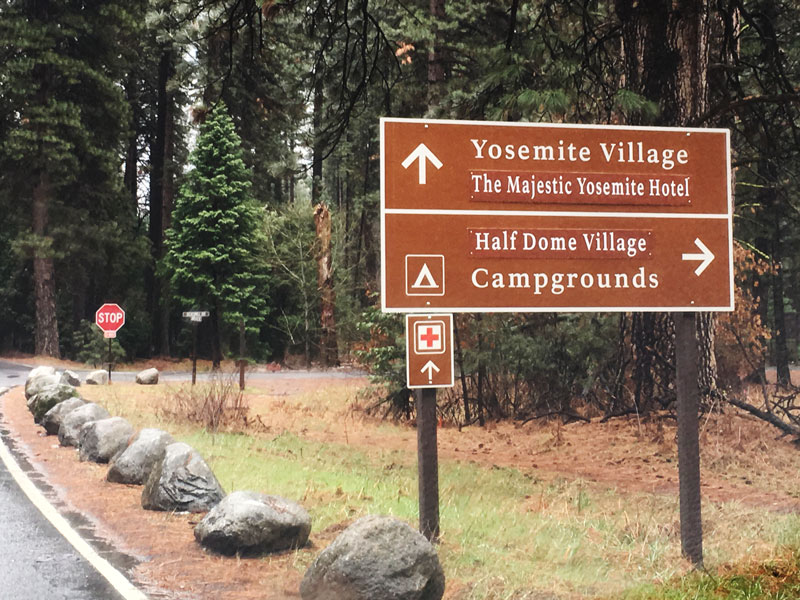
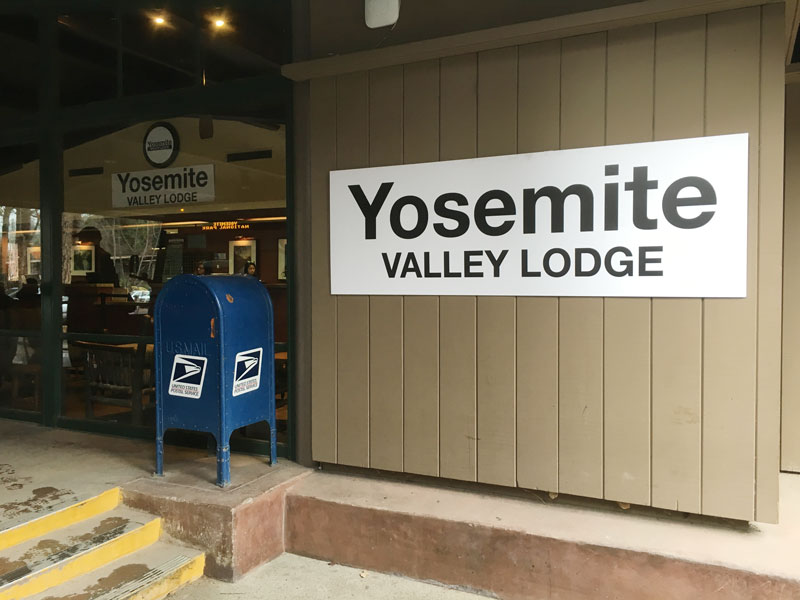
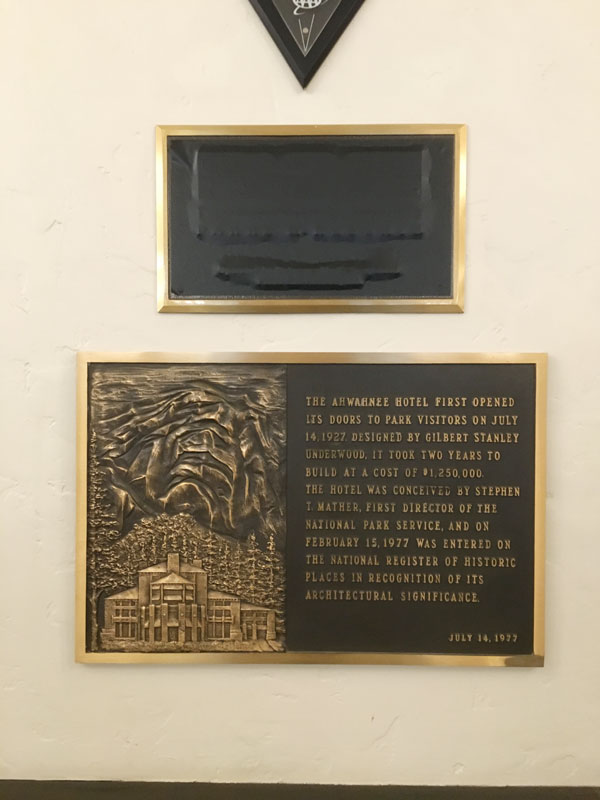
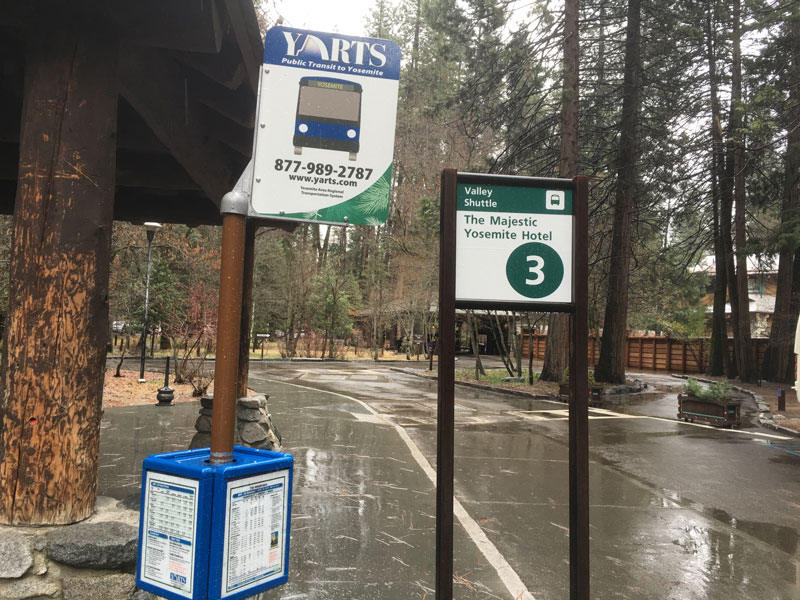
Yosemite is a place that never ceases to amaze, often evoking a reflexive “Wow!” from my lips as I explore the national park. Indeed on my last visit that wow factor hit me again as snow fell in Yosemite Valley, but I was also wow’d in a way that could only make me facepalm in disgust and embarrassment. What could cause such a reaction? Seeing the recent name changes to much beloved landmarks that have swept across the park due to a heated trademark battle between the National Park Service and Delaware North. Curry Village is now Half Dome Village, Yosemite Lodge is now Yosemite Valley Lodge, The Ahwahnee is now the Majestic Yosemite Hotel, etc., but what pushed me over the edge on my visit was seeing the recent change to The Ansel Adams Gallery which is now The Scenic Village Gallery.  The absurdity of changing the name of a Historical Landmark such as the Ahwahnee is in itself silly especially given the Historical Landmark placards still stand outside & inside the building, but to see tradition further trounced upon by changing The Ansel Adams Gallery to something as generic as “Scenic Village” was mind blowing. Below are some photos of the signs reflecting the name changes I took on my visit. I will say though they got the name right on some buildings that have yet to get much press attention…

The Ahwahnee National Historical Landmark  Placard

The Ahwahnee National Historical Landmark Placard Outside the Majestic Yosemite Hotel

New Roadsigns in Yosemite Valley

New Roadsigns in Yosemite Valley Resulting from the Delaware North Trademark Dispute

Yosemite Valley Lodge Sign

Yosemite Valley Lodge Sign

Historical Landmark  Placard Inside the Majestic Yosemite Hotel - Formerly the Ahwahnee Hotel

The Partially Covered Ahwahnee National Historical Landmark Placard Inside the Majestic Yosemite Hotel – Formerly the Ahwahnee Hotel

The Majestic Yosemite Hotel Bus Stop

The Majestic Yosemite Hotel Bus Stop

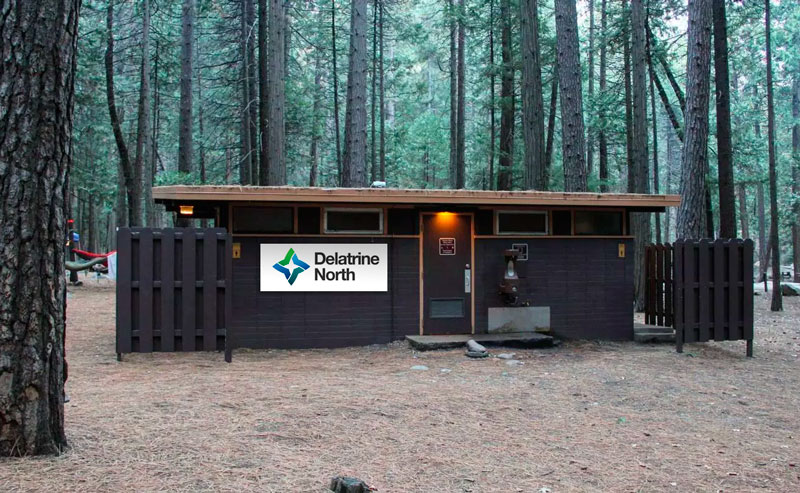
Newly Named Yosemite Bathrooms - Delatrine Norths

Yosemite Bathrooms Now Aptly Named the Delatrine Norths


For more information on the Delaware North / National Park Service  trademark battle read the following articles:

  • A private company trademarked the phrase ‘Yosemite National Park.’ Should the U.S. pay to get it back? – New York Times
  • Op-Ed: Yosemite Is Losing to Corporate Greed – Outside Magazine
  • No Longer the Ahwahnee: new names for Yosemite landmark sites – SFGate.com


The post Yosemite Trademark Dispute Name Changes – The Final Straw appeared first on JMG-Galleries – Landscape, Nature & Travel Photography.


JMG-Galleries – Landscape, Nature & Travel Photography

 
Comments Off on Yosemite Trademark Dispute Name Changes – The Final Straw

Posted in Equipment


Adobe announces final Camera Raw update for CS6 owners

29 Jul

It’s a sad day for owners of Adobe’s Creative Suite 6, as the company announces its upcoming Camera Raw 9.1.1 update will be the final version available for the software. Read more

Articles: Digital Photography Review (dpreview.com)

 
Comments Off on Adobe announces final Camera Raw update for CS6 owners

Posted in Uncategorized


Final firmware Canon EOS 5DSR real-world samples posted

24 Jun

Last night the Northern Lights tip-toed farther south than they usually do, and many regions of North America not accustomed to seeing them were treated to a light show. In hopes of catching it we hopped in the car with the Canon EOS 5DSR and headed away from the city lights. We’ve got a couple of aurora shots to share as well as a selection of others taken with a final 5DS R camera. See gallery

Articles: Digital Photography Review (dpreview.com)

 
Comments Off on Final firmware Canon EOS 5DSR real-world samples posted

Posted in Uncategorized


Adobe releases final versions of Camera Raw 8.3 and Lightroom 5.3

12 Dec

shared:AdobeLogo.png

Adobe has announced the final versions of Camera Raw and DNG Converter 8.3, along with Lightroom 5.3. Different versions for ACR 8.3 are available for Photoshop CC and Photoshop CS6 – both from Adobe.com and through the update mechanisms in the software. DNG Converter is available for free for users of older versions of Photoshop. The latest versions brings support for 20 cameras, including the Nikon Df and Nokia Lumia 1020 that weren’t in the release candidate versions.

News: Digital Photography Review (dpreview.com)

 
Comments Off on Adobe releases final versions of Camera Raw 8.3 and Lightroom 5.3

Posted in Uncategorized


Free T-Shirt & Final Tag: Banksy’s Goodbye to New York City

04 Nov

[ By WebUrbanist in Art & Street Art & Graffiti. ]

banksy nyc goodbye art

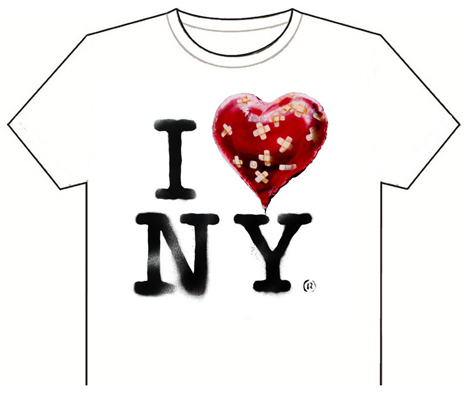
After an intensive month-long residency in America’s biggest city with daily updates, street artist Banksy is leaving behind a strangely mixed legacy of his trip. Here are some of his last works from the stay, from a thrift store painting hacked and re-donated and an unpublished op-ed piece to a free t-shirt to anyone who wishes to download and print it.

banksy thrift store nazi

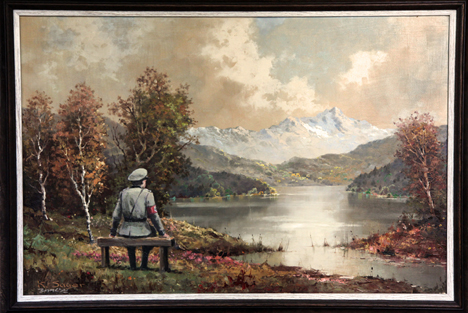
banksy banality of evil

‘The banality of the banality of evil’ is a second-hand shop art conversion purchased, adapted and given back to a local store on 23rd street. It features a World War II Nazi officer added to the otherwise bland landscape, easy to overlook in the serene scenery.

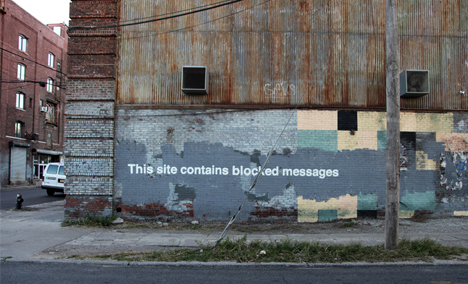
banksy internet tag humor

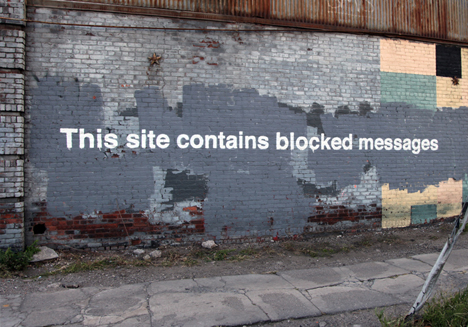
banksy blocked messages wall

Meanwhile, in Greenpoint, a kind of meta-tag (not in the internet sense, though certainly a reference to webpages) speaks to already-covered graffiti painted over below it.

banksy op ed wtc

His controversial message aimed to be published in the local press (submitted to the New York Times but rejected) gives his stance on One World Trade Center, which he sees as an insufficiently bold tribute to the falls towers of the city.

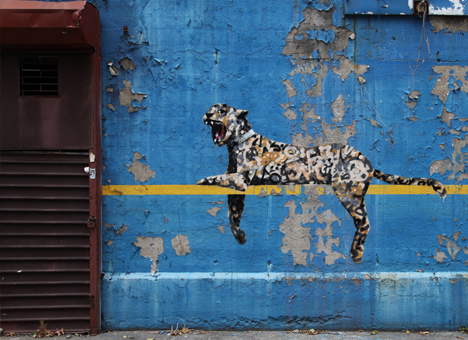
banksy perched cat stadium

banksy robot bar code

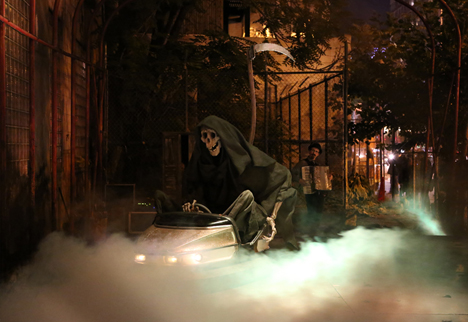
banksy grim reaper bumper car

Other odds and ends from his final days in town include: a cheetah lounging on the side of Yankee Stadium, a robot spray-painting a bar code on a brick wall in Coney Island, a gentleman waiting for a date outside the Hustler Club and the Grim Reaper riding a bumper car in Bowery.

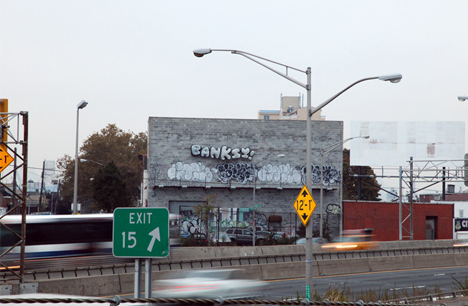
banksy goodbye nyc tag

banksy free t-shirt image

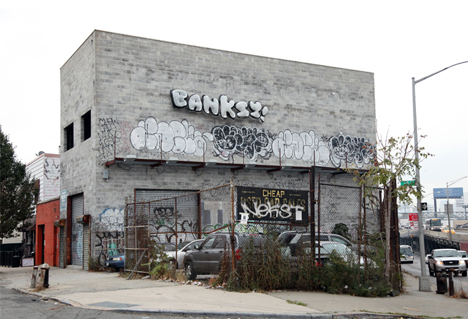
Before spray-painting his name in simple bubble letters on a wall in Queens to end his October run, Banksy reminded New Yorkers to ‘save Five Points’ and added his iconic bandaged heart to the iconic white I Heart NYC t-shirt. The latter he offers for ‘free’ as a download, complete with an ironic registered trademark symbol and graffiti-style lettering. Given the controversy caused by some of his projects and their aftermath, some will no doubt be sad and others glad to see him go from the Five Boroughs.

Share on Facebook


[ By WebUrbanist in Art & Street Art & Graffiti. ]

[ WebUrbanist | Archives | Galleries | Privacy | TOS ]


WebUrbanist

 
Comments Off on Free T-Shirt & Final Tag: Banksy’s Goodbye to New York City

Posted in Creativity