RSS
 

Posts Tagged ‘Fill’

Fill in the Blanks: Illustrated Sky Spaces Between Buildings

29 Apr

[ By WebUrbanist in Art & Drawing & Digital. ]

sky art

Street art uses roads, sidewalks, walls and infrastructure as canvasses, but one of the brightest and blankest slates of all may be the spaces in between.

sky scape cloud canvass

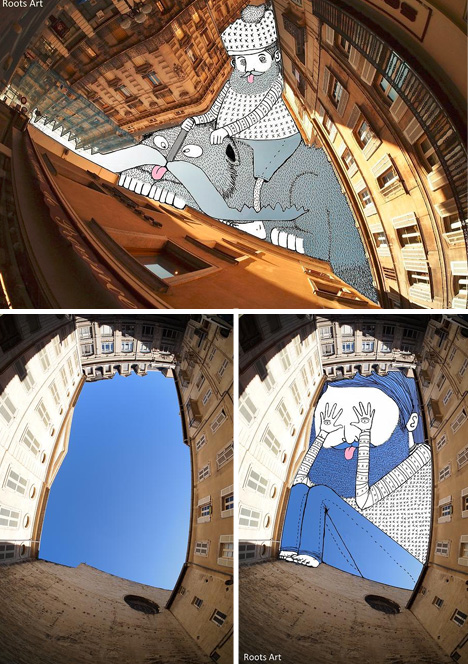
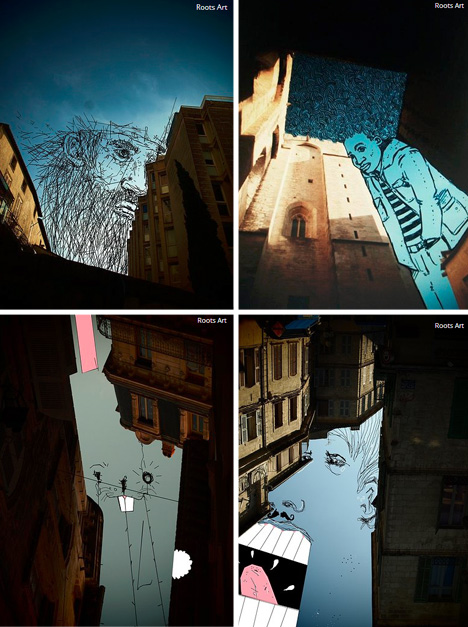
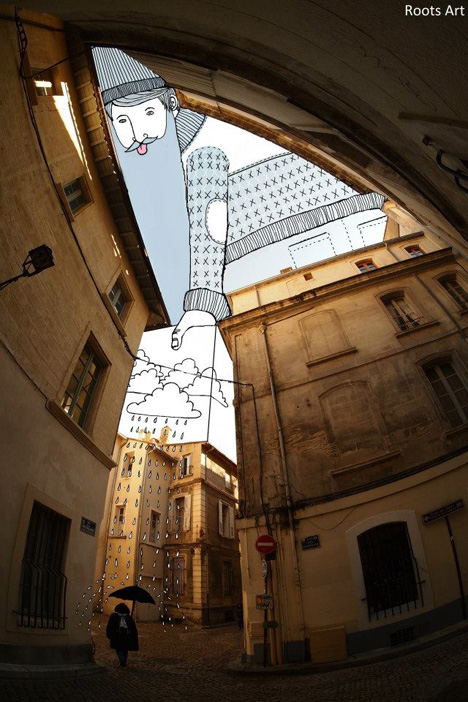
Thomas Lamadieu, a French artist, looks up and sees subject, not void, in blue and clouded city skies, then uses his imagination to fill in the picture, playing on notions of figure and ground.

sky art infill drawings

His Sky Art series shows a given and take between shapes being worked with and what he puts in, often working with minimalist lines and splashes of color.

sky art interactive sketch

In the process, he turns tapering alleys into uncomfortable figures, sinuous spaces into leaning ladies, and cramped courtyards into crouching pranksters, all the while challenging us to see back and forth between positive and negative space (and selectively breaking the boundaries in between).

Share on Facebook


[ By WebUrbanist in Art & Drawing & Digital. ]

[ WebUrbanist | Archives | Galleries | Privacy | TOS ]


WebUrbanist

 
Comments Off on Fill in the Blanks: Illustrated Sky Spaces Between Buildings

Posted in Creativity


Dragging The Shutter: Balancing Fill Flash With Ambient Light

17 Feb
Wedding receptions are notoriously dimly lit places that make use of a flash a must. In this shot, I wanted to balance the ambient light from the stage with my flash to create more depth to the image. EOS-1D X, EF 24-70 f/2.8L II. 600EX-RT Speedlite. 1/60, f/2.8, ISO 800.

Wedding receptions are notoriously dimly lit places that make use of a flash a must. In this shot, I wanted to balance the ambient light from the stage with my flash to create more depth to the image. EOS-1D X, EF 24-70 f/2.8L II. 600EX-RT Speedlite. 1/60, f/2.8, ISO 800. Photo by Rick Berk/kNot Photography

Shooting indoors with a flash can challenge the best of photographers. Many times, the goal is simply to create enough light to illuminate your subject, and background be damned.  The results, however, tend to be less than pleasing when we allow the flash to be the only light source.  Assuming there is some ambient light in the room, adjusting the settings in your camera can help allow that ambient light into your exposure and create more depth in your image.

Most cameras typically sync with a flash at around 1/200 or 1/250 of a second.  While this speed is fine for the flash alone, it is generally too fast a shutter speed to allow ambient light to factor into the exposure. This creates images with a brightly lit subject and a very dark background.  To allow more ambient light in, you’ll want to slow your shutter down.  Putting the camera into Manual mode will allow you to adjust your shutter speed to do this.  You can then also open your aperture as wide as it can go to allow as much light as possible into the scene.  This technique is typically known as “dragging the shutter”.

The problem with dragging the shutter is that if the shutter speed is too slow, any movement can cause a ghost image, ruining the shot.  So you’ll need to keep the shutter speed fast enough to avoid that.  This may not allow enough ambient light in, so you have one last option to allow more light in.  Adjusting the ISO.  By raising the ISO speed, you make the camera’s imaging sensor more sensitive to light, allowing that ambient light to show in the image.

For the image above, the stage lighting for the band created a nice background light, but my flash was too powerful and my shutter speed too fast at the maximum sync speed of 1/250. By slowing down the shutter speed to 1/60, I gained two stops of light sensitivity.  I also raised the ISO to 800 to allow the sensor to be even more sensitive.  This allowed the flash to illuminate the bride and groom, and the stage lighting to show brightly in the background.

Another way to do this is to change the shooting mode on your camera. For most cameras, shooting in Program or Automatic means the camera will treat the flash as the only light source, and disregard the ambient light for exposure. However, if you change the mode on your camera to Aperture Priority, the camera then sets the exposure based on the ambient lighting, and flash is simply treated as fill.  The one caveat with this is that the camera could choose a shutter speed that is too slow to safely hand-hold, creating ghosting or blur in your image.  You’ll want to keep an eye on the shutter speed, and if necessary, raise the ISO to give you a faster shutter speed.  Many cameras also have a setting, allowing you set a minimum shutter speed when using flash in Aperture Priority mode to help avoid ghosting.

Post originally from: Digital Photography Tips.

Check out our more Photography Tips at Photography Tips for Beginners, Portrait Photography Tips and Wedding Photography Tips.

Dragging The Shutter: Balancing Fill Flash With Ambient Light


Digital Photography School

 
Comments Off on Dragging The Shutter: Balancing Fill Flash With Ambient Light

Posted in Photography


On Assignment: Hiding Your Key with Fill

23 Jan

I made this photo this past summer, and in revisiting it just learned two pretty important lessons: one a dumb luck success, one a total failure.

Maybe take a moment to guess which is which before opening my psychological medicine cabinet to peek inside… Read more »
Strobist

 
Comments Off on On Assignment: Hiding Your Key with Fill

Posted in Photography


Fill flash portraits

23 Jan

Fill flash portraits www.proamimaging.com


Content Aware Fill vs Content Aware Scale

08 Jan

Content Aware Fill and Content Aware Scale sound very similar, but do two different jobs. However when it comes to resizing a photo both work amazingly once you know which to use.
Video Rating: 4 / 5

New SKB T-Shirts!!! goo.gl/Bqoyy Get the Official SoldierKnowsBest Apps: iPhone: goo.gl Android: goo.gl FaceBook Fan Page: goo.gl Google+: goo.gl Twitter: twitter.com New Gaming Channel: youtube.com Website: soldierknowsbest.com Hands on with the new Samsung NX200 and MV800 cameras live from IFA 2011.
Video Rating: 4 / 5


Photoshop Content-Aware Fill [Video Tutorial]

19 Oct

In this tutorial Phil Steele from Photoshop Basics for Photographers shares a great little tutorial on a feature called ‘Content Aware Fill’ that is in recent versions of Photoshop CS and Photoshop Elements.

Check out more of Phil’s quality training at:

  • How to Shoot Headshots and Portraits on a Budget with Small Flashes
  • Photoshop Basics for Photographers
  • Lightroom Made Easy

Post originally from: Digital Photography Tips.

Check out our more Photography Tips at Photography Tips for Beginners, Portrait Photography Tips and Wedding Photography Tips.

Photoshop Content-Aware Fill [Video Tutorial]


Digital Photography School

 
Comments Off on Photoshop Content-Aware Fill [Video Tutorial]

Posted in Photography


Adobe Photoshop CS5 – Content Aware Fill

31 Jul

In this tutorial, AJ demonstrates the most talked about feature in Photoshop CS5–Content Aware Fill. Yup, that one.
Video Rating: 4 / 5

FINAL PIECE PLEASE LOOK: www.deviantart.com Please note: I had to re-upload this video with different music due to copyright reasons. Thank you for the ongoing support!! MUSIC: www.myspace.com “Journey to Rekindle Love” By Lantheria Final piece can be found on my deviant art page shidesha.deviantart.com Please stop by and have a look!


Adobe Photoshop CS5: Content-Aware Fill Sneak Peek

09 Aug

Now in Photoshop CS5. Try or buy Photoshop CS5 at bit.ly One of the biggest requests we get of Photoshop is to make adding, removing, moving or repairing items faster and more seamless. From retouching to completely reimagining an image, here’s an early glimpse of what could happen in the future when you press the delete key. CS5 is coming on April 12 – www.adobe.com

Philip Andrews looks at adjusting skin tones using Adobe Photoshop Elements 4
Video Rating: 4 / 5


Ah! My Goddess: Flights of Fancy – 4 – Ah! Fill The World!

23 Jun

Unexpected events surround Belldandy at Sayoko’s Christmas party. And Keiichi finds himself in pursuit of a goddess who decides to spread the love of a goddess all about town!
Video Rating: 4 / 5

Urd and Skuld return to heaven to tie up a few loose ends. Skuld has Keiichi eat some flan which transforms him into a woman. Now he’ll keep his hands off Belldandy, right? Keiichi and Belldandy go through Urd’s potion ingredients to find an antidote, but the formula goes wrong and Belldandy catches some kind of flu, and it’s getting worse! Keiichi will have to push himself to his finest hour to find a solution.
Video Rating: 4 / 5


Flashes Part 5: Fill Flash – Photography with Imre – Episode 17

20 May

Episode 17 of my photography series focuses on fill flash; this is the fifth and last part of the flash mini-series. You’ll also want to check out my blog – binarygraphite.blogspot.com – as it’s supplemented with additional information and links to sites describing this topic in detail. Hope you enjoy, remember to rate (5 stars!), and subscribe so you can stay up to date with my future videos. Follow Me on Twitter: twitter.com
Video Rating: 4 / 5