We all know that dust on a DSLR sensor can range anywhere from the mildly annoying to downright problematic. You can try avoiding it, but the simple, unfortunate truth about sensor dust is that regardless of how careful you are, onto every sensor some dust will fall at some time. The closest you might come to avoiding it would be if you were to put a prime lens on your camera when it’s brand new and never change it or take it off. Ever. We all know that’s not about to happen, so dealing with dust becomes a critical part of regular camera maintenance. Part of eradicating any enemy, however, first requires some knowledge of where he’s hiding and how he got there.
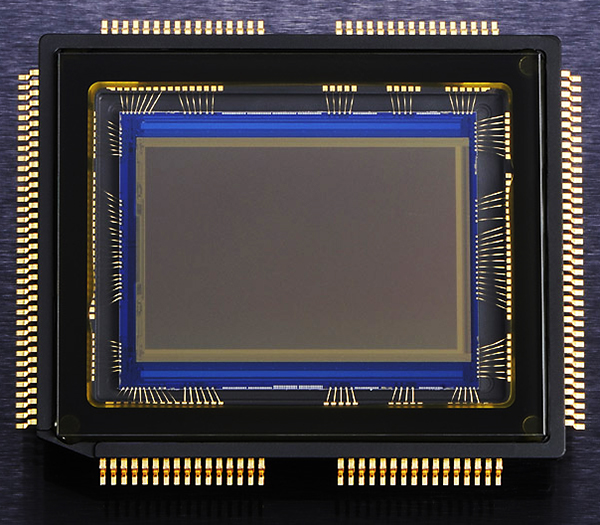
The fact is that our cameras spend a great deal of time in dusty environments. Regardless of how clean your studio is or how lint-free your camera bags are, those microscopic makers of mayhem are going to settle on your camera at some point. And that’s before we even think about taking our cameras outside or changing lenses. When using lower-end or budget zoom lenses, the simple act of repeatedly zooming the lens in and out can “inhale” dust particles into the lens, which can then over time work their way into your camera. Once inside, they can settle on the mirror or sensor. Once you start changing lenses, the likelihood of dust finding its way to your sensor skyrockets. There are steps you can take to minimize the dust (holding the camera with lens mount facing down while changing, not changing lenses outside, etc.), but sooner or later it’s going to find you.
Mirror or Sensor?
The first important difference between the dust that settles on your sensor and that which settles on the mirror is that only one of them will appear in your photos. While the mirror is essential to viewing the scene and taking the photo, mirror dust will have absolutely no impact at all on your images. It also differs from sensor dust in that you can often actually see mirror dust with the naked eye when you look through the viewfinder. It can be annoying, but it is also usually a pretty easy fix with an air blower. Sensor dust, on the other hand, won’t show itself until it’s left dark spots of varying sizes on your photos. If you see it in the viewfinder, it’s not on the sensor.
Spotting the Spots
For starters, you’ll be able to recognize a dust spot on your photos if it appears in the same place in multiple images, particularly in images taken at small apertures like f/8 or smaller. If you are generally a “wide open” photographer, you need to know that most dust particles will not show up at very wide apertures like f/1.8 against bright backgrounds. Dust may also be less noticeable in images with a lot of detail, but that doesn’t mean it’s gone. If a dust spot is visible with just a quick glance at the image, chances are that you’re looking at a pretty bad spot on your sensor– one that’s not going to leave just because you squeeze a little bit of air at it. You may need a thorough sensor cleaning to get rid of your worst offenders. But regardless of whether you pay to have your sensor professionally cleaned or you are comfortable enough doing it yourself, it is possible to overdo it. Sensors have a delicate coating that can be damaged by over-cleaning, not to mention the fact that you increase the odds of damaging your sensor the more often you clean it. So, how do you do a quick and easy evaluation to see if your sensor really does need a cleaning?
Test Shot
You can run this test against a clear sky, a white sheet of paper, or even your computer screen. Start by switching your camera into Aperture Priority mode, as well as matrix/evaluative metering, and the lowest possible ISO. Then turn off auto-focus and dial in the smallest aperture possible (remember– higher number = smaller aperture). Fill the frame with your blank target area, manually dial the lens completely out of focus, and click off a frame. When you open the image on your computer, look for dark spots– those are your culprits.
Making Sure
No system is perfect, and this one is no different. There is, however, a neat little trick you can run in Photoshop as an added layer of detection. By holding down Command + I (CTRL in Windows), you will invert the image, basically creating a negative. The dark spots (if any) will now appear white against a dark background, making them easier to see. In the example below, certain spots were plainly visible in the original photo. It wasn’t until I inverted the image, however, that I was able to see several additional trouble spots on my sensor.

In the original image, some dust spots are obvious on the right side of the sky.

By inverting the photo and creating a negative, several additional problem areas are revealed.
Saving Time in Post
Obviously, this is one of those things that can be fixed in Lightroom or Photoshop without too much of a hassle, but why spend extra time in front of the computer when you don’t have to? If you are a photographer who strives to get things right in the camera (and you should be), this is absolutely one of those things to keep on a semi-regular checklist. There are a lot of do-it-yourself sensor-cleaning options available. If you are comfortable doing this task on your own, great. If not– and I don’t blame you– local camera shops provide sensor-cleaning services for a nominal fee. Either way, by knowing how to quickly identify the problem, you’re in a much better position to do something about it and get back to taking clean, crisp, dust-free photos.
Post originally from: Digital Photography Tips.
Check out our more Photography Tips at Photography Tips for Beginners, Portrait Photography Tips and Wedding Photography Tips.
Got Sensor Dust? Here’s How to Check.
The post Got Sensor Dust? Here’s How to Check. by Jeff Guyer appeared first on Digital Photography School.