RSS
 

Posts Tagged ‘drones’

Intro to drones part I: Drone basics

02 Aug

A post shared by RyanMcMaster (@ryanmc_33) on

The use of drones for aerial photography has grown rapidly over the past few years, and systems are now available in all shapes and sizes, ranging from small hobby aircraft to complex commercial systems. Whether you’re a beginner just looking to have fun, or an experienced photographer exploring new creative opportunities, there’s never been a better time to try this technology.

If you’ve never flown one before, drones have the potential to be a bit intimidating. In this article, the first of a three-part series, we’ll familiarize you with the basic features and components that comprise most consumer drone systems. In parts two and three, we’ll talk about how to select the best drone to meet your needs, and what you need to know about safety before your first flight.

What’s in a drone system?

Let’s get some vocabulary out of the way. While it’s common to refer to a remote-controlled aircraft as a drone, you may also run into the terms UAV (unmanned aerial vehicle) or UAS (unmanned aircraft system), and professional pilots usually prefer to use these descriptors. The words drone and UAV are largely interchangeable as they both refer to just the aircraft, while UAS refers to the entire system. For convenience, we’ll use the word drone throughout this article.

Every drone system is a bit different, but there are some basic things most have in common. In addition to the aircraft, they’ll generally include a lithium polymer battery for power, a camera mounted on a stabilized gimbal, and a radio communication system. Most also include a dedicated controller, though some less expensive consumer models can be controlled using only a smartphone.

From the outside, most drones appear to be simple devices, but they’re actually built around some fairly advanced technology that makes them easier to fly. This includes GPS for tracking the drone’s position, various sensors to help avoid unwanted collisions, and intelligent flight modes that can automatically focus on a point of interest or track a moving subject.

That’s a lot, so let’s break it down!

The aircraft

At the core of any system is the aircraft, and most consumer and prosumer drones today are quadcopters (though there are exceptions). Today, all multi-rotor drone systems designed for photo and video use a fixed-pitch propeller system. Most models use removable propellers made from a plastic/fiberglass composite that have a simple twist locking system to hold the propeller in place. Alternatively, some will use a folding propeller system.

A twist-lock prop on the DJI Phantom 4 Pro (L) and a foldable prop on the DJI Mavic Pro (R).

The drone’s propellers are driven by brushless motors that spin at very high speed to produce the thrust required to fly. Each motor has a corresponding speed controller unit that allows for slight adjustments in the speed of the rotor; by varying the speed of the individual motors relative to one another, it’s possible to induce pitch, yaw, roll and altitude.

Flight controller

The flight controller is your direct line of command to the drone, and the two are linked using a radio control system, typically at 2.4 or 5.8 GHz. Input from the sticks on the flight controller sends signals to the aircraft directing it to adjust the speed controllers on each motor, allowing you to maneuver the drone. Additional inputs allow you to control the camera and other features specific to the model you’re flying.

The same radio signal used for command and control also allows the video signal to be fed from the drone to the controller’s screen, providing a real-time view for shooting photos or video. In many cases, the screen is just an Android or iOS device running a control app that you’ve installed and paired with the controller, though some models, such as the DJI Phantom 4 Pro+ and Yuneec Typhoon 4K, have their own built-in screens. In addition, the screen allows you to monitor telemetry from the aircraft and includes all the controls you would expect for photography such as custom WB, bracketing, shooting style, and other camera settings.

Drones allow new perspectives on photography, such as this stitched aerial panorama of Lake Tahoe. Photo by Ryan McMaster

Gimbal

If you’re planning to take photos or videos from the air, it’s critical that your camera remain as steady as possible. Most drones actually move quite a bit as they maneuver around or make corrections to maintain position. To compensate, the camera is mounted to a gimbal: a device that isolates it from the vibration and movement of the drone. Most gimbals use a 3-axis system that allows for yaw (rotational stabilization), pitch (holding the horizon during forward and backward movement), and roll (holding the horizon during side-to-side movement).

Gimbals use brushless motors that are very precise, and hold the camera in place so that video and photos (including long exposures) look amazing. In fact, if you watch a drone flying in even a moderate amount of wind you’ll notice quite a few small movements, but with a good gimbal the camera’s image will be rock solid. Some systems also offer a dual operator mode that allows the pilot to fly, while a separate camera operator runs the gimbal. This is the ultimate mode for shooting video!

The gimbal isolates the camera from vibrations and small movements by the drone, providing a stable image.

Global positioning system (GPS)

Once your drone is in the air you want it to maintain its position, even in windy conditions. Though it’s possible for a skilled pilot to do this without assistance, all drones today rely on GPS technology, typically using both the Global Positioning System and GLONASS (the Russian GPS system), to automate this task with a high degree of precision.

The good news is that GPS makes it surprisingly easy to hold, fly a straight line, or orbit a subject while the computer does the hard work of making small adjustments to compensate for wind direction and turbulence, and as a result, drones are often much easier to fly than people anticipate. However, GPS, like any technology, can fail. As a result, learning to fly a drone without GPS assistance is an important skill to learn.

Collision avoidance systems

A big advancement over the past couple years has been the development of collision avoidance systems that use vision, sonic and infrared sensors to avoid obstacles. Vision systems can ‘see’ objects and halt the aircraft before it strikes something, however they usually have a limited range (15m/50ft), and the sun can sometimes create issues by causing them to think something is in the way when nothing is there. Sonic systems use sound (much like bats) to sense objects, and are usually aimed at the ground and used for auto-landing operations and ‘positioning’ on the ground in lieu of GPS. Finally, IR (infrared) sensors are a relatively new option and work based on reflected IR spectrum light. These are short range and have issues in low light, but work in a similar fashion to vision systems for obstacle avoidance.

The small circles that look like bug eyes on the front of the DJI Mavic Pro are visual sensors for the collision avoidance system.

What are all these systems used for? Mostly, assisting new pilots in preventing collisions with objects in their vicinity, as well as preventing a loss of aircraft when returning to home by allowing the drone to avoid trees or other obstacles. However, it’s important to remember that the pilot in command is always responsible for the aircraft. Collision avoidance systems are useful but not infallible, so don’t depend on them to keep you out of trouble!

Batteries

Let’s talk about power. Most drones use lithium polymer, or ‘LiPo’ batteries. These cells come in all sorts of shapes, sizes and power ratings. ‘Smart LiPo’ batteries have built-in charge/discharge regulators and sensors that can report battery voltage and temperature via an app or the press of a button. Typically, LiPo batteries run both the controller and the aircraft, and flight time usually ranges from approximately 15 to 30 minutes depending on your model, the conditions, and how aggressive you are at the controls.

“You must always carry these batteries on the plane with you, and never place them in checked baggage – no exceptions.”

LiPo batteries are energy dense and require special care, and can be dangerous if mishandled. Traveling with these batteries can be risky if you don’t take proper precautions, and in most countries, there are specific rules when you take these cells on airplanes. In the US, the TSA/FAA provide specific rules and instructions, and you must always carry these batteries on the plane with you, and never place them in checked baggage – no exceptions. If you’re outside the US, make sure you understand the rules in your country before traveling with LiPo batteries.

Intelligent flight modes

Originally, drones were simply a tool that allowed you to get your camera off the ground and into the air, but thanks to all the technology packed inside, modern aircraft can usually do much more.

Many drones today include a variety of semi-autonomous (‘intelligent’) flight modes that use technologies like GPS, computer vision and subject tracking to help with more complex tasks. Common examples include the ability to actively track and follow a subject as it moves, orbiting around a point of interest, or programming waypoints for the drone to follow. These modes make it possible to get very creative shots with minimal effort by the pilot. In a sense, it’s a bit like having a separate drone operator while you focus on the creative side of things. These modes are particularly helpful if your intent is to shoot video as they can make your footage look very cinematic.

One of the intelligent flight modes, waypoints (seen here), can turn your Phantom 4 Pro into a powerful surveying tool that has the ability to collect data like never before!

A word of caution, however. Don’t just take off and blindly start using these modes. They require good knowledge of how to disable them in case of an emergency, and should not be used by beginners until basic operation of the aircraft is mastered.

Who makes them?

There are numerous companies building consumer and prosumer drones today. The one most people will be familiar with is DJI, which is the 800-pound gorilla in the market. However, compelling models can also be found from companies like Yuneec, Autel Robotics, GoPro and Parrot, as well as a number of others.

Although it’s easy to lump these all into the same category, each creates different products and has different design philosophies. For example, Yuneec makes affordable hexacopters, and Autel Robotics provides options such a camera with thermal imaging capabilities in addition to visible light. In part two of this series, we’ll discuss how to go about choosing the drone that best meets your needs.

Conclusion

Drones are an amazing tool that allow us to do jobs remotely, safely, and in a way that doesn’t put a manned aircraft at risk. As technology advances the capabilities of these devices will only get better. If you’ve been looking for a way to bring a new perspective to your photos or video, consider taking to the skies. Just remember to fly respectfully and follow the rules in your locale – things we’ll discuss in upcoming articles.

Articles: Digital Photography Review (dpreview.com)

 
Comments Off on Intro to drones part I: Drone basics

Posted in Uncategorized


Flying drones over the internet isn’t the future we wanted, but it’s the one we’ve got

25 Mar
You’re flying… kind of! Cape lets registered users fly drones in remote locations. Takeoff and landing are handled automatically by the drone.

We were promised jetpacks, but as many-a-scholar has noted, here we are knocking on 2020’s door and we are still jetpackless. We have, however, managed to put countless drones into the sky. While jetpacks are scarce, a drone can be had for as little as $ 15 and as much as, well a hell of a lot more than that. Anyone can fly a cheapo drone into their living room wall, but if you want to fly a bigger drone somewhere cool there are costs, logistics and federal guidelines to contend with. What’s an apartment-dweller with big drone flying ambitions to do?

Enter Cape: a service that lets you fly real drones in real outdoor locations, without leaving the comfort of your home or your web browser. No license, no learning curve, no expensive crashes. Flight locations are exclusively located in California at this point, and the service is in beta so its developers expect to work out some bugs and improve latency before launch. Deep into a stretch of grey Seattle weather, flying a drone around a sunny California desert sounded fantastic to me.

Just sitting at my desk in Seattle, flying over the Sacramento River. You know, no big deal.

How I learned to stop worrying and love the drone

Cape’s locations include desert and coastal sites including San Francisco Bay, the Salton Sea and Sacramento River. Each has its own hours and days of availability, but most are available weekdays until 5pm Pacific Time. Provided your internet connection is robust, all you need to do is select a site that’s available and hop to the controls of your very own DJI Inspire 1.

Your flight begins with a diagram of your keyboard control shortcuts overlaying the camera’s live feed. Getting started just requires pressing ‘enter’ to initiate autopilot take-off. And there you are – soaring above the California desert with the press of a button.

When your session starts, you’re met with this handy controls diagram.

Cape’s drones are as dummy-proof as you’d hope they would be. A map in the corner of the screen indicates where your aircraft is in the geo-fenced zone. You can’t go beyond the zone’s boundaries, can’t crash your drone into another drone, and can’t stray outside of minimum and maximum altitudes – autopilot will kick in and prevent you from doing any of these things.

You quite literally learn the controls on the fly, but they’re easy to master. There’s some lag, but it was honestly less than I expected. In no time, I was zooming across a little patch of California desert at a reasonable speed and legal altitude. There wasn’t much to see, since that’s how deserts are, aside from some distant brush and pixelated mountains on the horizon.

And on that topic: considering you’re flying a drone that could very well be a world away, the live feed resolution isn’t bad. At best it looks like a Google Street View image, but most of the time it’s a bit more pixelated than that as it catches up with your movements. This translates to a slightly less awe-inspiring experience than, say, actually being there to gaze on some distant desert mountains.

I’m trying to drown this drone and it’s having none of it.

It’s a small world after all

The zones feel small once you’ve flown from one edge to the other, and by necessity the controls are pared down to a minimum. If it’s a truly realistic piloting experience you’re hankering, I’m not sure it’ll scratch that itch. Playing tennis on a Nintendo Wii is convenient and fun in its own way, but it’s not the same experience as playing on a real court with a racquet in your hand. You don’t come away with the same satisfaction when so much is done for you.

So if it doesn’t quite provide the same excitement as flying a drone in person, is it escapism that Cape can provide? Sure, getting a peek at the sun for the first time in days, even virtually, felt pretty nice. I can attest to how strong the desire is around Seattle to be somewhere sunny right now. I got a little bit of that escapism from Cape, but not so much that I’ll be racing back to fly somewhere else tomorrow.

But really, when you think about what Cape allows you to do, it’s kind of incredible. You’re controlling an aircraft hundreds, maybe thousands of miles away, in real time. Finding visually rich places where those drones can be operated safely and legally seems like a tricky balance. Cape’s website says the company is working on ‘unlocking new locations,’ and if one of those locations is in say, Norway or Iceland, then you’d definitely have my attention.

It’s not jetpacks, but maybe we’re getting closer.

Articles: Digital Photography Review (dpreview.com)

 
Comments Off on Flying drones over the internet isn’t the future we wanted, but it’s the one we’ve got

Posted in Uncategorized


EHang uses 1000 GhostDrone 2.0 drones for massive light show in China

25 Feb

Just a few days after Intel wowed audiences with a 300-drone aerial light show at the Super Bowl, Chinese drone company EHang raised the bar with a 1000-drone light show for audiences in China.

EHang performed its ‘Meteor Sky’ show in the city of Guangzhou in celebration of the traditional Chinese Lantern Festival on February 11. To create the spectacle, the company used 1000 of its GhostDrone 2.0 drones configured with color changing lights.

A long exposure captures the drone show near Guangzhou’s Canton Tower.

Putting on a show of this scale requires some impressive logistics. Just arranging the drones prior to flight required an area 290m long by 19m wide, and over 30 EHang engineers and staff put in thousands of hours to develop, choreograph and test the show. The company also developed an advanced communication network and safety system which maintained a minimum 1.5m distance between drones during flight. Despite the complexity, the entire show was controlled by a single computer on the ground.

EHang staff arrange drones in preparation for its ‘Meteor Sky’ light show. The entire staging area was 290m x 19m in size.

EHang notes that the show also served as a trial to see if drones could provide an environmentally friendly alternative to fireworks.

What do you think about drone light shows? Tell us in the comments!

Articles: Digital Photography Review (dpreview.com)

 
Comments Off on EHang uses 1000 GhostDrone 2.0 drones for massive light show in China

Posted in Uncategorized


Crash drones over and over again with Microsoft’s open source simulator

17 Feb

Microsoft has released a free, open source simulator to help engineers test drones in a photo-realistic environment. The AirSim, as it’s called, offers a space for developers to run simulated flights again and again, gathering data and seeing how a drone’s onboard perception systems react to a complex environment. Naturally, that’s a lot cheaper and less time-consuming than studying repeated real-world drone crashes.

The cross-platform software supports manual or programmatically controlled flights, and thanks to its open source nature, data gathered from test flights can be easily used to create new algorithms to guide drone operation. There you have it – hundreds of simulated drone crashes aren’t just amusing to watch, they may be actually useful.

The code is available for download via GitHub.

Articles: Digital Photography Review (dpreview.com)

 
Comments Off on Crash drones over and over again with Microsoft’s open source simulator

Posted in Uncategorized


Ambarella announces 8K-ready H3 SoC for drones and video cameras

08 Jan

Image processor maker Ambarella has released the H3 System-on-Chip (SoC) for high-end drones and video cameras, including those capturing 360-degree and virtual reality footage. The H3 supports 8K Ultra HD H.264/AVC video at 30 frames per second or multiple video streams with equivalent performance, for example 360-degree cameras that use dual 4K/60fps sensors. 

With the introduction of H3 we believe we provide the highest video performance and best image quality solution for high-end drones and multi-sensor video cameras,” said Fermi Wang, president and CEO of Ambarella. “H3 delivers 8Kp30 video performance to match the next generation of displays, such as 8K televisions and high resolution head-mounted displays.

The chip comes with a multi-channel ISP for 360-degree video capture and multi-sensor drone applications. 10-bit HDR processing should help deal with high-contrast scenes and Ambarella’s electronic image stabilization should keep things steady, even in difficult conditions, such as high winds or when panning quickly. The chipset is powered by a quad-core ARM Cortex-A53 CPU and an integrated hardware de-warping engine supports wide-angle panoramic camera designs and fish-eye lenses. Ambarella has not provided any information as to when the H3 is likely to make its appearance in consumer products, but it’s good to see that in the near future there should be a range of capture devices capable of recording content for the latest 8K displays. 

Press Release:

Ambarella Introduces 8K Ultra HD SoCs for Virtual Reality and Drone Cameras

Ambarella H3 SoC delivers 8K Ultra HD at 30 frames per second and 4K Ultra HD at 120 frames per second

SANTA CLARA, Calif., January 5, 2017 — Ambarella, Inc. (NASDAQ: AMBA), a leading developer of low-power, HD and Ultra HD video processing semiconductors, today introduced the H3 System-on-Chip (SoC) for high-end drones and a new generation of video cameras, including 360-degree and virtual reality cameras. The H3 video SoC enables 8K Ultra HD H.264/AVC video at 30 frames per second, as well as multiple video streams with equivalent performance, including 360-degree cameras with dual 4KP60 sensor video capture.

8K videos played on large 8K displays provide a better viewing experience to the end user, as pixels at this resolution are indistinguishable to the human eye at any reasonable distance. The combination of 8K video capture together with Ambarella’s advanced oversampling and image stabilization also enables higher video quality 4K video recording.

“With the introduction of H3 we believe we provide the highest video performance and best image quality solution for high-end drones and multi-sensor video cameras,” said Fermi Wang, president and CEO of Ambarella. “H3 delivers 8Kp30 video performance to match the next generation of displays, such as 8K televisions and high resolution head-mounted displays.”

H3 includes a powerful multi-channel ISP for 360 degree video capture and multi-sensor drone applications. Its 10-bit HEVC High Dynamic Range (HDR) video processing handles high contrast and wide color range scenes. It also features Ambarella’s advanced Electronic Image Stabilization (EIS), capable of generating a smooth 4Kp60 video output under challenging conditions, including during high winds and with high degrees of rotation. The integration of a quad-core ARM® Cortex®-A53 CPU with floating point and NEON™ provides significant processing power for customer applications including computer vision, wireless networking, and multi-sensor stitching algorithms. The H3’s hardware de-warping engine supports wide-angle panoramic camera designs and fish-eye lenses.

Ambarella will demonstrate the new H3 SoC at a private, invitation-only event held during the Consumer Electronics Show (CES) in Las Vegas, January 5 – 8, 2017.

Articles: Digital Photography Review (dpreview.com)

 
Comments Off on Ambarella announces 8K-ready H3 SoC for drones and video cameras

Posted in Uncategorized


2016 Roundup: Best Camera Drones Under $1500

23 Nov

The past few years have seen an explosion in the popularity of drones, and they’re being used for everything from video production to aerial panoramas. It’s an exciting time to dive into this technology.

Drones can be expensive, but there are good values to be had, even under $ 1500. In fact, some of the models in this round-up have been used for prize-winning photography as well as for major feature films.

Before buying a drone, think about how you intend to use it. Some are better for video, while others may be better for pictures. Some still photographers prefer to shoot with 4K video and ‘frame grab.’ As with any tool it’s about picking what’s right for you.

One thing to remember is that specifications are designed to catch your eye. But remember, as with any camera, it’s not all about a single specification; it’s about combining the features and specifications that matter most to you and meet your needs.

In addition to core specs, many drones have features such as ‘follow-me’ or subject tracking modes that can be used to make operation easier, or even automate shots. For instance, if you want to shoot video but have a difficult time orbiting, spiraling, or doing a fly-by pan while keeping your subject in frame, these features can be an immense help (if they work properly). Also, consider how easy a drone is to fly. The guidance system and stability of the drone will help determine this.

It’s a crowded market and there are a lot of drones available for under $ 1500, but we’ll take a look at some of the most common models you’re likely to run into:

  • Parrot Bebop 2
  • DJI Phantom 3 Series
  • 3D Robotics Solo
  • Yuneec Q500 Typhoon 4K
  • Yuneec Typhoon H 4K
  • DJI Mavic Pro
  • DJI Phantom 4 and Phantom 4 Pro

Finally, we’ll try to help answer the question “Which drone should I buy?”

Articles: Digital Photography Review (dpreview.com)

 
Comments Off on 2016 Roundup: Best Camera Drones Under $1500

Posted in Uncategorized


DJI announces new Phantom 4 Pro and Inspire 2 drones

16 Nov
The DJI Phantom 4 Pro

DJI has announced the release of two new drones, the Phantom 4 Pro and the Inspire 2, and both of them are packed with interesting upgrades and features.

Visually similar to the original Phantom 4, the Phantom 4 Pro includes a camera with a 1″ 20MP sensor with ‘almost’ 12 stops of dynamic range. Of particular interest, the Phantom 4 Pro has a mechanical shutter to eliminate rolling shutter effects from fast motion. It can record 4K/60p video at 100 mbps and offers H.265 video compression. Its FlightAutonomy feature uses three sets of visual systems to map obstacles in front of, behind and below the drone to help it avoid obstacles, while a Landing Protection function will help it avoid landing on uneven ground or water. It has a maximum speed of 45 mph and a high performance battery provides up to 30 minutes of flight time. It also includes new intelligent flight modes.

The Inspire 2, similar to DJI’s Inspire 1 model, is oriented at the professional and semi-professional audience. Its magnesium-aluminum alloy body increases stiffness while lowering weight, while a new battery system allows flight time up to 27 minutes. It also offers a new forward-facing camera that will give the pilot a view for flying while a camera operator can independently control the Zenmuse camera mounted on the main gimbal. It includes a new image processing system, called CineCore 2.0, which improves file processing and supports 5.2K video at 4.2 Gbps for CinemaDNG Raw video capture, as well as support for ProRes 422 HQ, ProRes 4444 XQ, H.264, and H.265.

DJI has also released two new Zenmuse cameras for use with the Inspire 2. The Zenmuse X4S includes a 1″ 20MP sensor with 11.6 stops of dynamic range, a 24mm F2.8-11 lens and a mechanical shutter. The Zenmuse X5S has a 20.8MP Micro Four Thirds sensor with 12.8 stops of dynamic range, and it supports 8 lenses ranging from wide angles to zooms. DJI says that a handheld mount will be available for both cameras in the future.

The Phantom 4 Pro will retail for $ 1,499 with a standard controller and $ 1,799 with a high luminance display controller. The Inspire 2 will retail for $ 2,999 (aircraft only), and $ 6,198 for the Inspire 2 with the X5S camera, CinemaDNG, and Apple ProRes license, but will be available for $ 5,999 if ordered before January 1, 2017.

If you want to get your hands on one of these you won’t have to wait very long: the Phantom 4 Pro will begin shipping one week after launch, the Inspire 2/X5S camera combo will begin shipping in early December, and the Inspire 2 and X4S/X5S cameras sold separately will ship in early January, 2017. All products are available for immediate pre-order.

Press release:

DJI Raises Bar For Aerial Imaging With Two New Flying Cameras

Inspire 2 And Phantom 4 Pro Give Creators Unique High-Performance Tools

November 15, 2016 – DJI, the world leader in unmanned aerial technology, Tuesday introduced two new drones that raise the bar for professional imaging: Inspire 2, the best ready-to-fly platform for high-end film and video creators, and Phantom 4 Pro, the smartest and most creative flying camera of its size.

“Professional filmmakers and photographers always push to create images that have never been seen before, and DJI never stops trying to give them the tools to achieve their vision,” said DJI CEO and Founder Frank Wang. “Our newest flight platforms and stabilized aerial cameras are smarter, faster and more powerful than ever before. We can’t wait to see how creators use Inspire 2 and Phantom 4 Pro to capture dazzling images.”

Inspire 2

Advanced Imaging for Professional Results

Inspire 2 offers powerful capabilities and is easy to operate. The nimble new magnesium-aluminum alloy body increases stiffness while lowering weight. It has a top speed of 67 mph and takes only 4 seconds to accelerate to 50 mph. With the new dual battery system, flight time is up to 27 minutes. A new forward-facing camera offers the pilot the best flight view for operating the master controller, while the camera operator receives a separate feed from the professional Zenmuse camera mounted on the main gimbal. The Inspire 2 supports the brand-new Zenmuse X4S and X5S cameras and will support additional cameras in the future.

An entirely new image processing system, called CineCore 2.0, is embedded into the airframe, which allows processing large files faster than ever before. Inspire 2 captures 5.2K video at 4.2 Gbps for Adobe CinemaDNG RAW videos and leverages a newly-designed, fast CINESSD storage for a smooth work experience. A variety of video compression formats are supported by CineCore 2.0, including Adobe CinemaDNG, Apple ProRes 422 HQ (5.2K, 4K) and ProRes 4444 XQ (4K), H.264, and H.265. When recording 4K video in H.264 and H.265, the birate is up to 100Mbps.

Inspire 2 offers professional capability and control suitable for many scenarios. With optional high-altitude propellers, Inspire 2 can reach a maximum service ceiling of 16,404 feet above sea level, and the self-heating dual battery redundancy system maintains good performance of the battery to -4 degrees Fahrenheit. Through an optimized mode, Inspire 2 streams smooth video at the widely used 1080i50/720p60 broadcast standard. Enhanced Lightbridge video transmission makes smoother HDMI video possible.

High Performance and Professional Reliability

The dual-battery system ensures that if one battery fails during a flight, the other will be able to provide power for a safe return to home. Stereo vision sensors have been included on the front and bottom of Inspire 2 for obstacle detection, and upward facing infrared sensors on top of the aircraft add protection when flying in enclosed spaces.

The redesigned propulsion system can safely carry Inspire 2 through incredible vertical camera moves, climbing at almost 20 feet/second and descending at almost 30 feet/second. Redundant systems provide reliability for the IMU, barometer, electronic speed controller communication and satellite navigation modules. The master and slave controller range now extends to 328 feet and users can switch between 2.4 GHz and 5.8 GHz frequencies to cut through any noise for greater signal stability.

Creative Freedom

Inspire 2’s new intelligent flight modes expand DJI’s computer vision technology to safely fly routes that give creators new ways to capture what they envision. Spotlight Pro Mode locks onto a subject during flight while the aircraft flies freely in another direction – and automatically rotates the aircraft to stay on the shot if the gimbal reaches its rotational limit. The forward-facing camera offers TapFly, which directs Inspire 2 to any point on the screen while avoiding obstacles along the way. ActiveTrack recognizes common subjects such as people, cars and animals, sending Inspire 2 to follow behind, lead in front, circle above or track alongside while always flying forward, ensuring the forward-facing obstacle sensing system keeps the aircraft safe. 

New Zenmuse Cameras

DJI is enhancing the imaging potential of the Inspire 2 by expanding its line of interchangeable Zenmuse cameras, which are designed for aerial imaging and communicate directly with the aircraft’s gimbal and flight controllers. For situations that require a balance between weight and image quality, the new Zenmuse X4S has a 1-inch, 20-megapixel sensor with 11.6 stops of dynamic range and a 24 mm equivalent focal length. The Zenmuse X4S offers aperture control (f2.8-11) and a mechanical shutter that cancels rolling shutter distortion. The new Zenmuse X5S has a larger Micro Four Thirds sensor with 20.8 megapixels and an incredible 12.8 stops of dynamic range. The Zenmuse X5S camera now supports 8 lenses from wide angles to zooms. It shoots 20fps continuous burst DNG RAW (20.8 MP). In the future, a handheld mount will be available for the Zenmuse X4S and X5S cameras, bringing those cameras down to the ground for more flexible filmmaking.

Professional Accessories to Enhance Performance

A series of powerful DJI accessories will meet the needs of operators under various filming conditions. DJI Focus, a battery charging station, DJI CINESSD, CINESSD station and other optional accessories are available.

An optional DJI Crystalsky high-brightness IPS monitor features an ultra-bright screen that is clearly visible in direct sunlight and ideal for outdoor shooting. It comes in 5.5-inch and 7.85-inch sizes, with the highest brightness up to 1000 cd/m2 and 2000 cd/m2 respectively, and its dedicated system reduces video transmission latency. Dual Micro-SD Card slots within the screen make it easy to back up footage and can also be used to transfer and play back files. It operates in extreme temperature conditions from -4 degrees to 104 degrees Fahrenheit.

Phantom 4 Pro

Professional Imaging

Phantom 4 Pro offers a powerful imaging system for professional photo and video creators as well as non-professionals who demand excellence from the camera and platform they use to pursue their creative visions. The camera now packs a 1-inch 20-megapixel sensor, and almost 12 stops of dynamic range bring out levels of detail and low-light performance unprecedented in a flying camera of this size. Its mechanical shutter eliminates rolling shutter distortion in fast-moving scenes. Phantom 4 Pro can capture slow-motion 4K video up to 60 fps at a maximum bitrate of 100 mbps. In addition, the Phantom 4 Pro offers H.265 video compression, which substantially improves video quality at the same bitrate.

Reliable with Enhanced FlightAutonomy System

Phantom 4 Pro builds on DJI’s original obstacle avoidance system with FlightAutonomy – three sets of visual systems that build a 3D map of obstacles in front, behind and below the aircraft, as well as infrared sensing systems on both sides. FlightAutonomy can position, navigate and plan routes for Phantom 4 Pro, enabling it to avoid obstacles in a sensing range up to 98 feet at front and rear, even in complex 3D environments. When returning to home and tapping to initiate auto takeoff or landing, the Landing Protection function is able to detect and help avoid landing on uneven ground or water. Phantom 4 Pro has high-performance battery technology that provides up to 30 minutes of flight time. The Phantom 4 Pro flies at 31 mph in P mode with obstacle avoidance in effect, and has a 45 mph top speed in sport mode.

Professional Control with New Remote Controller

Phantom 4 Pro’s revolutionary new compact remote controller comes with an optional high luminance display, providing a clear and vivid live HD view from the main camera as well as essential telemetry data, even in direct sunlight. The aircraft will automatically choose between 2.4GHz and 5.8GHz once powering on to gain a clear signal in areas with high radio interference. The new controller has a built-in GPS, compass, Micro-SD card slot and HDMI port.

Intelligent Flight

New intelligent flight modes make Phantom 4 Pro the smartest flying camera of its size, opening new vistas for creators, such as the new Draw Mode that allows operators to draw lines on the controller display and direct the Phantom 4 Pro to fly that route.

ActiveTrack recognizes common subjects such as people and bikes, then follows them from any angle while maintaining camera focus, and includes three new modes – New Circle, Profile and Spotlight.

Narrow sensing enhances obstacle avoidance sensitivity so the aircraft can fly through complex environments like narrow doorways. TapFly now works backwards and comes with a new Free mode that allows a pilot to set the direction of flight, turn the Phantom 4 Pro or tilt the gimbal without changing the direction of flight. With the new AR Route feature, operators will be able to tell the flight route on the screen.

As an additional safety feature, within a minute of losing GPS signal, the aircraft will automatically return to the last connected position and hover there precisely to wait for the pilot’s command. With the enhanced return to home function, the aircraft knows where it should be going from up to 984 feet away and avoids obstacles along the route.

Price and Availability

Phantom 4 Pro’s U.S. retail price is $ 1,499 with a standard controller. The Phantom 4 Pro, which includes a Phantom 4 Pro aircraft, and a high luminance display remote controller, will be available at $ 1,799. Phantom 4 Pro and Phantom 4 Pro are immediately available for pre-order at dji.com/phantom-4-pro and DJI flagship stores in Shenzhen, Seoul and Hong Kong. These products will begin shipping one week after launch.

The U.S. retail price of the Inspire 2 aircraft is $ 2,999. The Inspire 2 Combo, which includes one Inspire 2 aircraft, one Zenmuse X5S, CinemaDNG and Apple ProRes License Key, is available for $ 6,198. Customers who order the Inspire 2 Combo before January 1, 2017 can enjoy a special price of $ 5,999. Inspire 2 and its accessories will be immediately available for pre-order at dji.com/inspire-2 and also in the three DJI flagship stores. Inspire 2 Combo will start shipping in early December 2016 while customers who purchase the aircraft and camera separately can expect their orders to start shipping in early January 2017.

Articles: Digital Photography Review (dpreview.com)

 
Comments Off on DJI announces new Phantom 4 Pro and Inspire 2 drones

Posted in Uncategorized


Tips for Getting Started Doing Photography with Drones

26 Sep

Until very recently, my mindset was decidedly anti-drone. To me, drones seemed like a complicated plaything for geeks. After all, isn’t this photography hobby expensive enough without adding flying apparatuses to the equation? Plus there was very little doubt in my mind that if I bought a drone I would send it flying into the ocean on its first flight. No thanks.

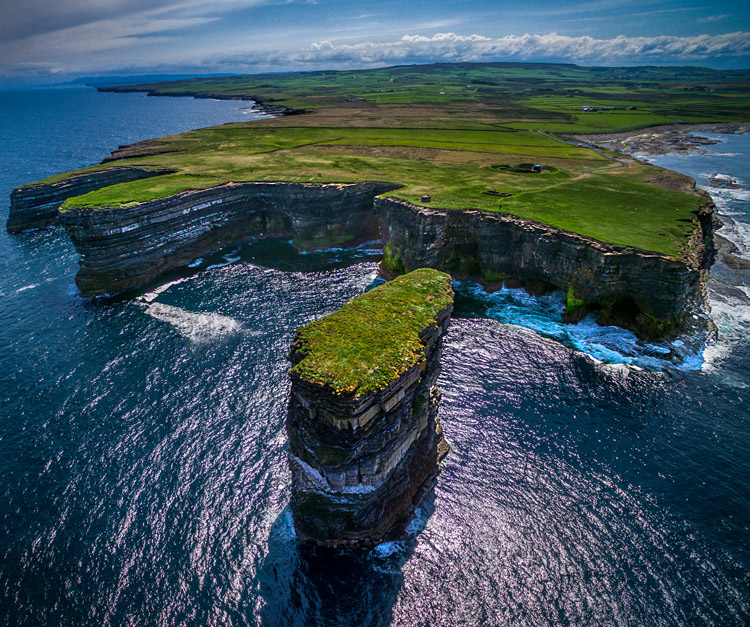
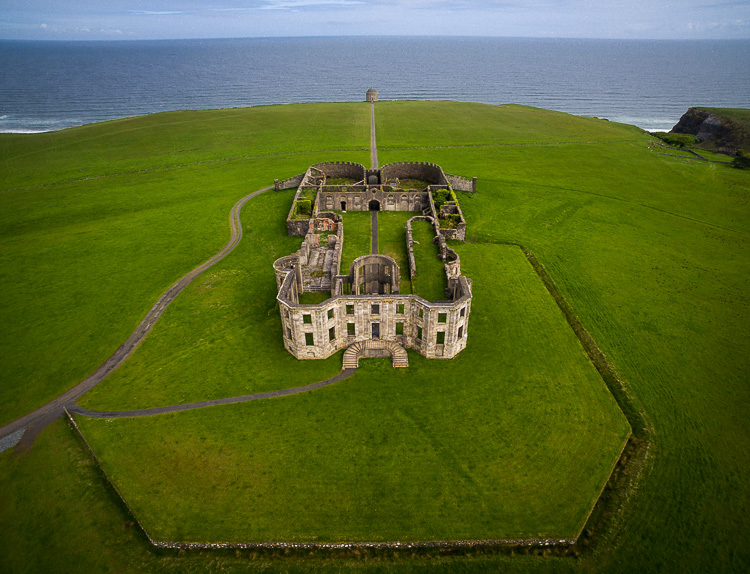
Downpatrick-Head photography with drones

Why a drone?

I had a problem though. I had a coastal photography trip planned, and in coastal photography it is often difficult to take pictures of the coast while standing on the coast. I have long wanted some way to be able to look back at the coast from out to sea and photograph it from that perspective. A drone was the only real answer for me, so I bit the bullet and bought one.

After having used the drone for several months now, I can say my attitude has changed markedly. Much of what I thought about drones was wrong, or at least the problems were overemphasized. Flying them is actually very easy. It isn’t that complicated. It isn’t even that expensive (at least not compared to what we spend on cameras and lenses).

You may be pondering buying a drone, or at least wondering what they are all about. You might also see all the video footage from drones and wonder how drones are used in still photography. So let me introduce you to drones and how they can add a new dimension to your photography.

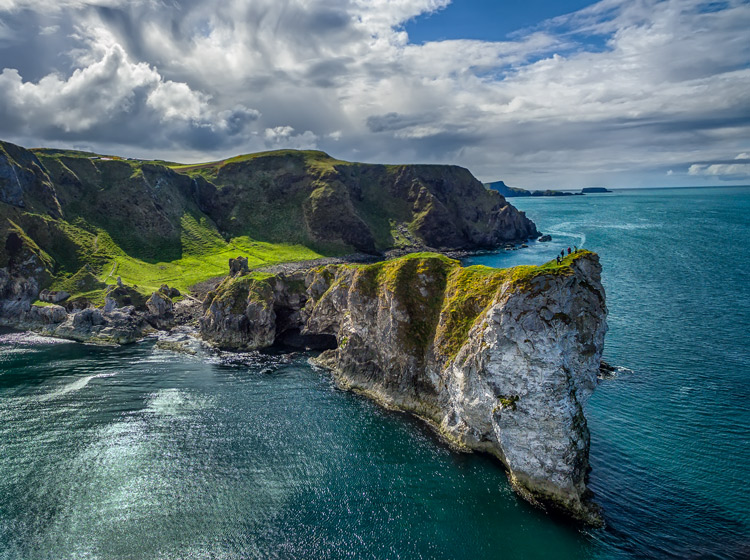
Kinbane-Head

Flying drones is easy

First, let’s talk about flying drones. This is something you are probably concerned about. You might wonder if flying will require skills you don’t have. Or perhaps you just don’t want to devote time to learning it. This is one area where you have nothing to worry about. Flying a drone is remarkably easy. That’s not to say you shouldn’t be careful or that you won’t be nervous every time you fly it, but flying is really easy.

The main thing to understand is that if you have your drone in the air, and you completely let go of the controls, it will just hover harmlessly in the air. It literally just sits there until you tell it what to do. Another thing that people worry about is having the battery run out while you are in the air. That won’t happen. Most drones have a feature that brings the drone back to its take-off point when the battery gets down to a certain level. In fact, most drones have a return to home feature you can press if you ever find yourself in an uncomfortable situation. You always have a way out.

Controlling the drone is easy. You have a controller with two joysticks on it. Pushing on one of them sends the drone up or down; doing the same to the other joystick sends it forward and backward. Each of the joysticks also goes right and left. One will turn the drone to the right and left; the other will make it move to whichever side you push to. I’ll talk more about the specifics of the control later. For now, I just want you to get a feel for how easy it is. If you were worried about being able to fly a drone, don’t be.

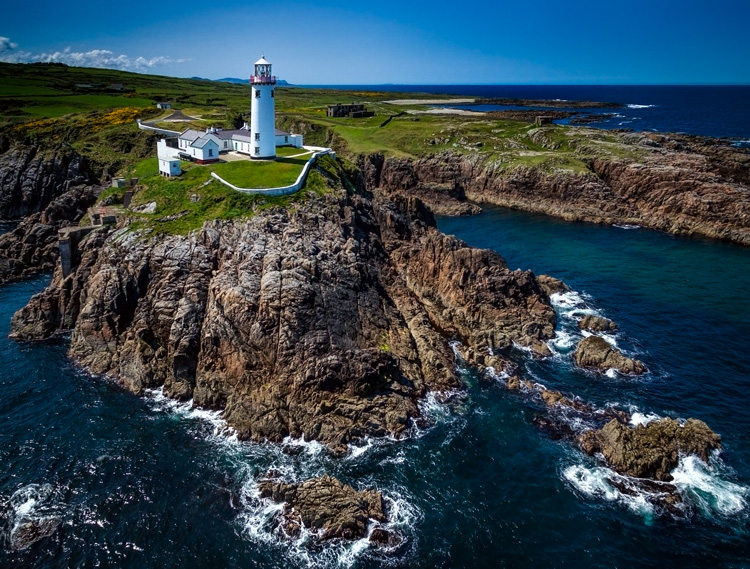
Fanad-Head

Watch where you fly

You may have heard a lot about the new laws affecting drones. It is true that most countries are enacting regulations for drones. In the U.S., the FAA has recently finalized its rules regarding drones. But many of the rules and restrictions apply to those using drones commercially. Most of us are just doing this for fun, so let me try to make this simple for you.

If you are flying your drone for recreational purposes, you don’t need a permit. There are no pilot requirements. Just register your drone with the FAA and you are set. The registration process is simple and only costs $ 5. To do so, just go to this page, create an account, and follow the instructions to register your drone.

That said, you cannot just fly your drone wherever you want. The main limitations you should understand are as follows:

  • You must always fly below 400 feet.
  • You must keep your drone within direct eyesight.
  • Never fly near other aircraft, or within five miles of any airport.
  • Never fly over groups of people, stadiums, or sporting events.

There are other restricted areas as well. For example, you cannot fly anywhere in Washington D.C. or in national parks. There are online maps and apps for your phone – including the FAA’s B4U Fly app – that will tell you when you are in a restricted space.

Anyway, the regulations above apply to the U.S. Other countries will have their own regulations. Here are links to the regulations for Australia, New Zealand, and the UK.

Old-Head

Getting the right drone

Next, let’s talk about getting a drone, if you don’t already have one.

You may have dreams of buying a drone and sending up your DSLR to take high quality pictures. Forget about that, unless you want to spend upwards of $ 6,000. Instead, you’ll probably want to get a drone that comes with its own camera, but there are also models that work with the GoPro. The most common models are the Phantom 4 by DJI (check prices on Amazon or B&H Photo) or the Typhoon H by Yuneec (check prices on Amazon or B&H Photo). These will cost you about $ 1,300 – $ 1,500 for the drone and camera, although you can still get older models cheaper.

What will you get for that? You’ll get a drone that will fly up to about 40 miles per hour, which can operate up to a few miles away from you. It will remain aloft on a battery charge for about 20-30 minutes. You can expect it to have features like an automatic return to home, collision avoidance, and the ability to follow you. Of course, specific features will depend on the actual model you choose.

As to the camera, you can expect to get one that shoots both stills and video (usually 4K). We’ll talk more about the specifics of the cameras in a minute. First let’s talk more about how to fly.

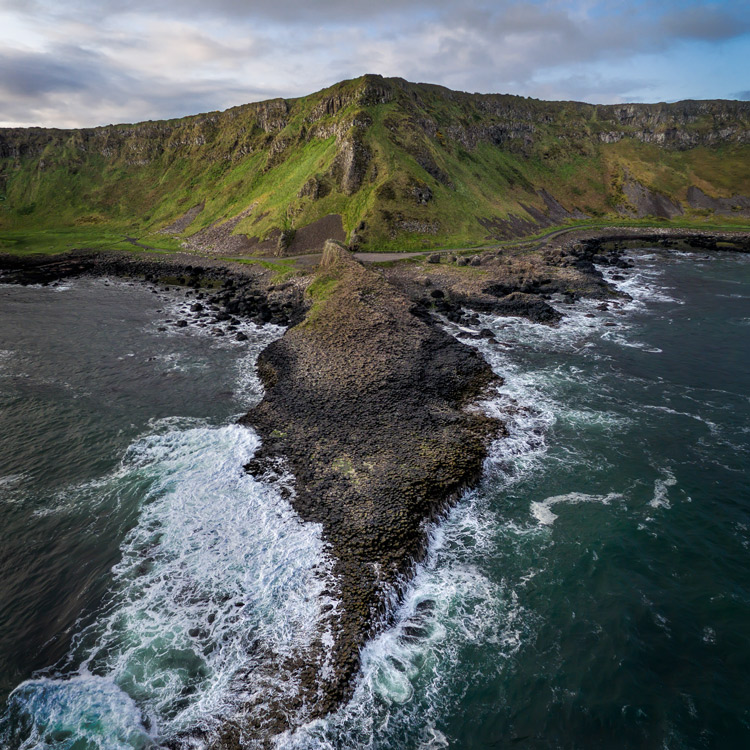
Giants-Causeway

How to fly

When you fly the drone for still photography, things are pretty simple. Unlike shooting video, you won’t need to do any fancy pans or reveals. You just want to get the drone to the right spot(s) to take the picture. It’s just a matter of getting it up in the air, watching where you are going with it, and moving it where you want.

Your drone will have a controller with two joysticks. The controller plugs into your phone or other device. You control the drone with the two joysticks. At the same time, you can see through the drones camera on your device. To send the drone up into the air, all you do is press up on the left joystick. That stick controls altitude. It is as simple as pushing up on the stick to increase the altitude, and pulling down to bring the drone down. That stick will also turn the drone from side to side. The other (right) joystick will fly the drone forward and backward by pressing up and down. When you press that joystick left or right, it moves the drone in that direction.

Monitoring the flight

To keep an eye on where your drone is going, you can either watch the drone itself or watch where it is going via the screen on your phone. Of course, you can operate the controller while keeping your eyes on the drone to make it go where you want.  But you can also see what the drone sees to control it, which is often much easier. You will have a controller that connects to your phone or other device. Your screen will show the view from the drone’s camera as well as other pertinent data. Remember that your drone has to be kept in direct eyesight though.

That doesn’t sound too difficult, does it? It’s really not. After a few flights, it will be even easier. Of course, there are additional nuances and things will be a little different depending on what model you buy. Be sure to read the instructions and watch a few online videos on your specific model.

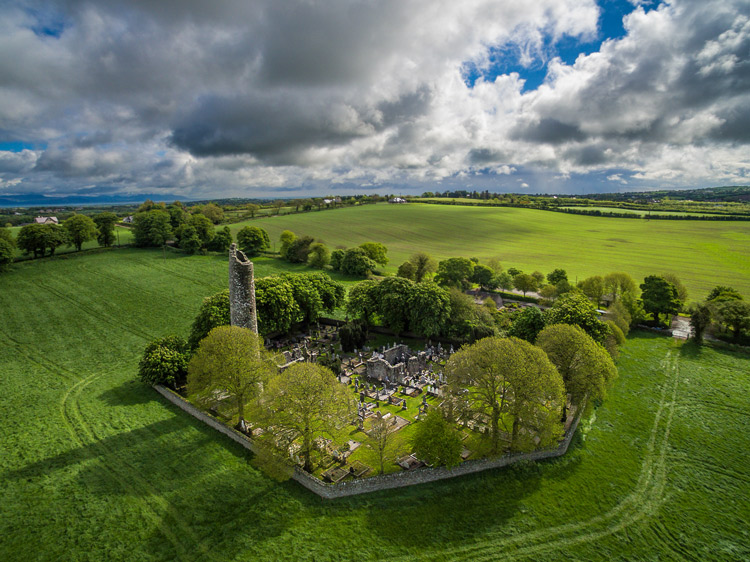
Monasterboice

You’ll be using a camera made for video

Next let’s talk about the camera that will come with your drone. First, the good news. When it comes to shooting video, the cameras in drones are top notch. They routinely shoot Ultra HD and most shoot 4K video. It doesn’t get better than that.

The bad news is that still photography is something of an afterthought for drones. The sensors are small. In most cases they are what you’d get in a compact camera. The resolution is moderate (12-16 MP is standard). The dynamic range is extremely limited and the low light performance isn’t great.

In addition, the lens will likely be very limited; a fixed focal length. It will be a wide angle lens, usually around 15-20 mm. The lens will also have a fixed aperture, meaning you cannot change it.

Working with the limitations

Virtually none of us would feel good about going out shooting with such a limited camera and lens. However, in drones it isn’t that bad. As to the camera, remember you will be shooting in daylight (you can only fly drones during the day – within 30 minutes of sunrise and sunset – in the U.S.), so there will usually be plenty of light. As to the lens, the fixed aperture isn’t as limiting as it would first appear. Keep in mind that everything in your picture will be so far away that the focus will be at infinity. You don’t need a lot of deep depth of field for everything to be sharp.

So the cameras are pretty limited, but you can make do. In any event, the cameras are getting better all the time, so you can expect significant improvements in camera quality in the near future.

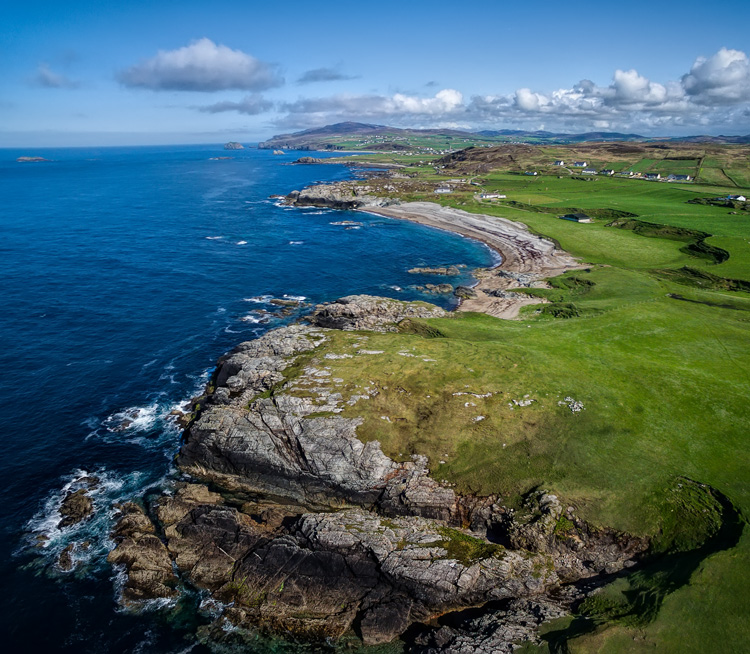
Malin-Head

Tips for photographing with your drone

We’ve talked about the capabilities of drones and the basics of how to fly them. Let’s talk now about taking pictures with them. For the most part, it is similar to operating a normal camera. You have the normal modes to choose from. You can set the shutter speed and ISO yourself or have the camera set them for you. That said, there are some aspects of using cameras on drones you should be aware of. Here are some tips to get you started:

#1 Consider Shooting in Automatic Mode

I am a dedicated manual mode shooter when it comes to shooting with my DSLR. I would not think of using an automatic exposure mode. But when it comes to shooting with a drone, I put it in automatic exposure mode more often than not.

Why? Because there is enough to worry about when it comes to drones. I don’t want to add exposure control to my list of issues to think about. So when you are starting out using a drone for photography, consider using automatic mode. When you get more comfortable with the other controls, you can then set the exposure controls yourself. In any case, your camera will typically do a pretty good job setting the exposure level. You’ll rarely have tricky exposure scenarios here.

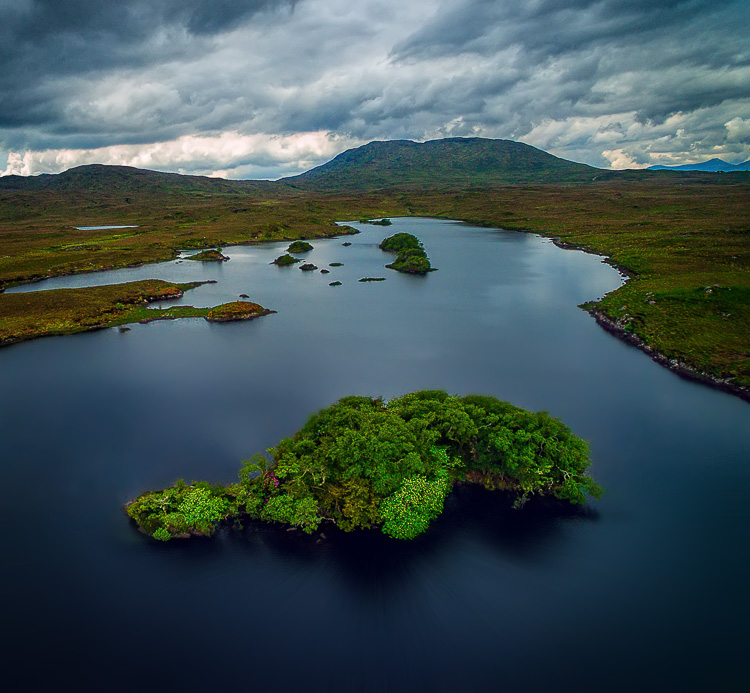
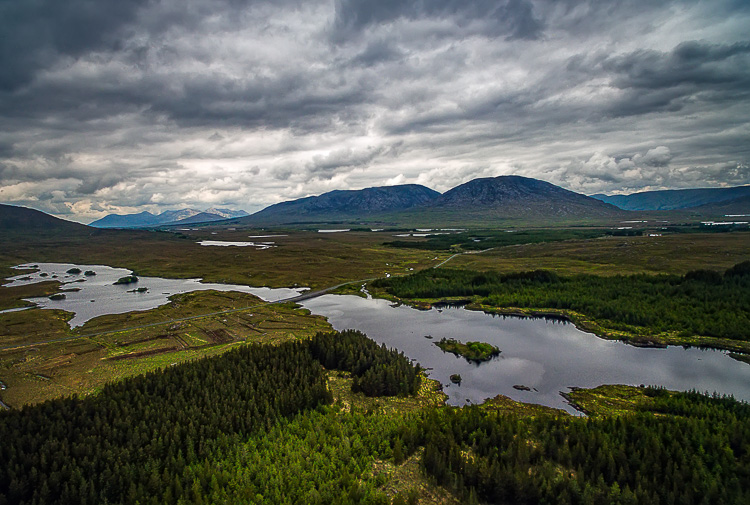
Connemara

#2 Bracket your photos

One way to make sure you get the right exposure every time is to bracket your photos. Drone cameras are usually capable of doing 3-shot brackets. Use this to overexpose and underexpose your shots by a stop. Think of this as exposure insurance. Sometimes you will just like one of the over or underexposed shots better. In that case, just use it. In addition, you can blend the exposures or use HDR software to combine the exposures later.

#3 Use filters

As mentioned earlier, the lens on your drone will likely have only one aperture. That leaves you limited options for changing shutter speeds. You aren’t completely out of luck though; you can still buy neutral density filters for your lens. These filters are used more for video, but they also help still photographers. They restrict the amount of light that gets into the camera, thereby forcing the camera to use a longer shutter speed.

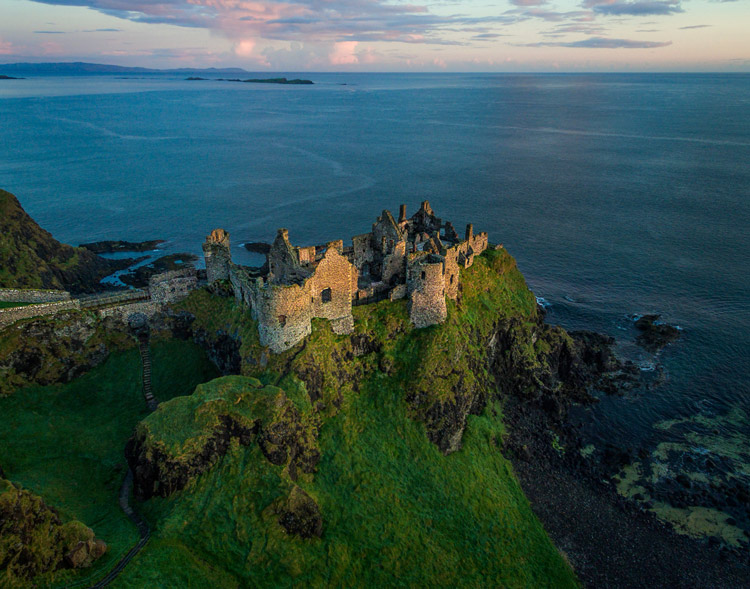
Dunluce

You can also get polarizing filters for your drone. These filters cut down on reflections and make skies appear a deeper, richer blue. This is helpful for drone photography, where the sky is often a significant part of the picture.

#4 Get multiple batteries

This isn’t strictly a photography tip, but it is important nonetheless. Be sure to get more than one battery for your drone. Drone batteries typically last only 20-30 minutes. That isn’t a lot of time. Further, you may also want to fly in a few different locations on the same day. Most of the time you won’t be able to charge your battery in between locations. So, you’ll need more than one.

How many do you need? That depends. You can get away with only two batteries (I do), but many drone photographers have three or four. You shouldn’t need more than that. Batteries are not cheap so think carefully about what you will need.

DownhillCastle

#5 Watch out for the deone’s blades in your pictures

Obviously, when you are flying the blades on your drone will be spinning. Remember that you will also be using an extremely wide angle lens. If you aren’t careful, your picture will include the spinning blades.

The best way to avoid this problem is to simply angle the camera down. That will keep the spinning blades out of the camera’s field of view. Of course, changing the angle of the camera will change the composition of your picture. Flying higher while angling the camera down might keep the composition similar to the picture you originally had in mind.

In any case, just be sure to look for blades in your pictures. You will need to look closely sometimes because it isn’t always obvious. You don’t want to get home and discover that your pictures are all ruined because there are spinning blades in all your pictures. If they are present, just change things up and take another shot without the blades in the picture.

#6  Keep it low

Your drone will fly up to 400 feet in the air. It is fun to fly it high, and it also ensures that you are far away from trees, power lines, and other obstacles. But for the best photos, you will not want to be anywhere near that high. Your shot will look like something from Google Earth. Instead, keep your drones pretty low to the ground (under 100 feet) to get the best shots. That will help you establish a foreground for your picture.
Connemara-2

Getting started with your new drone

So I admit it, I was wrong about drones. They are fun, easy to fly, and they really add something to your photography. Is one right for you? The answer will be different for everybody, but if you are on the fence I really encourage you to give it a shot.

A “just get out there and do it” attitude might not seem appropriate when it comes to drones. After all, any mistake can lead to a crash. But there is one simple rule that will make flying drones easy. That is to just stay away from everything. In fact, stay far away. Don’t go anywhere near trees, buildings, power lines, etc. If you do that, very little can go wrong.

Do you have any other drone tips to share with dPS readers? Please do so and share your drone images in the comments below.

googletag.cmd.push(function() {
tablet_slots.push( googletag.defineSlot( “/1005424/_dPSv4_tab-all-article-bottom_(300×250)”, [300, 250], “pb-ad-78623” ).addService( googletag.pubads() ) ); } );

googletag.cmd.push(function() {
mobile_slots.push( googletag.defineSlot( “/1005424/_dPSv4_mob-all-article-bottom_(300×250)”, [300, 250], “pb-ad-78158” ).addService( googletag.pubads() ) ); } );

The post Tips for Getting Started Doing Photography with Drones by Jim Hamel appeared first on Digital Photography School.


Digital Photography School

 
Comments Off on Tips for Getting Started Doing Photography with Drones

Posted in Photography


Bird Biomimicry in Action: 12 Avian-Inspired Jets, Drones & Cars

14 Apr

[ By Steph in Design & Products & Packaging. ]

bird inspired skeleton race car 2

The very same evolution-driven characteristics that enable birds to glide effortlessly through the air can be applied to everything from drones to bullet trains to make them faster, lighter, more nimble and all around cooler looking. Avian-inspired aircraft with nature’s most aerodynamic silhouettes, cars with frames modeled on bird skeletons, gull wing fighter jets and even the U.S. military’s current B2 Spirit Bomber look to the skies for design and performance improvements.

Yamaha with Swan Wing-Shaped Paneling

bird inspired yamaha

bird inspired yamaha 2

With an overall design inspired by flowing garments on a high fashion runway, the Yamaha 04GEN scooter concept has an elegant birdlike frame and two transparent body panels modeled on the wings of the swan. The likeness is especially evident when the panels are flipped up. The experimental concept model was unveiled at the first Vietnam Motorcycle Show in Ho Chi Minh City, and there’s no word as to whether it will actually go into production.

Lockheed Stratoliner

bird inspired lockheed

bird inspired lockheed 2

Designer William Black created the Lockheed Stratoliner in tribute to the bar-tailed Godwit, a bird that holds the record for traveling the farthest without a single stop (7,258 miles.) Designed for long distances, it uses four cryogenic hydrogen turbofans as its engines, emitting zero pollution. The oversized wings and swooping body come straight from the Australian wading bird, as well. Considering that hydrogen-powered flight is still far off from being a reality on such a large scale, this is destined to remain a concept for the indefinite future.

Kingfisher-Inspired Shinkansen Bullet Train
bird inspired kingfisher train

bird inspired kingfisher train 2

bird inspired kingfisher train 3

Engineer Eiji Nakatsu, a general manager of the technical development department for Japan’s high-speed bullet trains, also happens to be a birdwatcher, and not just by coincidence. He realized studying the flight of birds could help make trains faster and lighter, pushing the boundaries of innovation in his field. The typical train nose design was creating incredibly loud sonic booms as it emerged from tunnels, and needed some tweaking. Nakatsu recalled the way a kingfisher’s scoop-like beak enables it to dive into water at high speed with barely a splash, and applied the same shape to the train, eliminating the noise problem and enabling it to run at higher speeds.

Swan Plane, Chicken Aircraft & Seagull Jets by Alex Brady
bird inspired swan brady

Bird Inspired Seagull Jet Brady

bird inspired chicken brady

An odd swan-shaped plane, seagull-inspired fighter jets and an aircraft that combines the forms of chickens and dragons are among the fantastical aircraft concepts by British artist Alex Brady. Admitting that they’re 100 percent whimsical, Brady isn’t too concerned about the opinions of experts, who have noted that these creations couldn’t fly without the invention of new propulsion systems. His other designs take inspiration from manta rays, warthogs, wood lice, porpoises and even a pterodactyl.

Next Page – Click Below to Read More:
Bird Biomimicry In Action 12 Avian Inspired Jets Drones Cars

Share on Facebook


[ By Steph in Design & Products & Packaging. ]

[ WebUrbanist | Archives | Galleries | Privacy | TOS ]


WebUrbanist

 
Comments Off on Bird Biomimicry in Action: 12 Avian-Inspired Jets, Drones & Cars

Posted in Creativity


Eyes on the Skies: Ambarella brings fast 4K to drones with H2 and H12 processors

07 Jan

Processor maker Ambarella has announced its two newest and most powerful chips. The H2 and H12 are 4K (UHD) capable processors, with the more powerful H2 able to compress 10-bit 4K/60p video using H.265 HEVC compression or 4K/120p with the less efficient H.264 AVC system. The company says it’s the drone market that’s now pushing the capabilities it needs to offer – way beyond what compact cameras tend to need.

With the drone market in mind, the H2 also includes a 1.2Ghz quad core processor that allows it to handle the data required to keep a drone in the air. It can also output a low-delay Full HD video stream at the same time as compressing a 4K stream, allowing a near-immediate high res view to be sent to a remote operator.

What we found interesting is not just that applications such as drones are so demanding (that makes sense), but that the expectations of the drone and sports camera markets are so far beyond what is being offered in the still camera market. One big difference between the two markets is that, with the continued decline of small-sensor compacts, most of the sensors used in stills photography are much larger than those used in action cams or drones, which makes heat management and data readout more challenging. Even with this difference, it’s interesting to know that 60p and 120p 4K processing is already ready for consumer devices.

Ambarella vice president of marketing and business development Chris Day says that sales of processors for drone/flying cameras now makes up 10% of the company’s revenues, highlighting how fast-moving the sector is. ‘These things need Ultra HD video, high frame rates, great imaging, electronic stabilization and lots of CPU power. And, of course, this all needs to be with low power consumption: it’s pretty demanding but it’s a great fit for us.’ he says. Asked about the impact these technologies are likely to have on the conventional stills camera market, he points out the narrowing of boundaries between sectors: ‘companies such as DJI are starting to make their own cameras, rather than mounting conventional Sony or Micro Four Thirds cameras on there.’

With fast, high quality, high bit-depth video likely to become more common on action cameras and flying cameras, it’ll be interesting to see how many of these capabilities start to appear on more conventional cameras in the coming months and years.


Press Release:

Ambarella Introduces Low Power 4K Ultra HD SoCs for Sports and Flying Cameras

SANTA CLARA, Calif.–(UNDER EMBARGO – until Jan. 6, 2016 at 8:00 AM Eastern)–Ambarella, Inc. (NASDAQ: AMBA), a leading developer of low-power, HD and Ultra HD video processing semiconductors, today introduced the H2 and H12 camera System-on-Chips (SoCs) for a new generation of sports and flying cameras. H2 targets high-end camera models with 4K Ultra HD H.265/HEVC video at 60 frames per second and 4K AVC video at 120 frames per second. These high frame rates deliver smooth video during fast action shots and slow motion playback. H2 also includes 10-bit High Dynamic Range (HDR) video processing to handle high contrast scenes and supports DSLR quality photography. H12 targets mainstream cameras and offers 4K Ultra HD HEVC video at 30 frames per second. Both SoCs have extremely low power consumption allowing for the design of small form factor cameras, and feature advanced 3D electronic image stabilization, potentially eliminating the need for mechanical gimbals.

“With the introduction of H2 and H12 we now provide a complete portfolio of 4K Ultra HD HEVC solutions for sports and flying cameras,” said Fermi Wang, President and CEO of Ambarella. “H2, our first 14nm chip, delivers 4Kp60 Ultra HD HEVC video with 10-bit HDR processing, as supported by the latest generation of 4K HDR televisions. H12 delivers 4Kp30 Ultra HD HEVC video for outstanding video quality at mainstream camera price points.”

H2 features a new generation image processing pipeline which includes 10-bit HDR video processing and excellent imaging, even in challenging low-light conditions. The integration of a 1.2 GHz quad-core ARM® Cortex®-A53 CPU with floating point and NEONTM provides significant processing power for customer applications including flying camera flight control, video analytics and wireless networking. Its hardware de-warp engine supports wide-angle panoramic camera designs, while USB 3.0 connectivity provides fast upload of high resolution video. H2 supports live streaming of a second, low-delay, Full HD video stream for wireless monitoring and camera control.

H12 supports both 4Kp30 Ultra HD HEVC and AVC video encoding. It integrates a 1GHz single-core ARM® Cortex®-A9 CPU with floating point and NEONTM to provide the processing power required for customer applications including flying camera flight control and wireless networking. Its de-warp capability allows the use of wide-angle lenses with minimal image distortion. H12 also supports the live video streaming of a second, low-delay Full HD video stream.

Ambarella will demonstrate both H2 and H12 at a private event during the Consumer Electronics Show in Las Vegas, January 6 – 9, 2016.

Pricing and Availability

For pricing and availability please contact Ambarella at www.ambarella.com/about/contact/inquiries
The URL for this news release is: www.ambarella.com/about/news-events.html
The URL for the related image is: www.ambarella.com/about/news-events/press-images/H2-H12-press-images.html

Articles: Digital Photography Review (dpreview.com)

 
Comments Off on Eyes on the Skies: Ambarella brings fast 4K to drones with H2 and H12 processors

Posted in Uncategorized