RSS
 

Posts Tagged ‘development’

Ricoh R Development Kit 360 degree camera will be available for pre-order in May

28 Feb

Ricoh has released pricing and full specifications for the Ricoh R Development Kit 360 degree live streaming camera that was first shown to the public at CES earlier this year. The company has also announced it is starting to take pre-orders for the device on the Ricoh R website starting in May. The kit will be available at a price point of $ 499.

The RICOH R Development Kit is capable of live-streaming fully spherical, 360-degree video in 2K resolution at 30 frames per second. The footage is stitched on the device in real time to fit the standard Equirectangular Projection Format. Streaming video can be output via HDMI or USB, and, when using a power adapter, continuously up to 24 hours. The camera can also record onto a micro SD card. 

The kit consists of the camera, camera stand, a software development kit (SDK) as well as image-control tools and source code. Thanks to an open API the camera is controllable via USB. Ricoh says potential applications include live streaming of events, telepresence, computer vision and surveillance. Full specs are available on the Ricoh website. 

Press Release:

Announced at CES 2017, RICOH R Development Kit delivers up 24 hours of fully spherical live streams

TOKYO and BARCELONA (Mobile World Congress 2017, Hall 8.0 J3), February 27, 2017?Ricoh today announced it is taking pre-orders of the RICOH R Development Kit, featuring the industry’s first camera capable of delivering up to 24 continuous hours of fully spherical, 360-degree live video streams. Showcased at Mobile World Congress 2017, the camera can be pre-ordered from http://ricohR.ricoh, with shipments scheduled to start in May 2017. The sales price will be $ 499.

Using Ricoh’s fully spherical imaging technology, the RICOH R Development Kit can live-stream fully spherical, 360-degree images in 2K resolution at 30 frames per second. Unique to RICOH R technology is the stitching of video within the camera in real time to the Equirectangular Projection Format, which is the standard format for fully spherical images. Video is then output via HDMI® or USB, and—by using an AC power adapter– continuous, live streaming up to 24 hours is possible. The camera records onto a micro SD card, which enables the body to be extremely thin and lightweight.

The RICOH R Development Kit consists of the camera, camera stand, downloadable software development kit (SDK), plus image-control tools and source code. Using the camera’s open API and the “RICOH R Console” image-control tool source code available through GitHub, the camera can be controlled via USB, which will enable its use in a variety of environments and industries such as telepresence and computer vision.

Articles: Digital Photography Review (dpreview.com)

 
Comments Off on Ricoh R Development Kit 360 degree camera will be available for pre-order in May

Posted in Uncategorized


Cosina announces development of three Voigtlander E-mount lenses

24 Feb
From left to right: Nokton classic 35mm F1.4, Nokton 40mm F1.2, Macro APO-Lanthar 65mm F2.

Cosina has announced the development of three manual focus Voigtländer prime lenses for Sony E-mount: the MACRO APO-LANTHAR 65mm F2 Aspherical, the Classic Nokton 35mm F1.4, and NOKTON 40mm F1.2 Aspherical. All three lenses offer complete E-mount support and will transmit EXIF data, will work with in-body image stabilization and allow automatic magnification when focusing.

Originally announced at Photokina 2016, the Macro APO-Lanthar 65mm F2 is one of the brightest Macro lenses for full-frame, and offers a reproduction ratio of 1:2. The Classic Nokton 35mm F1.4 is a redesign of the M-mount version, with optimization for the Sony’s sensor. Finally, the Nokton 40mm F1.2 is the fastest 40mm for full-frame format, and will be one of the fastest E-mount lenses available.

Pricing and release dates for all three lenses are currently unavailable.

Articles: Digital Photography Review (dpreview.com)

 
Comments Off on Cosina announces development of three Voigtlander E-mount lenses

Posted in Uncategorized


Pentax announces development of 50mm F1.4, adds lenses to K-mount roadmap

23 Feb

Pentax is displaying a prototype version of a new 50mm F1.4 for K-mount at CP+ 2017, and has also added an 85mm F1.4 and an unspecified telephoto zoom to their roadmap.

Press Release

RICOH to Exhibit One Reference Product at CP? 2017 Camera and Imaging Show

TOKYO, February 22, 2017 ?RICOH COMPANY, LTD and RICOH IMAGING COMPANY, LTD. is pleased to inform the exhibition of one reference product — interchangeable lens currently under development — at CP + 2017 , one of the largest and most comprehensive camera and imaging show in Asia. This annual event will be held from February 23rd to February 26th at the PACIFICO YOKOHAMA convention center in Japan.

Reference of Products
Interchangeable lens for PENTAX K mount digital cameras
Model name: D FA?50mmF1.4(tentative)
Product information:
?An image circle accommodating the image size of 35mm full-frame digital cameras
?High-performance Star (?)-series lens with high-resolution , high-contrast images and beautiful bokeh (defocus) effect
?Price: Not decided
?Market launch: Not decided
Notes:
Model name, design, specification are all tentative and subject to change without notice. Price and marketing launch date will be announced at later date.

Articles: Digital Photography Review (dpreview.com)

 
Comments Off on Pentax announces development of 50mm F1.4, adds lenses to K-mount roadmap

Posted in Uncategorized


Silkypix Development Studio Pro8 released with new clarity slider and B&W controls

17 Feb

Japanese software developer Ichikawa Soft Laboratory Co. has released a new version of its Silkypix Development Studio Pro application that introduces a number of new tools and functions. Version 8 of the Raw adjustment and conversion program adds a clarity slider to the tool-set, that can be used to emphasize or smooth-out differences in neighboring tones to deliver more or less tonal impact in an image.

Users can also now take more control of black and white conversions using the Monochrome Controller Function that allows a range of colors to be lightened or darkened to simulate the use of colored optical filters over the lens of a camera loaded with black and white film. For selective enhancements a brush tool has been added to the Partial correction tool kit which the company says will make it easier to create rounder selection areas for adjustment.

Those who like to shoot underwater will be glad of a dedicated tool for correcting the color of images recorded in a range of sub-aqua conditions which reduces the impact of color-loss and shift at various selectable depths. Silkypix also now allows a single license to cover three computers and the company says it has cleaned up the user interface to make it more straightforward to use.

The program, and variations on it, is favored by a number of camera brands as an in-the-box raw converter given away with their cameras, but the full version can be purchased on-line from the manufacturer for 22464 JPY (approx. $ 200/£160). A 30-day free trial is also available. The program supports raw files from 613 cameras, it is claimed. For more information see the Silkypix website.

Press release

Product release announcement, high quality RAW development software high-end version “SILKYPIX Developer Studio Pro8 download version”

The product concept of SILKYPIX Developer Studio Pro8

“SILKYPIX Developer Studio Pro8” is the latest development in the SILKYPIX series, aiming at “enhancement of functions for finishing photographs that meet the photographer’s expectations” and “a comfortable and enjoyable RAW development software.” In this version, we have added “Clarity” and a “Brush” to the “Partial correction tool,” which have been requested by many customers. In addition, it has been equipped with a “Monochrome controller” specialized for monochrome adjustments and a “Underwater photo controller” specific for underwater photography. This RAW development software will be a strong support so you can create your own works.

SILKYPIX Developer Studio Pro8 major features

Clarity adjustment
A “Clarity” parameter has been added to the “Tone” adjustment item to adjust the luminance level of each pixel based on information from surrounding pixels. Increasing the effects of “Clarity” will make it possible to finish the details of the subject in a bold picture, so it is effective when you want to finish bold scenes with a hazy surrounding. In contrast, by lowering the “Clarity” you can finish with a soft ambience like with a soft focus, so you can use it to effect with women and children’s photography.

A Brush added to the Partial correction tools
A “Brush” that makes it possible to select correction areas more freely to “Partial corrections” was added in “SILKYPIX Developer Studio Pro7.” Using the “Brush” makes corrections easier even in difficult areas of “circular correction filter” and “gradual correction filter.” More creative adjustments have become possible by making partial corrections that do not take the form of the subject.

Strengthening the Monochrome Controller Function
A Monochrome Controller function has been installed specialized for adjusting monochrome pictures. Eight kinds of “Color filters” can be selected, and it is possible to reproduce filters when shooting monochrome photographs on your screen. In addition, since the “Lightness” can be adjusted for each hue, you can make a thorough finish to your black and white photographs. Even beginners of black and white photography can easily switch between color and monochrome images after applying parameters in the preview display, so you will be able to intensify the understanding of effects on monochrome photographs due to changes in color.

Underwater Photo Controller Installed as a Function for Correcting Dedicated to Underwater Photography
A function from “SILKYPIX Marine Photography” for RAW development software dedicated to underwater photography has been installed into “SILKYPIX Developer Studio Pro8” called Underwater photo controller. With this Underwater photo controller, you can correct the bluishness that is difficult to adjust with the normal white balance by using “White balance for underwater.” It also features “Color restoration,” which actually reproduces colors lost in water, as well as “Muddy reduction” to eliminate murkiness in water.

Focus Peaking Function Installed
A Focus peaking function has been installed to detect the parts focused on from adjacent pixels in the image, and to display them with colors added to those parts. With this function, you can clearly check the area of focus.

Improved User Interface
We have improved the design to be clean and simple to make it possible to concentrate on adjusting images. In addition, the layout has been changed to make it easier to understand for those using adjustment functions for the first time. Also, you can now change the background color of the preview display according to your preference.

One License Can Be Used on Three Computers
In recent years, more and more people own multiple computers, such as desktops, laptops, tablets, etc., sometimes using both Windows and macOS. With such changes in the industry, “SILKYPIX Developer Studio Pro8” is now available for use on three computers with one license.

New function / Improvement list

  • Tone – Clarity slider addition
  • Partial correction tool – brush addition
  • Monochrome controller
  • Underwater photo controller
  • Warning indication – Focus peaking addition
  • Preview display Select background color
  • Choose Rating Display / Non-display under the thumbnail display
  • Improved User Interface
  • One License Can Be Used on Three Computers

SILKYPIX Developer Studio Pro8 download version (Win/Mac) license price

Regular list price
New license
28080 JPY (tax included)

Upgrade license
Customer who already has following license can purchase one license for your one product license.
Upgrade target products:
SILKYPIX Developer Studio Pro, Pro5, Pro5 for Panasonic, Pro6, Pro7, Pro7 for Panasonic
11232 JPY (tax included)
Upgrade target products:
SILKYPIX Developer Studio 3.0, 4.0, 6, 7
16848 JPY (tax included)

Special price for bundle products
Customers for (bundle version) SILKYPIX series which were shipped with the cameras and lenses
22464 JPY (tax included)
[Target products]
SILKYPIX Developer Studio SE version
SILKYPIX Developer Studio 4.0 for TAMRON
SILKYPIX Developer Studio 4.0 for CASIO
FUJIFILM RAW FILE CONVERTER powered by SILKYPIX
SILKYPIX Developer Studio 3.0 for PENTAX or LE
SAMSUNG RAW Converter

Articles: Digital Photography Review (dpreview.com)

 
Comments Off on Silkypix Development Studio Pro8 released with new clarity slider and B&W controls

Posted in Uncategorized


Nikon cancels DL compact series citing high development costs

14 Feb

Nikon has officially put an end to the DL series. Announced just under a year ago, the three DL compacts would have had 1″ sensors. Nikon missed its June target ship date, citing problems related to the image processor. Now, Nikon says that the development costs had become too great to continue. A statement released today also mentions the company’s concern that it wouldn’t sell enough units to make up for the increased costs, due to a slow down in the market.

That wasn’t the only piece of bad news from Nikon this morning. The company released its third quarter financial results and due to costs of a ‘voluntary retirement’ program it initiated last year and semiconductor inventory write-offs, has announced an ‘extraordinary loss’ from April to December of 2016. The impact of this is reflected in an updated forecast for the financial year ending in March, lowering predictions of net sales and operating income. The statement acknowledges a ‘sluggish and shrinking’ market for digital cameras.

Articles: Digital Photography Review (dpreview.com)

 
Comments Off on Nikon cancels DL compact series citing high development costs

Posted in Uncategorized


Exclusive interview: Olympus R&D on continued E-M1 Mark II development

01 Feb
Conference room to conference room: Setting up for a cross-Pacific meeting.

Over the years, Olympus has steadily released firmware updates to its previous flagship, the OM-D E-M1. It currently sits at firmware version 4.3, and in the interim, updates have added features such as Live Composite and Live Boost II, and also included functional improvements to such aspects as continuous autofocus performance, image display lag time and more.

Bearing this in mind, it stands to reason that Olympus would be planning a similar treatment with regards to the E-M1 Mark II. Since its surprise reveal at Photokina 2016, and particularly since we’ve published our full review, we’ve emailed back and forth with both feedback and feature requests for Olympus Tokyo to consider in future firmware updates. This all culminated in an international video conference call last week, where we learned a great deal about just what Olympus’ has in store.

“I would like to promise that we will be improving and evolving [the E-M1 Mark II] with firmware upgrades.” – Mr. Takao Takasu, E-M1 Mark II Product Development

It’s important to point out that the Olympus engineers we met with are understandably unable to confirm specifics such as when (or if) certain improvements will come to the E-M1 II, but they are at the very least committed to confirming some items that they are ‘working on.’ The most notable of these include:

  • Adding ‘Auto ISO’ capability to manual video shooting
  • Allowing for control of autofocus racking speed while shooting video
  • Clarifying and enhancing customizability of continuous autofocus behavior beyond the current -2 to +2 ‘tight to loose’ scale
  • Working on the AF algorithm to improve tracking performance
  • Enable the ability to enter playback and menus while the buffer is clearing

To see considerations as significant as refinement of the autofocus algorithm this early in a product cycle is encouraging. Olympus is adamant (and, given what we’ve found in our full review, rightfully so) that the E-M1 II is part of a system that can appeal to professional shooters looking for a more compact kit without sacrificing anything in terms of overall speed. Admittedly the smaller Four Thirds sensor lags behind many cheaper APS-C and Full Frame solutions with regards to low light and noise performance, but no other camera offers 18fps Raw burst shooting with continuous autofocus, and the smaller sensor in the E-M1 II is precisely what allows the camera to do so.

“We will try to improve playback function during data recording.”- Mr. Katsuhisa Kawaguchi, Continuous Shooting

In addition to letting us know what they’re working on for future firmware upgrades, Olympus gave us some further insight into some of the E-M1 II’s headline capabilities.

With regard to autofocus during burst shooting, the camera is able to capture and analyze phase-detection autofocus information of the image that has just been captured to use it in tandem with Live View autofocus information for more accurate prediction of subject movement – this is all meant to improve tracking performance.

The in-body image stabilization system currently allows around 5.5 stops of image stabilization at 40mm (80mm equiv.) focal length, with shorter focal lengths reducing overall effectiveness, as with shorter focal lengths, you have ever lengthening exposure times where body shake – as opposed to hand shake – becomes dominant (this is true of all IS systems). Smaller amplitude and higher-frequency shaking from hand shake is far easier to engineer for in terms of sensor movement than high amplitude, slow-frequency shake from a photographer’s whole body.

“Our [image stabilization] becoming very, very sensitive. But we are not satisfied with the current performance and will continue to improve.” – Mr. Hisashi Takeuchi, Image Stabilization System

There are, of course, reports of users getting sharp shots at shutter speeds ranging from 2-10 seconds, though these users are also bracing against larger body movements by leaning on a wall, or placing elbows on a desk.

As with its predecessor, weather sealing and durability was a big point of emphasis on the E-M1 Mark II.

That being said, the engineers stated that they are aiming to push image stabilization technology even farther than the 6.5 stops afforded when the E-M1 II is paired with an image stabilized lens, such as the 300mm F4 Pro or 12-100mm F4 Pro. We asked them how they aim to do this, and were greeted with a wry smile or two – certainly indicative of some confidence in their ongoing development. 

Olympus was also able to tell us that the E-M1 II was ‘benchmarked’ against competitors’ models, with a concerted effort being made to improve upon them. In this vein, particular attention was paid to speed of image playback (which is blazingly fast, and highly important considering the burst speeds), JPEG tonality, noise reduction and overall quality (important for quickly filing photos on, say, breaking news assignments), and run-and-gun movie capability, especially in terms of movie image stabilization.

“We have achieved high quality 4K shooting without a tripod or stabilizer.” – Mr. Kazuhiro Haneda, Video

It’s clear that Olympus is proud of the E-M1 Mark II, and is serious about tackling its shortcomings with firmware upgrades wherever possible. One thing they won’t be able to fix with firmware is one of the E-M1 II’s biggest criticisms: the price remains prohibitively high for many. 

But given what Olympus is already aiming to tackle, those investing in the Olympus system for the long term are likely to be rewarded. It’s become more common practice over the past few years to bring updates to camera models (particularly flagships) throughout the product cycle. It’s encouraging to see Olympus continue this going forward, not only in terms of usability and technical improvements, but perhaps new features as well – we’ll just have to wait and see.

Articles: Digital Photography Review (dpreview.com)

 
Comments Off on Exclusive interview: Olympus R&D on continued E-M1 Mark II development

Posted in Uncategorized


Lenovo pushing Moto Mod development through design contest and hackathon

05 Nov

Lenovo’s Moto Z series, which was introduced earlier this year, is compatible with a range of accessory modules called Moto Mods. So far the Moto Mod line includes a speaker, a projector, a battery pack and the Hasselblad True Zoom camera module. When we tested the latter we found the Moto Mod concept to be the by far best modular smartphone system we have seen so far. The modules attach magnetically to the phone and work instantly, without a need to reboot the device, configure wireless connections or adjust any settings.

Nevertheless, since the Hasselblad True Zoom we have not seen any new Moto Mods and in the long run the system can only be a commercial success if customers have a large Moto Mod ecosystem to choose from. Lenovo is aware of this and has launched several initiatives to encourage third party hardware and software developers to work on new Moto Mod modules. The Moto Mods Developer Kit (MDK) has been available since the launch of the first modules, but from now until the end of January 2017 hardware developers can design a Moto Mod and enter a competition to win a Moto Z smartphone. Additionally, Lenovo will be hosting a couple of Moto Mod hackathons, one in New York City in December and another in January in San Francisco.

Winners of both the design contest and the hackathons will have the opportunity to meet the Moto Mod development team at Lenovo’s subdivision Motorola in Chicago and potentially receive investment to turn their idea into a product. Developers who design prototypes will also have the chance to launch a crowdfunding campaign on Indiegogo. Experts from Indiegogo will help run the campaign and Moto and Verizon will help promote the best projects with current Moto Z owners.

We really liked the Moto Mod concept when we tested the Hasselblad True Zoom. However, with the latter targeted at a consumer audience, we would like to see somebody design an enthusiast or even pro level camera Moto Mod. What would your ideal camera mod look like? Let us know in the comments.

Articles: Digital Photography Review (dpreview.com)

 
Comments Off on Lenovo pushing Moto Mod development through design contest and hackathon

Posted in Uncategorized


How to Accelerate the Development of Your Personal Photographic Style with Lightroom

16 Jul

If you want more Lightroom help from Viktor, get 50% OFF his Four Seasons Lightroom Preset Collection, on now at Snapdeals (only until July 19th, 2016)

Over the years, Lightroom has become the most important tool for my photography. I use it for organizing and editing my photos, as well as publishing them to various channels. But, this hasn’t always been the case.
Images Personal Artistic Style in Lightroom 01

When Adobe introduced Lightroom years ago, 100% of my editing was done in Photoshop. But, gradually over the years with every new version or update of Lightroom, it became a one-stop destination for all of my post-processing activities. Today, Lightroom meets 90% of my photography needs with Photoshop meeting only 10%.

Compared to Photoshop, I love Lightroom because of its nondestructive RAW editing and speed. But, if I had to choose my favorite Lightroom feature, it would be the ability to create presets.

Images Personal Artistic Style in Lightroom 02

Notice patterns and make them into presets

Preset functionality drastically changed the way I approach photo editing and helped me accelerate the development of my personal style. Yet, when presets were first introduced in Lightroom 3, I initially overlooked the feature until I decided to put an extra effort toward increasing the efficiency of my editing.

When I started analyzing the way I take and edit photos, I noticed certain patterns. I recognized that the way I take pictures directly affects the way I process photos in Lightroom.

For example, when shooting landscapes and cityscapes, I always set the exposure for the highlights (sky) that results in underexposed foreground shadow areas. Then, as I begin editing, I start by opening up the shadows, recovering details in the highlights and adding a graduated filter to the sky area. I boost contrast and clarity, increase the saturation and vibrance. This usually results in an oversaturated sky so I only desaturate the blue hues. I also ensure that the vegetation in my photos is not electric green by shifting the green hues toward the yellow spectrum. In the final steps, I add vignetting, increase sharpening and reduce noise.
Images Personal Artistic Style in Lightroom 03

Though these steps soon became second nature, it also meant that I performed anywhere from 20 to 30 identical adjustments to every edited photo. When I realized this, it quickly became obvious that if I recorded the common edits and adjustments as a Lightroom preset, then I could reuse them again and again more efficiently.

When I finally saved the edits listed above, my first preset was born. I named it “Natural” because it fully reflected my photography style in achieving a natural and well-balanced look, with rich colors.
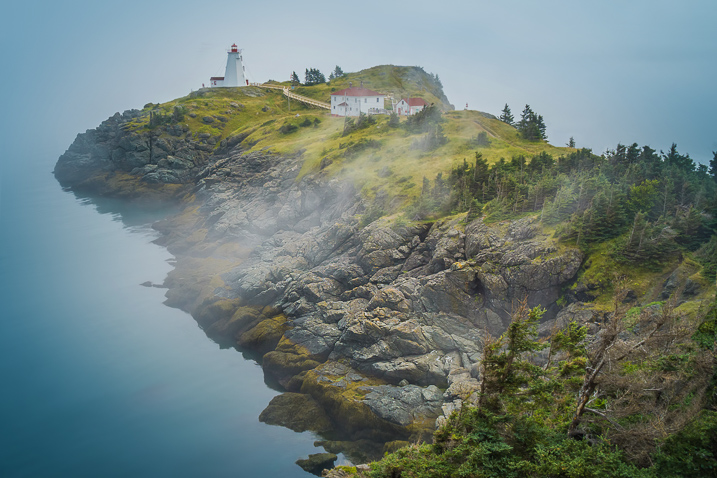
Images Personal Artistic Style in Lightroom 04

Create variations

I then created two more presets, based on the first Natural preset. I shifted the color balance toward warm colors (yellow, orange) to emulate the warm hues of the early morning. I called this one “Sunrise.” Another preset I created was “Overcast” in which I decreased saturation and boosted contrast to imitate cloudy and darker days.

These three presets – Natural, Sunrise and Overcast — were the foundation of my Landscape collection.
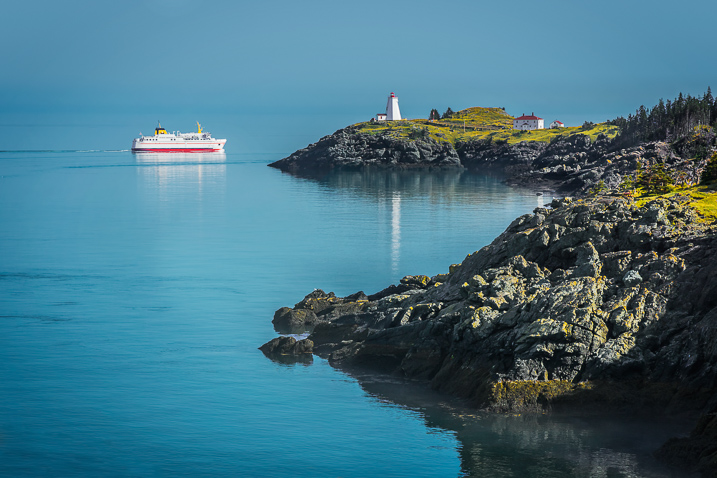
Images Personal Artistic Style in Lightroom 05

Over the years, I gradually created new presets while making sure each of them reflected my taste and photography style. At some point, I looked back and realized that I was actually defining and perfecting my own artistic style while also exploring different artistic directions and the future of my work.

Today, I have three main preset collections that cover the different aspects of travel photography: Landscape Collection, Cityscape Collection and People Collection.

Experiment and save

I use the preset-based editing approach on a daily basis because it not only saves me an enormous amount of time editing, it also keeps my artistic style consistent. But, at the same time, I am also able to continue experimenting with new approaches that can be saved as new presets that reflect my evolving style.

I highly recommend that you try a similar approach with your photography.
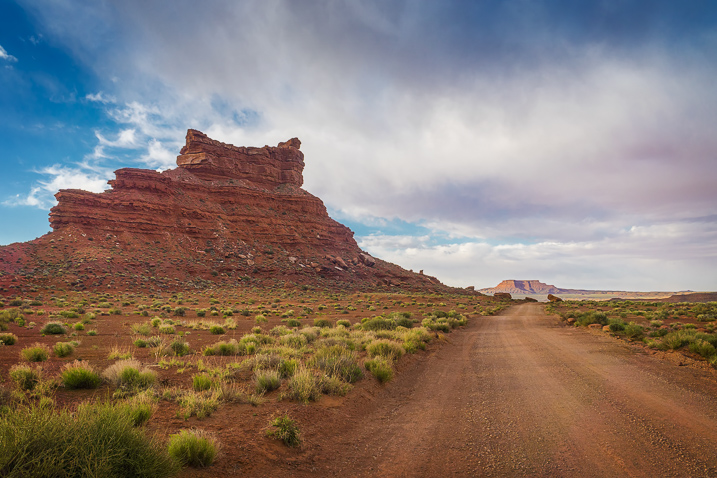
Images Personal Artistic Style in Lightroom 06

Making your own presets

Here are some actionable steps that can help you jumpstart the process of creating your own presets:

If you’ve been using Lightroom and have a decent sized photo collection, select your favorite photos from the archives and create your own presets based on the edits and adjustments of the selected photos. Continue refining your presets over time to make sure that they are generic enough to work with a variety of photos. Also, keep growing your preset collection, and be sure to organize them by topic and/or style.

For photographers who are just starting out and don’t yet have a sizeable archive, I recommend using someone else’s presets as a starting point. It is fairly common that well-established photographers are willing to sell or give away their Lightroom presets to help budding photographers. Simply find a photographer whose style you like, and use his or her Lightroom presets as the foundation for your future collections.

You can even try to reverse engineer them to figure out how certain effects were achieved. Also, don’t be afraid to modify the presets until you come up with something exciting and unique to you.

Images Personal Artistic Style in Lightroom 07

Conclusion

Developing your personal artistic style in photography is a long, and sometimes chaotic and uncontrollable process. By recording your artistic tastes and versions as Lightroom presets, and by using them as the foundation for your preset-based editing routine, you can accelerate, simplify, and streamline an otherwise extremely complex process.

If you want more Lightroom help from Viktor, get 50% OFF his Four Seasons Lightroom Preset Collection, on now at Snapdeals (only until July 19th, 2016)

googletag.cmd.push(function() {
tablet_slots.push( googletag.defineSlot( “/1005424/_dPSv4_tab-all-article-bottom_(300×250)”, [300, 250], “pb-ad-78623” ).addService( googletag.pubads() ) ); } );

googletag.cmd.push(function() {
mobile_slots.push( googletag.defineSlot( “/1005424/_dPSv4_mob-all-article-bottom_(300×250)”, [300, 250], “pb-ad-78158” ).addService( googletag.pubads() ) ); } );

The post How to Accelerate the Development of Your Personal Photographic Style with Lightroom by Viktor Elizarov appeared first on Digital Photography School.


Digital Photography School

 
Comments Off on How to Accelerate the Development of Your Personal Photographic Style with Lightroom

Posted in Photography


Revisiting Film Photography After 10 Years: Development & Post

26 Apr
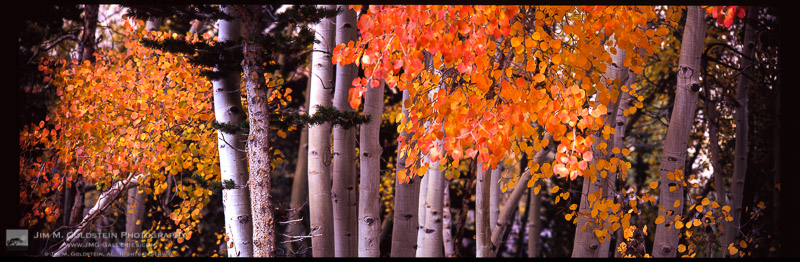
Brightly colored Aspen leaves cling to branches as Fall comes to an end in the Sierra Nevada mountains.

Brightly colored Aspen leaves cling to branches as Fall comes to an end in the Sierra Nevada mountains.

This is the 3rd of a 3 part series on my experience jumping back into film photography after a 10 year hiatus focusing purely on digital photography. You can start here at Revisiting Film Photography After 10 Years: The Readjustment if you missed it.

Withering Vine of Development vs Hipster Revival
These days you hear a lot about how film development has withered away to virtually nothing and I even wrote Film is Dead. No Really! back in 2009 . Depending where you are this may indeed be true. Long gone are the days of having easy access to development at a corner store. In that regard my post from 2009 still holds true. Luckily for me I live near San Francisco and the hipster revival of film has helped keep a few developers, like Light Waves Imaging, alive and kicking. Before finally going to Light Waves I did call around for other alternatives and the few mom and pop stores remaining ship their customers positive film to larger developers elsewhere in California. Rather than wait I opted to drive to Light Waves and pick up my film in 24-48 hours.

Pains of Review and Scanning
It took a while to get used to waiting to see the outcome of my Eastern Sierra shoot on film. It didn’t help that I had immediate access to images I took in parallel on a DSLR. This heightened my interest in seeing my film exposures because I wanted to see how the two formats compared. The last time I shot film side by side with a DSLR it was with an 8.5 megapixel sensor (1.3x crop) Canon 1D Mark II. On this trip I was shooting with a Canon 5DS R which utilizes a 50 megapixel sensor.

When the time came to pick up my film I brought my 5 year old son along and he had plenty of questions at the store counter as to what film was and why it was different than my digital camera. That in itself was a surreal experience as he has only seen digital photographs to this point. I had fun showing him how the images looked on the store light box, but it was still a fairly abstract concept for him to absorb. After spot checking a couple frames on each roll to see if there were any absolute failures (luckily there were not) we headed home. That evening I quickly learned that my old light box was missing a power cord and in a fit of impatience I started using my iPad as a light box. Considering this worked relatively well, but with a loop you see pixels behind your film and I found it distracting. I priced light boxes to buy, but opted to hold off and scanned each frame on my Epson V700 photo scanner.

Am I A Film Worthy Photographer?
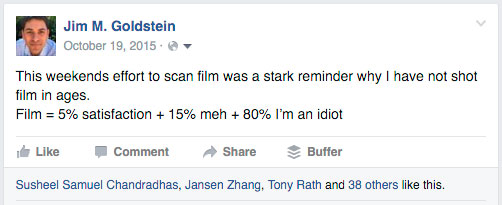
I have to admit I was nervous about jumping back into film after 10 years because I wasn’t sure how well I’d hold up to a very unforgiving format. You have a finite number of frames to expose, limited latitude in dynamic range, and a variety of ways to mess up an exposure. I wasn’t a bad film photographer back in the day, but I forgot how bad failed film images made me feel. It’s a miracle I stuck it out with photography. One of the nights I was scanning film I summed up my feelings about film photography on Facebook with the following update:

Film = 5% satisfaction + 15% meh + 80% I’m an idiot

Film = 5% satisfaction + 15% meh + 80% I’m an idiot

In the end I turned out to be a “worthy” film photographer. The stats turned out as follows:

  • 29% (13/45) are worthy of working further on (sharp, decent composition, etc.)
  • 11% (5/45) are likely worthy of sharing/printing from the 6×17.
  • 7% (3-4) are likely worthy of sharing from my pinhole camera.
    Note: Each roll of film was comprised of 4 exposures.

The numbers weren’t super impressive, but having >10% of my exposures being worthy of sharing and printing surpassed my expectations. Knowing that while using a new camera system for the first time I could get decently sharp exposures balanced the horrible dread I felt looking at each exposure where I didn’t advance the film properly, under/over exposed, mis-focused, and/or made poor composition choices.

Post-Production
One thing that remained universal 10 years on was how frustrating the results are from scanning film. Whether using a negative or flatbed scanner the resulting scan is soft and looks like a muted version of the film itself. One good thing about the downfall of film is that drum scans are much more reasonably priced. That said for my first time out, flatbed scans were good enough for sharing online.

Looking at my film to edit in Lightroom and Photoshop I felt as though I was transported back in my frustrated younger self 10 years earlier. Other than the interface of the software nothing had changed in the sense that I was color correcting, spotting and sharpening my scans. I found myself meticulously removing color casts with curves adjustments in Photoshop, spotting my image to remove dust spots created by dust on the scanner glass or film itself and trying to resurrect the sharpness of my image after being softened in the scanning process. It made me want to jump ship again to digital… until I saw how final 6×17 image came out.

One other thing that was surprisingly refreshing was once again enjoying the look of Fuji Velvia. In an age where presets are obsessed over as much if not more than cameras I liked seeing a defined look of a particular film. One could argue that the look of film is in itself a preset, but my point here is that it’s a distinct style I long missed seeing. No attempt at a recreated look via a digital preset compares.

Concluding Thoughts
Film photography is both an exhilarating and frustrating experience. Working with a film camera in the field was refreshing. Slowing down and taking in the scene while composing & setting up was incredibly refreshing. I instantly realized how much this had been missing from my digital shoots. On the other hand waiting for my film to be developed, taking a hit to my ego each time I viewed a failed exposure and dealing with the hassles of scanning & post-processing was enough to make me unconsciously start pulling out my hair. If I wasn’t so in love with the 6×17 format I’d likely revert back to shooting digital 35mm exclusively. Luckily for my remaining rolls of 120 film I’ll be taking them out again soon. I’ll keep plugging away with 6×17 film work over the next few years for select personal projects. Film lives after all.


The post Revisiting Film Photography After 10 Years: Development & Post appeared first on JMG-Galleries – Landscape, Nature & Travel Photography.


JMG-Galleries – Landscape, Nature & Travel Photography

 
Comments Off on Revisiting Film Photography After 10 Years: Development & Post

Posted in Equipment


DPReview is hiring! Software development manager

24 Mar

DPReview is hiring! We’re looking to add a Software Development Manager to our Seattle-based team. Bring your creativity, passion and talent to help us build the next generation of our web and mobile experiences. Responsibilities include building and managing our team of engineers, listening to audience feedback and driving DPReview’s technical vision. See all of the details below.

Software Development Manager

DPReview.com is seeking a talented, passionate, creative developer to help us craft the look, feel, and functionality of the world’s most popular digital camera website. The right candidate will be capable of defining the technical vision for the product, as well as leading the team in achieving that vision.

Our engineers work closely with a small in-house product management and editorial team. Fast, scrappy development and testing, combined with regular (sometimes daily) deployment ensures that no one gets the chance to fall into a rut and that everyone has the opportunity to help shape projects from concept to delivery. You will listen to our audience, help drive our goals, and leverage our unique position in the photographic industry, and to constantly strive for better, smarter ways to deliver the content, services, and community tools that have made the site the success it is.

You’ll be excited by the opportunity to build rich interactive user experiences on a large-scale public facing website. Your core focus will be to build the next generation of DPReview web and mobile experiences, including shopping and comparison tools for photographic gear, community and social features focused on photography enthusiasts, and special products in support of Amazon teams. DPReview has enough traffic to pose interesting performance challenges, so a solid knowledge of SQL, database design, and optimization techniques is important.

While we are part of Amazon, DPReview has its own unique culture, with a small but cohesive team of editorial staff and developers. You’ll feel like you’re at a small startup, with lean, product-focused processes, but with all the upsides of working for a large company.

DPReview.com runs primarily on .NET, but any solid experience with web technologies is sufficient. Also, we collaborate with other Amazon teams to develop features and widgets for Amazon.com, which provides the unique opportunity to show your work to a much larger audience than DPReview’s millions of daily visitors.

Basic Qualifications

  • Equivalent experience to a Bachelor’s degree based on 3 years of work experience for every 1 year of education
  • 4+ years professional experience in software development
  • Computer Science fundamentals in data structures, algorithms, complexity analysis, databases, and web technologies
  • Proficiency in at least one modern server-side programming language (such as C# or Java) and a client-side language (JavaScript); HTML and CSS experience is assumed

Preferred Qualifications / Experience 

  • Master’s Degree in Computer Science or related field
  • Build and manage a team of engineers. Recruit, hire, mentor, and coach technical staff
  • Ability to handle multiple competing priorities in a fast-paced environment
  • Demonstrated leadership ability as a lead software developer
  • People management, team building and mentoring experience
  • Experience taking a leading role in building complex software such as large-scale public websites that have been successfully delivered to customers
  • A track record of handling ambiguity well, translating loose product and project requirements into effective customer solutions
  • Hands-on expertise in many web technologies, ranging from front-end user interfaces through back-end systems and all points in between
  • Knowledge of professional software engineering practices and best practices for the full software development life cycle, including coding standards, code reviews, source control management, etc.
  • Strong UX intuition and demonstrated UI design skills
  • Solid database design experience with an emphasis on performance
  • Experience with systems administration

Click here to find out more and to apply for this role – Software Development Manager

Articles: Digital Photography Review (dpreview.com)

 
Comments Off on DPReview is hiring! Software development manager

Posted in Uncategorized