RSS
 

Posts Tagged ‘Design’

99% Invisible: 7 Episodes of the Best Radio Show on Design

24 Oct

[ By WebUrbanist in Architecture & Cities & Urbanism. ]

roman mars 99 invisible

There is no witty wordplay nor shocking truth in our title today, but that is quite by design – we simply did not want risk underselling Roman Mars, the maker of a radio show that covers architecture, design and cities at a level more than sufficiently clever to speak for itself. Below, we will share with you a hand-selected set of some of the most fascinating episodes 99% Invisible has aired to date. If you like what you hear, be sure to support the program on Kickstarter.

roman mars radio show

Roman Mars, host of 99% Invisible and Progam Director of Public Radio Remix from PRX, crafts artful stories that reveal hidden realities in the built environments around us and celebrate secret histories of seemingly ordinary spaces. Roman has 450,000 listeners on SoundCloud and has won praise from the likes of This American Life and RadioLab – two programs that this author has regularly compared to 99% Invisible (“It’s like RadioLab for design geeks”).

suburban cul de sac

Today, from the lawless metropolis of Kowloon Walled City to the tame suburbs of the American cul-de-sac and beyond, we invite you to explore a series of compelling stories from this stellar radio show, with more links and information at the end of this article.

 Kowloon Walled City – Den of Iniquity [Episode 66]

Kowloon Walled City, covered previously on WebUrbanist, was a lawless metropolis – a strange no-mans-land between (then) British Hong Kong and mainland China. “By its peak in the 1990s, the 6.5 acre Kowloon Walled City was home to at least 33,000 people (with estimates of up to 50,000). That’s a population density of at least 3.2 million per square mile. For New York City to get that dense, every man, woman, and child living in Texas would have to move to Manhattan.” Even with pictures, it is almost impossible to visualize – but listen to the above tale and it starts to come alive the same way a fictional city rises from the pages of a book.

Cul-De-Sac – Symbol of Suburbia [Episode 29]

The cul-de-sac once represented the American Dream, but has in the minds of many turned from a utopian ideal to a dystopian symbol of dead-end suburban life.  “When people critique cul-de-sacs, a lot of the time, they’re actually critiquing the suburbs more generally. The cul-de-sac has become sort of like the mascot of the suburbs– like if suburbia had a flag, it would have a picture of a cul-de-sac on it. Cul-de-sacs by definition aren’t well connected to other streets and they are far away town centers. For little kids, cul-de-sacs can be great, but they do have some real, quantifiable design flaws.” In the episode above, Roman and a guest explore the back and forth, exploring the evolution and alternating emphasis on urbanization and suburbanization, and changes in regulation that first allowed and are are now destroying these strange street layouts.

In and Out of LOVE – Skating in the Park [Episode 71]

Skateboarding enjoys a dubious reputation in most cities – some places are set aside for skateboarders in some cases, but many of the best impromptu skate parks (at least: from the perspective of skaters) are those that are forbidden. “Though its official name is JFK Plaza, the open space near Philadelphia’s City Hall is more commonly known as LOVE Park. With its sleek granite benches, geometric raised planter beds, and long expanses of pavement, its success as a pedestrian plaza is debatable. But it turned out to be perfect for skateboarding. As skateboarding culture grew in the 1990s, LOVE Park became a Mecca of the skating world–even though skateboarding was officially banned there.” Even if you hate having a skateboarder whip by you on the sidewalk, you may find yourself softening to their perspective as you listen to this episode.

Next Page:
99 Invisible 7 Episodes Of The Best Radio Show On Design

Share on Facebook


[ By WebUrbanist in Architecture & Cities & Urbanism. ]

[ WebUrbanist | Archives | Galleries | Privacy | TOS ]


WebUrbanist

 
Comments Off on 99% Invisible: 7 Episodes of the Best Radio Show on Design

Posted in Creativity


Apple’s Jony Ive and Marc Newson design special edition Leica M

09 Oct

leica_thumb.png

Jony Ive, design mastermind at Apple, and Marc Newson, the creative force behind the thoroughly unconventional Pentax K-01, have collaborated with Leica to design a special edition Leica M for a good cause. The unique M will be sold at auction, at an event raising money for The Global Fund to fight AIDS, Tuberculosis and Malaria. The one-of-a-kind camera is the product of 85 days’ work and no less than 1000 prototype parts. Click through for the full details.

News: Digital Photography Review (dpreview.com)

 
Comments Off on Apple’s Jony Ive and Marc Newson design special edition Leica M

Posted in Uncategorized


Texture as a Design Element in Photography

08 Oct

While it’s true that photography is a visual medium, I am always fascinated by images that can suggestively invoke my other senses. Have you ever looked at a photo in a cookbook or magazine and commented that the food looked so good you could practically taste it? What really pulls me into the essence of a photograph, though, is texture. Whether I’m feeling colorful autumn leaves crunching under my feet, the delicate edges of flower petals on my fingertips, or the jagged shards of a broken window– when a photo makes me want to touch it you have me hooked. That’s probably why I’m such a sucker for texture and why I strive to include it as a design element in so much of my photography. I want (or is it need?) these images to speak not only to your eyes, but to as many of your other senses as I possibly can. I want them to speak to your heart.

texture-002-leaves

1/80, f/5, ISO 250

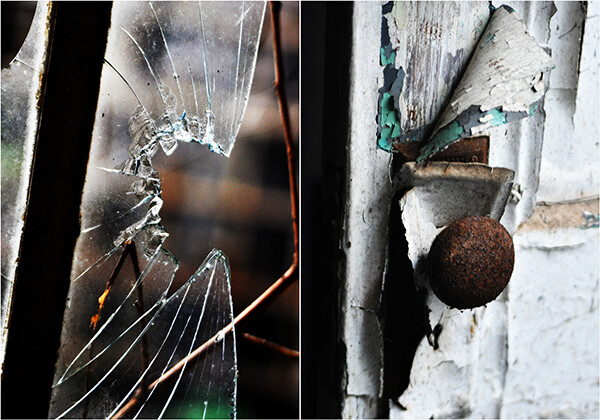
One of the first things to consider when photographing texture is that the beauty is in the details. While the deserted hallway of an abandoned building can evoke a strong sensory response, it’s filling the frame with a broken window or rusted pipe from the deserted hallway that’s going to really bring your textures to the forefront. That’s not to say that the deserted hallway doesn’t have its own story to tell, but this is not the time for cramming as many elements as you can into the frame. Keep it simple.

1/250, f/8, ISO 400

1/250, f/8, ISO 400

As with just about everything we do as photographers, lighting is crucial in accurately and effectively creating a both visual and textural  experience for the viewer. The three characteristics of light– color, quality, and direction– are just as defining when highlighting textural elements as they are when photographing people, landscapes, or any other subject. While it is difficult to separate the three, I find that quality and direction of light tend to have the most impact on photographing textures– accentuating them, rather than overpowering them. Generally speaking, soft, cool lighting will enhance softer, smoother textures like ice or water, while hard side-lighting will not only bring out the detail on that rusty pipe or stone statue, but elevate it as a tactile experience. Ambient light almost always works best, providing a more organic, natural feel.

1/100, f/4.8, ISO 100.

Remember that when you are shooting for texture, your model isn’t going to get bored or tired. Your child is not going to get all fidgety, wondering about the ice cream you promised if they sat still for a nice picture. The only timing issues you have to deal with when shooting texture are your shutter speed and how long your ambient light is going to cooperate.  As result, you usually have the luxury of taking your time. Experiment with your composition. Play with your angles. Adjust your camera settings, then adjust them again.  Your available light may be your primary tool in these scenarios, but you still have to able to make sure that your camera sees the scene the same way you do. Your digital camera is nothing more than a computer with a window on it. It has no opinions or artistic intent. You have to tell it what you are seeing, so play with your shutter speed and aperture. See where they take you.

texture-008-broken-glass

Taken at an abandoned prison, the broken glass and decades worth of peeling paint not only tell a story, but evoke an almost physical reaction. Both shot at 1/250, f/5.6, ISO 640.

Obviously, a certain amount of personal taste and preference come into play, but I tend to use smaller apertures when shooting textures. Shooting wide open and its resulting depth-of-field, can throw parts of your image out of focus– something I want to avoid when photographing texture, simply because textures will no longer look as they should when out of focus. I will, however, use wider apertures if I am including any background elements. Just as with a portrait, an out-of-focus background will place added emphasis on my subject and foreground– emphasis which will significantly enhance the textures in the frame. Try bracketing your exposures until you get the desired results.

In the examples below, I did go with wider apertures because of the background elements. For the cookbook shot, we needed a clearly defined background in order to really emphasize the texture of the ingredients. Blurring out the background behind the butterfly in the next example gave more definition to the textures of the wings and flowers.

texture-007-food-photog

1/80, f/5.6, ISO 400

texture-009-butterfly

1/250, f/5, ISO 200

For the sunflower, however, notice that there are multiple textures on the same visual plane. Since I was working with a mostly solid, dark background, I wanted to make sure that every element– as well as all three textures– was in focus, which meant going with a smaller aperture.

texture-006-sunflower

1/250, f/5.6, ISO 100

Texture is such an  interesting and effective design element because it provides visual cues that allow the viewer to put your images into their own context. It gives them something they can relate to. If your photo truly speaks to them, this is one of the reasons why. You’ve given them something that helps make it their own. By capturing the texture, you’ve captured at least part of the essence– and it doesn’t get much cooler than that.

Post originally from: Digital Photography Tips.

Check out our more Photography Tips at Photography Tips for Beginners, Portrait Photography Tips and Wedding Photography Tips.

Texture as a Design Element in Photography

The post Texture as a Design Element in Photography by Jeff Guyer appeared first on Digital Photography School.


Digital Photography School

 
Comments Off on Texture as a Design Element in Photography

Posted in Photography


Team Notes From Our New Design

04 Oct

Quite a few months ago we started the process of redesigning Digital Photography School. For some time we’ve wanted to freshen up of the site as it’s been a couple of years since we last did (and the web has changed a lot since then!).

Our first port of call was to get your feedback on what you’d like to see – your feedback was great and we’ve put a lot of it into place (with more still to come).

If you’re reading this post and everything has gone to plan you’re hopefully seeing the the result!

We are still putting a few finishing touches on this design but while we do – we wanted to stop and share with you some of the important updates.

The big three …

Mobile Mobile Mobile!

mobile

You’ll notice the new design is what’s called responsive. This means it reformats itself depending on they size of the screen viewing the page.  The super wide screens we could optimise a little better for, but we’ll get to that.

Bigger text, better readability. 

text

If you look through the articles on the site you’ll notice a significantly bigger font. Some have said perfect, others have said a little too big. We’d love to know your thoughts in comments below.

Improved commenting system.

comments

We’ve moved to Disqus for commenting allowing you to more easily upload your photo’s, keep track of your comments and create threads in all the articles.  All your original comments have been kept the way they were so it’s the best of both worlds.

Some other things we’ve Done

Nicer Archive Pages.

archive

We’ve created what we feel are more usable archives and search results pages. Hopefully making it easier to find the articles you’re looking for. See what they look like in our Photography Tips, Post Production and Cameras and Gear archives.

Some new Color

color

We’ve added a bit more color to the site.  We hope you like it!

A flashy new Home for our eBooks.

Our new bookstore page is designed to help you find the right eBooks with much less fuss.

books

Built for Speed

Millions of people visit dPS every month and whilst an never ending vigil you should find this new design a little more zippier than the last.  Where possible we’ve kept everything as efficient as we can.

Different but similar.

We’ve tried not to change the menus of the site to much.  There are still three main categories (tips, post and gear) and the submenus are the same.

A totally new front page.

front

You’ll notice the front page is very different.  We’ve tried to create the best window into the site as we can. This was perhaps the most controversial page so we’d love to know what you think.

New ways to share articles.

share

We’ve added a bunch of new ways to share articles with links at the top and the side. The next part is up to you!

 The Forums are up Next

Forum_Home

The development team are hard are work getting the forum ready for an update as well.  Just like the blog this will be mobile friendly, cleaner, easier to use and a lot more colourful!

… and a Little Glimpse into the Future

A few of you made the suggestion that you’d like to be able to bookmark some of the articles and really customise your dPS experience.  Once this new design over we’re excited to start working on exactly that.  I won’t give to much away but it’s something to be excited about!

How you can Help?

There’s over 4,000 articles on dPS and  I’m sure we’ve missed something – in fact our team are currently working through the full site still making tweaks as we find them.

You can help with this – if you do spot a bug, or some formatting that just doesn’t look right please let us know via the form below and we’ll get them fixed ASAP.

We can’t wait to hear your thoughts and as always thanks for being part of the dPS community.

Bug Submission

  • var RecaptchaOptions = {theme : ‘red’}; if(parseInt(‘4’) > 0) {RecaptchaOptions.tabindex = 4;}

jQuery(document).ready(function(){jQuery(document).trigger(‘gform_post_render’, [5, 1]) } );

Post originally from: Digital Photography Tips.

Check out our more Photography Tips at Photography Tips for Beginners, Portrait Photography Tips and Wedding Photography Tips.

Team Notes From Our New Design

The post Team Notes From Our New Design appeared first on Digital Photography School.


Digital Photography School

 
Comments Off on Team Notes From Our New Design

Posted in Photography


New dPS Design Launching Soon

03 Oct

The next 24 hours is an exciting time for the team at dPS as we’re about to show you something we’ve been busily working on for months – our brand new site design.

The brief for our design and development team was huge – we wanted a fresh new look, a more readable design, a better mobile experience, easier ways for readers to share our content, better ways to find the best posts in the archives and more.

Later today we’ll show you what our team came up with (there’s a sneak peak of part of our new front page below). But before we do dPS will be down for several hours for maintenance while we make that switch.

new-dps

dPS will be down for maintenance for several hours beginning at 6am on Thursday in Melbourne Australia (4pm US Eastern time and 9pm London time on Wednesday). Please bear with us during this period – while we hope it’ll be a smooth transition these things do take time and we’ll be sure to have a few little bugs to fix once the site goes live!

While you’re waiting please check in with our Twitter, Facebook and Pinterest accounts for updates and photographic distractions!

Post originally from: Digital Photography Tips.

Check out our more Photography Tips at Photography Tips for Beginners, Portrait Photography Tips and Wedding Photography Tips.

New dPS Design Launching Soon


Digital Photography School

 
Comments Off on New dPS Design Launching Soon

Posted in Photography


Constant Motion: Open-Plan, Puzzle-Piece Apartment Design

19 Sep

[ By WebUrbanist in Design & Fixtures & Interiors. ]

open 12

A small cubic condo with windows on only one side hardly seems an obvious candidate for a complex and dynamic plan, but from concept through execution, this design embodies its creator’s and clients’ visions for space in motion.

open 11

open plan concept diagram

As the diagrams by designer Alex Bykov illustrate, the layout started with a central kitchen, acting as a modern-day hearth and center of activity around which the rest of the mostly-open rooms revolve.

open 14

open 15

open 13

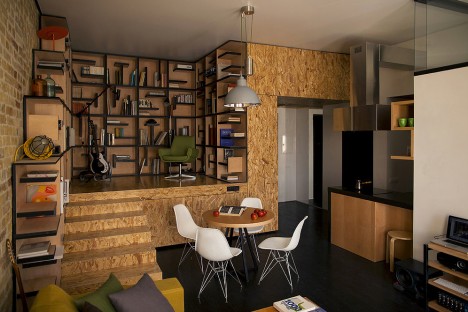
The raised-level library area, framed in richly variegated plywood, feels like a cozy and separate space, but also remains an extension of the main volume. Its shelving shapes play into the puzzle theme that inspired the overall plan.

open 7

open 5

open 6

The steps leading up to this little library serve two purposes, acting as stairs but also forming a corner breakfast nook on the main floor – another one of many turns and angles throughout the project that add to its dynamism.

Next Page:
Constant Motion Open Plan Puzzle Piece Apartment Design

Share on Facebook


[ By WebUrbanist in Design & Fixtures & Interiors. ]

[ WebUrbanist | Archives | Galleries | Privacy | TOS ]


WebUrbanist

 
Comments Off on Constant Motion: Open-Plan, Puzzle-Piece Apartment Design

Posted in Creativity


Swiss-Army Bathroom: Spine-Inspired Space-Saving Design

04 Sep

[ By WebUrbanist in Design & Fixtures & Interiors. ]

space saving bathroom design

Like a giant-sized Swiss Army knife, this narrow column unfolds to reveal everything your bathroom could need – a NASA-worthy, space-age modular design idea.

spiral unfolding bathroom design

A water-transmitting ‘spinal cord’ connects independently-rotating ‘vertabrae’, each of which includes a core function, from shower heads and cisterns above to storage in the middle and basins and toilets below.

space saver spinal bathroom

The combined system mounts to the ceiling and floor to form single set of pivot points, providing stability for the spiraling functions in between and a single simple pair of inflows and outflows.

space bathroom design specs


From Design Odyssey: “The Vertebrae was designed by Paul Hernon and it basically incorporates a toilet, a sink, a water cistern and two showers into an 8 foot tall compact steel column that can be folded up when not in use.

space rotating modular bathroom

As for the intention: “It was designed for those living in a small cramped apartment who might not have the room for a bathroom with all the amenities they would like. Each module is hand crafted from 3mm aluminum with polished hand welded seams.”

Share on Facebook


[ By WebUrbanist in Design & Fixtures & Interiors. ]

[ WebUrbanist | Archives | Galleries | Privacy | TOS ]


WebUrbanist

 
Comments Off on Swiss-Army Bathroom: Spine-Inspired Space-Saving Design

Posted in Creativity


Did Sigma design the Olympus M.Zuiko 75mm F1.8?

29 Aug

olympus_75.png

It’s an open secret that many compact cameras are produced by OEMs – companies that produce large numbers of products that are then sold under other brand names. There are also consumer-grade zooms from big name manufacturers that look much alike (we know for a fact that third-party makers commonly create lenses for the bigger brands). But we were still surprised to read about Sigma’s latest patent for a 75mm F1.8 prime lens…

News: Digital Photography Review (dpreview.com)

 
Comments Off on Did Sigma design the Olympus M.Zuiko 75mm F1.8?

Posted in Uncategorized


RayFlash introduces universal Ringflash adapter with new clamp design

24 Aug

rayflash6.jpg

RayFlash has announced a new universal ringflash adapter for DSLRs. Designed to clamp on to your own hotshoe flash, it utilizes the light from your existing flash unit and bends it through the circular structure around the lens of a DSLR. It’s offered in two sizes – one fits most DSLRs (and the Olympus E-M5 O-MD) and another is configured with a longer neck for cameras with a higher body. It replaces the original adapter which could only accommodate a few Nikon and Canon flash units. Click through for more information.

News: Digital Photography Review (dpreview.com)

 
Comments Off on RayFlash introduces universal Ringflash adapter with new clamp design

Posted in Uncategorized


Peak Design Capture Camera Clip v2 review

08 Aug

You may have read the article we wrote on Peak Design’s Leash & Cuff a little while back? The crazy bunch at Peak Design are at it again, this time with a version 2 release of their primary product, Capture

GET CAPTURE v2.0 ON KICKSTARTER

As of right now, 4,875 people have backed their current Kickstarter for over half a MILLION dollars!… Amazing crowd supported project! Well, being a Peak Design Pro, I’m very lucky to already be using Capture v2.0 and wanted to pen an article about it and how it has changed from version to version and how it could help you.

Peak_Design_V2_Simon_Pollock

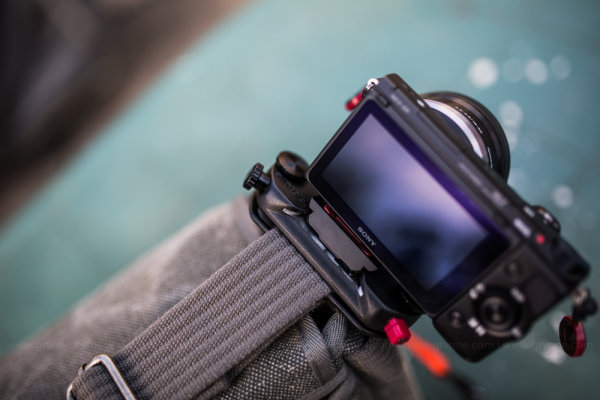
A brief catch up – what is “Capture” …well, in very basic terms, Capture is a device that you can attach to pretty much any belt / bag strap / backpack shoulder strap etc, that allows you to quickly and securely mount your camera on that device via the included baseplate. So if you want to go hands free while you’re out shooting, you simply slot your camera into Capture and you’re good to go, then when you see a photograph you want to make, on press of a button and you’re firing. You can see the image above, I have my little Sony NEX 5r mounted on the shoulder strap of my thinkTankPhoto Retro 7 camera bag, it makes it so easy when I’m down the park with my 3.5 year old – I can run, kick, jump, swing and hide with my hands free, then, when he’s doing something awesome like climbing a massive tree, I can whip the camera out of its little metal home and SNAP, I’ve capture my moment.

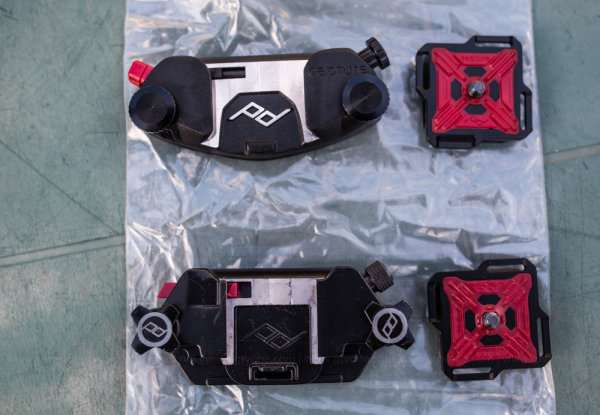
In the photograph below, you can see some of the changes from version one (bottom) to version two (top) including the following (based on my two weeks solid use and not the specs on the website)

  • Easier ‘mouth’ where you slide your camera in – makes slotting your camera away easier (in my opinion) 
  • No more sharp edges / less round edges – while I love and still use v1.0, the v2.0 feels…grown up..
  • The red button you use to release your camera now has a little simple twist lock to stop accidental ejection..
  • The screw (top right of units) now secures the camera plate solid, so you can actually use Capture on top of a monopod / tripod..
  • Capture now has the ability to mount little cameras such as GoPro so you can use capture to shoot yourself falling off your bike – etc!

Capture_Peak_Design_V1_vs_v2_Simon_Pollock

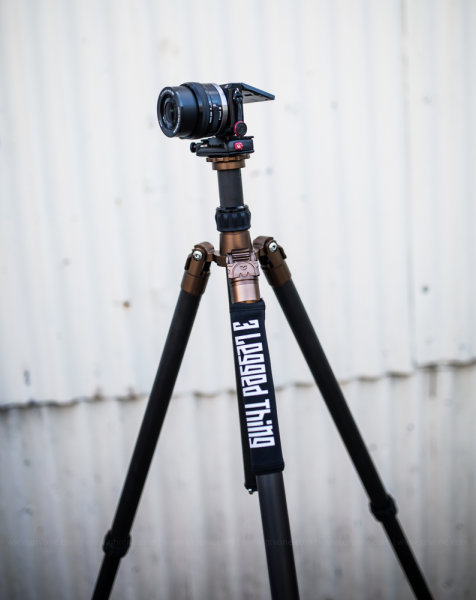
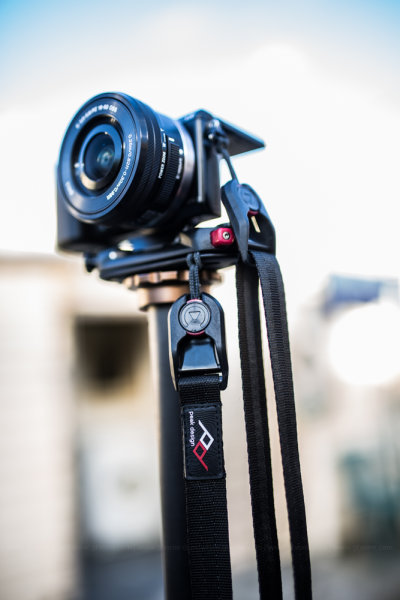
Here’s a couple of photographs that show you how you can use Capture for the top of a tripod or monopod and in the second photo you can see the Sony is tethered with Peak Design’s “Leash”

Peak_Design_Simon_Pollock

Capture being used to mount the Sony directly onto the 3LeggedThing tripod furniture

Peak_Design_Simon_Pollock

Capture being used to mount the Sony directly onto the ‘Bob’ 3LeggedThing Monopod furniture

I’m use Capture v2.0 and v1.0 with Peak Design’s Leash and Cuff system (for those among you that are saying…ohhh, I might drop my camera… you can’t!)

Take a look at the version two Capture camera clip system video on KickStarter and see for yourself… If you have any questions about how the clip works, what I shoot with it / my workflow / how I use Capture, please don’t hesitate to ask in the comments below.

–Sime


Post originally from: Digital Photography Tips.

Check out our more Photography Tips at Photography Tips for Beginners, Portrait Photography Tips and Wedding Photography Tips.

Peak Design Capture Camera Clip v2 review


Digital Photography School

 
Comments Off on Peak Design Capture Camera Clip v2 review

Posted in Photography